@nocobase/plugin-ai 2.2.0-beta.2 → 2.2.0-beta.5
This diff represents the content of publicly available package versions that have been released to one of the supported registries. The information contained in this diff is provided for informational purposes only and reflects changes between package versions as they appear in their respective public registries.
- package/dist/ai/docs/nocobase/ai/install-nocobase-app.md +17 -4
- package/dist/ai/docs/nocobase/ai/upgrade-from-2-0-to-2-1.md +57 -0
- package/dist/ai/docs/nocobase/ai/upgrade-nocobase-app.md +6 -0
- package/dist/ai/docs/nocobase/api/cli/init.md +1 -1
- package/dist/ai/docs/nocobase/api/cli/skills/install.md +1 -0
- package/dist/ai/docs/nocobase/api/cli/skills/update.md +1 -0
- package/dist/ai/docs/nocobase/get-started/deployment/how-to-deploy-nocobase-faster.mdx +2 -2
- package/dist/ai/docs/nocobase/interface-builder/blocks/data-blocks/map.md +105 -0
- package/dist/ai/docs/nocobase/nocobase-cli/installation/cli.md +1 -1
- package/dist/ai/docs/nocobase/ops-management/backup-manager/index.mdx +9 -7
- package/dist/ai/docs/nocobase/ops-management/migration-manager/built-in-tables.md +423 -0
- package/dist/ai/docs/nocobase/ops-management/migration-manager/index.md +12 -9
- package/dist/ai/docs/nocobase/ops-management/release-management/index.md +111 -24
- package/dist/ai/docs/nocobase/plugins/@nocobase/plugin-app-sso/index.md +1 -1
- package/dist/ai/docs/nocobase/plugins/@nocobase/plugin-map/index.md +85 -3
- package/dist/ai/docs/nocobase/plugins/@nocobase/plugin-workflow-transaction/index.md +16 -0
- package/dist/ai/docs/nocobase/workflow/nodes/index.md +2 -1
- package/dist/ai/docs/nocobase/workflow/nodes/transaction.md +81 -0
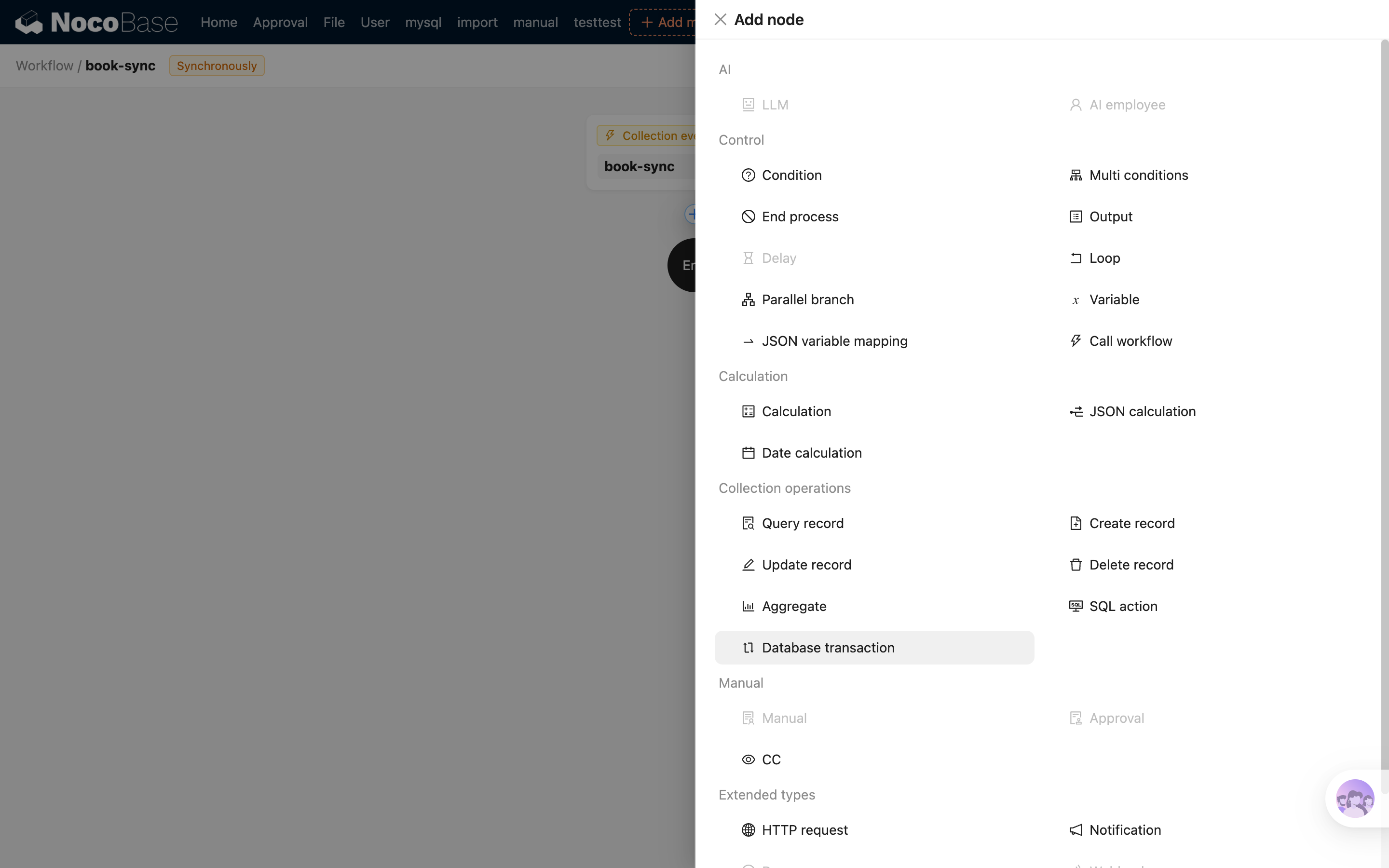
- package/dist/client/ai-employees/form-filler/tools/index.d.ts +8 -0
- package/dist/client/index.js +3 -3
- package/dist/externalVersion.js +16 -16
- package/dist/node_modules/@langchain/xai/package.json +1 -1
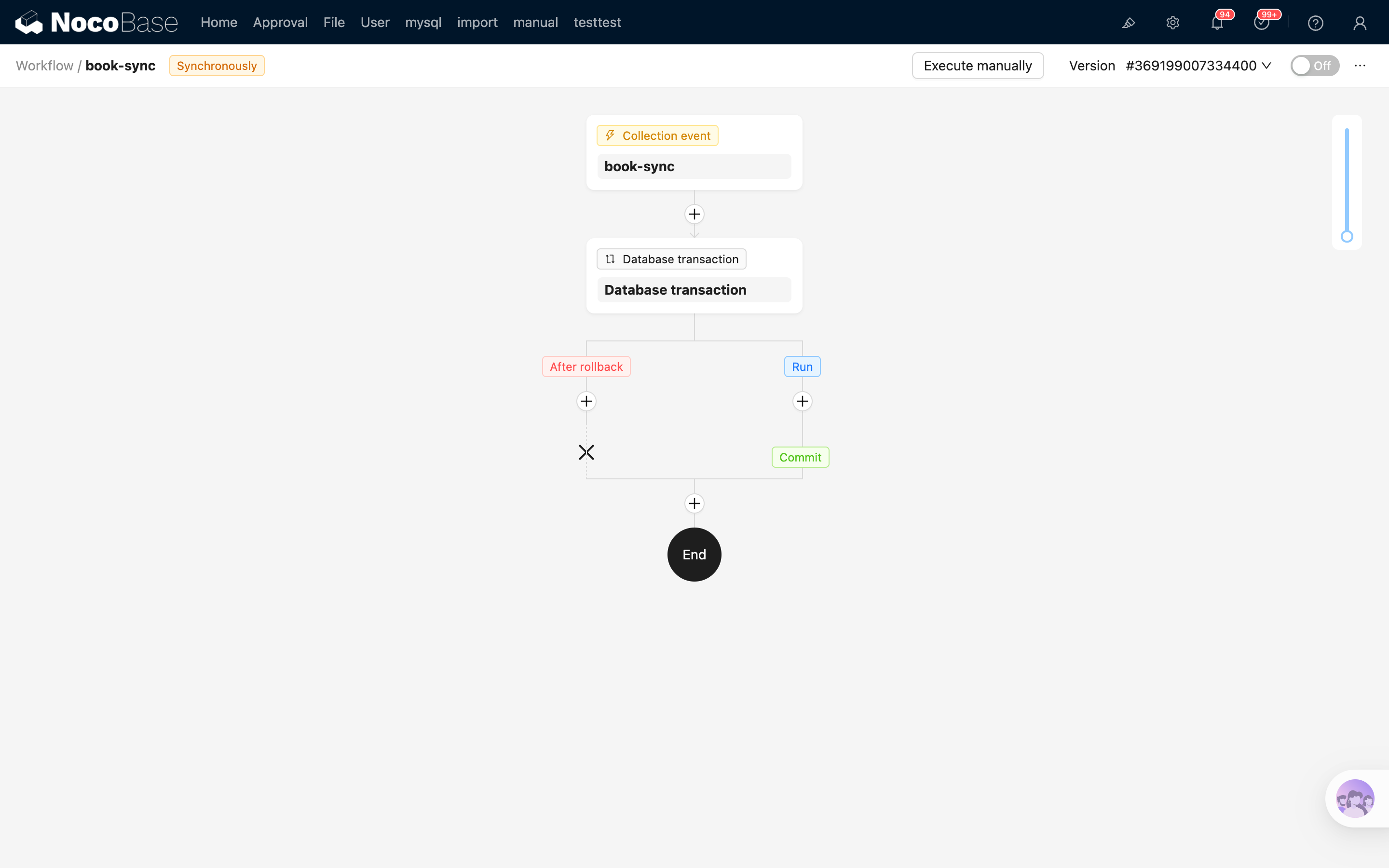
- package/dist/node_modules/fs-extra/package.json +1 -1
- package/dist/node_modules/jsonrepair/package.json +1 -1
- package/dist/node_modules/just-bash/package.json +1 -1
- package/dist/node_modules/nodejs-snowflake/package.json +1 -1
- package/dist/node_modules/openai/package.json +1 -1
- package/dist/node_modules/zod/package.json +1 -1
- package/package.json +2 -2
|
@@ -1,7 +1,7 @@
|
|
|
1
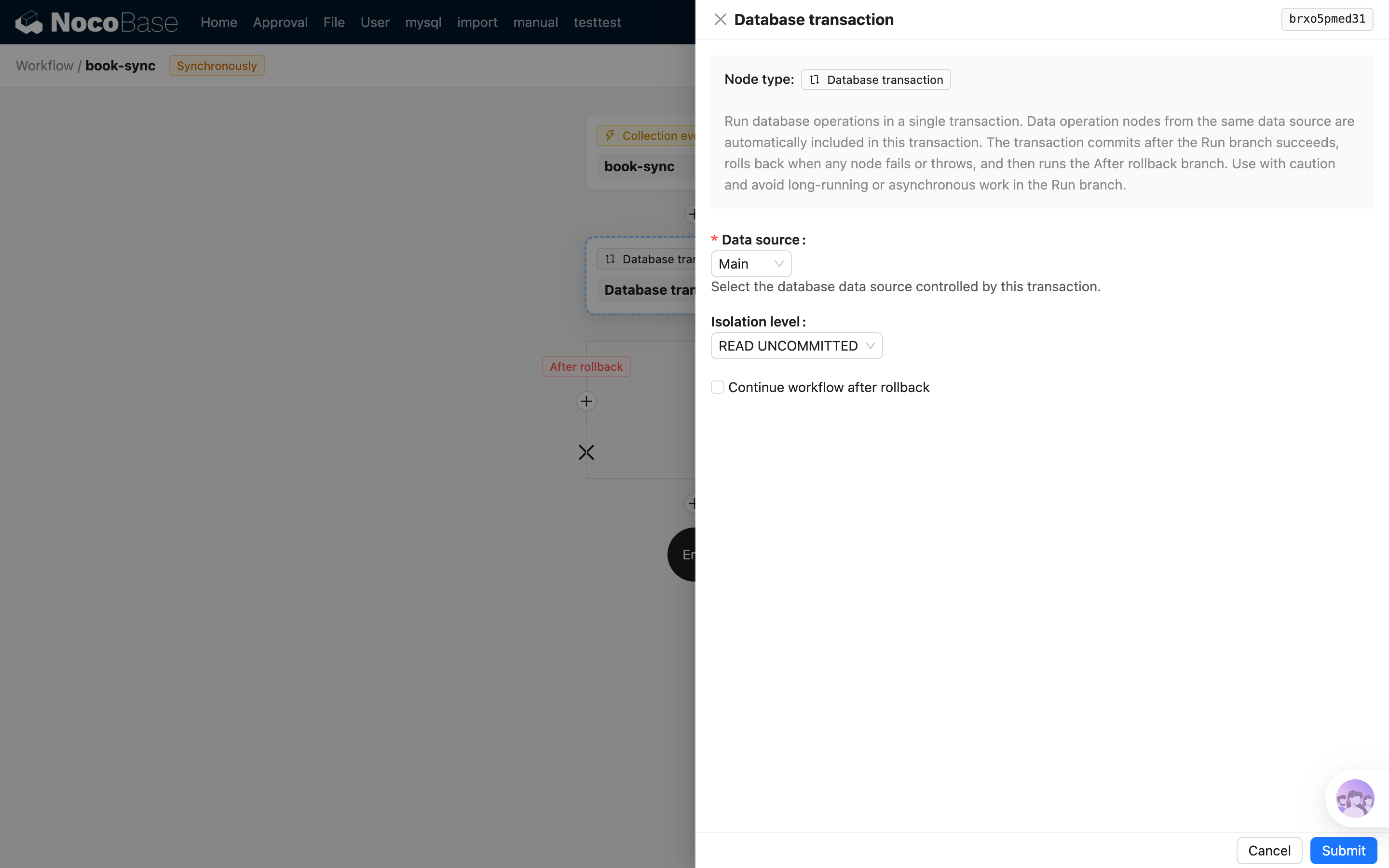
1
|
---
|
|
2
|
-
title:
|
|
3
|
-
keywords:
|
|
4
|
-
displayName:
|
|
2
|
+
title: 'Block: Map'
|
|
3
|
+
keywords: 'Blocks'
|
|
4
|
+
displayName: 'Block: Map'
|
|
5
5
|
packageName: '@nocobase/plugin-map'
|
|
6
6
|
description: |
|
|
7
7
|
Map block, support Gaode map and Google map, you can also extend more map types.
|
|
@@ -12,3 +12,85 @@ editionLevel: 0
|
|
|
12
12
|
---
|
|
13
13
|
|
|
14
14
|
# Block: Map
|
|
15
|
+
|
|
16
|
+
In NocoBase v2, the **Map block** displays geographic data from a collection on a map. It supports AMap and Google Maps, and can render point, line, polygon, and circle fields. You can also add actions to the block to open record views, filter data, refresh data, or run custom logic.
|
|
17
|
+
|
|
18
|
+
The Map block is a collection block. Before using it, enable `@nocobase/plugin-map` and create at least one map field in the target collection.
|
|
19
|
+
|
|
20
|
+
## Before you start
|
|
21
|
+
|
|
22
|
+
### Configure a map provider
|
|
23
|
+
|
|
24
|
+
After enabling the plugin, go to "Plugin settings / Map manager" and configure the map provider.
|
|
25
|
+
|
|
26
|
+
The required settings are:
|
|
27
|
+
|
|
28
|
+
- **AMap**: `Access key`, plus `securityJsCode` or `serviceHost`
|
|
29
|
+
- **Google Maps**: `Api key`
|
|
30
|
+
|
|
31
|
+
After saving the settings, map fields and map blocks load the provider selected by the field's map type. If the map cannot be loaded, check whether the key is valid, whether the domain whitelist includes the current domain, and whether the browser can access the selected map provider.
|
|
32
|
+
|
|
33
|
+
### Create a map field
|
|
34
|
+
|
|
35
|
+
When adding a field to a collection, choose a field type from the "Map-based geometry" group.
|
|
36
|
+
|
|
37
|
+
| Field type | Usage |
|
|
38
|
+
| ---------- | --------------------------------------------------------------------- |
|
|
39
|
+
| Point | Marks a single location, such as a store, device, or customer address |
|
|
40
|
+
| Line | Represents a route or track |
|
|
41
|
+
| Polygon | Represents an area |
|
|
42
|
+
| Circle | Represents a radius around a center point |
|
|
43
|
+
|
|
44
|
+
You need to choose the "Map type" when creating the field. This determines whether the field editor and the block use AMap or Google Maps. Usually, one business dataset should use one map type consistently.
|
|
45
|
+
|
|
46
|
+
## Add a map block
|
|
47
|
+
|
|
48
|
+
In v2 page configuration mode, click "Add block" and choose "Map" from the "Data Blocks" group.
|
|
49
|
+
|
|
50
|
+
When creating the block, choose:
|
|
51
|
+
|
|
52
|
+
- **Collection**: the data source displayed by the block
|
|
53
|
+
- **Map field**: the field used to draw map overlays. It can be a map field in the current collection or a map field reached through an association field
|
|
54
|
+
- **Marker field**: optional. When the map field is a point field, you can choose a text field as the point label
|
|
55
|
+
|
|
56
|
+
If the collection has no available map field, the Map field selector will be empty. Add a point, line, polygon, or circle field to the collection first.
|
|
57
|
+
|
|
58
|
+
## Block settings
|
|
59
|
+
|
|
60
|
+
After creating the block, you can adjust its display and interaction behavior from the block settings.
|
|
61
|
+
|
|
62
|
+
| Setting | Description |
|
|
63
|
+
| -------------------------- | ------------------------------------------------------------------------------------------------------------------------------ |
|
|
64
|
+
| Map field and marker field | Changes the map field used by the block and the label field for point markers |
|
|
65
|
+
| Data scope | Limits the records loaded and displayed by the map block |
|
|
66
|
+
| Concatenation order field | Sorts point markers and connects them into a route. It only takes effect for point fields |
|
|
67
|
+
| Default zoom level | Sets the initial map zoom level |
|
|
68
|
+
| Actions | Adds buttons such as filter, add new, popup, link, refresh, custom request, AI employee, and JS action to the top of the block |
|
|
69
|
+
|
|
70
|
+
The Map block loads all records that match the data scope without pagination. For large datasets, configure a data scope or add filter actions to narrow the displayed records.
|
|
71
|
+
|
|
72
|
+
## View and select records
|
|
73
|
+
|
|
74
|
+
The Map block renders each record's map field as a map overlay. Clicking an overlay triggers the record opening flow, which is usually used to open a popup, drawer, or another record view.
|
|
75
|
+
|
|
76
|
+
The block provides selection tools in the upper-left corner:
|
|
77
|
+
|
|
78
|
+
- Location icon: exits selection mode and returns to normal viewing
|
|
79
|
+
- Selection icon: enters selection mode and lets you draw a polygon area on the map
|
|
80
|
+
- Confirm icon: confirms the current selection area and adds records inside it to the selected state
|
|
81
|
+
|
|
82
|
+
Selected records are synced to the block resource and can be used by later block actions.
|
|
83
|
+
|
|
84
|
+
## v2 development entry points
|
|
85
|
+
|
|
86
|
+
The v2 client implementation of the Map block is located in `packages/plugins/@nocobase/plugin-map/src/client-v2/`.
|
|
87
|
+
|
|
88
|
+
Key files:
|
|
89
|
+
|
|
90
|
+
- `plugin.tsx`: registers map fields, the Map manager settings page, and v2 FlowModel loaders
|
|
91
|
+
- `models/MapBlockModel.tsx`: defines the map block model. It extends `CollectionBlockModel` and defines flows for block creation, data scope, sorting, zoom level, and opening records
|
|
92
|
+
- `models/MapActionGroupModel.tsx`: defines the actions available in the map block
|
|
93
|
+
- `models/MapBlockComponent.tsx`: dispatches rendering to AMap or Google Maps according to the field's `mapType`
|
|
94
|
+
- `models/fieldModels/`: contains v2 model implementations for point, line, polygon, and circle fields
|
|
95
|
+
|
|
96
|
+
To extend another map provider, usually add a new `mapType` option for map fields, then implement the corresponding map renderer and block component.
|
|
@@ -0,0 +1,16 @@
|
|
|
1
|
+
---
|
|
2
|
+
title: "Workflow: Database transaction node"
|
|
3
|
+
keywords: "Workflow: Database transaction node,plugin,NocoBase"
|
|
4
|
+
displayName: "Workflow: Database transaction node"
|
|
5
|
+
packageName: '@nocobase/plugin-workflow-transaction'
|
|
6
|
+
supportedVersions:
|
|
7
|
+
- 2.x
|
|
8
|
+
description: |
|
|
9
|
+
Run data operation nodes from the same database data source in a transaction, committing on success and rolling back on failure.
|
|
10
|
+
isFree: false
|
|
11
|
+
builtIn: false
|
|
12
|
+
defaultEnabled: false
|
|
13
|
+
editionLevel: 3
|
|
14
|
+
---
|
|
15
|
+
|
|
16
|
+
# Workflow: Database transaction node
|
|
@@ -6,7 +6,7 @@ A workflow is typically composed of several connected operational steps. Each no
|
|
|
6
6
|
A workflow's trigger is not a node. It is only displayed as an entry point in the flowchart, but it is a different concept from a node. For details, please refer to the [Triggers](../triggers/index.md) content.
|
|
7
7
|
:::
|
|
8
8
|
|
|
9
|
-
From a functional perspective, the currently implemented nodes can be divided into several major categories (
|
|
9
|
+
From a functional perspective, the currently implemented nodes can be divided into several major categories (30 types of nodes in total):
|
|
10
10
|
|
|
11
11
|
- Artificial Intelligence
|
|
12
12
|
- [Large Language Model](../../ai-employees/workflow/nodes/llm/chat.md) (provided by @nocobase/plugin-workflow-llm plugin)
|
|
@@ -32,6 +32,7 @@ From a functional perspective, the currently implemented nodes can be divided in
|
|
|
32
32
|
- [Query Data](./query.md)
|
|
33
33
|
- [Aggregate Query](./aggregate.md) (provided by @nocobase/plugin-workflow-aggregate plugin)
|
|
34
34
|
- [SQL Action](./sql.md) (provided by @nocobase/plugin-workflow-sql plugin)
|
|
35
|
+
- [Database Transaction](./transaction.md) (provided by @nocobase/plugin-workflow-transaction plugin)
|
|
35
36
|
- Manual Handling
|
|
36
37
|
- [Manual Handling](./manual.md) (provided by @nocobase/plugin-workflow-manual plugin)
|
|
37
38
|
- [Approval](./approval.md) (provided by @nocobase/plugin-workflow-approval plugin)
|
|
@@ -0,0 +1,81 @@
|
|
|
1
|
+
---
|
|
2
|
+
pkg: '@nocobase/plugin-workflow-transaction'
|
|
3
|
+
title: "Workflow node - Database transaction"
|
|
4
|
+
description: "Database transaction node: run data operations from the same data source in one transaction, commit on success, and roll back on failure."
|
|
5
|
+
keywords: "workflow,database transaction,Transaction,rollback,commit,data operation,NocoBase"
|
|
6
|
+
---
|
|
7
|
+
|
|
8
|
+
# Database Transaction
|
|
9
|
+
|
|
10
|
+
## Introduction
|
|
11
|
+
|
|
12
|
+
The database transaction node runs a group of database operations in the same transaction. It is suitable for scenarios where multiple data steps must either all succeed or all roll back, such as creating an order, deducting inventory, writing order details, and updating status.
|
|
13
|
+
|
|
14
|
+
The transaction node currently supports database data sources only. Data operations from the same data source inside the node are automatically included in the transaction; other data sources do not use this transaction.
|
|
15
|
+
|
|
16
|
+
This node has been supported since 2.2.0.
|
|
17
|
+
|
|
18
|
+
## Create Node
|
|
19
|
+
|
|
20
|
+
In the workflow configuration interface, click the plus ("+") button in the flow to add a "Database transaction" node.
|
|
21
|
+
|
|
22
|
+
|
|
23
|
+
|
|
24
|
+
After creation, two branches are generated:
|
|
25
|
+
|
|
26
|
+
- **Run**: The main branch executed inside the transaction. If all nodes in this branch succeed, the transaction is committed automatically. If any node fails or throws an error, the transaction is rolled back automatically.
|
|
27
|
+
- **After rollback**: The branch executed after rollback. This branch runs outside the transaction and can be used to record logs, send notifications, or perform compensation handling.
|
|
28
|
+
|
|
29
|
+
|
|
30
|
+
|
|
31
|
+
## Node Configuration
|
|
32
|
+
|
|
33
|
+
|
|
34
|
+
|
|
35
|
+
### Data Source
|
|
36
|
+
|
|
37
|
+
Select the database data source controlled by this transaction. Only data operation nodes from the same data source are automatically included in the transaction.
|
|
38
|
+
|
|
39
|
+
### Isolation Level
|
|
40
|
+
|
|
41
|
+
Set the transaction isolation level. The default value is `READ UNCOMMITTED`. If your business requires stricter data consistency, choose another isolation level based on database capabilities and concurrency requirements.
|
|
42
|
+
|
|
43
|
+
### Continue Workflow After Rollback
|
|
44
|
+
|
|
45
|
+
When enabled, the workflow continues to the nodes after the transaction node after the `After rollback` branch finishes.
|
|
46
|
+
|
|
47
|
+
When disabled, the workflow stops at the transaction node after the `After rollback` branch finishes, and subsequent nodes are not executed.
|
|
48
|
+
|
|
49
|
+
## Usage
|
|
50
|
+
|
|
51
|
+
### Constraints
|
|
52
|
+
|
|
53
|
+
The `Run` branch does not support asynchronous nodes that suspend the workflow, such as manual handling and delay nodes. The transaction must be committed or rolled back during the current execution. If the `Run` branch enters a waiting state, the system rolls back the transaction and marks the workflow as failed.
|
|
54
|
+
|
|
55
|
+
The `After rollback` branch runs outside the transaction, so it is not subject to the above restriction. You can use asynchronous nodes in this branch as needed, such as sending requests, waiting for manual confirmation, or delaying processing.
|
|
56
|
+
|
|
57
|
+
:::warning Note
|
|
58
|
+
Transactions occupy database connections until they are committed or rolled back. Avoid long-running operations in the `Run` branch and keep only the necessary data reads, writes, and checks there.
|
|
59
|
+
:::
|
|
60
|
+
|
|
61
|
+
### Nested Transactions
|
|
62
|
+
|
|
63
|
+
Transaction nodes can be nested, but you need to pay attention to the data source scope:
|
|
64
|
+
|
|
65
|
+
- If the inner and outer transactions use the same data source, the inner transaction is created within the outer transaction scope and is handled according to the database and Sequelize capabilities.
|
|
66
|
+
- If the inner transaction uses a different data source, it does not reuse the outer transaction and creates an independent transaction for that data source.
|
|
67
|
+
- If the workflow is triggered by a synchronous collection event, the trigger itself may already provide a top-level transaction for the same data source. The transaction node preferentially reuses the outer transaction of the same data source and does not reuse transactions from different data sources.
|
|
68
|
+
|
|
69
|
+
Nested transactions increase the cost of understanding and troubleshooting. In general, use nested transactions only when you really need a local rollback boundary. Otherwise, prefer wrapping the complete data processing flow in a single transaction node.
|
|
70
|
+
|
|
71
|
+
### Common Scenario
|
|
72
|
+
|
|
73
|
+
A typical flow is as follows:
|
|
74
|
+
|
|
75
|
+
1. Query or create related data in the `Run` branch.
|
|
76
|
+
2. Continue updating inventory, status, details, and other data from the same data source in the `Run` branch.
|
|
77
|
+
3. If all steps succeed, the transaction is committed automatically.
|
|
78
|
+
4. If any node fails or throws an error, the transaction is rolled back automatically and the workflow enters the `After rollback` branch.
|
|
79
|
+
5. Record the failure reason, send notifications, or perform compensation logic in the `After rollback` branch.
|
|
80
|
+
|
|
81
|
+
If the workflow needs to continue after rollback, enable "Continue workflow after rollback".
|
|
@@ -7,4 +7,12 @@
|
|
|
7
7
|
* For more information, please refer to: https://www.nocobase.com/agreement.
|
|
8
8
|
*/
|
|
9
9
|
import { ToolsOptions } from '@nocobase/client';
|
|
10
|
+
type NamePath = Array<string | number>;
|
|
11
|
+
type FormFillerPatch = {
|
|
12
|
+
path: NamePath;
|
|
13
|
+
value: unknown;
|
|
14
|
+
};
|
|
15
|
+
export declare function normalizeFormFillerData(data: Record<string, unknown>, basePath?: NamePath, subTablePaths?: Set<string>): Record<string, unknown>;
|
|
16
|
+
export declare function buildFormFillerPatches(data: Record<string, unknown>, basePath?: NamePath): FormFillerPatch[];
|
|
10
17
|
export declare const formFillerTool: [string, ToolsOptions];
|
|
18
|
+
export {};
|