@nocobase/plugin-ai 2.2.0-beta.1 → 2.2.0-beta.2
This diff represents the content of publicly available package versions that have been released to one of the supported registries. The information contained in this diff is provided for informational purposes only and reflects changes between package versions as they appear in their respective public registries.
- package/dist/ai/docs/nocobase/ai/ai-quick-start.md +1 -1
- package/dist/ai/docs/nocobase/ai/claude-code/index.md +2 -2
- package/dist/ai/docs/nocobase/ai/codex/index.md +2 -2
- package/dist/ai/docs/nocobase/ai/hermes-agent/index.md +2 -2
- package/dist/ai/docs/nocobase/ai/index.md +1 -1
- package/dist/ai/docs/nocobase/ai/install-nocobase-app.md +104 -0
- package/dist/ai/docs/nocobase/ai/local-development-setup.md +94 -0
- package/dist/ai/docs/nocobase/ai/openclaw/index.md +2 -2
- package/dist/ai/docs/nocobase/ai/opencode/index.md +2 -2
- package/dist/ai/docs/nocobase/ai/quick-start.mdx +22 -15
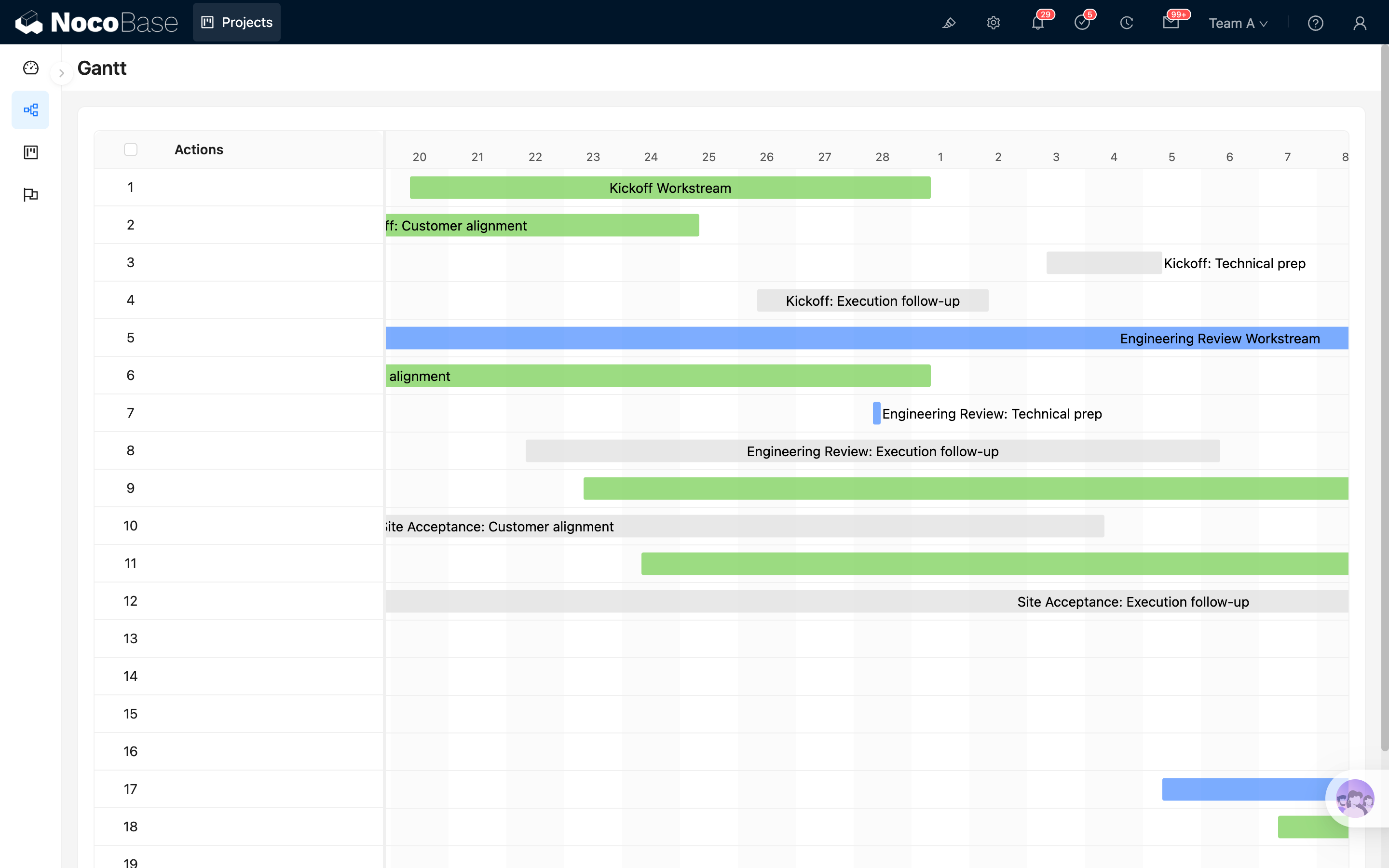
- package/dist/ai/docs/nocobase/ai/upgrade-nocobase-app.md +105 -0
- package/dist/ai/docs/nocobase/ai/windows-wsl.md +409 -0
- package/dist/ai/docs/nocobase/ai/workbuddy/index.md +2 -2
- package/dist/ai/docs/nocobase/ai-builder/index.md +17 -2
- package/dist/ai/docs/nocobase/ai-builder/version-control.md +120 -0
- package/dist/ai/docs/nocobase/ai-dev/index.md +1 -1
- package/dist/ai/docs/nocobase/api/cli/init.md +1 -1
- package/dist/ai/docs/nocobase/api/cli/plugin/import.md +1 -1
- package/dist/ai/docs/nocobase/get-started/how-nocobase-works.mdx +8 -1
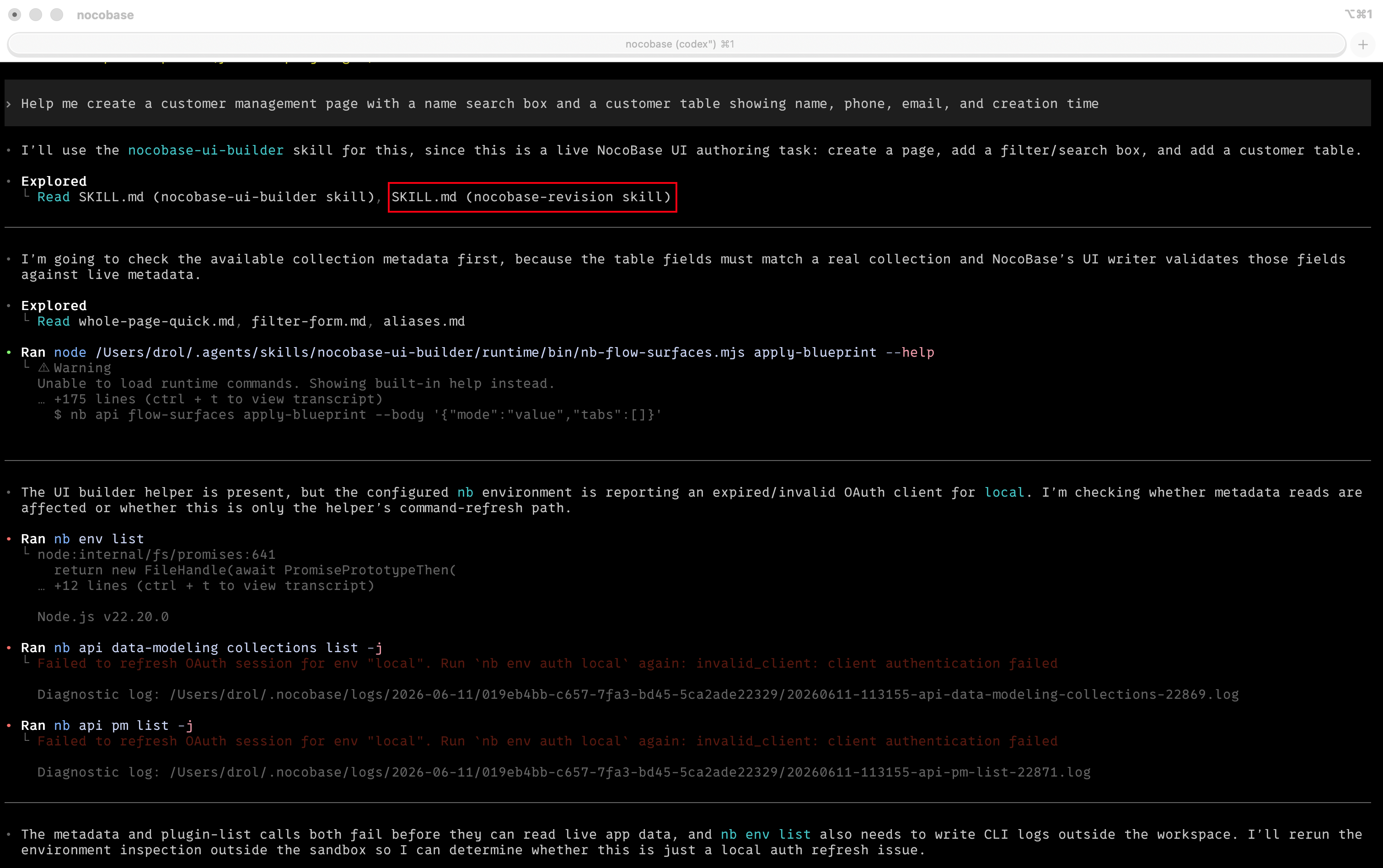
- package/dist/ai/docs/nocobase/get-started/quickstart.md +6 -1
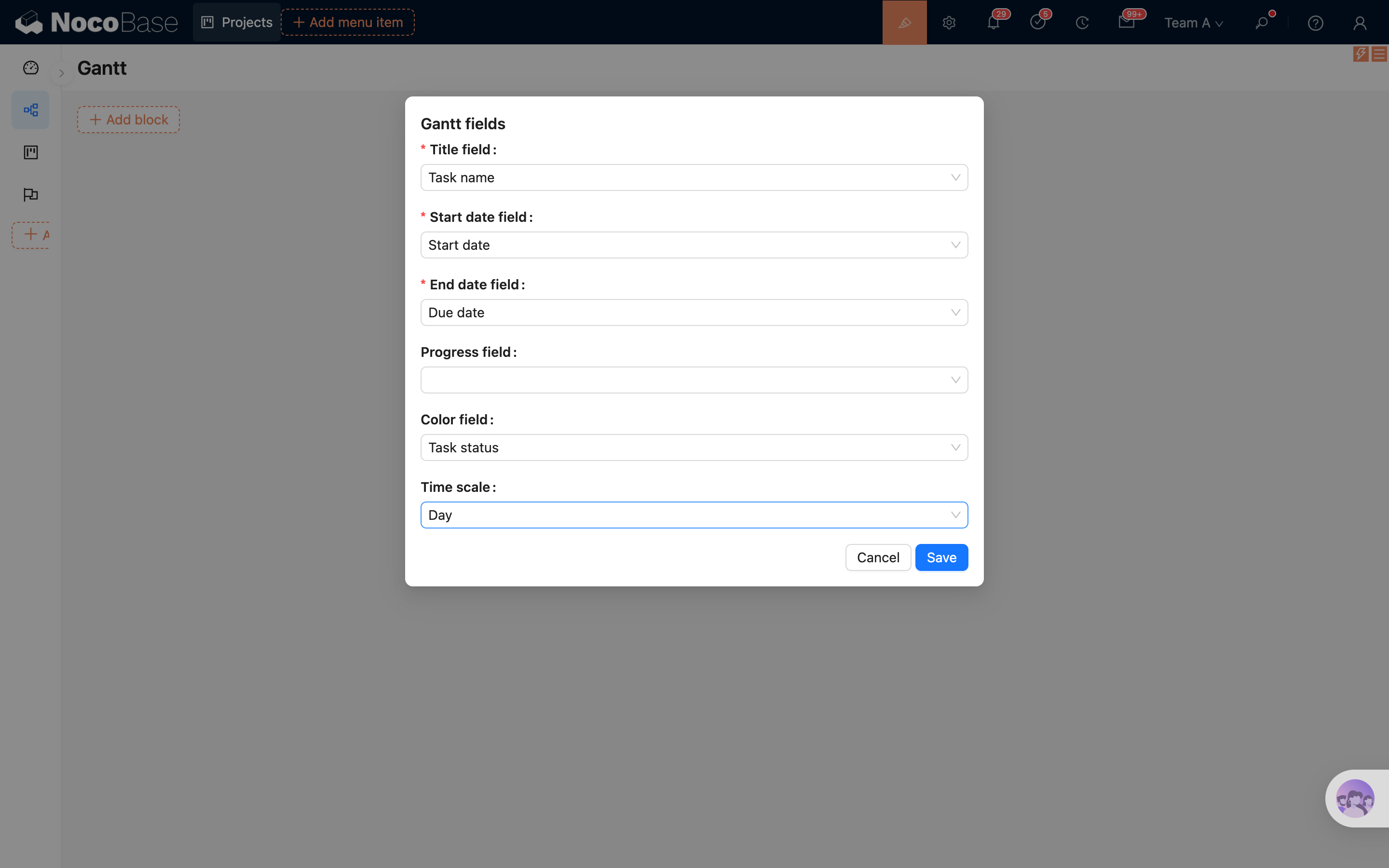
- package/dist/ai/docs/nocobase/get-started/system-requirements.md +9 -1
- package/dist/ai/docs/nocobase/index.md +7 -10
- package/dist/ai/docs/nocobase/interface-builder/blocks/data-blocks/gantt.md +204 -0
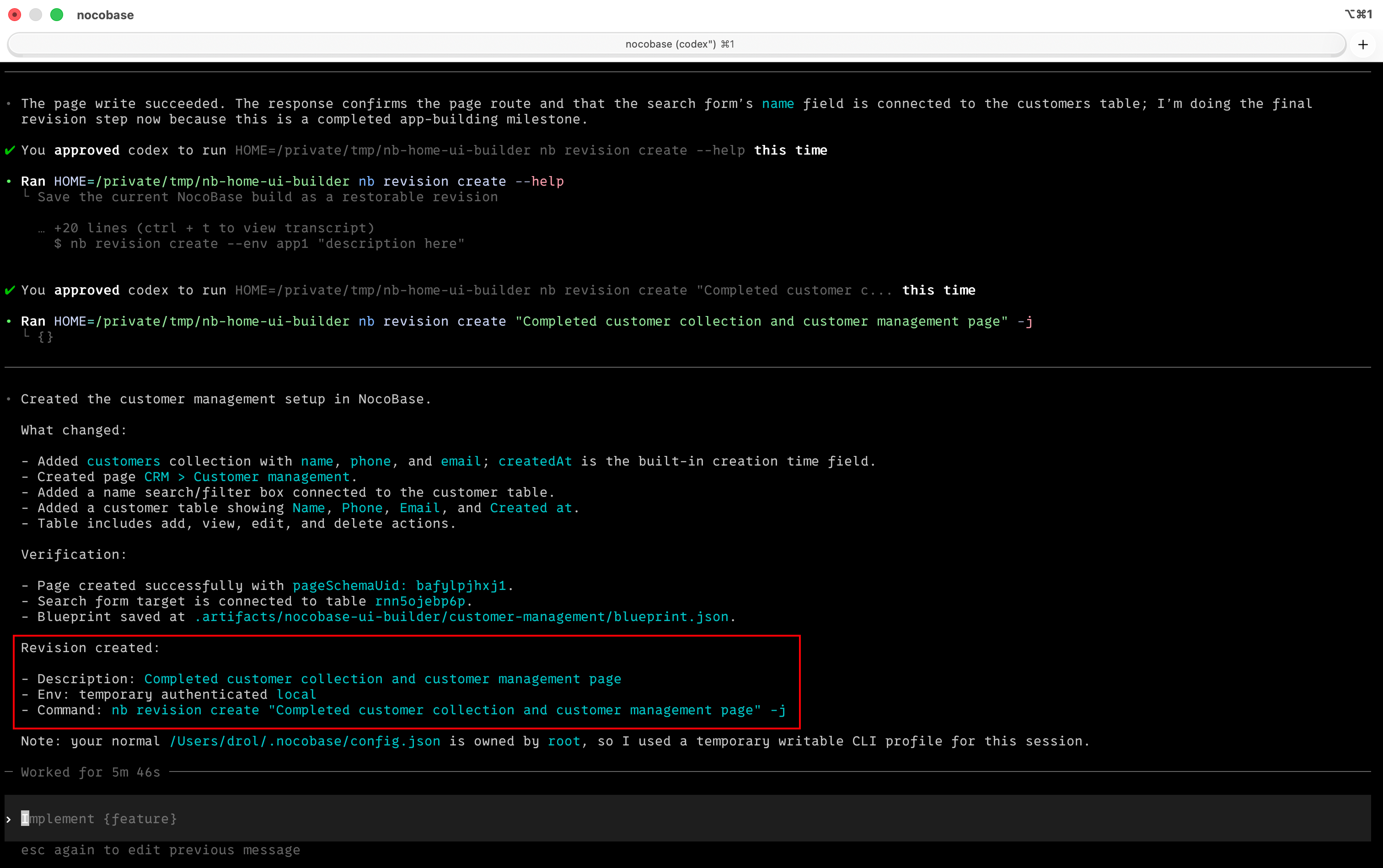
- package/dist/ai/docs/nocobase/interface-builder/fields/field-settings/scan-input.md +43 -0
- package/dist/ai/docs/nocobase/{quickstart → nocobase-cli}/index.md +6 -6
- package/dist/ai/docs/nocobase/{quickstart → nocobase-cli}/installation/cli.md +2 -8
- package/dist/ai/docs/nocobase/{quickstart → nocobase-cli}/installation/env.md +3 -3
- package/dist/ai/docs/nocobase/{quickstart → nocobase-cli}/installation/migration.md +1 -1
- package/dist/ai/docs/nocobase/{quickstart → nocobase-cli}/production/index.md +1 -1
- package/dist/ai/docs/nocobase/{quickstart → nocobase-cli}/production/reverse-proxy/caddy.md +1 -1
- package/dist/ai/docs/nocobase/{quickstart → nocobase-cli}/production/reverse-proxy/index.md +1 -1
- package/dist/ai/docs/nocobase/{quickstart → nocobase-cli}/production/reverse-proxy/nginx.md +1 -1
- package/dist/ai/docs/nocobase/ops-management/version-control/index.md +21 -6
- package/dist/ai/docs/nocobase/plugins/@nocobase/plugin-acl/index.md +5 -3
- package/dist/ai/docs/nocobase/plugins/@nocobase/plugin-action-bulk-edit/index.md +5 -3
- package/dist/ai/docs/nocobase/plugins/@nocobase/plugin-action-bulk-update/index.md +5 -3
- package/dist/ai/docs/nocobase/plugins/@nocobase/plugin-action-custom-request/index.md +5 -2
- package/dist/ai/docs/nocobase/plugins/@nocobase/plugin-action-duplicate/index.md +4 -2
- package/dist/ai/docs/nocobase/plugins/@nocobase/plugin-action-export/index.md +4 -2
- package/dist/ai/docs/nocobase/plugins/@nocobase/plugin-action-export-pro/index.md +3 -1
- package/dist/ai/docs/nocobase/plugins/@nocobase/plugin-action-import/index.md +4 -2
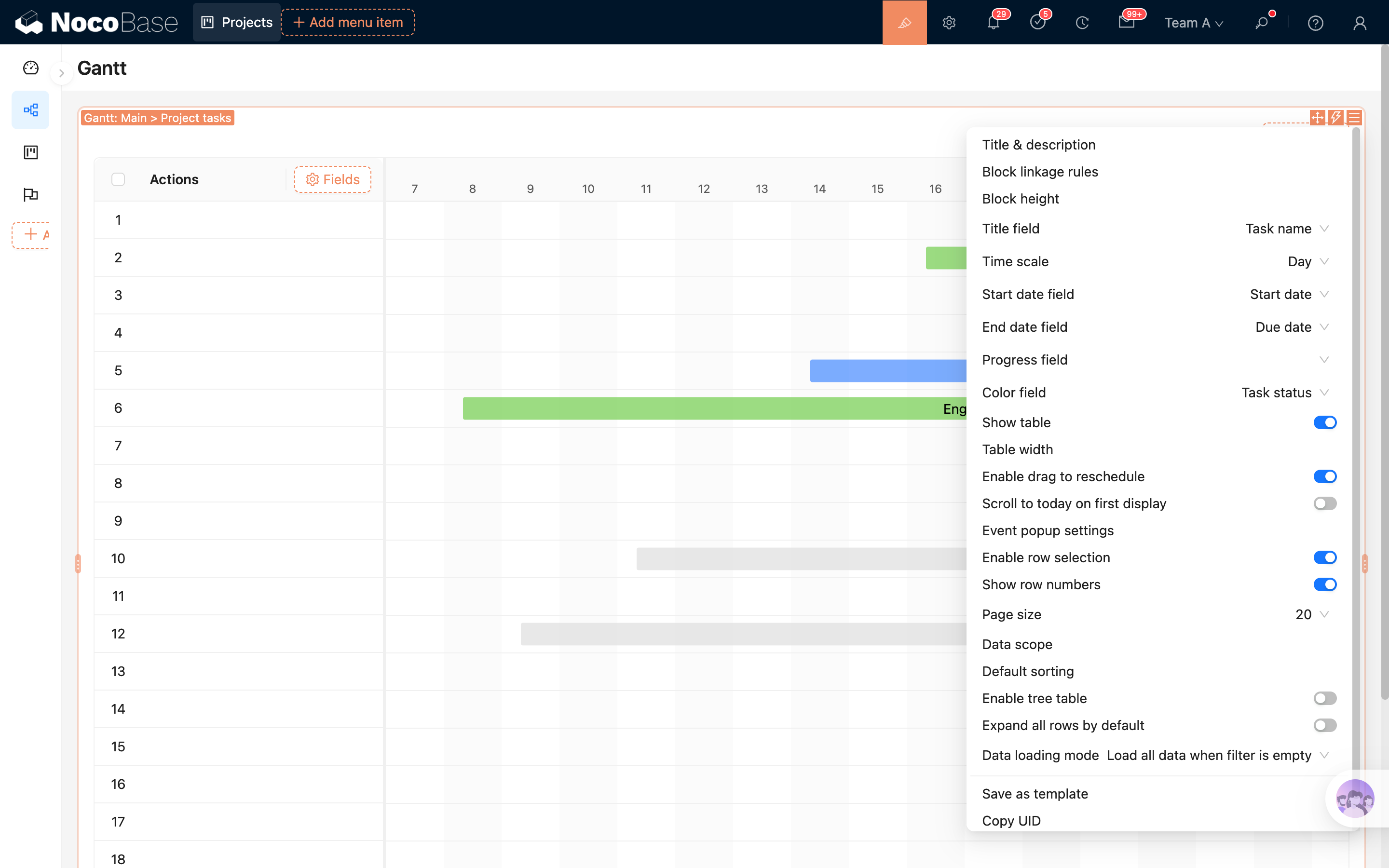
- package/dist/ai/docs/nocobase/plugins/@nocobase/plugin-action-import-pro/index.md +3 -1
- package/dist/ai/docs/nocobase/plugins/@nocobase/plugin-action-print/index.md +3 -1
- package/dist/ai/docs/nocobase/plugins/@nocobase/plugin-action-template-print/index.md +5 -3
- package/dist/ai/docs/nocobase/plugins/@nocobase/plugin-ai/index.md +6 -2
- package/dist/ai/docs/nocobase/plugins/@nocobase/plugin-ai-gigachat/index.md +3 -1
- package/dist/ai/docs/nocobase/plugins/@nocobase/plugin-ai-knowledge-base/index.md +2 -0
- package/dist/ai/docs/nocobase/plugins/@nocobase/plugin-api-doc/index.md +4 -2
- package/dist/ai/docs/nocobase/plugins/@nocobase/plugin-api-keys/index.md +5 -3
- package/dist/ai/docs/nocobase/plugins/@nocobase/plugin-app-sso/index.md +16 -0
- package/dist/ai/docs/nocobase/plugins/@nocobase/plugin-app-supervisor/index.md +5 -3
- package/dist/ai/docs/nocobase/plugins/@nocobase/plugin-async-task-manager/index.md +5 -3
- package/dist/ai/docs/nocobase/plugins/@nocobase/plugin-audit-logger/index.md +2 -0
- package/dist/ai/docs/nocobase/plugins/@nocobase/plugin-audit-logs/index.md +3 -1
- package/dist/ai/docs/nocobase/plugins/@nocobase/plugin-auth/index.md +3 -1
- package/dist/ai/docs/nocobase/plugins/@nocobase/plugin-auth-cas/index.md +3 -1
- package/dist/ai/docs/nocobase/plugins/@nocobase/plugin-auth-dingtalk/index.md +5 -3
- package/dist/ai/docs/nocobase/plugins/@nocobase/plugin-auth-ldap/index.md +3 -1
- package/dist/ai/docs/nocobase/plugins/@nocobase/plugin-auth-oidc/index.md +3 -1
- package/dist/ai/docs/nocobase/plugins/@nocobase/plugin-auth-saml/index.md +3 -1
- package/dist/ai/docs/nocobase/plugins/@nocobase/plugin-auth-sms/index.md +5 -3
- package/dist/ai/docs/nocobase/plugins/@nocobase/plugin-auth-wecom/index.md +5 -3
- package/dist/ai/docs/nocobase/plugins/@nocobase/plugin-backup-restore/index.md +3 -1
- package/dist/ai/docs/nocobase/plugins/@nocobase/plugin-backups/index.md +5 -3
- package/dist/ai/docs/nocobase/plugins/@nocobase/plugin-block-grid-card/index.md +4 -2
- package/dist/ai/docs/nocobase/plugins/@nocobase/plugin-block-iframe/index.md +3 -1
- package/dist/ai/docs/nocobase/plugins/@nocobase/plugin-block-list/index.md +3 -1
- package/dist/ai/docs/nocobase/plugins/@nocobase/plugin-block-markdown/index.md +4 -2
- package/dist/ai/docs/nocobase/plugins/@nocobase/plugin-block-multi-step-form/index.md +6 -1
- package/dist/ai/docs/nocobase/plugins/@nocobase/plugin-block-template/index.md +3 -1
- package/dist/ai/docs/nocobase/plugins/@nocobase/plugin-block-tree/index.md +3 -1
- package/dist/ai/docs/nocobase/plugins/@nocobase/plugin-block-workbench/index.md +3 -1
- package/dist/ai/docs/nocobase/plugins/@nocobase/plugin-calendar/index.md +4 -2
- package/dist/ai/docs/nocobase/plugins/@nocobase/plugin-charts/index.md +5 -1
- package/dist/ai/docs/nocobase/plugins/@nocobase/plugin-client/index.md +4 -2
- package/dist/ai/docs/nocobase/plugins/@nocobase/plugin-collection-fdw/index.md +3 -1
- package/dist/ai/docs/nocobase/plugins/@nocobase/plugin-collection-sql/index.md +3 -1
- package/dist/ai/docs/nocobase/plugins/@nocobase/plugin-collection-tree/index.md +3 -1
- package/dist/ai/docs/nocobase/plugins/@nocobase/plugin-comments/index.md +3 -1
- package/dist/ai/docs/nocobase/plugins/@nocobase/plugin-custom-brand/index.md +2 -0
- package/dist/ai/docs/nocobase/plugins/@nocobase/plugin-custom-variables/index.md +3 -1
- package/dist/ai/docs/nocobase/plugins/@nocobase/plugin-data-source-external-clickhouse/index.md +5 -3
- package/dist/ai/docs/nocobase/plugins/@nocobase/plugin-data-source-external-doris/index.md +5 -3
- package/dist/ai/docs/nocobase/plugins/@nocobase/plugin-data-source-external-mariadb/index.md +3 -1
- package/dist/ai/docs/nocobase/plugins/@nocobase/plugin-data-source-external-mssql/index.md +3 -1
- package/dist/ai/docs/nocobase/plugins/@nocobase/plugin-data-source-external-mysql/index.md +3 -1
- package/dist/ai/docs/nocobase/plugins/@nocobase/plugin-data-source-external-nocobase/index.md +16 -0
- package/dist/ai/docs/nocobase/plugins/@nocobase/plugin-data-source-external-oracle/index.md +5 -3
- package/dist/ai/docs/nocobase/plugins/@nocobase/plugin-data-source-external-postgres/index.md +3 -1
- package/dist/ai/docs/nocobase/plugins/@nocobase/plugin-data-source-kingbase/index.md +4 -2
- package/dist/ai/docs/nocobase/plugins/@nocobase/plugin-data-source-main/index.md +5 -3
- package/dist/ai/docs/nocobase/plugins/@nocobase/plugin-data-source-manager/index.md +5 -3
- package/dist/ai/docs/nocobase/plugins/@nocobase/plugin-data-source-rest-api/index.md +3 -1
- package/dist/ai/docs/nocobase/plugins/@nocobase/plugin-data-visualization/index.md +5 -3
- package/dist/ai/docs/nocobase/plugins/@nocobase/plugin-data-visualization-echarts/index.md +8 -4
- package/dist/ai/docs/nocobase/plugins/@nocobase/plugin-departments/index.md +3 -1
- package/dist/ai/docs/nocobase/plugins/@nocobase/plugin-email-manager/index.md +4 -2
- package/dist/ai/docs/nocobase/plugins/@nocobase/plugin-embed/index.md +4 -1
- package/dist/ai/docs/nocobase/plugins/@nocobase/plugin-environment-variables/index.md +3 -1
- package/dist/ai/docs/nocobase/plugins/@nocobase/plugin-error-handler/index.md +3 -1
- package/dist/ai/docs/nocobase/plugins/@nocobase/plugin-field-attachment-url/index.md +4 -2
- package/dist/ai/docs/nocobase/plugins/@nocobase/plugin-field-china-region/index.md +5 -3
- package/dist/ai/docs/nocobase/plugins/@nocobase/plugin-field-code/index.md +3 -1
- package/dist/ai/docs/nocobase/plugins/@nocobase/plugin-field-component-mask/index.md +5 -3
- package/dist/ai/docs/nocobase/plugins/@nocobase/plugin-field-encryption/index.md +2 -0
- package/dist/ai/docs/nocobase/plugins/@nocobase/plugin-field-formula/index.md +3 -1
- package/dist/ai/docs/nocobase/plugins/@nocobase/plugin-field-m2m-array/index.md +5 -3
- package/dist/ai/docs/nocobase/plugins/@nocobase/plugin-field-markdown-vditor/index.md +4 -2
- package/dist/ai/docs/nocobase/plugins/@nocobase/plugin-field-sequence/index.md +3 -1
- package/dist/ai/docs/nocobase/plugins/@nocobase/plugin-field-signature/index.md +3 -1
- package/dist/ai/docs/nocobase/plugins/@nocobase/plugin-field-sort/index.md +3 -1
- package/dist/ai/docs/nocobase/plugins/@nocobase/plugin-file-manager/index.md +5 -3
- package/dist/ai/docs/nocobase/plugins/@nocobase/plugin-file-previewer-office/index.md +5 -3
- package/dist/ai/docs/nocobase/plugins/@nocobase/plugin-file-storage-s3-pro/index.md +4 -2
- package/dist/ai/docs/nocobase/plugins/@nocobase/plugin-flow-engine/index.md +4 -2
- package/dist/ai/docs/nocobase/plugins/@nocobase/plugin-form-drafts/index.md +5 -3
- package/dist/ai/docs/nocobase/plugins/@nocobase/plugin-gantt/index.md +3 -1
- package/dist/ai/docs/nocobase/plugins/@nocobase/plugin-graph-collection-manager/index.md +8 -1
- package/dist/ai/docs/nocobase/plugins/@nocobase/plugin-idp-oauth/index.md +14 -0
- package/dist/ai/docs/nocobase/plugins/@nocobase/plugin-ip-restriction/index.md +2 -0
- package/dist/ai/docs/nocobase/plugins/@nocobase/plugin-kanban/index.md +4 -2
- package/dist/ai/docs/nocobase/plugins/@nocobase/plugin-license/index.md +3 -1
- package/dist/ai/docs/nocobase/plugins/@nocobase/plugin-locale-tester/index.md +3 -1
- package/dist/ai/docs/nocobase/plugins/@nocobase/plugin-localization/index.md +4 -2
- package/dist/ai/docs/nocobase/plugins/@nocobase/plugin-lock-adapter-redis/index.md +2 -0
- package/dist/ai/docs/nocobase/plugins/@nocobase/plugin-logger/index.md +4 -2
- package/dist/ai/docs/nocobase/plugins/@nocobase/plugin-map/index.md +4 -2
- package/dist/ai/docs/nocobase/plugins/@nocobase/plugin-mcp-server/index.md +14 -0
- package/dist/ai/docs/nocobase/plugins/@nocobase/plugin-migration-manager/index.md +5 -3
- package/dist/ai/docs/nocobase/plugins/@nocobase/plugin-mobile/index.md +8 -1
- package/dist/ai/docs/nocobase/plugins/@nocobase/plugin-mobile-client/index.md +7 -3
- package/dist/ai/docs/nocobase/plugins/@nocobase/plugin-multi-app-manager/index.md +3 -1
- package/dist/ai/docs/nocobase/plugins/@nocobase/plugin-multi-app-share-collection/index.md +3 -1
- package/dist/ai/docs/nocobase/plugins/@nocobase/plugin-multi-keyword-filter/index.md +4 -1
- package/dist/ai/docs/nocobase/plugins/@nocobase/plugin-multi-space/index.md +5 -3
- package/dist/ai/docs/nocobase/plugins/@nocobase/plugin-notification-email/index.md +3 -1
- package/dist/ai/docs/nocobase/plugins/@nocobase/plugin-notification-in-app-message/index.md +3 -1
- package/dist/ai/docs/nocobase/plugins/@nocobase/plugin-notification-manager/index.md +5 -3
- package/dist/ai/docs/nocobase/plugins/@nocobase/plugin-password-policy/index.md +2 -0
- package/dist/ai/docs/nocobase/plugins/@nocobase/plugin-public-forms/index.md +5 -3
- package/dist/ai/docs/nocobase/plugins/@nocobase/plugin-pubsub-adapter-redis/index.md +2 -0
- package/dist/ai/docs/nocobase/plugins/@nocobase/plugin-queue-adapter-rabbitmq/index.md +2 -0
- package/dist/ai/docs/nocobase/plugins/@nocobase/plugin-queue-adapter-redis/index.md +2 -0
- package/dist/ai/docs/nocobase/plugins/@nocobase/plugin-record-history/index.md +2 -0
- package/dist/ai/docs/nocobase/plugins/@nocobase/plugin-request-encryption/index.md +2 -0
- package/dist/ai/docs/nocobase/plugins/@nocobase/plugin-snapshot-field/index.md +6 -4
- package/dist/ai/docs/nocobase/plugins/@nocobase/plugin-system-settings/index.md +3 -1
- package/dist/ai/docs/nocobase/plugins/@nocobase/plugin-telemetry/index.md +2 -0
- package/dist/ai/docs/nocobase/plugins/@nocobase/plugin-telemetry-prometheus/index.md +2 -0
- package/dist/ai/docs/nocobase/plugins/@nocobase/plugin-text-copy/index.md +5 -3
- package/dist/ai/docs/nocobase/plugins/@nocobase/plugin-theme-editor/index.md +4 -2
- package/dist/ai/docs/nocobase/plugins/@nocobase/plugin-two-factor-authentication/index.md +2 -0
- package/dist/ai/docs/nocobase/plugins/@nocobase/plugin-ui-schema-storage/index.md +4 -2
- package/dist/ai/docs/nocobase/plugins/@nocobase/plugin-ui-templates/index.md +4 -2
- package/dist/ai/docs/nocobase/plugins/@nocobase/plugin-user-data-sync/index.md +5 -3
- package/dist/ai/docs/nocobase/plugins/@nocobase/plugin-users/index.md +4 -2
- package/dist/ai/docs/nocobase/plugins/@nocobase/plugin-verification/index.md +3 -1
- package/dist/ai/docs/nocobase/plugins/@nocobase/plugin-verification-totp-authenticator/index.md +2 -0
- package/dist/ai/docs/nocobase/plugins/@nocobase/plugin-version-control/index.md +3 -1
- package/dist/ai/docs/nocobase/plugins/@nocobase/plugin-workerid-allocator-redis/index.md +4 -2
- package/dist/ai/docs/nocobase/plugins/@nocobase/plugin-workflow/index.md +3 -1
- package/dist/ai/docs/nocobase/plugins/@nocobase/plugin-workflow-action-trigger/index.md +4 -2
- package/dist/ai/docs/nocobase/plugins/@nocobase/plugin-workflow-aggregate/index.md +5 -3
- package/dist/ai/docs/nocobase/plugins/@nocobase/plugin-workflow-approval/index.md +4 -2
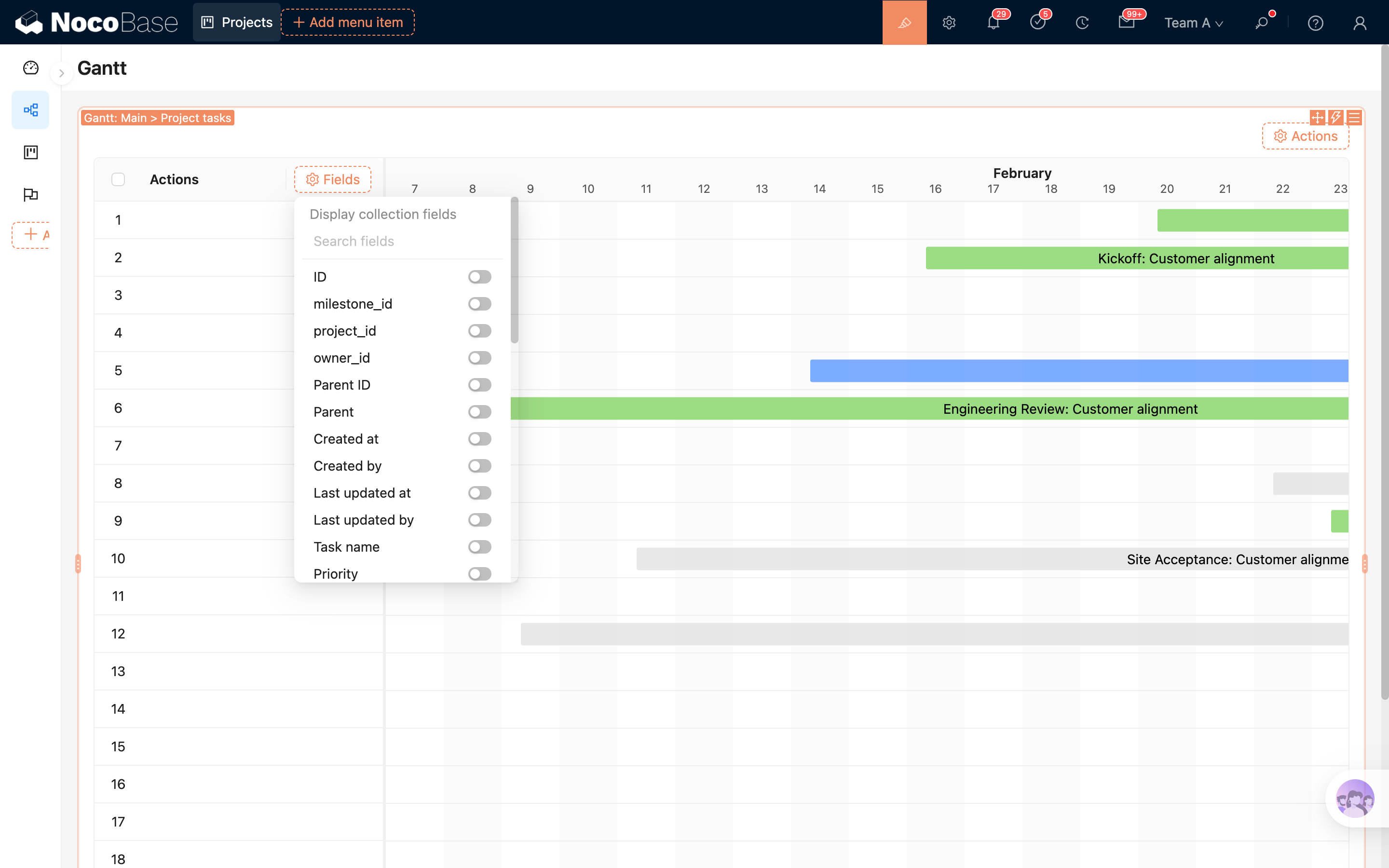
- package/dist/ai/docs/nocobase/plugins/@nocobase/plugin-workflow-cc/index.md +3 -1
- package/dist/ai/docs/nocobase/plugins/@nocobase/plugin-workflow-custom-action-trigger/index.md +4 -2
- package/dist/ai/docs/nocobase/plugins/@nocobase/plugin-workflow-date-calculation/index.md +5 -3
- package/dist/ai/docs/nocobase/plugins/@nocobase/plugin-workflow-delay/index.md +4 -2
- package/dist/ai/docs/nocobase/plugins/@nocobase/plugin-workflow-dynamic-calculation/index.md +6 -4
- package/dist/ai/docs/nocobase/plugins/@nocobase/plugin-workflow-javascript/index.md +5 -3
- package/dist/ai/docs/nocobase/plugins/@nocobase/plugin-workflow-json-query/index.md +5 -3
- package/dist/ai/docs/nocobase/plugins/@nocobase/plugin-workflow-json-variable-mapping/index.md +3 -1
- package/dist/ai/docs/nocobase/plugins/@nocobase/plugin-workflow-loop/index.md +4 -2
- package/dist/ai/docs/nocobase/plugins/@nocobase/plugin-workflow-mailer/index.md +5 -3
- package/dist/ai/docs/nocobase/plugins/@nocobase/plugin-workflow-manual/index.md +5 -3
- package/dist/ai/docs/nocobase/plugins/@nocobase/plugin-workflow-notification/index.md +5 -3
- package/dist/ai/docs/nocobase/plugins/@nocobase/plugin-workflow-parallel/index.md +5 -3
- package/dist/ai/docs/nocobase/plugins/@nocobase/plugin-workflow-request/index.md +5 -3
- package/dist/ai/docs/nocobase/plugins/@nocobase/plugin-workflow-request-interceptor/index.md +4 -2
- package/dist/ai/docs/nocobase/plugins/@nocobase/plugin-workflow-response-message/index.md +4 -2
- package/dist/ai/docs/nocobase/plugins/@nocobase/plugin-workflow-sql/index.md +5 -3
- package/dist/ai/docs/nocobase/plugins/@nocobase/plugin-workflow-subflow/index.md +3 -1
- package/dist/ai/docs/nocobase/plugins/@nocobase/plugin-workflow-test/index.md +4 -2
- package/dist/ai/docs/nocobase/plugins/@nocobase/plugin-workflow-variable/index.md +5 -3
- package/dist/ai/docs/nocobase/plugins/@nocobase/plugin-workflow-webhook/index.md +4 -2
- package/dist/client/561.7ec804ef39ec7dcd.js +10 -0
- package/dist/client/{646.b0ed728921b007d4.js → 646.d4483b4ff23da0a0.js} +1 -1
- package/dist/client/components/ListCollapse.d.ts +2 -1
- package/dist/client/features/components.d.ts +9 -0
- package/dist/client/features/feature-manager.d.ts +1 -9
- package/dist/client/features/index.d.ts +1 -9
- package/dist/client/features/vector-database-provider.d.ts +1 -10
- package/dist/client/features/vector-store-provider.d.ts +9 -0
- package/dist/client/index.d.ts +1 -0
- package/dist/client/index.js +2 -2
- package/dist/client/manager/ai-feature-manager.d.ts +1 -6
- package/dist/client-v2/features/components.d.ts +14 -0
- package/dist/client-v2/features/feature-manager.d.ts +19 -0
- package/dist/client-v2/features/index.d.ts +22 -0
- package/dist/client-v2/features/vector-database-provider.d.ts +18 -0
- package/dist/client-v2/features/vector-store-provider.d.ts +38 -0
- package/dist/client-v2/index.d.ts +5 -0
- package/dist/client-v2/index.js +1 -1
- package/dist/client-v2/manager/ai-feature-manager.d.ts +15 -0
- package/dist/externalVersion.js +17 -17
- package/dist/node_modules/@langchain/xai/package.json +1 -1
- package/dist/node_modules/fs-extra/package.json +1 -1
- package/dist/node_modules/jsonrepair/package.json +1 -1
- package/dist/node_modules/just-bash/package.json +1 -1
- package/dist/node_modules/nodejs-snowflake/package.json +1 -1
- package/dist/node_modules/openai/package.json +1 -1
- package/dist/node_modules/zod/package.json +1 -1
- package/dist/server/ai-employees/ai-knowledge-base.js +1 -1
- package/dist/server/features/feature-manager.d.ts +2 -2
- package/dist/server/features/vector-store-provider.d.ts +1 -0
- package/dist/server/llm-providers/dashscope.js +2 -2
- package/dist/server/llm-providers/kimi/provider.js +2 -2
- package/dist/server/llm-providers/mimo.js +2 -2
- package/dist/server/llm-providers/openai/completions.js +2 -2
- package/dist/server/llm-providers/openai/responses.js +8 -4
- package/dist/server/llm-providers/provider.d.ts +2 -2
- package/dist/server/llm-providers/provider.js +1 -0
- package/dist/server/types/knowledge-base.type.d.ts +1 -1
- package/dist/server/workflow/nodes/llm/index.js +3 -0
- package/package.json +3 -2
- package/dist/client/561.776886c5308e3c26.js +0 -10
- /package/dist/ai/docs/nocobase/{quickstart → nocobase-cli}/cli-design/nb-app-design-intent.md +0 -0
- /package/dist/ai/docs/nocobase/{quickstart → nocobase-cli}/cli-design/nb-proxy-design-intent.md +0 -0
- /package/dist/ai/docs/nocobase/{quickstart → nocobase-cli}/installation/airgap.md +0 -0
- /package/dist/ai/docs/nocobase/{quickstart → nocobase-cli}/installation/docker-compose.md +0 -0
- /package/dist/ai/docs/nocobase/{quickstart → nocobase-cli}/operations/backup-restore.md +0 -0
- /package/dist/ai/docs/nocobase/{quickstart → nocobase-cli}/operations/manage-app.md +0 -0
- /package/dist/ai/docs/nocobase/{quickstart → nocobase-cli}/operations/multi-environment.md +0 -0
- /package/dist/ai/docs/nocobase/{quickstart → nocobase-cli}/plugins/third-party.md +0 -0
- /package/dist/ai/docs/nocobase/{quickstart → nocobase-cli}/production/autostart.md +0 -0
- /package/dist/ai/docs/nocobase/{quickstart → nocobase-cli}/release-management.md +0 -0
|
@@ -11,21 +11,21 @@ hero:
|
|
|
11
11
|
actions:
|
|
12
12
|
- theme: brand
|
|
13
13
|
text: Get Started
|
|
14
|
-
link: /
|
|
14
|
+
link: /ai/how-nocobase-works
|
|
15
15
|
- theme: alt
|
|
16
16
|
text: GitHub
|
|
17
17
|
link: https://github.com/nocobase/nocobase
|
|
18
18
|
|
|
19
19
|
features:
|
|
20
20
|
- title: Start
|
|
21
|
-
details: Get started with NocoBase
|
|
21
|
+
details: Get started with NocoBase quickly - install, configure, and explore step by step.
|
|
22
22
|
items:
|
|
23
|
-
- title: NocoBase
|
|
23
|
+
- title: How NocoBase Works
|
|
24
24
|
details: Understand NocoBase's core concepts and basic operations.
|
|
25
|
-
link: /
|
|
26
|
-
- title: Install App
|
|
27
|
-
details:
|
|
28
|
-
link: /
|
|
25
|
+
link: /ai/how-nocobase-works
|
|
26
|
+
- title: Install NocoBase App
|
|
27
|
+
details: Use NocoBase CLI to install an application quickly.
|
|
28
|
+
link: /ai/install-nocobase-app
|
|
29
29
|
- title: Tutorials
|
|
30
30
|
details: Step-by-step tutorials to build real projects with NocoBase from scratch.
|
|
31
31
|
link: /tutorials/v2/
|
|
@@ -33,9 +33,6 @@ features:
|
|
|
33
33
|
- title: AI
|
|
34
34
|
details: An AI-powered new way to get started - use natural language to build, use, and develop.
|
|
35
35
|
items:
|
|
36
|
-
- title: Quick Start
|
|
37
|
-
details: Install NocoBase CLI, configure AI Skills, and connect your AI Agent, preparing for AI building, using, and developing NocoBase.
|
|
38
|
-
link: /ai/quick-start
|
|
39
36
|
- title: AI Builder
|
|
40
37
|
details: Build NocoBase applications from scratch with AI, covering the full process from data modeling, UI configuration, workflows to release management.
|
|
41
38
|
link: /ai-builder
|
|
@@ -0,0 +1,204 @@
|
|
|
1
|
+
---
|
|
2
|
+
pkg: '@nocobase/plugin-gantt'
|
|
3
|
+
title: 'Gantt Block'
|
|
4
|
+
description: 'The Gantt block displays record start and end dates and progress on a timeline. It is suitable for project planning, task scheduling, and milestone tracking, and supports title fields, date fields, progress fields, color fields, time scale, the left table, and event popup settings.'
|
|
5
|
+
keywords: 'Gantt block,Gantt,project planning,task scheduling,timeline,progress management,UI building,NocoBase'
|
|
6
|
+
---
|
|
7
|
+
|
|
8
|
+
# Gantt Block
|
|
9
|
+
|
|
10
|
+
## Introduction
|
|
11
|
+
|
|
12
|
+
The Gantt block displays record start and end dates and progress on a timeline. It is suitable for project planning, task scheduling, milestone tracking, and other scenarios where you need to view task duration by time.
|
|
13
|
+
|
|
14
|
+
|
|
15
|
+
|
|
16
|
+
## Installation
|
|
17
|
+
|
|
18
|
+
This block is a built-in plugin and does not require additional installation.
|
|
19
|
+
|
|
20
|
+
## Add Block
|
|
21
|
+
|
|
22
|
+
After selecting the Gantt block and choosing a data table, configure the fields required by the Gantt block in the popup:
|
|
23
|
+
|
|
24
|
+
1. Select the title field, which is used to display the task name
|
|
25
|
+
2. Select the start date field, which is used to determine the task start time
|
|
26
|
+
3. Select the end date field, which is used to determine the task end time
|
|
27
|
+
4. Optionally select the progress field, which is used to display and drag to update task progress
|
|
28
|
+
5. Optionally select the color field, which is used to distinguish different tasks
|
|
29
|
+
6. Select the time scale, which controls the granularity of the timeline
|
|
30
|
+
|
|
31
|
+
After completing the configuration, you can create the Gantt block.
|
|
32
|
+
|
|
33
|
+
.png>)
|
|
34
|
+
|
|
35
|
+
|
|
36
|
+
|
|
37
|
+
## Block Settings
|
|
38
|
+
|
|
39
|
+
|
|
40
|
+
|
|
41
|
+
### Gantt Fields
|
|
42
|
+
|
|
43
|
+
Gantt fields determine how records are mapped to timeline tasks.
|
|
44
|
+
|
|
45
|
+
They include:
|
|
46
|
+
|
|
47
|
+
- The title field determines the name displayed on the task bar
|
|
48
|
+
- The start date field determines where the task bar starts
|
|
49
|
+
- The end date field determines where the task bar ends
|
|
50
|
+
- The progress field determines the progress displayed inside the task bar
|
|
51
|
+
- The color field determines the task bar color
|
|
52
|
+
- The time scale determines whether the timeline is displayed by hour, day, week, month, and so on
|
|
53
|
+
|
|
54
|
+
### Title Field
|
|
55
|
+
|
|
56
|
+
Used to display the task name. Usually, you can select a string field such as task name, project name, or title.
|
|
57
|
+
|
|
58
|
+
### Start Date Field
|
|
59
|
+
|
|
60
|
+
Used to specify the task start time. The Gantt block uses this field to place the task on the timeline.
|
|
61
|
+
|
|
62
|
+
### End Date Field
|
|
63
|
+
|
|
64
|
+
Used to specify the task end time. When the start date and end date are the same, the task is displayed as a shorter time range.
|
|
65
|
+
|
|
66
|
+
### Progress Field
|
|
67
|
+
|
|
68
|
+
Used to display task completion progress, and supports updating it by dragging the progress handle on the task bar.
|
|
69
|
+
|
|
70
|
+
The progress field uses a float field. Data is stored from `0` to `1`, and displayed as a percentage in the Gantt block. For example, `0.6` is displayed as `60%`.
|
|
71
|
+
|
|
72
|
+
### Color Field
|
|
73
|
+
|
|
74
|
+
Used to set the task bar color, making it easier to distinguish different task types, statuses, or priorities.
|
|
75
|
+
|
|
76
|
+
The color field supports:
|
|
77
|
+
|
|
78
|
+
- Single select field
|
|
79
|
+
- Color field
|
|
80
|
+
|
|
81
|
+
If a single select field is used, the Gantt block will prioritize the color configured for the selected option.
|
|
82
|
+
|
|
83
|
+
### Time Scale
|
|
84
|
+
|
|
85
|
+
Used to control the timeline display granularity.
|
|
86
|
+
|
|
87
|
+
Currently supported:
|
|
88
|
+
|
|
89
|
+
- Hour
|
|
90
|
+
- Quarter of day
|
|
91
|
+
- Half of day
|
|
92
|
+
- Day
|
|
93
|
+
- Week
|
|
94
|
+
- Month
|
|
95
|
+
- Year
|
|
96
|
+
- Quarter
|
|
97
|
+
|
|
98
|
+
For short task spans, use hour, half-day, or day. For longer task spans, use week, month, quarter, or year.
|
|
99
|
+
|
|
100
|
+
### Show Table
|
|
101
|
+
|
|
102
|
+
When enabled, the Gantt block displays a table area on the left. You can configure table columns to show key task attributes.
|
|
103
|
+
|
|
104
|
+
When disabled, the block only displays the timeline on the right. This is suitable when page space is limited or you only need to view scheduling.
|
|
105
|
+
|
|
106
|
+
### Table Width
|
|
107
|
+
|
|
108
|
+
Used to set the width of the left table area. This setting only appears when Show table is enabled.
|
|
109
|
+
|
|
110
|
+
If there are many table fields, increase the table width. If only a few fields are kept, reduce the width and leave more space for the timeline.
|
|
111
|
+
|
|
112
|
+
### Enable Drag to Reschedule
|
|
113
|
+
|
|
114
|
+
When enabled, you can drag task bars on the timeline to adjust start and end dates.
|
|
115
|
+
|
|
116
|
+
Details:
|
|
117
|
+
|
|
118
|
+
- Drag the whole task bar to adjust both the start date and end date
|
|
119
|
+
- Drag the handles on both sides of the task bar to adjust the start date or end date
|
|
120
|
+
- Drag the progress handle to update the progress field
|
|
121
|
+
|
|
122
|
+
If you do not want users to modify schedules directly in the Gantt block, disable this option.
|
|
123
|
+
|
|
124
|
+
### Scroll to Today on First Display
|
|
125
|
+
|
|
126
|
+
When enabled, the Gantt block automatically scrolls to today when it is first displayed.
|
|
127
|
+
|
|
128
|
+
This option is suitable for projects with long task spans. When the page opens, users can first see tasks near the current date.
|
|
129
|
+
|
|
130
|
+
### Event Popup Settings
|
|
131
|
+
|
|
132
|
+
Used to configure how a task bar opens after being clicked.
|
|
133
|
+
|
|
134
|
+
You can configure:
|
|
135
|
+
|
|
136
|
+
- Open mode, such as drawer, dialog, or page
|
|
137
|
+
- Popup size
|
|
138
|
+
- Popup template
|
|
139
|
+
|
|
140
|
+
After clicking a task bar, NocoBase opens the current record according to this configuration, making it convenient to view or edit task details.
|
|
141
|
+
|
|
142
|
+
### Data Scope
|
|
143
|
+
|
|
144
|
+
Used to limit the data displayed in the Gantt block.
|
|
145
|
+
|
|
146
|
+
For example: only show tasks under the current project, or only show unfinished tasks.
|
|
147
|
+
|
|
148
|
+
For more details, refer to [Data Scope](../block-settings/data-scope).
|
|
149
|
+
|
|
150
|
+
### Page Size
|
|
151
|
+
|
|
152
|
+
Used to control the number of records loaded per page. When there are many records, users can switch pages to view more tasks.
|
|
153
|
+
|
|
154
|
+
### Show Row Numbers
|
|
155
|
+
|
|
156
|
+
When enabled, the left table displays row numbers, making it easier to locate records when there are many tasks.
|
|
157
|
+
|
|
158
|
+
### Tree Table
|
|
159
|
+
|
|
160
|
+
If the current data table is a tree table, the Gantt block can enable tree table mode. After enabling it, the left table displays records by parent-child hierarchy, and the timeline on the right displays tasks in the same hierarchy.
|
|
161
|
+
|
|
162
|
+
In tree table mode, you can also configure Expand all rows by default.
|
|
163
|
+
|
|
164
|
+
## Configure Fields
|
|
165
|
+
|
|
166
|
+
The left table area uses table columns to display record fields.
|
|
167
|
+
|
|
168
|
+
|
|
169
|
+
|
|
170
|
+
### Add Fields
|
|
171
|
+
|
|
172
|
+
After Show table is enabled, you can add field columns to the left table. Field settings can refer to [Table Column](../../fields/generic/table-column).
|
|
173
|
+
|
|
174
|
+
### Actions Column
|
|
175
|
+
|
|
176
|
+
The Gantt block includes an actions column by default. You can add record actions such as view, edit, and delete to the actions column.
|
|
177
|
+
|
|
178
|
+
If Event popup settings have already been configured, you can also click the task bar on the right to open record details.
|
|
179
|
+
|
|
180
|
+
## Configure Actions
|
|
181
|
+
|
|
182
|
+
The Gantt block supports configuring global actions at the top. Available action types depend on the enabled capabilities in the current environment.
|
|
183
|
+
|
|
184
|
+
.png>)
|
|
185
|
+
|
|
186
|
+
### Built-in Actions
|
|
187
|
+
|
|
188
|
+
- Today: quickly scroll to today
|
|
189
|
+
- Expand/Collapse: expand or collapse all rows in tree table mode
|
|
190
|
+
|
|
191
|
+
### Global Actions
|
|
192
|
+
|
|
193
|
+
- [Add New](../../actions/types/add-new)
|
|
194
|
+
- [Popup](../../actions/types/pop-up)
|
|
195
|
+
- [Link](../../actions/types/link)
|
|
196
|
+
- [Refresh](../../actions/types/refresh)
|
|
197
|
+
- [Filter](../../actions/types/filter)
|
|
198
|
+
- [Bulk Edit](../../actions/types/bulk-edit)
|
|
199
|
+
- [Bulk Update](../../actions/types/bulk-update)
|
|
200
|
+
- [Trigger Workflow](../../actions/types/trigger-workflow)
|
|
201
|
+
- [Custom Request](../../actions/types/custom-request)
|
|
202
|
+
- [JS Item](../../actions/types/js-item)
|
|
203
|
+
- [JS Action](../../actions/types/js-action)
|
|
204
|
+
- [AI Employee](../../actions/types/ai-employee)
|
|
@@ -0,0 +1,43 @@
|
|
|
1
|
+
---
|
|
2
|
+
title: "Scan Code Input"
|
|
3
|
+
description: "Field settings: enable scan code input for text form fields, supporting writing field values through QR codes or barcodes."
|
|
4
|
+
keywords: "scan code input,QR code,barcode,field settings,interface builder,NocoBase"
|
|
5
|
+
---
|
|
6
|
+
|
|
7
|
+
# Scan Code Input
|
|
8
|
+
|
|
9
|
+
## Introduction
|
|
10
|
+
|
|
11
|
+
Scan code input is used for text fields in editable forms. After it is enabled, a scan button appears on the right side of the field input. Users can scan a QR code or barcode, or select an image from the album for recognition, and write the recognized result into the current field.
|
|
12
|
+
|
|
13
|
+
It is typically suitable for entering values such as device numbers, asset codes, order numbers, and tracking numbers that are inconvenient to type manually.
|
|
14
|
+
|
|
15
|
+
## Supported Fields
|
|
16
|
+
|
|
17
|
+
Scan code input is mainly used for text-based fields, such as:
|
|
18
|
+
|
|
19
|
+
- Single line text
|
|
20
|
+
- Mobile phone
|
|
21
|
+
- Email
|
|
22
|
+
- URL
|
|
23
|
+
- UUID
|
|
24
|
+
- Nano ID
|
|
25
|
+
|
|
26
|
+
If the field is read-only, in reading mode, or does not support editable input itself, the scan code input configuration will not be shown.
|
|
27
|
+
|
|
28
|
+
## Configuration
|
|
29
|
+
|
|
30
|
+
Select the corresponding field in a form block, open the field configuration menu, and find `Scan Code Input Settings`.
|
|
31
|
+
|
|
32
|
+
Options include:
|
|
33
|
+
|
|
34
|
+
- `Enable scan code input`: after enabling, a scan button is shown on the right side of the input box
|
|
35
|
+
- `Disable manual input`: after enabling, users can only write the field value by scanning and cannot edit the input box manually
|
|
36
|
+
|
|
37
|
+
After `Enable scan code input` is turned off, `Disable manual input` also becomes inactive.
|
|
38
|
+
|
|
39
|
+
## Usage
|
|
40
|
+
|
|
41
|
+
After the user clicks the scan button on the right side of the field, they can use the camera to recognize a QR code or barcode. Browser-based scanning requires permission to access the camera. In mobile environments that support native scan capabilities, the native mobile scan capability is used first.
|
|
42
|
+
|
|
43
|
+
If it is not convenient to use the camera directly, users can also click `Album` to select an image for recognition.
|
|
@@ -1,4 +1,4 @@
|
|
|
1
|
-
#
|
|
1
|
+
# NocoBase CLI Overview
|
|
2
2
|
|
|
3
3
|
If this is your first time using this CLI, you don’t need to memorize all the commands at the beginning. Use `nb init --ui` to install an application first, and then continue looking at the rest according to the scenario.
|
|
4
4
|
|
|
@@ -20,7 +20,7 @@ Keep this in mind first, and the subsequent documents will be much smoother.
|
|
|
20
20
|
|
|
21
21
|
If you're not sure where to start, it's usually easiest to follow this path:
|
|
22
22
|
|
|
23
|
-
1. First read [
|
|
23
|
+
1. First read [Install using CLI](./installation/cli.md) and complete `nb init` once.
|
|
24
24
|
2. After the application is saved as env, look at [Multiple Environment Management](./operations/multi-environment.md) to confirm the current env, switch env, and check the status.
|
|
25
25
|
3. For daily startup, stop, log and upgrade, continue to see [Manage Application](./operations/manage-app.md).
|
|
26
26
|
4. Before making upgrades, migrations or important changes, see [Backup and Restore](./operations/backup-restore.md).
|
|
@@ -32,8 +32,8 @@ The first three steps cover most usage scenarios.
|
|
|
32
32
|
|
|
33
33
|
| I want... | Where to look |
|
|
34
34
|
| --- | --- |
|
|
35
|
-
| There is no application yet
|
|
36
|
-
|
|
|
35
|
+
| There is no application yet and you want to install a new NocoBase and save it as a CLI env | [Install using CLI](./installation/cli.md) |
|
|
36
|
+
| You already have a running NocoBase and want to bring it under CLI management | [Install using CLI](./installation/cli.md) |
|
|
37
37
|
| Gradually migrate old installation methods to CLI | [Migrate from old installation methods to CLI](./installation/migration.md) |
|
|
38
38
|
| See which envs are saved locally, switch the current env, and check the status | [Multiple environment management](./operations/multi-environment.md) |
|
|
39
39
|
| Start, stop, restart the application, view logs, or continue the upgrade | [Manage Application](./operations/manage-app.md) |
|
|
@@ -44,11 +44,11 @@ The first three steps cover most usage scenarios.
|
|
|
44
44
|
|
|
45
45
|
## When to look at the command reference
|
|
46
46
|
|
|
47
|
-
This set of quick start documents is more "what do I want to do now". If you already know which command you want to
|
|
47
|
+
This set of quick start documents is more about "what do I want to do now". If you already know which command you want to run and only want the full parameters, go straight to [NocoBase CLI Command Reference](../api/cli/index.md).
|
|
48
48
|
|
|
49
49
|
The default suggestions are:
|
|
50
50
|
|
|
51
|
-
- First use the
|
|
51
|
+
- First use this overview and the quick start documents to establish a sense of path
|
|
52
52
|
- Then check the parameter details on the specific command page
|
|
53
53
|
|
|
54
54
|
This makes it easier to get started than reading the complete command tree at first glance.
|
|
@@ -1,4 +1,4 @@
|
|
|
1
|
-
# Install using CLI
|
|
1
|
+
# Install using CLI
|
|
2
2
|
|
|
3
3
|
After NocoBase 2.1.0, the official CLI-based installation and management method is provided. You can use it to complete installation, connection, upgrade and daily maintenance, and you can also prepare a connectable and operable environment for AI Agent.
|
|
4
4
|
|
|
@@ -9,7 +9,7 @@ Only executed when installing the CLI for the first time.
|
|
|
9
9
|
First install the CLI globally:
|
|
10
10
|
|
|
11
11
|
```bash
|
|
12
|
-
npm install -g @nocobase/cli
|
|
12
|
+
npm install -g @nocobase/cli
|
|
13
13
|
nb --version
|
|
14
14
|
```
|
|
15
15
|
|
|
@@ -23,12 +23,6 @@ nb session setup
|
|
|
23
23
|
|
|
24
24
|
:::
|
|
25
25
|
|
|
26
|
-
If you plan to use the Chinese interface for a long time, it is usually enough to set the locale first:
|
|
27
|
-
|
|
28
|
-
```bash
|
|
29
|
-
nb config set locale zh-CN
|
|
30
|
-
```
|
|
31
|
-
|
|
32
26
|
The CLI checks for self-updates by default. You can adjust the update strategy according to your own habits:
|
|
33
27
|
|
|
34
28
|
- `prompt`: Prompt when a new version is found
|
|
@@ -2,7 +2,7 @@
|
|
|
2
2
|
|
|
3
3
|
This page only applies to applications created or hosted via the NocoBase CLI.
|
|
4
4
|
|
|
5
|
-
If you have just finished reading [
|
|
5
|
+
If you have just finished reading [Install using CLI](./cli.md) and have seen the "Installation Directory" section, then the most common problems you will encounter are usually the following:
|
|
6
6
|
|
|
7
7
|
- Where is the `.env` file placed?
|
|
8
8
|
- Which configurations are still suitable to be written into `.env`
|
|
@@ -17,7 +17,7 @@ Let’s talk about the conclusion first:
|
|
|
17
17
|
|
|
18
18
|
## Find `app-path` first
|
|
19
19
|
|
|
20
|
-
In [Install using CLI
|
|
20
|
+
In [Install using CLI](./cli.md#Installation directory), the default directory structure of CLI env is as follows:
|
|
21
21
|
|
|
22
22
|
```text
|
|
23
23
|
<app-path>/
|
|
@@ -148,6 +148,6 @@ This is also the mentality that this page most wants to help you build:
|
|
|
148
148
|
|
|
149
149
|
## Where to look next
|
|
150
150
|
|
|
151
|
-
- If you have not confirmed the application directory structure, first go back to [Install using CLI
|
|
151
|
+
- If you have not confirmed the application directory structure, first go back to [Install using CLI](./cli.md#Installation directory)
|
|
152
152
|
- If you want to modify basic configurations such as ports, time zones, database connections, and public access paths, continue to see [`nb env update`](../../api/cli/env/update.md)
|
|
153
153
|
- If you want to start, restart or view application logs, continue to see [Manage Application](../operations/manage-app.md)
|
|
@@ -99,5 +99,5 @@ By default, it is enough to migrate the test environment first. Only migrate the
|
|
|
99
99
|
|
|
100
100
|
## Where to look next
|
|
101
101
|
|
|
102
|
-
- If you are ready to install and manage applications in a new way, continue to [
|
|
102
|
+
- If you are ready to install and manage applications in a new way, continue to [Install using CLI](./cli.md)
|
|
103
103
|
- If you just continue to use the original installation method, just go back to the installation and upgrade document entry above.
|
|
@@ -69,7 +69,7 @@ If you happen to be stuck here "Why do you need `nb app autostart`", just contin
|
|
|
69
69
|
- If you are going to connect to the reverse proxy, `appPort` has been saved in env
|
|
70
70
|
- If you are ready to officially open it to the outside world, you have already planned the domain name, entrance port and HTTPS solution.
|
|
71
71
|
|
|
72
|
-
If you have not completed the CLI installation or env initialization, go back to [
|
|
72
|
+
If you have not completed the CLI installation or env initialization, go back to [Install using CLI](../installation/cli.md).
|
|
73
73
|
|
|
74
74
|
If the command prompts that env is missing `appPort`, first execute [`nb env update`](../../api/cli/env/update.md) to fill it in.
|
|
75
75
|
|
|
@@ -290,6 +290,6 @@ nb proxy caddy status
|
|
|
290
290
|
|
|
291
291
|
- [Production environment reverse proxy](./index.md)
|
|
292
292
|
- [Nginx](./nginx.md)
|
|
293
|
-
- [Install using CLI
|
|
293
|
+
- [Install using CLI](../../installation/cli.md)
|
|
294
294
|
- [Application configuration with `.env`](../../installation/env.md)
|
|
295
295
|
- [`nb proxy caddy` Command Reference](../../../api/cli/proxy/caddy/index.md)
|
|
@@ -45,4 +45,4 @@ It can usually be judged like this:
|
|
|
45
45
|
| Follow the Nginx management site entrance | [Nginx](./nginx.md) |
|
|
46
46
|
| Connect HTTPS as soon as possible | [Caddy](./caddy.md) |
|
|
47
47
|
| First adjust the env configuration that will affect the proxy results, such as `app-port`, `app-public-path` | [`nb env update`](../../../api/cli/env/update.md) |
|
|
48
|
-
| First confirm the installation and env configuration of the application | [Install using CLI
|
|
48
|
+
| First confirm the installation and env configuration of the application | [Install using CLI](../../installation/cli.md) |
|
|
@@ -246,6 +246,6 @@ However, if you just want to get available HTTPS as soon as possible, and don't
|
|
|
246
246
|
|
|
247
247
|
- [Production environment reverse proxy](./index.md)
|
|
248
248
|
- [Caddy](./caddy.md)
|
|
249
|
-
- [Install using CLI
|
|
249
|
+
- [Install using CLI](../../installation/cli.md)
|
|
250
250
|
- [Application configuration with `.env`](../../installation/env.md)
|
|
251
251
|
- [`nb proxy nginx` Command Reference](../../../api/cli/proxy/nginx/index.md)
|
|
@@ -1,12 +1,12 @@
|
|
|
1
1
|
---
|
|
2
2
|
title: "Version control"
|
|
3
|
-
description: "Version control plugin guide:
|
|
4
|
-
keywords: "Version control,ops management,create version,restore version,NocoBase"
|
|
3
|
+
description: "Version control plugin guide: automatically save versions during AI Builder sessions, create and restore versions manually, configure retention, set shortcuts, and include user collections in saved versions."
|
|
4
|
+
keywords: "Version control,ops management,AI Builder,nocobase-revision,nb revision create,create version,restore version,NocoBase"
|
|
5
5
|
---
|
|
6
6
|
|
|
7
7
|
# Version control
|
|
8
8
|
|
|
9
|
-
In NocoBase, **Version control** lets you save a restorable version of the current application. You can create versions manually, restore the application to a saved version when needed, and
|
|
9
|
+
In NocoBase, **Version control** lets you save a restorable version of the current application. You can create versions manually, restore the application to a saved version when needed, and let AI Builder automatically save versions after meaningful milestones.
|
|
10
10
|
|
|
11
11
|
Version control depends on [Backup manager](../backup-manager/index.mdx) to save and restore application states. Before using Version control, enable Backup manager first.
|
|
12
12
|
|
|
@@ -16,17 +16,31 @@ Community and Standard editions do not include the Version control plugin. If yo
|
|
|
16
16
|
|
|
17
17
|
:::
|
|
18
18
|
|
|
19
|
+
## AI auto-saved versions
|
|
20
|
+
|
|
21
|
+
After the Version control plugin is enabled, AI Builder gets an extra rollback safeguard. When an AI Agent starts working on a request, it checks the NocoBase Skills available to the current application. If it finds the `nocobase-revision` skill, it can save key building milestones as restorable versions.
|
|
22
|
+
|
|
23
|
+
|
|
24
|
+
|
|
25
|
+
When AI completes a piece of work that can be reviewed on its own, such as building a page, creating a set of collections, or configuring a workflow, it runs `nb revision create` through the NocoBase CLI. You do not need to click 「Create version」 manually each time, and small adjustments will not create noisy version records.
|
|
26
|
+
|
|
27
|
+
|
|
28
|
+
|
|
29
|
+
These versions appear in the versions list. If later changes do not match your expectations, you can restore to the previous clear building milestone and continue adjusting from there.
|
|
30
|
+
|
|
19
31
|
## Open the plugin
|
|
20
32
|
|
|
21
|
-
|
|
33
|
+
After the plugin is enabled, a 「Version control」 menu appears in the top bar. You can create a version directly from there or open the versions list.
|
|
34
|
+
|
|
35
|
+
You can also open the plugin from 「System settings / Version control」. The default shortcut for creating a version is `Ctrl + K`, and you can change it in the settings tab.
|
|
22
36
|
|
|
23
|
-

|
|
24
38
|
|
|
25
39
|
## Create a version
|
|
26
40
|
|
|
27
41
|
Click 「Create version」, enter a description, and save it. The description can be up to 2000 characters. It is useful for recording the background of the change, such as “Adjusted approval fields and permissions”.
|
|
28
42
|
|
|
29
|
-

|
|
30
44
|
|
|
31
45
|
After you click save, the list first shows a temporary “Saving” entry. When the task finishes, the saved version appears in the list.
|
|
32
46
|
|
|
@@ -77,3 +91,4 @@ If you include a user collection, NocoBase also includes related collections aut
|
|
|
77
91
|
- [Backup manager](../backup-manager/index.mdx) — the underlying capability required by Version control
|
|
78
92
|
- [Migration manager](../migration-manager/index.md) — move application configuration across environments
|
|
79
93
|
- [Release management](../release-management/index.md) — plan release workflows with backups, migrations, and variables
|
|
94
|
+
- [AI Builder quick start](../../ai-builder/index.md) — use natural language to complete data modeling, page configuration, and workflow orchestration
|
|
@@ -1,15 +1,17 @@
|
|
|
1
1
|
---
|
|
2
|
-
|
|
2
|
+
title: "Access control"
|
|
3
|
+
keywords: "Users & permissions"
|
|
4
|
+
displayName: "Access control"
|
|
3
5
|
packageName: '@nocobase/plugin-acl'
|
|
4
6
|
supportedVersions:
|
|
5
7
|
- 1.x
|
|
6
8
|
- 2.x
|
|
7
9
|
description: |
|
|
8
|
-
Based on roles, resources, and actions,
|
|
10
|
+
Based on roles, resources, and actions, access control can precisely manage interface configuration permissions, data operation permissions, menu access permissions, and plugin permissions.
|
|
9
11
|
isFree: true
|
|
10
12
|
builtIn: true
|
|
11
13
|
defaultEnabled: true
|
|
12
14
|
editionLevel: 0
|
|
13
15
|
---
|
|
14
16
|
|
|
15
|
-
# Access
|
|
17
|
+
# Access control
|
|
@@ -1,15 +1,17 @@
|
|
|
1
1
|
---
|
|
2
|
-
|
|
2
|
+
title: "Action: Batch edit"
|
|
3
|
+
keywords: "Actions"
|
|
4
|
+
displayName: "Action: Batch edit"
|
|
3
5
|
packageName: '@nocobase/plugin-action-bulk-edit'
|
|
4
6
|
supportedVersions:
|
|
5
7
|
- 1.x
|
|
6
8
|
- 2.x
|
|
7
9
|
description: |
|
|
8
|
-
|
|
10
|
+
Batch edit all records or selected records.
|
|
9
11
|
isFree: true
|
|
10
12
|
builtIn: true
|
|
11
13
|
defaultEnabled: false
|
|
12
14
|
editionLevel: 0
|
|
13
15
|
---
|
|
14
16
|
|
|
15
|
-
# Action:
|
|
17
|
+
# Action: Batch edit
|
|
@@ -1,15 +1,17 @@
|
|
|
1
1
|
---
|
|
2
|
-
|
|
2
|
+
title: "Action: Batch update"
|
|
3
|
+
keywords: "Actions"
|
|
4
|
+
displayName: "Action: Batch update"
|
|
3
5
|
packageName: '@nocobase/plugin-action-bulk-update'
|
|
4
6
|
supportedVersions:
|
|
5
7
|
- 1.x
|
|
6
8
|
- 2.x
|
|
7
9
|
description: |
|
|
8
|
-
|
|
10
|
+
Batch update all records or selected records.
|
|
9
11
|
isFree: true
|
|
10
12
|
builtIn: true
|
|
11
13
|
defaultEnabled: false
|
|
12
14
|
editionLevel: 0
|
|
13
15
|
---
|
|
14
16
|
|
|
15
|
-
# Action:
|
|
17
|
+
# Action: Batch update
|
|
@@ -1,14 +1,17 @@
|
|
|
1
1
|
---
|
|
2
|
+
title: "Action: Custom request"
|
|
3
|
+
keywords: "Actions"
|
|
2
4
|
displayName: "Action: Custom request"
|
|
3
5
|
packageName: '@nocobase/plugin-action-custom-request'
|
|
4
6
|
supportedVersions:
|
|
5
7
|
- 1.x
|
|
8
|
+
- 2.x
|
|
6
9
|
description: |
|
|
7
|
-
|
|
10
|
+
Sending a request to any HTTP service supports sending context data to the target service.
|
|
8
11
|
isFree: true
|
|
9
12
|
builtIn: true
|
|
10
13
|
defaultEnabled: false
|
|
11
14
|
editionLevel: 0
|
|
12
15
|
---
|
|
13
16
|
|
|
14
|
-
# Action: Custom request
|
|
17
|
+
# Action: Custom request
|
|
@@ -1,15 +1,17 @@
|
|
|
1
1
|
---
|
|
2
|
+
title: "Action: Duplicate record"
|
|
3
|
+
keywords: "Actions"
|
|
2
4
|
displayName: "Action: Duplicate record"
|
|
3
5
|
packageName: '@nocobase/plugin-action-duplicate'
|
|
4
6
|
supportedVersions:
|
|
5
7
|
- 1.x
|
|
6
8
|
- 2.x
|
|
7
9
|
description: |
|
|
8
|
-
Duplicate a record
|
|
10
|
+
Duplicate a record, you can either duplicate it into a form and edit it before saving it, or you can duplicate it directly to generate a new record.
|
|
9
11
|
isFree: true
|
|
10
12
|
builtIn: true
|
|
11
13
|
defaultEnabled: false
|
|
12
14
|
editionLevel: 0
|
|
13
15
|
---
|
|
14
16
|
|
|
15
|
-
# Action: Duplicate record
|
|
17
|
+
# Action: Duplicate record
|
|
@@ -1,15 +1,17 @@
|
|
|
1
1
|
---
|
|
2
|
+
title: "Action: Export records"
|
|
3
|
+
keywords: "Actions"
|
|
2
4
|
displayName: "Action: Export records"
|
|
3
5
|
packageName: '@nocobase/plugin-action-export'
|
|
4
6
|
supportedVersions:
|
|
5
7
|
- 1.x
|
|
6
8
|
- 2.x
|
|
7
9
|
description: |
|
|
8
|
-
Export filtered records to
|
|
10
|
+
Export filtered records to excel, you can configure which fields to export.
|
|
9
11
|
isFree: true
|
|
10
12
|
builtIn: true
|
|
11
13
|
defaultEnabled: false
|
|
12
14
|
editionLevel: 0
|
|
13
15
|
---
|
|
14
16
|
|
|
15
|
-
# Action: Export records
|
|
17
|
+
# Action: Export records
|
|
@@ -1,4 +1,6 @@
|
|
|
1
1
|
---
|
|
2
|
+
title: "Action: Export records Pro"
|
|
3
|
+
keywords: "Actions"
|
|
2
4
|
displayName: "Action: Export records Pro"
|
|
3
5
|
packageName: '@nocobase/plugin-action-export-pro'
|
|
4
6
|
supportedVersions:
|
|
@@ -12,4 +14,4 @@ defaultEnabled: false
|
|
|
12
14
|
editionLevel: 1
|
|
13
15
|
---
|
|
14
16
|
|
|
15
|
-
# Action: Export records Pro
|
|
17
|
+
# Action: Export records Pro
|
|
@@ -1,15 +1,17 @@
|
|
|
1
1
|
---
|
|
2
|
+
title: "Action: Import records"
|
|
3
|
+
keywords: "Actions"
|
|
2
4
|
displayName: "Action: Import records"
|
|
3
5
|
packageName: '@nocobase/plugin-action-import'
|
|
4
6
|
supportedVersions:
|
|
5
7
|
- 1.x
|
|
6
8
|
- 2.x
|
|
7
9
|
description: |
|
|
8
|
-
Import records using
|
|
10
|
+
Import records using excel templates. You can configure which fields to import and templates will be generated automatically.
|
|
9
11
|
isFree: true
|
|
10
12
|
builtIn: true
|
|
11
13
|
defaultEnabled: false
|
|
12
14
|
editionLevel: 0
|
|
13
15
|
---
|
|
14
16
|
|
|
15
|
-
# Action: Import records
|
|
17
|
+
# Action: Import records
|