@nocobase/plugin-ai 2.2.0-beta.1 → 2.2.0-beta.2
This diff represents the content of publicly available package versions that have been released to one of the supported registries. The information contained in this diff is provided for informational purposes only and reflects changes between package versions as they appear in their respective public registries.
- package/dist/ai/docs/nocobase/ai/ai-quick-start.md +1 -1
- package/dist/ai/docs/nocobase/ai/claude-code/index.md +2 -2
- package/dist/ai/docs/nocobase/ai/codex/index.md +2 -2
- package/dist/ai/docs/nocobase/ai/hermes-agent/index.md +2 -2
- package/dist/ai/docs/nocobase/ai/index.md +1 -1
- package/dist/ai/docs/nocobase/ai/install-nocobase-app.md +104 -0
- package/dist/ai/docs/nocobase/ai/local-development-setup.md +94 -0
- package/dist/ai/docs/nocobase/ai/openclaw/index.md +2 -2
- package/dist/ai/docs/nocobase/ai/opencode/index.md +2 -2
- package/dist/ai/docs/nocobase/ai/quick-start.mdx +22 -15
- package/dist/ai/docs/nocobase/ai/upgrade-nocobase-app.md +105 -0
- package/dist/ai/docs/nocobase/ai/windows-wsl.md +409 -0
- package/dist/ai/docs/nocobase/ai/workbuddy/index.md +2 -2
- package/dist/ai/docs/nocobase/ai-builder/index.md +17 -2
- package/dist/ai/docs/nocobase/ai-builder/version-control.md +120 -0
- package/dist/ai/docs/nocobase/ai-dev/index.md +1 -1
- package/dist/ai/docs/nocobase/api/cli/init.md +1 -1
- package/dist/ai/docs/nocobase/api/cli/plugin/import.md +1 -1
- package/dist/ai/docs/nocobase/get-started/how-nocobase-works.mdx +8 -1
- package/dist/ai/docs/nocobase/get-started/quickstart.md +6 -1
- package/dist/ai/docs/nocobase/get-started/system-requirements.md +9 -1
- package/dist/ai/docs/nocobase/index.md +7 -10
- package/dist/ai/docs/nocobase/interface-builder/blocks/data-blocks/gantt.md +204 -0
- package/dist/ai/docs/nocobase/interface-builder/fields/field-settings/scan-input.md +43 -0
- package/dist/ai/docs/nocobase/{quickstart → nocobase-cli}/index.md +6 -6
- package/dist/ai/docs/nocobase/{quickstart → nocobase-cli}/installation/cli.md +2 -8
- package/dist/ai/docs/nocobase/{quickstart → nocobase-cli}/installation/env.md +3 -3
- package/dist/ai/docs/nocobase/{quickstart → nocobase-cli}/installation/migration.md +1 -1
- package/dist/ai/docs/nocobase/{quickstart → nocobase-cli}/production/index.md +1 -1
- package/dist/ai/docs/nocobase/{quickstart → nocobase-cli}/production/reverse-proxy/caddy.md +1 -1
- package/dist/ai/docs/nocobase/{quickstart → nocobase-cli}/production/reverse-proxy/index.md +1 -1
- package/dist/ai/docs/nocobase/{quickstart → nocobase-cli}/production/reverse-proxy/nginx.md +1 -1
- package/dist/ai/docs/nocobase/ops-management/version-control/index.md +21 -6
- package/dist/ai/docs/nocobase/plugins/@nocobase/plugin-acl/index.md +5 -3
- package/dist/ai/docs/nocobase/plugins/@nocobase/plugin-action-bulk-edit/index.md +5 -3
- package/dist/ai/docs/nocobase/plugins/@nocobase/plugin-action-bulk-update/index.md +5 -3
- package/dist/ai/docs/nocobase/plugins/@nocobase/plugin-action-custom-request/index.md +5 -2
- package/dist/ai/docs/nocobase/plugins/@nocobase/plugin-action-duplicate/index.md +4 -2
- package/dist/ai/docs/nocobase/plugins/@nocobase/plugin-action-export/index.md +4 -2
- package/dist/ai/docs/nocobase/plugins/@nocobase/plugin-action-export-pro/index.md +3 -1
- package/dist/ai/docs/nocobase/plugins/@nocobase/plugin-action-import/index.md +4 -2
- package/dist/ai/docs/nocobase/plugins/@nocobase/plugin-action-import-pro/index.md +3 -1
- package/dist/ai/docs/nocobase/plugins/@nocobase/plugin-action-print/index.md +3 -1
- package/dist/ai/docs/nocobase/plugins/@nocobase/plugin-action-template-print/index.md +5 -3
- package/dist/ai/docs/nocobase/plugins/@nocobase/plugin-ai/index.md +6 -2
- package/dist/ai/docs/nocobase/plugins/@nocobase/plugin-ai-gigachat/index.md +3 -1
- package/dist/ai/docs/nocobase/plugins/@nocobase/plugin-ai-knowledge-base/index.md +2 -0
- package/dist/ai/docs/nocobase/plugins/@nocobase/plugin-api-doc/index.md +4 -2
- package/dist/ai/docs/nocobase/plugins/@nocobase/plugin-api-keys/index.md +5 -3
- package/dist/ai/docs/nocobase/plugins/@nocobase/plugin-app-sso/index.md +16 -0
- package/dist/ai/docs/nocobase/plugins/@nocobase/plugin-app-supervisor/index.md +5 -3
- package/dist/ai/docs/nocobase/plugins/@nocobase/plugin-async-task-manager/index.md +5 -3
- package/dist/ai/docs/nocobase/plugins/@nocobase/plugin-audit-logger/index.md +2 -0
- package/dist/ai/docs/nocobase/plugins/@nocobase/plugin-audit-logs/index.md +3 -1
- package/dist/ai/docs/nocobase/plugins/@nocobase/plugin-auth/index.md +3 -1
- package/dist/ai/docs/nocobase/plugins/@nocobase/plugin-auth-cas/index.md +3 -1
- package/dist/ai/docs/nocobase/plugins/@nocobase/plugin-auth-dingtalk/index.md +5 -3
- package/dist/ai/docs/nocobase/plugins/@nocobase/plugin-auth-ldap/index.md +3 -1
- package/dist/ai/docs/nocobase/plugins/@nocobase/plugin-auth-oidc/index.md +3 -1
- package/dist/ai/docs/nocobase/plugins/@nocobase/plugin-auth-saml/index.md +3 -1
- package/dist/ai/docs/nocobase/plugins/@nocobase/plugin-auth-sms/index.md +5 -3
- package/dist/ai/docs/nocobase/plugins/@nocobase/plugin-auth-wecom/index.md +5 -3
- package/dist/ai/docs/nocobase/plugins/@nocobase/plugin-backup-restore/index.md +3 -1
- package/dist/ai/docs/nocobase/plugins/@nocobase/plugin-backups/index.md +5 -3
- package/dist/ai/docs/nocobase/plugins/@nocobase/plugin-block-grid-card/index.md +4 -2
- package/dist/ai/docs/nocobase/plugins/@nocobase/plugin-block-iframe/index.md +3 -1
- package/dist/ai/docs/nocobase/plugins/@nocobase/plugin-block-list/index.md +3 -1
- package/dist/ai/docs/nocobase/plugins/@nocobase/plugin-block-markdown/index.md +4 -2
- package/dist/ai/docs/nocobase/plugins/@nocobase/plugin-block-multi-step-form/index.md +6 -1
- package/dist/ai/docs/nocobase/plugins/@nocobase/plugin-block-template/index.md +3 -1
- package/dist/ai/docs/nocobase/plugins/@nocobase/plugin-block-tree/index.md +3 -1
- package/dist/ai/docs/nocobase/plugins/@nocobase/plugin-block-workbench/index.md +3 -1
- package/dist/ai/docs/nocobase/plugins/@nocobase/plugin-calendar/index.md +4 -2
- package/dist/ai/docs/nocobase/plugins/@nocobase/plugin-charts/index.md +5 -1
- package/dist/ai/docs/nocobase/plugins/@nocobase/plugin-client/index.md +4 -2
- package/dist/ai/docs/nocobase/plugins/@nocobase/plugin-collection-fdw/index.md +3 -1
- package/dist/ai/docs/nocobase/plugins/@nocobase/plugin-collection-sql/index.md +3 -1
- package/dist/ai/docs/nocobase/plugins/@nocobase/plugin-collection-tree/index.md +3 -1
- package/dist/ai/docs/nocobase/plugins/@nocobase/plugin-comments/index.md +3 -1
- package/dist/ai/docs/nocobase/plugins/@nocobase/plugin-custom-brand/index.md +2 -0
- package/dist/ai/docs/nocobase/plugins/@nocobase/plugin-custom-variables/index.md +3 -1
- package/dist/ai/docs/nocobase/plugins/@nocobase/plugin-data-source-external-clickhouse/index.md +5 -3
- package/dist/ai/docs/nocobase/plugins/@nocobase/plugin-data-source-external-doris/index.md +5 -3
- package/dist/ai/docs/nocobase/plugins/@nocobase/plugin-data-source-external-mariadb/index.md +3 -1
- package/dist/ai/docs/nocobase/plugins/@nocobase/plugin-data-source-external-mssql/index.md +3 -1
- package/dist/ai/docs/nocobase/plugins/@nocobase/plugin-data-source-external-mysql/index.md +3 -1
- package/dist/ai/docs/nocobase/plugins/@nocobase/plugin-data-source-external-nocobase/index.md +16 -0
- package/dist/ai/docs/nocobase/plugins/@nocobase/plugin-data-source-external-oracle/index.md +5 -3
- package/dist/ai/docs/nocobase/plugins/@nocobase/plugin-data-source-external-postgres/index.md +3 -1
- package/dist/ai/docs/nocobase/plugins/@nocobase/plugin-data-source-kingbase/index.md +4 -2
- package/dist/ai/docs/nocobase/plugins/@nocobase/plugin-data-source-main/index.md +5 -3
- package/dist/ai/docs/nocobase/plugins/@nocobase/plugin-data-source-manager/index.md +5 -3
- package/dist/ai/docs/nocobase/plugins/@nocobase/plugin-data-source-rest-api/index.md +3 -1
- package/dist/ai/docs/nocobase/plugins/@nocobase/plugin-data-visualization/index.md +5 -3
- package/dist/ai/docs/nocobase/plugins/@nocobase/plugin-data-visualization-echarts/index.md +8 -4
- package/dist/ai/docs/nocobase/plugins/@nocobase/plugin-departments/index.md +3 -1
- package/dist/ai/docs/nocobase/plugins/@nocobase/plugin-email-manager/index.md +4 -2
- package/dist/ai/docs/nocobase/plugins/@nocobase/plugin-embed/index.md +4 -1
- package/dist/ai/docs/nocobase/plugins/@nocobase/plugin-environment-variables/index.md +3 -1
- package/dist/ai/docs/nocobase/plugins/@nocobase/plugin-error-handler/index.md +3 -1
- package/dist/ai/docs/nocobase/plugins/@nocobase/plugin-field-attachment-url/index.md +4 -2
- package/dist/ai/docs/nocobase/plugins/@nocobase/plugin-field-china-region/index.md +5 -3
- package/dist/ai/docs/nocobase/plugins/@nocobase/plugin-field-code/index.md +3 -1
- package/dist/ai/docs/nocobase/plugins/@nocobase/plugin-field-component-mask/index.md +5 -3
- package/dist/ai/docs/nocobase/plugins/@nocobase/plugin-field-encryption/index.md +2 -0
- package/dist/ai/docs/nocobase/plugins/@nocobase/plugin-field-formula/index.md +3 -1
- package/dist/ai/docs/nocobase/plugins/@nocobase/plugin-field-m2m-array/index.md +5 -3
- package/dist/ai/docs/nocobase/plugins/@nocobase/plugin-field-markdown-vditor/index.md +4 -2
- package/dist/ai/docs/nocobase/plugins/@nocobase/plugin-field-sequence/index.md +3 -1
- package/dist/ai/docs/nocobase/plugins/@nocobase/plugin-field-signature/index.md +3 -1
- package/dist/ai/docs/nocobase/plugins/@nocobase/plugin-field-sort/index.md +3 -1
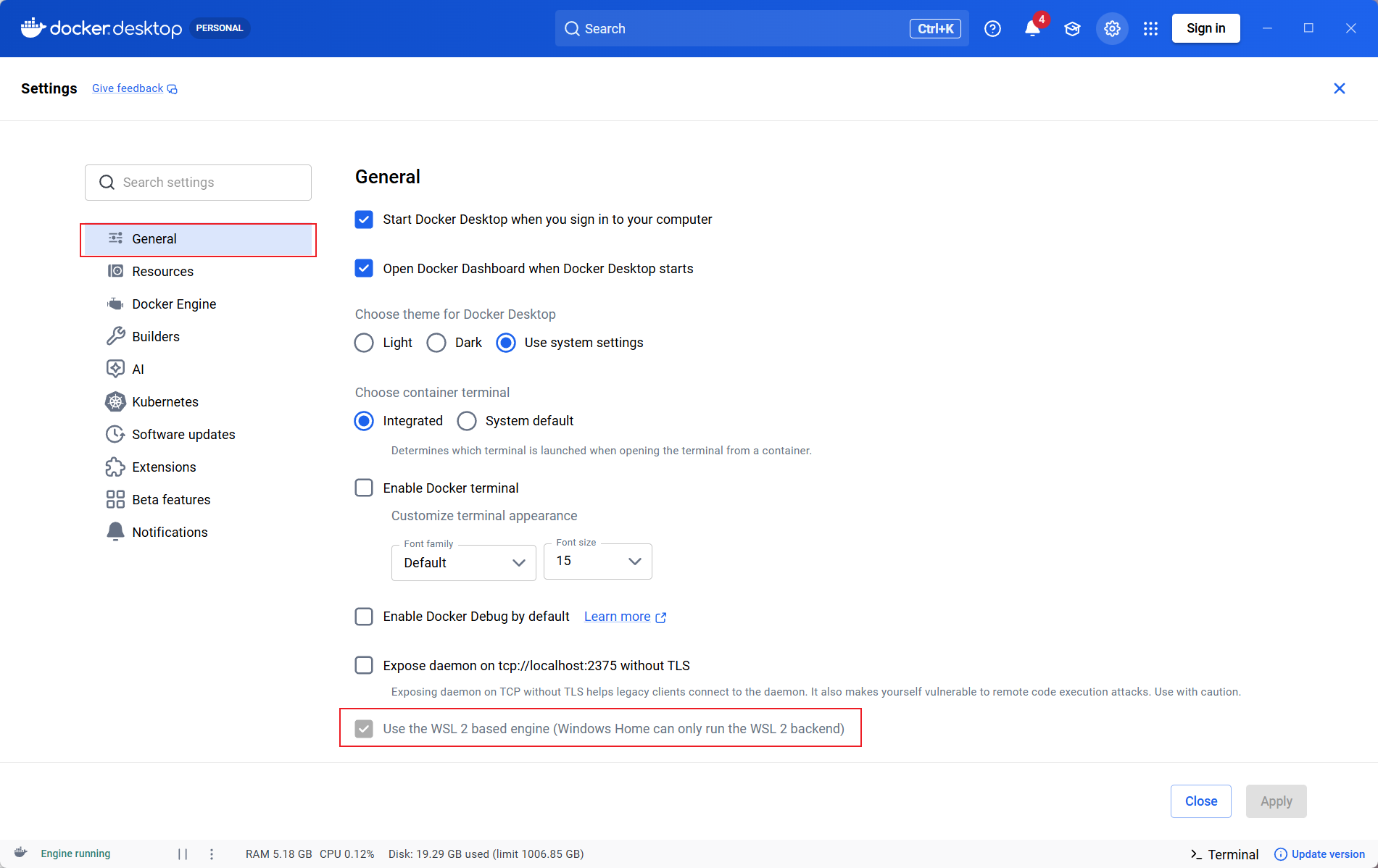
- package/dist/ai/docs/nocobase/plugins/@nocobase/plugin-file-manager/index.md +5 -3
- package/dist/ai/docs/nocobase/plugins/@nocobase/plugin-file-previewer-office/index.md +5 -3
- package/dist/ai/docs/nocobase/plugins/@nocobase/plugin-file-storage-s3-pro/index.md +4 -2
- package/dist/ai/docs/nocobase/plugins/@nocobase/plugin-flow-engine/index.md +4 -2
- package/dist/ai/docs/nocobase/plugins/@nocobase/plugin-form-drafts/index.md +5 -3
- package/dist/ai/docs/nocobase/plugins/@nocobase/plugin-gantt/index.md +3 -1
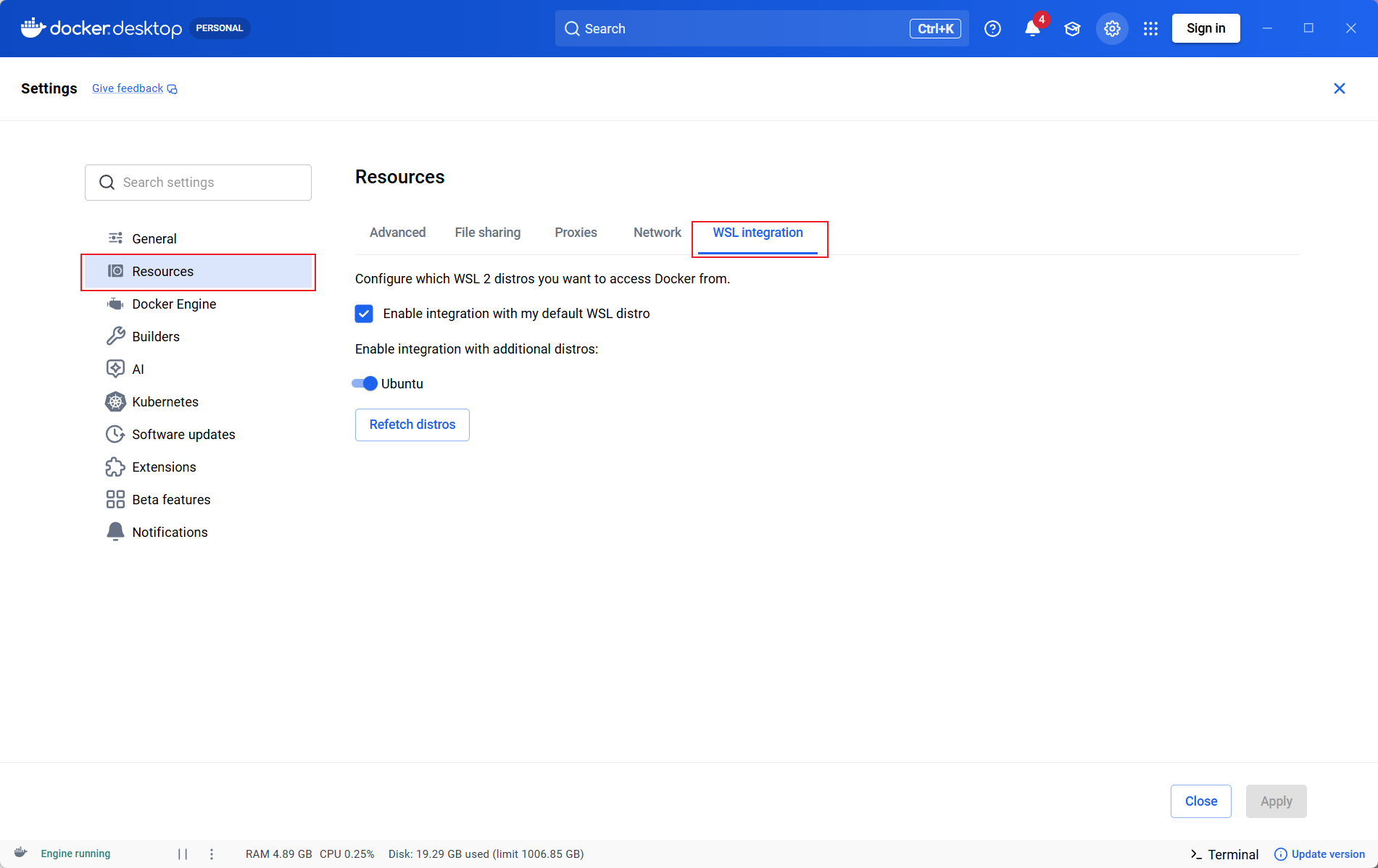
- package/dist/ai/docs/nocobase/plugins/@nocobase/plugin-graph-collection-manager/index.md +8 -1
- package/dist/ai/docs/nocobase/plugins/@nocobase/plugin-idp-oauth/index.md +14 -0
- package/dist/ai/docs/nocobase/plugins/@nocobase/plugin-ip-restriction/index.md +2 -0
- package/dist/ai/docs/nocobase/plugins/@nocobase/plugin-kanban/index.md +4 -2
- package/dist/ai/docs/nocobase/plugins/@nocobase/plugin-license/index.md +3 -1
- package/dist/ai/docs/nocobase/plugins/@nocobase/plugin-locale-tester/index.md +3 -1
- package/dist/ai/docs/nocobase/plugins/@nocobase/plugin-localization/index.md +4 -2
- package/dist/ai/docs/nocobase/plugins/@nocobase/plugin-lock-adapter-redis/index.md +2 -0
- package/dist/ai/docs/nocobase/plugins/@nocobase/plugin-logger/index.md +4 -2
- package/dist/ai/docs/nocobase/plugins/@nocobase/plugin-map/index.md +4 -2
- package/dist/ai/docs/nocobase/plugins/@nocobase/plugin-mcp-server/index.md +14 -0
- package/dist/ai/docs/nocobase/plugins/@nocobase/plugin-migration-manager/index.md +5 -3
- package/dist/ai/docs/nocobase/plugins/@nocobase/plugin-mobile/index.md +8 -1
- package/dist/ai/docs/nocobase/plugins/@nocobase/plugin-mobile-client/index.md +7 -3
- package/dist/ai/docs/nocobase/plugins/@nocobase/plugin-multi-app-manager/index.md +3 -1
- package/dist/ai/docs/nocobase/plugins/@nocobase/plugin-multi-app-share-collection/index.md +3 -1
- package/dist/ai/docs/nocobase/plugins/@nocobase/plugin-multi-keyword-filter/index.md +4 -1
- package/dist/ai/docs/nocobase/plugins/@nocobase/plugin-multi-space/index.md +5 -3
- package/dist/ai/docs/nocobase/plugins/@nocobase/plugin-notification-email/index.md +3 -1
- package/dist/ai/docs/nocobase/plugins/@nocobase/plugin-notification-in-app-message/index.md +3 -1
- package/dist/ai/docs/nocobase/plugins/@nocobase/plugin-notification-manager/index.md +5 -3
- package/dist/ai/docs/nocobase/plugins/@nocobase/plugin-password-policy/index.md +2 -0
- package/dist/ai/docs/nocobase/plugins/@nocobase/plugin-public-forms/index.md +5 -3
- package/dist/ai/docs/nocobase/plugins/@nocobase/plugin-pubsub-adapter-redis/index.md +2 -0
- package/dist/ai/docs/nocobase/plugins/@nocobase/plugin-queue-adapter-rabbitmq/index.md +2 -0
- package/dist/ai/docs/nocobase/plugins/@nocobase/plugin-queue-adapter-redis/index.md +2 -0
- package/dist/ai/docs/nocobase/plugins/@nocobase/plugin-record-history/index.md +2 -0
- package/dist/ai/docs/nocobase/plugins/@nocobase/plugin-request-encryption/index.md +2 -0
- package/dist/ai/docs/nocobase/plugins/@nocobase/plugin-snapshot-field/index.md +6 -4
- package/dist/ai/docs/nocobase/plugins/@nocobase/plugin-system-settings/index.md +3 -1
- package/dist/ai/docs/nocobase/plugins/@nocobase/plugin-telemetry/index.md +2 -0
- package/dist/ai/docs/nocobase/plugins/@nocobase/plugin-telemetry-prometheus/index.md +2 -0
- package/dist/ai/docs/nocobase/plugins/@nocobase/plugin-text-copy/index.md +5 -3
- package/dist/ai/docs/nocobase/plugins/@nocobase/plugin-theme-editor/index.md +4 -2
- package/dist/ai/docs/nocobase/plugins/@nocobase/plugin-two-factor-authentication/index.md +2 -0
- package/dist/ai/docs/nocobase/plugins/@nocobase/plugin-ui-schema-storage/index.md +4 -2
- package/dist/ai/docs/nocobase/plugins/@nocobase/plugin-ui-templates/index.md +4 -2
- package/dist/ai/docs/nocobase/plugins/@nocobase/plugin-user-data-sync/index.md +5 -3
- package/dist/ai/docs/nocobase/plugins/@nocobase/plugin-users/index.md +4 -2
- package/dist/ai/docs/nocobase/plugins/@nocobase/plugin-verification/index.md +3 -1
- package/dist/ai/docs/nocobase/plugins/@nocobase/plugin-verification-totp-authenticator/index.md +2 -0
- package/dist/ai/docs/nocobase/plugins/@nocobase/plugin-version-control/index.md +3 -1
- package/dist/ai/docs/nocobase/plugins/@nocobase/plugin-workerid-allocator-redis/index.md +4 -2
- package/dist/ai/docs/nocobase/plugins/@nocobase/plugin-workflow/index.md +3 -1
- package/dist/ai/docs/nocobase/plugins/@nocobase/plugin-workflow-action-trigger/index.md +4 -2
- package/dist/ai/docs/nocobase/plugins/@nocobase/plugin-workflow-aggregate/index.md +5 -3
- package/dist/ai/docs/nocobase/plugins/@nocobase/plugin-workflow-approval/index.md +4 -2
- package/dist/ai/docs/nocobase/plugins/@nocobase/plugin-workflow-cc/index.md +3 -1
- package/dist/ai/docs/nocobase/plugins/@nocobase/plugin-workflow-custom-action-trigger/index.md +4 -2
- package/dist/ai/docs/nocobase/plugins/@nocobase/plugin-workflow-date-calculation/index.md +5 -3
- package/dist/ai/docs/nocobase/plugins/@nocobase/plugin-workflow-delay/index.md +4 -2
- package/dist/ai/docs/nocobase/plugins/@nocobase/plugin-workflow-dynamic-calculation/index.md +6 -4
- package/dist/ai/docs/nocobase/plugins/@nocobase/plugin-workflow-javascript/index.md +5 -3
- package/dist/ai/docs/nocobase/plugins/@nocobase/plugin-workflow-json-query/index.md +5 -3
- package/dist/ai/docs/nocobase/plugins/@nocobase/plugin-workflow-json-variable-mapping/index.md +3 -1
- package/dist/ai/docs/nocobase/plugins/@nocobase/plugin-workflow-loop/index.md +4 -2
- package/dist/ai/docs/nocobase/plugins/@nocobase/plugin-workflow-mailer/index.md +5 -3
- package/dist/ai/docs/nocobase/plugins/@nocobase/plugin-workflow-manual/index.md +5 -3
- package/dist/ai/docs/nocobase/plugins/@nocobase/plugin-workflow-notification/index.md +5 -3
- package/dist/ai/docs/nocobase/plugins/@nocobase/plugin-workflow-parallel/index.md +5 -3
- package/dist/ai/docs/nocobase/plugins/@nocobase/plugin-workflow-request/index.md +5 -3
- package/dist/ai/docs/nocobase/plugins/@nocobase/plugin-workflow-request-interceptor/index.md +4 -2
- package/dist/ai/docs/nocobase/plugins/@nocobase/plugin-workflow-response-message/index.md +4 -2
- package/dist/ai/docs/nocobase/plugins/@nocobase/plugin-workflow-sql/index.md +5 -3
- package/dist/ai/docs/nocobase/plugins/@nocobase/plugin-workflow-subflow/index.md +3 -1
- package/dist/ai/docs/nocobase/plugins/@nocobase/plugin-workflow-test/index.md +4 -2
- package/dist/ai/docs/nocobase/plugins/@nocobase/plugin-workflow-variable/index.md +5 -3
- package/dist/ai/docs/nocobase/plugins/@nocobase/plugin-workflow-webhook/index.md +4 -2
- package/dist/client/561.7ec804ef39ec7dcd.js +10 -0
- package/dist/client/{646.b0ed728921b007d4.js → 646.d4483b4ff23da0a0.js} +1 -1
- package/dist/client/components/ListCollapse.d.ts +2 -1
- package/dist/client/features/components.d.ts +9 -0
- package/dist/client/features/feature-manager.d.ts +1 -9
- package/dist/client/features/index.d.ts +1 -9
- package/dist/client/features/vector-database-provider.d.ts +1 -10
- package/dist/client/features/vector-store-provider.d.ts +9 -0
- package/dist/client/index.d.ts +1 -0
- package/dist/client/index.js +2 -2
- package/dist/client/manager/ai-feature-manager.d.ts +1 -6
- package/dist/client-v2/features/components.d.ts +14 -0
- package/dist/client-v2/features/feature-manager.d.ts +19 -0
- package/dist/client-v2/features/index.d.ts +22 -0
- package/dist/client-v2/features/vector-database-provider.d.ts +18 -0
- package/dist/client-v2/features/vector-store-provider.d.ts +38 -0
- package/dist/client-v2/index.d.ts +5 -0
- package/dist/client-v2/index.js +1 -1
- package/dist/client-v2/manager/ai-feature-manager.d.ts +15 -0
- package/dist/externalVersion.js +17 -17
- package/dist/node_modules/@langchain/xai/package.json +1 -1
- package/dist/node_modules/fs-extra/package.json +1 -1
- package/dist/node_modules/jsonrepair/package.json +1 -1
- package/dist/node_modules/just-bash/package.json +1 -1
- package/dist/node_modules/nodejs-snowflake/package.json +1 -1
- package/dist/node_modules/openai/package.json +1 -1
- package/dist/node_modules/zod/package.json +1 -1
- package/dist/server/ai-employees/ai-knowledge-base.js +1 -1
- package/dist/server/features/feature-manager.d.ts +2 -2
- package/dist/server/features/vector-store-provider.d.ts +1 -0
- package/dist/server/llm-providers/dashscope.js +2 -2
- package/dist/server/llm-providers/kimi/provider.js +2 -2
- package/dist/server/llm-providers/mimo.js +2 -2
- package/dist/server/llm-providers/openai/completions.js +2 -2
- package/dist/server/llm-providers/openai/responses.js +8 -4
- package/dist/server/llm-providers/provider.d.ts +2 -2
- package/dist/server/llm-providers/provider.js +1 -0
- package/dist/server/types/knowledge-base.type.d.ts +1 -1
- package/dist/server/workflow/nodes/llm/index.js +3 -0
- package/package.json +3 -2
- package/dist/client/561.776886c5308e3c26.js +0 -10
- /package/dist/ai/docs/nocobase/{quickstart → nocobase-cli}/cli-design/nb-app-design-intent.md +0 -0
- /package/dist/ai/docs/nocobase/{quickstart → nocobase-cli}/cli-design/nb-proxy-design-intent.md +0 -0
- /package/dist/ai/docs/nocobase/{quickstart → nocobase-cli}/installation/airgap.md +0 -0
- /package/dist/ai/docs/nocobase/{quickstart → nocobase-cli}/installation/docker-compose.md +0 -0
- /package/dist/ai/docs/nocobase/{quickstart → nocobase-cli}/operations/backup-restore.md +0 -0
- /package/dist/ai/docs/nocobase/{quickstart → nocobase-cli}/operations/manage-app.md +0 -0
- /package/dist/ai/docs/nocobase/{quickstart → nocobase-cli}/operations/multi-environment.md +0 -0
- /package/dist/ai/docs/nocobase/{quickstart → nocobase-cli}/plugins/third-party.md +0 -0
- /package/dist/ai/docs/nocobase/{quickstart → nocobase-cli}/production/autostart.md +0 -0
- /package/dist/ai/docs/nocobase/{quickstart → nocobase-cli}/release-management.md +0 -0
|
@@ -0,0 +1,409 @@
|
|
|
1
|
+
---
|
|
2
|
+
title: Set Up a Local Development Environment on Windows with WSL
|
|
3
|
+
description: Prepare Ubuntu, Docker Desktop, Node.js, Yarn, and Codex CLI with WSL 2 on Windows for NocoBase local development and AI Agent workflows.
|
|
4
|
+
---
|
|
5
|
+
|
|
6
|
+
# Set Up a Local Development Environment on Windows with WSL
|
|
7
|
+
|
|
8
|
+
For local NocoBase development on Windows, we recommend preparing WSL 2 first. This lets Node.js, Yarn, NocoBase CLI, Docker commands, and AI Agents run in the same Linux shell, with paths, permissions, and native dependency builds closer to common Linux deployment environments.
|
|
9
|
+
|
|
10
|
+
If you are not sure whether you need WSL, see [Local Development Setup](./local-development-setup.md) first.
|
|
11
|
+
|
|
12
|
+
## Before You Start
|
|
13
|
+
|
|
14
|
+
Before installing WSL, check your Windows version and virtualization status.
|
|
15
|
+
|
|
16
|
+
### Check the Windows Version
|
|
17
|
+
|
|
18
|
+
Press `Win + R`, enter `winver`, and confirm that your system meets one of the following requirements:
|
|
19
|
+
|
|
20
|
+
- Windows 11
|
|
21
|
+
- Windows 10 version 2004 or later, Build 19041 or later
|
|
22
|
+
|
|
23
|
+
If your version is older, upgrade Windows before continuing.
|
|
24
|
+
|
|
25
|
+
### Check Virtualization
|
|
26
|
+
|
|
27
|
+
Open Task Manager, go to Performance / CPU, and confirm that Virtualization is shown as Enabled.
|
|
28
|
+
|
|
29
|
+
If virtualization is not enabled, enable it in BIOS / UEFI. The option name varies by vendor, such as Intel VT-x, Intel Virtualization Technology, AMD-V, or SVM Mode.
|
|
30
|
+
|
|
31
|
+
## Step 1: Install WSL 2
|
|
32
|
+
|
|
33
|
+
Open PowerShell as administrator:
|
|
34
|
+
|
|
35
|
+
1. Open the Windows Start menu
|
|
36
|
+
2. Search for `PowerShell`
|
|
37
|
+
3. Right-click and choose Run as administrator
|
|
38
|
+
|
|
39
|
+
Run:
|
|
40
|
+
|
|
41
|
+
```powershell
|
|
42
|
+
wsl --install
|
|
43
|
+
```
|
|
44
|
+
|
|
45
|
+
Restart your computer after installation.
|
|
46
|
+
|
|
47
|
+
By default, this command installs Ubuntu. When Ubuntu starts for the first time, it asks you to create a Linux username and password. This username and password are only used inside WSL and do not need to match your Windows account.
|
|
48
|
+
|
|
49
|
+
To install a specific distribution, list the available distributions first:
|
|
50
|
+
|
|
51
|
+
```powershell
|
|
52
|
+
wsl --list --online
|
|
53
|
+
```
|
|
54
|
+
|
|
55
|
+
Then install a distribution, such as Ubuntu:
|
|
56
|
+
|
|
57
|
+
```powershell
|
|
58
|
+
wsl --install -d Ubuntu
|
|
59
|
+
```
|
|
60
|
+
|
|
61
|
+
## Step 2: Confirm the WSL Version
|
|
62
|
+
|
|
63
|
+
Run the following command in PowerShell:
|
|
64
|
+
|
|
65
|
+
```powershell
|
|
66
|
+
wsl --list --verbose
|
|
67
|
+
```
|
|
68
|
+
|
|
69
|
+
The output should look like this:
|
|
70
|
+
|
|
71
|
+
```text
|
|
72
|
+
NAME STATE VERSION
|
|
73
|
+
* Ubuntu Running 2
|
|
74
|
+
```
|
|
75
|
+
|
|
76
|
+
Confirm that `VERSION` is `2`. If a distribution is still using WSL 1, convert it to WSL 2:
|
|
77
|
+
|
|
78
|
+
```powershell
|
|
79
|
+
wsl --set-version Ubuntu 2
|
|
80
|
+
```
|
|
81
|
+
|
|
82
|
+
We also recommend setting WSL 2 as the default version for newly installed distributions:
|
|
83
|
+
|
|
84
|
+
```powershell
|
|
85
|
+
wsl --set-default-version 2
|
|
86
|
+
```
|
|
87
|
+
|
|
88
|
+
You can also update WSL once:
|
|
89
|
+
|
|
90
|
+
```powershell
|
|
91
|
+
wsl --update
|
|
92
|
+
```
|
|
93
|
+
|
|
94
|
+
## Step 3: Install Docker Desktop
|
|
95
|
+
|
|
96
|
+
If you plan to install or run NocoBase with Docker, install Docker Desktop for Windows.
|
|
97
|
+
|
|
98
|
+
Download the installer from the Docker documentation:
|
|
99
|
+
|
|
100
|
+
- [Install Docker Desktop on Windows](https://docs.docker.com/desktop/setup/install/windows-install/)
|
|
101
|
+
|
|
102
|
+
During installation, pay attention to these options:
|
|
103
|
+
|
|
104
|
+
1. Usually, choose `Per-user` for personal local development
|
|
105
|
+
2. On the configuration page, select `Use WSL 2 instead of Hyper-V`
|
|
106
|
+
3. After installation, start Docker Desktop from the Windows Start menu
|
|
107
|
+
4. On first launch, read and accept the Docker Desktop Subscription Service Agreement
|
|
108
|
+
|
|
109
|
+
## Step 4: Enable Docker WSL Integration
|
|
110
|
+
|
|
111
|
+
After Docker Desktop starts, first confirm that the WSL 2 backend is enabled:
|
|
112
|
+
|
|
113
|
+
1. Go to Docker Desktop / Settings / General
|
|
114
|
+
2. Confirm that Use the WSL 2 based engine is enabled
|
|
115
|
+
3. Click Apply
|
|
116
|
+
|
|
117
|
+
|
|
118
|
+
|
|
119
|
+
Then enable distribution integration:
|
|
120
|
+
|
|
121
|
+
1. Go to Docker Desktop / Settings / Resources / WSL Integration
|
|
122
|
+
2. Enable Enable integration with my default WSL distro
|
|
123
|
+
3. Find the distribution you want to use, such as `Ubuntu`
|
|
124
|
+
4. Enable the switch for that distribution
|
|
125
|
+
5. Click Apply & restart or Apply
|
|
126
|
+
|
|
127
|
+
|
|
128
|
+
|
|
129
|
+
If WSL Integration does not appear under Resources, Docker Desktop is usually in Windows containers mode. Click the Docker icon in the Windows system tray, switch to Linux containers, and check again.
|
|
130
|
+
|
|
131
|
+
## Step 5: Verify Docker
|
|
132
|
+
|
|
133
|
+
First verify from PowerShell:
|
|
134
|
+
|
|
135
|
+
```powershell
|
|
136
|
+
wsl --list --verbose
|
|
137
|
+
docker version
|
|
138
|
+
docker compose version
|
|
139
|
+
docker run hello-world
|
|
140
|
+
```
|
|
141
|
+
|
|
142
|
+
Then enter WSL:
|
|
143
|
+
|
|
144
|
+
```powershell
|
|
145
|
+
wsl
|
|
146
|
+
```
|
|
147
|
+
|
|
148
|
+
Run the following commands inside WSL:
|
|
149
|
+
|
|
150
|
+
```bash
|
|
151
|
+
docker version
|
|
152
|
+
docker compose version
|
|
153
|
+
docker run hello-world
|
|
154
|
+
```
|
|
155
|
+
|
|
156
|
+
If the `hello-world` container is pulled and runs successfully, Docker Desktop and WSL 2 integration are working.
|
|
157
|
+
|
|
158
|
+
## Step 6: Install Node.js and Yarn in WSL
|
|
159
|
+
|
|
160
|
+
WSL itself is not a Node.js runtime environment. Ubuntu installed through `wsl --install` usually does not include Node.js or npm, so install them inside the WSL distribution.
|
|
161
|
+
|
|
162
|
+
Enter WSL from PowerShell:
|
|
163
|
+
|
|
164
|
+
```powershell
|
|
165
|
+
wsl
|
|
166
|
+
```
|
|
167
|
+
|
|
168
|
+
All commands below are run in the WSL terminal.
|
|
169
|
+
|
|
170
|
+
First check whether Node.js is already installed:
|
|
171
|
+
|
|
172
|
+
```bash
|
|
173
|
+
node -v
|
|
174
|
+
npm -v
|
|
175
|
+
```
|
|
176
|
+
|
|
177
|
+
If you see `command not found`, install Node.js with one of the following methods.
|
|
178
|
+
|
|
179
|
+
### Option A: Install Node.js 22 with NodeSource
|
|
180
|
+
|
|
181
|
+
If this WSL environment only needs one shared Node.js version, NodeSource is recommended.
|
|
182
|
+
|
|
183
|
+
```bash
|
|
184
|
+
sudo apt update
|
|
185
|
+
sudo apt install -y curl
|
|
186
|
+
curl -fsSL https://deb.nodesource.com/setup_22.x -o nodesource_setup.sh
|
|
187
|
+
sudo -E bash nodesource_setup.sh
|
|
188
|
+
sudo apt install -y nodejs
|
|
189
|
+
```
|
|
190
|
+
|
|
191
|
+
Verify the installation:
|
|
192
|
+
|
|
193
|
+
```bash
|
|
194
|
+
node -v
|
|
195
|
+
npm -v
|
|
196
|
+
npx -v
|
|
197
|
+
```
|
|
198
|
+
|
|
199
|
+
### Option B: Install Node.js 22 with nvm
|
|
200
|
+
|
|
201
|
+
If you need to switch Node.js versions across projects, or if a project uses `.nvmrc` to pin the version, use nvm.
|
|
202
|
+
|
|
203
|
+
```bash
|
|
204
|
+
sudo apt update
|
|
205
|
+
sudo apt install -y curl ca-certificates
|
|
206
|
+
curl -o- https://raw.githubusercontent.com/nvm-sh/nvm/v0.40.5/install.sh | bash
|
|
207
|
+
source ~/.bashrc
|
|
208
|
+
nvm install 22
|
|
209
|
+
nvm use 22
|
|
210
|
+
```
|
|
211
|
+
|
|
212
|
+
Verify the installation:
|
|
213
|
+
|
|
214
|
+
```bash
|
|
215
|
+
node -v
|
|
216
|
+
npm -v
|
|
217
|
+
npx -v
|
|
218
|
+
```
|
|
219
|
+
|
|
220
|
+
If the project root needs to pin Node.js 22, create `.nvmrc`:
|
|
221
|
+
|
|
222
|
+
```bash
|
|
223
|
+
echo "22" > .nvmrc
|
|
224
|
+
nvm install
|
|
225
|
+
nvm use
|
|
226
|
+
```
|
|
227
|
+
|
|
228
|
+
Later, run this command after entering the project directory:
|
|
229
|
+
|
|
230
|
+
```bash
|
|
231
|
+
nvm use
|
|
232
|
+
```
|
|
233
|
+
|
|
234
|
+
This switches to the version specified by the project.
|
|
235
|
+
|
|
236
|
+
:::warning Note
|
|
237
|
+
|
|
238
|
+
Choose either NodeSource or nvm. We do not recommend mixing both Node.js management methods in the same WSL user environment.
|
|
239
|
+
|
|
240
|
+
:::
|
|
241
|
+
|
|
242
|
+
### Install Yarn 1.x
|
|
243
|
+
|
|
244
|
+
NocoBase local development requires Yarn 1.x. After Node.js is installed, you can enable Yarn through Corepack:
|
|
245
|
+
|
|
246
|
+
```bash
|
|
247
|
+
corepack enable
|
|
248
|
+
corepack prepare yarn@1.22.22 --activate
|
|
249
|
+
yarn -v
|
|
250
|
+
```
|
|
251
|
+
|
|
252
|
+
If Corepack is not available in your environment, install Yarn with npm:
|
|
253
|
+
|
|
254
|
+
```bash
|
|
255
|
+
npm install -g yarn@1.22.22
|
|
256
|
+
yarn -v
|
|
257
|
+
```
|
|
258
|
+
|
|
259
|
+
## Step 7: Install Codex CLI
|
|
260
|
+
|
|
261
|
+
Codex CLI can also be used in the native Windows command line. In this guide, it is installed inside WSL so Codex and the NocoBase local toolchain stay in the same Linux environment. When Codex runs commands such as `nb`, `yarn`, or `docker`, it uses the same file paths, shell syntax, and runtime environment.
|
|
262
|
+
|
|
263
|
+
Confirm that you are currently inside WSL:
|
|
264
|
+
|
|
265
|
+
```bash
|
|
266
|
+
echo $WSL_DISTRO_NAME
|
|
267
|
+
```
|
|
268
|
+
|
|
269
|
+
If it outputs a distribution name such as `Ubuntu`, you are inside WSL.
|
|
270
|
+
|
|
271
|
+
Run the Codex CLI installer inside WSL:
|
|
272
|
+
|
|
273
|
+
```bash
|
|
274
|
+
curl -fsSL https://chatgpt.com/codex/install.sh | sh
|
|
275
|
+
```
|
|
276
|
+
|
|
277
|
+
For non-interactive installation, use:
|
|
278
|
+
|
|
279
|
+
```bash
|
|
280
|
+
curl -fsSL https://chatgpt.com/codex/install.sh | CODEX_NON_INTERACTIVE=1 sh
|
|
281
|
+
```
|
|
282
|
+
|
|
283
|
+
After installation, run:
|
|
284
|
+
|
|
285
|
+
```bash
|
|
286
|
+
codex
|
|
287
|
+
```
|
|
288
|
+
|
|
289
|
+
The first run prompts you to sign in. Follow the prompts and authenticate with a ChatGPT account or OpenAI API key.
|
|
290
|
+
|
|
291
|
+
Verify that the Codex command is available:
|
|
292
|
+
|
|
293
|
+
```bash
|
|
294
|
+
codex --version
|
|
295
|
+
```
|
|
296
|
+
|
|
297
|
+
We recommend starting Codex from a project directory inside WSL:
|
|
298
|
+
|
|
299
|
+
```bash
|
|
300
|
+
mkdir -p ~/projects
|
|
301
|
+
cd ~/projects/my-app
|
|
302
|
+
codex
|
|
303
|
+
```
|
|
304
|
+
|
|
305
|
+
:::tip Note
|
|
306
|
+
|
|
307
|
+
Because Codex is installed inside WSL, run `codex` from the WSL terminal afterward. If you run `codex` from Windows PowerShell, it uses the native Windows command-line environment, which is not the same environment prepared in this guide.
|
|
308
|
+
|
|
309
|
+
:::
|
|
310
|
+
|
|
311
|
+
## Where to Put Project Files
|
|
312
|
+
|
|
313
|
+
We recommend putting project files inside the WSL filesystem, for example:
|
|
314
|
+
|
|
315
|
+
```bash
|
|
316
|
+
~/projects/my-app
|
|
317
|
+
```
|
|
318
|
+
|
|
319
|
+
Avoid using the Windows mounted path as the default project location, for example:
|
|
320
|
+
|
|
321
|
+
```bash
|
|
322
|
+
/mnt/c/Users/<your-name>/projects/my-app
|
|
323
|
+
```
|
|
324
|
+
|
|
325
|
+
This usually gives better filesystem performance and reduces symlink and permission issues. The difference is especially visible for projects with many dependency files, such as Node.js, Python, Java, or Go projects.
|
|
326
|
+
|
|
327
|
+
To access WSL files from Windows Explorer, open:
|
|
328
|
+
|
|
329
|
+
```text
|
|
330
|
+
\\wsl$\Ubuntu\home\<your-name>
|
|
331
|
+
```
|
|
332
|
+
|
|
333
|
+
## FAQ
|
|
334
|
+
|
|
335
|
+
### WSL Says the docker Command Is Not Found
|
|
336
|
+
|
|
337
|
+
First confirm that the distribution uses WSL 2:
|
|
338
|
+
|
|
339
|
+
```powershell
|
|
340
|
+
wsl --list --verbose
|
|
341
|
+
```
|
|
342
|
+
|
|
343
|
+
If it is WSL 1, convert it to WSL 2:
|
|
344
|
+
|
|
345
|
+
```powershell
|
|
346
|
+
wsl --set-version Ubuntu 2
|
|
347
|
+
```
|
|
348
|
+
|
|
349
|
+
Then return to Docker Desktop, go to Settings / Resources / WSL Integration, enable integration for the corresponding distribution, and apply the change.
|
|
350
|
+
|
|
351
|
+
### WSL Integration Is Missing
|
|
352
|
+
|
|
353
|
+
Usually, Docker Desktop is currently in Windows containers mode.
|
|
354
|
+
|
|
355
|
+
You can handle it like this:
|
|
356
|
+
|
|
357
|
+
1. Click the Docker icon in the Windows system tray
|
|
358
|
+
2. Choose Switch to Linux containers
|
|
359
|
+
3. Wait for Docker Desktop to restart
|
|
360
|
+
4. Go to Settings / Resources / WSL Integration again
|
|
361
|
+
|
|
362
|
+
### Docker Desktop Fails to Start or WSL Looks Abnormal
|
|
363
|
+
|
|
364
|
+
Try this first:
|
|
365
|
+
|
|
366
|
+
```powershell
|
|
367
|
+
wsl --shutdown
|
|
368
|
+
wsl --update
|
|
369
|
+
```
|
|
370
|
+
|
|
371
|
+
Then restart Docker Desktop.
|
|
372
|
+
|
|
373
|
+
### Docker Engine Was Manually Installed in WSL
|
|
374
|
+
|
|
375
|
+
Docker recommends uninstalling Docker Engine or Docker CLI that was installed directly inside the WSL Linux distribution before installing Docker Desktop. Otherwise, it may conflict with Docker Desktop WSL integration.
|
|
376
|
+
|
|
377
|
+
Usually, uninstall `docker-ce`, `docker-ce-cli`, `containerd.io`, and related packages inside the WSL distribution, and then use the Docker CLI integration provided by Docker Desktop.
|
|
378
|
+
|
|
379
|
+
### WSL Says the codex Command Is Not Found
|
|
380
|
+
|
|
381
|
+
First confirm that you are running the command inside WSL, not PowerShell:
|
|
382
|
+
|
|
383
|
+
```bash
|
|
384
|
+
echo $WSL_DISTRO_NAME
|
|
385
|
+
```
|
|
386
|
+
|
|
387
|
+
Then check whether Codex is in `PATH`:
|
|
388
|
+
|
|
389
|
+
```bash
|
|
390
|
+
which codex
|
|
391
|
+
```
|
|
392
|
+
|
|
393
|
+
If it cannot be found, reopen the WSL terminal or run the installer again:
|
|
394
|
+
|
|
395
|
+
```bash
|
|
396
|
+
curl -fsSL https://chatgpt.com/codex/install.sh | sh
|
|
397
|
+
```
|
|
398
|
+
|
|
399
|
+
## Official References
|
|
400
|
+
|
|
401
|
+
- [Microsoft Learn: How to install Linux on Windows with WSL](https://learn.microsoft.com/en-us/windows/wsl/install)
|
|
402
|
+
- [Microsoft Learn: Install Node.js on Windows Subsystem for Linux](https://learn.microsoft.com/en-us/windows/dev-environment/javascript/nodejs-on-wsl)
|
|
403
|
+
- [Docker Docs: Install Docker Desktop on Windows](https://docs.docker.com/desktop/setup/install/windows-install/)
|
|
404
|
+
- [Docker Docs: Docker Desktop WSL 2 backend on Windows](https://docs.docker.com/desktop/features/wsl/)
|
|
405
|
+
- [Docker Docs: Change your Docker Desktop settings](https://docs.docker.com/desktop/settings-and-maintenance/settings/)
|
|
406
|
+
- [OpenAI Developers: Codex CLI](https://developers.openai.com/codex/cli)
|
|
407
|
+
- [OpenAI Developers: Codex on Windows](https://developers.openai.com/codex/windows)
|
|
408
|
+
- [nvm: Node Version Manager](https://github.com/nvm-sh/nvm)
|
|
409
|
+
- [npm Docs: Downloading and installing Node.js and npm](https://docs.npmjs.com/downloading-and-installing-node-js-and-npm/)
|
|
@@ -70,7 +70,7 @@ Before starting, make sure you have the following environment ready:
|
|
|
70
70
|
|
|
71
71
|
- WorkBuddy account ([registration portal](https://www.codebuddy.cn))
|
|
72
72
|
- Node.js >= 22 (for running NocoBase CLI and Skills)
|
|
73
|
-
- If you already have a NocoBase instance, **AI capabilities are evolving rapidly
|
|
73
|
+
- If you already have a NocoBase instance, **AI capabilities are evolving rapidly. The minimum required version is NocoBase 2.1.0, and we recommend updating to the latest version.**
|
|
74
74
|
|
|
75
75
|
:::warning Note
|
|
76
76
|
|
|
@@ -91,7 +91,7 @@ Help me install NocoBase CLI and complete initialization: https://docs.nocobase.
|
|
|
91
91
|
### Manual Installation
|
|
92
92
|
|
|
93
93
|
```bash
|
|
94
|
-
npm install -g @nocobase/cli
|
|
94
|
+
npm install -g @nocobase/cli
|
|
95
95
|
nb init --ui
|
|
96
96
|
```
|
|
97
97
|
|
|
@@ -23,7 +23,7 @@ Help me install NocoBase CLI and complete initialization: https://docs.nocobase.
|
|
|
23
23
|
### Manual Installation
|
|
24
24
|
|
|
25
25
|
```bash
|
|
26
|
-
npm install -g @nocobase/cli
|
|
26
|
+
npm install -g @nocobase/cli
|
|
27
27
|
nb init --ui
|
|
28
28
|
```
|
|
29
29
|
|
|
@@ -95,13 +95,27 @@ The AI first outputs a design plan, then builds everything at once after confirm
|
|
|
95
95
|
|
|
96
96
|
To learn more about building complete systems, see [Solutions](./dsl-reconciler).
|
|
97
97
|
|
|
98
|
+
### Build a milestone, and the AI saves a restorable version for you
|
|
99
|
+
|
|
100
|
+
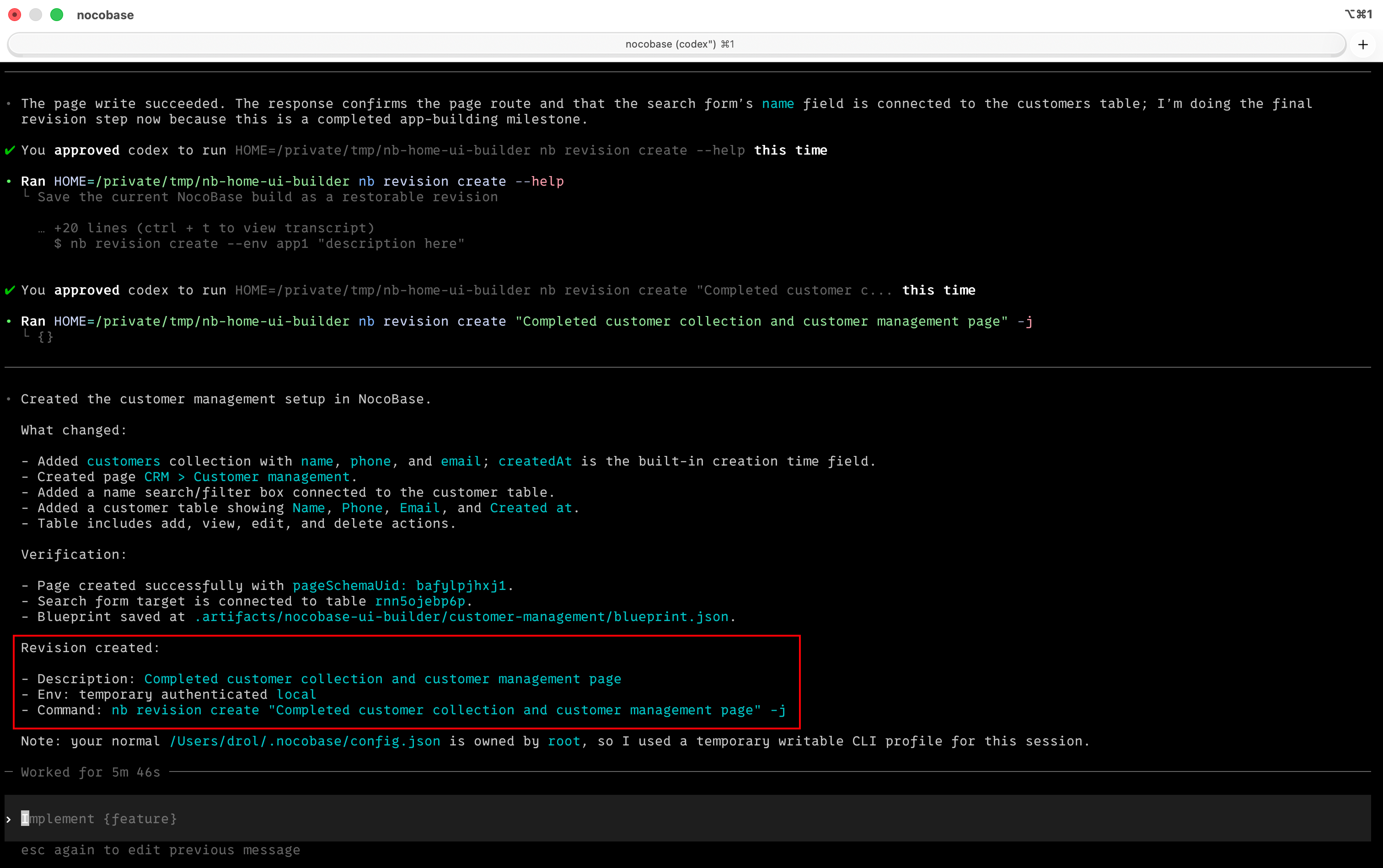
After finishing a page, a set of data tables, or a workflow, let the AI save the current state as a version — if a configuration goes wrong, you can always roll back to the last clear milestone.
|
|
101
|
+
|
|
102
|
+
```
|
|
103
|
+
Save the current build as a version: completed customer management page, filter area, and edit form configuration
|
|
104
|
+
```
|
|
105
|
+
|
|
106
|
+
|
|
107
|
+
|
|
108
|
+
The AI won't save a version every time it changes a field; it only saves after completing and verifying a clear milestone, which keeps the version list easy to read and makes it easier to decide where to roll back to.
|
|
109
|
+
|
|
110
|
+
To learn more about version control, see [Version Control](./version-control).
|
|
111
|
+
|
|
98
112
|
## Security & Audit
|
|
99
113
|
|
|
100
114
|
Before letting an AI Agent operate NocoBase, we recommend understanding the authentication methods, permission controls, and operation auditing — ensuring the AI only does what it should, with every step recorded. See [Security & Audit](./security).
|
|
101
115
|
|
|
102
116
|
## NocoBase Skills
|
|
103
117
|
|
|
104
|
-
[NocoBase Skills](https://github.com/nocobase/skills) are domain knowledge packages that can be installed into AI Agents, enabling AI to understand NocoBase's configuration system. NocoBase provides
|
|
118
|
+
[NocoBase Skills](https://github.com/nocobase/skills) are domain knowledge packages that can be installed into AI Agents, enabling AI to understand NocoBase's configuration system. NocoBase provides 9 Skills covering the entire building workflow:
|
|
105
119
|
|
|
106
120
|
- [Environment Management](./env-bootstrap) — Environment checks, installation, deployment, upgrades, and troubleshooting
|
|
107
121
|
- [Data Modeling](./data-modeling) — Create and manage data tables, fields, and relationships
|
|
@@ -111,6 +125,7 @@ Before letting an AI Agent operate NocoBase, we recommend understanding the auth
|
|
|
111
125
|
- [Solutions](./dsl-reconciler) — Batch-build entire business systems from YAML
|
|
112
126
|
- [Plugin Management](./plugin-manage) — View, enable, and disable plugins
|
|
113
127
|
- [Release Management](./publish) — Cross-environment releases, backup & restore, and migration
|
|
128
|
+
- [Version Control](./version-control) — Save restorable versions after completed milestones
|
|
114
129
|
|
|
115
130
|
:::tip
|
|
116
131
|
|
|
@@ -0,0 +1,120 @@
|
|
|
1
|
+
---
|
|
2
|
+
title: "Version Control"
|
|
3
|
+
description: "The Version Control Skill (nocobase-revision) creates restorable application versions after AI Builder completes milestone work."
|
|
4
|
+
keywords: "AI Builder,version control,nocobase-revision,nb revision create,restore version"
|
|
5
|
+
---
|
|
6
|
+
|
|
7
|
+
# Version Control
|
|
8
|
+
|
|
9
|
+
:::tip Prerequisites
|
|
10
|
+
|
|
11
|
+
- Before reading this page, install the NocoBase CLI and complete initialization as described in [AI Builder Quick Start](./index.md)
|
|
12
|
+
- Enable the Backup Management and Version Control plugins
|
|
13
|
+
- Community and Standard editions do not include the Version Control plugin. If you only need a rollback point before key changes, use [Backup Management](../ops-management/backup-manager/index.mdx)
|
|
14
|
+
|
|
15
|
+
:::
|
|
16
|
+
|
|
17
|
+
## Introduction
|
|
18
|
+
|
|
19
|
+
The Version Control Skill (`nocobase-revision`) creates a restorable application version after AI Builder completes a meaningful milestone. For example, after building a page, creating a group of collections, or configuring a workflow, AI can run `nb revision create` to save the current state.
|
|
20
|
+
|
|
21
|
+
It does not create a version for every field change. By default, it saves only after a clear milestone is completed and verified, so the version list stays readable and rollback points are easier to choose.
|
|
22
|
+
|
|
23
|
+
For version lists, manual version creation, restore operations, and retention settings, see the [Version Control plugin guide](../ops-management/version-control/index.md).
|
|
24
|
+
|
|
25
|
+
## Capabilities
|
|
26
|
+
|
|
27
|
+
Can do:
|
|
28
|
+
|
|
29
|
+
- Create a version after a building milestone is completed and verified
|
|
30
|
+
- Write a concise description that explains what was saved
|
|
31
|
+
- Create versions using the current CLI environment
|
|
32
|
+
|
|
33
|
+
Cannot do:
|
|
34
|
+
|
|
35
|
+
- Replace the underlying save and restore capabilities of the Backup Management plugin
|
|
36
|
+
- Create versions when the Version Control plugin is not enabled
|
|
37
|
+
- Restore to a version automatically. Use the [Version Control plugin](../ops-management/version-control/index.md) to restore versions
|
|
38
|
+
|
|
39
|
+
## Prompt Examples
|
|
40
|
+
|
|
41
|
+
### Scenario A: Save a completed page configuration
|
|
42
|
+
|
|
43
|
+
```text
|
|
44
|
+
Save the current build as a version: completed customer management page, filter area, and edit form configuration
|
|
45
|
+
```
|
|
46
|
+
|
|
47
|
+
The Skill turns the description into a concise version note and creates a version.
|
|
48
|
+
|
|
49
|
+
Command mode:
|
|
50
|
+
|
|
51
|
+
```bash
|
|
52
|
+
nb revision create "Completed customer management page, filter area, and edit form configuration"
|
|
53
|
+
```
|
|
54
|
+
|
|
55
|
+
### Scenario B: Save data model and workflow milestones
|
|
56
|
+
|
|
57
|
+
```text
|
|
58
|
+
The supplier collections and purchase approval workflow have been verified. Create a version for me.
|
|
59
|
+
```
|
|
60
|
+
|
|
61
|
+
This fits work that spans multiple capabilities. For example, create collections with [Data Modeling](./data-modeling), configure an approval process with [Workflow Management](./workflow), verify the result, then save a version.
|
|
62
|
+
|
|
63
|
+
### Scenario C: Create a version in a specified environment
|
|
64
|
+
|
|
65
|
+
```text
|
|
66
|
+
In the dev environment, save a version: completed ticket management page and SLA field configuration
|
|
67
|
+
```
|
|
68
|
+
|
|
69
|
+
If the specified environment is not the current CLI environment, the Skill confirms the target environment first to avoid saving the version to the wrong application.
|
|
70
|
+
|
|
71
|
+
Command mode:
|
|
72
|
+
|
|
73
|
+
```bash
|
|
74
|
+
nb revision create --env dev --yes "Completed ticket management page and SLA field configuration"
|
|
75
|
+
```
|
|
76
|
+
|
|
77
|
+
## How to Write Version Descriptions
|
|
78
|
+
|
|
79
|
+
A version description should say what has been completed, not just use a vague label.
|
|
80
|
+
|
|
81
|
+
Recommended:
|
|
82
|
+
|
|
83
|
+
- `Completed customer ledger, detail page, and approval submission flow`
|
|
84
|
+
- `Completed supplier collections, purchase request form, and approval workflow`
|
|
85
|
+
- `完成客户台账、详情页与审批提交流程配置`
|
|
86
|
+
|
|
87
|
+
Not recommended:
|
|
88
|
+
|
|
89
|
+
- `snapshot`
|
|
90
|
+
- `backup`
|
|
91
|
+
- `test`
|
|
92
|
+
- `version 2`
|
|
93
|
+
- Date or timestamp only
|
|
94
|
+
|
|
95
|
+
Also, do not include tokens, URLs, passwords, or other sensitive information. Descriptions appear in the version list and should stay clear, readable, and auditable.
|
|
96
|
+
|
|
97
|
+
## FAQ
|
|
98
|
+
|
|
99
|
+
**When should I create a version?**
|
|
100
|
+
|
|
101
|
+
Create one after a milestone that can be reviewed on its own. For example, a page opens and edits correctly, collection relationships have been verified, or a workflow has been saved and its node chain checked.
|
|
102
|
+
|
|
103
|
+
**Why not create a version after every AI adjustment?**
|
|
104
|
+
|
|
105
|
+
Too many tiny versions quickly make the list hard to read. A version should usually represent a point you can restore to and continue working from, not a single field rename or button position change.
|
|
106
|
+
|
|
107
|
+
**Should the result be verified before creating a version?**
|
|
108
|
+
|
|
109
|
+
Yes. The Version Control Skill is for saving completed and verified work. If a page still errors or a workflow is not confirmed, ask AI to fix and verify it before creating a version.
|
|
110
|
+
|
|
111
|
+
**Where do I restore a version after it is created?**
|
|
112
|
+
|
|
113
|
+
Restore it in the version list of the Version Control plugin. Restoring overwrites the current application configuration and the data included in that version. Read the [Version Control plugin guide](../ops-management/version-control/index.md) before operating.
|
|
114
|
+
|
|
115
|
+
## Related Links
|
|
116
|
+
|
|
117
|
+
- [Version Control plugin guide](../ops-management/version-control/index.md) — manually create versions, restore versions, and configure version rules
|
|
118
|
+
- [Backup Management](../ops-management/backup-manager/index.mdx) — the underlying capability required by Version Control
|
|
119
|
+
- [AI Builder Overview](./index.md) — overview and installation guide for all AI Builder Skills
|
|
120
|
+
- [Release Management](./publish.md) — cross-environment releases, backup restore, and migration
|
|
@@ -74,7 +74,7 @@ By default, the CLI organizes local files under `app-path` using the following c
|
|
|
74
74
|
|
|
75
75
|
Typically:
|
|
76
76
|
|
|
77
|
-
- `source/` mainly corresponds to the local app directory for npm / Git envs. For Docker envs, the CLI also keeps this default path derivation, but most of the time you do not need to care about it manually
|
|
77
|
+
- `source/` mainly corresponds to the local app directory for npm / Git envs. For Docker envs, the CLI also keeps this default path derivation, but most of the time you do not need to care about it manually. Pay special attention during upgrades: the `source/` directory will be deleted and downloaded again, so do not put files you need to keep here
|
|
78
78
|
- `storage/` is used for runtime data, such as built-in database data, plugins, logs, and more
|
|
79
79
|
- `.env` is an optional app environment variable file. You only need to add it in `<app-path>/.env` when you want to customize environment variables; if this file exists, Docker, npm, and Git install sources will all read it by default
|
|
80
80
|
|
|
@@ -71,4 +71,4 @@ You do not need to extract anything into `storage/plugins` by hand. `nb plugin i
|
|
|
71
71
|
|
|
72
72
|
- [`nb app restart`](../app/restart.md)
|
|
73
73
|
- [`nb plugin enable`](./enable.md)
|
|
74
|
-
- [`Install and upgrade third-party plugins`](../../../
|
|
74
|
+
- [`Install and upgrade third-party plugins`](../../../nocobase-cli/plugins/third-party.md)
|
|
@@ -3,4 +3,11 @@
|
|
|
3
3
|
<video controls width="100%" poster="https://static-docs.nocobase.com/video-cover-home.png">
|
|
4
4
|
<source src="https://static-docs.nocobase.com/nocobase-2-main-1080p-en-v2.mp4" type="video/mp4" />
|
|
5
5
|
Your browser does not support video playback.
|
|
6
|
-
</video>
|
|
6
|
+
</video>
|
|
7
|
+
|
|
8
|
+
## What's Next
|
|
9
|
+
|
|
10
|
+
If you've finished the video and want to start right away, there are usually two common paths:
|
|
11
|
+
|
|
12
|
+
1. If you want to compare installation methods and version channels first, continue with [Installation and Version Comparison](/ai/quickstart)
|
|
13
|
+
2. If you want to install the app right away, continue with [Install NocoBase App](/ai/install-nocobase-app)
|
|
@@ -55,4 +55,9 @@ You can install NocoBase in different ways.
|
|
|
55
55
|
| **Scenarios** | No-code users; users who want to quickly deploy to a server. | Front-end/full-stack developers; team projects; low-code development. | Technical developers; users who want to try unreleased versions. |
|
|
56
56
|
| **Technical Requirement** | ★☆☆☆☆ | ★★★☆☆ | ★★★★★ |
|
|
57
57
|
| **Upgrade Method** | Pull the latest image and restart the container. | Update dependencies with yarn. | Synchronize updates through Git. |
|
|
58
|
-
|
|
58
|
+
|
|
59
|
+
|
|
60
|
+
|
|
61
|
+
## What's Next
|
|
62
|
+
|
|
63
|
+
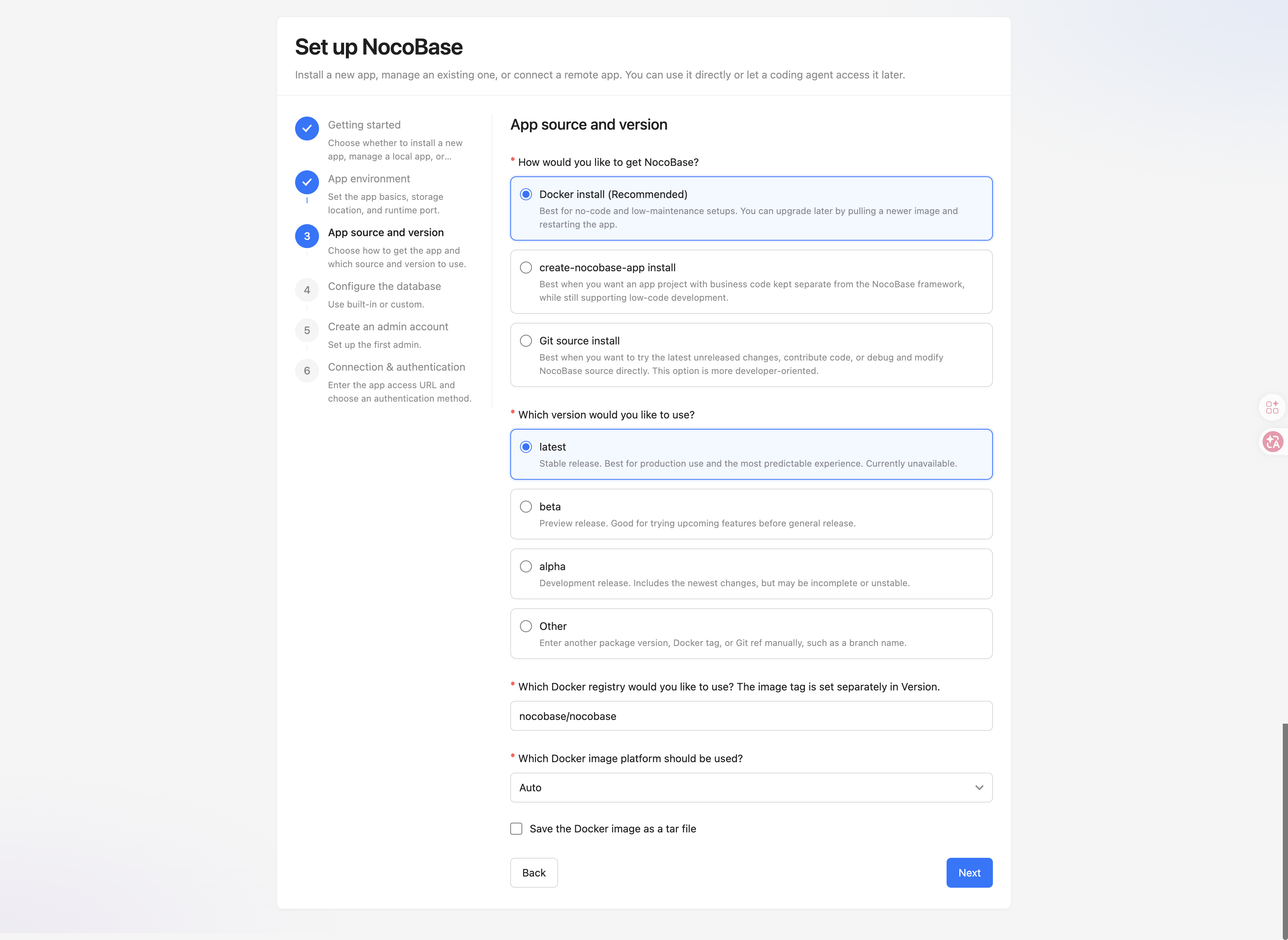
If you've already picked an installation method, the next step is [Install NocoBase App](/ai/install-nocobase-app). It walks you through installing NocoBase CLI and finishing the app installation and initialization.
|
|
@@ -11,6 +11,14 @@ Except for functionality validation or purely experimental scenarios, **we stron
|
|
|
11
11
|
|
|
12
12
|
The system configuration and capacity planning of those services must be evaluated and tuned separately based on the **actual data size, workload, and concurrency level**.
|
|
13
13
|
|
|
14
|
+
## Operating System
|
|
15
|
+
|
|
16
|
+
For production environments, Linux servers are recommended, such as Ubuntu LTS, Debian, Rocky Linux, or AlmaLinux. Docker, reverse proxy, process management, logging, and backup workflows are more mature on Linux and are easier to integrate with common cloud server environments.
|
|
17
|
+
|
|
18
|
+
NocoBase can also be installed on Windows Server. If you choose Windows Server, confirm Node.js, database, reverse proxy, process supervision, backup, file permissions, firewall, and related operations based on your actual deployment method.
|
|
19
|
+
|
|
20
|
+
macOS is usually more suitable for local development and testing, and is not recommended as a production server. If you are setting up NocoBase locally for development or AI Agent usage, see [Local Development Setup](../ai/local-development-setup.md).
|
|
21
|
+
|
|
14
22
|
## Single-Node Deployment Mode
|
|
15
23
|
|
|
16
24
|
Single-node deployment mode means the NocoBase application service runs on a single server or container instance.
|
|
@@ -85,4 +93,4 @@ In cluster mode, the recommended hardware configuration for each application nod
|
|
|
85
93
|
Recommendations for production environments:
|
|
86
94
|
|
|
87
95
|
- Adjust the node count dynamically based on monitoring metrics (CPU, memory, request latency, and so on).
|
|
88
|
-
- Reserve a resource buffer to handle traffic spikes.
|
|
96
|
+
- Reserve a resource buffer to handle traffic spikes.
|