@nocobase/plugin-ai 2.2.0-alpha.7 → 2.2.0-alpha.9
This diff represents the content of publicly available package versions that have been released to one of the supported registries. The information contained in this diff is provided for informational purposes only and reflects changes between package versions as they appear in their respective public registries.
- package/dist/ai/docs/nocobase/ai-employees/scenarios/company-background-research.md +125 -0
- package/dist/ai/docs/nocobase/building-tips/operations-dashboard.md +513 -0
- package/dist/ai/docs/nocobase/file-manager/stable-url.md +87 -0
- package/dist/ai/docs/nocobase/get-started/deployment/production.md +24 -2
- package/dist/ai/docs/nocobase/get-started/installation/docker-caddy.mdx +3 -0
- package/dist/ai/docs/nocobase/get-started/installation/docker-nginx.mdx +3 -0
- package/dist/ai/docs/nocobase/get-started/installation/docker.mdx +27 -3
- package/dist/ai/docs/nocobase/get-started/installation/env.md +33 -0
- package/dist/ai/docs/nocobase/index.md +1 -1
- package/dist/ai/docs/nocobase/interface-builder/index.md +7 -6
- package/dist/ai/docs/nocobase/interface-builder/ui-layout/desktop.md +97 -0
- package/dist/ai/docs/nocobase/interface-builder/ui-layout/index.md +50 -0
- package/dist/ai/docs/nocobase/interface-builder/ui-layout/mobile.md +133 -0
- package/dist/ai/docs/nocobase/multi-app/multi-app-vs-multi-portal-vs-multi-space.md +159 -0
- package/dist/ai/docs/nocobase/multi-app/multi-portal/index.md +195 -0
- package/dist/ai/docs/nocobase/nocobase-cli/production/index.md +10 -0
- package/dist/ai/docs/nocobase/nocobase-cli/production/reverse-proxy/caddy.md +15 -2
- package/dist/ai/docs/nocobase/nocobase-cli/production/reverse-proxy/index.md +1 -1
- package/dist/ai/docs/nocobase/nocobase-cli/production/reverse-proxy/nginx.md +16 -2
- package/dist/ai/docs/nocobase/runjs/context/ai.md +206 -0
- package/dist/ai/docs/nocobase/tutorials/index.md +20 -1
- package/dist/ai/tools/formFiller.js +4 -3
- package/dist/client/372.40eb52905e3f3049.js +10 -0
- package/dist/client/index.js +7 -7
- package/dist/client-v2/372.8cc3fde09c9bec77.js +10 -0
- package/dist/client-v2/ai-employees/chatbox/utils/normalizeTriggerTaskOptions.d.ts +19 -0
- package/dist/client-v2/ai-employees/chatbox/utils.d.ts +5 -0
- package/dist/client-v2/index.js +3 -3
- package/dist/client-v2/manager/ai-manager.d.ts +21 -0
- package/dist/client-v2/pages/EmployeesPage.d.ts +9 -0
- package/dist/client-v2/plugin.d.ts +1 -0
- package/dist/client-v2/runjs/registerAIEmployeeRunJSFacade.d.ts +20 -0
- package/dist/externalVersion.js +15 -15
- package/dist/locale/en-US.json +3 -0
- package/dist/locale/zh-CN.json +3 -0
- package/dist/node_modules/@langchain/mistralai/package.json +1 -1
- package/dist/node_modules/@langchain/xai/package.json +1 -1
- package/dist/node_modules/fs-extra/package.json +1 -1
- package/dist/node_modules/jsonrepair/package.json +1 -1
- package/dist/node_modules/just-bash/package.json +1 -1
- package/dist/node_modules/nodejs-snowflake/package.json +1 -1
- package/dist/node_modules/openai/package.json +1 -1
- package/dist/node_modules/zod/package.json +1 -1
- package/dist/server/ai-employees/ai-employee.d.ts +1 -0
- package/dist/server/ai-employees/ai-employee.js +30 -1
- package/dist/server/ai-employees/tool-call-sanitizer.d.ts +1 -0
- package/dist/server/ai-employees/tool-call-sanitizer.js +2 -1
- package/dist/server/ai-employees/utils.js +11 -5
- package/dist/server/attachments.d.ts +24 -0
- package/dist/server/attachments.js +204 -0
- package/dist/server/document-loader/cached.d.ts +1 -0
- package/dist/server/document-loader/cached.js +18 -9
- package/dist/server/document-loader/loader.d.ts +0 -1
- package/dist/server/document-loader/loader.js +25 -8
- package/dist/server/document-loader/types.d.ts +7 -0
- package/dist/server/llm-providers/anthropic.d.ts +2 -1
- package/dist/server/llm-providers/anthropic.js +1 -3
- package/dist/server/llm-providers/google-genai.d.ts +1 -1
- package/dist/server/llm-providers/google-genai.js +1 -5
- package/dist/server/llm-providers/provider.d.ts +3 -2
- package/dist/server/llm-providers/provider.js +26 -3
- package/dist/server/manager/ai-context-datasource-manager.js +34 -7
- package/dist/server/plugin.js +14 -0
- package/dist/server/resource/aiConversations.js +44 -1
- package/dist/server/utils.d.ts +5 -2
- package/dist/server/utils.js +11 -19
- package/dist/server/workflow/nodes/employee/files.d.ts +3 -1
- package/dist/server/workflow/nodes/employee/files.js +31 -5
- package/package.json +2 -2
- package/dist/client/372.da38fe350bf841f4.js +0 -10
- package/dist/client-v2/372.d76ea1ceed2be2a4.js +0 -10
|
@@ -0,0 +1,159 @@
|
|
|
1
|
+
# Multi-portal, Multi-app, and Multi-space
|
|
2
|
+
|
|
3
|
+
NocoBase provides three capabilities: Multi-portal, Multi-app, and Multi-space.
|
|
4
|
+
|
|
5
|
+
They solve problems at different levels. They can be used independently or together.
|
|
6
|
+
|
|
7
|
+
## Key differences
|
|
8
|
+
|
|
9
|
+
| Capability | Multi-portal | Multi-app | Multi-space |
|
|
10
|
+
|------|------|------|------|
|
|
11
|
+
| What problem it solves | Provides multiple access entries | Splits business into multiple systems | Isolates business data |
|
|
12
|
+
| Core focus | Where users enter | How the system is divided | Who the data belongs to |
|
|
13
|
+
| Data | Shared | Independent by default | Isolated |
|
|
14
|
+
| Pages and menus | Independent | Independent | Shared |
|
|
15
|
+
| Plugin configuration | Shared | Independent | Shared |
|
|
16
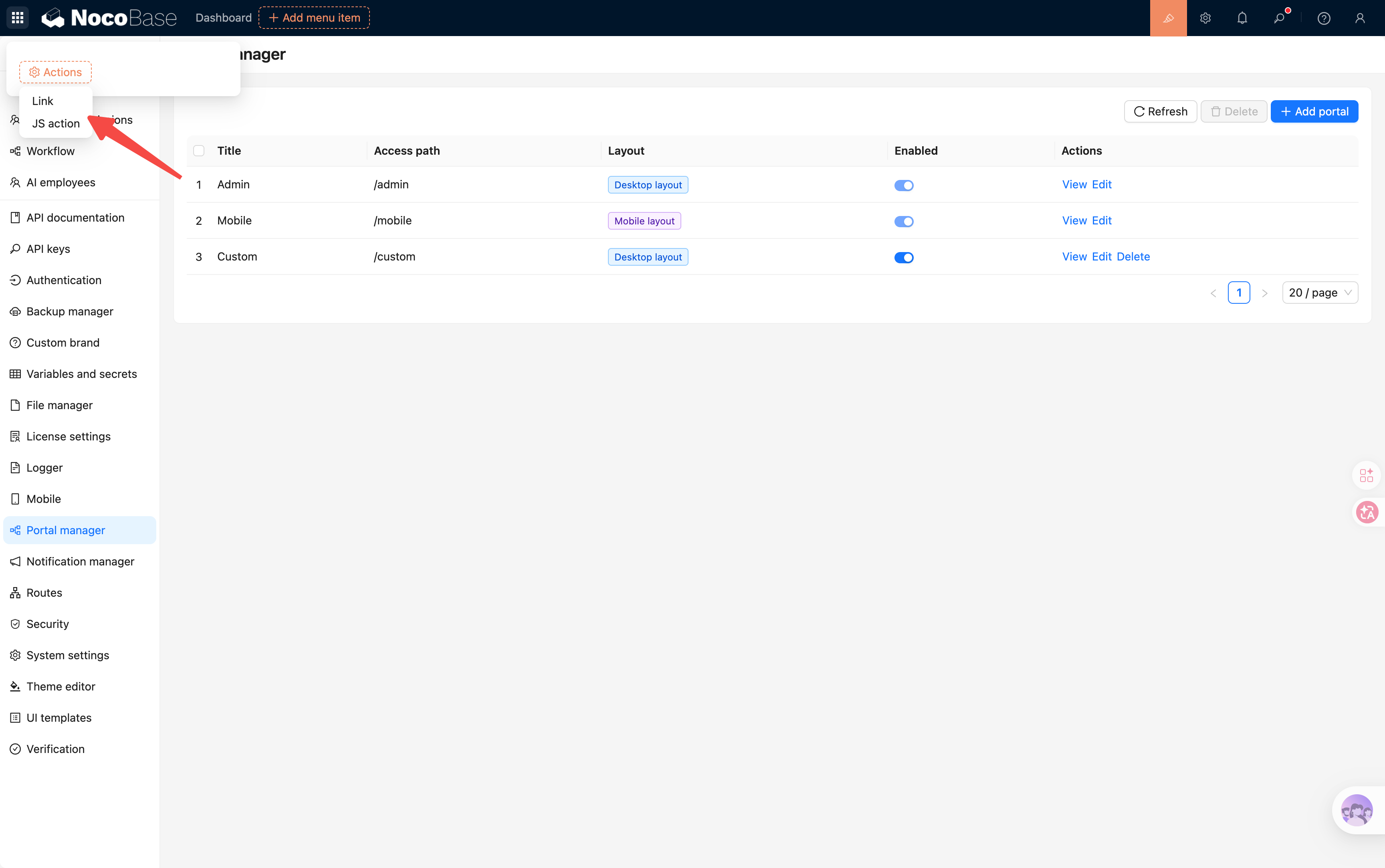
|
+
| User system | Shared | Can be shared through SSO | Shared |
|
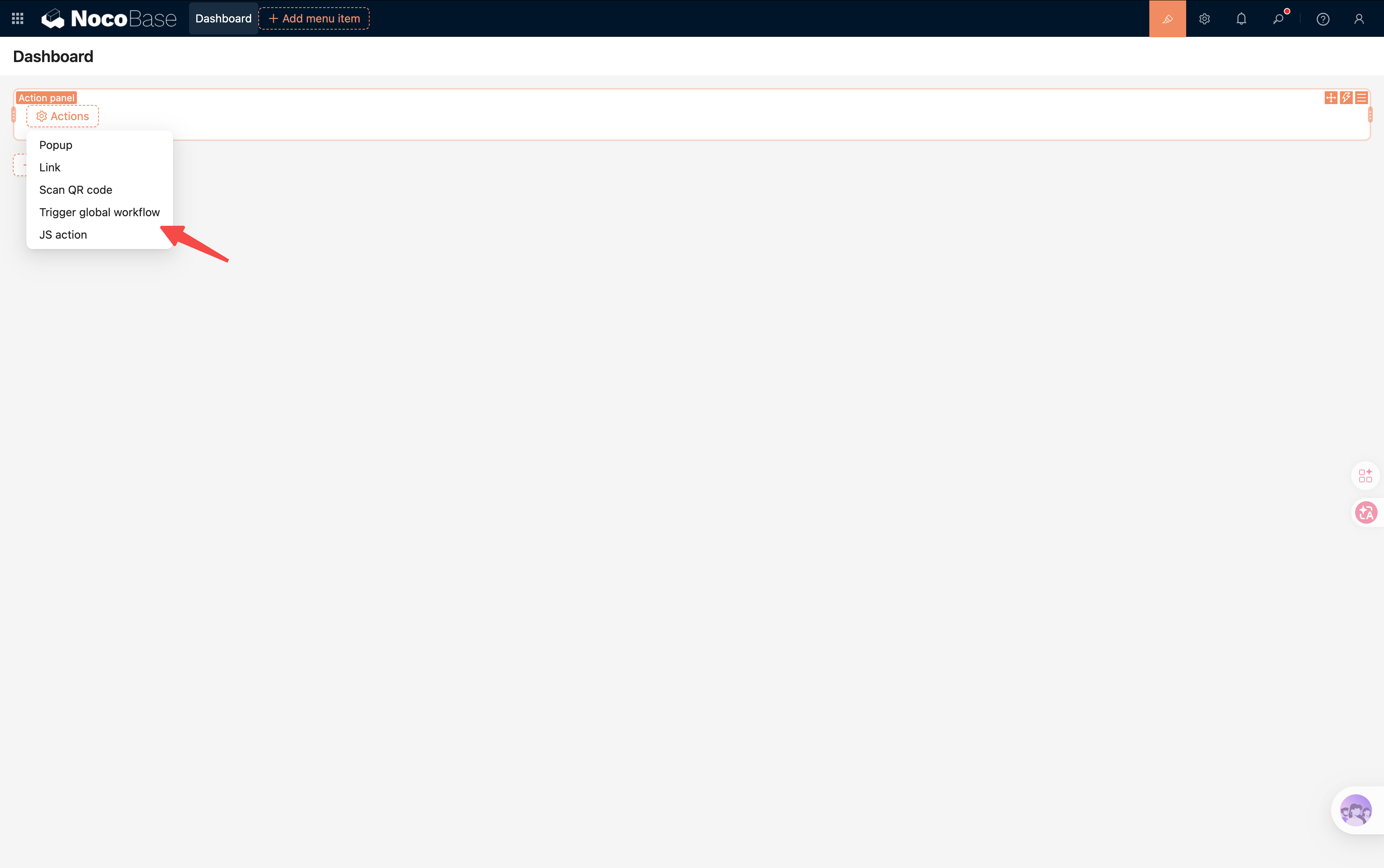
|
17
|
+
| Typical scenarios | Different roles need different entries | Different businesses need independent management | Multiple organizations, stores, or tenants |
|
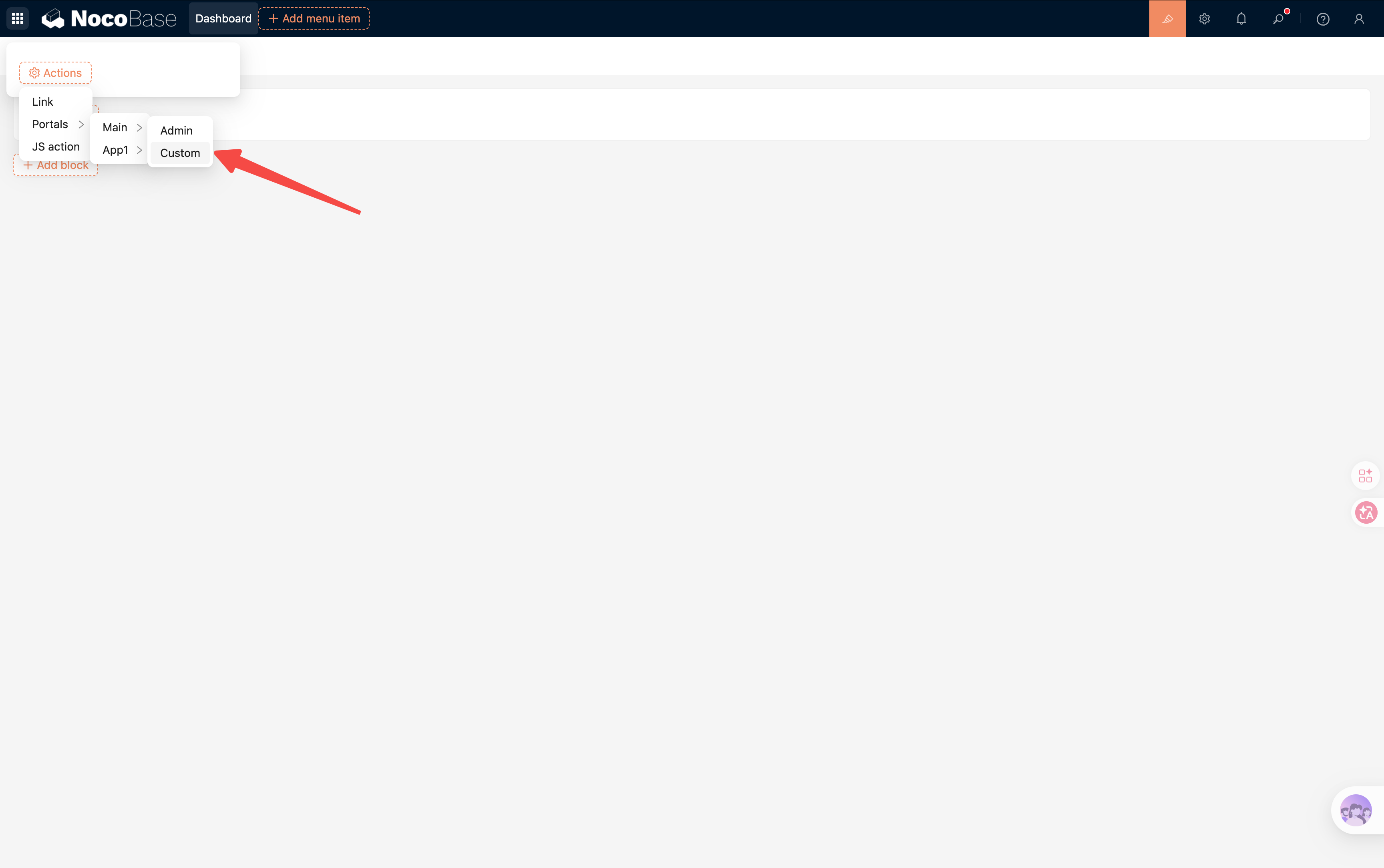
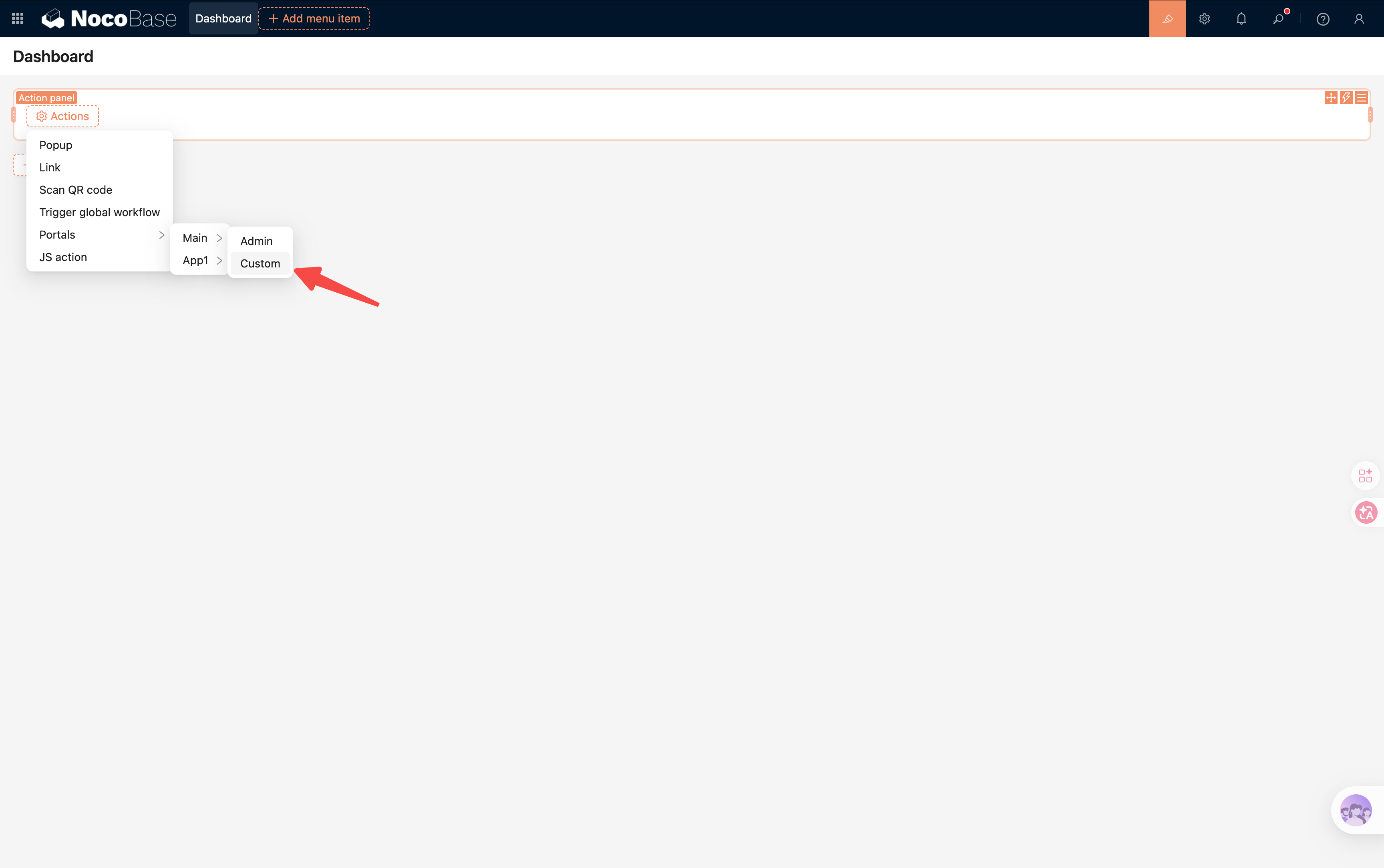
|
18
|
+
| Can be combined | Yes | Yes | Yes |
|
|
19
|
+
|
|
20
|
+
## Multi-portal
|
|
21
|
+
|
|
22
|
+
Multi-portal provides multiple access entries within the same application.
|
|
23
|
+
|
|
24
|
+
For example:
|
|
25
|
+
|
|
26
|
+
```text
|
|
27
|
+
ERP App
|
|
28
|
+
|
|
29
|
+
├─ Admin Portal (/v/admin)
|
|
30
|
+
├─ Store Portal (/v/store)
|
|
31
|
+
├─ Distributor Portal (/v/dealer)
|
|
32
|
+
└─ Mobile Portal (/v/mobile)
|
|
33
|
+
```
|
|
34
|
+
|
|
35
|
+
Features:
|
|
36
|
+
|
|
37
|
+
- Uses the same application
|
|
38
|
+
- Shares the same data
|
|
39
|
+
- Shares plugin configuration
|
|
40
|
+
- Pages and menus can be configured independently
|
|
41
|
+
|
|
42
|
+
Suitable for scenarios where different roles need different access entries, such as:
|
|
43
|
+
|
|
44
|
+
- Administrators
|
|
45
|
+
- Employees
|
|
46
|
+
- Customers
|
|
47
|
+
- Distributors
|
|
48
|
+
|
|
49
|
+
## Multi-app
|
|
50
|
+
|
|
51
|
+
Multi-app splits business into multiple independent applications.
|
|
52
|
+
|
|
53
|
+
For example:
|
|
54
|
+
|
|
55
|
+
```text
|
|
56
|
+
Group System
|
|
57
|
+
|
|
58
|
+
├─ CRM
|
|
59
|
+
├─ ERP
|
|
60
|
+
├─ OA
|
|
61
|
+
└─ Analytics
|
|
62
|
+
```
|
|
63
|
+
|
|
64
|
+
Features:
|
|
65
|
+
|
|
66
|
+
- Each app is managed independently
|
|
67
|
+
- Independent plugin configuration
|
|
68
|
+
- Independent database connection
|
|
69
|
+
- Independent upgrade and maintenance
|
|
70
|
+
|
|
71
|
+
Suitable for:
|
|
72
|
+
|
|
73
|
+
- Splitting large business systems
|
|
74
|
+
- Multi-team collaborative development
|
|
75
|
+
- Batch creation of apps for SaaS platforms
|
|
76
|
+
- Independent apps for different customers
|
|
77
|
+
|
|
78
|
+
## Multi-space
|
|
79
|
+
|
|
80
|
+
Multi-space isolates business data within the same application.
|
|
81
|
+
|
|
82
|
+
For example:
|
|
83
|
+
|
|
84
|
+
```text
|
|
85
|
+
Store Management App
|
|
86
|
+
|
|
87
|
+
Spaces
|
|
88
|
+
├─ Beijing Store
|
|
89
|
+
├─ Shanghai Store
|
|
90
|
+
└─ Shenzhen Store
|
|
91
|
+
```
|
|
92
|
+
|
|
93
|
+
Features:
|
|
94
|
+
|
|
95
|
+
- Shared pages
|
|
96
|
+
- Shared menus
|
|
97
|
+
- Shared workflows
|
|
98
|
+
- Shared configuration
|
|
99
|
+
- Isolated data
|
|
100
|
+
|
|
101
|
+
For tables that have a space field enabled, the system automatically filters data according to the current space.
|
|
102
|
+
|
|
103
|
+
From the user's perspective:
|
|
104
|
+
|
|
105
|
+
- The Beijing store can only see Beijing store data
|
|
106
|
+
- The Shanghai store can only see Shanghai store data
|
|
107
|
+
- The Shenzhen store can only see Shenzhen store data
|
|
108
|
+
|
|
109
|
+
But all stores still use the same system.
|
|
110
|
+
|
|
111
|
+
## Relationship among the three
|
|
112
|
+
|
|
113
|
+
These three capabilities do not conflict. They work on different dimensions.
|
|
114
|
+
|
|
115
|
+
They can be used together:
|
|
116
|
+
|
|
117
|
+
```text
|
|
118
|
+
Group System
|
|
119
|
+
|
|
120
|
+
CRM App
|
|
121
|
+
├─ Admin Portal
|
|
122
|
+
├─ Sales Portal
|
|
123
|
+
└─ Customer Portal
|
|
124
|
+
|
|
125
|
+
Spaces
|
|
126
|
+
├─ Beijing Branch
|
|
127
|
+
├─ Shanghai Branch
|
|
128
|
+
└─ Shenzhen Branch
|
|
129
|
+
```
|
|
130
|
+
|
|
131
|
+
Conceptually:
|
|
132
|
+
|
|
133
|
+
```text
|
|
134
|
+
Portal
|
|
135
|
+
↓
|
|
136
|
+
Where users enter the system
|
|
137
|
+
|
|
138
|
+
App
|
|
139
|
+
↓
|
|
140
|
+
How the system is divided
|
|
141
|
+
|
|
142
|
+
Space
|
|
143
|
+
↓
|
|
144
|
+
Who the data belongs to
|
|
145
|
+
```
|
|
146
|
+
|
|
147
|
+
## How to choose
|
|
148
|
+
|
|
149
|
+
If you only want to provide different entries for different roles, choose **Multi-portal**.
|
|
150
|
+
|
|
151
|
+
If you want to split business into multiple independent systems, choose **Multi-app**.
|
|
152
|
+
|
|
153
|
+
If you want to isolate data for different organizations or tenants within the same system, choose **Multi-space**.
|
|
154
|
+
|
|
155
|
+
In real projects, these three capabilities are usually combined rather than used as substitutes for one another.
|
|
156
|
+
|
|
157
|
+
In one sentence:
|
|
158
|
+
|
|
159
|
+
> Multi-portal solves entry points, Multi-app solves system splitting, and Multi-space solves data isolation.
|
|
@@ -0,0 +1,195 @@
|
|
|
1
|
+
---
|
|
2
|
+
title: "Multi-portal"
|
|
3
|
+
description: "Learn the concept, use cases, configuration, and relationship between Multi-portal, Multi-app, and Multi-space in NocoBase."
|
|
4
|
+
keywords: "workspace, portal, multi-portal, NocoBase"
|
|
5
|
+
pkg: "@nocobase/plugin-multi-portal"
|
|
6
|
+
---
|
|
7
|
+
|
|
8
|
+
# Multi-portal
|
|
9
|
+
|
|
10
|
+
## What is a portal
|
|
11
|
+
|
|
12
|
+
A portal is used to provide multiple access entries within the same application.
|
|
13
|
+
|
|
14
|
+
Each portal can have its own:
|
|
15
|
+
|
|
16
|
+
- Pages
|
|
17
|
+
- Menus
|
|
18
|
+
- Navigation structure
|
|
19
|
+
- Layout
|
|
20
|
+
- Permission settings
|
|
21
|
+
|
|
22
|
+
The Multi-portal plugin provides the following capabilities:
|
|
23
|
+
|
|
24
|
+
- Portal management
|
|
25
|
+
- Portal switching
|
|
26
|
+
- Portal permission control
|
|
27
|
+
|
|
28
|
+
With these capabilities, you can provide different experiences for different roles while sharing the same data and business capabilities.
|
|
29
|
+
|
|
30
|
+
## Why use portals
|
|
31
|
+
|
|
32
|
+
In real business scenarios, different roles often need different interfaces.
|
|
33
|
+
|
|
34
|
+
For example, in a retail management system:
|
|
35
|
+
|
|
36
|
+
```text
|
|
37
|
+
Retail Management System
|
|
38
|
+
|
|
39
|
+
├─ Headquarters Portal
|
|
40
|
+
├─ Store Portal
|
|
41
|
+
├─ Distributor Portal
|
|
42
|
+
└─ Mobile Portal
|
|
43
|
+
```
|
|
44
|
+
|
|
45
|
+
Headquarters staff focus on:
|
|
46
|
+
|
|
47
|
+
- Product management
|
|
48
|
+
- Inventory management
|
|
49
|
+
- Data analysis
|
|
50
|
+
|
|
51
|
+
Store staff focus on:
|
|
52
|
+
|
|
53
|
+
- Cashiering
|
|
54
|
+
- Stocktaking
|
|
55
|
+
- Order processing
|
|
56
|
+
|
|
57
|
+
Distributors focus on:
|
|
58
|
+
|
|
59
|
+
- Purchasing
|
|
60
|
+
- Reconciliation
|
|
61
|
+
- Shipment status
|
|
62
|
+
|
|
63
|
+
Although everyone uses the same system, different roles do not need to see the same menus and pages.
|
|
64
|
+
|
|
65
|
+
That is exactly the problem portals solve.
|
|
66
|
+
|
|
67
|
+
## Relationship between portals and menus
|
|
68
|
+
|
|
69
|
+
Each portal has its own menu tree.
|
|
70
|
+
|
|
71
|
+
Menus in different portals do not affect each other.
|
|
72
|
+
|
|
73
|
+
For example:
|
|
74
|
+
|
|
75
|
+
```text
|
|
76
|
+
Headquarters Portal
|
|
77
|
+
├─ Product Management
|
|
78
|
+
├─ Supply Chain Management
|
|
79
|
+
└─ Data Analysis
|
|
80
|
+
|
|
81
|
+
Store Portal
|
|
82
|
+
├─ Cashiering
|
|
83
|
+
├─ Order Management
|
|
84
|
+
└─ Stocktaking
|
|
85
|
+
```
|
|
86
|
+
|
|
87
|
+
## Relationship between portals and pages
|
|
88
|
+
|
|
89
|
+
Pages belong to their respective portals.
|
|
90
|
+
|
|
91
|
+
The same page can also be shown only in specific portals.
|
|
92
|
+
|
|
93
|
+
This makes it possible to design completely different workflows for different roles.
|
|
94
|
+
|
|
95
|
+
## Relationship between portals and permissions
|
|
96
|
+
|
|
97
|
+
Portals themselves can be configured with access permissions.
|
|
98
|
+
|
|
99
|
+
Only authorized users can access the corresponding portal.
|
|
100
|
+
|
|
101
|
+
Unauthorized portals:
|
|
102
|
+
|
|
103
|
+
- Do not appear in the switcher list
|
|
104
|
+
- Cannot be accessed directly
|
|
105
|
+
|
|
106
|
+
## Portal management
|
|
107
|
+
|
|
108
|
+
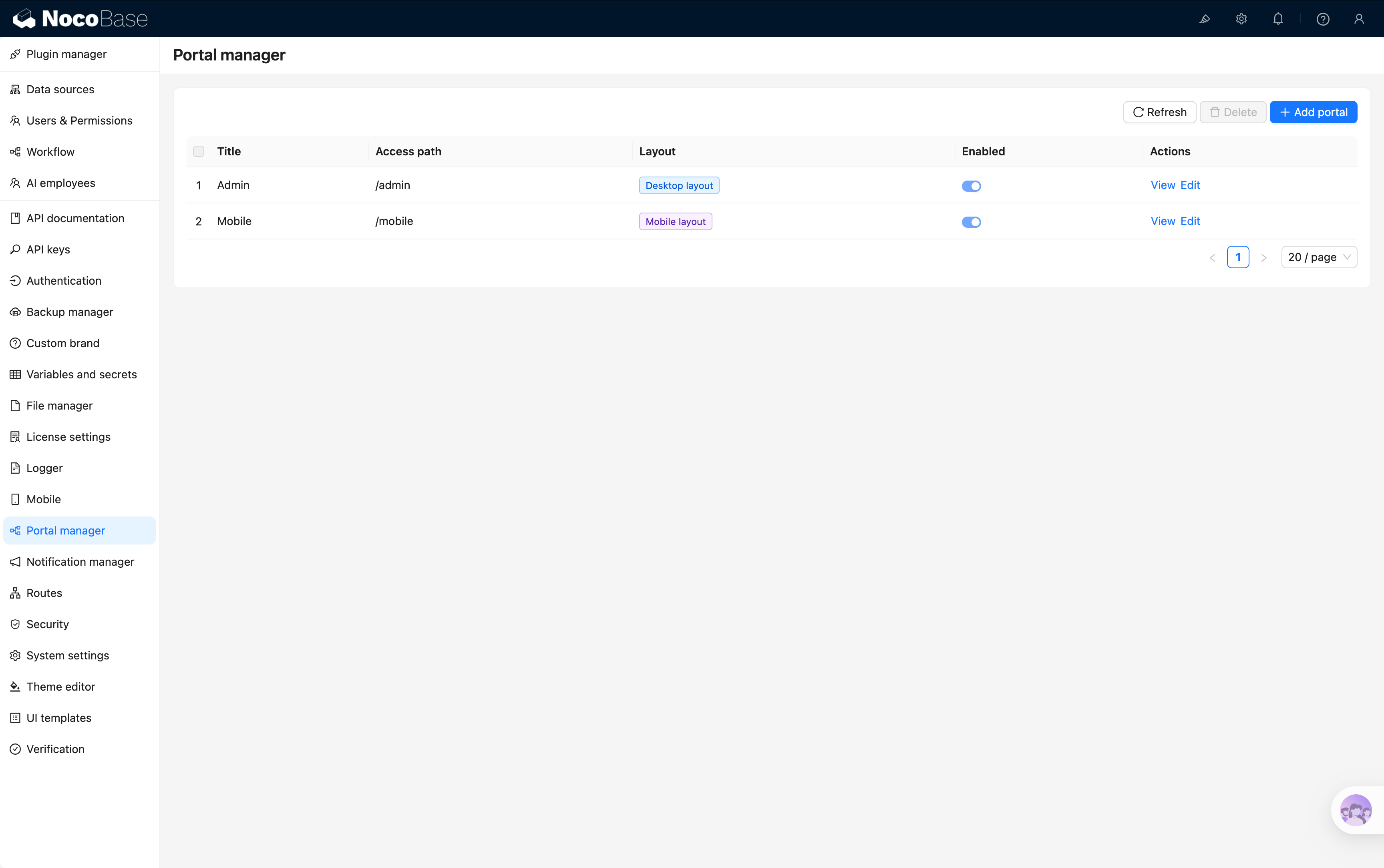
After enabling the Multi-portal plugin, the system provides two built-in portals by default:
|
|
109
|
+
|
|
110
|
+
| Portal | Path | Purpose |
|
|
111
|
+
|----------|----------|----------|
|
|
112
|
+
| Desktop | `/v/admin` | Desktop entry |
|
|
113
|
+
| Mobile | `/v/mobile` | Mobile entry |
|
|
114
|
+
|
|
115
|
+
### Built-in portals
|
|
116
|
+
|
|
117
|
+
|
|
118
|
+
|
|
119
|
+
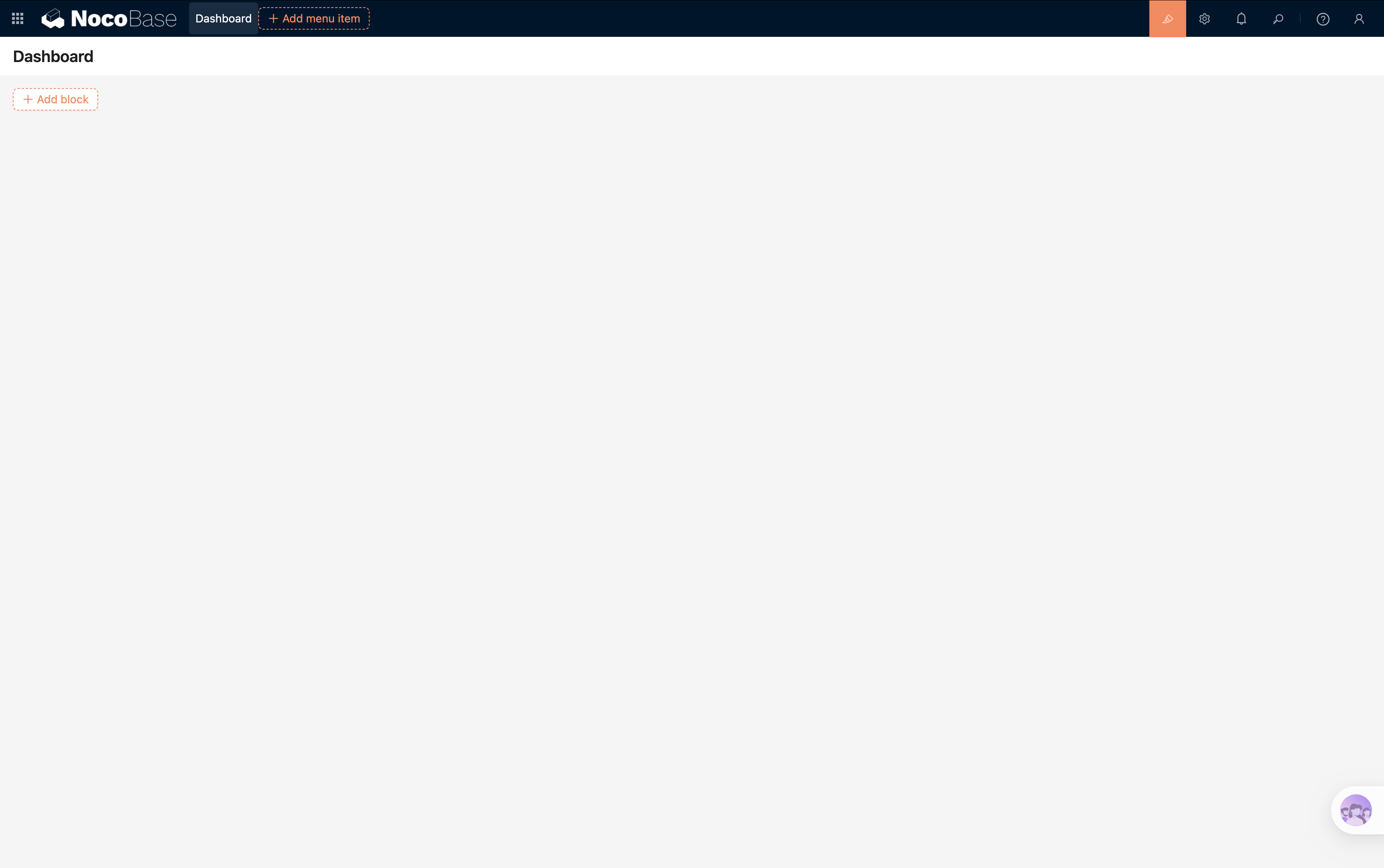
### Desktop portal
|
|
120
|
+
|
|
121
|
+
Access path:
|
|
122
|
+
|
|
123
|
+
```text
|
|
124
|
+
/v/admin
|
|
125
|
+
```
|
|
126
|
+
|
|
127
|
+
|
|
128
|
+
|
|
129
|
+
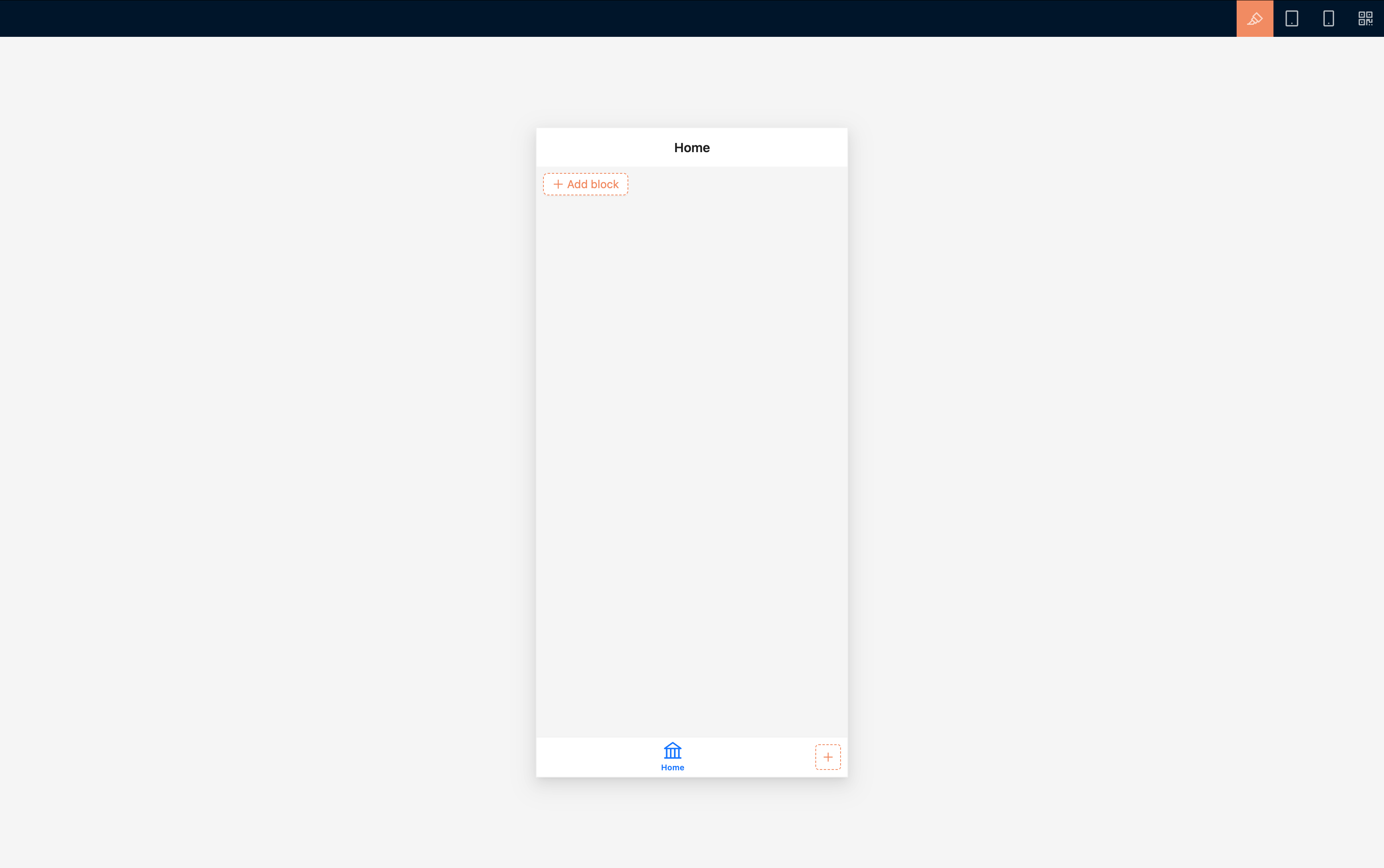
### Mobile portal
|
|
130
|
+
|
|
131
|
+
Access path:
|
|
132
|
+
|
|
133
|
+
```text
|
|
134
|
+
/v/mobile
|
|
135
|
+
```
|
|
136
|
+
|
|
137
|
+
|
|
138
|
+
|
|
139
|
+
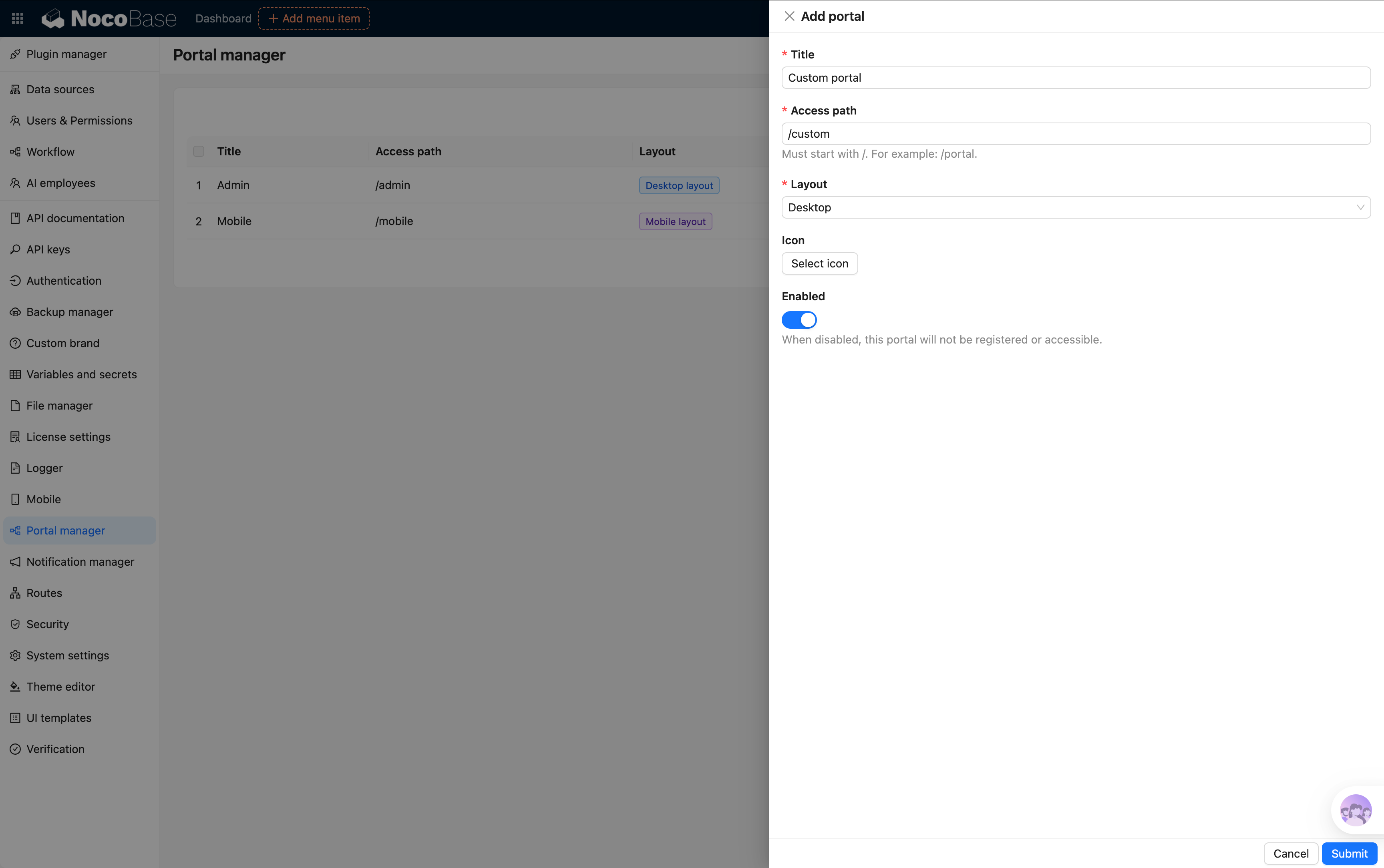
## Create a portal
|
|
140
|
+
|
|
141
|
+
In addition to the built-in portals, you can create more portals based on business needs.
|
|
142
|
+
|
|
143
|
+
For example:
|
|
144
|
+
|
|
145
|
+
- Store portal
|
|
146
|
+
- Distributor portal
|
|
147
|
+
- Customer service portal
|
|
148
|
+
- Data analysis portal
|
|
149
|
+
|
|
150
|
+
After creation, you can configure:
|
|
151
|
+
|
|
152
|
+
- Pages
|
|
153
|
+
- Menus
|
|
154
|
+
- Permissions
|
|
155
|
+
- Navigation
|
|
156
|
+
|
|
157
|
+
|
|
158
|
+
|
|
159
|
+
## Switch portals
|
|
160
|
+
|
|
161
|
+
Users can quickly switch between portals through the portal switcher.
|
|
162
|
+
|
|
163
|
+
### Switch portals within a single app
|
|
164
|
+
|
|
165
|
+
Add it to the portal switcher panel in the upper-left corner
|
|
166
|
+
|
|
167
|
+
|
|
168
|
+
|
|
169
|
+
Add it to the action panel block
|
|
170
|
+
|
|
171
|
+
|
|
172
|
+
|
|
173
|
+
### Switch portals across apps
|
|
174
|
+
|
|
175
|
+
After enabling Multi-app and configuring SSO, users can also switch between portals across different apps through the portal switcher.
|
|
176
|
+
|
|
177
|
+
Add it to the portal switcher panel in the upper-left corner
|
|
178
|
+
|
|
179
|
+
|
|
180
|
+
|
|
181
|
+
Add it to the action panel block
|
|
182
|
+
|
|
183
|
+
|
|
184
|
+
|
|
185
|
+
## Portal permissions
|
|
186
|
+
|
|
187
|
+
You can control which portals a user can access through role permissions.
|
|
188
|
+
|
|
189
|
+
Unauthorized portals do not appear in the portal switcher list, and users cannot access those entries directly.
|
|
190
|
+
|
|
191
|
+
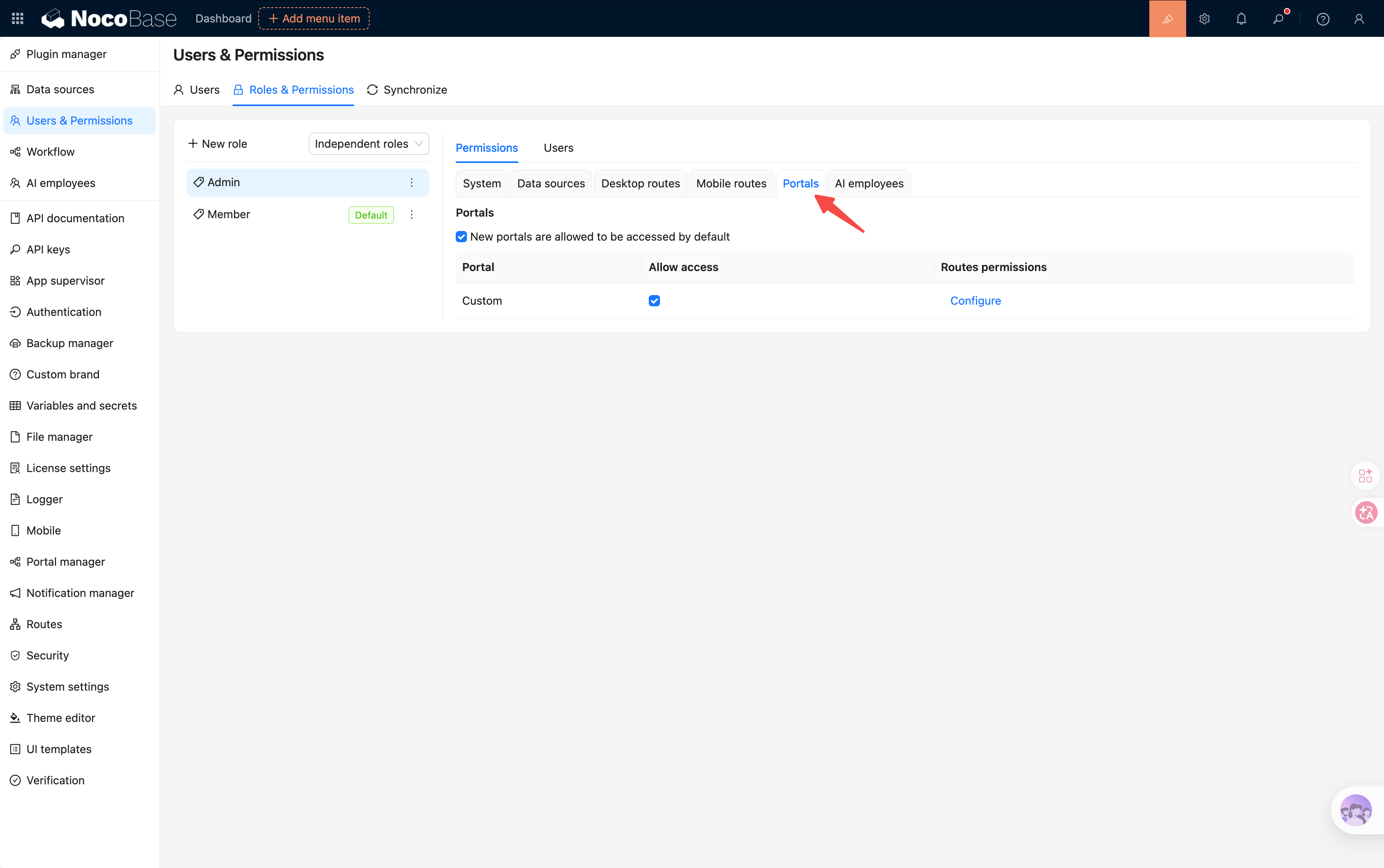
|
|
192
|
+
|
|
193
|
+
## Related links
|
|
194
|
+
|
|
195
|
+
For the differences and combination patterns among Multi-portal, Multi-app, and Multi-space, see: [Multi-portal, Multi-app, and Multi-space](../multi-app-vs-multi-portal-vs-multi-space.md).
|
|
@@ -69,6 +69,16 @@ If you happen to be stuck here "Why do you need `nb app autostart`", just contin
|
|
|
69
69
|
- If you are going to connect to the reverse proxy, `appPort` has been saved in env
|
|
70
70
|
- If you are ready to officially open it to the outside world, you have already planned the domain name, entrance port and HTTPS solution.
|
|
71
71
|
|
|
72
|
+
:::warning Note
|
|
73
|
+
|
|
74
|
+
Use a different `hostname`, such as a separate subdomain, for each independent NocoBase service. Do not distinguish services only by port. Browser cookies are not isolated by port, so services under the same `hostname` may overwrite login state and affect [stable URL](../../file-manager/stable-url.md) authorization.
|
|
75
|
+
|
|
76
|
+
Sub-apps within the same NocoBase deployment are distinguished by app name and do not need separate hostnames. However, if another independent NocoBase service runs on a different port under the same `hostname` and contains a main app or sub-app with the same name, its cookies may still conflict.
|
|
77
|
+
|
|
78
|
+
For example, use `app1.example.com` and `app2.example.com` instead of `example.com:13000` and `example.com:14000`.
|
|
79
|
+
|
|
80
|
+
:::
|
|
81
|
+
|
|
72
82
|
If you have not completed the CLI installation or env initialization, go back to [Install using CLI](../installation/cli.md).
|
|
73
83
|
|
|
74
84
|
If the command prompts that env is missing `appPort`, first execute [`nb env update`](../../api/cli/env/update.md) to fill it in.
|
|
@@ -124,7 +124,7 @@ If you want to make up for Caddy site-level configuration, such as additional he
|
|
|
124
124
|
|
|
125
125
|
If your application is not CLI hosted, or you explicitly want to maintain the complete Caddy configuration yourself, you can also write it by hand.
|
|
126
126
|
|
|
127
|
-
However, for NocoBase, the production environment entry is usually not just a simple `reverse_proxy`. In addition to forwarding API requests to the backend application, a complete and working Caddy configuration usually also needs to handle the upload directory, front-end static resources, `.well-known` routing, WebSocket, and SPA fallback
|
|
127
|
+
However, for NocoBase, the production environment entry is usually not just a simple `reverse_proxy`. In addition to forwarding API requests to the backend application, a complete and working Caddy configuration usually also needs to handle the upload directory, front-end static resources, the `/files/` file access route, `.well-known` routing, WebSocket, and SPA fallback pages.
|
|
128
128
|
|
|
129
129
|
Taking `test2` as an example, key directories related to Caddy usually include:
|
|
130
130
|
|
|
@@ -139,6 +139,7 @@ In other words, handwritten configuration usually needs to cover at least the fo
|
|
|
139
139
|
- `dist`: Expose the front-end build product directory
|
|
140
140
|
- `oauth well-known`: Handle OAuth discovery paths
|
|
141
141
|
- `openid well-known`: Handle OpenID discovery paths
|
|
142
|
+
- `files`: Forward file access requests under `/files/` to the backend application
|
|
142
143
|
- `api`: forward `/api/` request to the backend application
|
|
143
144
|
- `ws`: forward WebSocket requests to the backend application
|
|
144
145
|
- `spa v2`: Provides front-end entry and return page for `/v/`
|
|
@@ -187,6 +188,10 @@ c.local.nocobase.com {
|
|
|
187
188
|
reverse_proxy host.docker.internal:56575
|
|
188
189
|
}
|
|
189
190
|
|
|
191
|
+
handle /files/* {
|
|
192
|
+
reverse_proxy host.docker.internal:56575
|
|
193
|
+
}
|
|
194
|
+
|
|
190
195
|
handle /api/* {
|
|
191
196
|
reverse_proxy host.docker.internal:56575
|
|
192
197
|
}
|
|
@@ -249,7 +254,15 @@ A more prudent approach is usually:
|
|
|
249
254
|
2. Confirm the routing structure and actual path based on the generated results.
|
|
250
255
|
3. Then make manual adjustments according to your domain name, running mode and mounting path.
|
|
251
256
|
|
|
252
|
-
This is usually less likely to miss details related to WebSockets, static resources, upload directories, `.well-known` routes, or SPA fallback pages than handwriting a configuration from scratch.
|
|
257
|
+
This is usually less likely to miss details related to `/files/`, WebSockets, static resources, upload directories, `.well-known` routes, or SPA fallback pages than handwriting a configuration from scratch.
|
|
258
|
+
|
|
259
|
+
:::warning Note
|
|
260
|
+
|
|
261
|
+
`/files/` is an application route that must pass through NocoBase authorization. Do not handle it as a static directory or let it fall through to the SPA fallback. Forward it to the NocoBase backend and place the rule before `handle_path /*` and other front-end fallback rules.
|
|
262
|
+
|
|
263
|
+
If `APP_PUBLIC_PATH=/nocobase/` is configured, also forward `/nocobase/files/*`. Keep the root-level `/files/*` rule for compatibility with existing file URLs.
|
|
264
|
+
|
|
265
|
+
:::
|
|
253
266
|
|
|
254
267
|
## Check and reload configuration
|
|
255
268
|
|
|
@@ -9,7 +9,7 @@ keywords: "NocoBase,nb proxy nginx,nb proxy caddy, reverse proxy, Nginx, Caddy,
|
|
|
9
9
|
|
|
10
10
|
This article only applies to applications installed using `nb init`.
|
|
11
11
|
|
|
12
|
-
In NocoBase, the production environment reverse proxy does more than simply forward requests to the application process.
|
|
12
|
+
In NocoBase, the production environment reverse proxy does more than simply forward requests to the application process. It also needs to handle WebSockets, subpaths, front-end static resources, upload directories, the `/files/` file access route, and SPA fallback pages.
|
|
13
13
|
|
|
14
14
|
The function of `nb proxy` is to collect these easily missed details into a stable set of command entries.
|
|
15
15
|
|
|
@@ -122,7 +122,7 @@ If you want to add site-level Nginx configuration, such as current limiting, add
|
|
|
122
122
|
|
|
123
123
|
If your application is not CLI hosted, or you explicitly want to maintain the complete Nginx configuration yourself, you can also write it by hand.
|
|
124
124
|
|
|
125
|
-
However, for NocoBase, the production reverse proxy is usually more than a simple `proxy_pass`. In addition to forwarding API requests to the backend application, a complete and usable configuration usually needs to handle the upload directory, front-end static resources, WebSocket, `.well-known` route, and SPA fallback
|
|
125
|
+
However, for NocoBase, the production reverse proxy is usually more than a simple `proxy_pass`. In addition to forwarding API requests to the backend application, a complete and usable configuration usually needs to handle the upload directory, front-end static resources, the `/files/` file access route, WebSocket, the `.well-known` route, and SPA fallback pages.
|
|
126
126
|
|
|
127
127
|
Taking `test2` as an example, key files and directories related to Nginx usually include:
|
|
128
128
|
|
|
@@ -138,6 +138,7 @@ In other words, handwritten configuration usually needs to cover at least the fo
|
|
|
138
138
|
- `uploads`: Expose the upload directory through `alias`
|
|
139
139
|
- `dist`: Expose the front-end build product directory through `alias`
|
|
140
140
|
- `well-known`: Handle OAuth / OpenID related discovery paths
|
|
141
|
+
- `files`: Forward file access requests under `/files/` to the backend application
|
|
141
142
|
- `api`: forward `/api/` request to the backend application
|
|
142
143
|
- `ws`: forward WebSocket requests to the backend application
|
|
143
144
|
- `spa`: Provides front-end entry and `try_files` fallback for `/` and `/v/`
|
|
@@ -180,6 +181,11 @@ server {
|
|
|
180
181
|
include NB_CLI_ROOT/.nocobase/proxy/nginx/snippets/proxy-location.conf;
|
|
181
182
|
}
|
|
182
183
|
|
|
184
|
+
location ^~ /files/ {
|
|
185
|
+
proxy_pass http://127.0.0.1:56575;
|
|
186
|
+
include NB_CLI_ROOT/.nocobase/proxy/nginx/snippets/proxy-location.conf;
|
|
187
|
+
}
|
|
188
|
+
|
|
183
189
|
location ^~ /api/ {
|
|
184
190
|
proxy_pass http://127.0.0.1:56575;
|
|
185
191
|
include NB_CLI_ROOT/.nocobase/proxy/nginx/snippets/proxy-location.conf;
|
|
@@ -229,7 +235,15 @@ A more prudent approach is usually:
|
|
|
229
235
|
2. Confirm the routing structure and actual path based on the generated results.
|
|
230
236
|
3. Then make manual adjustments according to your domain name, running mode and mounting path.
|
|
231
237
|
|
|
232
|
-
This is usually less likely to miss details related to WebSockets, static resources, upload directories, or SPA fallback pages than handwriting a configuration from scratch.
|
|
238
|
+
This is usually less likely to miss details related to `/files/`, WebSockets, static resources, upload directories, or SPA fallback pages than handwriting a configuration from scratch.
|
|
239
|
+
|
|
240
|
+
:::warning Note
|
|
241
|
+
|
|
242
|
+
`/files/` is an application route that must pass through NocoBase authorization. Do not handle it as a static directory or let it fall through to the SPA fallback. Forward it to the NocoBase backend and place the rule before `location /` and other front-end fallback rules.
|
|
243
|
+
|
|
244
|
+
If `APP_PUBLIC_PATH=/nocobase/` is configured, also forward `/nocobase/files/`. Keep the root-level `/files/` rule for compatibility with existing file URLs.
|
|
245
|
+
|
|
246
|
+
:::
|
|
233
247
|
|
|
234
248
|
## How to handle HTTPS
|
|
235
249
|
|
|
@@ -0,0 +1,206 @@
|
|
|
1
|
+
---
|
|
2
|
+
title: "ctx.ai"
|
|
3
|
+
description: "Use ctx.ai in RunJS to trigger AI employee tasks, either with inline task content or with tasks configured on an AI employee action."
|
|
4
|
+
keywords: "ctx.ai,AI employee,triggerTask,triggerModelTask,RunJS,NocoBase"
|
|
5
|
+
---
|
|
6
|
+
|
|
7
|
+
# ctx.ai
|
|
8
|
+
|
|
9
|
+
Use `ctx.ai` in RunJS to trigger **AI employee tasks**. It works well in JSBlock, JSAction, and other interactions where a button, form, or business flow needs to hand work to a specific AI employee.
|
|
10
|
+
|
|
11
|
+
`ctx.ai` only triggers tasks. It does not return the execution result of the AI employee task. After the call, the task enters the AI employee conversation flow, and the result is handled by the AI employee session.
|
|
12
|
+
|
|
13
|
+
:::warning Note
|
|
14
|
+
|
|
15
|
+
`ctx.ai` is provided by the AI plugin. If the AI plugin is not enabled, or the current RunJS environment has not loaded the corresponding client capability, `ctx.ai` may not exist. You can check `ctx.ai?.triggerTask` or `ctx.ai?.triggerModelTask` before calling it.
|
|
16
|
+
|
|
17
|
+
:::
|
|
18
|
+
|
|
19
|
+
## Methods
|
|
20
|
+
|
|
21
|
+
### ctx.ai.triggerTask()
|
|
22
|
+
|
|
23
|
+
Trigger an AI employee task directly.
|
|
24
|
+
|
|
25
|
+
```ts
|
|
26
|
+
ctx.ai.triggerTask(options: TriggerTaskOptions): void
|
|
27
|
+
```
|
|
28
|
+
|
|
29
|
+
| Parameter | Type | Description |
|
|
30
|
+
|------|------|------|
|
|
31
|
+
| `aiEmployee` | `string \| AIEmployee` | AI employee. When a string is passed, NocoBase matches `AIEmployee.username` exactly, and the AI employee must be accessible to the current user. |
|
|
32
|
+
| `tasks` | `Task[]` | Tasks to trigger. |
|
|
33
|
+
| `open` | `boolean` | Whether to open the AI employee conversation panel. |
|
|
34
|
+
| `auto` | `boolean` | Whether to use the auto-trigger semantics of an AI employee action. |
|
|
35
|
+
|
|
36
|
+
Common `Task` fields:
|
|
37
|
+
|
|
38
|
+
| Field | Type | Description |
|
|
39
|
+
|------|------|------|
|
|
40
|
+
| `title` | `string` | Task title. |
|
|
41
|
+
| `message.system` | `string` | System message, used to constrain the AI employee's role and output requirements. |
|
|
42
|
+
| `message.user` | `string` | User message, which is the main instruction for this task. |
|
|
43
|
+
| `message.workContext` | `ContextItem[]` | Page block context used by the task. |
|
|
44
|
+
| `autoSend` | `boolean` | Whether to send the task message automatically. |
|
|
45
|
+
| `webSearch` | `boolean` | Whether Web search is allowed for this task. |
|
|
46
|
+
| `model` | `{ llmService: string; model: string } \| null` | Model used by this task. |
|
|
47
|
+
| `skillSettings` | `SkillSettings` | Skills and tools available to this task. |
|
|
48
|
+
|
|
49
|
+
### Add Page Block Context
|
|
50
|
+
|
|
51
|
+
`message.workContext` currently passes page blocks. Put the FlowModel uid of the target page block into it:
|
|
52
|
+
|
|
53
|
+
```ts
|
|
54
|
+
message: {
|
|
55
|
+
user: 'Review the current users table and summarize operational risks.',
|
|
56
|
+
workContext: [
|
|
57
|
+
{
|
|
58
|
+
type: 'flow-model',
|
|
59
|
+
uid: 'USERS_TABLE_BLOCK_UID',
|
|
60
|
+
},
|
|
61
|
+
],
|
|
62
|
+
}
|
|
63
|
+
```
|
|
64
|
+
|
|
65
|
+
| Field | Description |
|
|
66
|
+
|------|------|
|
|
67
|
+
| `type` | Fixed to `flow-model`, meaning this item is a page block context. |
|
|
68
|
+
| `uid` | FlowModel uid of the page block, such as a table block, detail block, or chart block. |
|
|
69
|
+
|
|
70
|
+
If you want to use the current JSBlock itself as context, use the current model uid:
|
|
71
|
+
|
|
72
|
+
```ts
|
|
73
|
+
workContext: [
|
|
74
|
+
{
|
|
75
|
+
type: 'flow-model',
|
|
76
|
+
uid: ctx.model.uid,
|
|
77
|
+
},
|
|
78
|
+
],
|
|
79
|
+
```
|
|
80
|
+
|
|
81
|
+
Usually, `message.workContext` should be placed inside the `message` of a concrete task. `triggerModelTask()` reuses the task configured on the target AI employee action, so it also reads `message.workContext` from that task.
|
|
82
|
+
|
|
83
|
+
### Specify Model
|
|
84
|
+
|
|
85
|
+
`model` specifies the model for a single task. If omitted, the AI employee's default model configuration is used. Passing `null` means no task-level model is specified.
|
|
86
|
+
|
|
87
|
+
```ts
|
|
88
|
+
model: {
|
|
89
|
+
llmService: 'openai-main',
|
|
90
|
+
model: 'gpt-4.1',
|
|
91
|
+
}
|
|
92
|
+
```
|
|
93
|
+
|
|
94
|
+
### Configure Skills / Tools
|
|
95
|
+
|
|
96
|
+
`skillSettings` specifies the skills and tools available to a single task. If omitted, the AI employee's own capability configuration is used.
|
|
97
|
+
|
|
98
|
+
```ts
|
|
99
|
+
skillSettings: {
|
|
100
|
+
skillsVersion: 2,
|
|
101
|
+
toolsVersion: 2,
|
|
102
|
+
skills: ['business-analysis-report'],
|
|
103
|
+
tools: ['businessReportGenerator'],
|
|
104
|
+
}
|
|
105
|
+
```
|
|
106
|
+
|
|
107
|
+
To explicitly disable all skills or tools for this task, pass empty arrays and keep the version fields:
|
|
108
|
+
|
|
109
|
+
```ts
|
|
110
|
+
skillSettings: {
|
|
111
|
+
skillsVersion: 2,
|
|
112
|
+
toolsVersion: 2,
|
|
113
|
+
skills: [],
|
|
114
|
+
tools: [],
|
|
115
|
+
}
|
|
116
|
+
```
|
|
117
|
+
|
|
118
|
+
The following example asks `viz` to generate a handoff brief and opens the AI employee conversation panel:
|
|
119
|
+
|
|
120
|
+
```ts
|
|
121
|
+
if (!ctx.ai?.triggerTask) {
|
|
122
|
+
ctx.message.error(ctx.t('AI employee task API is not available.'));
|
|
123
|
+
return;
|
|
124
|
+
}
|
|
125
|
+
|
|
126
|
+
ctx.ai.triggerTask({
|
|
127
|
+
aiEmployee: 'viz',
|
|
128
|
+
open: true,
|
|
129
|
+
tasks: [
|
|
130
|
+
{
|
|
131
|
+
title: ctx.t('Daily operations handoff brief'),
|
|
132
|
+
message: {
|
|
133
|
+
system:
|
|
134
|
+
'You prepare reusable daily operations handoff briefs. Focus on risks, blockers, decisions, owners, and next actions.',
|
|
135
|
+
user: [
|
|
136
|
+
"Prepare today's operations handoff brief.",
|
|
137
|
+
'Cover customer escalations, SLA risks, approvals, and follow-up owners.',
|
|
138
|
+
'Return a concise brief that can be posted to the team channel.',
|
|
139
|
+
].join('\n'),
|
|
140
|
+
},
|
|
141
|
+
autoSend: true,
|
|
142
|
+
webSearch: false,
|
|
143
|
+
},
|
|
144
|
+
],
|
|
145
|
+
});
|
|
146
|
+
|
|
147
|
+
ctx.message.success(ctx.t('AI employee task triggered.'));
|
|
148
|
+
```
|
|
149
|
+
|
|
150
|
+
If `aiEmployee` is a string, NocoBase matches accessible AI employees by `username` exactly. If no match is found, the task is not triggered and a warning is printed to the console.
|
|
151
|
+
|
|
152
|
+
### ctx.ai.triggerModelTask()
|
|
153
|
+
|
|
154
|
+
Read a task from an AI employee action model on the page and trigger it.
|
|
155
|
+
|
|
156
|
+
```ts
|
|
157
|
+
ctx.ai.triggerModelTask(uid: string, taskIndex: number, options?: TriggerModelTaskOptions): void
|
|
158
|
+
```
|
|
159
|
+
|
|
160
|
+
| Parameter | Type | Description |
|
|
161
|
+
|------|------|------|
|
|
162
|
+
| `uid` | `string` | FlowModel uid of the AI employee action. |
|
|
163
|
+
| `taskIndex` | `number` | Task index, starting from `0`. |
|
|
164
|
+
| `options.open` | `boolean` | Whether to open the AI employee conversation panel. |
|
|
165
|
+
| `options.auto` | `boolean` | Whether to use the auto-trigger semantics of an AI employee action. |
|
|
166
|
+
|
|
167
|
+
This method reads the AI employee and task configuration from the target model. It is useful when the task has already been configured on an AI employee action on the page, and RunJS only needs to trigger it.
|
|
168
|
+
|
|
169
|
+
```ts
|
|
170
|
+
if (!ctx.ai?.triggerModelTask) {
|
|
171
|
+
ctx.message.error(ctx.t('AI employee task API is not available.'));
|
|
172
|
+
return;
|
|
173
|
+
}
|
|
174
|
+
|
|
175
|
+
const weeklyReviewActionUid = 'AI_EMPLOYEE_ACTION_MODEL_UID';
|
|
176
|
+
|
|
177
|
+
ctx.ai.triggerModelTask(weeklyReviewActionUid, 0, {
|
|
178
|
+
open: true,
|
|
179
|
+
});
|
|
180
|
+
|
|
181
|
+
ctx.message.success(ctx.t('Configured AI employee task triggered.'));
|
|
182
|
+
```
|
|
183
|
+
|
|
184
|
+
If the target model does not exist, has no AI employee configured, or the specified index has no task, no task is triggered and a warning is printed to the console.
|
|
185
|
+
|
|
186
|
+
## Which Method to Use
|
|
187
|
+
|
|
188
|
+
| Scenario | Recommended method |
|
|
189
|
+
|------|------|
|
|
190
|
+
| Task content is assembled dynamically in RunJS, such as from form values. | `ctx.ai.triggerTask()` |
|
|
191
|
+
| The task has already been configured on an AI employee action on the page, and RunJS only triggers it. | `ctx.ai.triggerModelTask()` |
|
|
192
|
+
| Business users need to adjust task content without changing code. | `ctx.ai.triggerModelTask()` |
|
|
193
|
+
| The AI employee, prompt, or sending behavior needs to be decided at runtime. | `ctx.ai.triggerTask()` |
|
|
194
|
+
|
|
195
|
+
## Notes
|
|
196
|
+
|
|
197
|
+
- `triggerTask()` and `triggerModelTask()` are fire-and-forget. They do not return the execution result of the AI employee task.
|
|
198
|
+
- `aiEmployee` strings only match `AIEmployee.username` exactly. They do not match nicknames, job titles, or translated names.
|
|
199
|
+
- `triggerModelTask()` uses a `0`-based `taskIndex`.
|
|
200
|
+
- `triggerModelTask()` reads task configuration from the target AI employee action model. If the task needs work context, configure `message.workContext` on that task.
|
|
201
|
+
|
|
202
|
+
## Related
|
|
203
|
+
|
|
204
|
+
- [ctx.message](./message.md): Show lightweight prompts before and after triggering tasks.
|
|
205
|
+
- [ctx.render](./render.md): Render buttons or forms in JSBlock.
|
|
206
|
+
- [ctx.model](./model.md): Get current FlowModel information.
|