@nocobase/plugin-ai 2.1.0-beta.44 → 2.1.0-beta.45
This diff represents the content of publicly available package versions that have been released to one of the supported registries. The information contained in this diff is provided for informational purposes only and reflects changes between package versions as they appear in their respective public registries.
- package/dist/ai/docs/nocobase/ai/install-upgrade-migration.mdx +127 -132
- package/dist/ai/docs/nocobase/ai-dev/capabilities.md +1 -1
- package/dist/ai/docs/nocobase/ai-dev/index.md +1 -1
- package/dist/ai/docs/nocobase/ai-dev/watermark-plugin.md +1 -1
- package/dist/ai/docs/nocobase/api/cli/app/autostart/disable.md +44 -0
- package/dist/ai/docs/nocobase/api/cli/app/autostart/enable.md +44 -0
- package/dist/ai/docs/nocobase/api/cli/app/autostart/index.md +63 -0
- package/dist/ai/docs/nocobase/api/cli/app/autostart/list.md +41 -0
- package/dist/ai/docs/nocobase/api/cli/app/autostart/run.md +50 -0
- package/dist/ai/docs/nocobase/api/cli/app/index.md +18 -15
- package/dist/ai/docs/nocobase/api/cli/app/restart.md +3 -11
- package/dist/ai/docs/nocobase/api/cli/app/start.md +3 -11
- package/dist/ai/docs/nocobase/api/cli/app/stop.md +22 -12
- package/dist/ai/docs/nocobase/api/cli/app/upgrade.md +6 -6
- package/dist/ai/docs/nocobase/api/cli/backup/create.md +49 -0
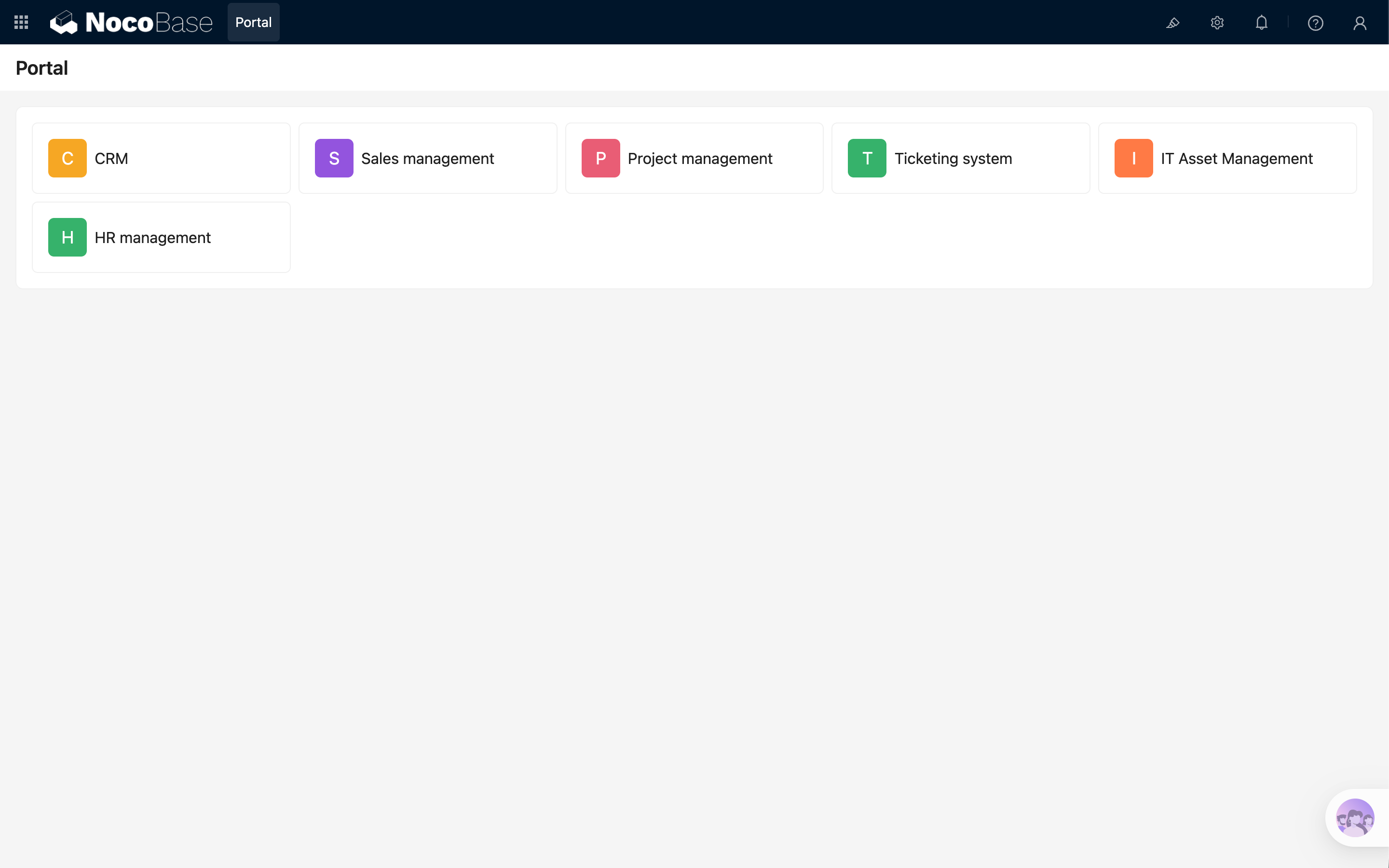
- package/dist/ai/docs/nocobase/api/cli/backup/index.md +46 -0
- package/dist/ai/docs/nocobase/api/cli/backup/restore.md +46 -0
- package/dist/ai/docs/nocobase/api/cli/config/delete.md +11 -9
- package/dist/ai/docs/nocobase/api/cli/config/get.md +11 -8
- package/dist/ai/docs/nocobase/api/cli/config/index.md +28 -24
- package/dist/ai/docs/nocobase/api/cli/config/set.md +14 -12
- package/dist/ai/docs/nocobase/api/cli/db/stop.md +10 -11
- package/dist/ai/docs/nocobase/api/cli/env/index.md +25 -23
- package/dist/ai/docs/nocobase/api/cli/env/info.md +12 -10
- package/dist/ai/docs/nocobase/api/cli/env/proxy/caddy.md +108 -0
- package/dist/ai/docs/nocobase/api/cli/env/proxy/index.md +54 -0
- package/dist/ai/docs/nocobase/api/cli/env/proxy/nginx.md +104 -0
- package/dist/ai/docs/nocobase/api/cli/env/remove.md +18 -14
- package/dist/ai/docs/nocobase/api/cli/env/update.md +115 -14
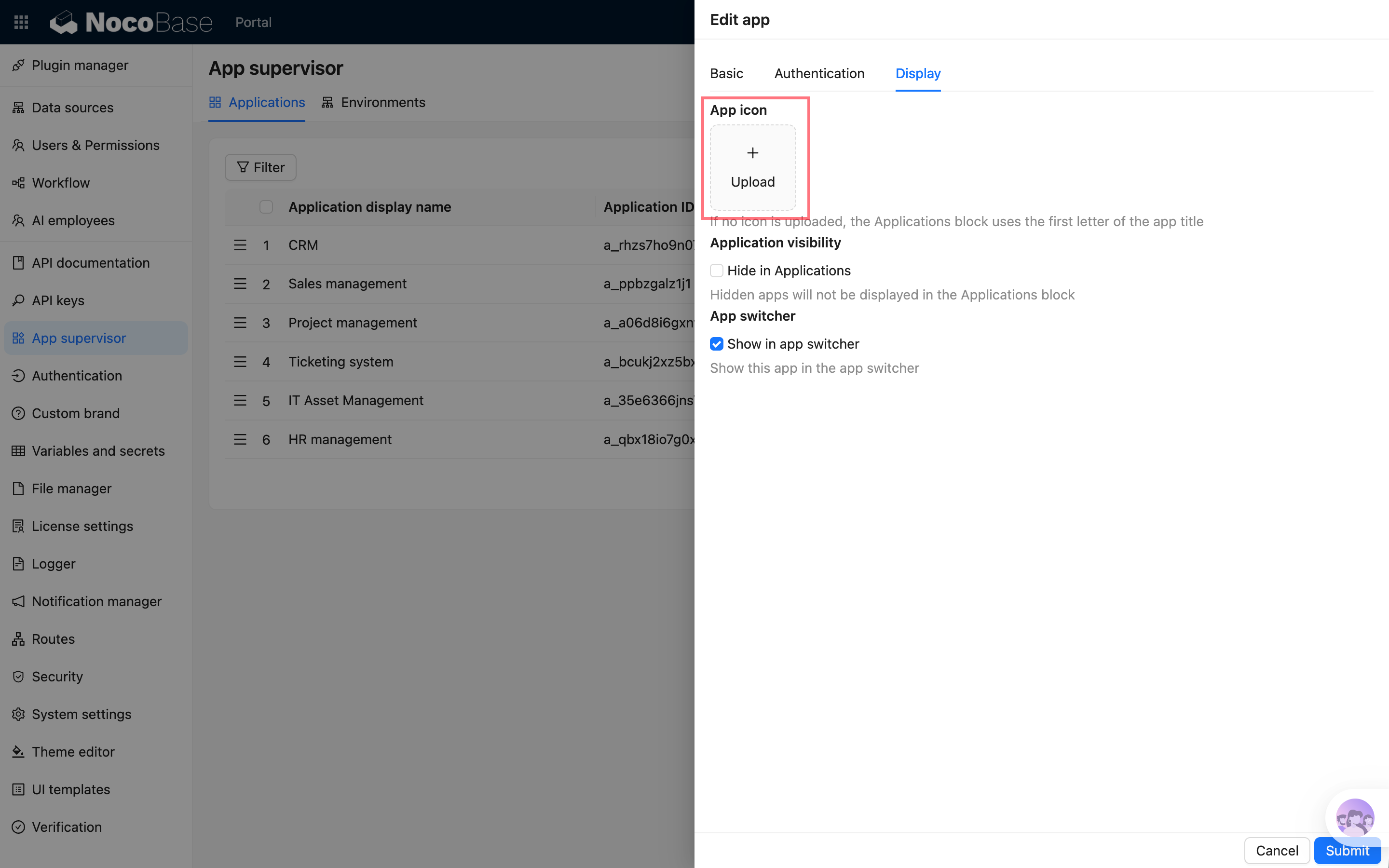
- package/dist/ai/docs/nocobase/api/cli/index.md +66 -52
- package/dist/ai/docs/nocobase/api/cli/init.md +244 -62
- package/dist/ai/docs/nocobase/api/cli/license/activate.md +13 -12
- package/dist/ai/docs/nocobase/api/cli/license/index.md +2 -2
- package/dist/ai/docs/nocobase/api/cli/plugin/import.md +74 -0
- package/dist/ai/docs/nocobase/api/cli/plugin/index.md +4 -2
- package/dist/ai/docs/nocobase/get-started/deployment/how-to-deploy-nocobase-faster.mdx +384 -0
- package/dist/ai/docs/nocobase/get-started/install-upgrade-plugins.mdx +16 -10
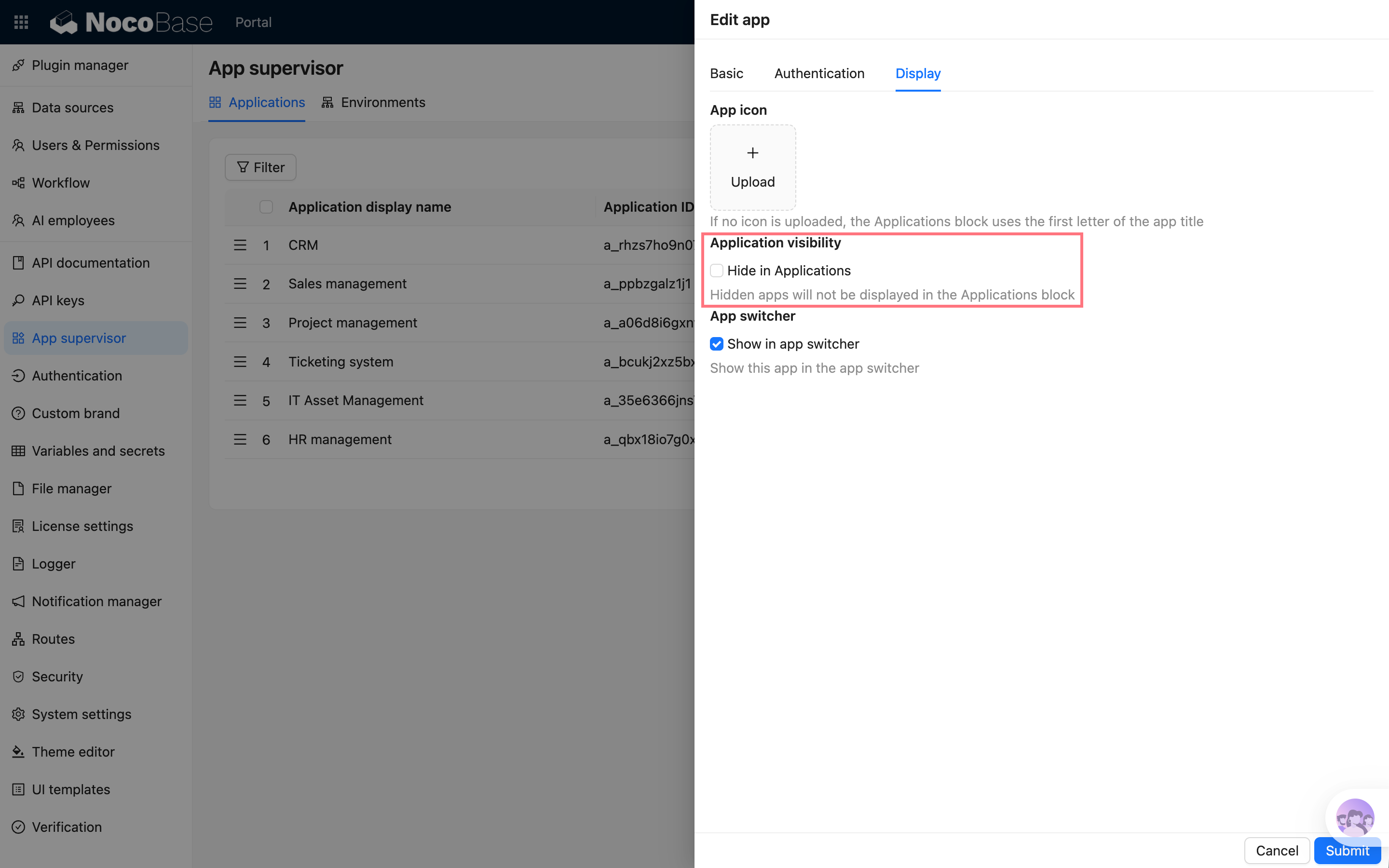
- package/dist/ai/docs/nocobase/get-started/upgrading/docker.md +1 -1
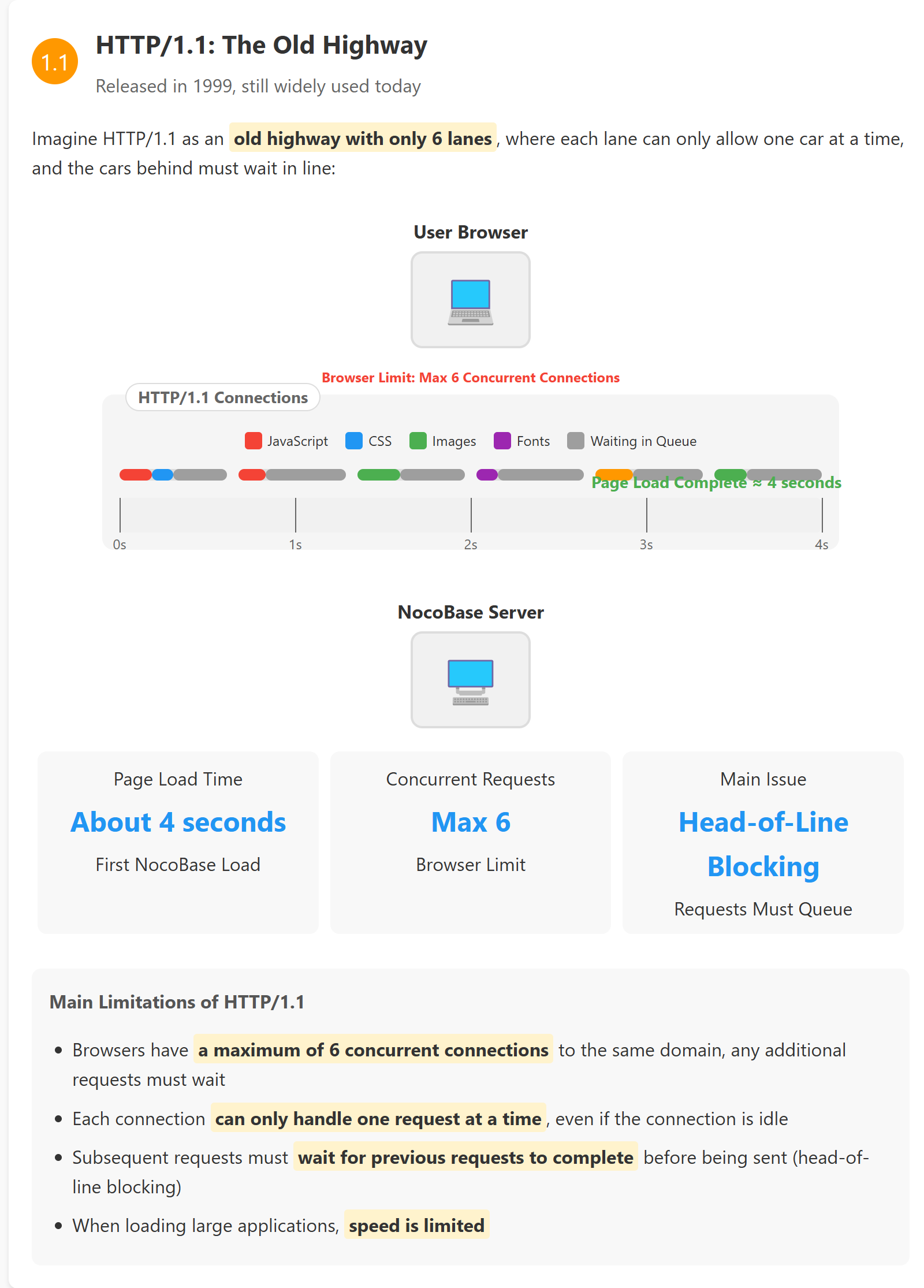
- package/dist/ai/docs/nocobase/index.md +3 -3
- package/dist/ai/docs/nocobase/multi-app/multi-app/app-block-and-switcher.md +68 -0
- package/dist/ai/docs/nocobase/multi-app/multi-app/app-sso.md +71 -0
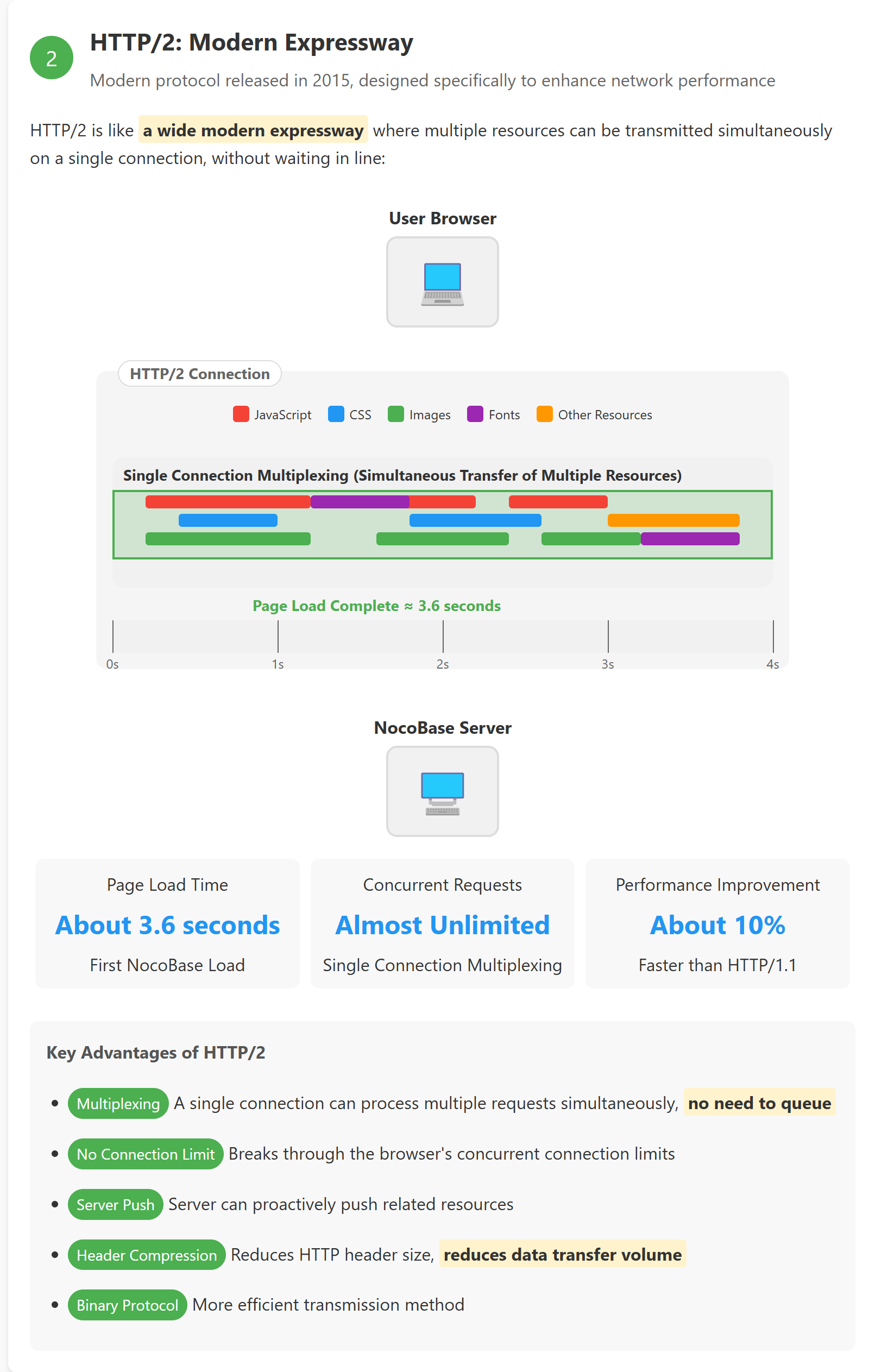
- package/dist/ai/docs/nocobase/multi-app/multi-app/index.md +9 -1
- package/dist/ai/docs/nocobase/multi-app/multi-app/sub-app-api.md +112 -0
- package/dist/ai/docs/nocobase/plugin-development/client/appendix/faq.md +3 -3
- package/dist/ai/docs/nocobase/plugin-development/client/component/index.md +1 -1
- package/dist/ai/docs/nocobase/plugin-development/client/ctx/common-capabilities.md +2 -2
- package/dist/ai/docs/nocobase/plugin-development/client/ctx/index.md +1 -1
- package/dist/ai/docs/nocobase/plugin-development/client/router.md +11 -11
- package/dist/ai/docs/nocobase/quickstart/index.md +27 -0
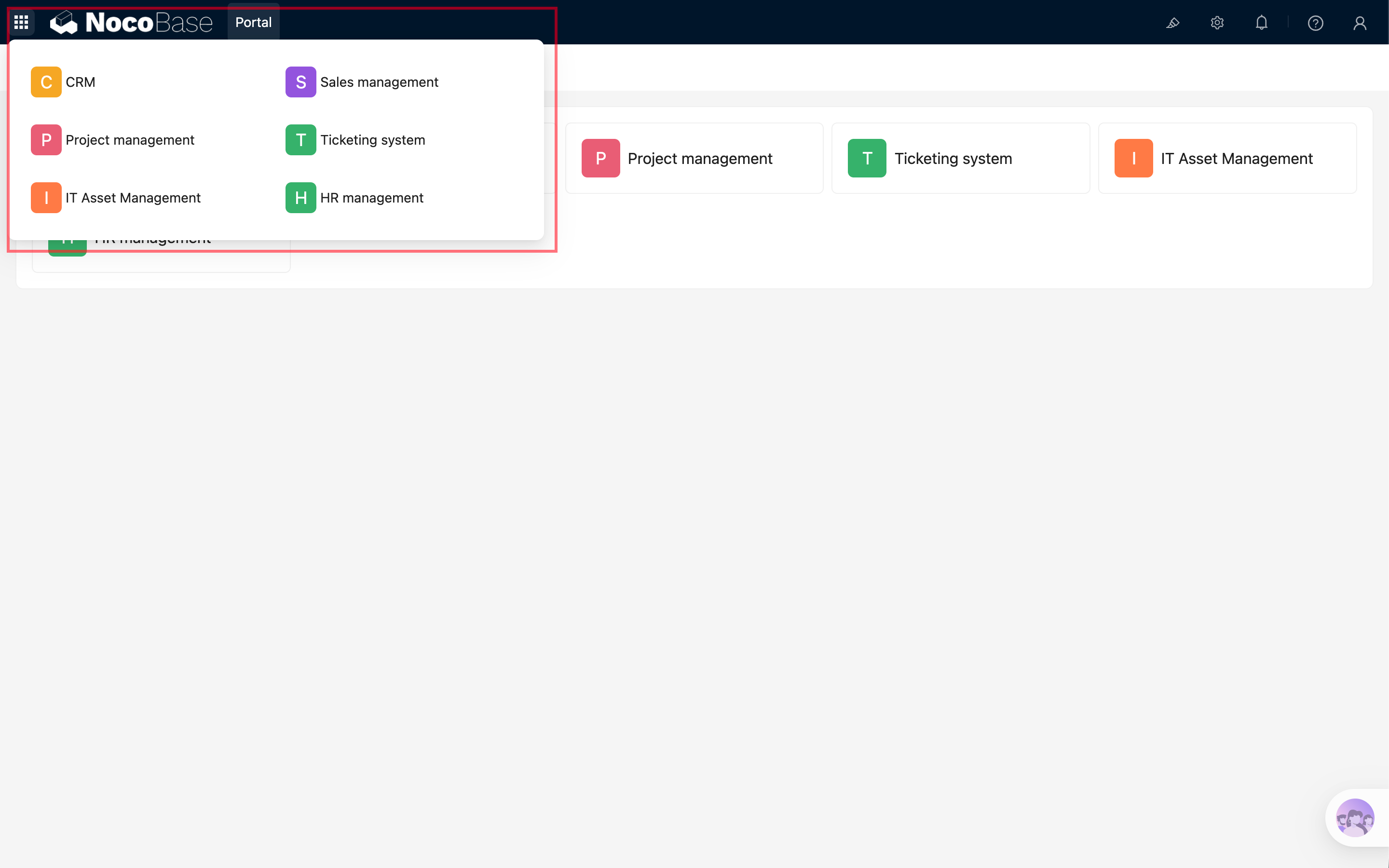
- package/dist/ai/docs/nocobase/quickstart/installation/airgap.md +67 -0
- package/dist/ai/docs/nocobase/quickstart/installation/cli.md +205 -0
- package/dist/ai/docs/nocobase/quickstart/installation/docker-compose.md +123 -0
- package/dist/ai/docs/nocobase/quickstart/installation/env.md +101 -0
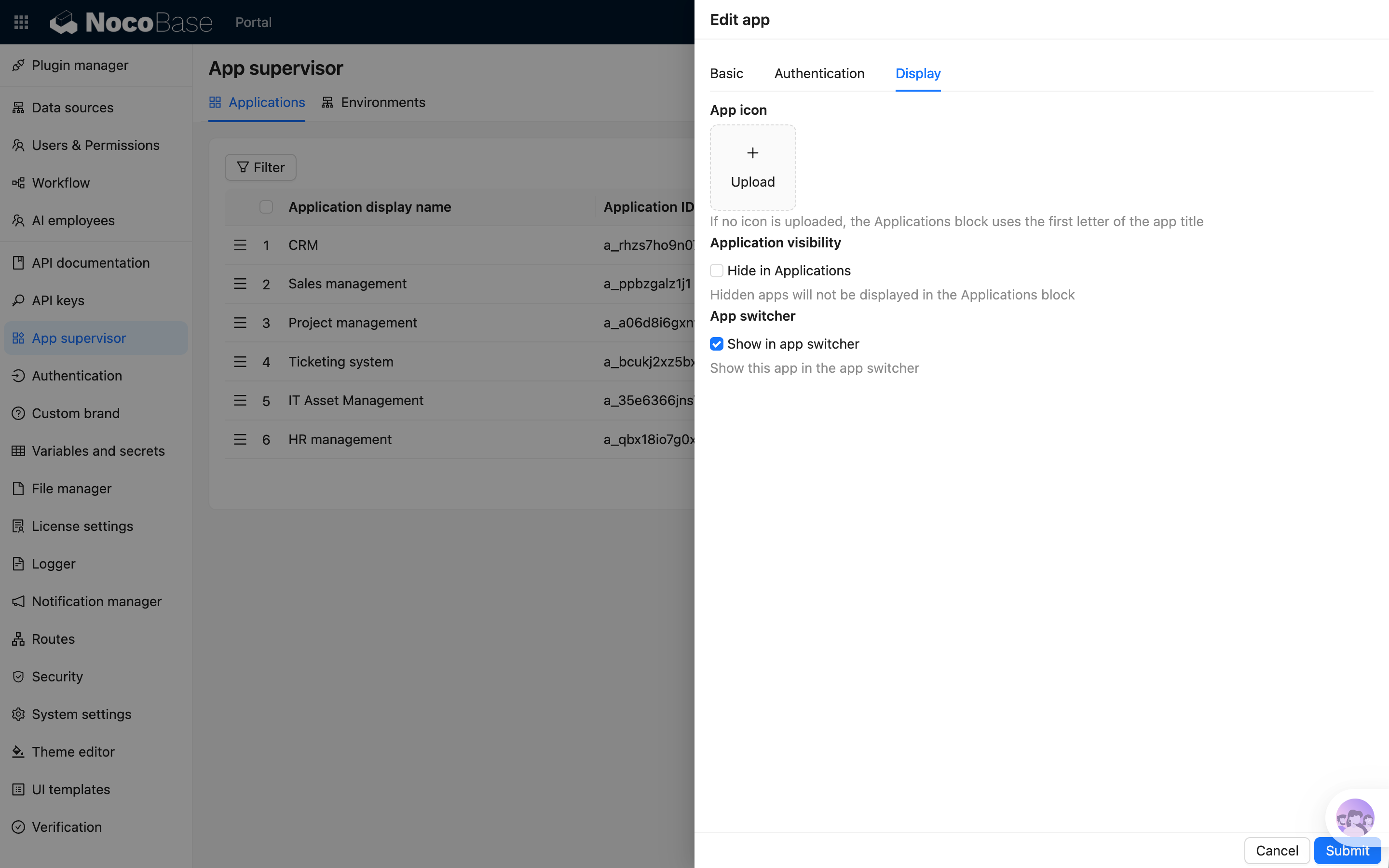
- package/dist/ai/docs/nocobase/quickstart/installation/migration.md +50 -0
- package/dist/ai/docs/nocobase/quickstart/operations/backup-restore.md +94 -0
- package/dist/ai/docs/nocobase/quickstart/operations/manage-app.md +166 -0
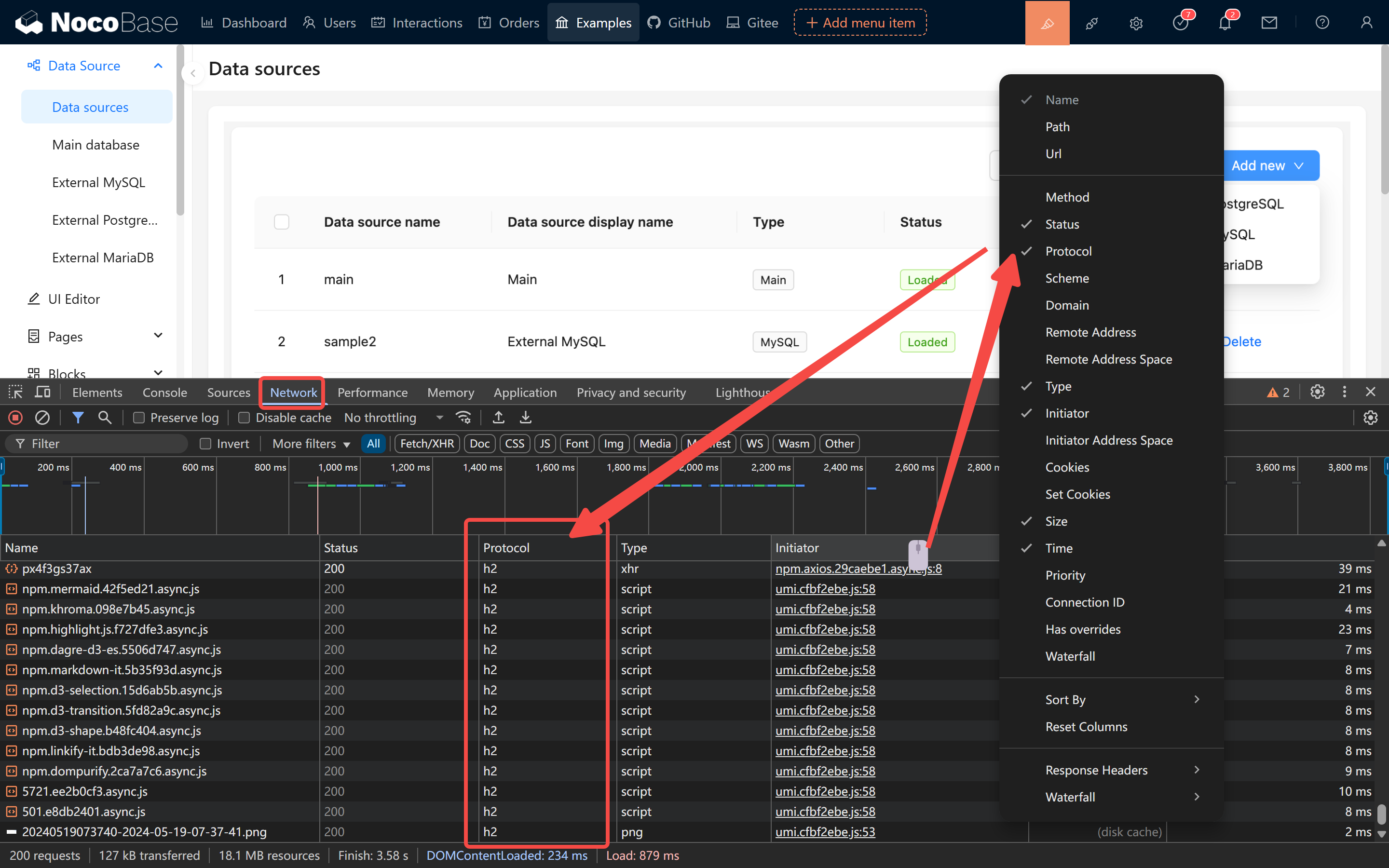
- package/dist/ai/docs/nocobase/quickstart/operations/multi-environment.md +171 -0
- package/dist/ai/docs/nocobase/quickstart/plugins/third-party.md +86 -0
- package/dist/ai/docs/nocobase/quickstart/production/index.md +163 -0
- package/dist/ai/docs/nocobase/quickstart/production/reverse-proxy/caddy.md +158 -0
- package/dist/ai/docs/nocobase/quickstart/production/reverse-proxy/index.md +100 -0
- package/dist/ai/docs/nocobase/quickstart/production/reverse-proxy/nginx.md +166 -0
- package/dist/ai/docs/nocobase/quickstart/release-management.md +1 -0
- package/dist/ai/docs/nocobase/solution/all-in-one/installation.md +181 -0
- package/dist/ai/docs/nocobase/solution/crm/changelog.md +0 -3
- package/dist/ai/docs/nocobase/solution/crm/installation.md +6 -76
- package/dist/ai/docs/nocobase/solution/crm/v1.md +6 -35
- package/dist/ai/docs/nocobase/solution/ticket-system/changelog.md +0 -2
- package/dist/ai/docs/nocobase/solution/ticket-system/installation.md +6 -69
- package/dist/ai/docs/nocobase/workflow/advanced/options.md +45 -1
- package/dist/client/{406.15c09d98faa2ccf1.js → 406.9a530334eae8cede.js} +1 -1
- package/dist/client/{428.e9f38da3b0d8b498.js → 428.431a00d29107058e.js} +1 -1
- package/dist/client/index.js +2 -2
- package/dist/client-v2/index.js +1 -1
- package/dist/externalVersion.js +16 -16
- package/dist/locale/de-DE.json +1 -0
- package/dist/locale/en-US.json +2 -1
- package/dist/locale/es-ES.json +1 -0
- package/dist/locale/fr-FR.json +1 -0
- package/dist/locale/hu-HU.json +1 -0
- package/dist/locale/id-ID.json +1 -0
- package/dist/locale/it-IT.json +1 -0
- package/dist/locale/ja-JP.json +1 -0
- package/dist/locale/ko-KR.json +1 -0
- package/dist/locale/nl-NL.json +1 -0
- package/dist/locale/pt-BR.json +1 -0
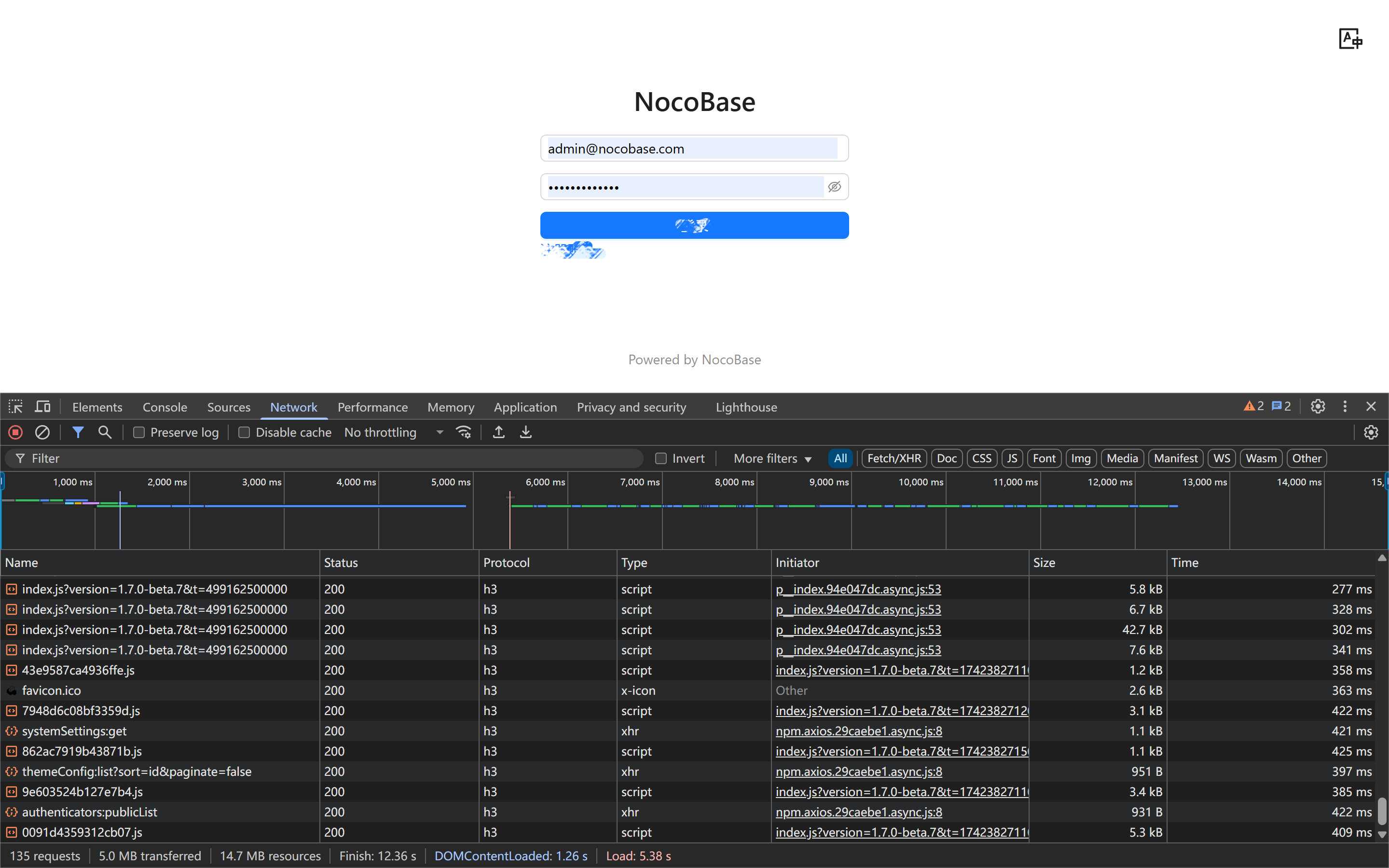
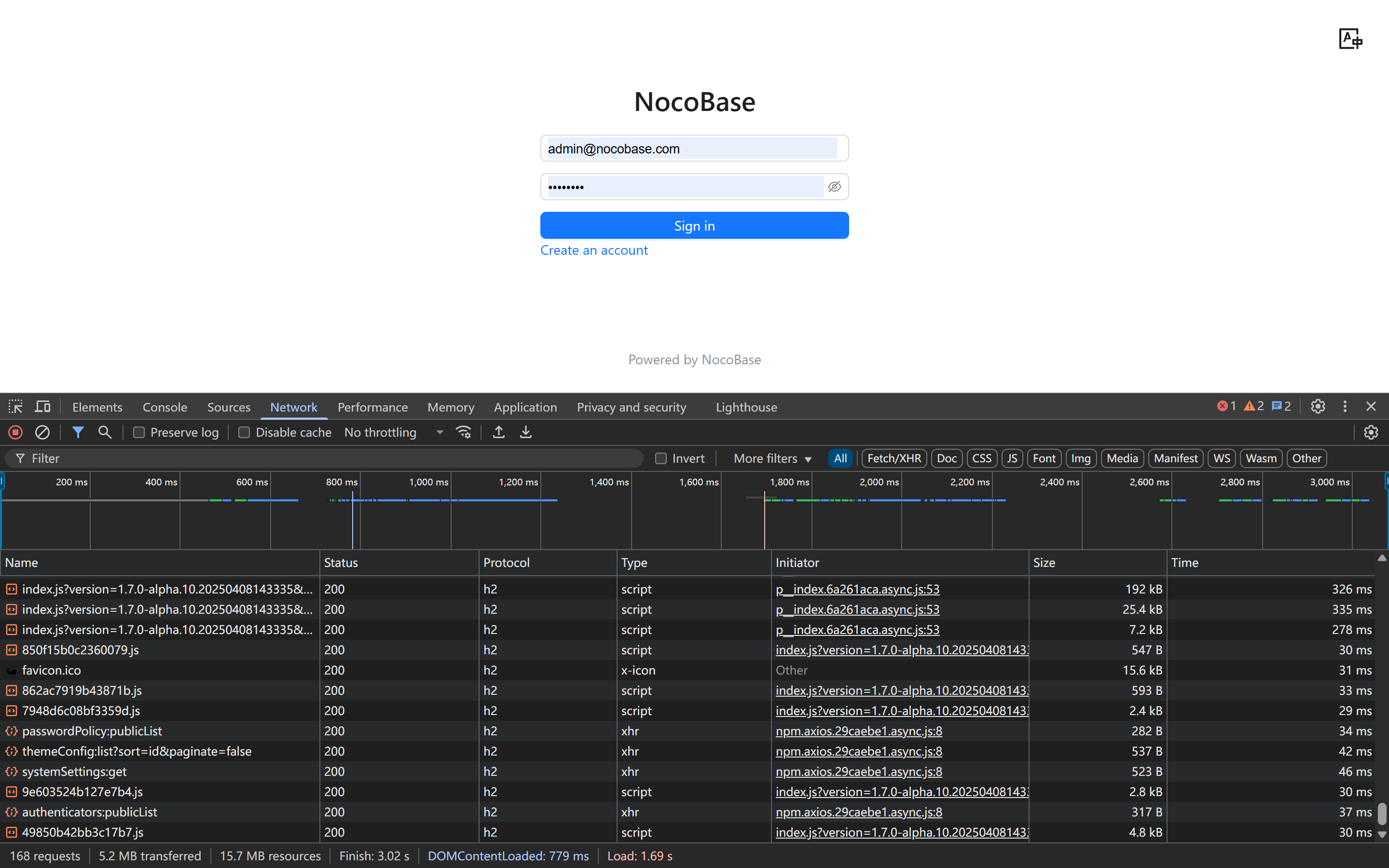
- package/dist/locale/ru-RU.json +1 -0
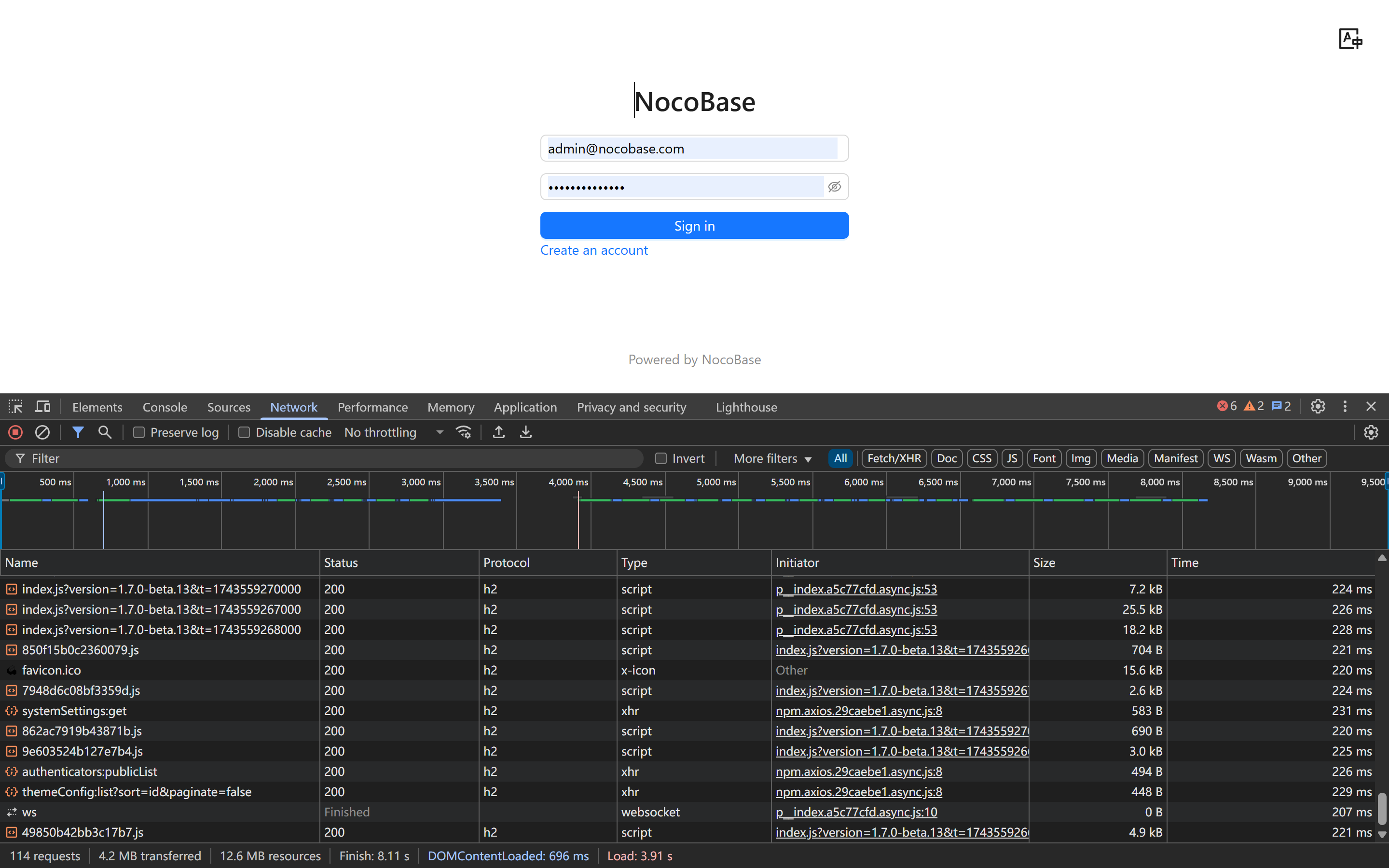
- package/dist/locale/tr-TR.json +1 -0
- package/dist/locale/uk-UA.json +1 -0
- package/dist/locale/vi-VN.json +1 -0
- package/dist/locale/zh-CN.json +2 -1
- package/dist/locale/zh-TW.json +1 -0
- package/dist/node_modules/@langchain/xai/package.json +1 -1
- package/dist/node_modules/fs-extra/package.json +1 -1
- package/dist/node_modules/jsonrepair/package.json +1 -1
- package/dist/node_modules/just-bash/package.json +1 -1
- package/dist/node_modules/nodejs-snowflake/package.json +1 -1
- package/dist/node_modules/openai/package.json +1 -1
- package/dist/node_modules/zod/package.json +1 -1
- package/dist/server/resource/ai.js +11 -9
- package/dist/server/workflow/nodes/employee/index.js +2 -4
- package/dist/server/workflow/nodes/employee/types.d.ts +2 -2
- package/package.json +2 -2
- package/dist/ai/docs/nocobase/api/cli/app/down.md +0 -41
|
@@ -0,0 +1,384 @@
|
|
|
1
|
+
---
|
|
2
|
+
title: How to Deploy Faster
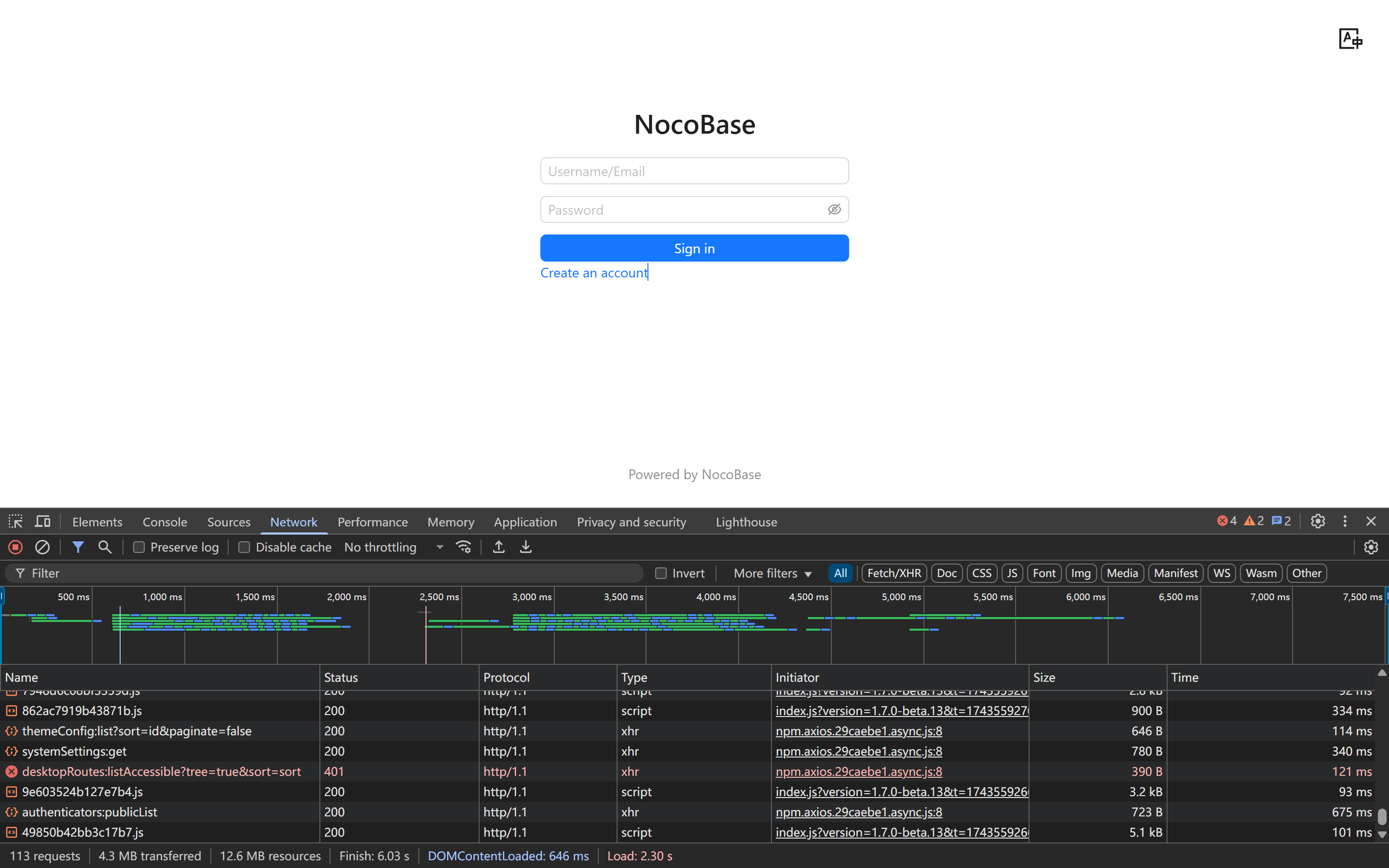
|
|
3
|
+
description: Optimize NocoBase deployment with HTTP/2, CDN, server location, compression, and caching to significantly reduce load times.
|
|
4
|
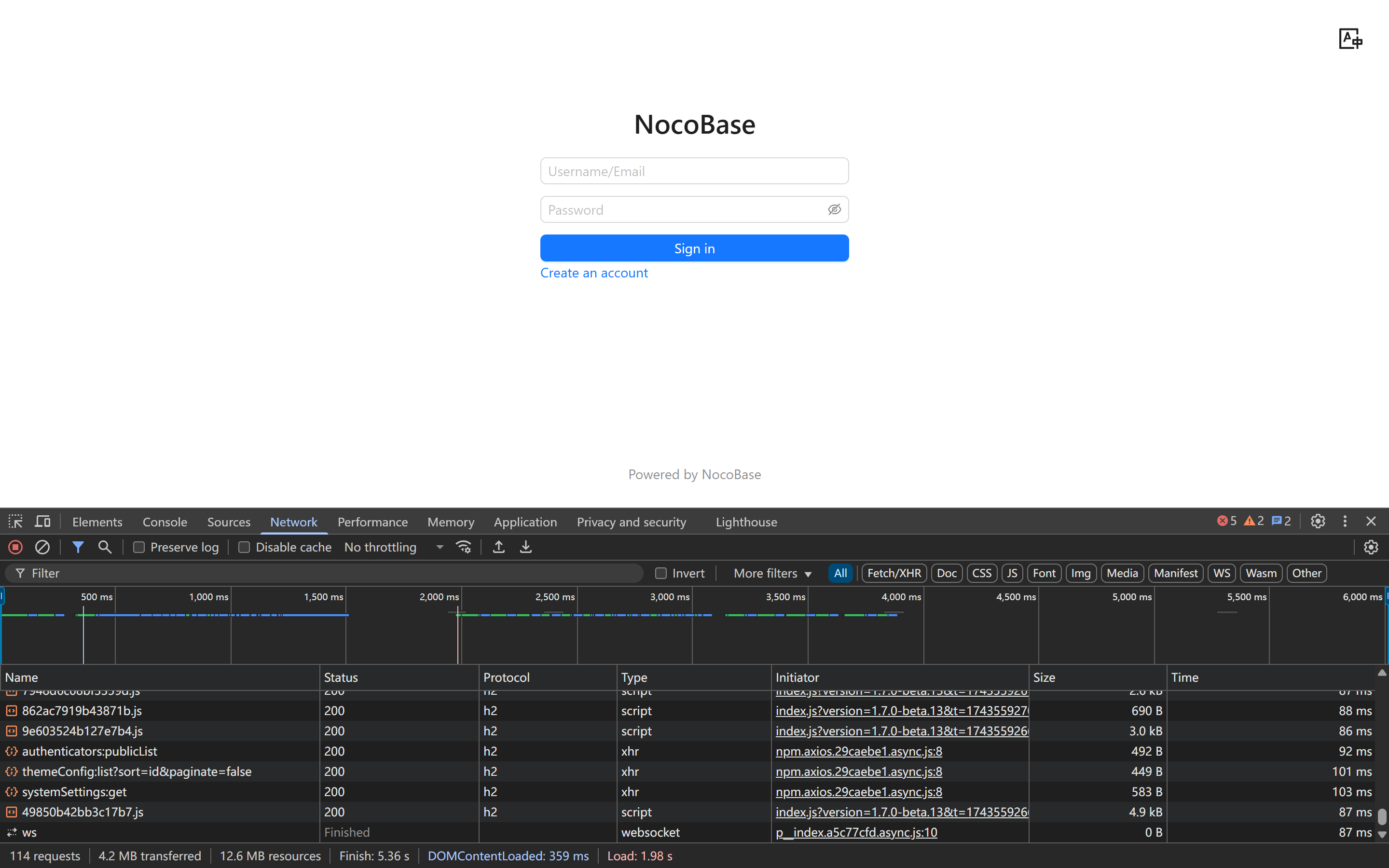
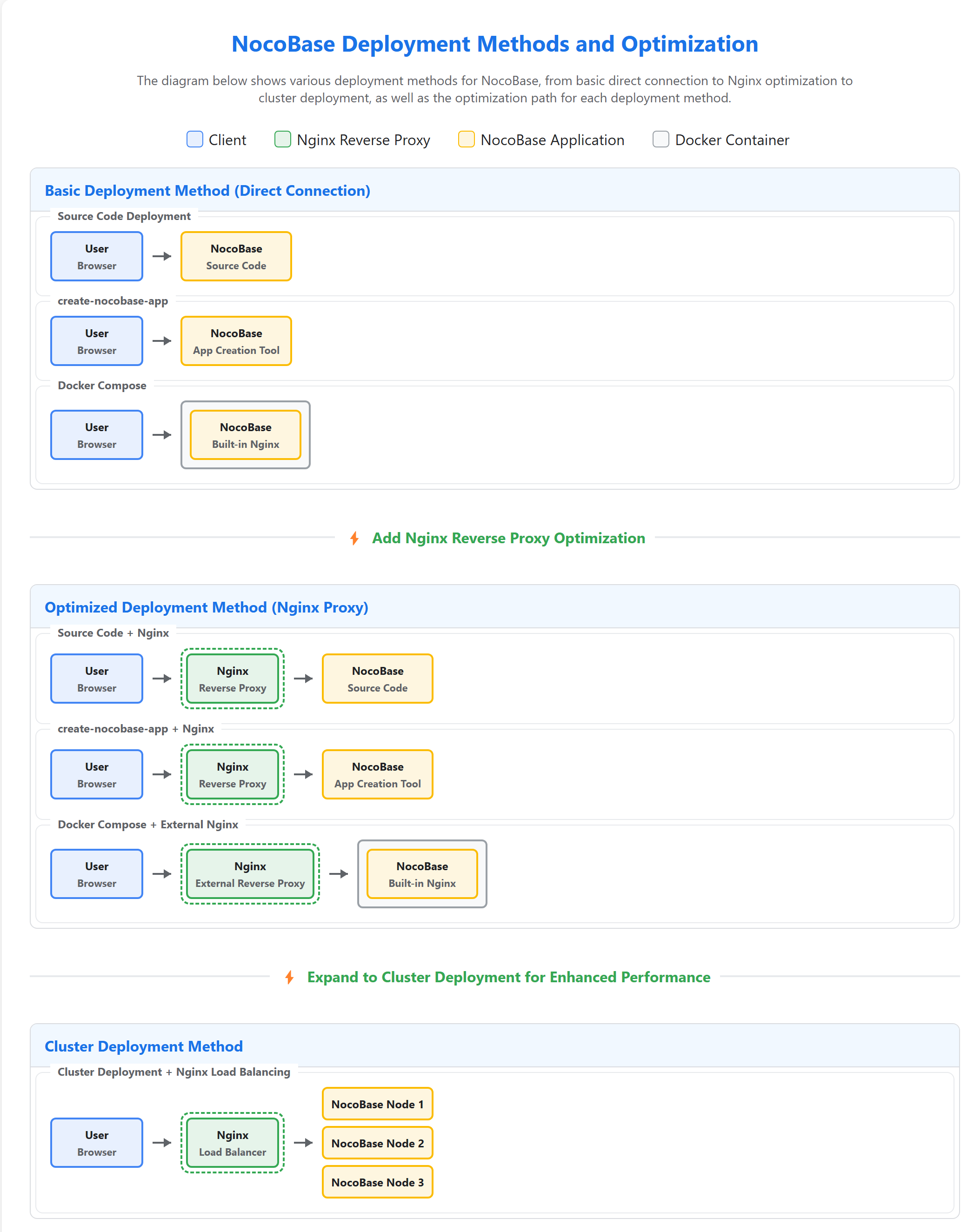
+
keywords: NocoBase, deployment, performance, HTTP/2, CDN, optimization
|
|
5
|
+
---
|
|
6
|
+
|
|
7
|
+
# How to Deploy Faster
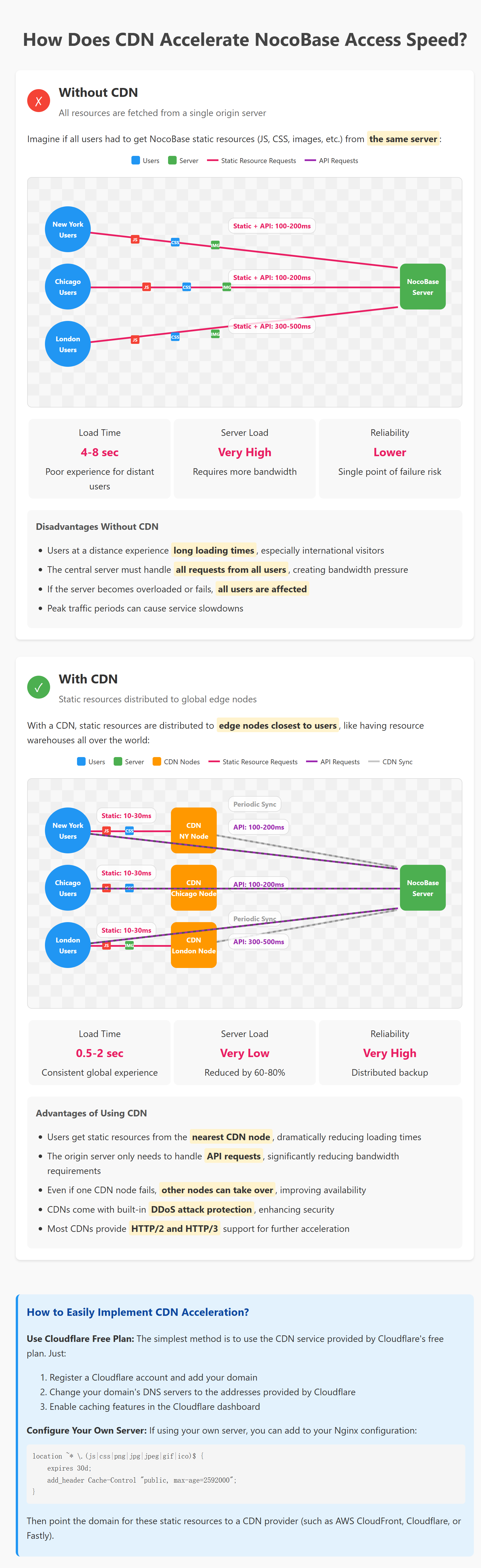
|
|
8
|
+
|
|
9
|
+
Many users may find that NocoBase runs slower than expected after deployment. This is often due to network environment, server configurations, or deployment architecture. Before diving into optimization techniques, let's first look at reference values for normal NocoBase loading speeds to avoid unnecessary concerns.
|
|
10
|
+
|
|
11
|
+
### NocoBase Normal Loading Speed Reference
|
|
12
|
+
|
|
13
|
+
The following are loading speeds tested in the NocoBase demo environment:
|
|
14
|
+
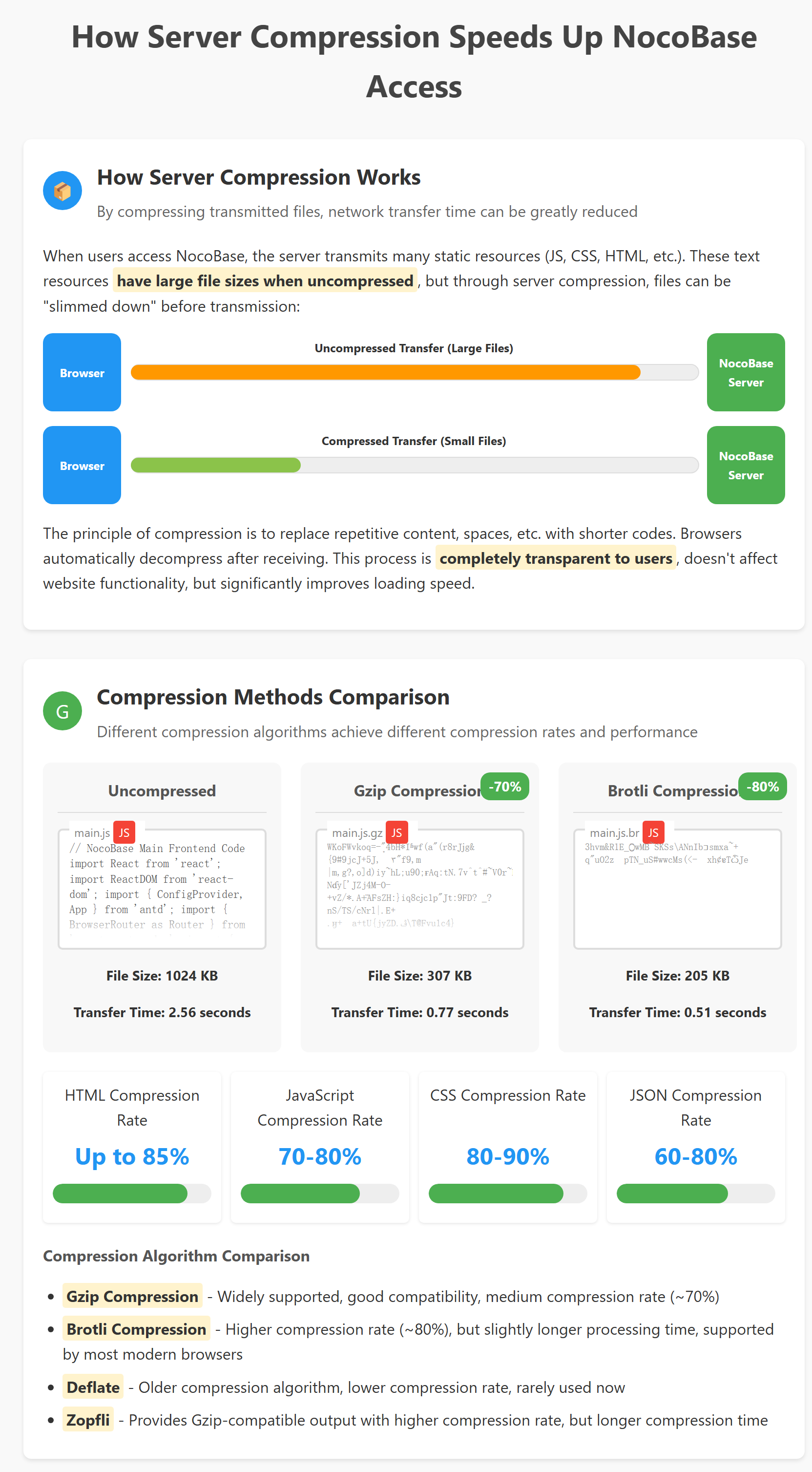
|
|
15
|
+
* Time required to enter the application for the first time by entering the URL: approximately 2 seconds
|
|
16
|
+
* Time required to switch pages within the application: approximately 50-300 milliseconds
|
|
17
|
+
|
|
18
|
+
<video autoplay loop width="100%">
|
|
19
|
+
<source src="https://static-docs.nocobase.com/886b8e6afd4eea8fd1ff601fdbaecaf0.mp4" />
|
|
20
|
+
</video>
|
|
21
|
+
|
|
22
|
+
<video autoplay loop width="100%">
|
|
23
|
+
<source src="https://static-docs.nocobase.com/c240cf4029820f0e4c2bbb58723e2d76.mp4" />
|
|
24
|
+
</video>
|
|
25
|
+
|
|
26
|
+
Next, I'll share a series of simple yet effective deployment optimization techniques that can significantly improve access speed by adjusting deployment settings, without needing to modify any code:
|
|
27
|
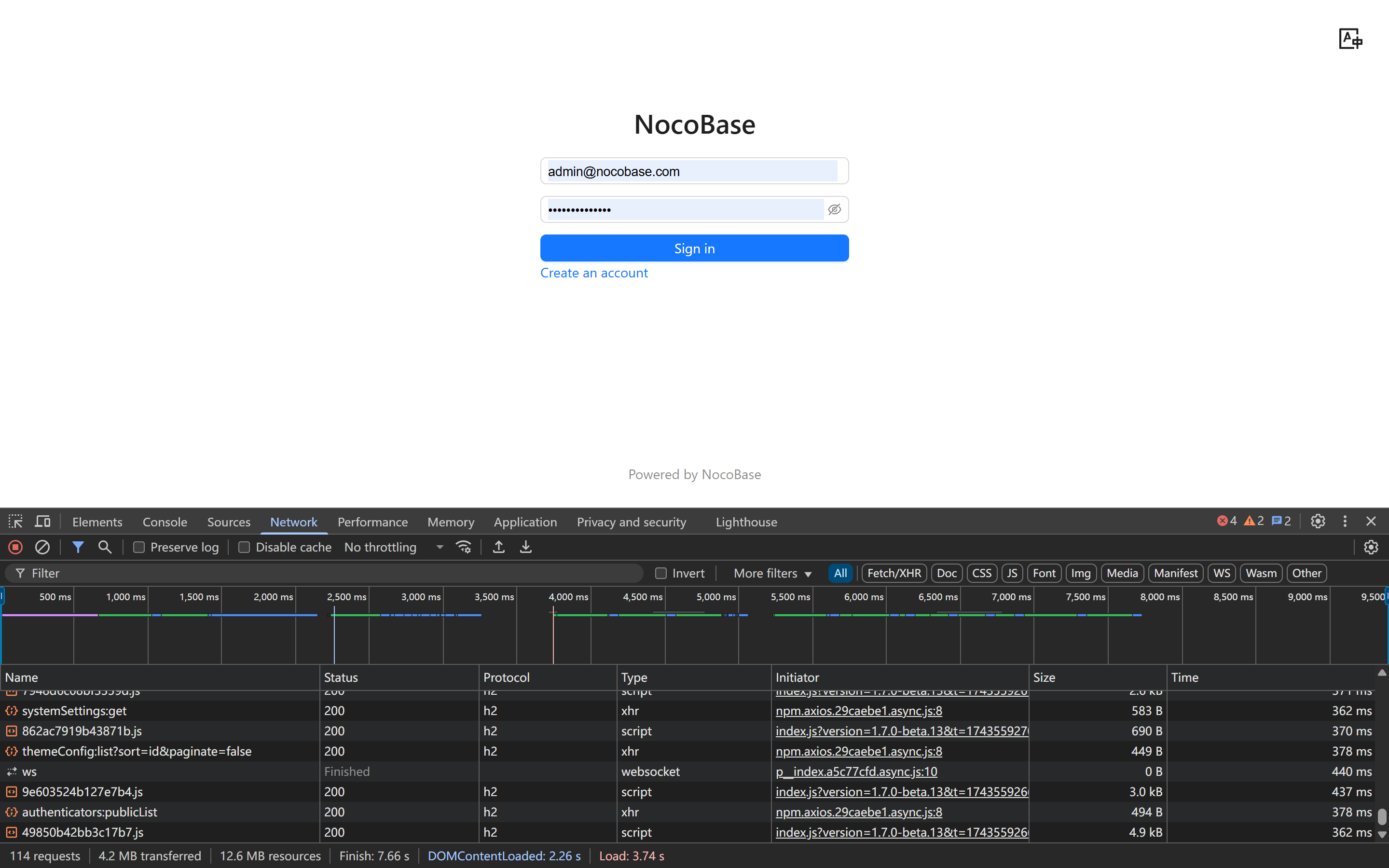
+
|
|
28
|
+
## I. Network and Infrastructure Optimization
|
|
29
|
+
|
|
30
|
+
### 1. HTTP Protocol Version: Easily Embrace HTTP/2
|
|
31
|
+
|
|
32
|
+
【Prerequisites】
|
|
33
|
+
|
|
34
|
+
- **HTTPS Support Required**: This is important! Almost all modern browsers only support HTTP/2 over HTTPS connections, so you must configure SSL certificates first.
|
|
35
|
+
- **Server Requirements**: You need to use server software that supports HTTP/2, such as Nginx 1.9.5+ or Apache 2.4.17+.
|
|
36
|
+
- **TLS Version**: TLS 1.2 or higher is recommended (TLS 1.3 is best), as older SSL versions don't support HTTP/2.
|
|
37
|
+
|
|
38
|
+
【Tips】
|
|
39
|
+
|
|
40
|
+
Traditional HTTP/1.1 protocol has limitations when handling multiple requests—typically only 6-8 connections simultaneously, which is like waiting in line to buy tickets, easily causing delays.
|
|
41
|
+
|
|
42
|
+
|
|
43
|
+
HTTP/2 uses "multiplexing" technology to handle multiple requests simultaneously, greatly accelerating resource loading; while the latest HTTP/3 performs even better in unstable networks, with excellent results.
|
|
44
|
+
|
|
45
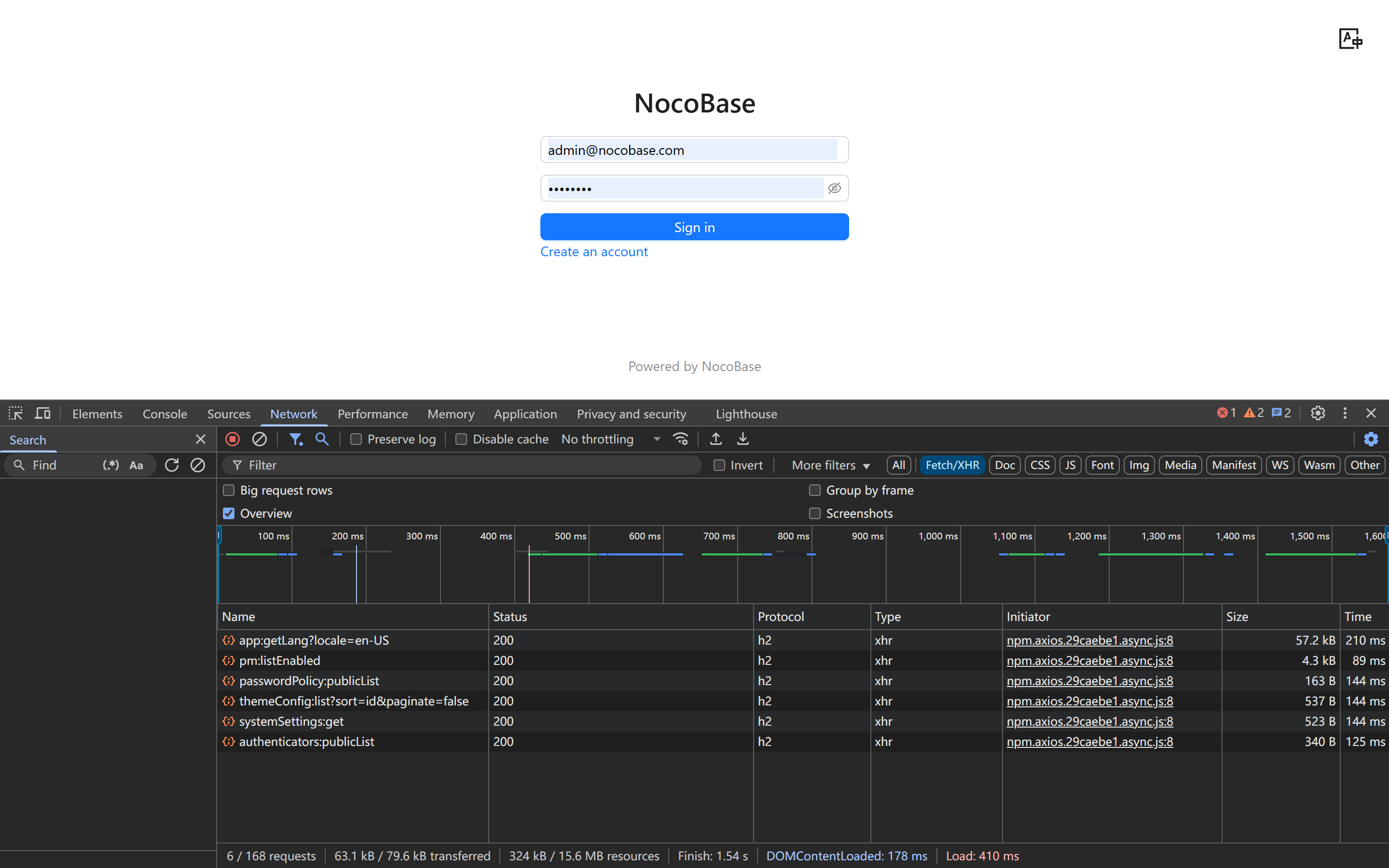
|
+
|
|
46
|
+
|
|
47
|
+
【Optimization Suggestions】
|
|
48
|
+
|
|
49
|
+
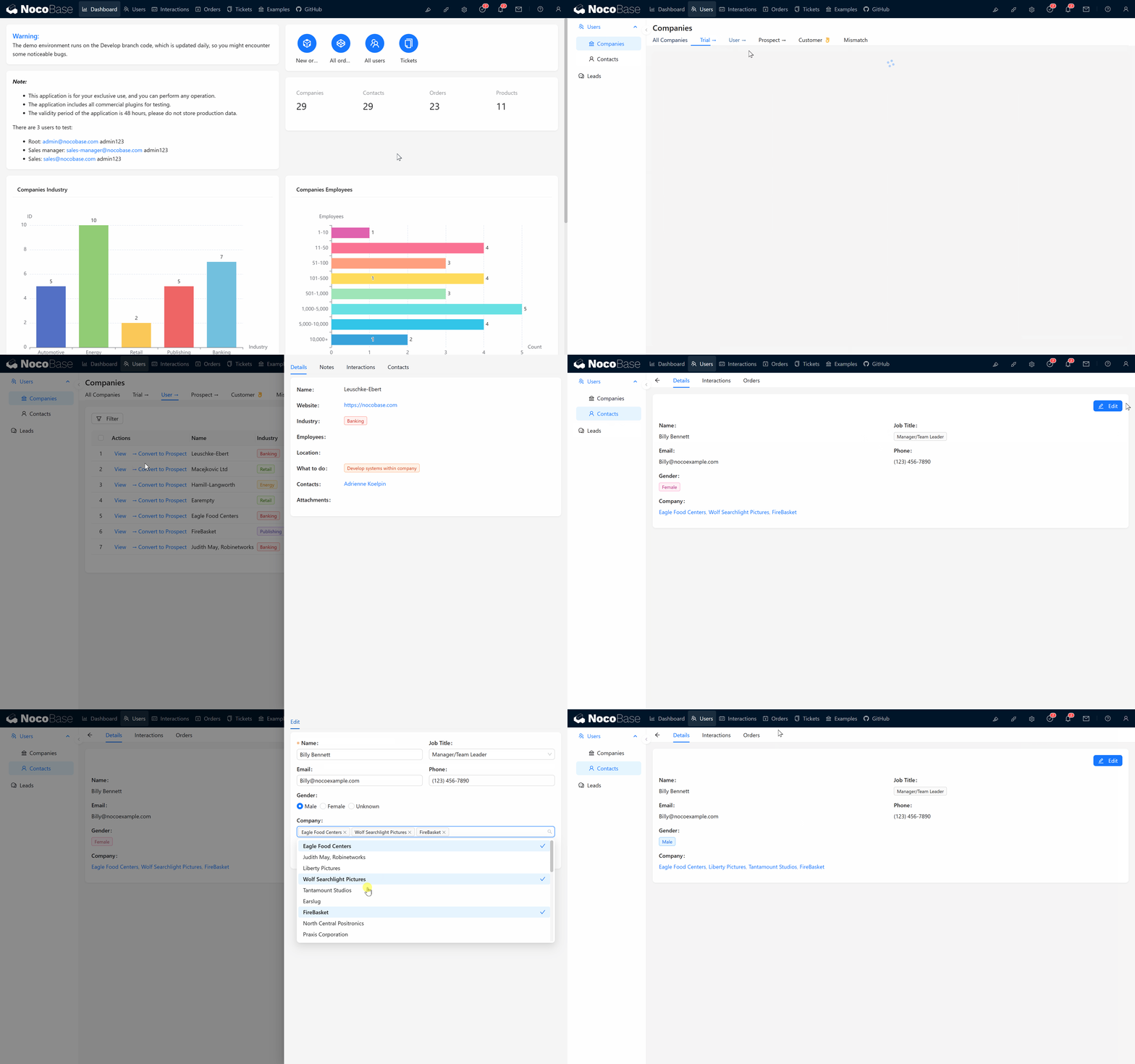
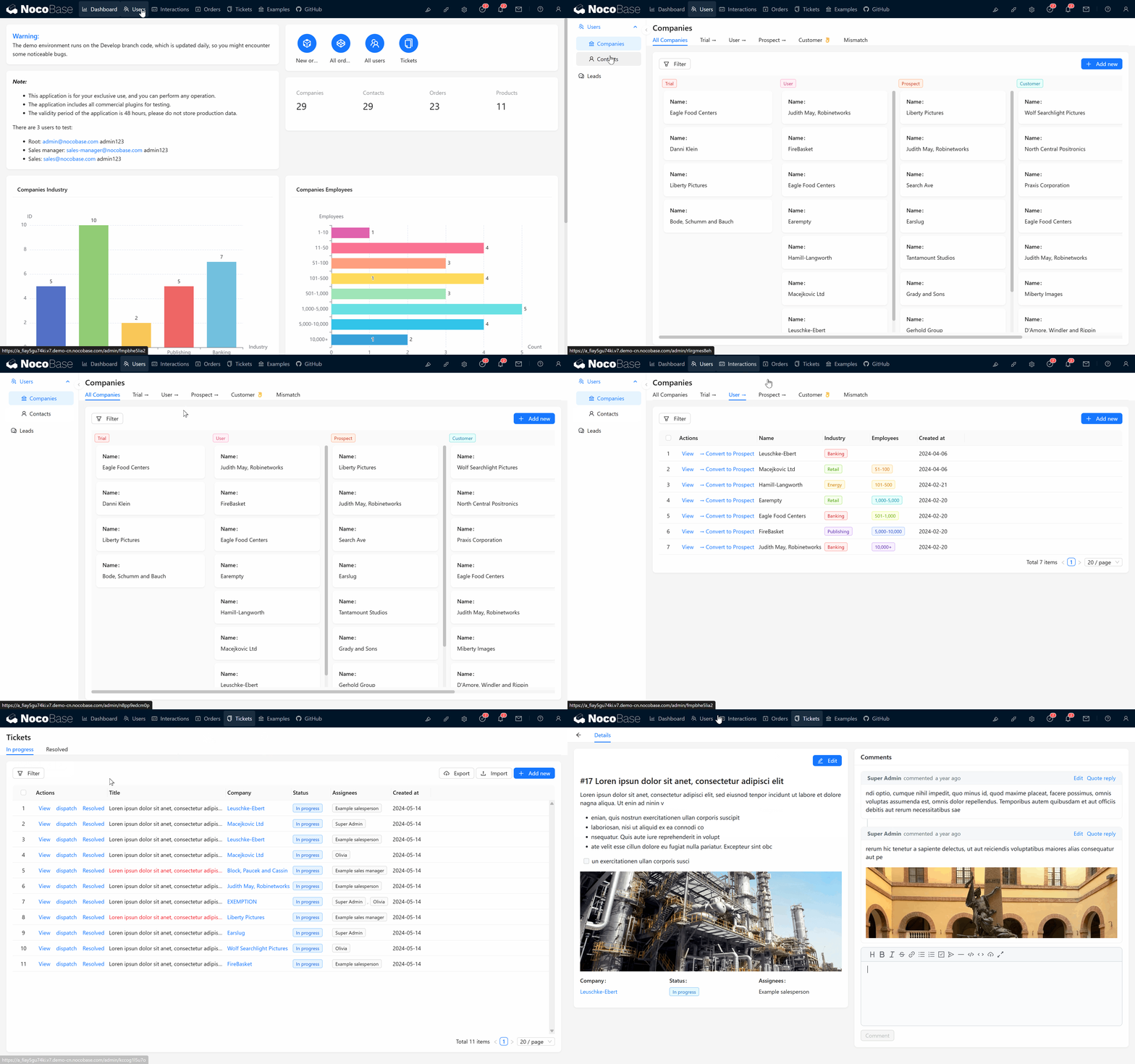
- Make sure your web server has HTTP/2 support enabled, which is easy to configure on most servers (like Nginx, Caddy).
|
|
50
|
+
- In Nginx, simply add the `http2` parameter after the listen directive:
|
|
51
|
+
|
|
52
|
+
```nginx
|
|
53
|
+
listen 443 ssl http2;
|
|
54
|
+
```
|
|
55
|
+
|
|
56
|
+
【Verification】
|
|
57
|
+
|
|
58
|
+
In your browser's developer panel, open the "Network" option, right-click and check "Protocol" to see the current connection protocol version:
|
|
59
|
+
|
|
60
|
+
|
|
61
|
+
Based on our tests, overall speed improves by about 10%, with more significant performance improvements when the system has many blocks and resources.
|
|
62
|
+
|
|
63
|
+
### 2. Network Bandwidth: Bigger is Better, Flexible Billing
|
|
64
|
+
|
|
65
|
+
【Tips】
|
|
66
|
+
|
|
67
|
+
Just like highways are smoother than local roads, bandwidth determines data transmission efficiency. When NocoBase loads for the first time, it needs to download many frontend resources, and insufficient bandwidth can easily become a bottleneck.
|
|
68
|
+
|
|
69
|
+
【Optimization Suggestions】
|
|
70
|
+
|
|
71
|
+
- Choose sufficient bandwidth (50Mbps+ recommended for many users), don't skimp on this critical resource.
|
|
72
|
+
- Recommend "pay-as-you-go" billing: many cloud providers offer this flexible model, allowing you to enjoy higher bandwidth during peak times while controlling costs during normal usage.
|
|
73
|
+
|
|
74
|
+
### 3. Network Latency and Server Geographic Location: Closer Means Faster
|
|
75
|
+
|
|
76
|
+
【Tips】
|
|
77
|
+
|
|
78
|
+
Latency is the waiting time for data transmission. Even with sufficient bandwidth, if the server is too far from users (e.g., users in China but server in the US), each request response may be slowed down due to the long distance.
|
|
79
|
+
|
|
80
|
+
【Optimization Suggestions】
|
|
81
|
+
|
|
82
|
+
- Try to deploy NocoBase in regions closer to your main user base.
|
|
83
|
+
- If your users are globally distributed, consider using global acceleration services (such as Alibaba Cloud Global Accelerator or AWS Global Accelerator) to optimize network routing and reduce latency.
|
|
84
|
+
|
|
85
|
+
【Verification】
|
|
86
|
+
|
|
87
|
+
Use the ping command to test latency from different regions.
|
|
88
|
+
This approach shows the most obvious improvement, with access speed increasing 1-3 times or more depending on the region.
|
|
89
|
+
Across 12 time zones, 13 seconds:
|
|
90
|
+
|
|
91
|
+
|
|
92
|
+
Across 2 time zones, 8 seconds:
|
|
93
|
+
|
|
94
|
+
|
|
95
|
+
Current region, about 3 seconds:
|
|
96
|
+
|
|
97
|
+
|
|
98
|
+
## II. Deployment Architecture Optimization
|
|
99
|
+
|
|
100
|
+
### 4. Server Deployment and Proxy Methods: Choose the Most Suitable Architecture
|
|
101
|
+
|
|
102
|
+
【Prerequisites】
|
|
103
|
+
|
|
104
|
+
- **Server Permissions**: You need root or sudo access to configure services like Nginx.
|
|
105
|
+
- **Basic Skills**: Some basic server configuration knowledge is required, but don't worry, specific configuration examples will be provided.
|
|
106
|
+
- **Port Access**: Ensure your firewall allows access to ports 80 (HTTP) and 443 (HTTPS).
|
|
107
|
+
|
|
108
|
+
【Tips】
|
|
109
|
+
|
|
110
|
+
When users access NocoBase, requests go directly to your server. An appropriate deployment method allows your server to handle requests more efficiently, providing faster responses.
|
|
111
|
+
|
|
112
|
+
【Different Solutions and Recommendations】
|
|
113
|
+
|
|
114
|
+
**Starting NocoBase without using a reverse proxy for static resources (not recommended):**
|
|
115
|
+
|
|
116
|
+
- Disadvantages: This method is simple but performs poorly when handling high concurrency or static files; suitable for development and testing only.
|
|
117
|
+
- Recommendation: Please avoid this method if possible.
|
|
118
|
+
|
|
119
|
+
> Reference "[Installation Documentation](https://v2.docs.nocobase.com/get-started/quickstart)"
|
|
120
|
+
|
|
121
|
+
Without a reverse proxy, homepage loading takes about 6.1 seconds
|
|
122
|
+
|
|
123
|
+
|
|
124
|
+
**Using Nginx / Caddy as reverse proxy (strongly recommended):**
|
|
125
|
+
|
|
126
|
+
- Advantages: Reverse proxy servers can efficiently handle concurrent connections, serve static files, implement load balancing, and make HTTP/2 configuration simple.
|
|
127
|
+
- Recommendation: In production environments, after application deployment (source code deployment / create-nocobase-app / Docker image), use Nginx or Caddy as a reverse proxy.
|
|
128
|
+
|
|
129
|
+
> Reference "[Deployment Documentation](https://v2.docs.nocobase.com/get-started/deployment/production)"
|
|
130
|
+
|
|
131
|
+
With Nginx proxy, homepage loading takes about 3-4 seconds
|
|
132
|
+
|
|
133
|
+
|
|
134
|
+
|
|
135
|
+
|
|
136
|
+
**Using cluster deployment with load balancing (suitable for high concurrency and high availability scenarios):**
|
|
137
|
+
|
|
138
|
+
- Advantages: By deploying multiple instances to handle requests, you can significantly improve overall system stability and concurrency capacity.
|
|
139
|
+
- For specific deployment methods, see **[Cluster Mode](https://docs.nocobase.com/welcome/getting-started/deployment/cluster-mode)**
|
|
140
|
+
|
|
141
|
+
### 5. Using CDN to Accelerate Static Resources
|
|
142
|
+
|
|
143
|
+
【Prerequisites】
|
|
144
|
+
|
|
145
|
+
- **Domain Requirements**: You need a registered domain name and the ability to manage its DNS settings.
|
|
146
|
+
- **SSL Certificate**: Most CDN services require SSL certificate configuration (you can use free Let's Encrypt certificates).
|
|
147
|
+
- **Service Selection**: Choose appropriate CDN providers based on user regions (users in mainland China need CDNs with ICP filing).
|
|
148
|
+
|
|
149
|
+
【Tips】
|
|
150
|
+
CDN (Content Delivery Network) caches your static resources at nodes around the world, allowing users to get resources from the nearest node, like getting water from a nearby source, greatly reducing loading delays.
|
|
151
|
+
|
|
152
|
+
Additionally, the greatest advantage of CDNs is their ability to **significantly reduce the load and bandwidth pressure on your application server**. When many users access NocoBase simultaneously without a CDN, all static resource requests (JavaScript, CSS, images, etc.) hit your server directly, potentially causing bandwidth saturation, performance degradation, or even server crashes. By offloading these requests to a CDN, your server can focus on processing core business logic, providing users with a more stable experience.
|
|
153
|
+
|
|
154
|
+
|
|
155
|
+
|
|
156
|
+
【Optimization Suggestions】• Configure your server to distribute static resource requests through CDN.• Choose suitable CDN providers based on user location:
|
|
157
|
+
|
|
158
|
+
- Global users: Cloudflare, Akamai, AWS CloudFront;
|
|
159
|
+
- Mainland China users: Alibaba Cloud CDN, Tencent Cloud CDN, Baidu Cloud Acceleration.Example configuration:
|
|
160
|
+
|
|
161
|
+
```nginx
|
|
162
|
+
# Redirect static resources to CDN domain
|
|
163
|
+
location ~* \.(js|css|png|jpg|jpeg|gif|ico|svg|woff|woff2|ttf|eot)$ {
|
|
164
|
+
rewrite ^(.*)$ https://your-cdn-domain.com$1 permanent;
|
|
165
|
+
}
|
|
166
|
+
```
|
|
167
|
+
|
|
168
|
+
- For small projects, Cloudflare's free plan can provide good CDN acceleration:
|
|
169
|
+
|
|
170
|
+
1. Register a Cloudflare account and add your domain;
|
|
171
|
+
2. Modify DNS to point your domain to Cloudflare's servers;
|
|
172
|
+
3. Set appropriate cache levels in the control panel.
|
|
173
|
+
|
|
174
|
+
**Special Note**: Even if all your users are in the same region, it's still strongly recommended to use a CDN as it effectively reduces server burden, improves overall system stability, especially during high traffic periods.
|
|
175
|
+
|
|
176
|
+
## III. Static Resource Optimization
|
|
177
|
+
|
|
178
|
+
### 6. Server Compression and Cache Configuration
|
|
179
|
+
|
|
180
|
+
【Prerequisites】
|
|
181
|
+
|
|
182
|
+
- **CPU Resources**: Compression increases server CPU load, so your server should have sufficient processing power.
|
|
183
|
+
- **Nginx Module Support**: Gzip compression is generally built-in, but Brotli compression may require additional module installation.
|
|
184
|
+
- **Configuration Permissions**: You need permission to modify server configurations.
|
|
185
|
+
|
|
186
|
+
【Tips】
|
|
187
|
+
|
|
188
|
+
By enabling compression and implementing reasonable cache strategies, you can significantly reduce data transfer volume and repeated requests, essentially "slimming down" your resources to make loading speeds take off.
|
|
189
|
+
|
|
190
|
+
|
|
191
|
+
【Optimization Suggestions】
|
|
192
|
+
|
|
193
|
+
- Simplest solution: Use Cloudflare's free CDN service, which automatically enables Gzip compression.
|
|
194
|
+
- Enable Gzip or Brotli compression, which can be set in Nginx like this:
|
|
195
|
+
|
|
196
|
+
```nginx
|
|
197
|
+
# Enable Gzip compression
|
|
198
|
+
gzip on;
|
|
199
|
+
gzip_comp_level 6;
|
|
200
|
+
gzip_min_length 1000;
|
|
201
|
+
gzip_proxied any;
|
|
202
|
+
gzip_types text/plain text/css application/json application/javascript text/xml application/xml application/xml+rss text/javascript;
|
|
203
|
+
|
|
204
|
+
# If Brotli compression is supported, enable it for more efficient compression
|
|
205
|
+
brotli on;
|
|
206
|
+
brotli_comp_level 6;
|
|
207
|
+
brotli_types text/plain text/css application/json application/javascript text/xml application/xml application/xml+rss text/javascript;
|
|
208
|
+
```
|
|
209
|
+
|
|
210
|
+
- Set appropriate cache headers for static resources to reduce repeated loading:
|
|
211
|
+
|
|
212
|
+
```nginx
|
|
213
|
+
location ~* \.(js|css|png|jpg|jpeg|gif|ico|svg)$ {
|
|
214
|
+
expires 30d;
|
|
215
|
+
add_header Cache-Control "public, max-age=2592000";
|
|
216
|
+
access_log off;
|
|
217
|
+
}
|
|
218
|
+
```
|
|
219
|
+
|
|
220
|
+
### 7. Using SSL/TLS and Optimizing Performance
|
|
221
|
+
|
|
222
|
+
【Prerequisites】
|
|
223
|
+
|
|
224
|
+
- **SSL Certificate**: You need a valid SSL certificate (you can use free Let's Encrypt certificates).
|
|
225
|
+
- **Server Configuration Permissions**: You need to be able to modify SSL configurations.
|
|
226
|
+
- **DNS Configuration**: Configure reliable DNS resolvers for OCSP Stapling.
|
|
227
|
+
|
|
228
|
+
【Tips】
|
|
229
|
+
|
|
230
|
+
Security always comes first, but improper HTTPS configuration can add some delay. Here are some optimization tricks to help you maintain high performance while ensuring security.
|
|
231
|
+
|
|
232
|
+
【Optimization Suggestions】
|
|
233
|
+
|
|
234
|
+
- Use TLS 1.3, which is currently the fastest TLS version. Configure in Nginx:
|
|
235
|
+
|
|
236
|
+
```nginx
|
|
237
|
+
ssl_protocols TLSv1.2 TLSv1.3;
|
|
238
|
+
ssl_prefer_server_ciphers on;
|
|
239
|
+
ssl_ciphers ECDHE-ECDSA-AES128-GCM-SHA256:ECDHE-RSA-AES128-GCM-SHA256:ECDHE-ECDSA-AES256-GCM-SHA384:ECDHE-RSA-AES256-GCM-SHA384:ECDHE-ECDSA-CHACHA20-POLY1305:ECDHE-RSA-CHACHA20-POLY1305;
|
|
240
|
+
```
|
|
241
|
+
|
|
242
|
+
- Enable OCSP Stapling to reduce certificate verification time:
|
|
243
|
+
|
|
244
|
+
```nginx
|
|
245
|
+
ssl_stapling on;
|
|
246
|
+
ssl_stapling_verify on;
|
|
247
|
+
resolver 8.8.8.8 8.8.4.4 valid=300s;
|
|
248
|
+
resolver_timeout 5s;
|
|
249
|
+
```
|
|
250
|
+
|
|
251
|
+
- Reduce repeated handshake time through session reuse:
|
|
252
|
+
|
|
253
|
+
```nginx
|
|
254
|
+
ssl_session_cache shared:SSL:10m;
|
|
255
|
+
ssl_session_timeout 10m;
|
|
256
|
+
```
|
|
257
|
+
|
|
258
|
+
【Cross-Region Optimization Effect】
|
|
259
|
+
**Special Note**: The following shows optimization effects in a cross-region/cross-12-timezone scenario, which is fundamentally different from the local access scenario (about 3 seconds) mentioned earlier. Network latency caused by geographical distance is unavoidable, but optimization can still significantly improve speed:
|
|
260
|
+
|
|
261
|
+
With Http2 + CDN caching + Gzip compression + Brotli compression combined:
|
|
262
|
+
Before optimization (cross-region access), 13 seconds:
|
|
263
|
+

|
|
264
|
+
After optimization (cross-region access), 8 seconds:
|
|
265
|
+
|
|
266
|
+
|
|
267
|
+
This example shows that even when geographical locations are far apart, appropriate optimization measures can still reduce loading time by about 40%, greatly improving user experience.
|
|
268
|
+
|
|
269
|
+
## IV. Monitoring and Troubleshooting
|
|
270
|
+
|
|
271
|
+
### 8. Performance Monitoring and Basic Analysis
|
|
272
|
+
|
|
273
|
+
【Prerequisites】
|
|
274
|
+
|
|
275
|
+
- **Accessibility**: Your website must be publicly accessible to use most online testing tools.
|
|
276
|
+
- **Basic Skills**: You need to understand the basic meaning of performance metrics, though we'll explain each key indicator.
|
|
277
|
+
|
|
278
|
+
【Tips】
|
|
279
|
+
|
|
280
|
+
It's difficult to optimize precisely without knowing where the bottlenecks are. We recommend using some free tools to monitor website performance to help identify problems.
|
|
281
|
+
|
|
282
|
+
【Optimization Suggestions】
|
|
283
|
+
|
|
284
|
+
**Use the following free tools to check website performance:**
|
|
285
|
+
|
|
286
|
+
- [Google PageSpeed Insights](https://pagespeed.web.dev/)
|
|
287
|
+
- [WebPageTest](https://www.webpagetest.org/)
|
|
288
|
+
- [Pingdom](https://tools.pingdom.com/)
|
|
289
|
+
|
|
290
|
+
**Focus on these key metrics:**
|
|
291
|
+
|
|
292
|
+
- Page load time
|
|
293
|
+
- Server response time
|
|
294
|
+
- DNS resolution time
|
|
295
|
+
- SSL handshake time
|
|
296
|
+
|
|
297
|
+
**Common problem solutions:**
|
|
298
|
+
|
|
299
|
+
- Slow DNS resolution? Consider changing DNS service or enabling DNS pre-resolution.
|
|
300
|
+
- Slow SSL handshake? Optimize SSL configuration, enable session reuse.
|
|
301
|
+
- Slow server response? Check server resources, upgrade if necessary.
|
|
302
|
+
- Slow static resource loading? Try implementing CDN and adjusting cache strategies.
|
|
303
|
+
|
|
304
|
+
## Deployment Optimization Quick Checklist
|
|
305
|
+
|
|
306
|
+
The following checklist can help you quickly check and optimize your NocoBase deployment:
|
|
307
|
+
|
|
308
|
+
1. **HTTP Version Check**
|
|
309
|
+
|
|
310
|
+
- [ ] HTTPS enabled (prerequisite for HTTP/2)
|
|
311
|
+
- [ ] HTTP/2 enabled
|
|
312
|
+
- [ ] Consider supporting HTTP/3 if conditions allow
|
|
313
|
+
2. **Bandwidth Assessment**
|
|
314
|
+
|
|
315
|
+
- [ ] Sufficient server bandwidth (at least 10Mbps recommended, 50Mbps+ preferred)
|
|
316
|
+
- [ ] Consider pay-as-you-go billing model rather than fixed bandwidth
|
|
317
|
+
3. **Server Location Selection**
|
|
318
|
+
|
|
319
|
+
- [ ] Server location should be close to user regions
|
|
320
|
+
- [ ] Consider using global acceleration services for worldwide users
|
|
321
|
+
4. **Deployment Architecture**
|
|
322
|
+
|
|
323
|
+
- [ ] Use Nginx/Caddy as reverse proxy to separate static resources from API
|
|
324
|
+
- [ ] If needed, adopt multi-instance deployment and load balancing technology
|
|
325
|
+
5. **CDN Implementation**
|
|
326
|
+
|
|
327
|
+
- [ ] Accelerate static resource distribution through CDN
|
|
328
|
+
- [ ] Configure appropriate caching strategies
|
|
329
|
+
- [ ] Ensure CDN supports HTTP/2 or HTTP/3
|
|
330
|
+
6. **Compression and Caching**
|
|
331
|
+
|
|
332
|
+
- [ ] Enable Gzip or Brotli compression
|
|
333
|
+
- [ ] Set appropriate browser cache headers
|
|
334
|
+
7. **SSL/TLS Optimization**
|
|
335
|
+
|
|
336
|
+
- [ ] Use TLS 1.3 to improve handshake speed
|
|
337
|
+
- [ ] Enable OCSP Stapling
|
|
338
|
+
- [ ] Configure SSL session reuse
|
|
339
|
+
8. **Performance Monitoring**
|
|
340
|
+
|
|
341
|
+
- [ ] Regularly use performance testing tools to evaluate your website
|
|
342
|
+
- [ ] Monitor key metrics (loading, response, resolution, handshake times)
|
|
343
|
+
- [ ] Optimize based on identified issues
|
|
344
|
+
|
|
345
|
+
## Frequently Asked Questions
|
|
346
|
+
|
|
347
|
+
【Q】My server is deployed in a different region than my users, causing slow access. What should I do?
|
|
348
|
+
|
|
349
|
+
【A】The best solution is to choose a cloud server in the same region as your primary users. If that's not possible, you can also:
|
|
350
|
+
|
|
351
|
+
1. Use a CDN service to accelerate static resources;
|
|
352
|
+
2. Utilize global acceleration services to optimize network routing;
|
|
353
|
+
3. Enable all compression and cache optimization measures as much as possible.
|
|
354
|
+
|
|
355
|
+
【Q】Why is my NocoBase slow on first load but fast afterward?
|
|
356
|
+
|
|
357
|
+
【A】Slow first load is normal because it needs to download many resources initially.
|
|
358
|
+
|
|
359
|
+
Using our official Demo as an example, the first load typically takes about 3 seconds. Subsequent daily access when entering the URL takes about 1-2 seconds, while navigating between pages within the application is very fast at approximately 50-300 milliseconds, with very low latency.
|
|
360
|
+
|
|
361
|
+
|
|
362
|
+
|
|
363
|
+
For excessively long loading times, there's still room for optimization:
|
|
364
|
+
|
|
365
|
+
1. Ensure HTTP/2 is enabled;
|
|
366
|
+
2. Implement CDN acceleration;
|
|
367
|
+
3. Enable Gzip/Brotli compression;
|
|
368
|
+
4. Check if server bandwidth is sufficient.
|
|
369
|
+
|
|
370
|
+
【Q】I'm currently using shared hosting and cannot modify Nginx configuration. What should I do?
|
|
371
|
+
|
|
372
|
+
【A】In this case, although optimization options are fewer, we still recommend:
|
|
373
|
+
|
|
374
|
+
1. Try using CDN services (like Cloudflare);
|
|
375
|
+
2. Optimize parameters that can be adjusted within the application;
|
|
376
|
+
3. If conditions allow, consider upgrading to a VPS that supports more custom configurations.
|
|
377
|
+
|
|
378
|
+
---
|
|
379
|
+
|
|
380
|
+
Through these simple yet practical deployment optimization strategies, you can significantly improve NocoBase access speed and provide users with a smoother experience. Many optimization measures can be completed within a few hours, require no code changes, and easily show results.
|
|
381
|
+
|
|
382
|
+
Daily operations:
|
|
383
|
+
|
|
384
|
+
|
|
@@ -1,33 +1,39 @@
|
|
|
1
|
+
---
|
|
2
|
+
title: 'Install and Upgrade Plugins'
|
|
3
|
+
description: 'NocoBase Quick Start: Install and Upgrade Plugins'
|
|
4
|
+
keywords: 'install,upgrade,plugins,NocoBase'
|
|
5
|
+
---
|
|
6
|
+
|
|
1
7
|
# Install and Upgrade Plugins
|
|
2
8
|
|
|
3
9
|
## Built-in Plugins
|
|
4
10
|
|
|
5
|
-
NocoBase built-in plugins are automatically updated with the core version
|
|
11
|
+
NocoBase built-in plugins are automatically updated along with the core version, with no manual action required.
|
|
6
12
|
|
|
7
13
|
## Commercial Plugins
|
|
8
14
|
|
|
9
|
-
For detailed
|
|
15
|
+
For detailed activation and upgrade methods, please refer to: [Commercial Plugin Activation and Upgrade](../api/cli/license/index.md)
|
|
10
16
|
|
|
11
17
|
## Third-party Plugins
|
|
12
18
|
|
|
13
|
-
###
|
|
19
|
+
### Install Plugins via Command Line
|
|
14
20
|
|
|
15
21
|
```bash
|
|
16
22
|
yarn pm pull https://github.com/nocobase/plugin-auth-cas/releases/download/v1.4.0/plugin-auth-cas-1.4.0.tgz
|
|
17
23
|
yarn pm pull /your/path/plugin-auth-cas-1.4.0.tgz
|
|
18
24
|
```
|
|
19
25
|
|
|
20
|
-
If the plugin is already installed and needs to be upgraded, run
|
|
26
|
+
If the plugin is already installed in the application and needs to be upgraded, run:
|
|
21
27
|
|
|
22
28
|
```bash
|
|
23
29
|
yarn nocobase upgrade --skip-code-update
|
|
24
30
|
```
|
|
25
31
|
|
|
26
|
-
###
|
|
32
|
+
### Manually Upload and Extract
|
|
27
33
|
|
|
28
|
-
|
|
34
|
+
First download the plugin package locally, then manually upload and extract it to the `./storage/plugins` directory. If the plugin is already enabled, run the following command after uploading and extracting to complete the plugin upgrade.
|
|
29
35
|
|
|
30
|
-
> ⚠️ **Note**: To avoid cache issues,
|
|
36
|
+
> ⚠️ **Note**: To avoid cache issues, make sure the NocoBase application has been stopped before executing.
|
|
31
37
|
|
|
32
38
|
```bash
|
|
33
39
|
yarn nocobase upgrade --skip-code-update
|
|
@@ -44,13 +50,13 @@ mkdir -p /my-nocobase/storage/plugins/@nocobase/plugin-auth-cas && \
|
|
|
44
50
|
--strip-components=1
|
|
45
51
|
```
|
|
46
52
|
|
|
47
|
-
This command
|
|
53
|
+
This command extracts the plugin to the specified directory without creating an extra `package` directory level.
|
|
48
54
|
|
|
49
55
|
```bash
|
|
50
56
|
/my-nocobase/storage/plugins/@nocobase/plugin-auth-cas
|
|
51
57
|
```
|
|
52
58
|
|
|
53
|
-
### Example of
|
|
59
|
+
### Example of Correct Directory Structure
|
|
54
60
|
|
|
55
61
|
```bash
|
|
56
62
|
./plugin-auth-cas/dist/server/migrations/20240425200816-change-locale-module.js
|
|
@@ -86,4 +92,4 @@ This command will extract the plugin to the specified directory without creating
|
|
|
86
92
|
./plugin-auth-cas/dist/server/actions/service.d.ts
|
|
87
93
|
./plugin-auth-cas/dist/client/SigninPage.d.ts
|
|
88
94
|
./plugin-auth-cas/LICENSE.txt
|
|
89
|
-
```
|
|
95
|
+
```
|
|
@@ -73,4 +73,4 @@ Confirm that you have changed `image` to the new version number and successfully
|
|
|
73
73
|
|
|
74
74
|
**Q: Commercial plugin download or update failed**
|
|
75
75
|
|
|
76
|
-
For commercial plugins, please verify the license key in the system, and then restart the Docker container. For details, see [NocoBase Commercial License Activation Guide](https://www.nocobase.com/blog/nocobase-commercial-license-activation-guide).
|
|
76
|
+
For commercial plugins, please verify the license key in the system, and then restart the Docker container. For details, see [NocoBase Commercial License Activation Guide](https://www.nocobase.com/en/blog/nocobase-commercial-license-activation-guide).
|
|
@@ -23,9 +23,9 @@ features:
|
|
|
23
23
|
- title: NocoBase Getting Started
|
|
24
24
|
details: Understand NocoBase's core concepts and basic operations.
|
|
25
25
|
link: /get-started/how-nocobase-works
|
|
26
|
-
- title: Install
|
|
27
|
-
details:
|
|
28
|
-
link: /get-started/
|
|
26
|
+
- title: Install App
|
|
27
|
+
details: Quickly install and manage applications.
|
|
28
|
+
link: /get-started/installation/docker
|
|
29
29
|
- title: Tutorials
|
|
30
30
|
details: Step-by-step tutorials to build real projects with NocoBase from scratch.
|
|
31
31
|
link: /tutorials/v2/
|
|
@@ -0,0 +1,68 @@
|
|
|
1
|
+
---
|
|
2
|
+
pkg: '@nocobase/plugin-app-supervisor'
|
|
3
|
+
title: 'Applications block and app switcher'
|
|
4
|
+
description: 'Applications block and app switcher in multi-app: show sub-app entries on the frontend, configure app icons, visibility, and the app switcher in the upper-left corner.'
|
|
5
|
+
keywords: 'multi-app,Applications block,app switcher,sub-app entry,NocoBase'
|
|
6
|
+
---
|
|
7
|
+
|
|
8
|
+
# Applications block and app switcher
|
|
9
|
+
|
|
10
|
+
Besides managing sub-apps in the admin panel, multi-app can also provide app entries on the frontend. Common ways include:
|
|
11
|
+
|
|
12
|
+
- Adding an "Applications" block to a page to display accessible sub-apps
|
|
13
|
+
- Enabling the app switcher in the upper-left corner so users can switch between the main app and sub-apps
|
|
14
|
+
|
|
15
|
+
## Applications block
|
|
16
|
+
|
|
17
|
+
|
|
18
|
+
|
|
19
|
+
The "Applications" block displays a list of sub-apps on a frontend page. It is suitable for building a simple app portal, where end users can enter different business apps from one page.
|
|
20
|
+
|
|
21
|
+
Each app in the block displays:
|
|
22
|
+
|
|
23
|
+
- App icon
|
|
24
|
+
- App name
|
|
25
|
+
- Access entry
|
|
26
|
+
|
|
27
|
+
Clicking an app opens the corresponding sub-app.
|
|
28
|
+
|
|
29
|
+
### Configure app icons
|
|
30
|
+
|
|
31
|
+
When creating or editing an app in App Supervisor, you can upload an app icon in "Display configuration".
|
|
32
|
+
|
|
33
|
+
If no icon is uploaded, the system generates a default icon from the first letter of the app name, making apps easier to distinguish in the list.
|
|
34
|
+
|
|
35
|
+
|
|
36
|
+
|
|
37
|
+
### Hide apps
|
|
38
|
+
|
|
39
|
+
If an app should not appear in the frontend "Applications" block, select "Hide in Applications block" in the app configuration.
|
|
40
|
+
|
|
41
|
+
After it is hidden:
|
|
42
|
+
|
|
43
|
+
- The app can still be managed in the admin panel
|
|
44
|
+
- The app can still be opened through its direct URL
|
|
45
|
+
- It simply no longer appears in the frontend "Applications" block
|
|
46
|
+
|
|
47
|
+
|
|
48
|
+
|
|
49
|
+
## App switcher
|
|
50
|
+
|
|
51
|
+
|
|
52
|
+
|
|
53
|
+
The app switcher appears in the upper-left corner and is used to quickly switch to other apps.
|
|
54
|
+
|
|
55
|
+
To show an app in the app switcher, enable "Show in app switcher" in the app configuration.
|
|
56
|
+
|
|
57
|
+
After it is enabled, users can see the app switcher in the upper-left corner of the main app or sub-apps and enter other apps from the list.
|
|
58
|
+
|
|
59
|
+
|
|
60
|
+
|
|
61
|
+
### Opening behavior
|
|
62
|
+
|
|
63
|
+
The app switcher opens apps as follows:
|
|
64
|
+
|
|
65
|
+
- From the main app to a sub-app: opens in a new tab
|
|
66
|
+
- From one sub-app to another: opens in the current tab
|
|
67
|
+
|
|
68
|
+
This avoids interrupting work in the main app while keeping switching between sub-apps natural.
|
|
@@ -0,0 +1,71 @@
|
|
|
1
|
+
---
|
|
2
|
+
pkg: '@nocobase/plugin-app-supervisor'
|
|
3
|
+
title: 'App SSO'
|
|
4
|
+
description: 'App SSO in multi-app: automatically sign in to sub-apps from the main app or app switcher, with username mapping and automatic user signup.'
|
|
5
|
+
keywords: 'multi-app,App SSO,automatic sign-in,app switcher,sub-app,NocoBase'
|
|
6
|
+
---
|
|
7
|
+
|
|
8
|
+
# App SSO
|
|
9
|
+
|
|
10
|
+
App SSO simplifies the sign-in flow when users enter sub-apps in a multi-app setup.
|
|
11
|
+
|
|
12
|
+
After it is enabled, when a user enters a sub-app from the main app entry or switches between sub-apps, the system attempts to automatically sign in to the target sub-app as the current user. Users do not need to enter their username and password repeatedly in each sub-app.
|
|
13
|
+
|
|
14
|
+
## Use cases
|
|
15
|
+
|
|
16
|
+
App SSO is suitable for the following scenarios:
|
|
17
|
+
|
|
18
|
+
- The main app acts as a unified entry, and users enter different business sub-apps from it
|
|
19
|
+
- A system is split into multiple business sub-apps, but the user sign-in experience should remain continuous
|
|
20
|
+
- Users need to switch frequently between multiple sub-apps
|
|
21
|
+
- User accounts are mapped between sub-apps by the same username
|
|
22
|
+
|
|
23
|
+
## Enable App SSO
|
|
24
|
+
|
|
25
|
+
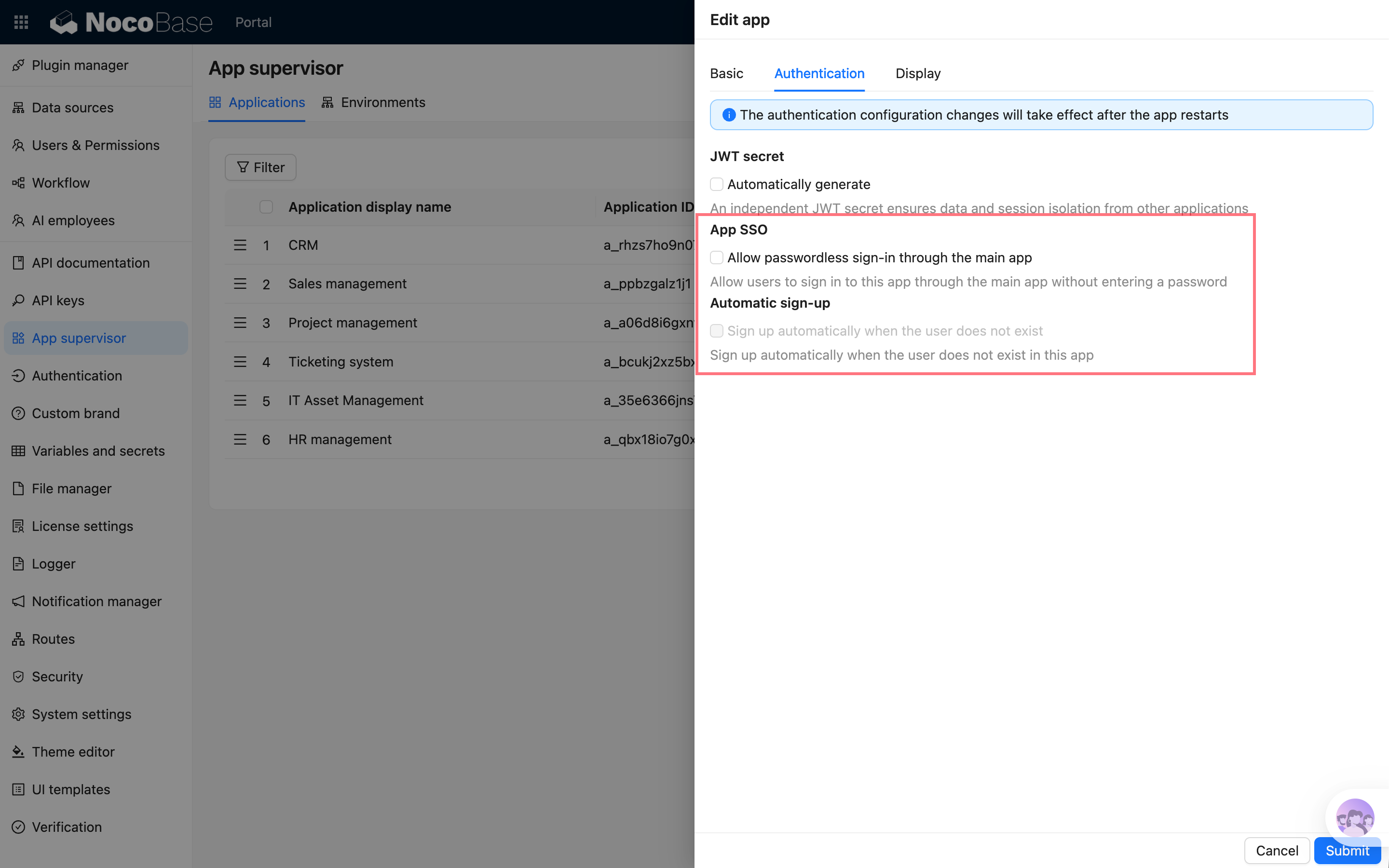
Go to "App Supervisor", create or edit a sub-app, and enable "App SSO" in "Authentication configuration".
|
|
26
|
+
|
|
27
|
+
After it is enabled, the sub-app can trigger automatic sign-in through the main app entry or the app switcher.
|
|
28
|
+
|
|
29
|
+
> After changing authentication configuration, the sub-app usually needs to be restarted for the change to take effect.
|
|
30
|
+
|
|
31
|
+
|
|
32
|
+
|
|
33
|
+
## Automatic user signup
|
|
34
|
+
|
|
35
|
+
If the corresponding user does not exist in the target sub-app, you can enable "Automatically sign up when user does not exist".
|
|
36
|
+
|
|
37
|
+
After it is enabled, when a user enters a sub-app through App SSO for the first time, the system creates a basic user in the sub-app from the user information in the main app.
|
|
38
|
+
|
|
39
|
+
User mapping is mainly based on username. This means:
|
|
40
|
+
|
|
41
|
+
- If the username is the same in the main app and sub-app, the user signs in as the corresponding sub-app user
|
|
42
|
+
- If the username does not exist in the sub-app, the user is created only when automatic signup is enabled
|
|
43
|
+
- If automatic signup is not enabled, the administrator needs to create the user in the sub-app in advance
|
|
44
|
+
|
|
45
|
+
Roles and permissions after user creation are determined by the sub-app's own user and permission configuration.
|
|
46
|
+
|
|
47
|
+
## Entries that trigger automatic sign-in
|
|
48
|
+
|
|
49
|
+
App SSO is mainly triggered from:
|
|
50
|
+
|
|
51
|
+
- Entering a sub-app from the main app's app entry
|
|
52
|
+
- Entering a sub-app from the upper-left app switcher
|
|
53
|
+
- Switching from one sub-app to another
|
|
54
|
+
|
|
55
|
+
Directly visiting the sub-app sign-in page or the sub-app's own URL does not force the main app sign-in state. This preserves the sub-app's own sign-in methods and makes it possible to manage sub-app accounts separately when needed.
|
|
56
|
+
|
|
57
|
+
## FAQ
|
|
58
|
+
|
|
59
|
+
### Still not signed in automatically after enabling it?
|
|
60
|
+
|
|
61
|
+
Check the following:
|
|
62
|
+
|
|
63
|
+
- Whether App SSO is enabled for the sub-app
|
|
64
|
+
- Whether the sub-app has been restarted so the authentication configuration takes effect
|
|
65
|
+
- Whether the user entered from the main app entry or app switcher
|
|
66
|
+
- Whether a user with the same username exists in the sub-app
|
|
67
|
+
- If the user does not exist, whether automatic signup is enabled
|
|
68
|
+
|
|
69
|
+
### Why does direct access to a sub-app not automatically sign in?
|
|
70
|
+
|
|
71
|
+
This is expected. When directly visiting a sub-app, the sub-app may need to use its own sign-in method, so the main app sign-in state is not forced.
|
|
@@ -8,6 +8,14 @@ pkg: '@nocobase/plugin-app-supervisor'
|
|
|
8
8
|
|
|
9
9
|
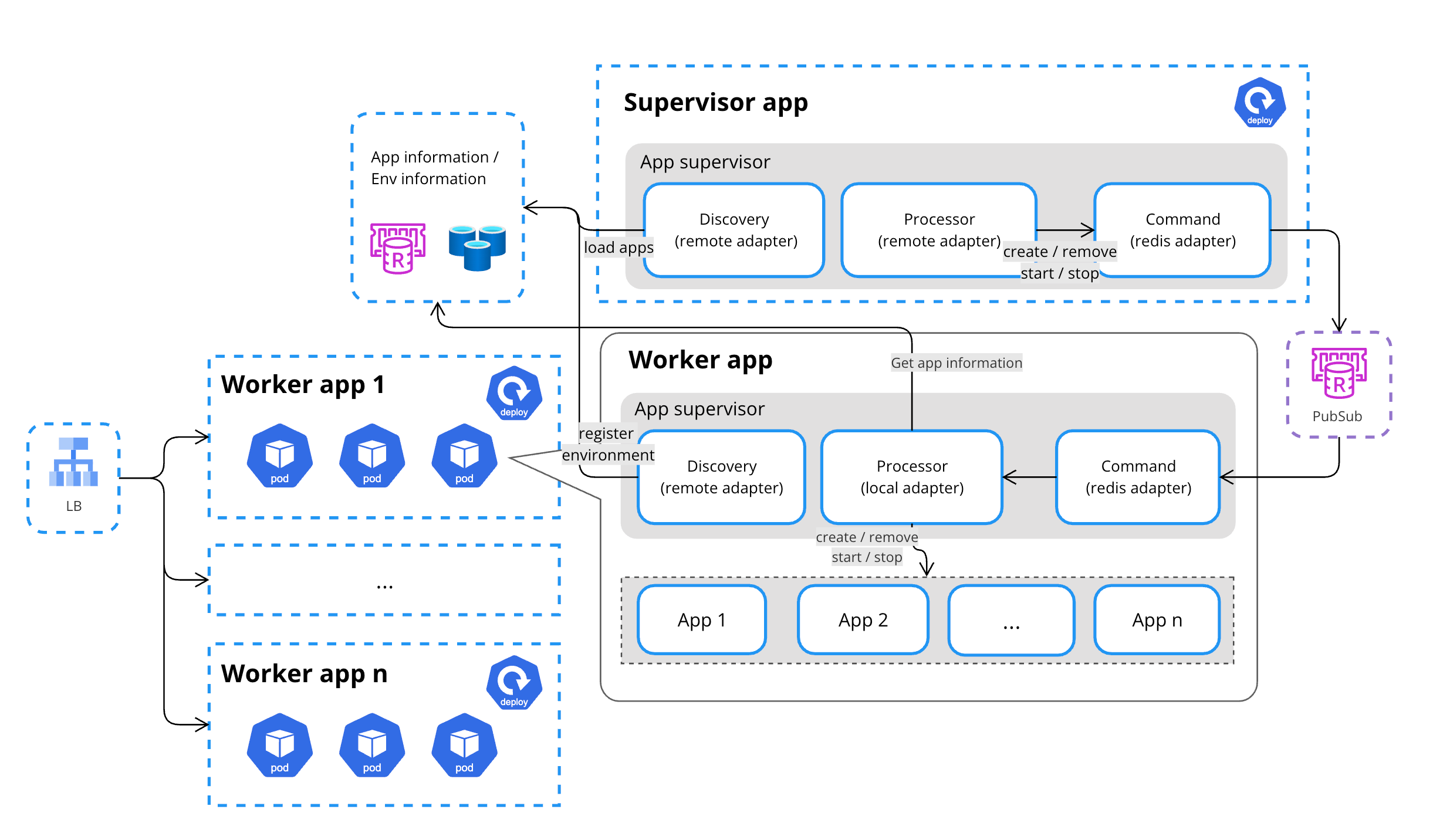
Multi-app management is a unified application management solution provided by NocoBase for creating and managing multiple physically isolated NocoBase application instances in one or more runtime environments. Through the AppSupervisor, users can create and maintain multiple applications from a unified entry point to meet the needs of different businesses and scale stages.
|
|
10
10
|
|
|
11
|
+
Multi-app is suitable for the following scenarios:
|
|
12
|
+
|
|
13
|
+
- Splitting a large system into multiple applications by business module, such as CRM, after-sales service, operations, and analytics
|
|
14
|
+
- Letting teams develop by business line or module in parallel, reducing configuration and release impact between modules
|
|
15
|
+
- Creating isolated applications for different customers, tenants, or organizations
|
|
16
|
+
- Creating independent demo, test, or sandbox applications in batches
|
|
17
|
+
- Assigning applications to different runtime environments as application count or load increases
|
|
18
|
+
|
|
11
19
|
## Single App
|
|
12
20
|
|
|
13
21
|
In the early stages of a project, most users start with a single app.
|
|
@@ -63,4 +71,4 @@ For users, multiple applications can still be created and managed through a sing
|
|
|
63
71
|
|
|
64
72
|
|
|
65
73
|
|
|
66
|
-
This approach is suitable for SaaS platforms, large numbers of demo environments, or multi-tenant scenarios, improving system stability and maintainability while ensuring flexibility.
|
|
74
|
+
This approach is suitable for SaaS platforms, large numbers of demo environments, or multi-tenant scenarios, improving system stability and maintainability while ensuring flexibility.
|