@nocobase/plugin-ai 2.1.0-beta.29 → 2.1.0-beta.32
This diff represents the content of publicly available package versions that have been released to one of the supported registries. The information contained in this diff is provided for informational purposes only and reflects changes between package versions as they appear in their respective public registries.
- package/client-v2.d.ts +1 -0
- package/client-v2.js +1 -0
- package/dist/ai/docs/nocobase/ai/index.md +1 -1
- package/dist/ai/docs/nocobase/ai-employees/built-in/atlas.md +24 -0
- package/dist/ai/docs/nocobase/ai-employees/built-in/dara.md +22 -0
- package/dist/ai/docs/nocobase/ai-employees/built-in/dex.md +32 -0
- package/dist/ai/docs/nocobase/ai-employees/built-in/ellis.md +22 -0
- package/dist/ai/docs/nocobase/ai-employees/built-in/index.md +25 -0
- package/dist/ai/docs/nocobase/ai-employees/built-in/lexi.md +26 -0
- package/dist/ai/docs/nocobase/ai-employees/built-in/lina.md +142 -0
- package/dist/ai/docs/nocobase/ai-employees/built-in/nathan.md +36 -0
- package/dist/ai/docs/nocobase/ai-employees/built-in/vera.md +22 -0
- package/dist/ai/docs/nocobase/ai-employees/built-in/viz.md +25 -0
- package/dist/ai/docs/nocobase/ai-employees/features/built-in-employee.md +1 -29
- package/dist/ai/docs/nocobase/ai-employees/features/collaborate.md +17 -7
- package/dist/ai/docs/nocobase/ai-employees/features/enable-ai-employee.md +4 -4
- package/dist/ai/docs/nocobase/ai-employees/features/model-settings.md +87 -0
- package/dist/ai/docs/nocobase/ai-employees/index.md +1 -1
- package/dist/ai/docs/nocobase/ai-employees/scenarios/localization-hy-mt.md +241 -0
- package/dist/ai/docs/nocobase/ai-employees/workflow/nodes/employee/configuration.md +1 -1
- package/dist/ai/docs/nocobase/api/cli/api/dynamic.md +7 -0
- package/dist/ai/docs/nocobase/api/cli/api/resource/index.md +3 -0
- package/dist/ai/docs/nocobase/api/cli/app/down.md +7 -3
- package/dist/ai/docs/nocobase/api/cli/app/index.md +1 -1
- package/dist/ai/docs/nocobase/api/cli/app/logs.md +3 -0
- package/dist/ai/docs/nocobase/api/cli/app/restart.md +4 -0
- package/dist/ai/docs/nocobase/api/cli/app/start.md +4 -0
- package/dist/ai/docs/nocobase/api/cli/app/stop.md +3 -0
- package/dist/ai/docs/nocobase/api/cli/app/upgrade.md +5 -0
- package/dist/ai/docs/nocobase/api/cli/env/add.md +11 -3
- package/dist/ai/docs/nocobase/api/cli/env/auth.md +1 -1
- package/dist/ai/docs/nocobase/api/cli/env/current.md +29 -0
- package/dist/ai/docs/nocobase/api/cli/env/index.md +22 -4
- package/dist/ai/docs/nocobase/api/cli/env/info.md +1 -5
- package/dist/ai/docs/nocobase/api/cli/env/list.md +11 -6
- package/dist/ai/docs/nocobase/api/cli/env/remove.md +4 -1
- package/dist/ai/docs/nocobase/api/cli/env/status.md +52 -0
- package/dist/ai/docs/nocobase/api/cli/env/update.md +1 -1
- package/dist/ai/docs/nocobase/api/cli/env/use.md +11 -1
- package/dist/ai/docs/nocobase/api/cli/index.md +13 -1
- package/dist/ai/docs/nocobase/api/cli/license/activate.md +4 -1
- package/dist/ai/docs/nocobase/api/cli/license/id.md +4 -0
- package/dist/ai/docs/nocobase/api/cli/license/plugins/clean.md +5 -1
- package/dist/ai/docs/nocobase/api/cli/license/plugins/list.md +4 -0
- package/dist/ai/docs/nocobase/api/cli/license/plugins/sync.md +5 -1
- package/dist/ai/docs/nocobase/api/cli/license/status.md +4 -0
- package/dist/ai/docs/nocobase/api/cli/plugin/disable.md +4 -0
- package/dist/ai/docs/nocobase/api/cli/plugin/enable.md +4 -0
- package/dist/ai/docs/nocobase/api/cli/plugin/list.md +4 -0
- package/dist/ai/docs/nocobase/api/cli/session/id.md +28 -0
- package/dist/ai/docs/nocobase/api/cli/session/index.md +41 -0
- package/dist/ai/docs/nocobase/api/cli/session/remove.md +35 -0
- package/dist/ai/docs/nocobase/api/cli/session/setup.md +47 -0
- package/dist/ai/docs/nocobase/interface-builder/actions/types/js-action.md +1 -1
- package/dist/ai/docs/nocobase/interface-builder/actions/types/js-item.md +1 -1
- package/dist/ai/docs/nocobase/interface-builder/blocks/other-blocks/js-block.md +1 -1
- package/dist/ai/docs/nocobase/interface-builder/fields/specific/js-column.md +1 -1
- package/dist/ai/docs/nocobase/interface-builder/fields/specific/js-field.md +1 -1
- package/dist/ai/docs/nocobase/interface-builder/fields/specific/js-item.md +1 -1
- package/dist/ai/docs/nocobase/security/guide.md +13 -1
- package/dist/ai/docs/nocobase/system-management/localization/index.md +25 -1
- package/dist/client/119.c6bf8c6433167d81.js +10 -0
- package/dist/client/228.b4b709f93b86b6b9.js +10 -0
- package/dist/client/462.1708385b148779cd.js +10 -0
- package/dist/client/{486.afbed6b132b3c0dd.js → 486.dcac8f3fcec19c33.js} +1 -1
- package/dist/client/{559.39872901b9053629.js → 559.585f80c3bcea0bed.js} +1 -1
- package/dist/client/597.b0d64948d74cf6cb.js +10 -0
- package/dist/client/646.b0ed728921b007d4.js +10 -0
- package/dist/client/711.92cd94681fde7e05.js +10 -0
- package/dist/client/768.5177bff46ae71a5b.js +10 -0
- package/dist/client/792.abb57765453bcbcc.js +10 -0
- package/dist/client/820.f72ef2462b61d812.js +10 -0
- package/dist/client/927.d95c74ebb8fd51c9.js +10 -0
- package/dist/client/ai-employees/admin/ModelSettings.d.ts +10 -0
- package/dist/client/ai-employees/admin/hooks.d.ts +1 -1
- package/dist/client/ai-employees/avatars.d.ts +9 -783
- package/dist/client/ai-employees/chatbox/conversations/ConversationsList.d.ts +1 -15
- package/dist/client/ai-employees/chatbox/conversations/WorkflowTasksList.d.ts +1 -21
- package/dist/client/ai-employees/chatbox/hooks/useChat.d.ts +125 -0
- package/dist/client/ai-employees/chatbox/hooks/useChatBoxActions.d.ts +1 -1
- package/dist/client/ai-employees/chatbox/hooks/useChatConversationActions.d.ts +13 -1
- package/dist/client/ai-employees/chatbox/hooks/useChatMessageActions.d.ts +8 -8
- package/dist/client/ai-employees/chatbox/model.d.ts +6 -3
- package/dist/client/ai-employees/chatbox/stores/chat-conversations.d.ts +4 -0
- package/dist/client/ai-employees/chatbox/stores/chat-messages.d.ts +77 -50
- package/dist/client/ai-employees/chatbox/stores/chat-tool-call.d.ts +24 -16
- package/dist/client/ai-employees/types.d.ts +24 -0
- package/dist/client/features/vector-database-provider.d.ts +1 -1
- package/dist/client/index.d.ts +2 -0
- package/dist/client/index.js +3 -3
- package/dist/client/llm-services/component/EnabledModelsSelect.d.ts +1 -14
- package/dist/client-v2/ai-employees/AIEmployeeShortcut.d.ts +21 -0
- package/dist/client-v2/ai-employees/ProfileCard.d.ts +17 -0
- package/dist/client-v2/ai-employees/avatars.d.ts +783 -0
- package/dist/client-v2/ai-employees/types.d.ts +20 -0
- package/dist/client-v2/index.d.ts +17 -0
- package/dist/client-v2/index.js +10 -0
- package/dist/client-v2/llm-services/model-label.d.ts +22 -0
- package/dist/collections/ai-employees.d.ts +2 -1
- package/dist/collections/ai-employees.js +1 -1
- package/dist/externalVersion.js +17 -16
- package/dist/locale/en-US.json +16 -1
- package/dist/locale/zh-CN.json +16 -1
- package/dist/node_modules/@langchain/xai/package.json +1 -1
- package/dist/node_modules/fs-extra/package.json +1 -1
- package/dist/node_modules/jsonrepair/package.json +1 -1
- package/dist/node_modules/just-bash/package.json +1 -1
- package/dist/node_modules/nodejs-snowflake/package.json +1 -1
- package/dist/node_modules/openai/package.json +1 -1
- package/dist/node_modules/zod/package.json +1 -1
- package/dist/server/ai-employees/ai-conversations.d.ts +4 -1
- package/dist/server/ai-employees/ai-conversations.js +44 -4
- package/dist/server/ai-employees/ai-employee.d.ts +31 -15
- package/dist/server/ai-employees/ai-employee.js +205 -52
- package/dist/server/ai-employees/ai-employees-manager.d.ts +4 -0
- package/dist/server/ai-employees/ai-employees-manager.js +41 -0
- package/dist/server/ai-employees/ai-knowledge-base.js +7 -7
- package/dist/server/ai-employees/middleware/conversation.d.ts +1 -0
- package/dist/server/ai-employees/middleware/conversation.js +15 -11
- package/dist/server/ai-employees/sub-agents/dispatcher.js +2 -4
- package/dist/server/ai-employees/utils.d.ts +6 -3
- package/dist/server/ai-employees/utils.js +7 -1
- package/dist/server/collections/ai-conversations.js +6 -0
- package/dist/server/features/knowledge-base.d.ts +3 -2
- package/dist/server/index.d.ts +2 -0
- package/dist/server/index.js +3 -0
- package/dist/server/llm-providers/common/reasoning.d.ts +2 -0
- package/dist/server/llm-providers/common/reasoning.js +15 -2
- package/dist/server/llm-providers/dashscope.d.ts +2 -1
- package/dist/server/llm-providers/dashscope.js +39 -0
- package/dist/server/llm-providers/deepseek.js +2 -0
- package/dist/server/llm-providers/provider.d.ts +15 -1
- package/dist/server/llm-providers/provider.js +21 -2
- package/dist/server/manager/ai-chat-conversation.js +3 -4
- package/dist/server/manager/ai-manager.d.ts +17 -0
- package/dist/server/manager/ai-manager.js +65 -0
- package/dist/server/manager/llm-stream-manager.d.ts +37 -0
- package/dist/server/manager/llm-stream-manager.js +142 -0
- package/dist/server/migrations/20260407170416-ai-employee-knowledge-base-add-key.d.ts +14 -0
- package/dist/server/migrations/20260407170416-ai-employee-knowledge-base-add-key.js +61 -0
- package/dist/server/plugin.d.ts +2 -0
- package/dist/server/plugin.js +3 -0
- package/dist/server/resource/ai.js +1 -41
- package/dist/server/resource/aiConversations.d.ts +8 -0
- package/dist/server/resource/aiConversations.js +141 -10
- package/dist/server/resource/aiEmployees.js +32 -1
- package/dist/server/types/knowledge-base.type.d.ts +3 -2
- package/dist/server/workflow/nodes/employee/index.js +4 -2
- package/package.json +2 -2
- package/dist/client/119.78774f3ad953af49.js +0 -10
- package/dist/client/228.a3df2921c8beb766.js +0 -10
- package/dist/client/343.6f36d97dd122c5b6.js +0 -10
- package/dist/client/597.aa363881a325b5c0.js +0 -10
- package/dist/client/646.217a40387efbd163.js +0 -10
- package/dist/client/711.266b8f1c520d467a.js +0 -10
- package/dist/client/768.973ce32e15099a48.js +0 -10
- package/dist/client/792.2e48eab4767d662a.js +0 -10
- package/dist/client/820.6a26239ea96c075a.js +0 -10
- package/dist/client/927.ff5cd05b14901ae6.js +0 -10
|
@@ -0,0 +1,52 @@
|
|
|
1
|
+
---
|
|
2
|
+
title: "nb env status"
|
|
3
|
+
description: "nb env status command reference: show status for the current env, one env, or all envs."
|
|
4
|
+
keywords: "nb env status,NocoBase CLI,environment status,API Base URL"
|
|
5
|
+
---
|
|
6
|
+
|
|
7
|
+
# nb env status
|
|
8
|
+
|
|
9
|
+
Show env status. By default it inspects the current env. You can also inspect one named env, or use `--all` to inspect all envs.
|
|
10
|
+
|
|
11
|
+
This command prints a simplified status table with `Env`, `Status`, and `API Base URL`.
|
|
12
|
+
|
|
13
|
+
## Usage
|
|
14
|
+
|
|
15
|
+
```bash
|
|
16
|
+
nb env status [name] [flags]
|
|
17
|
+
```
|
|
18
|
+
|
|
19
|
+
## Parameters
|
|
20
|
+
|
|
21
|
+
| Parameter | Type | Description |
|
|
22
|
+
| --- | --- | --- |
|
|
23
|
+
| `[name]` | string | Configured environment name to inspect; uses the current env if omitted; cannot be used with `--all` |
|
|
24
|
+
| `--all` | boolean | Show status for all configured envs |
|
|
25
|
+
| `--json-output` | boolean | Output the result as JSON |
|
|
26
|
+
|
|
27
|
+
`[name]` and `--all` cannot be used together.
|
|
28
|
+
|
|
29
|
+
## Status values
|
|
30
|
+
|
|
31
|
+
`Status` is the result returned after the CLI checks the target env. Typical values include:
|
|
32
|
+
|
|
33
|
+
- `ok`: the env is reachable and authenticated
|
|
34
|
+
- `auth failed`: the API is reachable but authentication failed
|
|
35
|
+
- `unreachable`: the target address could not be reached
|
|
36
|
+
- `unconfigured`: the env configuration is incomplete
|
|
37
|
+
- `missing`: the managed app for this env no longer exists
|
|
38
|
+
|
|
39
|
+
## Examples
|
|
40
|
+
|
|
41
|
+
```bash
|
|
42
|
+
nb env status
|
|
43
|
+
nb env status app1
|
|
44
|
+
nb env status --all
|
|
45
|
+
nb env status --all --json-output
|
|
46
|
+
```
|
|
47
|
+
|
|
48
|
+
## Related Commands
|
|
49
|
+
|
|
50
|
+
- [`nb env current`](./current.md)
|
|
51
|
+
- [`nb env list`](./list.md)
|
|
52
|
+
- [`nb env info`](./info.md)
|
|
@@ -18,7 +18,7 @@ nb env update [name] [flags]
|
|
|
18
18
|
|
|
19
19
|
| Parameter | Type | Description |
|
|
20
20
|
| --- | --- | --- |
|
|
21
|
-
| `[name]` | string |
|
|
21
|
+
| `[name]` | string | Configured environment name to refresh; uses the current env if omitted |
|
|
22
22
|
| `--verbose` | boolean | Show detailed progress |
|
|
23
23
|
| `--api-base-url` | string | Override the NocoBase API URL and persist it to the target env |
|
|
24
24
|
| `--role` | string | Role override sent as the `X-Role` request header |
|
|
@@ -8,6 +8,10 @@ keywords: "nb env use,NocoBase CLI,switch environment,current env"
|
|
|
8
8
|
|
|
9
9
|
Switch the current CLI env. Commands that omit `--env` will use this env by default afterward.
|
|
10
10
|
|
|
11
|
+
When session mode is enabled for the current shell or runtime, this change only affects the current session.
|
|
12
|
+
|
|
13
|
+
When session mode is not enabled, this falls back to updating the global `last env`. In that case, other terminals or agent runtimes without session isolation may also be affected.
|
|
14
|
+
|
|
11
15
|
## Usage
|
|
12
16
|
|
|
13
17
|
```bash
|
|
@@ -18,7 +22,7 @@ nb env use <name>
|
|
|
18
22
|
|
|
19
23
|
| Parameter | Type | Description |
|
|
20
24
|
| --- | --- | --- |
|
|
21
|
-
| `<name>` | string | Configured
|
|
25
|
+
| `<name>` | string | Configured environment name to switch to |
|
|
22
26
|
|
|
23
27
|
## Examples
|
|
24
28
|
|
|
@@ -26,7 +30,13 @@ nb env use <name>
|
|
|
26
30
|
nb env use local
|
|
27
31
|
```
|
|
28
32
|
|
|
33
|
+
## Recommendation
|
|
34
|
+
|
|
35
|
+
The default recommendation is to run [`nb session setup`](../session/setup.md) once first. That makes `nb env use` behave more like `use dbname` in a database client: switch the current session context first, then run follow-up commands that depend on that env.
|
|
36
|
+
|
|
29
37
|
## Related Commands
|
|
30
38
|
|
|
39
|
+
- [`nb env current`](./current.md)
|
|
40
|
+
- [`nb env status`](./status.md)
|
|
31
41
|
- [`nb env list`](./list.md)
|
|
32
42
|
- [`nb env info`](./info.md)
|
|
@@ -35,11 +35,12 @@ The root command mainly displays help and dispatches execution to command groups
|
|
|
35
35
|
| [`nb app`](./app/index.md) | Manage NocoBase app runtimes: start, stop, restart, logs, and upgrades. |
|
|
36
36
|
| [`nb config`](./config/index.md) | Manage CLI configuration defaults. |
|
|
37
37
|
| [`nb db`](./db/index.md) | Manage the built-in database for the selected env. |
|
|
38
|
-
| [`nb env`](./env/index.md) | Manage NocoBase project environments, status, details, and command runtimes. |
|
|
38
|
+
| [`nb env`](./env/index.md) | Manage NocoBase project environments, current env, status, details, and command runtimes. |
|
|
39
39
|
| [`nb license`](./license/index.md) | Manage commercial licensing and licensed plugins. |
|
|
40
40
|
| [`nb plugin`](./plugin/index.md) | Manage plugins in the selected NocoBase env. |
|
|
41
41
|
| [`nb scaffold`](./scaffold/index.md) | Generate NocoBase plugin development scaffolds. |
|
|
42
42
|
| [`nb self`](./self/index.md) | Inspect or update the NocoBase CLI itself. |
|
|
43
|
+
| [`nb session`](./session/index.md) | Configure `NB_SESSION_ID` so current env is isolated per shell or agent runtime. |
|
|
43
44
|
| [`nb skills`](./skills/index.md) | Inspect or synchronize NocoBase AI coding skills for the current workspace. |
|
|
44
45
|
| [`nb source`](./source/index.md) | Work with the local NocoBase source project: download, develop, build, and test. |
|
|
45
46
|
|
|
@@ -93,6 +94,8 @@ Connect an existing app:
|
|
|
93
94
|
|
|
94
95
|
```bash
|
|
95
96
|
nb env add app1 --api-base-url http://localhost:13000/api
|
|
97
|
+
nb env current
|
|
98
|
+
nb env status
|
|
96
99
|
```
|
|
97
100
|
|
|
98
101
|
Start the app and refresh runtime commands:
|
|
@@ -130,6 +133,7 @@ The following environment variables affect CLI behavior:
|
|
|
130
133
|
| --- | --- |
|
|
131
134
|
| `NB_CLI_ROOT` | Root directory where the CLI stores `.nocobase` config and local app files. Defaults to the current user's home directory. |
|
|
132
135
|
| `NB_LOCALE` | Language for CLI prompts and the local setup UI. Supported values are `en-US` and `zh-CN`. |
|
|
136
|
+
| `NB_SESSION_ID` | Session ID for the current shell or agent runtime. When set, `nb env use` and `nb env current` are isolated per session. |
|
|
133
137
|
|
|
134
138
|
Example:
|
|
135
139
|
|
|
@@ -154,6 +158,14 @@ After setting `NB_CLI_ROOT=/your/workspace`, the config file path becomes:
|
|
|
154
158
|
|
|
155
159
|
The CLI also keeps compatibility with legacy project config under the current working directory.
|
|
156
160
|
|
|
161
|
+
Current env session cache is stored in:
|
|
162
|
+
|
|
163
|
+
```text
|
|
164
|
+
.nocobase/sessions/<NB_SESSION_ID>.json
|
|
165
|
+
```
|
|
166
|
+
|
|
167
|
+
The globally last-used env is stored in the `lastEnv` field in `config.json`. When `NB_SESSION_ID` is not set, the CLI falls back to that global value.
|
|
168
|
+
|
|
157
169
|
Runtime command cache is stored in:
|
|
158
170
|
|
|
159
171
|
```text
|
|
@@ -25,7 +25,7 @@ nb license activate [flags]
|
|
|
25
25
|
| `--account` | string | License service account for online activation |
|
|
26
26
|
| `--password` | string | License service password for online activation |
|
|
27
27
|
| `--desc` | string | Application name submitted for online activation |
|
|
28
|
-
| `--yes` | boolean |
|
|
28
|
+
| `--yes`, `-y` | boolean | When an explicitly passed `--env` targets a different env than the current env, skip the interactive confirmation prompt |
|
|
29
29
|
| `--json` | boolean | Output JSON |
|
|
30
30
|
|
|
31
31
|
## Examples
|
|
@@ -34,6 +34,7 @@ nb license activate [flags]
|
|
|
34
34
|
nb license activate --env app1 --key <licenseKey>
|
|
35
35
|
nb license activate --env app1 --key-file ./license.txt
|
|
36
36
|
nb license activate --env app1 --online
|
|
37
|
+
nb license activate --env app1 --online --account aa --password bb --desc test24
|
|
37
38
|
nb license activate --env app1 --online --account aa --password bb --desc test24 --yes
|
|
38
39
|
nb license activate --env app1 --json --key-file ./license.txt
|
|
39
40
|
```
|
|
@@ -42,6 +43,8 @@ nb license activate --env app1 --json --key-file ./license.txt
|
|
|
42
43
|
|
|
43
44
|
When online activation is used, the CLI requests a license key from the license service with the current env's instance ID and app URL.
|
|
44
45
|
|
|
46
|
+
If you explicitly pass `--env` and it differs from the current env, the CLI asks for confirmation first. In non-interactive terminals or AI agent sessions, add `--yes` yourself or run `nb env use <name>` first and try again.
|
|
47
|
+
|
|
45
48
|
## Related Commands
|
|
46
49
|
|
|
47
50
|
- [`nb license id`](./id.md)
|
|
@@ -19,6 +19,7 @@ nb license id [flags]
|
|
|
19
19
|
| Parameter | Type | Description |
|
|
20
20
|
| --- | --- | --- |
|
|
21
21
|
| `--env`, `-e` | string | CLI env name; when omitted, the current env is used |
|
|
22
|
+
| `--yes`, `-y` | boolean | When an explicitly passed `--env` targets a different env than the current env, skip the interactive confirmation prompt |
|
|
22
23
|
| `--force` | boolean | Regenerate the instance ID even when one is already saved |
|
|
23
24
|
| `--json` | boolean | Output JSON |
|
|
24
25
|
|
|
@@ -27,10 +28,13 @@ nb license id [flags]
|
|
|
27
28
|
```bash
|
|
28
29
|
nb license id
|
|
29
30
|
nb license id --env app1
|
|
31
|
+
nb license id --env app1 --yes
|
|
30
32
|
nb license id --env app1 --force
|
|
31
33
|
nb license id --env app1 --json
|
|
32
34
|
```
|
|
33
35
|
|
|
36
|
+
`--force` only forces regeneration of the instance ID. It does not replace cross-env confirmation; if an explicitly passed `--env` targets a non-current env, you still need confirmation or `--yes`.
|
|
37
|
+
|
|
34
38
|
## Related Commands
|
|
35
39
|
|
|
36
40
|
- [`nb license activate`](./activate.md)
|
|
@@ -19,8 +19,9 @@ nb license plugins clean [flags]
|
|
|
19
19
|
| Parameter | Type | Description |
|
|
20
20
|
| --- | --- | --- |
|
|
21
21
|
| `--env`, `-e` | string | CLI env name; when omitted, the current env is used |
|
|
22
|
+
| `--yes`, `-y` | boolean | When an explicitly passed `--env` targets a different env than the current env, skip the interactive confirmation prompt |
|
|
22
23
|
| `--dry-run` | boolean | Preview which plugins would be removed without deleting anything |
|
|
23
|
-
| `--verbose
|
|
24
|
+
| `--verbose` | boolean | Show detailed per-plugin clean logs |
|
|
24
25
|
| `--json` | boolean | Output JSON |
|
|
25
26
|
|
|
26
27
|
## Examples
|
|
@@ -28,11 +29,14 @@ nb license plugins clean [flags]
|
|
|
28
29
|
```bash
|
|
29
30
|
nb license plugins clean
|
|
30
31
|
nb license plugins clean --env app1
|
|
32
|
+
nb license plugins clean --env app1 --yes
|
|
31
33
|
nb license plugins clean --env app1 --dry-run
|
|
32
34
|
nb license plugins clean --env app1 --verbose
|
|
33
35
|
nb license plugins clean --env app1 --json
|
|
34
36
|
```
|
|
35
37
|
|
|
38
|
+
If you explicitly pass `--env` and it differs from the current env, the CLI asks for confirmation first. In non-interactive terminals or AI agent sessions, add `--yes` yourself or run `nb env use <name>` first and try again.
|
|
39
|
+
|
|
36
40
|
## Related Commands
|
|
37
41
|
|
|
38
42
|
- [`nb license plugins sync`](./sync.md)
|
|
@@ -19,6 +19,7 @@ nb license plugins list [flags]
|
|
|
19
19
|
| Parameter | Type | Description |
|
|
20
20
|
| --- | --- | --- |
|
|
21
21
|
| `--env`, `-e` | string | CLI env name; when omitted, the current env is used |
|
|
22
|
+
| `--yes`, `-y` | boolean | When an explicitly passed `--env` targets a different env than the current env, skip the interactive confirmation prompt |
|
|
22
23
|
| `--json` | boolean | Output JSON |
|
|
23
24
|
|
|
24
25
|
## Examples
|
|
@@ -26,9 +27,12 @@ nb license plugins list [flags]
|
|
|
26
27
|
```bash
|
|
27
28
|
nb license plugins list
|
|
28
29
|
nb license plugins list --env app1
|
|
30
|
+
nb license plugins list --env app1 --yes
|
|
29
31
|
nb license plugins list --env app1 --json
|
|
30
32
|
```
|
|
31
33
|
|
|
34
|
+
If you explicitly pass `--env` and it differs from the current env, the CLI asks for confirmation first. In non-interactive terminals or AI agent sessions, add `--yes` yourself or run `nb env use <name>` first and try again.
|
|
35
|
+
|
|
32
36
|
## Related Commands
|
|
33
37
|
|
|
34
38
|
- [`nb license plugins sync`](./sync.md)
|
|
@@ -19,9 +19,10 @@ nb license plugins sync [flags]
|
|
|
19
19
|
| Parameter | Type | Description |
|
|
20
20
|
| --- | --- | --- |
|
|
21
21
|
| `--env`, `-e` | string | CLI env name; when omitted, the current env is used |
|
|
22
|
+
| `--yes`, `-y` | boolean | When an explicitly passed `--env` targets a different env than the current env, skip the interactive confirmation prompt |
|
|
22
23
|
| `--dry-run` | boolean | Preview changes without installing, upgrading, or removing plugins |
|
|
23
24
|
| `--version` | string | Registry version or dist-tag to synchronize; defaults to the current workspace version |
|
|
24
|
-
| `--verbose
|
|
25
|
+
| `--verbose` | boolean | Show detailed per-plugin sync logs |
|
|
25
26
|
| `--json` | boolean | Output JSON |
|
|
26
27
|
|
|
27
28
|
## Examples
|
|
@@ -29,6 +30,7 @@ nb license plugins sync [flags]
|
|
|
29
30
|
```bash
|
|
30
31
|
nb license plugins sync
|
|
31
32
|
nb license plugins sync --env app1
|
|
33
|
+
nb license plugins sync --env app1 --yes
|
|
32
34
|
nb license plugins sync --env app1 --dry-run
|
|
33
35
|
nb license plugins sync --env app1 --json
|
|
34
36
|
```
|
|
@@ -37,6 +39,8 @@ nb license plugins sync --env app1 --json
|
|
|
37
39
|
|
|
38
40
|
When `--version` is omitted, the CLI detects the current app version automatically and uses that to decide which registry version of commercial plugins should be downloaded.
|
|
39
41
|
|
|
42
|
+
If you explicitly pass `--env` and it differs from the current env, the CLI asks for confirmation first. In non-interactive terminals or AI agent sessions, add `--yes` yourself or run `nb env use <name>` first and try again.
|
|
43
|
+
|
|
40
44
|
## Related Commands
|
|
41
45
|
|
|
42
46
|
- [`nb license plugins list`](./list.md)
|
|
@@ -19,6 +19,7 @@ nb license status [flags]
|
|
|
19
19
|
| Parameter | Type | Description |
|
|
20
20
|
| --- | --- | --- |
|
|
21
21
|
| `--env`, `-e` | string | CLI env name; when omitted, the current env is used |
|
|
22
|
+
| `--yes`, `-y` | boolean | When an explicitly passed `--env` targets a different env than the current env, skip the interactive confirmation prompt |
|
|
22
23
|
| `--doctor` | boolean | Run extra diagnostic checks and suggestions |
|
|
23
24
|
| `--json` | boolean | Output JSON |
|
|
24
25
|
|
|
@@ -27,6 +28,7 @@ nb license status [flags]
|
|
|
27
28
|
```bash
|
|
28
29
|
nb license status
|
|
29
30
|
nb license status --env app1
|
|
31
|
+
nb license status --env app1 --yes
|
|
30
32
|
nb license status --env app1 --doctor
|
|
31
33
|
nb license status --env app1 --json
|
|
32
34
|
```
|
|
@@ -35,6 +37,8 @@ nb license status --env app1 --json
|
|
|
35
37
|
|
|
36
38
|
The new CLI does not fully implement backend license status checks yet. The command can still return basic context and diagnostic placeholders, but not a complete license verdict.
|
|
37
39
|
|
|
40
|
+
If you explicitly pass `--env` and it differs from the current env, the CLI asks for confirmation first. In non-interactive terminals or AI agent sessions, add `--yes` yourself or run `nb env use <name>` first and try again.
|
|
41
|
+
|
|
38
42
|
## Related Commands
|
|
39
43
|
|
|
40
44
|
- [`nb license activate`](./activate.md)
|
|
@@ -20,6 +20,7 @@ nb plugin disable <packages...> [flags]
|
|
|
20
20
|
| --- | --- | --- |
|
|
21
21
|
| `<packages...>` | string[] | Plugin package names, required; supports multiple values |
|
|
22
22
|
| `--env`, `-e` | string | CLI env name; uses the current env if omitted |
|
|
23
|
+
| `--yes`, `-y` | boolean | When an explicitly passed `--env` targets a different env than the current env, skip the interactive confirmation prompt |
|
|
23
24
|
|
|
24
25
|
## Examples
|
|
25
26
|
|
|
@@ -27,8 +28,11 @@ nb plugin disable <packages...> [flags]
|
|
|
27
28
|
nb plugin disable @nocobase/plugin-sample
|
|
28
29
|
nb plugin disable @nocobase/plugin-a @nocobase/plugin-b
|
|
29
30
|
nb plugin disable -e local @nocobase/plugin-sample
|
|
31
|
+
nb plugin disable -e local --yes @nocobase/plugin-sample
|
|
30
32
|
```
|
|
31
33
|
|
|
34
|
+
If you explicitly pass `--env` and it differs from the current env, the CLI asks for confirmation first. In non-interactive terminals or AI agent sessions, add `--yes` yourself or run `nb env use <name>` first and try again.
|
|
35
|
+
|
|
32
36
|
## Related Commands
|
|
33
37
|
|
|
34
38
|
- [`nb plugin list`](./list.md)
|
|
@@ -20,6 +20,7 @@ nb plugin enable <packages...> [flags]
|
|
|
20
20
|
| --- | --- | --- |
|
|
21
21
|
| `<packages...>` | string[] | Plugin package names, required; supports multiple values |
|
|
22
22
|
| `--env`, `-e` | string | CLI env name; uses the current env if omitted |
|
|
23
|
+
| `--yes`, `-y` | boolean | When an explicitly passed `--env` targets a different env than the current env, skip the interactive confirmation prompt |
|
|
23
24
|
|
|
24
25
|
## Examples
|
|
25
26
|
|
|
@@ -27,8 +28,11 @@ nb plugin enable <packages...> [flags]
|
|
|
27
28
|
nb plugin enable @nocobase/plugin-sample
|
|
28
29
|
nb plugin enable @nocobase/plugin-a @nocobase/plugin-b
|
|
29
30
|
nb plugin enable -e local @nocobase/plugin-sample
|
|
31
|
+
nb plugin enable -e local --yes @nocobase/plugin-sample
|
|
30
32
|
```
|
|
31
33
|
|
|
34
|
+
If you explicitly pass `--env` and it differs from the current env, the CLI asks for confirmation first. In non-interactive terminals or AI agent sessions, add `--yes` yourself or run `nb env use <name>` first and try again.
|
|
35
|
+
|
|
32
36
|
## Related Commands
|
|
33
37
|
|
|
34
38
|
- [`nb plugin list`](./list.md)
|
|
@@ -19,15 +19,19 @@ nb plugin list [flags]
|
|
|
19
19
|
| Parameter | Type | Description |
|
|
20
20
|
| --- | --- | --- |
|
|
21
21
|
| `--env`, `-e` | string | CLI env name; uses the current env if omitted |
|
|
22
|
+
| `--yes`, `-y` | boolean | When an explicitly passed `--env` targets a different env than the current env, skip the interactive confirmation prompt |
|
|
22
23
|
|
|
23
24
|
## Examples
|
|
24
25
|
|
|
25
26
|
```bash
|
|
26
27
|
nb plugin list
|
|
27
28
|
nb plugin list -e local
|
|
29
|
+
nb plugin list -e local --yes
|
|
28
30
|
nb plugin list -e local-docker
|
|
29
31
|
```
|
|
30
32
|
|
|
33
|
+
If you explicitly pass `--env` and it differs from the current env, the CLI asks for confirmation first. In non-interactive terminals or AI agent sessions, add `--yes` yourself or run `nb env use <name>` first and try again.
|
|
34
|
+
|
|
31
35
|
## Related Commands
|
|
32
36
|
|
|
33
37
|
- [`nb plugin enable`](./enable.md)
|
|
@@ -0,0 +1,28 @@
|
|
|
1
|
+
---
|
|
2
|
+
title: "nb session id"
|
|
3
|
+
description: "nb session id command reference: show the current effective NB_SESSION_ID."
|
|
4
|
+
keywords: "nb session id,NocoBase CLI,NB_SESSION_ID,session id"
|
|
5
|
+
---
|
|
6
|
+
|
|
7
|
+
# nb session id
|
|
8
|
+
|
|
9
|
+
Show the current effective session id.
|
|
10
|
+
|
|
11
|
+
If no usable `NB_SESSION_ID` is available in the current shell or runtime, the command tells you to run [`nb session setup`](./setup.md) first, then open a new shell session or runtime.
|
|
12
|
+
|
|
13
|
+
## Usage
|
|
14
|
+
|
|
15
|
+
```bash
|
|
16
|
+
nb session id
|
|
17
|
+
```
|
|
18
|
+
|
|
19
|
+
## Examples
|
|
20
|
+
|
|
21
|
+
```bash
|
|
22
|
+
nb session id
|
|
23
|
+
```
|
|
24
|
+
|
|
25
|
+
## Related Commands
|
|
26
|
+
|
|
27
|
+
- [`nb session setup`](./setup.md)
|
|
28
|
+
- [`nb env current`](../env/current.md)
|
|
@@ -0,0 +1,41 @@
|
|
|
1
|
+
---
|
|
2
|
+
title: "nb session"
|
|
3
|
+
description: "nb session command reference: configure and inspect NB_SESSION_ID so current env is isolated per shell or agent runtime."
|
|
4
|
+
keywords: "nb session,NocoBase CLI,NB_SESSION_ID,session mode"
|
|
5
|
+
---
|
|
6
|
+
|
|
7
|
+
# nb session
|
|
8
|
+
|
|
9
|
+
Manage session mode for `NB_SESSION_ID`.
|
|
10
|
+
|
|
11
|
+
After session mode is enabled, `nb env use` and `nb env current` use the current shell or agent runtime context first, instead of directly sharing a single global current env.
|
|
12
|
+
|
|
13
|
+
## Usage
|
|
14
|
+
|
|
15
|
+
```bash
|
|
16
|
+
nb session <command>
|
|
17
|
+
```
|
|
18
|
+
|
|
19
|
+
## Subcommands
|
|
20
|
+
|
|
21
|
+
| Command | Description |
|
|
22
|
+
| --- | --- |
|
|
23
|
+
| [`nb session setup`](./setup.md) | Install shell or runtime integration for `NB_SESSION_ID` |
|
|
24
|
+
| [`nb session id`](./id.md) | Show the current effective session id |
|
|
25
|
+
| [`nb session remove`](./remove.md) | Remove shell or runtime integration for `NB_SESSION_ID` |
|
|
26
|
+
|
|
27
|
+
## When you need it
|
|
28
|
+
|
|
29
|
+
The default recommendation is to run `nb session setup` once when you first start using the CLI. With it enabled:
|
|
30
|
+
|
|
31
|
+
- terminal 1 can use `env1`
|
|
32
|
+
- terminal 2 can use `env2` at the same time
|
|
33
|
+
- an agent runtime can keep its own current env too
|
|
34
|
+
|
|
35
|
+
Without session mode, different sessions fall back to sharing the global `last env`, which makes parallel work more likely to affect each other.
|
|
36
|
+
|
|
37
|
+
## Related Commands
|
|
38
|
+
|
|
39
|
+
- [`nb env current`](../env/current.md)
|
|
40
|
+
- [`nb env use`](../env/use.md)
|
|
41
|
+
- [`nb env status`](../env/status.md)
|
|
@@ -0,0 +1,35 @@
|
|
|
1
|
+
---
|
|
2
|
+
title: "nb session remove"
|
|
3
|
+
description: "nb session remove command reference: remove shell or runtime integration for NB_SESSION_ID."
|
|
4
|
+
keywords: "nb session remove,NocoBase CLI,NB_SESSION_ID,remove session integration"
|
|
5
|
+
---
|
|
6
|
+
|
|
7
|
+
# nb session remove
|
|
8
|
+
|
|
9
|
+
Remove session integration for `NB_SESSION_ID`.
|
|
10
|
+
|
|
11
|
+
This command cleans up shell configuration previously written by [`nb session setup`](./setup.md). If opencode plugin integration is detected, it removes that integration too.
|
|
12
|
+
|
|
13
|
+
## Usage
|
|
14
|
+
|
|
15
|
+
```bash
|
|
16
|
+
nb session remove [flags]
|
|
17
|
+
```
|
|
18
|
+
|
|
19
|
+
## Parameters
|
|
20
|
+
|
|
21
|
+
| Parameter | Type | Description |
|
|
22
|
+
| --- | --- | --- |
|
|
23
|
+
| `--shell` | string | Target shell. Supported values: `bash`, `zsh`, `fish`, `powershell`, `cmd` |
|
|
24
|
+
|
|
25
|
+
## Examples
|
|
26
|
+
|
|
27
|
+
```bash
|
|
28
|
+
nb session remove
|
|
29
|
+
nb session remove --shell zsh
|
|
30
|
+
```
|
|
31
|
+
|
|
32
|
+
## Related Commands
|
|
33
|
+
|
|
34
|
+
- [`nb session setup`](./setup.md)
|
|
35
|
+
- [`nb session id`](./id.md)
|
|
@@ -0,0 +1,47 @@
|
|
|
1
|
+
---
|
|
2
|
+
title: "nb session setup"
|
|
3
|
+
description: "nb session setup command reference: install shell or runtime integration for NB_SESSION_ID."
|
|
4
|
+
keywords: "nb session setup,NocoBase CLI,NB_SESSION_ID,shell integration"
|
|
5
|
+
---
|
|
6
|
+
|
|
7
|
+
# nb session setup
|
|
8
|
+
|
|
9
|
+
Install session integration for `NB_SESSION_ID`.
|
|
10
|
+
|
|
11
|
+
This command detects the current shell, or uses the shell you pass with `--shell`, and writes the matching initialization file so new shell sessions automatically get `NB_SESSION_ID`.
|
|
12
|
+
|
|
13
|
+
If opencode configuration is detected on the machine, it also writes the related plugin integration so the agent runtime can inject its own `NB_SESSION_ID`.
|
|
14
|
+
|
|
15
|
+
## Usage
|
|
16
|
+
|
|
17
|
+
```bash
|
|
18
|
+
nb session setup [flags]
|
|
19
|
+
```
|
|
20
|
+
|
|
21
|
+
## Parameters
|
|
22
|
+
|
|
23
|
+
| Parameter | Type | Description |
|
|
24
|
+
| --- | --- | --- |
|
|
25
|
+
| `--shell` | string | Target shell. Supported values: `bash`, `zsh`, `fish`, `powershell`, `cmd` |
|
|
26
|
+
|
|
27
|
+
## Notes
|
|
28
|
+
|
|
29
|
+
In most cases, you only need to run this once.
|
|
30
|
+
|
|
31
|
+
After it finishes, open a new shell session or reload your profile so `NB_SESSION_ID` is initialized automatically.
|
|
32
|
+
|
|
33
|
+
In agent runtimes such as Codex, if the runtime already injects a context variable such as `CODEX_THREAD_ID`, the CLI reuses that value first.
|
|
34
|
+
|
|
35
|
+
## Examples
|
|
36
|
+
|
|
37
|
+
```bash
|
|
38
|
+
nb session setup
|
|
39
|
+
nb session setup --shell zsh
|
|
40
|
+
nb session setup --shell powershell
|
|
41
|
+
```
|
|
42
|
+
|
|
43
|
+
## Related Commands
|
|
44
|
+
|
|
45
|
+
- [`nb session id`](./id.md)
|
|
46
|
+
- [`nb session remove`](./remove.md)
|
|
47
|
+
- [`nb env use`](../env/use.md)
|
|
@@ -35,7 +35,7 @@ JS Action is used to execute JavaScript when a button is clicked, allowing for c
|
|
|
35
35
|
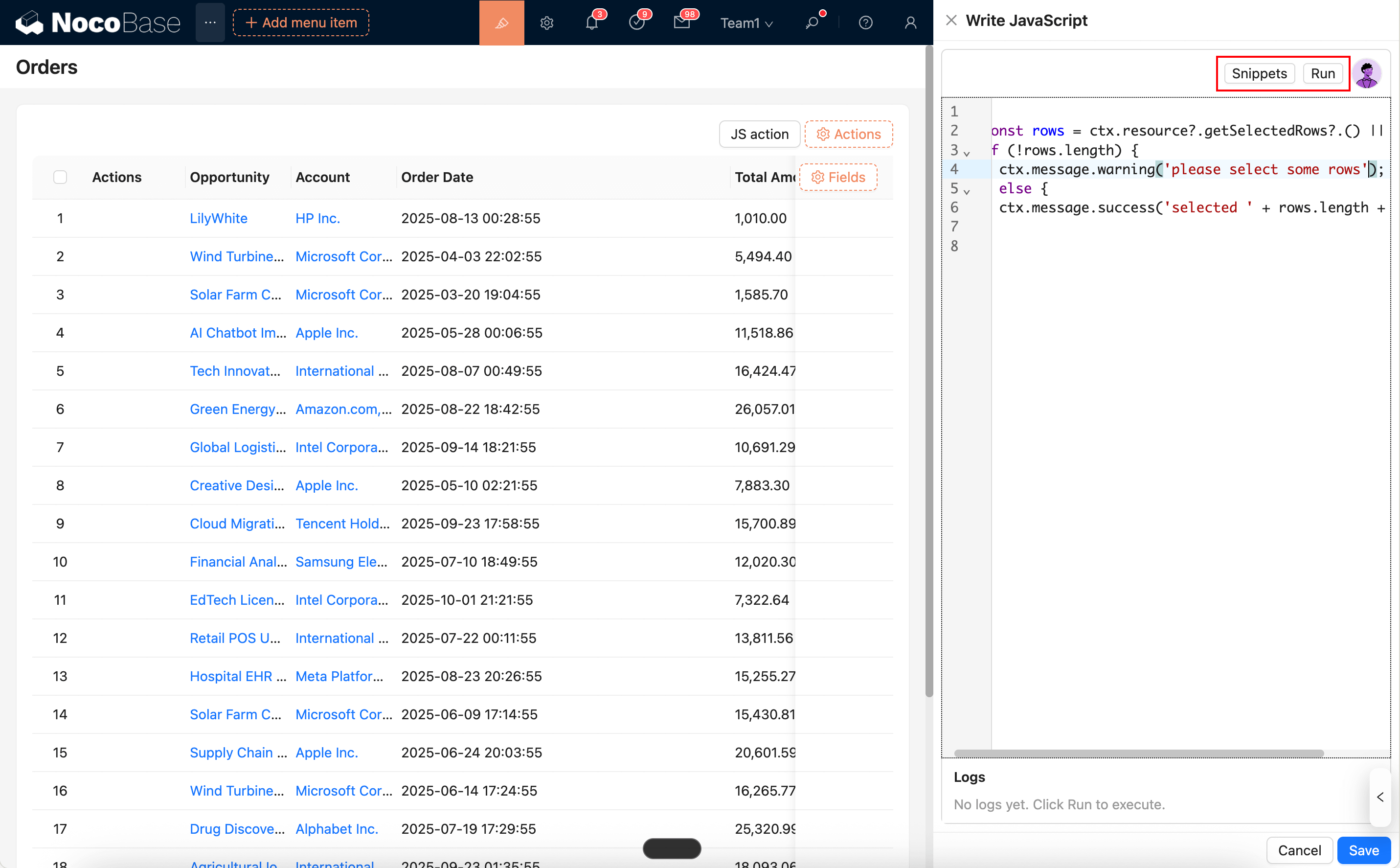
|
|
36
36
|
|
|
37
37
|
|
|
38
|
-
- You can use AI employees to generate/modify scripts: [AI Employee · Nathan: Frontend Engineer](/ai-employees/
|
|
38
|
+
- You can use AI employees to generate/modify scripts: [AI Employee · Nathan: Frontend Engineer](/ai-employees/built-in/)
|
|
39
39
|
|
|
40
40
|
## Common Usage (Simplified Examples)
|
|
41
41
|
|
|
@@ -47,7 +47,7 @@ The JS Item runtime injects common capabilities that you can use directly in the
|
|
|
47
47
|
|
|
48
48
|
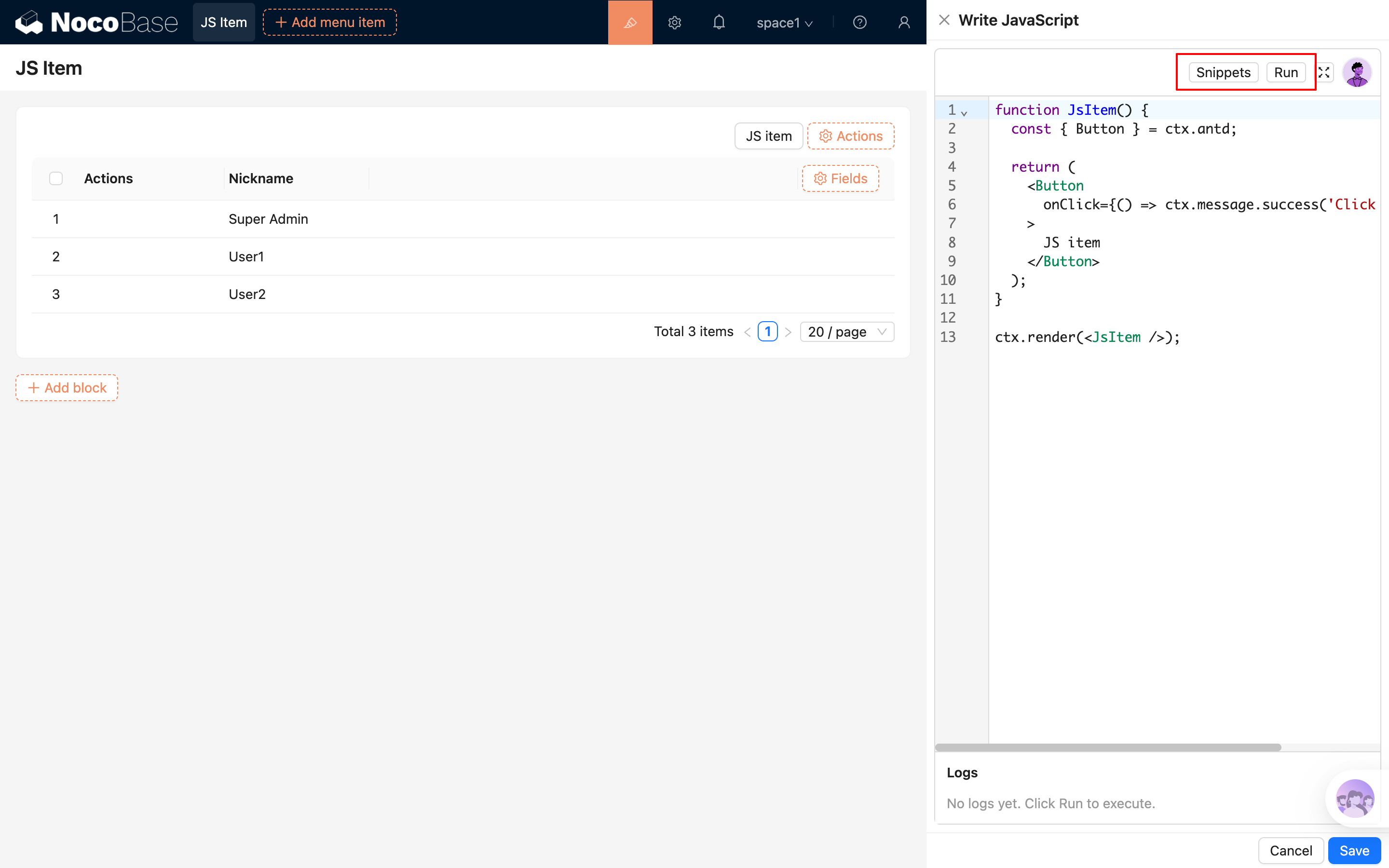
|
|
49
49
|
|
|
50
|
-
- You can use AI employees to generate / modify scripts: [AI Employee · Nathan: Frontend Engineer](/ai-employees/
|
|
50
|
+
- You can use AI employees to generate / modify scripts: [AI Employee · Nathan: Frontend Engineer](/ai-employees/built-in/)
|
|
51
51
|
|
|
52
52
|
## Common Usage (Simplified Examples)
|
|
53
53
|
|
|
@@ -38,7 +38,7 @@ The JS Block's script editor supports syntax highlighting, error hints, and buil
|
|
|
38
38
|
|
|
39
39
|
Additionally, you can directly summon the AI employee "Frontend Engineer · Nathan" from the top-right corner of the editor. Nathan can help you write or modify scripts based on the current context. You can then "Apply to editor" with one click and run the code to see the effect. For details, see:
|
|
40
40
|
|
|
41
|
-
- [AI Employee · Nathan: Frontend Engineer](/ai-employees/
|
|
41
|
+
- [AI Employee · Nathan: Frontend Engineer](/ai-employees/built-in/)
|
|
42
42
|
|
|
43
43
|
## Runtime Environment and Security
|
|
44
44
|
|
|
@@ -37,7 +37,7 @@ The script editor for JS Column supports syntax highlighting, error hints, and b
|
|
|
37
37
|
|
|
38
38
|
You can also use an AI Employee to generate code:
|
|
39
39
|
|
|
40
|
-
- [AI Employee · Nathan: Frontend Engineer](/ai-employees/
|
|
40
|
+
- [AI Employee · Nathan: Frontend Engineer](/ai-employees/built-in/)
|
|
41
41
|
|
|
42
42
|
## Common Usage
|
|
43
43
|
|
|
@@ -58,7 +58,7 @@ The JS Field script editor supports syntax highlighting, error hints, and built-
|
|
|
58
58
|
|
|
59
59
|
You can also generate code with the AI Employee:
|
|
60
60
|
|
|
61
|
-
- [AI Employee · Nathan: Frontend Engineer](/ai-employees/
|
|
61
|
+
- [AI Employee · Nathan: Frontend Engineer](/ai-employees/built-in/)
|
|
62
62
|
|
|
63
63
|
## Common Usage
|
|
64
64
|
|
|
@@ -32,7 +32,7 @@ JS Item is used for "custom items" (not bound to a field) in a form. You can use
|
|
|
32
32
|
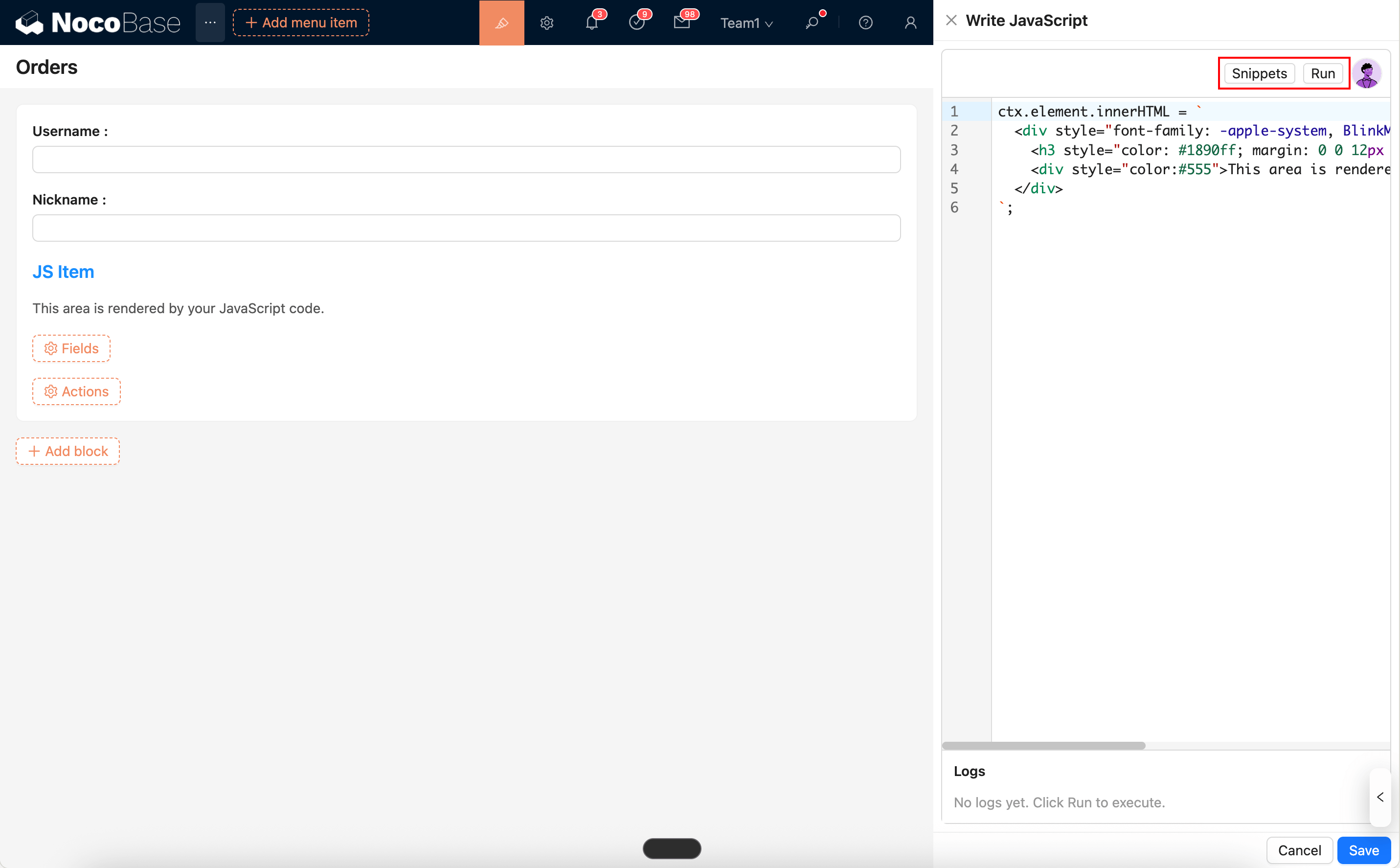
|
|
33
33
|
|
|
34
34
|
|
|
35
|
-
- Can be used with AI Employee to generate/modify scripts: [AI Employee · Nathan: Frontend Engineer](/ai-employees/
|
|
35
|
+
- Can be used with AI Employee to generate/modify scripts: [AI Employee · Nathan: Frontend Engineer](/ai-employees/built-in/)
|
|
36
36
|
|
|
37
37
|
## Common Usage (Simplified Examples)
|
|
38
38
|
|
|
@@ -213,6 +213,18 @@ If you need to store sensitive files, it is recommended to use a cloud storage s
|
|
|
213
213
|
|
|
214
214
|

|
|
215
215
|
|
|
216
|
+
For local storage or other public storage that can be accessed directly through same-origin application URLs, you should also pay extra attention to the risks introduced by active content files. Files such as `html`, `xhtml`, and `svg` may be parsed and executed directly by the browser. If an attacker can upload such a file and trick a user into opening it, the attacker may use your trusted application domain to host a malicious page or script.
|
|
217
|
+
|
|
218
|
+
In most cases, we recommend that administrators:
|
|
219
|
+
|
|
220
|
+
- Prefer private storage, signed URLs, or a separate file domain, so that user-uploaded files are not served directly from the same origin as the main application.
|
|
221
|
+
- Enforce a strict MIME type allowlist for uploads and only allow the file types that are actually required by the business.
|
|
222
|
+
- Be cautious about allowing active content types such as `text/html`, `application/xhtml+xml`, and `image/svg+xml`. Even if the system tries to return these files as downloads, this should not be considered a complete replacement for upload restrictions and origin isolation.
|
|
223
|
+
- Apply consistent security settings to reverse proxies, CDNs, object storage, and any other static file delivery layer, so dangerous files are not returned inline by bypassing application-layer protections.
|
|
224
|
+
- Do not use local/public storage to host untrusted web content. If you really need this capability, use an isolated domain and separately evaluate CSP, download behavior, and access control.
|
|
225
|
+
|
|
226
|
+
If an administrator explicitly allows dangerous file types to be uploaded, they should assess the resulting phishing, same-origin script execution, and sensitive information leakage risks on their own, and ensure that the Web Server, gateway, CDN, and storage services in the deployment chain enforce consistent restrictions.
|
|
227
|
+
|
|
216
228
|
|
|
217
229
|
### Application Backup
|
|
218
230
|
|
|
@@ -293,4 +305,4 @@ NocoBase provides multiple log types to help users understand the system's runni
|
|
|
293
305
|
- Request log: API request logs, including accessed URLs, HTTP methods, request parameters, response times, and status codes.
|
|
294
306
|
- System log: Records application running events, including service startup, configuration changes, error messages, and key operations.
|
|
295
307
|
- SQL log: Records database operation statements and their execution times, covering operations such as query, update, insert, and delete.
|
|
296
|
-
- Workflow log: Execution log of the workflow, including execution time, running information, and error information.
|
|
308
|
+
- Workflow log: Execution log of the workflow, including execution time, running information, and error information.
|
|
@@ -4,6 +4,8 @@
|
|
|
4
4
|
|
|
5
5
|
The Localization Management plugin is used to manage and implement NocoBase's localization resources. It can translate system menus, collections, fields, and all plugins to adapt to the language and culture of specific regions.
|
|
6
6
|
|
|
7
|
+
If you want to contribute default translations for the system and official plugins to NocoBase, see [Translation Contribution](/get-started/translations).
|
|
8
|
+
|
|
7
9
|
## Installation
|
|
8
10
|
|
|
9
11
|
This plugin is built-in and requires no additional installation.
|
|
@@ -36,6 +38,8 @@ After synchronization, the system will list all translatable entries for the cur
|
|
|
36
38
|
Different modules may have the same original text entries, which need to be translated separately.
|
|
37
39
|
:::
|
|
38
40
|
|
|
41
|
+
If translations for system or plugin built-in entries are manually changed or overwritten by AI translation, select `Reset system built-in entry translations` during synchronization. After synchronization, the system will overwrite existing built-in entry translations for the current language with translations from the built-in language pack to restore the defaults.
|
|
42
|
+
|
|
39
43
|
### Automatically Create Translation Entries
|
|
40
44
|
|
|
41
45
|
When editing a page, custom text within each block will automatically generate the corresponding i18n entry and simultaneously create the translation for the current language.
|
|
@@ -54,6 +58,26 @@ When defining text in code, you need to manually specify the ns (namespace), for
|
|
|
54
58
|
|
|
55
59
|
<img src="https://static-docs.nocobase.com/202404202142836.png"/>
|
|
56
60
|
|
|
61
|
+
### Using AI Translation
|
|
62
|
+
|
|
63
|
+
Localization Management supports translating entries through the AI Employee Lina. After enabling AI Employees and configuring a model service, you can use AI translation on the Localization Management page to batch generate translations for the current language.
|
|
64
|
+
|
|
65
|
+
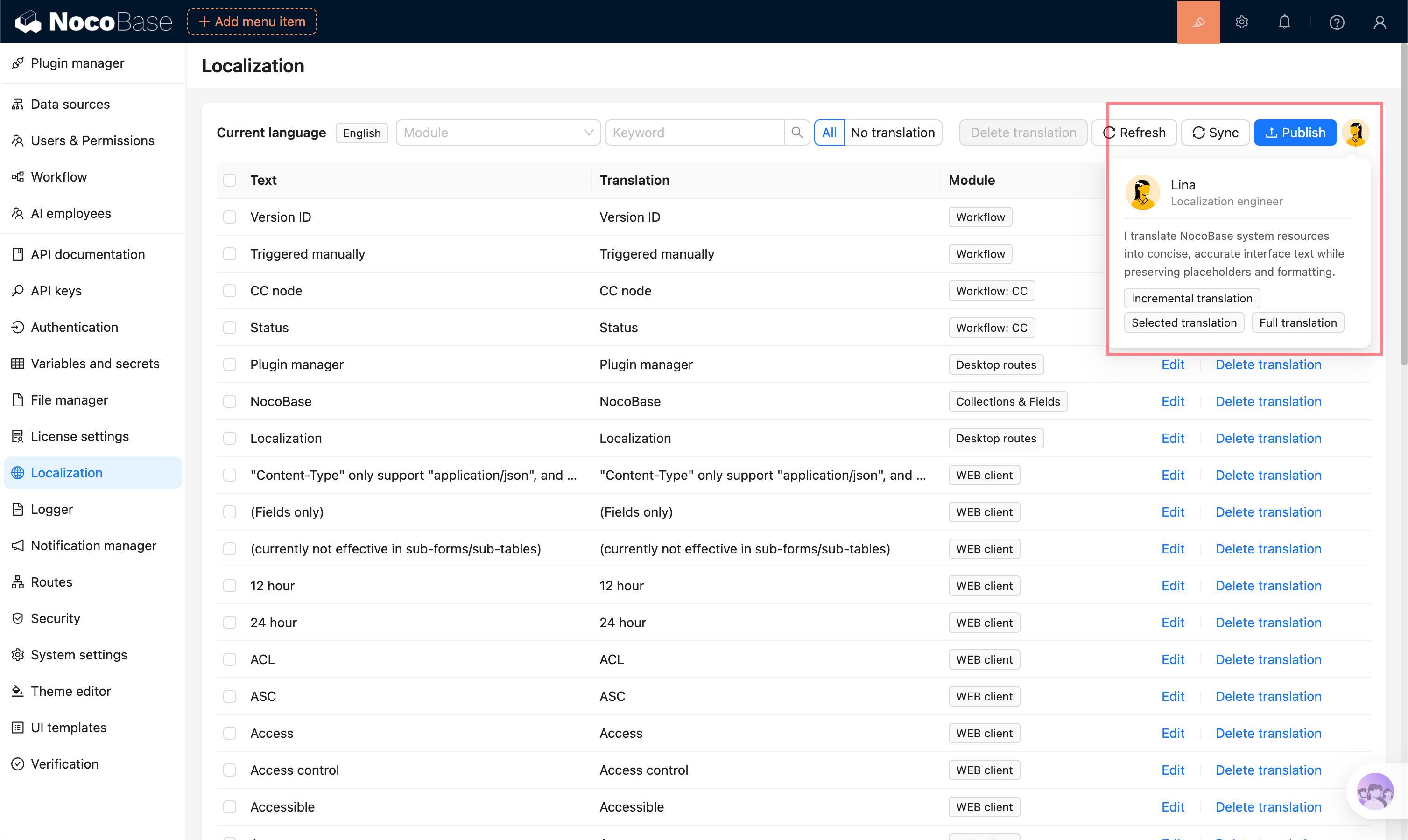
|
|
66
|
+
|
|
67
|
+
Supported translation scopes:
|
|
68
|
+
|
|
69
|
+
- **Full translation**: translate all eligible entries in the current language.
|
|
70
|
+
- **Incremental translation**: only translate entries that do not have translations yet.
|
|
71
|
+
- **Selected translation**: select entries in the table and translate only the selected content.
|
|
72
|
+
|
|
73
|
+
AI translation creates a background task. You can view progress while the task runs. After completion, translations are written to the corresponding language and should still be reviewed and corrected according to the actual context.
|
|
74
|
+
|
|
75
|
+
For the complete guide, see [AI Employee - Lina](/ai-employees/built-in/lina).
|
|
76
|
+
|
|
77
|
+
:::warning{title=Note}
|
|
78
|
+
AI-generated translations may have semantic deviations, inconsistent terminology, or insufficient context understanding. Before publishing, manually review important pages, business terminology, and user-facing copy.
|
|
79
|
+
:::
|
|
80
|
+
|
|
57
81
|
### Publishing Translations
|
|
58
82
|
|
|
59
83
|
After completing the translation, you need to click the "Publish" button to make the changes take effect.
|
|
@@ -76,4 +100,4 @@ Synchronize the entries.
|
|
|
76
100
|
|
|
77
101
|
Translate and publish.
|
|
78
102
|
|
|
79
|
-
<img src="https://static-docs.nocobase.com/202404202143135.png"/>
|
|
103
|
+
<img src="https://static-docs.nocobase.com/202404202143135.png"/>
|