@nocobase/plugin-ai 2.1.0-beta.29 → 2.1.0-beta.32
This diff represents the content of publicly available package versions that have been released to one of the supported registries. The information contained in this diff is provided for informational purposes only and reflects changes between package versions as they appear in their respective public registries.
- package/client-v2.d.ts +1 -0
- package/client-v2.js +1 -0
- package/dist/ai/docs/nocobase/ai/index.md +1 -1
- package/dist/ai/docs/nocobase/ai-employees/built-in/atlas.md +24 -0
- package/dist/ai/docs/nocobase/ai-employees/built-in/dara.md +22 -0
- package/dist/ai/docs/nocobase/ai-employees/built-in/dex.md +32 -0
- package/dist/ai/docs/nocobase/ai-employees/built-in/ellis.md +22 -0
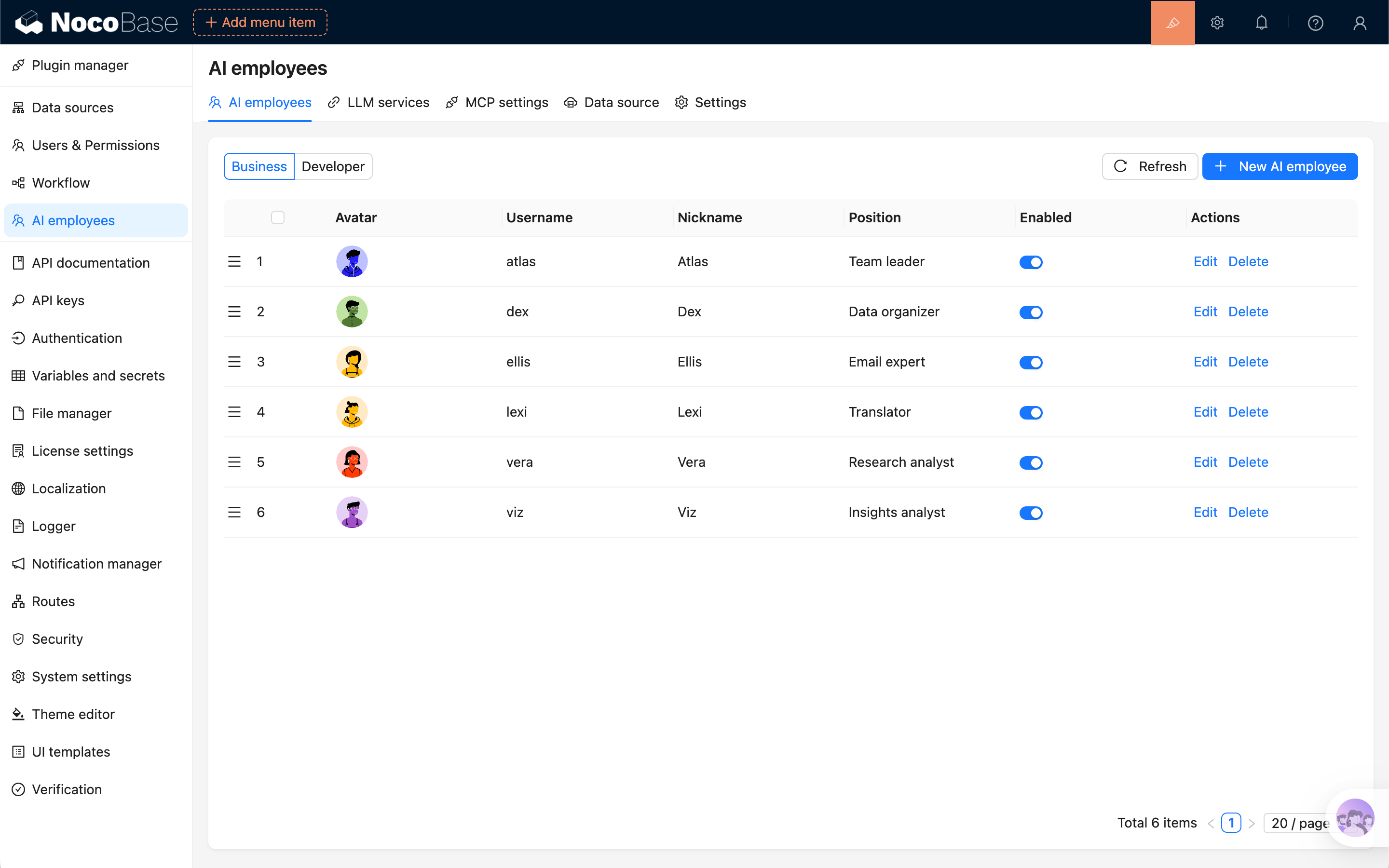
- package/dist/ai/docs/nocobase/ai-employees/built-in/index.md +25 -0
- package/dist/ai/docs/nocobase/ai-employees/built-in/lexi.md +26 -0
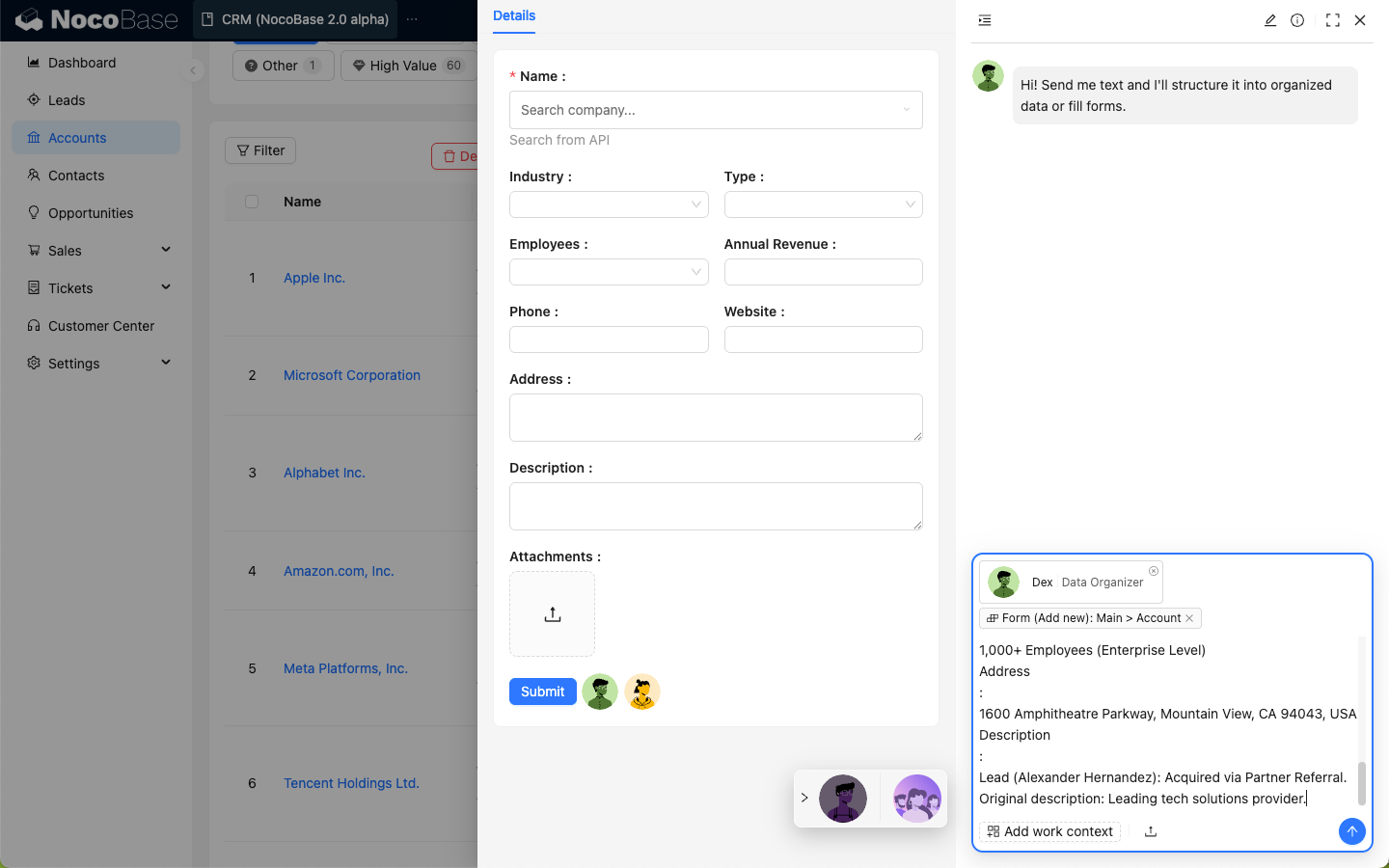
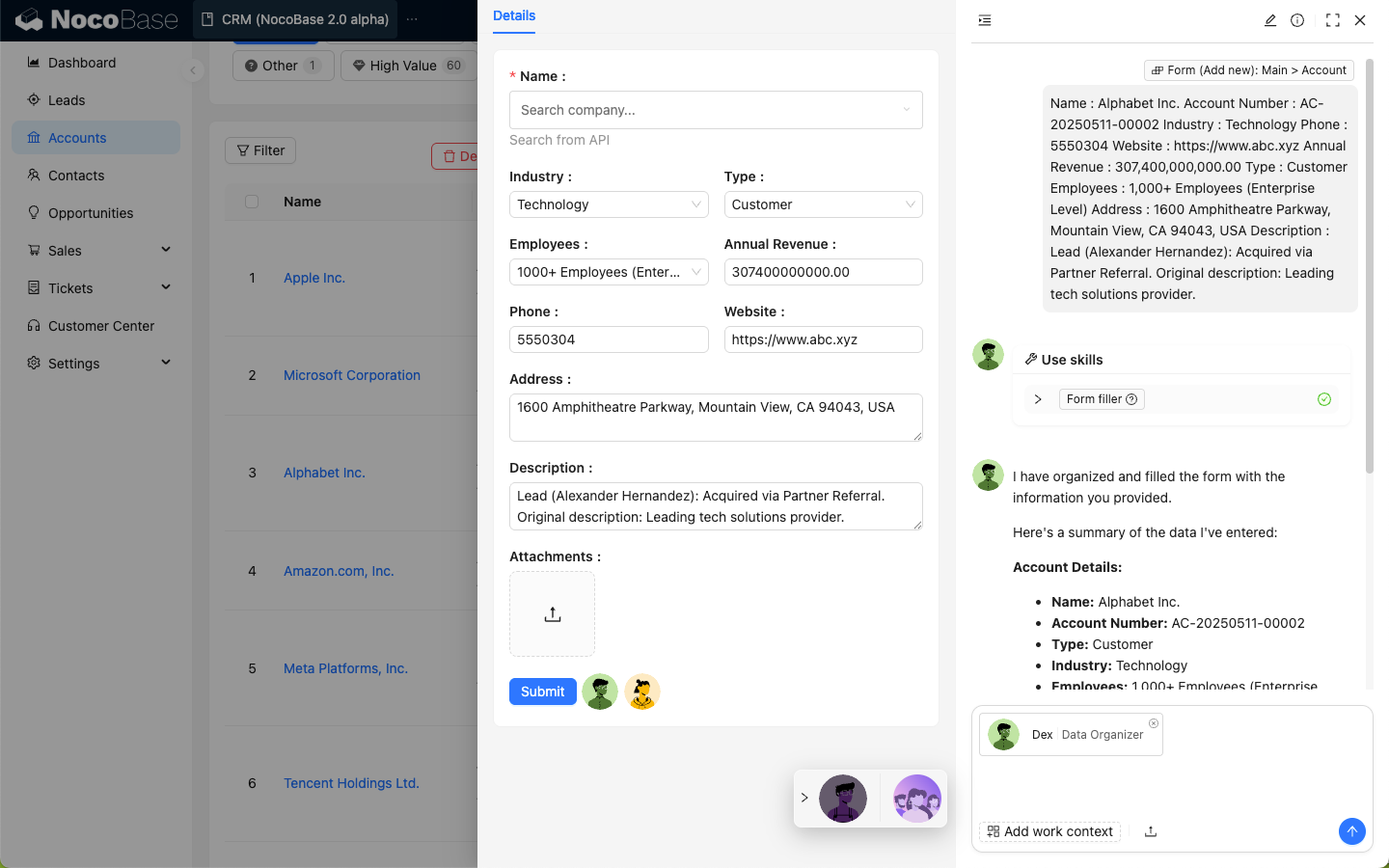
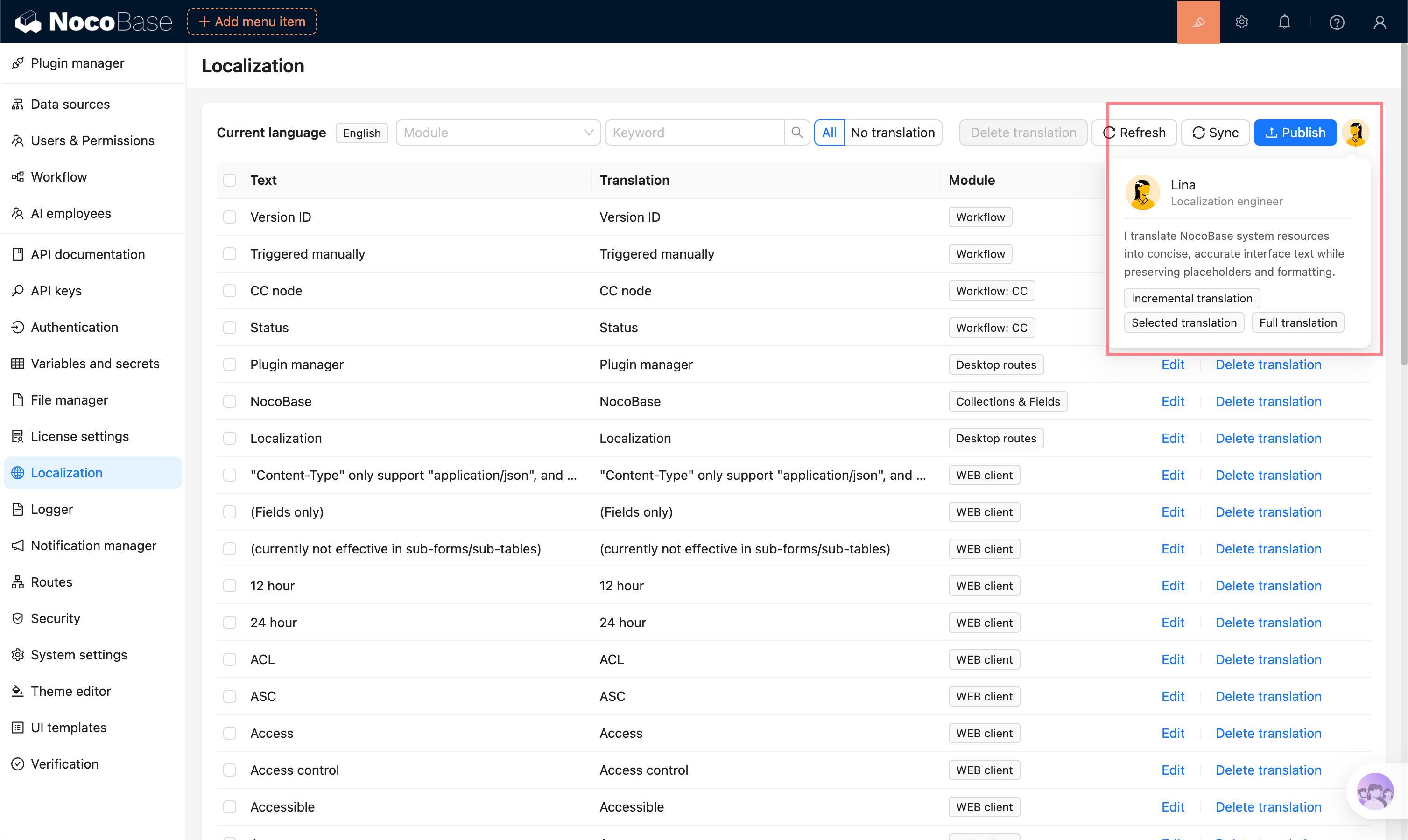
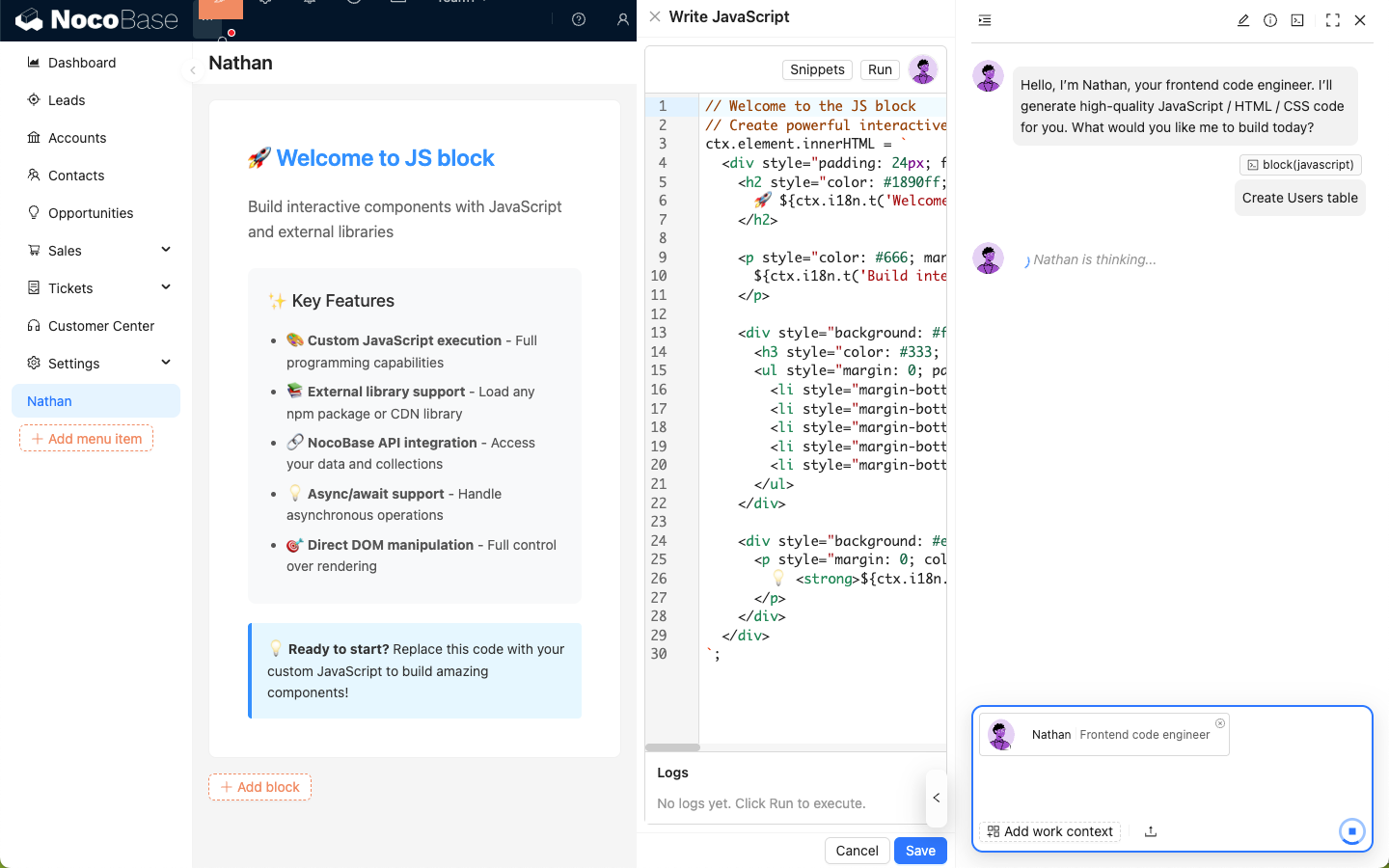
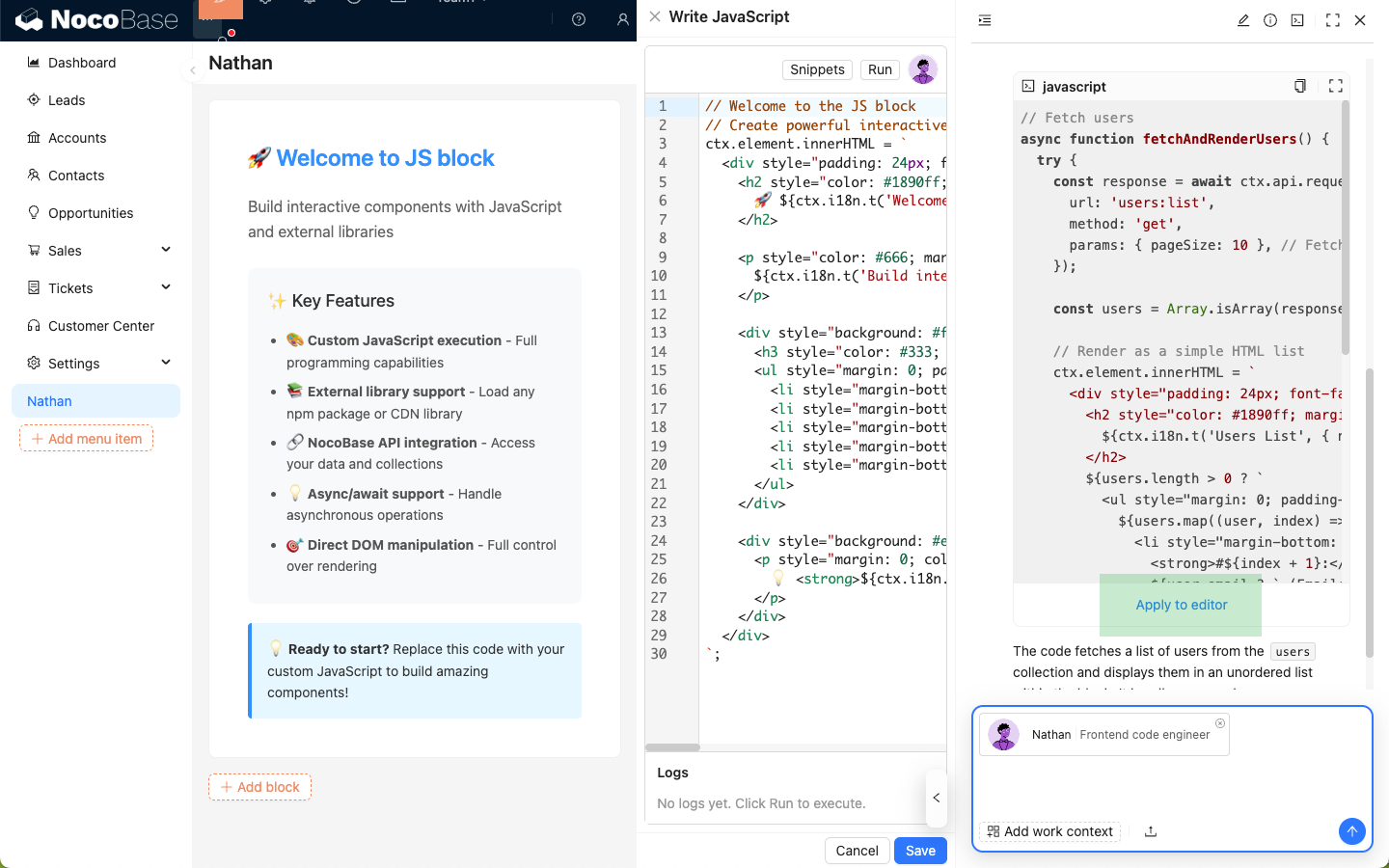
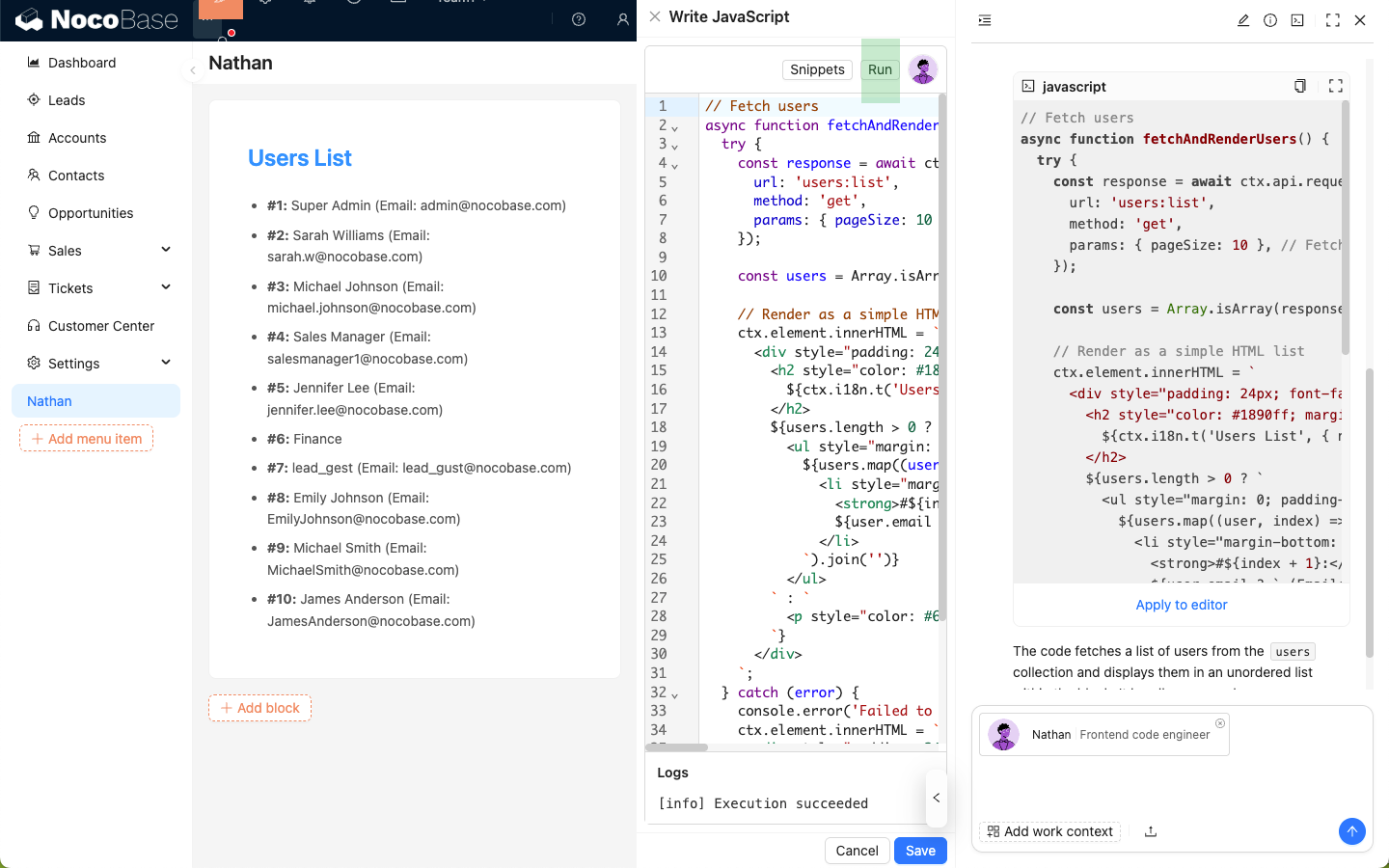
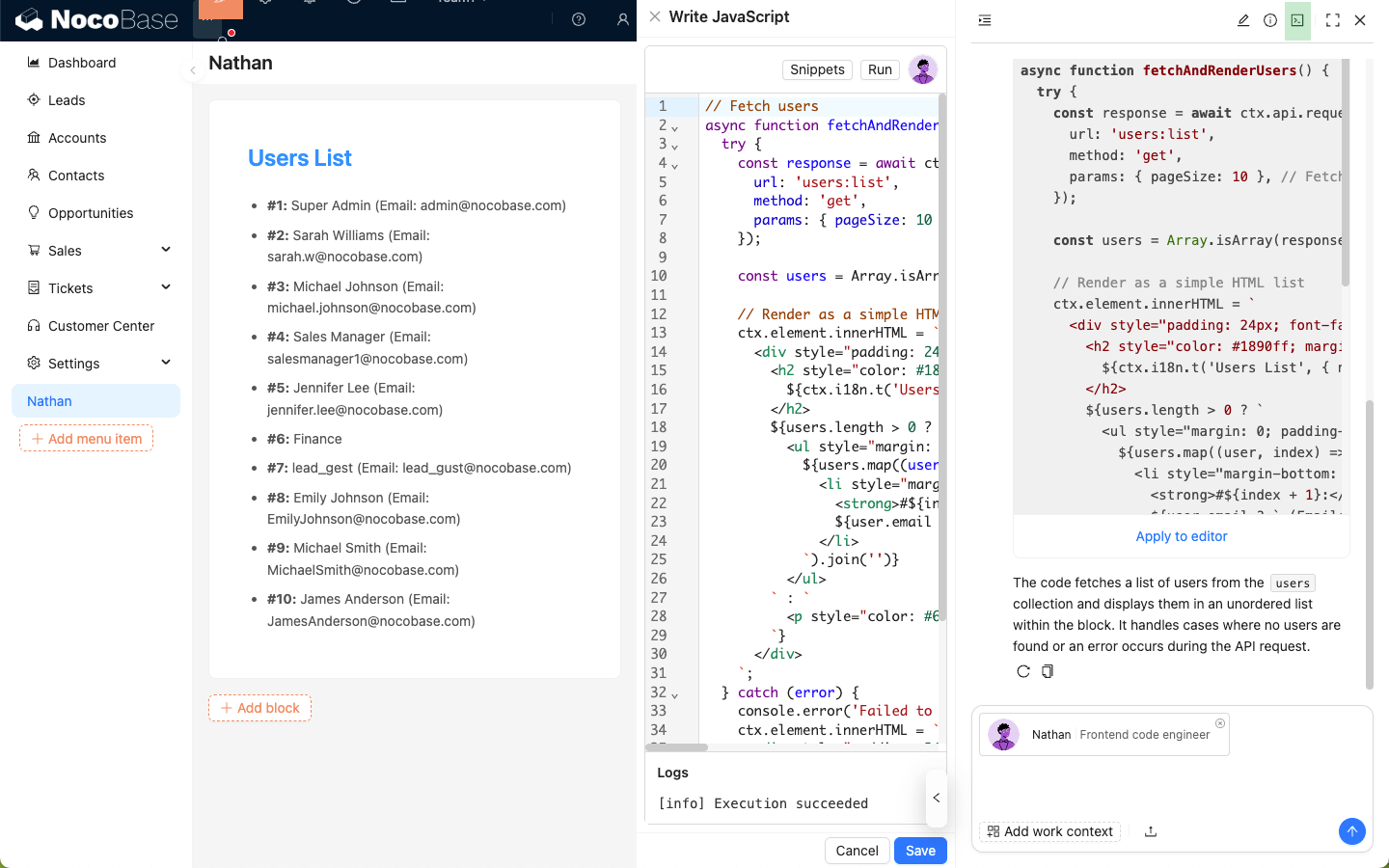
- package/dist/ai/docs/nocobase/ai-employees/built-in/lina.md +142 -0
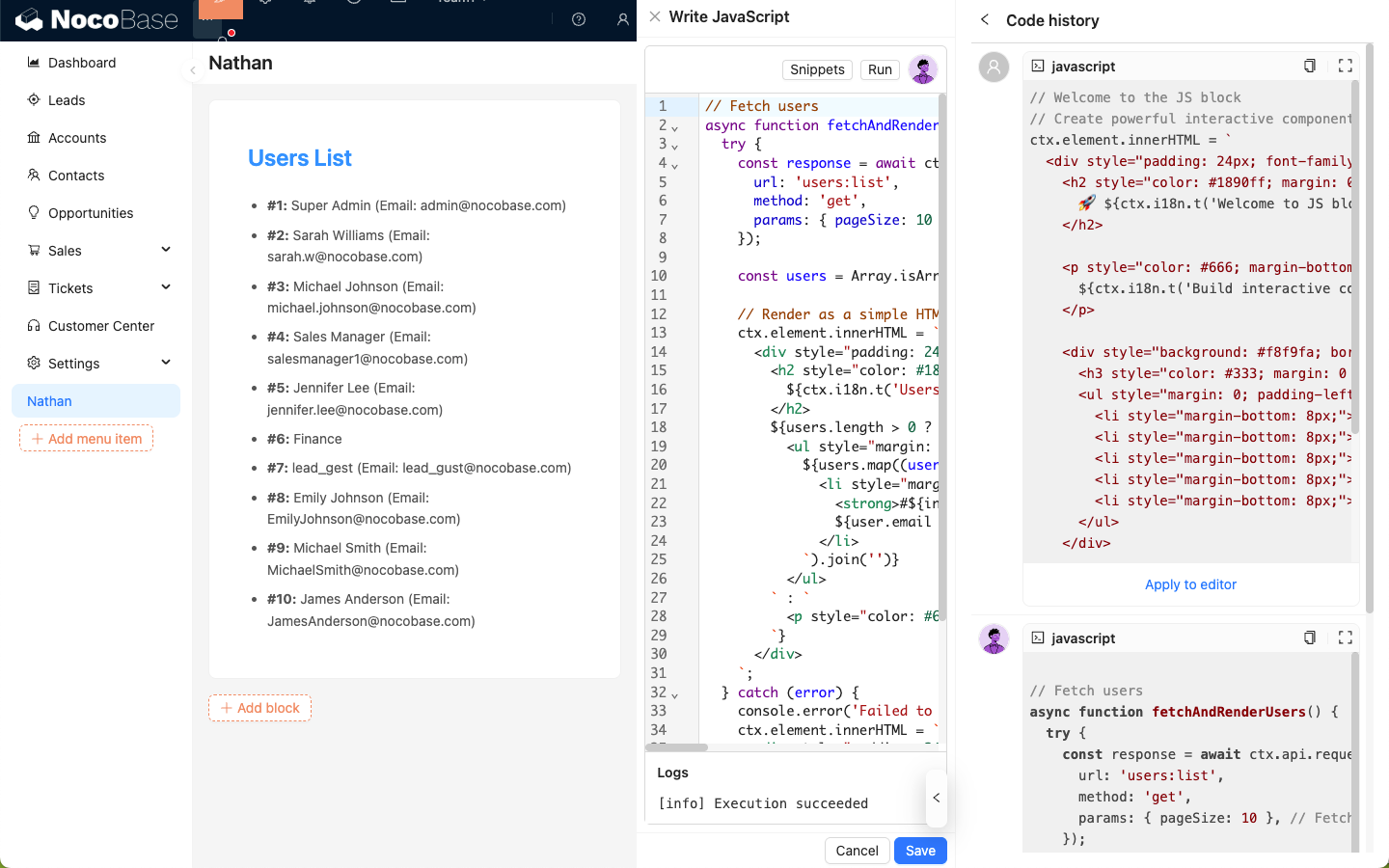
- package/dist/ai/docs/nocobase/ai-employees/built-in/nathan.md +36 -0
- package/dist/ai/docs/nocobase/ai-employees/built-in/vera.md +22 -0
- package/dist/ai/docs/nocobase/ai-employees/built-in/viz.md +25 -0
- package/dist/ai/docs/nocobase/ai-employees/features/built-in-employee.md +1 -29
- package/dist/ai/docs/nocobase/ai-employees/features/collaborate.md +17 -7
- package/dist/ai/docs/nocobase/ai-employees/features/enable-ai-employee.md +4 -4
- package/dist/ai/docs/nocobase/ai-employees/features/model-settings.md +87 -0
- package/dist/ai/docs/nocobase/ai-employees/index.md +1 -1
- package/dist/ai/docs/nocobase/ai-employees/scenarios/localization-hy-mt.md +241 -0
- package/dist/ai/docs/nocobase/ai-employees/workflow/nodes/employee/configuration.md +1 -1
- package/dist/ai/docs/nocobase/api/cli/api/dynamic.md +7 -0
- package/dist/ai/docs/nocobase/api/cli/api/resource/index.md +3 -0
- package/dist/ai/docs/nocobase/api/cli/app/down.md +7 -3
- package/dist/ai/docs/nocobase/api/cli/app/index.md +1 -1
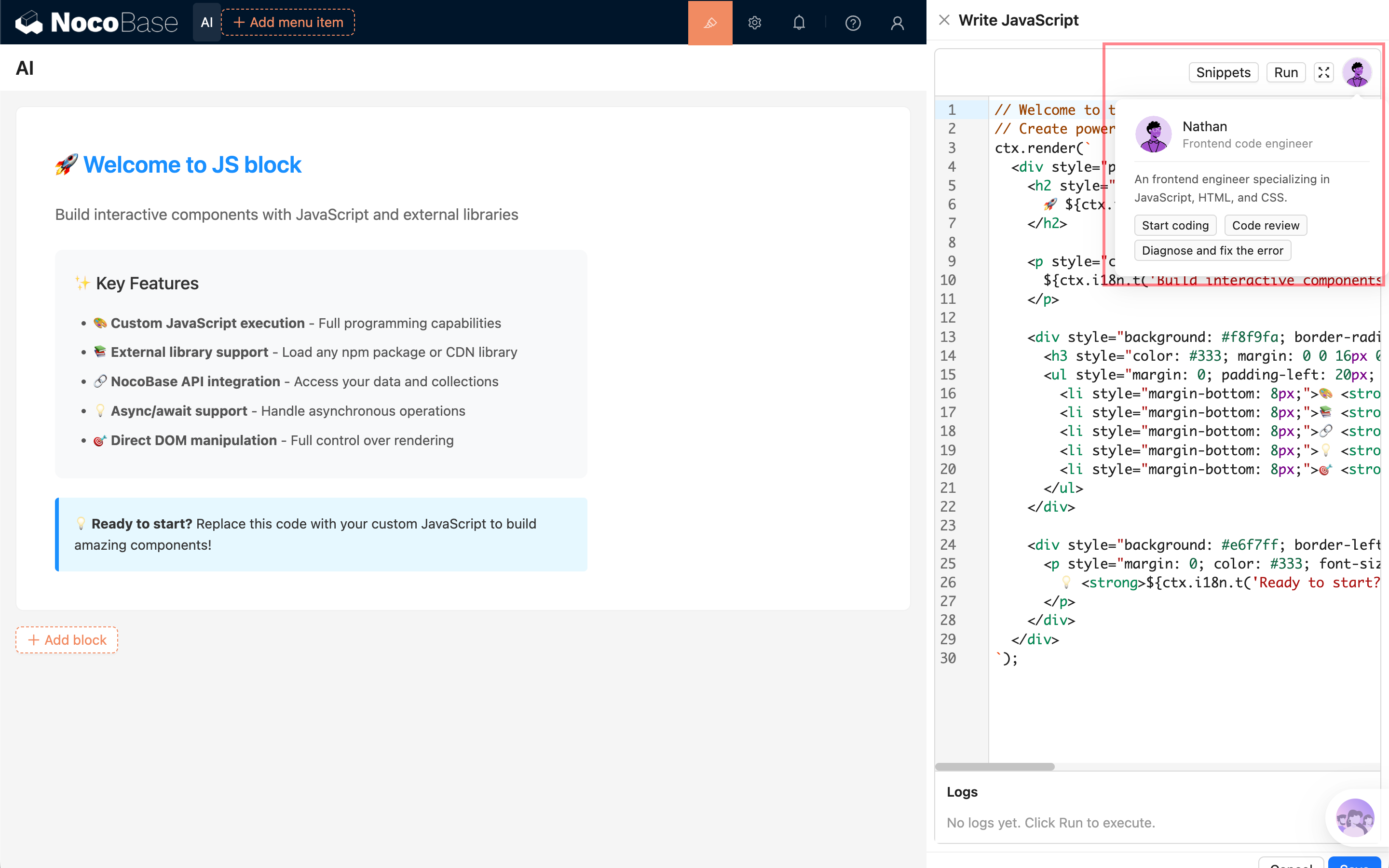
- package/dist/ai/docs/nocobase/api/cli/app/logs.md +3 -0
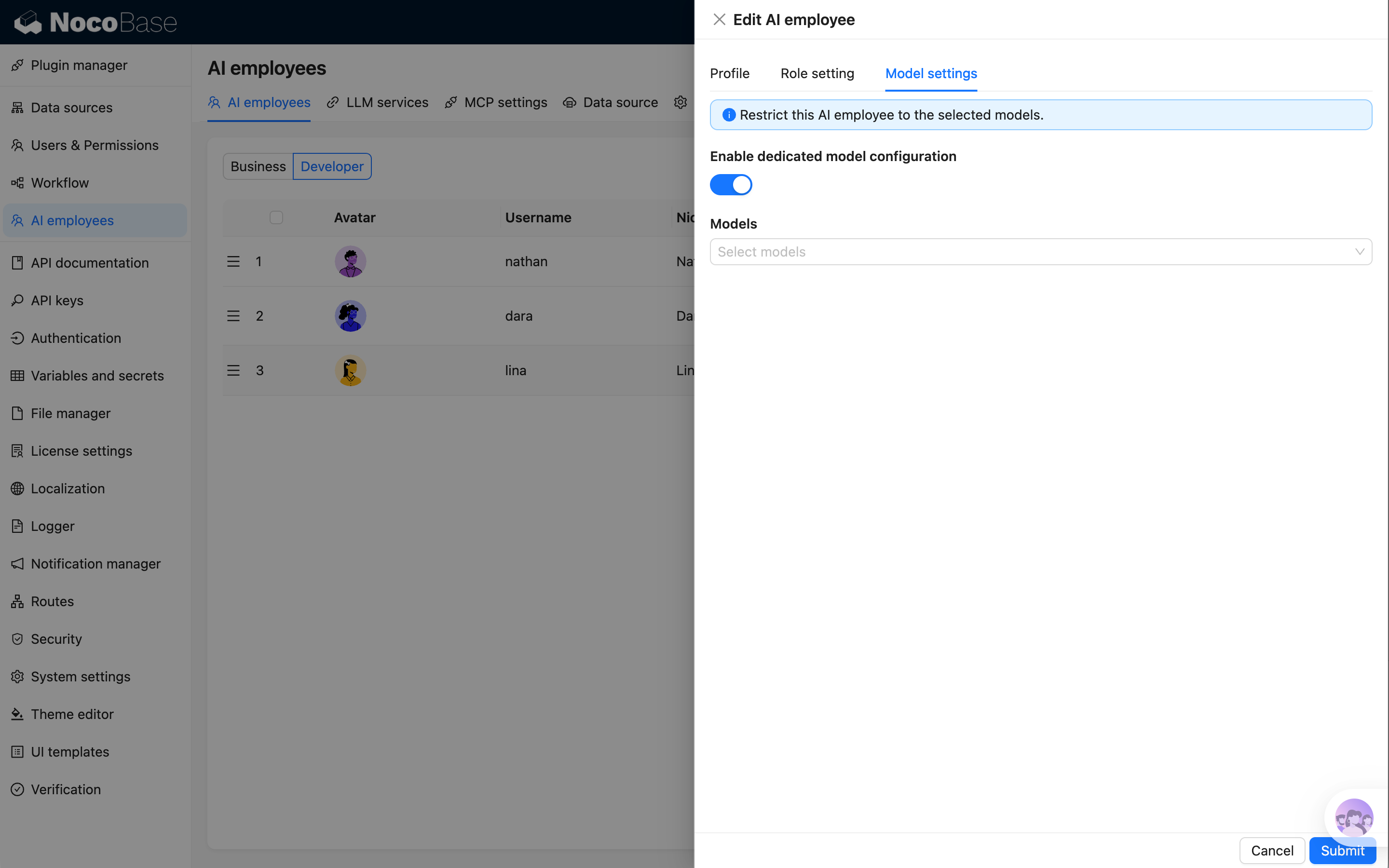
- package/dist/ai/docs/nocobase/api/cli/app/restart.md +4 -0
- package/dist/ai/docs/nocobase/api/cli/app/start.md +4 -0
- package/dist/ai/docs/nocobase/api/cli/app/stop.md +3 -0
- package/dist/ai/docs/nocobase/api/cli/app/upgrade.md +5 -0
- package/dist/ai/docs/nocobase/api/cli/env/add.md +11 -3
- package/dist/ai/docs/nocobase/api/cli/env/auth.md +1 -1
- package/dist/ai/docs/nocobase/api/cli/env/current.md +29 -0
- package/dist/ai/docs/nocobase/api/cli/env/index.md +22 -4
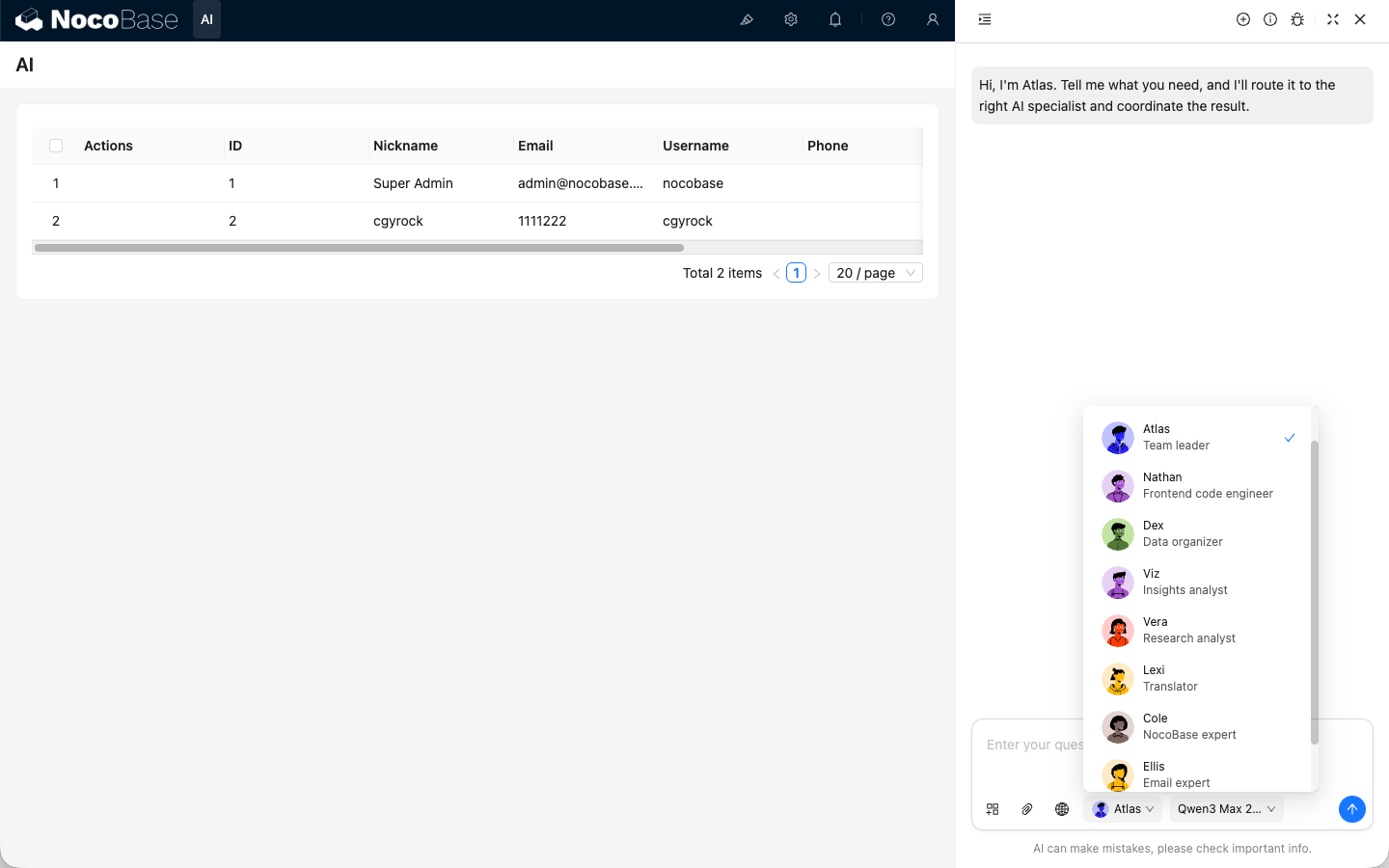
- package/dist/ai/docs/nocobase/api/cli/env/info.md +1 -5
- package/dist/ai/docs/nocobase/api/cli/env/list.md +11 -6
- package/dist/ai/docs/nocobase/api/cli/env/remove.md +4 -1
- package/dist/ai/docs/nocobase/api/cli/env/status.md +52 -0
- package/dist/ai/docs/nocobase/api/cli/env/update.md +1 -1
- package/dist/ai/docs/nocobase/api/cli/env/use.md +11 -1
- package/dist/ai/docs/nocobase/api/cli/index.md +13 -1
- package/dist/ai/docs/nocobase/api/cli/license/activate.md +4 -1
- package/dist/ai/docs/nocobase/api/cli/license/id.md +4 -0
- package/dist/ai/docs/nocobase/api/cli/license/plugins/clean.md +5 -1
- package/dist/ai/docs/nocobase/api/cli/license/plugins/list.md +4 -0
- package/dist/ai/docs/nocobase/api/cli/license/plugins/sync.md +5 -1
- package/dist/ai/docs/nocobase/api/cli/license/status.md +4 -0
- package/dist/ai/docs/nocobase/api/cli/plugin/disable.md +4 -0
- package/dist/ai/docs/nocobase/api/cli/plugin/enable.md +4 -0
- package/dist/ai/docs/nocobase/api/cli/plugin/list.md +4 -0
- package/dist/ai/docs/nocobase/api/cli/session/id.md +28 -0
- package/dist/ai/docs/nocobase/api/cli/session/index.md +41 -0
- package/dist/ai/docs/nocobase/api/cli/session/remove.md +35 -0
- package/dist/ai/docs/nocobase/api/cli/session/setup.md +47 -0
- package/dist/ai/docs/nocobase/interface-builder/actions/types/js-action.md +1 -1
- package/dist/ai/docs/nocobase/interface-builder/actions/types/js-item.md +1 -1
- package/dist/ai/docs/nocobase/interface-builder/blocks/other-blocks/js-block.md +1 -1
- package/dist/ai/docs/nocobase/interface-builder/fields/specific/js-column.md +1 -1
- package/dist/ai/docs/nocobase/interface-builder/fields/specific/js-field.md +1 -1
- package/dist/ai/docs/nocobase/interface-builder/fields/specific/js-item.md +1 -1
- package/dist/ai/docs/nocobase/security/guide.md +13 -1
- package/dist/ai/docs/nocobase/system-management/localization/index.md +25 -1
- package/dist/client/119.c6bf8c6433167d81.js +10 -0
- package/dist/client/228.b4b709f93b86b6b9.js +10 -0
- package/dist/client/462.1708385b148779cd.js +10 -0
- package/dist/client/{486.afbed6b132b3c0dd.js → 486.dcac8f3fcec19c33.js} +1 -1
- package/dist/client/{559.39872901b9053629.js → 559.585f80c3bcea0bed.js} +1 -1
- package/dist/client/597.b0d64948d74cf6cb.js +10 -0
- package/dist/client/646.b0ed728921b007d4.js +10 -0
- package/dist/client/711.92cd94681fde7e05.js +10 -0
- package/dist/client/768.5177bff46ae71a5b.js +10 -0
- package/dist/client/792.abb57765453bcbcc.js +10 -0
- package/dist/client/820.f72ef2462b61d812.js +10 -0
- package/dist/client/927.d95c74ebb8fd51c9.js +10 -0
- package/dist/client/ai-employees/admin/ModelSettings.d.ts +10 -0
- package/dist/client/ai-employees/admin/hooks.d.ts +1 -1
- package/dist/client/ai-employees/avatars.d.ts +9 -783
- package/dist/client/ai-employees/chatbox/conversations/ConversationsList.d.ts +1 -15
- package/dist/client/ai-employees/chatbox/conversations/WorkflowTasksList.d.ts +1 -21
- package/dist/client/ai-employees/chatbox/hooks/useChat.d.ts +125 -0
- package/dist/client/ai-employees/chatbox/hooks/useChatBoxActions.d.ts +1 -1
- package/dist/client/ai-employees/chatbox/hooks/useChatConversationActions.d.ts +13 -1
- package/dist/client/ai-employees/chatbox/hooks/useChatMessageActions.d.ts +8 -8
- package/dist/client/ai-employees/chatbox/model.d.ts +6 -3
- package/dist/client/ai-employees/chatbox/stores/chat-conversations.d.ts +4 -0
- package/dist/client/ai-employees/chatbox/stores/chat-messages.d.ts +77 -50
- package/dist/client/ai-employees/chatbox/stores/chat-tool-call.d.ts +24 -16
- package/dist/client/ai-employees/types.d.ts +24 -0
- package/dist/client/features/vector-database-provider.d.ts +1 -1
- package/dist/client/index.d.ts +2 -0
- package/dist/client/index.js +3 -3
- package/dist/client/llm-services/component/EnabledModelsSelect.d.ts +1 -14
- package/dist/client-v2/ai-employees/AIEmployeeShortcut.d.ts +21 -0
- package/dist/client-v2/ai-employees/ProfileCard.d.ts +17 -0
- package/dist/client-v2/ai-employees/avatars.d.ts +783 -0
- package/dist/client-v2/ai-employees/types.d.ts +20 -0
- package/dist/client-v2/index.d.ts +17 -0
- package/dist/client-v2/index.js +10 -0
- package/dist/client-v2/llm-services/model-label.d.ts +22 -0
- package/dist/collections/ai-employees.d.ts +2 -1
- package/dist/collections/ai-employees.js +1 -1
- package/dist/externalVersion.js +17 -16
- package/dist/locale/en-US.json +16 -1
- package/dist/locale/zh-CN.json +16 -1
- package/dist/node_modules/@langchain/xai/package.json +1 -1
- package/dist/node_modules/fs-extra/package.json +1 -1
- package/dist/node_modules/jsonrepair/package.json +1 -1
- package/dist/node_modules/just-bash/package.json +1 -1
- package/dist/node_modules/nodejs-snowflake/package.json +1 -1
- package/dist/node_modules/openai/package.json +1 -1
- package/dist/node_modules/zod/package.json +1 -1
- package/dist/server/ai-employees/ai-conversations.d.ts +4 -1
- package/dist/server/ai-employees/ai-conversations.js +44 -4
- package/dist/server/ai-employees/ai-employee.d.ts +31 -15
- package/dist/server/ai-employees/ai-employee.js +205 -52
- package/dist/server/ai-employees/ai-employees-manager.d.ts +4 -0
- package/dist/server/ai-employees/ai-employees-manager.js +41 -0
- package/dist/server/ai-employees/ai-knowledge-base.js +7 -7
- package/dist/server/ai-employees/middleware/conversation.d.ts +1 -0
- package/dist/server/ai-employees/middleware/conversation.js +15 -11
- package/dist/server/ai-employees/sub-agents/dispatcher.js +2 -4
- package/dist/server/ai-employees/utils.d.ts +6 -3
- package/dist/server/ai-employees/utils.js +7 -1
- package/dist/server/collections/ai-conversations.js +6 -0
- package/dist/server/features/knowledge-base.d.ts +3 -2
- package/dist/server/index.d.ts +2 -0
- package/dist/server/index.js +3 -0
- package/dist/server/llm-providers/common/reasoning.d.ts +2 -0
- package/dist/server/llm-providers/common/reasoning.js +15 -2
- package/dist/server/llm-providers/dashscope.d.ts +2 -1
- package/dist/server/llm-providers/dashscope.js +39 -0
- package/dist/server/llm-providers/deepseek.js +2 -0
- package/dist/server/llm-providers/provider.d.ts +15 -1
- package/dist/server/llm-providers/provider.js +21 -2
- package/dist/server/manager/ai-chat-conversation.js +3 -4
- package/dist/server/manager/ai-manager.d.ts +17 -0
- package/dist/server/manager/ai-manager.js +65 -0
- package/dist/server/manager/llm-stream-manager.d.ts +37 -0
- package/dist/server/manager/llm-stream-manager.js +142 -0
- package/dist/server/migrations/20260407170416-ai-employee-knowledge-base-add-key.d.ts +14 -0
- package/dist/server/migrations/20260407170416-ai-employee-knowledge-base-add-key.js +61 -0
- package/dist/server/plugin.d.ts +2 -0
- package/dist/server/plugin.js +3 -0
- package/dist/server/resource/ai.js +1 -41
- package/dist/server/resource/aiConversations.d.ts +8 -0
- package/dist/server/resource/aiConversations.js +141 -10
- package/dist/server/resource/aiEmployees.js +32 -1
- package/dist/server/types/knowledge-base.type.d.ts +3 -2
- package/dist/server/workflow/nodes/employee/index.js +4 -2
- package/package.json +2 -2
- package/dist/client/119.78774f3ad953af49.js +0 -10
- package/dist/client/228.a3df2921c8beb766.js +0 -10
- package/dist/client/343.6f36d97dd122c5b6.js +0 -10
- package/dist/client/597.aa363881a325b5c0.js +0 -10
- package/dist/client/646.217a40387efbd163.js +0 -10
- package/dist/client/711.266b8f1c520d467a.js +0 -10
- package/dist/client/768.973ce32e15099a48.js +0 -10
- package/dist/client/792.2e48eab4767d662a.js +0 -10
- package/dist/client/820.6a26239ea96c075a.js +0 -10
- package/dist/client/927.ff5cd05b14901ae6.js +0 -10
package/client-v2.d.ts
ADDED
|
@@ -0,0 +1 @@
|
|
|
1
|
+
export * from './dist/client-v2';
|
package/client-v2.js
ADDED
|
@@ -0,0 +1 @@
|
|
|
1
|
+
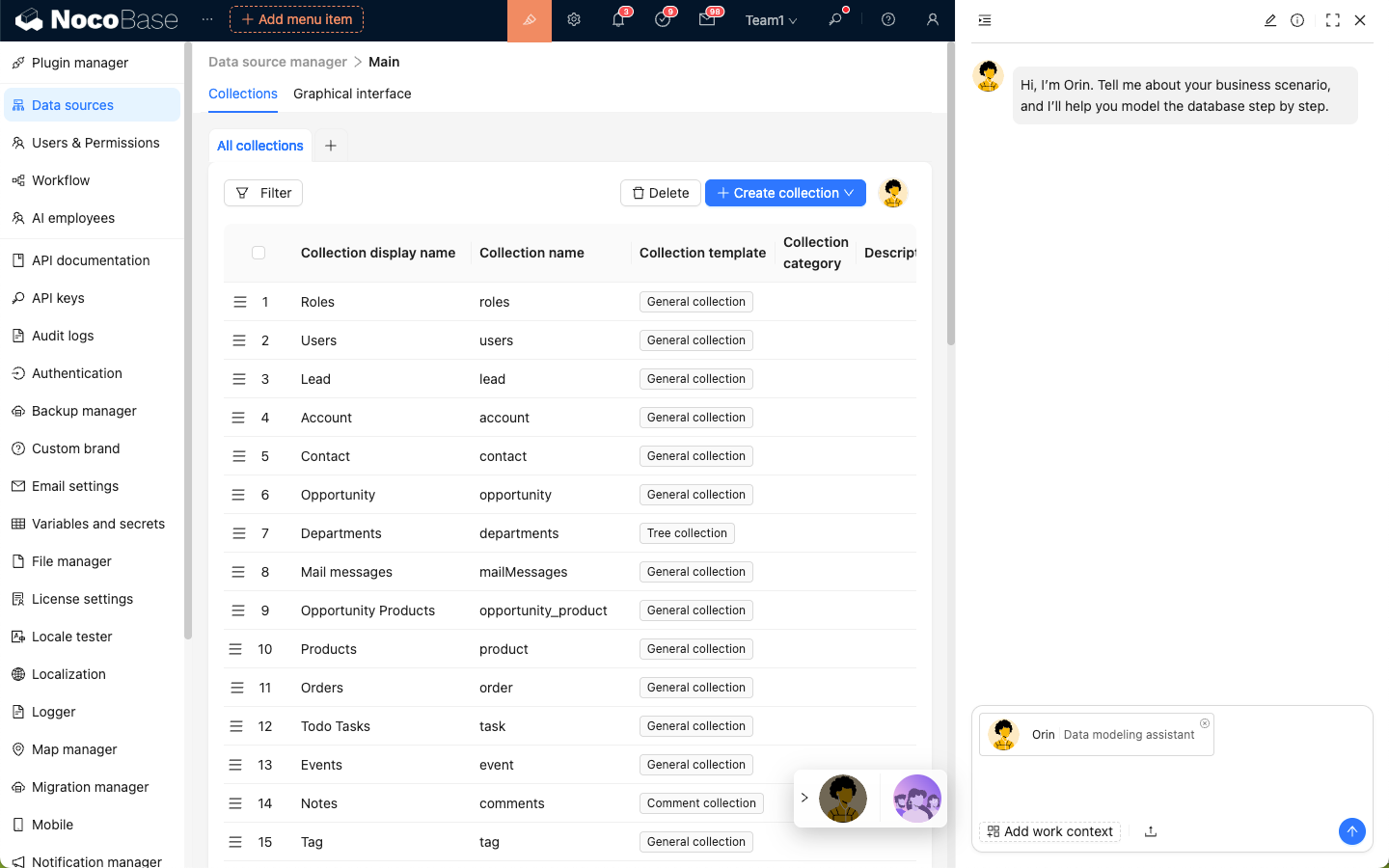
module.exports = require('./dist/client-v2/index.js');
|
|
@@ -51,7 +51,7 @@ features:
|
|
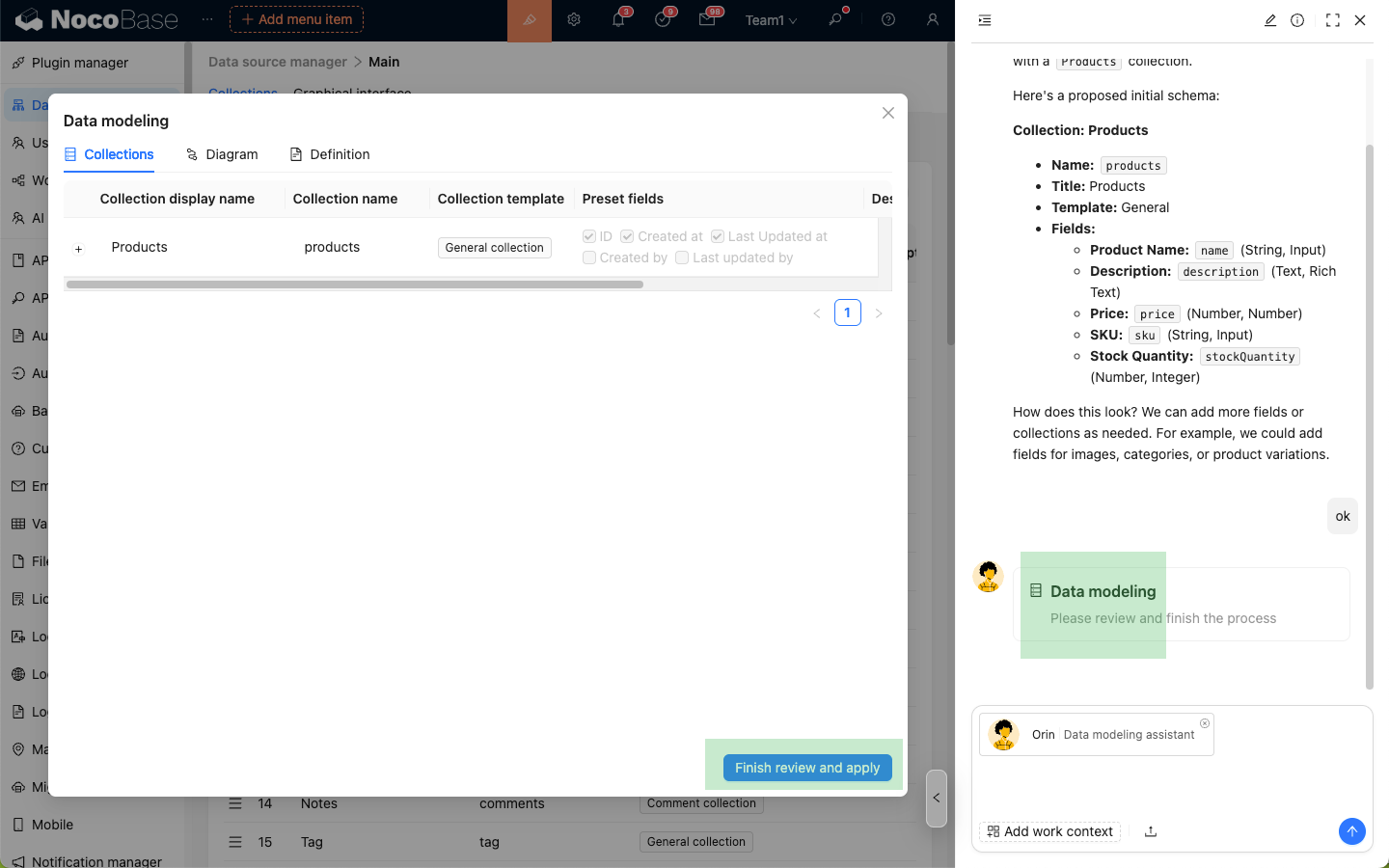
|
51
51
|
link: /ai-employees
|
|
52
52
|
- title: Ready-to-Use AI Team
|
|
53
53
|
details: Pre-built AI employee teams in NocoBase, covering data modeling, front-end development, data processing, and more — no configuration needed, ready to use.
|
|
54
|
-
link: /ai-employees/
|
|
54
|
+
link: /ai-employees/built-in/
|
|
55
55
|
- title: Let AI Understand Your Business
|
|
56
56
|
details: Import business documents and data through the AI knowledge base, making AI employees' responses and actions more aligned with your actual scenarios.
|
|
57
57
|
link: /ai-employees/knowledge-base
|
|
@@ -0,0 +1,24 @@
|
|
|
1
|
+
---
|
|
2
|
+
title: 'Atlas: Team Leader'
|
|
3
|
+
description: 'Atlas is the built-in AI Employee team leader in NocoBase, used to understand user intent and coordinate other AI Employees.'
|
|
4
|
+
keywords: 'Atlas,Team Leader,AI Employee,NocoBase'
|
|
5
|
+
---
|
|
6
|
+
|
|
7
|
+
# Atlas: Team Leader
|
|
8
|
+
|
|
9
|
+
## Role
|
|
10
|
+
|
|
11
|
+
Atlas is the default general entry AI Employee. It understands user needs and coordinates suitable AI Employees according to the task type.
|
|
12
|
+
|
|
13
|
+
## Scenarios
|
|
14
|
+
|
|
15
|
+
- Describe your needs to Atlas when you are not sure which AI Employee to use.
|
|
16
|
+
- Split a task across multiple AI Employees.
|
|
17
|
+
- Use one entry point for analysis, organization, translation, and other tasks.
|
|
18
|
+
|
|
19
|
+
## Entry Points
|
|
20
|
+
|
|
21
|
+
- AI floating button in the lower-right corner
|
|
22
|
+
- AI Employee chat panel
|
|
23
|
+
|
|
24
|
+
|
|
@@ -0,0 +1,22 @@
|
|
|
1
|
+
---
|
|
2
|
+
title: 'Dara: Data Visualization Expert'
|
|
3
|
+
description: 'Dara is the built-in data visualization expert in NocoBase, used to generate charts and visualization configurations from data.'
|
|
4
|
+
keywords: 'Dara,data visualization,charts,AI Employee,NocoBase'
|
|
5
|
+
---
|
|
6
|
+
|
|
7
|
+
# Dara: Data Visualization Expert
|
|
8
|
+
|
|
9
|
+
## Role
|
|
10
|
+
|
|
11
|
+
Dara focuses on chart and visualization configuration scenarios. It can write complex SQL based on user questions and generate chart configurations suitable for display.
|
|
12
|
+
|
|
13
|
+
## Scenarios
|
|
14
|
+
|
|
15
|
+
- Generate charts from business questions.
|
|
16
|
+
- Add visual components to dashboards.
|
|
17
|
+
- Adjust chart types, dimensions, metrics, and interactions.
|
|
18
|
+
|
|
19
|
+
## Entry Points
|
|
20
|
+
|
|
21
|
+
- Chart configuration pages
|
|
22
|
+
- AI Employee chat panel
|
|
@@ -0,0 +1,32 @@
|
|
|
1
|
+
---
|
|
2
|
+
title: 'Dex: Data Organizer'
|
|
3
|
+
description: 'Dex is the built-in data organization expert in NocoBase, used to extract information from unstructured text and help fill forms.'
|
|
4
|
+
keywords: 'Dex,data organization,information extraction,form filling,AI Employee,NocoBase'
|
|
5
|
+
---
|
|
6
|
+
|
|
7
|
+
# Dex: Data Organizer
|
|
8
|
+
|
|
9
|
+
## Role
|
|
10
|
+
|
|
11
|
+
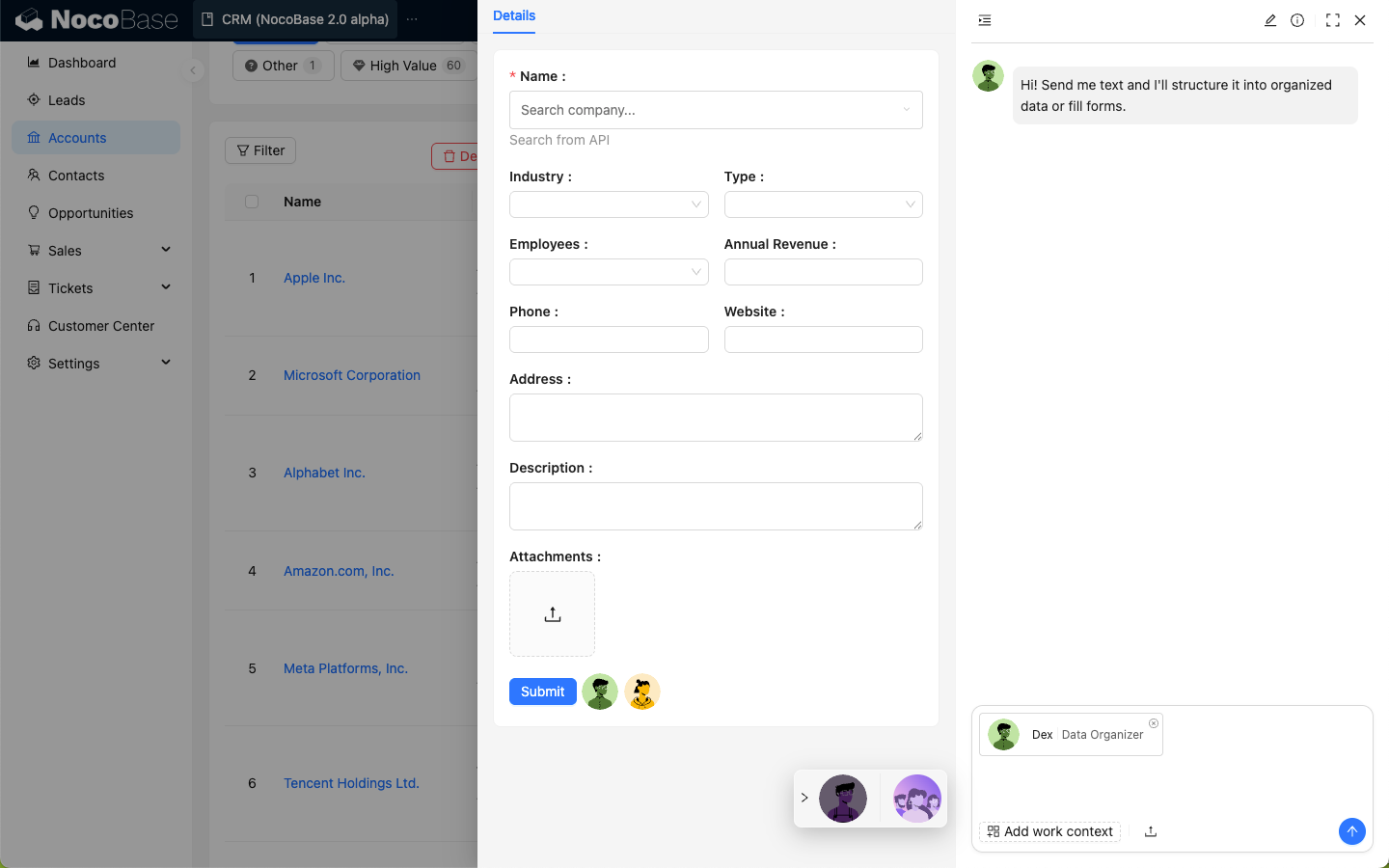
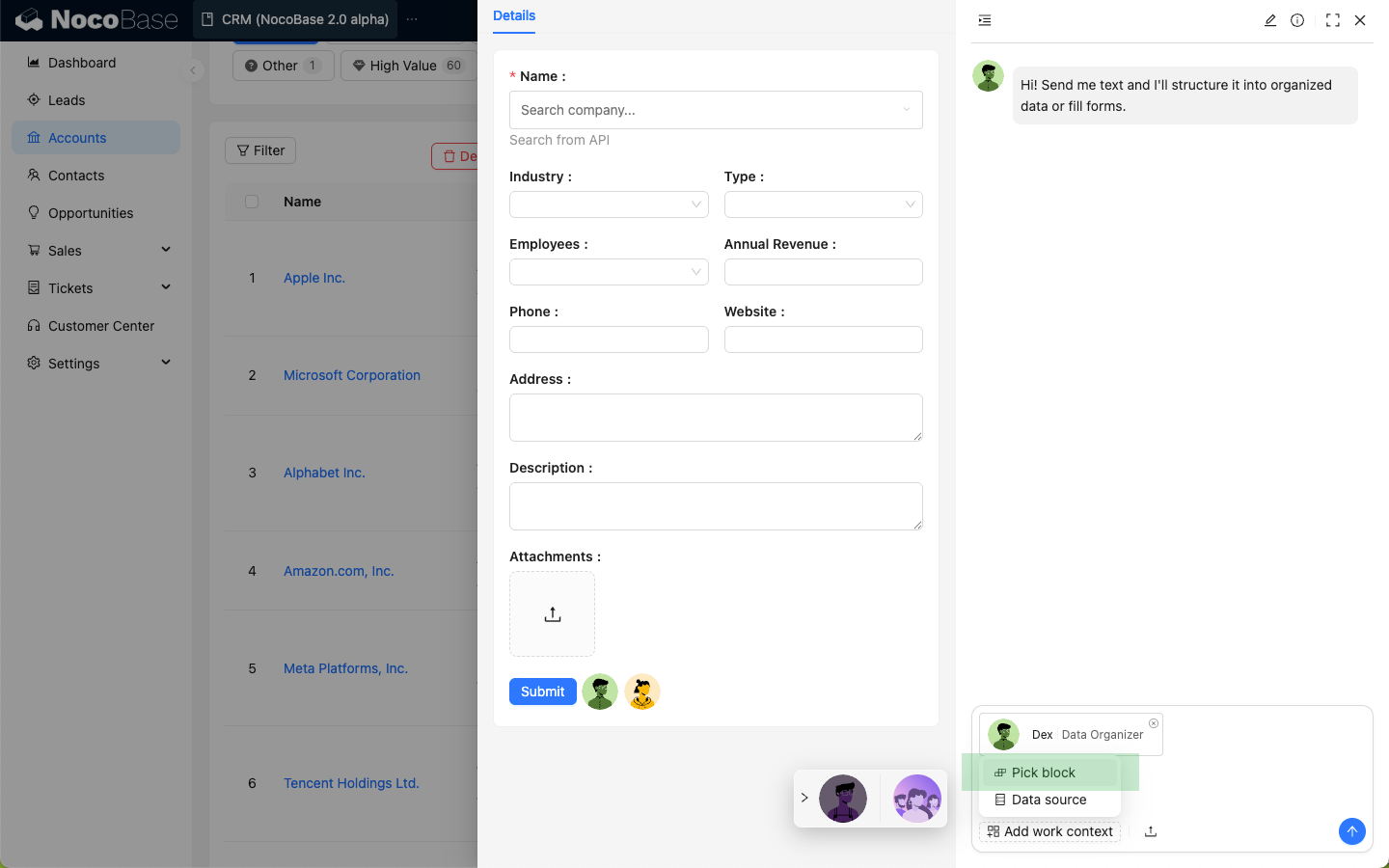
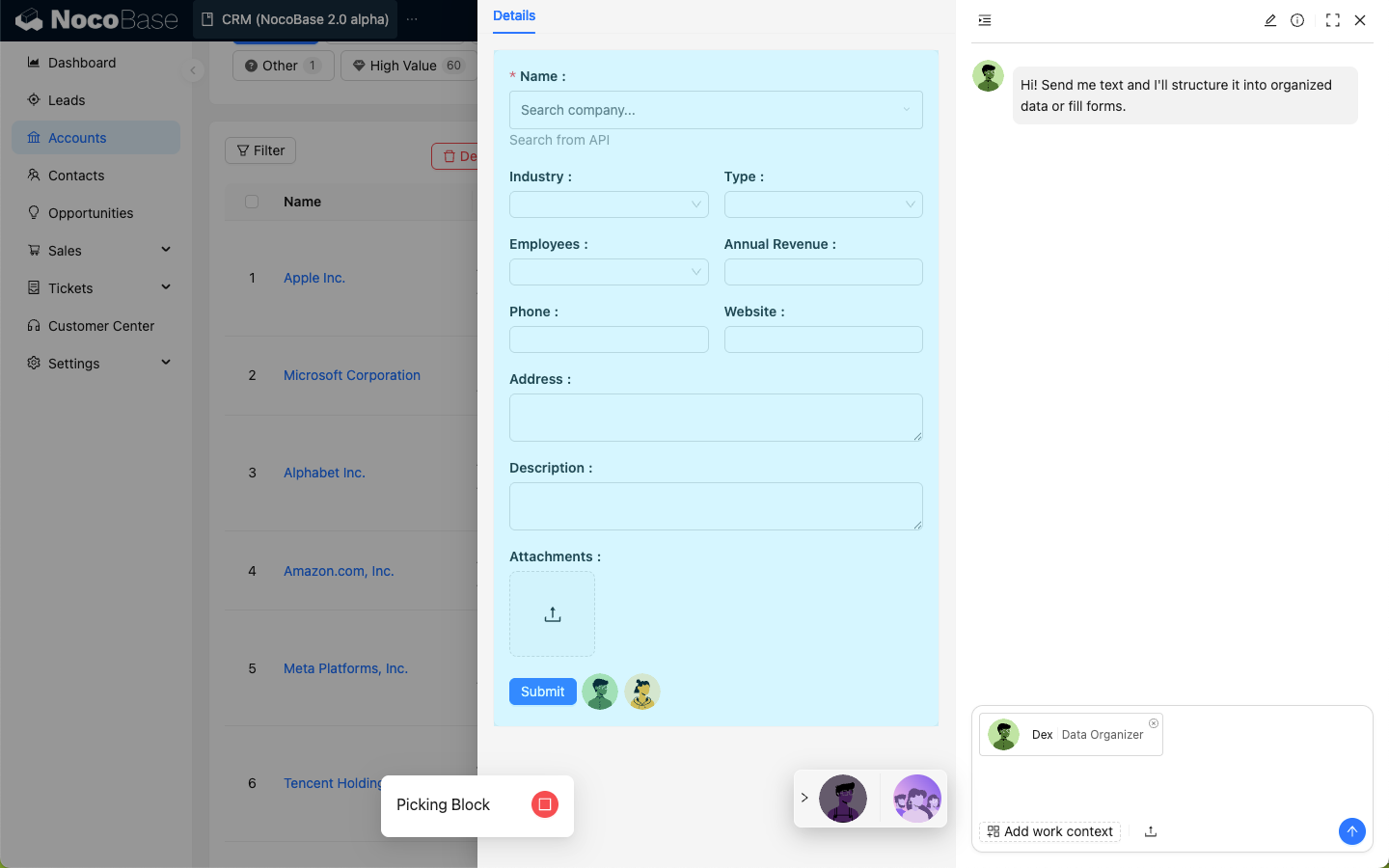
Dex is good at extracting key information from emails, chat records, document snippets, and other unstructured content, then organizing it into structured results.
|
|
12
|
+
|
|
13
|
+
## Scenarios
|
|
14
|
+
|
|
15
|
+
- Extract contacts, dates, tasks, requirements, and other information from text.
|
|
16
|
+
- Organize messy content into tables or lists.
|
|
17
|
+
- Fill forms based on extracted results.
|
|
18
|
+
|
|
19
|
+
## Entry Points
|
|
20
|
+
|
|
21
|
+
- AI Employee chat panel
|
|
22
|
+
- Form pages after selecting block context
|
|
23
|
+
|
|
24
|
+
|
|
25
|
+
|
|
26
|
+
|
|
27
|
+
|
|
28
|
+
|
|
29
|
+
|
|
30
|
+
|
|
31
|
+
|
|
32
|
+
|
|
@@ -0,0 +1,22 @@
|
|
|
1
|
+
---
|
|
2
|
+
title: 'Ellis: Email Expert'
|
|
3
|
+
description: 'Ellis is the built-in email expert in NocoBase, used to understand email context, summarize messages, and draft replies.'
|
|
4
|
+
keywords: 'Ellis,email,email summary,email reply,AI Employee,NocoBase'
|
|
5
|
+
---
|
|
6
|
+
|
|
7
|
+
# Ellis: Email Expert
|
|
8
|
+
|
|
9
|
+
## Role
|
|
10
|
+
|
|
11
|
+
Ellis focuses on email processing. It can combine email history, customer information, and current email content to help users understand context and draft replies.
|
|
12
|
+
|
|
13
|
+
## Scenarios
|
|
14
|
+
|
|
15
|
+
- Summarize email threads.
|
|
16
|
+
- Identify email intent, risks, and follow-up tasks.
|
|
17
|
+
- Generate professional and clear reply drafts.
|
|
18
|
+
|
|
19
|
+
## Entry Points
|
|
20
|
+
|
|
21
|
+
- AI Employee chat panel
|
|
22
|
+
- Email-related pages or task entries
|
|
@@ -0,0 +1,25 @@
|
|
|
1
|
+
---
|
|
2
|
+
title: 'Built-in AI Employees'
|
|
3
|
+
description: 'Overview of NocoBase built-in AI Employees: learn their roles, scenarios, and entry points.'
|
|
4
|
+
keywords: 'Built-in AI Employees,Atlas,Viz,Dara,Dex,Ellis,Lexi,Vera,Lina,Nathan,NocoBase'
|
|
5
|
+
---
|
|
6
|
+
|
|
7
|
+
# Built-in AI Employees
|
|
8
|
+
|
|
9
|
+
NocoBase provides a set of built-in AI Employees for different scenarios. They can help with data analysis, data organization, email processing, translation, localization, frontend development, and more.
|
|
10
|
+
|
|
11
|
+
|
|
12
|
+
|
|
13
|
+
## Employee List
|
|
14
|
+
|
|
15
|
+
| Employee | Role | Typical Scenario | Type |
|
|
16
|
+
| --- | --- | --- | --- |
|
|
17
|
+
| [Atlas](./atlas.md) | Team Leader | Understand user intent and coordinate suitable AI Employees | Main Agent |
|
|
18
|
+
| [Viz](./viz.md) | Insights Analyst | Query business data and generate insights or reports | Business Employee |
|
|
19
|
+
| [Dex](./dex.md) | Data Organizer | Extract structured information from text and help fill forms | Business Employee |
|
|
20
|
+
| [Ellis](./ellis.md) | Email Expert | Summarize email context and draft replies | Business Employee |
|
|
21
|
+
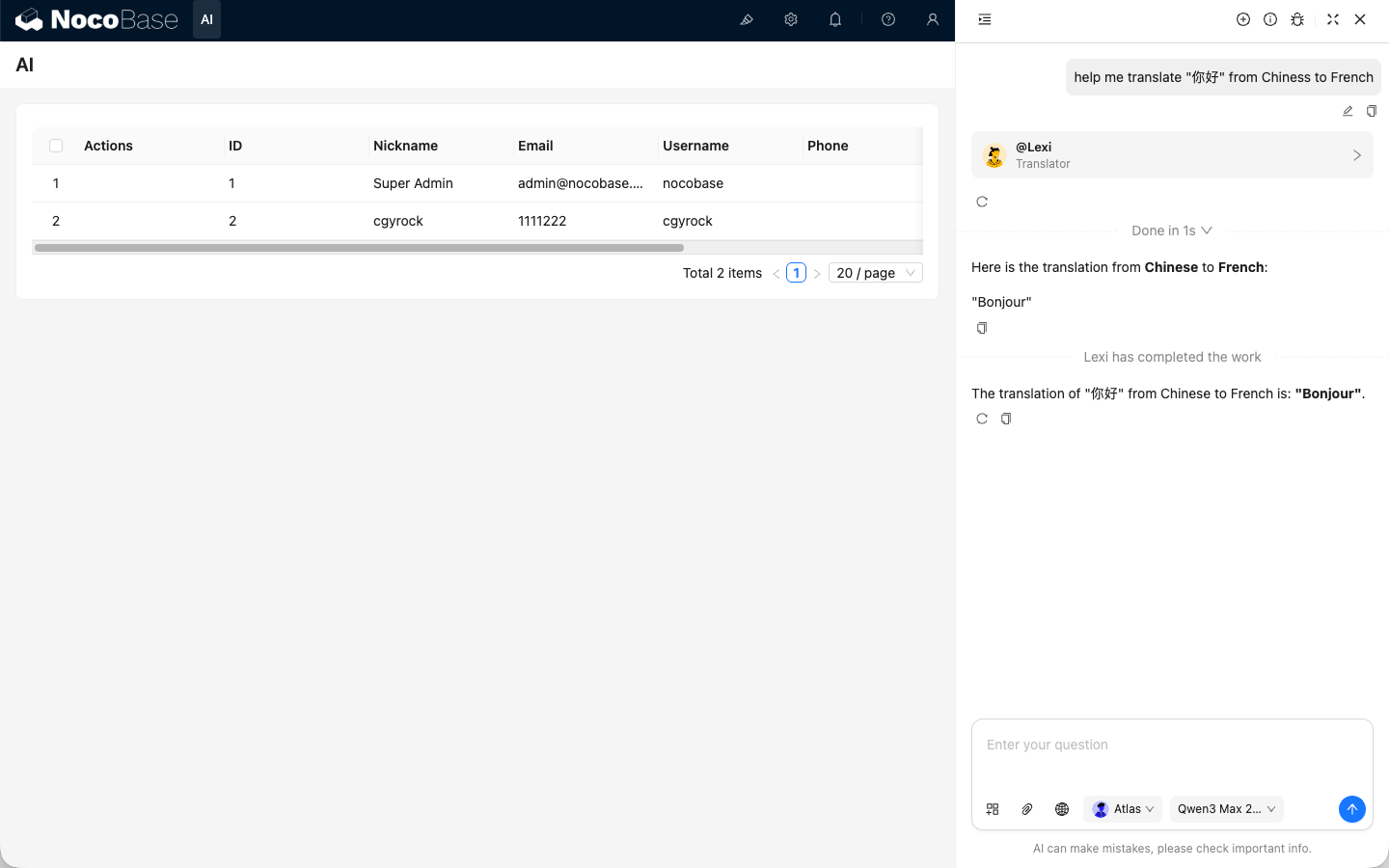
| [Lexi](./lexi.md) | Translation Assistant | Conversational multilingual translation | Business Employee |
|
|
22
|
+
| [Vera](./vera.md) | Research Analyst | Web search, information verification, and research summaries | Business Employee |
|
|
23
|
+
| [Nathan](./nathan.md) | Frontend Engineer | Help write or modify frontend code in code editors | Developer Employee |
|
|
24
|
+
| [Lina](./lina.md) | Localization Engineer | Translate system localization entries and plugin UI text | Developer Employee |
|
|
25
|
+
| [Dara](./dara.md) | Data Visualization Expert | Generate charts and visualization configurations from data | Developer Employee |
|
|
@@ -0,0 +1,26 @@
|
|
|
1
|
+
---
|
|
2
|
+
title: 'Lexi: Translation Assistant'
|
|
3
|
+
description: 'Lexi is the built-in translation assistant in NocoBase, used for conversational multilingual translation and communication assistance.'
|
|
4
|
+
keywords: 'Lexi,translation assistant,multilingual,AI Employee,NocoBase'
|
|
5
|
+
---
|
|
6
|
+
|
|
7
|
+
# Lexi: Translation Assistant
|
|
8
|
+
|
|
9
|
+
## Role
|
|
10
|
+
|
|
11
|
+
Lexi focuses on daily communication and business text translation, helping users convert content between languages.
|
|
12
|
+
|
|
13
|
+
## Scenarios
|
|
14
|
+
|
|
15
|
+
- Translate text entered by users.
|
|
16
|
+
- Translate foreign language content into the current user language.
|
|
17
|
+
- Translate current language content into a specified target language.
|
|
18
|
+
|
|
19
|
+
## Entry Points
|
|
20
|
+
|
|
21
|
+
- AI Employee chat panel
|
|
22
|
+
- Business pages where content needs translation
|
|
23
|
+
|
|
24
|
+
## Difference from Lina
|
|
25
|
+
|
|
26
|
+
Lexi is mainly for user conversations and business communication translation; Lina is mainly for system localization entries and UI text translation.
|
|
@@ -0,0 +1,142 @@
|
|
|
1
|
+
---
|
|
2
|
+
title: 'Lina: Localization Engineer'
|
|
3
|
+
description: 'Lina is the built-in AI Employee of the Localization plugin, used to translate NocoBase system localization entries and plugin UI text.'
|
|
4
|
+
keywords: 'Lina,Localization Engineer,AI translation,Localization Management,AI Employee,NocoBase'
|
|
5
|
+
---
|
|
6
|
+
|
|
7
|
+
# Lina: Localization Engineer
|
|
8
|
+
|
|
9
|
+
## Role
|
|
10
|
+
|
|
11
|
+
Lina is the built-in AI Employee registered by the Localization plugin. It focuses on system localization translation, translating localization entries into the target language while preserving variables, placeholders, tags, formatting, and concise UI wording.
|
|
12
|
+
|
|
13
|
+
|
|
14
|
+
|
|
15
|
+
:::info{title=Tip}
|
|
16
|
+
Lina is a dedicated AI Employee for localization scenarios and does not use general Skills or Tools.
|
|
17
|
+
:::
|
|
18
|
+
|
|
19
|
+
## Scenarios
|
|
20
|
+
|
|
21
|
+
- Batch translate system and plugin entries.
|
|
22
|
+
- Translate localization content for collections, fields, and menus.
|
|
23
|
+
- Quickly generate an initial translation for a newly enabled language.
|
|
24
|
+
- Incrementally translate entries that already exist but are not translated yet.
|
|
25
|
+
- Translate only selected entries in the table.
|
|
26
|
+
|
|
27
|
+
## Prerequisites
|
|
28
|
+
|
|
29
|
+
Before using Lina, complete the following setup:
|
|
30
|
+
|
|
31
|
+
- Enable the **Localization Management** plugin.
|
|
32
|
+
- Configure an available LLM service and assign a default model to Lina. See [Configure AI Employee Models](/ai-employees/features/model-settings) and [Model Recommendations](#model-recommendations).
|
|
33
|
+
- Enable the target language in system settings.
|
|
34
|
+
- Synchronize the entries to translate on the Localization Management page.
|
|
35
|
+
|
|
36
|
+
:::info{title=Tip}
|
|
37
|
+
Lina creates translation tasks for the current locale. For example, if the current UI locale is Thai, the task generates Thai translations.
|
|
38
|
+
:::
|
|
39
|
+
|
|
40
|
+
## Usage
|
|
41
|
+
|
|
42
|
+
On the Localization Management page, click Lina's avatar and choose one of the AI translation task scopes.
|
|
43
|
+
|
|
44
|
+
### Incremental Translation
|
|
45
|
+
|
|
46
|
+
Only translate entries that do not have a translation for the current language. This is suitable for daily maintenance after adding plugins, fields, or menus.
|
|
47
|
+
|
|
48
|
+
### Selected Translation
|
|
49
|
+
|
|
50
|
+
Select records in the entries table first, then choose selected translation. This is suitable for retranslating a small set of entries or entries that need manual correction.
|
|
51
|
+
|
|
52
|
+
If no entry is selected, the system prompts you to select records first.
|
|
53
|
+
|
|
54
|
+
### Full Translation
|
|
55
|
+
|
|
56
|
+
Translate all eligible entries in the current language. This is suitable when generating the first version of a newly enabled language.
|
|
57
|
+
|
|
58
|
+
:::warning{title=Note}
|
|
59
|
+
Full translation may overwrite existing translations. Confirm the target language, entry count, and model service before starting.
|
|
60
|
+
:::
|
|
61
|
+
|
|
62
|
+
## Task Confirmation
|
|
63
|
+
|
|
64
|
+
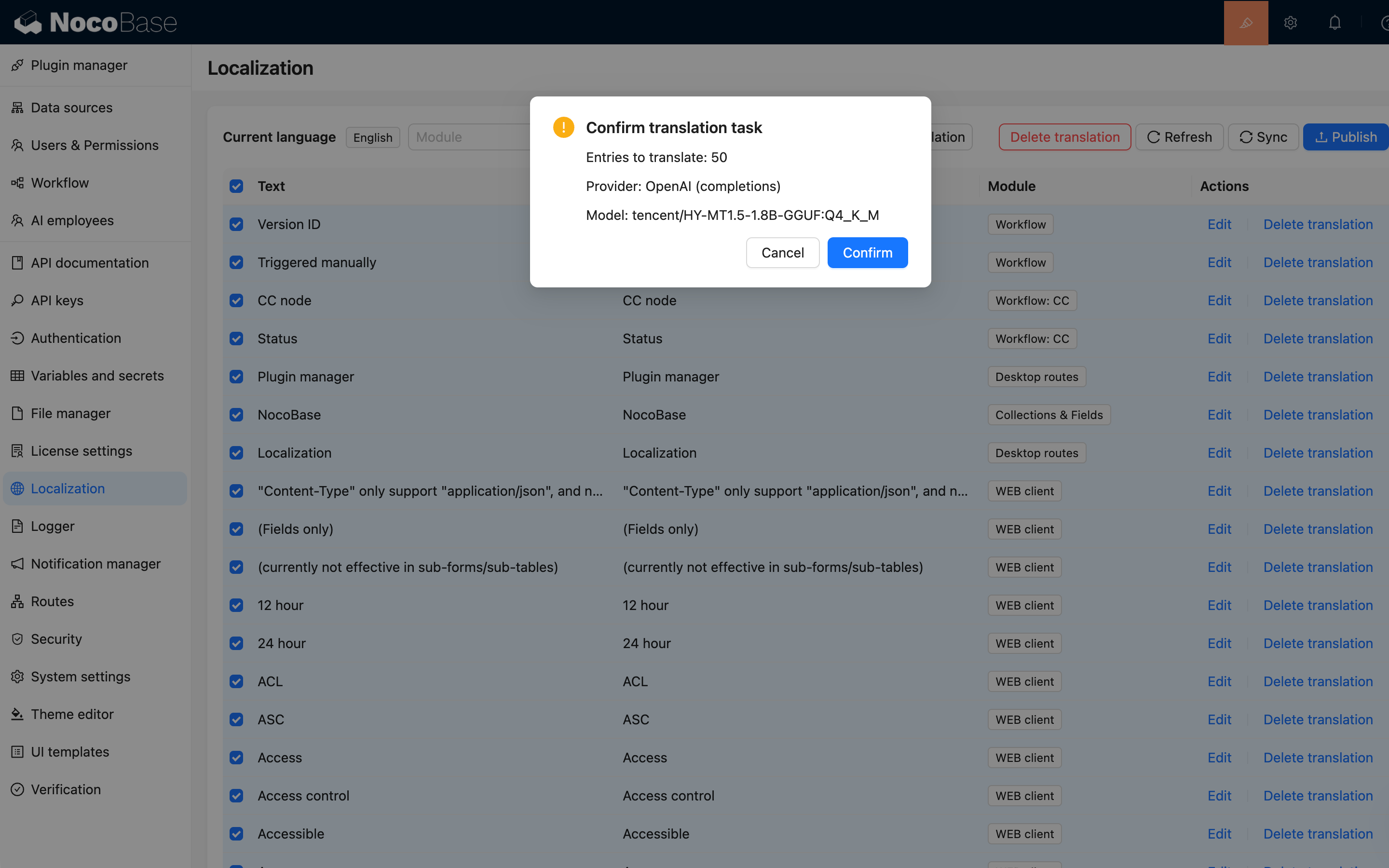
Before creating the task, the system displays a confirmation dialog with:
|
|
65
|
+
|
|
66
|
+
- Number of entries to translate.
|
|
67
|
+
- Provider to use.
|
|
68
|
+
- Model to use.
|
|
69
|
+
|
|
70
|
+
After confirmation, the system creates a background task. You can view progress in async tasks. When the task completes, translations are written to the corresponding language.
|
|
71
|
+
|
|
72
|
+
|
|
73
|
+
|
|
74
|
+
## Translation Strategy
|
|
75
|
+
|
|
76
|
+
Lina follows these rules when translating localization entries:
|
|
77
|
+
|
|
78
|
+
- Return only the translated text without explanation, summary, Markdown, or extra content.
|
|
79
|
+
- Preserve variables, placeholders, HTML tags, ICU syntax, code-like tokens, and formatting symbols.
|
|
80
|
+
- Preserve meaningful line breaks.
|
|
81
|
+
- Keep UI text concise and natural for buttons, fields, menus, and prompts.
|
|
82
|
+
- Return text unchanged if it should not be translated.
|
|
83
|
+
|
|
84
|
+
## Reference Translations
|
|
85
|
+
|
|
86
|
+
Some entries are short, such as field names, button labels, and statuses. Lina uses existing reference translations when possible to improve consistency.
|
|
87
|
+
|
|
88
|
+
- Built-in entries prefer Chinese translations as references.
|
|
89
|
+
- Non-built-in entries prefer the system default language as references.
|
|
90
|
+
- If the system default language is English, the English entry is used directly as the source.
|
|
91
|
+
|
|
92
|
+
When a reference is available, Lina uses a prompt with semantics similar to:
|
|
93
|
+
|
|
94
|
+
```text
|
|
95
|
+
Refer to the following translation:
|
|
96
|
+
{source_term} is translated as {target_term}
|
|
97
|
+
|
|
98
|
+
Translate the following text into {target_language}. Output only the translated result without any additional explanation:
|
|
99
|
+
|
|
100
|
+
{source_text}
|
|
101
|
+
```
|
|
102
|
+
|
|
103
|
+
## Model Recommendations
|
|
104
|
+
|
|
105
|
+
Localization translation usually processes many entries in one task. If possible, use a locally deployed translation-specific small model first, because online models often have API rate limits, concurrency limits, or token-per-minute limits. When many entries are translated, rate limiting can make tasks much slower or cause some requests to wait or fail.
|
|
106
|
+
|
|
107
|
+
If local deployment is not possible, use a translation-specific model rather than a general chat model. Translation models are usually better for short entries, UI text, and batch translation. If the model service supports dedicated translation parameters, the system passes source text, source language, target language, and terminology information according to the model rules.
|
|
108
|
+
|
|
109
|
+
You can adjust request concurrency according to model capability to better control throughput, response time, and cost.
|
|
110
|
+
|
|
111
|
+
For a complete practice using a locally deployed translation-specific small model, see [Use Lina and local HY-MT1.5-1.8B to translate localization entries](/ai-employees/scenarios/localization-hy-mt).
|
|
112
|
+
|
|
113
|
+
:::info{title=Tip}
|
|
114
|
+
The concurrency of localization translation tasks is controlled by `AI_LOCALIZATION_CONCURRENCY`. The default is `10`, the allowed range is `1` to `20`, and values outside the range use the default.
|
|
115
|
+
:::
|
|
116
|
+
|
|
117
|
+
## Progress and Failure Handling
|
|
118
|
+
|
|
119
|
+
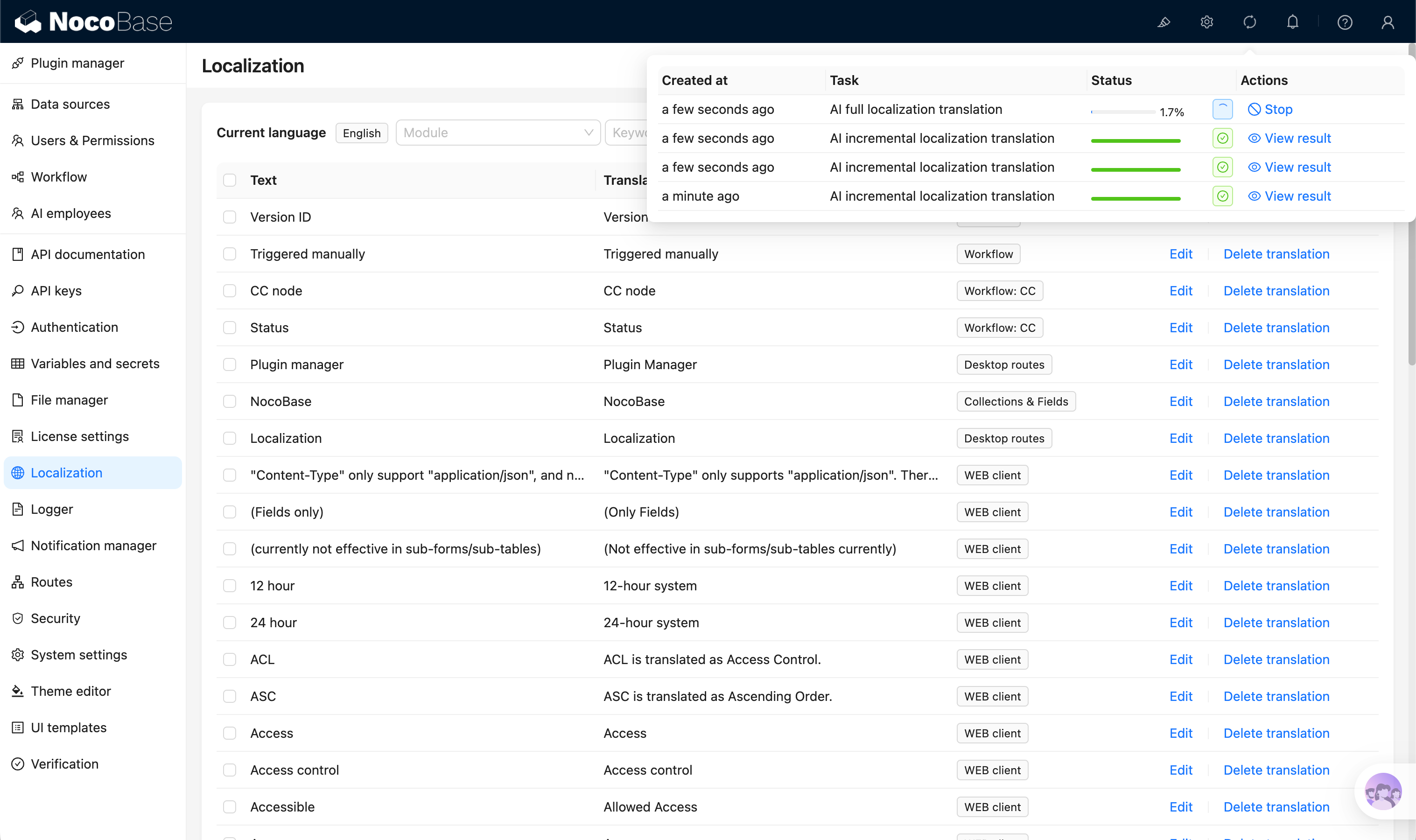
Lina translation tasks run as background async tasks. The task writes translation results entry by entry and updates progress.
|
|
120
|
+
|
|
121
|
+
|
|
122
|
+
|
|
123
|
+
If an entry fails to translate, the task records the failure and stops to avoid continuing to write uncontrolled results when model calls, model output, or configuration is abnormal. Common causes include:
|
|
124
|
+
|
|
125
|
+
- AI plugin or Async Task Manager plugin is not enabled.
|
|
126
|
+
- Lina does not have an available model configured.
|
|
127
|
+
- Model service is unavailable or times out.
|
|
128
|
+
- Model service does not support the current request format.
|
|
129
|
+
- Model returns empty content.
|
|
130
|
+
|
|
131
|
+
Check async task details and server logs for provider, model, target language, failed entry ID, and model call duration.
|
|
132
|
+
|
|
133
|
+
## Review Before Publishing
|
|
134
|
+
|
|
135
|
+
After AI translation finishes, review before publishing:
|
|
136
|
+
|
|
137
|
+
- Check whether short entries such as menus, buttons, and field names fit the product context.
|
|
138
|
+
- Check whether variables, placeholders, and HTML tags are preserved.
|
|
139
|
+
- Check business terminology consistency.
|
|
140
|
+
- Check important pages and user-facing text for natural wording.
|
|
141
|
+
- If built-in entry translations are overwritten, return to Localization Management and select `Reset system built-in entry translations` during synchronization to restore defaults. To contribute default translations for the system and official plugins, see [Translation Contribution](/get-started/translations).
|
|
142
|
+
- Publish translations after review.
|
|
@@ -0,0 +1,36 @@
|
|
|
1
|
+
---
|
|
2
|
+
title: 'Nathan: Frontend Engineer'
|
|
3
|
+
description: 'Nathan is the built-in frontend engineer in NocoBase, used to help write and modify frontend code in JS editors and related scenarios.'
|
|
4
|
+
keywords: 'Nathan,frontend engineer,JS editor,code generation,AI Employee,NocoBase'
|
|
5
|
+
---
|
|
6
|
+
|
|
7
|
+
# Nathan: Frontend Engineer
|
|
8
|
+
|
|
9
|
+
## Role
|
|
10
|
+
|
|
11
|
+
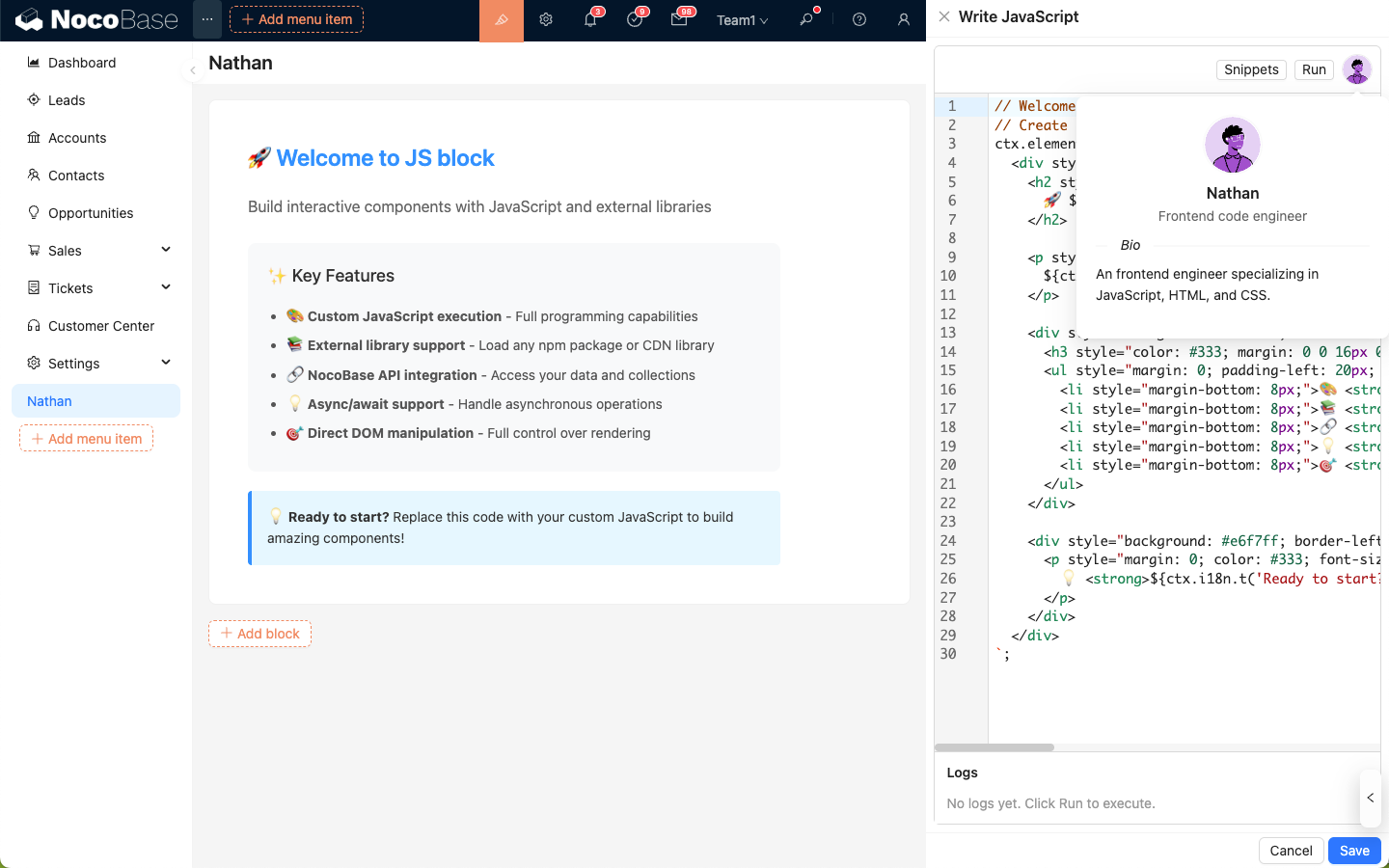
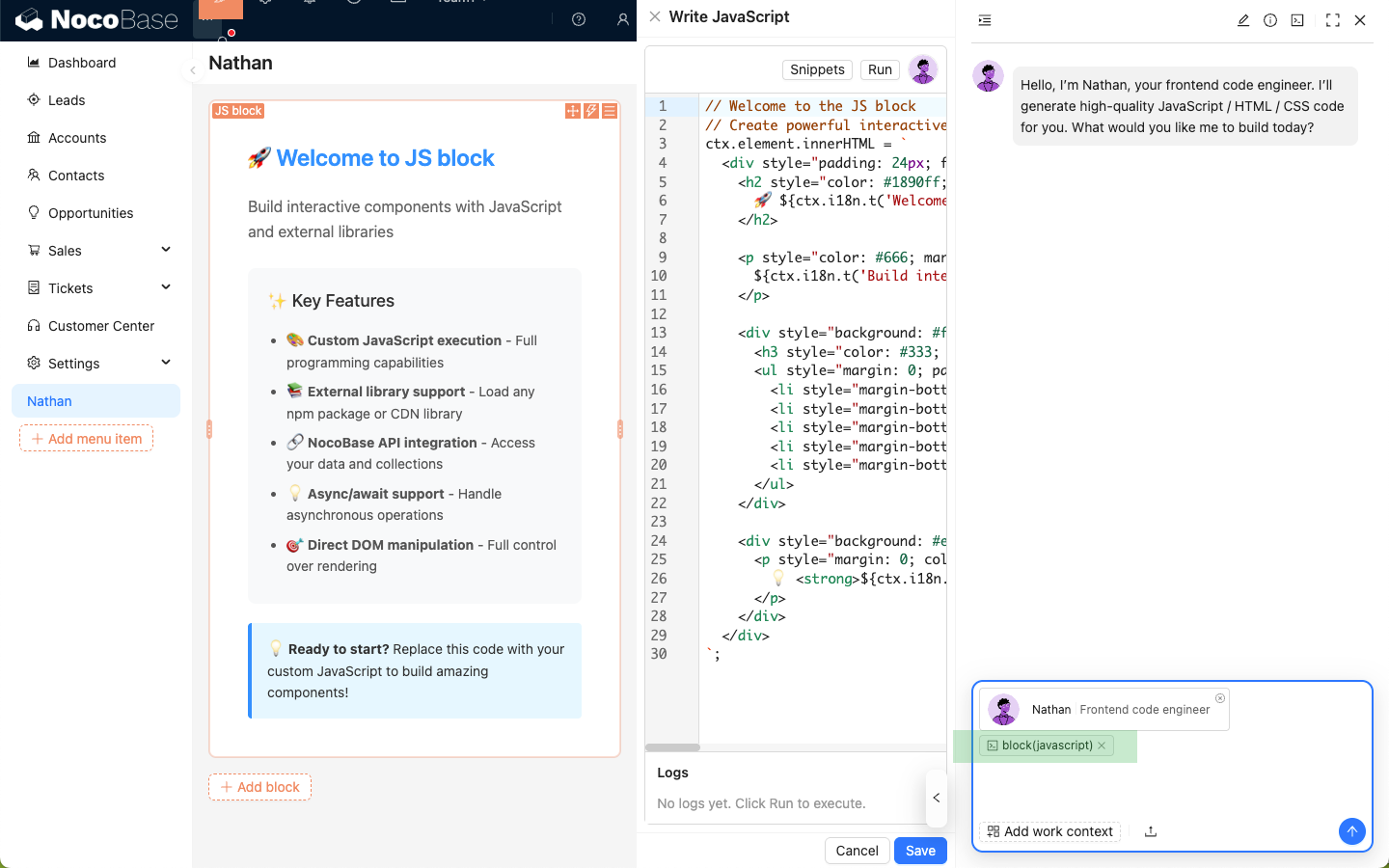
Nathan focuses on frontend coding and debugging scenarios. It can generate, modify, or explain JavaScript code based on the current code context.
|
|
12
|
+
|
|
13
|
+
## Scenarios
|
|
14
|
+
|
|
15
|
+
- Write code for JSBlock, JSField, JSItem, JSColumn, JSAction, and similar editors.
|
|
16
|
+
- Adjust page interaction logic or styles.
|
|
17
|
+
- Provide modification suggestions based on current editor content.
|
|
18
|
+
|
|
19
|
+
## Entry Points
|
|
20
|
+
|
|
21
|
+
- Nathan entry in the upper-right corner of JS code editors
|
|
22
|
+
- Other configuration scenarios that require JavaScript
|
|
23
|
+
|
|
24
|
+
|
|
25
|
+
|
|
26
|
+
|
|
27
|
+
|
|
28
|
+
|
|
29
|
+
|
|
30
|
+
|
|
31
|
+
|
|
32
|
+
|
|
33
|
+
|
|
34
|
+
|
|
35
|
+
|
|
36
|
+
|
|
@@ -0,0 +1,22 @@
|
|
|
1
|
+
---
|
|
2
|
+
title: 'Vera: Research Analyst'
|
|
3
|
+
description: 'Vera is the built-in research analyst in NocoBase, used for web search, information verification, and research summaries.'
|
|
4
|
+
keywords: 'Vera,research analyst,web search,information verification,AI Employee,NocoBase'
|
|
5
|
+
---
|
|
6
|
+
|
|
7
|
+
# Vera: Research Analyst
|
|
8
|
+
|
|
9
|
+
## Role
|
|
10
|
+
|
|
11
|
+
Vera focuses on external information retrieval and research. It can search public internet information and organize conclusions with source references.
|
|
12
|
+
|
|
13
|
+
## Scenarios
|
|
14
|
+
|
|
15
|
+
- Query the latest public information.
|
|
16
|
+
- Compare information from multiple sources.
|
|
17
|
+
- Summarize competitors, industries, policies, and market materials.
|
|
18
|
+
|
|
19
|
+
## Entry Points
|
|
20
|
+
|
|
21
|
+
- AI Employee chat panel
|
|
22
|
+
- Task scenarios with web search enabled
|
|
@@ -0,0 +1,25 @@
|
|
|
1
|
+
---
|
|
2
|
+
title: 'Viz: Insights Analyst'
|
|
3
|
+
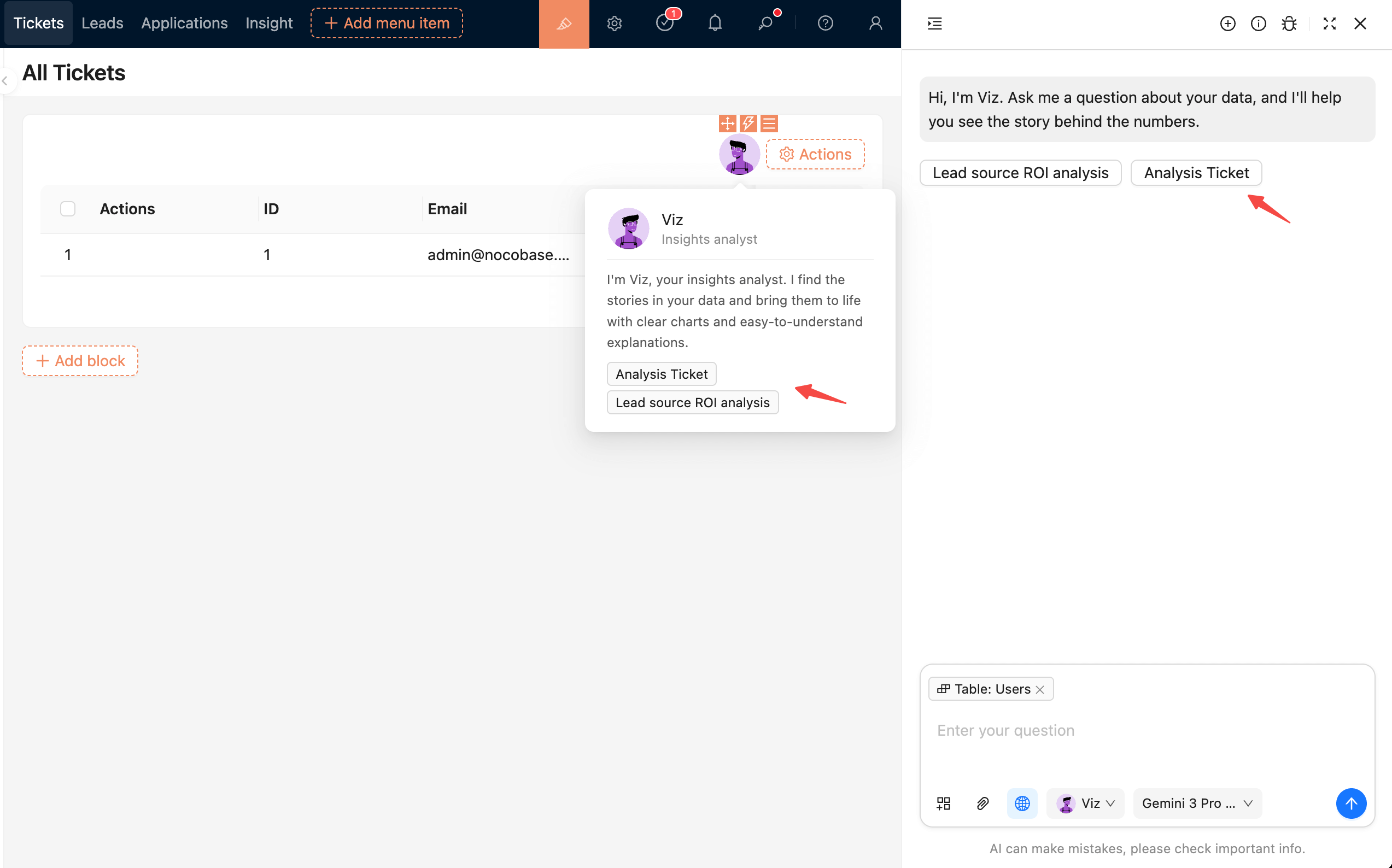
description: 'Viz is the built-in insights analyst in NocoBase, used to query business data and generate analytical conclusions and business reports.'
|
|
4
|
+
keywords: 'Viz,insights analyst,data analysis,AI Employee,NocoBase'
|
|
5
|
+
---
|
|
6
|
+
|
|
7
|
+
# Viz: Insights Analyst
|
|
8
|
+
|
|
9
|
+
## Role
|
|
10
|
+
|
|
11
|
+
Viz focuses on data insights and business analysis. It can read specified data ranges and generate trend analysis, metric interpretation, and structured reports.
|
|
12
|
+
|
|
13
|
+
## Scenarios
|
|
14
|
+
|
|
15
|
+
- Generate business analysis reports.
|
|
16
|
+
- Analyze sales, customers, leads, orders, and other business data.
|
|
17
|
+
- Interpret trends, comparisons, conversions, retention, and other metrics.
|
|
18
|
+
|
|
19
|
+
## Entry Points
|
|
20
|
+
|
|
21
|
+
- AI Employee chat panel
|
|
22
|
+
- AI Employee shortcut tasks configured on pages or blocks
|
|
23
|
+
- Scenario entries related to business analysis reports
|
|
24
|
+
|
|
25
|
+
|
|
@@ -18,7 +18,6 @@ You only need to configure the LLM service and enable the corresponding employee
|
|
|
18
18
|
| **Lexi** | Translation Assistant | Multilingual translation, communication assistance |
|
|
19
19
|
| **Vera** | Research Analyst | Web search, information aggregation, deep research |
|
|
20
20
|
| **Dara** | Data Visualization Expert | Chart configuration, visual report generation |
|
|
21
|
-
| **Orin** | Data Modeling Expert | Assist in designing collection structures, field suggestions |
|
|
22
21
|
| **Nathan** | Frontend Engineer | Assist in writing frontend code snippets, style adjustments |
|
|
23
22
|
|
|
24
23
|
Click the **AI floating ball** in the bottom-right corner of the application interface to open an AI conversation and start collaborating.
|
|
@@ -45,7 +44,7 @@ In most scenarios, you can simply describe what you need. Atlas will either cont
|
|
|
45
44
|
|
|
46
45
|
Some built-in AI employees (builder types) do not appear in the bottom-right AI employee list; they have dedicated workspaces, for example:
|
|
47
46
|
|
|
48
|
-
*
|
|
47
|
+
* only appears on the Data Source configuration page;
|
|
49
48
|
* Dara only appears on the chart configuration page;
|
|
50
49
|
* Nathan only appears in the JS editor.
|
|
51
50
|
|
|
@@ -164,33 +163,6 @@ After sending, `Dex` will structure the data and use its skills to update the da
|
|
|
164
163
|
|
|
165
164
|
---
|
|
166
165
|
|
|
167
|
-
## Orin: Data Modeler
|
|
168
|
-
|
|
169
|
-
### Introduction
|
|
170
|
-
|
|
171
|
-
> Intelligently design collections and optimize database structures.
|
|
172
|
-
|
|
173
|
-
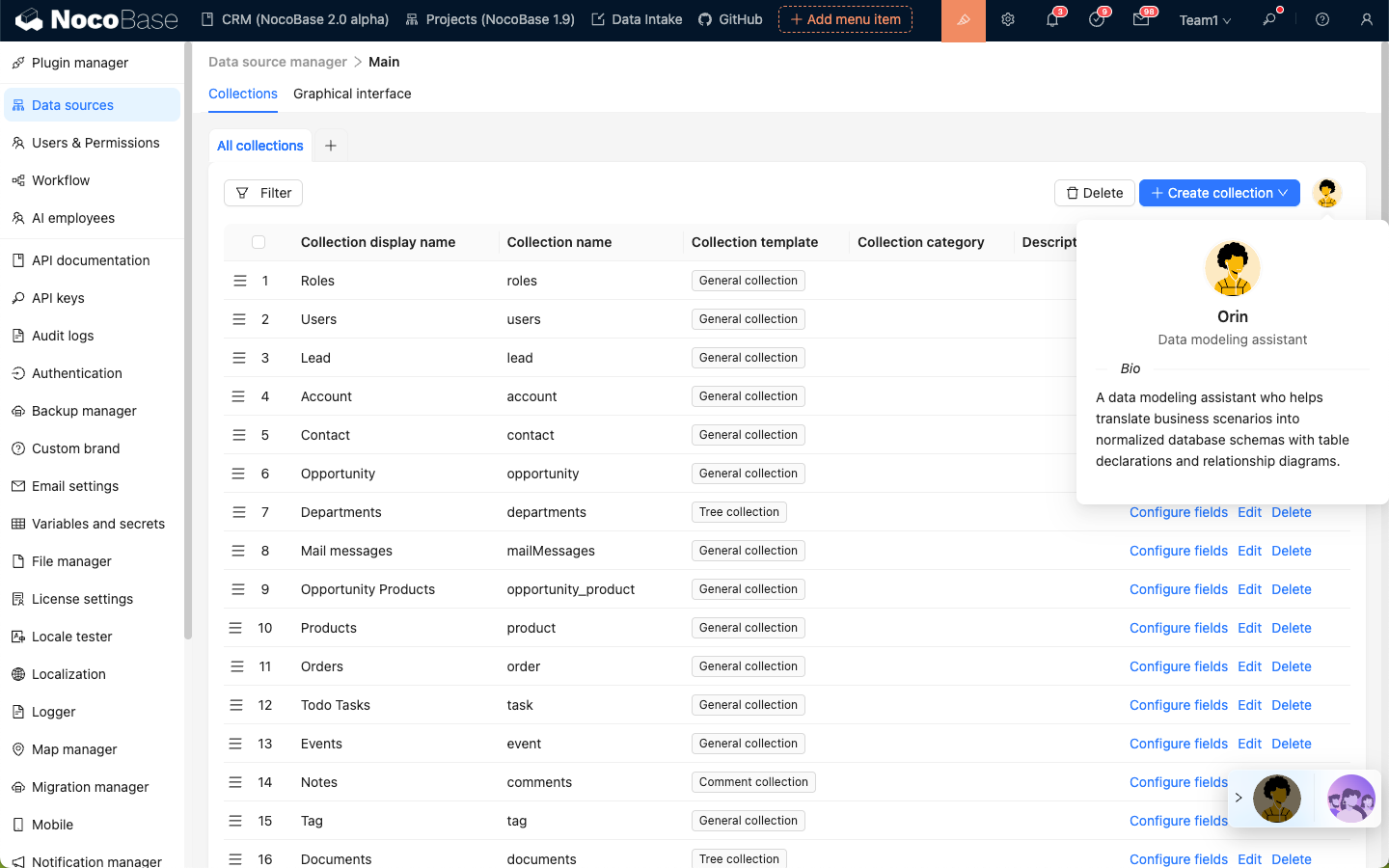
`Orin` is a data modeling expert. On the main data source configuration page, you can let `Orin` help you create or modify collections.
|
|
174
|
-
|
|
175
|
-
|
|
176
|
-
|
|
177
|
-
### Usage
|
|
178
|
-
|
|
179
|
-
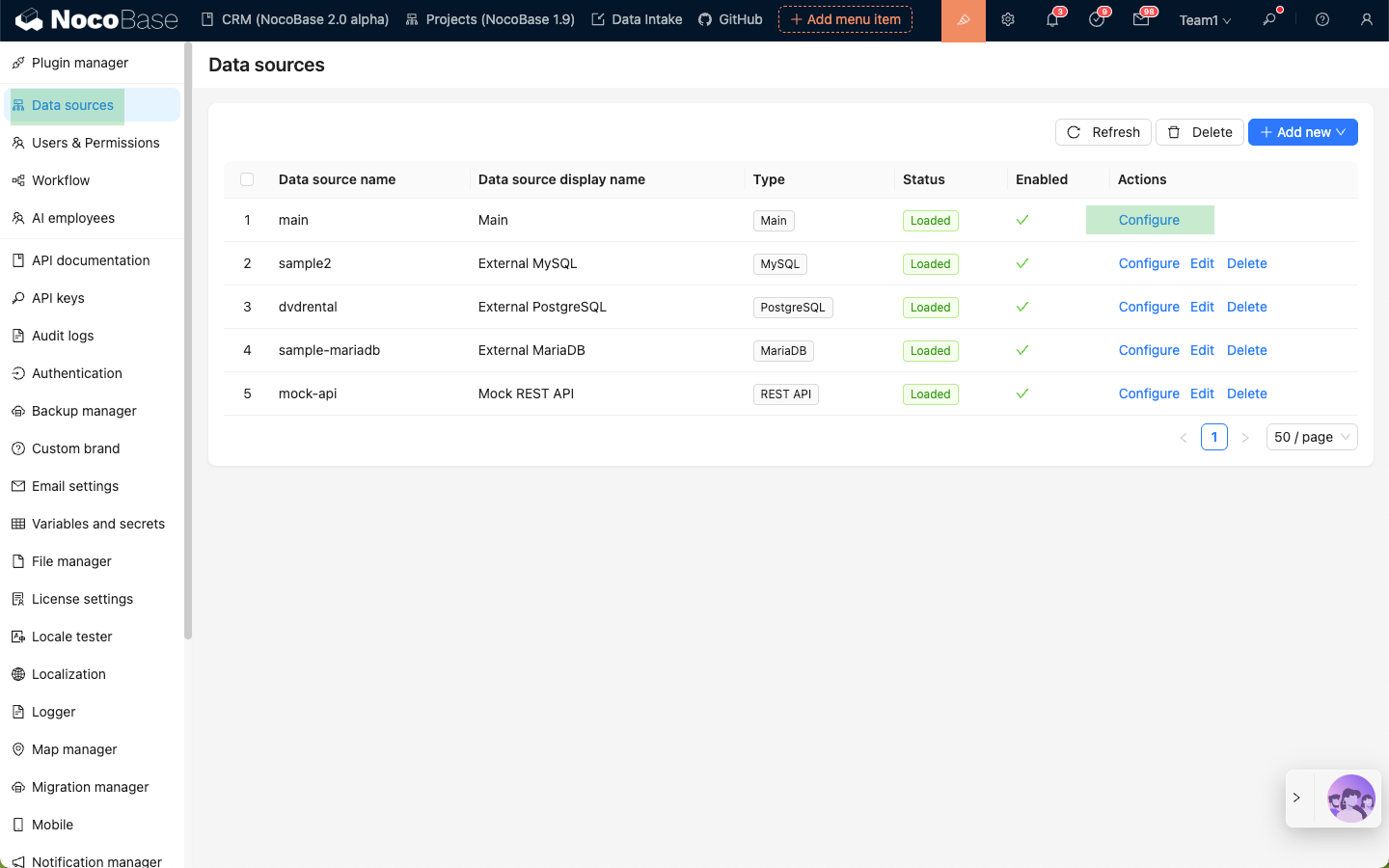
Enter the Data Source Manager plugin and select to configure the main data source.
|
|
180
|
-
|
|
181
|
-
|
|
182
|
-
|
|
183
|
-
Click the `Orin` avatar in the top right corner to open the AI employee dialog box.
|
|
184
|
-
|
|
185
|
-
|
|
186
|
-
|
|
187
|
-
Describe your modeling requirements to `Orin`, send, and wait for a reply.
|
|
188
|
-
|
|
189
|
-
Once `Orin` confirms your requirements, he will use his skills and reply with a preview of the data modeling.
|
|
190
|
-
|
|
191
|
-
After reviewing the preview, click the **Finish review and apply** button to create collections according to `Orin`'s modeling.
|
|
192
|
-
|
|
193
|
-
|
|
194
166
|
|
|
195
167
|
---
|
|
196
168
|
|
|
@@ -1,31 +1,41 @@
|
|
|
1
|
+
---
|
|
2
|
+
pkg: '@nocobase/plugin-ai'
|
|
3
|
+
title: 'Collaborate with AI Employees'
|
|
4
|
+
description: 'Collaborate with AI Employees: bottom-right main entry, block Action entry, chat operations, and switching employees and models in a conversation (AI Employee Switcher, Model Switcher).'
|
|
5
|
+
keywords: 'AI Employee collaboration,chat panel,employee switcher,model switcher,NocoBase'
|
|
6
|
+
---
|
|
7
|
+
|
|
1
8
|
# Collaborate with AI Employees
|
|
2
9
|
|
|
3
10
|
After creating and enabling AI Employees, you can collaborate with them in pages.
|
|
4
11
|
|
|
5
12
|
## Entry Points
|
|
6
13
|
|
|
7
|
-
There are two common entry points:
|
|
8
|
-
|
|
9
14
|
1. **Bottom-right main entry**: Open the AI chat panel from the bottom-right corner of business pages. Suitable for general Q&A and cross-block collaboration.
|
|
10
|
-
2. **Block Action entry**: In blocks that support `Actions`,
|
|
15
|
+
2. **Block Action entry**: In blocks that support `Actions`, add AI Employees through `Actions -> AI employees`. Suitable for tasks on the current block, such as filling form blocks.
|
|
16
|
+
3. **Scenario-specific entry**: Development-oriented employees, such as Nathan, Lina, and Dara, provide dedicated entries in specific scenarios such as JS blocks, chart blocks, or Localization Management.
|
|
11
17
|
|
|
12
|
-
### Bottom-right
|
|
18
|
+
### Bottom-right Main Entry
|
|
13
19
|
|
|
14
20
|
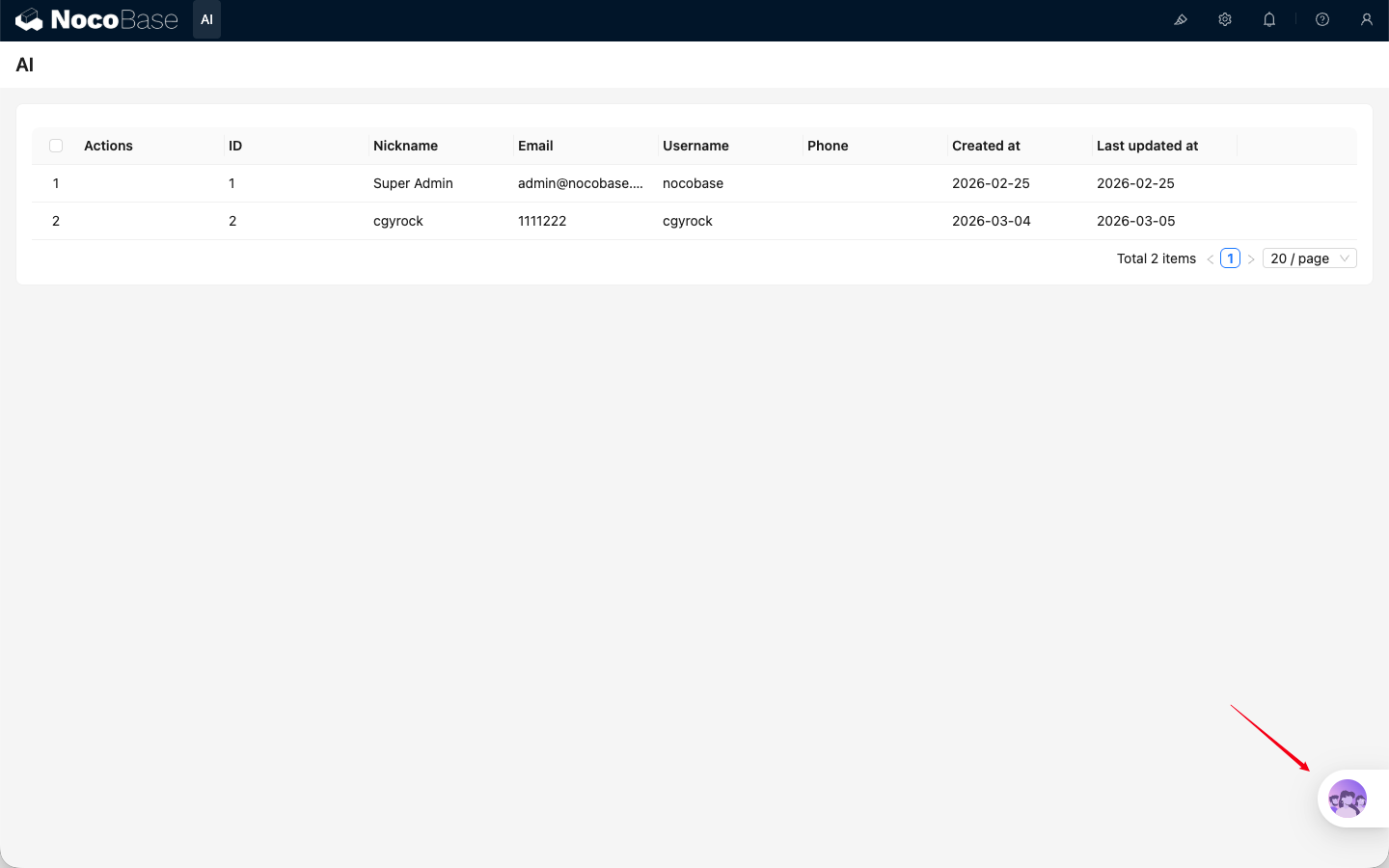
|
|
15
21
|
|
|
16
|
-
### Block Action
|
|
22
|
+
### Block Action Entry
|
|
17
23
|
|
|
18
24
|
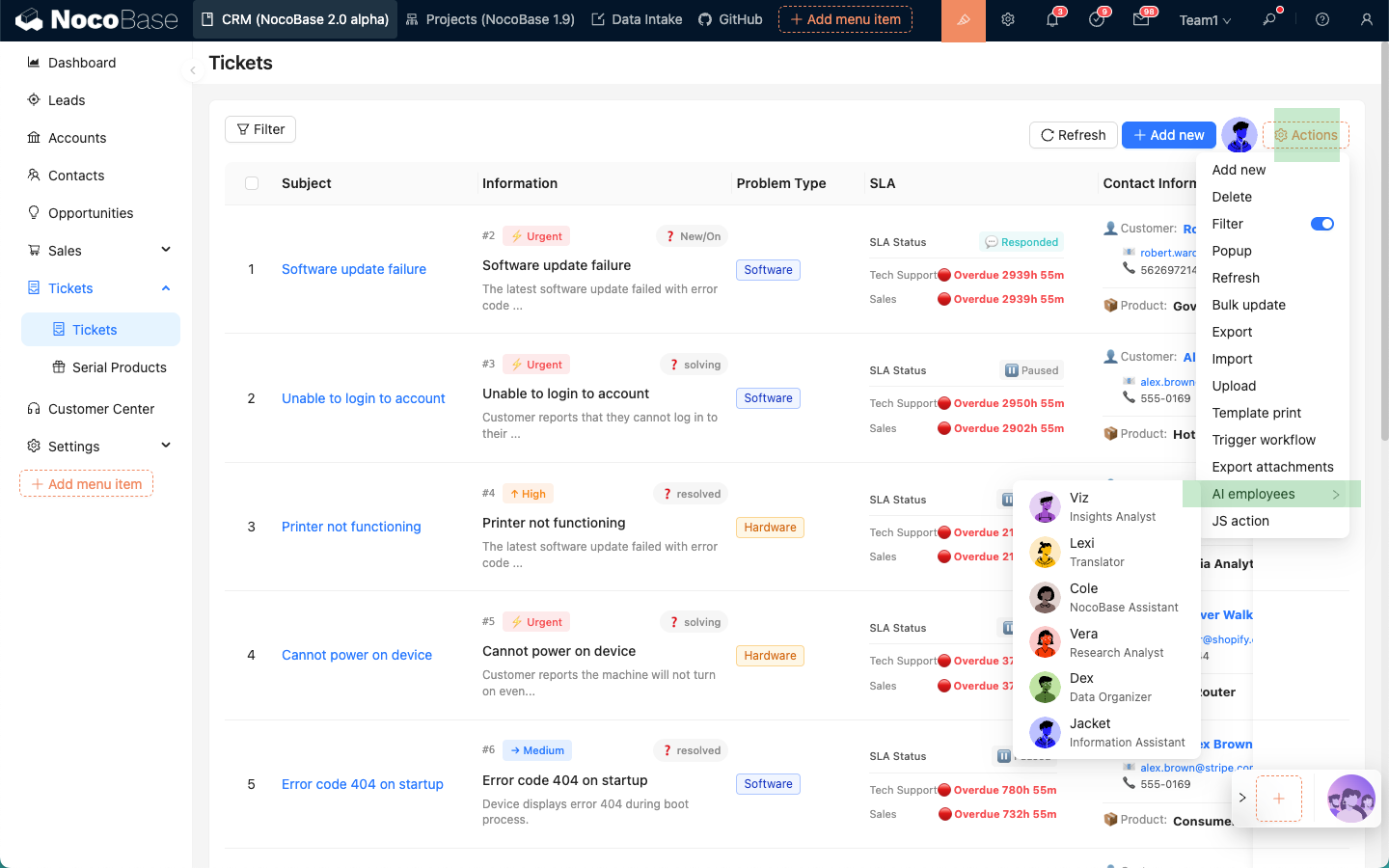
|
|
19
25
|
|
|
26
|
+
### Scenario-Specific Entry
|
|
27
|
+
|
|
28
|
+
|
|
29
|
+
|
|
20
30
|
## Basic Chat Operations
|
|
21
31
|
|
|
22
32
|
The chat panel supports common operations such as sending messages, uploading attachments, viewing history, creating new chats, and editing system prompts.
|
|
23
33
|
|
|
24
34
|
## In-Chat Switching
|
|
25
35
|
|
|
26
|
-
In most cases, you can simply talk to Atlas, and he will coordinate the appropriate AI
|
|
36
|
+
In most cases, you can simply talk to Atlas, and he will coordinate the appropriate AI Employee to help handle the task.
|
|
27
37
|
|
|
28
|
-
If you want to use a specific AI
|
|
38
|
+
If you want to use a specific AI Employee, click the AI Employee dropdown in the message composer to select one.
|
|
29
39
|
|
|
30
40
|
|
|
31
41
|
|
|
@@ -7,14 +7,14 @@ keywords: 'Enable AI Employees,AI employees,NocoBase'
|
|
|
7
7
|
|
|
8
8
|
# Enable AI Employees
|
|
9
9
|
|
|
10
|
-
NocoBase provides
|
|
10
|
+
NocoBase provides built-in AI Employees for multiple scenarios. For the complete description, see [Built-in AI Employees](/ai-employees/built-in/).
|
|
11
11
|
|
|
12
12
|
## How to Enable
|
|
13
13
|
|
|
14
|
-
|
|
14
|
+
After entering the `AI employees` management page, turn on the `Enabled` switch directly in the list to enable an employee.
|
|
15
15
|
|
|
16
|
-

|
|
17
17
|
|
|
18
18
|
## Usage After Enabling
|
|
19
19
|
|
|
20
|
-
After enabling, the employee appears in available
|
|
20
|
+
After enabling, the employee appears in available entries, such as the bottom-right shortcut entry or scenario-specific entry.
|
|
@@ -0,0 +1,87 @@
|
|
|
1
|
+
---
|
|
2
|
+
pkg: '@nocobase/plugin-ai'
|
|
3
|
+
title: 'Configure AI Employee Models'
|
|
4
|
+
description: 'Restrict the model range for a single AI Employee, configure dedicated models, and understand model selection rules in chat, shortcut tasks, and workflows.'
|
|
5
|
+
keywords: 'AI Employee model settings,dedicated model,model scope,LLM service,NocoBase AI'
|
|
6
|
+
---
|
|
7
|
+
|
|
8
|
+
# Configure AI Employee Models
|
|
9
|
+
|
|
10
|
+
By default, AI Employees can use all enabled LLM services and models in the system. Administrators can also enable dedicated model settings for a specific AI Employee and restrict that employee to selected models.
|
|
11
|
+
|
|
12
|
+
This is useful when you need stable model capability, cost control, or a task-specific model. For example, Lina can be fixed to a translation model, while Viz can be limited to models that are better at data analysis.
|
|
13
|
+
|
|
14
|
+
## Prerequisites
|
|
15
|
+
|
|
16
|
+
Before configuring models for an AI Employee, make sure that:
|
|
17
|
+
|
|
18
|
+
- The **AI Employees** plugin is enabled.
|
|
19
|
+
- At least one LLM service has been configured.
|
|
20
|
+
- The LLM service has available `Enabled Models`.
|
|
21
|
+
- The target AI Employee is enabled.
|
|
22
|
+
|
|
23
|
+
For LLM service setup, see [Configure LLM Service](/ai-employees/features/llm-service).
|
|
24
|
+
|
|
25
|
+
## Entry Point
|
|
26
|
+
|
|
27
|
+
Go to `System Settings -> AI Employees -> AI employees`, open the AI Employee you want to configure, and switch to `Model settings`.
|
|
28
|
+
|
|
29
|
+
You can enable or disable dedicated model settings for the current employee on this page.
|
|
30
|
+
|
|
31
|
+
|
|
32
|
+
|
|
33
|
+
## Enable Dedicated Model Settings
|
|
34
|
+
|
|
35
|
+
After enabling `Enable dedicated model configuration`, select the models that this AI Employee is allowed to use in `Models`.
|
|
36
|
+
|
|
37
|
+
Multiple models can be selected. The options come from enabled LLM services and their `Enabled Models`.
|
|
38
|
+
|
|
39
|
+
After this option is enabled, the AI Employee can only use the selected models:
|
|
40
|
+
|
|
41
|
+
- The model switcher in chat only shows selected models.
|
|
42
|
+
- Shortcut tasks can only use selected models.
|
|
43
|
+
- Workflow AI Employee nodes can only select selected models.
|
|
44
|
+
- If a request passes a model outside the allowed range, the system uses the first allowed model instead.
|
|
45
|
+
|
|
46
|
+
:::info{title=Tip}
|
|
47
|
+
If dedicated model settings are enabled but no model is selected, the AI Employee cannot resolve an available model and will report that the model is not configured.
|
|
48
|
+
:::
|
|
49
|
+
|
|
50
|
+
## Disable Dedicated Model Settings
|
|
51
|
+
|
|
52
|
+
After disabling `Enable dedicated model configuration`, the AI Employee returns to the default model rules:
|
|
53
|
+
|
|
54
|
+
- It can use all enabled LLM service models.
|
|
55
|
+
- Users can switch to any available model in chat.
|
|
56
|
+
- If no model is selected manually, the system uses the global default model.
|
|
57
|
+
|
|
58
|
+
## Model Resolution Rules
|
|
59
|
+
|
|
60
|
+
When an AI Employee executes a task, the final model is resolved in this order:
|
|
61
|
+
|
|
62
|
+
1. If dedicated model settings are enabled, resolve within the selected model range first.
|
|
63
|
+
2. If the request specifies a model and that model is allowed, use the specified model.
|
|
64
|
+
3. If the specified model is not allowed, use the first allowed model.
|
|
65
|
+
4. If dedicated model settings are not enabled, prefer the model specified by the request.
|
|
66
|
+
5. If no model is specified, use the global default model.
|
|
67
|
+
|
|
68
|
+
## Recommendations
|
|
69
|
+
|
|
70
|
+
- Configure task-specific models for specialized employees. Translation, localization, data analysis, and code generation may benefit from different models.
|
|
71
|
+
- Use lower-cost models for cost-sensitive scenarios and prevent users from switching to expensive models.
|
|
72
|
+
- For employees that need tool calling, web search, or structured output, choose models that support those capabilities.
|
|
73
|
+
- Keep at least one stable model available for key built-in employees to avoid task failures.
|
|
74
|
+
|
|
75
|
+
## FAQ
|
|
76
|
+
|
|
77
|
+
### Why is the model list empty?
|
|
78
|
+
|
|
79
|
+
Usually because no LLM service has been configured, or no model is enabled in the LLM service. Check `Enabled Models` in `LLM service` first.
|
|
80
|
+
|
|
81
|
+
### Why can't users switch to other models?
|
|
82
|
+
|
|
83
|
+
If the AI Employee has dedicated model settings enabled, the chat window only allows switching within the selected model range. Add more models in `Model settings` or disable dedicated model settings if other models are needed.
|
|
84
|
+
|
|
85
|
+
### Which entries are affected after model settings are changed?
|
|
86
|
+
|
|
87
|
+
The change affects new chats, shortcut tasks, workflow AI Employee nodes, and plugin built-in tasks started by this AI Employee. Completed historical messages are not regenerated.
|
|
@@ -44,7 +44,7 @@ Start with [Quick Start](/ai-employees/quick-start), and complete minimal setup
|
|
|
44
44
|
|
|
45
45
|
### C. Advanced Capabilities (Extensions)
|
|
46
46
|
|
|
47
|
-
- [Built-in AI Employees](/ai-employees/
|
|
47
|
+
- [Built-in AI Employees](/ai-employees/built-in/): understand built-in role positioning and suitable scenarios.
|
|
48
48
|
- [Permission Control](/ai-employees/permission): control employee, skill, and data access by org permissions.
|
|
49
49
|
- [AI Knowledge Base](/ai-employees/knowledge-base/index): import enterprise knowledge for stable and traceable answers.
|
|
50
50
|
- [Workflow AI Employee Nodes](/ai-employees/workflow/nodes/employee/configuration): orchestrate AI Employee capabilities into automated workflows.
|