@modern-js/main-doc 2.6.0 → 2.8.0
This diff represents the content of publicly available package versions that have been released to one of the supported registries. The information contained in this diff is provided for informational purposes only and reflects changes between package versions as they appear in their respective public registries.
- package/.turbo/turbo-build.log +1 -1
- package/CHANGELOG.md +17 -0
- package/README.md +2 -2
- package/en/apis/app/commands.mdx +2 -0
- package/en/apis/app/hooks/config/upload.mdx +10 -0
- package/en/apis/app/runtime/model/connect.mdx +1 -1
- package/en/apis/app/runtime/model/model_.mdx +1 -1
- package/en/apis/app/runtime/model/use-model.mdx +1 -1
- package/en/apis/app/runtime/web-server/hook.mdx +2 -2
- package/en/apis/app/runtime/web-server/middleware.mdx +33 -9
- package/en/components/enable-bff.mdx +4 -4
- package/en/components/init-rspack-app.mdx +7 -0
- package/en/configure/app/bff/enable-handle-web.mdx +24 -0
- package/en/configure/app/server/enable-framework-ext.mdx +1 -1
- package/en/configure/app/server/ssr.mdx +18 -0
- package/en/guides/advanced-features/bff/_category_.json +1 -1
- package/en/guides/advanced-features/eslint.mdx +30 -32
- package/en/guides/advanced-features/low-level.mdx +1 -1
- package/en/guides/advanced-features/rspack-start.mdx +13 -17
- package/en/guides/advanced-features/ssr.mdx +210 -5
- package/en/guides/advanced-features/web-server.mdx +87 -20
- package/en/guides/{css/tailwindcss.mdx → basic-features/css.mdx} +60 -3
- package/en/guides/basic-features/env-vars.mdx +4 -0
- package/en/guides/concept/builder.mdx +1 -1
- package/en/guides/topic-detail/framework-plugin/extend.mdx +20 -19
- package/en/guides/topic-detail/framework-plugin/hook-list.mdx +156 -155
- package/en/guides/topic-detail/framework-plugin/hook.mdx +58 -43
- package/en/guides/topic-detail/framework-plugin/implement.mdx +47 -49
- package/en/guides/topic-detail/framework-plugin/introduction.mdx +22 -23
- package/en/guides/topic-detail/framework-plugin/plugin-api.mdx +13 -13
- package/en/guides/topic-detail/framework-plugin/relationship.mdx +30 -30
- package/en/guides/topic-detail/generator/plugin/develop.mdx +1 -1
- package/en/guides/topic-detail/micro-frontend/c01-introduction.mdx +17 -17
- package/en/guides/topic-detail/micro-frontend/c02-development.mdx +76 -78
- package/en/guides/topic-detail/micro-frontend/c03-main-app.mdx +57 -51
- package/en/guides/topic-detail/micro-frontend/c04-communicate.mdx +11 -11
- package/en/guides/topic-detail/micro-frontend/c05-mixed-stack.mdx +13 -13
- package/en/guides/topic-detail/model/auto-actions.mdx +18 -21
- package/en/guides/topic-detail/model/computed-state.mdx +27 -25
- package/en/guides/topic-detail/model/define-model.mdx +14 -14
- package/en/guides/topic-detail/model/faq.mdx +12 -13
- package/en/guides/topic-detail/model/manage-effects.mdx +43 -52
- package/en/guides/topic-detail/model/model-communicate.mdx +47 -45
- package/en/guides/topic-detail/model/performance.mdx +22 -23
- package/en/guides/topic-detail/model/quick-start.mdx +29 -28
- package/en/guides/topic-detail/model/redux-integration.mdx +7 -7
- package/en/guides/topic-detail/model/test-model.mdx +11 -11
- package/en/guides/topic-detail/model/typescript-best-practice.mdx +16 -15
- package/en/guides/topic-detail/model/use-model.mdx +40 -45
- package/en/guides/topic-detail/model/use-out-of-modernjs.mdx +16 -16
- package/en/guides/troubleshooting/cli.mdx +2 -2
- package/en/tutorials/first-app/c03-css.mdx +1 -1
- package/package.json +5 -5
- package/zh/apis/app/commands.mdx +2 -0
- package/zh/apis/app/hooks/config/upload.mdx +12 -2
- package/zh/apis/app/runtime/model/connect.mdx +1 -1
- package/zh/apis/app/runtime/model/model_.mdx +1 -1
- package/zh/apis/app/runtime/model/use-model.mdx +1 -1
- package/zh/apis/app/runtime/web-server/hook.mdx +2 -4
- package/zh/apis/app/runtime/web-server/middleware.mdx +30 -10
- package/zh/apis/monorepo/commands/gen-release-note.mdx +3 -3
- package/zh/components/enable-bff.mdx +4 -4
- package/zh/components/init-rspack-app.mdx +7 -0
- package/zh/components/release-note.mdx +1 -1
- package/zh/configure/app/bff/enable-handle-web.mdx +24 -0
- package/zh/configure/app/server/enable-framework-ext.mdx +1 -1
- package/zh/configure/app/server/ssr.mdx +19 -1
- package/zh/guides/advanced-features/bff/_category_.json +1 -1
- package/zh/guides/advanced-features/rspack-start.mdx +13 -17
- package/zh/guides/advanced-features/ssr.mdx +210 -4
- package/zh/guides/advanced-features/web-server.mdx +81 -16
- package/zh/guides/{css/tailwindcss.mdx → basic-features/css.mdx} +60 -3
- package/zh/guides/basic-features/env-vars.mdx +4 -0
- package/zh/guides/concept/builder.mdx +1 -1
- package/zh/guides/topic-detail/changesets/github.mdx +2 -2
- package/zh/guides/topic-detail/changesets/release-note.mdx +1 -1
- package/zh/guides/topic-detail/framework-plugin/plugin-api.mdx +2 -2
- package/zh/guides/topic-detail/generator/plugin/develop.mdx +1 -1
- package/zh/guides/topic-detail/model/faq.mdx +1 -1
- package/zh/guides/topic-detail/model/manage-effects.mdx +1 -1
- package/zh/guides/topic-detail/model/model-communicate.mdx +1 -1
- package/zh/guides/topic-detail/model/performance.mdx +1 -1
- package/zh/guides/topic-detail/model/quick-start.mdx +2 -2
- package/zh/guides/topic-detail/model/use-model.mdx +3 -3
- package/zh/tutorials/first-app/c03-css.mdx +1 -1
- package/en/guides/css/_category_.json +0 -5
- package/en/guides/css/css-in-js.mdx +0 -40
- package/en/guides/css/css-modules.mdx +0 -87
- package/en/guides/css/less-sass.mdx +0 -17
- package/en/guides/css/postcss.mdx +0 -79
- package/zh/guides/css/_category_.json +0 -5
- package/zh/guides/css/css-in-js.mdx +0 -40
- package/zh/guides/css/css-modules.mdx +0 -87
- package/zh/guides/css/less-sass.mdx +0 -17
- package/zh/guides/css/postcss.mdx +0 -80
|
@@ -1,40 +0,0 @@
|
|
|
1
|
-
---
|
|
2
|
-
sidebar_position: 1
|
|
3
|
-
---
|
|
4
|
-
|
|
5
|
-
# CSS-in-JS
|
|
6
|
-
|
|
7
|
-
CSS-in-JS 是一种可以将 CSS 样式写在 JS 文件里的技术。Modern.js 集成了社区常用的 CSS-in-JS 实现库 [styled-components](https://styled-components.com/),它使用 JavaScript 的新特性 [Tagged template](https://developer.mozilla.org/en-US/docs/Web/JavaScript/Reference/Template_literals#tagged_templates) 编写组件的 CSS 样式。可以直接从 `@modern-js/runtime/styled` 引入 [styled-components](https://styled-components.com/) 的 API 进行使用。
|
|
8
|
-
|
|
9
|
-
当需要编写一个内部字体为红色的 `div` 组件时,可以如下实现:
|
|
10
|
-
|
|
11
|
-
```js
|
|
12
|
-
import styled from '@modern-js/runtime/styled';
|
|
13
|
-
|
|
14
|
-
const RedDiv = styled.div`
|
|
15
|
-
color: red;
|
|
16
|
-
`;
|
|
17
|
-
```
|
|
18
|
-
|
|
19
|
-
当需要根据组件的 `props` 动态设置组件样式时,例如 `props` 的属性 `primary` 为 `true` 时,按钮的颜色为白色,其他情况为红色,实现代码如下:
|
|
20
|
-
|
|
21
|
-
```js
|
|
22
|
-
import styled from '@modern-js/runtime/styled';
|
|
23
|
-
|
|
24
|
-
const Button = styled.button`
|
|
25
|
-
color: ${props => (props.primary ? 'white' : 'red')};
|
|
26
|
-
font-size: 1em;
|
|
27
|
-
`;
|
|
28
|
-
```
|
|
29
|
-
|
|
30
|
-
关于 styled-components 的更多用法,请参考【[styled-components 官网](https://styled-components.com/)】。
|
|
31
|
-
|
|
32
|
-
:::info 补充信息
|
|
33
|
-
Modern.js 内部使用了 Babel 插件 [babel-plugin-styled-components](https://github.com/styled-components/babel-plugin-styled-components),可以通过 [`tools.styledComponents`](/configure/app/tools/styled-components) 对插件进行配置。
|
|
34
|
-
|
|
35
|
-
:::
|
|
36
|
-
|
|
37
|
-
:::tip 提示
|
|
38
|
-
如果需要使用 [styled-jsx](https://www.npmjs.com/package/styled-jsx)、[Emotion](https://emotion.sh/) 等其他 CSS-in-JS 库,需要先安装对应库的依赖。具体使用方式请参考对应库的官网。
|
|
39
|
-
|
|
40
|
-
:::
|
|
@@ -1,87 +0,0 @@
|
|
|
1
|
-
---
|
|
2
|
-
sidebar_position: 5
|
|
3
|
-
---
|
|
4
|
-
|
|
5
|
-
# CSS Modules
|
|
6
|
-
|
|
7
|
-
Modern.js 为 [CSS Modules](https://github.com/css-modules/css-modules) 提供了开箱即用的支持。
|
|
8
|
-
|
|
9
|
-
## 文件后缀形式 CSS Modules
|
|
10
|
-
|
|
11
|
-
默认情况下,以 `.module.(css|scss|sass|less)` 结尾的文件会作为 CSS Modules 文件处理,例如:
|
|
12
|
-
|
|
13
|
-
```css title="button.module.css"
|
|
14
|
-
.redColor {
|
|
15
|
-
color: red;
|
|
16
|
-
}
|
|
17
|
-
```
|
|
18
|
-
|
|
19
|
-
```js title="Button.jsx"
|
|
20
|
-
import styles from './button.module.css';
|
|
21
|
-
|
|
22
|
-
export default function Button() {
|
|
23
|
-
return (
|
|
24
|
-
<button type="button" className={styles.redColor}>
|
|
25
|
-
red button
|
|
26
|
-
</button>
|
|
27
|
-
);
|
|
28
|
-
}
|
|
29
|
-
```
|
|
30
|
-
|
|
31
|
-
最终将被编译为
|
|
32
|
-
|
|
33
|
-
```js
|
|
34
|
-
<button type="button" className="button_redColor__1-RBg">
|
|
35
|
-
red button
|
|
36
|
-
</button>
|
|
37
|
-
```
|
|
38
|
-
|
|
39
|
-
## 全面启用 CSS Modules
|
|
40
|
-
|
|
41
|
-
如果想去掉文件名中 `.module` 后缀,可以设置 [`output.disableCssModuleExtension`](/configure/app/output/disable-css-module-extension)。
|
|
42
|
-
|
|
43
|
-
设置后,除了 `node_modules/` 目录下的样式文件和文件名称格式为 `[name].global.(css|scss|sass|less)` 之外的所有样式文件,都会作为 CSS Modules 处理。
|
|
44
|
-
|
|
45
|
-
如果此时需要全局样式,可以通过创建文件名称格式为 `[name].global.(css|less|scss|sass)` 的样式文件来解决, 例如:
|
|
46
|
-
|
|
47
|
-
```css title="app.global.css"
|
|
48
|
-
.bg-blue {
|
|
49
|
-
background-color: blue;
|
|
50
|
-
}
|
|
51
|
-
```
|
|
52
|
-
|
|
53
|
-
```css title="button.css"
|
|
54
|
-
.redColor {
|
|
55
|
-
color: red;
|
|
56
|
-
}
|
|
57
|
-
```
|
|
58
|
-
|
|
59
|
-
```js title="App.jsx"
|
|
60
|
-
import './app.global.css';
|
|
61
|
-
import styles from './button.css';
|
|
62
|
-
|
|
63
|
-
export default function Button() {
|
|
64
|
-
return (
|
|
65
|
-
<button type="button" className={`${styles.redColor} bg-blue`}>
|
|
66
|
-
button
|
|
67
|
-
</button>
|
|
68
|
-
);
|
|
69
|
-
}
|
|
70
|
-
```
|
|
71
|
-
|
|
72
|
-
最终将被编译为:
|
|
73
|
-
|
|
74
|
-
```js
|
|
75
|
-
<button type="button" className="button__redColor--JsFYl bg-blue">
|
|
76
|
-
button
|
|
77
|
-
</button>
|
|
78
|
-
```
|
|
79
|
-
|
|
80
|
-
最终效果如下:
|
|
81
|
-
|
|
82
|
-
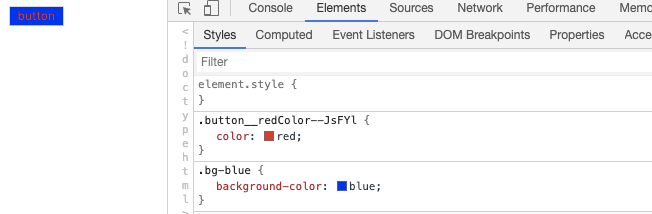
|
|
83
|
-
|
|
84
|
-
:::tip 提示
|
|
85
|
-
使用 [babel-plugin-react-css-modules](https://github.com/gajus/babel-plugin-react-css-modules) 时需要注意,该插件的配置选项 `generateScopedName` 需要和 [`output.cssModuleLocalIdentName`](/configure/app/output/css-module-local-ident-name) 保持一致。
|
|
86
|
-
|
|
87
|
-
:::
|
|
@@ -1,17 +0,0 @@
|
|
|
1
|
-
---
|
|
2
|
-
sidebar_position: 4
|
|
3
|
-
---
|
|
4
|
-
|
|
5
|
-
# Less 和 Sass
|
|
6
|
-
|
|
7
|
-
[Less](https://lesscss.org/) 和 [Sass](https://sass-lang.com/) 是常用的两种 CSS 预处理器,Modern.js 内置了 Less 和 Sass 编译能力的支持。
|
|
8
|
-
|
|
9
|
-
## 自定义配置
|
|
10
|
-
|
|
11
|
-
- 如果需要自定义 [less-loader](https://github.com/webpack-contrib/less-loader) 的配置,请参考 [tools.less](/configure/app/tools/less) 配置项。
|
|
12
|
-
- 如果需要自定义 [sass-loader](https://github.com/webpack-contrib/sass-loader) 的配置,请参考 [tools.less](/configure/app/tools/sass) 配置项。
|
|
13
|
-
|
|
14
|
-
:::tip 提示
|
|
15
|
-
经过 Less 和 Sass 预编译后的 CSS 文件,仍然会经过 Modern.js 内置的 [PostCSS](https://postcss.org/) 的转换,具备良好的浏览器兼容性。相关内容请参考【[PostCSS](/guides/css/postcss)】。
|
|
16
|
-
|
|
17
|
-
:::
|
|
@@ -1,80 +0,0 @@
|
|
|
1
|
-
---
|
|
2
|
-
sidebar_position: 3
|
|
3
|
-
---
|
|
4
|
-
|
|
5
|
-
# PostCSS
|
|
6
|
-
|
|
7
|
-
[PostCSS](https://postcss.org/) 是一个用 JavaScript 工具和插件转换 CSS 代码的工具。Modern.js 内置 PostCSS,并集成 [Autoprefixer](https://github.com/postcss/autoprefixer) 等常用的 PostCSS 插件,能够满足大多数项目的样式开发需求。
|
|
8
|
-
|
|
9
|
-
默认情况下,Modern.js 会对 CSS 进行以下编译和转换:
|
|
10
|
-
|
|
11
|
-
1. [Autoprefixer](https://github.com/postcss/autoprefixer) 根据需要支持的浏览器范围,会自动为 CSS 规则添加需要的浏览器厂商前缀。Modern.js 默认支持的浏览器范围为:`['> 0.01%', 'not dead', 'not op_mini all']`。
|
|
12
|
-
|
|
13
|
-
:::info 注意
|
|
14
|
-
|
|
15
|
-
- 【支持的浏览器范围为:`> 0.01%`】是指浏览器市场份额大于 0.01%。
|
|
16
|
-
- `not dead` 是指不包含官方不再支持的浏览器和过去 24 个月没有更新的浏览器。
|
|
17
|
-
- `not op_mini all` 是指不包含 Opera Mini。
|
|
18
|
-
|
|
19
|
-
:::
|
|
20
|
-
|
|
21
|
-
:::info 补充信息
|
|
22
|
-
如果需要修改默认浏览器支持范围,可以在项目的 `package.json` 文件中配置 `browserslist`,设置规则参考 [Browserslist](https://github.com/browserslist/browserslist) 的使用,下面是一个示例:
|
|
23
|
-
`json title="package.json" { "browserslist": [ "last 1 version", "> 1%", "IE 10" ] } `
|
|
24
|
-
|
|
25
|
-
:::
|
|
26
|
-
|
|
27
|
-
2. 提供 [CSS custom properties](https://www.w3.org/TR/css-variables-1/) 支持,可以在 CSS 中定义和使用自定义变量,如:
|
|
28
|
-
|
|
29
|
-
```css
|
|
30
|
-
:root {
|
|
31
|
-
--main-bg-color: pink;
|
|
32
|
-
}
|
|
33
|
-
|
|
34
|
-
body {
|
|
35
|
-
background-color: var(--main-bg-color);
|
|
36
|
-
}
|
|
37
|
-
```
|
|
38
|
-
|
|
39
|
-
3. 提供 [CSS Nesting](https://drafts.csswg.org/css-nesting-1/) 支持,可以在 CSS 中使用嵌套写法,如:
|
|
40
|
-
|
|
41
|
-
```css
|
|
42
|
-
table.colortable td {
|
|
43
|
-
text-align: center;
|
|
44
|
-
}
|
|
45
|
-
table.colortable td.c {
|
|
46
|
-
text-transform: uppercase;
|
|
47
|
-
}
|
|
48
|
-
```
|
|
49
|
-
|
|
50
|
-
也可以改写成 CSS 嵌套写法:
|
|
51
|
-
|
|
52
|
-
```css
|
|
53
|
-
table.colortable {
|
|
54
|
-
& td {
|
|
55
|
-
text-align: center;
|
|
56
|
-
&.c {
|
|
57
|
-
text-transform: uppercase;
|
|
58
|
-
}
|
|
59
|
-
}
|
|
60
|
-
}
|
|
61
|
-
```
|
|
62
|
-
|
|
63
|
-
4. 修复已知的 [Flexbugs](https://github.com/philipwalton/flexbugs) 。
|
|
64
|
-
5. 对以下 CSS 特性提供兼容:
|
|
65
|
-
- [`initial` 属性值](https://developer.mozilla.org/en-US/docs/Web/CSS/initial_value)
|
|
66
|
-
- [`break-` 属性](https://developer.mozilla.org/en-US/docs/Web/CSS/break-after)
|
|
67
|
-
- [`font-variant`](https://developer.mozilla.org/en-US/docs/Web/CSS/font-variant)
|
|
68
|
-
- [Media Query Ranges](https://developer.mozilla.org/en-US/docs/Web/CSS/Media_Queries/Using_media_queries#syntax_improvements_in_level_4)
|
|
69
|
-
|
|
70
|
-
当需要修改 PostCSS 配置时,可以通过底层配置 [`tools.postcss`](/configure/app/tools/postcss) 来实现,下面是一个示例:
|
|
71
|
-
|
|
72
|
-
```ts title="modern.config.ts"
|
|
73
|
-
export default defineConfig({
|
|
74
|
-
tools: {
|
|
75
|
-
postcss: {
|
|
76
|
-
plugins: ['autoprefixer', ('postcss-flexbugs-fixes': {})],
|
|
77
|
-
},
|
|
78
|
-
},
|
|
79
|
-
});
|
|
80
|
-
```
|