@modern-js/main-doc 2.6.0 → 2.8.0
This diff represents the content of publicly available package versions that have been released to one of the supported registries. The information contained in this diff is provided for informational purposes only and reflects changes between package versions as they appear in their respective public registries.
- package/.turbo/turbo-build.log +1 -1
- package/CHANGELOG.md +17 -0
- package/README.md +2 -2
- package/en/apis/app/commands.mdx +2 -0
- package/en/apis/app/hooks/config/upload.mdx +10 -0
- package/en/apis/app/runtime/model/connect.mdx +1 -1
- package/en/apis/app/runtime/model/model_.mdx +1 -1
- package/en/apis/app/runtime/model/use-model.mdx +1 -1
- package/en/apis/app/runtime/web-server/hook.mdx +2 -2
- package/en/apis/app/runtime/web-server/middleware.mdx +33 -9
- package/en/components/enable-bff.mdx +4 -4
- package/en/components/init-rspack-app.mdx +7 -0
- package/en/configure/app/bff/enable-handle-web.mdx +24 -0
- package/en/configure/app/server/enable-framework-ext.mdx +1 -1
- package/en/configure/app/server/ssr.mdx +18 -0
- package/en/guides/advanced-features/bff/_category_.json +1 -1
- package/en/guides/advanced-features/eslint.mdx +30 -32
- package/en/guides/advanced-features/low-level.mdx +1 -1
- package/en/guides/advanced-features/rspack-start.mdx +13 -17
- package/en/guides/advanced-features/ssr.mdx +210 -5
- package/en/guides/advanced-features/web-server.mdx +87 -20
- package/en/guides/{css/tailwindcss.mdx → basic-features/css.mdx} +60 -3
- package/en/guides/basic-features/env-vars.mdx +4 -0
- package/en/guides/concept/builder.mdx +1 -1
- package/en/guides/topic-detail/framework-plugin/extend.mdx +20 -19
- package/en/guides/topic-detail/framework-plugin/hook-list.mdx +156 -155
- package/en/guides/topic-detail/framework-plugin/hook.mdx +58 -43
- package/en/guides/topic-detail/framework-plugin/implement.mdx +47 -49
- package/en/guides/topic-detail/framework-plugin/introduction.mdx +22 -23
- package/en/guides/topic-detail/framework-plugin/plugin-api.mdx +13 -13
- package/en/guides/topic-detail/framework-plugin/relationship.mdx +30 -30
- package/en/guides/topic-detail/generator/plugin/develop.mdx +1 -1
- package/en/guides/topic-detail/micro-frontend/c01-introduction.mdx +17 -17
- package/en/guides/topic-detail/micro-frontend/c02-development.mdx +76 -78
- package/en/guides/topic-detail/micro-frontend/c03-main-app.mdx +57 -51
- package/en/guides/topic-detail/micro-frontend/c04-communicate.mdx +11 -11
- package/en/guides/topic-detail/micro-frontend/c05-mixed-stack.mdx +13 -13
- package/en/guides/topic-detail/model/auto-actions.mdx +18 -21
- package/en/guides/topic-detail/model/computed-state.mdx +27 -25
- package/en/guides/topic-detail/model/define-model.mdx +14 -14
- package/en/guides/topic-detail/model/faq.mdx +12 -13
- package/en/guides/topic-detail/model/manage-effects.mdx +43 -52
- package/en/guides/topic-detail/model/model-communicate.mdx +47 -45
- package/en/guides/topic-detail/model/performance.mdx +22 -23
- package/en/guides/topic-detail/model/quick-start.mdx +29 -28
- package/en/guides/topic-detail/model/redux-integration.mdx +7 -7
- package/en/guides/topic-detail/model/test-model.mdx +11 -11
- package/en/guides/topic-detail/model/typescript-best-practice.mdx +16 -15
- package/en/guides/topic-detail/model/use-model.mdx +40 -45
- package/en/guides/topic-detail/model/use-out-of-modernjs.mdx +16 -16
- package/en/guides/troubleshooting/cli.mdx +2 -2
- package/en/tutorials/first-app/c03-css.mdx +1 -1
- package/package.json +5 -5
- package/zh/apis/app/commands.mdx +2 -0
- package/zh/apis/app/hooks/config/upload.mdx +12 -2
- package/zh/apis/app/runtime/model/connect.mdx +1 -1
- package/zh/apis/app/runtime/model/model_.mdx +1 -1
- package/zh/apis/app/runtime/model/use-model.mdx +1 -1
- package/zh/apis/app/runtime/web-server/hook.mdx +2 -4
- package/zh/apis/app/runtime/web-server/middleware.mdx +30 -10
- package/zh/apis/monorepo/commands/gen-release-note.mdx +3 -3
- package/zh/components/enable-bff.mdx +4 -4
- package/zh/components/init-rspack-app.mdx +7 -0
- package/zh/components/release-note.mdx +1 -1
- package/zh/configure/app/bff/enable-handle-web.mdx +24 -0
- package/zh/configure/app/server/enable-framework-ext.mdx +1 -1
- package/zh/configure/app/server/ssr.mdx +19 -1
- package/zh/guides/advanced-features/bff/_category_.json +1 -1
- package/zh/guides/advanced-features/rspack-start.mdx +13 -17
- package/zh/guides/advanced-features/ssr.mdx +210 -4
- package/zh/guides/advanced-features/web-server.mdx +81 -16
- package/zh/guides/{css/tailwindcss.mdx → basic-features/css.mdx} +60 -3
- package/zh/guides/basic-features/env-vars.mdx +4 -0
- package/zh/guides/concept/builder.mdx +1 -1
- package/zh/guides/topic-detail/changesets/github.mdx +2 -2
- package/zh/guides/topic-detail/changesets/release-note.mdx +1 -1
- package/zh/guides/topic-detail/framework-plugin/plugin-api.mdx +2 -2
- package/zh/guides/topic-detail/generator/plugin/develop.mdx +1 -1
- package/zh/guides/topic-detail/model/faq.mdx +1 -1
- package/zh/guides/topic-detail/model/manage-effects.mdx +1 -1
- package/zh/guides/topic-detail/model/model-communicate.mdx +1 -1
- package/zh/guides/topic-detail/model/performance.mdx +1 -1
- package/zh/guides/topic-detail/model/quick-start.mdx +2 -2
- package/zh/guides/topic-detail/model/use-model.mdx +3 -3
- package/zh/tutorials/first-app/c03-css.mdx +1 -1
- package/en/guides/css/_category_.json +0 -5
- package/en/guides/css/css-in-js.mdx +0 -40
- package/en/guides/css/css-modules.mdx +0 -87
- package/en/guides/css/less-sass.mdx +0 -17
- package/en/guides/css/postcss.mdx +0 -79
- package/zh/guides/css/_category_.json +0 -5
- package/zh/guides/css/css-in-js.mdx +0 -40
- package/zh/guides/css/css-modules.mdx +0 -87
- package/zh/guides/css/less-sass.mdx +0 -17
- package/zh/guides/css/postcss.mdx +0 -80
|
@@ -1,23 +1,35 @@
|
|
|
1
1
|
---
|
|
2
2
|
title: 自定义 Web Server
|
|
3
|
-
sidebar_position:
|
|
3
|
+
sidebar_position: 3
|
|
4
4
|
---
|
|
5
5
|
# 自定义 Web Server
|
|
6
6
|
|
|
7
7
|
Modern.js 作为以客户端为中心的开发框架,对服务端的定制能力较弱。而在有些开发场景下,需要定制特殊的服务端逻辑,例如用户鉴权、请求预处理、添加页面渲染骨架等。
|
|
8
8
|
|
|
9
|
-
|
|
9
|
+
一些开发者可能会有疑惑,Modern.js 已经提供了 [BFF 能力](/guides/advanced-features/bff/function.html),为什么还需要**自定义 Web Server**。
|
|
10
10
|
|
|
11
|
-
|
|
11
|
+
因为在默认情况下,页面路由并不会经过 BFF,它没有办法为页面访问提供服务端的定制逻辑。之所以这样设计,是因为我们不希望控制页面的服务与 BFF 服务绑定在一起,避免 BFF 的框架限制页面的部署方式。例如将页面与 BFF 分开托管、将页面服务部署到非 Node 的环境上,或是针对部署平台做定制等。
|
|
12
12
|
|
|
13
|
-
|
|
13
|
+
出于上述原因,Modern.js 提供了三种方式,让项目可以在根据需求,渐进式的定制服务端能力。
|
|
14
|
+
|
|
15
|
+
:::warning
|
|
16
|
+
三种扩展方式无法同时工作,开发者需要根据场景选择合适的方式。
|
|
17
|
+
:::
|
|
18
|
+
|
|
19
|
+
## 使用 API 扩展 Web Server
|
|
20
|
+
|
|
21
|
+
第一种方式是通过 Modern.js 提供的服务端运行时 API,在特定的生命周期对服务端进行定制。提供这种方式的目的是在部分情况下,开发者并不需要控制完整的 Web Server,只需要添加服务端逻辑即可。
|
|
22
|
+
|
|
23
|
+
这种方式无法控制完整的 Web Server,并且扩展逻辑**只在请求页面时生效**。因此,它适用于服务端逻辑相对简单,不希望额外创建 BFF 或者 BFF 和页面无需公用服务端逻辑场景。
|
|
24
|
+
|
|
25
|
+
可以在项目根目录执行 `pnpm run new` 命令,开启「自定义 Web Serve」功能:
|
|
14
26
|
|
|
15
27
|
```bash
|
|
16
28
|
? 请选择你想要的操作 创建工程元素
|
|
17
29
|
? 创建工程元素 新建「自定义 Web Server」源码目录
|
|
18
30
|
```
|
|
19
31
|
|
|
20
|
-
执行命令后,在 `modern.config.ts` 中注册
|
|
32
|
+
执行命令后,在 `modern.config.ts` 中注册 `@modern-js/plugin-server` 插件:
|
|
21
33
|
|
|
22
34
|
```ts title="modern.config.ts"
|
|
23
35
|
import serverPlugin from '@modern-js/plugin-server';
|
|
@@ -27,31 +39,84 @@ export default defineConfig({
|
|
|
27
39
|
});
|
|
28
40
|
```
|
|
29
41
|
|
|
30
|
-
|
|
42
|
+
开启功能后,项目目录下会自动创建 `server/index.ts` 文件,可以在这个文件中编写自定义逻辑。Modern.js 提供了 **Hook** 与 **Middleware** 两类 API 来扩展 Web Server。
|
|
31
43
|
|
|
32
|
-
|
|
44
|
+
### Hook
|
|
33
45
|
|
|
34
|
-
Modern.js
|
|
46
|
+
Modern.js 提供的 Hook 用于控制 Web Server 中的内置逻辑,所有的页面请求都会经过 Hook。
|
|
35
47
|
|
|
36
|
-
|
|
48
|
+
目前提供了两种 Hook,分别是 `AfterMatch` 和 `AfterRender`,可以用于修改渲染结果。可以在 `server/index.ts` 中这样写:
|
|
49
|
+
|
|
50
|
+
```ts
|
|
51
|
+
import type { AfterMatchHook, AfterRenderHook } from '@modern-js/runtime/server';
|
|
52
|
+
|
|
53
|
+
export const afterMatch: AfterMatchHook = (ctx, next) => {
|
|
54
|
+
next();
|
|
55
|
+
}
|
|
56
|
+
|
|
57
|
+
export const afterRender: AfterRenderHook = (ctx, next) => {
|
|
58
|
+
next();
|
|
59
|
+
}
|
|
60
|
+
```
|
|
37
61
|
|
|
38
|
-
|
|
62
|
+
项目在使用 Hook 时,应该有以下最佳实践:
|
|
39
63
|
|
|
40
|
-
|
|
64
|
+
1. 在 afterMatch 中做权限校验。
|
|
65
|
+
2. 在 afterMatch 做 Rewrite 和 Redirect。
|
|
66
|
+
3. 在 afterRender 中做 HTML 内容注入。
|
|
41
67
|
|
|
42
|
-
|
|
68
|
+
:::note
|
|
69
|
+
详细 API 和更多用法可以查看 [Hook](/apis/app/runtime/web-server/hook)。
|
|
70
|
+
:::
|
|
43
71
|
|
|
44
72
|
### Middleware
|
|
45
73
|
|
|
46
|
-
Middleware
|
|
74
|
+
对于某些项目,可能在服务端有更多的需求,Modern.js 提供了 Middleware 为 Web Server 添加前置中间件。它只能运行在 Node 环境下,因此如果项目被部署到其他环境中,如 Worker 环境,则不可以使用 Middleware。
|
|
75
|
+
|
|
76
|
+
Modern.js 默认提供了一套 API 供项目使用:
|
|
47
77
|
|
|
48
|
-
|
|
78
|
+
```ts
|
|
79
|
+
import { Middlewre } from '@modern-js/runtime/server';
|
|
49
80
|
|
|
50
|
-
|
|
81
|
+
export const middleware = (context, next) => {
|
|
82
|
+
const { source: { req, res } } = context;
|
|
83
|
+
console.log(req.url);
|
|
84
|
+
next();
|
|
85
|
+
};
|
|
86
|
+
```
|
|
87
|
+
|
|
88
|
+
:::note
|
|
89
|
+
详细 API 和更多用法可以查看 [Middleware](/apis/app/runtime/web-server/middleware)。
|
|
90
|
+
:::
|
|
91
|
+
|
|
92
|
+
项目在使用 Middleware 时,应该有以下最佳实践:
|
|
93
|
+
|
|
94
|
+
1. 在 Middleware 中可以直接操作原生的请求、响应对象,做数据打点、注入 SSR 渲染可能用到的 Node 服务(数据库、Redis 等)。
|
|
95
|
+
2. 在 Middleware 里可以做类似功能打标、爬虫优化等功能。
|
|
96
|
+
3. 在 Middleware 里可以无视后续默认渲染,自定义渲染流程。
|
|
97
|
+
|
|
98
|
+
**总的来说,CSR 项目中,使用 Hook 基本能满足简单场景的所有需求。SSR 项目中,可以使用 Middleware 做更复杂的 Node 扩展。**
|
|
99
|
+
|
|
100
|
+
## 通过 BFF 托管页面请求
|
|
101
|
+
|
|
102
|
+
第二种方式,是利用 BFF 来托管页面渲染,这种方式下,所有的请求都会先打到 BFF 的服务。
|
|
103
|
+
|
|
104
|
+
因为这种方式可以通过 BFF 统一控制所有请求的服务端逻辑。因此,它适用于服务端逻辑复杂,BFF 和页面需要公用服务端逻辑的场景。但它整体还是依托于 Modern.js 的 Web Server 运行,无法将逻辑运行在已有的服务上。
|
|
105
|
+
|
|
106
|
+
使用这种方式,我们需要先通过 `pnpm new` 开启「BFF」功能。然后在配置文件中添加 [`bff.enableHandleWeb`](/configure/app/bff/enable-handle-web.html) 配置:
|
|
107
|
+
|
|
108
|
+
```ts
|
|
109
|
+
export default defineConfig({
|
|
110
|
+
bff: {
|
|
111
|
+
enableHandleWeb: true,
|
|
112
|
+
},
|
|
113
|
+
});
|
|
114
|
+
```
|
|
115
|
+
|
|
116
|
+
当该值设置为 `true` 时,页面请求流量也会经过 BFF,并且 Modern.js 内置的页面渲染的逻辑默认会作为 BFF 服务的最后一个中间件运行。
|
|
51
117
|
|
|
52
118
|
## 完全自定义的 Web Server
|
|
53
119
|
|
|
54
120
|
:::note
|
|
55
121
|
敬请期待
|
|
56
|
-
|
|
57
122
|
:::
|
|
@@ -2,7 +2,64 @@
|
|
|
2
2
|
sidebar_position: 2
|
|
3
3
|
---
|
|
4
4
|
|
|
5
|
-
#
|
|
5
|
+
# CSS 开发方案
|
|
6
|
+
|
|
7
|
+
Modern.js 内置多种常用的 CSS 开发方案,包括 Less / Sass / Stylus 预处理器、PostCSS、CSS Modules、CSS-in-JS 和 Tailwind CSS。
|
|
8
|
+
|
|
9
|
+
## 使用 Less、Sass 和 Stylus
|
|
10
|
+
|
|
11
|
+
Modern.js 内置了社区流行的 CSS 预处理器,包括 Less 和 Sass。
|
|
12
|
+
|
|
13
|
+
默认情况下,你不需要对 Less 和 Sass 进行任何配置。如果你有自定义 loader 配置的需求,可以通过配置 [tools.less](/configure/app/tools/less)、[tools.sass](/configure/app/tools/sass) 来进行设置。
|
|
14
|
+
|
|
15
|
+
你也可以在 Modern.js 中使用 Stylus,只需要安装 Modern.js Builder 提供的 Stylus 插件即可,使用方式请参考 [Stylus 插件](https://modernjs.dev/builder/plugins/plugin-stylus.html)。
|
|
16
|
+
|
|
17
|
+
## 使用 PostCSS
|
|
18
|
+
|
|
19
|
+
Modern.js 内置了 [PostCSS](https://postcss.org/) 来转换 CSS 代码。
|
|
20
|
+
|
|
21
|
+
请阅读 [Modern.js Builder - 使用 PostCSS](https://modernjs.dev/builder/guide/basic/css-usage.html#%E4%BD%BF%E7%94%A8-postcss) 了解更多用法。
|
|
22
|
+
|
|
23
|
+
## 使用 CSS Modules
|
|
24
|
+
|
|
25
|
+
请阅读 [使用 CSS Modules](https://modernjs.dev/builder/guide/basic/css-modules.html) 章节来了解 CSS Modules 的完整用法。
|
|
26
|
+
|
|
27
|
+
## 使用 CSS-in-JS
|
|
28
|
+
|
|
29
|
+
CSS-in-JS 是一种可以将 CSS 样式写在 JS 文件里的技术。
|
|
30
|
+
|
|
31
|
+
Modern.js 集成了社区常用的 CSS-in-JS 实现库 [styled-components](https://styled-components.com/),它使用 JavaScript 的新特性 [Tagged template](https://developer.mozilla.org/en-US/docs/Web/JavaScript/Reference/Template_literals#tagged_templates) 编写组件的 CSS 样式。可以直接从 `@modern-js/runtime/styled` 引入 [styled-components](https://styled-components.com/) 的 API 进行使用。
|
|
32
|
+
|
|
33
|
+
当需要编写一个内部字体为红色的 `div` 组件时,可以如下实现:
|
|
34
|
+
|
|
35
|
+
```js
|
|
36
|
+
import styled from '@modern-js/runtime/styled';
|
|
37
|
+
|
|
38
|
+
const RedDiv = styled.div`
|
|
39
|
+
color: red;
|
|
40
|
+
`;
|
|
41
|
+
```
|
|
42
|
+
|
|
43
|
+
当需要根据组件的 `props` 动态设置组件样式时,例如 `props` 的属性 `primary` 为 `true` 时,按钮的颜色为白色,其他情况为红色,实现代码如下:
|
|
44
|
+
|
|
45
|
+
```js
|
|
46
|
+
import styled from '@modern-js/runtime/styled';
|
|
47
|
+
|
|
48
|
+
const Button = styled.button`
|
|
49
|
+
color: ${props => (props.primary ? 'white' : 'red')};
|
|
50
|
+
font-size: 1em;
|
|
51
|
+
`;
|
|
52
|
+
```
|
|
53
|
+
|
|
54
|
+
关于 styled-components 的更多用法,请参考 [styled-components 官网](https://styled-components.com/)。
|
|
55
|
+
|
|
56
|
+
Modern.js 内部集成了 Babel 的 [babel-plugin-styled-components](https://github.com/styled-components/babel-plugin-styled-components) 插件,你可以通过 [tools.styledComponents](/configure/app/tools/styled-components) 对插件进行配置。
|
|
57
|
+
|
|
58
|
+
:::tip 提示
|
|
59
|
+
如果需要使用 [styled-jsx](https://www.npmjs.com/package/styled-jsx)、[Emotion](https://emotion.sh/) 等其他 CSS-in-JS 库,需要先安装对应库的依赖。具体使用方式请参考对应库的官网。
|
|
60
|
+
:::
|
|
61
|
+
|
|
62
|
+
## 使用 Tailwind CSS
|
|
6
63
|
|
|
7
64
|
[Tailwind CSS](https://tailwindcss.com/) 是一个以 Utility Class 为基础的 CSS 框架和设计系统,可以快速地为组件添加常用样式,同时支持主题样式的灵活扩展。在 Modern.js 中使用 [Tailwind CSS](https://tailwindcss.com/),只需要在项目根目录下执行 `pnpm run new` 并开启。
|
|
8
65
|
|
|
@@ -46,7 +103,7 @@ const App = () => (
|
|
|
46
103
|
|
|
47
104
|
:::
|
|
48
105
|
|
|
49
|
-
|
|
106
|
+
### Tailwind CSS 版本
|
|
50
107
|
|
|
51
108
|
Modern.js 同时支持 Tailwind CSS v2 和 v3 版本,框架会识别项目 `package.json` 中的 `tailwindcss` 依赖版本,并启用相应的配置。默认情况下,我们会为你安装 Tailwind CSS v3 版本。
|
|
52
109
|
|
|
@@ -64,7 +121,7 @@ Tailwind CSS v2 和 v3 均不支持 IE 11 浏览器,相关背景请参考:
|
|
|
64
121
|
|
|
65
122
|
如果你在 IE 11 浏览器上使用 Tailwind CSS,可能会出现部分样式不可用的现象,请谨慎使用。
|
|
66
123
|
|
|
67
|
-
|
|
124
|
+
### Theme 配置
|
|
68
125
|
|
|
69
126
|
当需要自定义 Tailwind CSS 的 [theme](https://tailwindcss.com/docs/theme) 配置的时候,可以在配置 [`source.designSystem`](/configure/app/source/design-system) 中修改,例如,颜色主题中增加一个 `primary`:
|
|
70
127
|
|
|
@@ -6,7 +6,7 @@ sidebar_position: 2
|
|
|
6
6
|
|
|
7
7
|
**Modern.js 的构建能力由 [Modern.js Builder](https://modernjs.dev/builder) 提供。**
|
|
8
8
|
|
|
9
|
-
Modern.js Builder 是 Modern.js 体系的核心组件之一,它是一个面向 Web 开发场景的构建引擎,可以脱离 Modern.js 被独立使用。Modern.js Builder 同时支持 webpack 和
|
|
9
|
+
Modern.js Builder 是 Modern.js 体系的核心组件之一,它是一个面向 Web 开发场景的构建引擎,可以脱离 Modern.js 被独立使用。Modern.js Builder 同时支持 webpack 和 Rspack 等多种打包工具,默认情况下使用最成熟的 webpack 进行打包。
|
|
10
10
|
|
|
11
11
|
## 构建架构
|
|
12
12
|
|
|
@@ -72,7 +72,7 @@ jobs:
|
|
|
72
72
|
fetch-depth: 100
|
|
73
73
|
|
|
74
74
|
- name: Create Release Pull Request
|
|
75
|
-
uses:
|
|
75
|
+
uses: web-infra-dev/actions@main
|
|
76
76
|
with:
|
|
77
77
|
# this expects you to have a script called release which does a build for your packages and calls changeset publish
|
|
78
78
|
versionNumber: ${{ github.event.inputs.version }}
|
|
@@ -136,7 +136,7 @@ jobs:
|
|
|
136
136
|
fetch-depth: 1
|
|
137
137
|
|
|
138
138
|
- name: Release
|
|
139
|
-
uses:
|
|
139
|
+
uses: web-infra-dev/actions@main
|
|
140
140
|
with:
|
|
141
141
|
# this expects you to have a script called release which does a build for your packages and calls changeset publish
|
|
142
142
|
version: ${{ github.event.inputs.version }}
|
|
@@ -9,7 +9,7 @@ Modern.js 提供了 `modern gen-release-note` 命令,支持通过当前存在
|
|
|
9
9
|
默认生成的 Release Note 格式为:
|
|
10
10
|
|
|
11
11
|
```markdown
|
|
12
|
-
[[#1220](https://github.com/
|
|
12
|
+
[[#1220](https://github.com/web-infra-dev/modern.js/pull/1220)] feat: support bff operators -- Ming
|
|
13
13
|
```
|
|
14
14
|
|
|
15
15
|
根据 commit 信息获取 changeset 的 Pull Request ID,并生成 Github 的链接,内容为 changeset 的 changelog 信息和作者信息。
|
|
@@ -45,7 +45,7 @@ interface UserConfig {
|
|
|
45
45
|
}
|
|
46
46
|
```
|
|
47
47
|
|
|
48
|
-
具体配置字段的意义请参考【[配置](/configure/app/
|
|
48
|
+
具体配置字段的意义请参考【[配置](/configure/app/usage)】。
|
|
49
49
|
|
|
50
50
|
### useAppContext
|
|
51
51
|
|
|
@@ -96,7 +96,7 @@ interface NormalizedConfig {
|
|
|
96
96
|
}
|
|
97
97
|
```
|
|
98
98
|
|
|
99
|
-
具体配置字段的意义请参考【[配置](/configure/app/
|
|
99
|
+
具体配置字段的意义请参考【[配置](/configure/app/usage)】。
|
|
100
100
|
|
|
101
101
|
### useHookRunners
|
|
102
102
|
|
|
@@ -43,7 +43,7 @@ npx @modern-js/create plugin --plugin @modern-js/generator-plugin-plugin
|
|
|
43
43
|
创建项目命令执行完成后,会对应的生成一个开发生成器插件的项目,`package.json` 中也会根据你的选择对应的生成 `meta` 信息。
|
|
44
44
|
|
|
45
45
|
:::info
|
|
46
|
-
生成器插件开发可参考 `@modern-js/generator-plugin-plugin` [源码地址](https://github.com/
|
|
46
|
+
生成器插件开发可参考 `@modern-js/generator-plugin-plugin` [源码地址](https://github.com/web-infra-dev/modern.js/tree/main/packages/generator/plugins/generator-plugin)
|
|
47
47
|
|
|
48
48
|
:::
|
|
49
49
|
|
|
@@ -10,7 +10,7 @@ title: 常见问题
|
|
|
10
10
|
Reduck 的编译构建产物默认使用 ES6 语法,如果你需要支持更低版本的浏览器,请将 `@modern-js-reduck` 命名空间下的所有包加入到应用的编译过程。
|
|
11
11
|
|
|
12
12
|
:::info 补充信息
|
|
13
|
-
Reduck 使用的 [`@babel/preset-env`](https://babeljs.io/docs/en/babel-preset-env) 的详细[配置](https://github.com/
|
|
13
|
+
Reduck 使用的 [`@babel/preset-env`](https://babeljs.io/docs/en/babel-preset-env) 的详细[配置](https://github.com/web-infra-dev/reduck/blob/main/common/config.js#L10~L17)。
|
|
14
14
|
|
|
15
15
|
:::
|
|
16
16
|
|
|
@@ -255,6 +255,6 @@ const handleClick = async () => {
|
|
|
255
255
|
```
|
|
256
256
|
|
|
257
257
|
:::info 补充信息
|
|
258
|
-
[示例代码](https://github.com/
|
|
258
|
+
[示例代码](https://github.com/web-infra-dev/modern-js-examples/tree/main/series/tutorials/runtime-api/model/effects)
|
|
259
259
|
|
|
260
260
|
:::
|
|
@@ -100,7 +100,7 @@ Modern.js 默认开启 [自动生成 actions](./auto-actions.mdx),所以 `step
|
|
|
100
100
|
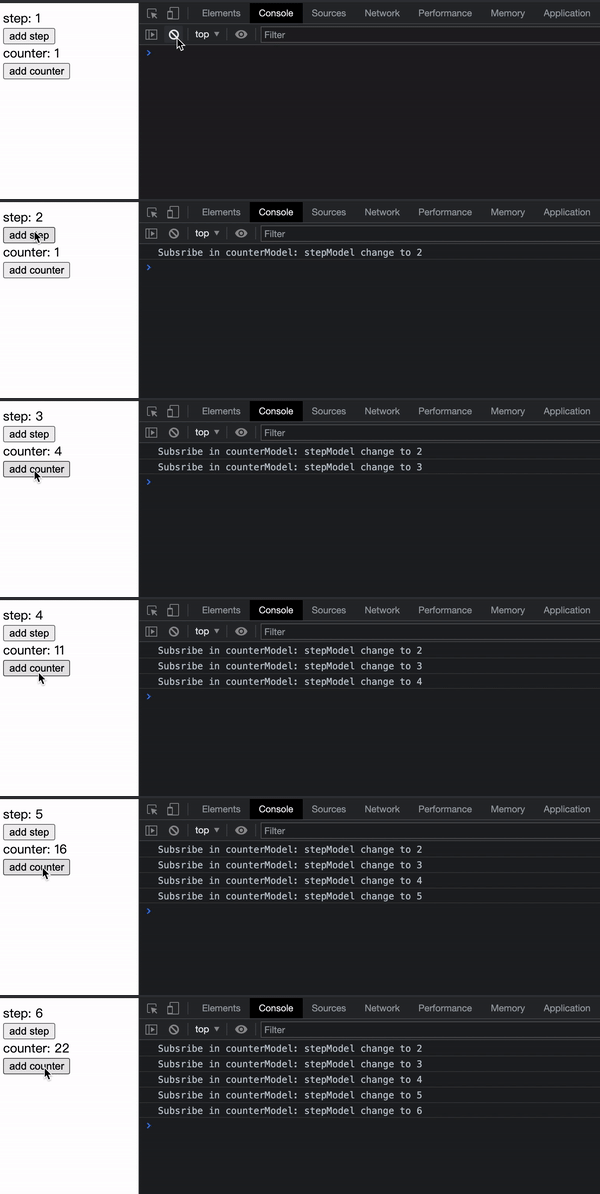
|
|
101
101
|
|
|
102
102
|
:::info 补充信息
|
|
103
|
-
- 本节完整的[示例代码](https://github.com/
|
|
103
|
+
- 本节完整的[示例代码](https://github.com/web-infra-dev/modern-js-examples/tree/main/series/tutorials/runtime-api/model/models-communication)。
|
|
104
104
|
- 相关 API 的更多介绍,请参考:[model](/apis/app/runtime/model/model_#函数类型)。
|
|
105
105
|
|
|
106
106
|
:::
|
|
@@ -166,6 +166,6 @@ const barModel = model("bar").define({
|
|
|
166
166
|
我们创建缓存函数 `createSelector`,仅当 `barModel` 的状态发生改变或 `fooModel` 的 `a` 状态发生改变时,才会重新计算 `combineA` 的值。
|
|
167
167
|
|
|
168
168
|
:::info 补充信息
|
|
169
|
-
本节完整的[示例代码](https://github.com/
|
|
169
|
+
本节完整的[示例代码](https://github.com/web-infra-dev/modern-js-examples/tree/main/series/tutorials/runtime-api/model/performance-optimization)
|
|
170
170
|
|
|
171
171
|
:::
|
|
@@ -8,7 +8,7 @@ import ReduckMigration from "@site-docs/components/reduck-migration"
|
|
|
8
8
|
|
|
9
9
|
<ReduckMigration />
|
|
10
10
|
|
|
11
|
-
[Reduck](https://github.com/
|
|
11
|
+
[Reduck](https://github.com/web-infra-dev/reduck) 是 Modern.js 团队开发的遵循 MVC 模式的状态管理库,底层状态存储基于 [Redux](https://redux.js.org/) 实现,同时提供更高层级的抽象,并完全兼容 Redux 生态。
|
|
12
12
|
|
|
13
13
|
Reduck 的目标是以 MVC 模式组织 React 应用开发结构,将业务逻辑维护在 Model 层,业务逻辑与 UI 解耦,让开发业务逻辑更集中、更简单,同时通过更高层级的抽象,减少重复工作(样板代码)。
|
|
14
14
|
|
|
@@ -110,4 +110,4 @@ function Counter() {
|
|
|
110
110
|
|
|
111
111
|
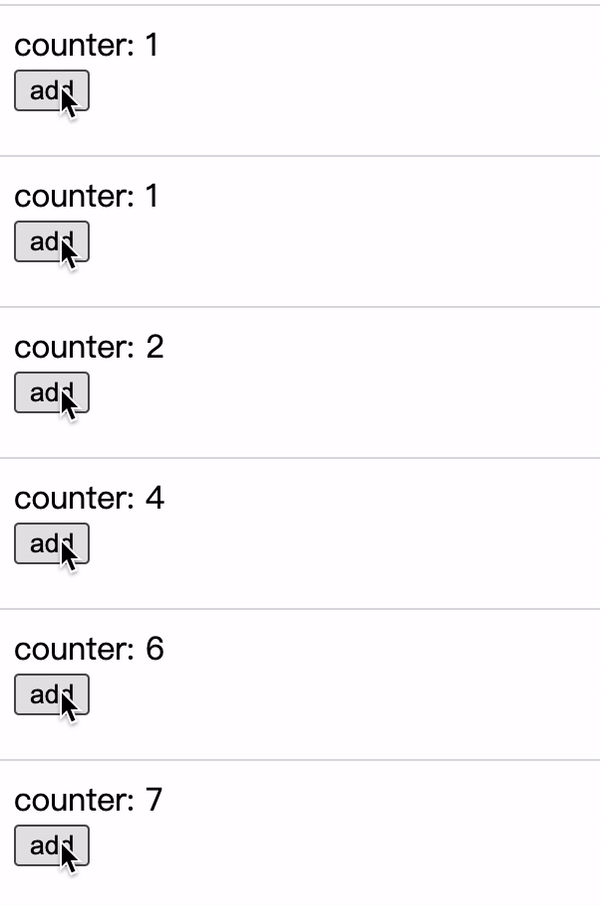
|
|
112
112
|
|
|
113
|
-
这样,我们就完了一个简单的计数器应用。本节完整的示例代码可以在[这里](https://github.com/
|
|
113
|
+
这样,我们就完了一个简单的计数器应用。本节完整的示例代码可以在[这里](https://github.com/web-infra-dev/modern-js-examples/tree/main/series/tutorials/runtime-api/model/counter-model)查看。
|
|
@@ -163,7 +163,7 @@ function ThreeComponent() {
|
|
|
163
163
|
|
|
164
164
|
使用 React 的 refs 也可以实现类似效果,其实 `useStaticModel` 内部也使用到了 refs。不过直接 `useStaticModel` 有助于将状态的管理逻辑从组件中解耦,统一收敛到 Model 层。
|
|
165
165
|
|
|
166
|
-
完整的示例代码可以在[这里](https://github.com/
|
|
166
|
+
完整的示例代码可以在[这里](https://github.com/web-infra-dev/modern-js-examples/tree/main/series/tutorials/runtime-api/model/static-model)查看。
|
|
167
167
|
|
|
168
168
|
### 作为局部状态使用
|
|
169
169
|
|
|
@@ -195,7 +195,7 @@ function LocalCounter() {
|
|
|
195
195
|
|
|
196
196
|
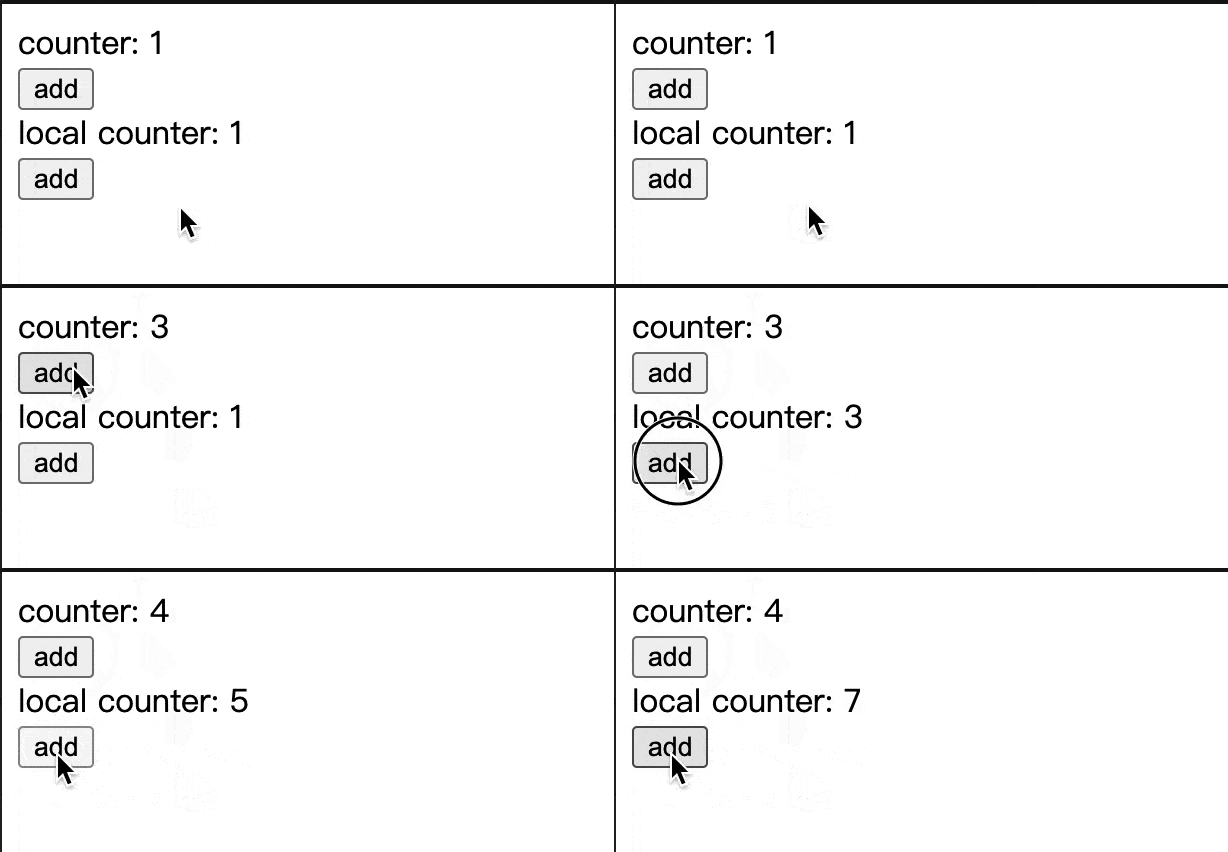
|
|
197
197
|
|
|
198
|
-
完整的示例代码可以在[这里](https://github.com/
|
|
198
|
+
完整的示例代码可以在[这里](https://github.com/web-infra-dev/modern-js-examples/tree/main/series/tutorials/runtime-api/model/local-model)查看。
|
|
199
199
|
|
|
200
200
|
## 在组件外使用
|
|
201
201
|
|
|
@@ -239,7 +239,7 @@ setInterval(() => {
|
|
|
239
239
|
}, 1000);
|
|
240
240
|
```
|
|
241
241
|
|
|
242
|
-
完整的示例代码可以在[这里](https://github.com/
|
|
242
|
+
完整的示例代码可以在[这里](https://github.com/web-infra-dev/modern-js-examples/tree/main/series/tutorials/runtime-api/model/counter-model-outof-react)查看。
|
|
243
243
|
|
|
244
244
|
:::info
|
|
245
245
|
如果是通过 [`createStore`](/apis/app/runtime/model/create-store) 手动创建的 Store 对象,无需通过 `useStore` 在组件内获取,即可直接使用。
|
|
@@ -293,7 +293,7 @@ import '../styles/utils.css';
|
|
|
293
293
|
```
|
|
294
294
|
|
|
295
295
|
:::info
|
|
296
|
-
Modern.js 集成了 [PostCSS](/guides/css
|
|
296
|
+
Modern.js 集成了 [PostCSS](/guides/basic-features/css),支持现代 CSS 语法特性,比如 [custom properties](https://developer.mozilla.org/en-US/docs/Web/CSS/Using_CSS_custom_properties)。
|
|
297
297
|
|
|
298
298
|
:::
|
|
299
299
|
|
|
@@ -1,40 +0,0 @@
|
|
|
1
|
-
---
|
|
2
|
-
sidebar_position: 1
|
|
3
|
-
---
|
|
4
|
-
|
|
5
|
-
# CSS-in-JS
|
|
6
|
-
|
|
7
|
-
CSS-in-JS is a technology that can write CSS styles in JS files. Modern.js integrates the CSS-in-JS library [styled-components](https://styled-components.com/) commonly used in the community, which uses the new feature of JavaScript [Tagged template](https://developer.mozilla.org/en-US/docs/Web/JavaScript/Reference/Template_literals#tagged_templates) to write CSS styles for components. You can use the [styled-components](https://styled-components.com/) API directly from `@modern-js/runtime/styled`.
|
|
8
|
-
|
|
9
|
-
When you need to write a `div` component with an internal font in red, you can do the following implementation:
|
|
10
|
-
|
|
11
|
-
```js
|
|
12
|
-
import styled from '@modern-js/runtime/styled';
|
|
13
|
-
|
|
14
|
-
const RedDiv = styled.div`
|
|
15
|
-
color: red;
|
|
16
|
-
`;
|
|
17
|
-
```
|
|
18
|
-
|
|
19
|
-
When you need to dynamically set the component style according to the `props` of the component, for example, when the attribute `primary` of `props` is `true`, the color of the button is white, and otherwise it is red. The implementation code is as follows:
|
|
20
|
-
|
|
21
|
-
```js
|
|
22
|
-
import styled from '@modern-js/runtime/styled';
|
|
23
|
-
|
|
24
|
-
const Button = styled.button`
|
|
25
|
-
color: ${props => (props.primary ? 'white' : 'red')};
|
|
26
|
-
font-size: 1em;
|
|
27
|
-
`;
|
|
28
|
-
```
|
|
29
|
-
|
|
30
|
-
For more usage of styled-components, please refer to [[styled-components official website](https://styled-components.com/) ].
|
|
31
|
-
|
|
32
|
-
:::info Additional
|
|
33
|
-
Modern.js uses the Babel plugin [babel-plugin-styled-components](https://github.com/styled-components/babel-plugin-styled-components) internally, and the plugin can be configured through [`tools.styled Components`](/configure/app/tools/styled-components).
|
|
34
|
-
|
|
35
|
-
:::
|
|
36
|
-
|
|
37
|
-
:::tip
|
|
38
|
-
If you need to use [styled-jsx](https://www.npmjs.com/package/styled-jsx), [Emotion](https://emotion.sh/) and other CSS-in-JS libraries, you need to install the dependency of the corresponding library first. For specific usage, please refer to the official website of the corresponding library.
|
|
39
|
-
|
|
40
|
-
:::
|
|
@@ -1,87 +0,0 @@
|
|
|
1
|
-
---
|
|
2
|
-
sidebar_position: 5
|
|
3
|
-
---
|
|
4
|
-
|
|
5
|
-
# CSS Modules
|
|
6
|
-
|
|
7
|
-
Modern.js out of the box support for [CSS Modules](https://github.com/css-modules/css-modules).
|
|
8
|
-
|
|
9
|
-
## File Suffix Form CSS Modules
|
|
10
|
-
|
|
11
|
-
By default, files ending in `.module.(css|scss|sass|less)` are treated as CSS Modules files, for example:
|
|
12
|
-
|
|
13
|
-
```css title="button.module.css"
|
|
14
|
-
.redColor {
|
|
15
|
-
color: red;
|
|
16
|
-
}
|
|
17
|
-
```
|
|
18
|
-
|
|
19
|
-
```js title="Button.jsx"
|
|
20
|
-
import styles from './button.module.css';
|
|
21
|
-
|
|
22
|
-
export default function Button() {
|
|
23
|
-
return (
|
|
24
|
-
<button type="button" className={styles.redColor}>
|
|
25
|
-
red button
|
|
26
|
-
</button>
|
|
27
|
-
);
|
|
28
|
-
}
|
|
29
|
-
```
|
|
30
|
-
|
|
31
|
-
Will eventually be compiled as:
|
|
32
|
-
|
|
33
|
-
```js
|
|
34
|
-
<button type="button" className="button_redColor__1-RBg">
|
|
35
|
-
red button
|
|
36
|
-
</button>
|
|
37
|
-
```
|
|
38
|
-
|
|
39
|
-
## Global CSS Modules
|
|
40
|
-
|
|
41
|
-
If you want to remove the `.module` suffix from the filename, you can set [`output.disable CssModuleExtension`](/configure/app/output/disable-css-module-extension).
|
|
42
|
-
|
|
43
|
-
After setting, all style files except the style files in the `node_modules/` directory and the file name format of `[name].global.(css|scss|sass|less)` will be processed as CSS Modules.
|
|
44
|
-
|
|
45
|
-
If you need global styles at this point, you can solve it by creating a style file with the filename format `[name].global.(css|scss|sass|less)`, for example:
|
|
46
|
-
|
|
47
|
-
```css title="app.global.css"
|
|
48
|
-
.bg-blue {
|
|
49
|
-
background-color: blue;
|
|
50
|
-
}
|
|
51
|
-
```
|
|
52
|
-
|
|
53
|
-
```css title="button.css"
|
|
54
|
-
.redColor {
|
|
55
|
-
color: red;
|
|
56
|
-
}
|
|
57
|
-
```
|
|
58
|
-
|
|
59
|
-
```js title="App.jsx"
|
|
60
|
-
import './app.global.css';
|
|
61
|
-
import styles from './button.css';
|
|
62
|
-
|
|
63
|
-
export default function Button() {
|
|
64
|
-
return (
|
|
65
|
-
<button type="button" className={`${styles.redColor} bg-blue`}>
|
|
66
|
-
button
|
|
67
|
-
</button>
|
|
68
|
-
);
|
|
69
|
-
}
|
|
70
|
-
```
|
|
71
|
-
|
|
72
|
-
Will eventually be compiled as:
|
|
73
|
-
|
|
74
|
-
```js
|
|
75
|
-
<button type="button" className="button__redColor--JsFYl bg-blue">
|
|
76
|
-
button
|
|
77
|
-
</button>
|
|
78
|
-
```
|
|
79
|
-
|
|
80
|
-
The final effect is as follows:
|
|
81
|
-
|
|
82
|
-
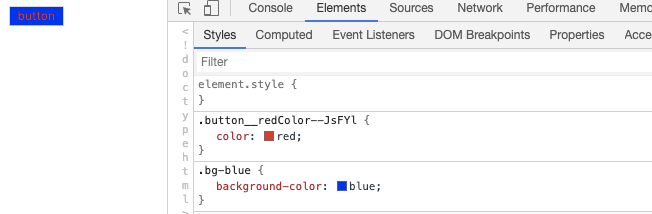
|
|
83
|
-
|
|
84
|
-
:::tip
|
|
85
|
-
When using [babel-plugin-react-css-modules](https://github.com/gajus/babel-plugin-react-css-modules), it is important to note that the configuration option `generateScopedName` of this plugin needs to be the same as [`output.css ModuleLocalIdentName`](/configure/app/output/css-module-local-ident-name).
|
|
86
|
-
|
|
87
|
-
:::
|
|
@@ -1,17 +0,0 @@
|
|
|
1
|
-
---
|
|
2
|
-
sidebar_position: 4
|
|
3
|
-
---
|
|
4
|
-
|
|
5
|
-
# Less and Sass
|
|
6
|
-
|
|
7
|
-
[Less](https://lesscss.org/) and [Sass](https://sass-lang.com/) are two commonly used CSS preprocessors that Modern.js built-in support for the Less and Sass compile capabilities.
|
|
8
|
-
|
|
9
|
-
## Customized Configuration
|
|
10
|
-
|
|
11
|
-
- If you need to customize the configuration of [less-loader](https://github.com/webpack-contrib/less-loader), please refer to the [tools.less](/configure/app/tools/less).
|
|
12
|
-
- If you need to customize the configuration of [sass-loader](https://github.com/webpack-contrib/sass-loader), please refer to the [tools.less](/configure/app/tools/sass).
|
|
13
|
-
|
|
14
|
-
:::tip
|
|
15
|
-
CSS files pre-compiled by Less and Sass will still undergo Modern.js build-in [PostCSS](https://postcss.org/) conversion, which has good browser compatibility. For related content, please refer to [[PostCSS](/guides/css/postcss)].
|
|
16
|
-
|
|
17
|
-
:::
|
|
@@ -1,79 +0,0 @@
|
|
|
1
|
-
---
|
|
2
|
-
sidebar_position: 3
|
|
3
|
-
---
|
|
4
|
-
|
|
5
|
-
# PostCSS
|
|
6
|
-
|
|
7
|
-
[PostCSS](https://postcss.org/) is a tool for converting CSS code with JavaScript tools and plugins. Modern.js built-in PostCSS and integrates common PostCSS plugins such as [Autoprefixer](https://github.com/postcss/autoprefixer) to meet the style development needs of most projects.
|
|
8
|
-
|
|
9
|
-
By default, Modern.js compile and transform CSS as follows:
|
|
10
|
-
|
|
11
|
-
1. [Autoprefixer](https://github.com/postcss/autoprefixer) Automatically add the required browser vendor prefix to CSS rules according to the required browser range. Modern.js default supported browser ranges are: `['> 0.01%', 'not dead', 'not op_mini all']`.
|
|
12
|
-
|
|
13
|
-
:::info Note
|
|
14
|
-
- [Supported browser range: `> 0.01%`] means that the browser market share is greater than 0.01%.
|
|
15
|
-
- `Not dead` means excluding browsers that are no longer officially supported and browsers that have not been updated in the past 24 months.
|
|
16
|
-
- `not op_mini all` means exclude Opera Mini.
|
|
17
|
-
|
|
18
|
-
:::
|
|
19
|
-
|
|
20
|
-
:::info Additional
|
|
21
|
-
If you need to modify the default browser support range, you can configure `browserslist` in the project's `package.json` file, and set the rule to refer to the use of [Browserslist](https://github.com/browserslist/browserslist). The following is an example:
|
|
22
|
-
`json title ="package.json" { "Browserslist": [ "The last 1 versions", "> 1%", "IE 10" ] } `
|
|
23
|
-
|
|
24
|
-
:::
|
|
25
|
-
|
|
26
|
-
2. Provide [CSS custom properties](https://www.w3.org/TR/css-variables-1/) support, you can define and use custom variables in CSS, such as:
|
|
27
|
-
|
|
28
|
-
```css
|
|
29
|
-
:root {
|
|
30
|
-
--main-bg-color: pink;
|
|
31
|
-
}
|
|
32
|
-
|
|
33
|
-
body {
|
|
34
|
-
background-color: var(--main-bg-color);
|
|
35
|
-
}
|
|
36
|
-
```
|
|
37
|
-
|
|
38
|
-
3. Provide [CSS Nesting](https://drafts.csswg.org/css-nesting-1/) support, you can use nested writing in CSS, such as:
|
|
39
|
-
|
|
40
|
-
```css
|
|
41
|
-
table.colortable td {
|
|
42
|
-
text-align: center;
|
|
43
|
-
}
|
|
44
|
-
table.colortable td.c {
|
|
45
|
-
text-transform: uppercase;
|
|
46
|
-
}
|
|
47
|
-
```
|
|
48
|
-
|
|
49
|
-
It can also be rewritten as CSS nested:
|
|
50
|
-
|
|
51
|
-
```css
|
|
52
|
-
table.colortable {
|
|
53
|
-
& td {
|
|
54
|
-
text-align: center;
|
|
55
|
-
&.c {
|
|
56
|
-
text-transform: uppercase;
|
|
57
|
-
}
|
|
58
|
-
}
|
|
59
|
-
}
|
|
60
|
-
```
|
|
61
|
-
|
|
62
|
-
4. Fix known [Flexbugs](https://github.com/philipwalton/flexbugs).
|
|
63
|
-
5. Provide compatibility with the following CSS features:
|
|
64
|
-
- [`initial` attribute value](https://developer.mozilla.org/en-US/docs/Web/CSS/initial_value)
|
|
65
|
-
- [`break-` attribute](https://developer.mozilla.org/en-US/docs/Web/CSS/break-after)
|
|
66
|
-
- [`font-variant`](https://developer.mozilla.org/en-US/docs/Web/CSS/font-variant)
|
|
67
|
-
- [Media Query Ranges](https://developer.mozilla.org/en-US/docs/Web/CSS/Media_Queries/Using_media_queries#syntax_improvements_in_level_4)
|
|
68
|
-
|
|
69
|
-
When you need to modify the PostCSS configuration, you can implement it through the underlying configuration [`tools.postcss`](/configure/app/tools/postcss), here is an example:
|
|
70
|
-
|
|
71
|
-
```ts title="modern.config.ts"
|
|
72
|
-
export default defineConfig({
|
|
73
|
-
tools: {
|
|
74
|
-
postcss: {
|
|
75
|
-
plugins: ['autoprefixer', ('postcss-flexbugs-fixes': {})],
|
|
76
|
-
},
|
|
77
|
-
},
|
|
78
|
-
});
|
|
79
|
-
```
|