@modern-js/main-doc 2.59.0 → 2.60.0
This diff represents the content of publicly available package versions that have been released to one of the supported registries. The information contained in this diff is provided for informational purposes only and reflects changes between package versions as they appear in their respective public registries.
- package/docs/en/_meta.json +10 -5
- package/docs/en/apis/app/hooks/api/lambda.mdx +4 -48
- package/docs/en/apis/app/hooks/api/middleware.mdx +11 -0
- package/docs/en/community/blog/v2-release-note.mdx +1 -1
- package/docs/en/components/enable-bff.mdx +19 -2
- package/docs/en/components/extend-bff-function.mdx +5 -0
- package/docs/en/components/other-plugins.mdx +0 -0
- package/docs/en/configure/app/auto-load-plugin.mdx +4 -0
- package/docs/en/configure/app/plugins.mdx +2 -2
- package/docs/en/configure/app/tools/esbuild.mdx +1 -1
- package/docs/en/configure/app/tools/swc.mdx +1 -1
- package/docs/en/guides/_meta.json +0 -5
- package/docs/en/guides/advanced-features/_meta.json +7 -4
- package/docs/en/guides/advanced-features/bff/_meta.json +1 -1
- package/docs/en/guides/advanced-features/bff/extend-server.mdx +154 -0
- package/docs/en/guides/advanced-features/bff/frameworks.mdx +52 -123
- package/docs/en/guides/advanced-features/bff/function.mdx +108 -80
- package/docs/en/guides/advanced-features/bff/sdk.mdx +40 -51
- package/docs/en/guides/advanced-features/build-performance.mdx +6 -21
- package/docs/en/guides/advanced-features/page-performance/_meta.json +1 -0
- package/docs/en/guides/basic-features/render/streaming-ssr.mdx +1 -1
- package/docs/en/guides/basic-features/routes.mdx +2 -3
- package/docs/en/guides/basic-features/static-assets.mdx +1 -1
- package/docs/en/guides/deprecated.md +2 -0
- package/docs/en/guides/topic-detail/_meta.json +0 -6
- package/docs/en/plugin/_meta.json +19 -0
- package/docs/en/plugin/cli-plugins/_meta.json +1 -0
- package/docs/en/plugin/cli-plugins/plugin-bff.mdx +5 -0
- package/docs/en/plugin/cli-plugins/plugin-ssg.mdx +5 -0
- package/docs/en/{guides/rsbuild-plugins → plugin/cli-plugins}/plugin-swc.mdx +7 -0
- package/docs/en/plugin/cli-plugins/plugin-tailwind.mdx +5 -0
- package/docs/en/plugin/cli-plugins.mdx +6 -0
- package/docs/en/{guides/advanced-features/rsbuild-plugin.mdx → plugin/introduction.mdx} +34 -9
- package/docs/en/{guides/topic-detail/framework-plugin → plugin/plugin-system}/extend.mdx +1 -1
- package/docs/en/{guides/topic-detail/framework-plugin → plugin/plugin-system}/implement.mdx +3 -3
- package/docs/en/{guides/topic-detail/framework-plugin → plugin/plugin-system}/plugin-api.mdx +2 -2
- package/docs/en/plugin/rsbuild-plugins/_meta.json +1 -0
- package/docs/en/plugin/rsbuild-plugins.mdx +3 -0
- package/docs/zh/_meta.json +10 -5
- package/docs/zh/apis/app/hooks/api/lambda.mdx +5 -48
- package/docs/zh/apis/app/hooks/api/middleware.mdx +11 -0
- package/docs/zh/community/blog/v2-release-note.mdx +1 -1
- package/docs/zh/components/enable-bff.mdx +19 -2
- package/docs/zh/components/extend-bff-function.mdx +5 -0
- package/docs/zh/components/other-plugins.mdx +0 -0
- package/docs/zh/configure/app/auto-load-plugin.mdx +4 -0
- package/docs/zh/configure/app/plugins.mdx +2 -2
- package/docs/zh/configure/app/tools/esbuild.mdx +1 -1
- package/docs/zh/configure/app/tools/swc.mdx +1 -1
- package/docs/zh/guides/_meta.json +0 -5
- package/docs/zh/guides/advanced-features/_meta.json +7 -4
- package/docs/zh/guides/advanced-features/bff/_meta.json +1 -1
- package/docs/zh/guides/advanced-features/bff/extend-server.mdx +156 -0
- package/docs/zh/guides/advanced-features/bff/frameworks.mdx +51 -117
- package/docs/zh/guides/advanced-features/bff/function.mdx +69 -59
- package/docs/zh/guides/advanced-features/bff/sdk.mdx +27 -36
- package/docs/zh/guides/advanced-features/build-performance.mdx +6 -21
- package/docs/zh/guides/advanced-features/page-performance/_meta.json +1 -0
- package/docs/zh/guides/advanced-features/rspack-start.mdx +2 -2
- package/docs/zh/guides/basic-features/alias.mdx +5 -11
- package/docs/zh/guides/basic-features/env-vars.mdx +1 -1
- package/docs/zh/guides/basic-features/routes.mdx +1 -2
- package/docs/zh/guides/basic-features/static-assets.mdx +1 -1
- package/docs/zh/guides/deprecated.md +4 -0
- package/docs/zh/guides/topic-detail/_meta.json +0 -6
- package/docs/zh/plugin/_meta.json +19 -0
- package/docs/zh/plugin/cli-plugins/_meta.json +1 -0
- package/docs/zh/plugin/cli-plugins/plugin-bff.mdx +5 -0
- package/docs/zh/plugin/cli-plugins/plugin-ssg.mdx +5 -0
- package/docs/zh/{guides/rsbuild-plugins → plugin/cli-plugins}/plugin-swc.mdx +7 -0
- package/docs/zh/plugin/cli-plugins/plugin-tailwind.mdx +5 -0
- package/docs/zh/plugin/cli-plugins.mdx +6 -0
- package/docs/zh/{guides/advanced-features/rsbuild-plugin.mdx → plugin/introduction.mdx} +36 -11
- package/docs/zh/{guides/topic-detail/framework-plugin → plugin/plugin-system}/extend.mdx +1 -1
- package/docs/zh/{guides/topic-detail/framework-plugin → plugin/plugin-system}/implement.mdx +3 -3
- package/docs/zh/{guides/topic-detail/framework-plugin → plugin/plugin-system}/plugin-api.mdx +2 -2
- package/docs/zh/plugin/rsbuild-plugins/_meta.json +1 -0
- package/docs/zh/plugin/rsbuild-plugins.mdx +4 -0
- package/i18n.json +27 -3
- package/package.json +5 -4
- package/rspress.config.ts +1 -58
- package/src/components/Footer/index.tsx +1 -1
- package/src/pages/index.tsx +0 -1
- package/docs/en/apis/app/hooks/api/api.mdx +0 -80
- package/docs/en/apis/app/hooks/api/app.mdx +0 -12
- package/docs/en/guides/advanced-features/bff/type.mdx +0 -46
- package/docs/en/guides/advanced-features/eslint.mdx +0 -148
- package/docs/zh/apis/app/hooks/api/api.mdx +0 -81
- package/docs/zh/apis/app/hooks/api/app.mdx +0 -12
- package/docs/zh/guides/advanced-features/bff/type.mdx +0 -46
- package/docs/zh/guides/advanced-features/eslint.mdx +0 -152
- /package/docs/en/guides/advanced-features/{bff/index.mdx → bff.mdx} +0 -0
- /package/docs/en/guides/advanced-features/{code-split.mdx → page-performance/code-split.mdx} +0 -0
- /package/docs/en/guides/advanced-features/{inline-assets.mdx → page-performance/inline-assets.mdx} +0 -0
- /package/docs/en/guides/advanced-features/{optimize-bundle.mdx → page-performance/optimize-bundle.mdx} +0 -0
- /package/docs/en/{guides/topic-detail/framework-plugin → plugin/plugin-system}/_meta.json +0 -0
- /package/docs/en/{guides/topic-detail/framework-plugin → plugin/plugin-system}/hook-list.mdx +0 -0
- /package/docs/en/{guides/topic-detail/framework-plugin → plugin/plugin-system}/hook.mdx +0 -0
- /package/docs/en/{guides/topic-detail/framework-plugin → plugin/plugin-system}/introduction.mdx +0 -0
- /package/docs/en/{guides/topic-detail/framework-plugin → plugin/plugin-system}/lifecycle.mdx +0 -0
- /package/docs/en/{guides/topic-detail/framework-plugin → plugin/plugin-system}/relationship.mdx +0 -0
- /package/docs/en/{guides → plugin}/rsbuild-plugins/plugin-esbuild.mdx +0 -0
- /package/docs/zh/guides/advanced-features/{bff/index.mdx → bff.mdx} +0 -0
- /package/docs/zh/guides/advanced-features/{code-split.mdx → page-performance/code-split.mdx} +0 -0
- /package/docs/zh/guides/advanced-features/{inline-assets.mdx → page-performance/inline-assets.mdx} +0 -0
- /package/docs/zh/guides/advanced-features/{optimize-bundle.mdx → page-performance/optimize-bundle.mdx} +0 -0
- /package/docs/zh/{guides/topic-detail/framework-plugin → plugin/plugin-system}/_meta.json +0 -0
- /package/docs/zh/{guides/topic-detail/framework-plugin → plugin/plugin-system}/hook-list.mdx +0 -0
- /package/docs/zh/{guides/topic-detail/framework-plugin → plugin/plugin-system}/hook.mdx +0 -0
- /package/docs/zh/{guides/topic-detail/framework-plugin → plugin/plugin-system}/introduction.mdx +0 -0
- /package/docs/zh/{guides/topic-detail/framework-plugin → plugin/plugin-system}/lifecycle.mdx +0 -0
- /package/docs/zh/{guides/topic-detail/framework-plugin → plugin/plugin-system}/relationship.mdx +0 -0
- /package/docs/zh/{guides → plugin}/rsbuild-plugins/plugin-esbuild.mdx +0 -0
|
@@ -4,6 +4,13 @@ sidebar_position: 2
|
|
|
4
4
|
|
|
5
5
|
# SWC Plugin
|
|
6
6
|
|
|
7
|
+
:::warning
|
|
8
|
+
**The SWC feature in the current document is no longer maintained**, we recommend using the Rspack + SWC solution.
|
|
9
|
+
|
|
10
|
+
Please refer to [「Use Rspack」](guides/advanced-features/rspack-start) for more information.
|
|
11
|
+
|
|
12
|
+
:::
|
|
13
|
+
|
|
7
14
|
import SWC from '@modern-js/builder-doc/docs/en/shared/swc.md';
|
|
8
15
|
|
|
9
16
|
<SWC />
|
|
@@ -0,0 +1,5 @@
|
|
|
1
|
+
# Tailwind CSS Plugin
|
|
2
|
+
|
|
3
|
+
Tailwind CSS is a utility-first CSS framework and design system that allows you to quickly add commonly used styles to components while supporting flexible theme style extensions.
|
|
4
|
+
|
|
5
|
+
For more details, refer to [Using Tailwind CSS](/guides/basic-features/css/tailwindcss).
|
|
@@ -0,0 +1,6 @@
|
|
|
1
|
+
# Overview
|
|
2
|
+
|
|
3
|
+
- [@modern-js/plugin-tailwindcss](/plugin/cli-plugins/plugin-tailwind): Enables the use of Tailwind CSS styles.
|
|
4
|
+
- [@modern-js/plugin-bff](/plugin/cli-plugins/plugin-bff): Provides BFF services and unified invocation capabilities.
|
|
5
|
+
- [@modern-js/plugin-ssg](/plugin/cli-plugins/plugin-ssg): Provides static site generation capabilities.
|
|
6
|
+
- [@modern-js/plugin-swc](/plugin/cli-plugins/plugin-swc): Provides SWC compilation support.
|
|
@@ -1,11 +1,26 @@
|
|
|
1
|
-
|
|
2
|
-
sidebar_position: 21
|
|
3
|
-
title: Using Rsbuild Plugin
|
|
4
|
-
---
|
|
1
|
+
# Plugin
|
|
5
2
|
|
|
6
|
-
|
|
3
|
+
In Modern.js, you can directly use two types of plugins: Modern.js framework plugins and Rsbuild plugins.
|
|
7
4
|
|
|
8
|
-
##
|
|
5
|
+
## Modern.js Framework Plugin
|
|
6
|
+
|
|
7
|
+
Modern.js has its own framework plugin system. You can use Modern.js plugins by configuring the [`plugins`](/configure/app/plugins) field in `modern.config.ts`.
|
|
8
|
+
|
|
9
|
+
### Plugin Types
|
|
10
|
+
|
|
11
|
+
Framework plugins can be categorized into three types:
|
|
12
|
+
|
|
13
|
+
1. [CLI Plugins](/plugin/cli-plugins): These are used to provide additional functionality when the Modern.js commands are executed in the application. Examples include adding commands, modifying configuration, and monitoring files. Most build-related capabilities can be achieved through CLI plugins.
|
|
14
|
+
2. Server Plugins: These add extra functionality when the application receives requests. Examples include adding middleware and modifying request responses.
|
|
15
|
+
3. Runtime Plugins: These provide additional functionality when the application runs React code. Examples include performing initialization actions and wrapping React higher-order components.
|
|
16
|
+
|
|
17
|
+
:::note
|
|
18
|
+
Server plugins and Runtime plugins are coming soon.
|
|
19
|
+
:::
|
|
20
|
+
|
|
21
|
+
### Developing Plugins
|
|
22
|
+
|
|
23
|
+
If you need to develop Modern.js framework plugins, you can read [Modern.js Plugin System](/plugin/plugin-system/introduction) for more information.
|
|
9
24
|
|
|
10
25
|
Rsbuild is the build tool of Modern.js. You can modify the default build behavior and add various additional features by adding the Rsbuild plugin, including but not limited to:
|
|
11
26
|
|
|
@@ -22,9 +37,15 @@ Modern.js has upgraded the build tool to [Rsbuild](https://rsbuild.dev/) startin
|
|
|
22
37
|
If your current version is lower than MAJOR_VERSION.46.0, you can upgrade by executing `npx modern upgrade`.
|
|
23
38
|
:::
|
|
24
39
|
|
|
25
|
-
|
|
40
|
+
:::info
|
|
41
|
+
For more information about the Rsbuild plugin system, you can read [Rsbuild Official Site - Plugins](https://rsbuild.dev/plugins/list/index).
|
|
42
|
+
:::
|
|
43
|
+
|
|
44
|
+
## Rsbuild Plugin
|
|
26
45
|
|
|
27
|
-
###
|
|
46
|
+
### Official Plugins
|
|
47
|
+
|
|
48
|
+
#### Builtin Plugins
|
|
28
49
|
|
|
29
50
|
Here are the official Rsbuild plugins built into Modern.js:
|
|
30
51
|
|
|
@@ -44,10 +65,14 @@ Here are the official Rsbuild plugins built into Modern.js:
|
|
|
44
65
|
| [YAML Plugin](https://github.com/rspack-contrib/rsbuild-plugin-yaml) | Used to import YAML files and convert them into JavaScript objects | [TOML File](/guides/basic-features/static-assets/json-files.html#toml-file) |
|
|
45
66
|
| [TOML Plugin](https://github.com/rspack-contrib/rsbuild-plugin-toml) | Used to import TOML files and convert them into JavaScript objects | [YAML File](/guides/basic-features/static-assets/json-files.html#yaml-file) |
|
|
46
67
|
|
|
47
|
-
|
|
68
|
+
#### Un-builtin Plugins
|
|
48
69
|
|
|
49
70
|
Here are the official Rsbuild plugins that are not built into Modern.js:
|
|
50
71
|
|
|
51
72
|
- [Image Compress Plugin](https://github.com/rspack-contrib/rsbuild-plugin-image-compress): Compress the image resources used in the project.
|
|
52
73
|
- [Stylus Plugin](https://rsbuild.dev/plugins/list/plugin-stylus): Use Stylus as the CSS preprocessor.
|
|
53
74
|
- [UMD Plugin](https://github.com/rspack-contrib/rsbuild-plugin-umd): Used to build outputs in UMD format.
|
|
75
|
+
|
|
76
|
+
import OtherPlugins from '@site-docs-en/components/other-plugins.mdx';
|
|
77
|
+
|
|
78
|
+
<OtherPlugins />
|
|
@@ -4,7 +4,7 @@ sidebar_position: 5
|
|
|
4
4
|
|
|
5
5
|
# Extending Plugin Hooks
|
|
6
6
|
|
|
7
|
-
This section describes how to extend plugin Hooks by dynamically registering [Hook models](/
|
|
7
|
+
This section describes how to extend plugin Hooks by dynamically registering [Hook models](/plugin/plugin-system/hook).
|
|
8
8
|
|
|
9
9
|
## Example
|
|
10
10
|
|
|
@@ -28,7 +28,7 @@ const myPlugin = {
|
|
|
28
28
|
};
|
|
29
29
|
```
|
|
30
30
|
|
|
31
|
-
In addition, plugins allow configuration of the execution order with other plugins. For more information, please refer to [Plugin Relationship](/
|
|
31
|
+
In addition, plugins allow configuration of the execution order with other plugins. For more information, please refer to [Plugin Relationship](/plugin/plugin-system/relationship).
|
|
32
32
|
|
|
33
33
|
### Plugin Types
|
|
34
34
|
|
|
@@ -108,7 +108,7 @@ import type { MyPluginHook } from 'xxx';
|
|
|
108
108
|
const myPlugin: CliPlugin<AppTools & { hooks: MyPluginHook }> = {};
|
|
109
109
|
```
|
|
110
110
|
|
|
111
|
-
Please refer to [Extending Hooks](/
|
|
111
|
+
Please refer to [Extending Hooks](/plugin/plugin-system/extend) for detailed explanations.
|
|
112
112
|
|
|
113
113
|
### Plugin Configuration
|
|
114
114
|
|
|
@@ -151,7 +151,7 @@ export const myPlugin = (): CliPlugin => ({
|
|
|
151
151
|
});
|
|
152
152
|
```
|
|
153
153
|
|
|
154
|
-
For more detail [Plugin API](/
|
|
154
|
+
For more detail [Plugin API](/plugin/plugin-system/plugin-api).
|
|
155
155
|
|
|
156
156
|
### Async setup
|
|
157
157
|
|
package/docs/en/{guides/topic-detail/framework-plugin → plugin/plugin-system}/plugin-api.mdx
RENAMED
|
@@ -44,7 +44,7 @@ interface UserConfig {
|
|
|
44
44
|
Please refer to [Configuration](/configure/app/usage) for the specific meanings of configuration fields.
|
|
45
45
|
|
|
46
46
|
:::tip
|
|
47
|
-
This method returns a read-only configuration and cannot be modified. If you need to modify the configuration, please use [config hook](/
|
|
47
|
+
This method returns a read-only configuration and cannot be modified. If you need to modify the configuration, please use [config hook](/plugin/plugin-system/hook-list.html#config).
|
|
48
48
|
:::
|
|
49
49
|
|
|
50
50
|
### useResolvedConfigContext
|
|
@@ -67,7 +67,7 @@ interface NormalizedConfig {
|
|
|
67
67
|
Please refer to [Configuration](/configure/app/usage) for the specific meanings of configuration fields.
|
|
68
68
|
|
|
69
69
|
:::tip
|
|
70
|
-
This method returns a read-only configuration and cannot be modified. If you need to modify the configuration, please use [config hook](/
|
|
70
|
+
This method returns a read-only configuration and cannot be modified. If you need to modify the configuration, please use [config hook](/plugin/plugin-system/hook-list.html#config).
|
|
71
71
|
:::
|
|
72
72
|
|
|
73
73
|
### useAppContext
|
|
@@ -0,0 +1 @@
|
|
|
1
|
+
["plugin-esbuild"]
|
package/docs/zh/_meta.json
CHANGED
|
@@ -4,21 +4,26 @@
|
|
|
4
4
|
"link": "/guides/get-started/introduction",
|
|
5
5
|
"activeMatch": "/guides/"
|
|
6
6
|
},
|
|
7
|
-
{
|
|
8
|
-
"text": "tutorials",
|
|
9
|
-
"link": "/tutorials/foundations/introduction",
|
|
10
|
-
"activeMatch": "/tutorials/"
|
|
11
|
-
},
|
|
12
7
|
{
|
|
13
8
|
"text": "configure",
|
|
14
9
|
"link": "/configure/app/usage",
|
|
15
10
|
"activeMatch": "/configure/"
|
|
16
11
|
},
|
|
12
|
+
{
|
|
13
|
+
"text": "plugin-menu",
|
|
14
|
+
"link": "/plugin/introduction",
|
|
15
|
+
"activeMatch": "/plugin/"
|
|
16
|
+
},
|
|
17
17
|
{
|
|
18
18
|
"text": "apis",
|
|
19
19
|
"link": "/apis/app/commands",
|
|
20
20
|
"activeMatch": "/apis/"
|
|
21
21
|
},
|
|
22
|
+
{
|
|
23
|
+
"text": "tutorials",
|
|
24
|
+
"link": "/tutorials/foundations/introduction",
|
|
25
|
+
"activeMatch": "/tutorials/"
|
|
26
|
+
},
|
|
22
27
|
{
|
|
23
28
|
"text": "community",
|
|
24
29
|
"link": "/community/showcase",
|
|
@@ -2,56 +2,13 @@
|
|
|
2
2
|
title: lambda/*.[tj]s
|
|
3
3
|
sidebar_position: 3
|
|
4
4
|
---
|
|
5
|
-
# lambda/*.[tj]s
|
|
6
|
-
|
|
7
|
-
在 [BFF 框架写法](/guides/advanced-features/bff/type.html#框架写法)下,声明 API 路由的文件。除了[某些约定文件](/apis/app/hooks/api/lambda#白名单)外,`lambda/` 目录下的文件会被注册为接口的路由。
|
|
8
|
-
|
|
9
|
-
:::info
|
|
10
|
-
使用 `api` 目录需要开启 BFF 功能,需要在项目下执行 new 命令启用「BFF」功能。
|
|
11
5
|
|
|
12
|
-
|
|
6
|
+
# lambda/*.[tj]s
|
|
13
7
|
|
|
14
|
-
|
|
15
|
-
该文件支持使用 `js` 或 `ts` 语言,但必须使用 `esm` 语法导出函数。
|
|
8
|
+
开启 BFF 后,`lambda/` 目录下的文件会按照约定被注册为 BFF 的路由。
|
|
16
9
|
|
|
10
|
+
:::note
|
|
11
|
+
文件支持使用 `js` 或 `ts` 语言,但必须使用 `esm` 语法导出函数。
|
|
17
12
|
:::
|
|
18
13
|
|
|
19
|
-
|
|
20
|
-
|
|
21
|
-
### 默认路由
|
|
22
|
-
|
|
23
|
-
路由系统会将以 `index` 命名的文件会被映射到上一层目录。
|
|
24
|
-
|
|
25
|
-
- `api/lambda/index.ts` -> `$BASENAME/`
|
|
26
|
-
- `api/lambda/user/index.ts` -> `$BASENAME/user`
|
|
27
|
-
|
|
28
|
-
### 多级路由
|
|
29
|
-
|
|
30
|
-
路由系统也支持解析多级的文件,如果创建文件夹结构,文件仍会以相同方式自动解析路由。
|
|
31
|
-
|
|
32
|
-
- `api/lambda/hello.ts` -> `$BASENAME/hello`
|
|
33
|
-
- `api/lambda/user/list.ts` -> `$BASENAME/user/list`
|
|
34
|
-
|
|
35
|
-
### 动态路由
|
|
36
|
-
|
|
37
|
-
路由系统支持通过 `[]` 命名的文件目录生成动态路由。
|
|
38
|
-
|
|
39
|
-
- `api/lambda/user/[username]/info.ts` -> `$BASENAME/user/:username/info`
|
|
40
|
-
- `api/lambda/user/[username]/delete.ts` -> `$BASENAME/user/:username/delete`
|
|
41
|
-
- `api/lambda/article/[id]/info.ts` -> `$BASENAME/article/:id/info`
|
|
42
|
-
|
|
43
|
-
其中的 `$BASENAME` 可以在 `modern.config.js` 中进行配置,默认值为 `/api`。
|
|
44
|
-
|
|
45
|
-
### 白名单
|
|
46
|
-
|
|
47
|
-
默认 `lambda` 目录下所有文件都会当作 BFF 函数文件去解析,但同样我们也设置了白名单,这些文件不被被解析:
|
|
48
|
-
|
|
49
|
-
- 命名以 `_` 开头的文件。例如:`_utils.ts`。
|
|
50
|
-
- 命名以 `_` 开头的文件夹下所有文件。例如:`_utils/index.ts`、`_utils/cp.ts`。
|
|
51
|
-
- 测试文件。例如:`foo.test.ts`。
|
|
52
|
-
- TypeScript 类型文件。例如:`hello.d.ts`。
|
|
53
|
-
- `node_module` 下的文件。
|
|
54
|
-
|
|
55
|
-
## 函数定义
|
|
56
|
-
|
|
57
|
-
和函数写法下[函数定义](/apis/app/hooks/api/api#函数定义)完全一致。
|
|
14
|
+
详细内容可以参考 [BFF 函数路由](/guides/advanced-features/bff/function.html#函数路由)。
|
|
@@ -132,7 +132,7 @@ Modern.js 可以划分为三个核心部分:**CLI 工具、服务端和运行
|
|
|
132
132
|
|
|
133
133
|
在字节跳动内部,我们借助这些插件 API,结合公司内的基建和平台,封装出内部的企业级框架。如果你需要对 Modern.js 框架进行深度定制,也可以借助这些插件 API 来完成。
|
|
134
134
|
|
|
135
|
-
> 如果你对 Modern.js 的插件系统感兴趣,请阅读 [「Modern.js - 自定义插件」](https://modernjs.dev/
|
|
135
|
+
> 如果你对 Modern.js 的插件系统感兴趣,请阅读 [「Modern.js - 自定义插件」](https://modernjs.dev/plugin/plugin-system/introduction.html)文档。
|
|
136
136
|
|
|
137
137
|
### 嵌套路由
|
|
138
138
|
|
|
@@ -1,5 +1,22 @@
|
|
|
1
|
-
|
|
2
|
-
|
|
1
|
+
import { PackageManagerTabs } from '@theme';
|
|
2
|
+
|
|
3
|
+
1. 执行 `new` 命令:
|
|
4
|
+
|
|
5
|
+
<PackageManagerTabs command="run new" />
|
|
6
|
+
|
|
7
|
+
2. 按照提示,选择**启用 BFF 功能**:
|
|
8
|
+
|
|
9
|
+
```bash
|
|
10
|
+
? 请选择你想要的操作 启用可选功能
|
|
11
|
+
? 请选择功能名称 启用「BFF」功能
|
|
12
|
+
? 请选择 BFF 类型 框架模式
|
|
13
|
+
```
|
|
14
|
+
|
|
15
|
+
:::note
|
|
16
|
+
目前推荐使用框架模式创建 BFF,后续我们将会移除 BFF 类型的概念。
|
|
17
|
+
:::
|
|
18
|
+
|
|
19
|
+
3. 根据选择的运行时框架,将下面的代码添加到 `modern.config.[tj]s` 中:
|
|
3
20
|
|
|
4
21
|
import { Tabs, Tab as TabItem } from "@theme";
|
|
5
22
|
|
|
File without changes
|
|
@@ -9,7 +9,7 @@ sidebar_position: 9
|
|
|
9
9
|
|
|
10
10
|
用于配置自定义的 Modern.js 框架插件。
|
|
11
11
|
|
|
12
|
-
自定义插件的编写方式请参考 [如何编写插件](/
|
|
12
|
+
自定义插件的编写方式请参考 [如何编写插件](/plugin/plugin-system/implement)。
|
|
13
13
|
|
|
14
14
|
## 注意事项
|
|
15
15
|
|
|
@@ -33,7 +33,7 @@ Modern.js 中内置了三种不同的框架插件:
|
|
|
33
33
|
|
|
34
34
|
默认情况下,自定义插件会按照 `plugins` 数组的顺序依次执行,Modern.js 内置插件的执行时机早于自定义插件。
|
|
35
35
|
|
|
36
|
-
当插件内部使用了控制顺序的相关字段,比如 `pre`、`post` 时,会基于声明的字段对执行顺序进行调整,详见 [插件之间的关系](/
|
|
36
|
+
当插件内部使用了控制顺序的相关字段,比如 `pre`、`post` 时,会基于声明的字段对执行顺序进行调整,详见 [插件之间的关系](/plugin/plugin-system/relationship)。
|
|
37
37
|
|
|
38
38
|
## 示例
|
|
39
39
|
|
|
@@ -6,13 +6,16 @@
|
|
|
6
6
|
"label": "use-bff",
|
|
7
7
|
"collapsed": true
|
|
8
8
|
},
|
|
9
|
-
|
|
9
|
+
{
|
|
10
|
+
"type": "dir",
|
|
11
|
+
"name": "page-performance",
|
|
12
|
+
"label": "page-performance",
|
|
13
|
+
"collapsed": true
|
|
14
|
+
},
|
|
15
|
+
"build-performance",
|
|
10
16
|
"compatibility",
|
|
11
17
|
"eslint",
|
|
12
18
|
"low-level",
|
|
13
19
|
"source-build",
|
|
14
|
-
"build-performance",
|
|
15
|
-
"inline-assets",
|
|
16
|
-
"optimize-bundle",
|
|
17
20
|
"web-server"
|
|
18
21
|
]
|
|
@@ -1 +1 @@
|
|
|
1
|
-
["function", "
|
|
1
|
+
["function", "frameworks", "extend-server", "sdk"]
|
|
@@ -0,0 +1,156 @@
|
|
|
1
|
+
# 扩展 BFF Server
|
|
2
|
+
|
|
3
|
+
部分应用中,开发者可能希望对所有 BFF 函数做统一的处理,例如鉴权、日志、数据处理等。
|
|
4
|
+
|
|
5
|
+
Modern.js 提供了两种方式,允许开发者根据运行时框架自由扩展 BFF Server。
|
|
6
|
+
|
|
7
|
+
## 中间件
|
|
8
|
+
|
|
9
|
+
开发者可以在编写 `api/_app.ts` 文件中编写中间件,用来扩展 BFF Server。以 Express 作为运行时框架为例,介绍如何手写一个中间件,添加权限校验:
|
|
10
|
+
|
|
11
|
+
```ts title="api/_app.ts"
|
|
12
|
+
import { hook } from '@modern-js/runtime/server';
|
|
13
|
+
import { Request, Response, NextFunction } from 'express';
|
|
14
|
+
|
|
15
|
+
export default hook(({ addMiddleware }) => {
|
|
16
|
+
addMiddleware(async (req: Request, res: Response, next: NextFunction) => {
|
|
17
|
+
if (req.url !== '/api/login') {
|
|
18
|
+
const sid = req?.cookies?.sid;
|
|
19
|
+
if (!sid) {
|
|
20
|
+
res.status(400);
|
|
21
|
+
res.json({ code: -1, message: 'need login' });
|
|
22
|
+
} else {
|
|
23
|
+
next();
|
|
24
|
+
}
|
|
25
|
+
} else {
|
|
26
|
+
next();
|
|
27
|
+
}
|
|
28
|
+
});
|
|
29
|
+
});
|
|
30
|
+
```
|
|
31
|
+
|
|
32
|
+
|
|
33
|
+
然后添加一个普通的 BFF 函数 `api/lambda/hello.ts`:
|
|
34
|
+
|
|
35
|
+
```ts title="api/lambda/hello.ts"
|
|
36
|
+
export default async () => {
|
|
37
|
+
return 'Hello Modern.js';
|
|
38
|
+
};
|
|
39
|
+
```
|
|
40
|
+
|
|
41
|
+
接下来,在前端 `src/routes/page.tsx` 添加接口的访问代码,直接使用一体化的方式调用:
|
|
42
|
+
|
|
43
|
+
```ts title="src/routes/page.tsx"
|
|
44
|
+
import { useState, useEffect } from 'react';
|
|
45
|
+
import { get as hello } from '@api/hello';
|
|
46
|
+
|
|
47
|
+
export default () => {
|
|
48
|
+
const [text, setText] = useState('');
|
|
49
|
+
|
|
50
|
+
useEffect(() => {
|
|
51
|
+
async function fetchMyApi() {
|
|
52
|
+
const { message } = await hello();
|
|
53
|
+
setText(message);
|
|
54
|
+
}
|
|
55
|
+
|
|
56
|
+
fetchMyApi();
|
|
57
|
+
}, []);
|
|
58
|
+
|
|
59
|
+
return <p>{text}</p>;
|
|
60
|
+
};
|
|
61
|
+
```
|
|
62
|
+
|
|
63
|
+
现在运行 `dev` 命令启动项目,访问 `http://localhost:8080/` 会发现 `/api/hello` 的请求被拦截了:
|
|
64
|
+
|
|
65
|
+
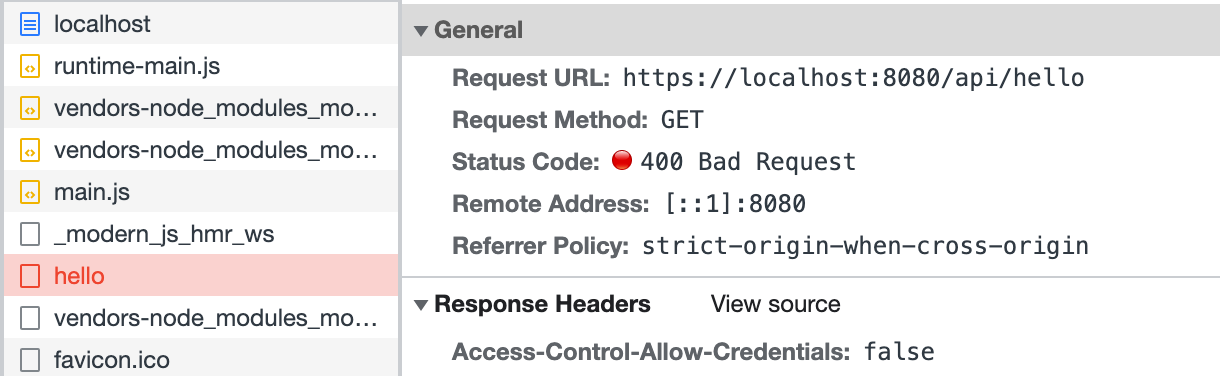
|
|
66
|
+
|
|
67
|
+
最后修改前端代码 `src/routes/page.tsx`,在访问 `/api/hello` 前先调用登录接口:
|
|
68
|
+
|
|
69
|
+
:::note
|
|
70
|
+
此处没有真实实现登录接口,代码仅作为演示。
|
|
71
|
+
:::
|
|
72
|
+
|
|
73
|
+
```ts
|
|
74
|
+
import { useState, useEffect } from 'react';
|
|
75
|
+
import { get as hello } from '@api/hello';
|
|
76
|
+
import { post as login } from '@api/login';
|
|
77
|
+
|
|
78
|
+
export default () => {
|
|
79
|
+
const [text, setText] = useState('');
|
|
80
|
+
|
|
81
|
+
useEffect(() => {
|
|
82
|
+
async function fetchAfterLogin() {
|
|
83
|
+
const { code } = await login();
|
|
84
|
+
if (code === 0) {
|
|
85
|
+
const { message } = await hello();
|
|
86
|
+
setText(message);
|
|
87
|
+
}
|
|
88
|
+
}
|
|
89
|
+
fetchAfterLogin();
|
|
90
|
+
}, []);
|
|
91
|
+
|
|
92
|
+
return <p>{text}</p>;
|
|
93
|
+
};
|
|
94
|
+
```
|
|
95
|
+
|
|
96
|
+
刷新页面,可以看到 `/api/hello` 访问成功:
|
|
97
|
+
|
|
98
|
+
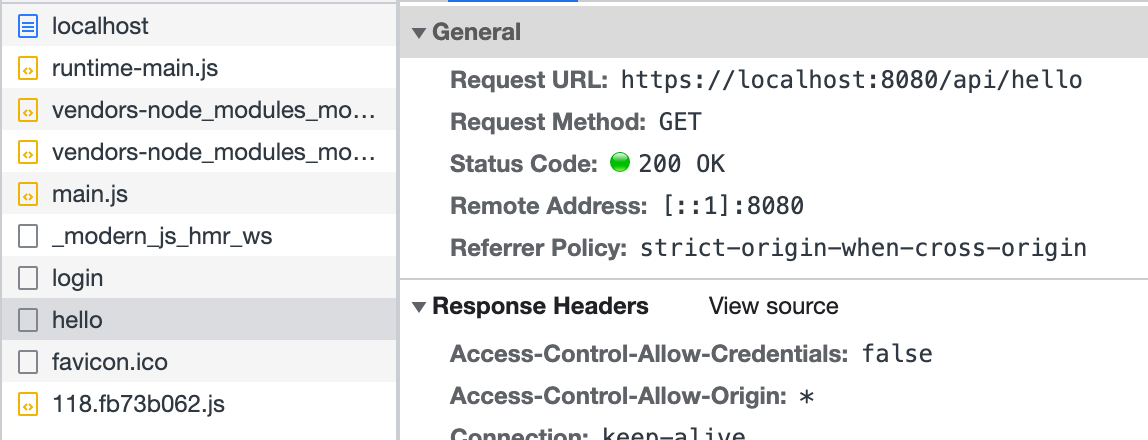
|
|
99
|
+
|
|
100
|
+
以上代码模拟了在 `/api/_app.ts` 中添加中间件的方式,实现了简易的登录功能。同样,可以在这个钩子文件中实现其他功能来扩展 BFF Server。
|
|
101
|
+
|
|
102
|
+
:::info
|
|
103
|
+
不同运行时框架中,中间件的写法不一定相同,详情可见[运行时框架](/guides/advanced-features/bff/frameworks)。
|
|
104
|
+
|
|
105
|
+
:::
|
|
106
|
+
|
|
107
|
+
## 定义 Server 实例
|
|
108
|
+
|
|
109
|
+
除了中间件之外,还可以通过 `api/app.ts` 文件来定义 BFF Server 的实例。开发者需要默认导出一个能被运行时框架插件识别的实例。这里简单展示一下 Koa 和 Express 如何定义 Server 实例。
|
|
110
|
+
|
|
111
|
+
import { Tabs, Tab as TabItem } from "@theme";
|
|
112
|
+
|
|
113
|
+
<Tabs>
|
|
114
|
+
<TabItem value="express" label="Express.js" default>
|
|
115
|
+
|
|
116
|
+
```ts title="api/app.ts"
|
|
117
|
+
import express from 'express';
|
|
118
|
+
|
|
119
|
+
const app = express();
|
|
120
|
+
app.use(async (req, res, next) => {
|
|
121
|
+
console.info(`access url: ${req.url}`);
|
|
122
|
+
next();
|
|
123
|
+
});
|
|
124
|
+
|
|
125
|
+
export default app;
|
|
126
|
+
```
|
|
127
|
+
|
|
128
|
+
</TabItem>
|
|
129
|
+
<TabItem value="koa" label="Koa.js">
|
|
130
|
+
|
|
131
|
+
```ts title="api/app.ts"
|
|
132
|
+
import koa from 'koa';
|
|
133
|
+
|
|
134
|
+
const app = new Koa();
|
|
135
|
+
app.use(async (ctx, next) => {
|
|
136
|
+
console.info(`access url: ${ctx.url}`);
|
|
137
|
+
await next();
|
|
138
|
+
});
|
|
139
|
+
|
|
140
|
+
export default app;
|
|
141
|
+
```
|
|
142
|
+
|
|
143
|
+
</TabItem>
|
|
144
|
+
</Tabs>
|
|
145
|
+
|
|
146
|
+
在复杂的 BFF 逻辑中,定义 Server 实例可以更方便通过一个入口来组织代码逻辑,设计目录结构。在这个文件中,可以执行初始化逻辑,添加全局中间件,声明路由,甚至扩展原有框架。
|
|
147
|
+
|
|
148
|
+
BFF 函数定义的路由会在 `app.ts` 文件定义的路由之后注册,所以在这里你也可以拦截 BFF 函数定义的路由,进行预处理或是提前响应。
|
|
149
|
+
|
|
150
|
+
:::note
|
|
151
|
+
此时,如果应用中同时存在 `api/_app.ts`,则定义的中间件会被放在 `api/app.ts` 导出实例的最后执行。多数情况下,中间件就能覆盖大多数 BFF 函数的定制需求。只有当应用的服务端逻辑比较复杂时,才需要自定义 Server 实例。
|
|
152
|
+
:::
|
|
153
|
+
|
|
154
|
+
:::caution
|
|
155
|
+
当应用中没有 `api/app.ts` 的时候,Modern.js 默认会添加 [koa-body](https://www.npmjs.com/package/koa-body)。当应用中存在 `api/app.ts` 时,如果开发者希望使用带有 Body 的 BFF 函数,需要**自行添加** `koa-body`。
|
|
156
|
+
:::
|