@modern-js/app-tools 3.7.0 → 3.8.0
This diff represents the content of publicly available package versions that have been released to one of the supported registries. The information contained in this diff is provided for informational purposes only and reflects changes between package versions as they appear in their respective public registries.
- package/bin/modern-bundle-docs.js +7 -0
- package/dist/cjs/builder/generator/createBuilderProviderConfig.js +5 -1
- package/dist/cjs/bundleDocs.js +114 -0
- package/dist/cjs/commands/build.js +2 -1
- package/dist/cjs/commands/deploy.js +4 -2
- package/dist/cjs/commands/index.js +0 -4
- package/dist/cjs/config/default.js +2 -0
- package/dist/cjs/index.js +52 -14
- package/dist/cjs/plugins/analyze/index.js +2 -2
- package/dist/cjs/plugins/analyze/utils.js +3 -2
- package/dist/cjs/plugins/initialize/index.js +4 -3
- package/dist/cjs/plugins/serverBuild.js +3 -2
- package/dist/esm/builder/generator/createBuilderProviderConfig.mjs +5 -1
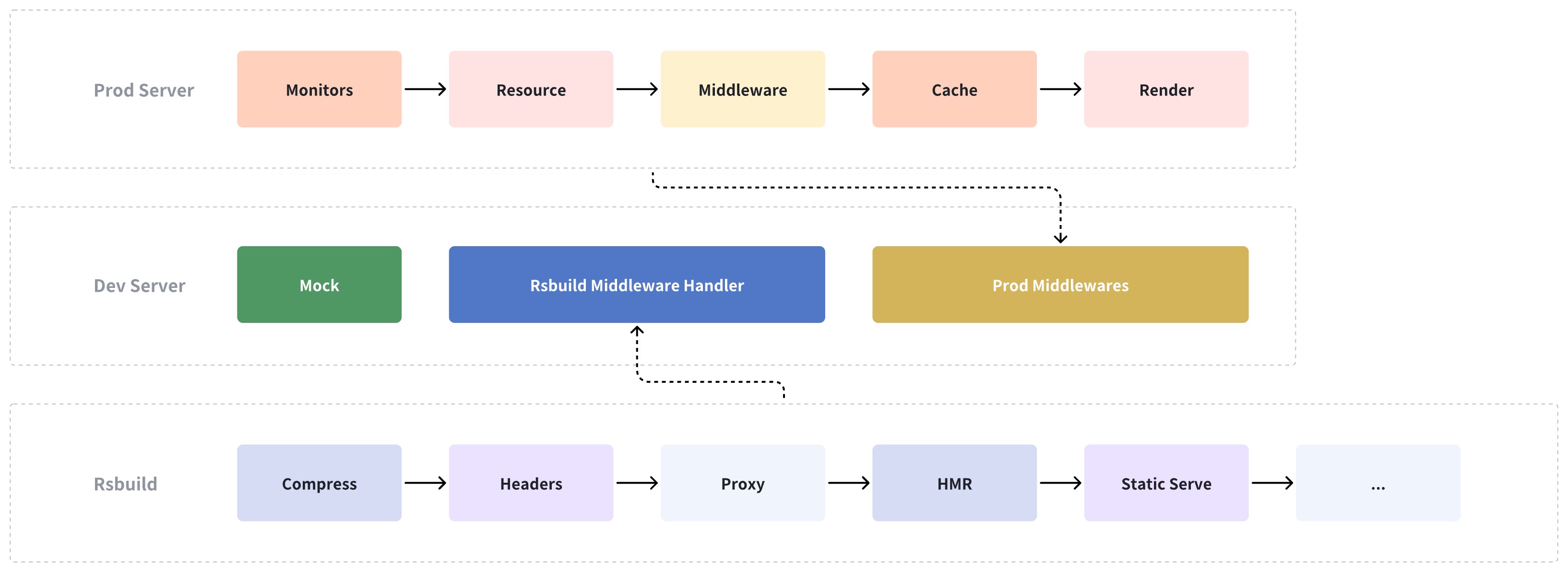
- package/dist/esm/bundleDocs.mjs +62 -0
- package/dist/esm/commands/build.mjs +2 -1
- package/dist/esm/commands/deploy.mjs +4 -2
- package/dist/esm/commands/index.mjs +0 -4
- package/dist/esm/config/default.mjs +2 -0
- package/dist/esm/index.mjs +15 -1
- package/dist/esm/plugins/analyze/index.mjs +2 -2
- package/dist/esm/plugins/analyze/utils.mjs +3 -2
- package/dist/esm/plugins/initialize/index.mjs +4 -3
- package/dist/esm/plugins/serverBuild.mjs +3 -2
- package/dist/esm-node/builder/generator/createBuilderProviderConfig.mjs +5 -1
- package/dist/esm-node/bundleDocs.mjs +63 -0
- package/dist/esm-node/commands/build.mjs +2 -1
- package/dist/esm-node/commands/deploy.mjs +4 -2
- package/dist/esm-node/commands/index.mjs +0 -4
- package/dist/esm-node/config/default.mjs +2 -0
- package/dist/esm-node/index.mjs +15 -1
- package/dist/esm-node/plugins/analyze/index.mjs +2 -2
- package/dist/esm-node/plugins/analyze/utils.mjs +3 -2
- package/dist/esm-node/plugins/initialize/index.mjs +4 -3
- package/dist/esm-node/plugins/serverBuild.mjs +3 -2
- package/dist/types/bundleDocs.d.ts +20 -0
- package/dist/types/commands/deploy.d.ts +2 -1
- package/dist/types/index.d.ts +4 -1
- package/dist/types/plugins/analyze/utils.d.ts +1 -1
- package/dist/types/types/config/dev.d.ts +6 -0
- package/docs/apis/app/commands.md +241 -0
- package/docs/apis/app/hooks/api/lambda.md +9 -0
- package/docs/apis/app/hooks/config/favicon.md +24 -0
- package/docs/apis/app/hooks/config/html.md +5 -0
- package/docs/apis/app/hooks/config/icon.md +24 -0
- package/docs/apis/app/hooks/config/mock.md +6 -0
- package/docs/apis/app/hooks/config/public.md +26 -0
- package/docs/apis/app/hooks/config/upload.md +50 -0
- package/docs/apis/app/hooks/modern-config.md +5 -0
- package/docs/apis/app/hooks/server/server.md +5 -0
- package/docs/apis/app/hooks/shared.md +3 -0
- package/docs/apis/app/hooks/src/app.md +30 -0
- package/docs/apis/app/hooks/src/entry.md +34 -0
- package/docs/apis/app/hooks/src/entry.server.md +51 -0
- package/docs/apis/app/hooks/src/modern.runtime.md +5 -0
- package/docs/apis/app/hooks/src/routes.md +86 -0
- package/docs/apis/app/hooks/src/server.md +3 -0
- package/docs/apis/app/runtime/bff/use-hono-context.md +27 -0
- package/docs/apis/app/runtime/core/create-root.md +19 -0
- package/docs/apis/app/runtime/core/render.md +39 -0
- package/docs/apis/app/runtime/core/runtime-context.md +156 -0
- package/docs/apis/app/runtime/router/router.md +280 -0
- package/docs/apis/app/runtime/ssr/no-ssr.md +35 -0
- package/docs/apis/app/runtime/ssr/renderStreaming.md +67 -0
- package/docs/apis/app/runtime/ssr/renderString.md +60 -0
- package/docs/apis/app/runtime/ssr/requestHandler.md +44 -0
- package/docs/apis/app/runtime/utility/css-in-js.md +40 -0
- package/docs/apis/app/runtime/utility/head.md +35 -0
- package/docs/apis/app/runtime/utility/loadable.md +82 -0
- package/docs/community/blog/2022-0708-updates.md +91 -0
- package/docs/community/blog/2022-0910-updates.md +76 -0
- package/docs/community/blog/overview.md +63 -0
- package/docs/community/blog/v2-release-note.md +238 -0
- package/docs/community/blog/v3-release-note.md +622 -0
- package/docs/community/contributing-guide.md +253 -0
- package/docs/community/releases.md +27 -0
- package/docs/community/showcase.md +34 -0
- package/docs/community/team.md +14 -0
- package/docs/configure/app/bff/cross-project.md +20 -0
- package/docs/configure/app/bff/prefix.md +29 -0
- package/docs/configure/app/builder-plugins.md +66 -0
- package/docs/configure/app/dev/asset-prefix.md +13 -0
- package/docs/configure/app/dev/before-start-url.md +17 -0
- package/docs/configure/app/dev/client.md +41 -0
- package/docs/configure/app/dev/hmr.md +10 -0
- package/docs/configure/app/dev/host.md +18 -0
- package/docs/configure/app/dev/https.md +77 -0
- package/docs/configure/app/dev/lazy-compilation.md +39 -0
- package/docs/configure/app/dev/live-reload.md +10 -0
- package/docs/configure/app/dev/mock-dir.md +31 -0
- package/docs/configure/app/dev/progress-bar.md +19 -0
- package/docs/configure/app/dev/server.md +124 -0
- package/docs/configure/app/dev/setup-middlewares.md +32 -0
- package/docs/configure/app/dev/start-url.md +48 -0
- package/docs/configure/app/dev/watch-files.md +27 -0
- package/docs/configure/app/dev/write-to-disk.md +10 -0
- package/docs/configure/app/experiments/source-build.md +31 -0
- package/docs/configure/app/html/app-icon.md +28 -0
- package/docs/configure/app/html/crossorigin.md +10 -0
- package/docs/configure/app/html/favicon.md +16 -0
- package/docs/configure/app/html/inject.md +10 -0
- package/docs/configure/app/html/meta.md +24 -0
- package/docs/configure/app/html/mount-id.md +10 -0
- package/docs/configure/app/html/output-structure.md +10 -0
- package/docs/configure/app/html/script-loading.md +10 -0
- package/docs/configure/app/html/tags.md +15 -0
- package/docs/configure/app/html/template-parameters.md +33 -0
- package/docs/configure/app/html/template.md +10 -0
- package/docs/configure/app/html/title.md +18 -0
- package/docs/configure/app/output/asset-prefix.md +11 -0
- package/docs/configure/app/output/assets-retry.md +77 -0
- package/docs/configure/app/output/charset.md +10 -0
- package/docs/configure/app/output/clean-dist-path.md +16 -0
- package/docs/configure/app/output/convert-to-rem.md +79 -0
- package/docs/configure/app/output/copy.md +10 -0
- package/docs/configure/app/output/css-modules.md +48 -0
- package/docs/configure/app/output/data-uri-limit.md +26 -0
- package/docs/configure/app/output/disable-css-module-extension.md +55 -0
- package/docs/configure/app/output/disable-inline-runtime-chunk.md +41 -0
- package/docs/configure/app/output/disable-svgr.md +16 -0
- package/docs/configure/app/output/disable-ts-checker.md +49 -0
- package/docs/configure/app/output/dist-path.md +43 -0
- package/docs/configure/app/output/enable-asset-manifest.md +36 -0
- package/docs/configure/app/output/enable-css-module-tsdeclaration.md +28 -0
- package/docs/configure/app/output/enable-inline-route-manifests.md +16 -0
- package/docs/configure/app/output/externals.md +20 -0
- package/docs/configure/app/output/filename-hash.md +10 -0
- package/docs/configure/app/output/filename.md +55 -0
- package/docs/configure/app/output/inject-styles.md +10 -0
- package/docs/configure/app/output/inline-scripts.md +29 -0
- package/docs/configure/app/output/inline-styles.md +29 -0
- package/docs/configure/app/output/legal-comments.md +18 -0
- package/docs/configure/app/output/minify.md +22 -0
- package/docs/configure/app/output/override-browserslist.md +22 -0
- package/docs/configure/app/output/polyfill.md +12 -0
- package/docs/configure/app/output/source-map.md +30 -0
- package/docs/configure/app/output/split-route-chunks.md +16 -0
- package/docs/configure/app/output/ssg.md +81 -0
- package/docs/configure/app/output/ssgByEntries.md +90 -0
- package/docs/configure/app/output/svg-default-export.md +30 -0
- package/docs/configure/app/output/temp-dir.md +20 -0
- package/docs/configure/app/performance/build-cache.md +39 -0
- package/docs/configure/app/performance/chunk-split.md +40 -0
- package/docs/configure/app/performance/dns-prefetch.md +15 -0
- package/docs/configure/app/performance/preconnect.md +16 -0
- package/docs/configure/app/performance/prefetch.md +21 -0
- package/docs/configure/app/performance/preload.md +23 -0
- package/docs/configure/app/performance/print-file-size.md +40 -0
- package/docs/configure/app/performance/profile.md +10 -0
- package/docs/configure/app/performance/remove-console.md +10 -0
- package/docs/configure/app/performance/remove-moment-locale.md +10 -0
- package/docs/configure/app/plugins.md +59 -0
- package/docs/configure/app/resolve/alias-strategy.md +10 -0
- package/docs/configure/app/resolve/alias.md +9 -0
- package/docs/configure/app/resolve/condition-names.md +13 -0
- package/docs/configure/app/resolve/dedupe.md +9 -0
- package/docs/configure/app/resolve/extensions.md +13 -0
- package/docs/configure/app/runtime/0-intro.md +58 -0
- package/docs/configure/app/runtime/plugins.md +58 -0
- package/docs/configure/app/runtime/router.md +35 -0
- package/docs/configure/app/security/check-syntax.md +69 -0
- package/docs/configure/app/security/nonce.md +15 -0
- package/docs/configure/app/security/sri.md +20 -0
- package/docs/configure/app/server/base-url.md +26 -0
- package/docs/configure/app/server/port.md +18 -0
- package/docs/configure/app/server/public-routes.md +22 -0
- package/docs/configure/app/server/routes.md +86 -0
- package/docs/configure/app/server/rsc.md +26 -0
- package/docs/configure/app/server/ssr-by-entries.md +25 -0
- package/docs/configure/app/server/ssr.md +78 -0
- package/docs/configure/app/server/tsconfig-path.md +59 -0
- package/docs/configure/app/source/alias-strategy.md +14 -0
- package/docs/configure/app/source/alias.md +23 -0
- package/docs/configure/app/source/config-dir.md +20 -0
- package/docs/configure/app/source/decorators.md +25 -0
- package/docs/configure/app/source/define.md +16 -0
- package/docs/configure/app/source/disable-default-entries.md +28 -0
- package/docs/configure/app/source/enable-async-entry.md +54 -0
- package/docs/configure/app/source/enable-async-pre-entry.md +26 -0
- package/docs/configure/app/source/entries-dir.md +35 -0
- package/docs/configure/app/source/entries.md +179 -0
- package/docs/configure/app/source/exclude.md +10 -0
- package/docs/configure/app/source/global-vars.md +106 -0
- package/docs/configure/app/source/include.md +36 -0
- package/docs/configure/app/source/main-entry-name.md +24 -0
- package/docs/configure/app/source/pre-entry.md +10 -0
- package/docs/configure/app/source/react-compiler.md +68 -0
- package/docs/configure/app/source/transform-import.md +27 -0
- package/docs/configure/app/split-chunks.md +17 -0
- package/docs/configure/app/tools/autoprefixer.md +44 -0
- package/docs/configure/app/tools/bundler-chain.md +26 -0
- package/docs/configure/app/tools/css-extract.md +33 -0
- package/docs/configure/app/tools/css-loader.md +17 -0
- package/docs/configure/app/tools/dev-server.md +113 -0
- package/docs/configure/app/tools/html-plugin.md +41 -0
- package/docs/configure/app/tools/less.md +81 -0
- package/docs/configure/app/tools/lightningcss-loader.md +35 -0
- package/docs/configure/app/tools/minify-css.md +53 -0
- package/docs/configure/app/tools/postcss.md +34 -0
- package/docs/configure/app/tools/rspack.md +10 -0
- package/docs/configure/app/tools/sass.md +78 -0
- package/docs/configure/app/tools/style-loader.md +10 -0
- package/docs/configure/app/tools/swc.md +65 -0
- package/docs/configure/app/tools/ts-checker.md +109 -0
- package/docs/configure/app/usage.md +276 -0
- package/docs/guides/advanced-features/bff/cross-project.md +109 -0
- package/docs/guides/advanced-features/bff/extend-server.md +120 -0
- package/docs/guides/advanced-features/bff/frameworks.md +124 -0
- package/docs/guides/advanced-features/bff/function.md +314 -0
- package/docs/guides/advanced-features/bff/operators.md +554 -0
- package/docs/guides/advanced-features/bff/sdk.md +116 -0
- package/docs/guides/advanced-features/bff/upload.md +101 -0
- package/docs/guides/advanced-features/bff.md +18 -0
- package/docs/guides/advanced-features/build-performance.md +130 -0
- package/docs/guides/advanced-features/compatibility.md +120 -0
- package/docs/guides/advanced-features/international/advanced.md +128 -0
- package/docs/guides/advanced-features/international/api.md +231 -0
- package/docs/guides/advanced-features/international/best-practices.md +286 -0
- package/docs/guides/advanced-features/international/configuration.md +227 -0
- package/docs/guides/advanced-features/international/locale-detection.md +126 -0
- package/docs/guides/advanced-features/international/quick-start.md +128 -0
- package/docs/guides/advanced-features/international/resource-loading.md +154 -0
- package/docs/guides/advanced-features/international/routing.md +130 -0
- package/docs/guides/advanced-features/international.md +27 -0
- package/docs/guides/advanced-features/low-level.md +46 -0
- package/docs/guides/advanced-features/page-performance/code-split.md +77 -0
- package/docs/guides/advanced-features/page-performance/inline-assets.md +159 -0
- package/docs/guides/advanced-features/page-performance/optimize-bundle.md +97 -0
- package/docs/guides/advanced-features/page-performance/react-compiler.md +69 -0
- package/docs/guides/advanced-features/server-monitor/logger.md +41 -0
- package/docs/guides/advanced-features/server-monitor/metrics.md +58 -0
- package/docs/guides/advanced-features/server-monitor/monitors.md +242 -0
- package/docs/guides/advanced-features/source-build.md +164 -0
- package/docs/guides/advanced-features/web-server.md +288 -0
- package/docs/guides/basic-features/alias.md +102 -0
- package/docs/guides/basic-features/css/css-in-js.md +72 -0
- package/docs/guides/basic-features/css/css-modules.md +212 -0
- package/docs/guides/basic-features/css/css.md +27 -0
- package/docs/guides/basic-features/css/tailwindcss.md +27 -0
- package/docs/guides/basic-features/data/data-cache.md +510 -0
- package/docs/guides/basic-features/data/data-fetch.md +415 -0
- package/docs/guides/basic-features/data/data-write.md +227 -0
- package/docs/guides/basic-features/debug/mock.md +109 -0
- package/docs/guides/basic-features/debug/proxy.md +21 -0
- package/docs/guides/basic-features/debug/rsdoctor.md +62 -0
- package/docs/guides/basic-features/debug/using-storybook.md +112 -0
- package/docs/guides/basic-features/deploy.md +458 -0
- package/docs/guides/basic-features/env-vars.md +177 -0
- package/docs/guides/basic-features/html.md +255 -0
- package/docs/guides/basic-features/output-files.md +141 -0
- package/docs/guides/basic-features/render/before-render.md +108 -0
- package/docs/guides/basic-features/render/overview.md +47 -0
- package/docs/guides/basic-features/render/rsc.md +525 -0
- package/docs/guides/basic-features/render/ssg.md +228 -0
- package/docs/guides/basic-features/render/ssr-cache.md +201 -0
- package/docs/guides/basic-features/render/ssr.md +321 -0
- package/docs/guides/basic-features/render/streaming-ssr.md +264 -0
- package/docs/guides/basic-features/routes/config-routes.md +426 -0
- package/docs/guides/basic-features/routes/routes.md +498 -0
- package/docs/guides/basic-features/static-assets/json-files.md +120 -0
- package/docs/guides/basic-features/static-assets/svg-assets.md +168 -0
- package/docs/guides/basic-features/static-assets/wasm-assets.md +62 -0
- package/docs/guides/basic-features/static-assets.md +160 -0
- package/docs/guides/basic-features/testing/playwright.md +120 -0
- package/docs/guides/basic-features/testing/rstest.md +251 -0
- package/docs/guides/concept/builder.md +37 -0
- package/docs/guides/concept/entries.md +319 -0
- package/docs/guides/concept/server.md +35 -0
- package/docs/guides/get-started/ai-coding-agents.md +58 -0
- package/docs/guides/get-started/glossary.md +63 -0
- package/docs/guides/get-started/introduction.md +36 -0
- package/docs/guides/get-started/quick-start.md +236 -0
- package/docs/guides/get-started/tech-stack.md +82 -0
- package/docs/guides/get-started/upgrade.md +123 -0
- package/docs/guides/topic-detail/module-federation/application.md +116 -0
- package/docs/guides/topic-detail/module-federation/deploy.md +104 -0
- package/docs/guides/topic-detail/module-federation/i18n.md +670 -0
- package/docs/guides/topic-detail/module-federation/introduce.md +35 -0
- package/docs/guides/topic-detail/module-federation/ssr.md +118 -0
- package/docs/guides/topic-detail/module-federation/usage.md +219 -0
- package/docs/guides/troubleshooting/builder.md +110 -0
- package/docs/guides/troubleshooting/cli.md +35 -0
- package/docs/guides/troubleshooting/dependencies.md +119 -0
- package/docs/guides/troubleshooting/hmr.md +144 -0
- package/docs/guides/upgrade/config.md +963 -0
- package/docs/guides/upgrade/entry.md +463 -0
- package/docs/guides/upgrade/other.md +183 -0
- package/docs/guides/upgrade/overview.md +33 -0
- package/docs/guides/upgrade/tailwindcss.md +91 -0
- package/docs/guides/upgrade/web-server.md +109 -0
- package/docs/index.md +33 -0
- package/docs/llms.txt +285 -0
- package/docs/plugin/cli-plugins/api.md +573 -0
- package/docs/plugin/cli-plugins/life-cycle.md +2 -0
- package/docs/plugin/introduction.md +152 -0
- package/docs/plugin/official/cli-plugins/plugin-bff.md +5 -0
- package/docs/plugin/official/cli-plugins/plugin-ssg.md +5 -0
- package/docs/plugin/official/cli-plugins/plugin-styled-components.md +5 -0
- package/docs/plugin/official/cli-plugins.md +4 -0
- package/docs/plugin/plugin-system.md +238 -0
- package/docs/plugin/runtime-plugins/api.md +194 -0
- package/docs/plugin/runtime-plugins/life-cycle.md +2 -0
- package/docs/plugin/server-plugins/api.md +209 -0
- package/docs/plugin/server-plugins/life-cycle.md +13 -0
- package/docs/tutorials/examples/csr-auth.md +9 -0
- package/docs/tutorials/foundations/introduction.md +16 -0
- package/package.json +46 -13
|
@@ -0,0 +1,251 @@
|
|
|
1
|
+
# Rstest
|
|
2
|
+
|
|
3
|
+
[Rstest](https://rstest.rs) is a testing framework developed by the Rspack team and built on top of Rspack for fast test execution.
|
|
4
|
+
|
|
5
|
+
This guide explains how to integrate Rstest with Modern.js for web app testing.
|
|
6
|
+
|
|
7
|
+
## Quick Start
|
|
8
|
+
|
|
9
|
+
Install the base dependencies first:
|
|
10
|
+
|
|
11
|
+
|
|
12
|
+
```sh [npm]
|
|
13
|
+
npm add @rstest/core @modern-js/adapter-rstest -D
|
|
14
|
+
```
|
|
15
|
+
|
|
16
|
+
```sh [yarn]
|
|
17
|
+
yarn add @rstest/core @modern-js/adapter-rstest -D
|
|
18
|
+
```
|
|
19
|
+
|
|
20
|
+
```sh [pnpm]
|
|
21
|
+
pnpm add @rstest/core @modern-js/adapter-rstest -D
|
|
22
|
+
```
|
|
23
|
+
|
|
24
|
+
```sh [bun]
|
|
25
|
+
bun add @rstest/core @modern-js/adapter-rstest -D
|
|
26
|
+
```
|
|
27
|
+
|
|
28
|
+
```sh [deno]
|
|
29
|
+
deno add npm:@rstest/core npm:@modern-js/adapter-rstest -D
|
|
30
|
+
```
|
|
31
|
+
|
|
32
|
+
Then create `rstest.config.ts`:
|
|
33
|
+
|
|
34
|
+
```ts title="rstest.config.ts"
|
|
35
|
+
import { defineConfig } from '@rstest/core';
|
|
36
|
+
import { withModernConfig } from '@modern-js/adapter-rstest';
|
|
37
|
+
|
|
38
|
+
export default defineConfig({
|
|
39
|
+
extends: withModernConfig(),
|
|
40
|
+
});
|
|
41
|
+
```
|
|
42
|
+
|
|
43
|
+
`@modern-js/adapter-rstest` lets Rstest inherit your existing Modern.js config so your test setup stays aligned with your app.
|
|
44
|
+
|
|
45
|
+
For more configuration details, refer to the [Rstest configuration documentation](https://rstest.rs/config).
|
|
46
|
+
|
|
47
|
+
You can run tests with `npx rstest`, or add a script in `package.json`:
|
|
48
|
+
|
|
49
|
+
```json title="package.json"
|
|
50
|
+
{
|
|
51
|
+
"scripts": {
|
|
52
|
+
"test": "rstest"
|
|
53
|
+
}
|
|
54
|
+
}
|
|
55
|
+
```
|
|
56
|
+
|
|
57
|
+
## Testing Web UI
|
|
58
|
+
|
|
59
|
+
For web UI tests in Modern.js, there are two common approaches:
|
|
60
|
+
|
|
61
|
+
- Use Rstest browser mode, which runs tests in a real browser. This is the recommended option in most cases, although it is currently experimental.
|
|
62
|
+
- Use a simulated DOM environment with `happy-dom` and Testing Library. This matches the default web test environment provided by `@modern-js/adapter-rstest`.
|
|
63
|
+
|
|
64
|
+
We generally recommend browser mode because it uses real browser APIs and behavior, supports cases that simulated DOM environments cannot fully cover, and offers a better debugging experience when UI behavior does not match expectations.
|
|
65
|
+
|
|
66
|
+
### Browser mode (experimental)
|
|
67
|
+
|
|
68
|
+
If you want to test in a real browser instead of a simulated DOM, install the browser mode dependencies:
|
|
69
|
+
|
|
70
|
+
|
|
71
|
+
```sh [npm]
|
|
72
|
+
npm add @rstest/browser @rstest/browser-react playwright -D
|
|
73
|
+
```
|
|
74
|
+
|
|
75
|
+
```sh [yarn]
|
|
76
|
+
yarn add @rstest/browser @rstest/browser-react playwright -D
|
|
77
|
+
```
|
|
78
|
+
|
|
79
|
+
```sh [pnpm]
|
|
80
|
+
pnpm add @rstest/browser @rstest/browser-react playwright -D
|
|
81
|
+
```
|
|
82
|
+
|
|
83
|
+
```sh [bun]
|
|
84
|
+
bun add @rstest/browser @rstest/browser-react playwright -D
|
|
85
|
+
```
|
|
86
|
+
|
|
87
|
+
```sh [deno]
|
|
88
|
+
deno add npm:@rstest/browser npm:@rstest/browser-react npm:playwright -D
|
|
89
|
+
```
|
|
90
|
+
|
|
91
|
+
Then enable browser mode in `rstest.config.ts`:
|
|
92
|
+
|
|
93
|
+
```ts title="rstest.config.ts"
|
|
94
|
+
import { defineConfig } from '@rstest/core';
|
|
95
|
+
import { withModernConfig } from '@modern-js/adapter-rstest';
|
|
96
|
+
|
|
97
|
+
export default defineConfig({
|
|
98
|
+
extends: withModernConfig(),
|
|
99
|
+
browser: {
|
|
100
|
+
enabled: true,
|
|
101
|
+
provider: 'playwright',
|
|
102
|
+
},
|
|
103
|
+
});
|
|
104
|
+
```
|
|
105
|
+
|
|
106
|
+
Example test:
|
|
107
|
+
|
|
108
|
+
```tsx title="__tests__/page.browser.test.tsx"
|
|
109
|
+
import { BrowserRouter as Router } from '@modern-js/runtime/router';
|
|
110
|
+
import { page } from '@rstest/browser';
|
|
111
|
+
import { render } from '@rstest/browser-react';
|
|
112
|
+
import { expect, test } from '@rstest/core';
|
|
113
|
+
import Page from '../routes/page';
|
|
114
|
+
|
|
115
|
+
test('Page', async () => {
|
|
116
|
+
await render(
|
|
117
|
+
<Router>
|
|
118
|
+
<Page />
|
|
119
|
+
</Router>,
|
|
120
|
+
);
|
|
121
|
+
|
|
122
|
+
await expect.element(
|
|
123
|
+
page.getByRole('heading', { level: 1, name: 'Home' }),
|
|
124
|
+
).toBeVisible();
|
|
125
|
+
});
|
|
126
|
+
```
|
|
127
|
+
|
|
128
|
+
For more browser mode setup, Locator APIs, and assertions, refer to the [Rstest documentation](https://rstest.rs/guide/browser-testing/).
|
|
129
|
+
|
|
130
|
+
### DOM simulation with `happy-dom`
|
|
131
|
+
|
|
132
|
+
Install the DOM testing dependencies:
|
|
133
|
+
|
|
134
|
+
|
|
135
|
+
```sh [npm]
|
|
136
|
+
npm add happy-dom @testing-library/react @testing-library/dom -D
|
|
137
|
+
```
|
|
138
|
+
|
|
139
|
+
```sh [yarn]
|
|
140
|
+
yarn add happy-dom @testing-library/react @testing-library/dom -D
|
|
141
|
+
```
|
|
142
|
+
|
|
143
|
+
```sh [pnpm]
|
|
144
|
+
pnpm add happy-dom @testing-library/react @testing-library/dom -D
|
|
145
|
+
```
|
|
146
|
+
|
|
147
|
+
```sh [bun]
|
|
148
|
+
bun add happy-dom @testing-library/react @testing-library/dom -D
|
|
149
|
+
```
|
|
150
|
+
|
|
151
|
+
```sh [deno]
|
|
152
|
+
deno add npm:happy-dom npm:@testing-library/react npm:@testing-library/dom -D
|
|
153
|
+
```
|
|
154
|
+
|
|
155
|
+
Update `rstest.config.ts` to use `happy-dom`:
|
|
156
|
+
|
|
157
|
+
```ts title="rstest.config.ts"
|
|
158
|
+
import { defineConfig } from '@rstest/core';
|
|
159
|
+
import { withModernConfig } from '@modern-js/adapter-rstest';
|
|
160
|
+
|
|
161
|
+
export default defineConfig({
|
|
162
|
+
extends: withModernConfig(),
|
|
163
|
+
testEnvironment: 'happy-dom',
|
|
164
|
+
});
|
|
165
|
+
```
|
|
166
|
+
|
|
167
|
+
First, create a simple page for testing:
|
|
168
|
+
|
|
169
|
+
```tsx title="routes/page.tsx"
|
|
170
|
+
import { Link } from '@modern-js/runtime/router';
|
|
171
|
+
|
|
172
|
+
const Page = () => (
|
|
173
|
+
<div>
|
|
174
|
+
<h1>Home</h1>
|
|
175
|
+
<Link to="/about">About</Link>
|
|
176
|
+
</div>
|
|
177
|
+
);
|
|
178
|
+
|
|
179
|
+
export default Page;
|
|
180
|
+
```
|
|
181
|
+
|
|
182
|
+
Then add a test case:
|
|
183
|
+
|
|
184
|
+
```tsx title="__tests__/page.test.tsx"
|
|
185
|
+
import { BrowserRouter as Router } from '@modern-js/runtime/router';
|
|
186
|
+
import { expect, test } from '@rstest/core';
|
|
187
|
+
import { render, screen } from '@testing-library/react';
|
|
188
|
+
import Page from '../routes/page';
|
|
189
|
+
|
|
190
|
+
test('Page', () => {
|
|
191
|
+
render(
|
|
192
|
+
<Router>
|
|
193
|
+
<Page />
|
|
194
|
+
</Router>,
|
|
195
|
+
);
|
|
196
|
+
|
|
197
|
+
expect(screen.getByRole('heading', { level: 1, name: 'Home' })).toBeDefined();
|
|
198
|
+
});
|
|
199
|
+
```
|
|
200
|
+
|
|
201
|
+
## Running Test Cases
|
|
202
|
+
|
|
203
|
+
Execute the `test` command above to run your tests:
|
|
204
|
+
|
|
205
|
+
```bash
|
|
206
|
+
✓ __tests__/page.test.tsx (1)
|
|
207
|
+
✓ Page
|
|
208
|
+
|
|
209
|
+
Test Files 1 passed
|
|
210
|
+
Tests 1 passed
|
|
211
|
+
Duration 510ms (build 145ms, tests 365ms)
|
|
212
|
+
```
|
|
213
|
+
|
|
214
|
+
## Node Mode
|
|
215
|
+
|
|
216
|
+
If you need node mode tests for server-side logic such as `bff`, refer to the [Rstest documentation](https://rstest.rs) directly.
|
|
217
|
+
|
|
218
|
+
Modern.js mainly targets web apps, so this guide focuses on web UI testing and browser mode.
|
|
219
|
+
|
|
220
|
+
## Migrating from Existing Projects
|
|
221
|
+
|
|
222
|
+
If your project already uses Jest or Vitest, refer to the official Rstest migration guides:
|
|
223
|
+
|
|
224
|
+
- [Migrate from Jest to Rstest](https://rstest.rs/guide/migration/jest)
|
|
225
|
+
- [Migrate from Vitest to Rstest](https://rstest.rs/guide/migration/vitest)
|
|
226
|
+
|
|
227
|
+
We recommend installing the `migrate-to-rstest` skill first, then copying this prompt to your coding agent. It keeps the Modern.js `@modern-js/adapter-rstest` integration during migration:
|
|
228
|
+
|
|
229
|
+
|
|
230
|
+
For your Agent
|
|
231
|
+
|
|
232
|
+
Migrate to Rstest
|
|
233
|
+
|
|
234
|
+
Copy this prompt and send it to your coding agent.
|
|
235
|
+
|
|
236
|
+
Copy Prompt
|
|
237
|
+
|
|
238
|
+
Migrate this Modern.js project from Jest or Vitest to Rstest.
|
|
239
|
+
|
|
240
|
+
First install and use the migrate-to-rstest skill. If it is not installed, install it with:
|
|
241
|
+
npx skills add rstackjs/agent-skills --skill migrate-to-rstest
|
|
242
|
+
|
|
243
|
+
Follow the migrate-to-rstest skill instructions and the official Rstest migration guides:
|
|
244
|
+
- Jest: https://rstest.rs/guide/migration/jest
|
|
245
|
+
- Vitest: https://rstest.rs/guide/migration/vitest
|
|
246
|
+
|
|
247
|
+
Modern.js-specific requirement:
|
|
248
|
+
- Install and use @modern-js/adapter-rstest together with @rstest/core.
|
|
249
|
+
- Create or update rstest.config.ts to import withModernConfig from @modern-js/adapter-rstest.
|
|
250
|
+
- Reuse the Modern.js app configuration with extends: withModernConfig().
|
|
251
|
+
- Do not replace this with a plain Rstest config unless the project explicitly does not need Modern.js config integration.
|
|
@@ -0,0 +1,37 @@
|
|
|
1
|
+
# Build Engine
|
|
2
|
+
|
|
3
|
+
Modern.js internally encapsulates [Rsbuild](https://v2.rsbuild.rs/), using Rspack as the bundler.
|
|
4
|
+
|
|
5
|
+
::: tip What is Rsbuild?
|
|
6
|
+
Rsbuild is a build tool based on Rspack. It is an enhanced Rspack CLI, easy-to-use, and ready-to-use out of the box.
|
|
7
|
+
:::
|
|
8
|
+
|
|
9
|
+
## Build Architecture
|
|
10
|
+
|
|
11
|
+
From the building perspective, Modern.js can be divided into three-layers, from top to bottom:
|
|
12
|
+
|
|
13
|
+
- Upper-level framework: Modern.js.
|
|
14
|
+
- Build tool: Rsbuild.
|
|
15
|
+
- Bundler: Rspack.
|
|
16
|
+
|
|
17
|
+
|
|
18
|
+
## Build Documentation
|
|
19
|
+
|
|
20
|
+
The documentation address of Rsbuild is: [https://v2.rsbuild.rs/](https://v2.rsbuild.rs/)
|
|
21
|
+
|
|
22
|
+
In this documentation, you can learn about the detailed introduction of Rsbuild, and you can also find complete usage guides for various building capabilities.
|
|
23
|
+
|
|
24
|
+
If you want to understand the use of build configurations, it is recommended that you read the Modern.js documentation first, because the build configurations and defaults in Modern.js are not exactly the same as Rsbuild.
|
|
25
|
+
|
|
26
|
+
## Build Plugins
|
|
27
|
+
|
|
28
|
+
In Modern.js, you can register Rspack plugins or Rsbuild plugins:
|
|
29
|
+
|
|
30
|
+
- Rspack plugins: Configured through [tools.bundlerChain](/configure/app/tools/bundler-chain.md).
|
|
31
|
+
- Rsbuild plugins: Configured through [builderPlugins](/configure/app/builder-plugins.md).
|
|
32
|
+
|
|
33
|
+
## Build Capabilities
|
|
34
|
+
|
|
35
|
+
Rsbuild provides rich build capabilities, including JavaScript compilation, CSS compilation, static assets processing, code hot update, code compression, TS type checking, and dozens of other capabilities.
|
|
36
|
+
|
|
37
|
+
We recommend that you read [「Rsbuild - All Features」](https://v2.rsbuild.rs/guide/start/features) to learn about all the features provided by Rsbuild.
|
|
@@ -0,0 +1,319 @@
|
|
|
1
|
+
# Page Entry
|
|
2
|
+
|
|
3
|
+
Through this chapter, you can understand the entry conventions in Modern.js and how to customize entries.
|
|
4
|
+
|
|
5
|
+
## What is Entry
|
|
6
|
+
|
|
7
|
+
**Entry refers to the starting module of a page.**
|
|
8
|
+
|
|
9
|
+
In a Modern.js application, each entry corresponds to an independent page and a server-side route. By default, Modern.js automatically determines page entries based on directory conventions, and also supports customizing entries through configuration options.
|
|
10
|
+
|
|
11
|
+
Many configuration options provided by Modern.js are divided by entry, such as page title, HTML template, page meta information, whether to enable SSR/SSG, server-side routing rules, etc. If you want to learn more about the technical details of entries, please refer to the [In-Depth](#in-depth) chapter.
|
|
12
|
+
|
|
13
|
+
## Single Entry and Multiple Entries
|
|
14
|
+
|
|
15
|
+
The application initialized by Modern.js is a single-entry application with the following structure:
|
|
16
|
+
|
|
17
|
+
```
|
|
18
|
+
.
|
|
19
|
+
├── src
|
|
20
|
+
│ └── routes
|
|
21
|
+
│ ├── index.css
|
|
22
|
+
│ ├── layout.tsx
|
|
23
|
+
│ └── page.tsx
|
|
24
|
+
├── package.json
|
|
25
|
+
├── modern.config.ts
|
|
26
|
+
└── tsconfig.json
|
|
27
|
+
```
|
|
28
|
+
|
|
29
|
+
In a Modern.js application, you can easily switch from single entry to multiple entries. To manually create multiple entries, follow these steps:
|
|
30
|
+
|
|
31
|
+
|
|
32
|
+
1. **Move the original entry code to a directory named after the `name` field in `package.json`**
|
|
33
|
+
|
|
34
|
+
Assuming the `name` in `package.json` is `myapp`, you need to move the `src/routes/` directory to `src/myapp/routes/`:
|
|
35
|
+
|
|
36
|
+
```bash
|
|
37
|
+
# Create new directory
|
|
38
|
+
mkdir -p src/myapp
|
|
39
|
+
# Move original entry code
|
|
40
|
+
mv src/routes src/myapp/routes
|
|
41
|
+
```
|
|
42
|
+
|
|
43
|
+
2. **Create a new entry directory**
|
|
44
|
+
|
|
45
|
+
Create a new entry directory, for example `new-entry`:
|
|
46
|
+
|
|
47
|
+
```bash
|
|
48
|
+
# Create new entry directory
|
|
49
|
+
mkdir -p src/new-entry/routes
|
|
50
|
+
```
|
|
51
|
+
|
|
52
|
+
3. **Create necessary files in the new entry directory**
|
|
53
|
+
|
|
54
|
+
Create basic files in the `routes/` directory of the new entry:
|
|
55
|
+
|
|
56
|
+
```bash
|
|
57
|
+
# Create basic files (adjust content as needed)
|
|
58
|
+
touch src/new-entry/routes/index.css
|
|
59
|
+
touch src/new-entry/routes/layout.tsx
|
|
60
|
+
touch src/new-entry/routes/page.tsx
|
|
61
|
+
```
|
|
62
|
+
|
|
63
|
+
After completing the above steps, the `src/` directory structure will be as follows:
|
|
64
|
+
|
|
65
|
+
```bash
|
|
66
|
+
.
|
|
67
|
+
├── myapp # Original entry
|
|
68
|
+
│ └── routes
|
|
69
|
+
│ ├── index.css
|
|
70
|
+
│ ├── layout.tsx
|
|
71
|
+
│ └── page.tsx
|
|
72
|
+
└── new-entry # New entry
|
|
73
|
+
└── routes
|
|
74
|
+
├── index.css
|
|
75
|
+
├── layout.tsx
|
|
76
|
+
└── page.tsx
|
|
77
|
+
```
|
|
78
|
+
|
|
79
|
+
Modern.js will use the entry with the same name as the `name` field in `package.json` as the main entry. The route of the main entry is `/`, and the route of other entries is `/{entryName}`. For example, when the `name` in `package.json` is `myapp`, `src/myapp` will be the main entry of the application.
|
|
80
|
+
|
|
81
|
+
You can execute `pnpm run dev` to start the development server. At this time, you can see that a new route named `/new-entry` has been added, and the routes of the original pages have not changed.
|
|
82
|
+
|
|
83
|
+
:::note
|
|
84
|
+
The concepts of **single entry/multiple entry** and **SPA/MPA** are not equivalent. The former is about how to configure and package the application, while the latter is a pattern for organizing front-end applications. Each entry can be SPA or non-SPA.
|
|
85
|
+
:::
|
|
86
|
+
|
|
87
|
+
## Entry Types
|
|
88
|
+
|
|
89
|
+
Modern.js supports three entry types, each with different use cases and characteristics. Choosing the appropriate entry type can help you better organize your code.
|
|
90
|
+
|
|
91
|
+
### How to Identify Entries
|
|
92
|
+
|
|
93
|
+
Modern.js automatically scans directories to identify entries that meet the criteria. A directory is recognized as an entry if it meets **one of the following three conditions**:
|
|
94
|
+
|
|
95
|
+
1. **Has a `routes/` directory** → Convention routing entry
|
|
96
|
+
2. **Has an `App.tsx?` file** → Self-controlled routing entry
|
|
97
|
+
3. **Has an `entry.tsx?` file** → Custom entry
|
|
98
|
+
|
|
99
|
+
:::tip 入口扫描逻辑
|
|
100
|
+
|
|
101
|
+
- 如果 `src/` 本身满足入口条件 → 单入口应用
|
|
102
|
+
- 如果 `src/` 不满足条件 → 扫描 `src/` 下的子目录 → 多入口应用
|
|
103
|
+
- 单入口应用中,默认入口名为 `index`
|
|
104
|
+
|
|
105
|
+
:::
|
|
106
|
+
|
|
107
|
+
:::tip Custom scanning directory
|
|
108
|
+
You can modify the directory for identifying entries through [source.entriesDir](/configure/app/source/entries-dir.md).
|
|
109
|
+
|
|
110
|
+
:::
|
|
111
|
+
|
|
112
|
+
|
|
113
|
+
Next, we will introduce the usage of each entry type in detail.
|
|
114
|
+
|
|
115
|
+
### Convention Routing
|
|
116
|
+
|
|
117
|
+
If there is a `routes/` directory in the entry, we call this entry a convention routing entry. Modern.js will scan the files under `routes/` during startup and automatically generate client-side routes (react-router) based on file conventions. For example:
|
|
118
|
+
|
|
119
|
+
```bash
|
|
120
|
+
src/
|
|
121
|
+
└── routes/
|
|
122
|
+
├── layout.tsx # Layout component (optional)
|
|
123
|
+
├── page.tsx # Homepage component (/ route)
|
|
124
|
+
├── about/
|
|
125
|
+
│ └── page.tsx # About page (/about route)
|
|
126
|
+
└── blog/
|
|
127
|
+
├── page.tsx # Blog list page (/blog route)
|
|
128
|
+
└── [id]/
|
|
129
|
+
└── page.tsx # Blog detail page (/blog/:id route)
|
|
130
|
+
```
|
|
131
|
+
|
|
132
|
+
Component correspondence
|
|
133
|
+
|
|
134
|
+
| File | Route | Description |
|
|
135
|
+
| --------------------------- | ------------- | ----------------------------- |
|
|
136
|
+
| `routes/layout.tsx` | Global layout | Outer container for all pages |
|
|
137
|
+
| `routes/page.tsx` | `/` | Homepage |
|
|
138
|
+
| `routes/about/page.tsx` | `/about` | About page |
|
|
139
|
+
| `routes/blog/[id]/page.tsx` | `/blog/:id` | Dynamic route page |
|
|
140
|
+
|
|
141
|
+
For more details, please refer to [Routing Solution](/guides/basic-features/routes/routes.md#convention-routing).
|
|
142
|
+
|
|
143
|
+
### Self-controlled Routing
|
|
144
|
+
|
|
145
|
+
If there is an `App.tsx?` file in the entry, this entry is a self-controlled routing entry. This method gives developers complete routing control.
|
|
146
|
+
|
|
147
|
+
```bash
|
|
148
|
+
.
|
|
149
|
+
├── src
|
|
150
|
+
│ └── App.tsx
|
|
151
|
+
```
|
|
152
|
+
|
|
153
|
+
For the entry defined as `src/App.tsx`, Modern.js does not perform additional routing operations. Developers can use the [React Router v7](https://reactrouter.com/en/main) API to set up client-side routes, or not set up client-side routes. For example, the following code sets up client-side routes in the application:
|
|
154
|
+
|
|
155
|
+
```tsx title="src/App.tsx"
|
|
156
|
+
import { BrowserRouter, Route, Routes } from '@modern-js/runtime/router';
|
|
157
|
+
|
|
158
|
+
export default () => {
|
|
159
|
+
return (
|
|
160
|
+
<BrowserRouter>
|
|
161
|
+
<Routes>
|
|
162
|
+
<Route index element={<div>index</div>} />
|
|
163
|
+
<Route path="about" element={<div>about</div>} />
|
|
164
|
+
</Routes>
|
|
165
|
+
</BrowserRouter>
|
|
166
|
+
);
|
|
167
|
+
};
|
|
168
|
+
```
|
|
169
|
+
|
|
170
|
+
:::note
|
|
171
|
+
We recommend developers use convention routing. Modern.js provides a series of optimizations in resource loading and rendering for convention routing by default and offers built-in SSR capabilities. When using self-controlled routing, these capabilities need to be encapsulated by developers themselves.
|
|
172
|
+
:::
|
|
173
|
+
|
|
174
|
+
### Custom Entry
|
|
175
|
+
|
|
176
|
+
By default, when using convention routing or self-controlled routing, Modern.js will automatically handle rendering. If you want to customize this behavior, you can implement it through a custom entry file.
|
|
177
|
+
|
|
178
|
+
:::tip
|
|
179
|
+
Custom entries can coexist with convention routing and self-controlled routing entries, customizing the application initialization logic.
|
|
180
|
+
|
|
181
|
+
:::
|
|
182
|
+
|
|
183
|
+
If there is an `entry.tsx` file in the entry, Modern.js will no longer control the application's rendering process. You can call the `createRoot` and `render` functions in the `entry.tsx` file to complete the application entry logic.
|
|
184
|
+
|
|
185
|
+
```tsx title="src/entry.tsx"
|
|
186
|
+
import { createRoot } from '@modern-js/runtime/react';
|
|
187
|
+
import { render } from '@modern-js/runtime/browser';
|
|
188
|
+
|
|
189
|
+
// Create root component
|
|
190
|
+
const ModernRoot = createRoot();
|
|
191
|
+
|
|
192
|
+
// Render to DOM
|
|
193
|
+
render(<ModernRoot />);
|
|
194
|
+
```
|
|
195
|
+
|
|
196
|
+
In the code above, the component returned by the `createRoot` function is the component generated from the `routes/` directory or exported by `App.tsx`. The `render` function is used to handle rendering and mounting components. For example, if you want to execute some asynchronous tasks before rendering, you can implement it like this:
|
|
197
|
+
|
|
198
|
+
```tsx
|
|
199
|
+
import { createRoot } from '@modern-js/runtime/react';
|
|
200
|
+
import { render } from '@modern-js/runtime/browser';
|
|
201
|
+
|
|
202
|
+
const ModernRoot = createRoot();
|
|
203
|
+
|
|
204
|
+
async function beforeRender() {
|
|
205
|
+
// some async request
|
|
206
|
+
}
|
|
207
|
+
|
|
208
|
+
beforeRender().then(() => {
|
|
209
|
+
render(<ModernRoot />);
|
|
210
|
+
});
|
|
211
|
+
```
|
|
212
|
+
|
|
213
|
+
If you don't want to use any of Modern.js's runtime capabilities, you can also mount the component to the DOM node yourself, for example:
|
|
214
|
+
|
|
215
|
+
```js title=src/entry.tsx
|
|
216
|
+
import React from 'react';
|
|
217
|
+
import { createRoot } from 'react-dom/client';
|
|
218
|
+
import App from './App';
|
|
219
|
+
|
|
220
|
+
const container = document.getElementById('root');
|
|
221
|
+
|
|
222
|
+
if (container) {
|
|
223
|
+
const root = createRoot(container);
|
|
224
|
+
root.render(<App />);
|
|
225
|
+
}
|
|
226
|
+
```
|
|
227
|
+
|
|
228
|
+
In this mode, **you will not be able to use Modern.js framework's runtime capabilities**, such as:
|
|
229
|
+
|
|
230
|
+
- Convention routing, i.e., routing based on files under `src/routes`
|
|
231
|
+
- Server-Side Rendering (SSR)
|
|
232
|
+
- Internationalization (i18n)
|
|
233
|
+
- Module Federation
|
|
234
|
+
|
|
235
|
+
## Specifying Entries in Configuration File
|
|
236
|
+
|
|
237
|
+
In some cases, you may need to customize the entry configuration instead of using the entry conventions provided by Modern.js.
|
|
238
|
+
|
|
239
|
+
For example, if you need to migrate a non-Modern.js application to Modern.js, and it is not structured according to Modern.js's directory structure, there might be some migration costs involved in changing it to the conventional structure. In such cases, you can use custom entries.
|
|
240
|
+
|
|
241
|
+
Modern.js provides the following configuration options that you can set in [modern.config.ts](/configure/app/usage.md):
|
|
242
|
+
|
|
243
|
+
- [source.entries](/configure/app/source/entries.md): Used to set custom entry objects.
|
|
244
|
+
- [source.disableDefaultEntries](/configure/app/source/disable-default-entries.md): Used to disable Modern.js's default entry scanning behavior. When you use custom entries, parts of your project structure might coincidentally match the Modern.js conventional directory structure, but you may not want Modern.js to generate entry configurations for them. Enabling this option can help avoid this issue.
|
|
245
|
+
|
|
246
|
+
### Example
|
|
247
|
+
|
|
248
|
+
Here is an example of a custom entry. You can also refer to the documentation of the corresponding configuration options for more usage.
|
|
249
|
+
|
|
250
|
+
```ts title="modern.config.ts"
|
|
251
|
+
export default defineConfig({
|
|
252
|
+
source: {
|
|
253
|
+
entries: {
|
|
254
|
+
// Specify an entry named 'my-entry'
|
|
255
|
+
'my-entry': {
|
|
256
|
+
// Path to the entry module
|
|
257
|
+
entry: './src/my-page/index.tsx',
|
|
258
|
+
// Disable automatic generation of entry code by Modern.js
|
|
259
|
+
disableMount: true,
|
|
260
|
+
},
|
|
261
|
+
},
|
|
262
|
+
// Disable entry scanning behavior
|
|
263
|
+
disableDefaultEntries: true,
|
|
264
|
+
},
|
|
265
|
+
});
|
|
266
|
+
```
|
|
267
|
+
|
|
268
|
+
## In-Depth
|
|
269
|
+
|
|
270
|
+
Pages usually correspond to HTML output files, meaning each additional entry will eventually generate a corresponding HTML file in the output. The modules imported by the entry will be compiled and packaged into multiple Chunk outputs. For example, JavaScript modules may ultimately generate several file outputs similar to `dist/static/js/index.ea39u8.js`.
|
|
271
|
+
|
|
272
|
+
It's important to distinguish the relationships between concepts such as entry and route:
|
|
273
|
+
|
|
274
|
+
- **Entry**: Contains multiple modules used for startup execution.
|
|
275
|
+
- **Client Router**: In Modern.js, it is usually implemented by `react-router`, using the History API to determine which React component to load and display based on the browser's current URL.
|
|
276
|
+
- **Server Router**: Determines what content the server returns based on the request URL. For traditional multi-page applications, different URLs usually return different HTML pages directly. For single-page applications that use client-side routing, the server generally falls back non-static asset requests to the entry HTML, and then the frontend takes over subsequent route matching and page rendering.
|
|
277
|
+
|
|
278
|
+
Their corresponding relationships are as follows:
|
|
279
|
+
|
|
280
|
+
- Each website project can contain multiple entries
|
|
281
|
+
- Each entry contains several modules (source code files)
|
|
282
|
+
- Each entry usually corresponds to one HTML file output and several other outputs
|
|
283
|
+
- Each HTML file can contain multiple client-side routing solutions (for example, using both `react-router` and `@tanstack/react-router` in the same page)
|
|
284
|
+
- Each HTML file can be mapped to multiple server-side routes
|
|
285
|
+
- Each HTML file can contain multiple client-side routing solutions, and when accessing different routes of a single-entry application, the same HTML file is actually used
|
|
286
|
+
|
|
287
|
+
## Common Issues
|
|
288
|
+
|
|
289
|
+
1. **Does each client route defined by `react-router` generate a separate HTML file?**
|
|
290
|
+
|
|
291
|
+
No. Each entry usually only generates one HTML file. If multiple client routing systems are defined in a single entry, they will share this one HTML file.
|
|
292
|
+
|
|
293
|
+
2. **Does each `page.tsx` file in the `routes/` directory of convention routing generate an HTML file?**
|
|
294
|
+
|
|
295
|
+
No. Convention routing is a client-side routing solution implemented based on `react-router`. Its convention is that each `page.tsx` file under the `routes/` directory corresponds to a client-side route of `react-router`. `routes/` itself serves as a page entry, corresponding to one HTML file in the final output.
|
|
296
|
+
|
|
297
|
+
3. **Do Server-Side Rendering (SSR) projects build multiple HTML outputs?**
|
|
298
|
+
|
|
299
|
+
When using server-side rendering applications, it is not necessary to generate an HTML output at build time. It can only include server-side JavaScript output for rendering. At this time, `react-router` will run and schedule routes on the server side, rendering and responding with HTML content on each request.
|
|
300
|
+
|
|
301
|
+
However, Modern.js will still generate a complete client-side output containing HTML files for each entry at build time, which can be used to downgrade to client-side rendering when server-side rendering fails.
|
|
302
|
+
|
|
303
|
+
Another special case is a project using Static Site Generation (SSG). Even if it is a single-entry SSG application built with convention routing, Modern.js will generate a separate HTML file for each `page.tsx` file outside the Rspack process.
|
|
304
|
+
|
|
305
|
+
It should be noted that even when server-side rendering is enabled, React usually still needs to execute the hydration phase and run `react-router` routing on the frontend.
|
|
306
|
+
|
|
307
|
+
4. **Are there exceptions where single-entry applications output multiple HTML files?**
|
|
308
|
+
|
|
309
|
+
You can configure [html-rspack-plugin](https://rspack.rs/zh/plugins/rspack/html-rspack-plugin#%E7%94%9F%E6%88%90%E5%A4%9A%E4%B8%AA-html-%E6%96%87%E4%BB%B6) to generate multiple HTML outputs for each entry, or have multiple entries share one HTML output.
|
|
310
|
+
|
|
311
|
+
5. **What is a Multi-Page Application (Multi-Page Application)?**
|
|
312
|
+
|
|
313
|
+
The "page" in a Multi-Page Application refers to a static HTML file.
|
|
314
|
+
|
|
315
|
+
Generally, any web application that contains multiple entries and multiple HTML file outputs can be called a multi-page application.
|
|
316
|
+
|
|
317
|
+
In a narrow sense, a multi-page application may not contain client-side routing and only navigates between static HTML pages through elements like `<a>` tags. However, in practice, multi-page applications often need to configure client-side routing for their entries to meet different needs.
|
|
318
|
+
|
|
319
|
+
Conversely, a single-entry application that defines multiple routes through `react-router` is called a Single Page Application because it only generates one HTML file output.
|
|
@@ -0,0 +1,35 @@
|
|
|
1
|
+
# Web Server
|
|
2
|
+
|
|
3
|
+
Modern.js provides an integrated Web server for applications that can run in any container environment with Node.js. Whether executing the `dev` command in a local development environment, running the `build && serve` commands in a production environment, or using the official deployment solution, it all runs through this Web server to host the application.
|
|
4
|
+
|
|
5
|
+
## Underlying Dependencies
|
|
6
|
+
|
|
7
|
+
Modern.js builds its Web server based on the [Hono framework](https://hono.dev/). Hono is a small, simple, and ultra-fast web standard-based framework that can run on any JavaScript runtime.
|
|
8
|
+
|
|
9
|
+
## Development & Production
|
|
10
|
+
|
|
11
|
+
The Web server flow in both Modern.js development and production environments is entirely isomorphic, so you don't need to worry about differences between them.
|
|
12
|
+
|
|
13
|
+
As mentioned in the [Build Tools](/guides/concept/builder.md) section, Modern.js' underlying build capability is provided by Rsbuild, and some server-side capabilities in the development environment are coupled with the build tools, such as HMR. Modern.js needs to reuse these capabilities of the Rsbuild Dev Server.
|
|
14
|
+
|
|
15
|
+
In the development environment, Modern.js directly uses the middlewares provided by Rsbuild, which includes capabilities needed during the development stage such as HMR and Proxy. Additionally, Modern.js provides capabilities such as Mock, routing, and rendering on top of this:
|
|
16
|
+
|
|
17
|
+
|
|
18
|
+
|
|
19
|
+
Therefore, in Modern.js, the development environment merely adds middleware to the production environment. All capabilities of the production environment are also applicable in the development environment, ensuring no fragmentation between the two.
|
|
20
|
+
|
|
21
|
+
:::tip
|
|
22
|
+
Static asset files can be directly hosted by Modern.js' server, but it is highly recommended to upload these files to a CDN in a production environment.
|
|
23
|
+
:::
|
|
24
|
+
|
|
25
|
+
## Running in CI Environments
|
|
26
|
+
|
|
27
|
+
Modern.js supports running built artifacts in any Node.js environment. Typically, the CI environment has already installed all application dependencies.
|
|
28
|
+
|
|
29
|
+
You can run the [`modern build`](/apis/app/commands.md#modern-build) command to build the application and the [`modern serve`](/apis/app/commands.md#modern-serve) command to run the Web server, starting the Modern.js application.
|
|
30
|
+
|
|
31
|
+
## Running in Production Environments
|
|
32
|
+
|
|
33
|
+
When deploying to production, the artifact size should be as small as possible. The aforementioned method for running in CI environments keeps all artifacts from the original project. Therefore, it is not recommended to run the application using the above commands in a production environment.
|
|
34
|
+
|
|
35
|
+
Modern.js offers a standalone deployment solution. When running the [`modern deploy`](/apis/app/commands.md#modern-deploy) command, the artifacts will include an entry file for running the Web server.
|