@modern-js/app-tools 3.7.0 → 3.8.0
This diff represents the content of publicly available package versions that have been released to one of the supported registries. The information contained in this diff is provided for informational purposes only and reflects changes between package versions as they appear in their respective public registries.
- package/bin/modern-bundle-docs.js +7 -0
- package/dist/cjs/builder/generator/createBuilderProviderConfig.js +5 -1
- package/dist/cjs/bundleDocs.js +114 -0
- package/dist/cjs/commands/build.js +2 -1
- package/dist/cjs/commands/deploy.js +4 -2
- package/dist/cjs/commands/index.js +0 -4
- package/dist/cjs/config/default.js +2 -0
- package/dist/cjs/index.js +52 -14
- package/dist/cjs/plugins/analyze/index.js +2 -2
- package/dist/cjs/plugins/analyze/utils.js +3 -2
- package/dist/cjs/plugins/initialize/index.js +4 -3
- package/dist/cjs/plugins/serverBuild.js +3 -2
- package/dist/esm/builder/generator/createBuilderProviderConfig.mjs +5 -1
- package/dist/esm/bundleDocs.mjs +62 -0
- package/dist/esm/commands/build.mjs +2 -1
- package/dist/esm/commands/deploy.mjs +4 -2
- package/dist/esm/commands/index.mjs +0 -4
- package/dist/esm/config/default.mjs +2 -0
- package/dist/esm/index.mjs +15 -1
- package/dist/esm/plugins/analyze/index.mjs +2 -2
- package/dist/esm/plugins/analyze/utils.mjs +3 -2
- package/dist/esm/plugins/initialize/index.mjs +4 -3
- package/dist/esm/plugins/serverBuild.mjs +3 -2
- package/dist/esm-node/builder/generator/createBuilderProviderConfig.mjs +5 -1
- package/dist/esm-node/bundleDocs.mjs +63 -0
- package/dist/esm-node/commands/build.mjs +2 -1
- package/dist/esm-node/commands/deploy.mjs +4 -2
- package/dist/esm-node/commands/index.mjs +0 -4
- package/dist/esm-node/config/default.mjs +2 -0
- package/dist/esm-node/index.mjs +15 -1
- package/dist/esm-node/plugins/analyze/index.mjs +2 -2
- package/dist/esm-node/plugins/analyze/utils.mjs +3 -2
- package/dist/esm-node/plugins/initialize/index.mjs +4 -3
- package/dist/esm-node/plugins/serverBuild.mjs +3 -2
- package/dist/types/bundleDocs.d.ts +20 -0
- package/dist/types/commands/deploy.d.ts +2 -1
- package/dist/types/index.d.ts +4 -1
- package/dist/types/plugins/analyze/utils.d.ts +1 -1
- package/dist/types/types/config/dev.d.ts +6 -0
- package/docs/apis/app/commands.md +241 -0
- package/docs/apis/app/hooks/api/lambda.md +9 -0
- package/docs/apis/app/hooks/config/favicon.md +24 -0
- package/docs/apis/app/hooks/config/html.md +5 -0
- package/docs/apis/app/hooks/config/icon.md +24 -0
- package/docs/apis/app/hooks/config/mock.md +6 -0
- package/docs/apis/app/hooks/config/public.md +26 -0
- package/docs/apis/app/hooks/config/upload.md +50 -0
- package/docs/apis/app/hooks/modern-config.md +5 -0
- package/docs/apis/app/hooks/server/server.md +5 -0
- package/docs/apis/app/hooks/shared.md +3 -0
- package/docs/apis/app/hooks/src/app.md +30 -0
- package/docs/apis/app/hooks/src/entry.md +34 -0
- package/docs/apis/app/hooks/src/entry.server.md +51 -0
- package/docs/apis/app/hooks/src/modern.runtime.md +5 -0
- package/docs/apis/app/hooks/src/routes.md +86 -0
- package/docs/apis/app/hooks/src/server.md +3 -0
- package/docs/apis/app/runtime/bff/use-hono-context.md +27 -0
- package/docs/apis/app/runtime/core/create-root.md +19 -0
- package/docs/apis/app/runtime/core/render.md +39 -0
- package/docs/apis/app/runtime/core/runtime-context.md +156 -0
- package/docs/apis/app/runtime/router/router.md +280 -0
- package/docs/apis/app/runtime/ssr/no-ssr.md +35 -0
- package/docs/apis/app/runtime/ssr/renderStreaming.md +67 -0
- package/docs/apis/app/runtime/ssr/renderString.md +60 -0
- package/docs/apis/app/runtime/ssr/requestHandler.md +44 -0
- package/docs/apis/app/runtime/utility/css-in-js.md +40 -0
- package/docs/apis/app/runtime/utility/head.md +35 -0
- package/docs/apis/app/runtime/utility/loadable.md +82 -0
- package/docs/community/blog/2022-0708-updates.md +91 -0
- package/docs/community/blog/2022-0910-updates.md +76 -0
- package/docs/community/blog/overview.md +63 -0
- package/docs/community/blog/v2-release-note.md +238 -0
- package/docs/community/blog/v3-release-note.md +622 -0
- package/docs/community/contributing-guide.md +253 -0
- package/docs/community/releases.md +27 -0
- package/docs/community/showcase.md +34 -0
- package/docs/community/team.md +14 -0
- package/docs/configure/app/bff/cross-project.md +20 -0
- package/docs/configure/app/bff/prefix.md +29 -0
- package/docs/configure/app/builder-plugins.md +66 -0
- package/docs/configure/app/dev/asset-prefix.md +13 -0
- package/docs/configure/app/dev/before-start-url.md +17 -0
- package/docs/configure/app/dev/client.md +41 -0
- package/docs/configure/app/dev/hmr.md +10 -0
- package/docs/configure/app/dev/host.md +18 -0
- package/docs/configure/app/dev/https.md +77 -0
- package/docs/configure/app/dev/lazy-compilation.md +39 -0
- package/docs/configure/app/dev/live-reload.md +10 -0
- package/docs/configure/app/dev/mock-dir.md +31 -0
- package/docs/configure/app/dev/progress-bar.md +19 -0
- package/docs/configure/app/dev/server.md +124 -0
- package/docs/configure/app/dev/setup-middlewares.md +32 -0
- package/docs/configure/app/dev/start-url.md +48 -0
- package/docs/configure/app/dev/watch-files.md +27 -0
- package/docs/configure/app/dev/write-to-disk.md +10 -0
- package/docs/configure/app/experiments/source-build.md +31 -0
- package/docs/configure/app/html/app-icon.md +28 -0
- package/docs/configure/app/html/crossorigin.md +10 -0
- package/docs/configure/app/html/favicon.md +16 -0
- package/docs/configure/app/html/inject.md +10 -0
- package/docs/configure/app/html/meta.md +24 -0
- package/docs/configure/app/html/mount-id.md +10 -0
- package/docs/configure/app/html/output-structure.md +10 -0
- package/docs/configure/app/html/script-loading.md +10 -0
- package/docs/configure/app/html/tags.md +15 -0
- package/docs/configure/app/html/template-parameters.md +33 -0
- package/docs/configure/app/html/template.md +10 -0
- package/docs/configure/app/html/title.md +18 -0
- package/docs/configure/app/output/asset-prefix.md +11 -0
- package/docs/configure/app/output/assets-retry.md +77 -0
- package/docs/configure/app/output/charset.md +10 -0
- package/docs/configure/app/output/clean-dist-path.md +16 -0
- package/docs/configure/app/output/convert-to-rem.md +79 -0
- package/docs/configure/app/output/copy.md +10 -0
- package/docs/configure/app/output/css-modules.md +48 -0
- package/docs/configure/app/output/data-uri-limit.md +26 -0
- package/docs/configure/app/output/disable-css-module-extension.md +55 -0
- package/docs/configure/app/output/disable-inline-runtime-chunk.md +41 -0
- package/docs/configure/app/output/disable-svgr.md +16 -0
- package/docs/configure/app/output/disable-ts-checker.md +49 -0
- package/docs/configure/app/output/dist-path.md +43 -0
- package/docs/configure/app/output/enable-asset-manifest.md +36 -0
- package/docs/configure/app/output/enable-css-module-tsdeclaration.md +28 -0
- package/docs/configure/app/output/enable-inline-route-manifests.md +16 -0
- package/docs/configure/app/output/externals.md +20 -0
- package/docs/configure/app/output/filename-hash.md +10 -0
- package/docs/configure/app/output/filename.md +55 -0
- package/docs/configure/app/output/inject-styles.md +10 -0
- package/docs/configure/app/output/inline-scripts.md +29 -0
- package/docs/configure/app/output/inline-styles.md +29 -0
- package/docs/configure/app/output/legal-comments.md +18 -0
- package/docs/configure/app/output/minify.md +22 -0
- package/docs/configure/app/output/override-browserslist.md +22 -0
- package/docs/configure/app/output/polyfill.md +12 -0
- package/docs/configure/app/output/source-map.md +30 -0
- package/docs/configure/app/output/split-route-chunks.md +16 -0
- package/docs/configure/app/output/ssg.md +81 -0
- package/docs/configure/app/output/ssgByEntries.md +90 -0
- package/docs/configure/app/output/svg-default-export.md +30 -0
- package/docs/configure/app/output/temp-dir.md +20 -0
- package/docs/configure/app/performance/build-cache.md +39 -0
- package/docs/configure/app/performance/chunk-split.md +40 -0
- package/docs/configure/app/performance/dns-prefetch.md +15 -0
- package/docs/configure/app/performance/preconnect.md +16 -0
- package/docs/configure/app/performance/prefetch.md +21 -0
- package/docs/configure/app/performance/preload.md +23 -0
- package/docs/configure/app/performance/print-file-size.md +40 -0
- package/docs/configure/app/performance/profile.md +10 -0
- package/docs/configure/app/performance/remove-console.md +10 -0
- package/docs/configure/app/performance/remove-moment-locale.md +10 -0
- package/docs/configure/app/plugins.md +59 -0
- package/docs/configure/app/resolve/alias-strategy.md +10 -0
- package/docs/configure/app/resolve/alias.md +9 -0
- package/docs/configure/app/resolve/condition-names.md +13 -0
- package/docs/configure/app/resolve/dedupe.md +9 -0
- package/docs/configure/app/resolve/extensions.md +13 -0
- package/docs/configure/app/runtime/0-intro.md +58 -0
- package/docs/configure/app/runtime/plugins.md +58 -0
- package/docs/configure/app/runtime/router.md +35 -0
- package/docs/configure/app/security/check-syntax.md +69 -0
- package/docs/configure/app/security/nonce.md +15 -0
- package/docs/configure/app/security/sri.md +20 -0
- package/docs/configure/app/server/base-url.md +26 -0
- package/docs/configure/app/server/port.md +18 -0
- package/docs/configure/app/server/public-routes.md +22 -0
- package/docs/configure/app/server/routes.md +86 -0
- package/docs/configure/app/server/rsc.md +26 -0
- package/docs/configure/app/server/ssr-by-entries.md +25 -0
- package/docs/configure/app/server/ssr.md +78 -0
- package/docs/configure/app/server/tsconfig-path.md +59 -0
- package/docs/configure/app/source/alias-strategy.md +14 -0
- package/docs/configure/app/source/alias.md +23 -0
- package/docs/configure/app/source/config-dir.md +20 -0
- package/docs/configure/app/source/decorators.md +25 -0
- package/docs/configure/app/source/define.md +16 -0
- package/docs/configure/app/source/disable-default-entries.md +28 -0
- package/docs/configure/app/source/enable-async-entry.md +54 -0
- package/docs/configure/app/source/enable-async-pre-entry.md +26 -0
- package/docs/configure/app/source/entries-dir.md +35 -0
- package/docs/configure/app/source/entries.md +179 -0
- package/docs/configure/app/source/exclude.md +10 -0
- package/docs/configure/app/source/global-vars.md +106 -0
- package/docs/configure/app/source/include.md +36 -0
- package/docs/configure/app/source/main-entry-name.md +24 -0
- package/docs/configure/app/source/pre-entry.md +10 -0
- package/docs/configure/app/source/react-compiler.md +68 -0
- package/docs/configure/app/source/transform-import.md +27 -0
- package/docs/configure/app/split-chunks.md +17 -0
- package/docs/configure/app/tools/autoprefixer.md +44 -0
- package/docs/configure/app/tools/bundler-chain.md +26 -0
- package/docs/configure/app/tools/css-extract.md +33 -0
- package/docs/configure/app/tools/css-loader.md +17 -0
- package/docs/configure/app/tools/dev-server.md +113 -0
- package/docs/configure/app/tools/html-plugin.md +41 -0
- package/docs/configure/app/tools/less.md +81 -0
- package/docs/configure/app/tools/lightningcss-loader.md +35 -0
- package/docs/configure/app/tools/minify-css.md +53 -0
- package/docs/configure/app/tools/postcss.md +34 -0
- package/docs/configure/app/tools/rspack.md +10 -0
- package/docs/configure/app/tools/sass.md +78 -0
- package/docs/configure/app/tools/style-loader.md +10 -0
- package/docs/configure/app/tools/swc.md +65 -0
- package/docs/configure/app/tools/ts-checker.md +109 -0
- package/docs/configure/app/usage.md +276 -0
- package/docs/guides/advanced-features/bff/cross-project.md +109 -0
- package/docs/guides/advanced-features/bff/extend-server.md +120 -0
- package/docs/guides/advanced-features/bff/frameworks.md +124 -0
- package/docs/guides/advanced-features/bff/function.md +314 -0
- package/docs/guides/advanced-features/bff/operators.md +554 -0
- package/docs/guides/advanced-features/bff/sdk.md +116 -0
- package/docs/guides/advanced-features/bff/upload.md +101 -0
- package/docs/guides/advanced-features/bff.md +18 -0
- package/docs/guides/advanced-features/build-performance.md +130 -0
- package/docs/guides/advanced-features/compatibility.md +120 -0
- package/docs/guides/advanced-features/international/advanced.md +128 -0
- package/docs/guides/advanced-features/international/api.md +231 -0
- package/docs/guides/advanced-features/international/best-practices.md +286 -0
- package/docs/guides/advanced-features/international/configuration.md +227 -0
- package/docs/guides/advanced-features/international/locale-detection.md +126 -0
- package/docs/guides/advanced-features/international/quick-start.md +128 -0
- package/docs/guides/advanced-features/international/resource-loading.md +154 -0
- package/docs/guides/advanced-features/international/routing.md +130 -0
- package/docs/guides/advanced-features/international.md +27 -0
- package/docs/guides/advanced-features/low-level.md +46 -0
- package/docs/guides/advanced-features/page-performance/code-split.md +77 -0
- package/docs/guides/advanced-features/page-performance/inline-assets.md +159 -0
- package/docs/guides/advanced-features/page-performance/optimize-bundle.md +97 -0
- package/docs/guides/advanced-features/page-performance/react-compiler.md +69 -0
- package/docs/guides/advanced-features/server-monitor/logger.md +41 -0
- package/docs/guides/advanced-features/server-monitor/metrics.md +58 -0
- package/docs/guides/advanced-features/server-monitor/monitors.md +242 -0
- package/docs/guides/advanced-features/source-build.md +164 -0
- package/docs/guides/advanced-features/web-server.md +288 -0
- package/docs/guides/basic-features/alias.md +102 -0
- package/docs/guides/basic-features/css/css-in-js.md +72 -0
- package/docs/guides/basic-features/css/css-modules.md +212 -0
- package/docs/guides/basic-features/css/css.md +27 -0
- package/docs/guides/basic-features/css/tailwindcss.md +27 -0
- package/docs/guides/basic-features/data/data-cache.md +510 -0
- package/docs/guides/basic-features/data/data-fetch.md +415 -0
- package/docs/guides/basic-features/data/data-write.md +227 -0
- package/docs/guides/basic-features/debug/mock.md +109 -0
- package/docs/guides/basic-features/debug/proxy.md +21 -0
- package/docs/guides/basic-features/debug/rsdoctor.md +62 -0
- package/docs/guides/basic-features/debug/using-storybook.md +112 -0
- package/docs/guides/basic-features/deploy.md +458 -0
- package/docs/guides/basic-features/env-vars.md +177 -0
- package/docs/guides/basic-features/html.md +255 -0
- package/docs/guides/basic-features/output-files.md +141 -0
- package/docs/guides/basic-features/render/before-render.md +108 -0
- package/docs/guides/basic-features/render/overview.md +47 -0
- package/docs/guides/basic-features/render/rsc.md +525 -0
- package/docs/guides/basic-features/render/ssg.md +228 -0
- package/docs/guides/basic-features/render/ssr-cache.md +201 -0
- package/docs/guides/basic-features/render/ssr.md +321 -0
- package/docs/guides/basic-features/render/streaming-ssr.md +264 -0
- package/docs/guides/basic-features/routes/config-routes.md +426 -0
- package/docs/guides/basic-features/routes/routes.md +498 -0
- package/docs/guides/basic-features/static-assets/json-files.md +120 -0
- package/docs/guides/basic-features/static-assets/svg-assets.md +168 -0
- package/docs/guides/basic-features/static-assets/wasm-assets.md +62 -0
- package/docs/guides/basic-features/static-assets.md +160 -0
- package/docs/guides/basic-features/testing/playwright.md +120 -0
- package/docs/guides/basic-features/testing/rstest.md +251 -0
- package/docs/guides/concept/builder.md +37 -0
- package/docs/guides/concept/entries.md +319 -0
- package/docs/guides/concept/server.md +35 -0
- package/docs/guides/get-started/ai-coding-agents.md +58 -0
- package/docs/guides/get-started/glossary.md +63 -0
- package/docs/guides/get-started/introduction.md +36 -0
- package/docs/guides/get-started/quick-start.md +236 -0
- package/docs/guides/get-started/tech-stack.md +82 -0
- package/docs/guides/get-started/upgrade.md +123 -0
- package/docs/guides/topic-detail/module-federation/application.md +116 -0
- package/docs/guides/topic-detail/module-federation/deploy.md +104 -0
- package/docs/guides/topic-detail/module-federation/i18n.md +670 -0
- package/docs/guides/topic-detail/module-federation/introduce.md +35 -0
- package/docs/guides/topic-detail/module-federation/ssr.md +118 -0
- package/docs/guides/topic-detail/module-federation/usage.md +219 -0
- package/docs/guides/troubleshooting/builder.md +110 -0
- package/docs/guides/troubleshooting/cli.md +35 -0
- package/docs/guides/troubleshooting/dependencies.md +119 -0
- package/docs/guides/troubleshooting/hmr.md +144 -0
- package/docs/guides/upgrade/config.md +963 -0
- package/docs/guides/upgrade/entry.md +463 -0
- package/docs/guides/upgrade/other.md +183 -0
- package/docs/guides/upgrade/overview.md +33 -0
- package/docs/guides/upgrade/tailwindcss.md +91 -0
- package/docs/guides/upgrade/web-server.md +109 -0
- package/docs/index.md +33 -0
- package/docs/llms.txt +285 -0
- package/docs/plugin/cli-plugins/api.md +573 -0
- package/docs/plugin/cli-plugins/life-cycle.md +2 -0
- package/docs/plugin/introduction.md +152 -0
- package/docs/plugin/official/cli-plugins/plugin-bff.md +5 -0
- package/docs/plugin/official/cli-plugins/plugin-ssg.md +5 -0
- package/docs/plugin/official/cli-plugins/plugin-styled-components.md +5 -0
- package/docs/plugin/official/cli-plugins.md +4 -0
- package/docs/plugin/plugin-system.md +238 -0
- package/docs/plugin/runtime-plugins/api.md +194 -0
- package/docs/plugin/runtime-plugins/life-cycle.md +2 -0
- package/docs/plugin/server-plugins/api.md +209 -0
- package/docs/plugin/server-plugins/life-cycle.md +13 -0
- package/docs/tutorials/examples/csr-auth.md +9 -0
- package/docs/tutorials/foundations/introduction.md +16 -0
- package/package.json +46 -13
|
@@ -0,0 +1,288 @@
|
|
|
1
|
+
# Custom Web Server
|
|
2
|
+
|
|
3
|
+
Modern.js encapsulates most server-side capabilities required by projects, typically eliminating the need for server-side development. However, in certain scenarios such as user authentication, request preprocessing, or adding page skeletons, custom server-side logic may still be necessary.
|
|
4
|
+
|
|
5
|
+
To use the Custom Web Server in a Modern.js project, follow these steps:
|
|
6
|
+
|
|
7
|
+
1. Install `@modern-js/server-runtime` dependency
|
|
8
|
+
|
|
9
|
+
If the `@modern-js/server-runtime` dependency is not yet installed in your project, install it first:
|
|
10
|
+
|
|
11
|
+
```bash
|
|
12
|
+
pnpm add @modern-js/server-runtime
|
|
13
|
+
```
|
|
14
|
+
|
|
15
|
+
:::tip Version Consistency
|
|
16
|
+
Make sure the version of `@modern-js/server-runtime` matches the version of `@modern-js/app-tools` in your project. All Modern.js official packages are released with a uniform version number, and version mismatches may cause compatibility issues.
|
|
17
|
+
|
|
18
|
+
Check the version of `@modern-js/app-tools` first, then install the same version of `@modern-js/server-runtime`:
|
|
19
|
+
|
|
20
|
+
```bash
|
|
21
|
+
# Check the current version of @modern-js/app-tools
|
|
22
|
+
pnpm list @modern-js/app-tools
|
|
23
|
+
|
|
24
|
+
# Install the same version of @modern-js/server-runtime
|
|
25
|
+
pnpm add @modern-js/server-runtime@<version>
|
|
26
|
+
```
|
|
27
|
+
|
|
28
|
+
:::
|
|
29
|
+
|
|
30
|
+
2. Create the `server` directory and configuration file
|
|
31
|
+
|
|
32
|
+
Create a `server/modern.server.ts` file in the project root directory:
|
|
33
|
+
|
|
34
|
+
```ts title="server/modern.server.ts"
|
|
35
|
+
import { defineServerConfig } from '@modern-js/server-runtime';
|
|
36
|
+
|
|
37
|
+
export default defineServerConfig({
|
|
38
|
+
middlewares: [], // Middleware
|
|
39
|
+
renderMiddlewares: [], // Render Middleware
|
|
40
|
+
plugins: [], // Plugins
|
|
41
|
+
onError: () => {}, // Error handling
|
|
42
|
+
});
|
|
43
|
+
```
|
|
44
|
+
|
|
45
|
+
After creating the file, you can write custom logic in this file.
|
|
46
|
+
|
|
47
|
+
3. Include `server` directory in `tsconfig.json`
|
|
48
|
+
|
|
49
|
+
```json5
|
|
50
|
+
{
|
|
51
|
+
// ...
|
|
52
|
+
"include": [
|
|
53
|
+
// ...
|
|
54
|
+
"server"
|
|
55
|
+
]
|
|
56
|
+
}
|
|
57
|
+
```
|
|
58
|
+
|
|
59
|
+
## Capabilities of the Custom Web Server
|
|
60
|
+
|
|
61
|
+
Modern.js's Web Server is based on Hono, and in the latest version of the Custom Web Server, we expose Hono's middleware capabilities, you can refer to [Hono API](https://hono.dev/docs/api/context) for more usage.
|
|
62
|
+
|
|
63
|
+
In the `server/modern.server.ts` file, you can add the following configurations to extend the Server:
|
|
64
|
+
|
|
65
|
+
- **Middleware**
|
|
66
|
+
- **Render Middleware**
|
|
67
|
+
- **Server-side Plugin**
|
|
68
|
+
|
|
69
|
+
In the **Plugin**, you can define **Middleware** and **RenderMiddleware**. The middleware loading process is illustrated in the following diagram:
|
|
70
|
+
|
|
71
|
+
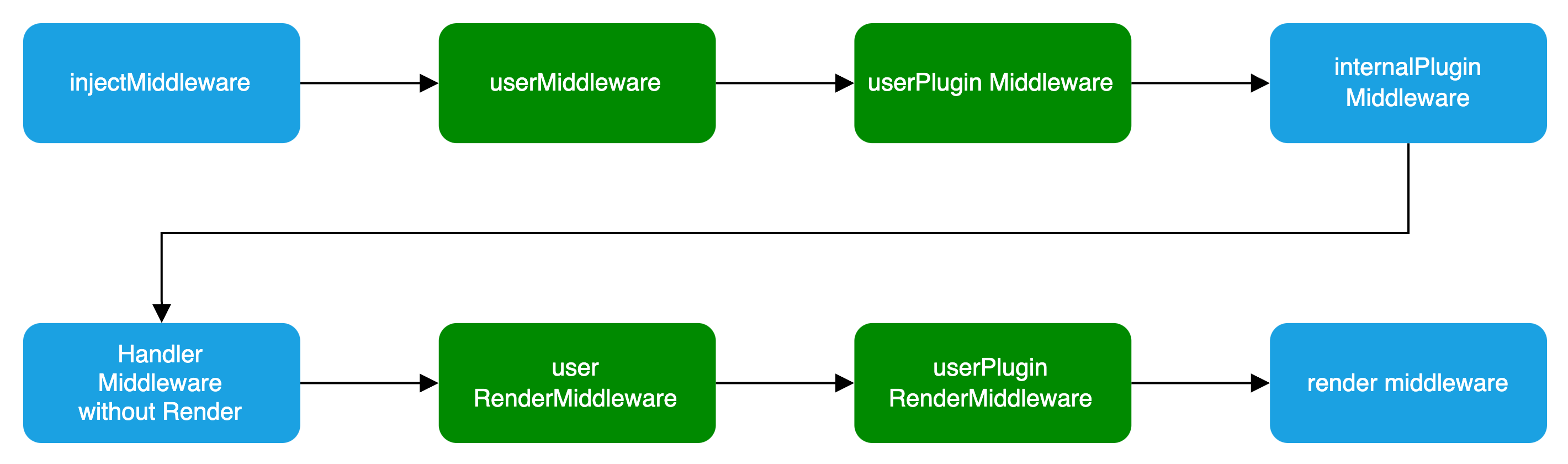
|
|
72
|
+
### Basic Configuration
|
|
73
|
+
|
|
74
|
+
```ts title="server/modern.server.ts"
|
|
75
|
+
import { defineServerConfig } from '@modern-js/server-runtime';
|
|
76
|
+
|
|
77
|
+
export default defineServerConfig({
|
|
78
|
+
middlewares: [],
|
|
79
|
+
renderMiddlewares: [],
|
|
80
|
+
plugins: [],
|
|
81
|
+
onError: () => {},
|
|
82
|
+
});
|
|
83
|
+
```
|
|
84
|
+
|
|
85
|
+
### Type Definition
|
|
86
|
+
|
|
87
|
+
`defineServerConfig` type definition is as follows:
|
|
88
|
+
|
|
89
|
+
```ts
|
|
90
|
+
import type { MiddlewareHandler } from 'hono';
|
|
91
|
+
|
|
92
|
+
type MiddlewareOrder = 'pre' | 'post' | 'default';
|
|
93
|
+
type MiddlewareObj = {
|
|
94
|
+
name: string;
|
|
95
|
+
path?: string;
|
|
96
|
+
method?: 'options' | 'get' | 'post' | 'put' | 'delete' | 'patch' | 'all';
|
|
97
|
+
handler: MiddlewareHandler | MiddlewareHandler[];
|
|
98
|
+
before?: Array<MiddlewareObj['name']>;
|
|
99
|
+
order?: MiddlewareOrder;
|
|
100
|
+
};
|
|
101
|
+
type ServerConfig = {
|
|
102
|
+
middlewares?: MiddlewareObj[];
|
|
103
|
+
renderMiddlewares?: MiddlewareObj[];
|
|
104
|
+
plugins?: ServerPlugin[];
|
|
105
|
+
onError?: (err: Error, c: Context) => Promise<any> | any;
|
|
106
|
+
};
|
|
107
|
+
```
|
|
108
|
+
|
|
109
|
+
### Middleware
|
|
110
|
+
|
|
111
|
+
Middleware supports executing custom logic before and after the **request handling** and **page routing** processes in Modern.js services.
|
|
112
|
+
If custom logic needs to handle both API routes and page routes, Middleware is the clear choice.
|
|
113
|
+
|
|
114
|
+
:::note
|
|
115
|
+
If you only need to handle BFF API routes, you can determine whether a request is for a BFF API by checking if `req.path` starts with the BFF `prefix`.
|
|
116
|
+
:::
|
|
117
|
+
|
|
118
|
+
Usage is as follows:
|
|
119
|
+
|
|
120
|
+
```ts title="server/modern.server.ts"
|
|
121
|
+
import {
|
|
122
|
+
defineServerConfig,
|
|
123
|
+
type MiddlewareHandler,
|
|
124
|
+
} from '@modern-js/server-runtime';
|
|
125
|
+
|
|
126
|
+
export const handler: MiddlewareHandler = async (c, next) => {
|
|
127
|
+
const monitors = c.get('monitors');
|
|
128
|
+
const start = Date.now();
|
|
129
|
+
|
|
130
|
+
await next();
|
|
131
|
+
|
|
132
|
+
const end = Date.now();
|
|
133
|
+
// Report Duration
|
|
134
|
+
monitors.timing('request_timing', end - start);
|
|
135
|
+
};
|
|
136
|
+
|
|
137
|
+
export default defineServerConfig({
|
|
138
|
+
middlewares: [
|
|
139
|
+
{
|
|
140
|
+
name: 'request-timing',
|
|
141
|
+
handler,
|
|
142
|
+
},
|
|
143
|
+
],
|
|
144
|
+
});
|
|
145
|
+
```
|
|
146
|
+
|
|
147
|
+
:::warning
|
|
148
|
+
You must execute the `next` function to proceed with the subsequent Middleware.
|
|
149
|
+
:::
|
|
150
|
+
|
|
151
|
+
### RenderMiddleware
|
|
152
|
+
|
|
153
|
+
If you only need to handle the logic before and after page rendering, modern.js also provides rendering middleware, which can be used as follows:
|
|
154
|
+
|
|
155
|
+
```ts title="server/modern.server.ts"
|
|
156
|
+
import {
|
|
157
|
+
defineServerConfig,
|
|
158
|
+
type MiddlewareHandler,
|
|
159
|
+
} from '@modern-js/server-runtime';
|
|
160
|
+
|
|
161
|
+
// Inject render performance metrics
|
|
162
|
+
const renderTiming: MiddlewareHandler = async (c, next) => {
|
|
163
|
+
const start = Date.now();
|
|
164
|
+
|
|
165
|
+
await next();
|
|
166
|
+
|
|
167
|
+
const end = Date.now();
|
|
168
|
+
c.res.headers.set('server-timing', `render; dur=${end - start}`);
|
|
169
|
+
};
|
|
170
|
+
|
|
171
|
+
// Modify the Response Body
|
|
172
|
+
const modifyResBody: MiddlewareHandler = async (c, next) => {
|
|
173
|
+
await next();
|
|
174
|
+
|
|
175
|
+
const { res } = c;
|
|
176
|
+
const text = await res.text();
|
|
177
|
+
const newText = text.replace('<body>', '<body> <h3>bytedance</h3>');
|
|
178
|
+
|
|
179
|
+
c.res = c.body(newText, {
|
|
180
|
+
status: res.status,
|
|
181
|
+
headers: res.headers,
|
|
182
|
+
});
|
|
183
|
+
};
|
|
184
|
+
|
|
185
|
+
export default defineServerConfig({
|
|
186
|
+
renderMiddlewares: [
|
|
187
|
+
{
|
|
188
|
+
name: 'render-timing',
|
|
189
|
+
handler: renderTiming,
|
|
190
|
+
},
|
|
191
|
+
{
|
|
192
|
+
name: 'modify-res-body',
|
|
193
|
+
handler: modifyResBody,
|
|
194
|
+
},
|
|
195
|
+
],
|
|
196
|
+
});
|
|
197
|
+
```
|
|
198
|
+
|
|
199
|
+
### Plugin
|
|
200
|
+
|
|
201
|
+
Modern.js supports adding the aforementioned middleware and rendering middleware for the Server in custom plugins, which can be used as follows:
|
|
202
|
+
|
|
203
|
+
```ts title="server/plugins/server.ts"
|
|
204
|
+
import type { ServerPlugin } from '@modern-js/server-runtime';
|
|
205
|
+
|
|
206
|
+
export default (): ServerPlugin => ({
|
|
207
|
+
name: 'serverPlugin',
|
|
208
|
+
setup(api) {
|
|
209
|
+
api.onPrepare(() => {
|
|
210
|
+
const { middlewares, renderMiddlewares } = api.getServerContext();
|
|
211
|
+
|
|
212
|
+
// Inject server-side data for page dataLoader consumption
|
|
213
|
+
middlewares?.push({
|
|
214
|
+
name: 'server-plugin-middleware',
|
|
215
|
+
handler: async (c, next) => {
|
|
216
|
+
c.set('message', 'hi modern.js');
|
|
217
|
+
await next();
|
|
218
|
+
// ...
|
|
219
|
+
},
|
|
220
|
+
});
|
|
221
|
+
|
|
222
|
+
// redirect
|
|
223
|
+
renderMiddlewares?.push({
|
|
224
|
+
name: 'server-plugin-render-middleware',
|
|
225
|
+
handler: async (c, next) => {
|
|
226
|
+
const user = getUser(c.req);
|
|
227
|
+
if (!user) {
|
|
228
|
+
return c.redirect('/login');
|
|
229
|
+
}
|
|
230
|
+
|
|
231
|
+
await next();
|
|
232
|
+
},
|
|
233
|
+
});
|
|
234
|
+
});
|
|
235
|
+
},
|
|
236
|
+
});
|
|
237
|
+
```
|
|
238
|
+
|
|
239
|
+
```ts title="server/modern.server.ts"
|
|
240
|
+
import { defineServerConfig } from '@modern-js/server-runtime';
|
|
241
|
+
import serverPlugin from './plugins/serverPlugin';
|
|
242
|
+
|
|
243
|
+
export default defineServerConfig({
|
|
244
|
+
plugins: [serverPlugin()],
|
|
245
|
+
});
|
|
246
|
+
```
|
|
247
|
+
|
|
248
|
+
```ts title="src/routes/page.data.ts"
|
|
249
|
+
import { useHonoContext } from '@modern-js/server-runtime';
|
|
250
|
+
import { defer } from '@modern-js/runtime/router';
|
|
251
|
+
|
|
252
|
+
export default () => {
|
|
253
|
+
const ctx = useHonoContext();
|
|
254
|
+
// SSR scenario consumes data injected by the Server Side
|
|
255
|
+
const message = ctx.get('message');
|
|
256
|
+
|
|
257
|
+
// ...
|
|
258
|
+
};
|
|
259
|
+
```
|
|
260
|
+
|
|
261
|
+
### onError
|
|
262
|
+
|
|
263
|
+
`onError` is a global error handling function used to capture and handle all uncaught errors in the Modern.js server. By customizing the `onError` function, developers can uniformly handle different types of errors, return custom error responses, and implement features such as error logging and error classification.
|
|
264
|
+
|
|
265
|
+
Below is a basic example of an `onError` configuration:
|
|
266
|
+
|
|
267
|
+
```ts title="server/modern.server.ts"
|
|
268
|
+
import { defineServerConfig } from '@modern-js/server-runtime';
|
|
269
|
+
|
|
270
|
+
export default defineServerConfig({
|
|
271
|
+
onError: (err, c) => {
|
|
272
|
+
// Log the error
|
|
273
|
+
console.error('Server error:', err);
|
|
274
|
+
|
|
275
|
+
// Return different responses based on the error type
|
|
276
|
+
if (err instanceof SyntaxError) {
|
|
277
|
+
return c.json({ error: 'Invalid JSON' }, 400);
|
|
278
|
+
}
|
|
279
|
+
|
|
280
|
+
// Customize BFF error response based on request path
|
|
281
|
+
if (c.req.path.includes('/api')) {
|
|
282
|
+
return c.json({ message: 'API error occurred' }, 500);
|
|
283
|
+
}
|
|
284
|
+
|
|
285
|
+
return c.text('Internal Server Error', 500);
|
|
286
|
+
},
|
|
287
|
+
});
|
|
288
|
+
```
|
|
@@ -0,0 +1,102 @@
|
|
|
1
|
+
# Path Alias
|
|
2
|
+
|
|
3
|
+
Path aliases allow developers to define aliases for modules, making it easier to reference them in code. This can be useful when you want to use a short, easy-to-remember name for a module instead of a long, complex path.
|
|
4
|
+
|
|
5
|
+
For example, if you frequently reference the `src/common/request.ts` module in your project, you can define an alias for it as `@request` and then use `import request from '@request'` in your code instead of writing the full relative path every time. This also allows you to move the module to a different location without needing to update all the import statements in your code.
|
|
6
|
+
|
|
7
|
+
In Modern.js, there are two ways to set up path aliases:
|
|
8
|
+
|
|
9
|
+
- Through the `paths` configuration in `tsconfig.json`.
|
|
10
|
+
- Through the [source.alias](/configure/app/source/alias.md) configuration.
|
|
11
|
+
|
|
12
|
+
## Using `tsconfig.json`'s `paths` Configuration
|
|
13
|
+
|
|
14
|
+
You can configure aliases through the `paths` configuration in `tsconfig.json`, which is the recommended approach in TypeScript projects as it also resolves the TS type issues related to path aliases.
|
|
15
|
+
|
|
16
|
+
For example:
|
|
17
|
+
|
|
18
|
+
```json title="tsconfig.json"
|
|
19
|
+
{
|
|
20
|
+
"compilerOptions": {
|
|
21
|
+
"paths": {
|
|
22
|
+
"@common/*": ["./src/common/*"]
|
|
23
|
+
}
|
|
24
|
+
}
|
|
25
|
+
}
|
|
26
|
+
```
|
|
27
|
+
|
|
28
|
+
After configuring, if you reference `@common/Foo.tsx` in your code, it will be mapped to the `<project>/src/common/Foo.tsx` path.
|
|
29
|
+
|
|
30
|
+
:::tip
|
|
31
|
+
You can refer to the [TypeScript - paths](https://www.typescriptlang.org/tsconfig#paths) documentation for more details.
|
|
32
|
+
:::
|
|
33
|
+
|
|
34
|
+
## Use `source.alias` Configuration
|
|
35
|
+
|
|
36
|
+
Modern.js provides the [source.alias](/configure/app/source/alias.md) configuration option. You can configure this option using an object or a function.
|
|
37
|
+
|
|
38
|
+
### Use Cases
|
|
39
|
+
|
|
40
|
+
Since the `paths` configuration in `tsconfig.json` is written in a static JSON file, it lacks dynamism.
|
|
41
|
+
|
|
42
|
+
The `source.alias` configuration can address this limitation by allowing you to dynamically set the `source.alias` using JavaScript code, such as based on environment variables.
|
|
43
|
+
|
|
44
|
+
### Object Usage
|
|
45
|
+
|
|
46
|
+
You can configure `source.alias` using an object, where the relative paths will be automatically resolved to absolute paths.
|
|
47
|
+
|
|
48
|
+
For example:
|
|
49
|
+
|
|
50
|
+
```js
|
|
51
|
+
export default {
|
|
52
|
+
source: {
|
|
53
|
+
alias: {
|
|
54
|
+
'@common': './src/common',
|
|
55
|
+
},
|
|
56
|
+
},
|
|
57
|
+
};
|
|
58
|
+
```
|
|
59
|
+
|
|
60
|
+
After configuring, if you reference `@common/Foo.tsx` in your code, it will be mapped to the `<project>/src/common/Foo.tsx` path.
|
|
61
|
+
|
|
62
|
+
### Function Usage
|
|
63
|
+
|
|
64
|
+
You can also configure `source.alias` as a function, which receives the built-in `alias` object and allows you to modify it.
|
|
65
|
+
|
|
66
|
+
For example:
|
|
67
|
+
|
|
68
|
+
```js
|
|
69
|
+
export default {
|
|
70
|
+
source: {
|
|
71
|
+
alias: alias => {
|
|
72
|
+
alias['@common'] = './src/common';
|
|
73
|
+
return alias;
|
|
74
|
+
},
|
|
75
|
+
},
|
|
76
|
+
};
|
|
77
|
+
```
|
|
78
|
+
|
|
79
|
+
### Priority
|
|
80
|
+
|
|
81
|
+
The `paths` configuration in `tsconfig.json` takes precedence over the `source.alias` configuration. When a path matches the rules defined in both `paths` and `source.alias`, the value defined in `paths` will be used.
|
|
82
|
+
|
|
83
|
+
You can adjust the priority of these two options using [source.aliasStrategy](/configure/app/source/alias-strategy.md).
|
|
84
|
+
|
|
85
|
+
## Default Aliases
|
|
86
|
+
|
|
87
|
+
The Modern.js framework comes with the following aliases built-in:
|
|
88
|
+
|
|
89
|
+
```json
|
|
90
|
+
{
|
|
91
|
+
"@": "./src",
|
|
92
|
+
"@shared": "./shared"
|
|
93
|
+
}
|
|
94
|
+
```
|
|
95
|
+
|
|
96
|
+
Additionally, when the BFF plugin of the framework is enabled, the `@api` alias is automatically added.
|
|
97
|
+
|
|
98
|
+
```json
|
|
99
|
+
{
|
|
100
|
+
"@api": "./api"
|
|
101
|
+
}
|
|
102
|
+
```
|
|
@@ -0,0 +1,72 @@
|
|
|
1
|
+
# Using CSS-in-JS
|
|
2
|
+
|
|
3
|
+
CSS-in-JS is a technique that allows you to write CSS styles within JS files.
|
|
4
|
+
|
|
5
|
+
Modern.js supports the commonly used community CSS-in-JS library [styled-components](https://styled-components.com/), which uses JavaScript's new feature [Tagged template](https://developer.mozilla.org/en-US/docs/Web/JavaScript/Reference/Template_literals#tagged_templates) to write component CSS styles.
|
|
6
|
+
|
|
7
|
+
The Modern.js plugin `@modern-js/plugin-styled-components` provides support for styled-components and adds server-side rendering capability for styled-components. You can use styled-components by installing the `@modern-js/plugin-styled-components` plugin.
|
|
8
|
+
|
|
9
|
+
## Using styled-components in Modern.js
|
|
10
|
+
|
|
11
|
+
First, you need to install the `styled-components` plugin dependency and the `styled-components` library:
|
|
12
|
+
|
|
13
|
+
|
|
14
|
+
```sh [npm]
|
|
15
|
+
npm install @modern-js/plugin-styled-components styled-components -D
|
|
16
|
+
```
|
|
17
|
+
|
|
18
|
+
```sh [yarn]
|
|
19
|
+
yarn add @modern-js/plugin-styled-components styled-components -D
|
|
20
|
+
```
|
|
21
|
+
|
|
22
|
+
```sh [pnpm]
|
|
23
|
+
pnpm install @modern-js/plugin-styled-components styled-components -D
|
|
24
|
+
```
|
|
25
|
+
|
|
26
|
+
Then configure the `styled-components` plugin in `modern.config.ts`:
|
|
27
|
+
|
|
28
|
+
```ts
|
|
29
|
+
import { defineConfig } from '@modern-js/app-tools';
|
|
30
|
+
import { styledComponentsPlugin } from '@modern-js/plugin-styled-components';
|
|
31
|
+
|
|
32
|
+
export default defineConfig({
|
|
33
|
+
plugins: [
|
|
34
|
+
styledComponentsPlugin({
|
|
35
|
+
// ...
|
|
36
|
+
displayName: true,
|
|
37
|
+
minify: process.env.NODE_ENV === 'production',
|
|
38
|
+
}),
|
|
39
|
+
],
|
|
40
|
+
});
|
|
41
|
+
```
|
|
42
|
+
|
|
43
|
+
The configuration options of the styledComponentsPlugin plugin are the same as those of the [@rsbuild/plugin-styled-components](https://www.npmjs.com/package/@rsbuild/plugin-styled-components) plugin. You can refer to the documentation of [@rsbuild/plugin-styled-components](https://www.npmjs.com/package/@rsbuild/plugin-styled-components) for configuration.
|
|
44
|
+
|
|
45
|
+
## Writing styles with styled-components
|
|
46
|
+
|
|
47
|
+
When you need to write a `div` component with red text inside, you can implement it as follows:
|
|
48
|
+
|
|
49
|
+
```js
|
|
50
|
+
import styled from '@modern-js/plugin-styled-components/styled';
|
|
51
|
+
|
|
52
|
+
const RedDiv = styled.div`
|
|
53
|
+
color: red;
|
|
54
|
+
`;
|
|
55
|
+
```
|
|
56
|
+
|
|
57
|
+
When you need to dynamically set component styles based on the component's `props`, for example, when the `primary` attribute of `props` is `true`, the button's color is white, otherwise red, the implementation is as follows:
|
|
58
|
+
|
|
59
|
+
```js
|
|
60
|
+
import styled from '@modern-js/plugin-styled-components/styled';
|
|
61
|
+
|
|
62
|
+
const Button = styled.button`
|
|
63
|
+
color: ${props => (props.primary ? 'white' : 'red')};
|
|
64
|
+
font-size: 1em;
|
|
65
|
+
`;
|
|
66
|
+
```
|
|
67
|
+
|
|
68
|
+
For more usage of styled-components, please refer to the [styled-components official website](https://styled-components.com/).
|
|
69
|
+
|
|
70
|
+
:::tip Tip
|
|
71
|
+
If you want to use other CSS-in-JS libraries such as [styled-jsx](https://www.npmjs.com/package/styled-jsx), [Emotion](https://emotion.sh/), etc., you need to install the corresponding dependencies first. Please refer to the official websites of the respective libraries for specific usage.
|
|
72
|
+
:::
|
|
@@ -0,0 +1,212 @@
|
|
|
1
|
+
# Use CSS Modules
|
|
2
|
+
|
|
3
|
+
[CSS Modules](https://github.com/css-modules/css-modules) allows us to write CSS code in a modular way, and these styles can be imported and used in JavaScript files. Using CSS Modules can automatically generate unique class names, isolate styles between different modules, and avoid class name conflicts.
|
|
4
|
+
|
|
5
|
+
Modern.js supports CSS Modules by default, you don't need to add additional configuration. Our convention is to use the `[name].module.css` filename to enable CSS Modules.
|
|
6
|
+
|
|
7
|
+
The following style files are considered CSS Modules:
|
|
8
|
+
|
|
9
|
+
- `*.module.scss`
|
|
10
|
+
- `*.module.less`
|
|
11
|
+
- `*.module.css`
|
|
12
|
+
|
|
13
|
+
## Example
|
|
14
|
+
|
|
15
|
+
- Write style:
|
|
16
|
+
|
|
17
|
+
```css
|
|
18
|
+
/* button.module.css */
|
|
19
|
+
.error {
|
|
20
|
+
background: red;
|
|
21
|
+
}
|
|
22
|
+
```
|
|
23
|
+
|
|
24
|
+
- Using styles:
|
|
25
|
+
|
|
26
|
+
```tsx
|
|
27
|
+
// Button.tsx
|
|
28
|
+
import React, { Component } from 'react';
|
|
29
|
+
// import style file
|
|
30
|
+
import styles from './button.module.css';
|
|
31
|
+
|
|
32
|
+
export default () => {
|
|
33
|
+
return <button className={styles.error}>Error Button</button>;
|
|
34
|
+
};
|
|
35
|
+
```
|
|
36
|
+
|
|
37
|
+
## Enable CSS Modules for all CSS files
|
|
38
|
+
|
|
39
|
+
By default, only files ending in `*.module.css` are treated CSS Modules.
|
|
40
|
+
|
|
41
|
+
If you want to treat all CSS files in the source directory as CSS Modules, you can enable the [output.disableCssModuleExtension](/configure/app/output/disable-css-module-extension.md) config, for example:
|
|
42
|
+
|
|
43
|
+
```ts
|
|
44
|
+
export default {
|
|
45
|
+
output: {
|
|
46
|
+
disableCssModuleExtension: true,
|
|
47
|
+
},
|
|
48
|
+
};
|
|
49
|
+
```
|
|
50
|
+
|
|
51
|
+
When set, the following two files are treated as CSS Modules:
|
|
52
|
+
|
|
53
|
+
```ts
|
|
54
|
+
import styles1 from './foo.module.css';
|
|
55
|
+
import styles2 from './bar.css';
|
|
56
|
+
```
|
|
57
|
+
|
|
58
|
+
:::tip
|
|
59
|
+
We do not recommend enabling this config, because after enabling disableCssModuleExtension, CSS Modules files and ordinary CSS files cannot be clearly distinguished, which is not conducive to long-term maintenance.
|
|
60
|
+
:::
|
|
61
|
+
|
|
62
|
+
## Enable CSS Modules for the specified style file
|
|
63
|
+
|
|
64
|
+
By default, only files ending in `*.module.css` are treated CSS Modules.
|
|
65
|
+
|
|
66
|
+
If you want to enable CSS Modules only for specified style files, you can configure [output.cssModules](/configure/app/output/css-modules.md), for example:
|
|
67
|
+
|
|
68
|
+
```ts
|
|
69
|
+
export default {
|
|
70
|
+
output: {
|
|
71
|
+
cssModules: {
|
|
72
|
+
auto: resource => {
|
|
73
|
+
return resource.includes('.module.') || resource.includes('shared/');
|
|
74
|
+
},
|
|
75
|
+
},
|
|
76
|
+
},
|
|
77
|
+
};
|
|
78
|
+
```
|
|
79
|
+
|
|
80
|
+
## Add Type Declaration
|
|
81
|
+
|
|
82
|
+
When you import CSS Modules in TypeScript code, TypeScript may prompt that the module is missing a type definition:
|
|
83
|
+
|
|
84
|
+
```
|
|
85
|
+
TS2307: Cannot find module './index.module.css' or its corresponding type declarations.
|
|
86
|
+
```
|
|
87
|
+
|
|
88
|
+
To fix this, you need to add a type declaration file for the CSS Modules, please create a `src/global.d.ts` file, and add the corresponding type declaration:
|
|
89
|
+
|
|
90
|
+
```ts title="src/global.d.ts"
|
|
91
|
+
declare module '*.module.css' {
|
|
92
|
+
const classes: { readonly [key: string]: string };
|
|
93
|
+
export default classes;
|
|
94
|
+
}
|
|
95
|
+
|
|
96
|
+
declare module '*.module.scss' {
|
|
97
|
+
const classes: { readonly [key: string]: string };
|
|
98
|
+
export default classes;
|
|
99
|
+
}
|
|
100
|
+
|
|
101
|
+
declare module '*.module.sass' {
|
|
102
|
+
const classes: { readonly [key: string]: string };
|
|
103
|
+
export default classes;
|
|
104
|
+
}
|
|
105
|
+
|
|
106
|
+
declare module '*.module.less' {
|
|
107
|
+
const classes: { readonly [key: string]: string };
|
|
108
|
+
export default classes;
|
|
109
|
+
}
|
|
110
|
+
|
|
111
|
+
declare module '*.module.styl' {
|
|
112
|
+
const classes: { readonly [key: string]: string };
|
|
113
|
+
export default classes;
|
|
114
|
+
}
|
|
115
|
+
```
|
|
116
|
+
|
|
117
|
+
If you enabled the `disableCssModuleExtension` config, you also need to add the following types:
|
|
118
|
+
|
|
119
|
+
```ts title="src/global.d.ts"
|
|
120
|
+
declare module '*.css' {
|
|
121
|
+
const classes: { readonly [key: string]: string };
|
|
122
|
+
export default classes;
|
|
123
|
+
}
|
|
124
|
+
|
|
125
|
+
declare module '*.scss' {
|
|
126
|
+
const classes: { readonly [key: string]: string };
|
|
127
|
+
export default classes;
|
|
128
|
+
}
|
|
129
|
+
|
|
130
|
+
declare module '*.sass' {
|
|
131
|
+
const classes: { readonly [key: string]: string };
|
|
132
|
+
export default classes;
|
|
133
|
+
}
|
|
134
|
+
|
|
135
|
+
declare module '*.less' {
|
|
136
|
+
const classes: { readonly [key: string]: string };
|
|
137
|
+
export default classes;
|
|
138
|
+
}
|
|
139
|
+
|
|
140
|
+
declare module '*.styl' {
|
|
141
|
+
const classes: { readonly [key: string]: string };
|
|
142
|
+
export default classes;
|
|
143
|
+
}
|
|
144
|
+
```
|
|
145
|
+
|
|
146
|
+
After adding the type declaration, if the type error still exists, you can try to restart the current IDE, or adjust the directory where `global.d.ts` is located, making sure the TypeScript can correctly identify the type definition.
|
|
147
|
+
|
|
148
|
+
## Generate exact type definitions
|
|
149
|
+
|
|
150
|
+
Although the above method can provide the type of CSS Modules, it cannot accurately prompt which classNames are exported by a certain CSS file.
|
|
151
|
+
|
|
152
|
+
Modern.js supports generating accurate type declarations for CSS Modules, you only need to enable the [output.enableCssModuleTSDeclaration](/configure/app/output/enable-css-module-tsdeclaration.md) config, and then execute the build, Modern.js will generate type declaration files for all CSS Modules.
|
|
153
|
+
|
|
154
|
+
```ts
|
|
155
|
+
export default {
|
|
156
|
+
output: {
|
|
157
|
+
enableCssModuleTSDeclaration: true,
|
|
158
|
+
},
|
|
159
|
+
};
|
|
160
|
+
```
|
|
161
|
+
|
|
162
|
+
### Example
|
|
163
|
+
|
|
164
|
+
For example, there are two files `src/index.ts` and `src/index.module.scss` under a certain folder:
|
|
165
|
+
|
|
166
|
+
```tsx title="src/index.ts"
|
|
167
|
+
import styles from './index.module.scss';
|
|
168
|
+
|
|
169
|
+
export default () => {
|
|
170
|
+
return (
|
|
171
|
+
<div>
|
|
172
|
+
<div className={styles.pageHeader}>Page Header</div>
|
|
173
|
+
</div>
|
|
174
|
+
);
|
|
175
|
+
};
|
|
176
|
+
```
|
|
177
|
+
|
|
178
|
+
```scss title="src/index.module.scss"
|
|
179
|
+
.page-header {
|
|
180
|
+
color: black;
|
|
181
|
+
}
|
|
182
|
+
```
|
|
183
|
+
|
|
184
|
+
After executing the build, the `src/index.module.scss.d.ts` type declaration file will be automatically generated:
|
|
185
|
+
|
|
186
|
+
```ts title="src/index.module.scss.d.ts"
|
|
187
|
+
// This file is automatically generated.
|
|
188
|
+
// Please do not change this file!
|
|
189
|
+
interface CssExports {
|
|
190
|
+
'page-header': string;
|
|
191
|
+
pageHeader: string;
|
|
192
|
+
}
|
|
193
|
+
export const cssExports: CssExports;
|
|
194
|
+
export default cssExports;
|
|
195
|
+
```
|
|
196
|
+
|
|
197
|
+
Then open the `src/index.ts` file again, you will see that the `styles` object already has a exact type.
|
|
198
|
+
|
|
199
|
+
### Related configuration
|
|
200
|
+
|
|
201
|
+
In the above example, `src/index.module.scss.d.ts` is generated by compilation, you can choose to commit them to the Git repository, or you can choose to ignore them in the `.gitignore` file:
|
|
202
|
+
|
|
203
|
+
```bash
|
|
204
|
+
# Ignore auto generated CSS declarations
|
|
205
|
+
*.module.css.d.ts
|
|
206
|
+
*.module.sass.d.ts
|
|
207
|
+
*.module.scss.d.ts
|
|
208
|
+
*.module.less.d.ts
|
|
209
|
+
*.module.styl.d.ts
|
|
210
|
+
```
|
|
211
|
+
|
|
212
|
+
In addition, if the generated code causes ESLint to report errors, you can also add the above configuration to the `.eslintignore` file.
|
|
@@ -0,0 +1,27 @@
|
|
|
1
|
+
# Styling
|
|
2
|
+
|
|
3
|
+
Modern.js has built-in a variety of commonly used CSS solutions, including Less / Sass / Stylus preprocessors, PostCSS, CSS Modules, CSS-in-JS, and Tailwind CSS.
|
|
4
|
+
|
|
5
|
+
## Using Less, Sass and Stylus
|
|
6
|
+
|
|
7
|
+
Modern.js has built-in popular community CSS preprocessors, including Less and Sass.
|
|
8
|
+
|
|
9
|
+
By default, you don't need to configure Less and Sass. If you have custom loader configuration requirements, you can set them up by configuring [tools.less](/configure/app/tools/less.md) and [tools.sass](/configure/app/tools/sass.md).
|
|
10
|
+
|
|
11
|
+
You can also use Stylus in Modern.js by installing the Stylus plugin provided by Rsbuild. For usage, please refer to [Stylus Plugin](https://v2.rsbuild.rs/plugins/list/plugin-stylus).
|
|
12
|
+
|
|
13
|
+
## Using PostCSS
|
|
14
|
+
|
|
15
|
+
Modern.js has built-in [PostCSS](https://postcss.org/) to transform CSS code.
|
|
16
|
+
|
|
17
|
+
Please refer to [Rsbuild - Using PostCSS](https://v2.rsbuild.rs/guide/styling/css-usage) for detailed usage.
|
|
18
|
+
|
|
19
|
+
## Using Lightning CSS
|
|
20
|
+
|
|
21
|
+
Modern.js supports using [Lightning CSS](https://lightningcss.dev/) to convert CSS code. This feature can be turned on by configuring [tools.lightningcssLoader](/configure/app/tools/lightningcss-loader.md).
|
|
22
|
+
|
|
23
|
+
Please refer to [Rsbuild - Using Lightning CSS](https://v2.rsbuild.rs/guide/styling/css-usage#lightning-css) for detailed usage.
|
|
24
|
+
|
|
25
|
+
## Using Uno CSS
|
|
26
|
+
|
|
27
|
+
Please read the [Rsbuild - Using UnoCSS](https://v2.rsbuild.rs/guide/styling/unocss) for detailed usage.
|