@maincode-ai/matilda-code 0.21.12 → 0.21.13-nightly.20261027.e00306cd3
This diff represents the content of publicly available package versions that have been released to one of the supported registries. The information contained in this diff is provided for informational purposes only and reflects changes between package versions as they appear in their respective public registries.
- package/chunks/agent-H5JE3RJQ.js +3 -0
- package/chunks/agent-headless-H2JZZ7UV.js +3 -0
- package/chunks/{askUserQuestion-2QI4NSFJ.js → askUserQuestion-L3WDL2T4.js} +3 -3
- package/chunks/ca-UBWUTZVZ.js +25 -0
- package/chunks/chunk-4CVGYUEL.js +3 -0
- package/chunks/{chunk-RNKDFE2S.js → chunk-5B2QERWR.js} +1 -1
- package/chunks/chunk-62GTGPTP.js +8 -0
- package/chunks/chunk-6365AZBW.js +56 -0
- package/chunks/chunk-6PFK4XTH.js +207 -0
- package/chunks/chunk-7ZODGQO6.js +4 -0
- package/chunks/chunk-DB5LMKXU.js +31 -0
- package/chunks/chunk-EYZPVR7N.js +13 -0
- package/chunks/chunk-FKHUEFMK.js +8 -0
- package/chunks/{chunk-6T2GIM76.js → chunk-GILXFDEG.js} +1 -1
- package/chunks/{chunk-VTGICC67.js → chunk-GKEUZTOB.js} +1 -1
- package/chunks/chunk-GSRXW64P.js +120 -0
- package/chunks/chunk-GT6MSEK4.js +3 -0
- package/chunks/chunk-HEJO7OBH.js +3 -0
- package/chunks/chunk-HPO2YWG4.js +78 -0
- package/chunks/chunk-I3CV4LOD.js +8 -0
- package/chunks/{chunk-DOOFGSRV.js → chunk-J3AMKDX6.js} +1 -1
- package/chunks/chunk-JU7QTSKS.js +14 -0
- package/chunks/chunk-LBQNFSZ2.js +9 -0
- package/chunks/chunk-LOB42ODE.js +9 -0
- package/chunks/chunk-LVDDFAK4.js +89 -0
- package/chunks/{chunk-27Q5KW3A.js → chunk-NK2QMGCC.js} +13 -13
- package/chunks/{chunk-YRQP3SLC.js → chunk-O7VPFJ3R.js} +1 -1
- package/chunks/chunk-OBE5S4GG.js +9 -0
- package/chunks/{chunk-CZGZ3KK7.js → chunk-ONANBLIE.js} +1 -1
- package/chunks/chunk-QXSBPCBA.js +8 -0
- package/chunks/chunk-TUKNB5CQ.js +33 -0
- package/chunks/chunk-UM6CLO7D.js +7 -0
- package/chunks/chunk-V4D3LER3.js +2615 -0
- package/chunks/{chunk-HYVP4472.js → chunk-V6UPUMP3.js} +1 -1
- package/chunks/chunk-VUJRLLGL.js +8 -0
- package/chunks/{chunk-MCQUPLRE.js → chunk-WTU6GSZH.js} +1 -1
- package/chunks/chunk-XBTBZHRC.js +8 -0
- package/chunks/{chunk-WV3IUPZS.js → chunk-YTB3OFTT.js} +1 -1
- package/chunks/chunk-ZQKABJBB.js +8 -0
- package/chunks/chunk-ZSGBDQXU.js +11 -0
- package/chunks/{computer-use-WKDNUTLD.js → computer-use-N6KGNST6.js} +1 -1
- package/chunks/{cron-create-F2LXM2OA.js → cron-create-4XBY5RVI.js} +1 -1
- package/chunks/cron-delete-BH4VP3LX.js +3 -0
- package/chunks/cron-list-XXRFKNGM.js +5 -0
- package/chunks/de-LEEHWWJ2.js +25 -0
- package/chunks/{devtools-5JRKK3E7.js → devtools-7YNCRYZV.js} +1 -1
- package/chunks/{chunk-OOEH6ZSV.js → dist-UWUWLWTO.js} +2 -2
- package/chunks/{edit-QQNJZ55P.js → edit-6ULTLTJQ.js} +1 -1
- package/chunks/{en-EJLDYIBM.js → en-LNOIHFSQ.js} +4 -4
- package/chunks/{enter-worktree-5X5SAMBJ.js → enter-worktree-V2VANZYJ.js} +1 -1
- package/chunks/enterPlanMode-75H54S3Z.js +18 -0
- package/chunks/{exit-worktree-SRKZBEYF.js → exit-worktree-KPB32K6P.js} +1 -1
- package/chunks/{exitPlanMode-WSPTGGVN.js → exitPlanMode-K7JRP22Y.js} +2 -2
- package/chunks/fr-4TA2AIU6.js +25 -0
- package/chunks/{getMachineId-bsd-ZYBNK2JG.js → getMachineId-bsd-ETKQTB6C.js} +1 -1
- package/chunks/{getMachineId-darwin-CM2MQGUI.js → getMachineId-darwin-AKNRWOWB.js} +1 -1
- package/chunks/{getMachineId-linux-SYE2KMCW.js → getMachineId-linux-2QSD7FTP.js} +1 -1
- package/chunks/{getMachineId-unsupported-6IHVG2XO.js → getMachineId-unsupported-UXSV7I24.js} +1 -1
- package/chunks/{getMachineId-win-S3J3JSUM.js → getMachineId-win-4MTFXGP3.js} +1 -1
- package/chunks/glob-ACAIHWST.js +22 -0
- package/chunks/{goal-tools-C6BSBHCF.js → goal-tools-VPFXBI6M.js} +3 -3
- package/chunks/{grep-MVCOBUYW.js → grep-R4K75RXS.js} +1 -1
- package/chunks/{ja-GGNJR7AR.js → ja-VXDMQKRW.js} +5 -5
- package/chunks/keychain-token-storage-7VYNARRB.js +3 -0
- package/chunks/ls-4ZEICYPK.js +15 -0
- package/chunks/{lsp-DYDK6XCS.js → lsp-4US2RIIV.js} +1 -1
- package/chunks/mcp-client-ZKQFYCFN.js +3 -0
- package/chunks/monitor-KSNFIY54.js +32 -0
- package/chunks/{multipart-parser-JI75T2O5.js → multipart-parser-FKHYAVGR.js} +1 -1
- package/chunks/notebook-edit-655ZNV6Q.js +17 -0
- package/chunks/openaiContentGenerator-BG3OM453.js +52 -0
- package/chunks/pt-WEIMCOKI.js +25 -0
- package/chunks/read-file-4VSUKSRB.js +3 -0
- package/chunks/ripGrep-PNALN2GG.js +3 -0
- package/chunks/ru-WFLK34ZL.js +25 -0
- package/chunks/scheduler-AVYCIBEK.js +8 -0
- package/chunks/send-message-ND2SRKX5.js +8 -0
- package/chunks/shell-GUHQNOMZ.js +3 -0
- package/chunks/{skill-HZPFEAPF.js → skill-AB2X2DTC.js} +1 -1
- package/chunks/src-LZEU4AYF.js +5 -0
- package/chunks/symbol-search-VICSUEZH.js +19 -0
- package/chunks/{syntheticOutput-432LXITX.js → syntheticOutput-Z7DQKMRI.js} +1 -1
- package/chunks/task-create-BQ73FRTH.js +3 -0
- package/chunks/{task-detach-XMSJ3HBM.js → task-detach-JCHSLUOR.js} +1 -1
- package/chunks/task-list-6ESRFO5F.js +9 -0
- package/chunks/{task-stop-NTS62FLG.js → task-stop-74H2CPAJ.js} +1 -1
- package/chunks/{task-update-AR26UFYZ.js → task-update-R3BN6KPQ.js} +1 -1
- package/chunks/{team-create-PYXFVIR5.js → team-create-UTKRPUPZ.js} +3 -3
- package/chunks/team-delete-PCCGTLGL.js +8 -0
- package/chunks/todoWrite-BZI75DFV.js +3 -0
- package/chunks/{tool-search-RKZDSRYS.js → tool-search-FJ5MAPQ6.js} +1 -1
- package/chunks/{web-fetch-VW3SVDQ6.js → web-fetch-DEUGZQZS.js} +17 -17
- package/chunks/{web-search-XQUIZARL.js → web-search-PUUIEFJO.js} +3 -3
- package/chunks/{workflow-YXNXDRWZ.js → workflow-CBADL3IM.js} +2 -2
- package/chunks/write-file-QGCL2AJL.js +15 -0
- package/cli.js +644 -679
- package/examples/starter/README.md +0 -3
- package/locales/ca.js +1 -37
- package/locales/de.js +1 -42
- package/locales/en.js +1 -43
- package/locales/fr.js +1 -39
- package/locales/ja.js +1 -42
- package/locales/pt.js +1 -42
- package/locales/ru.js +1 -42
- package/package.json +2 -2
- package/sandbox-macos-permissive-closed.sb +0 -1
- package/sandbox-macos-permissive-open.sb +0 -1
- package/sandbox-macos-permissive-proxied.sb +1 -2
- package/sandbox-macos-restrictive-closed.sb +14 -2
- package/sandbox-macos-restrictive-open.sb +14 -2
- package/sandbox-macos-restrictive-proxied.sb +15 -3
- package/bundled/mainy/SKILL.md +0 -157
- package/bundled/mainy/docs/_meta.ts +0 -32
- package/bundled/mainy/docs/common-workflow.md +0 -571
- package/bundled/mainy/docs/configuration/_meta.ts +0 -7
- package/bundled/mainy/docs/configuration/auth.md +0 -82
- package/bundled/mainy/docs/configuration/matilda-ignore.md +0 -55
- package/bundled/mainy/docs/configuration/model-providers.md +0 -598
- package/bundled/mainy/docs/configuration/settings.md +0 -790
- package/bundled/mainy/docs/configuration/themes.md +0 -199
- package/bundled/mainy/docs/configuration/trusted-folders.md +0 -67
- package/bundled/mainy/docs/extension/_meta.ts +0 -9
- package/bundled/mainy/docs/extension/extension-releasing.md +0 -204
- package/bundled/mainy/docs/extension/getting-started-extensions.md +0 -299
- package/bundled/mainy/docs/extension/introduction.md +0 -338
- package/bundled/mainy/docs/features/_meta.ts +0 -27
- package/bundled/mainy/docs/features/approval-mode.md +0 -388
- package/bundled/mainy/docs/features/arena.md +0 -219
- package/bundled/mainy/docs/features/auto-mode.md +0 -308
- package/bundled/mainy/docs/features/channels/_meta.ts +0 -8
- package/bundled/mainy/docs/features/channels/dingtalk.md +0 -134
- package/bundled/mainy/docs/features/channels/feishu.md +0 -186
- package/bundled/mainy/docs/features/channels/overview.md +0 -336
- package/bundled/mainy/docs/features/channels/plugins.md +0 -87
- package/bundled/mainy/docs/features/channels/telegram.md +0 -120
- package/bundled/mainy/docs/features/channels/weixin.md +0 -106
- package/bundled/mainy/docs/features/code-review.md +0 -291
- package/bundled/mainy/docs/features/commands.md +0 -528
- package/bundled/mainy/docs/features/dual-output.md +0 -627
- package/bundled/mainy/docs/features/followup-suggestions.md +0 -109
- package/bundled/mainy/docs/features/headless.md +0 -448
- package/bundled/mainy/docs/features/hooks.md +0 -1306
- package/bundled/mainy/docs/features/language.md +0 -171
- package/bundled/mainy/docs/features/lsp.md +0 -496
- package/bundled/mainy/docs/features/markdown-rendering.md +0 -183
- package/bundled/mainy/docs/features/mcp.md +0 -423
- package/bundled/mainy/docs/features/memory.md +0 -185
- package/bundled/mainy/docs/features/sandbox.md +0 -249
- package/bundled/mainy/docs/features/scheduled-tasks.md +0 -139
- package/bundled/mainy/docs/features/skills.md +0 -347
- package/bundled/mainy/docs/features/status-line.md +0 -397
- package/bundled/mainy/docs/features/structured-output.md +0 -309
- package/bundled/mainy/docs/features/sub-agents.md +0 -737
- package/bundled/mainy/docs/features/tips.md +0 -54
- package/bundled/mainy/docs/features/token-caching.md +0 -29
- package/bundled/mainy/docs/features/tool-use-summaries.md +0 -178
- package/bundled/mainy/docs/features/worktree.md +0 -345
- package/bundled/mainy/docs/ide-integration/_meta.ts +0 -4
- package/bundled/mainy/docs/ide-integration/ide-companion-spec.md +0 -182
- package/bundled/mainy/docs/ide-integration/ide-integration.md +0 -144
- package/bundled/mainy/docs/integration-github-action.md +0 -241
- package/bundled/mainy/docs/integration-jetbrains.md +0 -81
- package/bundled/mainy/docs/integration-vscode.md +0 -39
- package/bundled/mainy/docs/integration-zed.md +0 -72
- package/bundled/mainy/docs/matilda-serve-deploy-local.md +0 -221
- package/bundled/mainy/docs/matilda-serve.md +0 -661
- package/bundled/mainy/docs/overview.md +0 -64
- package/bundled/mainy/docs/quickstart.md +0 -234
- package/bundled/mainy/docs/reference/_meta.ts +0 -3
- package/bundled/mainy/docs/reference/keyboard-shortcuts.md +0 -91
- package/bundled/mainy/docs/support/Uninstall.md +0 -65
- package/bundled/mainy/docs/support/_meta.ts +0 -6
- package/bundled/mainy/docs/support/tos-privacy.md +0 -94
- package/bundled/mainy/docs/support/troubleshooting.md +0 -127
- package/chunks/agent-WM63A6NK.js +0 -3
- package/chunks/agent-headless-QIUBDKPW.js +0 -3
- package/chunks/anthropicContentGenerator-VKFTAIU3.js +0 -39
- package/chunks/ca-I2HEEIL7.js +0 -25
- package/chunks/chunk-2HTPVSGT.js +0 -3
- package/chunks/chunk-2MOGYHWM.js +0 -8
- package/chunks/chunk-3IRGBRSP.js +0 -113
- package/chunks/chunk-3YLXGE6T.js +0 -8
- package/chunks/chunk-47XR7IMP.js +0 -8
- package/chunks/chunk-4F4DA5UI.js +0 -8
- package/chunks/chunk-4J6DC24J.js +0 -59
- package/chunks/chunk-4Q2SNBUH.js +0 -18
- package/chunks/chunk-5C2RJ5RR.js +0 -37
- package/chunks/chunk-6E766NPX.js +0 -31
- package/chunks/chunk-6EQMZNIY.js +0 -8
- package/chunks/chunk-6GBNB5Z2.js +0 -3
- package/chunks/chunk-6Z2MV7ZY.js +0 -186
- package/chunks/chunk-BVOCFLC4.js +0 -56
- package/chunks/chunk-CSJTA7NE.js +0 -101
- package/chunks/chunk-DC7LAFZZ.js +0 -8
- package/chunks/chunk-DE3HKC2W.js +0 -9
- package/chunks/chunk-EQGA7LH7.js +0 -30
- package/chunks/chunk-FPO57O66.js +0 -39
- package/chunks/chunk-FWDMPRKU.js +0 -3
- package/chunks/chunk-G7R2XEEF.js +0 -7
- package/chunks/chunk-GOJCMVJJ.js +0 -8
- package/chunks/chunk-GTVCJCHR.js +0 -8
- package/chunks/chunk-JCE3JAVC.js +0 -25
- package/chunks/chunk-JRECUFB3.js +0 -2630
- package/chunks/chunk-KHHJYBR5.js +0 -9
- package/chunks/chunk-LJR4RZZ2.js +0 -3
- package/chunks/chunk-LUNDTQ3G.js +0 -8
- package/chunks/chunk-M53RP3YP.js +0 -31
- package/chunks/chunk-MO2HXJG5.js +0 -9
- package/chunks/chunk-MTMU7JYZ.js +0 -11
- package/chunks/chunk-O44XK65C.js +0 -8
- package/chunks/chunk-OA56BXPD.js +0 -3
- package/chunks/chunk-PA6532AY.js +0 -6
- package/chunks/chunk-PGXQZVLX.js +0 -8
- package/chunks/chunk-QKYGQLWC.js +0 -8
- package/chunks/chunk-QN6Y6NPA.js +0 -3
- package/chunks/chunk-QVCGLQCI.js +0 -32
- package/chunks/chunk-S3CWEVTS.js +0 -15
- package/chunks/chunk-SDTWBD62.js +0 -8
- package/chunks/chunk-T2T2UEPY.js +0 -4
- package/chunks/chunk-TISQNFB5.js +0 -3
- package/chunks/chunk-U347OO7S.js +0 -9
- package/chunks/chunk-UIRBHC5X.js +0 -3
- package/chunks/chunk-VI74YQQO.js +0 -8
- package/chunks/chunk-VYZOOSMP.js +0 -30
- package/chunks/chunk-WC2VTVCE.js +0 -27
- package/chunks/chunk-WVY2P6WH.js +0 -26
- package/chunks/chunk-WZ75OGYY.js +0 -14
- package/chunks/chunk-XMZIY7XX.js +0 -13
- package/chunks/chunk-YJAKOETP.js +0 -22
- package/chunks/chunk-YV3PUOBU.js +0 -65
- package/chunks/contextCommand-DAB3HOHY.js +0 -3
- package/chunks/cron-delete-DE6Q2S2L.js +0 -3
- package/chunks/cron-list-IAQEJVV7.js +0 -5
- package/chunks/de-AQXFJYZI.js +0 -25
- package/chunks/dist-7UYRLSLE.js +0 -3
- package/chunks/dist-ME6647DQ.js +0 -195
- package/chunks/dist-P6SLWL5V.js +0 -42
- package/chunks/dist-VG3ZDJ2A.js +0 -28
- package/chunks/dist-YTCHM57U.js +0 -23
- package/chunks/enterPlanMode-HP35SPLN.js +0 -18
- package/chunks/fileFromPath-7UCWPD4W.js +0 -3
- package/chunks/fr-6TDHK7F2.js +0 -25
- package/chunks/geminiContentGenerator-RJ73DQAP.js +0 -8
- package/chunks/glob-QQ6LGKDX.js +0 -22
- package/chunks/keychain-token-storage-KQK6MNOJ.js +0 -3
- package/chunks/ls-JYJXFSXN.js +0 -15
- package/chunks/matildaAgentContentGenerator-YUYS4336.js +0 -8
- package/chunks/matildaContentGenerator-O4Z2QPCP.js +0 -8
- package/chunks/matildaOAuth2-7COTQQR2.js +0 -3
- package/chunks/mcp-client-RXVQU5VI.js +0 -3
- package/chunks/monitor-77KXDXPR.js +0 -32
- package/chunks/notebook-edit-TKJD2EQZ.js +0 -17
- package/chunks/openaiContentGenerator-2EALAM3U.js +0 -3
- package/chunks/pt-D6L2QTDM.js +0 -25
- package/chunks/read-file-3KUAH6ND.js +0 -3
- package/chunks/ripGrep-U2PLKXMY.js +0 -3
- package/chunks/ru-BNJCHDYO.js +0 -25
- package/chunks/scheduler-J7VU2V5Y.js +0 -8
- package/chunks/send-message-P3SMWNEE.js +0 -8
- package/chunks/serve-FXH6EBQ6.js +0 -1015
- package/chunks/shell-PXR2AXDD.js +0 -3
- package/chunks/src-RFAEPLY7.js +0 -3
- package/chunks/src-WZTRMETQ.js +0 -5
- package/chunks/symbol-search-EAIZPWN7.js +0 -19
- package/chunks/task-create-Z3QRCMX4.js +0 -3
- package/chunks/task-list-GXAJW3JP.js +0 -9
- package/chunks/team-delete-OMYVUAQU.js +0 -8
- package/chunks/todoWrite-5NZ7CHTC.js +0 -3
- package/chunks/write-file-XDDLTGSG.js +0 -15
|
@@ -1,39 +0,0 @@
|
|
|
1
|
-
# Visual Studio Code
|
|
2
|
-
|
|
3
|
-
> The VS Code extension (Beta) lets you see Matilda's changes in real-time through a native graphical interface integrated directly into your IDE, making it easier to access and interact with Matilda Code.
|
|
4
|
-
|
|
5
|
-
<br/>
|
|
6
|
-
|
|
7
|
-
<video src="https://cloud.video.taobao.com/vod/IKKwfM-kqNI3OJjM_U8uMCSMAoeEcJhs6VNCQmZxUfk.mp4" controls width="800">
|
|
8
|
-
Your browser does not support the video tag.
|
|
9
|
-
</video>
|
|
10
|
-
|
|
11
|
-
### Features
|
|
12
|
-
|
|
13
|
-
- **Native IDE experience**: Dedicated Matilda Code sidebar panel accessed via the Matilda icon
|
|
14
|
-
- **Auto-accept edits mode**: Automatically apply Matilda's changes as they're made
|
|
15
|
-
- **File management**: @-mention files or attach files and images using the system file picker
|
|
16
|
-
- **Conversation history**: Access to past conversations
|
|
17
|
-
- **Multiple sessions**: Run multiple Matilda Code sessions simultaneously
|
|
18
|
-
|
|
19
|
-
### Requirements
|
|
20
|
-
|
|
21
|
-
- VS Code 1.85.0 or higher
|
|
22
|
-
|
|
23
|
-
### Installation
|
|
24
|
-
|
|
25
|
-
Download and install the extension from the [Visual Studio Code Extension Marketplace](https://marketplace.visualstudio.com/items?itemName=maincode.matilda-code-vscode-ide-companion).
|
|
26
|
-
|
|
27
|
-
## Troubleshooting
|
|
28
|
-
|
|
29
|
-
### Extension not installing
|
|
30
|
-
|
|
31
|
-
- Ensure you have VS Code 1.85.0 or higher
|
|
32
|
-
- Check that VS Code has permission to install extensions
|
|
33
|
-
- Try installing directly from the Marketplace website
|
|
34
|
-
|
|
35
|
-
### Matilda Code not responding
|
|
36
|
-
|
|
37
|
-
- Check your internet connection
|
|
38
|
-
- Start a new conversation to see if the issue persists
|
|
39
|
-
- [File an issue on GitHub](https://github.com/MaincodeHQ/matilda-code/issues) if the problem continues
|
|
@@ -1,72 +0,0 @@
|
|
|
1
|
-
# Zed Editor
|
|
2
|
-
|
|
3
|
-
> Zed Editor provides native support for AI coding assistants through the Agent Client Protocol (ACP). This integration allows you to use Matilda Code directly within Zed's interface with real-time code suggestions.
|
|
4
|
-
|
|
5
|
-
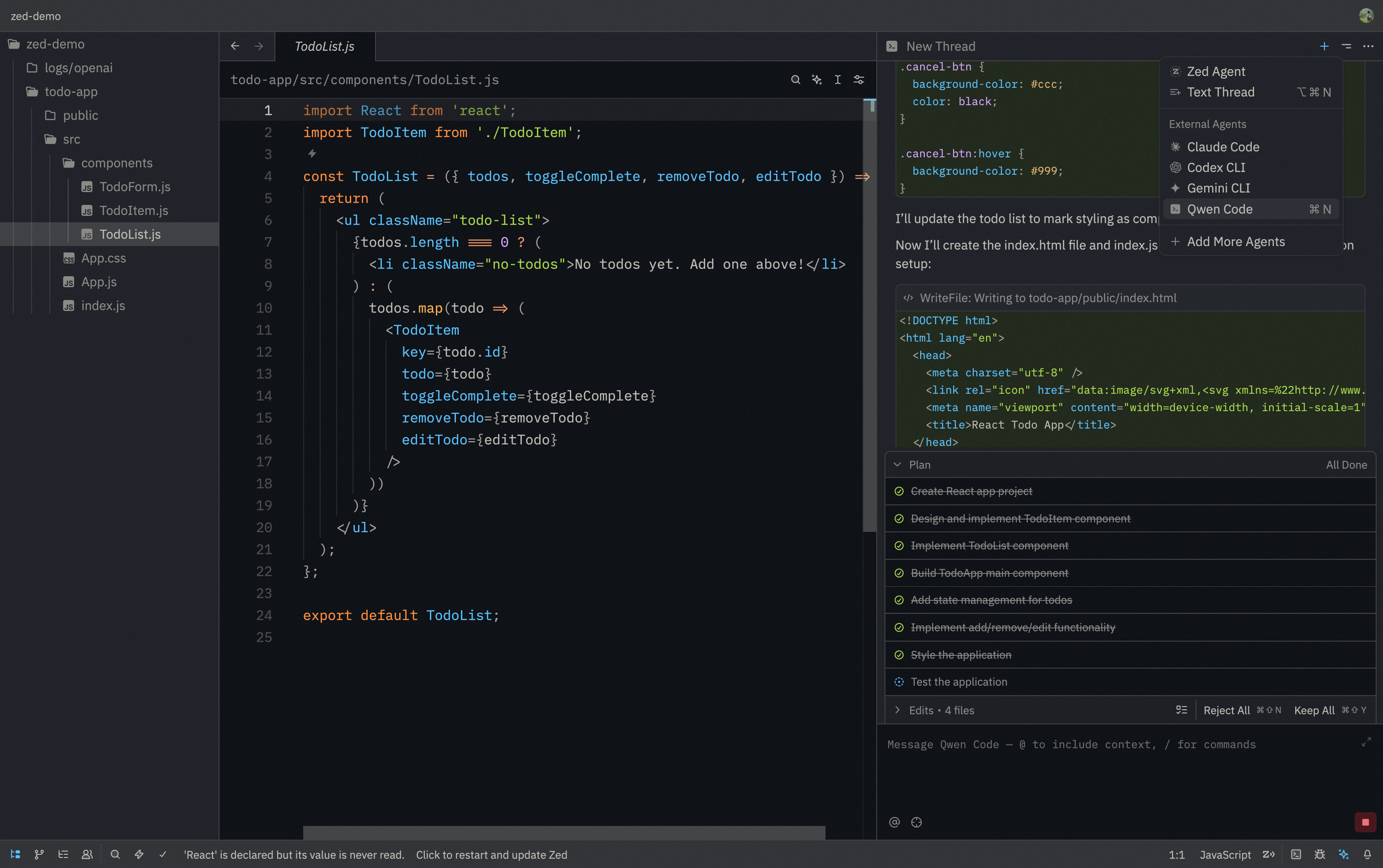
|
|
6
|
-
|
|
7
|
-
### Features
|
|
8
|
-
|
|
9
|
-
- **Native agent experience**: Integrated AI assistant panel within Zed's interface
|
|
10
|
-
- **Agent Client Protocol**: Full support for ACP enabling advanced IDE interactions
|
|
11
|
-
- **File management**: @-mention files to add them to the conversation context
|
|
12
|
-
- **Conversation history**: Access to past conversations within Zed
|
|
13
|
-
|
|
14
|
-
### Requirements
|
|
15
|
-
|
|
16
|
-
- Zed Editor (latest version recommended)
|
|
17
|
-
- Matilda Code CLI installed
|
|
18
|
-
|
|
19
|
-
### Installation
|
|
20
|
-
|
|
21
|
-
#### Install from ACP Registry (Recommend)
|
|
22
|
-
|
|
23
|
-
1. Install Matilda Code CLI:
|
|
24
|
-
|
|
25
|
-
```bash
|
|
26
|
-
npm install -g @maincode-ai/matilda-code
|
|
27
|
-
```
|
|
28
|
-
|
|
29
|
-
2. Download and install [Zed Editor](https://zed.dev/)
|
|
30
|
-
|
|
31
|
-
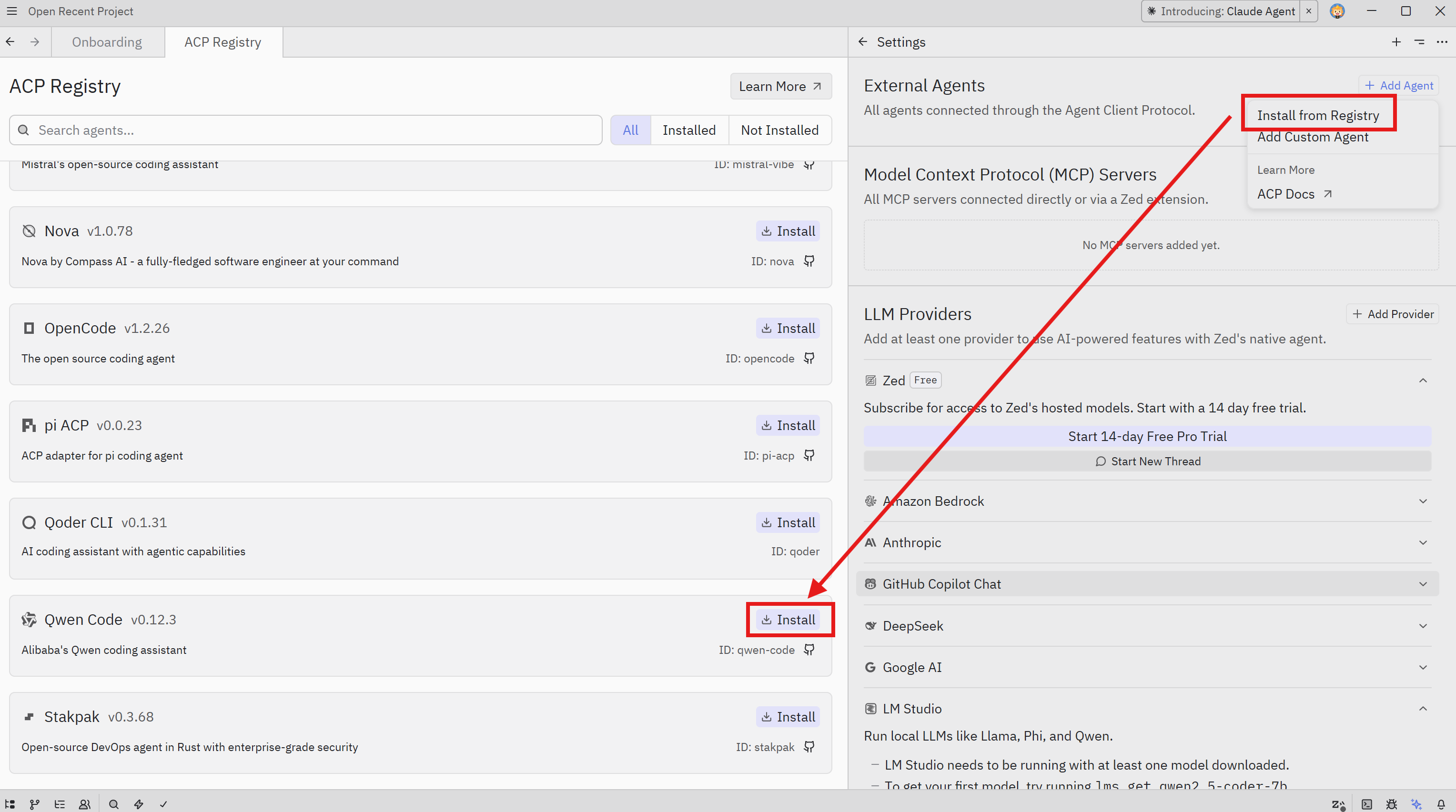
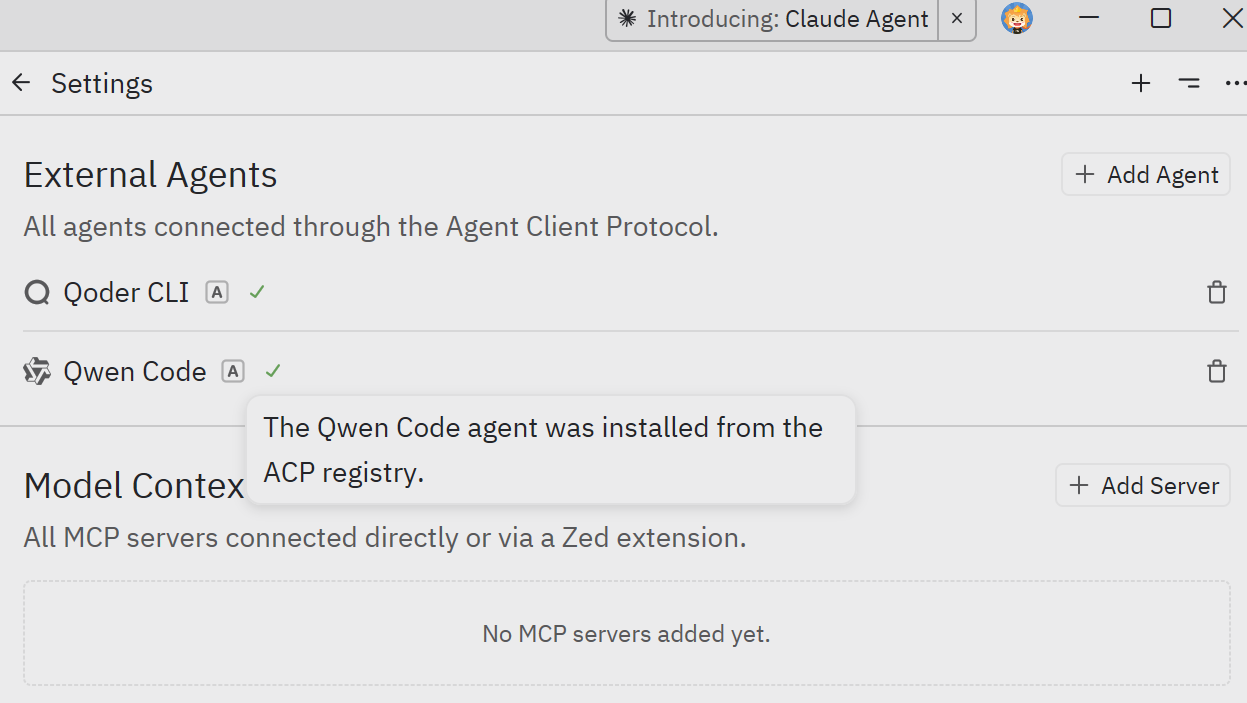
3. In Zed, click the **settings button** in the top right corner, select **"Add agent"**, choose **"Install from Registry"**, find **Matilda Code**, then click **Install**.
|
|
32
|
-
|
|
33
|
-
|
|
34
|
-
|
|
35
|
-
|
|
36
|
-
|
|
37
|
-
#### Manual Install
|
|
38
|
-
|
|
39
|
-
1. Install Matilda Code CLI:
|
|
40
|
-
|
|
41
|
-
```bash
|
|
42
|
-
npm install -g @maincode-ai/matilda-code
|
|
43
|
-
```
|
|
44
|
-
|
|
45
|
-
2. Download and install [Zed Editor](https://zed.dev/)
|
|
46
|
-
|
|
47
|
-
3. In Zed, click the **settings button** in the top right corner, select **"Add agent"**, choose **"Create a custom agent"**, and add the following configuration:
|
|
48
|
-
|
|
49
|
-
```json
|
|
50
|
-
"Matilda Code": {
|
|
51
|
-
"type": "custom",
|
|
52
|
-
"command": "matilda",
|
|
53
|
-
"args": ["--acp"],
|
|
54
|
-
"env": {}
|
|
55
|
-
}
|
|
56
|
-
```
|
|
57
|
-
|
|
58
|
-

|
|
59
|
-
|
|
60
|
-
## Troubleshooting
|
|
61
|
-
|
|
62
|
-
### Agent not appearing
|
|
63
|
-
|
|
64
|
-
- Run `matilda --version` in terminal to verify installation
|
|
65
|
-
- Check that the JSON configuration is valid
|
|
66
|
-
- Restart Zed Editor
|
|
67
|
-
|
|
68
|
-
### Matilda Code not responding
|
|
69
|
-
|
|
70
|
-
- Check your internet connection
|
|
71
|
-
- Verify CLI works by running `matilda` in terminal
|
|
72
|
-
- [File an issue on GitHub](https://github.com/MaincodeHQ/matilda-code/issues) if the problem persists
|
|
@@ -1,221 +0,0 @@
|
|
|
1
|
-
# Local launch templates for `matilda serve` (v0.16-alpha)
|
|
2
|
-
|
|
3
|
-
Reference templates for running `matilda serve` as a long-lived background process on a developer workstation. Pairs with the [v0.16-alpha known limits](./matilda-serve.md#v016-alpha-known-limits) — local-only, single-user, BYO bearer token. Containerized / multi-host / TLS-fronted deployments defer to v0.16.x.
|
|
4
|
-
|
|
5
|
-
> **Audience**: dogfooding developers who want the daemon up across reboots, with logs going somewhere durable, and a clean `restart-on-failure` story. If you only need the daemon for the duration of a single shell session, plain `matilda serve` (foreground, Ctrl-C to stop) is fine.
|
|
6
|
-
|
|
7
|
-
## Generate a bearer token (once)
|
|
8
|
-
|
|
9
|
-
```bash
|
|
10
|
-
openssl rand -hex 32 > ~/.matilda-serve-token # user-managed, NOT a built-in path
|
|
11
|
-
chmod 600 ~/.matilda-serve-token
|
|
12
|
-
export MATILDA_SERVER_TOKEN="$(cat ~/.matilda-serve-token)"
|
|
13
|
-
```
|
|
14
|
-
|
|
15
|
-
The path / filename is yours to choose; v0.16-alpha does not auto-generate or auto-locate a token file (deferred to v0.16.x). See the [Authentication](./matilda-serve.md#authentication) section of the user guide for the canonical BYO setup.
|
|
16
|
-
|
|
17
|
-
> **Scope this `export` to the current shell session only.** Don't add it to `~/.bashrc` / `~/.zshrc` — a profile-level export exposes the bearer token to every process spawned from that shell (IDE subprocesses, browser debuggers, `npm` scripts from unrelated projects). For long-running setups, use the systemd `EnvironmentFile=` / launchd `EnvironmentVariables` mechanisms below — both scope the token to just the daemon process.
|
|
18
|
-
|
|
19
|
-
The daemon reads the bearer token from either `--token <value>` on the CLI or the `MATILDA_SERVER_TOKEN` env var (whitespace stripped from both). The TypeScript SDK's `DaemonClient` constructor falls back to `MATILDA_SERVER_TOKEN` when no `token` option is passed (PR 27 fallback — clients with the env var set never need to thread the value through their script).
|
|
20
|
-
|
|
21
|
-
One shell-level `export` covers both server boot and SDK client construction (just keep it scoped to the session, per the note above).
|
|
22
|
-
|
|
23
|
-
## Linux: systemd user unit
|
|
24
|
-
|
|
25
|
-
> **Find your `matilda` binary first.** The unit file's `ExecStart=` must hold an **absolute path** — service managers don't read your shell's `PATH`. Run `which matilda` to discover it. Common locations: `/usr/local/bin/matilda` (Linuxbrew, manual installs), `~/.nvm/versions/node/vX.Y.Z/bin/matilda` (nvm), `~/.fnm/aliases/default/bin/matilda` (fnm), `~/.volta/bin/matilda` (Volta). Substitute the actual path everywhere the templates below show `/PATH/TO/matilda`.
|
|
26
|
-
|
|
27
|
-
`~/.config/systemd/user/matilda-serve.service`:
|
|
28
|
-
|
|
29
|
-
```ini
|
|
30
|
-
[Unit]
|
|
31
|
-
Description=Matilda Code daemon (loopback HTTP + SSE)
|
|
32
|
-
After=network.target
|
|
33
|
-
|
|
34
|
-
[Service]
|
|
35
|
-
Type=simple
|
|
36
|
-
# Replace with your project; %h expands to $HOME under user units.
|
|
37
|
-
WorkingDirectory=%h/your-project
|
|
38
|
-
# Run `which matilda` to find the absolute path. systemd does NOT read $PATH.
|
|
39
|
-
ExecStart=/PATH/TO/matilda serve --hostname 127.0.0.1 --port 4170
|
|
40
|
-
# Read the bearer token from a chmod 600 file rather than inlining it
|
|
41
|
-
# in the unit. `Environment=` would expose the token in the unit file
|
|
42
|
-
# (typically 644 = world-readable). EnvironmentFile keeps the token in
|
|
43
|
-
# the user-owned secret file you already created with `chmod 600`.
|
|
44
|
-
EnvironmentFile=%h/.matilda-serve-token-env
|
|
45
|
-
Restart=on-failure
|
|
46
|
-
RestartSec=5
|
|
47
|
-
StandardOutput=journal
|
|
48
|
-
StandardError=journal
|
|
49
|
-
|
|
50
|
-
[Install]
|
|
51
|
-
WantedBy=default.target
|
|
52
|
-
```
|
|
53
|
-
|
|
54
|
-
Build the env file once (the token file from the setup step holds the raw value; this wraps it in `KEY=value` form so systemd reads it as an env assignment):
|
|
55
|
-
|
|
56
|
-
```bash
|
|
57
|
-
echo "MATILDA_SERVER_TOKEN=$(cat ~/.matilda-serve-token)" > ~/.matilda-serve-token-env
|
|
58
|
-
chmod 600 ~/.matilda-serve-token-env
|
|
59
|
-
```
|
|
60
|
-
|
|
61
|
-
Manage:
|
|
62
|
-
|
|
63
|
-
```bash
|
|
64
|
-
systemctl --user daemon-reload
|
|
65
|
-
systemctl --user enable --now matilda-serve.service
|
|
66
|
-
loginctl enable-linger "$(whoami)" # keep the user manager running after logout / across reboot
|
|
67
|
-
journalctl --user -u matilda-serve -f # tail logs
|
|
68
|
-
systemctl --user restart matilda-serve.service # after token rotation
|
|
69
|
-
systemctl --user disable --now matilda-serve.service
|
|
70
|
-
```
|
|
71
|
-
|
|
72
|
-
Without `loginctl enable-linger`, the user-level systemd instance shuts down when the user logs out and only restarts on next login — on a headless dev box the daemon would not survive an SSH session ending. `enable-linger` is what makes "across reboots" actually work.
|
|
73
|
-
|
|
74
|
-
**System-wide alternative** (shared dev hosts, less common): drop the unit at `/etc/systemd/system/matilda-serve@.service` with `User=%i`, manage via `sudo systemctl enable --now matilda-serve@<username>.service`. Same `[Service]` body otherwise — but world-readable `Environment=` exposure is even more problematic at this level, so always use `EnvironmentFile=` pointing at the user's `chmod 600` file. Pick user-level + linger for single-user workstations.
|
|
75
|
-
|
|
76
|
-
## macOS: launchd user agent
|
|
77
|
-
|
|
78
|
-
> **Find your `matilda` binary first.** Same constraint as systemd — `ProgramArguments` must hold an **absolute path**. Run `which matilda` to discover it. Common locations on macOS: `/opt/homebrew/bin/matilda` (Homebrew on Apple Silicon), `/usr/local/bin/matilda` (Homebrew on Intel, manual installs), `~/.nvm/versions/node/vX.Y.Z/bin/matilda` (nvm), `~/.volta/bin/matilda` (Volta). Substitute below where the template shows `/PATH/TO/matilda`.
|
|
79
|
-
|
|
80
|
-
`~/Library/LaunchAgents/com.maincode.matilda-serve.plist`:
|
|
81
|
-
|
|
82
|
-
```xml
|
|
83
|
-
<?xml version="1.0" encoding="UTF-8"?>
|
|
84
|
-
<!DOCTYPE plist PUBLIC "-//Apple//DTD PLIST 1.0//EN" "http://www.apple.com/DTDs/PropertyList-1.0.dtd">
|
|
85
|
-
<plist version="1.0">
|
|
86
|
-
<dict>
|
|
87
|
-
<key>Label</key>
|
|
88
|
-
<string>com.maincode.matilda-serve</string>
|
|
89
|
-
<key>ProgramArguments</key>
|
|
90
|
-
<array>
|
|
91
|
-
<!-- Run `which matilda` to find the absolute path; launchd does NOT read $PATH. -->
|
|
92
|
-
<string>/PATH/TO/matilda</string>
|
|
93
|
-
<string>serve</string>
|
|
94
|
-
<string>--hostname</string>
|
|
95
|
-
<string>127.0.0.1</string>
|
|
96
|
-
<string>--port</string>
|
|
97
|
-
<string>4170</string>
|
|
98
|
-
</array>
|
|
99
|
-
<!-- launchd does NOT expand `~` or `$HOME` — use absolute paths. -->
|
|
100
|
-
<key>WorkingDirectory</key>
|
|
101
|
-
<string>/Users/YOUR-USERNAME/your-project</string>
|
|
102
|
-
<key>EnvironmentVariables</key>
|
|
103
|
-
<dict>
|
|
104
|
-
<!-- DO NOT COMMIT this file with a real token. Also chmod 600 the
|
|
105
|
-
plist itself so the inlined token is not world-readable. -->
|
|
106
|
-
<key>MATILDA_SERVER_TOKEN</key>
|
|
107
|
-
<string>PASTE-YOUR-TOKEN-HERE</string>
|
|
108
|
-
</dict>
|
|
109
|
-
<key>RunAtLoad</key>
|
|
110
|
-
<true/>
|
|
111
|
-
<!-- Restart only on non-zero exits (matches systemd Restart=on-failure).
|
|
112
|
-
A bare `<true/>` would respawn even after a clean SIGTERM, making
|
|
113
|
-
`kill <pid>` impossible to use as a stop signal — operator would
|
|
114
|
-
have to `launchctl unload`. SuccessfulExit=false fixes that. -->
|
|
115
|
-
<key>KeepAlive</key>
|
|
116
|
-
<dict>
|
|
117
|
-
<key>SuccessfulExit</key>
|
|
118
|
-
<false/>
|
|
119
|
-
</dict>
|
|
120
|
-
<!-- Throttle restart storms on persistent failures (mirrors systemd
|
|
121
|
-
RestartSec=5; launchd's default would respawn every <1s). -->
|
|
122
|
-
<key>ThrottleInterval</key>
|
|
123
|
-
<integer>10</integer>
|
|
124
|
-
<!-- Log into the user's Library, not /tmp. /tmp is world-writable
|
|
125
|
-
(symlink-attack risk on shared workstations) and gets cleaned by
|
|
126
|
-
periodic-daily after 3 days; `~/Library/Logs/matilda-serve/` is
|
|
127
|
-
user-scoped and survives. launchd truncates these on every
|
|
128
|
-
`load`, so the unload→load token-rotation cycle wipes prior
|
|
129
|
-
diagnostic logs — back them up if you need post-incident
|
|
130
|
-
inspection. -->
|
|
131
|
-
<key>StandardOutPath</key>
|
|
132
|
-
<string>/Users/YOUR-USERNAME/Library/Logs/matilda-serve/out.log</string>
|
|
133
|
-
<key>StandardErrorPath</key>
|
|
134
|
-
<string>/Users/YOUR-USERNAME/Library/Logs/matilda-serve/err.log</string>
|
|
135
|
-
</dict>
|
|
136
|
-
</plist>
|
|
137
|
-
```
|
|
138
|
-
|
|
139
|
-
Manage:
|
|
140
|
-
|
|
141
|
-
```bash
|
|
142
|
-
mkdir -p ~/Library/Logs/matilda-serve # first time only
|
|
143
|
-
chmod 600 ~/Library/LaunchAgents/com.maincode.matilda-serve.plist # plist holds the inline token
|
|
144
|
-
launchctl load ~/Library/LaunchAgents/com.maincode.matilda-serve.plist
|
|
145
|
-
launchctl unload ~/Library/LaunchAgents/com.maincode.matilda-serve.plist # to stop
|
|
146
|
-
tail -f ~/Library/Logs/matilda-serve/out.log ~/Library/Logs/matilda-serve/err.log
|
|
147
|
-
```
|
|
148
|
-
|
|
149
|
-
After editing the plist (e.g., rotating the token) you must `unload` then `load` again — `launchctl` does not auto-reload on plist changes the way `systemd daemon-reload` does. Note: each `load` truncates the log files, so save them off if you're investigating an incident before rotating.
|
|
150
|
-
|
|
151
|
-
## tmux session (interactive supervision)
|
|
152
|
-
|
|
153
|
-
Assumes `MATILDA_SERVER_TOKEN` is already exported in your shell (see the setup section above):
|
|
154
|
-
|
|
155
|
-
```bash
|
|
156
|
-
tmux new -d -s matilda-serve "cd ~/your-project && matilda serve --hostname 127.0.0.1"
|
|
157
|
-
tmux attach -t matilda-serve # see live logs; Ctrl-b d to detach
|
|
158
|
-
tmux kill-session -t matilda-serve
|
|
159
|
-
```
|
|
160
|
-
|
|
161
|
-
`tmux new -d` inherits the parent shell's environment, so `MATILDA_SERVER_TOKEN` flows through automatically. Best when you want to occasionally watch the daemon's stdout (auth warnings, MCP discovery progress, slow-client warnings) without committing to a service unit. Survives terminal close but not host reboot.
|
|
162
|
-
|
|
163
|
-
## nohup one-liner (quick + dirty)
|
|
164
|
-
|
|
165
|
-
Assumes `MATILDA_SERVER_TOKEN` is already exported in your shell:
|
|
166
|
-
|
|
167
|
-
```bash
|
|
168
|
-
nohup bash -c 'cd ~/your-project && matilda serve --hostname 127.0.0.1' > matilda-serve.log 2>&1 &
|
|
169
|
-
echo $! # daemon PID; capture if you want to `kill` cleanly later
|
|
170
|
-
```
|
|
171
|
-
|
|
172
|
-
The wrapping `bash -c '...'` ensures the daemon binds to `~/your-project` rather than wherever you happened to run the command. Without that `cd`, `matilda serve` defaults to `process.cwd()` and a `POST /session` from a client expecting your project workspace returns `400 workspace_mismatch` — silent foot-gun.
|
|
173
|
-
|
|
174
|
-
OK for one-off "let me run this in the background while I poke at the API" workflows. **Not recommended** for anything beyond a single session — no restart-on-crash, log file grows unbounded, no clean way to find the daemon if you forget the PID. Prefer tmux for interactive supervision or systemd / launchd for anything you want to outlast a reboot.
|
|
175
|
-
|
|
176
|
-
## Verifying the daemon is up
|
|
177
|
-
|
|
178
|
-
```bash
|
|
179
|
-
curl http://127.0.0.1:4170/health # → {"status":"ok"}
|
|
180
|
-
curl -H "Authorization: Bearer $MATILDA_SERVER_TOKEN" \
|
|
181
|
-
http://127.0.0.1:4170/capabilities | jq .protocolVersions # daemon's feature set
|
|
182
|
-
```
|
|
183
|
-
|
|
184
|
-
When auth is configured (i.e., the daemon was started with `--token` / `MATILDA_SERVER_TOKEN` set, OR `--require-auth=true`), every route except `/health` on loopback binds requires `Authorization: Bearer <token>`. If you started the daemon without a token on the loopback default (the `matilda serve` zero-config path), neither call requires a header. The templates above all configure a token, so the `Authorization` header is needed in practice. If `/capabilities` returns `401`, the unit / plist token doesn't match the env-exported token your `curl` is using.
|
|
185
|
-
|
|
186
|
-
## Token rotation
|
|
187
|
-
|
|
188
|
-
1. Generate a new token + write the env file the unit references:
|
|
189
|
-
```bash
|
|
190
|
-
openssl rand -hex 32 > ~/.matilda-serve-token
|
|
191
|
-
chmod 600 ~/.matilda-serve-token
|
|
192
|
-
echo "MATILDA_SERVER_TOKEN=$(cat ~/.matilda-serve-token)" > ~/.matilda-serve-token-env
|
|
193
|
-
chmod 600 ~/.matilda-serve-token-env
|
|
194
|
-
```
|
|
195
|
-
(For the launchd / nohup / tmux templates: edit the plist's `<string>` value or re-`export MATILDA_SERVER_TOKEN`. Don't forget `chmod 600` on the plist if you regenerate it.)
|
|
196
|
-
2. Restart the daemon:
|
|
197
|
-
- **systemd**: `systemctl --user restart matilda-serve.service`
|
|
198
|
-
- **launchd**: `launchctl unload ~/Library/LaunchAgents/com.maincode.matilda-serve.plist && launchctl load ~/Library/LaunchAgents/com.maincode.matilda-serve.plist`
|
|
199
|
-
- **tmux / nohup**: `kill <pid>` then re-run with the new token in env
|
|
200
|
-
3. Update any client SDKs / scripts. The TypeScript SDK's `DaemonClient` reads `MATILDA_SERVER_TOKEN` automatically (PR 27 fallback) — re-`export` the new value in any client shell and reconstruct the client.
|
|
201
|
-
|
|
202
|
-
## Restart and crash behavior
|
|
203
|
-
|
|
204
|
-
Service-manager restart semantics differ across the templates:
|
|
205
|
-
|
|
206
|
-
- **systemd `Restart=on-failure`** — restart only on non-zero exit / signal. A clean SIGTERM (`systemctl stop`) does **not** trigger a restart loop.
|
|
207
|
-
- **launchd `KeepAlive` with `SuccessfulExit=false`** (the template above) — matches systemd behavior. A bare `<true/>` would have respawned even after a clean exit. `ThrottleInterval=10` rate-limits restart storms on persistent failures, mirroring systemd's `RestartSec=5`.
|
|
208
|
-
- **tmux / nohup** — no automatic restart. A daemon crash leaves you with a dead PID until you re-run.
|
|
209
|
-
|
|
210
|
-
Within a **single daemon process lifetime**, client disconnects recover via SSE `Last-Event-ID` resume per the [Durability model](./matilda-serve.md#durability-model) section of the user guide — the replay ring is in-memory.
|
|
211
|
-
|
|
212
|
-
A daemon **restart** drops all in-memory sessions; clients reconnect and start fresh. Cross-restart durability of session content (prompts, tool calls, conversation history) is **NOT** in v0.16-alpha.
|
|
213
|
-
|
|
214
|
-
## Out of scope (defers to v0.16.x or later)
|
|
215
|
-
|
|
216
|
-
- **Containerized deployment** — Dockerfile, docker-compose, Kubernetes manifests, nginx + TLS reverse proxy, multi-instance token isolation. Defers to v0.16.x once an enterprise pilot is committed; the doc would otherwise rot from no-one-validating.
|
|
217
|
-
- **Cross-host federation / multi-daemon coordination on one host** — `1 daemon = 1 workspace × N sessions` is enforced. Instance-path token keying + stale-token cleanup defer to v0.16.x.
|
|
218
|
-
- **Auto-generated daemon tokens** — alpha is BYO-token. Auto-gen + token-store infrastructure defers to v0.16.x.
|
|
219
|
-
- **Windows native service** (`nssm`, Service Control Manager wrapper) — for now use [WSL2](https://learn.microsoft.com/en-us/windows/wsl/) and follow the systemd section above.
|
|
220
|
-
|
|
221
|
-
See the [v0.16-alpha known limits](./matilda-serve.md#v016-alpha-known-limits) callout in the main user guide for the full deferred-features list, and [#4175](https://github.com/MaincodeHQ/matilda-code/issues/4175) for the v0.16-alpha rollout tracking issue.
|