@maincode-ai/matilda-code 0.21.12 → 0.21.13-nightly.20261027.e00306cd3
This diff represents the content of publicly available package versions that have been released to one of the supported registries. The information contained in this diff is provided for informational purposes only and reflects changes between package versions as they appear in their respective public registries.
- package/chunks/agent-H5JE3RJQ.js +3 -0
- package/chunks/agent-headless-H2JZZ7UV.js +3 -0
- package/chunks/{askUserQuestion-2QI4NSFJ.js → askUserQuestion-L3WDL2T4.js} +3 -3
- package/chunks/ca-UBWUTZVZ.js +25 -0
- package/chunks/chunk-4CVGYUEL.js +3 -0
- package/chunks/{chunk-RNKDFE2S.js → chunk-5B2QERWR.js} +1 -1
- package/chunks/chunk-62GTGPTP.js +8 -0
- package/chunks/chunk-6365AZBW.js +56 -0
- package/chunks/chunk-6PFK4XTH.js +207 -0
- package/chunks/chunk-7ZODGQO6.js +4 -0
- package/chunks/chunk-DB5LMKXU.js +31 -0
- package/chunks/chunk-EYZPVR7N.js +13 -0
- package/chunks/chunk-FKHUEFMK.js +8 -0
- package/chunks/{chunk-6T2GIM76.js → chunk-GILXFDEG.js} +1 -1
- package/chunks/{chunk-VTGICC67.js → chunk-GKEUZTOB.js} +1 -1
- package/chunks/chunk-GSRXW64P.js +120 -0
- package/chunks/chunk-GT6MSEK4.js +3 -0
- package/chunks/chunk-HEJO7OBH.js +3 -0
- package/chunks/chunk-HPO2YWG4.js +78 -0
- package/chunks/chunk-I3CV4LOD.js +8 -0
- package/chunks/{chunk-DOOFGSRV.js → chunk-J3AMKDX6.js} +1 -1
- package/chunks/chunk-JU7QTSKS.js +14 -0
- package/chunks/chunk-LBQNFSZ2.js +9 -0
- package/chunks/chunk-LOB42ODE.js +9 -0
- package/chunks/chunk-LVDDFAK4.js +89 -0
- package/chunks/{chunk-27Q5KW3A.js → chunk-NK2QMGCC.js} +13 -13
- package/chunks/{chunk-YRQP3SLC.js → chunk-O7VPFJ3R.js} +1 -1
- package/chunks/chunk-OBE5S4GG.js +9 -0
- package/chunks/{chunk-CZGZ3KK7.js → chunk-ONANBLIE.js} +1 -1
- package/chunks/chunk-QXSBPCBA.js +8 -0
- package/chunks/chunk-TUKNB5CQ.js +33 -0
- package/chunks/chunk-UM6CLO7D.js +7 -0
- package/chunks/chunk-V4D3LER3.js +2615 -0
- package/chunks/{chunk-HYVP4472.js → chunk-V6UPUMP3.js} +1 -1
- package/chunks/chunk-VUJRLLGL.js +8 -0
- package/chunks/{chunk-MCQUPLRE.js → chunk-WTU6GSZH.js} +1 -1
- package/chunks/chunk-XBTBZHRC.js +8 -0
- package/chunks/{chunk-WV3IUPZS.js → chunk-YTB3OFTT.js} +1 -1
- package/chunks/chunk-ZQKABJBB.js +8 -0
- package/chunks/chunk-ZSGBDQXU.js +11 -0
- package/chunks/{computer-use-WKDNUTLD.js → computer-use-N6KGNST6.js} +1 -1
- package/chunks/{cron-create-F2LXM2OA.js → cron-create-4XBY5RVI.js} +1 -1
- package/chunks/cron-delete-BH4VP3LX.js +3 -0
- package/chunks/cron-list-XXRFKNGM.js +5 -0
- package/chunks/de-LEEHWWJ2.js +25 -0
- package/chunks/{devtools-5JRKK3E7.js → devtools-7YNCRYZV.js} +1 -1
- package/chunks/{chunk-OOEH6ZSV.js → dist-UWUWLWTO.js} +2 -2
- package/chunks/{edit-QQNJZ55P.js → edit-6ULTLTJQ.js} +1 -1
- package/chunks/{en-EJLDYIBM.js → en-LNOIHFSQ.js} +4 -4
- package/chunks/{enter-worktree-5X5SAMBJ.js → enter-worktree-V2VANZYJ.js} +1 -1
- package/chunks/enterPlanMode-75H54S3Z.js +18 -0
- package/chunks/{exit-worktree-SRKZBEYF.js → exit-worktree-KPB32K6P.js} +1 -1
- package/chunks/{exitPlanMode-WSPTGGVN.js → exitPlanMode-K7JRP22Y.js} +2 -2
- package/chunks/fr-4TA2AIU6.js +25 -0
- package/chunks/{getMachineId-bsd-ZYBNK2JG.js → getMachineId-bsd-ETKQTB6C.js} +1 -1
- package/chunks/{getMachineId-darwin-CM2MQGUI.js → getMachineId-darwin-AKNRWOWB.js} +1 -1
- package/chunks/{getMachineId-linux-SYE2KMCW.js → getMachineId-linux-2QSD7FTP.js} +1 -1
- package/chunks/{getMachineId-unsupported-6IHVG2XO.js → getMachineId-unsupported-UXSV7I24.js} +1 -1
- package/chunks/{getMachineId-win-S3J3JSUM.js → getMachineId-win-4MTFXGP3.js} +1 -1
- package/chunks/glob-ACAIHWST.js +22 -0
- package/chunks/{goal-tools-C6BSBHCF.js → goal-tools-VPFXBI6M.js} +3 -3
- package/chunks/{grep-MVCOBUYW.js → grep-R4K75RXS.js} +1 -1
- package/chunks/{ja-GGNJR7AR.js → ja-VXDMQKRW.js} +5 -5
- package/chunks/keychain-token-storage-7VYNARRB.js +3 -0
- package/chunks/ls-4ZEICYPK.js +15 -0
- package/chunks/{lsp-DYDK6XCS.js → lsp-4US2RIIV.js} +1 -1
- package/chunks/mcp-client-ZKQFYCFN.js +3 -0
- package/chunks/monitor-KSNFIY54.js +32 -0
- package/chunks/{multipart-parser-JI75T2O5.js → multipart-parser-FKHYAVGR.js} +1 -1
- package/chunks/notebook-edit-655ZNV6Q.js +17 -0
- package/chunks/openaiContentGenerator-BG3OM453.js +52 -0
- package/chunks/pt-WEIMCOKI.js +25 -0
- package/chunks/read-file-4VSUKSRB.js +3 -0
- package/chunks/ripGrep-PNALN2GG.js +3 -0
- package/chunks/ru-WFLK34ZL.js +25 -0
- package/chunks/scheduler-AVYCIBEK.js +8 -0
- package/chunks/send-message-ND2SRKX5.js +8 -0
- package/chunks/shell-GUHQNOMZ.js +3 -0
- package/chunks/{skill-HZPFEAPF.js → skill-AB2X2DTC.js} +1 -1
- package/chunks/src-LZEU4AYF.js +5 -0
- package/chunks/symbol-search-VICSUEZH.js +19 -0
- package/chunks/{syntheticOutput-432LXITX.js → syntheticOutput-Z7DQKMRI.js} +1 -1
- package/chunks/task-create-BQ73FRTH.js +3 -0
- package/chunks/{task-detach-XMSJ3HBM.js → task-detach-JCHSLUOR.js} +1 -1
- package/chunks/task-list-6ESRFO5F.js +9 -0
- package/chunks/{task-stop-NTS62FLG.js → task-stop-74H2CPAJ.js} +1 -1
- package/chunks/{task-update-AR26UFYZ.js → task-update-R3BN6KPQ.js} +1 -1
- package/chunks/{team-create-PYXFVIR5.js → team-create-UTKRPUPZ.js} +3 -3
- package/chunks/team-delete-PCCGTLGL.js +8 -0
- package/chunks/todoWrite-BZI75DFV.js +3 -0
- package/chunks/{tool-search-RKZDSRYS.js → tool-search-FJ5MAPQ6.js} +1 -1
- package/chunks/{web-fetch-VW3SVDQ6.js → web-fetch-DEUGZQZS.js} +17 -17
- package/chunks/{web-search-XQUIZARL.js → web-search-PUUIEFJO.js} +3 -3
- package/chunks/{workflow-YXNXDRWZ.js → workflow-CBADL3IM.js} +2 -2
- package/chunks/write-file-QGCL2AJL.js +15 -0
- package/cli.js +644 -679
- package/examples/starter/README.md +0 -3
- package/locales/ca.js +1 -37
- package/locales/de.js +1 -42
- package/locales/en.js +1 -43
- package/locales/fr.js +1 -39
- package/locales/ja.js +1 -42
- package/locales/pt.js +1 -42
- package/locales/ru.js +1 -42
- package/package.json +2 -2
- package/sandbox-macos-permissive-closed.sb +0 -1
- package/sandbox-macos-permissive-open.sb +0 -1
- package/sandbox-macos-permissive-proxied.sb +1 -2
- package/sandbox-macos-restrictive-closed.sb +14 -2
- package/sandbox-macos-restrictive-open.sb +14 -2
- package/sandbox-macos-restrictive-proxied.sb +15 -3
- package/bundled/mainy/SKILL.md +0 -157
- package/bundled/mainy/docs/_meta.ts +0 -32
- package/bundled/mainy/docs/common-workflow.md +0 -571
- package/bundled/mainy/docs/configuration/_meta.ts +0 -7
- package/bundled/mainy/docs/configuration/auth.md +0 -82
- package/bundled/mainy/docs/configuration/matilda-ignore.md +0 -55
- package/bundled/mainy/docs/configuration/model-providers.md +0 -598
- package/bundled/mainy/docs/configuration/settings.md +0 -790
- package/bundled/mainy/docs/configuration/themes.md +0 -199
- package/bundled/mainy/docs/configuration/trusted-folders.md +0 -67
- package/bundled/mainy/docs/extension/_meta.ts +0 -9
- package/bundled/mainy/docs/extension/extension-releasing.md +0 -204
- package/bundled/mainy/docs/extension/getting-started-extensions.md +0 -299
- package/bundled/mainy/docs/extension/introduction.md +0 -338
- package/bundled/mainy/docs/features/_meta.ts +0 -27
- package/bundled/mainy/docs/features/approval-mode.md +0 -388
- package/bundled/mainy/docs/features/arena.md +0 -219
- package/bundled/mainy/docs/features/auto-mode.md +0 -308
- package/bundled/mainy/docs/features/channels/_meta.ts +0 -8
- package/bundled/mainy/docs/features/channels/dingtalk.md +0 -134
- package/bundled/mainy/docs/features/channels/feishu.md +0 -186
- package/bundled/mainy/docs/features/channels/overview.md +0 -336
- package/bundled/mainy/docs/features/channels/plugins.md +0 -87
- package/bundled/mainy/docs/features/channels/telegram.md +0 -120
- package/bundled/mainy/docs/features/channels/weixin.md +0 -106
- package/bundled/mainy/docs/features/code-review.md +0 -291
- package/bundled/mainy/docs/features/commands.md +0 -528
- package/bundled/mainy/docs/features/dual-output.md +0 -627
- package/bundled/mainy/docs/features/followup-suggestions.md +0 -109
- package/bundled/mainy/docs/features/headless.md +0 -448
- package/bundled/mainy/docs/features/hooks.md +0 -1306
- package/bundled/mainy/docs/features/language.md +0 -171
- package/bundled/mainy/docs/features/lsp.md +0 -496
- package/bundled/mainy/docs/features/markdown-rendering.md +0 -183
- package/bundled/mainy/docs/features/mcp.md +0 -423
- package/bundled/mainy/docs/features/memory.md +0 -185
- package/bundled/mainy/docs/features/sandbox.md +0 -249
- package/bundled/mainy/docs/features/scheduled-tasks.md +0 -139
- package/bundled/mainy/docs/features/skills.md +0 -347
- package/bundled/mainy/docs/features/status-line.md +0 -397
- package/bundled/mainy/docs/features/structured-output.md +0 -309
- package/bundled/mainy/docs/features/sub-agents.md +0 -737
- package/bundled/mainy/docs/features/tips.md +0 -54
- package/bundled/mainy/docs/features/token-caching.md +0 -29
- package/bundled/mainy/docs/features/tool-use-summaries.md +0 -178
- package/bundled/mainy/docs/features/worktree.md +0 -345
- package/bundled/mainy/docs/ide-integration/_meta.ts +0 -4
- package/bundled/mainy/docs/ide-integration/ide-companion-spec.md +0 -182
- package/bundled/mainy/docs/ide-integration/ide-integration.md +0 -144
- package/bundled/mainy/docs/integration-github-action.md +0 -241
- package/bundled/mainy/docs/integration-jetbrains.md +0 -81
- package/bundled/mainy/docs/integration-vscode.md +0 -39
- package/bundled/mainy/docs/integration-zed.md +0 -72
- package/bundled/mainy/docs/matilda-serve-deploy-local.md +0 -221
- package/bundled/mainy/docs/matilda-serve.md +0 -661
- package/bundled/mainy/docs/overview.md +0 -64
- package/bundled/mainy/docs/quickstart.md +0 -234
- package/bundled/mainy/docs/reference/_meta.ts +0 -3
- package/bundled/mainy/docs/reference/keyboard-shortcuts.md +0 -91
- package/bundled/mainy/docs/support/Uninstall.md +0 -65
- package/bundled/mainy/docs/support/_meta.ts +0 -6
- package/bundled/mainy/docs/support/tos-privacy.md +0 -94
- package/bundled/mainy/docs/support/troubleshooting.md +0 -127
- package/chunks/agent-WM63A6NK.js +0 -3
- package/chunks/agent-headless-QIUBDKPW.js +0 -3
- package/chunks/anthropicContentGenerator-VKFTAIU3.js +0 -39
- package/chunks/ca-I2HEEIL7.js +0 -25
- package/chunks/chunk-2HTPVSGT.js +0 -3
- package/chunks/chunk-2MOGYHWM.js +0 -8
- package/chunks/chunk-3IRGBRSP.js +0 -113
- package/chunks/chunk-3YLXGE6T.js +0 -8
- package/chunks/chunk-47XR7IMP.js +0 -8
- package/chunks/chunk-4F4DA5UI.js +0 -8
- package/chunks/chunk-4J6DC24J.js +0 -59
- package/chunks/chunk-4Q2SNBUH.js +0 -18
- package/chunks/chunk-5C2RJ5RR.js +0 -37
- package/chunks/chunk-6E766NPX.js +0 -31
- package/chunks/chunk-6EQMZNIY.js +0 -8
- package/chunks/chunk-6GBNB5Z2.js +0 -3
- package/chunks/chunk-6Z2MV7ZY.js +0 -186
- package/chunks/chunk-BVOCFLC4.js +0 -56
- package/chunks/chunk-CSJTA7NE.js +0 -101
- package/chunks/chunk-DC7LAFZZ.js +0 -8
- package/chunks/chunk-DE3HKC2W.js +0 -9
- package/chunks/chunk-EQGA7LH7.js +0 -30
- package/chunks/chunk-FPO57O66.js +0 -39
- package/chunks/chunk-FWDMPRKU.js +0 -3
- package/chunks/chunk-G7R2XEEF.js +0 -7
- package/chunks/chunk-GOJCMVJJ.js +0 -8
- package/chunks/chunk-GTVCJCHR.js +0 -8
- package/chunks/chunk-JCE3JAVC.js +0 -25
- package/chunks/chunk-JRECUFB3.js +0 -2630
- package/chunks/chunk-KHHJYBR5.js +0 -9
- package/chunks/chunk-LJR4RZZ2.js +0 -3
- package/chunks/chunk-LUNDTQ3G.js +0 -8
- package/chunks/chunk-M53RP3YP.js +0 -31
- package/chunks/chunk-MO2HXJG5.js +0 -9
- package/chunks/chunk-MTMU7JYZ.js +0 -11
- package/chunks/chunk-O44XK65C.js +0 -8
- package/chunks/chunk-OA56BXPD.js +0 -3
- package/chunks/chunk-PA6532AY.js +0 -6
- package/chunks/chunk-PGXQZVLX.js +0 -8
- package/chunks/chunk-QKYGQLWC.js +0 -8
- package/chunks/chunk-QN6Y6NPA.js +0 -3
- package/chunks/chunk-QVCGLQCI.js +0 -32
- package/chunks/chunk-S3CWEVTS.js +0 -15
- package/chunks/chunk-SDTWBD62.js +0 -8
- package/chunks/chunk-T2T2UEPY.js +0 -4
- package/chunks/chunk-TISQNFB5.js +0 -3
- package/chunks/chunk-U347OO7S.js +0 -9
- package/chunks/chunk-UIRBHC5X.js +0 -3
- package/chunks/chunk-VI74YQQO.js +0 -8
- package/chunks/chunk-VYZOOSMP.js +0 -30
- package/chunks/chunk-WC2VTVCE.js +0 -27
- package/chunks/chunk-WVY2P6WH.js +0 -26
- package/chunks/chunk-WZ75OGYY.js +0 -14
- package/chunks/chunk-XMZIY7XX.js +0 -13
- package/chunks/chunk-YJAKOETP.js +0 -22
- package/chunks/chunk-YV3PUOBU.js +0 -65
- package/chunks/contextCommand-DAB3HOHY.js +0 -3
- package/chunks/cron-delete-DE6Q2S2L.js +0 -3
- package/chunks/cron-list-IAQEJVV7.js +0 -5
- package/chunks/de-AQXFJYZI.js +0 -25
- package/chunks/dist-7UYRLSLE.js +0 -3
- package/chunks/dist-ME6647DQ.js +0 -195
- package/chunks/dist-P6SLWL5V.js +0 -42
- package/chunks/dist-VG3ZDJ2A.js +0 -28
- package/chunks/dist-YTCHM57U.js +0 -23
- package/chunks/enterPlanMode-HP35SPLN.js +0 -18
- package/chunks/fileFromPath-7UCWPD4W.js +0 -3
- package/chunks/fr-6TDHK7F2.js +0 -25
- package/chunks/geminiContentGenerator-RJ73DQAP.js +0 -8
- package/chunks/glob-QQ6LGKDX.js +0 -22
- package/chunks/keychain-token-storage-KQK6MNOJ.js +0 -3
- package/chunks/ls-JYJXFSXN.js +0 -15
- package/chunks/matildaAgentContentGenerator-YUYS4336.js +0 -8
- package/chunks/matildaContentGenerator-O4Z2QPCP.js +0 -8
- package/chunks/matildaOAuth2-7COTQQR2.js +0 -3
- package/chunks/mcp-client-RXVQU5VI.js +0 -3
- package/chunks/monitor-77KXDXPR.js +0 -32
- package/chunks/notebook-edit-TKJD2EQZ.js +0 -17
- package/chunks/openaiContentGenerator-2EALAM3U.js +0 -3
- package/chunks/pt-D6L2QTDM.js +0 -25
- package/chunks/read-file-3KUAH6ND.js +0 -3
- package/chunks/ripGrep-U2PLKXMY.js +0 -3
- package/chunks/ru-BNJCHDYO.js +0 -25
- package/chunks/scheduler-J7VU2V5Y.js +0 -8
- package/chunks/send-message-P3SMWNEE.js +0 -8
- package/chunks/serve-FXH6EBQ6.js +0 -1015
- package/chunks/shell-PXR2AXDD.js +0 -3
- package/chunks/src-RFAEPLY7.js +0 -3
- package/chunks/src-WZTRMETQ.js +0 -5
- package/chunks/symbol-search-EAIZPWN7.js +0 -19
- package/chunks/task-create-Z3QRCMX4.js +0 -3
- package/chunks/task-list-GXAJW3JP.js +0 -9
- package/chunks/team-delete-OMYVUAQU.js +0 -8
- package/chunks/todoWrite-5NZ7CHTC.js +0 -3
- package/chunks/write-file-XDDLTGSG.js +0 -15
|
@@ -1,308 +0,0 @@
|
|
|
1
|
-
# Auto Mode
|
|
2
|
-
|
|
3
|
-
Auto Mode uses an LLM classifier to evaluate each tool call and decide
|
|
4
|
-
whether to auto-approve it. It sits between Auto-Edit (which only
|
|
5
|
-
auto-approves file edits) and YOLO (which auto-approves everything).
|
|
6
|
-
|
|
7
|
-
This page is the reference for configuring and troubleshooting Auto Mode.
|
|
8
|
-
For an introduction, see the
|
|
9
|
-
[Approval Mode overview](./approval-mode.md#4-auto-mode---classifier-driven-approval).
|
|
10
|
-
|
|
11
|
-
## How it works
|
|
12
|
-
|
|
13
|
-
When you're in Auto Mode and the agent tries to run a tool, Matilda Code
|
|
14
|
-
walks three layers in order:
|
|
15
|
-
|
|
16
|
-
1. **acceptEdits fast-path** — Edit / Write whose target path is inside
|
|
17
|
-
the workspace is auto-approved without invoking the classifier.
|
|
18
|
-
**Exception:** writes to Matilda Code's own self-modification surfaces
|
|
19
|
-
(`.matilda/settings*.json`, `MATILDA.md`, `AGENTS.md`, `MATILDA.local.md`,
|
|
20
|
-
configured context filenames, `.matilda/rules/`, `.matilda/commands/`,
|
|
21
|
-
`.matilda/agents/`, `.matilda/skills/`, `.matilda/hooks/`, `.mcp.json`) and
|
|
22
|
-
persistence surfaces (`.git/`, `.husky/`, `package.json`, `.npmrc`,
|
|
23
|
-
`Makefile`, `.github/workflows/`, etc.) route through the classifier
|
|
24
|
-
even when they are inside the workspace. Symlinks targeting protected
|
|
25
|
-
paths are resolved and rejected too. Shell commands that reach these
|
|
26
|
-
paths via `cd && bash -lc '...'` or other wrappers go through the
|
|
27
|
-
classifier as well.
|
|
28
|
-
2. **Safe-tool allowlist** — Read-only and metadata-only built-in tools
|
|
29
|
-
(Read, Grep, Glob, LS, LSP, TodoWrite, AskUserQuestion, etc.) are
|
|
30
|
-
auto-approved without invoking the classifier.
|
|
31
|
-
3. **LLM classifier** — Everything else (shell commands, web fetches,
|
|
32
|
-
sub-agent spawns, edits outside the workspace, MCP tools) is sent to
|
|
33
|
-
a two-stage classifier:
|
|
34
|
-
- **Stage 1 (fast)** — outputs `{ shouldBlock }` only. Around ~300ms.
|
|
35
|
-
If `shouldBlock` is `false`, the action is allowed and the call
|
|
36
|
-
proceeds.
|
|
37
|
-
- **Stage 2 (thinking)** — only runs when Stage 1 said block. Uses
|
|
38
|
-
chain-of-thought review to reduce Stage 1 false positives. Can
|
|
39
|
-
downgrade Stage 1's block to allow. Outputs the user-visible
|
|
40
|
-
`reason` on block.
|
|
41
|
-
|
|
42
|
-
The classifier uses your configured fast model
|
|
43
|
-
(`/model --fast`). If no fast model is configured, the main session
|
|
44
|
-
model is used instead.
|
|
45
|
-
|
|
46
|
-
## Hard rules still win
|
|
47
|
-
|
|
48
|
-
Auto Mode does **not** replace hard permission rules. Before the classifier
|
|
49
|
-
runs:
|
|
50
|
-
|
|
51
|
-
- `permissions.deny` rules block the action with the rule's reason. The
|
|
52
|
-
classifier never sees it.
|
|
53
|
-
- `permissions.allow` rules with specific specifiers (e.g.
|
|
54
|
-
`Bash(git status)`, `Read(./docs/**)`) still auto-allow without the
|
|
55
|
-
classifier — **except** when the call resolves to a write at a
|
|
56
|
-
protected self-modification or persistence path (see the list under
|
|
57
|
-
"How it works"). In that case Auto Mode re-checks the call through
|
|
58
|
-
the classifier so an allow rule on `Bash(*)` cannot silently turn
|
|
59
|
-
into permission to rewrite Matilda Code settings, commands, hooks,
|
|
60
|
-
skills, or MCP servers.
|
|
61
|
-
- `permissions.ask` rules force manual confirmation even in Auto Mode.
|
|
62
|
-
|
|
63
|
-
## Over-broad allow rules are stripped while in Auto Mode
|
|
64
|
-
|
|
65
|
-
Rules like the following would let the agent execute arbitrary code
|
|
66
|
-
without classifier review:
|
|
67
|
-
|
|
68
|
-
- `Bash` / `Bash(*)` / `Bash()` — auto-allow every shell command
|
|
69
|
-
- `Bash(python:*)`, `Bash(node*)`, `Bash(bash*)` — interpreter wildcards
|
|
70
|
-
- `Agent` / `Agent(coder)` — any allow on the Agent tool
|
|
71
|
-
- `Skill` / `Skill(pdf)` — any allow on the Skill tool
|
|
72
|
-
|
|
73
|
-
When you enter Auto Mode, Matilda Code temporarily removes these rules from
|
|
74
|
-
the active permission set and prints a notice listing them. The rules
|
|
75
|
-
come back the moment you leave Auto Mode. `settings.json` is never
|
|
76
|
-
modified.
|
|
77
|
-
|
|
78
|
-
If you genuinely need these broad rules, use YOLO mode instead.
|
|
79
|
-
|
|
80
|
-
## Configuring hints
|
|
81
|
-
|
|
82
|
-
Auto Mode reads `permissions.autoMode` from your `settings.json`. The
|
|
83
|
-
entries are natural-language descriptions, not rule patterns — they are
|
|
84
|
-
injected additively into the classifier's system prompt alongside the
|
|
85
|
-
built-in defaults.
|
|
86
|
-
|
|
87
|
-
There are three hint categories plus an environment list:
|
|
88
|
-
|
|
89
|
-
- **`allow`** — actions the classifier should auto-approve.
|
|
90
|
-
- **`softDeny`** — destructive or irreversible actions the classifier
|
|
91
|
-
should block **unless the user's most recent explicit request asked
|
|
92
|
-
for that exact action and scope**. Soft denies can be cleared by
|
|
93
|
-
user intent; a generic "yes do whatever" doesn't count.
|
|
94
|
-
- **`hardDeny`** — security-boundary actions the classifier must block
|
|
95
|
-
in Auto Mode regardless of `autoMode.hints.allow` or recent user
|
|
96
|
-
intent. This is classifier policy, not a deterministic permission
|
|
97
|
-
rule: it does not override `permissions.allow`. Use `permissions.deny`
|
|
98
|
-
for actions that must never be allowed by the permission manager.
|
|
99
|
-
|
|
100
|
-
```json
|
|
101
|
-
{
|
|
102
|
-
"permissions": {
|
|
103
|
-
"autoMode": {
|
|
104
|
-
"hints": {
|
|
105
|
-
"allow": [
|
|
106
|
-
"Running poetry install and poetry update in this Python project",
|
|
107
|
-
"Cleaning build artifacts under ./dist or ./build",
|
|
108
|
-
"Reading any file under /Users/me/code/"
|
|
109
|
-
],
|
|
110
|
-
"softDeny": [
|
|
111
|
-
"Editing Matilda Code settings unless I explicitly ask for the exact change",
|
|
112
|
-
"Running migration scripts that touch the production DB"
|
|
113
|
-
],
|
|
114
|
-
"hardDeny": [
|
|
115
|
-
"Sending secrets or .env contents to any network endpoint",
|
|
116
|
-
"Modifying anything under ~/.ssh or ~/.aws"
|
|
117
|
-
]
|
|
118
|
-
},
|
|
119
|
-
"environment": [
|
|
120
|
-
"This is a private monorepo with strict commit signing",
|
|
121
|
-
"Production credentials live in 1Password, never in plain files"
|
|
122
|
-
]
|
|
123
|
-
}
|
|
124
|
-
}
|
|
125
|
-
}
|
|
126
|
-
```
|
|
127
|
-
|
|
128
|
-
`hints.deny` is still accepted for backward compatibility and is treated
|
|
129
|
-
as `softDeny`. Mixing both is fine — entries are concatenated, `softDeny`
|
|
130
|
-
first.
|
|
131
|
-
|
|
132
|
-
### Length and count limits
|
|
133
|
-
|
|
134
|
-
To keep the classifier system prompt small:
|
|
135
|
-
|
|
136
|
-
- Each entry is capped at 200 characters (longer entries are truncated
|
|
137
|
-
with a warning).
|
|
138
|
-
- `hints.allow`, `hints.softDeny`, and `hints.hardDeny` accept up to 50
|
|
139
|
-
entries each.
|
|
140
|
-
- `environment` accepts up to 20 entries.
|
|
141
|
-
|
|
142
|
-
### Layering across settings files
|
|
143
|
-
|
|
144
|
-
`autoMode` is merged across system / user / workspace settings the same
|
|
145
|
-
way other permission settings are: arrays are concatenated and
|
|
146
|
-
de-duplicated.
|
|
147
|
-
|
|
148
|
-
## Reading the decision
|
|
149
|
-
|
|
150
|
-
When the classifier blocks an action, the tool call fails with one of
|
|
151
|
-
the following error texts:
|
|
152
|
-
|
|
153
|
-
- **`Blocked by auto mode policy: <reason>`** —
|
|
154
|
-
the classifier judged the action unsafe. The reason comes from Stage
|
|
155
|
-
2 of the classifier.
|
|
156
|
-
- **`Auto mode classifier unavailable; action blocked for safety`** —
|
|
157
|
-
the classifier API was unreachable, timed out, or returned an
|
|
158
|
-
un-parseable response. This is fail-closed behavior: when in doubt,
|
|
159
|
-
block.
|
|
160
|
-
|
|
161
|
-
Both messages are followed by a trailing guidance line telling the agent
|
|
162
|
-
that the **denied action specifically** must not be completed through
|
|
163
|
-
another tool, shell indirection, generated script, alias, symlink,
|
|
164
|
-
config change, hook, command file, MCP configuration, encoded payload,
|
|
165
|
-
or equivalent path. **Unrelated safe work and genuinely safer
|
|
166
|
-
alternatives are still allowed** — only attempts to accomplish the same
|
|
167
|
-
denied intent through a different surface are blocked.
|
|
168
|
-
|
|
169
|
-
If the denied action is genuinely required, the agent should stop and
|
|
170
|
-
ask you for explicit approval rather than route around the denial.
|
|
171
|
-
|
|
172
|
-
### Classifier reason language
|
|
173
|
-
|
|
174
|
-
Classifier reasons are produced by the LLM and are not translated. If you
|
|
175
|
-
want non-English reasons, add a hint like
|
|
176
|
-
`Respond reasons in Chinese` to `permissions.autoMode.environment`.
|
|
177
|
-
|
|
178
|
-
## Fallback to manual approval
|
|
179
|
-
|
|
180
|
-
Auto Mode protects you from getting stuck:
|
|
181
|
-
|
|
182
|
-
- After **3 consecutive policy blocks** the next tool call falls back to
|
|
183
|
-
the standard manual-approval prompt. This catches the case where the
|
|
184
|
-
agent keeps trying minor variants of a forbidden command.
|
|
185
|
-
- After **2 consecutive unavailable** results (classifier API failures)
|
|
186
|
-
the next tool call also falls back. This avoids waiting on a broken
|
|
187
|
-
classifier.
|
|
188
|
-
|
|
189
|
-
The session itself stays in Auto Mode — only the single fallback call
|
|
190
|
-
goes through manual approval. The counters reset when you approve the
|
|
191
|
-
fallback call or switch modes.
|
|
192
|
-
|
|
193
|
-
If you find yourself constantly hitting fallback, the most likely causes
|
|
194
|
-
are an outage on the classifier API or hints that need tuning. Switch to
|
|
195
|
-
Default Mode while you investigate.
|
|
196
|
-
|
|
197
|
-
## Troubleshooting
|
|
198
|
-
|
|
199
|
-
**"Auto mode keeps blocking my commands"**
|
|
200
|
-
|
|
201
|
-
Look at the reason in the error message. If the classifier is being too
|
|
202
|
-
conservative for your context, add an entry to
|
|
203
|
-
`permissions.autoMode.hints.allow` describing the pattern in
|
|
204
|
-
natural-language. Examples:
|
|
205
|
-
|
|
206
|
-
- `"Building Docker images for this project (docker build ...)"`
|
|
207
|
-
- `"Running database migrations against the local test DB"`
|
|
208
|
-
|
|
209
|
-
**"Auto mode classifier unavailable"**
|
|
210
|
-
|
|
211
|
-
The classifier API didn't respond. Possible causes:
|
|
212
|
-
|
|
213
|
-
- Network issue between you and the model endpoint.
|
|
214
|
-
- The configured fast model is no longer available — check `/model --fast`.
|
|
215
|
-
- The transcript is too long and exceeds the fast-model context window.
|
|
216
|
-
|
|
217
|
-
While diagnosing, switch back to Default Mode: `/approval-mode default`.
|
|
218
|
-
|
|
219
|
-
**"Falling back to manual approval"**
|
|
220
|
-
|
|
221
|
-
You've hit either the 3-consecutive-block or 2-consecutive-unavailable
|
|
222
|
-
guard. Approve or reject the prompt as you normally would. After one
|
|
223
|
-
approved fallback the consecutive counter resets.
|
|
224
|
-
|
|
225
|
-
**The classifier sees sensitive data in my prompts**
|
|
226
|
-
|
|
227
|
-
Tool inputs are projected through each tool's `toAutoClassifierInput`
|
|
228
|
-
method before they reach the classifier. Long edit content, web fetch
|
|
229
|
-
prompts, and sub-agent prompts are truncated. Tool results (file
|
|
230
|
-
contents, web pages) are never sent to the classifier — only the user's
|
|
231
|
-
text and assistant tool-use calls go through.
|
|
232
|
-
|
|
233
|
-
If a specific tool is exposing fields you'd rather redact, file an issue
|
|
234
|
-
with the tool name; the projection is per-tool and is meant to be
|
|
235
|
-
tightened over time.
|
|
236
|
-
|
|
237
|
-
## Limitations
|
|
238
|
-
|
|
239
|
-
- **Not offline-capable.** The classifier requires an LLM call.
|
|
240
|
-
- **Adds latency on the slow path.** Allowlist + acceptEdits cover most
|
|
241
|
-
calls without latency, but a `run_shell_command` typically adds
|
|
242
|
-
~300ms (fast classifier path) or ~3-5s (slow path with thinking
|
|
243
|
-
review).
|
|
244
|
-
- **Not a substitute for `deny` rules.** The classifier is best-effort.
|
|
245
|
-
For commands you're sure should never run, put them in
|
|
246
|
-
`permissions.deny`.
|
|
247
|
-
- **MCP tools default to conservative blocking.** Third-party MCP tools
|
|
248
|
-
(`mcp__*`) opt-in to argument forwarding via the
|
|
249
|
-
`toAutoClassifierInput` override. Tools that have not opted in expose
|
|
250
|
-
only their name to the classifier — most such calls are
|
|
251
|
-
conservatively blocked unless you've written an explicit `allow`
|
|
252
|
-
rule. This is fail-closed by design (credentials and voluminous
|
|
253
|
-
content do not leak into the classifier LLM). If you trust a
|
|
254
|
-
specific MCP tool, add `permissions.allow: ["mcp__server__tool"]` so
|
|
255
|
-
it bypasses the classifier entirely.
|
|
256
|
-
|
|
257
|
-
## FAQ
|
|
258
|
-
|
|
259
|
-
**Does Auto Mode send my code to a third party?**
|
|
260
|
-
|
|
261
|
-
Auto Mode reuses your existing model configuration — same endpoint as
|
|
262
|
-
the main agent. If you've configured Matilda Code to use a self-hosted
|
|
263
|
-
model, the classifier runs against that endpoint too.
|
|
264
|
-
|
|
265
|
-
**Will my secrets / `.env` contents reach the classifier?**
|
|
266
|
-
|
|
267
|
-
The classifier sees only what each tool's `toAutoClassifierInput`
|
|
268
|
-
projection exposes:
|
|
269
|
-
|
|
270
|
-
- `read_file` and other read-only tools: not invoked (they're on the
|
|
271
|
-
fast-path allowlist).
|
|
272
|
-
- `edit` / `write_file`: file_path plus the first 80 characters of
|
|
273
|
-
old/new content. Full content is not forwarded.
|
|
274
|
-
- `run_shell_command`: the full command (it has to — that's what the
|
|
275
|
-
classifier judges).
|
|
276
|
-
- `web_fetch`: the URL only. The prompt field is not forwarded.
|
|
277
|
-
- `agent`: subagent type plus the full prompt. The prompt is the
|
|
278
|
-
instruction the sub-agent will follow, so the classifier needs it
|
|
279
|
-
in full to detect attacks that would steer the sub-agent toward
|
|
280
|
-
destructive actions — same reason `run_shell_command` forwards the
|
|
281
|
-
full command.
|
|
282
|
-
|
|
283
|
-
Tool results (the actual content returned by tools) are stripped from
|
|
284
|
-
the classifier transcript entirely.
|
|
285
|
-
|
|
286
|
-
MCP tools (`mcp__*`) follow a stricter default: their parameters are
|
|
287
|
-
not forwarded unless the MCP tool author explicitly opted in via the
|
|
288
|
-
`toAutoClassifierInput` override. The classifier sees the tool name
|
|
289
|
-
but no arguments, so most MCP calls will be conservatively blocked
|
|
290
|
-
unless the user has written an explicit allow rule. This is fail-
|
|
291
|
-
closed by design — third-party tools should not leak credentials or
|
|
292
|
-
voluminous file content into the classifier LLM without intent.
|
|
293
|
-
|
|
294
|
-
**Can I disable the first-time information message?**
|
|
295
|
-
|
|
296
|
-
It only shows once per user-settings file. After dismissal,
|
|
297
|
-
`ui.autoModeAcknowledged: true` is set in your user settings.
|
|
298
|
-
|
|
299
|
-
**How is this different from Auto-Edit?**
|
|
300
|
-
|
|
301
|
-
Auto-Edit auto-approves file edits and nothing else — shell commands
|
|
302
|
-
still ask. Auto Mode uses a classifier to also auto-approve safe shell
|
|
303
|
-
commands and other tool calls while still blocking risky ones.
|
|
304
|
-
|
|
305
|
-
**How is this different from YOLO?**
|
|
306
|
-
|
|
307
|
-
YOLO auto-approves everything without any review. Auto Mode has the
|
|
308
|
-
classifier in the loop and blocks risky actions.
|
|
@@ -1,134 +0,0 @@
|
|
|
1
|
-
# DingTalk (Dingtalk)
|
|
2
|
-
|
|
3
|
-
This guide covers setting up a Matilda Code channel on DingTalk (钉钉).
|
|
4
|
-
|
|
5
|
-
## Prerequisites
|
|
6
|
-
|
|
7
|
-
- A DingTalk organization account
|
|
8
|
-
- A DingTalk bot application with AppKey and AppSecret (see below)
|
|
9
|
-
|
|
10
|
-
## Creating a Bot
|
|
11
|
-
|
|
12
|
-
1. Go to the [DingTalk Developer Portal](https://open-dev.dingtalk.com)
|
|
13
|
-
2. Create a new application (or use an existing one)
|
|
14
|
-
3. Under the application, enable the **Robot** capability
|
|
15
|
-
4. In Robot settings, enable **Stream Mode** (机器人协议 → Stream 模式)
|
|
16
|
-
5. Note the **AppKey** (Client ID) and **AppSecret** (Client Secret) from the application credentials page
|
|
17
|
-
|
|
18
|
-
### Stream Mode
|
|
19
|
-
|
|
20
|
-
DingTalk Stream mode uses an outbound WebSocket connection — no public URL or server is needed. The bot connects to DingTalk's servers, which push messages through the WebSocket. This is the simplest deployment model.
|
|
21
|
-
|
|
22
|
-
## Configuration
|
|
23
|
-
|
|
24
|
-
Add the channel to `~/.matilda/settings.json`:
|
|
25
|
-
|
|
26
|
-
```json
|
|
27
|
-
{
|
|
28
|
-
"channels": {
|
|
29
|
-
"my-dingtalk": {
|
|
30
|
-
"type": "dingtalk",
|
|
31
|
-
"clientId": "$DINGTALK_CLIENT_ID",
|
|
32
|
-
"clientSecret": "$DINGTALK_CLIENT_SECRET",
|
|
33
|
-
"senderPolicy": "open",
|
|
34
|
-
"sessionScope": "user",
|
|
35
|
-
"cwd": "/path/to/your/project",
|
|
36
|
-
"instructions": "You are a concise coding assistant responding via DingTalk.",
|
|
37
|
-
"groupPolicy": "open",
|
|
38
|
-
"groups": {
|
|
39
|
-
"*": { "requireMention": true }
|
|
40
|
-
}
|
|
41
|
-
}
|
|
42
|
-
}
|
|
43
|
-
}
|
|
44
|
-
```
|
|
45
|
-
|
|
46
|
-
Set the credentials as environment variables:
|
|
47
|
-
|
|
48
|
-
```bash
|
|
49
|
-
export DINGTALK_CLIENT_ID=<your-app-key>
|
|
50
|
-
export DINGTALK_CLIENT_SECRET=<your-app-secret>
|
|
51
|
-
```
|
|
52
|
-
|
|
53
|
-
Or define them in the `env` section of `settings.json`:
|
|
54
|
-
|
|
55
|
-
```json
|
|
56
|
-
{
|
|
57
|
-
"env": {
|
|
58
|
-
"DINGTALK_CLIENT_ID": "your-app-key",
|
|
59
|
-
"DINGTALK_CLIENT_SECRET": "your-app-secret"
|
|
60
|
-
}
|
|
61
|
-
}
|
|
62
|
-
```
|
|
63
|
-
|
|
64
|
-
## Running
|
|
65
|
-
|
|
66
|
-
```bash
|
|
67
|
-
# Start only the DingTalk channel
|
|
68
|
-
matilda channel start my-dingtalk
|
|
69
|
-
|
|
70
|
-
# Or start all configured channels together
|
|
71
|
-
matilda channel start
|
|
72
|
-
```
|
|
73
|
-
|
|
74
|
-
Open DingTalk and send a message to the bot. You should see a 👀 emoji reaction appear while the agent processes, followed by the response.
|
|
75
|
-
|
|
76
|
-
## Group Chats
|
|
77
|
-
|
|
78
|
-
DingTalk bots work in both DM and group conversations. To enable group support:
|
|
79
|
-
|
|
80
|
-
1. Set `groupPolicy` to `"allowlist"` or `"open"` in your channel config
|
|
81
|
-
2. Add the bot to a DingTalk group
|
|
82
|
-
3. @mention the bot in the group to trigger a response
|
|
83
|
-
|
|
84
|
-
By default, the bot requires an @mention in group chats (`requireMention: true`). Set `"requireMention": false` for a specific group to make it respond to all messages. See [Group Chats](./overview#group-chats) for full details.
|
|
85
|
-
|
|
86
|
-
### Finding a Group's Conversation ID
|
|
87
|
-
|
|
88
|
-
DingTalk uses `conversationId` to identify groups. You can find it in the channel service logs when someone sends a message in the group — look for the `conversationId` field in the log output.
|
|
89
|
-
|
|
90
|
-
## Images and Files
|
|
91
|
-
|
|
92
|
-
You can send photos and documents to the bot, not just text.
|
|
93
|
-
|
|
94
|
-
**Photos:** Send an image (screenshot, diagram, etc.) and the agent will analyze it using its vision capabilities. This requires a multimodal model — add `"model": "matilda3.5-plus"` (or another vision-capable model) to your channel config. DingTalk supports sending images directly or as part of rich text messages (mixed text + images).
|
|
95
|
-
|
|
96
|
-
**Files:** Send a PDF, code file, or any document. The bot downloads it from DingTalk's servers and saves it locally so the agent can read it with its file tools. Audio and video files are also supported. This works with any model.
|
|
97
|
-
|
|
98
|
-
## Key Differences from Telegram
|
|
99
|
-
|
|
100
|
-
- **Authentication:** AppKey + AppSecret instead of a static bot token. The SDK manages access token refresh automatically.
|
|
101
|
-
- **Connection:** WebSocket stream instead of polling — no public IP or webhook URL needed.
|
|
102
|
-
- **Formatting:** Responses use DingTalk's markdown dialect (a limited subset). Tables are automatically converted to plain text since DingTalk doesn't render them. Long messages are split into chunks at ~3800 characters.
|
|
103
|
-
- **Working indicator:** A 👀 emoji reaction is added to the user's message while processing, then removed when the response is sent.
|
|
104
|
-
- **Media download:** Two-step process — a `downloadCode` from the message is exchanged for a temporary download URL via DingTalk's API.
|
|
105
|
-
- **Groups:** DingTalk uses `isInAtList` for @mention detection instead of parsing message entities.
|
|
106
|
-
|
|
107
|
-
## Tips
|
|
108
|
-
|
|
109
|
-
- **Use DingTalk markdown-aware instructions** — DingTalk supports a limited markdown subset (headers, bold, links, code blocks, but not tables). Adding instructions like "Use DingTalk markdown. Avoid tables." helps the agent format responses correctly.
|
|
110
|
-
- **Restrict access** — In an organization context, `senderPolicy: "open"` may be acceptable. For tighter control, use `"allowlist"` or `"pairing"`. See [DM Pairing](./overview#dm-pairing) for details.
|
|
111
|
-
- **Referenced messages** — Quoting (replying to) a user message includes the quoted text as context for the agent. Quoting bot responses is not yet supported.
|
|
112
|
-
|
|
113
|
-
## Troubleshooting
|
|
114
|
-
|
|
115
|
-
### Bot doesn't connect
|
|
116
|
-
|
|
117
|
-
- Verify your AppKey and AppSecret are correct
|
|
118
|
-
- Check that the environment variables are set before running `matilda channel start`
|
|
119
|
-
- Make sure **Stream Mode** is enabled in the bot's settings on the DingTalk Developer Portal
|
|
120
|
-
- Check the terminal output for connection errors
|
|
121
|
-
|
|
122
|
-
### Bot doesn't respond in groups
|
|
123
|
-
|
|
124
|
-
- Check that `groupPolicy` is set to `"allowlist"` or `"open"` (default is `"disabled"`)
|
|
125
|
-
- Make sure you @mention the bot in the group message
|
|
126
|
-
- Verify the bot has been added to the group
|
|
127
|
-
|
|
128
|
-
### "No sessionWebhook in message"
|
|
129
|
-
|
|
130
|
-
This means DingTalk didn't include a reply endpoint in the message callback. This can happen if the bot's permissions are misconfigured. Check the bot's settings in the Developer Portal.
|
|
131
|
-
|
|
132
|
-
### "Sorry, something went wrong processing your message"
|
|
133
|
-
|
|
134
|
-
This usually means the agent encountered an error. Check the terminal output for details.
|
|
@@ -1,186 +0,0 @@
|
|
|
1
|
-
# Feishu (Lark)
|
|
2
|
-
|
|
3
|
-
This guide covers setting up a Matilda Code channel on Feishu (飞书) / Lark.
|
|
4
|
-
|
|
5
|
-
## Prerequisites
|
|
6
|
-
|
|
7
|
-
- A Feishu organization account
|
|
8
|
-
- A Feishu application with App ID and App Secret (see below)
|
|
9
|
-
|
|
10
|
-
## Creating an Application
|
|
11
|
-
|
|
12
|
-
1. Go to the [Feishu Open Platform](https://open.feishu.cn)
|
|
13
|
-
2. Create a new application (or use an existing one)
|
|
14
|
-
|
|
15
|
-
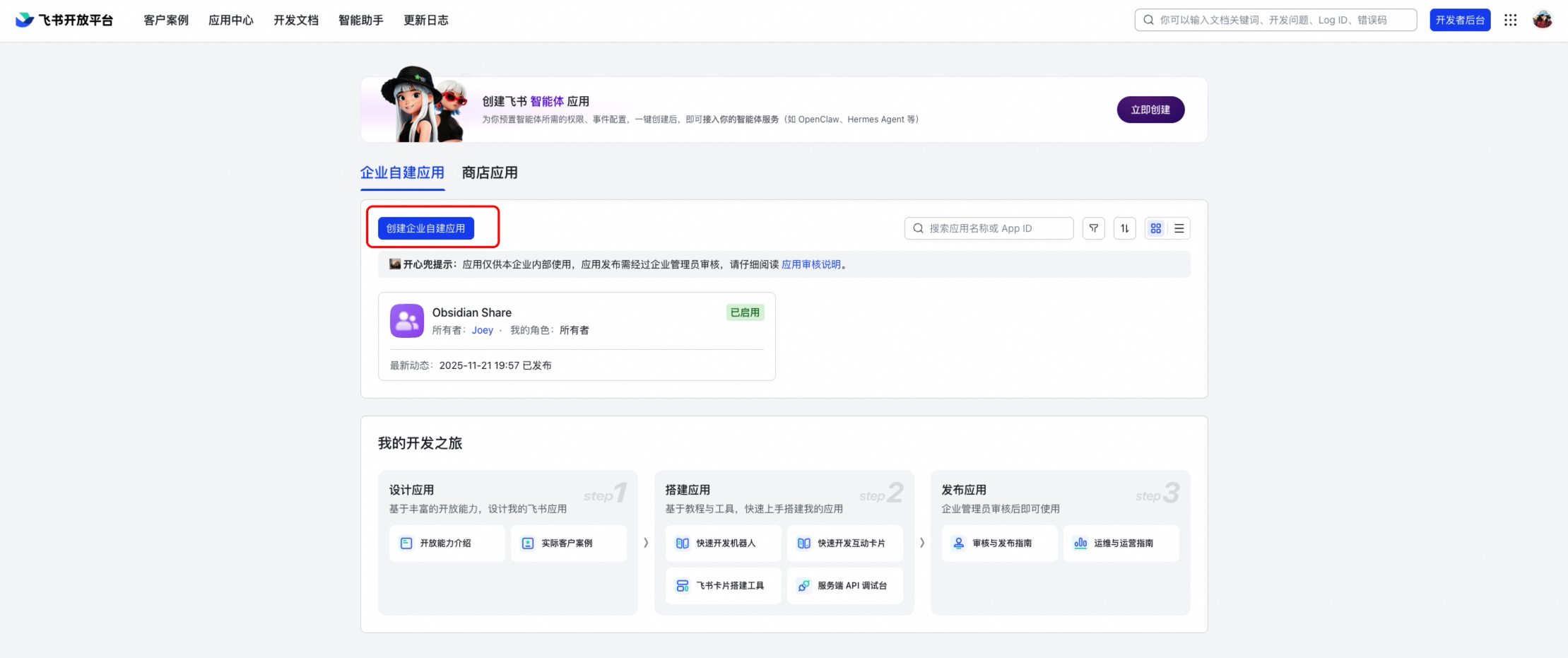
|
|
16
|
-
|
|
17
|
-
3. Under the application, enable the **Bot** capability (添加应用能力 → 机器人)
|
|
18
|
-
|
|
19
|
-
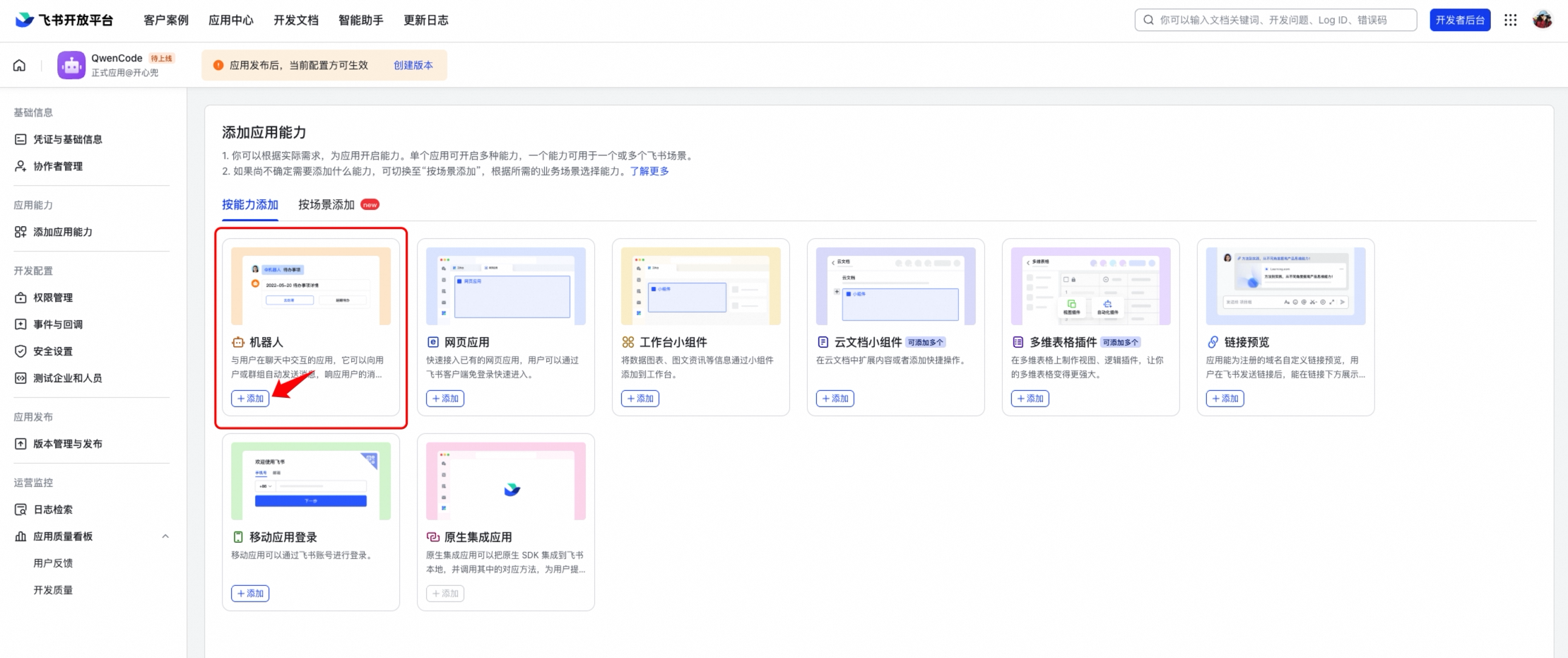
|
|
20
|
-
|
|
21
|
-
4. In **Event Subscriptions** (事件与回调), select **Long Connection** (使用长连接接收事件)
|
|
22
|
-
|
|
23
|
-
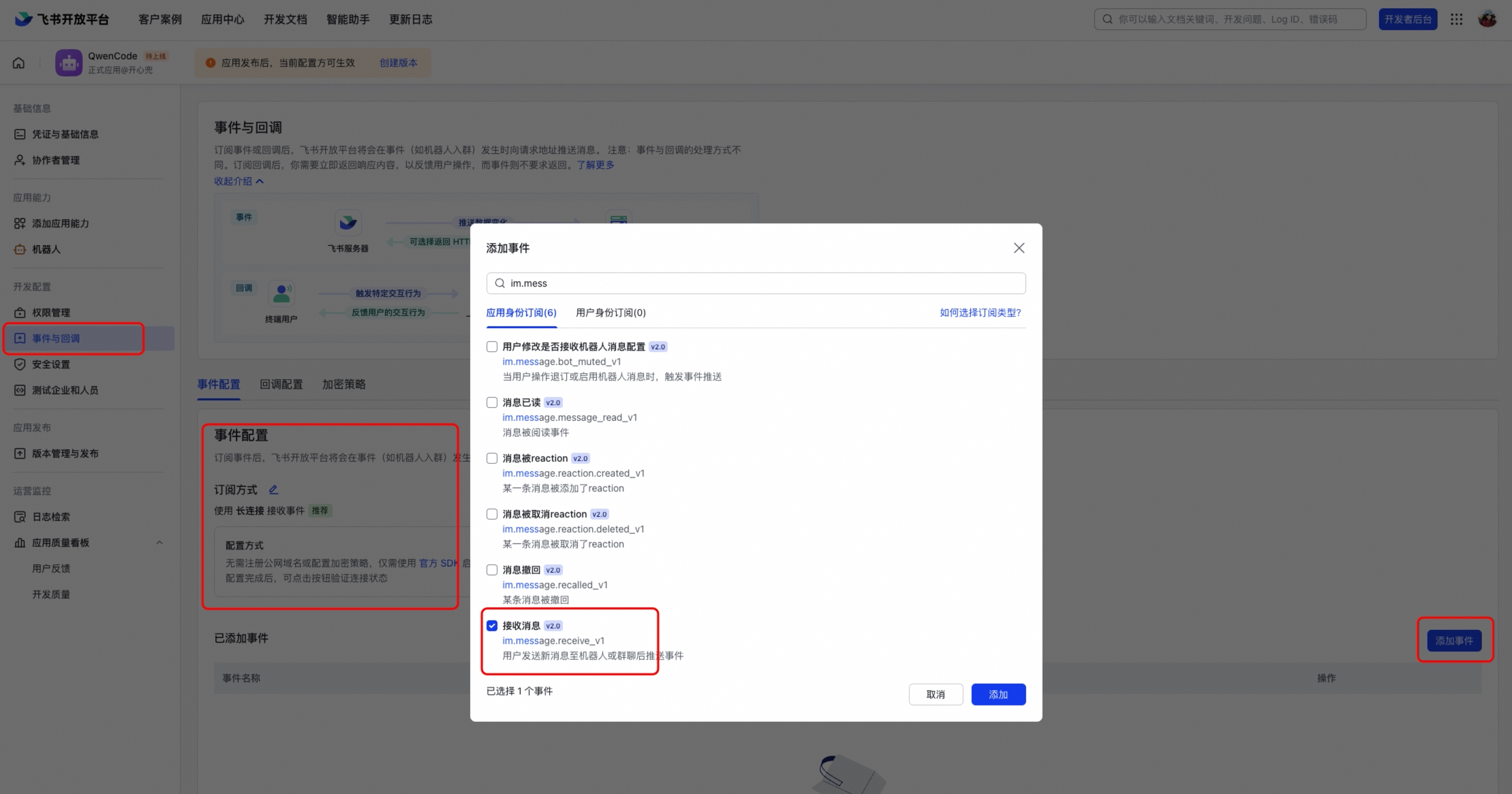
|
|
24
|
-
|
|
25
|
-
5. Add the event `im.message.receive_v1` (接收消息)
|
|
26
|
-
|
|
27
|
-
|
|
28
|
-
|
|
29
|
-
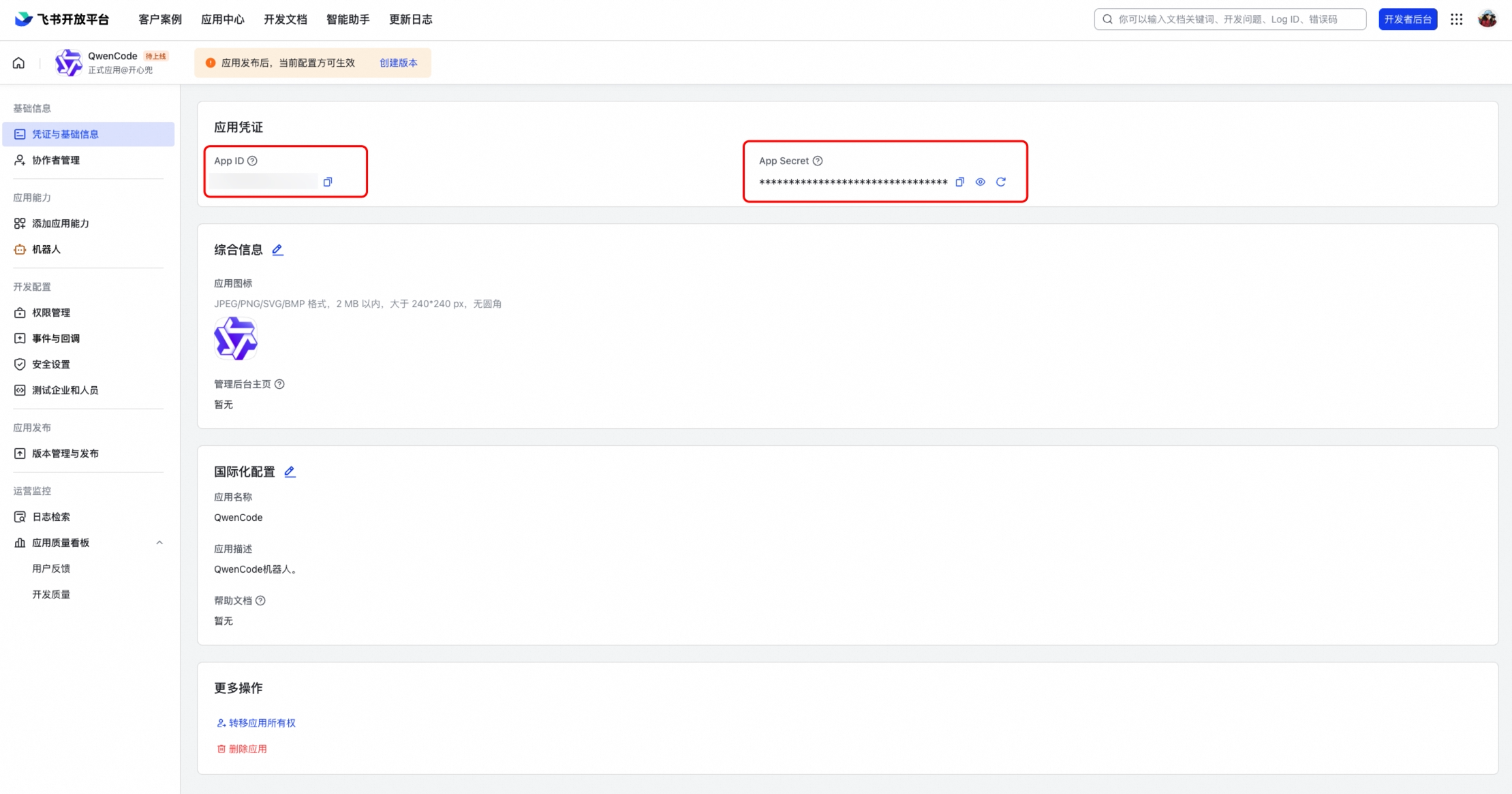
6. Note the **App ID** (Client ID) and **App Secret** (Client Secret) from the application credentials page
|
|
30
|
-
|
|
31
|
-
|
|
32
|
-
|
|
33
|
-
### Required Permissions
|
|
34
|
-
|
|
35
|
-
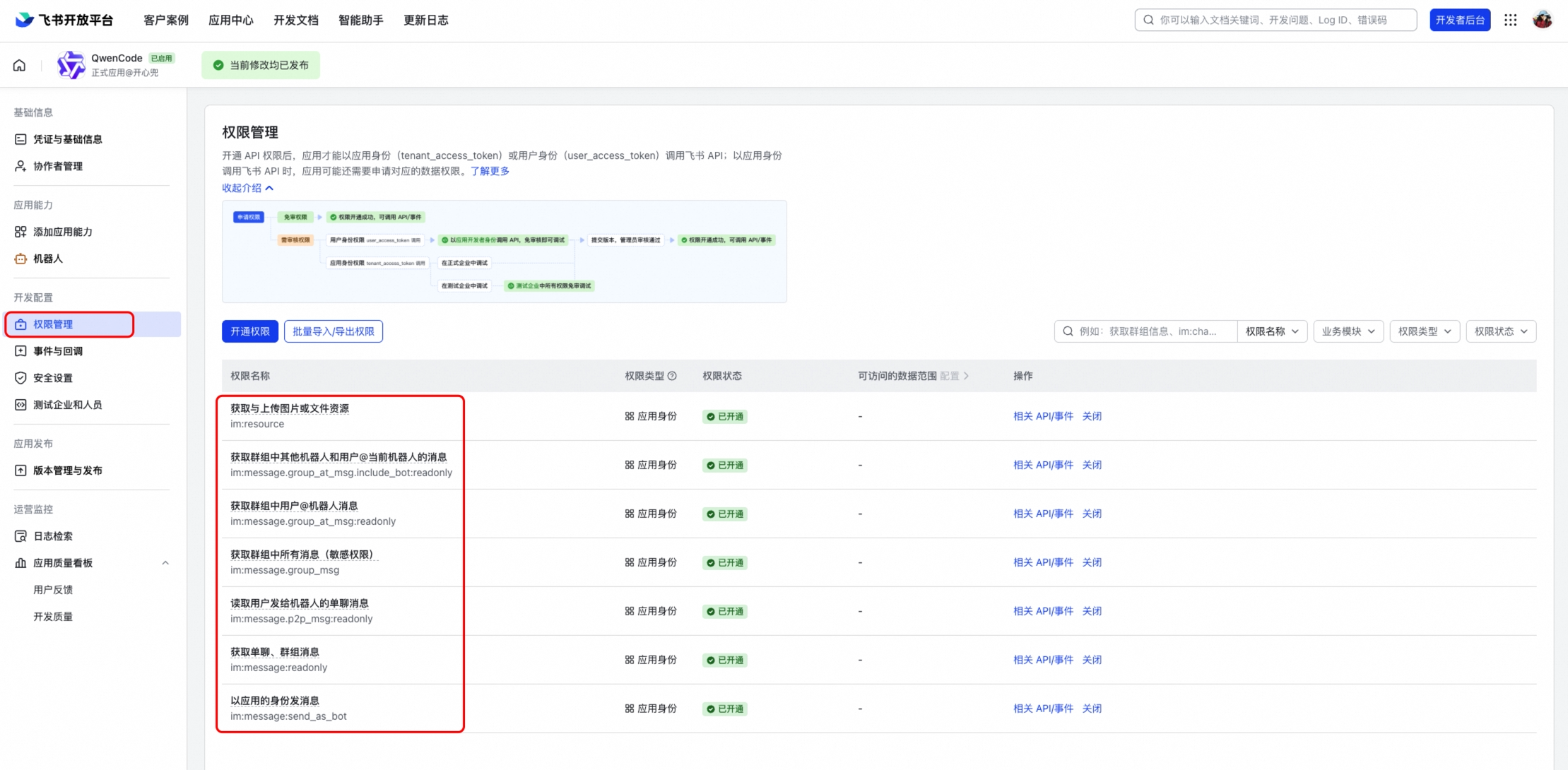
Enable the following permissions under **Permissions & Scopes** (权限管理):
|
|
36
|
-
|
|
37
|
-
- `im:message` — Read and send messages
|
|
38
|
-
- `im:message:send_as_bot` — Send messages as bot
|
|
39
|
-
- `im:resource` — Access message resources (images, files)
|
|
40
|
-
|
|
41
|
-
### Publish the Application
|
|
42
|
-
|
|
43
|
-
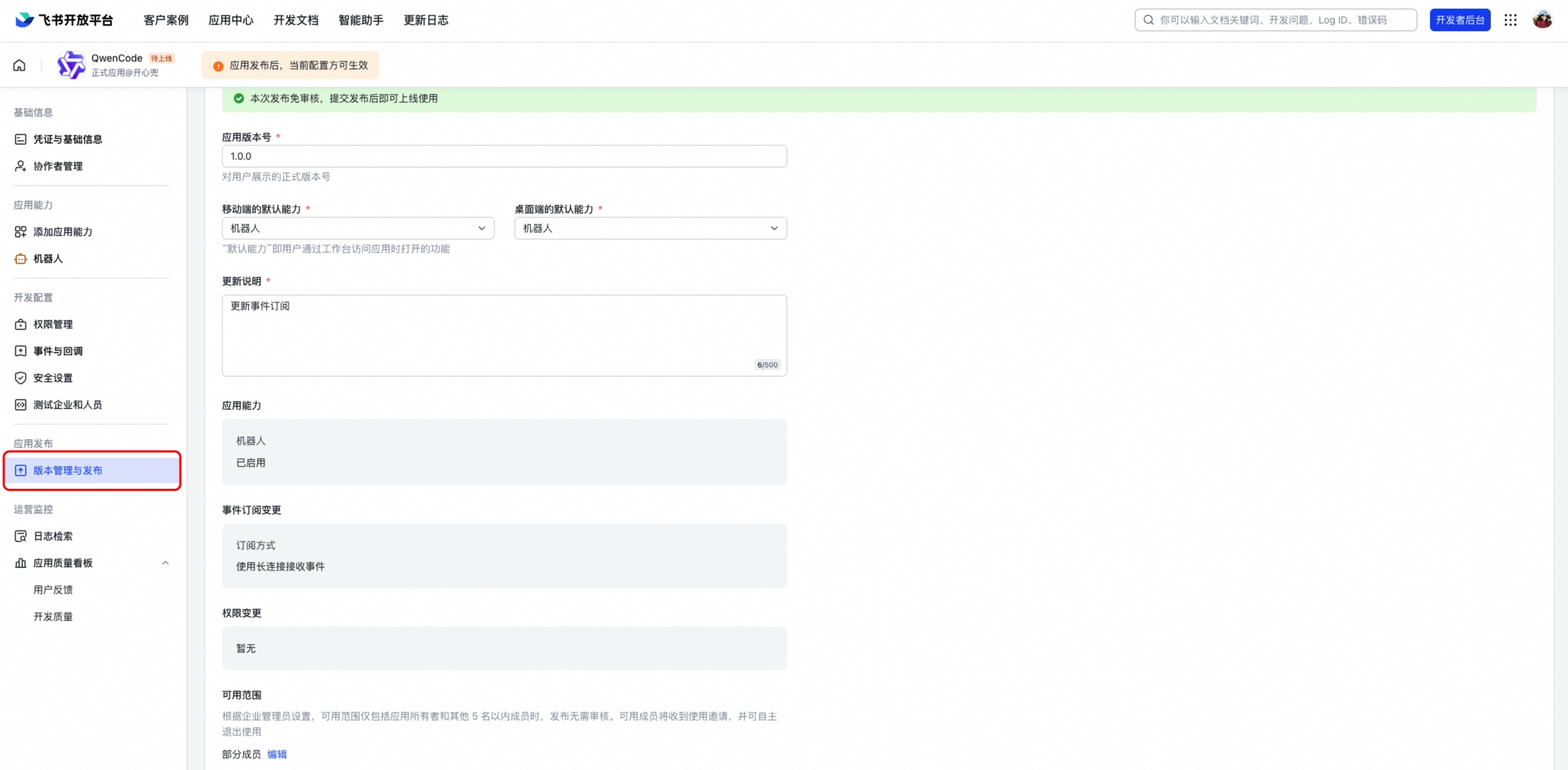
After configuring permissions and events, create a version and publish it. The bot won't work until the application is published and approved.
|
|
44
|
-
|
|
45
|
-
|
|
46
|
-
|
|
47
|
-
## Configuration
|
|
48
|
-
|
|
49
|
-
Add the channel to `~/.matilda/settings.json`:
|
|
50
|
-
|
|
51
|
-
```json
|
|
52
|
-
{
|
|
53
|
-
"channels": {
|
|
54
|
-
"my-feishu": {
|
|
55
|
-
"type": "feishu",
|
|
56
|
-
"clientId": "<your-app-id>",
|
|
57
|
-
"clientSecret": "<your-app-secret>",
|
|
58
|
-
"senderPolicy": "open",
|
|
59
|
-
"sessionScope": "user",
|
|
60
|
-
"cwd": "/path/to/your/project",
|
|
61
|
-
"groupPolicy": "open",
|
|
62
|
-
"collapsible": true,
|
|
63
|
-
"groups": {
|
|
64
|
-
"*": { "requireMention": true }
|
|
65
|
-
}
|
|
66
|
-
}
|
|
67
|
-
}
|
|
68
|
-
}
|
|
69
|
-
```
|
|
70
|
-
|
|
71
|
-
### Configuration Options
|
|
72
|
-
|
|
73
|
-
| Option | Description |
|
|
74
|
-
| ---------------------- | ------------------------------------------------------------------- |
|
|
75
|
-
| `clientId` | Feishu App ID |
|
|
76
|
-
| `clientSecret` | Feishu App Secret |
|
|
77
|
-
| `collapsible` | Collapse long responses into expandable sections (default: `false`) |
|
|
78
|
-
| `collapsibleThreshold` | Character threshold for collapsing (default: `500`) |
|
|
79
|
-
| `webhookPort` | If set, use HTTP webhook mode instead of WebSocket |
|
|
80
|
-
| `verificationToken` | Verification token for webhook mode |
|
|
81
|
-
| `encryptKey` | Encrypt key for webhook mode |
|
|
82
|
-
|
|
83
|
-
## Running
|
|
84
|
-
|
|
85
|
-
```bash
|
|
86
|
-
# Start only the Feishu channel
|
|
87
|
-
matilda channel start my-feishu
|
|
88
|
-
|
|
89
|
-
# Or start all configured channels together
|
|
90
|
-
matilda channel start
|
|
91
|
-
```
|
|
92
|
-
|
|
93
|
-
Open Feishu and send a message to the bot. You should see a streaming interactive card with the response.
|
|
94
|
-
|
|
95
|
-
## Connection Modes
|
|
96
|
-
|
|
97
|
-
### WebSocket (Default)
|
|
98
|
-
|
|
99
|
-
WebSocket mode uses an outbound long connection — no public URL or server is needed. This is the recommended mode for most deployments.
|
|
100
|
-
|
|
101
|
-
### Webhook
|
|
102
|
-
|
|
103
|
-
If you need webhook mode (e.g., for shared applications), set `webhookPort` in your config:
|
|
104
|
-
|
|
105
|
-
```json
|
|
106
|
-
{
|
|
107
|
-
"channels": {
|
|
108
|
-
"my-feishu": {
|
|
109
|
-
"type": "feishu",
|
|
110
|
-
"webhookPort": 9321,
|
|
111
|
-
"verificationToken": "<from-feishu-console>",
|
|
112
|
-
"encryptKey": "<from-feishu-console>"
|
|
113
|
-
}
|
|
114
|
-
}
|
|
115
|
-
}
|
|
116
|
-
```
|
|
117
|
-
|
|
118
|
-
Then set the request URL in Feishu Open Platform to `http://<your-server>:9321`.
|
|
119
|
-
|
|
120
|
-
## Group Chats
|
|
121
|
-
|
|
122
|
-
Feishu bots work in both DM and group conversations. To enable group support:
|
|
123
|
-
|
|
124
|
-
1. Set `groupPolicy` to `"allowlist"` or `"open"` in your channel config
|
|
125
|
-
2. Add the bot to a Feishu group
|
|
126
|
-
3. @mention the bot in the group to trigger a response
|
|
127
|
-
|
|
128
|
-
By default, the bot requires an @mention in group chats (`requireMention: true`). Set `"requireMention": false` for a specific group to make it respond to all messages.
|
|
129
|
-
|
|
130
|
-
## Features
|
|
131
|
-
|
|
132
|
-
### Interactive Card Streaming
|
|
133
|
-
|
|
134
|
-
Responses are rendered as Feishu interactive cards with real-time streaming updates. The card shows a "generating" indicator while the response is being produced, and a **Stop** button to cancel generation.
|
|
135
|
-
|
|
136
|
-
### Quote/Reply Context
|
|
137
|
-
|
|
138
|
-
When you reply to (quote) a message, the quoted content is automatically included as context for the agent. This works for:
|
|
139
|
-
|
|
140
|
-
- Text and rich-text messages
|
|
141
|
-
- Interactive cards (bot's previous responses)
|
|
142
|
-
|
|
143
|
-
### Images and Files
|
|
144
|
-
|
|
145
|
-
You can send photos and documents to the bot:
|
|
146
|
-
|
|
147
|
-
- **Images:** Analyzed using multimodal vision capabilities
|
|
148
|
-
- **Files:** Downloaded and saved locally for the agent to read
|
|
149
|
-
|
|
150
|
-
### Concurrent Messages
|
|
151
|
-
|
|
152
|
-
Multiple users can send messages simultaneously in the same group chat. Each message gets its own independent card and response — they don't interfere with each other.
|
|
153
|
-
|
|
154
|
-
## Key Differences from DingTalk
|
|
155
|
-
|
|
156
|
-
- **Response format:** Uses Feishu interactive cards (v2 schema) with native markdown rendering, including tables
|
|
157
|
-
- **Streaming:** Card content is updated in-place with throttled PATCH requests (1.5s interval)
|
|
158
|
-
- **Connection:** WebSocket via `@larksuiteoapi/node-sdk` — same outbound-only model, no public URL needed
|
|
159
|
-
- **Working indicator:** An "OnIt" emoji reaction is added while processing
|
|
160
|
-
- **Quote context:** Supports quoting both text messages and interactive cards
|
|
161
|
-
|
|
162
|
-
## Troubleshooting
|
|
163
|
-
|
|
164
|
-
### Bot doesn't connect
|
|
165
|
-
|
|
166
|
-
- Verify your App ID and App Secret are correct
|
|
167
|
-
- Make sure **Long Connection** is selected in Event Subscriptions
|
|
168
|
-
- Check that the `im.message.receive_v1` event is subscribed
|
|
169
|
-
- Check the terminal output for connection errors
|
|
170
|
-
|
|
171
|
-
### Bot doesn't respond in groups
|
|
172
|
-
|
|
173
|
-
- Check that `groupPolicy` is set to `"allowlist"` or `"open"` (default is `"disabled"`)
|
|
174
|
-
- Make sure you @mention the bot in the group message
|
|
175
|
-
- Verify the bot has been added to the group
|
|
176
|
-
|
|
177
|
-
### Card stays in "generating" state
|
|
178
|
-
|
|
179
|
-
- This usually indicates the response completed but the final card update failed
|
|
180
|
-
- Check terminal logs for API errors (rate limiting, card size limits)
|
|
181
|
-
- Very long responses with many tables may hit Feishu's card element limits
|
|
182
|
-
|
|
183
|
-
### Quote doesn't include card content
|
|
184
|
-
|
|
185
|
-
- The bot reads card content via the `card_msg_content_type=user_card_content` API parameter
|
|
186
|
-
- Ensure the bot has `im:message` permission to read messages
|