@lobehub/chat 0.133.0 → 0.133.2
This diff represents the content of publicly available package versions that have been released to one of the supported registries. The information contained in this diff is provided for informational purposes only and reflects changes between package versions as they appear in their respective public registries.
- package/.eslintrc.js +16 -0
- package/CHANGELOG.md +1392 -2240
- package/README.md +7 -3
- package/README.zh-CN.md +7 -3
- package/contributing/Home.md +20 -28
- package/contributing/_Sidebar.md +1 -9
- package/docs/self-hosting/advanced/analytics.zh-CN.mdx +4 -2
- package/docs/self-hosting/advanced/authentication.mdx +32 -33
- package/docs/self-hosting/advanced/authentication.zh-CN.mdx +31 -34
- package/docs/self-hosting/advanced/upstream-sync.mdx +23 -26
- package/docs/self-hosting/advanced/upstream-sync.zh-CN.mdx +23 -26
- package/docs/self-hosting/environment-variables/basic.mdx +12 -14
- package/docs/self-hosting/environment-variables/basic.zh-CN.mdx +13 -15
- package/docs/self-hosting/environment-variables/model-provider.mdx +6 -2
- package/docs/self-hosting/environment-variables/model-provider.zh-CN.mdx +8 -5
- package/docs/self-hosting/environment-variables.mdx +11 -0
- package/docs/self-hosting/environment-variables.zh-CN.mdx +10 -0
- package/docs/self-hosting/examples/azure-openai.mdx +7 -7
- package/docs/self-hosting/examples/azure-openai.zh-CN.mdx +7 -7
- package/docs/self-hosting/faq/no-v1-suffix.mdx +0 -1
- package/docs/self-hosting/faq/proxy-with-unable-to-verify-leaf-signature.mdx +0 -1
- package/docs/self-hosting/platform/docker-compose.mdx +73 -79
- package/docs/self-hosting/platform/docker-compose.zh-CN.mdx +80 -86
- package/docs/self-hosting/platform/docker.mdx +96 -101
- package/docs/self-hosting/platform/docker.zh-CN.mdx +102 -107
- package/docs/self-hosting/platform/netlify.mdx +66 -145
- package/docs/self-hosting/platform/netlify.zh-CN.mdx +64 -143
- package/docs/self-hosting/platform/repocloud.mdx +7 -9
- package/docs/self-hosting/platform/repocloud.zh-CN.mdx +10 -12
- package/docs/self-hosting/platform/sealos.mdx +7 -9
- package/docs/self-hosting/platform/sealos.zh-CN.mdx +10 -12
- package/docs/self-hosting/platform/vercel.mdx +13 -15
- package/docs/self-hosting/platform/vercel.zh-CN.mdx +12 -15
- package/docs/self-hosting/platform/zeabur.mdx +7 -9
- package/docs/self-hosting/platform/zeabur.zh-CN.mdx +10 -12
- package/docs/self-hosting/start.mdx +17 -0
- package/docs/self-hosting/start.zh-CN.mdx +17 -0
- package/docs/usage/agents/concepts.mdx +0 -1
- package/docs/usage/agents/custom-agent.mdx +5 -7
- package/docs/usage/agents/custom-agent.zh-CN.mdx +3 -3
- package/docs/usage/agents/model.mdx +9 -4
- package/docs/usage/agents/model.zh-CN.mdx +5 -5
- package/docs/usage/agents/prompt.mdx +8 -9
- package/docs/usage/agents/prompt.zh-CN.mdx +7 -8
- package/docs/usage/agents/topics.mdx +1 -1
- package/docs/usage/features/agent-market.mdx +13 -11
- package/docs/usage/features/agent-market.zh-CN.mdx +7 -8
- package/docs/usage/features/local-llm.mdx +6 -5
- package/docs/usage/features/local-llm.zh-CN.mdx +8 -5
- package/docs/usage/features/mobile.mdx +5 -5
- package/docs/usage/features/mobile.zh-CN.mdx +1 -5
- package/docs/usage/features/multi-ai-providers.mdx +6 -6
- package/docs/usage/features/multi-ai-providers.zh-CN.mdx +3 -7
- package/docs/usage/features/plugin-system.mdx +20 -18
- package/docs/usage/features/plugin-system.zh-CN.mdx +20 -22
- package/docs/usage/features/pwa.mdx +9 -11
- package/docs/usage/features/pwa.zh-CN.mdx +5 -11
- package/docs/usage/features/text-to-image.mdx +5 -1
- package/docs/usage/features/text-to-image.zh-CN.mdx +1 -1
- package/docs/usage/features/theme.mdx +5 -5
- package/docs/usage/features/theme.zh-CN.mdx +1 -5
- package/docs/usage/features/tts.mdx +6 -1
- package/docs/usage/features/tts.zh-CN.mdx +1 -1
- package/docs/usage/features/vision.mdx +7 -3
- package/docs/usage/features/vision.zh-CN.mdx +1 -1
- package/docs/usage/plugins/basic-usage.mdx +2 -2
- package/docs/usage/plugins/custom-plugin.mdx +2 -2
- package/docs/usage/plugins/custom-plugin.zh-CN.mdx +2 -2
- package/docs/usage/plugins/{plugin-development.mdx → development.mdx} +7 -7
- package/docs/usage/plugins/{plugin-development.zh-CN.mdx → development.zh-CN.mdx} +7 -7
- package/docs/usage/plugins/{plugin-store.mdx → store.mdx} +0 -1
- package/docs/usage/plugins/store.zh-CN.mdx +9 -0
- package/docs/usage/providers/ollama/gemma.mdx +22 -33
- package/docs/usage/providers/ollama/gemma.zh-CN.mdx +20 -32
- package/docs/usage/providers/ollama.mdx +34 -43
- package/docs/usage/providers/ollama.zh-CN.mdx +18 -29
- package/docs/usage/start.mdx +34 -0
- package/docs/usage/start.zh-CN.mdx +28 -0
- package/next-sitemap.config.mjs +2 -3
- package/package.json +24 -19
- package/src/app/settings/llm/Anthropic/index.tsx +2 -2
- package/src/app/settings/llm/index.tsx +4 -4
- package/src/config/modelProviders/ollama.ts +4 -4
- package/src/libs/agent-runtime/anthropic/index.test.ts +6 -10
- package/docs/usage/plugins/plugin-store.zh-CN.mdx +0 -9
- package/public/robots.txt +0 -4
|
@@ -1,13 +1,17 @@
|
|
|
1
|
+
---
|
|
2
|
+
title: Plugin System
|
|
3
|
+
---
|
|
4
|
+
|
|
1
5
|
import { Callout, Steps } from 'nextra/components';
|
|
2
6
|
|
|
3
7
|
# Plugin System
|
|
4
8
|
|
|
5
9
|
<Image
|
|
6
10
|
alt={'Plugin System'}
|
|
11
|
+
cover
|
|
7
12
|
src={
|
|
8
13
|
'https://github-production-user-asset-6210df.s3.amazonaws.com/17870709/268670883-33c43a5c-a512-467e-855c-fa299548cce5.png'
|
|
9
14
|
}
|
|
10
|
-
cover
|
|
11
15
|
/>
|
|
12
16
|
|
|
13
17
|
The plugin ecosystem of LobeChat is an important extension of its core functionality, greatly enhancing the practicality and flexibility of the LobeChat assistant.
|
|
@@ -36,12 +40,12 @@ Learn more about [plugin usage](/en-US/usage/plugins/basic) by checking it out.
|
|
|
36
40
|
|
|
37
41
|
📊 Total plugins: [<kbd>**61**</kbd>](https://github.com/lobehub/lobe-chat-plugins)
|
|
38
42
|
|
|
39
|
-
| Recently Added
|
|
40
|
-
|
|
|
41
|
-
| [Charts and Graphs](https://chat-preview.lobehub.com/settings/agent)<br/><sup>By **pyxl** on **2024-02-05**</sup> | Mermaid charts, presentation schemes, analysis, research websites, pie charts.<br/>`Charts` `Graphs`
|
|
42
|
-
| [Social Search](https://chat-preview.lobehub.com/settings/agent)<br/><sup>By **say-apps** on **2024-02-02**</sup> | Social search provides access to tweets, users, followers, images, media, and more.<br/>`Social` `Twitter` `x` `Search`
|
|
43
|
-
| [TokenInsights](https://chat-preview.lobehub.com/settings/agent)<br/><sup>By **feednews** on **2024-01-27**</sup> | Get real-time cryptocurrency prices, BTC, ETH, BNB, and the latest insights. The latest coin news and airdrop opportunities.<br/>`Cryptocurrency` `btc` `eth` `bnb`
|
|
44
|
-
| [Bilibili](https://chat-preview.lobehub.com/settings/agent)<br/><sup>By **LobeHub** on **2024-01-27**</sup>
|
|
43
|
+
| Recently Added | Plugin Description |
|
|
44
|
+
| ------------------------------------------------------------------------------------------------------------------ | --------------------------------------------------------------------------------------------------------------------------------------------------------------------------------------------------------------------- |
|
|
45
|
+
| [Charts and Graphs](https://chat-preview.lobehub.com/settings/agent)<br /><sup>By **pyxl** on **2024-02-05**</sup> | Mermaid charts, presentation schemes, analysis, research websites, pie charts.<br />`Charts` `Graphs` |
|
|
46
|
+
| [Social Search](https://chat-preview.lobehub.com/settings/agent)<br /><sup>By **say-apps** on **2024-02-02**</sup> | Social search provides access to tweets, users, followers, images, media, and more.<br />`Social` `Twitter` `x` `Search` |
|
|
47
|
+
| [TokenInsights](https://chat-preview.lobehub.com/settings/agent)<br /><sup>By **feednews** on **2024-01-27**</sup> | Get real-time cryptocurrency prices, BTC, ETH, BNB, and the latest insights. The latest coin news and airdrop opportunities.<br />`Cryptocurrency` `btc` `eth` `bnb` |
|
|
48
|
+
| [Bilibili](https://chat-preview.lobehub.com/settings/agent)<br /><sup>By **LobeHub** on **2024-01-27**</sup> | Experience Bilibili's rich content through keyword video search, replay access, interactive barrage, popular video recommendations, and hot search insights, all at your fingertips.<br />`Video` `Bilibili` `Search` |
|
|
45
49
|
|
|
46
50
|
## Plugin Ecosystem
|
|
47
51
|
|
|
@@ -60,26 +64,24 @@ Learn more about [plugin usage](/en-US/usage/plugins/basic) by checking it out.
|
|
|
60
64
|
The plugin system of LobeChat has now entered a stable stage, and we have basically completed most of the functionality required by the plugin system. However, we are still planning and considering the new possibilities that plugins can bring to us. You can learn more in the following Issues:
|
|
61
65
|
|
|
62
66
|
<Steps>
|
|
67
|
+
### ✅ Phase One of Plugins
|
|
63
68
|
|
|
64
|
-
|
|
65
|
-
|
|
66
|
-
Implementing the separation of plugins from the main body, splitting the plugins into independent repositories for maintenance, and implementing dynamic loading of plugins. [**#73**](https://github.com/lobehub/lobe-chat/issues/73)
|
|
69
|
+
Implementing the separation of plugins from the main body, splitting the plugins into independent repositories for maintenance, and implementing dynamic loading of plugins. [**#73**](https://github.com/lobehub/lobe-chat/issues/73)
|
|
67
70
|
|
|
68
|
-
### ✅ Phase Two of Plugins
|
|
71
|
+
### ✅ Phase Two of Plugins
|
|
69
72
|
|
|
70
|
-
The security and stability of plugin usage, more accurate presentation of abnormal states, maintainability and developer-friendliness of the plugin architecture. [**#97**](https://github.com/lobehub/lobe-chat/issues/97)
|
|
73
|
+
The security and stability of plugin usage, more accurate presentation of abnormal states, maintainability and developer-friendliness of the plugin architecture. [**#97**](https://github.com/lobehub/lobe-chat/issues/97)
|
|
71
74
|
|
|
72
|
-
### ✅ Phase Three of Plugins
|
|
75
|
+
### ✅ Phase Three of Plugins
|
|
73
76
|
|
|
74
|
-
Higher-level and improved customization capabilities, support for OpenAPI schema invocation, compatibility with ChatGPT plugins, and the addition of Midjourney plugins. [**#411**](https://github.com/lobehub/lobe-chat/discussions/#411)
|
|
77
|
+
Higher-level and improved customization capabilities, support for OpenAPI schema invocation, compatibility with ChatGPT plugins, and the addition of Midjourney plugins. [**#411**](https://github.com/lobehub/lobe-chat/discussions/#411)
|
|
75
78
|
|
|
76
|
-
### 💭 Phase Four of Plugins
|
|
77
|
-
|
|
78
|
-
Comprehensive authentication, visual configuration of plugin definitions, Plugin SDK CLI, Python language development template, any other ideas? Join the discussion: [**#1310**](https://github.com/lobehub/lobe-chat/discussions/#1310)
|
|
79
|
+
### 💭 Phase Four of Plugins
|
|
79
80
|
|
|
81
|
+
Comprehensive authentication, visual configuration of plugin definitions, Plugin SDK CLI, Python language development template, any other ideas? Join the discussion: [**#1310**](https://github.com/lobehub/lobe-chat/discussions/#1310)
|
|
80
82
|
</Steps>
|
|
81
83
|
|
|
82
|
-
[lobe-chat-plugins]: https://github.com/lobehub/lobe-chat-plugins
|
|
83
84
|
[chat-plugin-sdk]: https://github.com/lobehub/chat-plugin-sdk
|
|
84
85
|
[chat-plugin-template]: https://github.com/lobehub/chat-plugin-template
|
|
85
86
|
[chat-plugins-gateway]: https://github.com/lobehub/chat-plugins-gateway
|
|
87
|
+
[lobe-chat-plugins]: https://github.com/lobehub/lobe-chat-plugins
|
|
@@ -4,10 +4,10 @@ import { Callout, Steps } from 'nextra/components';
|
|
|
4
4
|
|
|
5
5
|
<Image
|
|
6
6
|
alt={'插件系统'}
|
|
7
|
+
cover
|
|
7
8
|
src={
|
|
8
9
|
'https://github-production-user-asset-6210df.s3.amazonaws.com/17870709/268670883-33c43a5c-a512-467e-855c-fa299548cce5.png'
|
|
9
10
|
}
|
|
10
|
-
cover
|
|
11
11
|
/>
|
|
12
12
|
|
|
13
13
|
LobeChat 的插件生态系统是其核心功能的重要扩展,它极大地增强了 LobeChat 助手的实用性和灵活性。
|
|
@@ -30,12 +30,12 @@ LobeChat 的插件生态系统是其核心功能的重要扩展,它极大地
|
|
|
30
30
|
|
|
31
31
|
📊 Total plugins: [<kbd>**61**</kbd>](https://github.com/lobehub/lobe-chat-plugins)
|
|
32
32
|
|
|
33
|
-
| 最近新增
|
|
34
|
-
|
|
|
35
|
-
| [图表和图示](https://chat-preview.lobehub.com/settings/agent)<br/><sup>By **pyxl** on **2024-02-05**</sup>
|
|
36
|
-
| [社交搜索](https://chat-preview.lobehub.com/settings/agent)<br/><sup>By **say-apps** on **2024-02-02**</sup>
|
|
37
|
-
| [TokenInsights](https://chat-preview.lobehub.com/settings/agent)<br/><sup>By **feednews** on **2024-01-27**</sup> | 获取实时加密货币价格,BTC,ETH,BNB 和最新见解。最新的币新闻和空投机会。<br/>`加密货币` `btc` `eth` `bnb`
|
|
38
|
-
| [哔哩哔哩](https://chat-preview.lobehub.com/settings/agent)<br/><sup>By **LobeHub** on **2024-01-27**</sup>
|
|
33
|
+
| 最近新增 | 插件描述 |
|
|
34
|
+
| ------------------------------------------------------------------------------------------------------------------ | ------------------------------------------------------------------------------ |
|
|
35
|
+
| [图表和图示](https://chat-preview.lobehub.com/settings/agent)<br /><sup>By **pyxl** on **2024-02-05**</sup> | 美人鱼图表,演示文稿方案,分析,研究网站,饼图。<br />`图表` `图示` |
|
|
36
|
+
| [社交搜索](https://chat-preview.lobehub.com/settings/agent)<br /><sup>By **say-apps** on **2024-02-02**</sup> | 社交搜索提供访问推文、用户、关注者、图片、媒体等功能。<br />`社交` `推特` `x` `搜索` |
|
|
37
|
+
| [TokenInsights](https://chat-preview.lobehub.com/settings/agent)<br /><sup>By **feednews** on **2024-01-27**</sup> | 获取实时加密货币价格,BTC,ETH,BNB 和最新见解。最新的币新闻和空投机会。<br />`加密货币` `btc` `eth` `bnb` |
|
|
38
|
+
| [哔哩哔哩](https://chat-preview.lobehub.com/settings/agent)<br /><sup>By **LobeHub** on **2024-01-27**</sup> | 通过关键词视频搜索、回放访问、互动弹幕、热门视频推荐和热搜洞察等功能,深入体验哔哩哔哩丰富的内容,尽在您的指尖。<br />`视频` `哔哩哔哩` `搜索` |
|
|
39
39
|
|
|
40
40
|
## 插件生态体系
|
|
41
41
|
|
|
@@ -48,31 +48,29 @@ LobeChat 的插件生态系统是其核心功能的重要扩展,它极大地
|
|
|
48
48
|
- [@lobehub/chat-plugin-sdk][chat-plugin-sdk]:LobeChat 插件 SDK 可帮助您创建出色的 Lobe Chat 插件。
|
|
49
49
|
- [@lobehub/chat-plugins-gateway][chat-plugins-gateway]:LobeChat 插件网关是一个后端服务,作为 LobeChat 插件的网关。我们使用 Vercel 部署此服务。
|
|
50
50
|
|
|
51
|
-
[lobe-chat-plugins]: https://github.com/lobehub/lobe-chat-plugins
|
|
52
|
-
[chat-plugin-sdk]: https://github.com/lobehub/chat-plugin-sdk
|
|
53
|
-
[chat-plugin-template]: https://github.com/lobehub/chat-plugin-template
|
|
54
|
-
[chat-plugins-gateway]: https://github.com/lobehub/chat-plugins-gateway
|
|
55
|
-
|
|
56
51
|
### 路线进展
|
|
57
52
|
|
|
58
53
|
LobeChat 的插件系统目前已初步进入一个稳定阶段,我们已基本完成大部分插件系统所需的功能,但我们仍然在规划与思考插件能为我们带来的全新可能性。您可以在以下 Issues 中了解更多信息:
|
|
59
54
|
|
|
60
55
|
<Steps>
|
|
56
|
+
### ✅ 插件一期
|
|
61
57
|
|
|
62
|
-
|
|
58
|
+
实现插件与主体分离,将插件拆分为独立仓库维护,并实现插件的动态加载。 [**#73**](https://github.com/lobehub/lobe-chat/issues/73)
|
|
63
59
|
|
|
64
|
-
|
|
60
|
+
### ✅ 插件二期
|
|
65
61
|
|
|
66
|
-
|
|
62
|
+
插件的安全性与使用的稳定性,更加精准地呈现异常状态,插件架构的可维护性与开发者友好。[**#97**](https://github.com/lobehub/lobe-chat/issues/97)
|
|
67
63
|
|
|
68
|
-
|
|
64
|
+
### ✅ 插件三期
|
|
69
65
|
|
|
70
|
-
|
|
66
|
+
更高阶与完善的自定义能力,支持 OpenAPI schema 调用、兼容 ChatGPT 插件、新增 Midjourney 插件。 [**#411**](https://github.com/lobehub/lobe-chat/discussions/#411)
|
|
71
67
|
|
|
72
|
-
|
|
73
|
-
|
|
74
|
-
### 💭 插件四期
|
|
75
|
-
|
|
76
|
-
完善的鉴权、可视化配置插件定义、 Plugin SDK CLI 、 Python 语言研发模板、还有什么想法?欢迎参与讨论: [**#1310**](https://github.com/lobehub/lobe-chat/discussions/#1310)
|
|
68
|
+
### 💭 插件四期
|
|
77
69
|
|
|
70
|
+
完善的鉴权、可视化配置插件定义、 Plugin SDK CLI 、 Python 语言研发模板、还有什么想法?欢迎参与讨论: [**#1310**](https://github.com/lobehub/lobe-chat/discussions/#1310)
|
|
78
71
|
</Steps>
|
|
72
|
+
|
|
73
|
+
[chat-plugin-sdk]: https://github.com/lobehub/chat-plugin-sdk
|
|
74
|
+
[chat-plugin-template]: https://github.com/lobehub/chat-plugin-template
|
|
75
|
+
[chat-plugins-gateway]: https://github.com/lobehub/chat-plugins-gateway
|
|
76
|
+
[lobe-chat-plugins]: https://github.com/lobehub/lobe-chat-plugins
|
|
@@ -1,25 +1,23 @@
|
|
|
1
|
+
---
|
|
2
|
+
title: Progressive Web Apps (PWA)
|
|
3
|
+
---
|
|
4
|
+
|
|
1
5
|
import { Steps } from 'nextra/components';
|
|
2
6
|
|
|
3
7
|
# Progressive Web App (PWA)
|
|
4
8
|
|
|
5
|
-
<Image
|
|
6
|
-
alt={'Progressive Web App (PWA)'}
|
|
7
|
-
src={'https://github.com/lobehub/lobe-chat/assets/28616219/ecc8364a-cfc4-4a3d-b6fd-68b2d9bc5f0d'}
|
|
8
|
-
cover
|
|
9
|
-
/>
|
|
9
|
+
<Image alt={'Progressive Web App (PWA)'} cover src={'https://github.com/lobehub/lobe-chat/assets/28616219/ecc8364a-cfc4-4a3d-b6fd-68b2d9bc5f0d'} />
|
|
10
10
|
|
|
11
11
|
We understand the importance of providing a seamless experience for users in today's multi-device environment. To achieve this, we have adopted Progressive Web App [PWA](https://support.google.com/chrome/answer/9658361) technology, which is a modern web technology that elevates web applications to a near-native app experience. Through PWA, LobeChat is able to provide a highly optimized user experience on both desktop and mobile devices, while maintaining lightweight and high performance characteristics. Visually and perceptually, we have also carefully designed it to ensure that its interface is indistinguishable from a native app, providing smooth animations, responsive layouts, and adaptation to different screen resolutions of various devices.
|
|
12
12
|
|
|
13
13
|
If you are unfamiliar with the installation process of PWA, you can follow the steps below to add LobeChat as a desktop app (also applicable to mobile devices):
|
|
14
14
|
|
|
15
15
|
<Steps>
|
|
16
|
+
### Run Chrome or Edge browser on your computer
|
|
16
17
|
|
|
17
|
-
###
|
|
18
|
-
|
|
19
|
-
### Visit the LobeChat webpage
|
|
20
|
-
|
|
21
|
-
### In the top right corner of the address bar, click the <kbd>Install</kbd> icon
|
|
18
|
+
### Visit the LobeChat webpage
|
|
22
19
|
|
|
23
|
-
###
|
|
20
|
+
### In the top right corner of the address bar, click the <kbd>Install</kbd> icon
|
|
24
21
|
|
|
22
|
+
### Follow the on-screen instructions to complete the PWA installation
|
|
25
23
|
</Steps>
|
|
@@ -2,24 +2,18 @@ import { Steps } from 'nextra/components';
|
|
|
2
2
|
|
|
3
3
|
# 渐进式 Web 应用(PWA)
|
|
4
4
|
|
|
5
|
-
<Image
|
|
6
|
-
alt={'渐进式 Web 应用(PWA)'}
|
|
7
|
-
src={'https://github.com/lobehub/lobe-chat/assets/28616219/ecc8364a-cfc4-4a3d-b6fd-68b2d9bc5f0d'}
|
|
8
|
-
cover
|
|
9
|
-
/>
|
|
5
|
+
<Image alt={'渐进式 Web 应用(PWA)'} cover src={'https://github.com/lobehub/lobe-chat/assets/28616219/ecc8364a-cfc4-4a3d-b6fd-68b2d9bc5f0d'} />
|
|
10
6
|
|
|
11
7
|
我们利深知在当今多设备环境下为用户提供无缝体验的重要性。为此,我们采用了渐进式 Web 应用 [PWA](https://support.google.com/chrome/answer/9658361) 技术,这是一种能够将网页应用提升至接近原生应用体验的现代 Web 技术。通过 PWA,LobeChat 能够在桌面和移动设备上提供高度优化的用户体验,同时保持轻量级和高性能的特点。在视觉和感觉上,我们也经过精心设计,以确保它的界面与原生应用无差别,提供流畅的动画、响应式布局和适配不同设备的屏幕分辨率。
|
|
12
8
|
|
|
13
9
|
若您未熟悉 PWA 的安装过程,您可以按照以下步骤将 LobeChat 添加为您的桌面应用(也适用于移动设备):
|
|
14
10
|
|
|
15
11
|
<Steps>
|
|
12
|
+
### 在电脑上运行 Chrome 或 Edge 浏览器
|
|
16
13
|
|
|
17
|
-
###
|
|
14
|
+
### 访问 LobeChat 网页
|
|
18
15
|
|
|
19
|
-
###
|
|
20
|
-
|
|
21
|
-
### 在地址栏的右上角,单击 <kbd>安装</kbd> 图标
|
|
22
|
-
|
|
23
|
-
### 根据屏幕上的指示完成 PWA 的安装
|
|
16
|
+
### 在地址栏的右上角,单击 <kbd>安装</kbd> 图标
|
|
24
17
|
|
|
18
|
+
### 根据屏幕上的指示完成 PWA 的安装
|
|
25
19
|
</Steps>
|
|
@@ -1,11 +1,15 @@
|
|
|
1
|
+
---
|
|
2
|
+
title: Text to Image
|
|
3
|
+
---
|
|
4
|
+
|
|
1
5
|
# Text to Image Generation
|
|
2
6
|
|
|
3
7
|
<Image
|
|
4
8
|
alt={'Text to Image Generation'}
|
|
9
|
+
cover
|
|
5
10
|
src={
|
|
6
11
|
'https://github-production-user-asset-6210df.s3.amazonaws.com/17870709/297746445-0ff762b9-aa08-4337-afb7-12f932b6efbb.png'
|
|
7
12
|
}
|
|
8
|
-
cover
|
|
9
13
|
/>
|
|
10
14
|
|
|
11
15
|
Supporting the latest text-to-image generation technology, LobeChat now enables users to directly utilize the Text to Image tool during conversations with the assistant. By harnessing the capabilities of AI tools such as [DALL-E 3](https://openai.com/dall-e-3), [MidJourney](https://www.midjourney.com/), and [Pollinations](https://pollinations.ai/), assistants can now transform your ideas into images. This allows for a more private and immersive creative process.
|
|
@@ -2,10 +2,10 @@
|
|
|
2
2
|
|
|
3
3
|
<Image
|
|
4
4
|
alt={'Text to Image 文生图'}
|
|
5
|
+
cover
|
|
5
6
|
src={
|
|
6
7
|
'https://github-production-user-asset-6210df.s3.amazonaws.com/17870709/297746445-0ff762b9-aa08-4337-afb7-12f932b6efbb.png'
|
|
7
8
|
}
|
|
8
|
-
cover
|
|
9
9
|
/>
|
|
10
10
|
|
|
11
11
|
支持最新的文本到图片生成技术,LobeChat 现在能够让用户在与助手对话中直接调用文成图工具进行创作。通过利用 [`DALL-E 3`](https://openai.com/dall-e-3)、[`MidJourney`](https://www.midjourney.com/) 和 [`Pollinations`](https://pollinations.ai/) 等 AI 工具的能力, 助手们现在可以将你的想法转化为图像。同时可以更私密和沉浸式的完成你的创造过程。
|
|
@@ -1,12 +1,12 @@
|
|
|
1
|
+
---
|
|
2
|
+
title: Custom Themes
|
|
3
|
+
---
|
|
4
|
+
|
|
1
5
|
import { Callout } from 'nextra/components';
|
|
2
6
|
|
|
3
7
|
# Custom Themes
|
|
4
8
|
|
|
5
|
-
<Image
|
|
6
|
-
alt={'Custom Themes'}
|
|
7
|
-
src={'https://github.com/lobehub/lobe-chat/assets/28616219/9eca103c-9335-4a4c-8192-271a0b857b26'}
|
|
8
|
-
cover
|
|
9
|
-
/>
|
|
9
|
+
<Image alt={'Custom Themes'} cover src={'https://github.com/lobehub/lobe-chat/assets/28616219/9eca103c-9335-4a4c-8192-271a0b857b26'} />
|
|
10
10
|
|
|
11
11
|
LobeChat places a strong emphasis on personalized user experiences in its interface design, and thus introduces flexible and diverse theme modes, including a light mode for daytime and a dark mode for nighttime.
|
|
12
12
|
|
|
@@ -2,11 +2,7 @@ import { Callout } from 'nextra/components';
|
|
|
2
2
|
|
|
3
3
|
# 自定义主题
|
|
4
4
|
|
|
5
|
-
<Image
|
|
6
|
-
alt={'自定义主题'}
|
|
7
|
-
src={'https://github.com/lobehub/lobe-chat/assets/28616219/9eca103c-9335-4a4c-8192-271a0b857b26'}
|
|
8
|
-
cover
|
|
9
|
-
/>
|
|
5
|
+
<Image alt={'自定义主题'} cover src={'https://github.com/lobehub/lobe-chat/assets/28616219/9eca103c-9335-4a4c-8192-271a0b857b26'} />
|
|
10
6
|
|
|
11
7
|
LobeChat 在界面设计上十分考虑用户的个性化体验,因此引入了灵活多变的主题模式,其中包括日间的亮色模式和夜间的深色模式。
|
|
12
8
|
|
|
@@ -1,13 +1,18 @@
|
|
|
1
|
+
---
|
|
2
|
+
title: Speech Synthesis and Recognition (TTS & STT)
|
|
3
|
+
---
|
|
4
|
+
|
|
5
|
+
|
|
1
6
|
import { Callout } from 'nextra/components';
|
|
2
7
|
|
|
3
8
|
# TTS & STT Voice Conversation
|
|
4
9
|
|
|
5
10
|
<Image
|
|
6
11
|
alt={'TTS & STT Voice Conversation'}
|
|
12
|
+
cover
|
|
7
13
|
src={
|
|
8
14
|
'https://github-production-user-asset-6210df.s3.amazonaws.com/17870709/284072124-c9853d8d-f1b5-44a8-a305-45ebc0f6d19a.png'
|
|
9
15
|
}
|
|
10
|
-
cover
|
|
11
16
|
/>
|
|
12
17
|
|
|
13
18
|
LobeChat supports Text-to-Speech (TTS) and Speech-to-Text (STT) technologies. Our application can convert text information into clear voice output, allowing users to interact with our conversational agents as if they were talking to a real person. Users can choose from a variety of voices and pair the appropriate audio with the assistant. Additionally, for users who prefer auditory learning or need to obtain information while busy, TTS provides an excellent solution.
|
|
@@ -4,10 +4,10 @@ import { Callout } from 'nextra/components';
|
|
|
4
4
|
|
|
5
5
|
<Image
|
|
6
6
|
alt={'TTS & STT 语音会话'}
|
|
7
|
+
cover
|
|
7
8
|
src={
|
|
8
9
|
'https://github-production-user-asset-6210df.s3.amazonaws.com/17870709/284072124-c9853d8d-f1b5-44a8-a305-45ebc0f6d19a.png'
|
|
9
10
|
}
|
|
10
|
-
cover
|
|
11
11
|
/>
|
|
12
12
|
|
|
13
13
|
LobeChat 支持文字转语音(Text-to-Speech,TTS)和语音转文字(Speech-to-Text,STT)技术,我们的应用能够将文本信息转化为清晰的语音输出,用户可以像与真人交谈一样与我们的对话代理进行交流。用户可以从多种声音中选择,给助手搭配合适的音源。 同时,对于那些倾向于听觉学习或者想要在忙碌中获取信息的用户来说,TTS 提供了一个极佳的解决方案。
|
|
@@ -1,11 +1,15 @@
|
|
|
1
|
-
|
|
1
|
+
---
|
|
2
|
+
title: Vision Recognition
|
|
3
|
+
---
|
|
4
|
+
|
|
5
|
+
|
|
6
|
+
# Model Vision Recognition
|
|
2
7
|
|
|
3
8
|
<Image
|
|
4
|
-
alt={'Model
|
|
9
|
+
alt={'Model Vision Recognition'}
|
|
5
10
|
src={
|
|
6
11
|
'https://github-production-user-asset-6210df.s3.amazonaws.com/17870709/284072129-382bdf30-e3d6-4411-b5a0-249710b8ba08.png'
|
|
7
12
|
}
|
|
8
|
-
cover
|
|
9
13
|
/>
|
|
10
14
|
|
|
11
15
|
LobeChat now supports large language models with visual recognition capabilities such as OpenAI's [`gpt-4-vision`](https://platform.openai.com/docs/guides/vision), Google Gemini Pro vision, and Zhipu GLM-4 Vision, enabling LobeChat to have multimodal interaction capabilities. Users can easily upload or drag and drop images into the chat box, and the assistant will be able to recognize the content of the images and engage in intelligent conversations based on them, creating more intelligent and diverse chat scenarios.
|
|
@@ -2,10 +2,10 @@
|
|
|
2
2
|
|
|
3
3
|
<Image
|
|
4
4
|
alt={'模型视觉识别'}
|
|
5
|
+
cover
|
|
5
6
|
src={
|
|
6
7
|
'https://github-production-user-asset-6210df.s3.amazonaws.com/17870709/284072129-382bdf30-e3d6-4411-b5a0-249710b8ba08.png'
|
|
7
8
|
}
|
|
8
|
-
cover
|
|
9
9
|
/>
|
|
10
10
|
|
|
11
11
|
LobeChat 已经支持 OpenAI 的 [`gpt-4-vision`](https://platform.openai.com/docs/guides/vision) 、Google Gemini Pro vision、智谱 GLM-4 Vision 等具有视觉识别能力的大语言模型,这使得 LobeChat 具备了多模态交互的能力。用户可以轻松上传图片或者拖拽图片到对话框中,助手将能够识别图片内容,并在此基础上进行智能对话,构建更智能、更多元化的聊天场景。
|
|
@@ -10,7 +10,7 @@ Watch the following video to quickly get started with using LobeChat plugins:
|
|
|
10
10
|
|
|
11
11
|
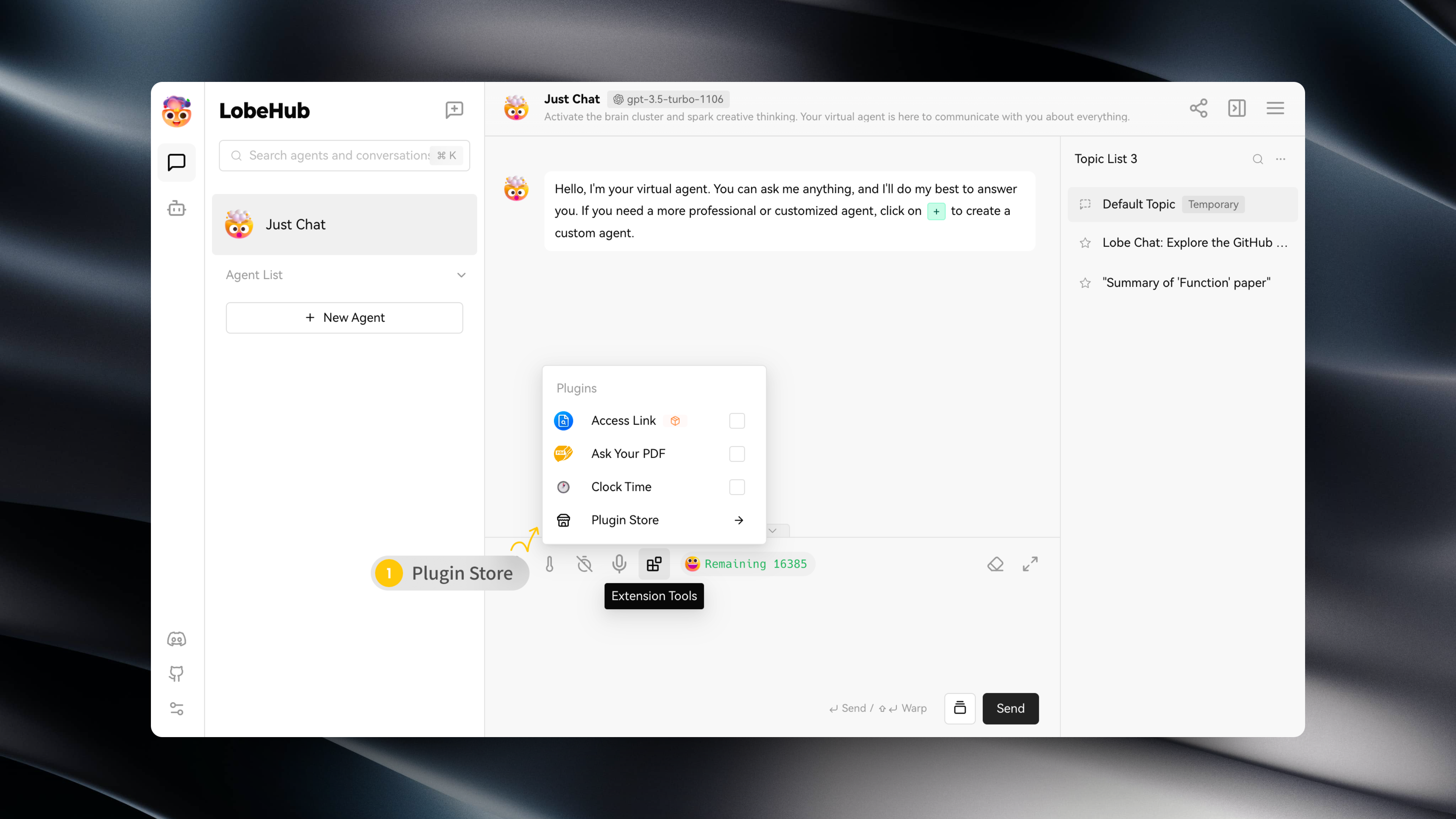
You can access the Plugin Store by navigating to "Extension Tools" -> "Plugin Store" in the session toolbar.
|
|
12
12
|
|
|
13
|
-
|
|
14
14
|
|
|
15
15
|
The Plugin Store allows you to directly install and use plugins within LobeChat.
|
|
16
16
|
|
|
@@ -20,7 +20,7 @@ The Plugin Store allows you to directly install and use plugins within LobeChat.
|
|
|
20
20
|
|
|
21
21
|
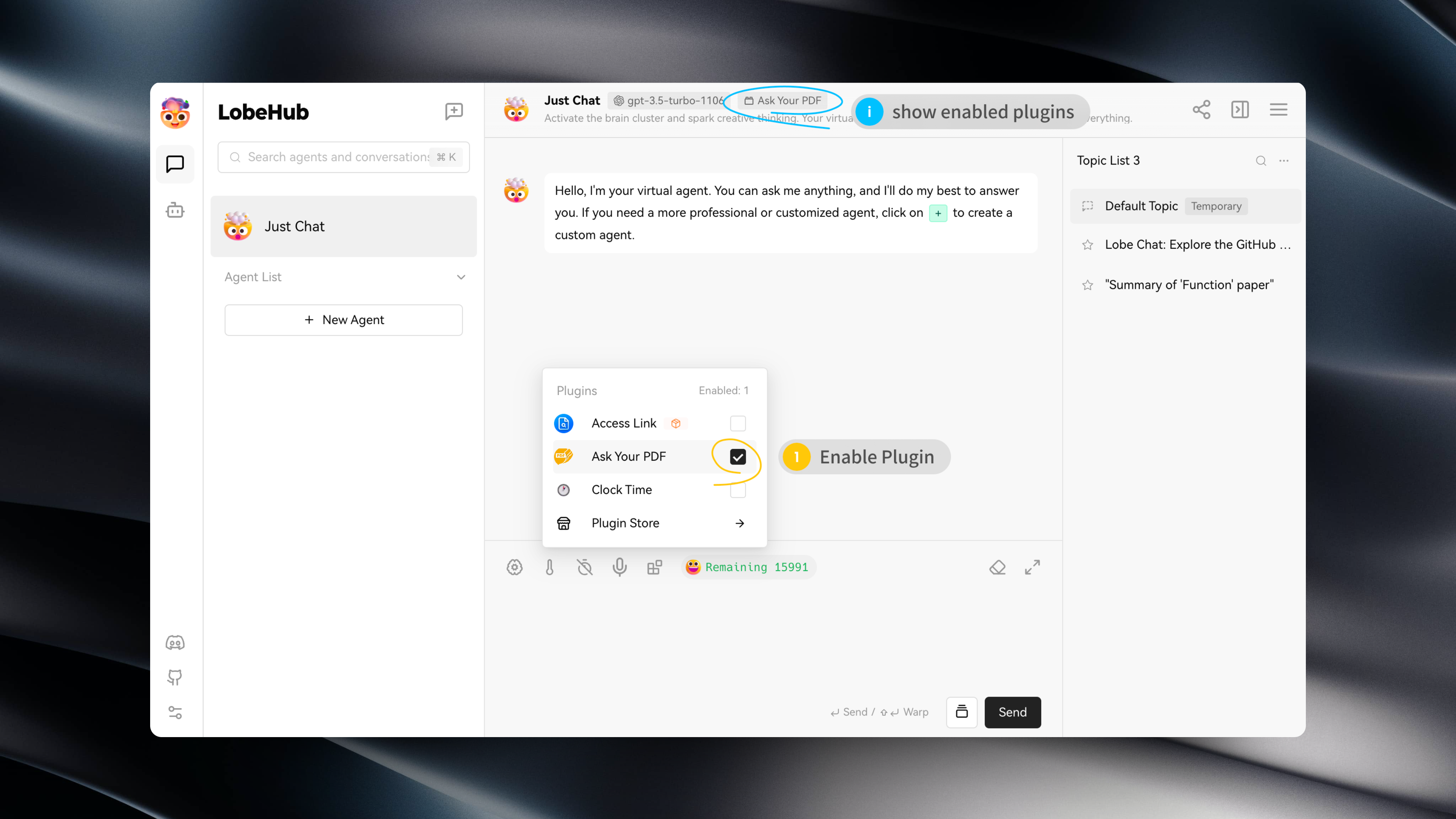
After installing a plugin, simply enable it under the current assistant to use it.
|
|
22
22
|
|
|
23
|
-
|
|
24
24
|
|
|
25
25
|
## Plugin Configuration
|
|
26
26
|
|
|
@@ -10,8 +10,8 @@ In addition, LobeChat's plugin mechanism is compatible with ChatGPT plugins, so
|
|
|
10
10
|
|
|
11
11
|
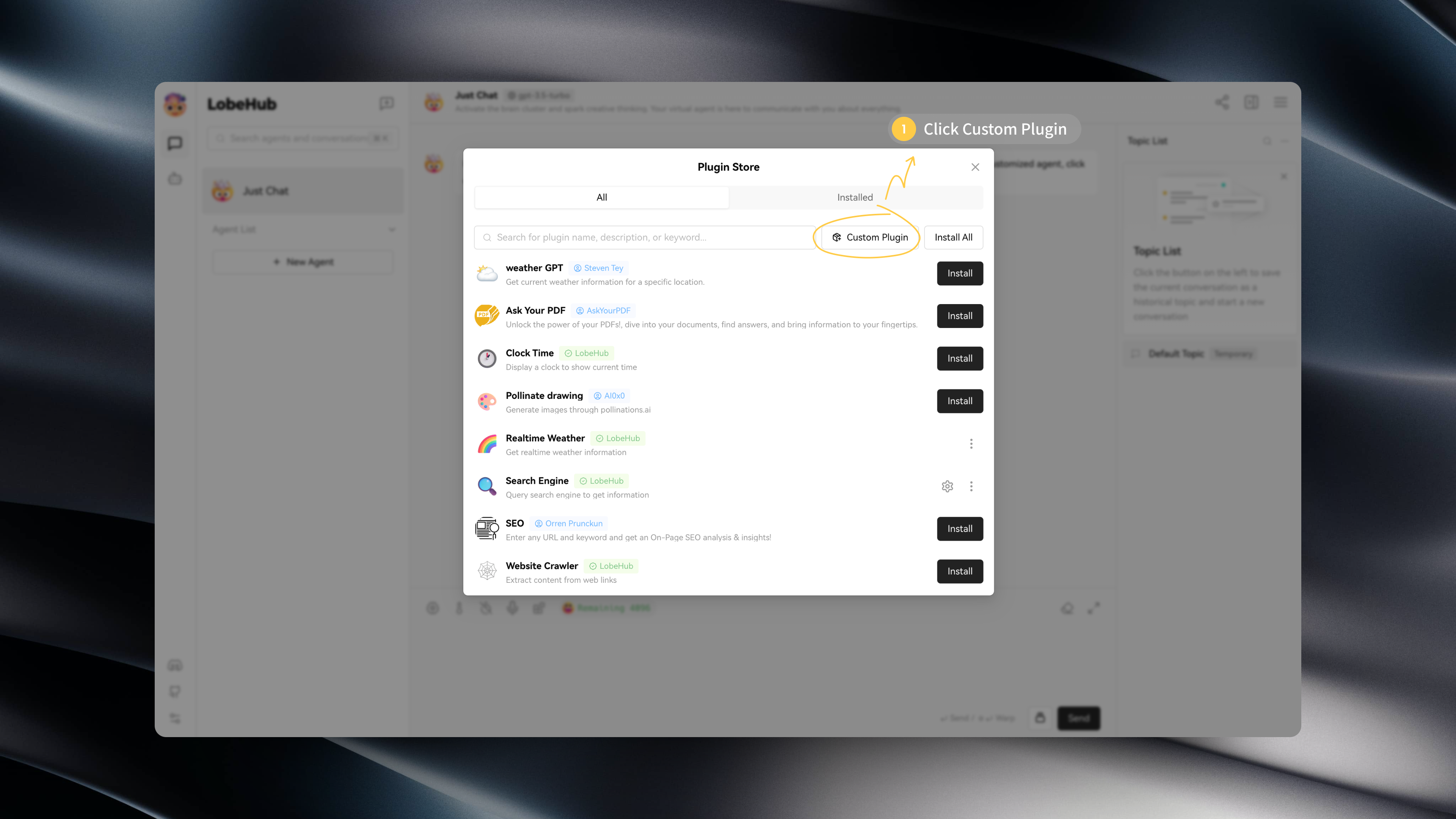
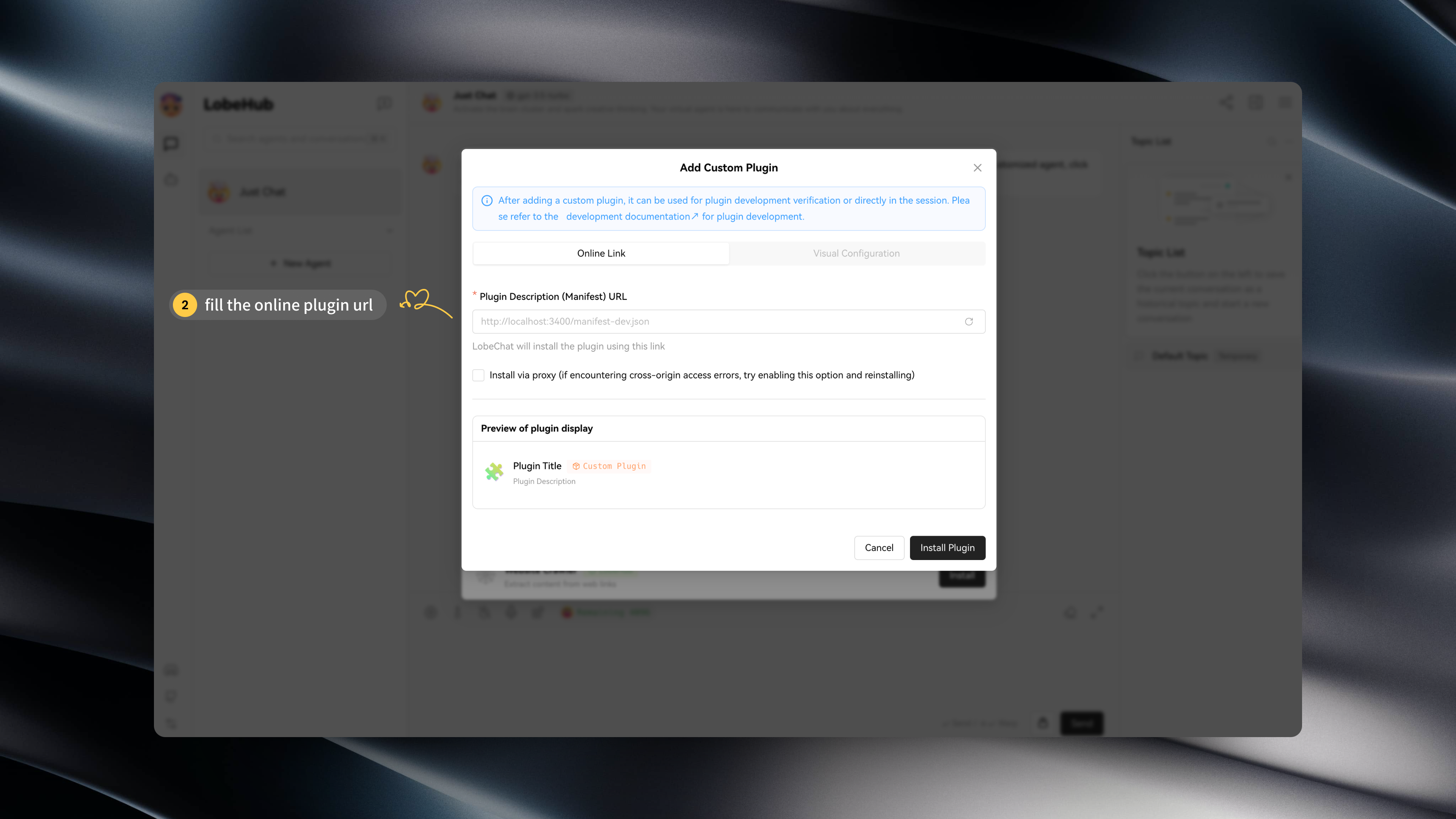
If you want to try installing custom plugins on your own, you can use the following links to try:
|
|
12
12
|
|
|
13
|
-
- `Custom Lobe Plugin` Mock Credit Card: https://lobe-plugin-mock-credit-card.vercel.app/manifest.json
|
|
14
|
-
- `ChatGPT Plugin` Access Links: https://www.accesslinks.ai/.well-known/ai-plugin.json
|
|
13
|
+
- `Custom Lobe Plugin` Mock Credit Card: [https://lobe-plugin-mock-credit-card.vercel.app/manifest.json](https://lobe-plugin-mock-credit-card.vercel.app/manifest.json)
|
|
14
|
+
- `ChatGPT Plugin` Access Links: [https://www.accesslinks.ai/.well-known/ai-plugin.json](https://www.accesslinks.ai/.well-known/ai-plugin.json)
|
|
15
15
|
|
|
16
16
|
|
|
17
17
|
|
|
@@ -10,8 +10,8 @@
|
|
|
10
10
|
|
|
11
11
|
如果你希望尝试自行安装自定义插件,你可以使用以下链接来尝试:
|
|
12
12
|
|
|
13
|
-
- `自定义 Lobe 插件` Mock Credit Card:https://lobe-plugin-mock-credit-card.vercel.app/manifest.json
|
|
14
|
-
- `ChatGPT 插件` Access Links:https://www.accesslinks.ai/.well-known/ai-plugin.json
|
|
13
|
+
- `自定义 Lobe 插件` Mock Credit Card:[https://lobe-plugin-mock-credit-card.vercel.app/manifest.json](https://lobe-plugin-mock-credit-card.vercel.app/manifest.json)
|
|
14
|
+
- `ChatGPT 插件` Access Links:[https://www.accesslinks.ai/.well-known/ai-plugin.json](https://www.accesslinks.ai/.well-known/ai-plugin.json)
|
|
15
15
|
|
|
16
16
|
 
|
|
17
17
|
|
|
@@ -174,7 +174,7 @@ Where `manClothes` and `womanClothes` are mock data and can be replaced with dat
|
|
|
174
174
|
|
|
175
175
|
Since the default plugin gateway for LobeChat is a cloud service `/api/plugins`, the cloud service sends requests to the address specified in the manifest's `api.url` to solve cross-origin issues.
|
|
176
176
|
|
|
177
|
-
For custom plugins, plugin requests need to be sent to the local service. Therefore, by specifying the gateway in the manifest (http://localhost:3400/api/gateway), LobeChat> will directly request this address, and then only the corresponding gateway needs to be created at that address.
|
|
177
|
+
For custom plugins, plugin requests need to be sent to the local service. Therefore, by specifying the gateway in the manifest ([http://localhost:3400/api/gateway](http://localhost:3400/api/gateway)), LobeChat> will directly request this address, and then only the corresponding gateway needs to be created at that address.
|
|
178
178
|
|
|
179
179
|
```ts
|
|
180
180
|
import { createLobeChatPluginGateway } from '@lobehub/chat-plugins-gateway';
|
|
@@ -240,7 +240,7 @@ If you want more people to use your plugin, feel free to [submit it for listing]
|
|
|
240
240
|
|
|
241
241
|
### Plugin Shield
|
|
242
242
|
|
|
243
|
-
[](https://github.com/lobehub/lobe-chat-plugins)
|
|
244
244
|
|
|
245
245
|
```md
|
|
246
246
|
[](https://github.com/lobehub/lobe-chat-plugins)
|
|
@@ -248,11 +248,11 @@ If you want more people to use your plugin, feel free to [submit it for listing]
|
|
|
248
248
|
|
|
249
249
|
## Links
|
|
250
250
|
|
|
251
|
-
- **📘 Pluging SDK Documentation**: https://chat-plugin-sdk.lobehub.com
|
|
252
|
-
- **🚀 chat-plugin-template**: https://github.com/lobehub/chat-plugin-template
|
|
253
|
-
- **🧩 chat-plugin-sdk**: https://github.com/lobehub/chat-plugin-sdk
|
|
254
|
-
- **🚪 chat-plugin-gateway**: https://github.com/lobehub/chat-plugins-gateway
|
|
255
|
-
- **🏪 lobe-chat-plugins**: https://github.com/lobehub/lobe-chat-plugins
|
|
251
|
+
- **📘 Pluging SDK Documentation**: [https://chat-plugin-sdk.lobehub.com](https://chat-plugin-sdk.lobehub.com)
|
|
252
|
+
- **🚀 chat-plugin-template**: [https://github.com/lobehub/chat-plugin-template](https://github.com/lobehub/chat-plugin-template)
|
|
253
|
+
- **🧩 chat-plugin-sdk**: [https://github.com/lobehub/chat-plugin-sdk](https://github.com/lobehub/chat-plugin-sdk)
|
|
254
|
+
- **🚪 chat-plugin-gateway**: [https://github.com/lobehub/chat-plugins-gateway](https://github.com/lobehub/chat-plugins-gateway)
|
|
255
|
+
- **🏪 lobe-chat-plugins**: [https://github.com/lobehub/lobe-chat-plugins](https://github.com/lobehub/lobe-chat-plugins)
|
|
256
256
|
|
|
257
257
|
[fetch-plugin-message-url]: https://github.com/lobehub/chat-plugin-template
|
|
258
258
|
[lobe-chat-plugin-template-url]: https://github.com/lobehub/chat-plugin-template
|
|
@@ -174,7 +174,7 @@ export default async (req: Request) => {
|
|
|
174
174
|
|
|
175
175
|
由于 LobeChat 默认的插件网关是云端服务 `/api/plugins`,云端服务通过 manifest 上的 `api.url` 地址发送请求,以解决跨域问题。
|
|
176
176
|
|
|
177
|
-
针对自定义插件,插件请求需要发送给本地服务, 因此通过在 manifest 中指定网关 (http://localhost:3400/api/gateway),LobeChat 将会直接请求该地址,然后只需要在该地址下创建对应的网关即可。
|
|
177
|
+
针对自定义插件,插件请求需要发送给本地服务, 因此通过在 manifest 中指定网关 ([http://localhost:3400/api/gateway),LobeChat](http://localhost:3400/api/gateway\),LobeChat) 将会直接请求该地址,然后只需要在该地址下创建对应的网关即可。
|
|
178
178
|
|
|
179
179
|
```ts
|
|
180
180
|
import { createLobeChatPluginGateway } from '@lobehub/chat-plugins-gateway';
|
|
@@ -240,7 +240,7 @@ export default Render;
|
|
|
240
240
|
|
|
241
241
|
### 插件 Shield
|
|
242
242
|
|
|
243
|
-
[](https://github.com/lobehub/lobe-chat-plugins)
|
|
244
244
|
|
|
245
245
|
```markdown
|
|
246
246
|
[](https://github.com/lobehub/lobe-chat-plugins)
|
|
@@ -248,11 +248,11 @@ export default Render;
|
|
|
248
248
|
|
|
249
249
|
## 链接
|
|
250
250
|
|
|
251
|
-
- **📘 Pluging SDK 文档**: https://chat-plugin-sdk.lobehub.com
|
|
252
|
-
- **🚀 chat-plugin-template**: https://github.com/lobehub/chat-plugin-template
|
|
253
|
-
- **🧩 chat-plugin-sdk**: https://github.com/lobehub/chat-plugin-sdk
|
|
254
|
-
- **🚪 chat-plugin-gateway**: https://github.com/lobehub/chat-plugins-gateway
|
|
255
|
-
- **🏪 lobe-chat-plugins**: https://github.com/lobehub/lobe-chat-plugins
|
|
251
|
+
- **📘 Pluging SDK 文档**: [https://chat-plugin-sdk.lobehub.com](https://chat-plugin-sdk.lobehub.com)
|
|
252
|
+
- **🚀 chat-plugin-template**: [https://github.com/lobehub/chat-plugin-template](https://github.com/lobehub/chat-plugin-template)
|
|
253
|
+
- **🧩 chat-plugin-sdk**: [https://github.com/lobehub/chat-plugin-sdk](https://github.com/lobehub/chat-plugin-sdk)
|
|
254
|
+
- **🚪 chat-plugin-gateway**: [https://github.com/lobehub/chat-plugins-gateway](https://github.com/lobehub/chat-plugins-gateway)
|
|
255
|
+
- **🏪 lobe-chat-plugins**: [https://github.com/lobehub/lobe-chat-plugins](https://github.com/lobehub/lobe-chat-plugins)
|
|
256
256
|
|
|
257
257
|
[fetch-plugin-message-url]: https://github.com/lobehub/chat-plugin-template
|
|
258
258
|
[lobe-chat-plugin-template-url]: https://github.com/lobehub/chat-plugin-template
|
|
@@ -0,0 +1,9 @@
|
|
|
1
|
+
# 插件商店
|
|
2
|
+
|
|
3
|
+
你可以在会话工具条中的 「扩展工具」 -> 「插件商店」,进入插件商店。
|
|
4
|
+
|
|
5
|
+

|
|
6
|
+
|
|
7
|
+
插件商店中会在 LobeChat 中可以直接安装并使用的插件。
|
|
8
|
+
|
|
9
|
+
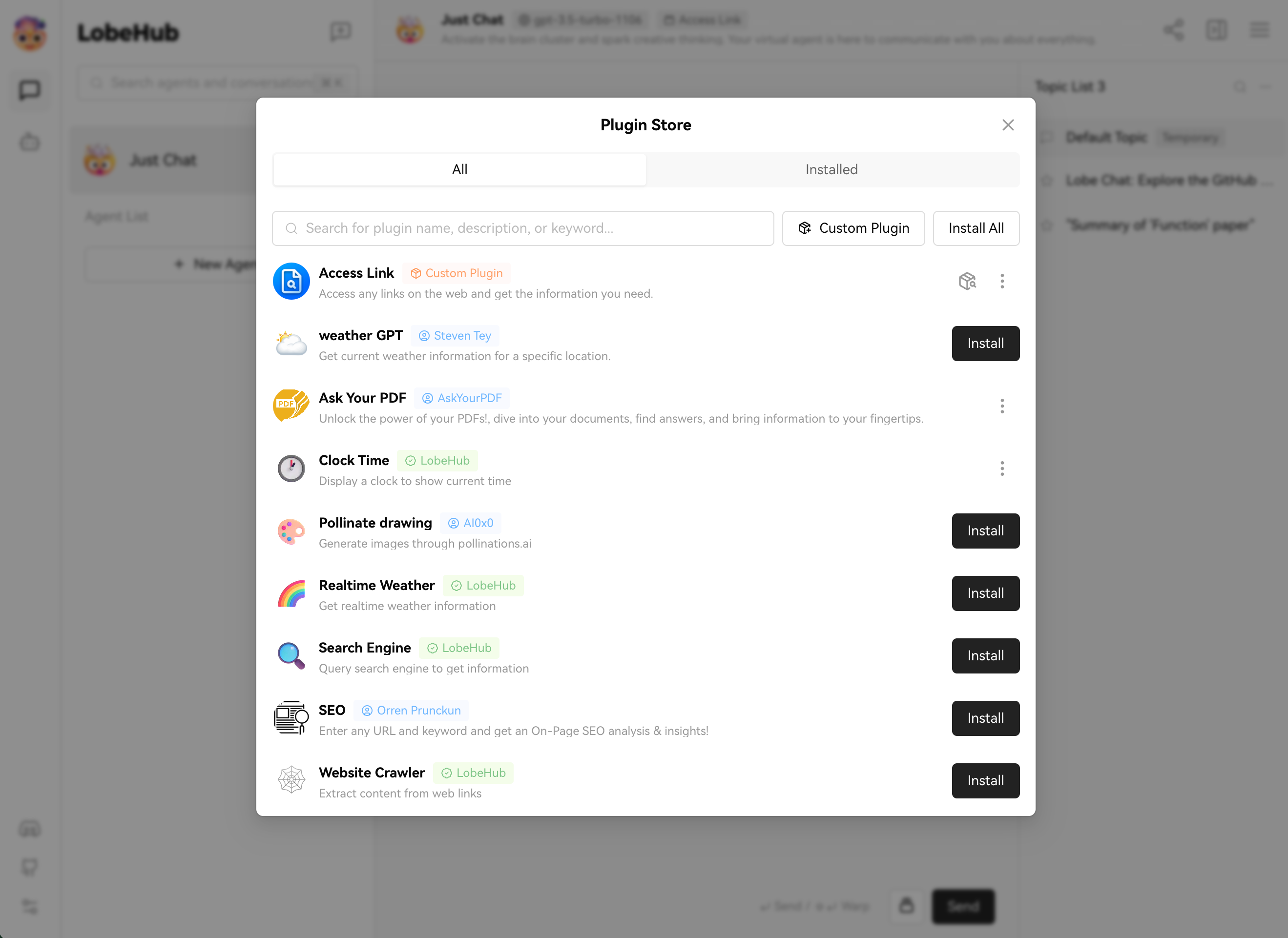
|
|
@@ -1,13 +1,14 @@
|
|
|
1
|
+
---
|
|
2
|
+
title: Using Google Gemma Model
|
|
3
|
+
image: https://github.com/lobehub/lobe-chat/assets/28616219/817f5655-4f9e-414b-af9f-9ccc5410a06d
|
|
4
|
+
---
|
|
5
|
+
|
|
6
|
+
|
|
1
7
|
import { Callout, Steps } from 'nextra/components';
|
|
2
8
|
|
|
3
9
|
# Using Google Gemma Model
|
|
4
10
|
|
|
5
|
-
<Image
|
|
6
|
-
alt={'Using Gemma in LobeChat'}
|
|
7
|
-
src={'https://github.com/lobehub/lobe-chat/assets/28616219/e636cb41-5b7f-4949-a236-1cc1633bd223'}
|
|
8
|
-
cover
|
|
9
|
-
rounded
|
|
10
|
-
/>
|
|
11
|
+
<Image alt={'Using Gemma in LobeChat'} cover rounded src={'https://github.com/lobehub/lobe-chat/assets/28616219/e636cb41-5b7f-4949-a236-1cc1633bd223'} />
|
|
11
12
|
|
|
12
13
|
[Gemma](https://blog.google/technology/developers/gemma-open-models/) is an open-source large language model (LLM) from Google, designed to provide a more general and flexible model for various natural language processing tasks. Now, with the integration of LobeChat and [Ollama](https://ollama.com/), you can easily use Google Gemma in LobeChat.
|
|
13
14
|
|
|
@@ -16,41 +17,29 @@ This document will guide you on how to use Google Gemma in LobeChat:
|
|
|
16
17
|
<Steps>
|
|
17
18
|
### Install Ollama locally
|
|
18
19
|
|
|
19
|
-
First, you need to install Ollama. For the installation process, please refer to the [Ollama usage documentation](/en/usage/providers/ollama).
|
|
20
|
-
|
|
21
|
-
### Pull Google Gemma model to local using Ollama
|
|
20
|
+
First, you need to install Ollama. For the installation process, please refer to the [Ollama usage documentation](/en/usage/providers/ollama).
|
|
22
21
|
|
|
23
|
-
|
|
22
|
+
### Pull Google Gemma model to local using Ollama
|
|
24
23
|
|
|
25
|
-
|
|
26
|
-
ollama pull gemma
|
|
27
|
-
```
|
|
24
|
+
After installing Ollama, you can install the Google Gemma model using the following command, using the 7b model as an example:
|
|
28
25
|
|
|
29
|
-
|
|
30
|
-
|
|
31
|
-
|
|
32
|
-
width={791}
|
|
33
|
-
height={473}
|
|
34
|
-
/>
|
|
26
|
+
```bash
|
|
27
|
+
ollama pull gemma
|
|
28
|
+
```
|
|
35
29
|
|
|
36
|
-
|
|
30
|
+
<Image alt={'Pulling Gemma model using Ollama'} height={473} src={'https://github.com/lobehub/lobe-chat/assets/28616219/7049a811-a08b-45d3-8491-970f579c2ebd'} width={791} />
|
|
37
31
|
|
|
38
|
-
|
|
32
|
+
### Select Gemma model
|
|
39
33
|
|
|
40
|
-
|
|
41
|
-
alt={'Selecting Gemma model in the model selection panel'}
|
|
42
|
-
src={'https://github.com/lobehub/lobe-chat/assets/28616219/c91d0c18-a21f-41f6-b5cc-94d29faeb797'}
|
|
43
|
-
width={791}
|
|
44
|
-
bordered
|
|
45
|
-
height={629}
|
|
46
|
-
/>
|
|
34
|
+
In the session page, open the model panel and then select the Gemma model.
|
|
47
35
|
|
|
48
|
-
<
|
|
49
|
-
If you do not see the Ollama provider in the model selection panel, please refer to [Integrating
|
|
50
|
-
with Ollama](/en/self-hosting/examples/ollama) to learn how to enable the Ollama provider in
|
|
51
|
-
LobeChat.
|
|
52
|
-
</Callout>
|
|
36
|
+
<Image alt={'Selecting Gemma model in the model selection panel'} bordered height={629} src={'https://github.com/lobehub/lobe-chat/assets/28616219/c91d0c18-a21f-41f6-b5cc-94d29faeb797'} width={791} />
|
|
53
37
|
|
|
38
|
+
<Callout type={'info'}>
|
|
39
|
+
If you do not see the Ollama provider in the model selection panel, please refer to [Integrating
|
|
40
|
+
with Ollama](/en/self-hosting/examples/ollama) to learn how to enable the Ollama provider in
|
|
41
|
+
LobeChat.
|
|
42
|
+
</Callout>
|
|
54
43
|
</Steps>
|
|
55
44
|
|
|
56
45
|
Now, you can start conversing with the local Gemma model using LobeChat.
|