@lobehub/chat 0.128.2 → 0.128.3
This diff represents the content of publicly available package versions that have been released to one of the supported registries. The information contained in this diff is provided for informational purposes only and reflects changes between package versions as they appear in their respective public registries.
- package/.github/workflows/issue-close-require.yml +3 -3
- package/.github/workflows/issues-translate.yml +3 -3
- package/.github/workflows/wiki-sync.yml +2 -2
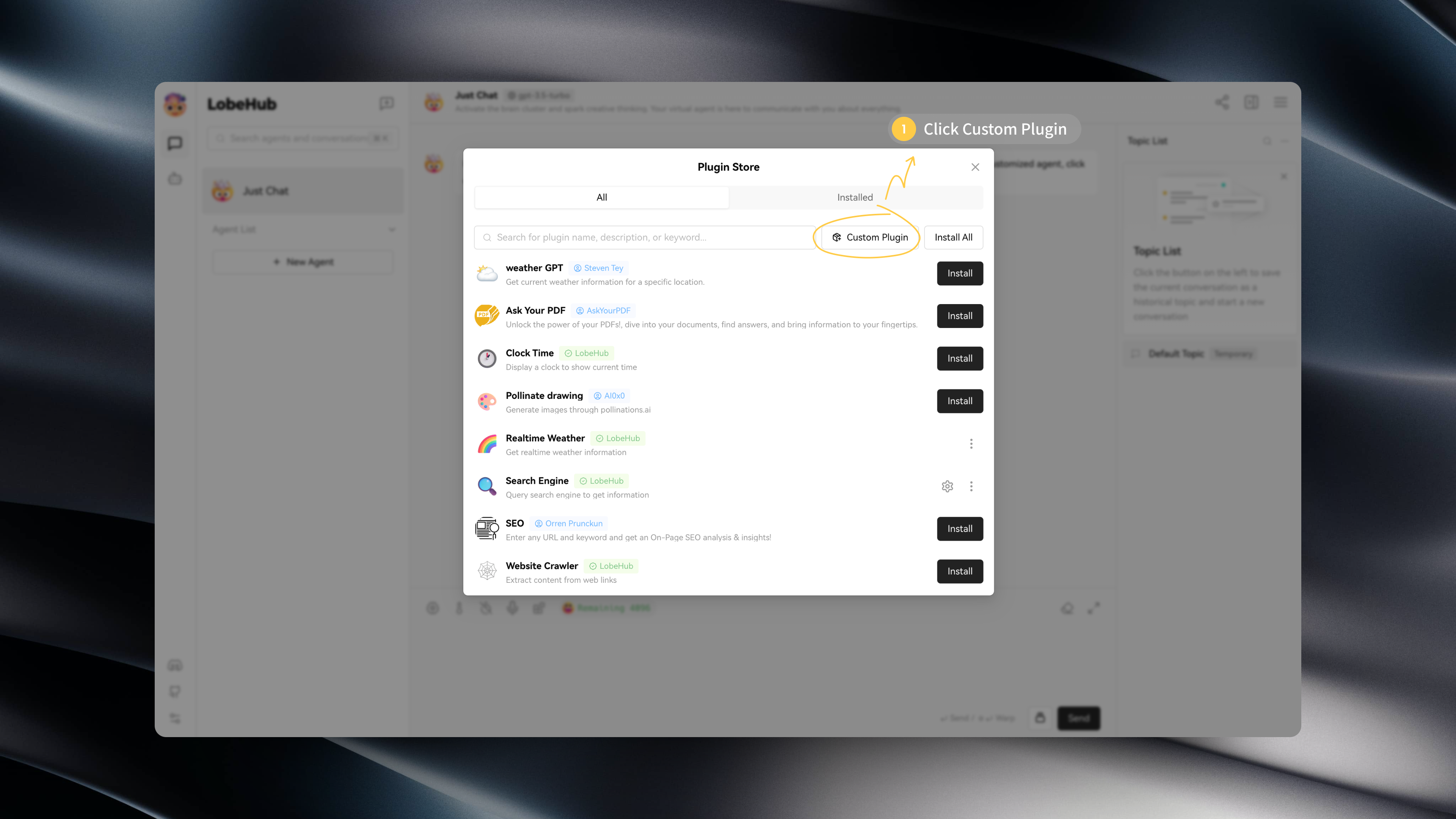
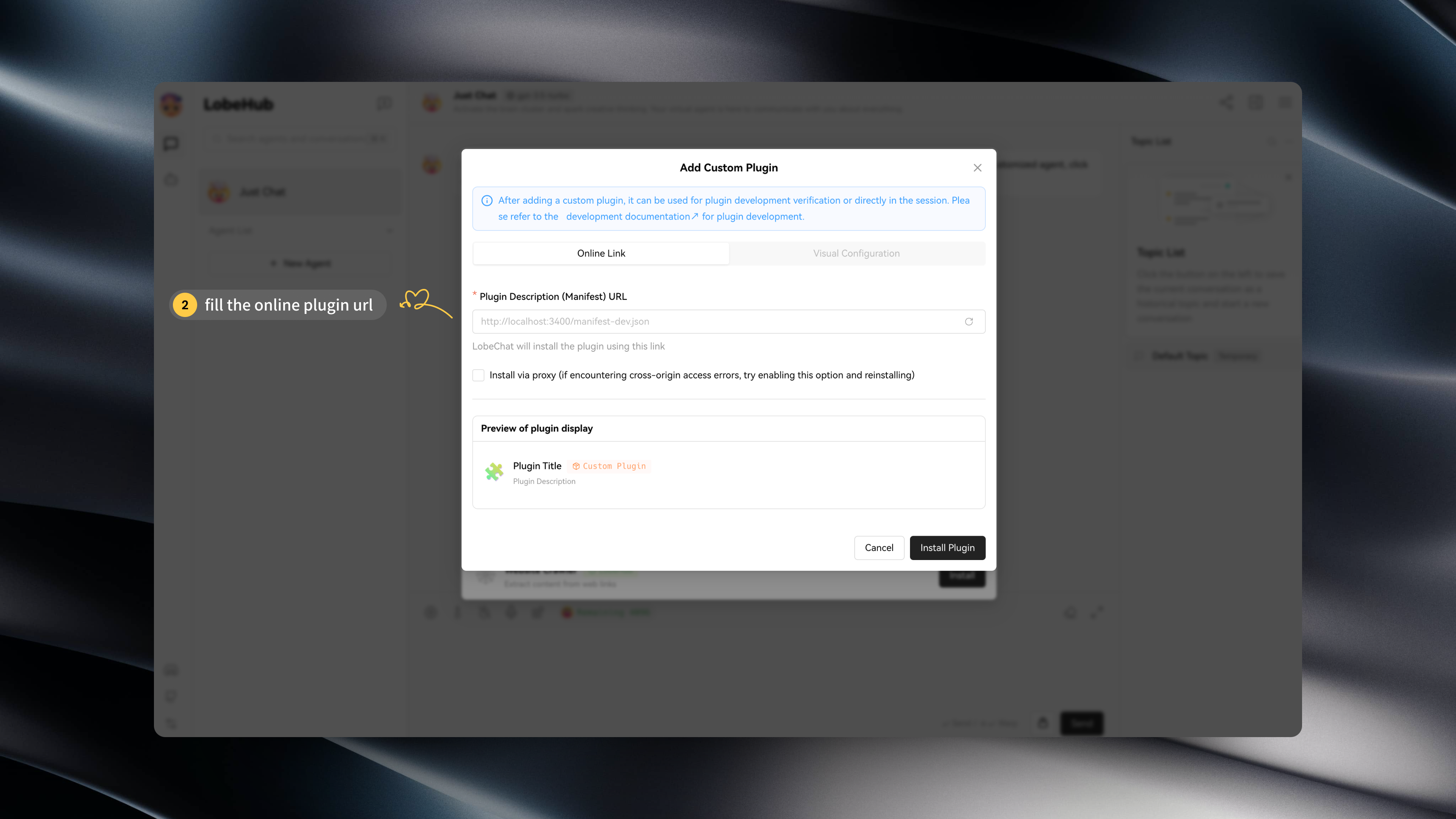
- package/.i18nrc.js +2 -2
- package/CHANGELOG.md +25 -0
- package/README.md +3 -3
- package/README.zh-CN.md +3 -3
- package/contributing/Basic/Feature-Development.md +713 -0
- package/{docs/Development → contributing/Basic}/Feature-Development.zh-CN.md +2 -2
- package/{docs/Development → contributing/Basic}/Intro.zh-CN.md +5 -5
- package/{docs → contributing}/Home.md +20 -29
- package/{docs/Development → contributing/Internationalization}/Internationalization-Implementation.zh-CN.md +1 -1
- package/{docs → contributing}/_Sidebar.md +18 -29
- package/docs/agents/concepts.mdx +18 -0
- package/docs/agents/concepts.zh-CN.mdx +17 -0
- package/docs/agents/custom-agent.mdx +34 -0
- package/docs/agents/custom-agent.zh-CN.mdx +31 -0
- package/docs/agents/model.mdx +68 -0
- package/docs/agents/model.zh-CN.mdx +64 -0
- package/docs/agents/prompt.mdx +96 -0
- package/docs/agents/prompt.zh-CN.mdx +97 -0
- package/docs/agents/topics.mdx +7 -0
- package/docs/agents/topics.zh-CN.mdx +6 -0
- package/docs/common-errors/no-v1-suffix.mdx +18 -0
- package/docs/common-errors/no-v1-suffix.zh-CN.mdx +17 -0
- package/docs/common-errors/proxy-with-unable-to-verify-leaf-signature.mdx +70 -0
- package/docs/{Deployment/Common-Error.zh-CN.md → common-errors/proxy-with-unable-to-verify-leaf-signature.zh-CN.mdx} +8 -26
- package/docs/environment-variables/common.mdx +215 -0
- package/docs/environment-variables/common.zh-CN.mdx +214 -0
- package/docs/environment-variables/model-provider.mdx +135 -0
- package/docs/environment-variables/model-provider.zh-CN.mdx +133 -0
- package/docs/package.json +5 -0
- package/docs/plugins/basic-usage.mdx +40 -0
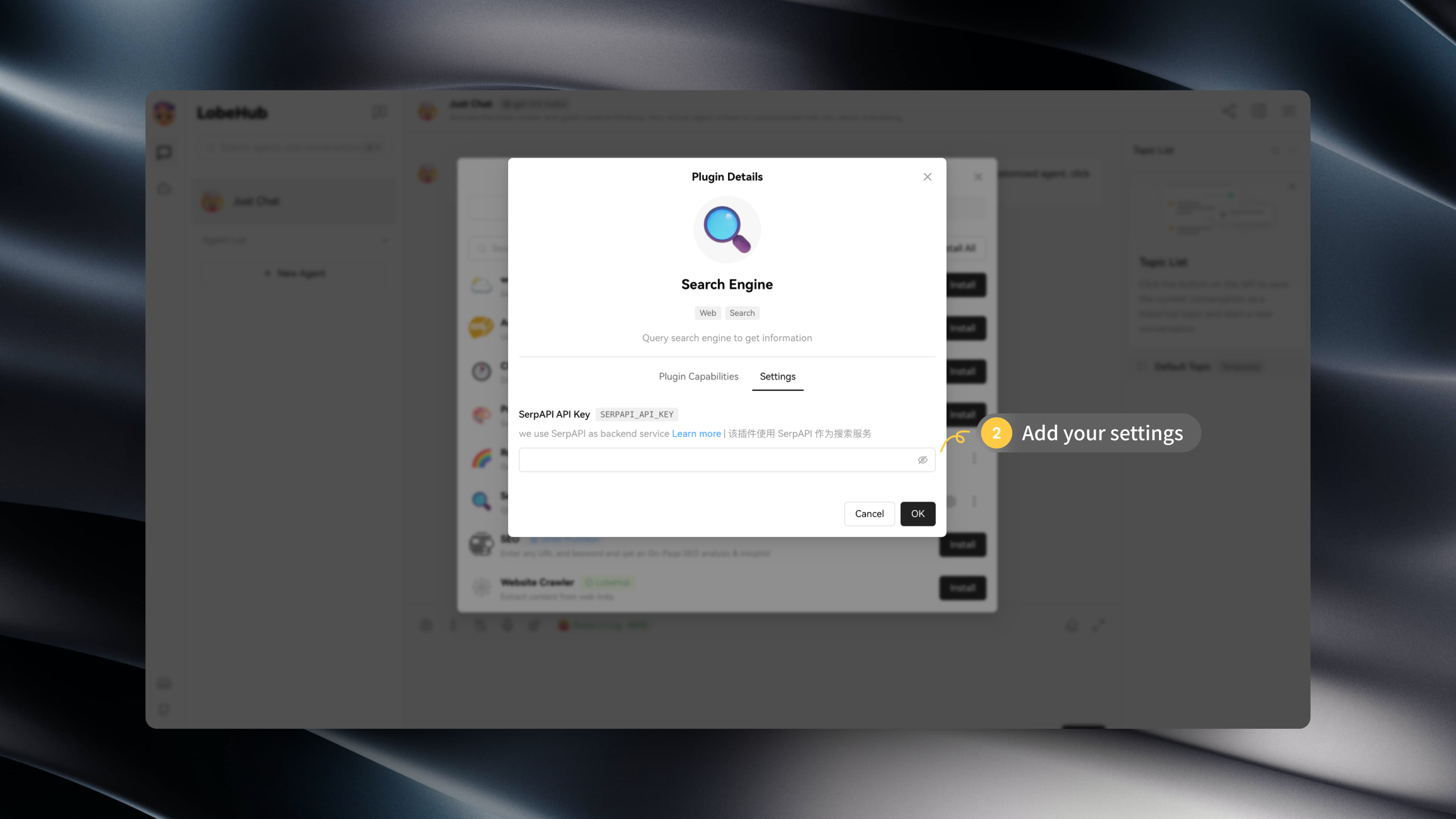
- package/docs/{Usage/Plugins.zh-CN.md → plugins/basic-usage.zh-CN.mdx} +7 -21
- package/docs/plugins/custom-plugin.mdx +27 -0
- package/docs/plugins/custom-plugin.zh-CN.mdx +26 -0
- package/docs/plugins/plugin-development.mdx +262 -0
- package/docs/{Plugins/Plugin-Development.zh-CN.md → plugins/plugin-development.zh-CN.mdx} +9 -33
- package/docs/plugins/plugin-store.mdx +10 -0
- package/docs/plugins/plugin-store.zh-CN.mdx +9 -0
- package/docs/self-hosting/analytics.mdx +20 -0
- package/docs/{Deployment/Analytics.zh-CN.md → self-hosting/analytics.zh-CN.mdx} +5 -8
- package/docs/self-hosting/authentication.mdx +94 -0
- package/docs/self-hosting/authentication.zh-CN.mdx +90 -0
- package/docs/self-hosting/deploy-with-azure-openai.mdx +48 -0
- package/docs/{Deployment/Deploy-with-Azure-OpenAI.zh-CN.md → self-hosting/deploy-with-azure-openai.zh-CN.mdx} +16 -21
- package/docs/self-hosting/docker-compose.mdx +121 -0
- package/docs/self-hosting/docker-compose.zh-CN.mdx +121 -0
- package/docs/self-hosting/docker.mdx +152 -0
- package/docs/self-hosting/docker.zh-CN.mdx +149 -0
- package/docs/self-hosting/environment-variable.mdx +340 -0
- package/docs/{Deployment/Environment-Variable.zh-CN.md → self-hosting/environment-variable.zh-CN.mdx} +43 -57
- package/docs/self-hosting/upstream-sync.mdx +66 -0
- package/docs/{Deployment/Upstream-Sync.zh-CN.md → self-hosting/upstream-sync.zh-CN.mdx} +23 -21
- package/docs/self-hosting/vercel.mdx +39 -0
- package/docs/self-hosting/vercel.zh-CN.mdx +39 -0
- package/docs/usage/agent-market.mdx +35 -0
- package/docs/usage/agent-market.zh-CN.mdx +32 -0
- package/docs/usage/mobile.mdx +8 -0
- package/docs/usage/mobile.zh-CN.mdx +7 -0
- package/docs/usage/more.mdx +21 -0
- package/docs/usage/more.zh-CN.mdx +19 -0
- package/docs/usage/plugin-system.mdx +84 -0
- package/docs/usage/plugin-system.zh-CN.mdx +77 -0
- package/docs/usage/pwa.mdx +21 -0
- package/docs/usage/pwa.zh-CN.mdx +21 -0
- package/docs/usage/text-to-image.mdx +5 -0
- package/docs/usage/text-to-image.zh-CN.mdx +6 -0
- package/docs/usage/theme.mdx +17 -0
- package/docs/usage/theme.zh-CN.mdx +15 -0
- package/docs/usage/tts.mdx +26 -0
- package/docs/usage/tts.zh-CN.mdx +24 -0
- package/docs/usage/vision.mdx +8 -0
- package/docs/usage/vision.zh-CN.mdx +7 -0
- package/next.config.mjs +5 -0
- package/package.json +4 -3
- package/scripts/docsWorkflow/const.ts +1 -1
- package/scripts/docsWorkflow/toc.ts +6 -6
- package/src/app/welcome/(desktop)/features/Footer.tsx +5 -3
- package/src/config/client.ts +6 -0
- package/src/const/url.ts +10 -1
- package/src/features/SideBar/BottomActions.tsx +11 -10
- package/src/locales/default/common.ts +1 -0
- package/docs/Deployment/Analytics.md +0 -20
- package/docs/Deployment/Authentication.md +0 -80
- package/docs/Deployment/Authentication.zh-CN.md +0 -80
- package/docs/Deployment/Common-Error.md +0 -87
- package/docs/Deployment/Deploy-with-Azure-OpenAI.md +0 -54
- package/docs/Deployment/Docker-Deployment.md +0 -219
- package/docs/Deployment/Docker-Deployment.zh-CN.md +0 -217
- package/docs/Deployment/Environment-Variable.md +0 -362
- package/docs/Deployment/Upstream-Sync.md +0 -62
- package/docs/Plugins/Plugin-Development.md +0 -287
- package/docs/Usage/Plugins.md +0 -53
- package/docs/Usage/Usage-Agents.md +0 -201
- package/docs/Usage/Usage-Agents.zh-CN.md +0 -202
- package/docs/Usage/Usage-Topics.md +0 -31
- package/docs/Usage/Usage-Topics.zh-CN.md +0 -31
- /package/{docs/Development → contributing/Basic}/Add-New-Authentication-Providers.md +0 -0
- /package/{docs/Development → contributing/Basic}/Add-New-Authentication-Providers.zh-CN.md +0 -0
- /package/{docs/Development → contributing/Basic}/Architecture.md +0 -0
- /package/{docs/Development → contributing/Basic}/Architecture.zh-CN.md +0 -0
- /package/{docs/Development → contributing/Basic}/Chat-API.md +0 -0
- /package/{docs/Development → contributing/Basic}/Chat-API.zh-CN.md +0 -0
- /package/{docs/Development → contributing/Basic}/Contributing-Guidelines.md +0 -0
- /package/{docs/Development → contributing/Basic}/Contributing-Guidelines.zh-CN.md +0 -0
- /package/{docs/Development → contributing/Basic}/Feature-Development-Frontend.md +0 -0
- /package/{docs/Development → contributing/Basic}/Feature-Development-Frontend.zh-CN.md +0 -0
- /package/{docs/Development → contributing/Basic}/Folder-Structure.md +0 -0
- /package/{docs/Development → contributing/Basic}/Folder-Structure.zh-CN.md +0 -0
- /package/{docs/Development → contributing/Basic}/Intro.md +0 -0
- /package/{docs/Development → contributing/Basic}/Resources.md +0 -0
- /package/{docs/Development → contributing/Basic}/Resources.zh-CN.md +0 -0
- /package/{docs/Development → contributing/Basic}/Setup-Development.md +0 -0
- /package/{docs/Development → contributing/Basic}/Setup-Development.zh-CN.md +0 -0
- /package/{docs/Development → contributing/Basic}/Test.md +0 -0
- /package/{docs/Development → contributing/Basic}/Test.zh-CN.md +0 -0
- /package/{docs/Development → contributing/Internationalization}/Add-New-Locale.md +0 -0
- /package/{docs/Development → contributing/Internationalization}/Add-New-Locale.zh-CN.md +0 -0
- /package/{docs/Development → contributing/Internationalization}/Internationalization-Implementation.md +0 -0
- /package/{docs → contributing}/Others/Lighthouse.md +0 -0
- /package/{docs → contributing}/Others/Lighthouse.zh-CN.md +0 -0
- /package/{docs/Development → contributing/State-Management}/State-Management-Intro.md +0 -0
- /package/{docs/Development → contributing/State-Management}/State-Management-Intro.zh-CN.md +0 -0
- /package/{docs/Development → contributing/State-Management}/State-Management-Selectors.md +0 -0
- /package/{docs/Development → contributing/State-Management}/State-Management-Selectors.zh-CN.md +0 -0
- /package/{docs → contributing}/_Footer.md +0 -0
|
@@ -0,0 +1,214 @@
|
|
|
1
|
+
import { Callout } from 'nextra/components';
|
|
2
|
+
|
|
3
|
+
# 环境变量
|
|
4
|
+
|
|
5
|
+
LobeChat 在部署时提供了一些额外的配置项,你可以使用环境变量进行自定义设置。
|
|
6
|
+
|
|
7
|
+
## 通用变量
|
|
8
|
+
|
|
9
|
+
### `ACCESS_CODE`
|
|
10
|
+
|
|
11
|
+
- 类型:可选
|
|
12
|
+
- 描述:添加访问 LobeChat 服务的密码,你可以设置一个长密码以防被爆破
|
|
13
|
+
- 默认值:-
|
|
14
|
+
- 示例:`awCTe)re_r74` or `rtrt_ewee3@09!`
|
|
15
|
+
|
|
16
|
+
### `ENABLE_OAUTH_SSO`
|
|
17
|
+
|
|
18
|
+
- 类型:可选
|
|
19
|
+
- 描述:为 LobeChat 启用单点登录 (SSO)。设置为 `1` 以启用单点登录。有关详细信息,请参阅[身份验证服务](#身份验证服务)。
|
|
20
|
+
- 默认值: `-`
|
|
21
|
+
- 示例: `1`
|
|
22
|
+
|
|
23
|
+
### `NEXT_PUBLIC_BASE_PATH`
|
|
24
|
+
|
|
25
|
+
- 类型:可选
|
|
26
|
+
- 描述:为 LobeChat 添加 `basePath`
|
|
27
|
+
- 默认值: `-`
|
|
28
|
+
- 示例: `/test`
|
|
29
|
+
|
|
30
|
+
#### `DEFAULT_AGENT_CONFIG`
|
|
31
|
+
|
|
32
|
+
- 类型:可选
|
|
33
|
+
- 描述:用于配置 LobeChat 默认助理的默认配置。它支持多种数据类型和结构,包括键值对、嵌套字段、数组值等。
|
|
34
|
+
- 默认值:`-`
|
|
35
|
+
- 示例:`'model=gpt-4-1106-preview;params.max_tokens=300;plugins=search-engine,lobe-image-designer`
|
|
36
|
+
|
|
37
|
+
`DEFAULT_AGENT_CONFIG` 用于配置 LobeChat 默认助理的默认配置。它支持多种数据类型和结构,包括键值对、嵌套字段、数组值等。下表详细说明了 `DEFAULT_AGENT_CONFIG` 环境变量的配置项、示例以及相应解释:
|
|
38
|
+
|
|
39
|
+
| 配置项类型 | 示例 | 解释 |
|
|
40
|
+
| --- | --- | --- |
|
|
41
|
+
| 基本键值对 | `model=gpt-4` | 设置模型为 `gpt-4`。 |
|
|
42
|
+
| 嵌套字段 | `tts.sttLocale=en-US` | 设置文本到语音服务的语言区域为 `en-US`。 |
|
|
43
|
+
| 数组 | `plugins=search-engine,lobe-image-designer` | 启用 `search-engine` 和 `lobe-image-designer` 插件。 |
|
|
44
|
+
| 中文逗号 | `plugins=search-engine,lobe-image-designer` | 同上,演示支持中文逗号分隔。 |
|
|
45
|
+
| 多个配置项 | `model=glm-4;provider=zhipu` | 设置模型为 `glm-4` 且模型服务商为 `zhipu`。 |
|
|
46
|
+
| 数字值 | `params.max_tokens=300` | 设置最大令牌数为 `300`。 |
|
|
47
|
+
| 布尔值 | `enableAutoCreateTopic=true` | 启用自动创建主题。 |
|
|
48
|
+
| 特殊字符 | `inputTemplate="Hello; I am a bot;"` | 设置输入模板为 `Hello; I am a bot;`。 |
|
|
49
|
+
| 错误处理 | `model=gpt-4;maxToken` | 忽略无效条目 `maxToken`,仅解析出 `model=gpt-4`。 |
|
|
50
|
+
| 值覆盖 | `model=gpt-4;model=gpt-4-1106-preview` | 如果键重复,使用最后一次出现的值,此处 `model` 的值为 `gpt-4-1106-preview`。 |
|
|
51
|
+
|
|
52
|
+
相关阅读:
|
|
53
|
+
|
|
54
|
+
- [\[RFC\] 022 - 环境变量配置默认助手参数](https://github.com/lobehub/lobe-chat/discussions/913)
|
|
55
|
+
|
|
56
|
+
## 身份验证服务
|
|
57
|
+
|
|
58
|
+
### 通用设置
|
|
59
|
+
|
|
60
|
+
#### `ENABLE_OAUTH_SSO`
|
|
61
|
+
|
|
62
|
+
- 类型:必选
|
|
63
|
+
- 描述:为 LobeChat 启用单点登录 (SSO)。设置为 `1` 以启用单点登录。
|
|
64
|
+
- 默认值: `-`
|
|
65
|
+
- 示例: `1`
|
|
66
|
+
|
|
67
|
+
#### `NEXTAUTH_SECRET`
|
|
68
|
+
|
|
69
|
+
- 类型:必选
|
|
70
|
+
- 描述:用于加密 Auth.js 会话令牌的密钥。您可以使用以下命令生成秘钥: `openssl rand -base64 32`.
|
|
71
|
+
- 默认值: `-`
|
|
72
|
+
- 示例: `Tfhi2t2pelSMEA8eaV61KaqPNEndFFdMIxDaJnS1CUI=`
|
|
73
|
+
|
|
74
|
+
### Auth0
|
|
75
|
+
|
|
76
|
+
<Callout>
|
|
77
|
+
目前我们只支持 Auth0 身份验证服务提供商。如果您需要使用其他身份验证服务提供商,可以提交
|
|
78
|
+
[功能请求](https://github.com/lobehub/lobe-chat/issues/new/choose) 或 Pull Request。
|
|
79
|
+
</Callout>
|
|
80
|
+
|
|
81
|
+
#### `AUTH0_CLIENT_ID`
|
|
82
|
+
|
|
83
|
+
- 类型:必选
|
|
84
|
+
- 描述: Auth0 应用程序的 Client ID,您可以访问[这里][auth0-client-page]并导航至应用程序设置来查看
|
|
85
|
+
- 默认值: `-`
|
|
86
|
+
- 示例: `evCnOJP1UX8FMnXR9Xkj5t0NyFn5p70P`
|
|
87
|
+
|
|
88
|
+
#### `AUTH0_CLIENT_SECRET`
|
|
89
|
+
|
|
90
|
+
- 类型:必选
|
|
91
|
+
- 描述: Auth0 应用程序的 Client Secret
|
|
92
|
+
- 默认值: `-`
|
|
93
|
+
- 示例: `wnX7UbZg85ZUzF6ioxPLnJVEQa1Elbs7aqBUSF16xleBS5AdkVfASS49-fQIC8Rm`
|
|
94
|
+
|
|
95
|
+
#### `AUTH0_ISSUER`
|
|
96
|
+
|
|
97
|
+
- 类型:必选
|
|
98
|
+
- 描述: Auth0 应用程序的签发人 / 域
|
|
99
|
+
- 默认值: `-`
|
|
100
|
+
- 示例: `https://example.auth0.com`
|
|
101
|
+
|
|
102
|
+
## 插件服务
|
|
103
|
+
|
|
104
|
+
### `PLUGINS_INDEX_URL`
|
|
105
|
+
|
|
106
|
+
- 类型:可选
|
|
107
|
+
- 描述:LobeChat 插件市场的索引地址,如果你自行部署了插件市场的服务,可以使用该变量来覆盖默认的插件市场地址
|
|
108
|
+
- 默认值:`https://chat-plugins.lobehub.com`
|
|
109
|
+
|
|
110
|
+
### `PLUGIN_SETTINGS`
|
|
111
|
+
|
|
112
|
+
- 类型:可选
|
|
113
|
+
- 描述:用于配置插件的设置,使用 `插件名:设置字段=设置值` 的格式来配置插件的设置,多个设置字段用英文分号 `;` 隔开,多个插件设置使用英文逗号`,`隔开。
|
|
114
|
+
- 默认值:`-`
|
|
115
|
+
- 示例:`search-engine:SERPAPI_API_KEY=xxxxx,plugin-2:key1=value1;key2=value2`
|
|
116
|
+
|
|
117
|
+
上述示例表示设置 `search-engine` 插件的 `SERPAPI_API_KEY` 为 `xxxxx`,设置 `plugin-2` 的 `key1` 为 `value1`,`key2` 为 `value2`。生成的插件设置配置如下:
|
|
118
|
+
|
|
119
|
+
```json
|
|
120
|
+
{
|
|
121
|
+
"plugin-2": {
|
|
122
|
+
"key1": "value1",
|
|
123
|
+
"key2": "value2"
|
|
124
|
+
},
|
|
125
|
+
"search-engine": {
|
|
126
|
+
"SERPAPI_API_KEY": "xxxxx"
|
|
127
|
+
}
|
|
128
|
+
}
|
|
129
|
+
```
|
|
130
|
+
|
|
131
|
+
## 助手市场
|
|
132
|
+
|
|
133
|
+
### `AGENTS_INDEX_URL`
|
|
134
|
+
|
|
135
|
+
- 类型:可选
|
|
136
|
+
- 描述:LobeChat 助手市场的索引地址,如果你自行部署了助手市场的服务,可以使用该变量来覆盖默认的市场地址
|
|
137
|
+
- 默认值:`https://chat-agents.lobehub.com`
|
|
138
|
+
|
|
139
|
+
## 数据统计
|
|
140
|
+
|
|
141
|
+
### Vercel Analytics
|
|
142
|
+
|
|
143
|
+
#### `NEXT_PUBLIC_ANALYTICS_VERCEL`
|
|
144
|
+
|
|
145
|
+
- 类型:可选
|
|
146
|
+
- 描述:用于配置 Vercel Analytics 的环境变量,当设为 `1` 时开启 Vercel Analytics
|
|
147
|
+
- 默认值: `-`
|
|
148
|
+
- 示例:`1`
|
|
149
|
+
|
|
150
|
+
#### `NEXT_PUBLIC_VERCEL_DEBUG`
|
|
151
|
+
|
|
152
|
+
- 类型:可选
|
|
153
|
+
- 描述:用于开启 Vercel Analytics 的调试模式
|
|
154
|
+
- 默认值: `-`
|
|
155
|
+
- 示例:`1`
|
|
156
|
+
|
|
157
|
+
### Posthog Analytics
|
|
158
|
+
|
|
159
|
+
#### `NEXT_PUBLIC_ANALYTICS_POSTHOG`
|
|
160
|
+
|
|
161
|
+
- 类型:可选
|
|
162
|
+
- 描述:用于开启 [PostHog Analytics][posthog-analytics-url] 的环境变量,设为 `1` 时开启 PostHog Analytics
|
|
163
|
+
- 默认值: `-`
|
|
164
|
+
- 示例:`1`
|
|
165
|
+
|
|
166
|
+
#### `NEXT_PUBLIC_POSTHOG_KEY`
|
|
167
|
+
|
|
168
|
+
- 类型:可选
|
|
169
|
+
- 描述:设置 PostHog 项目 Key
|
|
170
|
+
- 默认值: `-`
|
|
171
|
+
- 示例:`phc_xxxxxxxx`
|
|
172
|
+
|
|
173
|
+
#### `NEXT_PUBLIC_POSTHOG_HOST`
|
|
174
|
+
|
|
175
|
+
- 类型:可选
|
|
176
|
+
- 描述:设置 PostHog 服务的部署地址,默认为官方的 SAAS 地址
|
|
177
|
+
- 默认值:`https://app.posthog.com`
|
|
178
|
+
- 示例:`https://example.com`
|
|
179
|
+
|
|
180
|
+
#### `NEXT_PUBLIC_POSTHOG_DEBUG`
|
|
181
|
+
|
|
182
|
+
- 类型:可选
|
|
183
|
+
- 描述:开启 PostHog 的调试模式
|
|
184
|
+
- 默认值: `-`
|
|
185
|
+
- 示例:`1`
|
|
186
|
+
|
|
187
|
+
### Umami Analytics
|
|
188
|
+
|
|
189
|
+
#### `NEXT_PUBLIC_ANALYTICS_UMAMI`
|
|
190
|
+
|
|
191
|
+
- 类型:可选
|
|
192
|
+
- 描述:用于开启 [Umami Analytics][umami-analytics-url] 的环境变量,设为 `1` 时开启 Umami Analytics
|
|
193
|
+
- 默认值: `-`
|
|
194
|
+
- 示例:`1`
|
|
195
|
+
|
|
196
|
+
#### `NEXT_PUBLIC_UMAMI_SCRIPT_URL`
|
|
197
|
+
|
|
198
|
+
- 类型:可选
|
|
199
|
+
- 描述:Umami 脚本的网址,默认为 Umami Cloud 提供的脚本网址
|
|
200
|
+
- 默认值:`https://analytics.umami.is/script.js`
|
|
201
|
+
- 示例:`https://umami.your-site.com/script.js`
|
|
202
|
+
|
|
203
|
+
#### `NEXT_PUBLIC_UMAMI_WEBSITE_ID`
|
|
204
|
+
|
|
205
|
+
- 类型:必选
|
|
206
|
+
- 描述:你的 Umami 的 Website ID
|
|
207
|
+
- 默认值:`-`
|
|
208
|
+
- 示例:`E738D82A-EE9E-4806-A81F-0CA3CAE57F65`
|
|
209
|
+
|
|
210
|
+
[auth0-client-page]: https://manage.auth0.com/dashboard
|
|
211
|
+
[azure-api-verion-url]: https://docs.microsoft.com/zh-cn/azure/developer/javascript/api-reference/es-modules/azure-sdk/ai-translation/translationconfiguration?view=azure-node-latest#api-version
|
|
212
|
+
[openai-api-page]: https://platform.openai.com/account/api-keys
|
|
213
|
+
[posthog-analytics-url]: https://posthog.com
|
|
214
|
+
[umami-analytics-url]: https://umami.is
|
|
@@ -0,0 +1,135 @@
|
|
|
1
|
+
import { Callout } from 'nextra/components';
|
|
2
|
+
|
|
3
|
+
# Model Service Providers
|
|
4
|
+
|
|
5
|
+
When deploying LobeChat, a rich set of environment variables related to model service providers is provided, allowing you to easily define the model service providers to be enabled in LobeChat.
|
|
6
|
+
|
|
7
|
+
## OpenAI
|
|
8
|
+
|
|
9
|
+
### `OPENAI_API_KEY`
|
|
10
|
+
|
|
11
|
+
- Type: Required
|
|
12
|
+
- Description: This is the API key you applied for on the OpenAI account page, you can check it out [here](openai-api-page)
|
|
13
|
+
- Default: -
|
|
14
|
+
- Example: `sk-xxxxxx...xxxxxx`
|
|
15
|
+
|
|
16
|
+
### `OPENAI_PROXY_URL`
|
|
17
|
+
|
|
18
|
+
- Type: Optional
|
|
19
|
+
- Description: If you manually configure the OpenAI interface proxy, you can use this configuration item to override the default OpenAI API request base URL
|
|
20
|
+
- Default: `https://api.openai.com/v1`
|
|
21
|
+
- Example: `https://api.chatanywhere.cn` or `https://aihubmix.com/v1`
|
|
22
|
+
|
|
23
|
+
<Callout type={'warning'}>
|
|
24
|
+
Please check the request suffix of your proxy service provider. Some proxy service providers may
|
|
25
|
+
add `/v1` to the request suffix, while others may not. If you find that the AI returns an empty
|
|
26
|
+
message during testing, try adding the `/v1` suffix and retry.{' '}
|
|
27
|
+
</Callout>
|
|
28
|
+
|
|
29
|
+
<Callout type={'info'}>
|
|
30
|
+
Whether to fill in `/v1` is closely related to the model service provider. For example, the
|
|
31
|
+
default address of openai is `api.openai.com/v1`. If your proxy forwards the `/v1` interface, you
|
|
32
|
+
can simply fill in `proxy.com`. However, if the model service provider directly forwards the
|
|
33
|
+
`api.openai.com` domain, then you need to add `/v1` to the URL yourself.{' '}
|
|
34
|
+
</Callout>
|
|
35
|
+
|
|
36
|
+
Related discussions:
|
|
37
|
+
|
|
38
|
+
- [Why is the return value blank after installing Docker, configuring environment variables?](https://github.com/lobehub/lobe-chat/discussions/623)
|
|
39
|
+
- [Reasons for errors when using third-party interfaces](https://github.com/lobehub/lobe-chat/discussions/734)
|
|
40
|
+
- [No response in chat after filling in the proxy server address](https://github.com/lobehub/lobe-chat/discussions/1065)
|
|
41
|
+
|
|
42
|
+
### `CUSTOM_MODELS`
|
|
43
|
+
|
|
44
|
+
- Type: Optional
|
|
45
|
+
- Description: Used to control the model list, use `+` to add a model, use `-` to hide a model, use `model_name=display_name` to customize the display name of a model, separated by commas.
|
|
46
|
+
- Default: `-`
|
|
47
|
+
- Example: `+qwen-7b-chat,+glm-6b,-gpt-3.5-turbo,gpt-4-0125-preview=gpt-4-turbo`
|
|
48
|
+
|
|
49
|
+
The above example adds `qwen-7b-chat` and `glm-6b` to the model list, removes `gpt-3.5-turbo` from the list, and displays the name of `gpt-4-0125-preview` as `gpt-4-turbo`. If you want to disable all models first and then enable specific models, you can use `-all,+gpt-3.5-turbo`, which means only `gpt-3.5-turbo` will be enabled.
|
|
50
|
+
|
|
51
|
+
You can find all current model names in [modelProviders](https://github.com/lobehub/lobe-chat/tree/main/src/config/modelProviders).
|
|
52
|
+
|
|
53
|
+
## Azure OpenAI
|
|
54
|
+
|
|
55
|
+
If you need to use Azure OpenAI to provide model services, you can refer to the [Deploying with Azure OpenAI](../Deployment/Deploy-with-Azure-OpenAI.en-US.md) section for detailed steps. Here, we will list the environment variables related to Azure OpenAI.
|
|
56
|
+
|
|
57
|
+
### `USE_AZURE_OPENAI`
|
|
58
|
+
|
|
59
|
+
- Type: Optional
|
|
60
|
+
- Description: Set this value to `1` to enable Azure OpenAI configuration
|
|
61
|
+
- Default: -
|
|
62
|
+
- Example: `1`
|
|
63
|
+
|
|
64
|
+
### `AZURE_API_KEY`
|
|
65
|
+
|
|
66
|
+
- Type: Optional
|
|
67
|
+
- Description: This is the API key you applied for on the Azure OpenAI account page
|
|
68
|
+
- Default: -
|
|
69
|
+
- Example: `c55168be3874490ef0565d9779ecd5a6`
|
|
70
|
+
|
|
71
|
+
### `AZURE_API_VERSION`
|
|
72
|
+
|
|
73
|
+
- Type: Optional
|
|
74
|
+
- Description: The API version of Azure, following the format YYYY-MM-DD
|
|
75
|
+
- Default: `2023-08-01-preview`
|
|
76
|
+
- Example: `2023-05-15`, refer to [latest version][azure-api-verion-url]
|
|
77
|
+
|
|
78
|
+
## ZHIPU AI
|
|
79
|
+
|
|
80
|
+
### `ZHIPU_API_KEY`
|
|
81
|
+
|
|
82
|
+
- Type: Required
|
|
83
|
+
- Description: This is the API key you applied for in the ZHIPU AI service
|
|
84
|
+
- Default: -
|
|
85
|
+
- Example: `4582d332441a313f5c2ed9824d1798ca.rC8EcTAhgbOuAuVT`
|
|
86
|
+
|
|
87
|
+
## Moonshot AI
|
|
88
|
+
|
|
89
|
+
### `MOONSHOT_API_KEY`
|
|
90
|
+
|
|
91
|
+
- Type: Required
|
|
92
|
+
- Description: This is the API key you applied for in the Moonshot AI service
|
|
93
|
+
- Default: -
|
|
94
|
+
- Example: `Y2xpdGhpMzNhZXNoYjVtdnZjMWc6bXNrLWIxQlk3aDNPaXpBWnc0V1RaMDhSRmRFVlpZUWY=`
|
|
95
|
+
|
|
96
|
+
## Google AI
|
|
97
|
+
|
|
98
|
+
### `GOOGLE_API_KEY`
|
|
99
|
+
|
|
100
|
+
- Type: Required
|
|
101
|
+
- Description: This is the API key you applied for in the Google AI Platform to access Google AI services
|
|
102
|
+
- Default: -
|
|
103
|
+
- Example: `AIraDyDwcw254kwJaGjI9wwaHcdDCS__Vt3xQE`
|
|
104
|
+
|
|
105
|
+
## AWS Bedrock
|
|
106
|
+
|
|
107
|
+
### `AWS_ACCESS_KEY_ID`
|
|
108
|
+
|
|
109
|
+
- Type: Required
|
|
110
|
+
- Description: Access key ID for AWS service authentication
|
|
111
|
+
- Default: -
|
|
112
|
+
- Example: `AKIA5STVRLFSB4S9HWBR`
|
|
113
|
+
|
|
114
|
+
### `AWS_SECRET_ACCESS_KEY`
|
|
115
|
+
|
|
116
|
+
- Type: Required
|
|
117
|
+
- Description: Key for AWS service authentication
|
|
118
|
+
- Default: -
|
|
119
|
+
- Example: `Th3vXxLYpuKcv2BARktPSTPxx+jbSiFT6/0w7oEC`
|
|
120
|
+
|
|
121
|
+
### `AWS_REGION`
|
|
122
|
+
|
|
123
|
+
- Type: Optional
|
|
124
|
+
- Description: Region setting for AWS services
|
|
125
|
+
- Default: `us-east-1`
|
|
126
|
+
- Example: `us-east-1`
|
|
127
|
+
|
|
128
|
+
## Ollama
|
|
129
|
+
|
|
130
|
+
### `OLLAMA_PROXY_URL`
|
|
131
|
+
|
|
132
|
+
- Type: Optional
|
|
133
|
+
- Description: Used to enable the Ollama service, setting this will display optional open-source language models in the language model list and can also specify custom language models
|
|
134
|
+
- Default: -
|
|
135
|
+
- Example: `http://127.0.0.1:11434/v1`
|
|
@@ -0,0 +1,133 @@
|
|
|
1
|
+
import { Callout } from 'nextra/components';
|
|
2
|
+
|
|
3
|
+
# 模型服务商
|
|
4
|
+
|
|
5
|
+
LobeChat 在部署时提供了丰富的模型服务商相关的环境变量,你可以使用这些环境变量轻松定义需要在 LobeChat 中开启的模型服务商。
|
|
6
|
+
|
|
7
|
+
## OpenAI
|
|
8
|
+
|
|
9
|
+
### `OPENAI_API_KEY`
|
|
10
|
+
|
|
11
|
+
- 类型:必选
|
|
12
|
+
- 描述:这是你在 OpenAI 账户页面申请的 API 密钥,可以前往[这里][openai-api-page]查看
|
|
13
|
+
- 默认值:-
|
|
14
|
+
- 示例:`sk-xxxxxx...xxxxxx`
|
|
15
|
+
|
|
16
|
+
### `OPENAI_PROXY_URL`
|
|
17
|
+
|
|
18
|
+
- 类型:可选
|
|
19
|
+
- 描述:如果你手动配置了 OpenAI 接口代理,可以使用此配置项来覆盖默认的 OpenAI API 请求基础 URL
|
|
20
|
+
- 默认值:`https://api.openai.com/v1`
|
|
21
|
+
- 示例:`https://api.chatanywhere.cn` 或 `https://aihubmix.com/v1`
|
|
22
|
+
|
|
23
|
+
<Callout type={'warning'}>
|
|
24
|
+
请检查你的代理服务商的请求后缀,有的代理服务商会在请求后缀添加
|
|
25
|
+
`/v1`,有的则不会。如果你在测试时发现 AI 返回的消息为空,请尝试添加 `/v1` 后缀后重试。
|
|
26
|
+
</Callout>
|
|
27
|
+
|
|
28
|
+
<Callout type={'info'}>
|
|
29
|
+
是否填写 `/v1` 跟模型服务商有很大关系,比如 openai 的默认地址是 `api.openai.com/v1`
|
|
30
|
+
。如果你的代理商转发了 `/v1` 这个接口,那么直接填 `proxy.com` 即可。 但如果模型服务商是直接转发了
|
|
31
|
+
`api.openai.com` 域名,那么你就要自己加上 `/v1` 这个 url。
|
|
32
|
+
</Callout>
|
|
33
|
+
|
|
34
|
+
相关讨论:
|
|
35
|
+
|
|
36
|
+
- [Docker 安装,配置好环境变量后,为何返回值是空白?](https://github.com/lobehub/lobe-chat/discussions/623)
|
|
37
|
+
- [使用第三方接口报错的原因](https://github.com/lobehub/lobe-chat/discussions/734)
|
|
38
|
+
- [代理服务器地址填了聊天没任何反应](https://github.com/lobehub/lobe-chat/discussions/1065)
|
|
39
|
+
|
|
40
|
+
### `CUSTOM_MODELS`
|
|
41
|
+
|
|
42
|
+
- 类型:可选
|
|
43
|
+
- 描述:用来控制模型列表,使用 `+` 增加一个模型,使用 `-` 来隐藏一个模型,使用 `模型名=展示名` 来自定义模型的展示名,用英文逗号隔开。
|
|
44
|
+
- 默认值:`-`
|
|
45
|
+
- 示例:`+qwen-7b-chat,+glm-6b,-gpt-3.5-turbo,gpt-4-0125-preview=gpt-4-turbo`
|
|
46
|
+
|
|
47
|
+
上面示例表示增加 `qwen-7b-chat` 和 `glm-6b` 到模型列表,而从列表中删除 `gpt-3.5-turbo`,并将 `gpt-4-0125-preview` 模型名字展示为 `gpt-4-turbo`。如果你想先禁用所有模型,再启用指定模型,可以使用 `-all,+gpt-3.5-turbo`,则表示仅启用 `gpt-3.5-turbo`。
|
|
48
|
+
|
|
49
|
+
你可以在 [modelProviders](https://github.com/lobehub/lobe-chat/tree/main/src/config/modelProviders) 查找到当前的所有模型名。
|
|
50
|
+
|
|
51
|
+
## Azure OpenAI
|
|
52
|
+
|
|
53
|
+
如果你需要使用 Azure OpenAI 来提供模型服务,可以查阅 [使用 Azure OpenAI 部署](../Deployment/Deploy-with-Azure-OpenAI.zh-CN.md) 章节查看详细步骤,这里将列举和 Azure OpenAI 相关的环境变量。
|
|
54
|
+
|
|
55
|
+
### `USE_AZURE_OPENAI`
|
|
56
|
+
|
|
57
|
+
- 类型:可选
|
|
58
|
+
- 描述:设置该值为 `1` 开启 Azure OpenAI 配置
|
|
59
|
+
- 默认值:-
|
|
60
|
+
- 示例:`1`
|
|
61
|
+
|
|
62
|
+
### `AZURE_API_KEY`
|
|
63
|
+
|
|
64
|
+
- 类型:可选
|
|
65
|
+
- 描述:这是你在 Azure OpenAI 账户页面申请的 API 密钥
|
|
66
|
+
- 默认值:-
|
|
67
|
+
- 示例:`c55168be3874490ef0565d9779ecd5a6`
|
|
68
|
+
|
|
69
|
+
### `AZURE_API_VERSION`
|
|
70
|
+
|
|
71
|
+
- 类型:可选
|
|
72
|
+
- 描述:Azure 的 API 版本,遵循 YYYY-MM-DD 格式
|
|
73
|
+
- 默认值:`2023-08-01-preview`
|
|
74
|
+
- 示例:`2023-05-15`,查阅[最新版本][azure-api-verion-url]
|
|
75
|
+
|
|
76
|
+
## 智谱 AI
|
|
77
|
+
|
|
78
|
+
### `ZHIPU_API_KEY`
|
|
79
|
+
|
|
80
|
+
- 类型:必选
|
|
81
|
+
- 描述:这是你在 智谱 AI 服务中申请的 API 密钥
|
|
82
|
+
- 默认值:-
|
|
83
|
+
- 示例:`4582d332441a313f5c2ed9824d1798ca.rC8EcTAhgbOuAuVT`
|
|
84
|
+
|
|
85
|
+
## Moonshot AI
|
|
86
|
+
|
|
87
|
+
### `MOONSHOT_API_KEY`
|
|
88
|
+
|
|
89
|
+
- 类型:必选
|
|
90
|
+
- 描述:这是你在 Moonshot AI 服务中申请的 API 密钥
|
|
91
|
+
- 默认值:-
|
|
92
|
+
- 示例:`Y2xpdGhpMzNhZXNoYjVtdnZjMWc6bXNrLWIxQlk3aDNPaXpBWnc0V1RaMDhSRmRFVlpZUWY=`
|
|
93
|
+
|
|
94
|
+
## Google AI
|
|
95
|
+
|
|
96
|
+
### `GOOGLE_API_KEY`
|
|
97
|
+
|
|
98
|
+
- 类型:必选
|
|
99
|
+
- 描述:这是你在 Google AI Platform 申请的 API 密钥,用于访问 Google AI 服务
|
|
100
|
+
- 默认值:-
|
|
101
|
+
- 示例:`AIraDyDwcw254kwJaGjI9wwaHcdDCS__Vt3xQE`
|
|
102
|
+
|
|
103
|
+
## AWS Bedrock
|
|
104
|
+
|
|
105
|
+
### `AWS_ACCESS_KEY_ID`
|
|
106
|
+
|
|
107
|
+
- 类型:必选
|
|
108
|
+
- 描述:用于 AWS 服务认证的访问键 ID
|
|
109
|
+
- 默认值:-
|
|
110
|
+
- 示例:`AKIA5STVRLFSB4S9HWBR`
|
|
111
|
+
|
|
112
|
+
### `AWS_SECRET_ACCESS_KEY`
|
|
113
|
+
|
|
114
|
+
- 类型:必选
|
|
115
|
+
- 描述:用于 AWS 服务认证的密钥
|
|
116
|
+
- 默认值:-
|
|
117
|
+
- 示例:`Th3vXxLYpuKcv2BARktPSTPxx+jbSiFT6/0w7oEC`
|
|
118
|
+
|
|
119
|
+
### `AWS_REGION`
|
|
120
|
+
|
|
121
|
+
- 类型:可选
|
|
122
|
+
- 描述:AWS 服务的区域设置
|
|
123
|
+
- 默认值:`us-east-1`
|
|
124
|
+
- 示例:`us-east-1`
|
|
125
|
+
|
|
126
|
+
## Ollama
|
|
127
|
+
|
|
128
|
+
### `OLLAMA_PROXY_URL`
|
|
129
|
+
|
|
130
|
+
- 类型:可选
|
|
131
|
+
- 描述:用于启用 Ollama 服务,设置后可在语言模型列表内展示可选开源语言模型,也可以指定自定义语言模型
|
|
132
|
+
- 默认值:-
|
|
133
|
+
- 示例:`http://127.0.0.1:11434/v1`
|
|
@@ -0,0 +1,40 @@
|
|
|
1
|
+
# Plugin Usage
|
|
2
|
+
|
|
3
|
+
The plugin system is a key element in expanding the capabilities of assistants in LobeChat. You can enhance the assistant's abilities by enabling a variety of plugins.
|
|
4
|
+
|
|
5
|
+
Watch the following video to quickly get started with using LobeChat plugins:
|
|
6
|
+
|
|
7
|
+
<video
|
|
8
|
+
muted
|
|
9
|
+
controls
|
|
10
|
+
loop
|
|
11
|
+
autoPlay
|
|
12
|
+
src="https://github.com/lobehub/lobe-chat/assets/28616219/94d4c312-1699-4e24-8782-138883678c9e">
|
|
13
|
+
</video>
|
|
14
|
+
|
|
15
|
+
## Plugin Store
|
|
16
|
+
|
|
17
|
+
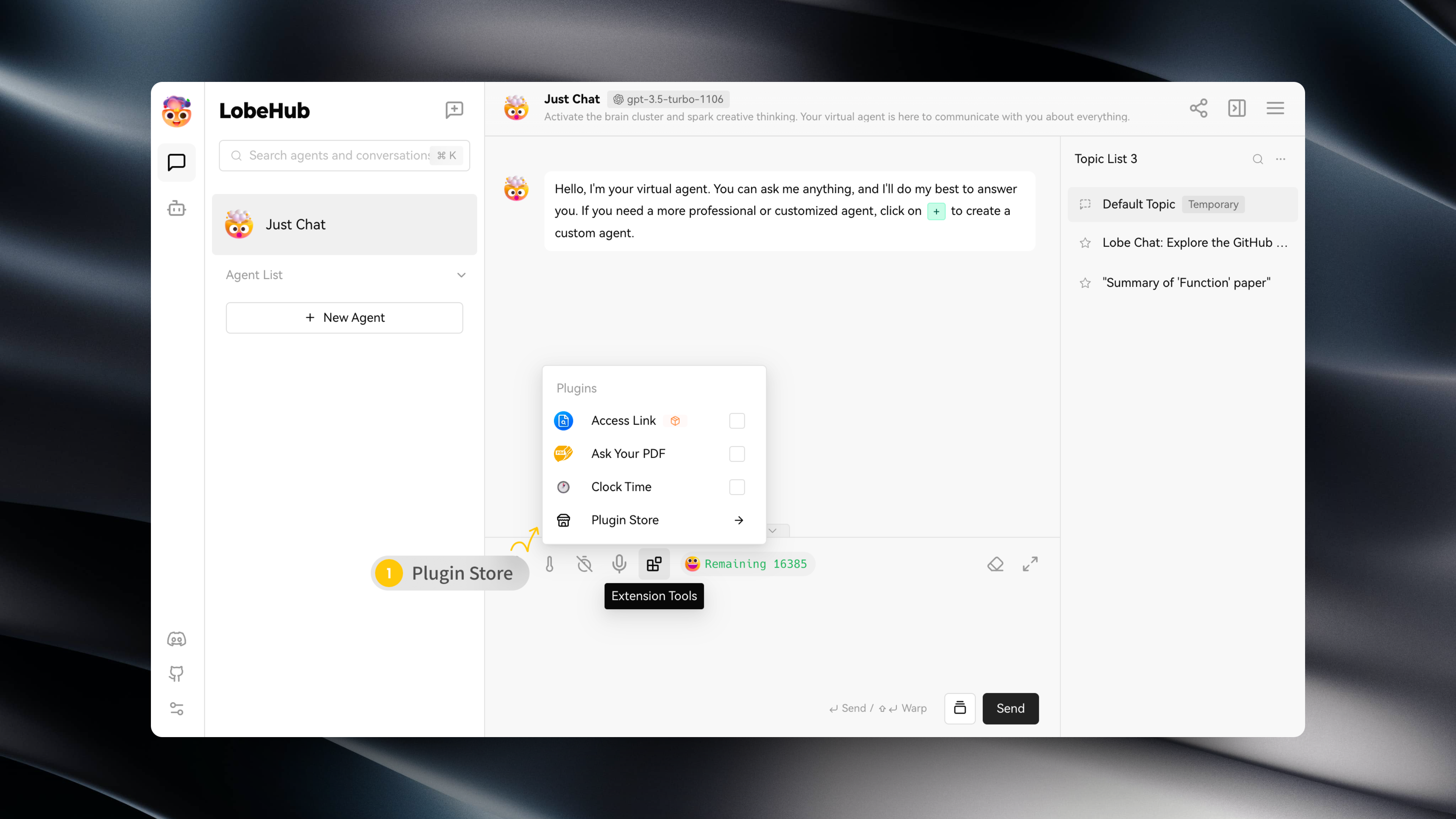
You can access the Plugin Store by navigating to "Extension Tools" -> "Plugin Store" in the session toolbar.
|
|
18
|
+
|
|
19
|
+
|
|
20
|
+
|
|
21
|
+
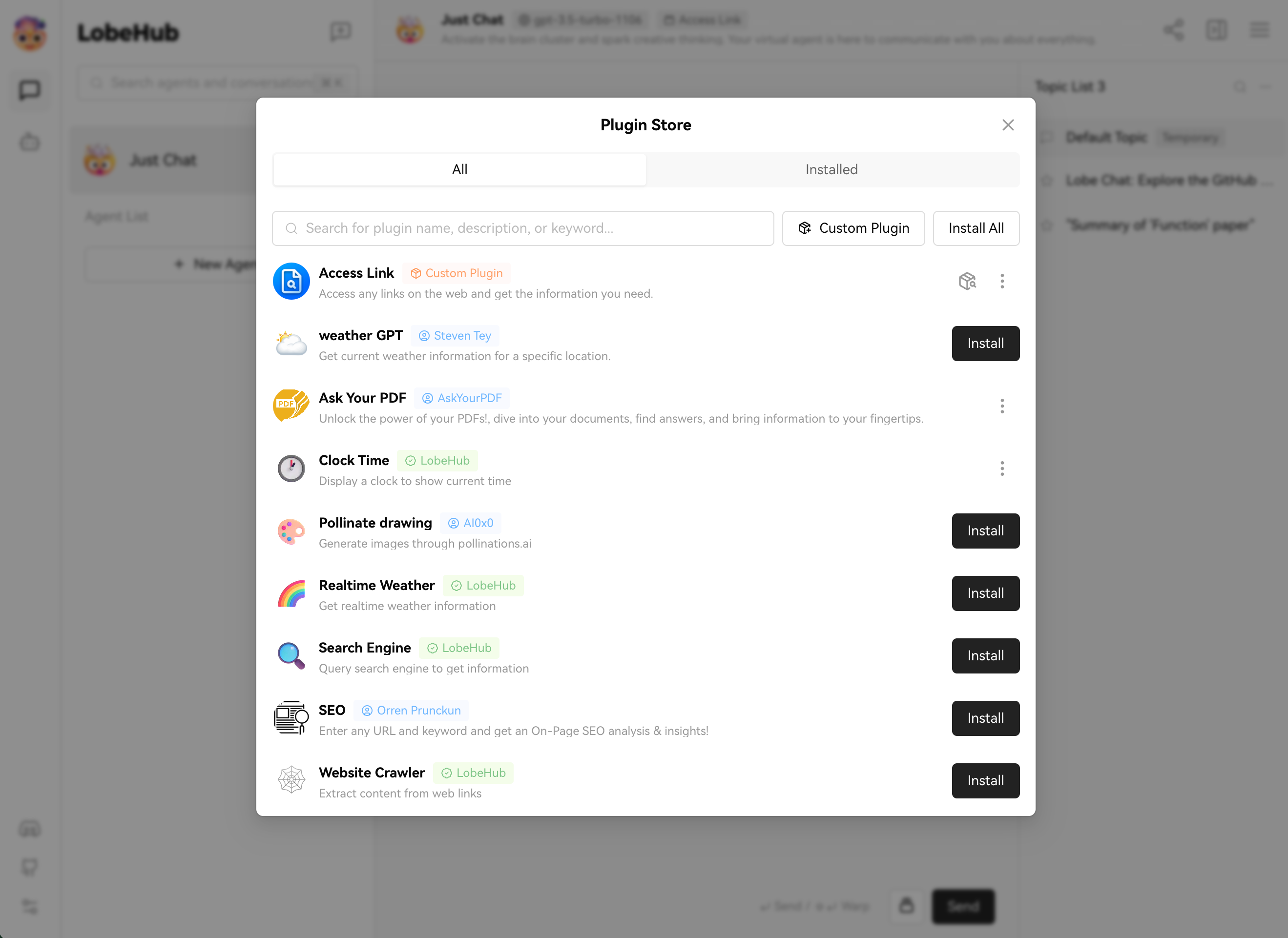
The Plugin Store allows you to directly install and use plugins within LobeChat.
|
|
22
|
+
|
|
23
|
+
|
|
24
|
+
|
|
25
|
+
## Using Plugins
|
|
26
|
+
|
|
27
|
+
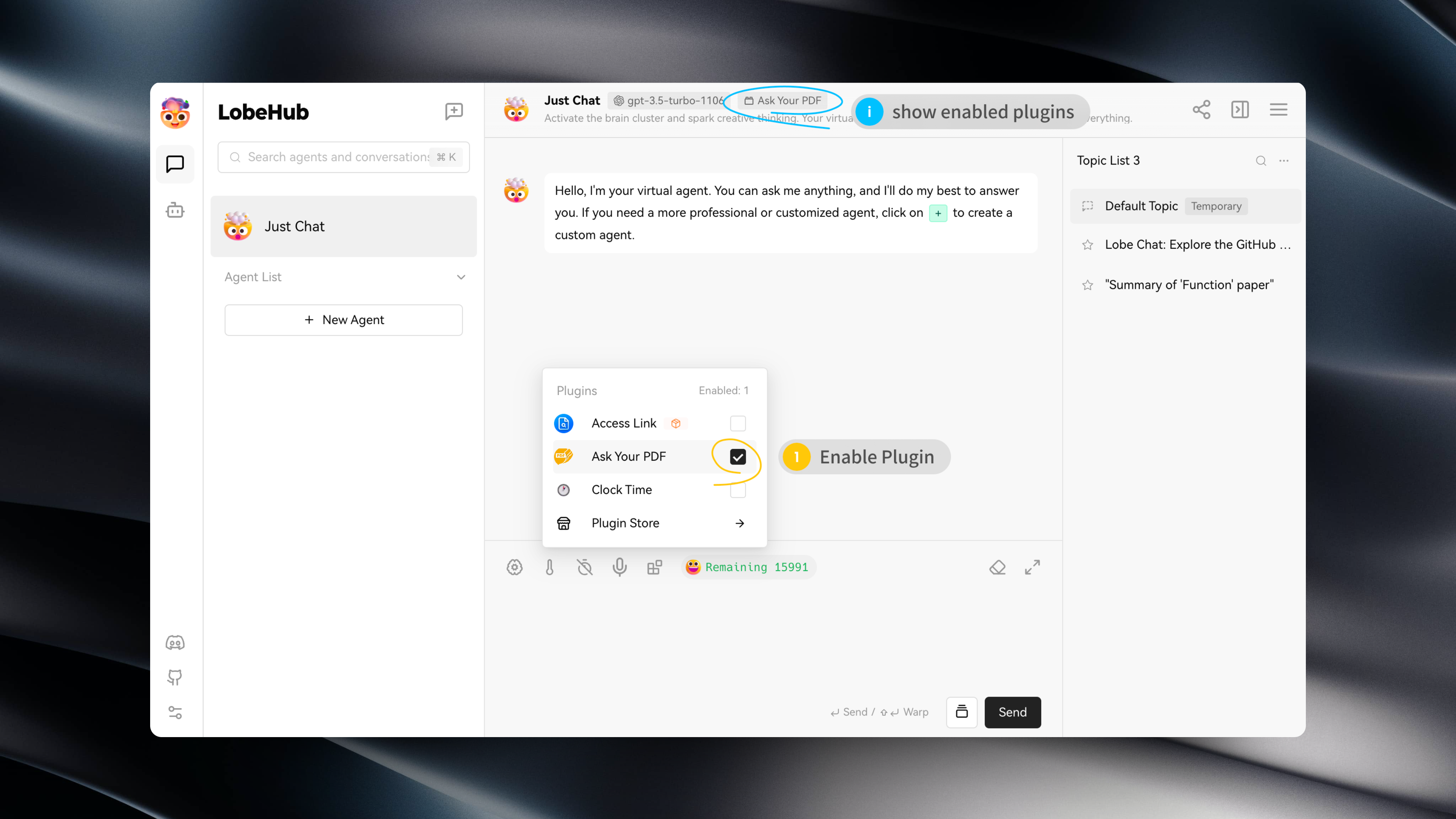
After installing a plugin, simply enable it under the current assistant to use it.
|
|
28
|
+
|
|
29
|
+
|
|
30
|
+
|
|
31
|
+
## Plugin Configuration
|
|
32
|
+
|
|
33
|
+
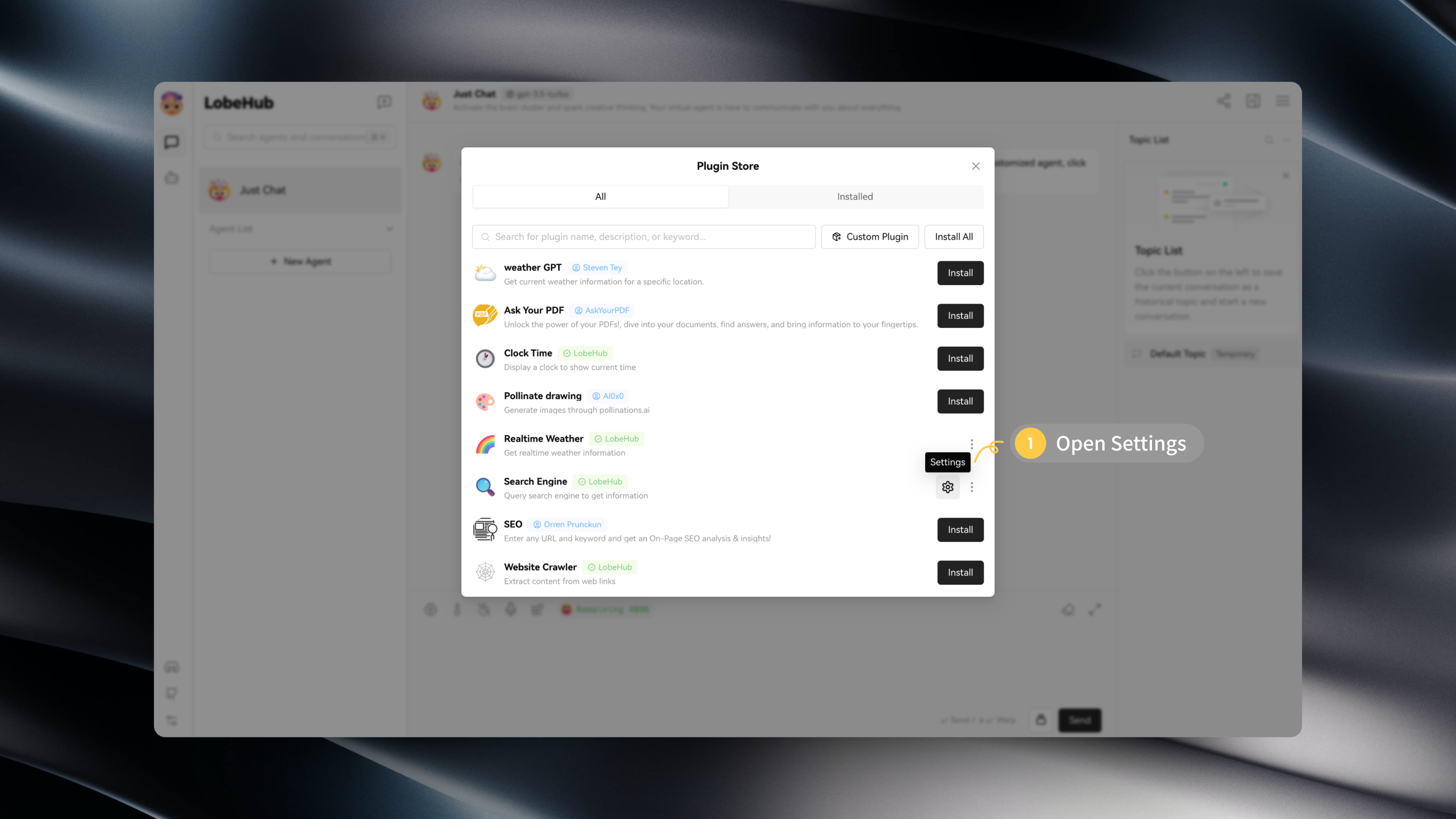
Some plugins may require specific configurations, such as API keys.
|
|
34
|
+
|
|
35
|
+
After installing a plugin, you can click on "Settings" to enter the plugin's settings and fill in the required configurations:
|
|
36
|
+
|
|
37
|
+
|
|
38
|
+
|
|
39
|
+
|
|
40
|
+
|
|
@@ -4,7 +4,13 @@
|
|
|
4
4
|
|
|
5
5
|
查看以下视频,快速上手使用 LobeChat 插件:
|
|
6
6
|
|
|
7
|
-
<
|
|
7
|
+
<video
|
|
8
|
+
muted
|
|
9
|
+
controls
|
|
10
|
+
loop
|
|
11
|
+
autoPlay
|
|
12
|
+
src="https://github.com/lobehub/lobe-chat/assets/28616219/94d4c312-1699-4e24-8782-138883678c9e"
|
|
13
|
+
></video>
|
|
8
14
|
|
|
9
15
|
## 插件商店
|
|
10
16
|
|
|
@@ -31,23 +37,3 @@
|
|
|
31
37
|

|
|
32
38
|
|
|
33
39
|

|
|
34
|
-
|
|
35
|
-
## 安装自定义插件
|
|
36
|
-
|
|
37
|
-
如果你希望安装一个不在 LobeChat 插件商店中的插件,例如自己开发的 LobeChat,你可以点击「自定义插件」进行安装:
|
|
38
|
-
|
|
39
|
-
<https://github.com/lobehub/lobe-chat/assets/28616219/034a328c-8465-4499-8f93-fdcdb03343cd>
|
|
40
|
-
|
|
41
|
-
此外,LobeChat 的插件机制兼容了 ChatGPT 的插件,因此你可以一键安装相应的 ChatGPT 插件。
|
|
42
|
-
|
|
43
|
-
如果你希望尝试自行安装自定义插件,你可以使用以下链接来尝试:
|
|
44
|
-
|
|
45
|
-
- `自定义 Lobe 插件` Mock Credit Card:<https://lobe-plugin-mock-credit-card.vercel.app/manifest.json>
|
|
46
|
-
- `ChatGPT 插件` Access Links:<https://www.accesslinks.ai/.well-known/ai-plugin.json>
|
|
47
|
-
|
|
48
|
-
|
|
49
|
-
|
|
50
|
-
|
|
51
|
-
## 开发插件
|
|
52
|
-
|
|
53
|
-
如果你希望自行开发一个 LobeChat 的插件,欢迎查阅 [Lobe 插件开发指南](https://chat-plugin-sdk.lobehub.com/zh-CN/guides/intro) 以扩展你的 AI 智能助手的可能性边界!
|
|
@@ -0,0 +1,27 @@
|
|
|
1
|
+
# Custom Plugins
|
|
2
|
+
|
|
3
|
+
## Installing Custom Plugins
|
|
4
|
+
|
|
5
|
+
If you wish to install a plugin that is not available in the LobeChat plugin store, such as a custom-developed LobeChat plugin, you can click on "Custom Plugins" to install it:
|
|
6
|
+
|
|
7
|
+
<video
|
|
8
|
+
muted
|
|
9
|
+
controls
|
|
10
|
+
loop
|
|
11
|
+
autoPlay
|
|
12
|
+
src="https://github.com/lobehub/lobe-chat/assets/28616219/034a328c-8465-4499-8f93-fdcdb03343cd"
|
|
13
|
+
></video>
|
|
14
|
+
|
|
15
|
+
In addition, LobeChat's plugin mechanism is compatible with ChatGPT plugins, so you can easily install corresponding ChatGPT plugins.
|
|
16
|
+
|
|
17
|
+
If you want to try installing custom plugins on your own, you can use the following links to try:
|
|
18
|
+
|
|
19
|
+
- `Custom Lobe Plugin` Mock Credit Card: https://lobe-plugin-mock-credit-card.vercel.app/manifest.json
|
|
20
|
+
- `ChatGPT Plugin` Access Links: https://www.accesslinks.ai/.well-known/ai-plugin.json
|
|
21
|
+
|
|
22
|
+

|
|
23
|
+

|
|
24
|
+
|
|
25
|
+
## Developing Custom Plugins
|
|
26
|
+
|
|
27
|
+
If you wish to develop a LobeChat plugin on your own, feel free to refer to the [Plugin Development Guide](/en/usage/plugins/development) to expand the possibilities of your AI assistant!
|
|
@@ -0,0 +1,26 @@
|
|
|
1
|
+
# 自定义插件
|
|
2
|
+
|
|
3
|
+
## 安装自定义插件
|
|
4
|
+
|
|
5
|
+
如果你希望安装一个不在 LobeChat 插件商店中的插件,例如自己开发的 LobeChat,你可以点击「自定义插件」进行安装:
|
|
6
|
+
|
|
7
|
+
<video
|
|
8
|
+
muted
|
|
9
|
+
controls
|
|
10
|
+
loop
|
|
11
|
+
autoPlay
|
|
12
|
+
src="https://github.com/lobehub/lobe-chat/assets/28616219/034a328c-8465-4499-8f93-fdcdb03343cd"
|
|
13
|
+
></video>
|
|
14
|
+
|
|
15
|
+
此外,LobeChat 的插件机制兼容了 ChatGPT 的插件,因此你可以一键安装相应的 ChatGPT 插件。
|
|
16
|
+
|
|
17
|
+
如果你希望尝试自行安装自定义插件,你可以使用以下链接来尝试:
|
|
18
|
+
|
|
19
|
+
- `自定义 Lobe 插件` Mock Credit Card:https://lobe-plugin-mock-credit-card.vercel.app/manifest.json
|
|
20
|
+
- `ChatGPT 插件` Access Links:https://www.accesslinks.ai/.well-known/ai-plugin.json
|
|
21
|
+
|
|
22
|
+
 
|
|
23
|
+
|
|
24
|
+
## 开发自定义插件
|
|
25
|
+
|
|
26
|
+
如果你希望自行开发一个 LobeChat 的插件,欢迎查阅 [插件开发指南](/zh/usage/plugins/development) 以扩展你的 AI 智能助手的可能性边界!
|