@lobehub/chat 0.128.2 → 0.128.3
This diff represents the content of publicly available package versions that have been released to one of the supported registries. The information contained in this diff is provided for informational purposes only and reflects changes between package versions as they appear in their respective public registries.
- package/.github/workflows/issue-close-require.yml +3 -3
- package/.github/workflows/issues-translate.yml +3 -3
- package/.github/workflows/wiki-sync.yml +2 -2
- package/.i18nrc.js +2 -2
- package/CHANGELOG.md +25 -0
- package/README.md +3 -3
- package/README.zh-CN.md +3 -3
- package/contributing/Basic/Feature-Development.md +713 -0
- package/{docs/Development → contributing/Basic}/Feature-Development.zh-CN.md +2 -2
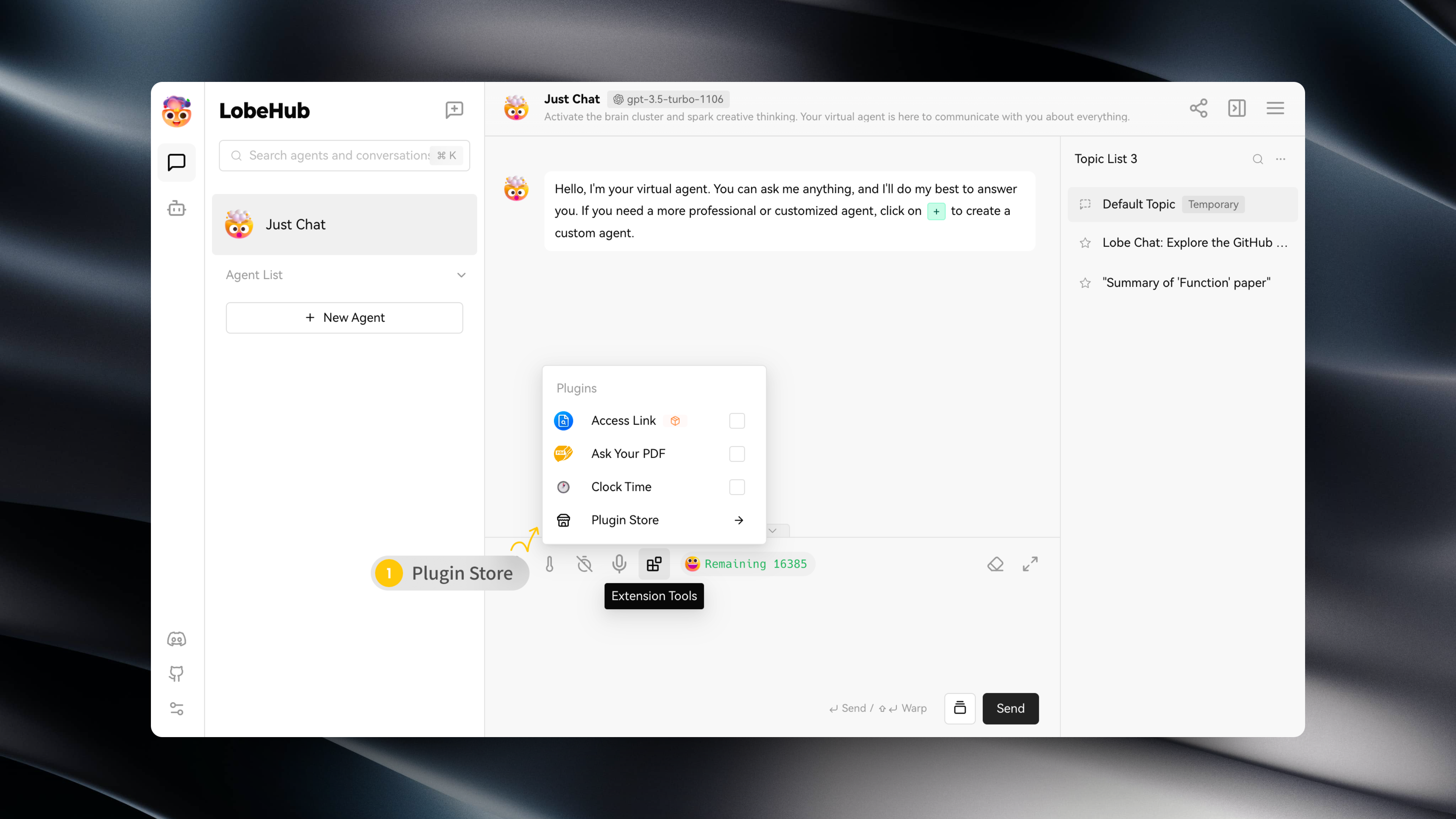
- package/{docs/Development → contributing/Basic}/Intro.zh-CN.md +5 -5
- package/{docs → contributing}/Home.md +20 -29
- package/{docs/Development → contributing/Internationalization}/Internationalization-Implementation.zh-CN.md +1 -1
- package/{docs → contributing}/_Sidebar.md +18 -29
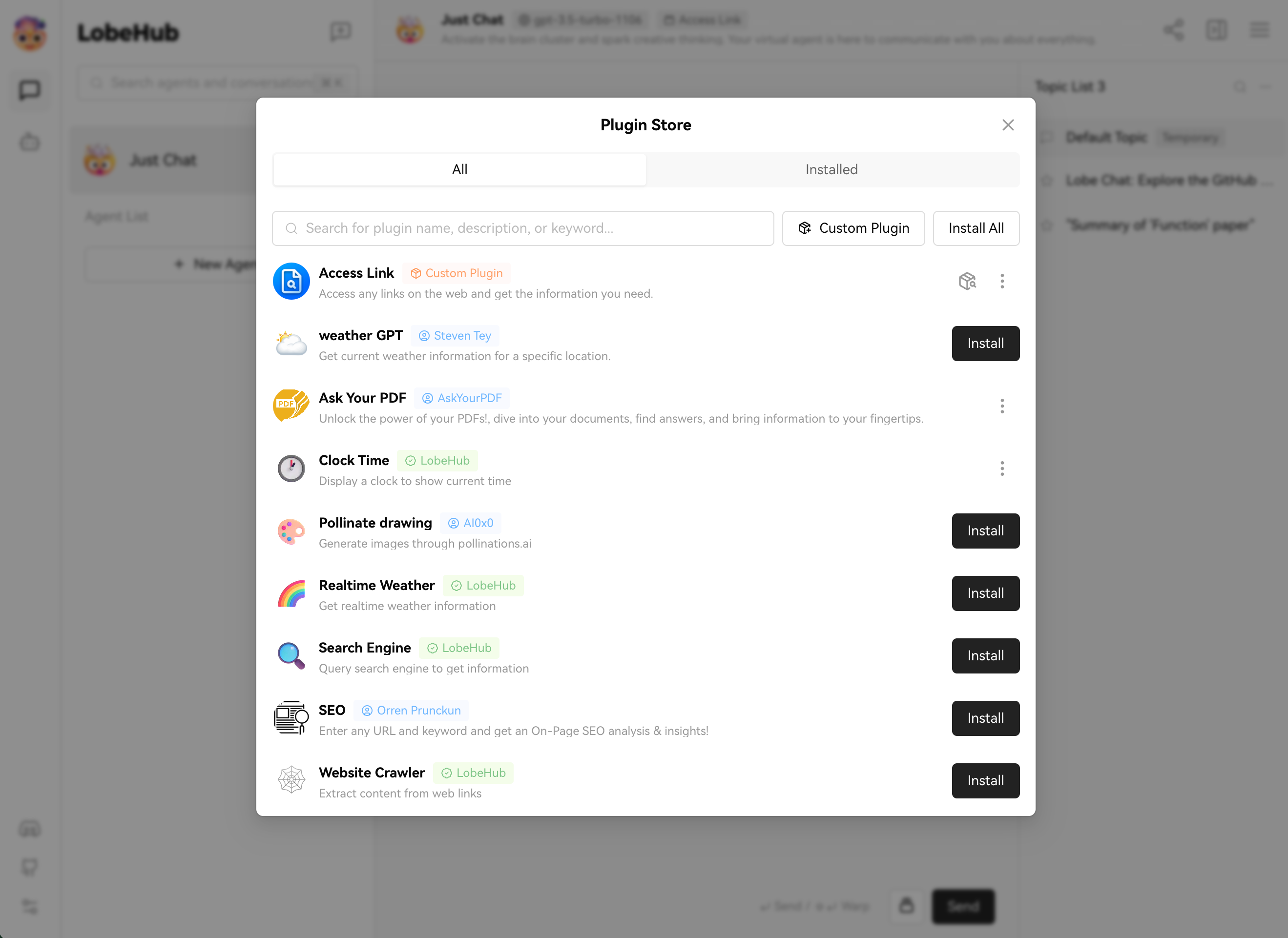
- package/docs/agents/concepts.mdx +18 -0
- package/docs/agents/concepts.zh-CN.mdx +17 -0
- package/docs/agents/custom-agent.mdx +34 -0
- package/docs/agents/custom-agent.zh-CN.mdx +31 -0
- package/docs/agents/model.mdx +68 -0
- package/docs/agents/model.zh-CN.mdx +64 -0
- package/docs/agents/prompt.mdx +96 -0
- package/docs/agents/prompt.zh-CN.mdx +97 -0
- package/docs/agents/topics.mdx +7 -0
- package/docs/agents/topics.zh-CN.mdx +6 -0
- package/docs/common-errors/no-v1-suffix.mdx +18 -0
- package/docs/common-errors/no-v1-suffix.zh-CN.mdx +17 -0
- package/docs/common-errors/proxy-with-unable-to-verify-leaf-signature.mdx +70 -0
- package/docs/{Deployment/Common-Error.zh-CN.md → common-errors/proxy-with-unable-to-verify-leaf-signature.zh-CN.mdx} +8 -26
- package/docs/environment-variables/common.mdx +215 -0
- package/docs/environment-variables/common.zh-CN.mdx +214 -0
- package/docs/environment-variables/model-provider.mdx +135 -0
- package/docs/environment-variables/model-provider.zh-CN.mdx +133 -0
- package/docs/package.json +5 -0
- package/docs/plugins/basic-usage.mdx +40 -0
- package/docs/{Usage/Plugins.zh-CN.md → plugins/basic-usage.zh-CN.mdx} +7 -21
- package/docs/plugins/custom-plugin.mdx +27 -0
- package/docs/plugins/custom-plugin.zh-CN.mdx +26 -0
- package/docs/plugins/plugin-development.mdx +262 -0
- package/docs/{Plugins/Plugin-Development.zh-CN.md → plugins/plugin-development.zh-CN.mdx} +9 -33
- package/docs/plugins/plugin-store.mdx +10 -0
- package/docs/plugins/plugin-store.zh-CN.mdx +9 -0
- package/docs/self-hosting/analytics.mdx +20 -0
- package/docs/{Deployment/Analytics.zh-CN.md → self-hosting/analytics.zh-CN.mdx} +5 -8
- package/docs/self-hosting/authentication.mdx +94 -0
- package/docs/self-hosting/authentication.zh-CN.mdx +90 -0
- package/docs/self-hosting/deploy-with-azure-openai.mdx +48 -0
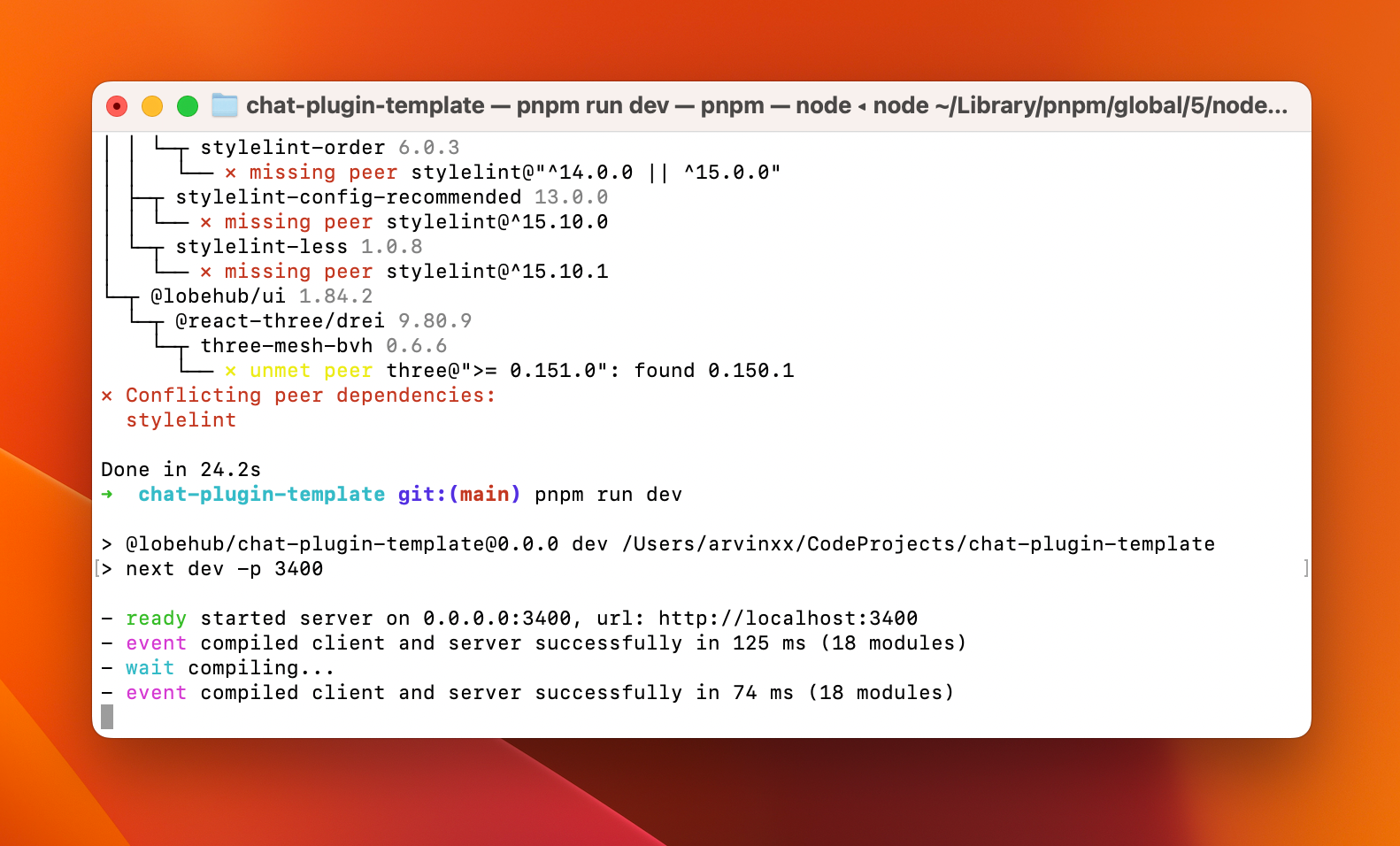
- package/docs/{Deployment/Deploy-with-Azure-OpenAI.zh-CN.md → self-hosting/deploy-with-azure-openai.zh-CN.mdx} +16 -21
- package/docs/self-hosting/docker-compose.mdx +121 -0
- package/docs/self-hosting/docker-compose.zh-CN.mdx +121 -0
- package/docs/self-hosting/docker.mdx +152 -0
- package/docs/self-hosting/docker.zh-CN.mdx +149 -0
- package/docs/self-hosting/environment-variable.mdx +340 -0
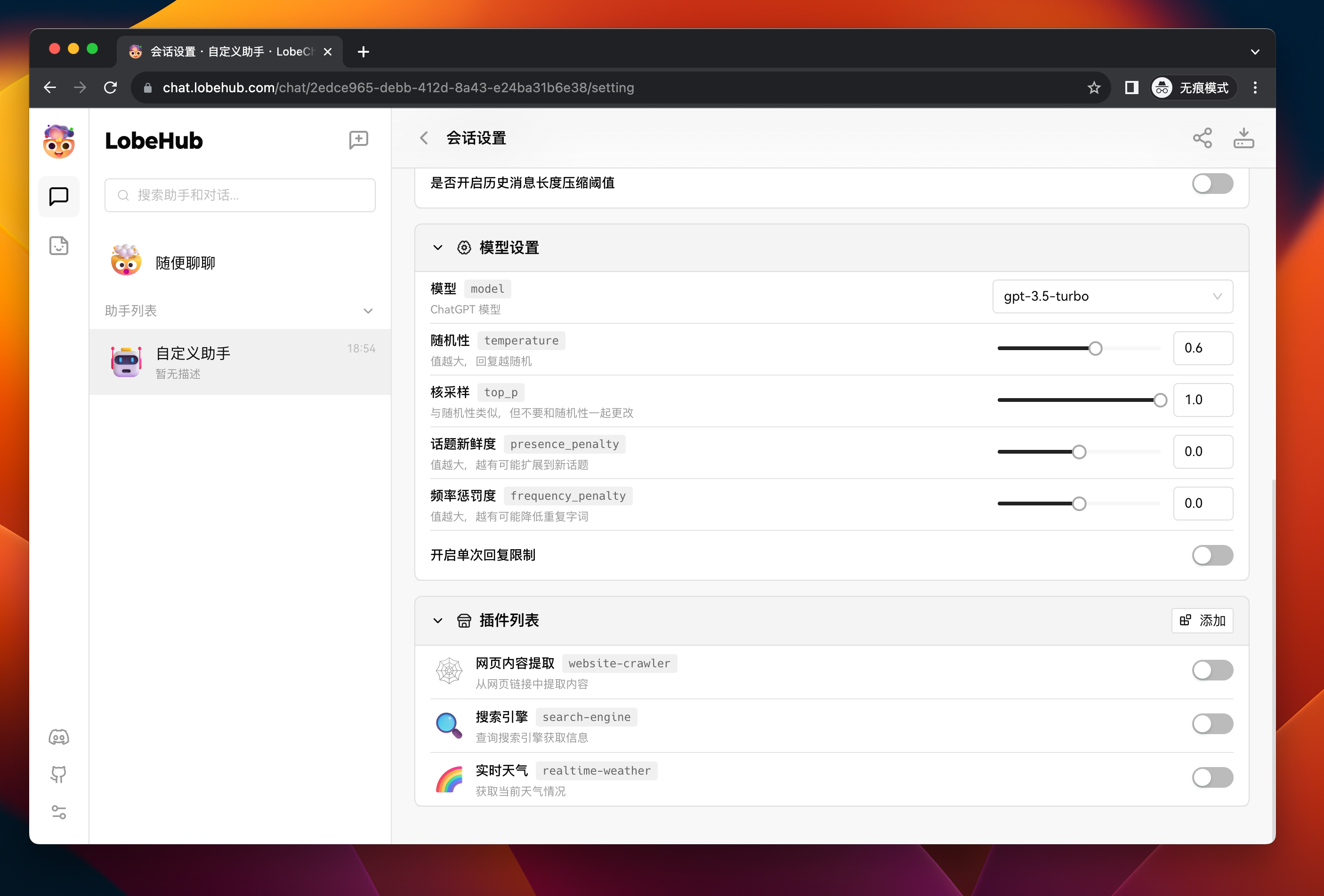
- package/docs/{Deployment/Environment-Variable.zh-CN.md → self-hosting/environment-variable.zh-CN.mdx} +43 -57
- package/docs/self-hosting/upstream-sync.mdx +66 -0
- package/docs/{Deployment/Upstream-Sync.zh-CN.md → self-hosting/upstream-sync.zh-CN.mdx} +23 -21
- package/docs/self-hosting/vercel.mdx +39 -0
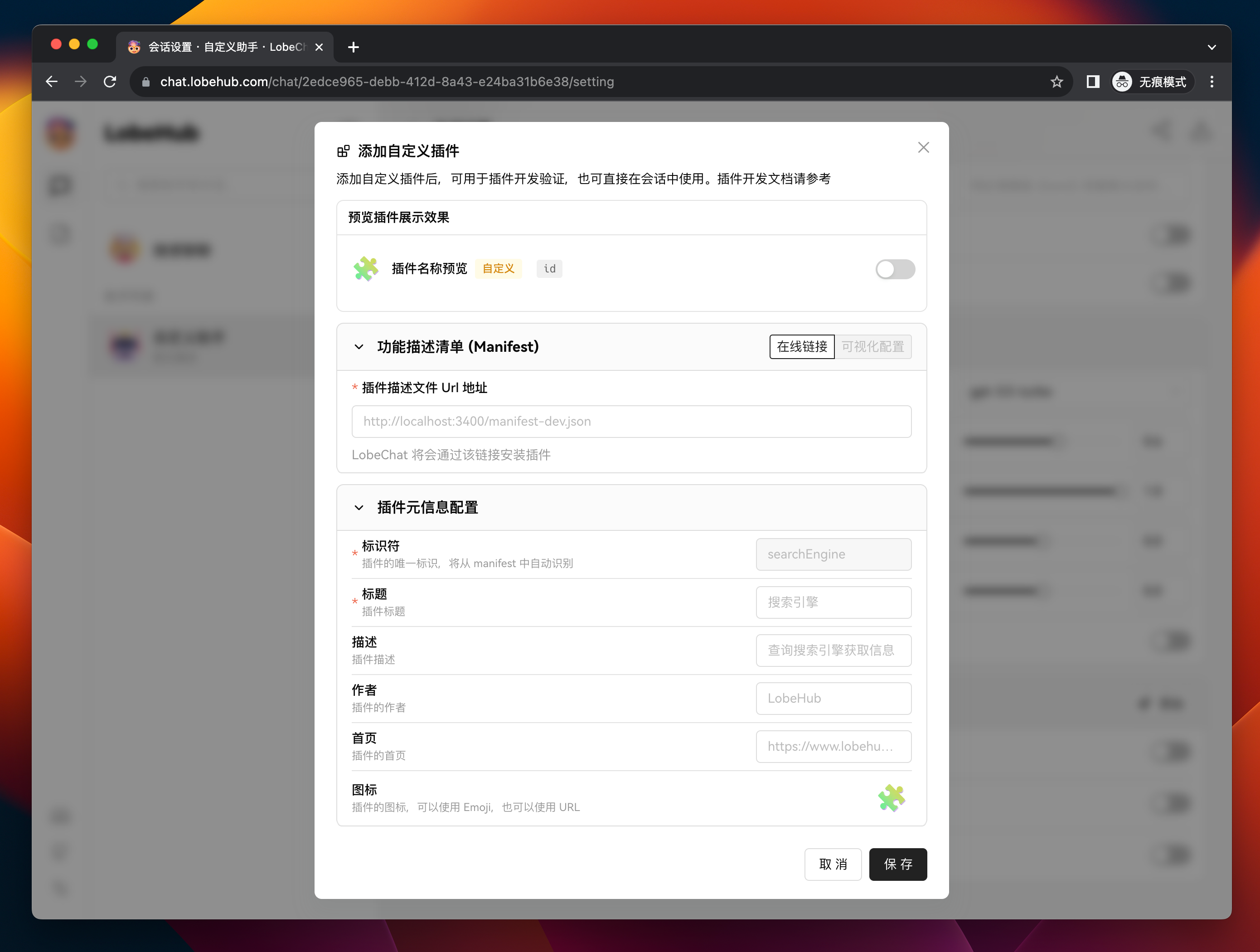
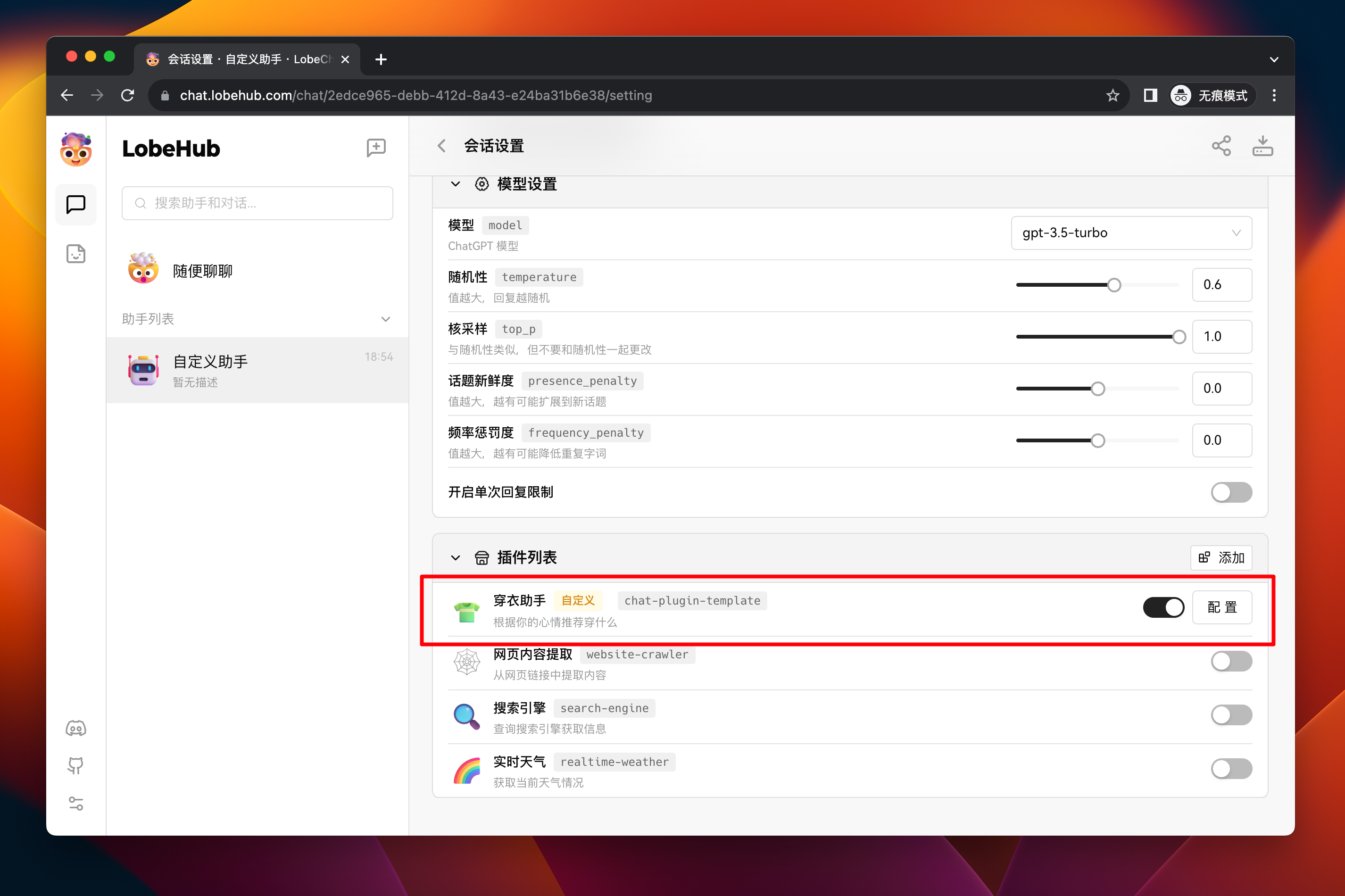
- package/docs/self-hosting/vercel.zh-CN.mdx +39 -0
- package/docs/usage/agent-market.mdx +35 -0
- package/docs/usage/agent-market.zh-CN.mdx +32 -0
- package/docs/usage/mobile.mdx +8 -0
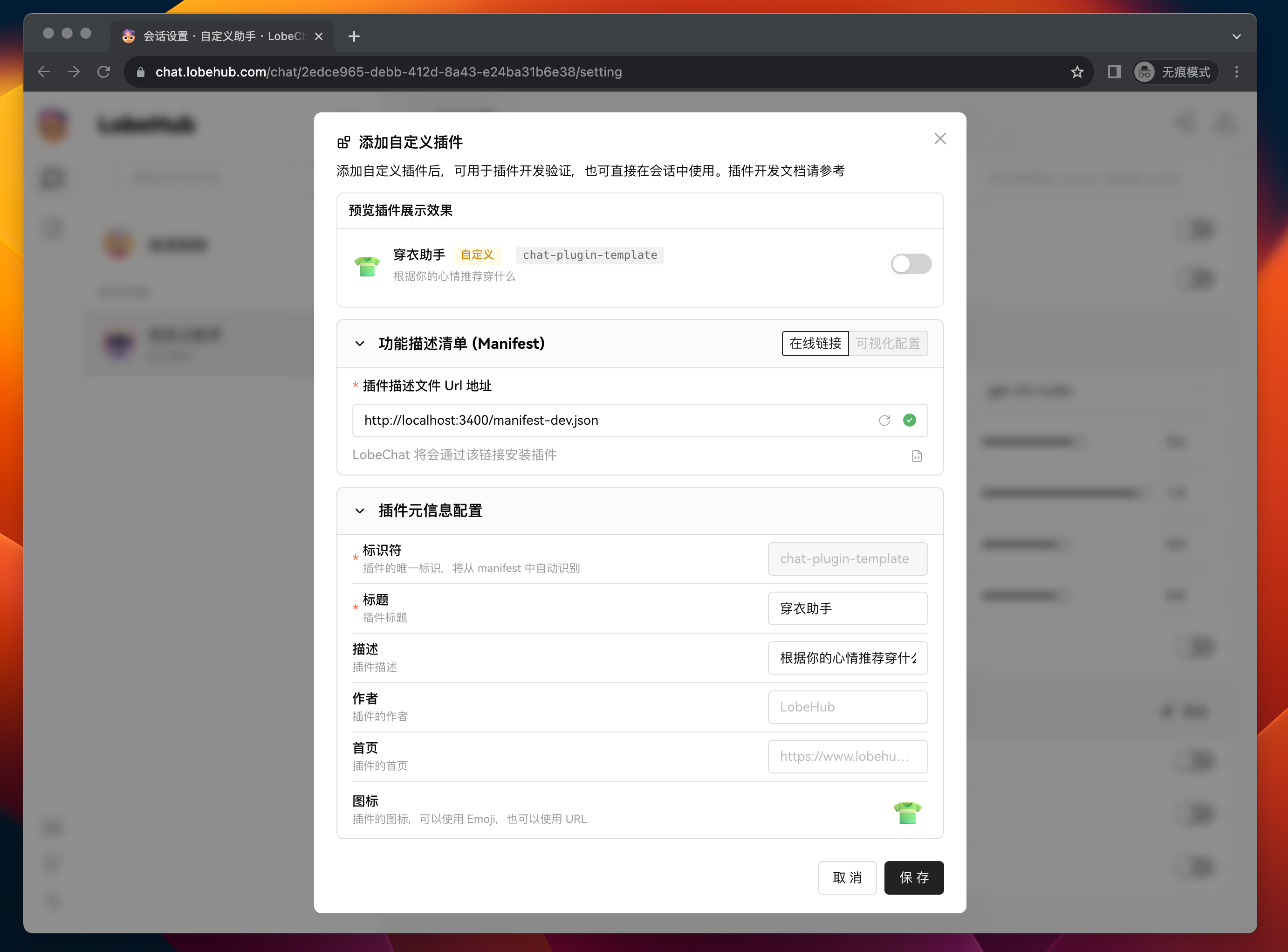
- package/docs/usage/mobile.zh-CN.mdx +7 -0
- package/docs/usage/more.mdx +21 -0
- package/docs/usage/more.zh-CN.mdx +19 -0
- package/docs/usage/plugin-system.mdx +84 -0
- package/docs/usage/plugin-system.zh-CN.mdx +77 -0
- package/docs/usage/pwa.mdx +21 -0
- package/docs/usage/pwa.zh-CN.mdx +21 -0
- package/docs/usage/text-to-image.mdx +5 -0
- package/docs/usage/text-to-image.zh-CN.mdx +6 -0
- package/docs/usage/theme.mdx +17 -0
- package/docs/usage/theme.zh-CN.mdx +15 -0
- package/docs/usage/tts.mdx +26 -0
- package/docs/usage/tts.zh-CN.mdx +24 -0
- package/docs/usage/vision.mdx +8 -0
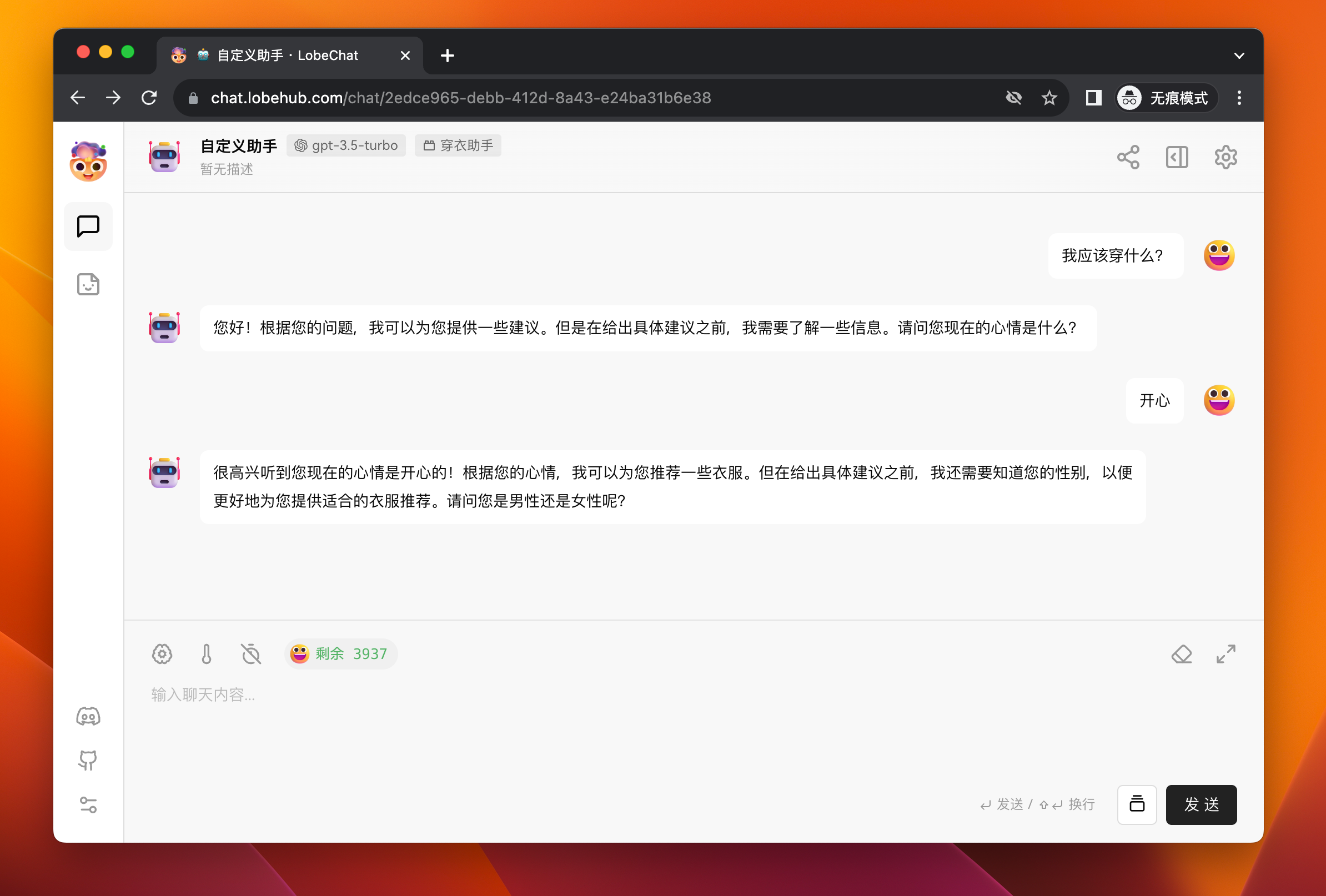
- package/docs/usage/vision.zh-CN.mdx +7 -0
- package/next.config.mjs +5 -0
- package/package.json +4 -3
- package/scripts/docsWorkflow/const.ts +1 -1
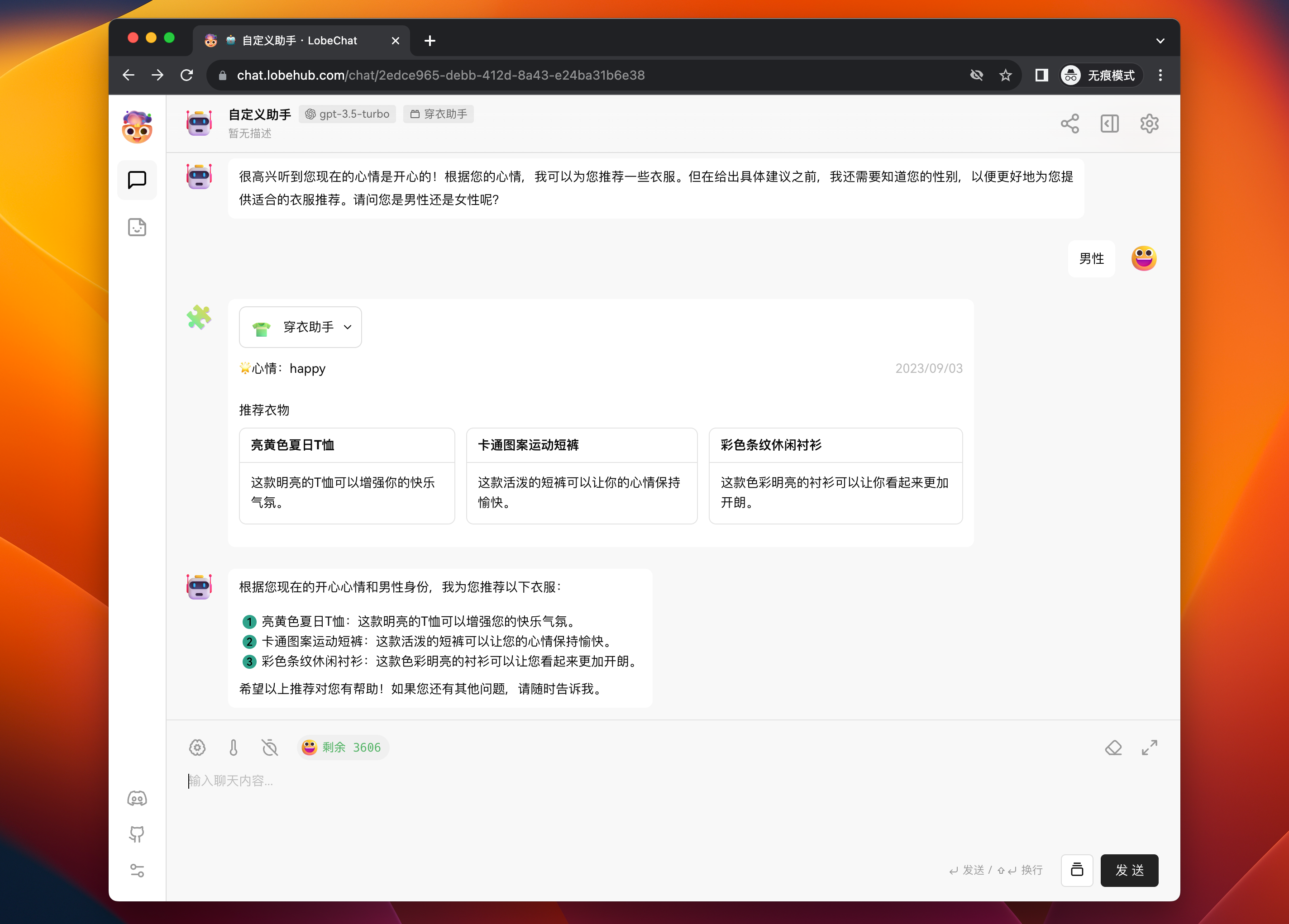
- package/scripts/docsWorkflow/toc.ts +6 -6
- package/src/app/welcome/(desktop)/features/Footer.tsx +5 -3
- package/src/config/client.ts +6 -0
- package/src/const/url.ts +10 -1
- package/src/features/SideBar/BottomActions.tsx +11 -10
- package/src/locales/default/common.ts +1 -0
- package/docs/Deployment/Analytics.md +0 -20
- package/docs/Deployment/Authentication.md +0 -80
- package/docs/Deployment/Authentication.zh-CN.md +0 -80
- package/docs/Deployment/Common-Error.md +0 -87
- package/docs/Deployment/Deploy-with-Azure-OpenAI.md +0 -54
- package/docs/Deployment/Docker-Deployment.md +0 -219
- package/docs/Deployment/Docker-Deployment.zh-CN.md +0 -217
- package/docs/Deployment/Environment-Variable.md +0 -362
- package/docs/Deployment/Upstream-Sync.md +0 -62
- package/docs/Plugins/Plugin-Development.md +0 -287
- package/docs/Usage/Plugins.md +0 -53
- package/docs/Usage/Usage-Agents.md +0 -201
- package/docs/Usage/Usage-Agents.zh-CN.md +0 -202
- package/docs/Usage/Usage-Topics.md +0 -31
- package/docs/Usage/Usage-Topics.zh-CN.md +0 -31
- /package/{docs/Development → contributing/Basic}/Add-New-Authentication-Providers.md +0 -0
- /package/{docs/Development → contributing/Basic}/Add-New-Authentication-Providers.zh-CN.md +0 -0
- /package/{docs/Development → contributing/Basic}/Architecture.md +0 -0
- /package/{docs/Development → contributing/Basic}/Architecture.zh-CN.md +0 -0
- /package/{docs/Development → contributing/Basic}/Chat-API.md +0 -0
- /package/{docs/Development → contributing/Basic}/Chat-API.zh-CN.md +0 -0
- /package/{docs/Development → contributing/Basic}/Contributing-Guidelines.md +0 -0
- /package/{docs/Development → contributing/Basic}/Contributing-Guidelines.zh-CN.md +0 -0
- /package/{docs/Development → contributing/Basic}/Feature-Development-Frontend.md +0 -0
- /package/{docs/Development → contributing/Basic}/Feature-Development-Frontend.zh-CN.md +0 -0
- /package/{docs/Development → contributing/Basic}/Folder-Structure.md +0 -0
- /package/{docs/Development → contributing/Basic}/Folder-Structure.zh-CN.md +0 -0
- /package/{docs/Development → contributing/Basic}/Intro.md +0 -0
- /package/{docs/Development → contributing/Basic}/Resources.md +0 -0
- /package/{docs/Development → contributing/Basic}/Resources.zh-CN.md +0 -0
- /package/{docs/Development → contributing/Basic}/Setup-Development.md +0 -0
- /package/{docs/Development → contributing/Basic}/Setup-Development.zh-CN.md +0 -0
- /package/{docs/Development → contributing/Basic}/Test.md +0 -0
- /package/{docs/Development → contributing/Basic}/Test.zh-CN.md +0 -0
- /package/{docs/Development → contributing/Internationalization}/Add-New-Locale.md +0 -0
- /package/{docs/Development → contributing/Internationalization}/Add-New-Locale.zh-CN.md +0 -0
- /package/{docs/Development → contributing/Internationalization}/Internationalization-Implementation.md +0 -0
- /package/{docs → contributing}/Others/Lighthouse.md +0 -0
- /package/{docs → contributing}/Others/Lighthouse.zh-CN.md +0 -0
- /package/{docs/Development → contributing/State-Management}/State-Management-Intro.md +0 -0
- /package/{docs/Development → contributing/State-Management}/State-Management-Intro.zh-CN.md +0 -0
- /package/{docs/Development → contributing/State-Management}/State-Management-Selectors.md +0 -0
- /package/{docs/Development → contributing/State-Management}/State-Management-Selectors.zh-CN.md +0 -0
- /package/{docs → contributing}/_Footer.md +0 -0
|
@@ -1,287 +0,0 @@
|
|
|
1
|
-
# Plugin Development Guide
|
|
2
|
-
|
|
3
|
-
#### TOC
|
|
4
|
-
|
|
5
|
-
- [Plugin Composition](#plugin-composition)
|
|
6
|
-
- [Custom Plugin Workflow](#custom-plugin-workflow)
|
|
7
|
-
- [**`1`** Create and Start a Plugin Project](#1-create-and-start-a-plugin-project)
|
|
8
|
-
- [**`2`** Add the Local Plugin in LobeChat Role Settings](#2-add-the-local-plugin-in-lobechat-role-settings)
|
|
9
|
-
- [**`3`** Test the Plugin Functionality in a Session](#3-test-the-plugin-functionality-in-a-session)
|
|
10
|
-
- [Local Plugin Development](#local-plugin-development)
|
|
11
|
-
- [Manifest](#manifest)
|
|
12
|
-
- [Project Structure](#project-structure)
|
|
13
|
-
- [Server-side](#server-side)
|
|
14
|
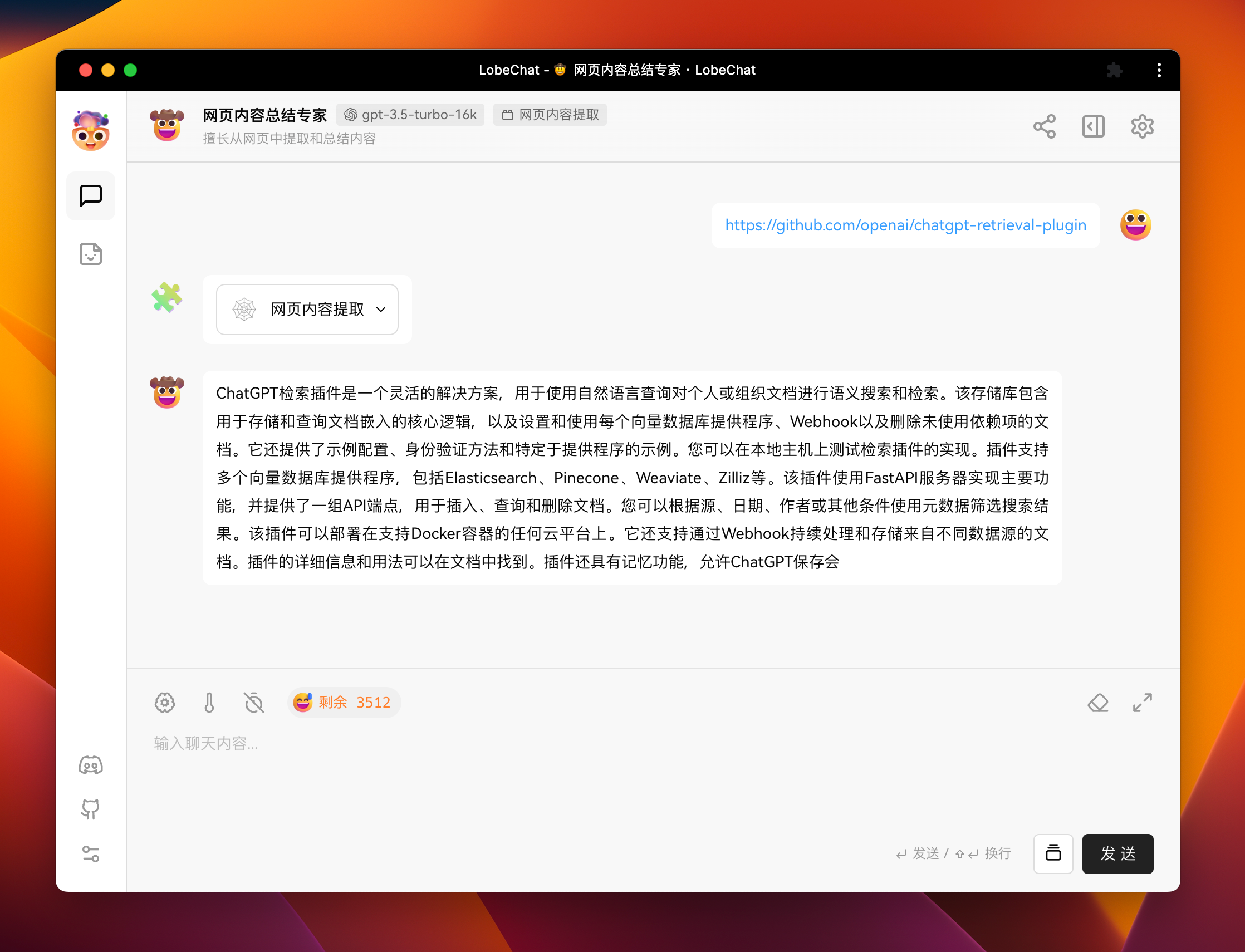
-
- [Plugin UI Interface](#plugin-ui-interface)
|
|
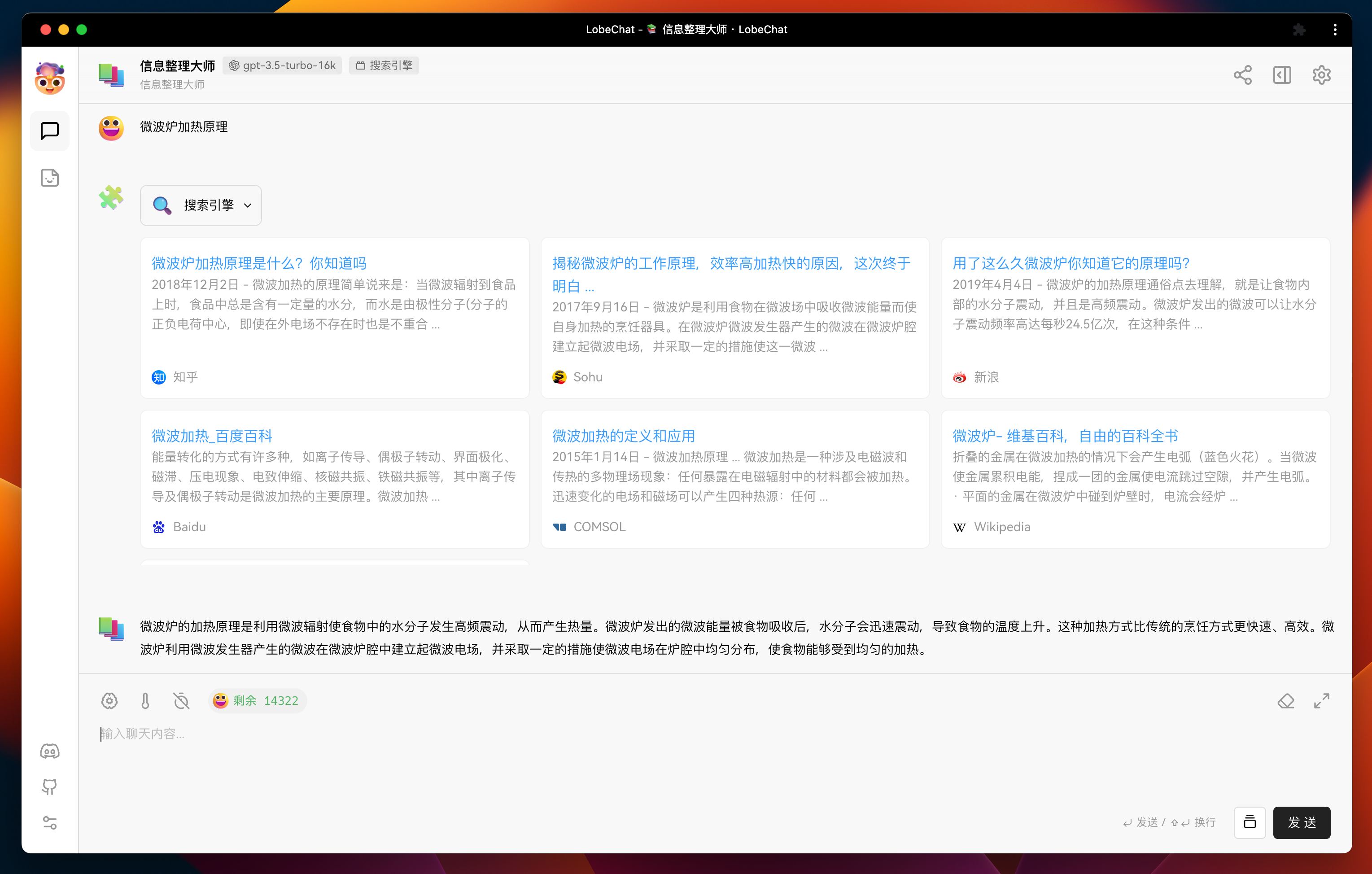
15
|
-
- [Plugin Deployment and Publication](#plugin-deployment-and-publication)
|
|
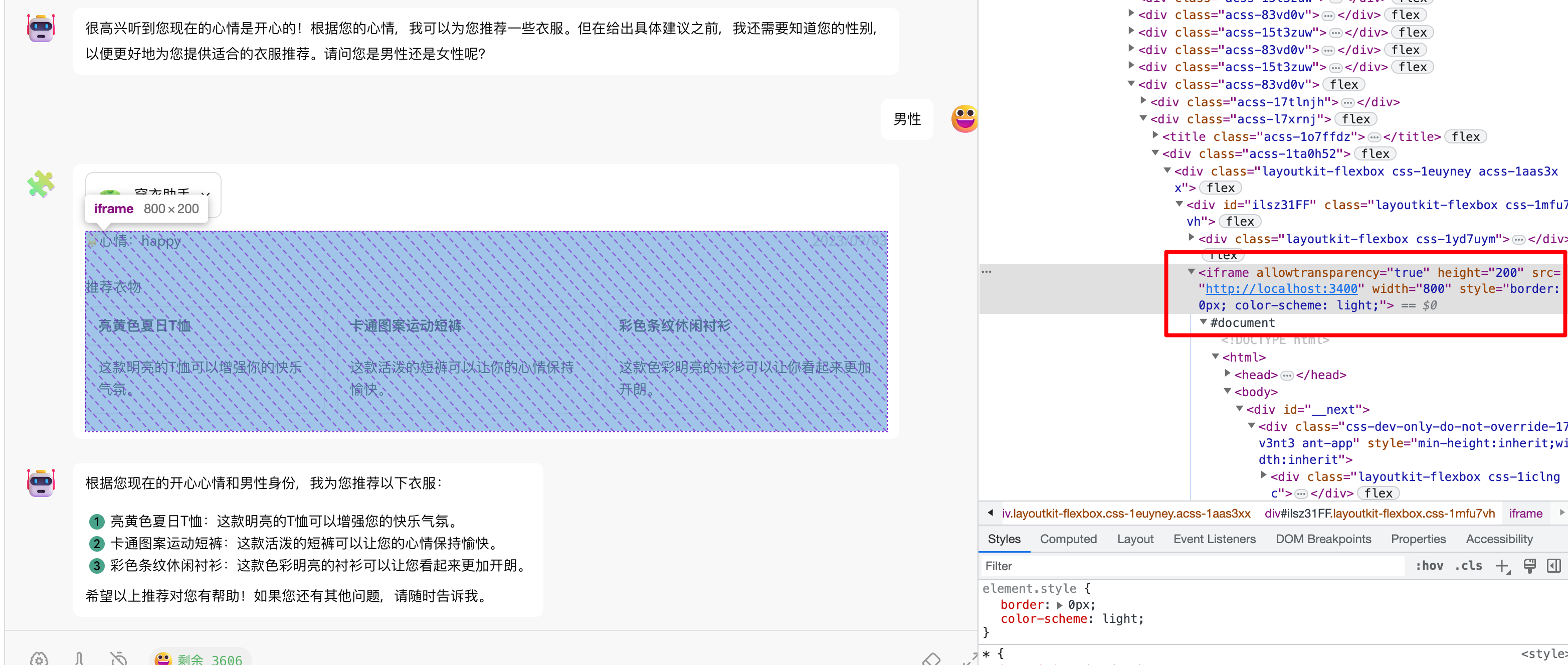
16
|
-
- [Plugin Shield](#plugin-shield)
|
|
17
|
-
- [Link](#link)
|
|
18
|
-
|
|
19
|
-
## Plugin Composition
|
|
20
|
-
|
|
21
|
-
A LobeChat plugin consists of the following components:
|
|
22
|
-
|
|
23
|
-
1. **Plugin Index**: Used to display basic information about the plugin, including the plugin name, description, author, version, and a link to the plugin manifest. The official plugin index can be found at [lobe-chat-plugins](https://github.com/lobehub/lobe-chat-plugins). To submit a plugin to the official plugin marketplace, you need to submit a PR to this repository.
|
|
24
|
-
2. **Plugin Manifest**: Used to describe the functionality of the plugin, including the server-side description, frontend display information, and version number. For more details about the manifest, please refer to the [manifest][manifest-docs-url].
|
|
25
|
-
3. **Plugin Services**: Used to implement the server-side and frontend modules described in the manifest:
|
|
26
|
-
|
|
27
|
-
- **Server-side**: Implement the API capabilities described in the manifest.
|
|
28
|
-
- **Frontend UI** (optional): Implement the interface described in the manifest, which will be displayed in plugin messages to provide richer information display than plain text.
|
|
29
|
-
|
|
30
|
-
<br/>
|
|
31
|
-
|
|
32
|
-
## Custom Plugin Workflow
|
|
33
|
-
|
|
34
|
-
To integrate a plugin into LobeChat, you need to add and use a custom plugin in LobeChat. This section will guide you through the process.
|
|
35
|
-
|
|
36
|
-
### **`1`** Create and Start a Plugin Project
|
|
37
|
-
|
|
38
|
-
First, you need to create a plugin project locally. You can use the [lobe-chat-plugin-template][lobe-chat-plugin-template-url] template we have prepared:
|
|
39
|
-
|
|
40
|
-
```bash
|
|
41
|
-
$ git clone https://github.com/lobehub/chat-plugin-template.git
|
|
42
|
-
$ cd chat-plugin-template
|
|
43
|
-
$ npm i
|
|
44
|
-
$ npm run dev
|
|
45
|
-
```
|
|
46
|
-
|
|
47
|
-
When you see `ready started server on 0.0.0.0:3400, url: http://localhost:3400`, it means that the plugin service has been successfully started locally.
|
|
48
|
-
|
|
49
|
-
|
|
50
|
-
|
|
51
|
-
### **`2`** Add the Local Plugin in LobeChat Role Settings
|
|
52
|
-
|
|
53
|
-
Next, go to LobeChat, create a new assistant, and go to its session settings page:
|
|
54
|
-
|
|
55
|
-
|
|
56
|
-
|
|
57
|
-
Click the <kbd>Add</kbd> button on the right side of "Plugin List" to open the custom plugin add dialog:
|
|
58
|
-
|
|
59
|
-
|
|
60
|
-
|
|
61
|
-
Enter `http://localhost:3400/manifest-dev.json` in the `Plugin Manifest URL` field, which is the URL of the locally started plugin manifest.
|
|
62
|
-
|
|
63
|
-
At this point, you should see that the identifier of the plugin has been automatically recognized as `chat-plugin-template`. Then fill in the remaining form fields (only the title is required) and click the <kbd>Save</kbd> button to complete the custom plugin addition.
|
|
64
|
-
|
|
65
|
-
|
|
66
|
-
|
|
67
|
-
After adding the plugin, you can see the newly added plugin in the plugin list. If you need to modify the plugin's configuration, you can click the <kbd>Settings</kbd> button to make changes.
|
|
68
|
-
|
|
69
|
-
|
|
70
|
-
|
|
71
|
-
### **`3`** Test the Plugin Functionality in a Session
|
|
72
|
-
|
|
73
|
-
Next, we need to test the functionality of the custom plugin.
|
|
74
|
-
|
|
75
|
-
Click the <kbd>Back</kbd> button to go back to the session area, and then send a message to the assistant: "What should I wear?" The assistant will try to ask you about your gender and current mood.
|
|
76
|
-
|
|
77
|
-
|
|
78
|
-
|
|
79
|
-
After answering, the assistant will make a plugin call to retrieve recommended clothing data based on your gender and mood from the server and push it to you. Finally, it will summarize the information in a text response.
|
|
80
|
-
|
|
81
|
-
|
|
82
|
-
|
|
83
|
-
After completing these steps, you have learned the basic process of adding and using a custom plugin in LobeChat.
|
|
84
|
-
|
|
85
|
-
<br/>
|
|
86
|
-
|
|
87
|
-
## Local Plugin Development
|
|
88
|
-
|
|
89
|
-
In the previous workflow, we have learned how to add and use a plugin. Now let's focus on the development process of custom plugins.
|
|
90
|
-
|
|
91
|
-
### Manifest
|
|
92
|
-
|
|
93
|
-
The manifest aggregates information about how the plugin's functionality is implemented. The core fields are `api` and `ui`, which describe the server-side API capabilities and the frontend rendering interface address of the plugin, respectively.
|
|
94
|
-
|
|
95
|
-
Taking the manifest in our template as an example:
|
|
96
|
-
|
|
97
|
-
```json
|
|
98
|
-
{
|
|
99
|
-
"api": [
|
|
100
|
-
{
|
|
101
|
-
"url": "http://localhost:3400/api/clothes",
|
|
102
|
-
"name": "recommendClothes",
|
|
103
|
-
"description": "Recommend clothes based on the user's mood",
|
|
104
|
-
"parameters": {
|
|
105
|
-
"properties": {
|
|
106
|
-
"mood": {
|
|
107
|
-
"description": "The user's current mood, with optional values: happy, sad, anger, fear, surprise, disgust",
|
|
108
|
-
"enums": ["happy", "sad", "anger", "fear", "surprise", "disgust"],
|
|
109
|
-
"type": "string"
|
|
110
|
-
},
|
|
111
|
-
"gender": {
|
|
112
|
-
"type": "string",
|
|
113
|
-
"enum": ["man", "woman"],
|
|
114
|
-
"description": "The gender of the user, which needs to be asked before knowing this information"
|
|
115
|
-
}
|
|
116
|
-
},
|
|
117
|
-
"required": ["mood", "gender"],
|
|
118
|
-
"type": "object"
|
|
119
|
-
}
|
|
120
|
-
}
|
|
121
|
-
],
|
|
122
|
-
"gateway": "http://localhost:3400/api/gateway",
|
|
123
|
-
"identifier": "chat-plugin-template",
|
|
124
|
-
"ui": {
|
|
125
|
-
"url": "http://localhost:3400",
|
|
126
|
-
"height": 200
|
|
127
|
-
},
|
|
128
|
-
"version": "1"
|
|
129
|
-
}
|
|
130
|
-
```
|
|
131
|
-
|
|
132
|
-
In this manifest, the following parts are included:
|
|
133
|
-
|
|
134
|
-
1. `identifier`: This is the unique identifier of the plugin, used to distinguish different plugins. This field needs to be globally unique.
|
|
135
|
-
2. `api`: This is an array that contains all the API interface information provided by the plugin. Each interface includes the `url`, `name`, `description`, and `parameters` fields, all of which are required. The `description` and `parameters` fields will be sent to GPT as the `functions` parameter of the [Function Call](https://sspai.com/post/81986). The parameters need to comply with the [JSON Schema](https://json-schema.org/) specification. In this example, the API interface is named `recommendClothes`, which recommends clothes based on the user's mood and gender. The parameters of the interface include the user's mood and gender, both of which are required.
|
|
136
|
-
3. `ui`: This field contains information about the plugin's user interface, indicating where LobeChat loads the frontend interface of the plugin from. Since the plugin interface loading in LobeChat is implemented based on `iframe`, you can specify the height and width of the plugin interface as needed.
|
|
137
|
-
4. `gateway`: This field specifies the gateway for LobeChat to query API interfaces. The default plugin gateway in LobeChat is a cloud service, but for custom plugins, the requests need to be sent to the local service. Therefore, by specifying the gateway in the manifest, LobeChat will directly request this address and access the local plugin service. The gateway field does not need to be specified for plugins published online.
|
|
138
|
-
5. `version`: This is the version number of the plugin, which is currently not used.
|
|
139
|
-
|
|
140
|
-
In actual development, you can modify the plugin's manifest according to your needs to declare the functionality you want to implement. For a complete introduction to each field in the manifest, please refer to: [manifest][manifest-docs-url].
|
|
141
|
-
|
|
142
|
-
### Project Structure
|
|
143
|
-
|
|
144
|
-
The [lobe-chat-plugin-template][lobe-chat-plugin-template-url] template project uses Next.js as the development framework. Its core directory structure is as follows:
|
|
145
|
-
|
|
146
|
-
```
|
|
147
|
-
➜ chat-plugin-template
|
|
148
|
-
├── public
|
|
149
|
-
│ └── manifest-dev.json # Manifest file
|
|
150
|
-
├── src
|
|
151
|
-
│ └── pages
|
|
152
|
-
│ │ ├── api # Next.js server-side folder
|
|
153
|
-
│ │ │ ├── clothes.ts # Implementation of the recommendClothes interface
|
|
154
|
-
│ │ │ └── gateway.ts # Local plugin proxy gateway
|
|
155
|
-
│ │ └── index.tsx # Frontend display interface
|
|
156
|
-
```
|
|
157
|
-
|
|
158
|
-
Of course, using Next.js as the development framework in the template is just because we are familiar with Next.js and it is convenient for development. You can use any frontend framework and programming language you are familiar with as long as it can implement the functionality described in the manifest.
|
|
159
|
-
|
|
160
|
-
We also welcome contributions of plugin templates in more frameworks and languages.
|
|
161
|
-
|
|
162
|
-
### Server-side
|
|
163
|
-
|
|
164
|
-
The server-side only needs to implement the API interfaces described in the manifest. In the template, we use Vercel's [Edge Runtime](https://nextjs.org/docs/pages/api-reference/edge) as the server, which eliminates the need for operational maintenance.
|
|
165
|
-
|
|
166
|
-
#### API Implementation
|
|
167
|
-
|
|
168
|
-
For Edge Runtime, we provide the `createErrorResponse` method in `@lobehub/chat-plugin-sdk` to quickly return error responses. The currently provided error types can be found at: [PluginErrorType][plugin-error-type-url].
|
|
169
|
-
|
|
170
|
-
Here is an example of the clothes API implementation in the template:
|
|
171
|
-
|
|
172
|
-
```ts
|
|
173
|
-
export default async (req: Request) => {
|
|
174
|
-
if (req.method !== 'POST') return createErrorResponse(PluginErrorType.MethodNotAllowed);
|
|
175
|
-
|
|
176
|
-
const { gender, mood } = (await req.json()) as RequestData;
|
|
177
|
-
|
|
178
|
-
const clothes = gender === 'man' ? manClothes : womanClothes;
|
|
179
|
-
|
|
180
|
-
const result: ResponseData = {
|
|
181
|
-
clothes: clothes[mood] || [],
|
|
182
|
-
mood,
|
|
183
|
-
today: Date.now(),
|
|
184
|
-
};
|
|
185
|
-
|
|
186
|
-
return new Response(JSON.stringify(result));
|
|
187
|
-
};
|
|
188
|
-
```
|
|
189
|
-
|
|
190
|
-
In this example, `manClothes` and `womanClothes` are hardcoded mock data. In actual scenarios, they can be replaced with database queries.
|
|
191
|
-
|
|
192
|
-
#### Gateway
|
|
193
|
-
|
|
194
|
-
Since the default plugin gateway in LobeChat is a cloud service (\</api/plugins>), which sends requests to the API addresses specified in the manifest to solve the cross-origin issue.
|
|
195
|
-
|
|
196
|
-
For custom plugins, the requests need to be sent to the local service. Therefore, by specifying the gateway in the manifest (<http://localhost:3400/api/gateway>), LobeChat will directly request this address. Then you only need to create a gateway implementation at this address.
|
|
197
|
-
|
|
198
|
-
```ts
|
|
199
|
-
import { createLobeChatPluginGateway } from '@lobehub/chat-plugins-gateway';
|
|
200
|
-
|
|
201
|
-
export const config = {
|
|
202
|
-
runtime: 'edge',
|
|
203
|
-
};
|
|
204
|
-
|
|
205
|
-
export default async createLobeChatPluginGateway();
|
|
206
|
-
```
|
|
207
|
-
|
|
208
|
-
[`@lobehub/chat-plugins-gateway`](https://github.com/lobehub/chat-plugins-gateway) includes the implementation of the plugin gateway in LobeChat, which you can use to create a gateway. This allows LobeChat to access the local plugin service.
|
|
209
|
-
|
|
210
|
-
### Plugin UI Interface
|
|
211
|
-
|
|
212
|
-
For a plugin, the UI interface is optional. For example, the [Web Crawler](https://github.com/lobehub/chat-plugin-web-crawler) plugin does not provide a corresponding user interface.
|
|
213
|
-
|
|
214
|
-
|
|
215
|
-
|
|
216
|
-
If you want to display richer information in plugin messages or include some rich interactions, you can define a user interface for the plugin. For example, the following image shows the user interface of a search engine plugin.
|
|
217
|
-
|
|
218
|
-
|
|
219
|
-
|
|
220
|
-
#### Plugin UI Interface Implementation
|
|
221
|
-
|
|
222
|
-
LobeChat uses `iframe` + `postMessage` to load and communicate with plugin UI. Therefore, the implementation of the plugin UI is the same as normal web development. You can use any frontend framework and programming language you are familiar with.
|
|
223
|
-
|
|
224
|
-
|
|
225
|
-
|
|
226
|
-
In our template, we use React + Next.js + antd as the frontend framework. You can find the implementation of the user interface in `src/pages/index.tsx`.
|
|
227
|
-
|
|
228
|
-
Regarding plugin communication, we provide related methods in [`@lobehub/chat-plugin-sdk`](https://github.com/lobehub/chat-plugin-sdk) to simplify the communication between the plugin and LobeChat. You can use the `fetchPluginMessage` method to actively retrieve the data of the current message from LobeChat. For a detailed description of this method, please refer to: [fetchPluginMessage][fetch-plugin-message-url].
|
|
229
|
-
|
|
230
|
-
```tsx
|
|
231
|
-
import { fetchPluginMessage } from '@lobehub/chat-plugin-sdk';
|
|
232
|
-
import { memo, useEffect, useState } from 'react';
|
|
233
|
-
|
|
234
|
-
import { ResponseData } from '@/type';
|
|
235
|
-
|
|
236
|
-
const Render = memo(() => {
|
|
237
|
-
const [data, setData] = useState<ResponseData>();
|
|
238
|
-
|
|
239
|
-
useEffect(() => {
|
|
240
|
-
// Retrieve the current plugin message from LobeChat
|
|
241
|
-
fetchPluginMessage().then((e: ResponseData) => {
|
|
242
|
-
setData(e);
|
|
243
|
-
});
|
|
244
|
-
}, []);
|
|
245
|
-
|
|
246
|
-
return <>...</>;
|
|
247
|
-
});
|
|
248
|
-
|
|
249
|
-
export default Render;
|
|
250
|
-
```
|
|
251
|
-
|
|
252
|
-
<br/>
|
|
253
|
-
|
|
254
|
-
## Plugin Deployment and Publication
|
|
255
|
-
|
|
256
|
-
After completing the plugin development, you can deploy the plugin using your preferred method. For example, you can use Vercel or package it as a Docker image for publication.
|
|
257
|
-
|
|
258
|
-
If you want more people to use your plugin, you are welcome to submit it for review in the plugin marketplace.
|
|
259
|
-
|
|
260
|
-
[![][submit-plugin-shield]][submit-plugin-url]
|
|
261
|
-
|
|
262
|
-
### Plugin Shield
|
|
263
|
-
|
|
264
|
-
[](https://github.com/lobehub/lobe-chat-plugins)
|
|
265
|
-
|
|
266
|
-
```markdown
|
|
267
|
-
[](https://github.com/lobehub/lobe-chat-plugins)
|
|
268
|
-
```
|
|
269
|
-
|
|
270
|
-
<br/>
|
|
271
|
-
|
|
272
|
-
## Link
|
|
273
|
-
|
|
274
|
-
- **📘 Pluging SDK Docs**: <https://chat-plugin-sdk.lobehub.com>
|
|
275
|
-
- **🚀 chat-plugin-template**: <https://github.com/lobehub/chat-plugin-template>
|
|
276
|
-
- **🧩 chat-plugin-sdk**: <https://github.com/lobehub/chat-plugin-sdk>
|
|
277
|
-
- **🚪 chat-plugin-sdk**: <https://github.com/lobehub/chat-plugins-gateway>
|
|
278
|
-
- **🏪 lobe-chat-plugins**: <https://github.com/lobehub/lobe-chat-plugins>
|
|
279
|
-
|
|
280
|
-
<!-- LINK GROUP -->
|
|
281
|
-
|
|
282
|
-
[fetch-plugin-message-url]: https://github.com/lobehub/chat-plugin-template
|
|
283
|
-
[lobe-chat-plugin-template-url]: https://github.com/lobehub/chat-plugin-template
|
|
284
|
-
[manifest-docs-url]: https://chat-plugin-sdk.lobehub.com/guides/plugin-manifest
|
|
285
|
-
[plugin-error-type-url]: https://github.com/lobehub/chat-plugin-template
|
|
286
|
-
[submit-plugin-shield]: https://img.shields.io/badge/🧩/🏪_submit_plugin-%E2%86%92-95f3d9?labelColor=black&style=for-the-badge
|
|
287
|
-
[submit-plugin-url]: https://github.com/lobehub/lobe-chat-plugins
|
package/docs/Usage/Plugins.md
DELETED
|
@@ -1,53 +0,0 @@
|
|
|
1
|
-
# Plugin Usage
|
|
2
|
-
|
|
3
|
-
The plugin system is a key element in expanding the capabilities of the assistant in LobeChat. You can enhance the assistant's abilities by enabling a variety of plugins.
|
|
4
|
-
|
|
5
|
-
Watch the following video to quickly get started with using LobeChat plugins:
|
|
6
|
-
|
|
7
|
-
<https://github.com/lobehub/lobe-chat/assets/28616219/94d4c312-1699-4e24-8782-138883678c9e>
|
|
8
|
-
|
|
9
|
-
## Plugin Store
|
|
10
|
-
|
|
11
|
-
You can access the Plugin Store by navigating to "Extension Tools" -> "Plugin Store" in the chat toolbar.
|
|
12
|
-
|
|
13
|
-
|
|
14
|
-
|
|
15
|
-
The Plugin Store contains plugins that can be directly installed and used in LobeChat.
|
|
16
|
-
|
|
17
|
-
|
|
18
|
-
|
|
19
|
-
## Using Plugins
|
|
20
|
-
|
|
21
|
-
After installing a plugin, simply enable it under the current assistant to use it.
|
|
22
|
-
|
|
23
|
-
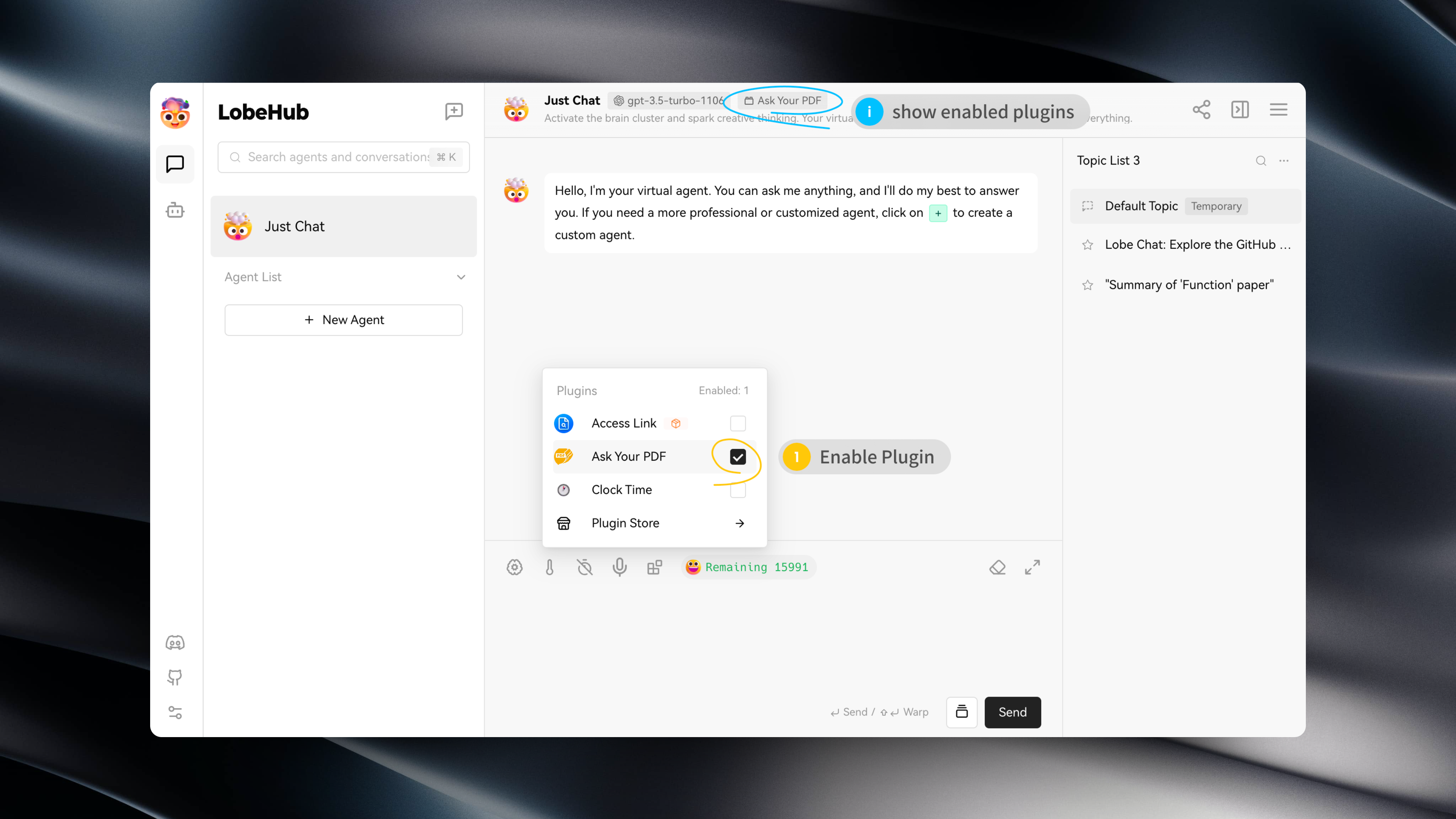
|
|
24
|
-
|
|
25
|
-
## Plugin Configuration
|
|
26
|
-
|
|
27
|
-
Some plugins may require specific configurations, such as API keys.
|
|
28
|
-
|
|
29
|
-
After installing a plugin, you can click on "Settings" to enter the plugin's settings and fill in the required configurations:
|
|
30
|
-
|
|
31
|
-
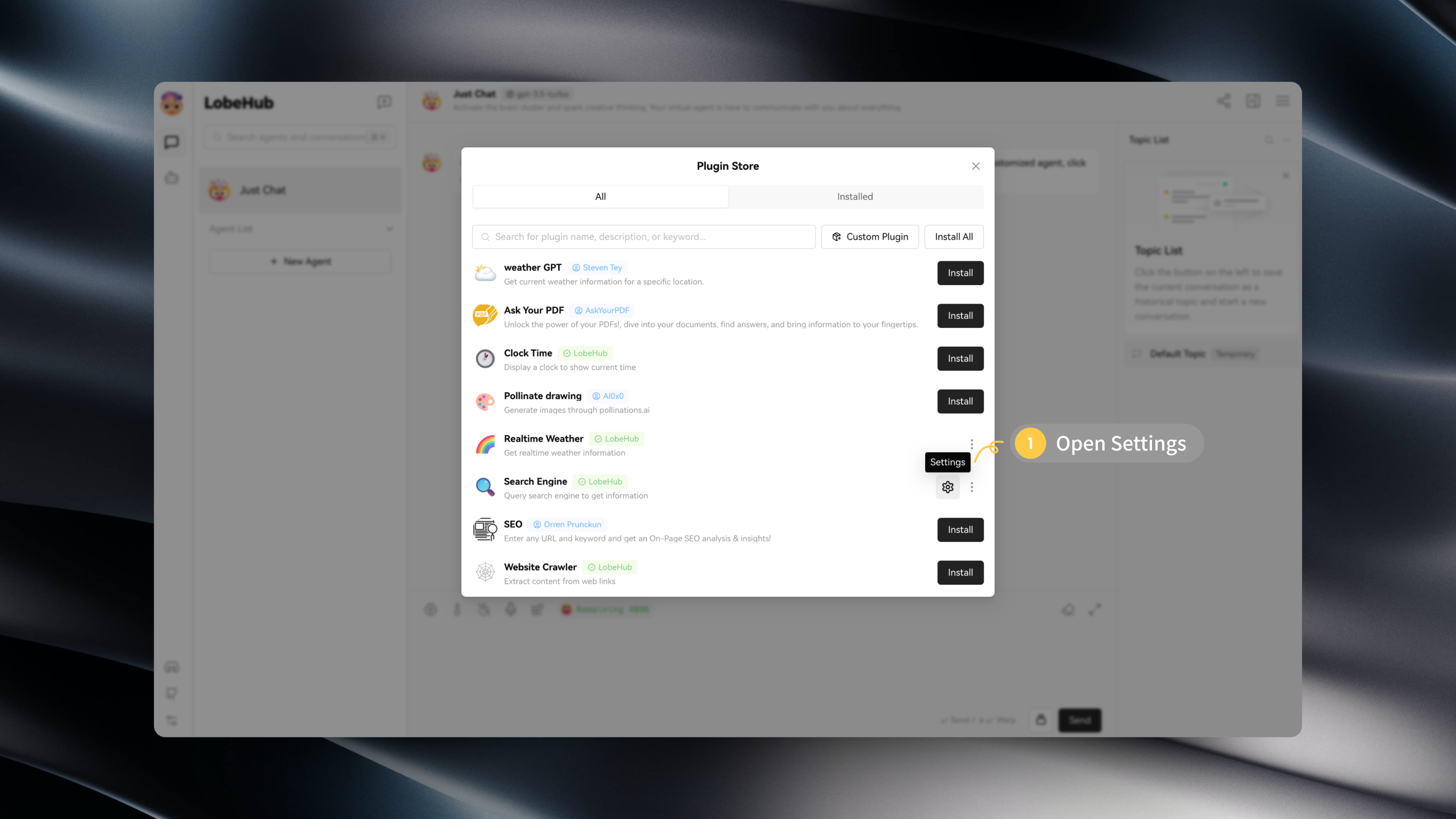
|
|
32
|
-
|
|
33
|
-
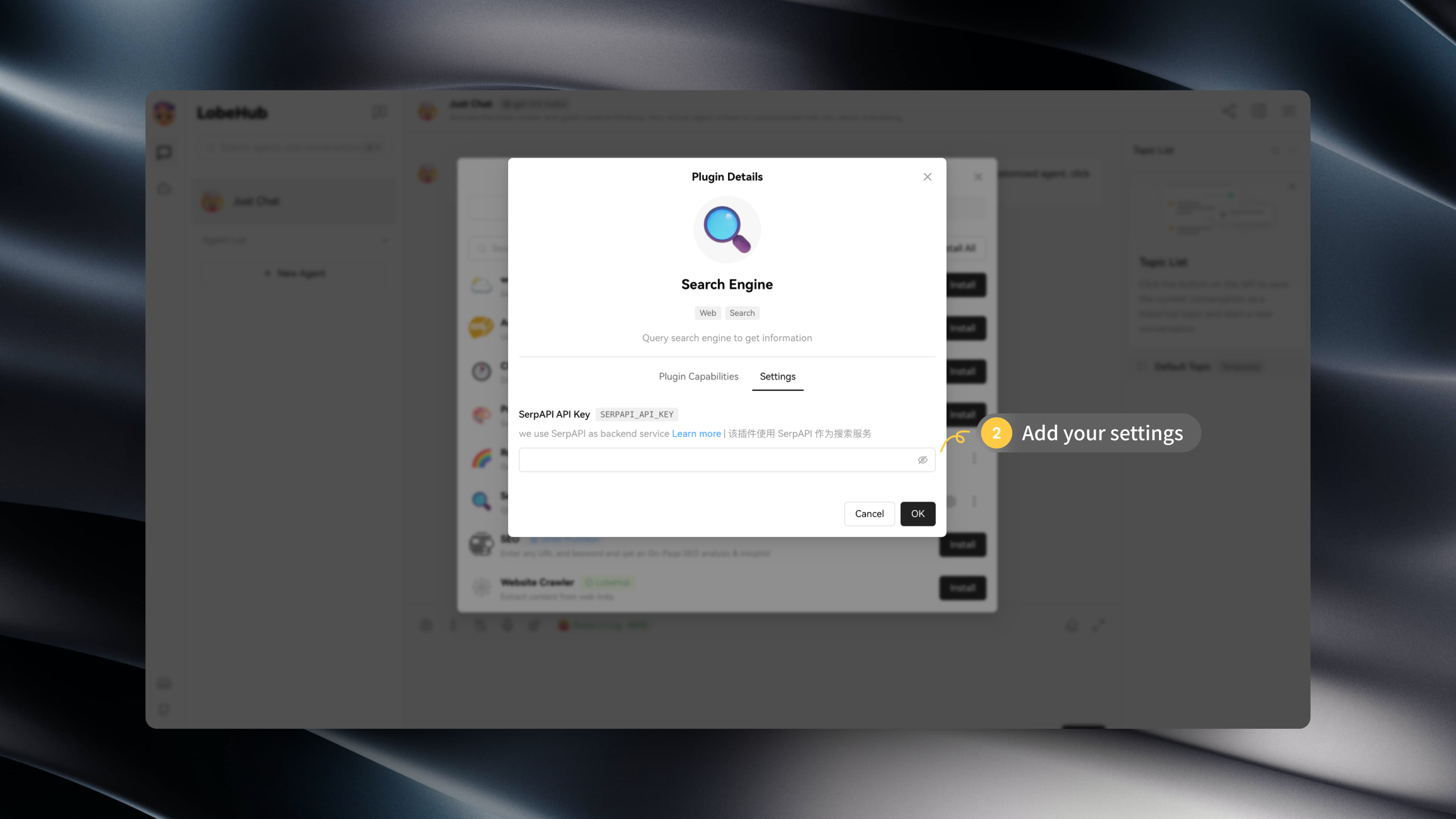
|
|
34
|
-
|
|
35
|
-
## Installing Custom Plugins
|
|
36
|
-
|
|
37
|
-
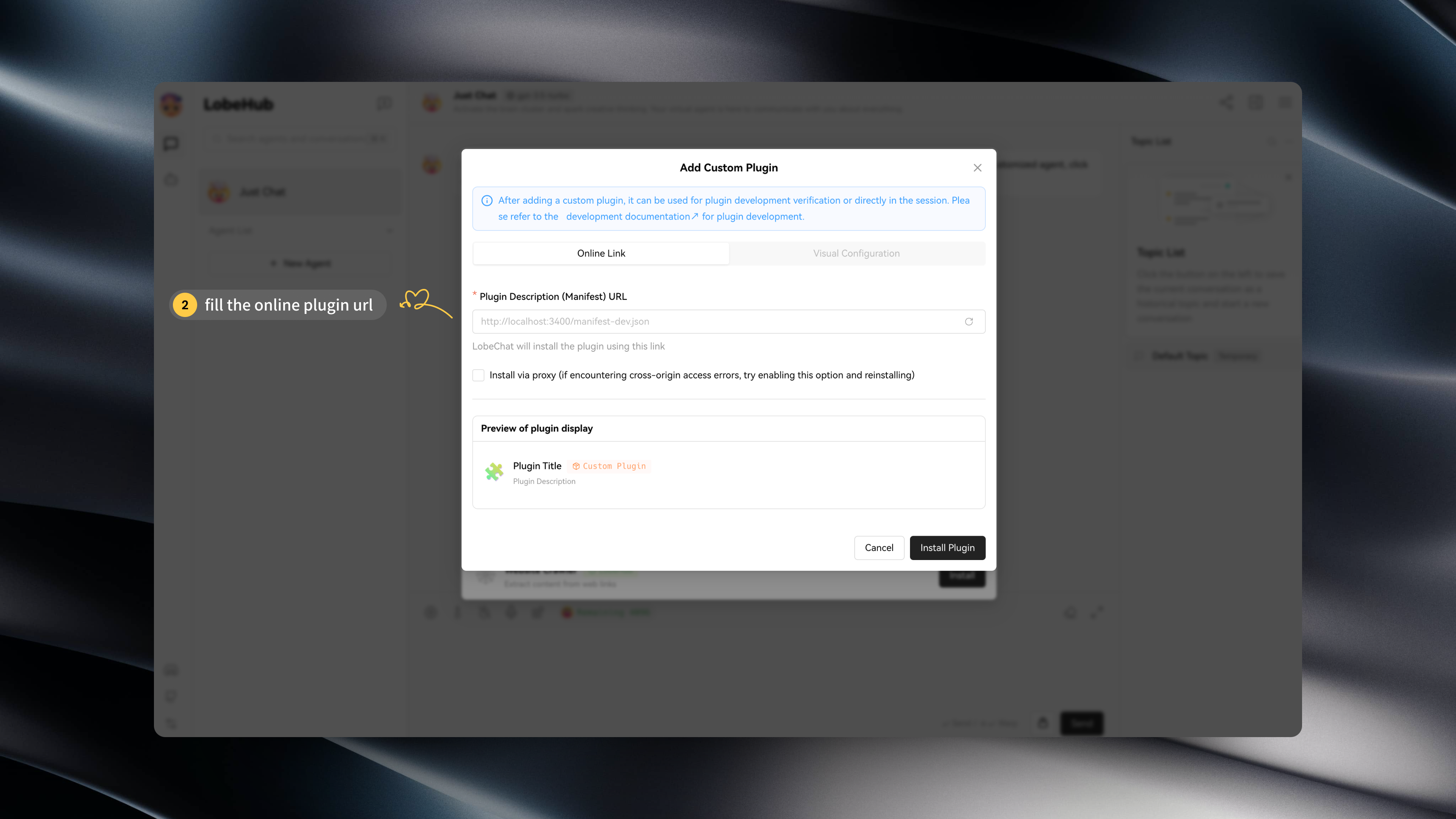
If you wish to install a plugin that is not available in the LobeChat Plugin Store, such as a custom LobeChat plugin you developed, you can click on "Custom Plugins" to install it:
|
|
38
|
-
|
|
39
|
-
[Custom Plugin Installation](https://github.com/lobehub/lobe-chat/assets/28616219/034a328c-8465-4499-8f93-fdcdb03343cd)
|
|
40
|
-
|
|
41
|
-
Additionally, LobeChat's plugin mechanism is compatible with ChatGPT plugins, allowing you to easily install corresponding ChatGPT plugins.
|
|
42
|
-
|
|
43
|
-
If you want to try installing custom plugins on your own, you can use the following links:
|
|
44
|
-
|
|
45
|
-
- `Custom Lobe Plugin` Mock Credit Card: [Mock Credit Card Plugin](https://lobe-plugin-mock-credit-card.vercel.app/manifest.json)
|
|
46
|
-
- `ChatGPT Plugin` Access Links: [Access Links Plugin](https://www.accesslinks.ai/.well-known/ai-plugin.json)
|
|
47
|
-
|
|
48
|
-
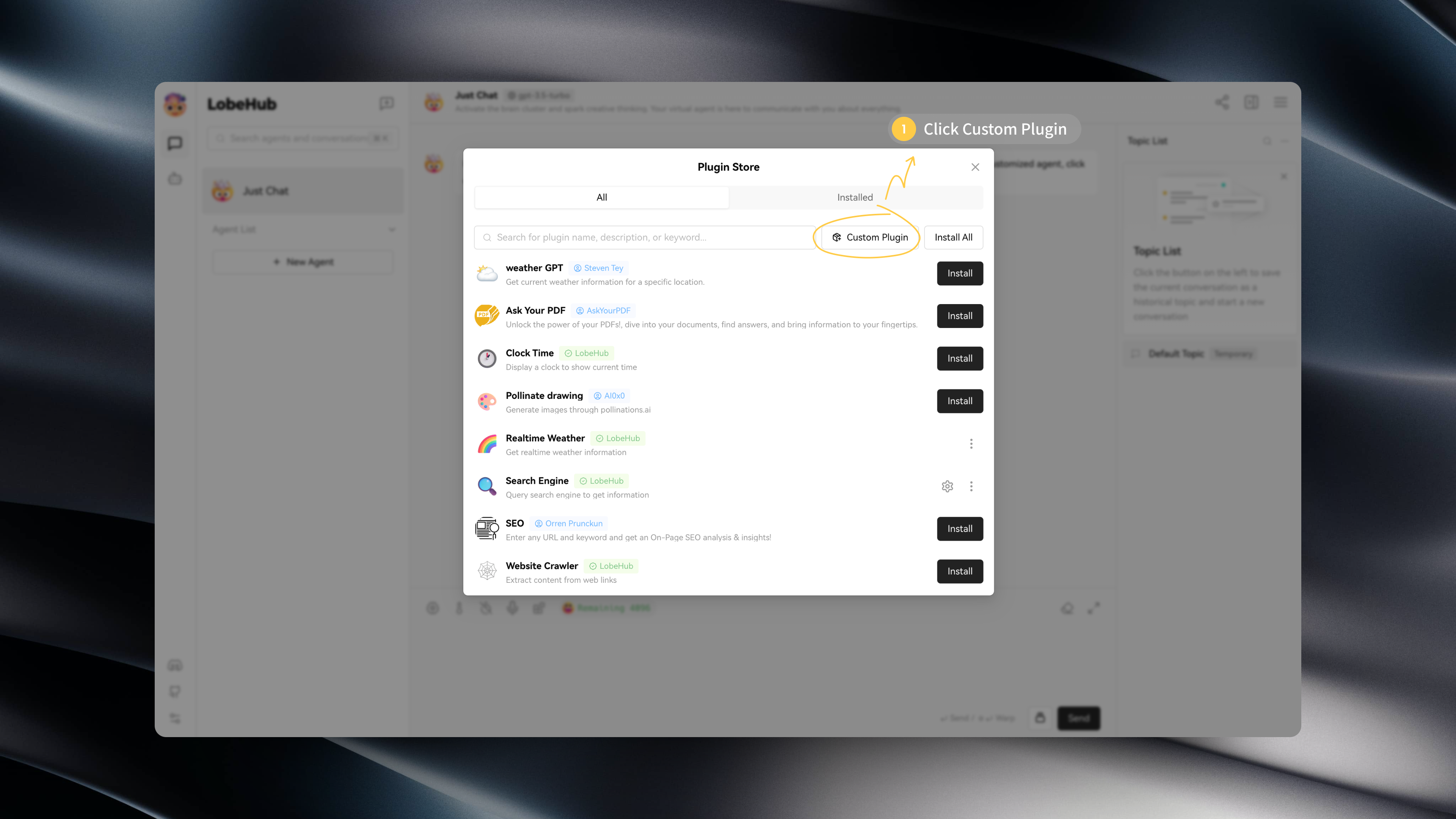
|
|
49
|
-
|
|
50
|
-
|
|
51
|
-
## Developing Plugins
|
|
52
|
-
|
|
53
|
-
If you want to develop a LobeChat plugin on your own, feel free to refer to the [Lobe Plugin Development Guide](https://chat-plugin-sdk.lobehub.com/guides/intro) to expand the possibilities of your AI assistant!
|
|
@@ -1,201 +0,0 @@
|
|
|
1
|
-
# Custom Agents Guide
|
|
2
|
-
|
|
3
|
-
#### TOC
|
|
4
|
-
|
|
5
|
-
- [Adding Custom Agents](#adding-custom-agents)
|
|
6
|
-
- [`A` Add through the Agent Marketplace](#a-add-through-the-agent-marketplace)
|
|
7
|
-
- [`B` Create a Custom Agent](#b-create-a-custom-agent)
|
|
8
|
-
- [Basic Concepts of Prompts](#basic-concepts-of-prompts)
|
|
9
|
-
- [How to write a structured prompt](#how-to-write-a-structured-prompt)
|
|
10
|
-
- [How to improve quality and effectiveness](#how-to-improve-quality-and-effectiveness)
|
|
11
|
-
- [Model Concepts](#model-concepts)
|
|
12
|
-
- [ChatGPT](#chatgpt)
|
|
13
|
-
- [Model Parameter Concepts](#model-parameter-concepts)
|
|
14
|
-
- [`temperature`](#temperature)
|
|
15
|
-
- [`top_p`](#top_p)
|
|
16
|
-
- [`presence_penalty`](#presence_penalty)
|
|
17
|
-
- [`frequency_penalty`](#frequency_penalty)
|
|
18
|
-
- [Further Reading](#further-reading)
|
|
19
|
-
|
|
20
|
-
## Adding Custom Agents
|
|
21
|
-
|
|
22
|
-
As the fundamental unit of LobeChat, adding and iterating on agents is crucial. Now you can add agents to your favorites list in two ways:
|
|
23
|
-
|
|
24
|
-
### `A` Add through the Agent Marketplace
|
|
25
|
-
|
|
26
|
-
If you're new to writing prompts, you might want to browse the Agent Marketplace in LobeChat. Here, you can find commonly used agents submitted by others and add them to your list with just one click, making it very convenient.
|
|
27
|
-
|
|
28
|
-

|
|
29
|
-
|
|
30
|
-
### `B` Create a Custom Agent
|
|
31
|
-
|
|
32
|
-
When you need to handle specific tasks, you'll want to consider creating a custom agent to help you solve the problem. You can add and configure the agent in detail using the following steps:
|
|
33
|
-
|
|
34
|
-

|
|
35
|
-

|
|
36
|
-
|
|
37
|
-
> \[!NOTE]
|
|
38
|
-
>
|
|
39
|
-
> Quick setting tip: You can conveniently modify the prompt by using the quick edit button in the sidebar.
|
|
40
|
-
|
|
41
|
-

|
|
42
|
-

|
|
43
|
-
|
|
44
|
-
Continue reading to understand the writing techniques and common model parameter settings for prompts.
|
|
45
|
-
|
|
46
|
-
<br/>
|
|
47
|
-
|
|
48
|
-
## Basic Concepts of Prompts
|
|
49
|
-
|
|
50
|
-
Generative AI is very useful, but it requires human guidance. In most cases, generative AI is like a capable intern who needs clear instructions to perform well. Being able to guide generative AI correctly is a powerful skill. You can guide generative AI by sending a prompt, which is typically a text instruction. The prompt is the input you provide to the agent, and it will influence the output. A good prompt should be structured, clear, concise, and directive.
|
|
51
|
-
|
|
52
|
-
### How to write a structured prompt
|
|
53
|
-
|
|
54
|
-
> \[!TIP]
|
|
55
|
-
>
|
|
56
|
-
> A structured prompt refers to the construction of the prompt having clear logic and structure. For example, if you want the model to generate an article, your prompt may need to include the topic of the article, its outline, and its style.
|
|
57
|
-
|
|
58
|
-
Let's look at a basic example of a discussion question:
|
|
59
|
-
|
|
60
|
-
> _"What are the most urgent environmental issues our planet faces, and what can individuals do to help address these problems?"_
|
|
61
|
-
|
|
62
|
-
We can turn this into a simple prompt by answering the following question upfront.
|
|
63
|
-
|
|
64
|
-
```
|
|
65
|
-
Answer the following question:
|
|
66
|
-
What are the most urgent environmental issues our planet faces, and what can individuals do to help address these problems?
|
|
67
|
-
```
|
|
68
|
-
|
|
69
|
-
Since the results generated by this prompt are inconsistent, with some only consisting of one or two sentences, it is not ideal for a typical discussion answer that should have multiple paragraphs. A good prompt should provide specific formatting and content instructions. You need to eliminate ambiguity in the language to improve consistency and quality. Here's a better prompt:
|
|
70
|
-
|
|
71
|
-
```
|
|
72
|
-
Write an in-depth essay that includes an introduction, body paragraphs, and a conclusion, answering the following question:
|
|
73
|
-
What are the most urgent environmental issues our planet faces, and what can individuals do to help address these problems?
|
|
74
|
-
```
|
|
75
|
-
|
|
76
|
-
The second prompt generates longer outputs with better structure. The use of the word "essay" in the prompt is intentional because agent can understand the definition of an essay, making it more likely to generate coherent and structured answers.
|
|
77
|
-
|
|
78
|
-
<br/>
|
|
79
|
-
|
|
80
|
-
### How to improve quality and effectiveness
|
|
81
|
-
|
|
82
|
-
> \[!TIP]
|
|
83
|
-
>
|
|
84
|
-
> There are several ways to improve the quality and effectiveness of prompts:
|
|
85
|
-
>
|
|
86
|
-
> - Be as clear as possible about your needs. The model will try to fulfill your requirements, so if your requirements are not clear, the output may not meet your expectations.
|
|
87
|
-
> - Use correct grammar and spelling. The model will try to mimic your language style, so if your language style is problematic, the output may also be problematic.
|
|
88
|
-
> - Provide sufficient contextual information. The model will generate output based on the contextual information you provide, so if you provide insufficient contextual information, it may not be able to generate the desired results.
|
|
89
|
-
|
|
90
|
-
After formulating effective prompts for discussion questions, you now need to refine the generated results. This may involve adjusting the output to fit constraints such as word count or combining concepts from different generated results.
|
|
91
|
-
|
|
92
|
-
A simple iteration method is to generate multiple outputs and examine them to understand the concepts and structure used by agent. Once the outputs have been evaluated, you can select the most suitable ones and combine them into a coherent answer. Another iterative approach is to start gradually and then expand step by step. This requires more than one prompt: an initial prompt for writing the first one or two paragraphs, followed by additional prompts to expand on the content already written. Here's a potential philosophical discussion prompt:
|
|
93
|
-
|
|
94
|
-
> _"Is mathematics invented or discovered? Explain your answer with careful reasoning."_
|
|
95
|
-
|
|
96
|
-
Add it to a simple prompt like this:
|
|
97
|
-
|
|
98
|
-
```
|
|
99
|
-
Write an opening paragraph answering the following question:
|
|
100
|
-
Is mathematics invented or discovered? Explain your answer with careful reasoning.
|
|
101
|
-
```
|
|
102
|
-
|
|
103
|
-
I generated a few answers and found one that I liked:
|
|
104
|
-
|
|
105
|
-
```
|
|
106
|
-
Philosophers and mathematicians have debated whether mathematics is invented or discovered.
|
|
107
|
-
Some argue that the concepts and principles of mathematics exist independently of human thought, so they can be considered discovered rather than invented.
|
|
108
|
-
For example, the concepts of numbers, ratios, and geometric shapes are observed in the natural world and can be abstracted and studied systematically.
|
|
109
|
-
```
|
|
110
|
-
|
|
111
|
-
It's a good start. Then I used another prompt to expand:
|
|
112
|
-
|
|
113
|
-
```
|
|
114
|
-
I'm writing a detailed essay answering the following prompt:
|
|
115
|
-
Is mathematics invented or discovered? Explain your answer with careful reasoning. Here's where I'm at so far: Philosophers and mathematicians have debated whether mathematics is invented or discovered.
|
|
116
|
-
Some argue that the concepts and principles of mathematics exist independently of human thought, so they can be considered discovered rather than invented.
|
|
117
|
-
For example, the concepts of numbers, ratios, and geometric shapes are observed in the natural world and can be abstracted and studied systematically. Write the next paragraph of my essay.
|
|
118
|
-
```
|
|
119
|
-
|
|
120
|
-
I used this prompt to generate several expansions and selected one that I liked, resulting in the following:
|
|
121
|
-
|
|
122
|
-
```
|
|
123
|
-
Philosophers and mathematicians have debated whether mathematics is invented or discovered.
|
|
124
|
-
Some argue that the concepts and principles of mathematics exist independently of human thought, so they can be considered discovered rather than invented.
|
|
125
|
-
For example, the concepts of numbers, ratios, and geometric shapes are observed in the natural world and can be abstracted and studied systematically.
|
|
126
|
-
On the other hand, some argue that mathematics is largely an invention of human thought.
|
|
127
|
-
Mathematical principles are based on logical reasoning, which is a characteristic of human thought.
|
|
128
|
-
For example, Euclidean geometry is based on abstract axioms and assumptions that are accepted as true without needing to be proven.
|
|
129
|
-
Therefore, geometry can be seen as an invention of human thought rather than a discovery.
|
|
130
|
-
Similarly, mathematical formulas and equations are used to model and predict physical phenomena, which are the result of human reasoning.
|
|
131
|
-
```
|
|
132
|
-
|
|
133
|
-
Using expansion prompts, we can gradually write and iterate at each step. This is useful for situations where you need to generate higher-quality output and want to make incremental modifications.
|
|
134
|
-
|
|
135
|
-
<br/>
|
|
136
|
-
|
|
137
|
-
## Model Concepts
|
|
138
|
-
|
|
139
|
-
### ChatGPT
|
|
140
|
-
|
|
141
|
-
- **gpt-3.5-turbo**: The fastest generating chatgpt model currently available, but it may sacrifice some text quality. The context length is 4k.
|
|
142
|
-
- **gpt-3.5-turbo-16k**: Same as gpt-4, but with an increased context limit of 16k tokens and a higher cost rate.
|
|
143
|
-
- **gpt-4**: ChatGPT 4.0 has improved language understanding and generation capabilities compared to 3.5. It has a better understanding of context and can generate more accurate and natural responses. This is due to improvements in the GPT-4 model, including better language modeling and deeper semantic understanding, but it may be slower than other models. The context length is 8k.
|
|
144
|
-
- **gpt-4-32k**: Same as gpt-4, but with an increased context limit of 32k tokens and a higher cost rate.
|
|
145
|
-
|
|
146
|
-
<br/>
|
|
147
|
-
|
|
148
|
-
## Model Parameter Concepts
|
|
149
|
-
|
|
150
|
-
LLM may seem magical, but it is essentially a probability problem. The neural network generates a set of candidate words from the pre-trained model based on the input text and selects the highest probability as the output. Most of the related parameters are about sampling (i.e., how to select the output from the candidate words).
|
|
151
|
-
|
|
152
|
-
### `temperature`
|
|
153
|
-
|
|
154
|
-
Controls the randomness of the model's output. Higher values increase randomness. In general, if you input the same prompt multiple times, the model's output will be different each time.
|
|
155
|
-
|
|
156
|
-
- Set to 0 for a fixed output for each prompt.
|
|
157
|
-
- Lower values make the output more focused and deterministic.
|
|
158
|
-
- Higher values make the output more random and creative.
|
|
159
|
-
|
|
160
|
-
> \[!NOTE]
|
|
161
|
-
>
|
|
162
|
-
> Generally, the longer and clearer the prompt, the better the quality and confidence of the generated output. In this case, you can increase the temperature value. Conversely, if the prompt is short and ambiguous, setting a higher temperature value will make the model's output less stable.
|
|
163
|
-
|
|
164
|
-
<br/>
|
|
165
|
-
|
|
166
|
-
### `top_p`
|
|
167
|
-
|
|
168
|
-
Top-p nucleus sampling is another sampling parameter that is different from temperature. Before the model generates the output, it generates a set of tokens. In top-p sampling mode, the candidate word list is dynamic and selected from the tokens based on a percentage. Top-p introduces randomness to the selection of tokens, allowing other high-scoring tokens to have a chance of being selected instead of always choosing the highest-scoring one.
|
|
169
|
-
|
|
170
|
-
> \[!NOTE]
|
|
171
|
-
>
|
|
172
|
-
> Top-p is similar to randomness. In general, it is not recommended to change it together with the randomness parameter, temperature.
|
|
173
|
-
|
|
174
|
-
<br/>
|
|
175
|
-
|
|
176
|
-
### `presence_penalty`
|
|
177
|
-
|
|
178
|
-
The presence penalty parameter can be seen as a punishment for repetitive content in the generated text. When this parameter is set high, the generative model will try to avoid generating repeated words, phrases, or sentences. Conversely, if the presence penalty parameter is low, the generated text may contain more repeated content. By adjusting the value of the presence penalty parameter, you can control the originality and diversity of the generated text. The importance of this parameter is mainly reflected in the following aspects:
|
|
179
|
-
|
|
180
|
-
- Increasing the originality and diversity of the generated text: In some application scenarios, such as creative writing or generating news headlines, it is desirable for the generated text to have high originality and diversity. By increasing the value of the presence penalty parameter, the probability of generating repeated content in the generated text can be effectively reduced, thereby improving its originality and diversity.
|
|
181
|
-
- Preventing generation loops and meaningless content: In some cases, the generative model may produce repetitive and meaningless text that fails to convey useful information. By appropriately increasing the value of the presence penalty parameter, the probability of generating this type of meaningless content can be reduced, thereby improving the readability and usefulness of the generated text.
|
|
182
|
-
|
|
183
|
-
> \[!NOTE]
|
|
184
|
-
>
|
|
185
|
-
> It is worth noting that the presence penalty parameter, along with other parameters such as temperature and top-p, collectively affect the quality of the generated text. Compared to other parameters, the presence penalty parameter focuses more on the originality and repetitiveness of the text, while the temperature and top-p parameters have a greater impact on the randomness and determinism of the generated text. By adjusting these parameters properly, comprehensive control of the quality of the generated text can be achieved.
|
|
186
|
-
|
|
187
|
-
<br/>
|
|
188
|
-
|
|
189
|
-
### `frequency_penalty`
|
|
190
|
-
|
|
191
|
-
Frequency penalty is a mechanism that penalizes frequent occurrences of new vocabulary in the generated text, reducing the likelihood of the model repeating the same words. The higher the value, the more likely it is to reduce repeated words.
|
|
192
|
-
|
|
193
|
-
- `-2.0` When the morning news starts playing, I noticed that my TV now now now now now now now now now now now now now now now now now now now now now now now now now now now now now now now now now now now now now now now now now now now now now now now now now now now now now now now _(The most frequent word is "now" with a percentage of 44.79%)_
|
|
194
|
-
- `-1.0` He always watches the news in the morning, watching watching watching watching watching watching watching watching watching watching watching watching watching watching watching watching watching watching watching watching watching watching watching watching watching watching watching watching watching watching watching watching watching watching watching watching watching _(The most frequent word is "watching" with a percentage of 57.69%)_
|
|
195
|
-
- `0.0` When the morning sun shines into the small restaurant, a tired mailman appears at the door, holding a bag of mail in his hand. The owner warmly prepares breakfast for him, and he starts sorting the mail while enjoying his breakfast. **_(The most frequent word is "the" with a percentage of 8.45%)_**
|
|
196
|
-
- `1.0` A deep sleep girl is awakened by a warm sunbeam. She sees the first ray of sunlight in the morning, surrounded by the sounds of birds and the fragrance of flowers, everything is full of vitality. _(The most frequent word is "the" with a percentage of 5.45%)_
|
|
197
|
-
- `2.0` Every morning, he sits on the balcony to have breakfast. In the gentle sunset, everything looks very peaceful. However, one day, as he was about to pick up his breakfast, an optimistic little bird flew by, bringing him a good mood for the day. _(The most frequent word is "the" with a percentage of 4.94%)_
|
|
198
|
-
|
|
199
|
-
## Further Reading
|
|
200
|
-
|
|
201
|
-
- **Learn Prompting** - <https://learnprompting.org/docs/intro>
|