@bleedingdev/modern-js-main-doc 3.2.0-ultramodern.8 → 3.2.0-ultramodern.81
This diff represents the content of publicly available package versions that have been released to one of the supported registries. The information contained in this diff is provided for informational purposes only and reflects changes between package versions as they appear in their respective public registries.
- package/docs/en/apis/app/commands.mdx +32 -32
- package/docs/en/community/blog/2022-0708-updates.md +1 -1
- package/docs/en/community/blog/2022-0910-updates.md +2 -2
- package/docs/en/community/blog/v2-release-note.mdx +5 -5
- package/docs/en/community/blog/v3-release-note.mdx +1 -1
- package/docs/en/community/contributing-guide.mdx +2 -3
- package/docs/en/community/releases.mdx +2 -2
- package/docs/en/components/build-output.mdx +1 -1
- package/docs/en/components/debug-app.mdx +1 -1
- package/docs/en/components/deploy-command.mdx +3 -3
- package/docs/en/components/init-app.mdx +38 -36
- package/docs/en/components/init-rspack-app.mdx +1 -1
- package/docs/en/components/prerequisites.mdx +1 -2
- package/docs/en/components/serve-command.mdx +3 -3
- package/docs/en/configure/app/bff/runtime-framework.mdx +1 -1
- package/docs/en/configure/app/usage.mdx +6 -6
- package/docs/en/guides/advanced-features/international/api.mdx +4 -1
- package/docs/en/guides/advanced-features/international/configuration.mdx +1 -0
- package/docs/en/guides/advanced-features/international/locale-detection.mdx +1 -1
- package/docs/en/guides/advanced-features/international/routing.mdx +43 -2
- package/docs/en/guides/basic-features/debug/using-storybook.mdx +1 -1
- package/docs/en/guides/basic-features/deploy.mdx +14 -14
- package/docs/en/guides/basic-features/env-vars.mdx +2 -2
- package/docs/en/guides/basic-features/routes/config-routes.mdx +2 -2
- package/docs/en/guides/basic-features/testing/_meta.json +1 -1
- package/docs/en/guides/concept/server.mdx +2 -2
- package/docs/en/guides/get-started/quick-start.mdx +2 -2
- package/docs/en/guides/get-started/tech-stack.mdx +10 -4
- package/docs/en/guides/get-started/ultramodern.mdx +93 -16
- package/docs/en/guides/topic-detail/module-federation/application.mdx +1 -1
- package/docs/en/guides/topic-detail/module-federation/deploy.mdx +2 -2
- package/docs/en/guides/topic-detail/module-federation/usage.mdx +5 -5
- package/docs/en/guides/troubleshooting/builder.mdx +1 -1
- package/docs/en/guides/upgrade/other.mdx +7 -7
- package/docs/zh/apis/app/commands.mdx +32 -32
- package/docs/zh/community/blog/2022-0708-updates.md +1 -1
- package/docs/zh/community/blog/2022-0910-updates.md +2 -2
- package/docs/zh/community/blog/v2-release-note.mdx +5 -5
- package/docs/zh/community/blog/v3-release-note.mdx +1 -1
- package/docs/zh/community/contributing-guide.mdx +2 -3
- package/docs/zh/community/releases.mdx +2 -2
- package/docs/zh/components/build-output.mdx +1 -1
- package/docs/zh/components/debug-app.mdx +1 -1
- package/docs/zh/components/deploy-command.mdx +3 -3
- package/docs/zh/components/init-app.mdx +36 -34
- package/docs/zh/components/init-rspack-app.mdx +1 -1
- package/docs/zh/components/prerequisites.mdx +1 -2
- package/docs/zh/components/serve-command.mdx +3 -3
- package/docs/zh/configure/app/bff/runtime-framework.mdx +1 -1
- package/docs/zh/configure/app/usage.mdx +5 -5
- package/docs/zh/guides/advanced-features/international/api.mdx +4 -1
- package/docs/zh/guides/advanced-features/international/configuration.mdx +1 -0
- package/docs/zh/guides/advanced-features/international/locale-detection.mdx +1 -1
- package/docs/zh/guides/advanced-features/international/routing.mdx +43 -2
- package/docs/zh/guides/basic-features/debug/using-storybook.mdx +1 -1
- package/docs/zh/guides/basic-features/deploy.mdx +13 -13
- package/docs/zh/guides/basic-features/env-vars.mdx +2 -2
- package/docs/zh/guides/basic-features/routes/config-routes.mdx +2 -2
- package/docs/zh/guides/basic-features/testing/_meta.json +1 -1
- package/docs/zh/guides/concept/server.mdx +2 -2
- package/docs/zh/guides/get-started/quick-start.mdx +2 -2
- package/docs/zh/guides/get-started/tech-stack.mdx +10 -4
- package/docs/zh/guides/get-started/ultramodern.mdx +90 -1
- package/docs/zh/guides/topic-detail/module-federation/application.mdx +1 -1
- package/docs/zh/guides/topic-detail/module-federation/deploy.mdx +2 -2
- package/docs/zh/guides/topic-detail/module-federation/usage.mdx +5 -5
- package/docs/zh/guides/troubleshooting/builder.mdx +1 -1
- package/docs/zh/guides/upgrade/other.md +7 -8
- package/main-doc/docs/en/guides/get-started/ultramodern.mdx +64 -14
- package/main-doc/docs/zh/guides/get-started/ultramodern.mdx +62 -3
- package/package.json +8 -8
- package/docs/en/guides/basic-features/testing/cypress.mdx +0 -95
- package/docs/en/guides/basic-features/testing/jest.mdx +0 -148
- package/docs/en/guides/basic-features/testing/vitest.mdx +0 -100
- package/docs/zh/guides/basic-features/testing/cypress.mdx +0 -95
- package/docs/zh/guides/basic-features/testing/jest.mdx +0 -148
- package/docs/zh/guides/basic-features/testing/vitest.mdx +0 -100
|
@@ -1,148 +0,0 @@
|
|
|
1
|
-
# Jest
|
|
2
|
-
|
|
3
|
-
Jest is a JavaScript testing framework that is primarily used with React Testing Library for unit testing and Snapshot testing.
|
|
4
|
-
|
|
5
|
-
To use Jest in Modern.js, you need to install the dependencies first. You can run the following commands:
|
|
6
|
-
|
|
7
|
-
import { PackageManagerTabs } from '@theme';
|
|
8
|
-
|
|
9
|
-
<PackageManagerTabs command={{
|
|
10
|
-
npm: "npm install -D jest jest-environment-jsdom @testing-library/react @testing-library/dom @testing-library/jest-dom",
|
|
11
|
-
yarn: "yarn add -D jest jest-environment-jsdom @testing-library/react @testing-library/dom @testing-library/jest-dom",
|
|
12
|
-
pnpm: "pnpm install -D jest jest-environment-jsdom @testing-library/react @testing-library/dom @testing-library/jest-dom"
|
|
13
|
-
}} />
|
|
14
|
-
|
|
15
|
-
Next, you can run the following commands to automatically initialize Jest in your project and generate a basic `jest.config.ts` configuration:
|
|
16
|
-
|
|
17
|
-
<PackageManagerTabs command={{
|
|
18
|
-
npm: "npm init jest@latest",
|
|
19
|
-
yarn: "yarn create jest@latest",
|
|
20
|
-
pnpm: "pnpm create jest@latest"
|
|
21
|
-
}} />
|
|
22
|
-
|
|
23
|
-
## Configuration File
|
|
24
|
-
|
|
25
|
-
:::note
|
|
26
|
-
This section will use `.ts` files for Jest testing.
|
|
27
|
-
:::
|
|
28
|
-
|
|
29
|
-
Compared to other testing frameworks, Jest requires more configuration at the build level, such as handling JSX and ESM syntax. Therefore, you need to install some additional dependencies:
|
|
30
|
-
|
|
31
|
-
<PackageManagerTabs command={{
|
|
32
|
-
npm: "npm install -D babel-jest @babel/core @babel/preset-env @babel/preset-react @babel/preset-typescript",
|
|
33
|
-
yarn: "yarn add -D babel-jest @babel/core @babel/preset-env @babel/preset-react @babel/preset-typescript",
|
|
34
|
-
pnpm: "pnpm install -D babel-jest @babel/core @babel/preset-env @babel/preset-react @babel/preset-typescript"
|
|
35
|
-
}} />
|
|
36
|
-
|
|
37
|
-
### Configure Jest
|
|
38
|
-
|
|
39
|
-
You need to further configure the `jest.config.ts` file to allow Jest to correctly compile and run test cases. Here is a basic configuration:
|
|
40
|
-
|
|
41
|
-
```ts title="jest.config.ts"
|
|
42
|
-
import type { Config } from 'jest';
|
|
43
|
-
|
|
44
|
-
const config: Config = {
|
|
45
|
-
coverageProvider: 'babel',
|
|
46
|
-
setupFilesAfterEnv: ['<rootDir>/jest.setup.ts'],
|
|
47
|
-
testEnvironment: 'jsdom',
|
|
48
|
-
transform: {
|
|
49
|
-
'^.+\\.(js|jsx|ts|tsx)$': 'babel-jest',
|
|
50
|
-
},
|
|
51
|
-
transformIgnorePatterns: [],
|
|
52
|
-
};
|
|
53
|
-
|
|
54
|
-
export default config;
|
|
55
|
-
```
|
|
56
|
-
|
|
57
|
-
In the configuration, the `transformIgnorePatterns` is set to an empty array, meaning that all files will be compiled. If you want to speed up the test run, you can configure it as needed.
|
|
58
|
-
|
|
59
|
-
The `setupFilesAfterEnv` will be executed at startup. In `jest.setup.ts`, you can import `@testing-library/jest-dom`, which includes a set of convenient custom matchers, such as `.toBeInTheDocument()`, to make writing tests easier:
|
|
60
|
-
|
|
61
|
-
```ts title="jest.setup.ts"
|
|
62
|
-
import '@testing-library/jest-dom';
|
|
63
|
-
```
|
|
64
|
-
|
|
65
|
-
### Configure Babel
|
|
66
|
-
|
|
67
|
-
You need to configure Babel to allow Jest to automatically compile JSX and other syntax. Here is a basic configuration:
|
|
68
|
-
|
|
69
|
-
```js title="babel.config.js"
|
|
70
|
-
module.exports = {
|
|
71
|
-
presets: [
|
|
72
|
-
['@babel/preset-env', { targets: { node: 'current' } }],
|
|
73
|
-
['@babel/preset-react', { runtime: 'automatic' }],
|
|
74
|
-
'@babel/preset-typescript',
|
|
75
|
-
],
|
|
76
|
-
};
|
|
77
|
-
```
|
|
78
|
-
|
|
79
|
-
## Writing Test Cases
|
|
80
|
-
|
|
81
|
-
Now, you can start writing tests. First, add a `test` command in `package.json`:
|
|
82
|
-
|
|
83
|
-
```json title="package.json"
|
|
84
|
-
{
|
|
85
|
-
"scripts": {
|
|
86
|
-
"test": "jest"
|
|
87
|
-
}
|
|
88
|
-
}
|
|
89
|
-
```
|
|
90
|
-
|
|
91
|
-
Create a simple page for testing:
|
|
92
|
-
|
|
93
|
-
```tsx title="routes/page.tsx"
|
|
94
|
-
import { Link } from '@modern-js/runtime/router';
|
|
95
|
-
|
|
96
|
-
const Index = () => (
|
|
97
|
-
<div>
|
|
98
|
-
<h1>Home</h1>
|
|
99
|
-
<Link to="/about">About</Link>
|
|
100
|
-
</div>
|
|
101
|
-
);
|
|
102
|
-
|
|
103
|
-
export default Index;
|
|
104
|
-
```
|
|
105
|
-
|
|
106
|
-
Add a test case to check if the page has the expected text:
|
|
107
|
-
|
|
108
|
-
```tsx title="__tests__/page.test.tsx"
|
|
109
|
-
import '@testing-library/jest-dom';
|
|
110
|
-
import { render, screen } from '@testing-library/react';
|
|
111
|
-
import { BrowserRouter as Router } from '@modern-js/runtime/router';
|
|
112
|
-
import Page from '../routes/page';
|
|
113
|
-
|
|
114
|
-
describe('Page', () => {
|
|
115
|
-
it('renders a heading', () => {
|
|
116
|
-
render(
|
|
117
|
-
<Router>
|
|
118
|
-
<Page />
|
|
119
|
-
</Router>,
|
|
120
|
-
);
|
|
121
|
-
|
|
122
|
-
const heading = screen.getByRole('heading', { level: 1 });
|
|
123
|
-
|
|
124
|
-
expect(heading).toBeInTheDocument();
|
|
125
|
-
});
|
|
126
|
-
});
|
|
127
|
-
```
|
|
128
|
-
|
|
129
|
-
In the above test case, we imported the `<Router>` component from `@modern-js/runtime/router` because React Router requires the corresponding context when rendering some route-related components.
|
|
130
|
-
|
|
131
|
-
:::note
|
|
132
|
-
When running directly in the Modern.js application, the `<Router>` component will be automatically injected.
|
|
133
|
-
:::
|
|
134
|
-
|
|
135
|
-
## Run Test Cases
|
|
136
|
-
|
|
137
|
-
Execute the above `test` command to run the test cases:
|
|
138
|
-
|
|
139
|
-
```bash
|
|
140
|
-
PASS src/__tests__/page.test.tsx
|
|
141
|
-
Page
|
|
142
|
-
✓ renders a heading (31 ms)
|
|
143
|
-
|
|
144
|
-
Test Suites: 1 passed, 1 total
|
|
145
|
-
Tests: 1 passed, 1 total
|
|
146
|
-
Snapshots: 0 total
|
|
147
|
-
Time: 0.959 s, estimated 1 s
|
|
148
|
-
```
|
|
@@ -1,100 +0,0 @@
|
|
|
1
|
-
# Vitest
|
|
2
|
-
|
|
3
|
-
Vitest is a testing framework driven by Vite, which can be used for unit testing in combination with React Testing Library.
|
|
4
|
-
|
|
5
|
-
To use Vitest in Modern.js, you need to install the dependencies first. You can run the following commands:
|
|
6
|
-
|
|
7
|
-
import { PackageManagerTabs } from '@theme';
|
|
8
|
-
|
|
9
|
-
<PackageManagerTabs command={{
|
|
10
|
-
npm: "npm install -D vitest @vitejs/plugin-react jsdom @testing-library/react @testing-library/dom",
|
|
11
|
-
yarn: "yarn add -D vitest @vitejs/plugin-react jsdom @testing-library/react @testing-library/dom",
|
|
12
|
-
pnpm: "pnpm install -D vitest @vitejs/plugin-react jsdom @testing-library/react @testing-library/dom",
|
|
13
|
-
bun: "bun add -D vitest @vitejs/plugin-react jsdom @testing-library/react @testing-library/dom"
|
|
14
|
-
}} />
|
|
15
|
-
|
|
16
|
-
Next, you need to create a Vitest configuration file `vitest.config.ts` with the following content:
|
|
17
|
-
|
|
18
|
-
```ts title="vitest.config.ts"
|
|
19
|
-
import { defineConfig } from 'vitest/config'
|
|
20
|
-
import react from '@vitejs/plugin-react'
|
|
21
|
-
|
|
22
|
-
export default defineConfig({
|
|
23
|
-
plugins: [react()],
|
|
24
|
-
test: {
|
|
25
|
-
environment: 'jsdom',
|
|
26
|
-
},
|
|
27
|
-
})
|
|
28
|
-
```
|
|
29
|
-
|
|
30
|
-
For more information about Vitest configuration, you can refer to the [Vitest configuration documentation](https://vitest.dev/config/#configuration).
|
|
31
|
-
|
|
32
|
-
You can optionally add the `vitest` command to `package.json`:
|
|
33
|
-
|
|
34
|
-
```json title="package.json"
|
|
35
|
-
{
|
|
36
|
-
"scripts": {
|
|
37
|
-
"test": "vitest"
|
|
38
|
-
}
|
|
39
|
-
}
|
|
40
|
-
```
|
|
41
|
-
|
|
42
|
-
After running this command, Vitest will automatically watch your file changes and rerun the test cases.
|
|
43
|
-
|
|
44
|
-
## Create Unit Tests
|
|
45
|
-
|
|
46
|
-
First, create a simple page for testing:
|
|
47
|
-
|
|
48
|
-
```tsx title="routes/page.tsx"
|
|
49
|
-
import { Link } from '@modern-js/runtime/router';
|
|
50
|
-
|
|
51
|
-
const Index = () => (
|
|
52
|
-
<div>
|
|
53
|
-
<h1>Home</h1>
|
|
54
|
-
<Link to="/about">About</Link>
|
|
55
|
-
</div>
|
|
56
|
-
);
|
|
57
|
-
|
|
58
|
-
export default Index;
|
|
59
|
-
```
|
|
60
|
-
|
|
61
|
-
Add a test case to check if the page has the expected text:
|
|
62
|
-
|
|
63
|
-
```tsx title="__tests__/page.test.tsx"
|
|
64
|
-
import { expect, test } from 'vitest';
|
|
65
|
-
import { render, screen } from '@testing-library/react';
|
|
66
|
-
import { BrowserRouter as Router } from '@modern-js/runtime/router';
|
|
67
|
-
import Page from '../routes/page';
|
|
68
|
-
|
|
69
|
-
test('Page', () => {
|
|
70
|
-
render(
|
|
71
|
-
<Router>
|
|
72
|
-
<Page />
|
|
73
|
-
</Router>,
|
|
74
|
-
);
|
|
75
|
-
expect(screen.getByRole('heading', { level: 1, name: 'Home' })).toBeDefined();
|
|
76
|
-
});
|
|
77
|
-
```
|
|
78
|
-
|
|
79
|
-
In the above test case, we imported the `<Router>` component from `@modern-js/runtime/router` because React Router requires the corresponding context when rendering some route-related components.
|
|
80
|
-
|
|
81
|
-
:::note
|
|
82
|
-
When running directly in the Modern.js application, the `<Router>` component will be automatically injected.
|
|
83
|
-
:::
|
|
84
|
-
|
|
85
|
-
## Run Test Cases
|
|
86
|
-
|
|
87
|
-
Execute the above `test` command to run the test cases:
|
|
88
|
-
|
|
89
|
-
```bash
|
|
90
|
-
✓ src/__tests__/page.test.tsx (1)
|
|
91
|
-
✓ Page
|
|
92
|
-
|
|
93
|
-
Test Files 1 passed (1)
|
|
94
|
-
Tests 1 passed (1)
|
|
95
|
-
Start at 15:37:12
|
|
96
|
-
Duration 999ms (transform 119ms, setup 0ms, collect 365ms, tests 33ms, environment 421ms, prepare 44ms)
|
|
97
|
-
|
|
98
|
-
|
|
99
|
-
PASS Waiting for file changes...
|
|
100
|
-
```
|
|
@@ -1,95 +0,0 @@
|
|
|
1
|
-
# Cypress
|
|
2
|
-
|
|
3
|
-
Cypress 是一个用于 E2E 测试和组件测试的框架。
|
|
4
|
-
|
|
5
|
-
在 Modern.js 中使用 Cypress 需要先安装依赖,可以执行以下命令:
|
|
6
|
-
|
|
7
|
-
import { PackageManagerTabs } from '@theme';
|
|
8
|
-
|
|
9
|
-
<PackageManagerTabs command={{ npm: "npm install -D cypress", yarn: "yarn add -D cypress", pnpm: "pnpm install -D cypress" }} />
|
|
10
|
-
|
|
11
|
-
接下来,创建 `cypress.config.ts` 文件,并添加以下内容:
|
|
12
|
-
|
|
13
|
-
```ts
|
|
14
|
-
import { defineConfig } from 'cypress'
|
|
15
|
-
|
|
16
|
-
export default defineConfig({
|
|
17
|
-
e2e: {
|
|
18
|
-
setupNodeEvents(on, config) {},
|
|
19
|
-
},
|
|
20
|
-
})
|
|
21
|
-
```
|
|
22
|
-
|
|
23
|
-
## 编写测试用例
|
|
24
|
-
|
|
25
|
-
现在,使用 Cypress 来编写一个 E2E 用例,首先创建两张 Modern.js 的页面。
|
|
26
|
-
|
|
27
|
-
```tsx title="routes/page.tsx"
|
|
28
|
-
import { Link } from '@modern-js/runtime/router';
|
|
29
|
-
|
|
30
|
-
const Index = () => (
|
|
31
|
-
<div>
|
|
32
|
-
<h1>Home</h1>
|
|
33
|
-
<Link to="/about">About</Link>
|
|
34
|
-
</div>
|
|
35
|
-
);
|
|
36
|
-
|
|
37
|
-
export default Index;
|
|
38
|
-
```
|
|
39
|
-
|
|
40
|
-
```tsx title="routes/about/page.tsx"
|
|
41
|
-
import { Link } from '@modern-js/runtime/router';
|
|
42
|
-
|
|
43
|
-
const Index = () => (
|
|
44
|
-
<div>
|
|
45
|
-
<h1>About</h1>
|
|
46
|
-
<Link to="/">Home</Link>
|
|
47
|
-
</div>
|
|
48
|
-
);
|
|
49
|
-
|
|
50
|
-
export default Index;
|
|
51
|
-
```
|
|
52
|
-
|
|
53
|
-
接下来,创建测试用例文件:
|
|
54
|
-
|
|
55
|
-
```ts title="cypress/e2e/app.cy.ts"
|
|
56
|
-
describe('Navigation', () => {
|
|
57
|
-
it('should navigate to the about page', () => {
|
|
58
|
-
// Start from the index page
|
|
59
|
-
cy.visit('http://localhost:8080/')
|
|
60
|
-
|
|
61
|
-
// Find a link with an href attribute containing "about" and click it
|
|
62
|
-
cy.get('a[href*="about"]').click()
|
|
63
|
-
|
|
64
|
-
// The new url should include "/about"
|
|
65
|
-
cy.url().should('include', '/about')
|
|
66
|
-
|
|
67
|
-
// The new page should contain an h1 with "About"
|
|
68
|
-
cy.get('h1').contains('About')
|
|
69
|
-
})
|
|
70
|
-
})
|
|
71
|
-
```
|
|
72
|
-
|
|
73
|
-
测试文件可能会缺少 API 的类型,你可以参考 [Cypress - Typescript](https://docs.cypress.io/guides/tooling/typescript-support#Configure-tsconfigjson) 文档解决。
|
|
74
|
-
|
|
75
|
-
你可以将命令添加到 `package.json` 中:
|
|
76
|
-
|
|
77
|
-
```json title="package.json"
|
|
78
|
-
{
|
|
79
|
-
"scripts": {
|
|
80
|
-
"test": "cypress open"
|
|
81
|
-
}
|
|
82
|
-
}
|
|
83
|
-
```
|
|
84
|
-
|
|
85
|
-
## 运行测试用例
|
|
86
|
-
|
|
87
|
-
执行上述 `test` 命令,运行测试用例:
|
|
88
|
-
|
|
89
|
-
```bash
|
|
90
|
-
DevTools listening on ws://127.0.0.1:55203/devtools/browser/xxxxx
|
|
91
|
-
```
|
|
92
|
-
|
|
93
|
-
Cypress 会打开一个无头浏览器,按照提示你可以找到对应的测试文件,并自动运行 E2E 测试:
|
|
94
|
-
|
|
95
|
-
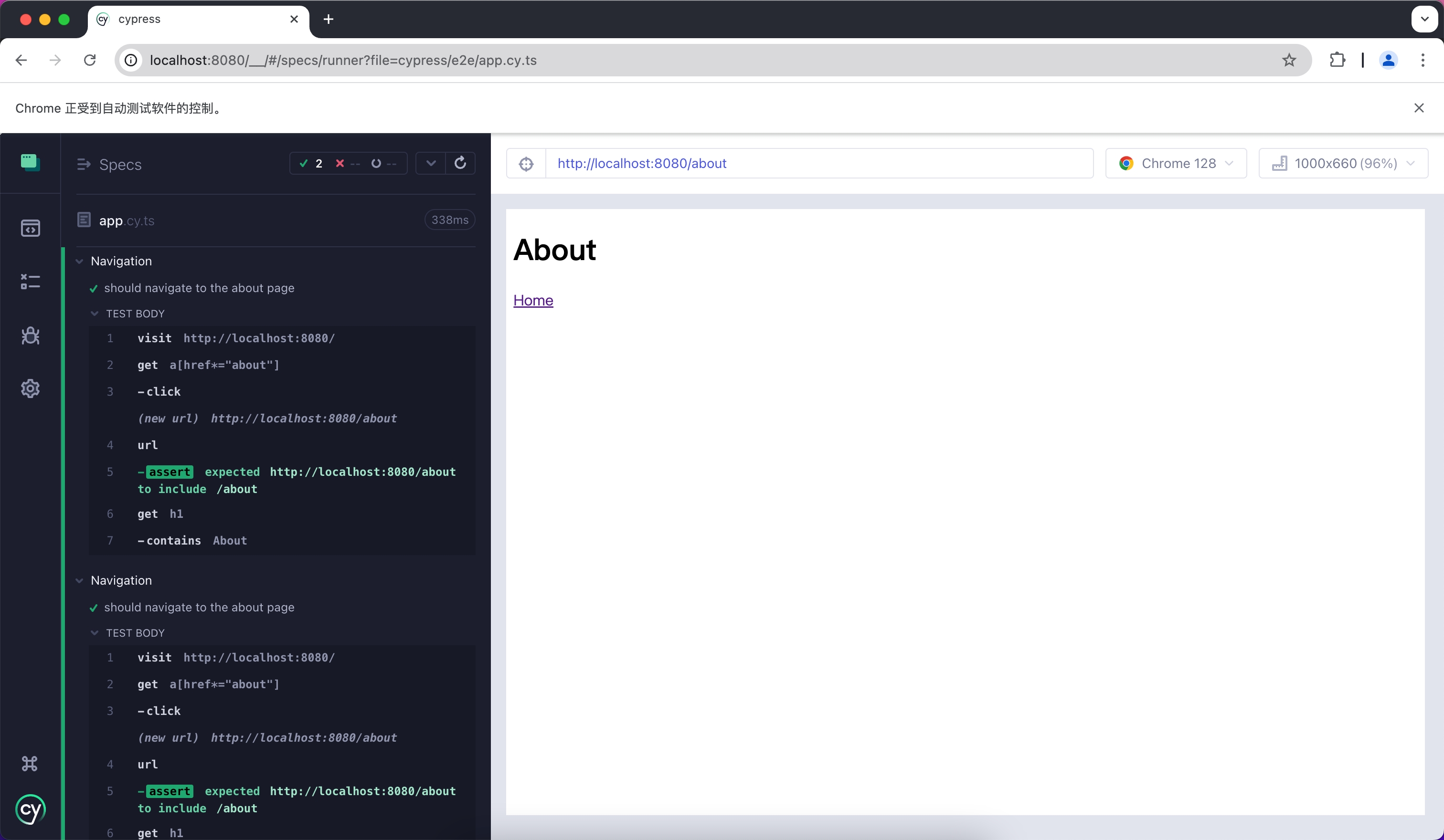
|
|
@@ -1,148 +0,0 @@
|
|
|
1
|
-
# Jest
|
|
2
|
-
|
|
3
|
-
Jest 是一个 JavaScript 测试框架,它主要和 React Testing Library 一起用于单元测试和 Snapshot 测试。
|
|
4
|
-
|
|
5
|
-
在 Modern.js 中使用 Jest 需要先安装依赖,可以执行以下命令:
|
|
6
|
-
|
|
7
|
-
import { PackageManagerTabs } from '@theme';
|
|
8
|
-
|
|
9
|
-
<PackageManagerTabs command={{
|
|
10
|
-
npm: "npm install -D jest jest-environment-jsdom @testing-library/react @testing-library/dom @testing-library/jest-dom",
|
|
11
|
-
yarn: "yarn add -D jest jest-environment-jsdom @testing-library/react @testing-library/dom @testing-library/jest-dom",
|
|
12
|
-
pnpm: "pnpm install -D jest jest-environment-jsdom @testing-library/react @testing-library/dom @testing-library/jest-dom"
|
|
13
|
-
}} />
|
|
14
|
-
|
|
15
|
-
随后,你可以运行以下命令,这将自动在项目中初始化 Jest,并生成一个基础的 `jest.config.ts` 配置:
|
|
16
|
-
|
|
17
|
-
<PackageManagerTabs command={{
|
|
18
|
-
npm: "npm init jest@latest",
|
|
19
|
-
yarn: "yarn create jest@latest",
|
|
20
|
-
pnpm: "pnpm create jest@latest"
|
|
21
|
-
}} />
|
|
22
|
-
|
|
23
|
-
## 配置文件
|
|
24
|
-
|
|
25
|
-
:::note
|
|
26
|
-
本章节会使用 `.ts` 文件来完成 Jest 测试。
|
|
27
|
-
:::
|
|
28
|
-
|
|
29
|
-
相比于其他的测试框架,Jest 在构建层面需要更多的配置,例如处理 JSX 和 ESM 语法,因此首先需要安装一些额外的依赖:
|
|
30
|
-
|
|
31
|
-
<PackageManagerTabs command={{
|
|
32
|
-
npm: "npm install -D babel-jest @babel/core @babel/preset-env @babel/preset-react @babel/preset-typescript",
|
|
33
|
-
yarn: "yarn add -D babel-jest @babel/core @babel/preset-env @babel/preset-react @babel/preset-typescript",
|
|
34
|
-
pnpm: "pnpm install -D babel-jest @babel/core @babel/preset-env @babel/preset-react @babel/preset-typescript"
|
|
35
|
-
}} />
|
|
36
|
-
|
|
37
|
-
### 配置 Jest
|
|
38
|
-
|
|
39
|
-
你需要进一步配置 `jest.config.ts` 文件,以便让 Jest 能够正确地编译和运行测试用例。下面是一个最基本的配置:
|
|
40
|
-
|
|
41
|
-
```ts title="jest.config.ts"
|
|
42
|
-
import type { Config } from 'jest';
|
|
43
|
-
|
|
44
|
-
const config: Config = {
|
|
45
|
-
coverageProvider: 'babel',
|
|
46
|
-
setupFilesAfterEnv: ['<rootDir>/jest.setup.ts'],
|
|
47
|
-
testEnvironment: 'jsdom',
|
|
48
|
-
transform: {
|
|
49
|
-
'^.+\\.(js|jsx|ts|tsx)$': 'babel-jest',
|
|
50
|
-
},
|
|
51
|
-
transformIgnorePatterns: [],
|
|
52
|
-
};
|
|
53
|
-
|
|
54
|
-
export default config;
|
|
55
|
-
```
|
|
56
|
-
|
|
57
|
-
配置中,将 `transformIgnorePatterns` 设置为了空数组,意味着所有的文件都会经过编译,如果你希望提升测试运行的速度,可以按需配置。
|
|
58
|
-
|
|
59
|
-
`setupFilesAfterEnv` 会在启动时执行,在 `jest.setup.ts` 中,可以引入 `@testing-library/jest-dom`。它包含了一组便捷的自定义匹配器,例如 `.toBeInTheDocument()`,使编写测试变得更容易:
|
|
60
|
-
|
|
61
|
-
```ts title="jest.setup.ts"
|
|
62
|
-
import '@testing-library/jest-dom';
|
|
63
|
-
```
|
|
64
|
-
|
|
65
|
-
### 配置 Babel
|
|
66
|
-
|
|
67
|
-
你需要配置 Babel 让 Jest 能够自动编译 JSX 等语法,下面是一个基本的配置:
|
|
68
|
-
|
|
69
|
-
```js title="babel.config.js"
|
|
70
|
-
module.exports = {
|
|
71
|
-
presets: [
|
|
72
|
-
['@babel/preset-env', { targets: { node: 'current' } }],
|
|
73
|
-
['@babel/preset-react', { runtime: 'automatic' }],
|
|
74
|
-
'@babel/preset-typescript',
|
|
75
|
-
],
|
|
76
|
-
};
|
|
77
|
-
```
|
|
78
|
-
|
|
79
|
-
## 编写测试用例
|
|
80
|
-
|
|
81
|
-
现在,你可以开始编写测试用例了,首先在 `package.json` 中添加一个 `test` 命令:
|
|
82
|
-
|
|
83
|
-
```json title="package.json"
|
|
84
|
-
{
|
|
85
|
-
"scripts": {
|
|
86
|
-
"test": "jest"
|
|
87
|
-
}
|
|
88
|
-
}
|
|
89
|
-
```
|
|
90
|
-
|
|
91
|
-
创建一个简单的页面用于测试:
|
|
92
|
-
|
|
93
|
-
```tsx title="routes/page.tsx"
|
|
94
|
-
import { Link } from '@modern-js/runtime/router';
|
|
95
|
-
|
|
96
|
-
const Index = () => (
|
|
97
|
-
<div>
|
|
98
|
-
<h1>Home</h1>
|
|
99
|
-
<Link to="/about">About</Link>
|
|
100
|
-
</div>
|
|
101
|
-
);
|
|
102
|
-
|
|
103
|
-
export default Index;
|
|
104
|
-
```
|
|
105
|
-
|
|
106
|
-
添加测试用例,检测页面中是否有预期的文本:
|
|
107
|
-
|
|
108
|
-
```tsx title="__tests__/page.test.tsx"
|
|
109
|
-
import '@testing-library/jest-dom';
|
|
110
|
-
import { render, screen } from '@testing-library/react';
|
|
111
|
-
import { BrowserRouter as Router } from '@modern-js/runtime/router';
|
|
112
|
-
import Page from '../routes/page';
|
|
113
|
-
|
|
114
|
-
describe('Page', () => {
|
|
115
|
-
it('renders a heading', () => {
|
|
116
|
-
render(
|
|
117
|
-
<Router>
|
|
118
|
-
<Page />
|
|
119
|
-
</Router>,
|
|
120
|
-
);
|
|
121
|
-
|
|
122
|
-
const heading = screen.getByRole('heading', { level: 1 });
|
|
123
|
-
|
|
124
|
-
expect(heading).toBeInTheDocument();
|
|
125
|
-
});
|
|
126
|
-
});
|
|
127
|
-
```
|
|
128
|
-
|
|
129
|
-
上述用例中,我们从 `@modern-js/runtime/router` 引入了 `<Router>` 组件,这是因为 React Router 在渲染部分路由相关组件时,必须要有对应的上下文。
|
|
130
|
-
|
|
131
|
-
:::note
|
|
132
|
-
直接在 Modern.js 应用中运行时,`<Router>` 组件会自动注入。
|
|
133
|
-
:::
|
|
134
|
-
|
|
135
|
-
## 运行测试用例
|
|
136
|
-
|
|
137
|
-
执行上述 `test` 命令,运行测试用例:
|
|
138
|
-
|
|
139
|
-
```bash
|
|
140
|
-
PASS src/__tests__/page.test.tsx
|
|
141
|
-
Page
|
|
142
|
-
✓ renders a heading (31 ms)
|
|
143
|
-
|
|
144
|
-
Test Suites: 1 passed, 1 total
|
|
145
|
-
Tests: 1 passed, 1 total
|
|
146
|
-
Snapshots: 0 total
|
|
147
|
-
Time: 0.959 s, estimated 1 s
|
|
148
|
-
```
|
|
@@ -1,100 +0,0 @@
|
|
|
1
|
-
# Vitest
|
|
2
|
-
|
|
3
|
-
Vitest 是由 Vite 驱动的测试框架,和 React Testing Library 配合可以用于单元测试。
|
|
4
|
-
|
|
5
|
-
在 Modern.js 中使用 Vitest 需要先安装依赖,可以执行以下命令:
|
|
6
|
-
|
|
7
|
-
import { PackageManagerTabs } from '@theme';
|
|
8
|
-
|
|
9
|
-
<PackageManagerTabs command={{
|
|
10
|
-
npm: "npm install -D vitest @vitejs/plugin-react jsdom @testing-library/react @testing-library/dom",
|
|
11
|
-
yarn: "yarn add -D vitest @vitejs/plugin-react jsdom @testing-library/react @testing-library/dom",
|
|
12
|
-
pnpm: "pnpm install -D vitest @vitejs/plugin-react jsdom @testing-library/react @testing-library/dom",
|
|
13
|
-
bun: "bun add -D vitest @vitejs/plugin-react jsdom @testing-library/react @testing-library/dom"
|
|
14
|
-
}} />
|
|
15
|
-
|
|
16
|
-
接下来,你需要创建一个 Vitest 配置文件 `vitest.config.ts`,内容如下:
|
|
17
|
-
|
|
18
|
-
```ts title="vitest.config.ts"
|
|
19
|
-
import { defineConfig } from 'vitest/config'
|
|
20
|
-
import react from '@vitejs/plugin-react'
|
|
21
|
-
|
|
22
|
-
export default defineConfig({
|
|
23
|
-
plugins: [react()],
|
|
24
|
-
test: {
|
|
25
|
-
environment: 'jsdom',
|
|
26
|
-
},
|
|
27
|
-
})
|
|
28
|
-
```
|
|
29
|
-
|
|
30
|
-
更多关于 Vitest 配置的信息,可以参考 [Vitest 配置文档](https://vitest.dev/config/#configuration)。
|
|
31
|
-
|
|
32
|
-
你可以选择性的将 `vitest` 命令添加到 `package.json` 中:
|
|
33
|
-
|
|
34
|
-
```json title="package.json"
|
|
35
|
-
{
|
|
36
|
-
"scripts": {
|
|
37
|
-
"test": "vitest"
|
|
38
|
-
}
|
|
39
|
-
}
|
|
40
|
-
```
|
|
41
|
-
|
|
42
|
-
运行该命令后,Vitest 会自动监听你的文件变化,并重新运行用例。
|
|
43
|
-
|
|
44
|
-
## 创建单元测试
|
|
45
|
-
|
|
46
|
-
首先,创建一个简单的页面用于测试:
|
|
47
|
-
|
|
48
|
-
```tsx title="routes/page.tsx"
|
|
49
|
-
import { Link } from '@modern-js/runtime/router';
|
|
50
|
-
|
|
51
|
-
const Index = () => (
|
|
52
|
-
<div>
|
|
53
|
-
<h1>Home</h1>
|
|
54
|
-
<Link to="/about">About</Link>
|
|
55
|
-
</div>
|
|
56
|
-
);
|
|
57
|
-
|
|
58
|
-
export default Index;
|
|
59
|
-
```
|
|
60
|
-
|
|
61
|
-
添加测试用例,检测页面中是否有预期的文本:
|
|
62
|
-
|
|
63
|
-
```tsx title="__tests__/page.test.tsx"
|
|
64
|
-
import { expect, test } from 'vitest';
|
|
65
|
-
import { render, screen } from '@testing-library/react';
|
|
66
|
-
import { BrowserRouter as Router } from '@modern-js/runtime/router';
|
|
67
|
-
import Page from '../routes/page';
|
|
68
|
-
|
|
69
|
-
test('Page', () => {
|
|
70
|
-
render(
|
|
71
|
-
<Router>
|
|
72
|
-
<Page />
|
|
73
|
-
</Router>,
|
|
74
|
-
);
|
|
75
|
-
expect(screen.getByRole('heading', { level: 1, name: 'Home' })).toBeDefined();
|
|
76
|
-
});
|
|
77
|
-
```
|
|
78
|
-
|
|
79
|
-
上述用例中,我们从 `@modern-js/runtime/router` 引入了 `<Router>` 组件,这是因为 React Router 在渲染部分路由相关组件时,必须要有对应的上下文。
|
|
80
|
-
|
|
81
|
-
:::note
|
|
82
|
-
直接在 Modern.js 应用中运行时,`<Router>` 组件会自动注入。
|
|
83
|
-
:::
|
|
84
|
-
|
|
85
|
-
## 运行测试用例
|
|
86
|
-
|
|
87
|
-
执行上述 `test` 命令,运行测试用例:
|
|
88
|
-
|
|
89
|
-
```bash
|
|
90
|
-
✓ src/__tests__/page.test.tsx (1)
|
|
91
|
-
✓ Page
|
|
92
|
-
|
|
93
|
-
Test Files 1 passed (1)
|
|
94
|
-
Tests 1 passed (1)
|
|
95
|
-
Start at 15:37:12
|
|
96
|
-
Duration 999ms (transform 119ms, setup 0ms, collect 365ms, tests 33ms, environment 421ms, prepare 44ms)
|
|
97
|
-
|
|
98
|
-
|
|
99
|
-
PASS Waiting for file changes...
|
|
100
|
-
```
|