@bleedingdev/modern-js-main-doc 3.2.0-ultramodern.8 → 3.2.0-ultramodern.81
This diff represents the content of publicly available package versions that have been released to one of the supported registries. The information contained in this diff is provided for informational purposes only and reflects changes between package versions as they appear in their respective public registries.
- package/docs/en/apis/app/commands.mdx +32 -32
- package/docs/en/community/blog/2022-0708-updates.md +1 -1
- package/docs/en/community/blog/2022-0910-updates.md +2 -2
- package/docs/en/community/blog/v2-release-note.mdx +5 -5
- package/docs/en/community/blog/v3-release-note.mdx +1 -1
- package/docs/en/community/contributing-guide.mdx +2 -3
- package/docs/en/community/releases.mdx +2 -2
- package/docs/en/components/build-output.mdx +1 -1
- package/docs/en/components/debug-app.mdx +1 -1
- package/docs/en/components/deploy-command.mdx +3 -3
- package/docs/en/components/init-app.mdx +38 -36
- package/docs/en/components/init-rspack-app.mdx +1 -1
- package/docs/en/components/prerequisites.mdx +1 -2
- package/docs/en/components/serve-command.mdx +3 -3
- package/docs/en/configure/app/bff/runtime-framework.mdx +1 -1
- package/docs/en/configure/app/usage.mdx +6 -6
- package/docs/en/guides/advanced-features/international/api.mdx +4 -1
- package/docs/en/guides/advanced-features/international/configuration.mdx +1 -0
- package/docs/en/guides/advanced-features/international/locale-detection.mdx +1 -1
- package/docs/en/guides/advanced-features/international/routing.mdx +43 -2
- package/docs/en/guides/basic-features/debug/using-storybook.mdx +1 -1
- package/docs/en/guides/basic-features/deploy.mdx +14 -14
- package/docs/en/guides/basic-features/env-vars.mdx +2 -2
- package/docs/en/guides/basic-features/routes/config-routes.mdx +2 -2
- package/docs/en/guides/basic-features/testing/_meta.json +1 -1
- package/docs/en/guides/concept/server.mdx +2 -2
- package/docs/en/guides/get-started/quick-start.mdx +2 -2
- package/docs/en/guides/get-started/tech-stack.mdx +10 -4
- package/docs/en/guides/get-started/ultramodern.mdx +93 -16
- package/docs/en/guides/topic-detail/module-federation/application.mdx +1 -1
- package/docs/en/guides/topic-detail/module-federation/deploy.mdx +2 -2
- package/docs/en/guides/topic-detail/module-federation/usage.mdx +5 -5
- package/docs/en/guides/troubleshooting/builder.mdx +1 -1
- package/docs/en/guides/upgrade/other.mdx +7 -7
- package/docs/zh/apis/app/commands.mdx +32 -32
- package/docs/zh/community/blog/2022-0708-updates.md +1 -1
- package/docs/zh/community/blog/2022-0910-updates.md +2 -2
- package/docs/zh/community/blog/v2-release-note.mdx +5 -5
- package/docs/zh/community/blog/v3-release-note.mdx +1 -1
- package/docs/zh/community/contributing-guide.mdx +2 -3
- package/docs/zh/community/releases.mdx +2 -2
- package/docs/zh/components/build-output.mdx +1 -1
- package/docs/zh/components/debug-app.mdx +1 -1
- package/docs/zh/components/deploy-command.mdx +3 -3
- package/docs/zh/components/init-app.mdx +36 -34
- package/docs/zh/components/init-rspack-app.mdx +1 -1
- package/docs/zh/components/prerequisites.mdx +1 -2
- package/docs/zh/components/serve-command.mdx +3 -3
- package/docs/zh/configure/app/bff/runtime-framework.mdx +1 -1
- package/docs/zh/configure/app/usage.mdx +5 -5
- package/docs/zh/guides/advanced-features/international/api.mdx +4 -1
- package/docs/zh/guides/advanced-features/international/configuration.mdx +1 -0
- package/docs/zh/guides/advanced-features/international/locale-detection.mdx +1 -1
- package/docs/zh/guides/advanced-features/international/routing.mdx +43 -2
- package/docs/zh/guides/basic-features/debug/using-storybook.mdx +1 -1
- package/docs/zh/guides/basic-features/deploy.mdx +13 -13
- package/docs/zh/guides/basic-features/env-vars.mdx +2 -2
- package/docs/zh/guides/basic-features/routes/config-routes.mdx +2 -2
- package/docs/zh/guides/basic-features/testing/_meta.json +1 -1
- package/docs/zh/guides/concept/server.mdx +2 -2
- package/docs/zh/guides/get-started/quick-start.mdx +2 -2
- package/docs/zh/guides/get-started/tech-stack.mdx +10 -4
- package/docs/zh/guides/get-started/ultramodern.mdx +90 -1
- package/docs/zh/guides/topic-detail/module-federation/application.mdx +1 -1
- package/docs/zh/guides/topic-detail/module-federation/deploy.mdx +2 -2
- package/docs/zh/guides/topic-detail/module-federation/usage.mdx +5 -5
- package/docs/zh/guides/troubleshooting/builder.mdx +1 -1
- package/docs/zh/guides/upgrade/other.md +7 -8
- package/main-doc/docs/en/guides/get-started/ultramodern.mdx +64 -14
- package/main-doc/docs/zh/guides/get-started/ultramodern.mdx +62 -3
- package/package.json +8 -8
- package/docs/en/guides/basic-features/testing/cypress.mdx +0 -95
- package/docs/en/guides/basic-features/testing/jest.mdx +0 -148
- package/docs/en/guides/basic-features/testing/vitest.mdx +0 -100
- package/docs/zh/guides/basic-features/testing/cypress.mdx +0 -95
- package/docs/zh/guides/basic-features/testing/jest.mdx +0 -148
- package/docs/zh/guides/basic-features/testing/vitest.mdx +0 -100
|
@@ -4,16 +4,16 @@ sidebar_position: 1
|
|
|
4
4
|
|
|
5
5
|
# Commands
|
|
6
6
|
|
|
7
|
-
|
|
7
|
+
UltraModern.js has some built-in commands that can help you quickly start a development server, build production environment code, and more.
|
|
8
8
|
|
|
9
|
-
Through this chapter, you can learn about the built-in commands of
|
|
9
|
+
Through this chapter, you can learn about the built-in commands of UltraModern.js and how to use them.
|
|
10
10
|
|
|
11
|
-
##
|
|
11
|
+
## ultramodern dev
|
|
12
12
|
|
|
13
|
-
The `
|
|
13
|
+
The `ultramodern dev` command is used to start a local development server and compile the source code in the development environment.
|
|
14
14
|
|
|
15
15
|
```bash
|
|
16
|
-
Usage:
|
|
16
|
+
Usage: ultramodern dev [options]
|
|
17
17
|
|
|
18
18
|
Options:
|
|
19
19
|
-e --entry <entry> compiler by entry
|
|
@@ -23,10 +23,10 @@ Options:
|
|
|
23
23
|
--api-only only start API service
|
|
24
24
|
```
|
|
25
25
|
|
|
26
|
-
After running `
|
|
26
|
+
After running `ultramodern dev`, UltraModern.js will watch source file changes and apply hot module replacement.
|
|
27
27
|
|
|
28
28
|
```bash
|
|
29
|
-
$
|
|
29
|
+
$ ultramodern dev
|
|
30
30
|
|
|
31
31
|
info Starting dev server...
|
|
32
32
|
|
|
@@ -38,10 +38,10 @@ info Starting dev server...
|
|
|
38
38
|
|
|
39
39
|
In multi-page (MPA) projects, the `--entry` option can be added to specify one or more pages to compile. In this way, only part of the code in the project will be compiled, and the dev startup speed will be faster.
|
|
40
40
|
|
|
41
|
-
For example, execute `
|
|
41
|
+
For example, execute `ultramodern dev --entry`, the entry selector will be displayed in the command line interface:
|
|
42
42
|
|
|
43
43
|
```text
|
|
44
|
-
$
|
|
44
|
+
$ ultramodern dev --entry
|
|
45
45
|
|
|
46
46
|
? Please select the entry that needs to be built
|
|
47
47
|
❯ ◯ foo
|
|
@@ -57,22 +57,22 @@ You can also specify the page name through parameters after `--entry`, and the n
|
|
|
57
57
|
|
|
58
58
|
```bash
|
|
59
59
|
# Compile foo page
|
|
60
|
-
|
|
60
|
+
ultramodern dev --entry foo
|
|
61
61
|
|
|
62
62
|
# Compile foo and bar pages
|
|
63
|
-
|
|
63
|
+
ultramodern dev --entry foo,bar
|
|
64
64
|
```
|
|
65
65
|
|
|
66
|
-
##
|
|
66
|
+
## ultramodern start
|
|
67
67
|
|
|
68
|
-
`
|
|
68
|
+
`ultramodern start` is an alias of `ultramodern dev` command, the usage of the two are exactly the same.
|
|
69
69
|
|
|
70
|
-
##
|
|
70
|
+
## ultramodern build
|
|
71
71
|
|
|
72
|
-
The `
|
|
72
|
+
The `ultramodern build` command will build production-ready artifacts in the `dist/` directory by default. You can specify the output directory by modifying the configuration [`output.distPath`](/configure/app/output/dist-path).
|
|
73
73
|
|
|
74
74
|
```bash
|
|
75
|
-
Usage:
|
|
75
|
+
Usage: ultramodern build [options]
|
|
76
76
|
|
|
77
77
|
Options:
|
|
78
78
|
-c --config <config> specify the configuration file, which can be a relative or absolute path
|
|
@@ -80,14 +80,14 @@ Options:
|
|
|
80
80
|
-w --watch turn on watch mode, watch for changes and rebuild
|
|
81
81
|
```
|
|
82
82
|
|
|
83
|
-
##
|
|
83
|
+
## ultramodern new
|
|
84
84
|
|
|
85
|
-
The `
|
|
85
|
+
The `ultramodern new` command is used to enable features in an existing project.
|
|
86
86
|
|
|
87
87
|
For example, add application entry, enable some optional features such as BFF, micro frontend, etc.
|
|
88
88
|
|
|
89
89
|
```bash
|
|
90
|
-
Usage:
|
|
90
|
+
Usage: ultramodern new [options]
|
|
91
91
|
|
|
92
92
|
Options:
|
|
93
93
|
--config-file <configFile> specify the configuration file, which can be a relative or absolute path
|
|
@@ -104,7 +104,7 @@ Options:
|
|
|
104
104
|
In the project, execute the `new` command to add entries as follows:
|
|
105
105
|
|
|
106
106
|
```text
|
|
107
|
-
$ npx
|
|
107
|
+
$ npx ultramodern new
|
|
108
108
|
? Please select the operation you want: Create Element
|
|
109
109
|
? Please select the type of element to create: New "entry"
|
|
110
110
|
? Please fill in the entry name: entry
|
|
@@ -115,7 +115,7 @@ $ npx modern new
|
|
|
115
115
|
In the project, execute the `new` command to enable features as follows:
|
|
116
116
|
|
|
117
117
|
```text
|
|
118
|
-
$ npx
|
|
118
|
+
$ npx ultramodern new
|
|
119
119
|
? Please select the operation you want: Enable Features
|
|
120
120
|
? Please select the feature name: (Use arrow keys)
|
|
121
121
|
❯ Enable BFF
|
|
@@ -133,12 +133,12 @@ import ServeCommand from '@site-docs-en/components/serve-command';
|
|
|
133
133
|
|
|
134
134
|
<ServeCommand />
|
|
135
135
|
|
|
136
|
-
##
|
|
136
|
+
## ultramodern upgrade
|
|
137
137
|
|
|
138
|
-
Execute the command `npx
|
|
138
|
+
Execute the command `npx ultramodern upgrade` in the project, by default, dependencies in the `package.json` are updated to the latest version.
|
|
139
139
|
|
|
140
140
|
```bash
|
|
141
|
-
Usage:
|
|
141
|
+
Usage: ultramodern upgrade [options]
|
|
142
142
|
|
|
143
143
|
Options:
|
|
144
144
|
--config <config> specify the configuration file, which can be a relative or absolute path
|
|
@@ -148,12 +148,12 @@ Options:
|
|
|
148
148
|
-h, --help show command help
|
|
149
149
|
```
|
|
150
150
|
|
|
151
|
-
##
|
|
151
|
+
## ultramodern inspect
|
|
152
152
|
|
|
153
|
-
The `
|
|
153
|
+
The `ultramodern inspect` command is used to view the UltraModern.js config, [Rsbuild config](https://v2.rsbuild.rs/config/index) and Rspack config of the project.
|
|
154
154
|
|
|
155
155
|
```bash
|
|
156
|
-
Usage:
|
|
156
|
+
Usage: ultramodern inspect [options]
|
|
157
157
|
|
|
158
158
|
Options:
|
|
159
159
|
--env <env> view the configuration in the target environment (default: "development")
|
|
@@ -163,14 +163,14 @@ Options:
|
|
|
163
163
|
-h, --help show command help
|
|
164
164
|
```
|
|
165
165
|
|
|
166
|
-
After executing the command `npx
|
|
166
|
+
After executing the command `npx ultramodern inspect` in the project root directory, the following files will be generated in the `dist` directory of the project:
|
|
167
167
|
|
|
168
168
|
- `modern.js.config.mjs`:The Modern.js configuration currently used.
|
|
169
169
|
- `rsbuild.config.mjs`: The Rsbuild config to use at build time.
|
|
170
170
|
- `rspack.config.web.mjs`: The Rspack config used by to use at build time.
|
|
171
171
|
|
|
172
172
|
```bash
|
|
173
|
-
➜ npx
|
|
173
|
+
➜ npx ultramodern inspect
|
|
174
174
|
|
|
175
175
|
Inspect config succeed, open following files to view the content:
|
|
176
176
|
|
|
@@ -184,7 +184,7 @@ Inspect config succeed, open following files to view the content:
|
|
|
184
184
|
By default, the inspect command will output the development configs, you can use the `--env production` option to output the production configs:
|
|
185
185
|
|
|
186
186
|
```bash
|
|
187
|
-
|
|
187
|
+
ultramodern inspect --env production
|
|
188
188
|
```
|
|
189
189
|
|
|
190
190
|
### Verbose content
|
|
@@ -192,7 +192,7 @@ modern inspect --env production
|
|
|
192
192
|
By default, the inspect command will omit the function content in the config object, you can use the `--verbose` option to output the full content of the function:
|
|
193
193
|
|
|
194
194
|
```bash
|
|
195
|
-
|
|
195
|
+
ultramodern inspect --verbose
|
|
196
196
|
```
|
|
197
197
|
|
|
198
198
|
### SSR Configuration
|
|
@@ -200,7 +200,7 @@ modern inspect --verbose
|
|
|
200
200
|
If the project has enabled SSR, an additional `rspack.config.node.mjs` file will be generated in the `dist/`, corresponding to the Rspack configuration at SSR build time.
|
|
201
201
|
|
|
202
202
|
```bash
|
|
203
|
-
➜ npx
|
|
203
|
+
➜ npx ultramodern inspect
|
|
204
204
|
|
|
205
205
|
Inspect config succeed, open following files to view the content:
|
|
206
206
|
|
|
@@ -17,7 +17,7 @@ Modern.js 7 ~ 8 月的最新版本为 v1.17.0,本双月的主要更新有:
|
|
|
17
17
|
|
|
18
18
|
Modern.js 框架和相关插件完成对 React 18 的适配。现在,只需要将项目中的 `react`、`react-dom` 两个包的版本,升级到最新的 React 18 大版本,就可以使用 React 18 的新功能。
|
|
19
19
|
|
|
20
|
-
注意,使用 `@modern-js
|
|
20
|
+
注意,使用 `@bleedingdev/modern-js-create` 命令默认创建的项目,安装的依赖 `react`、`react-dom` 的版本仍然为 17,如果希望使用 React 18,请手动升级这两个包的版本。
|
|
21
21
|
|
|
22
22
|
另外,SSR 流式渲染功能,目前尚在开发中,暂不支持。
|
|
23
23
|
|
|
@@ -15,7 +15,7 @@ Modern.js 9 ~ 10 月的最新版本为 v1.21.0,本双月的主要更新有:
|
|
|
15
15
|
|
|
16
16
|
Modern.js 框架完成了对 pnpm v7 的变更适配。
|
|
17
17
|
|
|
18
|
-
使用 `
|
|
18
|
+
使用 `pnpm dlx @bleedingdev/modern-js-create` 创建项目时会根据用户当前环境的 pnpm 版本进行安装依赖操作,并且在初始化项目中会在 `.npmrc` 中添加
|
|
19
19
|
`strict-peer-dependencies=false` 配置,避免安装时由于 `peerDependencies` 缺失导致安装依赖失败问题。
|
|
20
20
|
同时适配 `release`、`deploy` 命令对 pnpm v7 的支持。
|
|
21
21
|
|
|
@@ -67,7 +67,7 @@ pnpm run command --options
|
|
|
67
67
|
|
|
68
68
|
- husky 升级至 v8
|
|
69
69
|
|
|
70
|
-
使用 `
|
|
70
|
+
使用 `pnpm dlx @bleedingdev/modern-js-create` 创建项目时,husky 会默认安装 v8 版本,并移除 `package.json` 中 husky 的配置,使用 `.husky` 文件夹的形式管理 husky 配置。
|
|
71
71
|
|
|
72
72
|
在初次安装依赖时需要执行 `npx husky install` 进行 husky 初始化,默认项目会在 prepare 命令中完成,如果 husky 配置未生效,可通过手动执行完成 husky 配置。
|
|
73
73
|
|
|
@@ -86,20 +86,20 @@ title: Modern.js v2 发布
|
|
|
86
86
|
|
|
87
87
|
大家对 Modern.js 框架的第一印象可能是「一个大而全的框架」,但事实上,为了避免变得臃肿,**Modern.js 采取了渐进式设计**,将所有功能建立在灵活的插件系统之上,因此具备按需启用和可插拔的能力。
|
|
88
88
|
|
|
89
|
-
Modern.js 期望能支持不同规模的项目研发,考虑到中大型项目和小型项目对功能的诉求存在差异,**Modern.js 的大多数功能都是按需启用的**。在创建项目时,Modern.js 默认只安装核心模块,使 npm 依赖保持轻量;当需要用到额外功能时,你可以通过
|
|
89
|
+
Modern.js 期望能支持不同规模的项目研发,考虑到中大型项目和小型项目对功能的诉求存在差异,**Modern.js 的大多数功能都是按需启用的**。在创建项目时,Modern.js 默认只安装核心模块,使 npm 依赖保持轻量;当需要用到额外功能时,你可以通过 ultramodern new 命令一键开启,并自动安装相关依赖。
|
|
90
90
|
|
|
91
|
-
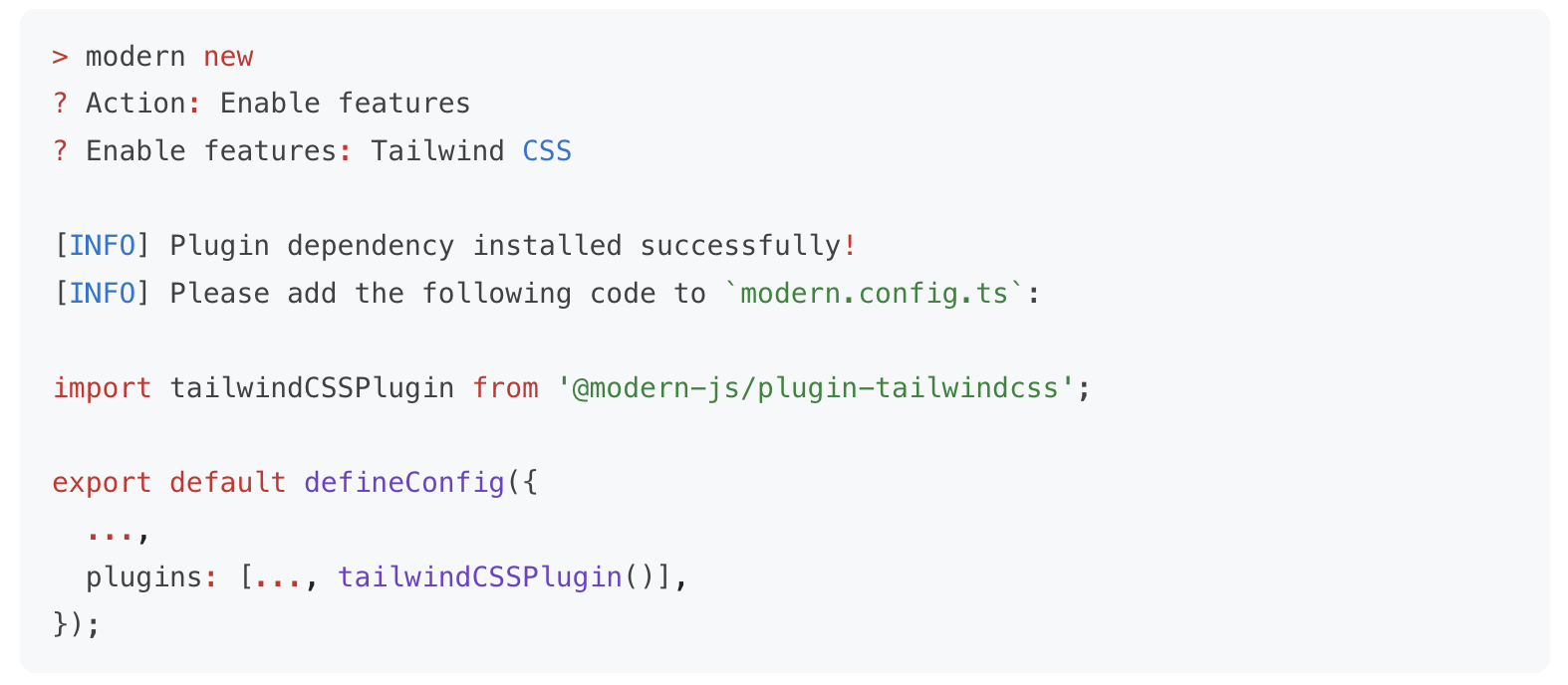
|
|
92
92
|
|
|
93
|
-
<div style={{ textAlign: 'center', fontStyle: 'italic' }}>
|
|
93
|
+
<div style={{ textAlign: 'center', fontStyle: 'italic' }}>ultramodern new 命令</div>
|
|
94
94
|
|
|
95
95
|
比如:
|
|
96
96
|
|
|
97
97
|
- 对于基础的开发场景,项目中只需安装 Modern.js 的 CLI 工具 `@modern-js/app-tools`,即具备了开发调试、生产构建的能力。
|
|
98
|
-
- 当你需要在应用中增加一些 BFF 接口时,可以执行
|
|
98
|
+
- 当你需要在应用中增加一些 BFF 接口时,可以执行 ultramodern new 命令来启用 BFF 功能。启用后,Modern.js 会自动安装所需的 BFF 插件,以及某个 Node.js 框架对应的插件(如 Koa / Express):
|
|
99
99
|
|
|
100
100
|
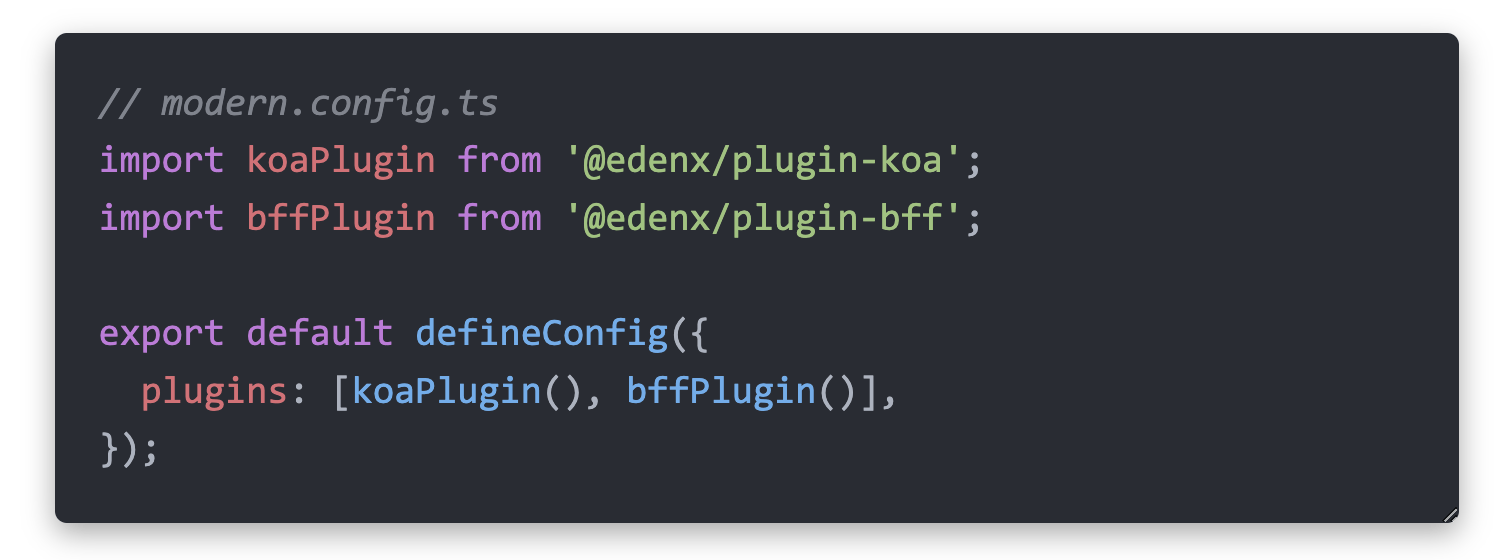
|
|
101
101
|
|
|
102
|
-
目前,你可以通过 `
|
|
102
|
+
目前,你可以通过 `ultramodern new` 命令来按需开启以下功能,未来我们也会将更多功能加入到 `new` 命令中,使其能够被便捷地集成。
|
|
103
103
|
|
|
104
104
|
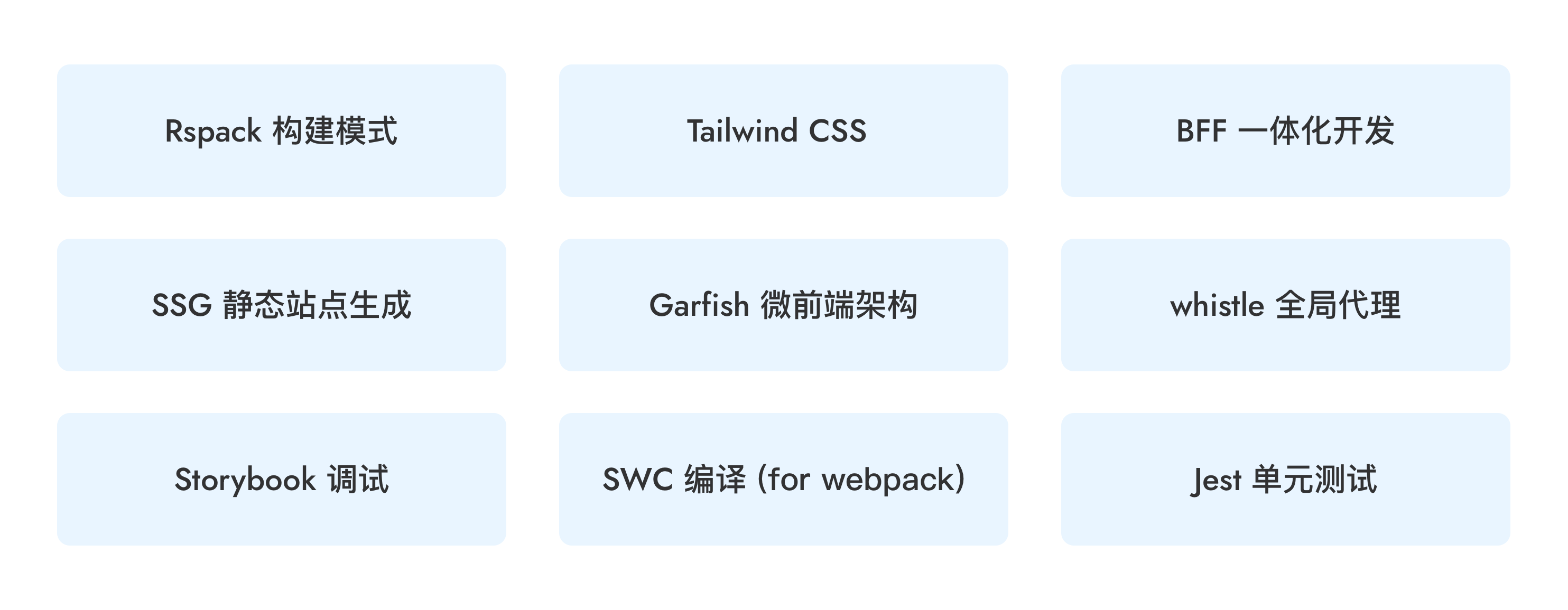
|
|
105
105
|
|
|
@@ -339,7 +339,7 @@ For more on config-based routing, see the docs: [Config-Based Routing](/guides/b
|
|
|
339
339
|
|
|
340
340
|
#### Route Debugging
|
|
341
341
|
|
|
342
|
-
Run the `npx
|
|
342
|
+
Run the `npx ultramodern routes` command to generate a complete route structure analysis report in the `dist/routes-inspect.json` file.
|
|
343
343
|
|
|
344
344
|
The report displays each route's path, component file, data loader, error boundary, loading component, and other details, helping developers quickly understand the project's route configuration and troubleshoot routing issues. The structured JSON format is also easy for AI agents to understand and analyze, improving the efficiency of AI-assisted development.
|
|
345
345
|
|
|
@@ -39,8 +39,7 @@ nvm use 22
|
|
|
39
39
|
### Install pnpm
|
|
40
40
|
|
|
41
41
|
```sh
|
|
42
|
-
|
|
43
|
-
corepack enable
|
|
42
|
+
mise install
|
|
44
43
|
```
|
|
45
44
|
|
|
46
45
|
### Install Dependencies
|
|
@@ -125,7 +124,7 @@ pnpm run reset
|
|
|
125
124
|
|
|
126
125
|
If you've fixed a bug or added code that should be tested, then add some tests.
|
|
127
126
|
|
|
128
|
-
You can add
|
|
127
|
+
Modern.js uses [Rstest](https://rstest.rs/) for unit tests across the repository. You can add test cases in the `<PACKAGE_DIR>/tests` folder, using Rstest syntax.
|
|
129
128
|
|
|
130
129
|
### Run Unit Tests
|
|
131
130
|
|
|
@@ -24,8 +24,8 @@ Modern.js follows the [Semantic Versioning](https://semver.org) specification.
|
|
|
24
24
|
|
|
25
25
|
## Version Upgrade
|
|
26
26
|
|
|
27
|
-
When you need to upgrade the Modern.js version in your project, you can use the `
|
|
27
|
+
When you need to upgrade the Modern.js version in your project, you can use the `ultramodern upgrade` command, refer to [Upgrade](/guides/get-started/upgrade).
|
|
28
28
|
|
|
29
29
|
```bash
|
|
30
|
-
npx
|
|
30
|
+
npx ultramodern upgrade
|
|
31
31
|
```
|
|
@@ -1,9 +1,9 @@
|
|
|
1
|
-
##
|
|
1
|
+
## ultramodern deploy
|
|
2
2
|
|
|
3
|
-
The `
|
|
3
|
+
The `ultramodern deploy` command is used to generate artifacts required for the deployment platform.
|
|
4
4
|
|
|
5
5
|
```bash
|
|
6
|
-
Usage:
|
|
6
|
+
Usage: ultramodern deploy [options]
|
|
7
7
|
|
|
8
8
|
Options:
|
|
9
9
|
-c --config <config> Specify configuration file path, either relative or absolute
|
|
@@ -1,64 +1,48 @@
|
|
|
1
|
-
|
|
1
|
+
UltraModern.js provides the BleedingDev create package to create projects. It does not require global installation and can be run on-demand using `pnpm dlx`.
|
|
2
2
|
|
|
3
|
-
You can
|
|
3
|
+
You can initialize the empty directory you are already in:
|
|
4
4
|
|
|
5
5
|
```bash
|
|
6
6
|
mkdir myapp && cd myapp
|
|
7
|
-
|
|
7
|
+
pnpm dlx @bleedingdev/modern-js-create .
|
|
8
8
|
```
|
|
9
9
|
|
|
10
10
|
You can also create a project directly in a new directory:
|
|
11
11
|
|
|
12
12
|
```bash
|
|
13
|
-
|
|
14
|
-
```
|
|
15
|
-
|
|
16
|
-
To initialize a TanStack Router template:
|
|
17
|
-
|
|
18
|
-
```bash
|
|
19
|
-
npx @modern-js/create@latest myapp --router tanstack
|
|
20
|
-
```
|
|
21
|
-
|
|
22
|
-
To initialize with Tailwind CSS v4 scaffold:
|
|
23
|
-
|
|
24
|
-
```bash
|
|
25
|
-
npx @modern-js/create@latest myapp --tailwind
|
|
13
|
+
pnpm dlx @bleedingdev/modern-js-create myapp
|
|
26
14
|
```
|
|
27
15
|
|
|
28
|
-
|
|
16
|
+
TanStack Router is scaffolded by default. To force React Router compatibility:
|
|
29
17
|
|
|
30
18
|
```bash
|
|
31
|
-
|
|
19
|
+
pnpm dlx @bleedingdev/modern-js-create myapp --router react-router
|
|
32
20
|
```
|
|
33
21
|
|
|
34
|
-
|
|
22
|
+
Tailwind CSS v4 is scaffolded by default. To opt out:
|
|
35
23
|
|
|
36
24
|
```bash
|
|
37
|
-
|
|
25
|
+
pnpm dlx @bleedingdev/modern-js-create myapp --no-tailwind
|
|
38
26
|
```
|
|
39
27
|
|
|
40
|
-
|
|
41
|
-
|
|
42
|
-
```bash
|
|
43
|
-
npx @modern-js/create@latest myapp --bff-runtime effect
|
|
44
|
-
```
|
|
28
|
+
Effect HttpApi BFF is scaffolded by default.
|
|
45
29
|
|
|
46
30
|
To initialize BFF scaffold with Hono runtime:
|
|
47
31
|
|
|
48
32
|
```bash
|
|
49
|
-
|
|
33
|
+
pnpm dlx @bleedingdev/modern-js-create myapp --bff-runtime hono
|
|
50
34
|
```
|
|
51
35
|
|
|
52
36
|
To initialize with workspace protocol dependencies (for local monorepo testing of unreleased Modern.js packages):
|
|
53
37
|
|
|
54
38
|
```bash
|
|
55
|
-
|
|
39
|
+
pnpm dlx @bleedingdev/modern-js-create myapp --workspace
|
|
56
40
|
```
|
|
57
41
|
|
|
58
|
-
|
|
42
|
+
The BleedingDev create package will directly create the application without providing an interactive Q & A interface:
|
|
59
43
|
|
|
60
44
|
```bash
|
|
61
|
-
🚀 Welcome to
|
|
45
|
+
🚀 Welcome to UltraModern.js
|
|
62
46
|
|
|
63
47
|
📦 Creating project "myapp"...
|
|
64
48
|
|
|
@@ -101,19 +85,37 @@ Now, the project structure is as follows:
|
|
|
101
85
|
└── tsconfig.json
|
|
102
86
|
```
|
|
103
87
|
|
|
104
|
-
|
|
88
|
+
Tailwind CSS v4 is generated by default; pass `--no-tailwind` to omit `postcss.config.mjs`, `tailwind.config.ts`, and the Tailwind import.
|
|
105
89
|
|
|
106
|
-
|
|
90
|
+
By default, `modern.config.ts` enables `@modern-js/plugin-bff`, generates `api/effect/index.ts` + `shared/effect/api.ts`, and sets `bff.runtimeFramework` to `effect`.
|
|
107
91
|
When `--bff-runtime hono` is enabled, `modern.config.ts` enables `@modern-js/plugin-bff`, generates `api/lambda/hello.ts`, and sets `bff.runtimeFramework` to `hono`.
|
|
108
92
|
When `--workspace` is enabled, `@modern-js/*` dependencies use `workspace:*` versions for local monorepo linkage.
|
|
109
93
|
|
|
110
|
-
|
|
111
|
-
|
|
112
|
-
workspace and published BleedingDev package aliases:
|
|
94
|
+
It creates a simple production-ready UltraModern app by default and installs
|
|
95
|
+
the published BleedingDev package aliases:
|
|
113
96
|
|
|
114
97
|
```bash
|
|
115
98
|
pnpm dlx @bleedingdev/modern-js-create myapp
|
|
116
99
|
```
|
|
117
100
|
|
|
118
|
-
|
|
119
|
-
|
|
101
|
+
Create a SuperApp workspace only when you need independently owned verticals:
|
|
102
|
+
|
|
103
|
+
```bash
|
|
104
|
+
pnpm dlx @bleedingdev/modern-js-create my-super-app --ultramodern-workspace
|
|
105
|
+
```
|
|
106
|
+
|
|
107
|
+
From a generated SuperApp workspace, add a business MicroVertical in place:
|
|
108
|
+
|
|
109
|
+
```bash
|
|
110
|
+
pnpm dlx @bleedingdev/modern-js-create transportation --vertical
|
|
111
|
+
```
|
|
112
|
+
|
|
113
|
+
The `--vertical` command mutates the current workspace: it adds the vertical
|
|
114
|
+
package and wires topology, ownership metadata, shell Module Federation,
|
|
115
|
+
development overlays, package dependencies, generated contracts, route-owned
|
|
116
|
+
i18n, CSS isolation, and the Effect BFF/client surface.
|
|
117
|
+
|
|
118
|
+
The lower-level `--ultramodern-package-*` flags are reserved for release
|
|
119
|
+
engineering and local package-source testing. BleedingDev packages are published
|
|
120
|
+
through GitHub Actions trusted publishing; do not publish them manually from a
|
|
121
|
+
developer machine.
|
|
@@ -9,8 +9,7 @@ import NodeVersion from '@site-docs-en/components/nodeVersion.mdx';
|
|
|
9
9
|
It is recommended to use [pnpm](https://pnpm.io/installation) to manage dependencies:
|
|
10
10
|
|
|
11
11
|
```bash
|
|
12
|
-
|
|
13
|
-
corepack prepare pnpm@11.1.2 --activate
|
|
12
|
+
mise use pnpm@11.4.0
|
|
14
13
|
```
|
|
15
14
|
|
|
16
15
|
:::note
|
|
@@ -1,9 +1,9 @@
|
|
|
1
|
-
##
|
|
1
|
+
## ultramodern serve
|
|
2
2
|
|
|
3
|
-
The `
|
|
3
|
+
The `ultramodern serve` command is used to start an UltraModern.js project in the production environment. It can also be used to preview the artifacts built for the production environment locally. Please note that you need to execute the [`build`](/apis/app/commands#ultramodern-build) command beforehand to generate the corresponding artifacts.
|
|
4
4
|
|
|
5
5
|
```bash
|
|
6
|
-
Usage:
|
|
6
|
+
Usage: ultramodern serve [options]
|
|
7
7
|
|
|
8
8
|
Options:
|
|
9
9
|
-c --config <config> specify the configuration file, which can be a relative or absolute path
|
|
@@ -25,4 +25,4 @@ export default defineConfig({
|
|
|
25
25
|
- Set to `'hono'` to run BFF only from file-convention handlers under `api/lambda/**`.
|
|
26
26
|
|
|
27
27
|
There is no implicit fallback between runtimes. Choose one runtime mode per app.
|
|
28
|
-
|
|
28
|
+
Generated UltraModern apps use the Effect lane by default; set `runtimeFramework: 'hono'` only for the compatibility runtime.
|
|
@@ -86,8 +86,8 @@ export default defineConfig(({ env, command }) => ({
|
|
|
86
86
|
This function accepts the following parameters:
|
|
87
87
|
|
|
88
88
|
- `env`: Corresponds to the value of `process.env.NODE_ENV`.
|
|
89
|
-
- When running `
|
|
90
|
-
- When running `
|
|
89
|
+
- When running `ultramodern dev`, the value of `env` is `development`.
|
|
90
|
+
- When running `ultramodern build` or `ultramodern serve`, the value of `env` is `production`.
|
|
91
91
|
- `command`: Corresponds to the current command being run, such as `dev`, `build`, or `serve`.
|
|
92
92
|
|
|
93
93
|
#### Exporting Asynchronous Functions
|
|
@@ -117,8 +117,8 @@ For example, if you need to use the `modern.prod.config.js` file when executing
|
|
|
117
117
|
```json title="package.json"
|
|
118
118
|
{
|
|
119
119
|
"scripts": {
|
|
120
|
-
"dev": "
|
|
121
|
-
"build": "
|
|
120
|
+
"dev": "ultramodern dev",
|
|
121
|
+
"build": "ultramodern build --config modern.prod.config.js"
|
|
122
122
|
}
|
|
123
123
|
}
|
|
124
124
|
```
|
|
@@ -126,7 +126,7 @@ For example, if you need to use the `modern.prod.config.js` file when executing
|
|
|
126
126
|
You can also abbreviate the `--config` option as `-c`:
|
|
127
127
|
|
|
128
128
|
```bash
|
|
129
|
-
$
|
|
129
|
+
$ ultramodern build -c modern.prod.config.js
|
|
130
130
|
```
|
|
131
131
|
|
|
132
132
|
### Configuring in package.json (Not Recommended)
|
|
@@ -187,7 +187,7 @@ The configuration in the `modern.config.local.ts` file will be deeply merged wit
|
|
|
187
187
|
|
|
188
188
|
When using `modern.config.local.ts`, please note the following:
|
|
189
189
|
|
|
190
|
-
- The `modern.config.local.ts` file will only be loaded when executing the `
|
|
190
|
+
- The `modern.config.local.ts` file will only be loaded when executing the `ultramodern dev` commands and will not be loaded during `ultramodern build`.
|
|
191
191
|
- The priority of the `modern.config.local.ts` file is higher than both `modern.config.ts` and the `modernConfig` field in `package.json`.
|
|
192
192
|
- Since `modern.config.local.ts` is only used for local debugging, it is not recommended to commit it to the code repository. Ensure that the project's `.gitignore` file includes `modern.config.local.ts` and similar files.
|
|
193
193
|
|
|
@@ -15,10 +15,13 @@ title: API Reference
|
|
|
15
15
|
| `language` | `string` | Current language code |
|
|
16
16
|
| `changeLanguage` | `(lang: string) => Promise<void>` | Switches language |
|
|
17
17
|
| `supportedLanguages` | `string[]` | Supported language list, from `localeDetection.languages` |
|
|
18
|
+
| `localisedUrls` | `boolean \| Record<string, Record<string, string>>` | Localised URL mapping from `localeDetection.localisedUrls` |
|
|
18
19
|
| `isLanguageSupported` | `(lang: string) => boolean` | Checks whether a language is in the supported list |
|
|
19
20
|
| `isResourcesReady` | `boolean` | Whether translation resources for the current language have finished loading |
|
|
20
21
|
| `i18nInstance` | `I18nInstance` | i18next instance for advanced scenarios |
|
|
21
22
|
|
|
23
|
+
When `localePathRedirect` is enabled and `localisedUrls` is omitted, Modern.js treats localised URL paths as enabled. Route generation still requires every localisable path to define every configured language unless you set `localisedUrls: false`.
|
|
24
|
+
|
|
22
25
|
### Basic Usage
|
|
23
26
|
|
|
24
27
|
```tsx
|
|
@@ -91,7 +94,7 @@ A route link component with a locale prefix.
|
|
|
91
94
|
| `children` | `React.ReactNode` | Yes | Link content |
|
|
92
95
|
| `replace` | `boolean` | No | Uses `history.replace` instead of `push` |
|
|
93
96
|
| `state` | `any` | No | State passed to the target route |
|
|
94
|
-
| Other Link props | - | No |
|
|
97
|
+
| Other Link props | - | No | Passed to the active router link when a router is available |
|
|
95
98
|
|
|
96
99
|
### Usage
|
|
97
100
|
|
|
@@ -49,6 +49,7 @@ export default defineConfig({
|
|
|
49
49
|
| `languages` | `string[]` | `[]` | Supported language list |
|
|
50
50
|
| `fallbackLanguage` | `string` | `''` | Fallback language when detection fails |
|
|
51
51
|
| `localePathRedirect` | `boolean` | `false` | Handles URL locale prefix recognition, redirects, and switching. See [Routing Integration](./routing.md#enable-locale-path-prefixes) |
|
|
52
|
+
| `localisedUrls` | `boolean \| Record<string, Record<string, string>>` | `true` when `localePathRedirect` is enabled | Localised route path map. Every localisable route must define every configured language. Set `false` to keep locale prefixes without translating path segments. |
|
|
52
53
|
| `i18nextDetector` | `boolean` | `false` | Enables the i18next detector (Cookie / Header, etc.) |
|
|
53
54
|
| `detection` | `LanguageDetectorOptions` | - | Detailed i18next detector configuration. See [Locale Detection](./locale-detection.md) |
|
|
54
55
|
| `ignoreRedirectRoutes` | `string[] \| Function` | - | Routes that skip redirects. See [Locale Detection](./locale-detection.md#ignoreredirectroutes) |
|
|
@@ -113,7 +113,7 @@ i18nPlugin({
|
|
|
113
113
|
|
|
114
114
|
## ignoreRedirectRoutes
|
|
115
115
|
|
|
116
|
-
Specify which paths should skip locale path redirects.
|
|
116
|
+
Specify which additional paths should skip locale path redirects. Modern.js automatically skips server API routes and BFF prefixes, including configured `bff.prefix` values. Use `ignoreRedirectRoutes` for non-API application paths that also do not need a locale prefix.
|
|
117
117
|
|
|
118
118
|
**Syntax 1: string array** (supports exact match and prefix match)
|
|
119
119
|
|
|
@@ -32,7 +32,48 @@ i18nPlugin({
|
|
|
32
32
|
| `/en/about` | Visits normally, language is `en` |
|
|
33
33
|
| `/zh/about` | Visits normally, language is `zh` |
|
|
34
34
|
|
|
35
|
-
|
|
35
|
+
API and BFF prefixes are skipped automatically, so server API routes do not need locale prefixes or `localisedUrls` entries. For additional application paths that should not redirect, use `ignoreRedirectRoutes`. See [Locale Detection -> ignoreRedirectRoutes](./locale-detection.md#ignoreredirectroutes).
|
|
36
|
+
|
|
37
|
+
## Localised URL Paths
|
|
38
|
+
|
|
39
|
+
When `localePathRedirect` is enabled, `localisedUrls` is enabled by default. This means every localisable route path must define a URL for every configured language. If you add a new language to `languages`, Modern.js will fail route generation until each localised URL entry includes that language too.
|
|
40
|
+
|
|
41
|
+
`localisedUrls` applies to file-system routes generated for both React Router and TanStack Router projects. Do not configure localised URL entries for API routes, BFF prefixes, or configured `bff.prefix` values; those paths are excluded from locale redirects automatically.
|
|
42
|
+
|
|
43
|
+
```ts
|
|
44
|
+
// modern.config.ts
|
|
45
|
+
i18nPlugin({
|
|
46
|
+
localeDetection: {
|
|
47
|
+
localePathRedirect: true,
|
|
48
|
+
languages: ['en', 'cs'],
|
|
49
|
+
fallbackLanguage: 'en',
|
|
50
|
+
localisedUrls: {
|
|
51
|
+
'/terms-of-service': {
|
|
52
|
+
en: '/terms-of-service',
|
|
53
|
+
cs: '/podminky-pouzivani',
|
|
54
|
+
},
|
|
55
|
+
'/products': {
|
|
56
|
+
en: '/products',
|
|
57
|
+
cs: '/produkty',
|
|
58
|
+
},
|
|
59
|
+
'/products/:slug': {
|
|
60
|
+
en: '/products/:slug',
|
|
61
|
+
cs: '/produkty/:slug',
|
|
62
|
+
},
|
|
63
|
+
},
|
|
64
|
+
},
|
|
65
|
+
});
|
|
66
|
+
```
|
|
67
|
+
|
|
68
|
+
**Result:**
|
|
69
|
+
|
|
70
|
+
| Visited path | Result |
|
|
71
|
+
| --- | --- |
|
|
72
|
+
| `/terms-of-service` | Redirects to `/en/terms-of-service` |
|
|
73
|
+
| `/cs/terms-of-service` | Redirects to `/cs/podminky-pouzivani` |
|
|
74
|
+
| `/cs/podminky-pouzivani` | Visits normally, language is `cs` |
|
|
75
|
+
|
|
76
|
+
Set `localisedUrls: false` only when you want locale prefixes without translated path segments.
|
|
36
77
|
|
|
37
78
|
## Route Configuration
|
|
38
79
|
|
|
@@ -131,4 +172,4 @@ function Navigation() {
|
|
|
131
172
|
<I18nLink to="/en/about">About</I18nLink>
|
|
132
173
|
```
|
|
133
174
|
|
|
134
|
-
`I18nLink`
|
|
175
|
+
`I18nLink` uses the active Modern.js router. In React Router projects it renders the React Router `Link`; in TanStack Router projects it navigates through TanStack Router. For the full Props type, see [API Reference](./api.md#i18nlink-component).
|
|
@@ -55,7 +55,7 @@ Add the following scripts to `package.json` to start the BFF server and Storyboo
|
|
|
55
55
|
```json
|
|
56
56
|
{
|
|
57
57
|
"scripts": {
|
|
58
|
-
"dev:api": "
|
|
58
|
+
"dev:api": "ultramodern dev --api-only",
|
|
59
59
|
"storybook": "BFF_PROXY=1 storybook dev -p 6006 --no-open",
|
|
60
60
|
}
|
|
61
61
|
}
|