@arcgis/map-components 5.0.0-next.22 → 5.0.0-next.24
This diff represents the content of publicly available package versions that have been released to one of the supported registries. The information contained in this diff is provided for informational purposes only and reflects changes between package versions as they appear in their respective public registries.
- package/dist/cdn/{3WHUCCS5.js → 2BSSCO7C.js} +2 -2
- package/dist/cdn/{GS43PJYB.js → 2HUIPA4G.js} +2 -2
- package/dist/cdn/{MQTKUJWN.js → 2JRY4QVW.js} +2 -2
- package/dist/cdn/{HJLNIC46.js → 2OJISXJN.js} +2 -2
- package/dist/cdn/{DLV6ZOTC.js → 2SBUH2AY.js} +2 -2
- package/dist/cdn/{Y54D3L5M.js → 2UDMBLEC.js} +2 -2
- package/dist/cdn/{NSXSOVR6.js → 35BNUAF5.js} +2 -2
- package/dist/cdn/{EJQU64XQ.js → 3CUXCPCJ.js} +2 -2
- package/dist/cdn/{G4SJ2RWN.js → 3GG6H5MG.js} +2 -2
- package/dist/cdn/{AQFFDL65.js → 3H74ZFYL.js} +2 -2
- package/dist/cdn/{VDA6ALVS.js → 3KBCDJCG.js} +2 -2
- package/dist/cdn/{VZGOD36G.js → 3NP3F4R3.js} +2 -2
- package/dist/cdn/{GGDUDYXM.js → 3R4EOZWK.js} +2 -2
- package/dist/cdn/{OWYAOI7Y.js → 3XBOSNWC.js} +2 -2
- package/dist/cdn/{CDH7OVVK.js → 46VVJUI4.js} +1 -1
- package/dist/cdn/{B2VZWZ4P.js → 4ECBNDJ3.js} +2 -2
- package/dist/cdn/{HOQ5KRDI.js → 4KY33MEJ.js} +2 -2
- package/dist/cdn/{YGF5LZS3.js → 4OZAIUOD.js} +2 -2
- package/dist/cdn/{HM7EPFWV.js → 4P2NGT7M.js} +2 -2
- package/dist/cdn/{673GDEJA.js → 4T6QNS7H.js} +2 -2
- package/dist/cdn/{QPYZWZX4.js → 544ETKUT.js} +2 -2
- package/dist/cdn/{M7JW4WKW.js → 57JFTM2D.js} +2 -2
- package/dist/cdn/5KCNNIVD.js +4 -0
- package/dist/cdn/{O6TNDO7Z.js → 5MA5RW3P.js} +2 -2
- package/dist/cdn/{75SCVL6S.js → 5OKKC5SV.js} +2 -2
- package/dist/cdn/{4SUHXN5W.js → 6BRRNMGK.js} +2 -2
- package/dist/cdn/{D5ZETLQJ.js → 6LAZEYNB.js} +2 -2
- package/dist/cdn/{BJDCCDGH.js → 6ORRMU52.js} +2 -2
- package/dist/cdn/{S4XH7SHB.js → 6P5C2VXD.js} +2 -2
- package/dist/cdn/{P3GLI5BJ.js → 6QDD44LQ.js} +2 -2
- package/dist/cdn/{74R2OB7B.js → 6UDU2M3R.js} +2 -2
- package/dist/cdn/{WEYOXYM2.js → 6XP7O7KR.js} +2 -2
- package/dist/cdn/{DK3YSQ6X.js → 74U7W6H2.js} +2 -2
- package/dist/cdn/{YYXVN6ZO.js → 75LNMXIV.js} +2 -2
- package/dist/cdn/{JSVH4DHO.js → 77L6DRSX.js} +2 -2
- package/dist/cdn/{MQET45NC.js → 7DQEDGRA.js} +2 -2
- package/dist/cdn/{UHURTWBN.js → 7GKNQONE.js} +2 -2
- package/dist/cdn/{CFZLQYRB.js → 7IJHRLSH.js} +2 -2
- package/dist/cdn/{KEVUZRRD.js → 7PIKVPZS.js} +2 -2
- package/dist/cdn/{HSQXL4EH.js → 7U7ZOOGC.js} +2 -2
- package/dist/cdn/{H5PP3CFD.js → 7Z543FXE.js} +2 -2
- package/dist/cdn/{NWUF374J.js → A2K6Y7PG.js} +2 -2
- package/dist/cdn/{WIISREJR.js → ACMEZHNJ.js} +2 -2
- package/dist/cdn/{VNZIQKJ4.js → AEBRV2VV.js} +2 -2
- package/dist/cdn/{TOKB667I.js → AJ24JEWS.js} +2 -2
- package/dist/cdn/{6IEKHZUZ.js → AL2QTOJU.js} +2 -2
- package/dist/cdn/{DDJ77OUN.js → AMVPUY4A.js} +2 -2
- package/dist/cdn/{4NJDJY3L.js → BBGQG5VJ.js} +2 -2
- package/dist/cdn/{YAWO7FHP.js → BHXWBVIQ.js} +2 -2
- package/dist/cdn/{3JRDRKOQ.js → BQ3BLKJ4.js} +2 -2
- package/dist/cdn/{NZUEPDM5.js → BVUI2QTN.js} +2 -2
- package/dist/cdn/{DTGRWXIT.js → C2KFCYKE.js} +2 -2
- package/dist/cdn/{VWFYLCP4.js → C35KZYBW.js} +2 -2
- package/dist/cdn/{NOSY6DO2.js → C4PDJ4WL.js} +2 -2
- package/dist/cdn/{GBGCZNI4.js → C7KSHKKY.js} +2 -2
- package/dist/cdn/{W5MTT3Y2.js → CD775WSZ.js} +2 -2
- package/dist/cdn/{WQ32DGAT.js → CFMQOXEL.js} +2 -2
- package/dist/cdn/{275NTM66.js → CHEUSDMN.js} +2 -2
- package/dist/cdn/{6E6KN7RG.js → COWFY4Z3.js} +2 -2
- package/dist/cdn/{Z2WCWOXG.js → CYMPKLQR.js} +2 -2
- package/dist/cdn/{DO6DQMW5.js → D2SX65K7.js} +2 -2
- package/dist/cdn/{RSEBSJUC.js → D56BQL45.js} +2 -2
- package/dist/cdn/{TQYYIJOA.js → DCUFOVCX.js} +2 -2
- package/dist/cdn/{QAJ4AWIW.js → DCZ4XQRT.js} +2 -2
- package/dist/cdn/{AKOSN73C.js → DG7FRZ7E.js} +2 -2
- package/dist/cdn/{DEPC3JPI.js → DL2SV6PN.js} +1 -1
- package/dist/cdn/{62IPHFIH.js → DM5MTRFD.js} +2 -2
- package/dist/cdn/{XJR3WSJ4.js → DQ33237W.js} +2 -2
- package/dist/cdn/{OBJ5ZFVU.js → DT74VC3H.js} +2 -2
- package/dist/cdn/{WYRFUVBQ.js → E3V27YEQ.js} +2 -2
- package/dist/cdn/{4IHAOS7O.js → E7E5CLJK.js} +2 -2
- package/dist/cdn/{GDHBHLWE.js → EDDFBKN7.js} +2 -2
- package/dist/cdn/{XCODB7RI.js → EHDRX7SR.js} +2 -2
- package/dist/cdn/{74SVNEQ7.js → EU7ORLKE.js} +2 -2
- package/dist/cdn/EXS654KL.js +4 -0
- package/dist/cdn/{IOU2IXJJ.js → EYI4YNC4.js} +1 -1
- package/dist/cdn/{6WQILZIL.js → EZ3K3LCL.js} +2 -2
- package/dist/cdn/{LHVB66IU.js → F2MGB6FA.js} +2 -2
- package/dist/cdn/{DPB2JX4H.js → F2XBH52I.js} +2 -2
- package/dist/cdn/{TSMYGL6C.js → F5Y7QKJX.js} +2 -2
- package/dist/cdn/{SBDKWEKK.js → FACZROM2.js} +2 -2
- package/dist/cdn/{WZWK3NKT.js → FAEQ4HPP.js} +2 -2
- package/dist/cdn/{NS353BYY.js → FCHACAVB.js} +2 -2
- package/dist/cdn/{OXXBWYC5.js → FNATIXZI.js} +2 -2
- package/dist/cdn/{AROPATAW.js → FSXYK3GU.js} +2 -2
- package/dist/cdn/{TUINBEOO.js → FU6OJA6A.js} +2 -2
- package/dist/cdn/{Z4XDH6RQ.js → FUF4P4HD.js} +2 -2
- package/dist/cdn/{55WDMZEY.js → FUUFKRMF.js} +2 -2
- package/dist/cdn/{HIJRQPA7.js → GBDA5F2U.js} +2 -2
- package/dist/cdn/{EUY7JY35.js → GE56AXFQ.js} +2 -2
- package/dist/cdn/{LSC6U53S.js → GFOL46U5.js} +2 -2
- package/dist/cdn/{Y4CDUNOP.js → GGKKXYGL.js} +2 -2
- package/dist/cdn/{AL667NC3.js → GNDXVOTQ.js} +2 -2
- package/dist/cdn/GOC7ZJU2.js +4 -0
- package/dist/cdn/{DBEFAKCB.js → GSSVSKOJ.js} +1 -1
- package/dist/cdn/{QYSCCGR5.js → GT22QY43.js} +2 -2
- package/dist/cdn/{OMS4VEZK.js → HBPFDZ2X.js} +2 -2
- package/dist/cdn/{U6JYGFXM.js → HMLJXHXG.js} +2 -2
- package/dist/cdn/{PU6VE5HV.js → HQ5RVS4T.js} +3 -3
- package/dist/cdn/{BUW6A2IC.js → HZUBE3BY.js} +2 -2
- package/dist/cdn/{62H4JM4G.js → IBA6W7TQ.js} +2 -2
- package/dist/cdn/{DYL55UVI.js → ILW4BDY4.js} +2 -2
- package/dist/cdn/{42PCRMNQ.js → IMHZ5EO4.js} +2 -2
- package/dist/cdn/{BOPOGDAZ.js → INCBMTMT.js} +2 -2
- package/dist/cdn/{G3734GBQ.js → J6VBV6AF.js} +2 -2
- package/dist/cdn/{UTP5N42U.js → JBGQ5FEG.js} +2 -2
- package/dist/cdn/{VJZMEZL6.js → JCUCNEUT.js} +2 -2
- package/dist/cdn/{BESADMOB.js → JFTU7PRB.js} +2 -2
- package/dist/cdn/{QPAKBD6F.js → JMLYDUSZ.js} +2 -2
- package/dist/cdn/{2746AKR2.js → JNBZFKPR.js} +2 -2
- package/dist/cdn/{SGHTSOGZ.js → JP4ADYOT.js} +2 -2
- package/dist/cdn/{FAVWC4TO.js → JPTKG37X.js} +2 -2
- package/dist/cdn/{2S772PH6.js → JV3PIKEF.js} +2 -2
- package/dist/cdn/{RVIB4GCJ.js → K6PKWKYP.js} +2 -2
- package/dist/cdn/{OBGA7W7N.js → KCILYQOV.js} +1 -1
- package/dist/cdn/{JT5KVBRF.js → KHCKN7QZ.js} +2 -2
- package/dist/cdn/{DA3LJLY3.js → KKGMFR6A.js} +2 -2
- package/dist/cdn/{GDQW6VWV.js → KNS4DNO5.js} +2 -2
- package/dist/cdn/{42AUHWZJ.js → KU5UNRFT.js} +1 -1
- package/dist/cdn/{QS62DXEF.js → L7ICXT3H.js} +1 -1
- package/dist/cdn/{URF6UVU3.js → LDY6KA2A.js} +2 -2
- package/dist/cdn/{P3LZX3UI.js → LHELVIF4.js} +2 -2
- package/dist/cdn/{EH6D3S4R.js → LKD6SM77.js} +2 -2
- package/dist/cdn/{ETA5NJYQ.js → LM24R6DO.js} +2 -2
- package/dist/cdn/{KB4XTRMH.js → LXQ557UY.js} +2 -2
- package/dist/cdn/{DUVJWKD5.js → LXQR22RB.js} +2 -2
- package/dist/cdn/{K756BF42.js → MGLFNY6E.js} +2 -2
- package/dist/cdn/{GXHVTVNC.js → MLYFA7PP.js} +2 -2
- package/dist/cdn/{Q4RJ5YJL.js → MONBRNWM.js} +2 -2
- package/dist/cdn/{G6TYRPAI.js → MRGK64TX.js} +2 -2
- package/dist/cdn/{LUOXRY6Q.js → MWGAXVMA.js} +2 -2
- package/dist/cdn/{PBW53ES3.js → MYL54YVV.js} +2 -2
- package/dist/cdn/{JM22JGNM.js → N27CGPZA.js} +2 -2
- package/dist/cdn/{YSWYOYEZ.js → N6A52ZDW.js} +2 -2
- package/dist/cdn/{WVF5F6V5.js → NCBDDT53.js} +2 -2
- package/dist/cdn/{AXED6HWL.js → NDP6UJ5O.js} +1 -1
- package/dist/cdn/{CIIBIYLS.js → NFJ6TTNG.js} +2 -2
- package/dist/cdn/{2MD5DFJI.js → NGIQQBDH.js} +2 -2
- package/dist/cdn/{A2SML465.js → NQ3LWIVJ.js} +2 -2
- package/dist/cdn/{O3SLUQKI.js → NQS45V3I.js} +2 -2
- package/dist/cdn/{774G7VPV.js → NUS7CDPJ.js} +2 -2
- package/dist/cdn/{6FYX5X3E.js → NX4D3T4R.js} +2 -2
- package/dist/cdn/{E6YZKAUE.js → OEADOS2P.js} +2 -2
- package/dist/cdn/{BDA54W4H.js → OGL3KZO3.js} +2 -2
- package/dist/cdn/{OFEWGCOG.js → OPNB4NKV.js} +2 -2
- package/dist/cdn/{3FK5YQNP.js → OQFXUHOV.js} +2 -2
- package/dist/cdn/{KQZZ43X4.js → ORDPN35I.js} +2 -2
- package/dist/cdn/{XAIDLSPE.js → OSRBTC72.js} +2 -2
- package/dist/cdn/{CICNDJMO.js → OX4MPYTW.js} +2 -2
- package/dist/cdn/{KJC4KTZV.js → OZ3GMQS3.js} +2 -2
- package/dist/cdn/{S3DVL6ZC.js → P4ZD57A4.js} +2 -2
- package/dist/cdn/{HJEYERUD.js → P62UBLSF.js} +2 -2
- package/dist/cdn/{UBEMCTDW.js → PE3TY4RA.js} +2 -2
- package/dist/cdn/{FSK32QHJ.js → PG2EC5UG.js} +2 -2
- package/dist/cdn/{BH2ULII4.js → PJE22EQQ.js} +2 -2
- package/dist/cdn/{RWASZHM4.js → PMOQCVFK.js} +2 -2
- package/dist/cdn/{3XCHQ357.js → PMOZAIEP.js} +2 -2
- package/dist/cdn/{OD35KOWM.js → PWSIAO47.js} +2 -2
- package/dist/cdn/{QKL2JK3Z.js → PZB77IE7.js} +2 -2
- package/dist/cdn/{BKELFSZJ.js → QBQZBAXU.js} +2 -2
- package/dist/cdn/{EUSVWPRK.js → QEB2IKWH.js} +1 -1
- package/dist/cdn/{FK4YJUBX.js → QHRY746M.js} +2 -2
- package/dist/cdn/{2K2XAYBA.js → QHVIJ7YL.js} +2 -2
- package/dist/cdn/{FNCYPQST.js → QX2Z64HX.js} +2 -2
- package/dist/cdn/{MXD4TXEJ.js → QYZZBHGH.js} +2 -2
- package/dist/cdn/{S3XA3G7Y.js → R5H7YV2D.js} +1 -1
- package/dist/cdn/{RFZ2YVTS.js → RBV6KW5K.js} +2 -2
- package/dist/cdn/{ZHZ773EL.js → RD26MFLA.js} +2 -2
- package/dist/cdn/{HKOH4UGD.js → RDHIE6V7.js} +2 -2
- package/dist/cdn/{R5RNC2V3.js → RFZMOTUI.js} +2 -2
- package/dist/cdn/{HBSAPQGW.js → RID3BAB6.js} +2 -2
- package/dist/cdn/{A3SOTRU3.js → RKLM2POM.js} +2 -2
- package/dist/cdn/{X6WHZVAS.js → RMKN6EQD.js} +2 -2
- package/dist/cdn/{B245W5N6.js → RUYOIM4L.js} +2 -2
- package/dist/cdn/{6QAL2A64.js → RXHF5RLL.js} +2 -2
- package/dist/cdn/{AF6U42AQ.js → S32JRNLS.js} +2 -2
- package/dist/cdn/{CHUQZ4GK.js → SLK6DHXC.js} +2 -2
- package/dist/cdn/{AX556ZZP.js → SO3F4JXA.js} +1 -1
- package/dist/cdn/SPJ4HFEU.js +4 -0
- package/dist/cdn/{INUQGH2C.js → ST3IYGCW.js} +2 -2
- package/dist/cdn/{W2GPZOZF.js → STMQSJ2M.js} +2 -2
- package/dist/cdn/{D6AYCZF3.js → SYTHT6ER.js} +2 -2
- package/dist/cdn/{NCXD3QMF.js → T5FFHI36.js} +1 -1
- package/dist/cdn/{F5DRXN5B.js → TGRL45MQ.js} +2 -2
- package/dist/cdn/TUBDJ2TJ.js +4 -0
- package/dist/cdn/{PAPJNUE6.js → TX5ZKLGC.js} +2 -2
- package/dist/cdn/{XERFFFKG.js → U6FI5UMV.js} +2 -2
- package/dist/cdn/{H2X2VRYL.js → U7HVKM2E.js} +2 -2
- package/dist/cdn/{ZDMFGVNL.js → UJAU3FSU.js} +2 -2
- package/dist/cdn/{XPTWWD2L.js → ULLEMZNX.js} +2 -2
- package/dist/cdn/UO4YJUTK.js +4 -0
- package/dist/cdn/{2PD47VT2.js → UOEXV56Q.js} +2 -2
- package/dist/cdn/{JBL6GDOL.js → UTUWHHK3.js} +1 -1
- package/dist/cdn/{SS4TJEID.js → UYSHEUIP.js} +2 -2
- package/dist/cdn/{4LALXLZJ.js → UZTWG7LL.js} +2 -2
- package/dist/cdn/{GXJ6BYUR.js → V23HD6W2.js} +2 -2
- package/dist/cdn/{PJQW3WEA.js → V4SEB6DK.js} +1 -1
- package/dist/cdn/{OG7NUSC3.js → VFIZ5OQQ.js} +2 -2
- package/dist/cdn/{WE2DKJUO.js → VIGLZVYL.js} +2 -2
- package/dist/cdn/{P4C4ZUJC.js → VTTGW6DC.js} +2 -2
- package/dist/cdn/{MGHHOJMX.js → VVKOKOBM.js} +2 -2
- package/dist/cdn/{GWL7T2LD.js → WCZUZ63Q.js} +2 -2
- package/dist/cdn/{NBLZ23WR.js → WJ6R3IIX.js} +2 -2
- package/dist/cdn/WOANAN43.js +9 -0
- package/dist/cdn/{HQKV3ZKF.js → WT2F7EGW.js} +2 -2
- package/dist/cdn/{Q25SVI6X.js → X6M34W2U.js} +2 -2
- package/dist/cdn/{7VWMU2UC.js → X7SBTFPU.js} +2 -2
- package/dist/cdn/{4DQSPBUU.js → XIYW2UAK.js} +2 -2
- package/dist/cdn/{4DCJMQSJ.js → XQMDRKZP.js} +2 -2
- package/dist/cdn/{MBLLH4UD.js → XTK2PRDH.js} +1 -1
- package/dist/cdn/{E3WOZNLT.js → XWUVE66Z.js} +2 -2
- package/dist/cdn/{V56RVAN6.js → YDJMROQY.js} +2 -2
- package/dist/cdn/{QIUP76D5.js → YE2ZCAEH.js} +2 -2
- package/dist/cdn/{RQCJ7AZT.js → YGPEVWQY.js} +2 -2
- package/dist/cdn/{OQVSLGLD.js → YPEYG7L2.js} +2 -2
- package/dist/cdn/{YT32G6HH.js → YWVX4IMT.js} +2 -2
- package/dist/cdn/{OBM5WYPY.js → YXUPRQBJ.js} +2 -2
- package/dist/cdn/{X6BHFNHG.js → Z4EDZ4WK.js} +2 -2
- package/dist/cdn/{UKI7CC42.js → ZCKSWQ5A.js} +2 -2
- package/dist/cdn/{RFIDELEP.js → ZE7QO6H5.js} +2 -2
- package/dist/cdn/{IYHTURJS.js → ZH4A7JUM.js} +2 -2
- package/dist/cdn/{RDKO2ZXD.js → ZJWKXOND.js} +2 -2
- package/dist/cdn/{D7CCMDA3.js → ZP6XTDWN.js} +2 -2
- package/dist/cdn/{XIDKNXOO.js → ZWHFTWTZ.js} +2 -2
- package/dist/cdn/index.js +2 -2
- package/dist/chunks/AnalysisViewModel.js +1 -1
- package/dist/chunks/action-utils.js +1 -1
- package/dist/chunks/async-utils.js +1 -1
- package/dist/chunks/basemap-gallery-resources.js +1 -1
- package/dist/chunks/chart-utils.js +1 -1
- package/dist/chunks/chartCommon.js +1 -1
- package/dist/chunks/component-utils.js +1 -1
- package/dist/chunks/createCloseEvent.js +1 -1
- package/dist/chunks/esri-main.js +1 -1
- package/dist/chunks/feature-utils.js +1 -1
- package/dist/chunks/globalCss.js +1 -1
- package/dist/chunks/handle.js +1 -1
- package/dist/chunks/heading.js +1 -1
- package/dist/chunks/layer-list.js +1 -1
- package/dist/chunks/legacyIcon.js +1 -1
- package/dist/chunks/maybe.js +1 -1
- package/dist/chunks/measurementUtils.js +1 -1
- package/dist/chunks/runtime.js +1 -1
- package/dist/chunks/screenLocation.js +1 -1
- package/dist/chunks/slots.js +2 -2
- package/dist/chunks/svgUtils.js +1 -1
- package/dist/chunks/univariateUtils.js +1 -1
- package/dist/chunks/useArcgisViewReadyError.js +1 -1
- package/dist/chunks/useHandles.js +1 -1
- package/dist/chunks/useT9n.js +1 -1
- package/dist/chunks/useView.js +1 -1
- package/dist/chunks/useViewModel.js +1 -1
- package/dist/chunks/useWidget.js +1 -1
- package/dist/chunks/utils.js +1 -1
- package/dist/chunks/utils2.js +1 -1
- package/dist/components/arcgis-area-measurement-2d/customElement.d.ts +1 -1
- package/dist/components/arcgis-area-measurement-2d/customElement.js +1 -1
- package/dist/components/arcgis-area-measurement-3d/customElement.d.ts +1 -1
- package/dist/components/arcgis-area-measurement-3d/customElement.js +1 -1
- package/dist/components/arcgis-attachments/customElement.js +1 -1
- package/dist/components/arcgis-basemap-gallery/customElement.d.ts +1 -1
- package/dist/components/arcgis-basemap-gallery/customElement.js +1 -1
- package/dist/components/arcgis-basemap-gallery-item/customElement.js +4 -4
- package/dist/components/arcgis-basemap-layer-list/customElement.d.ts +1 -1
- package/dist/components/arcgis-basemap-layer-list/customElement.js +1 -1
- package/dist/components/arcgis-basemap-toggle/customElement.d.ts +1 -1
- package/dist/components/arcgis-basemap-toggle/customElement.js +1 -1
- package/dist/components/arcgis-bookmarks/customElement.d.ts +13 -5
- package/dist/components/arcgis-bookmarks/customElement.js +1 -1
- package/dist/components/arcgis-building-explorer/customElement.d.ts +1 -1
- package/dist/components/arcgis-building-explorer/customElement.js +1 -1
- package/dist/components/arcgis-catalog-layer-list/customElement.d.ts +1 -1
- package/dist/components/arcgis-catalog-layer-list/customElement.js +1 -1
- package/dist/components/arcgis-compass/customElement.d.ts +1 -1
- package/dist/components/arcgis-compass/customElement.js +1 -1
- package/dist/components/arcgis-coordinate-conversion/customElement.d.ts +1 -1
- package/dist/components/arcgis-coordinate-conversion/customElement.js +1 -1
- package/dist/components/arcgis-daylight/customElement.d.ts +79 -64
- package/dist/components/arcgis-daylight/customElement.js +58 -57
- package/dist/components/arcgis-daylight/index.d.ts +1 -0
- package/dist/components/arcgis-daylight/index.js +1 -0
- package/dist/components/arcgis-direct-line-measurement-3d/customElement.d.ts +1 -1
- package/dist/components/arcgis-direct-line-measurement-3d/customElement.js +1 -1
- package/dist/components/arcgis-directional-pad/customElement.d.ts +1 -1
- package/dist/components/arcgis-directional-pad/customElement.js +1 -1
- package/dist/components/arcgis-directions/customElement.d.ts +1 -1
- package/dist/components/arcgis-directions/customElement.js +1 -1
- package/dist/components/arcgis-distance-measurement-2d/customElement.d.ts +1 -1
- package/dist/components/arcgis-distance-measurement-2d/customElement.js +1 -1
- package/dist/components/arcgis-editor/customElement.d.ts +11 -3
- package/dist/components/arcgis-editor/customElement.js +2 -2
- package/dist/components/arcgis-elevation-profile/customElement.d.ts +1 -1
- package/dist/components/arcgis-elevation-profile/customElement.js +1 -1
- package/dist/components/arcgis-elevation-profile-legend/customElement.js +1 -1
- package/dist/components/arcgis-elevation-profile-legend-item/customElement.js +1 -1
- package/dist/components/arcgis-elevation-profile-next/customElement.d.ts +1 -1
- package/dist/components/arcgis-elevation-profile-next/customElement.js +1 -1
- package/dist/components/arcgis-elevation-profile-settings/customElement.js +1 -1
- package/dist/components/arcgis-elevation-profile-statistics/customElement.js +1 -1
- package/dist/components/arcgis-expand/customElement.d.ts +4 -1
- package/dist/components/arcgis-expand/customElement.js +1 -1
- package/dist/components/arcgis-feature/customElement.d.ts +12 -17
- package/dist/components/arcgis-feature/customElement.js +1 -1
- package/dist/components/arcgis-feature-attachments/customElement.js +1 -1
- package/dist/components/arcgis-feature-content/customElement.js +1 -1
- package/dist/components/arcgis-feature-element-info/customElement.js +1 -1
- package/dist/components/arcgis-feature-expression/customElement.js +1 -1
- package/dist/components/arcgis-feature-fields/customElement.js +1 -1
- package/dist/components/arcgis-feature-form/customElement.js +1 -1
- package/dist/components/arcgis-feature-media/customElement.js +1 -1
- package/dist/components/arcgis-feature-relationship/customElement.js +1 -1
- package/dist/components/arcgis-feature-table/customElement.d.ts +1 -1
- package/dist/components/arcgis-feature-table/customElement.js +1 -1
- package/dist/components/arcgis-feature-templates/customElement.js +1 -1
- package/dist/components/arcgis-feature-utility-network-association-list/customElement.js +1 -1
- package/dist/components/arcgis-feature-utility-network-associations/customElement.js +1 -1
- package/dist/components/arcgis-features/customElement.d.ts +18 -2
- package/dist/components/arcgis-features/customElement.js +6 -6
- package/dist/components/arcgis-floor-filter/customElement.d.ts +1 -1
- package/dist/components/arcgis-floor-filter/customElement.js +1 -1
- package/dist/components/arcgis-fullscreen/customElement.js +1 -1
- package/dist/components/arcgis-grid-controls/customElement.d.ts +1 -1
- package/dist/components/arcgis-grid-controls/customElement.js +1 -1
- package/dist/components/arcgis-histogram-range-slider/customElement.js +1 -1
- package/dist/components/arcgis-home/customElement.d.ts +1 -1
- package/dist/components/arcgis-home/customElement.js +1 -1
- package/dist/components/arcgis-labeled-switch/customElement.js +1 -1
- package/dist/components/arcgis-layer-list/customElement.d.ts +1 -1
- package/dist/components/arcgis-layer-list/customElement.js +1 -1
- package/dist/components/arcgis-layer-list-item/customElement.js +1 -1
- package/dist/components/arcgis-legend/customElement.d.ts +38 -19
- package/dist/components/arcgis-legend/customElement.js +1 -1
- package/dist/components/arcgis-legend-card-color-ramp/customElement.js +1 -1
- package/dist/components/arcgis-legend-card-element/customElement.js +1 -1
- package/dist/components/arcgis-legend-card-size-ramp/customElement.js +1 -1
- package/dist/components/arcgis-legend-card-univariate-above-and-below-ramp/customElement.js +1 -1
- package/dist/components/arcgis-legend-card-univariate-color-size-ramp/customElement.js +1 -1
- package/dist/components/arcgis-legend-card-view/customElement.js +1 -1
- package/dist/components/arcgis-legend-classic-color-ramp/customElement.js +1 -1
- package/dist/components/arcgis-legend-classic-element/customElement.js +1 -1
- package/dist/components/arcgis-legend-classic-size-ramp/customElement.js +1 -1
- package/dist/components/arcgis-legend-classic-univariate-above-and-below-ramp/customElement.js +1 -1
- package/dist/components/arcgis-legend-classic-univariate-color-size-ramp/customElement.js +1 -1
- package/dist/components/arcgis-legend-classic-view/customElement.js +1 -1
- package/dist/components/arcgis-legend-relationship-ramp/customElement.js +1 -1
- package/dist/components/arcgis-legend-spike-ramp/customElement.js +1 -1
- package/dist/components/arcgis-line-of-sight/customElement.d.ts +1 -1
- package/dist/components/arcgis-line-of-sight/customElement.js +1 -1
- package/dist/components/arcgis-link-chart/customElement.d.ts +10 -0
- package/dist/components/arcgis-link-chart/customElement.js +1 -1
- package/dist/components/arcgis-link-chart-layout-switcher/customElement.d.ts +1 -1
- package/dist/components/arcgis-link-chart-layout-switcher/customElement.js +1 -1
- package/dist/components/arcgis-locate/customElement.d.ts +1 -1
- package/dist/components/arcgis-locate/customElement.js +1 -1
- package/dist/components/arcgis-map/customElement.d.ts +10 -0
- package/dist/components/arcgis-map/customElement.js +1 -1
- package/dist/components/arcgis-measurement/customElement.d.ts +1 -1
- package/dist/components/arcgis-measurement/customElement.js +1 -1
- package/dist/components/arcgis-measurement-content/customElement.js +1 -1
- package/dist/components/arcgis-navigation-toggle/customElement.d.ts +1 -1
- package/dist/components/arcgis-navigation-toggle/customElement.js +1 -1
- package/dist/components/arcgis-oriented-imagery-viewer/customElement.d.ts +1 -1
- package/dist/components/arcgis-oriented-imagery-viewer/customElement.js +1 -1
- package/dist/components/arcgis-placement/customElement.d.ts +1 -1
- package/dist/components/arcgis-placement/customElement.js +1 -1
- package/dist/components/arcgis-popup/customElement.d.ts +1 -1
- package/dist/components/arcgis-popup/customElement.js +1 -1
- package/dist/components/arcgis-print/customElement.d.ts +1 -1
- package/dist/components/arcgis-print/customElement.js +1 -1
- package/dist/components/arcgis-print-custom-text-elements/customElement.js +1 -1
- package/dist/components/arcgis-print-dpi-input/customElement.js +1 -1
- package/dist/components/arcgis-print-export-button/customElement.js +1 -1
- package/dist/components/arcgis-print-exported-link/customElement.js +1 -1
- package/dist/components/arcgis-print-exports-panel/customElement.js +1 -1
- package/dist/components/arcgis-print-format-select/customElement.js +1 -1
- package/dist/components/arcgis-print-layout-advanced-options/customElement.js +1 -1
- package/dist/components/arcgis-print-layout-panel/customElement.js +1 -1
- package/dist/components/arcgis-print-main-panel/customElement.js +1 -1
- package/dist/components/arcgis-print-map-only-advanced-options/customElement.js +1 -1
- package/dist/components/arcgis-print-map-only-panel/customElement.js +1 -1
- package/dist/components/arcgis-print-out-spatial-reference-input/customElement.js +1 -1
- package/dist/components/arcgis-print-preview-input/customElement.js +1 -1
- package/dist/components/arcgis-print-scale-section/customElement.js +1 -1
- package/dist/components/arcgis-print-template-select/customElement.js +1 -1
- package/dist/components/arcgis-print-template-selector/customElement.js +1 -1
- package/dist/components/arcgis-scale-bar/customElement.d.ts +1 -1
- package/dist/components/arcgis-scale-bar/customElement.js +1 -1
- package/dist/components/arcgis-scale-range-slider/customElement.d.ts +2 -1
- package/dist/components/arcgis-scale-range-slider/customElement.js +1 -1
- package/dist/components/arcgis-scene/customElement.js +1 -1
- package/dist/components/arcgis-search/customElement.d.ts +1 -1
- package/dist/components/arcgis-search/customElement.js +1 -1
- package/dist/components/arcgis-search-result-renderer/customElement.js +1 -1
- package/dist/components/arcgis-shadow-cast/customElement.d.ts +1 -1
- package/dist/components/arcgis-shadow-cast/customElement.js +1 -1
- package/dist/components/arcgis-sketch/customElement.d.ts +5 -3
- package/dist/components/arcgis-sketch/customElement.js +2 -2
- package/dist/components/arcgis-slice/customElement.d.ts +1 -1
- package/dist/components/arcgis-slice/customElement.js +1 -1
- package/dist/components/arcgis-spinner/customElement.js +1 -1
- package/dist/components/arcgis-swipe/customElement.d.ts +1 -1
- package/dist/components/arcgis-swipe/customElement.js +1 -1
- package/dist/components/arcgis-table-list/customElement.d.ts +3 -1
- package/dist/components/arcgis-table-list/customElement.js +1 -1
- package/dist/components/arcgis-time-slider/customElement.d.ts +1 -1
- package/dist/components/arcgis-time-slider/customElement.js +1 -1
- package/dist/components/arcgis-time-zone-label/customElement.d.ts +1 -0
- package/dist/components/arcgis-time-zone-label/customElement.js +1 -1
- package/dist/components/arcgis-track/customElement.d.ts +1 -1
- package/dist/components/arcgis-track/customElement.js +1 -1
- package/dist/components/arcgis-unit-select/customElement.js +1 -1
- package/dist/components/arcgis-utility-network-association-list/customElement.js +1 -1
- package/dist/components/arcgis-utility-network-associations/customElement.d.ts +67 -23
- package/dist/components/arcgis-utility-network-associations/customElement.js +2 -2
- package/dist/components/arcgis-utility-network-result-feature-list/customElement.js +1 -1
- package/dist/components/arcgis-utility-network-subnetwork-info/customElement.js +1 -1
- package/dist/components/arcgis-utility-network-trace/customElement.d.ts +3 -1
- package/dist/components/arcgis-utility-network-trace/customElement.js +1 -1
- package/dist/components/arcgis-utility-network-trace-analysis/customElement.js +1 -1
- package/dist/components/arcgis-utility-network-trace-inputs/customElement.js +1 -1
- package/dist/components/arcgis-utility-network-trace-location/customElement.js +1 -1
- package/dist/components/arcgis-utility-network-trace-results/customElement.js +1 -1
- package/dist/components/arcgis-utility-network-validate-topology/customElement.d.ts +1 -1
- package/dist/components/arcgis-utility-network-validate-topology/customElement.js +1 -1
- package/dist/components/arcgis-value-picker/customElement.js +1 -1
- package/dist/components/arcgis-version-management/customElement.js +1 -1
- package/dist/components/arcgis-version-management-service-item/customElement.js +1 -1
- package/dist/components/arcgis-version-management-version-list/customElement.js +1 -1
- package/dist/components/arcgis-version-management-version-properties/customElement.js +1 -1
- package/dist/components/arcgis-video/customElement.js +1 -1
- package/dist/components/arcgis-video-player/customElement.d.ts +1 -1
- package/dist/components/arcgis-video-player/customElement.js +2 -2
- package/dist/components/arcgis-video-player-action-bar/customElement.js +1 -1
- package/dist/components/arcgis-video-player-actions-group/customElement.js +1 -1
- package/dist/components/arcgis-video-player-controls-group/customElement.js +1 -1
- package/dist/components/arcgis-video-player-metadata/customElement.js +1 -1
- package/dist/components/arcgis-video-player-settings/customElement.js +1 -1
- package/dist/components/arcgis-video-player-slider/customElement.js +1 -1
- package/dist/components/arcgis-weather/customElement.d.ts +1 -1
- package/dist/components/arcgis-weather/customElement.js +1 -1
- package/dist/components/arcgis-zoom/customElement.d.ts +1 -1
- package/dist/components/arcgis-zoom/customElement.js +1 -1
- package/dist/components/support/utility-components/component-wrapper.d.ts +1 -1
- package/dist/docs/api.json +465 -336
- package/dist/docs/docs.json +392 -292
- package/dist/docs/vscode.html-custom-data.json +36 -61
- package/dist/docs/web-types.json +106 -133
- package/dist/index.js +1 -1
- package/dist/loader.js +2 -2
- package/dist/types/lumina.d.ts +2 -2
- package/dist/types/preact.d.ts +2 -2
- package/dist/types/preact10.d.ts +2 -2
- package/dist/types/react.d.ts +2 -2
- package/dist/types/stencil.d.ts +2 -2
- package/package.json +3 -3
- package/dist/cdn/35CPQEOL.js +0 -4
- package/dist/cdn/5TGKYYFK.js +0 -9
- package/dist/cdn/DNZ74UXJ.js +0 -4
- package/dist/cdn/HXM55ZEK.js +0 -4
- package/dist/cdn/QHSC42EU.js +0 -4
- package/dist/cdn/WWPBQCZX.js +0 -4
- package/dist/cdn/ZIH2RMIF.js +0 -4
|
@@ -839,7 +839,7 @@
|
|
|
839
839
|
},
|
|
840
840
|
{
|
|
841
841
|
"name": "arcgis-bookmarks",
|
|
842
|
-
"description": "The Bookmarks component allows end users to quickly navigate to a particular area of interest.\nIt displays a list of [bookmarks](https://developers.arcgis.com/javascript/latest/api-reference/esri-webmap-Bookmark.html),\nwhich are typically defined inside the [WebMap](https://developers.arcgis.com/javascript/latest/api-reference/esri-WebMap.html#bookmarks).\n\nEach bookmark may contain the following properties: `name`, `thumbnail`, `viewpoint` (defines rotation, scale, and target geometry), and `timeExtent`.\nWhen a bookmark with a timeExtent is selected, the [arcgis-map.timeExtent](https://developers.arcgis.com/javascript/latest/references/map-components/arcgis-map/#timeExtent) of the Map will be set to the timeExtent of the selected bookmark.\nTo disable time capability in the Bookmarks component, set [timeDisabled](https://developers.arcgis.com/javascript/latest/references/map-components/arcgis-bookmarks/#timeDisabled) to `true`.\n\nThe Bookmarks component can be used to create, edit, reorder, and delete bookmarks.\nTo enable these features, set the following properties to `true`:\n[showAddBookmarkButton](https://developers.arcgis.com/javascript/latest/references/map-components/arcgis-bookmarks/#showAddBookmarkButton), [showEditBookmarkButton](https://developers.arcgis.com/javascript/latest/references/map-components/arcgis-bookmarks/#showEditBookmarkButton), and [dragEnabled](https://developers.arcgis.com/javascript/latest/references/map-components/arcgis-bookmarks/#dragEnabled).\n\n**Note:** Bookmarks are supported in a 3D [Scene](https://developers.arcgis.com/javascript/latest/references/map-components/arcgis-scene/) only if they come from a [WebMap](https://developers.arcgis.com/javascript/latest/api-reference/esri-WebMap.html#bookmarks) or are [provided manually](#bookmarks). [Presentation](https://developers.arcgis.com/javascript/latest/api-reference/esri-webscene-Presentation.html) provides a similar experience for [WebScenes](https://developers.arcgis.com/javascript/latest/api-reference/esri-webscene-Presentation.html).\n--\n\n### Events\n- **arcgisBookmarkEdit** -
|
|
842
|
+
"description": "The Bookmarks component allows end users to quickly navigate to a particular area of interest.\nIt displays a list of [bookmarks](https://developers.arcgis.com/javascript/latest/api-reference/esri-webmap-Bookmark.html),\nwhich are typically defined inside the [WebMap](https://developers.arcgis.com/javascript/latest/api-reference/esri-WebMap.html#bookmarks).\n\nEach bookmark may contain the following properties: `name`, `thumbnail`, `viewpoint` (defines rotation, scale, and target geometry), and `timeExtent`.\nWhen a bookmark with a timeExtent is selected, the [arcgis-map.timeExtent](https://developers.arcgis.com/javascript/latest/references/map-components/arcgis-map/#timeExtent) of the Map will be set to the timeExtent of the selected bookmark.\nTo disable time capability in the Bookmarks component, set [timeDisabled](https://developers.arcgis.com/javascript/latest/references/map-components/arcgis-bookmarks/#timeDisabled) to `true`.\n\nThe Bookmarks component can be used to create, edit, reorder, and delete bookmarks.\nTo enable these features, set the following properties to `true`:\n[showAddBookmarkButton](https://developers.arcgis.com/javascript/latest/references/map-components/arcgis-bookmarks/#showAddBookmarkButton), [showEditBookmarkButton](https://developers.arcgis.com/javascript/latest/references/map-components/arcgis-bookmarks/#showEditBookmarkButton), and [dragEnabled](https://developers.arcgis.com/javascript/latest/references/map-components/arcgis-bookmarks/#dragEnabled).\n\n**Note:** Bookmarks are supported in a 3D [Scene](https://developers.arcgis.com/javascript/latest/references/map-components/arcgis-scene/) only if they come from a [WebMap](https://developers.arcgis.com/javascript/latest/api-reference/esri-WebMap.html#bookmarks) or are [provided manually](#bookmarks). [Presentation](https://developers.arcgis.com/javascript/latest/api-reference/esri-webscene-Presentation.html) provides a similar experience for [WebScenes](https://developers.arcgis.com/javascript/latest/api-reference/esri-webscene-Presentation.html).\n--\n\n### Events\n- **arcgisBookmarkEdit** - Fires when a [Bookmark](https://developers.arcgis.com/javascript/latest/api-reference/esri-webmap-Bookmark.html) is edited.\n- **arcgisBookmarkSelect** - Fires when a [Bookmark](https://developers.arcgis.com/javascript/latest/api-reference/esri-webmap-Bookmark.html) is selected.\n- **arcgisClose** - Emitted when the component's close button is clicked.\n- **arcgisPropertyChange** - Emitted when the value of a property is changed. Use this to listen to changes to properties.\n- **arcgisReady** - Emitted when the component associated with a map or scene view is ready to be interacted with.\n\n### Methods\n- `componentOnReady(): Promise<void>` - Create a promise that resolves once component is fully loaded.\n- `destroy(): Promise<void>` - Permanently destroy the component.\n- `goTo(bookmark: __esri.Bookmark): Promise<void>` - Zoom to a specific bookmark.",
|
|
843
843
|
"attributes": [
|
|
844
844
|
{
|
|
845
845
|
"name": "auto-destroy-disabled",
|
|
@@ -1565,7 +1565,7 @@
|
|
|
1565
1565
|
},
|
|
1566
1566
|
{
|
|
1567
1567
|
"name": "arcgis-daylight",
|
|
1568
|
-
"description": "The Daylight component can be used to manipulate the lighting conditions of a\n[Scene](https://developers.arcgis.com/javascript/latest/references/map-components/arcgis-scene/).\
|
|
1568
|
+
"description": "The Daylight component can be used to manipulate the lighting conditions of a\n[Scene](https://developers.arcgis.com/javascript/latest/references/map-components/arcgis-scene/).\nTo achieve this, the component modifies the `lighting` property of the\n[environment](https://developers.arcgis.com/javascript/latest/references/map-components/arcgis-scene/#environment) of the Scene component.\n\nTo illuminate the scene, one can either use a configuration of date and time to position the\n[sun](https://developers.arcgis.com/javascript/latest/api-reference/esri-views-3d-environment-SunLighting.html) or switch to the\n[virtual](https://developers.arcgis.com/javascript/latest/api-reference/esri-views-3d-environment-VirtualLighting.html) mode,\nwhere the light source is relative to the camera.\n\nWhen illuminating the scene with **[sunlight](https://developers.arcgis.com/javascript/latest/api-reference/esri-views-3d-environment-SunLighting.html)**\nand adjusting the time and date, the positions of the sun and stars are updated accordingly. This also updates the\n[date](https://developers.arcgis.com/javascript/latest/api-reference/esri-views-3d-environment-SunLighting.html#date) property of\n[environment.lighting](https://developers.arcgis.com/javascript/latest/references/map-components/arcgis-scene/#environment).\n\n[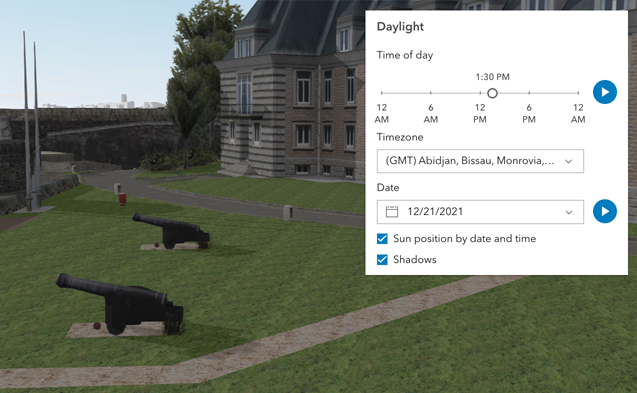](https://developers.arcgis.com/javascript/latest/sample-code/daylight/)\n\nThe component has an option to select the timezone. When the user makes any adjustments here, a new time\nin the chosen timezone is calculated and displayed in the slider. The timezone selector can be disabled\nby using the [hideTimezone](#hideTimezone) property.\n\nBy default, a calendar is displayed to select the day, month, and year.\nWith the [dateOrSeason](#dateOrSeason) property, the calendar can be replaced with\na dropdown menu where a season can be selected instead:\n\n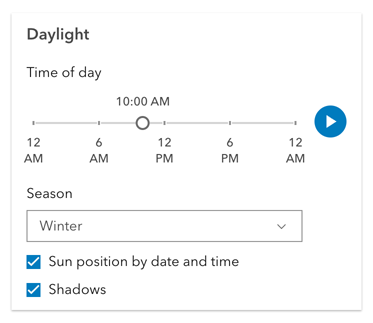\n\nThere are two play buttons: one corresponds to the time-of-day slider and animates the lighting\nover the course of a day, while the other corresponds to the date picker\nand animates the lighting over the course of a year (month by month). The speed of the animation can\nbe set using the [playSpeedMultiplier](#playSpeedMultiplier) property.\n\n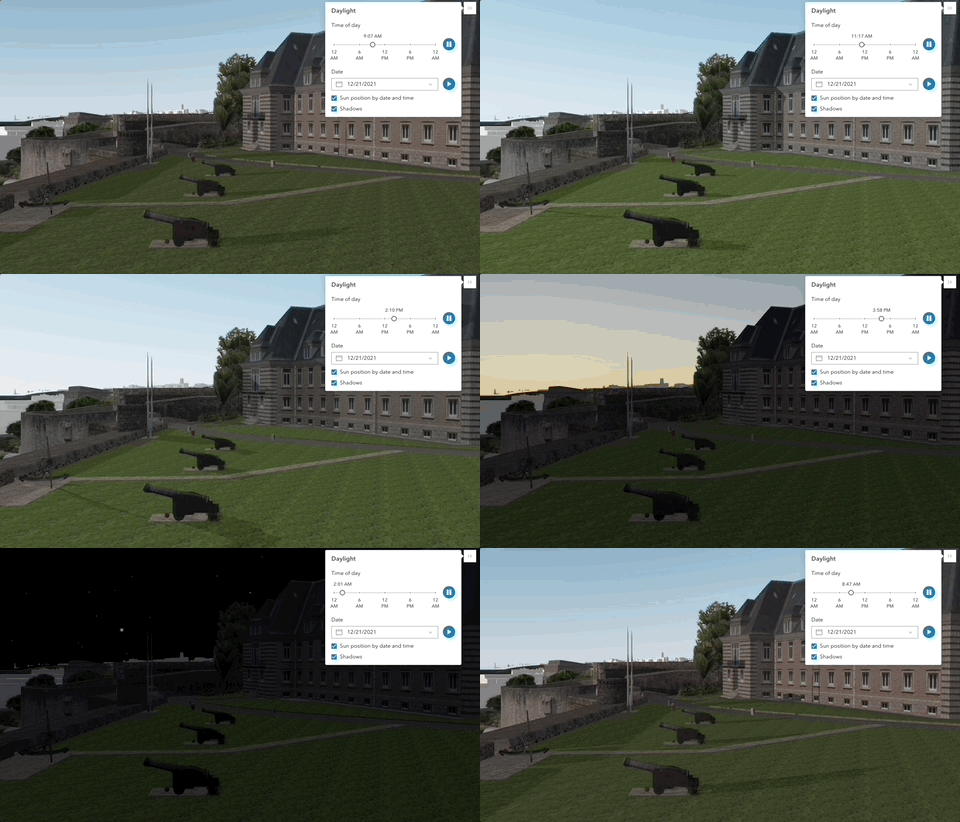\n\nExcept for the daytime slider, all the elements in the Daylight component can be hidden:\n\n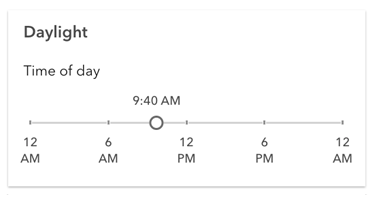\n\nWhenever the sun position option is unchecked, the scene applies the\n**[virtual light](https://developers.arcgis.com/javascript/latest/api-reference/esri-views-3d-environment-VirtualLighting.html)** source relative to the camera.\nWith this, the component's time slider, timezone, and date picker get automatically disabled:\n\n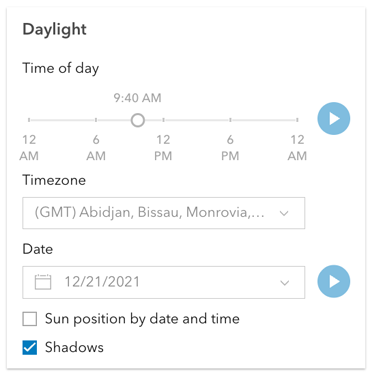\n\n**Things to consider**\n\n* Daylight is only supported in a 3D [Scene](https://developers.arcgis.com/javascript/latest/references/map-components/arcgis-scene/) component.\n* The Daylight component uses UTC time and does not account for the daylight savings times in different countries and regions of the world.\n* When using the [virtual light](https://developers.arcgis.com/javascript/latest/api-reference/esri-views-3d-environment-VirtualLighting.html),\nsetting the time and date programmatically does not have an influence on the lighting conditions of the scene.\n* When using the [sunlight](https://developers.arcgis.com/javascript/latest/api-reference/esri-views-3d-environment-SunLighting.html),\nthe time slider and time zone automatically react to the changes of the camera (e.g., position, rotation, pan, zoom) because the position of the simulated sun\nis updated to maintain a consistent solar time of day based on the camera's current longitude. This can be adjusted using the\n[cameraTrackingEnabled](https://developers.arcgis.com/javascript/latest/api-reference/esri-views-3d-environment-SunLighting.html#cameraTrackingEnabled)\nproperty on [environment.lighting](https://developers.arcgis.com/javascript/latest/references/map-components/arcgis-scene/#environment).\n--\n\n### Events\n- **arcgisReady** - Emitted when the component associated with a map or scene view is ready to be interacted with.\n- **arcgisUserDateTimeChange** - Fires when the user changes the date or time in the component by interacting with the slider, the date picker, the\nseason selector or the play buttons.\n\n### Methods\n- `componentOnReady(): Promise<void>` - Create a promise that resolves once component is fully loaded.\n- `destroy(): Promise<void>` - Permanently destroy the component.",
|
|
1569
1569
|
"attributes": [
|
|
1570
1570
|
{
|
|
1571
1571
|
"name": "auto-destroy-disabled",
|
|
@@ -1574,7 +1574,7 @@
|
|
|
1574
1574
|
},
|
|
1575
1575
|
{
|
|
1576
1576
|
"name": "current-season",
|
|
1577
|
-
"description": "Sets the season that is used when the component displays
|
|
1577
|
+
"description": "Sets the season that is used when the component displays the season picker.\nEach season uses a fixed date corresponding to the seasonal equinoxes and solstices.",
|
|
1578
1578
|
"values": [
|
|
1579
1579
|
{
|
|
1580
1580
|
"name": "fall"
|
|
@@ -1607,11 +1607,6 @@
|
|
|
1607
1607
|
"description": "Starts or pauses the daytime animation cycling through the minutes of the day.\nSet the property to `true` to start the animation and to `false` to pause it.",
|
|
1608
1608
|
"values": []
|
|
1609
1609
|
},
|
|
1610
|
-
{
|
|
1611
|
-
"name": "direct-shadows-disabled",
|
|
1612
|
-
"description": "Indicates whether to hide shadows cast by the sun.\n\n**See also**\n\n- [SunLighting.directShadowsEnabled](https://developers.arcgis.com/javascript/latest/api-reference/esri-views-3d-environment-SunLighting.html#directShadowsEnabled)\n- [Scene's `environment`](https://developers.arcgis.com/javascript/latest/references/map-components/arcgis-scene/#environment)",
|
|
1613
|
-
"values": []
|
|
1614
|
-
},
|
|
1615
1610
|
{
|
|
1616
1611
|
"name": "heading-level",
|
|
1617
1612
|
"description": "Indicates the heading level to use for the component title.",
|
|
@@ -1662,7 +1657,7 @@
|
|
|
1662
1657
|
},
|
|
1663
1658
|
{
|
|
1664
1659
|
"name": "icon",
|
|
1665
|
-
"description": "Icon which represents the component. Typically used when the component is controlled by another component (e.g. by the Expand component)
|
|
1660
|
+
"description": "Icon which represents the component. Typically used when the component is controlled by another component (e.g. by the Expand component).",
|
|
1666
1661
|
"values": []
|
|
1667
1662
|
},
|
|
1668
1663
|
{
|
|
@@ -1680,20 +1675,6 @@
|
|
|
1680
1675
|
"description": "Controls the daytime and date animation speed.",
|
|
1681
1676
|
"values": []
|
|
1682
1677
|
},
|
|
1683
|
-
{
|
|
1684
|
-
"name": "playing-state",
|
|
1685
|
-
"values": [
|
|
1686
|
-
{
|
|
1687
|
-
"name": "day"
|
|
1688
|
-
},
|
|
1689
|
-
{
|
|
1690
|
-
"name": "none"
|
|
1691
|
-
},
|
|
1692
|
-
{
|
|
1693
|
-
"name": "year"
|
|
1694
|
-
}
|
|
1695
|
-
]
|
|
1696
|
-
},
|
|
1697
1678
|
{
|
|
1698
1679
|
"name": "position",
|
|
1699
1680
|
"description": "**Deprecated**: since 4.34, use [`slot`](https://developers.arcgis.com/javascript/latest/building-your-ui/#slots) instead.. ",
|
|
@@ -1732,11 +1713,6 @@
|
|
|
1732
1713
|
"description": "By assigning the `id` attribute of the Map or Scene component to this property, you can position a child component anywhere in the DOM while still maintaining a connection to the Map or Scene.",
|
|
1733
1714
|
"values": []
|
|
1734
1715
|
},
|
|
1735
|
-
{
|
|
1736
|
-
"name": "sunlighting-disabled",
|
|
1737
|
-
"description": "When set, the light source is positioned relative to the camera, using\n[VirtualLighting](https://developers.arcgis.com/javascript/latest/api-reference/esri-views-3d-environment-VirtualLighting.html).\nOtherwise, [date and time](https://developers.arcgis.com/javascript/latest/api-reference/esri-views-3d-environment-SunLighting.html)\nare used to determine position of the light source.",
|
|
1738
|
-
"values": []
|
|
1739
|
-
},
|
|
1740
1716
|
{
|
|
1741
1717
|
"name": "time-slider-position",
|
|
1742
1718
|
"description": "Slider position for the time of day in the timezone\ngiven by [utcOffset](#utcOffset). The position represents the time\nof the day in minutes. Possible values range between 0 and 1440.",
|
|
@@ -1744,7 +1720,7 @@
|
|
|
1744
1720
|
},
|
|
1745
1721
|
{
|
|
1746
1722
|
"name": "time-slider-steps",
|
|
1747
|
-
"description": "Sets the interval, in minutes, with which the time slider increments or decrements as it is dragged or changed via the keyboard
|
|
1723
|
+
"description": "Sets the interval, in minutes, with which the time slider increments or decrements as it is dragged or changed via the keyboard.",
|
|
1748
1724
|
"values": []
|
|
1749
1725
|
},
|
|
1750
1726
|
{
|
|
@@ -3133,7 +3109,7 @@
|
|
|
3133
3109
|
},
|
|
3134
3110
|
{
|
|
3135
3111
|
"name": "arcgis-feature",
|
|
3136
|
-
"description": "The Feature component displays a graphic according to its [PopupTemplate](https://developers.arcgis.com/javascript/latest/api-reference/esri-PopupTemplate.html).\nThis component is useful in instances where you want to display information about a feature but without\nthe use of a [Popup](https://developers.arcgis.com/javascript/latest/api-reference/esri-widgets-Popup.html).\n\nIf wanting to show a feature's content with [actions](https://developers.arcgis.com/javascript/latest/api-reference/esri-PopupTemplate.html#actions), [related](https://developers.arcgis.com/javascript/latest/api-reference/esri-popup-content-RelationshipContent.html), or [clustering](https://developers.arcgis.com/javascript/latest/api-reference/esri-layers-support-FeatureReductionCluster.html#popupTemplate), etc., then use the [arcgis-features](https://developers.arcgis.com/javascript/latest/references/map-components/arcgis-features/) component.\n\nWhen Arcade expressions that use `$map` or [geometry functions](https://developers.arcgis.com/arcade/function-reference/geometry_functions/) are defined in any popup template content or as expression elements,\nthe [map](#map) and [spatialReference](#spatialReference) properties need to be defined in the Feature component.\n--\n\n### Events\n- **arcgisPropertyChange** - Emitted when the value of a property is changed. Use this to listen to changes to properties.\n- **arcgisReady** - Emitted when the component associated with a map or scene view is ready to be interacted with.\n\n### Methods\n- `componentOnReady(): Promise<void>` - Create a promise that resolves once component is fully loaded.\n- `destroy(): Promise<void>` - Permanently destroy the component.\n- `nextMedia(contentElementIndex: number): Promise<void>` - Paginates to the next [media](https://developers.arcgis.com/javascript/latest/api-reference/esri-popup-content-MediaContent.html) info.\n- `previousMedia(contentElementIndex: number): Promise<void>` - Paginates to the previous [media](https://developers.arcgis.com/javascript/latest/api-reference/esri-popup-content-MediaContent.html) info
|
|
3112
|
+
"description": "The Feature component displays a graphic according to its [PopupTemplate](https://developers.arcgis.com/javascript/latest/api-reference/esri-PopupTemplate.html).\nThis component is useful in instances where you want to display information about a feature but without\nthe use of a [Popup](https://developers.arcgis.com/javascript/latest/api-reference/esri-widgets-Popup.html).\n\nIf wanting to show a feature's content with [actions](https://developers.arcgis.com/javascript/latest/api-reference/esri-PopupTemplate.html#actions), [related](https://developers.arcgis.com/javascript/latest/api-reference/esri-popup-content-RelationshipContent.html), or [clustering](https://developers.arcgis.com/javascript/latest/api-reference/esri-layers-support-FeatureReductionCluster.html#popupTemplate), etc., then use the [arcgis-features](https://developers.arcgis.com/javascript/latest/references/map-components/arcgis-features/) component.\n\nWhen Arcade expressions that use `$map` or [geometry functions](https://developers.arcgis.com/arcade/function-reference/geometry_functions/) are defined in any popup template content or as expression elements,\nthe [map](#map) and [spatialReference](#spatialReference) properties need to be defined in the Feature component.\n--\n\n### Events\n- **arcgisPropertyChange** - Emitted when the value of a property is changed. Use this to listen to changes to properties.\n- **arcgisReady** - Emitted when the component associated with a map or scene view is ready to be interacted with.\n\n### Methods\n- `componentOnReady(): Promise<void>` - Create a promise that resolves once component is fully loaded.\n- `destroy(): Promise<void>` - Permanently destroy the component.\n- `nextMedia(contentElementIndex: number): Promise<void>` - Paginates to the next [media](https://developers.arcgis.com/javascript/latest/api-reference/esri-popup-content-MediaContent.html) info.\n- `previousMedia(contentElementIndex: number): Promise<void>` - Paginates to the previous [media](https://developers.arcgis.com/javascript/latest/api-reference/esri-popup-content-MediaContent.html) info.\n- `setActiveMedia(contentElementIndex: number, mediaInfoIndex: number): Promise<void>` - Paginates to a specified [media](https://developers.arcgis.com/javascript/latest/api-reference/esri-popup-content-MediaContent.html) info object. For example,\nyou may have [media](https://developers.arcgis.com/javascript/latest/api-reference/esri-popup-content-MediaContent.html) content which contains\nmultiple `mediaInfos`. This method allows you to specify the index of the `mediaInfos`\nyou wish to display.\n- `updateGeometry(): Promise<void>` - Updates the geometry of the graphic.",
|
|
3137
3113
|
"attributes": [
|
|
3138
3114
|
{
|
|
3139
3115
|
"name": "auto-destroy-disabled",
|
|
@@ -3309,7 +3285,7 @@
|
|
|
3309
3285
|
},
|
|
3310
3286
|
{
|
|
3311
3287
|
"name": "show-utility-network-content",
|
|
3312
|
-
"description": "This property provides the ability to hide or show [utility network content](https://developers.arcgis.com/javascript/latest/api-reference/esri-popup-content-
|
|
3288
|
+
"description": "This property provides the ability to hide or show [utility network content](https://developers.arcgis.com/javascript/latest/api-reference/esri-popup-content-UtilityNetworkAssociationsContent.html) within the component.",
|
|
3313
3289
|
"values": []
|
|
3314
3290
|
},
|
|
3315
3291
|
{
|
|
@@ -3342,16 +3318,8 @@
|
|
|
3342
3318
|
"url": "https://developers.arcgis.com/javascript/latest/references/map-components/arcgis-feature/"
|
|
3343
3319
|
},
|
|
3344
3320
|
{
|
|
3345
|
-
"name": "Feature",
|
|
3346
|
-
"url": "https://developers.arcgis.com/javascript/latest/storybook/map-components/?path=/story/arcgis-feature--
|
|
3347
|
-
},
|
|
3348
|
-
{
|
|
3349
|
-
"name": "Generic",
|
|
3350
|
-
"url": "https://developers.arcgis.com/javascript/latest/storybook/map-components/?path=/story/arcgis-feature--generic&singleStory=true"
|
|
3351
|
-
},
|
|
3352
|
-
{
|
|
3353
|
-
"name": "Expression",
|
|
3354
|
-
"url": "https://developers.arcgis.com/javascript/latest/storybook/map-components/?path=/story/arcgis-feature--expression&singleStory=true"
|
|
3321
|
+
"name": "Feature\nThe Feature component displays on hover.",
|
|
3322
|
+
"url": "https://developers.arcgis.com/javascript/latest/storybook/map-components/?path=/story/arcgis-feature--hover&singleStory=true"
|
|
3355
3323
|
}
|
|
3356
3324
|
]
|
|
3357
3325
|
},
|
|
@@ -4166,7 +4134,7 @@
|
|
|
4166
4134
|
"url": "https://developers.arcgis.com/javascript/latest/references/map-components/arcgis-features/"
|
|
4167
4135
|
},
|
|
4168
4136
|
{
|
|
4169
|
-
"name": "Features",
|
|
4137
|
+
"name": "Features\nThe Features component displays in a Calcite shell panel on click.",
|
|
4170
4138
|
"url": "https://developers.arcgis.com/javascript/latest/storybook/map-components/?path=/story/arcgis-features--demo&singleStory=true"
|
|
4171
4139
|
}
|
|
4172
4140
|
]
|
|
@@ -5007,7 +4975,7 @@
|
|
|
5007
4975
|
},
|
|
5008
4976
|
{
|
|
5009
4977
|
"name": "arcgis-legend",
|
|
5010
|
-
"description": "The Legend component displays the symbols and labels used to represent layers in a [arcgis-map](https://developers.arcgis.com/javascript/latest/references/map-components/arcgis-map/) or [arcgis-scene](https://developers.arcgis.com/javascript/latest/references/map-components/arcgis-scene/).\nOnly layers and sublayers visible in the view are shown, unless [ignoreLayerVisibility](https://developers.arcgis.com/javascript/latest/references/map-components/arcgis-legend/#ignoreLayerVisibility) is set to `true`.\n\nThe legend automatically updates when:\n - the visibility of a layer or sublayer changes\n - a layer is added or removed from the map\n - a layer's `renderer`, `opacity`, or `title` is changed\n - the `legendEnabled` property is changed (set to `true` or `false` on the layer)\n\n## Known Limitations\n\n* Currently, the legend component does not support the following layer types:\n[ElevationLayer](https://developers.arcgis.com/javascript/latest/api-reference/esri-layers-ElevationLayer.html),\n[GraphicsLayer](https://developers.arcgis.com/javascript/latest/api-reference/esri-layers-GraphicsLayer.html),\n[IntegratedMeshLayer](https://developers.arcgis.com/javascript/latest/api-reference/esri-layers-IntegratedMeshLayer.html),\n[KMLLayer](https://developers.arcgis.com/javascript/latest/api-reference/esri-layers-KMLLayer.html),\n[MapNotesLayer](https://developers.arcgis.com/javascript/latest/api-reference/esri-layers-MapNotesLayer.html),\n[OpenStreetMapLayer](https://developers.arcgis.com/javascript/latest/api-reference/esri-layers-OpenStreetMapLayer.html),\n[VectorTileLayer](https://developers.arcgis.com/javascript/latest/api-reference/esri-layers-VectorTileLayer.html),\n[VideoLayer](https://developers.arcgis.com/javascript/latest/api-reference/esri-layers-VideoLayer.html), and\n[WebTileLayer](https://developers.arcgis.com/javascript/latest/api-reference/esri-layers-WebTileLayer.html).\n* [Symbol3D](https://developers.arcgis.com/javascript/latest/api-reference/esri-symbols-Symbol3D.html) with more than one\n[symbol](https://developers.arcgis.com/javascript/latest/api-reference/esri-symbols-Symbol3DLayer.html) are not supported.\n* [DictionaryRenderer](https://developers.arcgis.com/javascript/latest/api-reference/esri-renderers-DictionaryRenderer.html) is not supported.\n* [TrackInfo](https://developers.arcgis.com/javascript/latest/api-reference/esri-layers-support-TrackInfo.html) is not supported.\n* CIM Symbol [primitiveOverride](https://developers.arcgis.com/javascript/latest/api-reference/esri-symbols-CIMSymbol.html#PrimitiveOverride) is not supported.\n* RasterStretchRenderer [dynamicRangeAdjustment](https://developers.arcgis.com/javascript/latest/api-reference/esri-renderers-RasterStretchRenderer.html#dynamicRangeAdjustment) is not supported.\n\n## Various examples of legends based on renderer type.\n\n### Unique values\n\n[](https://developers.arcgis.com/javascript/latest/sample-code/visualization-location-types/)\n\n### Continuous color\n\n[](https://developers.arcgis.com/javascript/latest/sample-code/visualization-vv-color/)\n\n### Classed color\n\n[](https://developers.arcgis.com/javascript/latest/sample-code/visualization-classbreaks/)\n\n### Continuous size\n\n[](https://developers.arcgis.com/javascript/latest/sample-code/visualization-sm-size/)\n\n### Size - above and below\n\n[](https://developers.arcgis.com/javascript/latest/sample-code/visualization-sm-size-themes/)\n\n### Dot density\n\n[](https://developers.arcgis.com/javascript/latest/sample-code/visualization-dot-density/)\n\n### Predominance\n\n[](https://developers.arcgis.com/javascript/latest/sample-code/visualization-arcade/)\n\n### Relationship\n\n[](https://developers.arcgis.com/javascript/latest/sample-code/visualization-sm-relationship/)\n\n\n
|
|
4978
|
+
"description": "The Legend component displays the symbols and labels used to represent layers in a [arcgis-map](https://developers.arcgis.com/javascript/latest/references/map-components/arcgis-map/) or [arcgis-scene](https://developers.arcgis.com/javascript/latest/references/map-components/arcgis-scene/).\nOnly layers and sublayers visible in the view are shown, unless [ignoreLayerVisibility](https://developers.arcgis.com/javascript/latest/references/map-components/arcgis-legend/#ignoreLayerVisibility) is set to `true`.\n\nThe legend automatically updates when:\n - the visibility of a layer or sublayer changes\n - a layer is added or removed from the map\n - a layer's `renderer`, `opacity`, or `title` is changed\n - the `legendEnabled` property is changed (set to `true` or `false` on the layer)\n\n## Known Limitations\n\n* Currently, the legend component does not support the following layer types:\n[ElevationLayer](https://developers.arcgis.com/javascript/latest/api-reference/esri-layers-ElevationLayer.html),\n[GraphicsLayer](https://developers.arcgis.com/javascript/latest/api-reference/esri-layers-GraphicsLayer.html),\n[IntegratedMeshLayer](https://developers.arcgis.com/javascript/latest/api-reference/esri-layers-IntegratedMeshLayer.html),\n[KMLLayer](https://developers.arcgis.com/javascript/latest/api-reference/esri-layers-KMLLayer.html),\n[MapNotesLayer](https://developers.arcgis.com/javascript/latest/api-reference/esri-layers-MapNotesLayer.html),\n[OpenStreetMapLayer](https://developers.arcgis.com/javascript/latest/api-reference/esri-layers-OpenStreetMapLayer.html),\n[VectorTileLayer](https://developers.arcgis.com/javascript/latest/api-reference/esri-layers-VectorTileLayer.html),\n[VideoLayer](https://developers.arcgis.com/javascript/latest/api-reference/esri-layers-VideoLayer.html), and\n[WebTileLayer](https://developers.arcgis.com/javascript/latest/api-reference/esri-layers-WebTileLayer.html).\n* [Symbol3D](https://developers.arcgis.com/javascript/latest/api-reference/esri-symbols-Symbol3D.html) with more than one\n[symbol](https://developers.arcgis.com/javascript/latest/api-reference/esri-symbols-Symbol3DLayer.html) are not supported.\n* [DictionaryRenderer](https://developers.arcgis.com/javascript/latest/api-reference/esri-renderers-DictionaryRenderer.html) is not supported.\n* [TrackInfo](https://developers.arcgis.com/javascript/latest/api-reference/esri-layers-support-TrackInfo.html) is not supported.\n* CIM Symbol [primitiveOverride](https://developers.arcgis.com/javascript/latest/api-reference/esri-symbols-CIMSymbol.html#PrimitiveOverride) is not supported.\n* RasterStretchRenderer [dynamicRangeAdjustment](https://developers.arcgis.com/javascript/latest/api-reference/esri-renderers-RasterStretchRenderer.html#dynamicRangeAdjustment) is not supported.\n\n## Various examples of legends based on renderer type.\n\n### Unique values\n\n[](https://developers.arcgis.com/javascript/latest/sample-code/visualization-location-types/)\n\n### Continuous color\n\n[](https://developers.arcgis.com/javascript/latest/sample-code/visualization-vv-color/)\n\n### Classed color\n\n[](https://developers.arcgis.com/javascript/latest/sample-code/visualization-classbreaks/)\n\n### Continuous size\n\n[](https://developers.arcgis.com/javascript/latest/sample-code/visualization-sm-size/)\n\n### Size - above and below\n\n[](https://developers.arcgis.com/javascript/latest/sample-code/visualization-sm-size-themes/)\n\n### Dot density\n\n[](https://developers.arcgis.com/javascript/latest/sample-code/visualization-dot-density/)\n\n### Predominance\n\n[](https://developers.arcgis.com/javascript/latest/sample-code/visualization-arcade/)\n\n### Relationship\n\n[](https://developers.arcgis.com/javascript/latest/sample-code/visualization-sm-relationship/)\n\n\n## Legend Field Formatting Priority\n\nThe following list summarizes how legend field values are formatted for different renderer and visual variable types, and the order in which formatting options are applied.\n\n * **Visual variable stops (color, opacity, size)**\n * Data source:\n * Number field\n 1. Use `stop.label` if present\n 2. Use [FieldConfiguration](https://developers.arcgis.com/javascript/latest/api-reference/esri-layers-support-FieldConfiguration.html) formatting\n 3. Use default precision formatting with grouping\n * Number field with normalization field\n 1. Use `stop.label` if present\n 2. Use FieldConfiguration (applies to main field, not normalization field)\n 3. Use default precision formatting with grouping\n * Notes:\n * If any stop has a label, it is used directly; otherwise, labels are generated at runtime. See [ColorStop](https://developers.arcgis.com/javascript/latest/api-reference/esri-renderers-visualVariables-support-ColorStop.html), [OpacityStop](https://developers.arcgis.com/javascript/latest/api-reference/esri-renderers-visualVariables-support-OpacityStop.html), and [SizeStop](https://developers.arcgis.com/javascript/latest/api-reference/esri-renderers-visualVariables-support-SizeStop.html).\n * For normalization fields, only the main field’s formatting is used, not the normalization field. See [ColorVariable](https://developers.arcgis.com/javascript/latest/api-reference/esri-renderers-visualVariables-ColorVariable.html#normalizationField), [OpacityVariable](https://developers.arcgis.com/javascript/latest/api-reference/esri-renderers-visualVariables-OpacityVariable.html#normalizationField), and [SizeVariable](https://developers.arcgis.com/javascript/latest/api-reference/esri-renderers-visualVariables-SizeVariable.html#normalizationField).\n * **Visual variable (valueExpression)**\n 1. Use `stop.label` if present\n 2. Use default precision formatting with grouping\n * Note: Since there’s no field, field formatting does not apply; fallback is default formatting. See [VisualVariable value expressions](https://developers.arcgis.com/javascript/latest/api-reference/esri-renderers-visualVariables-ColorVariable.html#valueExpression).\n * **Unique-value renderer labels**\n 1. Use UniqueValueRenderer class label if present\n 2. Use domain name\n 3. Use FieldConfiguration formatting\n 4. Use [PopupTemplate](https://developers.arcgis.com/javascript/latest/api-reference/esri-PopupTemplate.html) formatting\n 5. Use raw field value (if string) or default precision formatting with grouping (for number)\n * **Renderer title**\n 1. Use FieldConfiguration formatting\n 2. Use PopupTemplate formatting\n * **General notes**\n * Labels generated at runtime by the legend are not persisted in the WebMap or Layer.\n--\n\n### Events\n- **arcgisPropertyChange** - Emitted when the value of a property is changed. Use this to listen to changes to properties.\n- **arcgisReady** - Emitted when the component associated with a map or scene view is ready to be interacted with.\n\n### Methods\n- `componentOnReady(): Promise<void>` - Create a promise that resolves once component is fully loaded.\n- `destroy(): Promise<void>` - Permanently destroy the component.",
|
|
5011
4979
|
"attributes": [
|
|
5012
4980
|
{
|
|
5013
4981
|
"name": "auto-destroy-disabled",
|
|
@@ -6369,15 +6337,11 @@
|
|
|
6369
6337
|
"url": "https://developers.arcgis.com/javascript/latest/references/map-components/arcgis-popup/"
|
|
6370
6338
|
},
|
|
6371
6339
|
{
|
|
6372
|
-
"name": "Popup",
|
|
6340
|
+
"name": "Popup\nThe Popup component opens on view element click.",
|
|
6373
6341
|
"url": "https://developers.arcgis.com/javascript/latest/storybook/map-components/?path=/story/arcgis-popup--demo&singleStory=true"
|
|
6374
6342
|
},
|
|
6375
6343
|
{
|
|
6376
|
-
"name": "
|
|
6377
|
-
"url": "https://developers.arcgis.com/javascript/latest/storybook/map-components/?path=/story/arcgis-popup--small-map&singleStory=true"
|
|
6378
|
-
},
|
|
6379
|
-
{
|
|
6380
|
-
"name": "Custom Popup",
|
|
6344
|
+
"name": "Custom Popup\nThe Popup component opens manually within a click event.",
|
|
6381
6345
|
"url": "https://developers.arcgis.com/javascript/latest/storybook/map-components/?path=/story/arcgis-popup--custom-popup&singleStory=true"
|
|
6382
6346
|
}
|
|
6383
6347
|
]
|
|
@@ -7504,7 +7468,7 @@
|
|
|
7504
7468
|
},
|
|
7505
7469
|
{
|
|
7506
7470
|
"name": "toolbar-kind",
|
|
7507
|
-
"description": "Controls the appearance of the sketch widget, allowing
|
|
7471
|
+
"description": "Controls the appearance of the sketch widget, allowing the toolbar to adapt its appearance appropriately based on context.\n\nSet this to `docked` for use within the Expand component, or any other situation\nwhere Sketch is not floating within a large canvas.",
|
|
7508
7472
|
"values": [
|
|
7509
7473
|
{
|
|
7510
7474
|
"name": "docked"
|
|
@@ -8304,26 +8268,32 @@
|
|
|
8304
8268
|
},
|
|
8305
8269
|
{
|
|
8306
8270
|
"name": "hide-connectivity-associations-settings-color-picker",
|
|
8271
|
+
"description": "If true, hides the connectivity association color picker.",
|
|
8307
8272
|
"values": []
|
|
8308
8273
|
},
|
|
8309
8274
|
{
|
|
8310
8275
|
"name": "hide-connectivity-associations-settings-style-picker",
|
|
8276
|
+
"description": "If true, hides the connectivity association style picker.",
|
|
8311
8277
|
"values": []
|
|
8312
8278
|
},
|
|
8313
8279
|
{
|
|
8314
8280
|
"name": "hide-connectivity-associations-settings-width-input",
|
|
8281
|
+
"description": "If true, hides the connectivity association width input.",
|
|
8315
8282
|
"values": []
|
|
8316
8283
|
},
|
|
8317
8284
|
{
|
|
8318
8285
|
"name": "hide-structural-attachment-associations-settings-color-picker",
|
|
8286
|
+
"description": "If true, hides the structural attachment associations color picker.",
|
|
8319
8287
|
"values": []
|
|
8320
8288
|
},
|
|
8321
8289
|
{
|
|
8322
8290
|
"name": "hide-structural-attachment-associations-settings-style-picker",
|
|
8291
|
+
"description": "If true, hides the structural attachment associations style picker.",
|
|
8323
8292
|
"values": []
|
|
8324
8293
|
},
|
|
8325
8294
|
{
|
|
8326
8295
|
"name": "hide-structural-attachment-associations-settings-width-input",
|
|
8296
|
+
"description": "If true, hides the structural attachment associations width input.",
|
|
8327
8297
|
"values": []
|
|
8328
8298
|
},
|
|
8329
8299
|
{
|
|
@@ -8421,77 +8391,82 @@
|
|
|
8421
8391
|
},
|
|
8422
8392
|
{
|
|
8423
8393
|
"name": "show-connectivity-associations-settings-arrows-toggle",
|
|
8394
|
+
"description": "If true, shows the connectivity association arrows toggle.",
|
|
8424
8395
|
"values": []
|
|
8425
8396
|
},
|
|
8426
8397
|
{
|
|
8427
8398
|
"name": "show-connectivity-associations-settings-cap-select",
|
|
8399
|
+
"description": "If true, shows the connectivity association cap select.",
|
|
8428
8400
|
"values": []
|
|
8429
8401
|
},
|
|
8430
8402
|
{
|
|
8431
8403
|
"name": "show-max-allowable-associations-slider",
|
|
8404
|
+
"description": "If true, hides the max allowable associations slider.",
|
|
8432
8405
|
"values": []
|
|
8433
8406
|
},
|
|
8434
8407
|
{
|
|
8435
8408
|
"name": "show-structural-attachment-associations-settings-arrows-toggle",
|
|
8409
|
+
"description": "If true, shows the structural attachment associations arrow toggle.",
|
|
8436
8410
|
"values": []
|
|
8437
8411
|
},
|
|
8438
8412
|
{
|
|
8439
8413
|
"name": "show-structural-attachment-associations-settings-cap-select",
|
|
8414
|
+
"description": "If true, shows the structural attachment associations cap select.",
|
|
8440
8415
|
"values": []
|
|
8441
8416
|
},
|
|
8442
8417
|
{
|
|
8443
8418
|
"name": "visible-elements-connectivity-associations-settings-arrows-toggle",
|
|
8444
|
-
"description": "**Deprecated**: since 4.32, showConnectivityAssociationsSettingsArrowsToggle instead
|
|
8419
|
+
"description": "**Deprecated**: since 4.32, showConnectivityAssociationsSettingsArrowsToggle instead.. ",
|
|
8445
8420
|
"values": []
|
|
8446
8421
|
},
|
|
8447
8422
|
{
|
|
8448
8423
|
"name": "visible-elements-connectivity-associations-settings-cap-select",
|
|
8449
|
-
"description": "**Deprecated**: since 4.32, use showConnectivityAssociationsSettingsCapSelect instead
|
|
8424
|
+
"description": "**Deprecated**: since 4.32, use showConnectivityAssociationsSettingsCapSelect instead.. ",
|
|
8450
8425
|
"values": []
|
|
8451
8426
|
},
|
|
8452
8427
|
{
|
|
8453
8428
|
"name": "visible-elements-connectivity-associations-settings-color-picker",
|
|
8454
|
-
"description": "**Deprecated**: since 4.32, use hideConnectivityAssociationsSettingsColorPicker instead
|
|
8429
|
+
"description": "**Deprecated**: since 4.32, use hideConnectivityAssociationsSettingsColorPicker instead.. ",
|
|
8455
8430
|
"values": []
|
|
8456
8431
|
},
|
|
8457
8432
|
{
|
|
8458
8433
|
"name": "visible-elements-connectivity-associations-settings-style-picker",
|
|
8459
|
-
"description": "**Deprecated**: since 4.32, use hideConnectivityAssociationsSettingsStylePicker instead
|
|
8434
|
+
"description": "**Deprecated**: since 4.32, use hideConnectivityAssociationsSettingsStylePicker instead.. ",
|
|
8460
8435
|
"values": []
|
|
8461
8436
|
},
|
|
8462
8437
|
{
|
|
8463
8438
|
"name": "visible-elements-connectivity-associations-settings-width-input",
|
|
8464
|
-
"description": "**Deprecated**: since 4.32, use hideConnectivityAssociationsSettingsWidthInput instead
|
|
8439
|
+
"description": "**Deprecated**: since 4.32, use hideConnectivityAssociationsSettingsWidthInput instead.. ",
|
|
8465
8440
|
"values": []
|
|
8466
8441
|
},
|
|
8467
8442
|
{
|
|
8468
8443
|
"name": "visible-elements-max-allowable-associations-slider",
|
|
8469
|
-
"description": "**Deprecated**: since 4.32, use showMaxAllowableAssociationsSlider instead
|
|
8444
|
+
"description": "**Deprecated**: since 4.32, use showMaxAllowableAssociationsSlider instead.. ",
|
|
8470
8445
|
"values": []
|
|
8471
8446
|
},
|
|
8472
8447
|
{
|
|
8473
8448
|
"name": "visible-elements-structural-attachment-associations-settings-arrows-toggle",
|
|
8474
|
-
"description": "**Deprecated**: since 4.32, use showStructuralAttachmentAssociationsSettingsArrowsToggle instead
|
|
8449
|
+
"description": "**Deprecated**: since 4.32, use showStructuralAttachmentAssociationsSettingsArrowsToggle instead.. ",
|
|
8475
8450
|
"values": []
|
|
8476
8451
|
},
|
|
8477
8452
|
{
|
|
8478
8453
|
"name": "visible-elements-structural-attachment-associations-settings-cap-select",
|
|
8479
|
-
"description": "**Deprecated**: since 4.32, use showStructuralAttachmentAssociationsSettingsCapSelect instead
|
|
8454
|
+
"description": "**Deprecated**: since 4.32, use showStructuralAttachmentAssociationsSettingsCapSelect instead.. ",
|
|
8480
8455
|
"values": []
|
|
8481
8456
|
},
|
|
8482
8457
|
{
|
|
8483
8458
|
"name": "visible-elements-structural-attachment-associations-settings-color-picker",
|
|
8484
|
-
"description": "**Deprecated**: since 4.32, use hideStructuralAttachmentAssociationsSettingsColorPicker instead
|
|
8459
|
+
"description": "**Deprecated**: since 4.32, use hideStructuralAttachmentAssociationsSettingsColorPicker instead.. ",
|
|
8485
8460
|
"values": []
|
|
8486
8461
|
},
|
|
8487
8462
|
{
|
|
8488
8463
|
"name": "visible-elements-structural-attachment-associations-settings-style-picker",
|
|
8489
|
-
"description": "**Deprecated**: since 4.32, use hideStructuralAttachmentAssociationsSettingsStylePicker instead
|
|
8464
|
+
"description": "**Deprecated**: since 4.32, use hideStructuralAttachmentAssociationsSettingsStylePicker instead.. ",
|
|
8490
8465
|
"values": []
|
|
8491
8466
|
},
|
|
8492
8467
|
{
|
|
8493
8468
|
"name": "visible-elements-structural-attachment-associations-settings-width-input",
|
|
8494
|
-
"description": "**Deprecated**: since 4.32, use hideStructuralAttachmentAssociationsSettingsWidthInput instead
|
|
8469
|
+
"description": "**Deprecated**: since 4.32, use hideStructuralAttachmentAssociationsSettingsWidthInput instead.. ",
|
|
8495
8470
|
"values": []
|
|
8496
8471
|
}
|
|
8497
8472
|
],
|