@arcgis/map-components 5.0.0-next.21 → 5.0.0-next.23
This diff represents the content of publicly available package versions that have been released to one of the supported registries. The information contained in this diff is provided for informational purposes only and reflects changes between package versions as they appear in their respective public registries.
- package/dist/cdn/{KII7RSDD.js → 22PI4CYU.js} +2 -2
- package/dist/cdn/{KAWBHDXB.js → 2FFR4E3Y.js} +2 -2
- package/dist/cdn/{772QWOSV.js → 2GQEKELM.js} +2 -2
- package/dist/cdn/{IVRJJPVX.js → 2HIT3AOL.js} +2 -2
- package/dist/cdn/{2CLQRRRI.js → 2K7K4BFY.js} +1 -1
- package/dist/cdn/2KIXAZJR.js +4 -0
- package/dist/cdn/{GSDZP5MO.js → 2NR6DR2U.js} +2 -2
- package/dist/cdn/{YB3KDZQF.js → 2T7XGLB2.js} +2 -2
- package/dist/cdn/{LQTXHRVF.js → 2UP25HRZ.js} +2 -2
- package/dist/cdn/{KUEX5DRL.js → 33AZ2OQV.js} +2 -2
- package/dist/cdn/{JFDVLLWU.js → 343HT6YY.js} +2 -2
- package/dist/cdn/{UHICS5IL.js → 36MCKREH.js} +2 -2
- package/dist/cdn/{QFNTEZLG.js → 374YZ7AC.js} +2 -2
- package/dist/cdn/3BB3FP33.js +4 -0
- package/dist/cdn/3LDD6SXX.js +4 -0
- package/dist/cdn/{W4XCO3ZK.js → 3XO2JMG4.js} +2 -2
- package/dist/cdn/{W2AOAOCN.js → 4N6I5HWN.js} +2 -2
- package/dist/cdn/{YY3R7QXQ.js → 57NTZSVZ.js} +2 -2
- package/dist/cdn/{GGFKAOAK.js → 57TBF6VS.js} +2 -2
- package/dist/cdn/{N6H6ONSY.js → 5DTXOVOB.js} +2 -2
- package/dist/cdn/{STQF2DYR.js → 5EWRLE6O.js} +2 -2
- package/dist/cdn/{JJJMCKQH.js → 5NFZCGTA.js} +2 -2
- package/dist/cdn/{ZGNCCZTC.js → 5X6RMR63.js} +2 -2
- package/dist/cdn/{GNSWLZNY.js → 6347OPPK.js} +2 -2
- package/dist/cdn/{GTFKYZEI.js → 65PQ7H5F.js} +2 -2
- package/dist/cdn/{L2VX5RJK.js → 6CJOBXW5.js} +2 -2
- package/dist/cdn/{YOFCJ6HF.js → 6IQLPREU.js} +2 -2
- package/dist/cdn/{LN57T3MN.js → 6Q4HDWOI.js} +2 -2
- package/dist/cdn/{7RE23NUS.js → 6SWHG7AW.js} +2 -2
- package/dist/cdn/{NOG7MP2X.js → 6Z65HK3J.js} +2 -2
- package/dist/cdn/{BZ56UWMU.js → 72IVIXYD.js} +2 -2
- package/dist/cdn/{BMZTQ37D.js → 7PVG6KOM.js} +2 -2
- package/dist/cdn/{NLJSAOM6.js → AGA6P4ZU.js} +2 -2
- package/dist/cdn/{25JAF5AZ.js → BB2KHFBI.js} +2 -2
- package/dist/cdn/{GDGYNRHV.js → BJYEOTUZ.js} +2 -2
- package/dist/cdn/{2QHU4D6K.js → BSFGELQJ.js} +1 -1
- package/dist/cdn/{LU2DYUCL.js → BWHTDIKE.js} +2 -2
- package/dist/cdn/{7N6MDBOX.js → C5NBPUPE.js} +2 -2
- package/dist/cdn/{AY374JF2.js → CKQFM2IT.js} +2 -2
- package/dist/cdn/{A3KEHVFS.js → CPLZKJD4.js} +2 -2
- package/dist/cdn/{D4YUANLS.js → CXHFFG5Q.js} +2 -2
- package/dist/cdn/{MIECREOE.js → CZ3U5XMQ.js} +2 -2
- package/dist/cdn/{3DEMDHHZ.js → D2FNJL3T.js} +2 -2
- package/dist/cdn/{F7JX5WKZ.js → DACHLNGF.js} +2 -2
- package/dist/cdn/{BMRKHEDT.js → DI7RUMO2.js} +2 -2
- package/dist/cdn/{JU662V3W.js → DM7BV6J5.js} +2 -2
- package/dist/cdn/{7HJ4N5EY.js → DUNHPRTL.js} +2 -2
- package/dist/cdn/{GB6W6AHW.js → E2HBTKSU.js} +2 -2
- package/dist/cdn/{CV4MTDLI.js → E3SQV4EJ.js} +2 -2
- package/dist/cdn/{3XH6PMIS.js → E5DZSJLD.js} +2 -2
- package/dist/cdn/{7OC4FNSJ.js → E63BH4DB.js} +2 -2
- package/dist/cdn/{YLDGKJYZ.js → ECF5JTXL.js} +2 -2
- package/dist/cdn/{XYJAGSVA.js → ECYVICV6.js} +2 -2
- package/dist/cdn/{EAHEIZYY.js → EJDCSWLN.js} +2 -2
- package/dist/cdn/{6O76RJI2.js → EK2WBO4Y.js} +2 -2
- package/dist/cdn/{PS2J56HD.js → EMOPXC4R.js} +2 -2
- package/dist/cdn/{6BGGRCJ7.js → EN5MRVKU.js} +2 -2
- package/dist/cdn/{5ORPWZY4.js → EXS3Y5II.js} +2 -2
- package/dist/cdn/{RMIWSLTF.js → F4EU27BD.js} +2 -2
- package/dist/cdn/{75Z637LG.js → F5PWYUV7.js} +2 -2
- package/dist/cdn/{TPPLHRQC.js → FAAWMOQG.js} +2 -2
- package/dist/cdn/{CLIS2HMO.js → FARTCWVR.js} +2 -2
- package/dist/cdn/{VNQT6U7A.js → FAVINRXE.js} +2 -2
- package/dist/cdn/{IQVB2PKG.js → FNZRL6Y5.js} +1 -1
- package/dist/cdn/{Q3ZE7LTH.js → FOSEQVJT.js} +2 -2
- package/dist/cdn/{BJLXUTHH.js → FQUUEURI.js} +2 -2
- package/dist/cdn/{KCURCW22.js → FXOPI6I6.js} +1 -1
- package/dist/cdn/{375RYBJL.js → FYGQZIOZ.js} +1 -1
- package/dist/cdn/{WLNN7SXU.js → FYVIRZUG.js} +2 -2
- package/dist/cdn/{GVRD23TT.js → FZUA3ZHG.js} +2 -2
- package/dist/cdn/{EGKX3XNO.js → G2WQP2PU.js} +2 -2
- package/dist/cdn/{2NPH73QX.js → GFEYFTKQ.js} +2 -2
- package/dist/cdn/{TO2AQPZP.js → GSPDF4C2.js} +2 -2
- package/dist/cdn/{PEKIUAYW.js → GSX2YAM2.js} +2 -2
- package/dist/cdn/{J3IIOTJC.js → GURZO373.js} +2 -2
- package/dist/cdn/{OGWWLI7A.js → GV3WFSCE.js} +2 -2
- package/dist/cdn/{MBEPAUIW.js → GXDBRQMI.js} +1 -1
- package/dist/cdn/{VYXZAQWW.js → GY7Y7M2I.js} +2 -2
- package/dist/cdn/{KC2ZJNT5.js → H7THNY7F.js} +2 -2
- package/dist/cdn/{GC6IBJDP.js → HDSYE4ZG.js} +2 -2
- package/dist/cdn/{2S34KCLL.js → HDYTHZ2B.js} +2 -2
- package/dist/cdn/{OPKG3FXJ.js → HQCUFCD5.js} +2 -2
- package/dist/cdn/{45HRDNX7.js → HTFFPG4G.js} +2 -2
- package/dist/cdn/{KQZJ43JY.js → HVTC6WRM.js} +2 -2
- package/dist/cdn/{MYDY3AZU.js → IATBO5YT.js} +2 -2
- package/dist/cdn/{7W34S7DX.js → IGRIQZO2.js} +2 -2
- package/dist/cdn/{THKPZYIU.js → IN3CGJ65.js} +2 -2
- package/dist/cdn/IOGALETB.js +4 -0
- package/dist/cdn/{IFMXKXF3.js → IOURQYH4.js} +2 -2
- package/dist/cdn/{ZGFP7UIN.js → IPPOQP3O.js} +1 -1
- package/dist/cdn/{ZMAG2GT2.js → ITJIGX2M.js} +2 -2
- package/dist/cdn/{A23L5AQ7.js → ITYRSN6B.js} +2 -2
- package/dist/cdn/{66I3Q2D6.js → IX452DYE.js} +2 -2
- package/dist/cdn/{RAX7EBCM.js → IXUZWOOQ.js} +2 -2
- package/dist/cdn/{3DSFHU4T.js → J3ZFSSVI.js} +2 -2
- package/dist/cdn/{PKAX2UU6.js → JCLTKYYC.js} +1 -1
- package/dist/cdn/{3KJBPRNQ.js → JGWXNKGZ.js} +2 -2
- package/dist/cdn/{XDRBLZEC.js → JJZ27ZFQ.js} +2 -2
- package/dist/cdn/{YHDXIKML.js → JQ3CRDO4.js} +2 -2
- package/dist/cdn/{WG2P3E33.js → JSQ57NBU.js} +2 -2
- package/dist/cdn/{3DYWHZWE.js → JTPV6EF6.js} +2 -2
- package/dist/cdn/{ZBDECJAG.js → K6LQWYFG.js} +2 -2
- package/dist/cdn/{X3PCRLH3.js → KB7QGYSO.js} +2 -2
- package/dist/cdn/{WXMGMCSA.js → KJ5QEEEJ.js} +2 -2
- package/dist/cdn/{4YHTUMCP.js → KNAYEU5U.js} +2 -2
- package/dist/cdn/{FY4IZYHR.js → KPPEHK3Y.js} +2 -2
- package/dist/cdn/{PJ22Z2UF.js → KZFXLQ43.js} +2 -2
- package/dist/cdn/{BSA4VQVA.js → L6SSMCYZ.js} +2 -2
- package/dist/cdn/{Y27HMTIO.js → LDNIKC3C.js} +1 -1
- package/dist/cdn/{HWV3KCIN.js → LG2UXXSW.js} +2 -2
- package/dist/cdn/{BWFV2235.js → LGYKWGM2.js} +2 -2
- package/dist/cdn/{XTDTBRZB.js → LI4BSWFZ.js} +2 -2
- package/dist/cdn/{24XNA3OF.js → LLLCQYWI.js} +2 -2
- package/dist/cdn/{PWC7DVAK.js → LQBSUSBA.js} +2 -2
- package/dist/cdn/{YPKAPL7S.js → M7UZZJD2.js} +2 -2
- package/dist/cdn/{VNAFDTZZ.js → MCSKO4YD.js} +2 -2
- package/dist/cdn/{ROMBC4ZS.js → MDFELOQE.js} +2 -2
- package/dist/cdn/{PHZGOZZB.js → MG5H544T.js} +2 -2
- package/dist/cdn/{TAJCYM6X.js → MHA4VJIC.js} +2 -2
- package/dist/cdn/{SCL5OLFP.js → MJQFHKPR.js} +2 -2
- package/dist/cdn/{J6W6XVAK.js → MMDBMABT.js} +2 -2
- package/dist/cdn/{ILLKFO2T.js → MMLAMC5Y.js} +2 -2
- package/dist/cdn/{MSXCVNJY.js → MMMPJ2LT.js} +2 -2
- package/dist/cdn/{SWL2DUTD.js → MNIXB2RV.js} +2 -2
- package/dist/cdn/{THKBAUSH.js → MTSUGT37.js} +2 -2
- package/dist/cdn/{YNJTAHYB.js → MUPKXSFX.js} +1 -1
- package/dist/cdn/{NXHRALN4.js → NDRDQQ6Y.js} +2 -2
- package/dist/cdn/{JW6AJ733.js → NWWPEZXJ.js} +2 -2
- package/dist/cdn/{2W25NBQQ.js → NWXOWX2R.js} +2 -2
- package/dist/cdn/{4NRC4ECR.js → NZYO2S63.js} +2 -2
- package/dist/cdn/{3FUVUZUS.js → O5YQ4PTZ.js} +2 -2
- package/dist/cdn/{PVJRTMKS.js → OAXOUXJ3.js} +2 -2
- package/dist/cdn/{AY4ACZXB.js → OJWJMCPC.js} +2 -2
- package/dist/cdn/{NA4LDRXR.js → OLHSJAGC.js} +2 -2
- package/dist/cdn/{YMCGZXWV.js → OLLX2H42.js} +2 -2
- package/dist/cdn/{MQVLRALG.js → OMMYK4T7.js} +2 -2
- package/dist/cdn/{7F4QLSFS.js → OTTGHSSA.js} +2 -2
- package/dist/cdn/{OKHKPZJD.js → OTUK6LCE.js} +2 -2
- package/dist/cdn/{3JVPZBGB.js → OU4QFILH.js} +2 -2
- package/dist/cdn/{PPABQE7P.js → OWIIZF2A.js} +2 -2
- package/dist/cdn/{5H6Z377K.js → P33UF3WY.js} +2 -2
- package/dist/cdn/{TNQVVY22.js → P4SOYRXP.js} +2 -2
- package/dist/cdn/{KFIFYQLX.js → PHZ5UQBY.js} +2 -2
- package/dist/cdn/{OHFMAN5W.js → PMYYTVMX.js} +2 -2
- package/dist/cdn/{55YM6FKZ.js → PQSU4VJE.js} +2 -2
- package/dist/cdn/{3Z3B3FUT.js → PYHI7PGA.js} +2 -2
- package/dist/cdn/{CM45GNIN.js → QCYH7RXZ.js} +2 -2
- package/dist/cdn/{YRZQXRKX.js → QLAG5K2S.js} +2 -2
- package/dist/cdn/{X62MEYBB.js → QNW47ZU2.js} +2 -2
- package/dist/cdn/{NZDYLDLL.js → QQBTNV3Y.js} +2 -2
- package/dist/cdn/{4Z4V7IB3.js → QWY6HOVT.js} +2 -2
- package/dist/cdn/{4E3CKVPN.js → RABJWQHF.js} +2 -2
- package/dist/cdn/{RO647MJM.js → RH57WB7T.js} +2 -2
- package/dist/cdn/{UVIFI6DD.js → RML6GZRZ.js} +2 -2
- package/dist/cdn/{GFZYNR7F.js → RRZ2V4AA.js} +2 -2
- package/dist/cdn/{RPYV2IKC.js → RUBFPDFL.js} +2 -2
- package/dist/cdn/{I4QHKXVL.js → RXK7GACY.js} +2 -2
- package/dist/cdn/{T4WD6HN2.js → RZWIFUEM.js} +2 -2
- package/dist/cdn/{K4ICCYWY.js → SAQTABIK.js} +2 -2
- package/dist/cdn/{FF27FIVH.js → SGRUHEDJ.js} +2 -2
- package/dist/cdn/{CCSKXRAX.js → SKZ5254C.js} +2 -2
- package/dist/cdn/{DCWQERDJ.js → SOKOV2BL.js} +2 -2
- package/dist/cdn/{ZCG5V2US.js → SSY6C4OF.js} +2 -2
- package/dist/cdn/{5WHZWJLM.js → SUPY2ZIR.js} +2 -2
- package/dist/cdn/{6QOHFJFZ.js → SVA5M7JR.js} +2 -2
- package/dist/cdn/{OLXN372Q.js → SXAPT7HT.js} +2 -2
- package/dist/cdn/{WNF54NOK.js → TG2X3WPJ.js} +2 -2
- package/dist/cdn/{UNMP6EDV.js → THKGDWLO.js} +2 -2
- package/dist/cdn/{JSS3WYRB.js → TLFH4XQL.js} +2 -2
- package/dist/cdn/{Y3C343YV.js → TPCLNP4O.js} +2 -2
- package/dist/cdn/{V5PHXTM6.js → TSGXHCVC.js} +2 -2
- package/dist/cdn/{TRBDAVDC.js → TUMGQQS7.js} +2 -2
- package/dist/cdn/TVEQFBHV.js +4 -0
- package/dist/cdn/{BUSIYCON.js → TZBMB64F.js} +2 -2
- package/dist/cdn/{Y4BOQW2Z.js → U3IRVNE4.js} +2 -2
- package/dist/cdn/{3ZUX4EMW.js → U3UEYGBE.js} +2 -2
- package/dist/cdn/{3EGA73RX.js → U6ZBL7XI.js} +2 -2
- package/dist/cdn/{HSYAU6NS.js → UBOFSPYD.js} +1 -1
- package/dist/cdn/{2AX7IE5Y.js → UCICPURP.js} +1 -1
- package/dist/cdn/UCWY65IO.js +4 -0
- package/dist/cdn/{N65RE6ON.js → UEDGRIPC.js} +2 -2
- package/dist/cdn/{AS3FCHHG.js → UQHRFUL2.js} +2 -2
- package/dist/cdn/{AKHYENBF.js → URLSFUIL.js} +2 -2
- package/dist/cdn/{Y64T2JTL.js → USGAXOQJ.js} +2 -2
- package/dist/cdn/{XWSPVNM2.js → V7KK7UE2.js} +2 -2
- package/dist/cdn/{VM2GMKYL.js → VBTYEWMH.js} +2 -2
- package/dist/cdn/{ERXJZ24O.js → VLBI4OV3.js} +3 -3
- package/dist/cdn/{S5XHWMMP.js → VLJN65HW.js} +2 -2
- package/dist/cdn/{PJNG3TR6.js → VRMQFG7B.js} +2 -2
- package/dist/cdn/{XPL2DQC7.js → VSI6Y25S.js} +2 -2
- package/dist/cdn/{NR5SXHAH.js → VSV2QTJS.js} +2 -2
- package/dist/cdn/{LWL4CPD6.js → VW2ZY2ZT.js} +2 -2
- package/dist/cdn/{YH54NITK.js → VW6O726B.js} +2 -2
- package/dist/cdn/{5KURPCMY.js → VXGG6FGR.js} +1 -1
- package/dist/cdn/{H4OUBUC6.js → W3CJVVJE.js} +2 -2
- package/dist/cdn/{7E6RYSA5.js → WC2PTPHP.js} +2 -2
- package/dist/cdn/{3I4ARDUA.js → WJYUV44C.js} +2 -2
- package/dist/cdn/{ONHXTD2Y.js → WL4X432K.js} +2 -2
- package/dist/cdn/{6CGAQMBX.js → WM3TDL6T.js} +2 -2
- package/dist/cdn/{NG53EB3C.js → WS2T65MK.js} +2 -2
- package/dist/cdn/WUEXBXM3.js +9 -0
- package/dist/cdn/{3NNUM27B.js → WZ62XXQU.js} +2 -2
- package/dist/cdn/{W6KXAWZP.js → X3LXJLYS.js} +2 -2
- package/dist/cdn/{MJRMAVS3.js → X4ISSEPD.js} +2 -2
- package/dist/cdn/{IDFEZGQQ.js → X6Y5Z5SD.js} +1 -1
- package/dist/cdn/{ZGA5HIYO.js → X7FDXYQE.js} +2 -2
- package/dist/cdn/{NZTXGXC4.js → XFO4APGJ.js} +2 -2
- package/dist/cdn/{PZS2UGBJ.js → XG4I77Q2.js} +2 -2
- package/dist/cdn/{HMMTLGRW.js → XPCI5NCG.js} +2 -2
- package/dist/cdn/Y5H7WSZA.js +4 -0
- package/dist/cdn/{NMWUIHYJ.js → YAVDHLOB.js} +2 -2
- package/dist/cdn/{3YH5PVTG.js → YDDTUJM3.js} +2 -2
- package/dist/cdn/{AC7KTHY5.js → YIDELPMP.js} +2 -2
- package/dist/cdn/YLWBPIWZ.js +4 -0
- package/dist/cdn/{Z4EP4AEU.js → YMVXNTVC.js} +2 -2
- package/dist/cdn/{DLZSKULW.js → YONFFEZT.js} +2 -2
- package/dist/cdn/{HM7IEIYM.js → YWZUZN7K.js} +2 -2
- package/dist/cdn/{I4WGJORX.js → YXEIY2JM.js} +2 -2
- package/dist/cdn/{FUGRVP6W.js → Z2IOGGXF.js} +2 -2
- package/dist/cdn/{H6VT6UL3.js → ZAOFOQIZ.js} +1 -1
- package/dist/cdn/{G67QQFRU.js → ZDLLCQDT.js} +2 -2
- package/dist/cdn/{CQ6TVLF6.js → ZDQBIOVC.js} +2 -2
- package/dist/cdn/{CVLRFSFC.js → ZK7LQAQS.js} +2 -2
- package/dist/cdn/{SAT6LZUO.js → ZVUQYA3I.js} +2 -2
- package/dist/cdn/index.js +2 -2
- package/dist/chunks/AnalysisViewModel.js +1 -1
- package/dist/chunks/action-utils.js +1 -1
- package/dist/chunks/async-utils.js +1 -1
- package/dist/chunks/basemap-gallery-resources.js +1 -1
- package/dist/chunks/chart-utils.js +1 -1
- package/dist/chunks/chartCommon.js +1 -1
- package/dist/chunks/component-utils.js +1 -1
- package/dist/chunks/createCloseEvent.js +1 -1
- package/dist/chunks/esri-main.js +2 -2
- package/dist/chunks/feature-utils.js +1 -1
- package/dist/chunks/globalCss.js +1 -1
- package/dist/chunks/handle.js +1 -1
- package/dist/chunks/heading.js +1 -1
- package/dist/chunks/layer-list.js +1 -1
- package/dist/chunks/legacyIcon.js +1 -1
- package/dist/chunks/maybe.js +1 -1
- package/dist/chunks/measurementUtils.js +1 -1
- package/dist/chunks/runtime.js +1 -1
- package/dist/chunks/screenLocation.js +1 -1
- package/dist/chunks/slots.js +5 -5
- package/dist/chunks/svgUtils.js +1 -1
- package/dist/chunks/univariateUtils.js +1 -1
- package/dist/chunks/useArcgisViewReadyError.js +1 -1
- package/dist/chunks/useHandles.js +1 -1
- package/dist/chunks/useT9n.js +1 -1
- package/dist/chunks/useView.js +1 -1
- package/dist/chunks/useViewModel.js +1 -1
- package/dist/chunks/useWidget.js +1 -1
- package/dist/chunks/utils.js +1 -1
- package/dist/chunks/utils2.js +1 -1
- package/dist/components/arcgis-area-measurement-2d/customElement.js +1 -1
- package/dist/components/arcgis-area-measurement-3d/customElement.js +1 -1
- package/dist/components/arcgis-attachments/customElement.js +1 -1
- package/dist/components/arcgis-basemap-gallery/customElement.js +1 -1
- package/dist/components/arcgis-basemap-gallery-item/customElement.js +1 -1
- package/dist/components/arcgis-basemap-layer-list/customElement.js +1 -1
- package/dist/components/arcgis-basemap-toggle/customElement.js +1 -1
- package/dist/components/arcgis-bookmarks/customElement.js +1 -1
- package/dist/components/arcgis-building-explorer/customElement.js +1 -1
- package/dist/components/arcgis-catalog-layer-list/customElement.js +1 -1
- package/dist/components/arcgis-compass/customElement.js +1 -1
- package/dist/components/arcgis-coordinate-conversion/customElement.d.ts +12 -12
- package/dist/components/arcgis-coordinate-conversion/customElement.js +1 -1
- package/dist/components/arcgis-daylight/customElement.d.ts +79 -62
- package/dist/components/arcgis-daylight/customElement.js +76 -72
- package/dist/components/arcgis-daylight/index.d.ts +1 -0
- package/dist/components/arcgis-daylight/index.js +1 -0
- package/dist/components/arcgis-direct-line-measurement-3d/customElement.js +1 -1
- package/dist/components/arcgis-directional-pad/customElement.js +1 -1
- package/dist/components/arcgis-directions/customElement.js +1 -1
- package/dist/components/arcgis-distance-measurement-2d/customElement.js +1 -1
- package/dist/components/arcgis-editor/customElement.js +1 -1
- package/dist/components/arcgis-elevation-profile/customElement.js +1 -1
- package/dist/components/arcgis-elevation-profile-legend/customElement.js +1 -1
- package/dist/components/arcgis-elevation-profile-legend-item/customElement.js +1 -1
- package/dist/components/arcgis-elevation-profile-next/customElement.js +1 -1
- package/dist/components/arcgis-elevation-profile-settings/customElement.js +1 -1
- package/dist/components/arcgis-elevation-profile-statistics/customElement.js +1 -1
- package/dist/components/arcgis-expand/customElement.js +1 -1
- package/dist/components/arcgis-feature/customElement.d.ts +2 -15
- package/dist/components/arcgis-feature/customElement.js +1 -1
- package/dist/components/arcgis-feature-attachments/customElement.js +1 -1
- package/dist/components/arcgis-feature-content/customElement.js +1 -1
- package/dist/components/arcgis-feature-element-info/customElement.js +1 -1
- package/dist/components/arcgis-feature-expression/customElement.js +1 -1
- package/dist/components/arcgis-feature-fields/customElement.js +1 -1
- package/dist/components/arcgis-feature-form/customElement.js +1 -1
- package/dist/components/arcgis-feature-media/customElement.js +1 -1
- package/dist/components/arcgis-feature-relationship/customElement.js +1 -1
- package/dist/components/arcgis-feature-table/customElement.js +1 -1
- package/dist/components/arcgis-feature-templates/customElement.js +1 -1
- package/dist/components/arcgis-feature-utility-network-association-list/customElement.js +1 -1
- package/dist/components/arcgis-feature-utility-network-associations/customElement.js +1 -1
- package/dist/components/arcgis-features/customElement.js +1 -1
- package/dist/components/arcgis-floor-filter/customElement.js +7 -7
- package/dist/components/arcgis-fullscreen/customElement.js +1 -1
- package/dist/components/arcgis-grid-controls/customElement.js +1 -1
- package/dist/components/arcgis-histogram-range-slider/customElement.js +1 -1
- package/dist/components/arcgis-home/customElement.js +1 -1
- package/dist/components/arcgis-labeled-switch/customElement.js +1 -1
- package/dist/components/arcgis-layer-list/customElement.js +1 -1
- package/dist/components/arcgis-layer-list-item/customElement.js +1 -1
- package/dist/components/arcgis-legend/customElement.d.ts +21 -0
- package/dist/components/arcgis-legend/customElement.js +1 -1
- package/dist/components/arcgis-legend-card-color-ramp/customElement.js +1 -1
- package/dist/components/arcgis-legend-card-element/customElement.js +1 -1
- package/dist/components/arcgis-legend-card-size-ramp/customElement.js +1 -1
- package/dist/components/arcgis-legend-card-univariate-above-and-below-ramp/customElement.js +1 -1
- package/dist/components/arcgis-legend-card-univariate-color-size-ramp/customElement.js +1 -1
- package/dist/components/arcgis-legend-card-view/customElement.js +1 -1
- package/dist/components/arcgis-legend-classic-color-ramp/customElement.js +1 -1
- package/dist/components/arcgis-legend-classic-element/customElement.js +1 -1
- package/dist/components/arcgis-legend-classic-size-ramp/customElement.js +1 -1
- package/dist/components/arcgis-legend-classic-univariate-above-and-below-ramp/customElement.js +1 -1
- package/dist/components/arcgis-legend-classic-univariate-color-size-ramp/customElement.js +1 -1
- package/dist/components/arcgis-legend-classic-view/customElement.js +1 -1
- package/dist/components/arcgis-legend-relationship-ramp/customElement.js +1 -1
- package/dist/components/arcgis-legend-spike-ramp/customElement.js +1 -1
- package/dist/components/arcgis-line-of-sight/customElement.js +1 -1
- package/dist/components/arcgis-link-chart/customElement.js +1 -1
- package/dist/components/arcgis-link-chart-layout-switcher/customElement.js +1 -1
- package/dist/components/arcgis-locate/customElement.js +1 -1
- package/dist/components/arcgis-map/customElement.d.ts +376 -31
- package/dist/components/arcgis-map/customElement.js +1 -1
- package/dist/components/arcgis-measurement/customElement.js +1 -1
- package/dist/components/arcgis-measurement-content/customElement.js +1 -1
- package/dist/components/arcgis-navigation-toggle/customElement.js +1 -1
- package/dist/components/arcgis-oriented-imagery-viewer/customElement.js +1 -1
- package/dist/components/arcgis-placement/customElement.js +1 -1
- package/dist/components/arcgis-popup/customElement.js +1 -1
- package/dist/components/arcgis-print/customElement.js +1 -1
- package/dist/components/arcgis-print-custom-text-elements/customElement.js +1 -1
- package/dist/components/arcgis-print-dpi-input/customElement.js +1 -1
- package/dist/components/arcgis-print-export-button/customElement.js +1 -1
- package/dist/components/arcgis-print-exported-link/customElement.js +1 -1
- package/dist/components/arcgis-print-exports-panel/customElement.js +1 -1
- package/dist/components/arcgis-print-format-select/customElement.js +1 -1
- package/dist/components/arcgis-print-layout-advanced-options/customElement.js +1 -1
- package/dist/components/arcgis-print-layout-panel/customElement.js +1 -1
- package/dist/components/arcgis-print-main-panel/customElement.js +1 -1
- package/dist/components/arcgis-print-map-only-advanced-options/customElement.js +1 -1
- package/dist/components/arcgis-print-map-only-panel/customElement.js +1 -1
- package/dist/components/arcgis-print-out-spatial-reference-input/customElement.js +1 -1
- package/dist/components/arcgis-print-preview-input/customElement.js +1 -1
- package/dist/components/arcgis-print-scale-section/customElement.js +1 -1
- package/dist/components/arcgis-print-template-select/customElement.js +1 -1
- package/dist/components/arcgis-print-template-selector/customElement.js +1 -1
- package/dist/components/arcgis-scale-bar/customElement.js +1 -1
- package/dist/components/arcgis-scale-range-slider/customElement.js +1 -1
- package/dist/components/arcgis-scene/customElement.js +1 -1
- package/dist/components/arcgis-search/customElement.js +1 -1
- package/dist/components/arcgis-search-result-renderer/customElement.js +1 -1
- package/dist/components/arcgis-shadow-cast/customElement.js +1 -1
- package/dist/components/arcgis-sketch/customElement.js +9 -9
- package/dist/components/arcgis-slice/customElement.js +1 -1
- package/dist/components/arcgis-spinner/customElement.js +1 -1
- package/dist/components/arcgis-swipe/customElement.js +1 -1
- package/dist/components/arcgis-table-list/customElement.js +1 -1
- package/dist/components/arcgis-time-slider/customElement.js +1 -1
- package/dist/components/arcgis-time-zone-label/customElement.js +1 -1
- package/dist/components/arcgis-track/customElement.js +1 -1
- package/dist/components/arcgis-unit-select/customElement.js +1 -1
- package/dist/components/arcgis-utility-network-association-list/customElement.js +1 -1
- package/dist/components/arcgis-utility-network-associations/customElement.js +1 -1
- package/dist/components/arcgis-utility-network-result-feature-list/customElement.js +1 -1
- package/dist/components/arcgis-utility-network-subnetwork-info/customElement.js +1 -1
- package/dist/components/arcgis-utility-network-trace/customElement.js +1 -1
- package/dist/components/arcgis-utility-network-trace-analysis/customElement.js +1 -1
- package/dist/components/arcgis-utility-network-trace-inputs/customElement.js +1 -1
- package/dist/components/arcgis-utility-network-trace-location/customElement.js +1 -1
- package/dist/components/arcgis-utility-network-trace-results/customElement.js +1 -1
- package/dist/components/arcgis-utility-network-validate-topology/customElement.js +1 -1
- package/dist/components/arcgis-value-picker/customElement.js +1 -1
- package/dist/components/arcgis-version-management/customElement.js +1 -1
- package/dist/components/arcgis-version-management-service-item/customElement.js +1 -1
- package/dist/components/arcgis-version-management-version-list/customElement.js +1 -1
- package/dist/components/arcgis-version-management-version-properties/customElement.js +1 -1
- package/dist/components/arcgis-video/customElement.js +1 -1
- package/dist/components/arcgis-video-player/customElement.js +2 -2
- package/dist/components/arcgis-video-player-action-bar/customElement.js +1 -1
- package/dist/components/arcgis-video-player-actions-group/customElement.js +1 -1
- package/dist/components/arcgis-video-player-controls-group/customElement.js +23 -23
- package/dist/components/arcgis-video-player-metadata/customElement.js +1 -1
- package/dist/components/arcgis-video-player-settings/customElement.js +9 -9
- package/dist/components/arcgis-video-player-slider/customElement.js +1 -1
- package/dist/components/arcgis-weather/customElement.js +1 -1
- package/dist/components/arcgis-zoom/customElement.js +1 -1
- package/dist/components/support/utility-components/component-wrapper.d.ts +1 -1
- package/dist/docs/api.json +263 -256
- package/dist/docs/docs.json +233 -197
- package/dist/docs/vscode.html-custom-data.json +16 -52
- package/dist/docs/web-types.json +44 -89
- package/dist/index.js +1 -1
- package/dist/loader.js +2 -2
- package/dist/types/lumina.d.ts +2 -2
- package/dist/types/preact.d.ts +2 -2
- package/dist/types/preact10.d.ts +2 -2
- package/dist/types/react.d.ts +2 -2
- package/dist/types/stencil.d.ts +2 -2
- package/package.json +3 -3
- package/dist/cdn/5MXHE7BW.js +0 -4
- package/dist/cdn/7HR7L2E4.js +0 -4
- package/dist/cdn/ABJZNTU7.js +0 -4
- package/dist/cdn/FVYQSMTS.js +0 -4
- package/dist/cdn/HNUYO6KA.js +0 -4
- package/dist/cdn/IALXI7VP.js +0 -4
- package/dist/cdn/NHVJQDWL.js +0 -4
- package/dist/cdn/Q6ZYXPQM.js +0 -9
- package/dist/cdn/SKTZYGSR.js +0 -4
package/dist/docs/web-types.json
CHANGED
|
@@ -1,7 +1,7 @@
|
|
|
1
1
|
{
|
|
2
2
|
"$schema": "https://raw.githubusercontent.com/JetBrains/web-types/master/schema/web-types.json",
|
|
3
3
|
"name": "@arcgis/map-components",
|
|
4
|
-
"version": "5.0.0-next.
|
|
4
|
+
"version": "5.0.0-next.23",
|
|
5
5
|
"description-markup": "markdown",
|
|
6
6
|
"contributions": {
|
|
7
7
|
"html": {
|
|
@@ -2581,7 +2581,7 @@
|
|
|
2581
2581
|
},
|
|
2582
2582
|
{
|
|
2583
2583
|
"name": "hide-input-button",
|
|
2584
|
-
"description": "Determines whether the input
|
|
2584
|
+
"description": "Determines whether the input coordinate button will be shown in the component. If `true`, the input button will be hidden.",
|
|
2585
2585
|
"default": "false",
|
|
2586
2586
|
"value": {
|
|
2587
2587
|
"type": "boolean"
|
|
@@ -2764,7 +2764,7 @@
|
|
|
2764
2764
|
},
|
|
2765
2765
|
{
|
|
2766
2766
|
"name": "hideInputButton",
|
|
2767
|
-
"description": "Determines whether the input
|
|
2767
|
+
"description": "Determines whether the input coordinate button will be shown in the component. If `true`, the input button will be hidden.",
|
|
2768
2768
|
"type": "boolean"
|
|
2769
2769
|
},
|
|
2770
2770
|
{
|
|
@@ -2853,7 +2853,7 @@
|
|
|
2853
2853
|
},
|
|
2854
2854
|
{
|
|
2855
2855
|
"name": "arcgis-daylight",
|
|
2856
|
-
"description": "The Daylight component can be used to manipulate the lighting conditions of a\n[Scene](https://developers.arcgis.com/javascript/latest/references/map-components/arcgis-scene/).\
|
|
2856
|
+
"description": "The Daylight component can be used to manipulate the lighting conditions of a\n[Scene](https://developers.arcgis.com/javascript/latest/references/map-components/arcgis-scene/).\nTo achieve this, the component modifies the `lighting` property of the\n[environment](https://developers.arcgis.com/javascript/latest/references/map-components/arcgis-scene/#environment) of the Scene component.\n\nTo illuminate the scene, one can either use a configuration of date and time to position the\n[sun](https://developers.arcgis.com/javascript/latest/api-reference/esri-views-3d-environment-SunLighting.html) or switch to the\n[virtual](https://developers.arcgis.com/javascript/latest/api-reference/esri-views-3d-environment-VirtualLighting.html) mode,\nwhere the light source is relative to the camera.\n\nWhen illuminating the scene with **[sunlight](https://developers.arcgis.com/javascript/latest/api-reference/esri-views-3d-environment-SunLighting.html)**\nand adjusting the time and date, the positions of the sun and stars are updated accordingly. This also updates the\n[date](https://developers.arcgis.com/javascript/latest/api-reference/esri-views-3d-environment-SunLighting.html#date) property of\n[environment.lighting](https://developers.arcgis.com/javascript/latest/references/map-components/arcgis-scene/#environment).\n\n[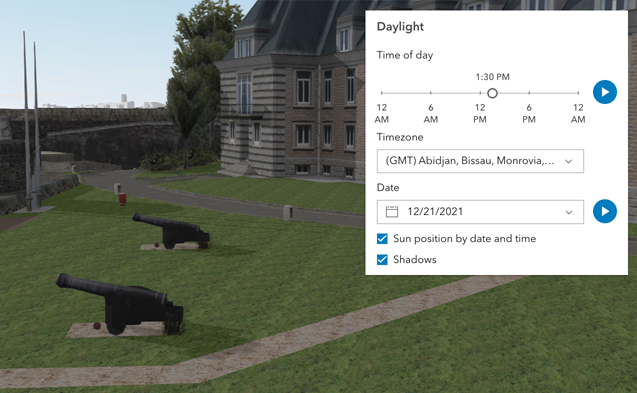](https://developers.arcgis.com/javascript/latest/sample-code/daylight/)\n\nThe component has an option to select the timezone. When the user makes any adjustments here, a new time\nin the chosen timezone is calculated and displayed in the slider. The timezone selector can be disabled\nby using the [hideTimezone](#hideTimezone) property.\n\nBy default, a calendar is displayed to select the day, month, and year.\nWith the [dateOrSeason](#dateOrSeason) property, the calendar can be replaced with\na dropdown menu where a season can be selected instead:\n\n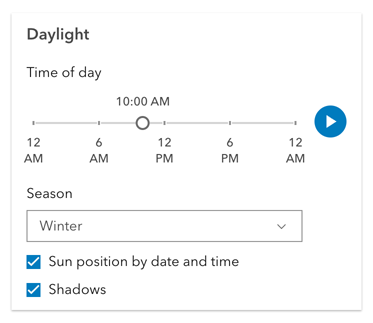\n\nThere are two play buttons: one corresponds to the time-of-day slider and animates the lighting\nover the course of a day, while the other corresponds to the date picker\nand animates the lighting over the course of a year (month by month). The speed of the animation can\nbe set using the [playSpeedMultiplier](#playSpeedMultiplier) property.\n\n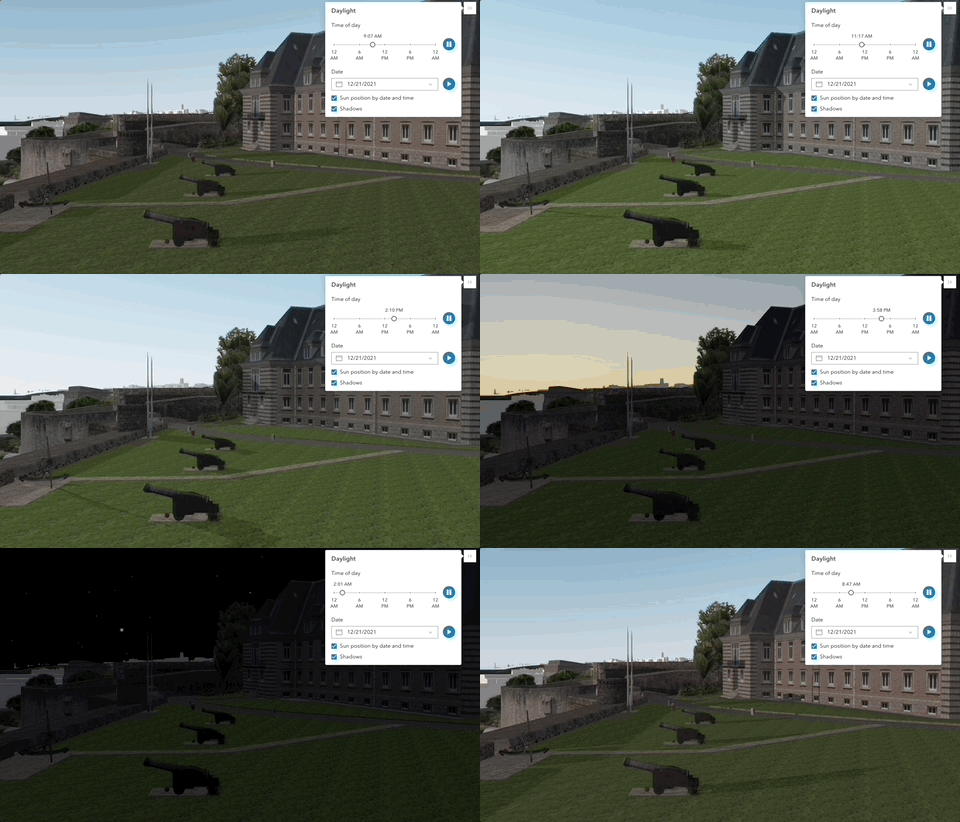\n\nExcept for the daytime slider, all the elements in the Daylight component can be hidden:\n\n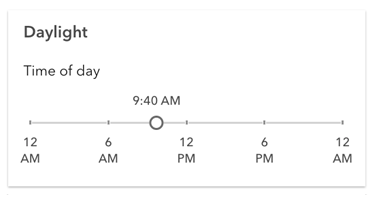\n\nWhenever the sun position option is unchecked, the scene applies the\n**[virtual light](https://developers.arcgis.com/javascript/latest/api-reference/esri-views-3d-environment-VirtualLighting.html)** source relative to the camera.\nWith this, the component's time slider, timezone, and date picker get automatically disabled:\n\n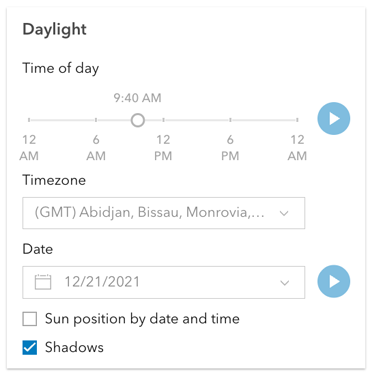\n\n**Things to consider**\n\n* Daylight is only supported in a 3D [Scene](https://developers.arcgis.com/javascript/latest/references/map-components/arcgis-scene/) component.\n* The Daylight component uses UTC time and does not account for the daylight savings times in different countries and regions of the world.\n* When using the [virtual light](https://developers.arcgis.com/javascript/latest/api-reference/esri-views-3d-environment-VirtualLighting.html),\nsetting the time and date programmatically does not have an influence on the lighting conditions of the scene.\n* When using the [sunlight](https://developers.arcgis.com/javascript/latest/api-reference/esri-views-3d-environment-SunLighting.html),\nthe time slider and time zone automatically react to the changes of the camera (e.g., position, rotation, pan, zoom) because the position of the simulated sun\nis updated to maintain a consistent solar time of day based on the camera's current longitude. This can be adjusted using the\n[cameraTrackingEnabled](https://developers.arcgis.com/javascript/latest/api-reference/esri-views-3d-environment-SunLighting.html#cameraTrackingEnabled)\nproperty on [environment.lighting](https://developers.arcgis.com/javascript/latest/references/map-components/arcgis-scene/#environment).\n--\n\n### Events\n- **arcgisReady** - Emitted when the component associated with a map or scene view is ready to be interacted with.\n- **arcgisUserDateTimeChange** - Fires when the user changes the date or time in the component by interacting with the slider, the date picker, the\nseason selector or the play buttons.\n\n### Methods\n- `componentOnReady(): Promise<void>` - Create a promise that resolves once component is fully loaded.\n- `destroy(): Promise<void>` - Permanently destroy the component.",
|
|
2857
2857
|
"doc-url": "https://developers.arcgis.com/javascript/latest/references/map-components/arcgis-daylight/",
|
|
2858
2858
|
"attributes": [
|
|
2859
2859
|
{
|
|
@@ -2866,7 +2866,7 @@
|
|
|
2866
2866
|
},
|
|
2867
2867
|
{
|
|
2868
2868
|
"name": "current-season",
|
|
2869
|
-
"description": "Sets the season that is used when the component displays
|
|
2869
|
+
"description": "Sets the season that is used when the component displays the season picker.\nEach season uses a fixed date corresponding to the seasonal equinoxes and solstices.",
|
|
2870
2870
|
"value": {
|
|
2871
2871
|
"type": [
|
|
2872
2872
|
"\"fall\"",
|
|
@@ -2895,14 +2895,6 @@
|
|
|
2895
2895
|
"type": "boolean"
|
|
2896
2896
|
}
|
|
2897
2897
|
},
|
|
2898
|
-
{
|
|
2899
|
-
"name": "direct-shadows-disabled",
|
|
2900
|
-
"description": "Indicates whether to hide shadows cast by the sun.\n\n**See also**\n\n- [SunLighting.directShadowsEnabled](https://developers.arcgis.com/javascript/latest/api-reference/esri-views-3d-environment-SunLighting.html#directShadowsEnabled)\n- [Scene's `environment`](https://developers.arcgis.com/javascript/latest/references/map-components/arcgis-scene/#environment)",
|
|
2901
|
-
"default": "false",
|
|
2902
|
-
"value": {
|
|
2903
|
-
"type": "boolean"
|
|
2904
|
-
}
|
|
2905
|
-
},
|
|
2906
2898
|
{
|
|
2907
2899
|
"name": "heading-level",
|
|
2908
2900
|
"description": "Indicates the heading level to use for the component title.",
|
|
@@ -2962,7 +2954,7 @@
|
|
|
2962
2954
|
},
|
|
2963
2955
|
{
|
|
2964
2956
|
"name": "icon",
|
|
2965
|
-
"description": "Icon which represents the component. Typically used when the component is controlled by another component (e.g. by the Expand component)
|
|
2957
|
+
"description": "Icon which represents the component. Typically used when the component is controlled by another component (e.g. by the Expand component).",
|
|
2966
2958
|
"default": "\"brightness\"",
|
|
2967
2959
|
"value": {
|
|
2968
2960
|
"type": "string"
|
|
@@ -2993,16 +2985,6 @@
|
|
|
2993
2985
|
"type": "number"
|
|
2994
2986
|
}
|
|
2995
2987
|
},
|
|
2996
|
-
{
|
|
2997
|
-
"name": "playing-state",
|
|
2998
|
-
"value": {
|
|
2999
|
-
"type": [
|
|
3000
|
-
"\"day\"",
|
|
3001
|
-
"\"none\"",
|
|
3002
|
-
"\"year\""
|
|
3003
|
-
]
|
|
3004
|
-
}
|
|
3005
|
-
},
|
|
3006
2988
|
{
|
|
3007
2989
|
"name": "position",
|
|
3008
2990
|
"description": "**Deprecated**: since 4.34, use [`slot`](https://developers.arcgis.com/javascript/latest/building-your-ui/#slots) instead.. ",
|
|
@@ -3027,14 +3009,6 @@
|
|
|
3027
3009
|
"type": "string"
|
|
3028
3010
|
}
|
|
3029
3011
|
},
|
|
3030
|
-
{
|
|
3031
|
-
"name": "sunlighting-disabled",
|
|
3032
|
-
"description": "When set, the light source is positioned relative to the camera, using\n[VirtualLighting](https://developers.arcgis.com/javascript/latest/api-reference/esri-views-3d-environment-VirtualLighting.html).\nOtherwise, [date and time](https://developers.arcgis.com/javascript/latest/api-reference/esri-views-3d-environment-SunLighting.html)\nare used to determine position of the light source.",
|
|
3033
|
-
"default": "false",
|
|
3034
|
-
"value": {
|
|
3035
|
-
"type": "boolean"
|
|
3036
|
-
}
|
|
3037
|
-
},
|
|
3038
3012
|
{
|
|
3039
3013
|
"name": "time-slider-position",
|
|
3040
3014
|
"description": "Slider position for the time of day in the timezone\ngiven by [utcOffset](#utcOffset). The position represents the time\nof the day in minutes. Possible values range between 0 and 1440.",
|
|
@@ -3044,7 +3018,7 @@
|
|
|
3044
3018
|
},
|
|
3045
3019
|
{
|
|
3046
3020
|
"name": "time-slider-steps",
|
|
3047
|
-
"description": "Sets the interval, in minutes, with which the time slider increments or decrements as it is dragged or changed via the keyboard
|
|
3021
|
+
"description": "Sets the interval, in minutes, with which the time slider increments or decrements as it is dragged or changed via the keyboard.",
|
|
3048
3022
|
"default": "5",
|
|
3049
3023
|
"value": {
|
|
3050
3024
|
"type": "number"
|
|
@@ -3087,7 +3061,7 @@
|
|
|
3087
3061
|
},
|
|
3088
3062
|
{
|
|
3089
3063
|
"name": "currentSeason",
|
|
3090
|
-
"description": "Sets the season that is used when the component displays
|
|
3064
|
+
"description": "Sets the season that is used when the component displays the season picker.\nEach season uses a fixed date corresponding to the seasonal equinoxes and solstices.",
|
|
3091
3065
|
"type": "\"fall\" | \"spring\" | \"summer\" | \"winter\""
|
|
3092
3066
|
},
|
|
3093
3067
|
{
|
|
@@ -3100,11 +3074,6 @@
|
|
|
3100
3074
|
"description": "Starts or pauses the daytime animation cycling through the minutes of the day.\nSet the property to `true` to start the animation and to `false` to pause it.",
|
|
3101
3075
|
"type": "boolean"
|
|
3102
3076
|
},
|
|
3103
|
-
{
|
|
3104
|
-
"name": "directShadowsDisabled",
|
|
3105
|
-
"description": "Indicates whether to hide shadows cast by the sun.\n\n**See also**\n\n- [SunLighting.directShadowsEnabled](https://developers.arcgis.com/javascript/latest/api-reference/esri-views-3d-environment-SunLighting.html#directShadowsEnabled)\n- [Scene's `environment`](https://developers.arcgis.com/javascript/latest/references/map-components/arcgis-scene/#environment)",
|
|
3106
|
-
"type": "boolean"
|
|
3107
|
-
},
|
|
3108
3077
|
{
|
|
3109
3078
|
"name": "headingLevel",
|
|
3110
3079
|
"description": "Indicates the heading level to use for the component title.",
|
|
@@ -3136,7 +3105,7 @@
|
|
|
3136
3105
|
},
|
|
3137
3106
|
{
|
|
3138
3107
|
"name": "icon",
|
|
3139
|
-
"description": "Icon which represents the component. Typically used when the component is controlled by another component (e.g. by the Expand component)
|
|
3108
|
+
"description": "Icon which represents the component. Typically used when the component is controlled by another component (e.g. by the Expand component).",
|
|
3140
3109
|
"type": "string"
|
|
3141
3110
|
},
|
|
3142
3111
|
{
|
|
@@ -3149,10 +3118,6 @@
|
|
|
3149
3118
|
"description": "The calendar date in the timezone given by [utcOffset](#utcOffset).",
|
|
3150
3119
|
"type": "Date | number | string"
|
|
3151
3120
|
},
|
|
3152
|
-
{
|
|
3153
|
-
"name": "playingState",
|
|
3154
|
-
"type": "\"day\" | \"none\" | \"year\""
|
|
3155
|
-
},
|
|
3156
3121
|
{
|
|
3157
3122
|
"name": "playSpeedMultiplier",
|
|
3158
3123
|
"description": "Controls the daytime and date animation speed.",
|
|
@@ -3167,11 +3132,6 @@
|
|
|
3167
3132
|
"description": "By assigning the `id` attribute of the Map or Scene component to this property, you can position a child component anywhere in the DOM while still maintaining a connection to the Map or Scene.",
|
|
3168
3133
|
"type": "HTMLArcgisLinkChartElement | HTMLArcgisMapElement | HTMLArcgisSceneElement | string"
|
|
3169
3134
|
},
|
|
3170
|
-
{
|
|
3171
|
-
"name": "sunlightingDisabled",
|
|
3172
|
-
"description": "When set, the light source is positioned relative to the camera, using\n[VirtualLighting](https://developers.arcgis.com/javascript/latest/api-reference/esri-views-3d-environment-VirtualLighting.html).\nOtherwise, [date and time](https://developers.arcgis.com/javascript/latest/api-reference/esri-views-3d-environment-SunLighting.html)\nare used to determine position of the light source.",
|
|
3173
|
-
"type": "boolean"
|
|
3174
|
-
},
|
|
3175
3135
|
{
|
|
3176
3136
|
"name": "supported",
|
|
3177
3137
|
"type": "boolean"
|
|
@@ -3183,8 +3143,8 @@
|
|
|
3183
3143
|
},
|
|
3184
3144
|
{
|
|
3185
3145
|
"name": "timeSliderSteps",
|
|
3186
|
-
"description": "Sets the interval, in minutes, with which the time slider increments or decrements as it is dragged or changed via the keyboard
|
|
3187
|
-
"type": "number"
|
|
3146
|
+
"description": "Sets the interval, in minutes, with which the time slider increments or decrements as it is dragged or changed via the keyboard.",
|
|
3147
|
+
"type": "Array<number> | number"
|
|
3188
3148
|
},
|
|
3189
3149
|
{
|
|
3190
3150
|
"name": "utcOffset",
|
|
@@ -3193,7 +3153,7 @@
|
|
|
3193
3153
|
},
|
|
3194
3154
|
{
|
|
3195
3155
|
"name": "view",
|
|
3196
|
-
"type": "
|
|
3156
|
+
"type": "SceneView"
|
|
3197
3157
|
},
|
|
3198
3158
|
{
|
|
3199
3159
|
"name": "yearPlaying",
|
|
@@ -5292,7 +5252,7 @@
|
|
|
5292
5252
|
},
|
|
5293
5253
|
{
|
|
5294
5254
|
"name": "arcgis-feature",
|
|
5295
|
-
"description": "The Feature component displays a graphic according to its [PopupTemplate](https://developers.arcgis.com/javascript/latest/api-reference/esri-PopupTemplate.html).\nThis component is useful in instances where you want to display information about a feature but without\nthe use of a [Popup](https://developers.arcgis.com/javascript/latest/api-reference/esri-widgets-Popup.html).\n\nIf wanting to show a feature's content with [actions](https://developers.arcgis.com/javascript/latest/api-reference/esri-PopupTemplate.html#actions), [related](https://developers.arcgis.com/javascript/latest/api-reference/esri-popup-content-RelationshipContent.html), or [clustering](https://developers.arcgis.com/javascript/latest/api-reference/esri-layers-support-FeatureReductionCluster.html#popupTemplate), etc., then use the [arcgis-features](https://developers.arcgis.com/javascript/latest/references/map-components/arcgis-features/) component.\n\nWhen Arcade expressions that use `$map` or [geometry functions](https://developers.arcgis.com/arcade/function-reference/geometry_functions/) are defined in any popup template content or as expression elements,\nthe [map](#map) and [spatialReference](#spatialReference) properties need to be defined in the Feature component.\n--\n\n### Events\n- **arcgisPropertyChange** - Emitted when the value of a property is changed. Use this to listen to changes to properties.\n- **arcgisReady** - Emitted when the component associated with a map or scene view is ready to be interacted with.\n\n### Methods\n- `componentOnReady(): Promise<void>` - Create a promise that resolves once component is fully loaded.\n- `destroy(): Promise<void>` - Permanently destroy the component.\n- `nextMedia(contentElementIndex: number): Promise<void>` - Paginates to the next [media](https://developers.arcgis.com/javascript/latest/api-reference/esri-popup-content-MediaContent.html) info.\n- `previousMedia(contentElementIndex: number): Promise<void>` - Paginates to the previous [media](https://developers.arcgis.com/javascript/latest/api-reference/esri-popup-content-MediaContent.html) info
|
|
5255
|
+
"description": "The Feature component displays a graphic according to its [PopupTemplate](https://developers.arcgis.com/javascript/latest/api-reference/esri-PopupTemplate.html).\nThis component is useful in instances where you want to display information about a feature but without\nthe use of a [Popup](https://developers.arcgis.com/javascript/latest/api-reference/esri-widgets-Popup.html).\n\nIf wanting to show a feature's content with [actions](https://developers.arcgis.com/javascript/latest/api-reference/esri-PopupTemplate.html#actions), [related](https://developers.arcgis.com/javascript/latest/api-reference/esri-popup-content-RelationshipContent.html), or [clustering](https://developers.arcgis.com/javascript/latest/api-reference/esri-layers-support-FeatureReductionCluster.html#popupTemplate), etc., then use the [arcgis-features](https://developers.arcgis.com/javascript/latest/references/map-components/arcgis-features/) component.\n\nWhen Arcade expressions that use `$map` or [geometry functions](https://developers.arcgis.com/arcade/function-reference/geometry_functions/) are defined in any popup template content or as expression elements,\nthe [map](#map) and [spatialReference](#spatialReference) properties need to be defined in the Feature component.\n--\n\n### Events\n- **arcgisPropertyChange** - Emitted when the value of a property is changed. Use this to listen to changes to properties.\n- **arcgisReady** - Emitted when the component associated with a map or scene view is ready to be interacted with.\n\n### Methods\n- `componentOnReady(): Promise<void>` - Create a promise that resolves once component is fully loaded.\n- `destroy(): Promise<void>` - Permanently destroy the component.\n- `nextMedia(contentElementIndex: number): Promise<void>` - Paginates to the next [media](https://developers.arcgis.com/javascript/latest/api-reference/esri-popup-content-MediaContent.html) info.\n- `previousMedia(contentElementIndex: number): Promise<void>` - Paginates to the previous [media](https://developers.arcgis.com/javascript/latest/api-reference/esri-popup-content-MediaContent.html) info.\n- `setActiveMedia(contentElementIndex: number, mediaInfoIndex: number): Promise<void>` - Paginates to a specified [media](https://developers.arcgis.com/javascript/latest/api-reference/esri-popup-content-MediaContent.html) info object. For example,\nyou may have [media](https://developers.arcgis.com/javascript/latest/api-reference/esri-popup-content-MediaContent.html) content which contains\nmultiple `mediaInfos`. This method allows you to specify the index of the `mediaInfos`\nyou wish to display.\n- `updateGeometry(): Promise<void>` - Updates the geometry of the graphic.",
|
|
5296
5256
|
"doc-url": "https://developers.arcgis.com/javascript/latest/references/map-components/arcgis-feature/",
|
|
5297
5257
|
"attributes": [
|
|
5298
5258
|
{
|
|
@@ -5511,7 +5471,7 @@
|
|
|
5511
5471
|
},
|
|
5512
5472
|
{
|
|
5513
5473
|
"name": "show-utility-network-content",
|
|
5514
|
-
"description": "This property provides the ability to hide or show [utility network content](https://developers.arcgis.com/javascript/latest/api-reference/esri-popup-content-
|
|
5474
|
+
"description": "This property provides the ability to hide or show [utility network content](https://developers.arcgis.com/javascript/latest/api-reference/esri-popup-content-UtilityNetworkAssociationsContent.html) within the component.",
|
|
5515
5475
|
"default": "false",
|
|
5516
5476
|
"value": {
|
|
5517
5477
|
"type": "boolean"
|
|
@@ -5567,11 +5527,6 @@
|
|
|
5567
5527
|
"description": "Enables automatic creation of a popup template for layers that have popups enabled but no\npopupTemplate defined. Automatic popup templates are supported for layers that\nsupport the `createPopupTemplate()` method. (Supported for\n[FeatureLayer](https://developers.arcgis.com/javascript/latest/api-reference/esri-layers-FeatureLayer.html),\n[GeoJSONLayer](https://developers.arcgis.com/javascript/latest/api-reference/esri-layers-GeoJSONLayer.html),\n[SceneLayer](https://developers.arcgis.com/javascript/latest/api-reference/esri-layers-SceneLayer.html),\n[CSVLayer](https://developers.arcgis.com/javascript/latest/api-reference/esri-layers-CSVLayer.html),\n[OGCFeatureLayer](https://developers.arcgis.com/javascript/latest/api-reference/esri-layers-OGCFeatureLayer.html)\n[PointCloudLayer](https://developers.arcgis.com/javascript/latest/api-reference/esri-layers-PointCloudLayer.html),\n[StreamLayer](https://developers.arcgis.com/javascript/latest/api-reference/esri-layers-StreamLayer.html), and\n[ImageryLayer](https://developers.arcgis.com/javascript/latest/api-reference/esri-layers-ImageryLayer.html)).\n\n**Note:**\nStarting with version 4.28, `date` fields are formatted using the `short-date-short-time` preset [dateFormat](https://developers.arcgis.com/javascript/latest/api-reference/esri-popup-support-FieldInfoFormat.html#dateFormat)\nrather than `long-month-day-year` in the default [popup](https://developers.arcgis.com/javascript/latest/api-reference/esri-PopupTemplate.html) created by setting the `defaultPopupTemplateEnabled` property to `true`.\nFor example, previously a date that may have appeared as `\"December 30, 1997\"` will now appear as `\"12/30/1997 6:00 PM\"`.",
|
|
5568
5528
|
"type": "boolean"
|
|
5569
5529
|
},
|
|
5570
|
-
{
|
|
5571
|
-
"name": "flowItems",
|
|
5572
|
-
"description": "A collection of flow items that are used to manage drill-in navigation.",
|
|
5573
|
-
"type": "Collection<HTMLArcgisFeatureElement | HTMLArcgisFeatureRelationshipElement | HTMLArcgisFeatureUtilityNetworkAssociationsElement>"
|
|
5574
|
-
},
|
|
5575
5530
|
{
|
|
5576
5531
|
"name": "graphic",
|
|
5577
5532
|
"description": "The [Graphic](https://developers.arcgis.com/javascript/latest/api-reference/esri-Graphic.html) used to represent the feature.",
|
|
@@ -5713,7 +5668,7 @@
|
|
|
5713
5668
|
},
|
|
5714
5669
|
{
|
|
5715
5670
|
"name": "showUtilityNetworkContent",
|
|
5716
|
-
"description": "This property provides the ability to hide or show [utility network content](https://developers.arcgis.com/javascript/latest/api-reference/esri-popup-content-
|
|
5671
|
+
"description": "This property provides the ability to hide or show [utility network content](https://developers.arcgis.com/javascript/latest/api-reference/esri-popup-content-UtilityNetworkAssociationsContent.html) within the component.",
|
|
5717
5672
|
"type": "boolean"
|
|
5718
5673
|
},
|
|
5719
5674
|
{
|
|
@@ -9314,7 +9269,7 @@
|
|
|
9314
9269
|
},
|
|
9315
9270
|
{
|
|
9316
9271
|
"name": "arcgis-legend",
|
|
9317
|
-
"description": "The Legend component displays the symbols and labels used to represent layers in a [arcgis-map](https://developers.arcgis.com/javascript/latest/references/map-components/arcgis-map/) or [arcgis-scene](https://developers.arcgis.com/javascript/latest/references/map-components/arcgis-scene/).\nOnly layers and sublayers visible in the view are shown, unless [ignoreLayerVisibility](https://developers.arcgis.com/javascript/latest/references/map-components/arcgis-legend/#ignoreLayerVisibility) is set to `true`.\n\nThe legend automatically updates when:\n - the visibility of a layer or sublayer changes\n - a layer is added or removed from the map\n - a layer's `renderer`, `opacity`, or `title` is changed\n - the `legendEnabled` property is changed (set to `true` or `false` on the layer)\n\n## Known Limitations\n\n* Currently, the legend component does not support the following layer types:\n[ElevationLayer](https://developers.arcgis.com/javascript/latest/api-reference/esri-layers-ElevationLayer.html),\n[GraphicsLayer](https://developers.arcgis.com/javascript/latest/api-reference/esri-layers-GraphicsLayer.html),\n[IntegratedMeshLayer](https://developers.arcgis.com/javascript/latest/api-reference/esri-layers-IntegratedMeshLayer.html),\n[KMLLayer](https://developers.arcgis.com/javascript/latest/api-reference/esri-layers-KMLLayer.html),\n[MapNotesLayer](https://developers.arcgis.com/javascript/latest/api-reference/esri-layers-MapNotesLayer.html),\n[OpenStreetMapLayer](https://developers.arcgis.com/javascript/latest/api-reference/esri-layers-OpenStreetMapLayer.html),\n[VectorTileLayer](https://developers.arcgis.com/javascript/latest/api-reference/esri-layers-VectorTileLayer.html),\n[VideoLayer](https://developers.arcgis.com/javascript/latest/api-reference/esri-layers-VideoLayer.html), and\n[WebTileLayer](https://developers.arcgis.com/javascript/latest/api-reference/esri-layers-WebTileLayer.html).\n* [Symbol3D](https://developers.arcgis.com/javascript/latest/api-reference/esri-symbols-Symbol3D.html) with more than one\n[symbol](https://developers.arcgis.com/javascript/latest/api-reference/esri-symbols-Symbol3DLayer.html) are not supported.\n* [DictionaryRenderer](https://developers.arcgis.com/javascript/latest/api-reference/esri-renderers-DictionaryRenderer.html) is not supported.\n* [TrackInfo](https://developers.arcgis.com/javascript/latest/api-reference/esri-layers-support-TrackInfo.html) is not supported.\n* CIM Symbol [primitiveOverride](https://developers.arcgis.com/javascript/latest/api-reference/esri-symbols-CIMSymbol.html#PrimitiveOverride) is not supported.\n* RasterStretchRenderer [dynamicRangeAdjustment](https://developers.arcgis.com/javascript/latest/api-reference/esri-renderers-RasterStretchRenderer.html#dynamicRangeAdjustment) is not supported.\n\n## Various examples of legends based on renderer type.\n\n### Unique values\n\n[](https://developers.arcgis.com/javascript/latest/sample-code/visualization-location-types/)\n\n### Continuous color\n\n[](https://developers.arcgis.com/javascript/latest/sample-code/visualization-vv-color/)\n\n### Classed color\n\n[](https://developers.arcgis.com/javascript/latest/sample-code/visualization-classbreaks/)\n\n### Continuous size\n\n[](https://developers.arcgis.com/javascript/latest/sample-code/visualization-sm-size/)\n\n### Size - above and below\n\n[](https://developers.arcgis.com/javascript/latest/sample-code/visualization-sm-size-themes/)\n\n### Dot density\n\n[](https://developers.arcgis.com/javascript/latest/sample-code/visualization-dot-density/)\n\n### Predominance\n\n[](https://developers.arcgis.com/javascript/latest/sample-code/visualization-arcade/)\n\n### Relationship\n\n[](https://developers.arcgis.com/javascript/latest/sample-code/visualization-sm-relationship/)\n--\n\n### Events\n- **arcgisPropertyChange** - Emitted when the value of a property is changed. Use this to listen to changes to properties.\n- **arcgisReady** - Emitted when the component associated with a map or scene view is ready to be interacted with.\n\n### Methods\n- `componentOnReady(): Promise<void>` - Create a promise that resolves once component is fully loaded.\n- `destroy(): Promise<void>` - Permanently destroy the component.",
|
|
9272
|
+
"description": "The Legend component displays the symbols and labels used to represent layers in a [arcgis-map](https://developers.arcgis.com/javascript/latest/references/map-components/arcgis-map/) or [arcgis-scene](https://developers.arcgis.com/javascript/latest/references/map-components/arcgis-scene/).\nOnly layers and sublayers visible in the view are shown, unless [ignoreLayerVisibility](https://developers.arcgis.com/javascript/latest/references/map-components/arcgis-legend/#ignoreLayerVisibility) is set to `true`.\n\nThe legend automatically updates when:\n - the visibility of a layer or sublayer changes\n - a layer is added or removed from the map\n - a layer's `renderer`, `opacity`, or `title` is changed\n - the `legendEnabled` property is changed (set to `true` or `false` on the layer)\n\n## Known Limitations\n\n* Currently, the legend component does not support the following layer types:\n[ElevationLayer](https://developers.arcgis.com/javascript/latest/api-reference/esri-layers-ElevationLayer.html),\n[GraphicsLayer](https://developers.arcgis.com/javascript/latest/api-reference/esri-layers-GraphicsLayer.html),\n[IntegratedMeshLayer](https://developers.arcgis.com/javascript/latest/api-reference/esri-layers-IntegratedMeshLayer.html),\n[KMLLayer](https://developers.arcgis.com/javascript/latest/api-reference/esri-layers-KMLLayer.html),\n[MapNotesLayer](https://developers.arcgis.com/javascript/latest/api-reference/esri-layers-MapNotesLayer.html),\n[OpenStreetMapLayer](https://developers.arcgis.com/javascript/latest/api-reference/esri-layers-OpenStreetMapLayer.html),\n[VectorTileLayer](https://developers.arcgis.com/javascript/latest/api-reference/esri-layers-VectorTileLayer.html),\n[VideoLayer](https://developers.arcgis.com/javascript/latest/api-reference/esri-layers-VideoLayer.html), and\n[WebTileLayer](https://developers.arcgis.com/javascript/latest/api-reference/esri-layers-WebTileLayer.html).\n* [Symbol3D](https://developers.arcgis.com/javascript/latest/api-reference/esri-symbols-Symbol3D.html) with more than one\n[symbol](https://developers.arcgis.com/javascript/latest/api-reference/esri-symbols-Symbol3DLayer.html) are not supported.\n* [DictionaryRenderer](https://developers.arcgis.com/javascript/latest/api-reference/esri-renderers-DictionaryRenderer.html) is not supported.\n* [TrackInfo](https://developers.arcgis.com/javascript/latest/api-reference/esri-layers-support-TrackInfo.html) is not supported.\n* CIM Symbol [primitiveOverride](https://developers.arcgis.com/javascript/latest/api-reference/esri-symbols-CIMSymbol.html#PrimitiveOverride) is not supported.\n* RasterStretchRenderer [dynamicRangeAdjustment](https://developers.arcgis.com/javascript/latest/api-reference/esri-renderers-RasterStretchRenderer.html#dynamicRangeAdjustment) is not supported.\n\n## Various examples of legends based on renderer type.\n\n### Unique values\n\n[](https://developers.arcgis.com/javascript/latest/sample-code/visualization-location-types/)\n\n### Continuous color\n\n[](https://developers.arcgis.com/javascript/latest/sample-code/visualization-vv-color/)\n\n### Classed color\n\n[](https://developers.arcgis.com/javascript/latest/sample-code/visualization-classbreaks/)\n\n### Continuous size\n\n[](https://developers.arcgis.com/javascript/latest/sample-code/visualization-sm-size/)\n\n### Size - above and below\n\n[](https://developers.arcgis.com/javascript/latest/sample-code/visualization-sm-size-themes/)\n\n### Dot density\n\n[](https://developers.arcgis.com/javascript/latest/sample-code/visualization-dot-density/)\n\n### Predominance\n\n[](https://developers.arcgis.com/javascript/latest/sample-code/visualization-arcade/)\n\n### Relationship\n\n[](https://developers.arcgis.com/javascript/latest/sample-code/visualization-sm-relationship/)\n\n\n### Legend Field Formatting Summary\n\nThe following table summarizes how legend field values are formatted for different renderer and visual variable types, and the order in which formatting options are applied.\n\n| Renderer / Visual Variable Type | Renderer Data Source | Formatting Priority (in order) |\n|----------------------------------------------|----------------------------------------|--------------------------------------------------------------------------------------------------------------------------------------------|\n| Visual variable stops (color, opacity, size) | Number field | 1. `stop.label`<br>2. FieldConfiguration<br>3. Default precision formatting with grouping |\n| Visual variable stops (color, opacity, size) | Number field / normalization field | 1. `stop.label`<br>2. FieldConfiguration (applies to main field, not normalization field)<br>3. Default precision formatting with grouping |\n| Visual variable | valueExpression | 1. `stop.label`<br>2. Default precision formatting with grouping |\n| Unique-value renderer labels | Field value | 1. UniqueValueRenderer class label<br>2. Domain name<br>3. FieldConfiguration or PopupTemplate<br>4. Raw field value (if string) or default precision formatting with grouping (for number)|\n| Renderer title | FieldConfiguration or PopupTemplate | 1. FieldConfiguration<br>2. PopupTemplate |\n\n#### Legend Field Formatting Notes\n- [FieldConfiguration](https://developers.arcgis.com/javascript/latest/api-reference/esri-layers-support-FieldConfiguration.html): Defines how fields in a layer are displayed and formatted within widgets and UI components.\n- [PopupTemplate](https://developers.arcgis.com/javascript/latest/api-reference/esri-PopupTemplate.html): Used as a fallback for layers that don’t support FieldConfigurations.\n- VisualVariable stop labels: If any stop has a label, it is used directly; otherwise, labels are generated at runtime. See [ColorStop](https://developers.arcgis.com/javascript/latest/api-reference/esri-renderers-visualVariables-support-ColorStop.html), [OpacityStop](https://developers.arcgis.com/javascript/latest/api-reference/esri-renderers-visualVariables-support-OpacityStop.html), and [SizeStop](https://developers.arcgis.com/javascript/latest/api-reference/esri-renderers-visualVariables-support-SizeStop.html).\n- Normalization Field: Only the main field’s formatting is used, not the normalization field. See [ColorVariable](https://developers.arcgis.com/javascript/latest/api-reference/esri-renderers-visualVariables-ColorVariable.html#normalizationField), [OpacityVariable](https://developers.arcgis.com/javascript/latest/api-reference/esri-renderers-visualVariables-OpacityVariable.html#normalizationField), and [SizeVariable](https://developers.arcgis.com/javascript/latest/api-reference/esri-renderers-visualVariables-SizeVariable.html#normalizationField).\n- [VisualVariable value expressions](https://developers.arcgis.com/javascript/latest/api-reference/esri-renderers-visualVariables-ColorVariable.html#valueExpression): Since there’s no field, field formatting does not apply; fallback is default formatting.\n- WebMap and Layer persistence: Labels generated at runtime by the legend are not persisted.\n--\n\n### Events\n- **arcgisPropertyChange** - Emitted when the value of a property is changed. Use this to listen to changes to properties.\n- **arcgisReady** - Emitted when the component associated with a map or scene view is ready to be interacted with.\n\n### Methods\n- `componentOnReady(): Promise<void>` - Create a promise that resolves once component is fully loaded.\n- `destroy(): Promise<void>` - Permanently destroy the component.",
|
|
9318
9273
|
"doc-url": "https://developers.arcgis.com/javascript/latest/references/map-components/arcgis-legend/",
|
|
9319
9274
|
"attributes": [
|
|
9320
9275
|
{
|
|
@@ -10731,7 +10686,7 @@
|
|
|
10731
10686
|
},
|
|
10732
10687
|
{
|
|
10733
10688
|
"name": "arcgis-map",
|
|
10734
|
-
"description": "The ArcGIS Map component is used to add 2D maps to web applications. For 3D maps, use the\n[ArcGIS Scene component](https://developers.arcgis.com/javascript/latest/references/map-components/arcgis-scene/).\n\nThe Map component creates a [MapView](https://developers.arcgis.com/javascript/latest/api-reference/esri-views-MapView.html) and loads a WebMap from either [ArcGIS Online](https://www.arcgis.com/home/index.html) or [ArcGIS Enterprise portal](https://enterprise.arcgis.com/en/portal/latest/administer/windows/what-is-portal-for-arcgis-.htm).\n\n```html\n<arcgis-map item-id=\"05e015c5f0314db9a487a9b46cb37eca\"></arcgis-map>\n```\n\nAlternatively, the Map component can be initialized without a WebMap item.\n\n```html\n<arcgis-map basemap=\"satellite\" center=\"-154.88, 19.46\" zoom=\"15\"></arcgis-map>\n```\n\nOther components can be added and connected to the Map component.\n\n```html\n<arcgis-map item-id=\"05e015c5f0314db9a487a9b46cb37eca\">\n <arcgis-zoom slot=\"top-left\"></arcgis-zoom>\n <arcgis-legend slot=\"bottom-left\"></arcgis-legend>\n</arcgis-map>\n```\n\nThe Map component can be customized further using any of the [core API functionalities](https://developers.arcgis.com/javascript/latest/api-reference/) of the ArcGIS Maps SDK for JavaScript.\n\n```js\nconst viewElement = document.querySelector(\"arcgis-map\");\nviewElement.addEventListener(\"arcgisViewReadyChange\", () => {\n const layer = new GraphicsLayer({ title: \"My Layer\" });\n viewElement.map.add(layer);\n});\n```\n\nSee also:\n- [SDK sample apps using the Map component](https://developers.arcgis.com/javascript/latest/sample-code/?tagged=arcgis-map)\n- [Get started](https://developers.arcgis.com/javascript/latest/get-started/)\n- [Programming patterns](https://developers.arcgis.com/javascript/latest/programming-patterns/)\n--\n\n### Events\n- **arcgisLoadError** - Fires when a ArcgisMap fails to load or if one of its dependencies fails to load (e.g., basemap, ground, layers).\n- **arcgisViewAnalysisViewCreate** - Fires when the view for an analysis is created.\n\n[Read more](https://developers.arcgis.com/javascript/latest/api-reference/esri-views-MapView.html#event-analysis-view-create)\n- **arcgisViewAnalysisViewCreateError** - Fires when an error occurs during the creation of an analysis view after an analysis is added to the view.\n\n[Read more](https://developers.arcgis.com/javascript/latest/api-reference/esri-views-MapView.html#event-analysis-view-create-error)\n- **arcgisViewAnalysisViewDestroy** - Fires after an analysis view is destroyed.\n\n[Read more](https://developers.arcgis.com/javascript/latest/api-reference/esri-views-MapView.html#event-analysis-view-destroy)\n- **arcgisViewChange** - This event is for view related property changes: zoom, scale, center, rotation, extent, camera, viewpoint.\nThis event will also emit if stationary toggles from true to false.\n- **arcgisViewClick** - Fires after a user clicks on the view.\n- **arcgisViewDoubleClick** - Fires after double-clicking on the view.\n- **arcgisViewDrag** - Fires during a pointer drag on the view.\n- **arcgisViewHold** - Fires during a pointer drag on the view.\n- **arcgisViewImmediateClick** - Fires right after a user clicks on the view.\n- **arcgisViewImmediateDoubleClick** - Is emitted after two consecutive immediate-click events.\n- **arcgisViewKeyDown** - Fires after a keyboard key is pressed.\n- **arcgisViewKeyUp** - Fires after a keyboard key is pressed.\n- **arcgisViewLayerviewCreate** - Fires after each layer in the map has a corresponding LayerView created and rendered in the view.\n- **arcgisViewLayerviewCreateError** - Fires when an error emits during the creation of a LayerView after a layer has been added to the map.\n- **arcgisViewLayerviewDestroy** - Fires after a LayerView is destroyed and is no longer rendered in the view.\n- **arcgisViewMouseWheel** - Fires when a wheel button of a pointing device (typically a mouse) is scrolled on the view.\n- **arcgisViewPointerDown** - Fires after a mouse button is pressed, or a finger touches the display.\n- **arcgisViewPointerEnter** - Fires after a mouse cursor enters the view, or a display touch begins.\n- **arcgisViewPointerLeave** - Fires after a mouse cursor leaves the view, or a display touch ends.\n- **arcgisViewPointerMove** - Fires after the mouse or a finger on the display moves.\n- **arcgisViewPointerUp** - Fires after a mouse button is released, or a display touch ends.\n- **arcgisViewReadyChange** - This event is for the `ready` property and will be emitted when the view is ready.\nThis event will also emit if the `map` property is changed.\n- **arcgisViewReadyError** - Fires if the view encounters a content or rendering error.\n\n### Methods\n- `addLayer(layer: __esri.Layer | Promise<any>, index?: number): Promise<void>` - **Deprecated**: since 4.33, use `element.map.add(layer)` instead.\n\nAdds a layer to the map layers collection.. \n- `addLayers(layers: __esri.Layer[], index?: number): Promise<void>` - **Deprecated**: since 4.33, use `element.map.addMany([layer])` instead.\n\nAdds a layer or array of layers to the map layers collection.. \n- `addTable(table: __esri.FeatureLayer): Promise<void>` - **Deprecated**: since 4.33, use `element.map.tables.add(table)` instead.\n\nAdds a table to the map tables collection.. \n- `addTables(tables: __esri.FeatureLayer[], index?: number): Promise<void>` - **Deprecated**: since 4.33, use `element.map.tables.addMany([table])` instead.\n\nAdds a table or array of tables to the map tables collection.. \n- `closePopup(): Promise<void>` - Closes the popup.\n- `componentOnReady(): Promise<void>` - Create a promise that resolves once component is fully loaded.\n- `destroy(): Promise<void>` - Destroys the view, and any associated resources, including its map, popup, and UI elements.\n- `goTo(target: __esri.GoToTarget2D, options?: __esri.GoToOptions2D): Promise<unknown>` - Sets the view to a given target.\n- `hitTest(screenPoint: __esri.MapViewScreenPoint | MouseEvent, options?: __esri.MapViewHitTestOptions): Promise<__esri.HitTestResult>` - Returns hit test results from each layer that intersects the specified screen coordinates.\n- `openPopup(options?: __esri.PopupViewOpenPopupOptions): Promise<void>` - Opens the popup at the given location with content defined either explicitly with content or driven\nfrom the PopupTemplate of input features.\n- `takeScreenshot(options?: __esri.MapViewTakeScreenshotOptions): Promise<__esri.Screenshot>` - Create a screenshot of the current view.\n- `toMap(screenPoint: __esri.MapViewScreenPoint | MouseEvent): __esri.Point`\n- `toScreen(point: __esri.Point, options?: __esri.ToScreenOptions2D): __esri.MapViewScreenPoint | nullish`\n- `tryFatalErrorRecovery(): Promise<void>` - Call this method to clear any fatal errors resulting from a lost WebGL context.\n- `viewOnReady(callback?: (): void, errback?: (error: Error) => void): Promise<void>` - `viewOnReady()` may be leveraged once an instance of the component and its underlying [view](https://developers.arcgis.com/javascript/latest/references/map-components/arcgis-map/#view) is created and ready.\nThis method takes two input parameters, a `callback` function and an `errback` function, and returns a promise. The `callback` executes when the promise resolves, and the `errback` executes if the promise is rejected.\n- `whenAnalysisView(analysis: __esri.Analysis): Promise<__esri.AnalysisView2DUnion>` - Gets the analysis view created for the given analysis object.\n\n[Read more](https://developers.arcgis.com/javascript/latest/api-reference/esri-views-MapView.html#whenAnalysisView)\n- `whenLayerView(layer: __esri.Layer): Promise<__esri.LayerView>` - Gets the LayerView created on the view for the given layer.\n\n[Read more](https://developers.arcgis.com/javascript/latest/api-reference/esri-views-MapView.html#whenLayerView)\n\n### Slots\n- _default_ - Default slot for adding components to the map. User is responsible for positioning the content via CSS.\n- **top-left** - Slot for components positioned in the top-left corner.\n- **top-right** - Slot for components positioned in the top-right corner.\n- **bottom-left** - Slot for components positioned in the bottom-left corner.\n- **bottom-right** - Slot for components positioned in the bottom-right corner.\n- **top-start** - Slot for components positioned at the top-start (top-left in LTR, top-right in RTL).\n- **top-end** - Slot for components positioned at the top-end (top-right in LTR, top-left in RTL).\n- **bottom-start** - Slot for components positioned at the bottom-start (bottom-left in LTR, bottom-right in RTL).\n- **bottom-end** - Slot for components positioned at the bottom-end (bottom-right in LTR, bottom-left in RTL).\n- **popup** - Slot for the [Popup](https://developers.arcgis.com/javascript/latest/references/map-components/arcgis-popup/) component to open automatically on click. When using this slot, the [`popup-disabled`](#popupDisabled) attribute must be set to `true`. Only the Popup component can be placed in this slot.\n\n### CSS Properties\n- **--arcgis-layout-overlay-space-top** - _Since 4.34_ Specifies the top padding for the layout. \n- **--arcgis-layout-overlay-space-bottom** - _Since 4.34_ Specifies the bottom padding for the layout. \n- **--arcgis-layout-overlay-space-left** - _Since 4.34_ Specifies the left padding for the layout. \n- **--arcgis-layout-overlay-space-right** - _Since 4.34_ Specifies the right padding for the layout. ",
|
|
10689
|
+
"description": "The ArcGIS Map component is used to add 2D maps to web applications. For 3D maps, use the\n[ArcGIS Scene component](https://developers.arcgis.com/javascript/latest/references/map-components/arcgis-scene/).\n\n#### Initializing the Map component\nThe Map component creates a [MapView](https://developers.arcgis.com/javascript/latest/api-reference/esri-views-MapView.html) and\nand can be initialized in one of three ways:\n\n##### 1. Using a WebMap\nLoad a [WebMap](https://developers.arcgis.com/javascript/latest/api-reference/esri-WebMap.html) from [ArcGIS Online](https://www.arcgis.com/home/index.html)\nor an [ArcGIS Enterprise portal](https://enterprise.arcgis.com/en/portal/latest/administer/windows/what-is-portal-for-arcgis-.htm) by specifying the [item-id](#itemId) attribute.\n\n```html\n<arcgis-map item-id=\"05e015c5f0314db9a487a9b46cb37eca\"></arcgis-map>\n```\n\n##### 2. Setting Map component attributes directly\nDefine the Map component using attributes like [basemap](#basemap), [center](#center), and [zoom](#zoom) directly.\n\n```html\n<arcgis-map basemap=\"satellite\" center=\"-154.88, 19.46\" zoom=\"15\"></arcgis-map>\n```\n\n##### 3. Providing a Map instance\nAlternatively, you can provide your own [Map](https://developers.arcgis.com/javascript/latest/api-reference/esri-Map.html) instance to the component.\nThis allows full control over map configuration, including [basemap](#basemap), operational [layers](https://developers.arcgis.com/javascript/latest/api-reference/esri-Map.html#layers)\nand [spatial reference](#spatialReference). See the [Select features by rectangle sample](https://developers.arcgis.com/javascript/latest/sample-code/highlight-features-by-geometry/)\nfor an example of this approach in action.\n\n```html\n<arcgis-map></arcgis-map>\n<script type=\"module\">\n const viewElement = document.querySelector(\"arcgis-map\");\n\n // set the basemap of the map to states feature layer\n // add national parks feature layer and a polygon graphics layer\n viewElement.map = new Map({\n basemap: new Basemap({ baseLayers: [states] }),\n layers: [nationalParksLayer, polygonGraphicsLayer]\n });\n\n // set the spatial reference of the map to NAD 1983 Albers contiguous USA\n viewElement.spatialReference = { wkid: 102003 };\n</script>\n```\n#### Adding components and customizing the Map\n\nOther components can be added and connected to the Map component.\n\n```html\n<arcgis-map item-id=\"05e015c5f0314db9a487a9b46cb37eca\">\n <arcgis-zoom slot=\"top-left\"></arcgis-zoom>\n <arcgis-legend slot=\"bottom-left\"></arcgis-legend>\n</arcgis-map>\n```\n\nThe Map component can be customized further using any of the [core API functionalities](https://developers.arcgis.com/javascript/latest/api-reference/) of the ArcGIS Maps SDK for JavaScript.\n\n```js\nconst viewElement = document.querySelector(\"arcgis-map\");\nviewElement.addEventListener(\"arcgisViewReadyChange\", () => {\n const layer = new GraphicsLayer({ title: \"My Layer\" });\n viewElement.map.add(layer);\n});\n```\n\nSee also:\n- [SDK sample apps using the Map component](https://developers.arcgis.com/javascript/latest/sample-code/?tagged=arcgis-map)\n- [Get started](https://developers.arcgis.com/javascript/latest/get-started/)\n- [Programming patterns](https://developers.arcgis.com/javascript/latest/programming-patterns/)\n--\n\n### Events\n- **arcgisLoadError** - Fires when a ArcgisMap fails to load or if one of its dependencies fails to load (e.g., basemap, ground, layers).\n- **arcgisViewAnalysisViewCreate** - Fires when the view for an analysis is created.\n\n[Read more](https://developers.arcgis.com/javascript/latest/api-reference/esri-views-MapView.html#event-analysis-view-create)\n- **arcgisViewAnalysisViewCreateError** - Fires when an error occurs during the creation of an analysis view after an analysis is added to the view.\n\n[Read more](https://developers.arcgis.com/javascript/latest/api-reference/esri-views-MapView.html#event-analysis-view-create-error)\n- **arcgisViewAnalysisViewDestroy** - Fires after an analysis view is destroyed.\n\n[Read more](https://developers.arcgis.com/javascript/latest/api-reference/esri-views-MapView.html#event-analysis-view-destroy)\n- **arcgisViewChange** - This event is triggered when view-related properties change, such as [zoom](#zoom), [scale](#scale), [center](#center), [rotation](#rotation), [extent](#extent),\n[viewpoint](#viewpoint), or [stationary](#stationary).\nIt reflects user interactions (e.g. panning or zooming) or programmatic updates to the view.\n- **arcgisViewClick** - Fires after a user clicks on the view. This event emits slightly slower than an [arcgisViewImmediateClick](#arcgisViewImmediateClick)\nevent to make sure that an [arcgisViewDoubleClick](#arcgisViewDoubleClick) event isn't triggered instead. The `arcgisViewImmediateClick`\nevent can be used for responding to an `arcgisViewClick` event without delay.\n- **arcgisViewDoubleClick** - Fires after double-clicking on the view.\n- **arcgisViewDrag** - Fires during a pointer drag on the view.\n- **arcgisViewHold** - Fires after holding either a mouse button or a single finger on the view for a short amount of time.\n- **arcgisViewImmediateClick** - Fires right after a user clicks on the view. In contrast to the [arcgisViewClick](#arcgisViewClick) event, the `arcgisViewImmediateClick`\nis emitted as soon as the user clicks on the view, and is not inhibited by a [arcgisViewDoubleClick](#arcgisViewDoubleClick) event.\nThis event is useful for interactive experiences that require feedback without delay.\n- **arcgisViewImmediateDoubleClick** - Fires after after two consecutive [arcgisViewImmediateClick](#arcgisViewImmediateClick) events. In contrast to [arcgisViewDoubleClick](#arcgisViewDoubleClick),\nan `arcgisViewImmediateDoubleClick` cannot be prevented by use of `stopPropagation()` on the [arcgisViewImmediateClick](#arcgisViewImmediateClick)\nevent and can therefore be used to react to double-clicking independently of usage of the [arcgisViewImmediateClick](#arcgisViewImmediateClick) event.\n- **arcgisViewKeyDown** - Fires after a keyboard key is pressed.\n- **arcgisViewKeyUp** - Fires after a keyboard key is released.\n- **arcgisViewLayerviewCreate** - Fires after each layer in the map has a corresponding\n[LayerView](https://developers.arcgis.com/javascript/latest/api-reference/esri-views-layers-LayerView.html)\ncreated and rendered in the view.\n- **arcgisViewLayerviewCreateError** - Fires when an error occurs during the creation of a [LayerView](https://developers.arcgis.com/javascript/latest/api-reference/esri-views-layers-LayerView.html)\nafter a layer has been added to the map.\n- **arcgisViewLayerviewDestroy** - Fires after a [LayerView](https://developers.arcgis.com/javascript/latest/api-reference/esri-views-layers-LayerView.html)\nis destroyed and is no longer rendered in the view.\n- **arcgisViewMouseWheel** - Fires when a wheel button of a pointing device (typically a mouse) is scrolled on the view.\n- **arcgisViewPointerDown** - Fires after a mouse button is pressed, or a finger touches the display.\n- **arcgisViewPointerEnter** - Fires after a mouse cursor enters the view, or a display touch begins.\n- **arcgisViewPointerLeave** - Fires after a mouse cursor leaves the view, or a display touch ends.\n- **arcgisViewPointerMove** - Fires after the mouse or a finger on the display moves.\n- **arcgisViewPointerUp** - Fires after a mouse button is released, or a display touch ends.\n- **arcgisViewReadyChange** - This event is for the `ready` property and is emitted when the view is ready.\nFires also when the [map](#map) is updated.\n- **arcgisViewReadyError** - Fires if the view encounters a content or rendering error.\n\n### Methods\n- `addLayer(layer: __esri.Layer | Promise<any>, index?: number): Promise<void>` - **Deprecated**: since 4.33, use `element.map.add(layer)` instead.\n\nAdds a layer to the map layers collection.. \n- `addLayers(layers: __esri.Layer[], index?: number): Promise<void>` - **Deprecated**: since 4.33, use `element.map.addMany([layer])` instead.\n\nAdds a layer or array of layers to the map layers collection.. \n- `addTable(table: __esri.FeatureLayer): Promise<void>` - **Deprecated**: since 4.33, use `element.map.tables.add(table)` instead.\n\nAdds a table to the map tables collection.. \n- `addTables(tables: __esri.FeatureLayer[], index?: number): Promise<void>` - **Deprecated**: since 4.33, use `element.map.tables.addMany([table])` instead.\n\nAdds a table or array of tables to the map tables collection.. \n- `closePopup(): Promise<void>` - Closes the popup.\n- `componentOnReady(): Promise<void>` - Create a promise that resolves once component is fully loaded.\n- `destroy(): Promise<void>` - Destroys the view, and any associated resources, including its map, popup, and UI elements.\n- `goTo(target: __esri.GoToTarget2D, options?: __esri.GoToOptions2D): Promise<unknown>` - Sets the view to a given target.\n- `hitTest(screenPoint: __esri.MapViewScreenPoint | MouseEvent, options?: __esri.MapViewHitTestOptions): Promise<__esri.HitTestResult>` - Returns [hit test results](https://developers.arcgis.com/javascript/latest/api-reference/esri-views-MapView.html#HitTestResult)\nfrom each layer that intersects the specified screen coordinates. The results are\norganized as an array of objects containing different [result types](https://developers.arcgis.com/javascript/latest/api-reference/esri-views-MapView.html#HitTestResult).\n\nThe following layer types will return all [features](https://developers.arcgis.com/javascript/latest/api-reference/esri-views-MapView.html#GraphicHit) if a hit is\nmade on intersecting features: [FeatureLayer](https://developers.arcgis.com/javascript/latest/api-reference/esri-layers-FeatureLayer.html),\n[CatalogLayer](https://developers.arcgis.com/javascript/latest/api-reference/esri-layers-CatalogLayer.html),\n[CSVLayer](https://developers.arcgis.com/javascript/latest/api-reference/esri-layers-CSVLayer.html),\n[GeoJSONLayer](https://developers.arcgis.com/javascript/latest/api-reference/esri-layers-GeoJSONLayer.html),\n[GeoRSSLayer](https://developers.arcgis.com/javascript/latest/api-reference/esri-layers-GeoRSSLayer.html),\n[GraphicsLayer](https://developers.arcgis.com/javascript/latest/api-reference/esri-layers-GraphicsLayer.html),\n[KMLLayer](https://developers.arcgis.com/javascript/latest/api-reference/esri-layers-KMLLayer.html),\n[MapNotesLayer](https://developers.arcgis.com/javascript/latest/api-reference/esri-layers-MapNotesLayer.html),\n[OGCFeatureLayer](https://developers.arcgis.com/javascript/latest/api-reference/esri-layers-OGCFeatureLayer.html),\n[StreamLayer](https://developers.arcgis.com/javascript/latest/api-reference/esri-layers-StreamLayer.html),\n[SubtypeSublayer](https://developers.arcgis.com/javascript/latest/api-reference/esri-layers-support-SubtypeSublayer.html),\n[VectorTileLayer](https://developers.arcgis.com/javascript/latest/api-reference/esri-layers-VectorTileLayer.html), and\n[WFSLayer](https://developers.arcgis.com/javascript/latest/api-reference/esri-layers-WFSLayer.html).\n\nThe [ParquetLayer](https://developers.arcgis.com/javascript/latest/api-reference/esri-layers-ParquetLayer.html) hit result returns only the topmost feature\nwhen the hit occurs on overlapping features in a ParquetLayer.\n\nThe [VectorTileLayer](https://developers.arcgis.com/javascript/latest/api-reference/esri-layers-VectorTileLayer.html) hit test result contains an array of objects containing\na [graphic](https://developers.arcgis.com/javascript/latest/api-reference/esri-views-MapView.html#GraphicHit).\nThe graphic returns attributes of a style layer. In addition, the graphic's [origin](https://developers.arcgis.com/javascript/latest/api-reference/esri-Graphic.html#origin)\ncontains the style layer's [id](https://maplibre.org/maplibre-style-spec/layers/#id) and layer index within the [vector tile style](https://doc.arcgis.com/en/arcgis-online/reference/tile-layers.htm#ESRI_SECTION1_8F68399EB47B48FF9EF46719FCC96978).\nSpatial information about the actual feature represented in the style layer is returned only if the style layer is a [symbol layer](https://maplibre.org/maplibre-style-spec/layers/#symbol).\nOtherwise, the graphic's geometry is `null`.\n\nThe [MediaLayer](https://developers.arcgis.com/javascript/latest/api-reference/esri-layers-MediaLayer.html) hit test result contains all media elements if the hit is made on intersecting elements.\nThe [RouteLayer](https://developers.arcgis.com/javascript/latest/api-reference/esri-layers-RouteLayer.html) hit test result contains all route elements if the hit is made on intersecting elements.\n\nIf the [polygon](https://developers.arcgis.com/javascript/latest/api-reference/esri-geometry-Polygon.html) feature's symbol\n[style](https://developers.arcgis.com/javascript/latest/api-reference/esri-symbols-SimpleFillSymbol.html#style) is set to `none`, the hitTest method will not\nreturn results when the fill is clicked. However, it will return results when the outline is clicked. To get results when clicking the fill, set the\n[color](https://developers.arcgis.com/javascript/latest/api-reference/esri-symbols-SimpleFillSymbol.html#color) to a transparent color instead.\n- `openPopup(options?: __esri.PopupViewOpenPopupOptions): Promise<void>` - Opens the popup at the given location with content defined either explicitly with content or driven\nfrom the PopupTemplate of input features.\n- `takeScreenshot(options?: __esri.MapViewTakeScreenshotOptions): Promise<__esri.Screenshot>` - Create a screenshot of the current view.\n- `toMap(screenPoint: __esri.MapViewScreenPoint | MouseEvent): __esri.Point`\n- `toScreen(point: __esri.Point, options?: __esri.ToScreenOptions2D): __esri.MapViewScreenPoint | nullish`\n- `tryFatalErrorRecovery(): Promise<void>` - Call this method to clear any fatal errors resulting from a lost WebGL context.\n- `viewOnReady(callback?: (): void, errback?: (error: Error) => void): Promise<void>` - `viewOnReady()` may be leveraged once an instance of the component and its underlying [view](https://developers.arcgis.com/javascript/latest/references/map-components/arcgis-map/#view) is created and ready.\nThis method takes two input parameters, a `callback` function and an `errback` function, and returns a promise. The `callback` executes when the promise resolves, and the `errback` executes if the promise is rejected.\n- `whenAnalysisView(analysis: __esri.Analysis): Promise<__esri.AnalysisView2DUnion>` - Gets the analysis view created for the given analysis object.\n\n[Read more](https://developers.arcgis.com/javascript/latest/api-reference/esri-views-MapView.html#whenAnalysisView)\n- `whenLayerView(layer: __esri.Layer): Promise<__esri.LayerView>` - Gets the LayerView created on the view for the given layer.\n\n[Read more](https://developers.arcgis.com/javascript/latest/api-reference/esri-views-MapView.html#whenLayerView)\n\n### Slots\n- _default_ - Default slot for adding components to the map. User is responsible for positioning the content via CSS.\n- **top-left** - Slot for components positioned in the top-left corner.\n- **top-right** - Slot for components positioned in the top-right corner.\n- **bottom-left** - Slot for components positioned in the bottom-left corner.\n- **bottom-right** - Slot for components positioned in the bottom-right corner.\n- **top-start** - Slot for components positioned at the top-start (top-left in LTR, top-right in RTL).\n- **top-end** - Slot for components positioned at the top-end (top-right in LTR, top-left in RTL).\n- **bottom-start** - Slot for components positioned at the bottom-start (bottom-left in LTR, bottom-right in RTL).\n- **bottom-end** - Slot for components positioned at the bottom-end (bottom-right in LTR, bottom-left in RTL).\n- **popup** - Slot for the [Popup](https://developers.arcgis.com/javascript/latest/references/map-components/arcgis-popup/) component to open automatically on click. When using this slot, the [`popup-disabled`](#popupDisabled) attribute must be set to `true`. Only the Popup component can be placed in this slot.\n\n### CSS Properties\n- **--arcgis-layout-overlay-space-top** - _Since 4.34_ Specifies the top padding for the layout. \n- **--arcgis-layout-overlay-space-bottom** - _Since 4.34_ Specifies the bottom padding for the layout. \n- **--arcgis-layout-overlay-space-left** - _Since 4.34_ Specifies the left padding for the layout. \n- **--arcgis-layout-overlay-space-right** - _Since 4.34_ Specifies the right padding for the layout. ",
|
|
10735
10690
|
"doc-url": "https://developers.arcgis.com/javascript/latest/references/map-components/arcgis-map/",
|
|
10736
10691
|
"attributes": [
|
|
10737
10692
|
{
|
|
@@ -10759,14 +10714,14 @@
|
|
|
10759
10714
|
},
|
|
10760
10715
|
{
|
|
10761
10716
|
"name": "center",
|
|
10762
|
-
"description": "Represents the view's center point; when setting the center, you may pass a\n[Point](https://developers.arcgis.com/javascript/latest/api-reference/esri-geometry-Point.html) instance or a string representing
|
|
10717
|
+
"description": "Represents the view's center point; when setting the center, you may pass a\n[Point](https://developers.arcgis.com/javascript/latest/api-reference/esri-geometry-Point.html) instance, numbers representing\na longitude/latitude pair (`[-100.4593, 36.9014]`), or a string attribute representing a longitude/latitude pair (\"-100.4593, 36.9014\").\nSetting the `center` immediately changes the current view. For animating the view, see this component's [goTo()](#goTo) method.\n\nThe returned [Point](https://developers.arcgis.com/javascript/latest/api-reference/esri-geometry-Point.html) object is always\nin the spatial reference of the view and may be modified internally.\nTo persist the returned object, create a clone using [clone()](https://developers.arcgis.com/javascript/latest/api-reference/esri-geometry-Point.html#clone) method.\n\n**Notes**\n\n* If the spatial reference of `center` set in the constructor does not match the [spatialReference](#spatialReference) of the view, then the\n[projectOperator](https://developers.arcgis.com/javascript/latest/api-reference/esri-geometry-operators-projectOperator.html) will be loaded dynamically.\n* At runtime, the [projectOperator](https://developers.arcgis.com/javascript/latest/api-reference/esri-geometry-operators-projectOperator.html) must be\n[loaded](https://developers.arcgis.com/javascript/latest/api-reference/esri-geometry-operators-projectOperator.html#load) when\nsetting the `center` to a spatial reference that doesn't match the view spatial reference. You can check if the projectOperator is\nloaded prior to setting the center by calling [isLoaded()](https://developers.arcgis.com/javascript/latest/api-reference/esri-geometry-operators-projectOperator.html#isLoaded)\nmethod. If it is not yet loaded, you can call [load()](https://developers.arcgis.com/javascript/latest/api-reference/esri-geometry-operators-projectOperator.html#load) method.",
|
|
10763
10718
|
"value": {
|
|
10764
10719
|
"type": "string"
|
|
10765
10720
|
}
|
|
10766
10721
|
},
|
|
10767
10722
|
{
|
|
10768
10723
|
"name": "display-filter-disabled",
|
|
10769
|
-
"description": "Indicates whether a layer's `
|
|
10724
|
+
"description": "Indicates whether a layer's `displayFilterInfo` is honored when rendering layers in the view.\nIf `false`, display filters are ignored and all features are rendered.",
|
|
10770
10725
|
"default": "false",
|
|
10771
10726
|
"value": {
|
|
10772
10727
|
"type": "boolean"
|
|
@@ -10925,12 +10880,12 @@
|
|
|
10925
10880
|
{
|
|
10926
10881
|
"name": "arcgisViewChange",
|
|
10927
10882
|
"type": "void",
|
|
10928
|
-
"description": "This event is
|
|
10883
|
+
"description": "This event is triggered when view-related properties change, such as [zoom](#zoom), [scale](#scale), [center](#center), [rotation](#rotation), [extent](#extent),\n[viewpoint](#viewpoint), or [stationary](#stationary).\nIt reflects user interactions (e.g. panning or zooming) or programmatic updates to the view."
|
|
10929
10884
|
},
|
|
10930
10885
|
{
|
|
10931
10886
|
"name": "arcgisViewClick",
|
|
10932
10887
|
"type": "ViewClickEvent",
|
|
10933
|
-
"description": "Fires after a user clicks on the view."
|
|
10888
|
+
"description": "Fires after a user clicks on the view. This event emits slightly slower than an [arcgisViewImmediateClick](#arcgisViewImmediateClick)\nevent to make sure that an [arcgisViewDoubleClick](#arcgisViewDoubleClick) event isn't triggered instead. The `arcgisViewImmediateClick`\nevent can be used for responding to an `arcgisViewClick` event without delay."
|
|
10934
10889
|
},
|
|
10935
10890
|
{
|
|
10936
10891
|
"name": "arcgisViewDoubleClick",
|
|
@@ -10945,17 +10900,17 @@
|
|
|
10945
10900
|
{
|
|
10946
10901
|
"name": "arcgisViewHold",
|
|
10947
10902
|
"type": "ViewHoldEvent",
|
|
10948
|
-
"description": "Fires
|
|
10903
|
+
"description": "Fires after holding either a mouse button or a single finger on the view for a short amount of time."
|
|
10949
10904
|
},
|
|
10950
10905
|
{
|
|
10951
10906
|
"name": "arcgisViewImmediateClick",
|
|
10952
10907
|
"type": "ViewImmediateClickEvent",
|
|
10953
|
-
"description": "Fires right after a user clicks on the view."
|
|
10908
|
+
"description": "Fires right after a user clicks on the view. In contrast to the [arcgisViewClick](#arcgisViewClick) event, the `arcgisViewImmediateClick`\nis emitted as soon as the user clicks on the view, and is not inhibited by a [arcgisViewDoubleClick](#arcgisViewDoubleClick) event.\nThis event is useful for interactive experiences that require feedback without delay."
|
|
10954
10909
|
},
|
|
10955
10910
|
{
|
|
10956
10911
|
"name": "arcgisViewImmediateDoubleClick",
|
|
10957
10912
|
"type": "ViewImmediateDoubleClickEvent",
|
|
10958
|
-
"description": "
|
|
10913
|
+
"description": "Fires after after two consecutive [arcgisViewImmediateClick](#arcgisViewImmediateClick) events. In contrast to [arcgisViewDoubleClick](#arcgisViewDoubleClick),\nan `arcgisViewImmediateDoubleClick` cannot be prevented by use of `stopPropagation()` on the [arcgisViewImmediateClick](#arcgisViewImmediateClick)\nevent and can therefore be used to react to double-clicking independently of usage of the [arcgisViewImmediateClick](#arcgisViewImmediateClick) event."
|
|
10959
10914
|
},
|
|
10960
10915
|
{
|
|
10961
10916
|
"name": "arcgisViewKeyDown",
|
|
@@ -10965,22 +10920,22 @@
|
|
|
10965
10920
|
{
|
|
10966
10921
|
"name": "arcgisViewKeyUp",
|
|
10967
10922
|
"type": "ViewKeyUpEvent",
|
|
10968
|
-
"description": "Fires after a keyboard key is
|
|
10923
|
+
"description": "Fires after a keyboard key is released."
|
|
10969
10924
|
},
|
|
10970
10925
|
{
|
|
10971
10926
|
"name": "arcgisViewLayerviewCreate",
|
|
10972
10927
|
"type": "ViewLayerviewCreateEvent",
|
|
10973
|
-
"description": "Fires after each layer in the map has a corresponding
|
|
10928
|
+
"description": "Fires after each layer in the map has a corresponding\n[LayerView](https://developers.arcgis.com/javascript/latest/api-reference/esri-views-layers-LayerView.html)\ncreated and rendered in the view."
|
|
10974
10929
|
},
|
|
10975
10930
|
{
|
|
10976
10931
|
"name": "arcgisViewLayerviewCreateError",
|
|
10977
10932
|
"type": "ViewLayerviewCreateErrorEvent",
|
|
10978
|
-
"description": "Fires when an error
|
|
10933
|
+
"description": "Fires when an error occurs during the creation of a [LayerView](https://developers.arcgis.com/javascript/latest/api-reference/esri-views-layers-LayerView.html)\nafter a layer has been added to the map."
|
|
10979
10934
|
},
|
|
10980
10935
|
{
|
|
10981
10936
|
"name": "arcgisViewLayerviewDestroy",
|
|
10982
10937
|
"type": "ViewLayerviewDestroyEvent",
|
|
10983
|
-
"description": "Fires after a LayerView
|
|
10938
|
+
"description": "Fires after a [LayerView](https://developers.arcgis.com/javascript/latest/api-reference/esri-views-layers-LayerView.html)\nis destroyed and is no longer rendered in the view."
|
|
10984
10939
|
},
|
|
10985
10940
|
{
|
|
10986
10941
|
"name": "arcgisViewMouseWheel",
|
|
@@ -11015,7 +10970,7 @@
|
|
|
11015
10970
|
{
|
|
11016
10971
|
"name": "arcgisViewReadyChange",
|
|
11017
10972
|
"type": "void",
|
|
11018
|
-
"description": "This event is for the `ready` property and
|
|
10973
|
+
"description": "This event is for the `ready` property and is emitted when the view is ready.\nFires also when the [map](#map) is updated."
|
|
11019
10974
|
},
|
|
11020
10975
|
{
|
|
11021
10976
|
"name": "arcgisViewReadyError",
|
|
@@ -11067,7 +11022,7 @@
|
|
|
11067
11022
|
},
|
|
11068
11023
|
{
|
|
11069
11024
|
"name": "center",
|
|
11070
|
-
"description": "Represents the view's center point; when setting the center, you may pass a\n[Point](https://developers.arcgis.com/javascript/latest/api-reference/esri-geometry-Point.html) instance or a string representing
|
|
11025
|
+
"description": "Represents the view's center point; when setting the center, you may pass a\n[Point](https://developers.arcgis.com/javascript/latest/api-reference/esri-geometry-Point.html) instance, numbers representing\na longitude/latitude pair (`[-100.4593, 36.9014]`), or a string attribute representing a longitude/latitude pair (\"-100.4593, 36.9014\").\nSetting the `center` immediately changes the current view. For animating the view, see this component's [goTo()](#goTo) method.\n\nThe returned [Point](https://developers.arcgis.com/javascript/latest/api-reference/esri-geometry-Point.html) object is always\nin the spatial reference of the view and may be modified internally.\nTo persist the returned object, create a clone using [clone()](https://developers.arcgis.com/javascript/latest/api-reference/esri-geometry-Point.html#clone) method.\n\n**Notes**\n\n* If the spatial reference of `center` set in the constructor does not match the [spatialReference](#spatialReference) of the view, then the\n[projectOperator](https://developers.arcgis.com/javascript/latest/api-reference/esri-geometry-operators-projectOperator.html) will be loaded dynamically.\n* At runtime, the [projectOperator](https://developers.arcgis.com/javascript/latest/api-reference/esri-geometry-operators-projectOperator.html) must be\n[loaded](https://developers.arcgis.com/javascript/latest/api-reference/esri-geometry-operators-projectOperator.html#load) when\nsetting the `center` to a spatial reference that doesn't match the view spatial reference. You can check if the projectOperator is\nloaded prior to setting the center by calling [isLoaded()](https://developers.arcgis.com/javascript/latest/api-reference/esri-geometry-operators-projectOperator.html#isLoaded)\nmethod. If it is not yet loaded, you can call [load()](https://developers.arcgis.com/javascript/latest/api-reference/esri-geometry-operators-projectOperator.html#load) method.",
|
|
11071
11026
|
"type": "Array<number> | Point | string"
|
|
11072
11027
|
},
|
|
11073
11028
|
{
|
|
@@ -11077,12 +11032,12 @@
|
|
|
11077
11032
|
},
|
|
11078
11033
|
{
|
|
11079
11034
|
"name": "displayFilterDisabled",
|
|
11080
|
-
"description": "Indicates whether a layer's `
|
|
11035
|
+
"description": "Indicates whether a layer's `displayFilterInfo` is honored when rendering layers in the view.\nIf `false`, display filters are ignored and all features are rendered.",
|
|
11081
11036
|
"type": "boolean"
|
|
11082
11037
|
},
|
|
11083
11038
|
{
|
|
11084
11039
|
"name": "extent",
|
|
11085
|
-
"description": "The extent represents the visible portion of a map within the view as an instance of [Extent](https://developers.arcgis.com/javascript/latest/api-reference/esri-geometry-Extent.html).\nSetting the extent immediately changes the view without animation. To animate\nthe view, see this component's [goTo()](#goTo) method.\nWhen the view is rotated, the extent does not update to include the newly visible portions of the map.",
|
|
11040
|
+
"description": "The extent represents the visible portion of a map within the view as an instance of [Extent](https://developers.arcgis.com/javascript/latest/api-reference/esri-geometry-Extent.html).\nSetting the extent immediately changes the view without animation. To animate\nthe view, see this component's [goTo()](#goTo) method.\nWhen the view is rotated, the extent does not update to include the newly visible portions of the map.\n\n**Notes**\n\n* If the spatial reference of `extent` set does not match the [spatialReference](#spatialReference) of the view, then the\n[projectOperator](https://developers.arcgis.com/javascript/latest/api-reference/esri-geometry-operators-projectOperator.html) will be loaded dynamically.\n* At runtime, the [projectOperator](https://developers.arcgis.com/javascript/latest/api-reference/esri-geometry-operators-projectOperator.html)\nmust be [loaded](https://developers.arcgis.com/javascript/latest/api-reference/esri-geometry-operators-projectOperator.html#load) when\nsetting the `extent` to a spatial reference that doesn't match the view spatial reference. You can check if the projectOperator is\nloaded prior to setting the extent by calling [isLoaded()](https://developers.arcgis.com/javascript/latest/api-reference/esri-geometry-operators-projectOperator.html#isLoaded)\nmethod. If it is not yet loaded, you can call the [load](https://developers.arcgis.com/javascript/latest/api-reference/esri-geometry-operators-projectOperator.html#load) method.",
|
|
11086
11041
|
"type": "Extent"
|
|
11087
11042
|
},
|
|
11088
11043
|
{
|
|
@@ -11117,7 +11072,7 @@
|
|
|
11117
11072
|
},
|
|
11118
11073
|
{
|
|
11119
11074
|
"name": "highlights",
|
|
11120
|
-
"description": "
|
|
11075
|
+
"description": "Represents a collection of [HighlightOptions](https://developers.arcgis.com/javascript/latest/api-reference/esri-views-support-HighlightOptions.html)\nobjects which can be used to highlight features throughout an application. Highlighting works by applying highlight options to one or\nmore features. You can configure these options (such as color or opacity) to define how a feature will be visually\nemphasized.\n\nA maximum of six [HighlightOptions](https://developers.arcgis.com/javascript/latest/api-reference/esri-views-support-HighlightOptions.html)\nobjects are supported in the collection, and they can be added, removed, and reordered freely. Their order in the collection determines priority, with the last\nobject having the highest priority. If you apply more than one highlight to a feature, the one that is last within\nthe collection will be applied. The [HighlightOptions](https://developers.arcgis.com/javascript/latest/api-reference/esri-views-support-HighlightOptions.html)\nobject must be part of this collection in order to be applied to features.\n\nTo highlight a feature, use the [highlight()](https://developers.arcgis.com/javascript/latest/api-reference/esri-views-layers-FeatureLayerView.html#highlight)\nmethod on the relevant [LayerView](https://developers.arcgis.com/javascript/latest/api-reference/esri-views-layers-LayerView.html) instance. To apply specific\n[HighlightOptions](https://developers.arcgis.com/javascript/latest/api-reference/esri-views-support-HighlightOptions.html), include the\n[name](https://developers.arcgis.com/javascript/latest/api-reference/esri-views-support-HighlightOptions.html#name) in the `highlight()` method's `options` parameter.\nIf no `name` is provided, the feature will use the `default` highlight options.\n\nThe table below shows the default highlight options in the View's highlights collection if the collection has not\nbeen modified:\n\n| Highlight options name | Description | Default settings |\n| ---------------------- | ----------- | ---------------- |\n| default | The default highlight options. Used when `layerView.highlight()` is called without specifying any particular highlight options. | ` { name: \"default\", color: \"cyan\", haloOpacity: 1, fillOpacity: 0.25, shadowColor: \"black\", shadowOpacity: 0.4, shadowDifference: 0.2}` |\n| temporary | The temporary highlight options, pre-configured for common use cases such as hovering over a feature in the view. | `{ name: \"temporary\", color: \"yellow\", haloOpacity: 1, fillOpacity: 0.25, shadowColor: \"black\", shadowOpacity: 0.4, shadowDifference: 0.2 }` |",
|
|
11121
11076
|
"type": "Collection<HighlightOptions>"
|
|
11122
11077
|
},
|
|
11123
11078
|
{
|
|
@@ -11207,7 +11162,7 @@
|
|
|
11207
11162
|
},
|
|
11208
11163
|
{
|
|
11209
11164
|
"name": "spatialReference",
|
|
11210
|
-
"description": "The spatial reference of the view
|
|
11165
|
+
"description": "The spatial reference of the view. This indicates the projected or geographic coordinate system used to locate geographic features in the map.\nYou can change the spatialReference of the view after it is initialized by either directly changing\nthis property, or by changing the basemap from the [Basemap Gallery](https://developers.arcgis.com/javascript/latest/references/map-components/arcgis-basemap-gallery/)\nand [Basemap Toggle](https://developers.arcgis.com/javascript/latest/references/map-components/arcgis-basemap-toggle/) components.\nSet [spatialReferenceLocked](#spatialReferenceLocked) property to `true` to prevent users from changing the view's spatial reference at runtime.\n\nPrior to changing the spatial reference, check if the [projectOperator](https://developers.arcgis.com/javascript/latest/api-reference/esri-geometry-operators-projectOperator.html)\nis loaded by calling [projectOperator.isLoaded()](https://developers.arcgis.com/javascript/latest/api-reference/esri-geometry-operators-projectOperator.html#isLoaded) method.\nIf it is not yet loaded, call [projectOperator.load()](https://developers.arcgis.com/javascript/latest/api-reference/esri-geometry-operators-projectOperator.html#load) method.\nIf the `projectOperator` is not loaded, the view's [center](#center) will default to `[0, 0]` in the new spatial reference of the view and a console error will be thrown.\n\n**Notes**\n\n* [LayerViews](https://developers.arcgis.com/javascript/latest/api-reference/esri-views-layers-LayerView.html) not compatible with the view's spatial reference\nare not displayed. In such case, the layer view's [suspended](https://developers.arcgis.com/javascript/latest/api-reference/esri-views-layers-LayerView.html#suspended)\nproperty is `true` and [spatialReferenceSupported](https://developers.arcgis.com/javascript/latest/api-reference/esri-views-layers-LayerView.html#spatialReferenceSupported)\nproperty is `false`.\n* When setting view's spatial reference, the [center](#center), [extent](#extent) or [viewpoint.targetGeometry](#viewpoint) properties are projected to the new spatial\nreference. The [scale](#scale) and [rotation](#rotation) properties are adjusted to keep the content of the map at the same size and orientation on screen.\n* To ensure [TileLayers](https://developers.arcgis.com/javascript/latest/api-reference/esri-layers-TileLayer.html) and\n[VectorTileLayers](https://developers.arcgis.com/javascript/latest/api-reference/esri-layers-VectorTileLayer.html)\nare displayed in a [basemap](#basemap) correctly, the spatialReference of the view must be set match their\n[tileInfo's](https://developers.arcgis.com/javascript/latest/api-reference/esri-layers-support-TileInfo.html) spatial reference.\n* Switching spatial reference with an [imageCoordinateSystem](https://developers.arcgis.com/javascript/latest/api-reference/esri-geometry-SpatialReference.html#imageCoordinateSystem)\nis not supported.",
|
|
11211
11166
|
"type": "SpatialReference"
|
|
11212
11167
|
},
|
|
11213
11168
|
{
|
|
@@ -11290,12 +11245,12 @@
|
|
|
11290
11245
|
{
|
|
11291
11246
|
"name": "arcgisViewChange",
|
|
11292
11247
|
"type": "void",
|
|
11293
|
-
"description": "This event is
|
|
11248
|
+
"description": "This event is triggered when view-related properties change, such as [zoom](#zoom), [scale](#scale), [center](#center), [rotation](#rotation), [extent](#extent),\n[viewpoint](#viewpoint), or [stationary](#stationary).\nIt reflects user interactions (e.g. panning or zooming) or programmatic updates to the view."
|
|
11294
11249
|
},
|
|
11295
11250
|
{
|
|
11296
11251
|
"name": "arcgisViewClick",
|
|
11297
11252
|
"type": "ViewClickEvent",
|
|
11298
|
-
"description": "Fires after a user clicks on the view."
|
|
11253
|
+
"description": "Fires after a user clicks on the view. This event emits slightly slower than an [arcgisViewImmediateClick](#arcgisViewImmediateClick)\nevent to make sure that an [arcgisViewDoubleClick](#arcgisViewDoubleClick) event isn't triggered instead. The `arcgisViewImmediateClick`\nevent can be used for responding to an `arcgisViewClick` event without delay."
|
|
11299
11254
|
},
|
|
11300
11255
|
{
|
|
11301
11256
|
"name": "arcgisViewDoubleClick",
|
|
@@ -11310,17 +11265,17 @@
|
|
|
11310
11265
|
{
|
|
11311
11266
|
"name": "arcgisViewHold",
|
|
11312
11267
|
"type": "ViewHoldEvent",
|
|
11313
|
-
"description": "Fires
|
|
11268
|
+
"description": "Fires after holding either a mouse button or a single finger on the view for a short amount of time."
|
|
11314
11269
|
},
|
|
11315
11270
|
{
|
|
11316
11271
|
"name": "arcgisViewImmediateClick",
|
|
11317
11272
|
"type": "ViewImmediateClickEvent",
|
|
11318
|
-
"description": "Fires right after a user clicks on the view."
|
|
11273
|
+
"description": "Fires right after a user clicks on the view. In contrast to the [arcgisViewClick](#arcgisViewClick) event, the `arcgisViewImmediateClick`\nis emitted as soon as the user clicks on the view, and is not inhibited by a [arcgisViewDoubleClick](#arcgisViewDoubleClick) event.\nThis event is useful for interactive experiences that require feedback without delay."
|
|
11319
11274
|
},
|
|
11320
11275
|
{
|
|
11321
11276
|
"name": "arcgisViewImmediateDoubleClick",
|
|
11322
11277
|
"type": "ViewImmediateDoubleClickEvent",
|
|
11323
|
-
"description": "
|
|
11278
|
+
"description": "Fires after after two consecutive [arcgisViewImmediateClick](#arcgisViewImmediateClick) events. In contrast to [arcgisViewDoubleClick](#arcgisViewDoubleClick),\nan `arcgisViewImmediateDoubleClick` cannot be prevented by use of `stopPropagation()` on the [arcgisViewImmediateClick](#arcgisViewImmediateClick)\nevent and can therefore be used to react to double-clicking independently of usage of the [arcgisViewImmediateClick](#arcgisViewImmediateClick) event."
|
|
11324
11279
|
},
|
|
11325
11280
|
{
|
|
11326
11281
|
"name": "arcgisViewKeyDown",
|
|
@@ -11330,22 +11285,22 @@
|
|
|
11330
11285
|
{
|
|
11331
11286
|
"name": "arcgisViewKeyUp",
|
|
11332
11287
|
"type": "ViewKeyUpEvent",
|
|
11333
|
-
"description": "Fires after a keyboard key is
|
|
11288
|
+
"description": "Fires after a keyboard key is released."
|
|
11334
11289
|
},
|
|
11335
11290
|
{
|
|
11336
11291
|
"name": "arcgisViewLayerviewCreate",
|
|
11337
11292
|
"type": "ViewLayerviewCreateEvent",
|
|
11338
|
-
"description": "Fires after each layer in the map has a corresponding
|
|
11293
|
+
"description": "Fires after each layer in the map has a corresponding\n[LayerView](https://developers.arcgis.com/javascript/latest/api-reference/esri-views-layers-LayerView.html)\ncreated and rendered in the view."
|
|
11339
11294
|
},
|
|
11340
11295
|
{
|
|
11341
11296
|
"name": "arcgisViewLayerviewCreateError",
|
|
11342
11297
|
"type": "ViewLayerviewCreateErrorEvent",
|
|
11343
|
-
"description": "Fires when an error
|
|
11298
|
+
"description": "Fires when an error occurs during the creation of a [LayerView](https://developers.arcgis.com/javascript/latest/api-reference/esri-views-layers-LayerView.html)\nafter a layer has been added to the map."
|
|
11344
11299
|
},
|
|
11345
11300
|
{
|
|
11346
11301
|
"name": "arcgisViewLayerviewDestroy",
|
|
11347
11302
|
"type": "ViewLayerviewDestroyEvent",
|
|
11348
|
-
"description": "Fires after a LayerView
|
|
11303
|
+
"description": "Fires after a [LayerView](https://developers.arcgis.com/javascript/latest/api-reference/esri-views-layers-LayerView.html)\nis destroyed and is no longer rendered in the view."
|
|
11349
11304
|
},
|
|
11350
11305
|
{
|
|
11351
11306
|
"name": "arcgisViewMouseWheel",
|
|
@@ -11380,7 +11335,7 @@
|
|
|
11380
11335
|
{
|
|
11381
11336
|
"name": "arcgisViewReadyChange",
|
|
11382
11337
|
"type": "void",
|
|
11383
|
-
"description": "This event is for the `ready` property and
|
|
11338
|
+
"description": "This event is for the `ready` property and is emitted when the view is ready.\nFires also when the [map](#map) is updated."
|
|
11384
11339
|
},
|
|
11385
11340
|
{
|
|
11386
11341
|
"name": "arcgisViewReadyError",
|