@arcgis/map-components 5.0.0-next.21 → 5.0.0-next.23
This diff represents the content of publicly available package versions that have been released to one of the supported registries. The information contained in this diff is provided for informational purposes only and reflects changes between package versions as they appear in their respective public registries.
- package/dist/cdn/{KII7RSDD.js → 22PI4CYU.js} +2 -2
- package/dist/cdn/{KAWBHDXB.js → 2FFR4E3Y.js} +2 -2
- package/dist/cdn/{772QWOSV.js → 2GQEKELM.js} +2 -2
- package/dist/cdn/{IVRJJPVX.js → 2HIT3AOL.js} +2 -2
- package/dist/cdn/{2CLQRRRI.js → 2K7K4BFY.js} +1 -1
- package/dist/cdn/2KIXAZJR.js +4 -0
- package/dist/cdn/{GSDZP5MO.js → 2NR6DR2U.js} +2 -2
- package/dist/cdn/{YB3KDZQF.js → 2T7XGLB2.js} +2 -2
- package/dist/cdn/{LQTXHRVF.js → 2UP25HRZ.js} +2 -2
- package/dist/cdn/{KUEX5DRL.js → 33AZ2OQV.js} +2 -2
- package/dist/cdn/{JFDVLLWU.js → 343HT6YY.js} +2 -2
- package/dist/cdn/{UHICS5IL.js → 36MCKREH.js} +2 -2
- package/dist/cdn/{QFNTEZLG.js → 374YZ7AC.js} +2 -2
- package/dist/cdn/3BB3FP33.js +4 -0
- package/dist/cdn/3LDD6SXX.js +4 -0
- package/dist/cdn/{W4XCO3ZK.js → 3XO2JMG4.js} +2 -2
- package/dist/cdn/{W2AOAOCN.js → 4N6I5HWN.js} +2 -2
- package/dist/cdn/{YY3R7QXQ.js → 57NTZSVZ.js} +2 -2
- package/dist/cdn/{GGFKAOAK.js → 57TBF6VS.js} +2 -2
- package/dist/cdn/{N6H6ONSY.js → 5DTXOVOB.js} +2 -2
- package/dist/cdn/{STQF2DYR.js → 5EWRLE6O.js} +2 -2
- package/dist/cdn/{JJJMCKQH.js → 5NFZCGTA.js} +2 -2
- package/dist/cdn/{ZGNCCZTC.js → 5X6RMR63.js} +2 -2
- package/dist/cdn/{GNSWLZNY.js → 6347OPPK.js} +2 -2
- package/dist/cdn/{GTFKYZEI.js → 65PQ7H5F.js} +2 -2
- package/dist/cdn/{L2VX5RJK.js → 6CJOBXW5.js} +2 -2
- package/dist/cdn/{YOFCJ6HF.js → 6IQLPREU.js} +2 -2
- package/dist/cdn/{LN57T3MN.js → 6Q4HDWOI.js} +2 -2
- package/dist/cdn/{7RE23NUS.js → 6SWHG7AW.js} +2 -2
- package/dist/cdn/{NOG7MP2X.js → 6Z65HK3J.js} +2 -2
- package/dist/cdn/{BZ56UWMU.js → 72IVIXYD.js} +2 -2
- package/dist/cdn/{BMZTQ37D.js → 7PVG6KOM.js} +2 -2
- package/dist/cdn/{NLJSAOM6.js → AGA6P4ZU.js} +2 -2
- package/dist/cdn/{25JAF5AZ.js → BB2KHFBI.js} +2 -2
- package/dist/cdn/{GDGYNRHV.js → BJYEOTUZ.js} +2 -2
- package/dist/cdn/{2QHU4D6K.js → BSFGELQJ.js} +1 -1
- package/dist/cdn/{LU2DYUCL.js → BWHTDIKE.js} +2 -2
- package/dist/cdn/{7N6MDBOX.js → C5NBPUPE.js} +2 -2
- package/dist/cdn/{AY374JF2.js → CKQFM2IT.js} +2 -2
- package/dist/cdn/{A3KEHVFS.js → CPLZKJD4.js} +2 -2
- package/dist/cdn/{D4YUANLS.js → CXHFFG5Q.js} +2 -2
- package/dist/cdn/{MIECREOE.js → CZ3U5XMQ.js} +2 -2
- package/dist/cdn/{3DEMDHHZ.js → D2FNJL3T.js} +2 -2
- package/dist/cdn/{F7JX5WKZ.js → DACHLNGF.js} +2 -2
- package/dist/cdn/{BMRKHEDT.js → DI7RUMO2.js} +2 -2
- package/dist/cdn/{JU662V3W.js → DM7BV6J5.js} +2 -2
- package/dist/cdn/{7HJ4N5EY.js → DUNHPRTL.js} +2 -2
- package/dist/cdn/{GB6W6AHW.js → E2HBTKSU.js} +2 -2
- package/dist/cdn/{CV4MTDLI.js → E3SQV4EJ.js} +2 -2
- package/dist/cdn/{3XH6PMIS.js → E5DZSJLD.js} +2 -2
- package/dist/cdn/{7OC4FNSJ.js → E63BH4DB.js} +2 -2
- package/dist/cdn/{YLDGKJYZ.js → ECF5JTXL.js} +2 -2
- package/dist/cdn/{XYJAGSVA.js → ECYVICV6.js} +2 -2
- package/dist/cdn/{EAHEIZYY.js → EJDCSWLN.js} +2 -2
- package/dist/cdn/{6O76RJI2.js → EK2WBO4Y.js} +2 -2
- package/dist/cdn/{PS2J56HD.js → EMOPXC4R.js} +2 -2
- package/dist/cdn/{6BGGRCJ7.js → EN5MRVKU.js} +2 -2
- package/dist/cdn/{5ORPWZY4.js → EXS3Y5II.js} +2 -2
- package/dist/cdn/{RMIWSLTF.js → F4EU27BD.js} +2 -2
- package/dist/cdn/{75Z637LG.js → F5PWYUV7.js} +2 -2
- package/dist/cdn/{TPPLHRQC.js → FAAWMOQG.js} +2 -2
- package/dist/cdn/{CLIS2HMO.js → FARTCWVR.js} +2 -2
- package/dist/cdn/{VNQT6U7A.js → FAVINRXE.js} +2 -2
- package/dist/cdn/{IQVB2PKG.js → FNZRL6Y5.js} +1 -1
- package/dist/cdn/{Q3ZE7LTH.js → FOSEQVJT.js} +2 -2
- package/dist/cdn/{BJLXUTHH.js → FQUUEURI.js} +2 -2
- package/dist/cdn/{KCURCW22.js → FXOPI6I6.js} +1 -1
- package/dist/cdn/{375RYBJL.js → FYGQZIOZ.js} +1 -1
- package/dist/cdn/{WLNN7SXU.js → FYVIRZUG.js} +2 -2
- package/dist/cdn/{GVRD23TT.js → FZUA3ZHG.js} +2 -2
- package/dist/cdn/{EGKX3XNO.js → G2WQP2PU.js} +2 -2
- package/dist/cdn/{2NPH73QX.js → GFEYFTKQ.js} +2 -2
- package/dist/cdn/{TO2AQPZP.js → GSPDF4C2.js} +2 -2
- package/dist/cdn/{PEKIUAYW.js → GSX2YAM2.js} +2 -2
- package/dist/cdn/{J3IIOTJC.js → GURZO373.js} +2 -2
- package/dist/cdn/{OGWWLI7A.js → GV3WFSCE.js} +2 -2
- package/dist/cdn/{MBEPAUIW.js → GXDBRQMI.js} +1 -1
- package/dist/cdn/{VYXZAQWW.js → GY7Y7M2I.js} +2 -2
- package/dist/cdn/{KC2ZJNT5.js → H7THNY7F.js} +2 -2
- package/dist/cdn/{GC6IBJDP.js → HDSYE4ZG.js} +2 -2
- package/dist/cdn/{2S34KCLL.js → HDYTHZ2B.js} +2 -2
- package/dist/cdn/{OPKG3FXJ.js → HQCUFCD5.js} +2 -2
- package/dist/cdn/{45HRDNX7.js → HTFFPG4G.js} +2 -2
- package/dist/cdn/{KQZJ43JY.js → HVTC6WRM.js} +2 -2
- package/dist/cdn/{MYDY3AZU.js → IATBO5YT.js} +2 -2
- package/dist/cdn/{7W34S7DX.js → IGRIQZO2.js} +2 -2
- package/dist/cdn/{THKPZYIU.js → IN3CGJ65.js} +2 -2
- package/dist/cdn/IOGALETB.js +4 -0
- package/dist/cdn/{IFMXKXF3.js → IOURQYH4.js} +2 -2
- package/dist/cdn/{ZGFP7UIN.js → IPPOQP3O.js} +1 -1
- package/dist/cdn/{ZMAG2GT2.js → ITJIGX2M.js} +2 -2
- package/dist/cdn/{A23L5AQ7.js → ITYRSN6B.js} +2 -2
- package/dist/cdn/{66I3Q2D6.js → IX452DYE.js} +2 -2
- package/dist/cdn/{RAX7EBCM.js → IXUZWOOQ.js} +2 -2
- package/dist/cdn/{3DSFHU4T.js → J3ZFSSVI.js} +2 -2
- package/dist/cdn/{PKAX2UU6.js → JCLTKYYC.js} +1 -1
- package/dist/cdn/{3KJBPRNQ.js → JGWXNKGZ.js} +2 -2
- package/dist/cdn/{XDRBLZEC.js → JJZ27ZFQ.js} +2 -2
- package/dist/cdn/{YHDXIKML.js → JQ3CRDO4.js} +2 -2
- package/dist/cdn/{WG2P3E33.js → JSQ57NBU.js} +2 -2
- package/dist/cdn/{3DYWHZWE.js → JTPV6EF6.js} +2 -2
- package/dist/cdn/{ZBDECJAG.js → K6LQWYFG.js} +2 -2
- package/dist/cdn/{X3PCRLH3.js → KB7QGYSO.js} +2 -2
- package/dist/cdn/{WXMGMCSA.js → KJ5QEEEJ.js} +2 -2
- package/dist/cdn/{4YHTUMCP.js → KNAYEU5U.js} +2 -2
- package/dist/cdn/{FY4IZYHR.js → KPPEHK3Y.js} +2 -2
- package/dist/cdn/{PJ22Z2UF.js → KZFXLQ43.js} +2 -2
- package/dist/cdn/{BSA4VQVA.js → L6SSMCYZ.js} +2 -2
- package/dist/cdn/{Y27HMTIO.js → LDNIKC3C.js} +1 -1
- package/dist/cdn/{HWV3KCIN.js → LG2UXXSW.js} +2 -2
- package/dist/cdn/{BWFV2235.js → LGYKWGM2.js} +2 -2
- package/dist/cdn/{XTDTBRZB.js → LI4BSWFZ.js} +2 -2
- package/dist/cdn/{24XNA3OF.js → LLLCQYWI.js} +2 -2
- package/dist/cdn/{PWC7DVAK.js → LQBSUSBA.js} +2 -2
- package/dist/cdn/{YPKAPL7S.js → M7UZZJD2.js} +2 -2
- package/dist/cdn/{VNAFDTZZ.js → MCSKO4YD.js} +2 -2
- package/dist/cdn/{ROMBC4ZS.js → MDFELOQE.js} +2 -2
- package/dist/cdn/{PHZGOZZB.js → MG5H544T.js} +2 -2
- package/dist/cdn/{TAJCYM6X.js → MHA4VJIC.js} +2 -2
- package/dist/cdn/{SCL5OLFP.js → MJQFHKPR.js} +2 -2
- package/dist/cdn/{J6W6XVAK.js → MMDBMABT.js} +2 -2
- package/dist/cdn/{ILLKFO2T.js → MMLAMC5Y.js} +2 -2
- package/dist/cdn/{MSXCVNJY.js → MMMPJ2LT.js} +2 -2
- package/dist/cdn/{SWL2DUTD.js → MNIXB2RV.js} +2 -2
- package/dist/cdn/{THKBAUSH.js → MTSUGT37.js} +2 -2
- package/dist/cdn/{YNJTAHYB.js → MUPKXSFX.js} +1 -1
- package/dist/cdn/{NXHRALN4.js → NDRDQQ6Y.js} +2 -2
- package/dist/cdn/{JW6AJ733.js → NWWPEZXJ.js} +2 -2
- package/dist/cdn/{2W25NBQQ.js → NWXOWX2R.js} +2 -2
- package/dist/cdn/{4NRC4ECR.js → NZYO2S63.js} +2 -2
- package/dist/cdn/{3FUVUZUS.js → O5YQ4PTZ.js} +2 -2
- package/dist/cdn/{PVJRTMKS.js → OAXOUXJ3.js} +2 -2
- package/dist/cdn/{AY4ACZXB.js → OJWJMCPC.js} +2 -2
- package/dist/cdn/{NA4LDRXR.js → OLHSJAGC.js} +2 -2
- package/dist/cdn/{YMCGZXWV.js → OLLX2H42.js} +2 -2
- package/dist/cdn/{MQVLRALG.js → OMMYK4T7.js} +2 -2
- package/dist/cdn/{7F4QLSFS.js → OTTGHSSA.js} +2 -2
- package/dist/cdn/{OKHKPZJD.js → OTUK6LCE.js} +2 -2
- package/dist/cdn/{3JVPZBGB.js → OU4QFILH.js} +2 -2
- package/dist/cdn/{PPABQE7P.js → OWIIZF2A.js} +2 -2
- package/dist/cdn/{5H6Z377K.js → P33UF3WY.js} +2 -2
- package/dist/cdn/{TNQVVY22.js → P4SOYRXP.js} +2 -2
- package/dist/cdn/{KFIFYQLX.js → PHZ5UQBY.js} +2 -2
- package/dist/cdn/{OHFMAN5W.js → PMYYTVMX.js} +2 -2
- package/dist/cdn/{55YM6FKZ.js → PQSU4VJE.js} +2 -2
- package/dist/cdn/{3Z3B3FUT.js → PYHI7PGA.js} +2 -2
- package/dist/cdn/{CM45GNIN.js → QCYH7RXZ.js} +2 -2
- package/dist/cdn/{YRZQXRKX.js → QLAG5K2S.js} +2 -2
- package/dist/cdn/{X62MEYBB.js → QNW47ZU2.js} +2 -2
- package/dist/cdn/{NZDYLDLL.js → QQBTNV3Y.js} +2 -2
- package/dist/cdn/{4Z4V7IB3.js → QWY6HOVT.js} +2 -2
- package/dist/cdn/{4E3CKVPN.js → RABJWQHF.js} +2 -2
- package/dist/cdn/{RO647MJM.js → RH57WB7T.js} +2 -2
- package/dist/cdn/{UVIFI6DD.js → RML6GZRZ.js} +2 -2
- package/dist/cdn/{GFZYNR7F.js → RRZ2V4AA.js} +2 -2
- package/dist/cdn/{RPYV2IKC.js → RUBFPDFL.js} +2 -2
- package/dist/cdn/{I4QHKXVL.js → RXK7GACY.js} +2 -2
- package/dist/cdn/{T4WD6HN2.js → RZWIFUEM.js} +2 -2
- package/dist/cdn/{K4ICCYWY.js → SAQTABIK.js} +2 -2
- package/dist/cdn/{FF27FIVH.js → SGRUHEDJ.js} +2 -2
- package/dist/cdn/{CCSKXRAX.js → SKZ5254C.js} +2 -2
- package/dist/cdn/{DCWQERDJ.js → SOKOV2BL.js} +2 -2
- package/dist/cdn/{ZCG5V2US.js → SSY6C4OF.js} +2 -2
- package/dist/cdn/{5WHZWJLM.js → SUPY2ZIR.js} +2 -2
- package/dist/cdn/{6QOHFJFZ.js → SVA5M7JR.js} +2 -2
- package/dist/cdn/{OLXN372Q.js → SXAPT7HT.js} +2 -2
- package/dist/cdn/{WNF54NOK.js → TG2X3WPJ.js} +2 -2
- package/dist/cdn/{UNMP6EDV.js → THKGDWLO.js} +2 -2
- package/dist/cdn/{JSS3WYRB.js → TLFH4XQL.js} +2 -2
- package/dist/cdn/{Y3C343YV.js → TPCLNP4O.js} +2 -2
- package/dist/cdn/{V5PHXTM6.js → TSGXHCVC.js} +2 -2
- package/dist/cdn/{TRBDAVDC.js → TUMGQQS7.js} +2 -2
- package/dist/cdn/TVEQFBHV.js +4 -0
- package/dist/cdn/{BUSIYCON.js → TZBMB64F.js} +2 -2
- package/dist/cdn/{Y4BOQW2Z.js → U3IRVNE4.js} +2 -2
- package/dist/cdn/{3ZUX4EMW.js → U3UEYGBE.js} +2 -2
- package/dist/cdn/{3EGA73RX.js → U6ZBL7XI.js} +2 -2
- package/dist/cdn/{HSYAU6NS.js → UBOFSPYD.js} +1 -1
- package/dist/cdn/{2AX7IE5Y.js → UCICPURP.js} +1 -1
- package/dist/cdn/UCWY65IO.js +4 -0
- package/dist/cdn/{N65RE6ON.js → UEDGRIPC.js} +2 -2
- package/dist/cdn/{AS3FCHHG.js → UQHRFUL2.js} +2 -2
- package/dist/cdn/{AKHYENBF.js → URLSFUIL.js} +2 -2
- package/dist/cdn/{Y64T2JTL.js → USGAXOQJ.js} +2 -2
- package/dist/cdn/{XWSPVNM2.js → V7KK7UE2.js} +2 -2
- package/dist/cdn/{VM2GMKYL.js → VBTYEWMH.js} +2 -2
- package/dist/cdn/{ERXJZ24O.js → VLBI4OV3.js} +3 -3
- package/dist/cdn/{S5XHWMMP.js → VLJN65HW.js} +2 -2
- package/dist/cdn/{PJNG3TR6.js → VRMQFG7B.js} +2 -2
- package/dist/cdn/{XPL2DQC7.js → VSI6Y25S.js} +2 -2
- package/dist/cdn/{NR5SXHAH.js → VSV2QTJS.js} +2 -2
- package/dist/cdn/{LWL4CPD6.js → VW2ZY2ZT.js} +2 -2
- package/dist/cdn/{YH54NITK.js → VW6O726B.js} +2 -2
- package/dist/cdn/{5KURPCMY.js → VXGG6FGR.js} +1 -1
- package/dist/cdn/{H4OUBUC6.js → W3CJVVJE.js} +2 -2
- package/dist/cdn/{7E6RYSA5.js → WC2PTPHP.js} +2 -2
- package/dist/cdn/{3I4ARDUA.js → WJYUV44C.js} +2 -2
- package/dist/cdn/{ONHXTD2Y.js → WL4X432K.js} +2 -2
- package/dist/cdn/{6CGAQMBX.js → WM3TDL6T.js} +2 -2
- package/dist/cdn/{NG53EB3C.js → WS2T65MK.js} +2 -2
- package/dist/cdn/WUEXBXM3.js +9 -0
- package/dist/cdn/{3NNUM27B.js → WZ62XXQU.js} +2 -2
- package/dist/cdn/{W6KXAWZP.js → X3LXJLYS.js} +2 -2
- package/dist/cdn/{MJRMAVS3.js → X4ISSEPD.js} +2 -2
- package/dist/cdn/{IDFEZGQQ.js → X6Y5Z5SD.js} +1 -1
- package/dist/cdn/{ZGA5HIYO.js → X7FDXYQE.js} +2 -2
- package/dist/cdn/{NZTXGXC4.js → XFO4APGJ.js} +2 -2
- package/dist/cdn/{PZS2UGBJ.js → XG4I77Q2.js} +2 -2
- package/dist/cdn/{HMMTLGRW.js → XPCI5NCG.js} +2 -2
- package/dist/cdn/Y5H7WSZA.js +4 -0
- package/dist/cdn/{NMWUIHYJ.js → YAVDHLOB.js} +2 -2
- package/dist/cdn/{3YH5PVTG.js → YDDTUJM3.js} +2 -2
- package/dist/cdn/{AC7KTHY5.js → YIDELPMP.js} +2 -2
- package/dist/cdn/YLWBPIWZ.js +4 -0
- package/dist/cdn/{Z4EP4AEU.js → YMVXNTVC.js} +2 -2
- package/dist/cdn/{DLZSKULW.js → YONFFEZT.js} +2 -2
- package/dist/cdn/{HM7IEIYM.js → YWZUZN7K.js} +2 -2
- package/dist/cdn/{I4WGJORX.js → YXEIY2JM.js} +2 -2
- package/dist/cdn/{FUGRVP6W.js → Z2IOGGXF.js} +2 -2
- package/dist/cdn/{H6VT6UL3.js → ZAOFOQIZ.js} +1 -1
- package/dist/cdn/{G67QQFRU.js → ZDLLCQDT.js} +2 -2
- package/dist/cdn/{CQ6TVLF6.js → ZDQBIOVC.js} +2 -2
- package/dist/cdn/{CVLRFSFC.js → ZK7LQAQS.js} +2 -2
- package/dist/cdn/{SAT6LZUO.js → ZVUQYA3I.js} +2 -2
- package/dist/cdn/index.js +2 -2
- package/dist/chunks/AnalysisViewModel.js +1 -1
- package/dist/chunks/action-utils.js +1 -1
- package/dist/chunks/async-utils.js +1 -1
- package/dist/chunks/basemap-gallery-resources.js +1 -1
- package/dist/chunks/chart-utils.js +1 -1
- package/dist/chunks/chartCommon.js +1 -1
- package/dist/chunks/component-utils.js +1 -1
- package/dist/chunks/createCloseEvent.js +1 -1
- package/dist/chunks/esri-main.js +2 -2
- package/dist/chunks/feature-utils.js +1 -1
- package/dist/chunks/globalCss.js +1 -1
- package/dist/chunks/handle.js +1 -1
- package/dist/chunks/heading.js +1 -1
- package/dist/chunks/layer-list.js +1 -1
- package/dist/chunks/legacyIcon.js +1 -1
- package/dist/chunks/maybe.js +1 -1
- package/dist/chunks/measurementUtils.js +1 -1
- package/dist/chunks/runtime.js +1 -1
- package/dist/chunks/screenLocation.js +1 -1
- package/dist/chunks/slots.js +5 -5
- package/dist/chunks/svgUtils.js +1 -1
- package/dist/chunks/univariateUtils.js +1 -1
- package/dist/chunks/useArcgisViewReadyError.js +1 -1
- package/dist/chunks/useHandles.js +1 -1
- package/dist/chunks/useT9n.js +1 -1
- package/dist/chunks/useView.js +1 -1
- package/dist/chunks/useViewModel.js +1 -1
- package/dist/chunks/useWidget.js +1 -1
- package/dist/chunks/utils.js +1 -1
- package/dist/chunks/utils2.js +1 -1
- package/dist/components/arcgis-area-measurement-2d/customElement.js +1 -1
- package/dist/components/arcgis-area-measurement-3d/customElement.js +1 -1
- package/dist/components/arcgis-attachments/customElement.js +1 -1
- package/dist/components/arcgis-basemap-gallery/customElement.js +1 -1
- package/dist/components/arcgis-basemap-gallery-item/customElement.js +1 -1
- package/dist/components/arcgis-basemap-layer-list/customElement.js +1 -1
- package/dist/components/arcgis-basemap-toggle/customElement.js +1 -1
- package/dist/components/arcgis-bookmarks/customElement.js +1 -1
- package/dist/components/arcgis-building-explorer/customElement.js +1 -1
- package/dist/components/arcgis-catalog-layer-list/customElement.js +1 -1
- package/dist/components/arcgis-compass/customElement.js +1 -1
- package/dist/components/arcgis-coordinate-conversion/customElement.d.ts +12 -12
- package/dist/components/arcgis-coordinate-conversion/customElement.js +1 -1
- package/dist/components/arcgis-daylight/customElement.d.ts +79 -62
- package/dist/components/arcgis-daylight/customElement.js +76 -72
- package/dist/components/arcgis-daylight/index.d.ts +1 -0
- package/dist/components/arcgis-daylight/index.js +1 -0
- package/dist/components/arcgis-direct-line-measurement-3d/customElement.js +1 -1
- package/dist/components/arcgis-directional-pad/customElement.js +1 -1
- package/dist/components/arcgis-directions/customElement.js +1 -1
- package/dist/components/arcgis-distance-measurement-2d/customElement.js +1 -1
- package/dist/components/arcgis-editor/customElement.js +1 -1
- package/dist/components/arcgis-elevation-profile/customElement.js +1 -1
- package/dist/components/arcgis-elevation-profile-legend/customElement.js +1 -1
- package/dist/components/arcgis-elevation-profile-legend-item/customElement.js +1 -1
- package/dist/components/arcgis-elevation-profile-next/customElement.js +1 -1
- package/dist/components/arcgis-elevation-profile-settings/customElement.js +1 -1
- package/dist/components/arcgis-elevation-profile-statistics/customElement.js +1 -1
- package/dist/components/arcgis-expand/customElement.js +1 -1
- package/dist/components/arcgis-feature/customElement.d.ts +2 -15
- package/dist/components/arcgis-feature/customElement.js +1 -1
- package/dist/components/arcgis-feature-attachments/customElement.js +1 -1
- package/dist/components/arcgis-feature-content/customElement.js +1 -1
- package/dist/components/arcgis-feature-element-info/customElement.js +1 -1
- package/dist/components/arcgis-feature-expression/customElement.js +1 -1
- package/dist/components/arcgis-feature-fields/customElement.js +1 -1
- package/dist/components/arcgis-feature-form/customElement.js +1 -1
- package/dist/components/arcgis-feature-media/customElement.js +1 -1
- package/dist/components/arcgis-feature-relationship/customElement.js +1 -1
- package/dist/components/arcgis-feature-table/customElement.js +1 -1
- package/dist/components/arcgis-feature-templates/customElement.js +1 -1
- package/dist/components/arcgis-feature-utility-network-association-list/customElement.js +1 -1
- package/dist/components/arcgis-feature-utility-network-associations/customElement.js +1 -1
- package/dist/components/arcgis-features/customElement.js +1 -1
- package/dist/components/arcgis-floor-filter/customElement.js +7 -7
- package/dist/components/arcgis-fullscreen/customElement.js +1 -1
- package/dist/components/arcgis-grid-controls/customElement.js +1 -1
- package/dist/components/arcgis-histogram-range-slider/customElement.js +1 -1
- package/dist/components/arcgis-home/customElement.js +1 -1
- package/dist/components/arcgis-labeled-switch/customElement.js +1 -1
- package/dist/components/arcgis-layer-list/customElement.js +1 -1
- package/dist/components/arcgis-layer-list-item/customElement.js +1 -1
- package/dist/components/arcgis-legend/customElement.d.ts +21 -0
- package/dist/components/arcgis-legend/customElement.js +1 -1
- package/dist/components/arcgis-legend-card-color-ramp/customElement.js +1 -1
- package/dist/components/arcgis-legend-card-element/customElement.js +1 -1
- package/dist/components/arcgis-legend-card-size-ramp/customElement.js +1 -1
- package/dist/components/arcgis-legend-card-univariate-above-and-below-ramp/customElement.js +1 -1
- package/dist/components/arcgis-legend-card-univariate-color-size-ramp/customElement.js +1 -1
- package/dist/components/arcgis-legend-card-view/customElement.js +1 -1
- package/dist/components/arcgis-legend-classic-color-ramp/customElement.js +1 -1
- package/dist/components/arcgis-legend-classic-element/customElement.js +1 -1
- package/dist/components/arcgis-legend-classic-size-ramp/customElement.js +1 -1
- package/dist/components/arcgis-legend-classic-univariate-above-and-below-ramp/customElement.js +1 -1
- package/dist/components/arcgis-legend-classic-univariate-color-size-ramp/customElement.js +1 -1
- package/dist/components/arcgis-legend-classic-view/customElement.js +1 -1
- package/dist/components/arcgis-legend-relationship-ramp/customElement.js +1 -1
- package/dist/components/arcgis-legend-spike-ramp/customElement.js +1 -1
- package/dist/components/arcgis-line-of-sight/customElement.js +1 -1
- package/dist/components/arcgis-link-chart/customElement.js +1 -1
- package/dist/components/arcgis-link-chart-layout-switcher/customElement.js +1 -1
- package/dist/components/arcgis-locate/customElement.js +1 -1
- package/dist/components/arcgis-map/customElement.d.ts +376 -31
- package/dist/components/arcgis-map/customElement.js +1 -1
- package/dist/components/arcgis-measurement/customElement.js +1 -1
- package/dist/components/arcgis-measurement-content/customElement.js +1 -1
- package/dist/components/arcgis-navigation-toggle/customElement.js +1 -1
- package/dist/components/arcgis-oriented-imagery-viewer/customElement.js +1 -1
- package/dist/components/arcgis-placement/customElement.js +1 -1
- package/dist/components/arcgis-popup/customElement.js +1 -1
- package/dist/components/arcgis-print/customElement.js +1 -1
- package/dist/components/arcgis-print-custom-text-elements/customElement.js +1 -1
- package/dist/components/arcgis-print-dpi-input/customElement.js +1 -1
- package/dist/components/arcgis-print-export-button/customElement.js +1 -1
- package/dist/components/arcgis-print-exported-link/customElement.js +1 -1
- package/dist/components/arcgis-print-exports-panel/customElement.js +1 -1
- package/dist/components/arcgis-print-format-select/customElement.js +1 -1
- package/dist/components/arcgis-print-layout-advanced-options/customElement.js +1 -1
- package/dist/components/arcgis-print-layout-panel/customElement.js +1 -1
- package/dist/components/arcgis-print-main-panel/customElement.js +1 -1
- package/dist/components/arcgis-print-map-only-advanced-options/customElement.js +1 -1
- package/dist/components/arcgis-print-map-only-panel/customElement.js +1 -1
- package/dist/components/arcgis-print-out-spatial-reference-input/customElement.js +1 -1
- package/dist/components/arcgis-print-preview-input/customElement.js +1 -1
- package/dist/components/arcgis-print-scale-section/customElement.js +1 -1
- package/dist/components/arcgis-print-template-select/customElement.js +1 -1
- package/dist/components/arcgis-print-template-selector/customElement.js +1 -1
- package/dist/components/arcgis-scale-bar/customElement.js +1 -1
- package/dist/components/arcgis-scale-range-slider/customElement.js +1 -1
- package/dist/components/arcgis-scene/customElement.js +1 -1
- package/dist/components/arcgis-search/customElement.js +1 -1
- package/dist/components/arcgis-search-result-renderer/customElement.js +1 -1
- package/dist/components/arcgis-shadow-cast/customElement.js +1 -1
- package/dist/components/arcgis-sketch/customElement.js +9 -9
- package/dist/components/arcgis-slice/customElement.js +1 -1
- package/dist/components/arcgis-spinner/customElement.js +1 -1
- package/dist/components/arcgis-swipe/customElement.js +1 -1
- package/dist/components/arcgis-table-list/customElement.js +1 -1
- package/dist/components/arcgis-time-slider/customElement.js +1 -1
- package/dist/components/arcgis-time-zone-label/customElement.js +1 -1
- package/dist/components/arcgis-track/customElement.js +1 -1
- package/dist/components/arcgis-unit-select/customElement.js +1 -1
- package/dist/components/arcgis-utility-network-association-list/customElement.js +1 -1
- package/dist/components/arcgis-utility-network-associations/customElement.js +1 -1
- package/dist/components/arcgis-utility-network-result-feature-list/customElement.js +1 -1
- package/dist/components/arcgis-utility-network-subnetwork-info/customElement.js +1 -1
- package/dist/components/arcgis-utility-network-trace/customElement.js +1 -1
- package/dist/components/arcgis-utility-network-trace-analysis/customElement.js +1 -1
- package/dist/components/arcgis-utility-network-trace-inputs/customElement.js +1 -1
- package/dist/components/arcgis-utility-network-trace-location/customElement.js +1 -1
- package/dist/components/arcgis-utility-network-trace-results/customElement.js +1 -1
- package/dist/components/arcgis-utility-network-validate-topology/customElement.js +1 -1
- package/dist/components/arcgis-value-picker/customElement.js +1 -1
- package/dist/components/arcgis-version-management/customElement.js +1 -1
- package/dist/components/arcgis-version-management-service-item/customElement.js +1 -1
- package/dist/components/arcgis-version-management-version-list/customElement.js +1 -1
- package/dist/components/arcgis-version-management-version-properties/customElement.js +1 -1
- package/dist/components/arcgis-video/customElement.js +1 -1
- package/dist/components/arcgis-video-player/customElement.js +2 -2
- package/dist/components/arcgis-video-player-action-bar/customElement.js +1 -1
- package/dist/components/arcgis-video-player-actions-group/customElement.js +1 -1
- package/dist/components/arcgis-video-player-controls-group/customElement.js +23 -23
- package/dist/components/arcgis-video-player-metadata/customElement.js +1 -1
- package/dist/components/arcgis-video-player-settings/customElement.js +9 -9
- package/dist/components/arcgis-video-player-slider/customElement.js +1 -1
- package/dist/components/arcgis-weather/customElement.js +1 -1
- package/dist/components/arcgis-zoom/customElement.js +1 -1
- package/dist/components/support/utility-components/component-wrapper.d.ts +1 -1
- package/dist/docs/api.json +263 -256
- package/dist/docs/docs.json +233 -197
- package/dist/docs/vscode.html-custom-data.json +16 -52
- package/dist/docs/web-types.json +44 -89
- package/dist/index.js +1 -1
- package/dist/loader.js +2 -2
- package/dist/types/lumina.d.ts +2 -2
- package/dist/types/preact.d.ts +2 -2
- package/dist/types/preact10.d.ts +2 -2
- package/dist/types/react.d.ts +2 -2
- package/dist/types/stencil.d.ts +2 -2
- package/package.json +3 -3
- package/dist/cdn/5MXHE7BW.js +0 -4
- package/dist/cdn/7HR7L2E4.js +0 -4
- package/dist/cdn/ABJZNTU7.js +0 -4
- package/dist/cdn/FVYQSMTS.js +0 -4
- package/dist/cdn/HNUYO6KA.js +0 -4
- package/dist/cdn/IALXI7VP.js +0 -4
- package/dist/cdn/NHVJQDWL.js +0 -4
- package/dist/cdn/Q6ZYXPQM.js +0 -9
- package/dist/cdn/SKTZYGSR.js +0 -4
package/dist/docs/docs.json
CHANGED
|
@@ -1,8 +1,8 @@
|
|
|
1
1
|
{
|
|
2
|
-
"timestamp": "2025-10-
|
|
2
|
+
"timestamp": "2025-10-16T04:40:24",
|
|
3
3
|
"compiler": {
|
|
4
4
|
"name": "@arcgis/lumina-compiler",
|
|
5
|
-
"version": "5.0.0-next.
|
|
5
|
+
"version": "5.0.0-next.23",
|
|
6
6
|
"typescriptVersion": "5.8.3"
|
|
7
7
|
},
|
|
8
8
|
"components": [
|
|
@@ -6834,7 +6834,7 @@
|
|
|
6834
6834
|
},
|
|
6835
6835
|
{
|
|
6836
6836
|
"name": "example",
|
|
6837
|
-
"text": "Conversions can be set with an array of strings where each string is a format's name
|
|
6837
|
+
"text": "Conversions can be set with an array of strings where each string is a format's name.\n```js\ncoordinateConversionComponent.conversions = [\"mgrs\"];\n```"
|
|
6838
6838
|
}
|
|
6839
6839
|
],
|
|
6840
6840
|
"values": [],
|
|
@@ -6865,7 +6865,7 @@
|
|
|
6865
6865
|
},
|
|
6866
6866
|
{
|
|
6867
6867
|
"name": "example",
|
|
6868
|
-
"text": "Set the current location
|
|
6868
|
+
"text": "Set the current location.\n```js\ncoordinateConversionComponent.currentLocation = { x: 77.0369, y: 38.9072, spatialReference: { wkid: 4326 } };\n```"
|
|
6869
6869
|
}
|
|
6870
6870
|
],
|
|
6871
6871
|
"values": [],
|
|
@@ -6891,7 +6891,7 @@
|
|
|
6891
6891
|
},
|
|
6892
6892
|
{
|
|
6893
6893
|
"name": "example",
|
|
6894
|
-
"text": "Expand the component
|
|
6894
|
+
"text": "Expand the component.\n```js\ncoordinateConversionComponent.expanded = true;\n```"
|
|
6895
6895
|
}
|
|
6896
6896
|
],
|
|
6897
6897
|
"default": "false",
|
|
@@ -6932,11 +6932,11 @@
|
|
|
6932
6932
|
},
|
|
6933
6933
|
{
|
|
6934
6934
|
"name": "example",
|
|
6935
|
-
"text": "Only show the \"xy\" format
|
|
6935
|
+
"text": "Only show the \"xy\" format.\n```js\nconst coordinateConversionComponent = document.getElementsByTagName(\"arcgis-coordinate-conversion\")[0];\nconst toRemove = coordinateConversionComponent.formats.filter(format => format.name !== \"xy\");\ncoordinateConversionComponent.formats.removeMany(toRemove);\n```"
|
|
6936
6936
|
},
|
|
6937
6937
|
{
|
|
6938
6938
|
"name": "example",
|
|
6939
|
-
"text": "Show every format except \"xy\"
|
|
6939
|
+
"text": "Show every format except \"xy\".\n```js\nconst coordinateConversionComponent = document.getElementsByTagName(\"arcgis-coordinate-conversion\")[0];\nconst toRemove = coordinateConversionComponent.formats.filter(format => format.name === \"xy\");\ncoordinateConversionComponent.formats.removeMany(toRemove);\n```"
|
|
6940
6940
|
}
|
|
6941
6941
|
],
|
|
6942
6942
|
"values": [],
|
|
@@ -7031,7 +7031,7 @@
|
|
|
7031
7031
|
},
|
|
7032
7032
|
{
|
|
7033
7033
|
"name": "example",
|
|
7034
|
-
"text": "Hide the capture button
|
|
7034
|
+
"text": "Hide the capture button.\n```html\n<arcgis-map item-id=\"45b3b2fb35e94ab09381d0caa0da5946\">\n <arcgis-coordinate-conversion hide-capture-button slot=\"bottom-left\"></arcgis-coordinate-conversion>\n</arcgis-map>\n```"
|
|
7035
7035
|
}
|
|
7036
7036
|
],
|
|
7037
7037
|
"default": "false",
|
|
@@ -7062,7 +7062,7 @@
|
|
|
7062
7062
|
},
|
|
7063
7063
|
{
|
|
7064
7064
|
"name": "example",
|
|
7065
|
-
"text": "Hide the
|
|
7065
|
+
"text": "Hide the expand button.\n```html\n<arcgis-map item-id=\"45b3b2fb35e94ab09381d0caa0da5946\">\n <arcgis-coordinate-conversion hide-expand-button slot=\"bottom-left\"></arcgis-coordinate-conversion>\n</arcgis-map>\n```"
|
|
7066
7066
|
}
|
|
7067
7067
|
],
|
|
7068
7068
|
"default": "false",
|
|
@@ -7085,7 +7085,7 @@
|
|
|
7085
7085
|
"mutable": true,
|
|
7086
7086
|
"attr": "hide-input-button",
|
|
7087
7087
|
"reflectToAttr": true,
|
|
7088
|
-
"docs": "Determines whether the input
|
|
7088
|
+
"docs": "Determines whether the input coordinate button will be shown in the component. If `true`, the input button will be hidden.",
|
|
7089
7089
|
"docsTags": [
|
|
7090
7090
|
{
|
|
7091
7091
|
"name": "type",
|
|
@@ -7093,7 +7093,7 @@
|
|
|
7093
7093
|
},
|
|
7094
7094
|
{
|
|
7095
7095
|
"name": "example",
|
|
7096
|
-
"text": "Hide the input button
|
|
7096
|
+
"text": "Hide the input button.\n```html\n<arcgis-map item-id=\"45b3b2fb35e94ab09381d0caa0da5946\">\n <arcgis-coordinate-conversion hide-input-button slot=\"bottom-left\"></arcgis-coordinate-conversion>\n</arcgis-map>\n```"
|
|
7097
7097
|
}
|
|
7098
7098
|
],
|
|
7099
7099
|
"default": "false",
|
|
@@ -7124,7 +7124,7 @@
|
|
|
7124
7124
|
},
|
|
7125
7125
|
{
|
|
7126
7126
|
"name": "example",
|
|
7127
|
-
"text": "Hide the
|
|
7127
|
+
"text": "Hide the settings button.\n```html\n<arcgis-map item-id=\"45b3b2fb35e94ab09381d0caa0da5946\">\n <arcgis-coordinate-conversion hide-settings-button slot=\"bottom-left\"></arcgis-coordinate-conversion>\n</arcgis-map>\n```"
|
|
7128
7128
|
}
|
|
7129
7129
|
],
|
|
7130
7130
|
"default": "false",
|
|
@@ -7219,7 +7219,7 @@
|
|
|
7219
7219
|
},
|
|
7220
7220
|
{
|
|
7221
7221
|
"name": "example",
|
|
7222
|
-
"text": "Set the location symbol to be an 'x'
|
|
7222
|
+
"text": "Set the location symbol to be an 'x'.\n```js\nconst coordinateConversionComponent = document.getElementsByTagName(\"arcgis-coordinate-conversion\")[0];\ncoordinateConversionComponent.locationSymbol = { type: \"simple-marker\", style: \"x\" };\n```"
|
|
7223
7223
|
}
|
|
7224
7224
|
],
|
|
7225
7225
|
"values": [
|
|
@@ -7258,7 +7258,7 @@
|
|
|
7258
7258
|
},
|
|
7259
7259
|
{
|
|
7260
7260
|
"name": "example",
|
|
7261
|
-
"text": "Programmatically set the component to capture mode
|
|
7261
|
+
"text": "Programmatically set the component to capture mode.\n```js\nconst coordinateConversionComponent = document.getElementsByTagName(\"arcgis-coordinate-conversion\")[0];\ncoordinateConversionComponent.mode = \"capture\";\n```"
|
|
7262
7262
|
}
|
|
7263
7263
|
],
|
|
7264
7264
|
"default": "\"live\"",
|
|
@@ -7767,8 +7767,24 @@
|
|
|
7767
7767
|
"overview": "",
|
|
7768
7768
|
"readme": "",
|
|
7769
7769
|
"usage": {},
|
|
7770
|
-
"docs": "The Daylight component can be used to manipulate the lighting conditions of a\n[Scene](https://developers.arcgis.com/javascript/latest/references/map-components/arcgis-scene/).\
|
|
7770
|
+
"docs": "The Daylight component can be used to manipulate the lighting conditions of a\n[Scene](https://developers.arcgis.com/javascript/latest/references/map-components/arcgis-scene/).\nTo achieve this, the component modifies the `lighting` property of the\n[environment](https://developers.arcgis.com/javascript/latest/references/map-components/arcgis-scene/#environment) of the Scene component.\n\nTo illuminate the scene, one can either use a configuration of date and time to position the\n[sun](https://developers.arcgis.com/javascript/latest/api-reference/esri-views-3d-environment-SunLighting.html) or switch to the\n[virtual](https://developers.arcgis.com/javascript/latest/api-reference/esri-views-3d-environment-VirtualLighting.html) mode,\nwhere the light source is relative to the camera.\n\nWhen illuminating the scene with **[sunlight](https://developers.arcgis.com/javascript/latest/api-reference/esri-views-3d-environment-SunLighting.html)**\nand adjusting the time and date, the positions of the sun and stars are updated accordingly. This also updates the\n[date](https://developers.arcgis.com/javascript/latest/api-reference/esri-views-3d-environment-SunLighting.html#date) property of\n[environment.lighting](https://developers.arcgis.com/javascript/latest/references/map-components/arcgis-scene/#environment).\n\n[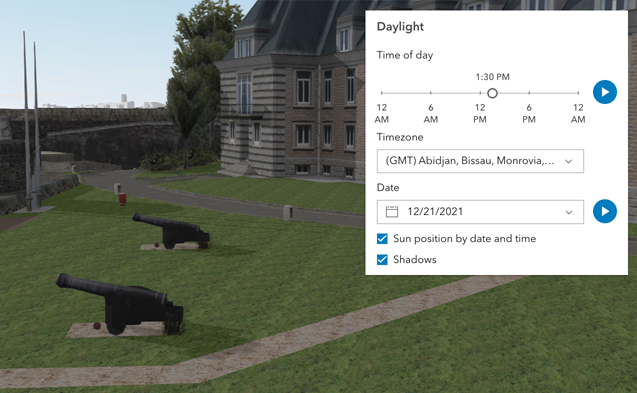](https://developers.arcgis.com/javascript/latest/sample-code/daylight/)\n\nThe component has an option to select the timezone. When the user makes any adjustments here, a new time\nin the chosen timezone is calculated and displayed in the slider. The timezone selector can be disabled\nby using the [hideTimezone](#hideTimezone) property.\n\nBy default, a calendar is displayed to select the day, month, and year.\nWith the [dateOrSeason](#dateOrSeason) property, the calendar can be replaced with\na dropdown menu where a season can be selected instead:\n\n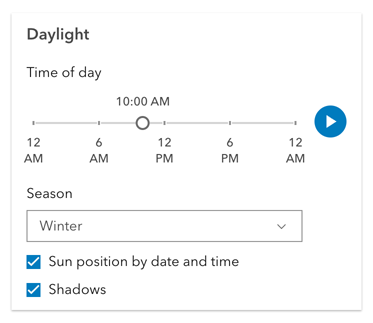\n\nThere are two play buttons: one corresponds to the time-of-day slider and animates the lighting\nover the course of a day, while the other corresponds to the date picker\nand animates the lighting over the course of a year (month by month). The speed of the animation can\nbe set using the [playSpeedMultiplier](#playSpeedMultiplier) property.\n\n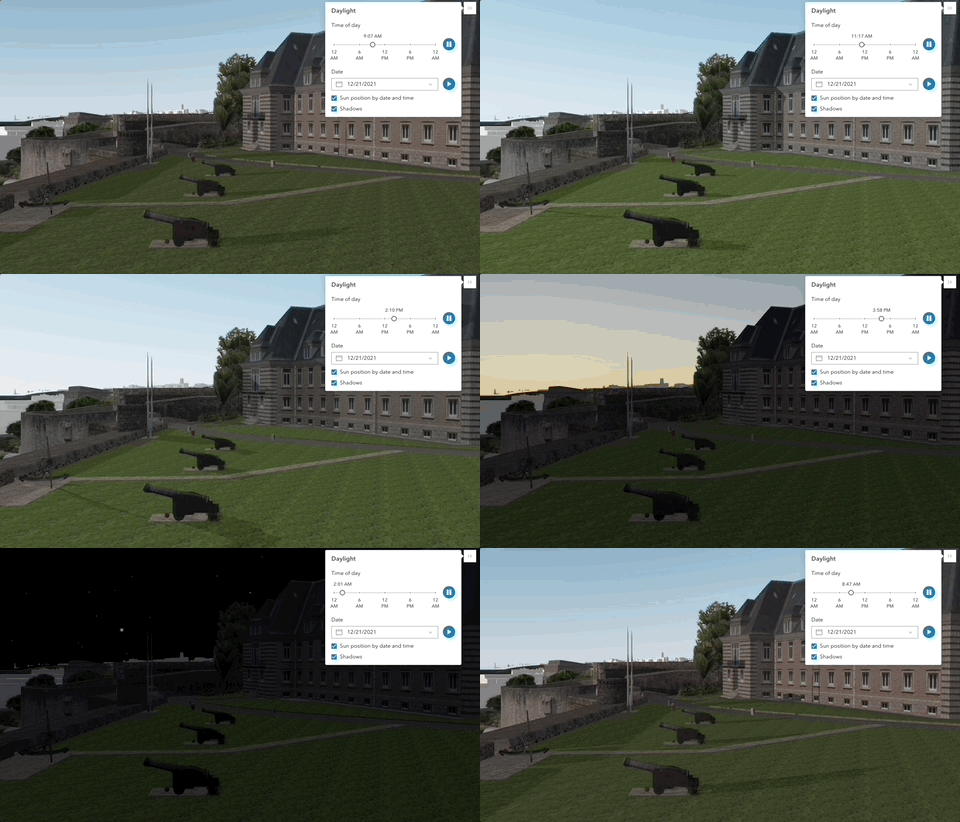\n\nExcept for the daytime slider, all the elements in the Daylight component can be hidden:\n\n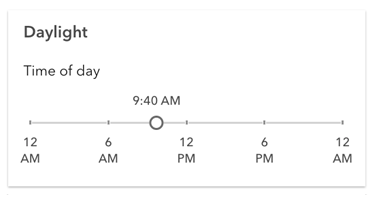\n\nWhenever the sun position option is unchecked, the scene applies the\n**[virtual light](https://developers.arcgis.com/javascript/latest/api-reference/esri-views-3d-environment-VirtualLighting.html)** source relative to the camera.\nWith this, the component's time slider, timezone, and date picker get automatically disabled:\n\n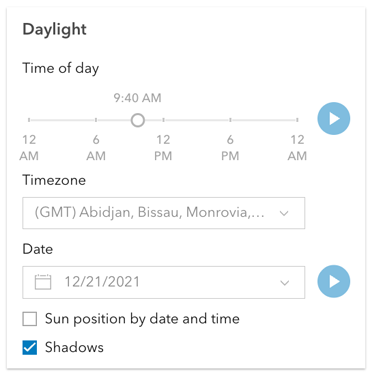\n\n**Things to consider**\n\n* Daylight is only supported in a 3D [Scene](https://developers.arcgis.com/javascript/latest/references/map-components/arcgis-scene/) component.\n* The Daylight component uses UTC time and does not account for the daylight savings times in different countries and regions of the world.\n* When using the [virtual light](https://developers.arcgis.com/javascript/latest/api-reference/esri-views-3d-environment-VirtualLighting.html),\nsetting the time and date programmatically does not have an influence on the lighting conditions of the scene.\n* When using the [sunlight](https://developers.arcgis.com/javascript/latest/api-reference/esri-views-3d-environment-SunLighting.html),\nthe time slider and time zone automatically react to the changes of the camera (e.g., position, rotation, pan, zoom) because the position of the simulated sun\nis updated to maintain a consistent solar time of day based on the camera's current longitude. This can be adjusted using the\n[cameraTrackingEnabled](https://developers.arcgis.com/javascript/latest/api-reference/esri-views-3d-environment-SunLighting.html#cameraTrackingEnabled)\nproperty on [environment.lighting](https://developers.arcgis.com/javascript/latest/references/map-components/arcgis-scene/#environment).",
|
|
7771
7771
|
"docsTags": [
|
|
7772
|
+
{
|
|
7773
|
+
"name": "see",
|
|
7774
|
+
"text": "[Environment](https://developers.arcgis.com/javascript/latest/references/map-components/arcgis-scene/#environment)"
|
|
7775
|
+
},
|
|
7776
|
+
{
|
|
7777
|
+
"name": "see",
|
|
7778
|
+
"text": "[SunLighting](https://developers.arcgis.com/javascript/latest/api-reference/esri-views-3d-environment-SunLighting.html)"
|
|
7779
|
+
},
|
|
7780
|
+
{
|
|
7781
|
+
"name": "see",
|
|
7782
|
+
"text": "[VirtualLighting](https://developers.arcgis.com/javascript/latest/api-reference/esri-views-3d-environment-VirtualLighting.html)"
|
|
7783
|
+
},
|
|
7784
|
+
{
|
|
7785
|
+
"name": "see",
|
|
7786
|
+
"text": "[Sample - Daylight component](https://developers.arcgis.com/javascript/latest/sample-code/daylight/)"
|
|
7787
|
+
},
|
|
7772
7788
|
{
|
|
7773
7789
|
"name": "since",
|
|
7774
7790
|
"text": "4.28"
|
|
@@ -7816,8 +7832,13 @@
|
|
|
7816
7832
|
"mutable": true,
|
|
7817
7833
|
"attr": "current-season",
|
|
7818
7834
|
"reflectToAttr": false,
|
|
7819
|
-
"docs": "Sets the season that is used when the component displays
|
|
7820
|
-
"docsTags": [
|
|
7835
|
+
"docs": "Sets the season that is used when the component displays the season picker.\nEach season uses a fixed date corresponding to the seasonal equinoxes and solstices.",
|
|
7836
|
+
"docsTags": [
|
|
7837
|
+
{
|
|
7838
|
+
"name": "see",
|
|
7839
|
+
"text": "[dateOrSeason](#dateOrSeason)"
|
|
7840
|
+
}
|
|
7841
|
+
],
|
|
7821
7842
|
"values": [
|
|
7822
7843
|
{
|
|
7823
7844
|
"value": "fall",
|
|
@@ -7888,28 +7909,6 @@
|
|
|
7888
7909
|
"optional": true,
|
|
7889
7910
|
"required": false
|
|
7890
7911
|
},
|
|
7891
|
-
{
|
|
7892
|
-
"name": "directShadowsDisabled",
|
|
7893
|
-
"type": "boolean",
|
|
7894
|
-
"complexType": {
|
|
7895
|
-
"original": "boolean",
|
|
7896
|
-
"resolved": "boolean",
|
|
7897
|
-
"references": {}
|
|
7898
|
-
},
|
|
7899
|
-
"mutable": true,
|
|
7900
|
-
"attr": "direct-shadows-disabled",
|
|
7901
|
-
"reflectToAttr": false,
|
|
7902
|
-
"docs": "Indicates whether to hide shadows cast by the sun.\n\n**See also**\n\n- [SunLighting.directShadowsEnabled](https://developers.arcgis.com/javascript/latest/api-reference/esri-views-3d-environment-SunLighting.html#directShadowsEnabled)\n- [Scene's `environment`](https://developers.arcgis.com/javascript/latest/references/map-components/arcgis-scene/#environment)",
|
|
7903
|
-
"docsTags": [],
|
|
7904
|
-
"default": "false",
|
|
7905
|
-
"values": [
|
|
7906
|
-
{
|
|
7907
|
-
"type": "boolean"
|
|
7908
|
-
}
|
|
7909
|
-
],
|
|
7910
|
-
"optional": true,
|
|
7911
|
-
"required": false
|
|
7912
|
-
},
|
|
7913
7912
|
{
|
|
7914
7913
|
"name": "headingLevel",
|
|
7915
7914
|
"type": "1 | 2 | 3 | 4 | 5 | 6",
|
|
@@ -8096,8 +8095,13 @@
|
|
|
8096
8095
|
"mutable": true,
|
|
8097
8096
|
"attr": "icon",
|
|
8098
8097
|
"reflectToAttr": true,
|
|
8099
|
-
"docs": "Icon which represents the component. Typically used when the component is controlled by another component (e.g. by the Expand component)
|
|
8100
|
-
"docsTags": [
|
|
8098
|
+
"docs": "Icon which represents the component. Typically used when the component is controlled by another component (e.g. by the Expand component).",
|
|
8099
|
+
"docsTags": [
|
|
8100
|
+
{
|
|
8101
|
+
"name": "see",
|
|
8102
|
+
"text": "[Calcite Icons](https://developers.arcgis.com/calcite-design-system/icons/)"
|
|
8103
|
+
}
|
|
8104
|
+
],
|
|
8101
8105
|
"default": "\"brightness\"",
|
|
8102
8106
|
"values": [
|
|
8103
8107
|
{
|
|
@@ -8146,45 +8150,28 @@
|
|
|
8146
8150
|
"attr": "local-date",
|
|
8147
8151
|
"reflectToAttr": false,
|
|
8148
8152
|
"docs": "The calendar date in the timezone given by [utcOffset](#utcOffset).",
|
|
8149
|
-
"docsTags": [
|
|
8150
|
-
"values": [
|
|
8153
|
+
"docsTags": [
|
|
8151
8154
|
{
|
|
8152
|
-
"
|
|
8155
|
+
"name": "example",
|
|
8156
|
+
"text": "```js\ndaylight.localDate = new Date(\"2005-08-25\");\n```"
|
|
8153
8157
|
},
|
|
8154
8158
|
{
|
|
8155
|
-
"
|
|
8159
|
+
"name": "example",
|
|
8160
|
+
"text": "```js\n// Alternatively, the date can be set by configuring the `date` property of `SunLighting`.\nviewElement.environment.lighting = new SunLighting({\n date: new Date(\"2005-08-25T16:00:00\")\n});\n```"
|
|
8156
8161
|
},
|
|
8157
8162
|
{
|
|
8158
|
-
"
|
|
8163
|
+
"name": "since",
|
|
8164
|
+
"text": "4.34"
|
|
8159
8165
|
}
|
|
8160
8166
|
],
|
|
8161
|
-
"optional": true,
|
|
8162
|
-
"required": false
|
|
8163
|
-
},
|
|
8164
|
-
{
|
|
8165
|
-
"name": "playingState",
|
|
8166
|
-
"type": "\"day\" | \"none\" | \"year\"",
|
|
8167
|
-
"complexType": {
|
|
8168
|
-
"original": "\"day\" | \"none\" | \"year\"",
|
|
8169
|
-
"resolved": "\"day\" | \"none\" | \"year\"",
|
|
8170
|
-
"references": {}
|
|
8171
|
-
},
|
|
8172
|
-
"mutable": true,
|
|
8173
|
-
"attr": "playing-state",
|
|
8174
|
-
"reflectToAttr": false,
|
|
8175
|
-
"docs": "",
|
|
8176
|
-
"docsTags": [],
|
|
8177
8167
|
"values": [
|
|
8178
8168
|
{
|
|
8179
|
-
"
|
|
8180
|
-
"type": "string"
|
|
8169
|
+
"type": "Date"
|
|
8181
8170
|
},
|
|
8182
8171
|
{
|
|
8183
|
-
"
|
|
8184
|
-
"type": "string"
|
|
8172
|
+
"type": "number"
|
|
8185
8173
|
},
|
|
8186
8174
|
{
|
|
8187
|
-
"value": "year",
|
|
8188
8175
|
"type": "string"
|
|
8189
8176
|
}
|
|
8190
8177
|
],
|
|
@@ -8206,7 +8193,7 @@
|
|
|
8206
8193
|
"docsTags": [
|
|
8207
8194
|
{
|
|
8208
8195
|
"name": "example",
|
|
8209
|
-
"text": "// Plays the daylight animation at half of the default speed\ndaylight.playSpeedMultiplier = 0.5
|
|
8196
|
+
"text": "```js\n// Plays the daylight animation at half of the default speed\ndaylight.playSpeedMultiplier = 0.5;\n```"
|
|
8210
8197
|
}
|
|
8211
8198
|
],
|
|
8212
8199
|
"default": "1.0",
|
|
@@ -8324,28 +8311,6 @@
|
|
|
8324
8311
|
"optional": true,
|
|
8325
8312
|
"required": false
|
|
8326
8313
|
},
|
|
8327
|
-
{
|
|
8328
|
-
"name": "sunlightingDisabled",
|
|
8329
|
-
"type": "boolean",
|
|
8330
|
-
"complexType": {
|
|
8331
|
-
"original": "boolean",
|
|
8332
|
-
"resolved": "boolean",
|
|
8333
|
-
"references": {}
|
|
8334
|
-
},
|
|
8335
|
-
"mutable": true,
|
|
8336
|
-
"attr": "sunlighting-disabled",
|
|
8337
|
-
"reflectToAttr": false,
|
|
8338
|
-
"docs": "When set, the light source is positioned relative to the camera, using\n[VirtualLighting](https://developers.arcgis.com/javascript/latest/api-reference/esri-views-3d-environment-VirtualLighting.html).\nOtherwise, [date and time](https://developers.arcgis.com/javascript/latest/api-reference/esri-views-3d-environment-SunLighting.html)\nare used to determine position of the light source.",
|
|
8339
|
-
"docsTags": [],
|
|
8340
|
-
"default": "false",
|
|
8341
|
-
"values": [
|
|
8342
|
-
{
|
|
8343
|
-
"type": "boolean"
|
|
8344
|
-
}
|
|
8345
|
-
],
|
|
8346
|
-
"optional": true,
|
|
8347
|
-
"required": false
|
|
8348
|
-
},
|
|
8349
8314
|
{
|
|
8350
8315
|
"name": "supported",
|
|
8351
8316
|
"type": "boolean",
|
|
@@ -8387,7 +8352,15 @@
|
|
|
8387
8352
|
"docsTags": [
|
|
8388
8353
|
{
|
|
8389
8354
|
"name": "example",
|
|
8390
|
-
"text": "
|
|
8355
|
+
"text": "```js\n// Set the time to 4:00 PM (16:00) in the given timezone.\ndaylight.timeSliderPosition = 16 * 60;\n```"
|
|
8356
|
+
},
|
|
8357
|
+
{
|
|
8358
|
+
"name": "example",
|
|
8359
|
+
"text": "```js\n// Alternatively, the time can be set by configuring the `date` property of `SunLighting`.\n// Then, the time slider gets updated automatically.\nviewElement.environment.lighting = new SunLighting({\n date: new Date(\"2005-08-25T16:00:00\")\n});\n```"
|
|
8360
|
+
},
|
|
8361
|
+
{
|
|
8362
|
+
"name": "since",
|
|
8363
|
+
"text": "4.34"
|
|
8391
8364
|
}
|
|
8392
8365
|
],
|
|
8393
8366
|
"values": [
|
|
@@ -8400,19 +8373,33 @@
|
|
|
8400
8373
|
},
|
|
8401
8374
|
{
|
|
8402
8375
|
"name": "timeSliderSteps",
|
|
8403
|
-
"type": "number",
|
|
8376
|
+
"type": "Array<number> | number",
|
|
8404
8377
|
"complexType": {
|
|
8405
|
-
"original": "number",
|
|
8406
|
-
"resolved": "number",
|
|
8407
|
-
"references": {
|
|
8378
|
+
"original": "Array<number> | number",
|
|
8379
|
+
"resolved": "Array<number> | number",
|
|
8380
|
+
"references": {
|
|
8381
|
+
"Array": {
|
|
8382
|
+
"location": "import",
|
|
8383
|
+
"path": "typescript/lib/lib.es5.d.ts",
|
|
8384
|
+
"id": "notImplemented"
|
|
8385
|
+
}
|
|
8386
|
+
}
|
|
8408
8387
|
},
|
|
8409
8388
|
"mutable": true,
|
|
8410
8389
|
"attr": "time-slider-steps",
|
|
8411
8390
|
"reflectToAttr": false,
|
|
8412
|
-
"docs": "Sets the interval, in minutes, with which the time slider increments or decrements as it is dragged or changed via the keyboard
|
|
8413
|
-
"docsTags": [
|
|
8391
|
+
"docs": "Sets the interval, in minutes, with which the time slider increments or decrements as it is dragged or changed via the keyboard.",
|
|
8392
|
+
"docsTags": [
|
|
8393
|
+
{
|
|
8394
|
+
"name": "example",
|
|
8395
|
+
"text": "```js\n// Set steps at an interval of 60. Then, the slider thumb snaps at each hour of the day.\ndaylight.timeSliderSteps = 60;\n```"
|
|
8396
|
+
}
|
|
8397
|
+
],
|
|
8414
8398
|
"default": "5",
|
|
8415
8399
|
"values": [
|
|
8400
|
+
{
|
|
8401
|
+
"type": "Array<number>"
|
|
8402
|
+
},
|
|
8416
8403
|
{
|
|
8417
8404
|
"type": "number"
|
|
8418
8405
|
}
|
|
@@ -8432,7 +8419,20 @@
|
|
|
8432
8419
|
"attr": "utc-offset",
|
|
8433
8420
|
"reflectToAttr": false,
|
|
8434
8421
|
"docs": "The difference in hours between UTC time and the time displayed in the component.",
|
|
8435
|
-
"docsTags": [
|
|
8422
|
+
"docsTags": [
|
|
8423
|
+
{
|
|
8424
|
+
"name": "example",
|
|
8425
|
+
"text": "```js\ndaylight.utcOffset = -8;\n```"
|
|
8426
|
+
},
|
|
8427
|
+
{
|
|
8428
|
+
"name": "example",
|
|
8429
|
+
"text": "```js\n// Alternatively, the UTC offset can be set by configuring the `displayUTCOffset` property of `SunLighting`.\nviewElement.environment.lighting = new SunLighting({\n displayUTCOffset: -8\n});\n```"
|
|
8430
|
+
},
|
|
8431
|
+
{
|
|
8432
|
+
"name": "since",
|
|
8433
|
+
"text": "4.34"
|
|
8434
|
+
}
|
|
8435
|
+
],
|
|
8436
8436
|
"values": [
|
|
8437
8437
|
{
|
|
8438
8438
|
"type": "number"
|
|
@@ -8443,21 +8443,11 @@
|
|
|
8443
8443
|
},
|
|
8444
8444
|
{
|
|
8445
8445
|
"name": "view",
|
|
8446
|
-
"type": "
|
|
8446
|
+
"type": "SceneView",
|
|
8447
8447
|
"complexType": {
|
|
8448
|
-
"original": "
|
|
8449
|
-
"resolved": "
|
|
8448
|
+
"original": "SceneView",
|
|
8449
|
+
"resolved": "SceneView",
|
|
8450
8450
|
"references": {
|
|
8451
|
-
"LinkChartView": {
|
|
8452
|
-
"location": "import",
|
|
8453
|
-
"path": "@arcgis/core/interfaces.d.ts",
|
|
8454
|
-
"id": "notImplemented"
|
|
8455
|
-
},
|
|
8456
|
-
"MapView": {
|
|
8457
|
-
"location": "import",
|
|
8458
|
-
"path": "@arcgis/core/interfaces.d.ts",
|
|
8459
|
-
"id": "notImplemented"
|
|
8460
|
-
},
|
|
8461
8451
|
"SceneView": {
|
|
8462
8452
|
"location": "import",
|
|
8463
8453
|
"path": "@arcgis/core/interfaces.d.ts",
|
|
@@ -8469,17 +8459,7 @@
|
|
|
8469
8459
|
"reflectToAttr": false,
|
|
8470
8460
|
"docs": "",
|
|
8471
8461
|
"docsTags": [],
|
|
8472
|
-
"values": [
|
|
8473
|
-
{
|
|
8474
|
-
"type": "LinkChartView"
|
|
8475
|
-
},
|
|
8476
|
-
{
|
|
8477
|
-
"type": "MapView"
|
|
8478
|
-
},
|
|
8479
|
-
{
|
|
8480
|
-
"type": "SceneView"
|
|
8481
|
-
}
|
|
8482
|
-
],
|
|
8462
|
+
"values": [],
|
|
8483
8463
|
"optional": true,
|
|
8484
8464
|
"required": false
|
|
8485
8465
|
},
|
|
@@ -14832,48 +14812,6 @@
|
|
|
14832
14812
|
"optional": true,
|
|
14833
14813
|
"required": false
|
|
14834
14814
|
},
|
|
14835
|
-
{
|
|
14836
|
-
"name": "flowItems",
|
|
14837
|
-
"type": "Collection<HTMLArcgisFeatureElement | HTMLArcgisFeatureRelationshipElement | HTMLArcgisFeatureUtilityNetworkAssociationsElement>",
|
|
14838
|
-
"complexType": {
|
|
14839
|
-
"original": "Collection<HTMLArcgisFeatureElement | HTMLArcgisFeatureRelationshipElement | HTMLArcgisFeatureUtilityNetworkAssociationsElement>",
|
|
14840
|
-
"resolved": "Collection<HTMLArcgisFeatureElement | HTMLArcgisFeatureRelationshipElement | HTMLArcgisFeatureUtilityNetworkAssociationsElement>",
|
|
14841
|
-
"references": {
|
|
14842
|
-
"Collection": {
|
|
14843
|
-
"location": "import",
|
|
14844
|
-
"path": "@arcgis/core/interfaces.d.ts",
|
|
14845
|
-
"id": "notImplemented"
|
|
14846
|
-
},
|
|
14847
|
-
"HTMLArcgisFeatureElement": {
|
|
14848
|
-
"location": "local",
|
|
14849
|
-
"path": "index.js",
|
|
14850
|
-
"id": "notImplemented"
|
|
14851
|
-
},
|
|
14852
|
-
"HTMLArcgisFeatureRelationshipElement": {
|
|
14853
|
-
"location": "local",
|
|
14854
|
-
"path": "index.js",
|
|
14855
|
-
"id": "notImplemented"
|
|
14856
|
-
},
|
|
14857
|
-
"HTMLArcgisFeatureUtilityNetworkAssociationsElement": {
|
|
14858
|
-
"location": "local",
|
|
14859
|
-
"path": "index.js",
|
|
14860
|
-
"id": "notImplemented"
|
|
14861
|
-
}
|
|
14862
|
-
}
|
|
14863
|
-
},
|
|
14864
|
-
"mutable": true,
|
|
14865
|
-
"reflectToAttr": false,
|
|
14866
|
-
"docs": "A collection of flow items that are used to manage drill-in navigation.",
|
|
14867
|
-
"docsTags": [
|
|
14868
|
-
{
|
|
14869
|
-
"name": "since",
|
|
14870
|
-
"text": "4.34"
|
|
14871
|
-
}
|
|
14872
|
-
],
|
|
14873
|
-
"values": [],
|
|
14874
|
-
"optional": true,
|
|
14875
|
-
"required": false
|
|
14876
|
-
},
|
|
14877
14815
|
{
|
|
14878
14816
|
"name": "graphic",
|
|
14879
14817
|
"type": "Graphic",
|
|
@@ -15678,7 +15616,7 @@
|
|
|
15678
15616
|
"mutable": true,
|
|
15679
15617
|
"attr": "show-utility-network-content",
|
|
15680
15618
|
"reflectToAttr": false,
|
|
15681
|
-
"docs": "This property provides the ability to hide or show [utility network content](https://developers.arcgis.com/javascript/latest/api-reference/esri-popup-content-
|
|
15619
|
+
"docs": "This property provides the ability to hide or show [utility network content](https://developers.arcgis.com/javascript/latest/api-reference/esri-popup-content-UtilityNetworkAssociationsContent.html) within the component.",
|
|
15682
15620
|
"docsTags": [
|
|
15683
15621
|
{
|
|
15684
15622
|
"name": "since",
|
|
@@ -15970,7 +15908,7 @@
|
|
|
15970
15908
|
"docs": ""
|
|
15971
15909
|
}
|
|
15972
15910
|
],
|
|
15973
|
-
"docs": "Paginates to the previous [media](https://developers.arcgis.com/javascript/latest/api-reference/esri-popup-content-MediaContent.html) info
|
|
15911
|
+
"docs": "Paginates to the previous [media](https://developers.arcgis.com/javascript/latest/api-reference/esri-popup-content-MediaContent.html) info.",
|
|
15974
15912
|
"docsTags": []
|
|
15975
15913
|
},
|
|
15976
15914
|
{
|
|
@@ -16015,7 +15953,7 @@
|
|
|
16015
15953
|
"docs": ""
|
|
16016
15954
|
}
|
|
16017
15955
|
],
|
|
16018
|
-
"docs": "Paginates to a specified [media](https://developers.arcgis.com/javascript/latest/api-reference/esri-popup-content-MediaContent.html) info object. For example,\nyou may have [media](https://developers.arcgis.com/javascript/latest/api-reference/esri-popup-content-MediaContent.html) content which contains\nmultiple `mediaInfos`. This method allows you to specify the index of the `mediaInfos`\nyou wish to display
|
|
15956
|
+
"docs": "Paginates to a specified [media](https://developers.arcgis.com/javascript/latest/api-reference/esri-popup-content-MediaContent.html) info object. For example,\nyou may have [media](https://developers.arcgis.com/javascript/latest/api-reference/esri-popup-content-MediaContent.html) content which contains\nmultiple `mediaInfos`. This method allows you to specify the index of the `mediaInfos`\nyou wish to display.",
|
|
16019
15957
|
"docsTags": []
|
|
16020
15958
|
},
|
|
16021
15959
|
{
|
|
@@ -26544,7 +26482,7 @@
|
|
|
26544
26482
|
"overview": "",
|
|
26545
26483
|
"readme": "",
|
|
26546
26484
|
"usage": {},
|
|
26547
|
-
"docs": "The Legend component displays the symbols and labels used to represent layers in a [arcgis-map](https://developers.arcgis.com/javascript/latest/references/map-components/arcgis-map/) or [arcgis-scene](https://developers.arcgis.com/javascript/latest/references/map-components/arcgis-scene/).\nOnly layers and sublayers visible in the view are shown, unless [ignoreLayerVisibility](https://developers.arcgis.com/javascript/latest/references/map-components/arcgis-legend/#ignoreLayerVisibility) is set to `true`.\n\nThe legend automatically updates when:\n - the visibility of a layer or sublayer changes\n - a layer is added or removed from the map\n - a layer's `renderer`, `opacity`, or `title` is changed\n - the `legendEnabled` property is changed (set to `true` or `false` on the layer)\n\n## Known Limitations\n\n* Currently, the legend component does not support the following layer types:\n[ElevationLayer](https://developers.arcgis.com/javascript/latest/api-reference/esri-layers-ElevationLayer.html),\n[GraphicsLayer](https://developers.arcgis.com/javascript/latest/api-reference/esri-layers-GraphicsLayer.html),\n[IntegratedMeshLayer](https://developers.arcgis.com/javascript/latest/api-reference/esri-layers-IntegratedMeshLayer.html),\n[KMLLayer](https://developers.arcgis.com/javascript/latest/api-reference/esri-layers-KMLLayer.html),\n[MapNotesLayer](https://developers.arcgis.com/javascript/latest/api-reference/esri-layers-MapNotesLayer.html),\n[OpenStreetMapLayer](https://developers.arcgis.com/javascript/latest/api-reference/esri-layers-OpenStreetMapLayer.html),\n[VectorTileLayer](https://developers.arcgis.com/javascript/latest/api-reference/esri-layers-VectorTileLayer.html),\n[VideoLayer](https://developers.arcgis.com/javascript/latest/api-reference/esri-layers-VideoLayer.html), and\n[WebTileLayer](https://developers.arcgis.com/javascript/latest/api-reference/esri-layers-WebTileLayer.html).\n* [Symbol3D](https://developers.arcgis.com/javascript/latest/api-reference/esri-symbols-Symbol3D.html) with more than one\n[symbol](https://developers.arcgis.com/javascript/latest/api-reference/esri-symbols-Symbol3DLayer.html) are not supported.\n* [DictionaryRenderer](https://developers.arcgis.com/javascript/latest/api-reference/esri-renderers-DictionaryRenderer.html) is not supported.\n* [TrackInfo](https://developers.arcgis.com/javascript/latest/api-reference/esri-layers-support-TrackInfo.html) is not supported.\n* CIM Symbol [primitiveOverride](https://developers.arcgis.com/javascript/latest/api-reference/esri-symbols-CIMSymbol.html#PrimitiveOverride) is not supported.\n* RasterStretchRenderer [dynamicRangeAdjustment](https://developers.arcgis.com/javascript/latest/api-reference/esri-renderers-RasterStretchRenderer.html#dynamicRangeAdjustment) is not supported.\n\n## Various examples of legends based on renderer type.\n\n### Unique values\n\n[](https://developers.arcgis.com/javascript/latest/sample-code/visualization-location-types/)\n\n### Continuous color\n\n[](https://developers.arcgis.com/javascript/latest/sample-code/visualization-vv-color/)\n\n### Classed color\n\n[](https://developers.arcgis.com/javascript/latest/sample-code/visualization-classbreaks/)\n\n### Continuous size\n\n[](https://developers.arcgis.com/javascript/latest/sample-code/visualization-sm-size/)\n\n### Size - above and below\n\n[](https://developers.arcgis.com/javascript/latest/sample-code/visualization-sm-size-themes/)\n\n### Dot density\n\n[](https://developers.arcgis.com/javascript/latest/sample-code/visualization-dot-density/)\n\n### Predominance\n\n[](https://developers.arcgis.com/javascript/latest/sample-code/visualization-arcade/)\n\n### Relationship\n\n[](https://developers.arcgis.com/javascript/latest/sample-code/visualization-sm-relationship/)",
|
|
26485
|
+
"docs": "The Legend component displays the symbols and labels used to represent layers in a [arcgis-map](https://developers.arcgis.com/javascript/latest/references/map-components/arcgis-map/) or [arcgis-scene](https://developers.arcgis.com/javascript/latest/references/map-components/arcgis-scene/).\nOnly layers and sublayers visible in the view are shown, unless [ignoreLayerVisibility](https://developers.arcgis.com/javascript/latest/references/map-components/arcgis-legend/#ignoreLayerVisibility) is set to `true`.\n\nThe legend automatically updates when:\n - the visibility of a layer or sublayer changes\n - a layer is added or removed from the map\n - a layer's `renderer`, `opacity`, or `title` is changed\n - the `legendEnabled` property is changed (set to `true` or `false` on the layer)\n\n## Known Limitations\n\n* Currently, the legend component does not support the following layer types:\n[ElevationLayer](https://developers.arcgis.com/javascript/latest/api-reference/esri-layers-ElevationLayer.html),\n[GraphicsLayer](https://developers.arcgis.com/javascript/latest/api-reference/esri-layers-GraphicsLayer.html),\n[IntegratedMeshLayer](https://developers.arcgis.com/javascript/latest/api-reference/esri-layers-IntegratedMeshLayer.html),\n[KMLLayer](https://developers.arcgis.com/javascript/latest/api-reference/esri-layers-KMLLayer.html),\n[MapNotesLayer](https://developers.arcgis.com/javascript/latest/api-reference/esri-layers-MapNotesLayer.html),\n[OpenStreetMapLayer](https://developers.arcgis.com/javascript/latest/api-reference/esri-layers-OpenStreetMapLayer.html),\n[VectorTileLayer](https://developers.arcgis.com/javascript/latest/api-reference/esri-layers-VectorTileLayer.html),\n[VideoLayer](https://developers.arcgis.com/javascript/latest/api-reference/esri-layers-VideoLayer.html), and\n[WebTileLayer](https://developers.arcgis.com/javascript/latest/api-reference/esri-layers-WebTileLayer.html).\n* [Symbol3D](https://developers.arcgis.com/javascript/latest/api-reference/esri-symbols-Symbol3D.html) with more than one\n[symbol](https://developers.arcgis.com/javascript/latest/api-reference/esri-symbols-Symbol3DLayer.html) are not supported.\n* [DictionaryRenderer](https://developers.arcgis.com/javascript/latest/api-reference/esri-renderers-DictionaryRenderer.html) is not supported.\n* [TrackInfo](https://developers.arcgis.com/javascript/latest/api-reference/esri-layers-support-TrackInfo.html) is not supported.\n* CIM Symbol [primitiveOverride](https://developers.arcgis.com/javascript/latest/api-reference/esri-symbols-CIMSymbol.html#PrimitiveOverride) is not supported.\n* RasterStretchRenderer [dynamicRangeAdjustment](https://developers.arcgis.com/javascript/latest/api-reference/esri-renderers-RasterStretchRenderer.html#dynamicRangeAdjustment) is not supported.\n\n## Various examples of legends based on renderer type.\n\n### Unique values\n\n[](https://developers.arcgis.com/javascript/latest/sample-code/visualization-location-types/)\n\n### Continuous color\n\n[](https://developers.arcgis.com/javascript/latest/sample-code/visualization-vv-color/)\n\n### Classed color\n\n[](https://developers.arcgis.com/javascript/latest/sample-code/visualization-classbreaks/)\n\n### Continuous size\n\n[](https://developers.arcgis.com/javascript/latest/sample-code/visualization-sm-size/)\n\n### Size - above and below\n\n[](https://developers.arcgis.com/javascript/latest/sample-code/visualization-sm-size-themes/)\n\n### Dot density\n\n[](https://developers.arcgis.com/javascript/latest/sample-code/visualization-dot-density/)\n\n### Predominance\n\n[](https://developers.arcgis.com/javascript/latest/sample-code/visualization-arcade/)\n\n### Relationship\n\n[](https://developers.arcgis.com/javascript/latest/sample-code/visualization-sm-relationship/)\n\n\n### Legend Field Formatting Summary\n\nThe following table summarizes how legend field values are formatted for different renderer and visual variable types, and the order in which formatting options are applied.\n\n| Renderer / Visual Variable Type | Renderer Data Source | Formatting Priority (in order) |\n|----------------------------------------------|----------------------------------------|--------------------------------------------------------------------------------------------------------------------------------------------|\n| Visual variable stops (color, opacity, size) | Number field | 1. `stop.label`<br>2. FieldConfiguration<br>3. Default precision formatting with grouping |\n| Visual variable stops (color, opacity, size) | Number field / normalization field | 1. `stop.label`<br>2. FieldConfiguration (applies to main field, not normalization field)<br>3. Default precision formatting with grouping |\n| Visual variable | valueExpression | 1. `stop.label`<br>2. Default precision formatting with grouping |\n| Unique-value renderer labels | Field value | 1. UniqueValueRenderer class label<br>2. Domain name<br>3. FieldConfiguration or PopupTemplate<br>4. Raw field value (if string) or default precision formatting with grouping (for number)|\n| Renderer title | FieldConfiguration or PopupTemplate | 1. FieldConfiguration<br>2. PopupTemplate |\n\n#### Legend Field Formatting Notes\n- [FieldConfiguration](https://developers.arcgis.com/javascript/latest/api-reference/esri-layers-support-FieldConfiguration.html): Defines how fields in a layer are displayed and formatted within widgets and UI components.\n- [PopupTemplate](https://developers.arcgis.com/javascript/latest/api-reference/esri-PopupTemplate.html): Used as a fallback for layers that don’t support FieldConfigurations.\n- VisualVariable stop labels: If any stop has a label, it is used directly; otherwise, labels are generated at runtime. See [ColorStop](https://developers.arcgis.com/javascript/latest/api-reference/esri-renderers-visualVariables-support-ColorStop.html), [OpacityStop](https://developers.arcgis.com/javascript/latest/api-reference/esri-renderers-visualVariables-support-OpacityStop.html), and [SizeStop](https://developers.arcgis.com/javascript/latest/api-reference/esri-renderers-visualVariables-support-SizeStop.html).\n- Normalization Field: Only the main field’s formatting is used, not the normalization field. See [ColorVariable](https://developers.arcgis.com/javascript/latest/api-reference/esri-renderers-visualVariables-ColorVariable.html#normalizationField), [OpacityVariable](https://developers.arcgis.com/javascript/latest/api-reference/esri-renderers-visualVariables-OpacityVariable.html#normalizationField), and [SizeVariable](https://developers.arcgis.com/javascript/latest/api-reference/esri-renderers-visualVariables-SizeVariable.html#normalizationField).\n- [VisualVariable value expressions](https://developers.arcgis.com/javascript/latest/api-reference/esri-renderers-visualVariables-ColorVariable.html#valueExpression): Since there’s no field, field formatting does not apply; fallback is default formatting.\n- WebMap and Layer persistence: Labels generated at runtime by the legend are not persisted.",
|
|
26548
26486
|
"docsTags": [
|
|
26549
26487
|
{
|
|
26550
26488
|
"name": "see",
|
|
@@ -31179,7 +31117,7 @@
|
|
|
31179
31117
|
"overview": "",
|
|
31180
31118
|
"readme": "",
|
|
31181
31119
|
"usage": {},
|
|
31182
|
-
"docs": "The ArcGIS Map component is used to add 2D maps to web applications. For 3D maps, use the\n[ArcGIS Scene component](https://developers.arcgis.com/javascript/latest/references/map-components/arcgis-scene/).\n\nThe Map component creates a [MapView](https://developers.arcgis.com/javascript/latest/api-reference/esri-views-MapView.html) and
|
|
31120
|
+
"docs": "The ArcGIS Map component is used to add 2D maps to web applications. For 3D maps, use the\n[ArcGIS Scene component](https://developers.arcgis.com/javascript/latest/references/map-components/arcgis-scene/).\n\n#### Initializing the Map component\nThe Map component creates a [MapView](https://developers.arcgis.com/javascript/latest/api-reference/esri-views-MapView.html) and\nand can be initialized in one of three ways:\n\n##### 1. Using a WebMap\nLoad a [WebMap](https://developers.arcgis.com/javascript/latest/api-reference/esri-WebMap.html) from [ArcGIS Online](https://www.arcgis.com/home/index.html)\nor an [ArcGIS Enterprise portal](https://enterprise.arcgis.com/en/portal/latest/administer/windows/what-is-portal-for-arcgis-.htm) by specifying the [item-id](#itemId) attribute.\n\n```html\n<arcgis-map item-id=\"05e015c5f0314db9a487a9b46cb37eca\"></arcgis-map>\n```\n\n##### 2. Setting Map component attributes directly\nDefine the Map component using attributes like [basemap](#basemap), [center](#center), and [zoom](#zoom) directly.\n\n```html\n<arcgis-map basemap=\"satellite\" center=\"-154.88, 19.46\" zoom=\"15\"></arcgis-map>\n```\n\n##### 3. Providing a Map instance\nAlternatively, you can provide your own [Map](https://developers.arcgis.com/javascript/latest/api-reference/esri-Map.html) instance to the component.\nThis allows full control over map configuration, including [basemap](#basemap), operational [layers](https://developers.arcgis.com/javascript/latest/api-reference/esri-Map.html#layers)\nand [spatial reference](#spatialReference). See the [Select features by rectangle sample](https://developers.arcgis.com/javascript/latest/sample-code/highlight-features-by-geometry/)\nfor an example of this approach in action.\n\n```html\n<arcgis-map></arcgis-map>\n<script type=\"module\">\n const viewElement = document.querySelector(\"arcgis-map\");\n\n // set the basemap of the map to states feature layer\n // add national parks feature layer and a polygon graphics layer\n viewElement.map = new Map({\n basemap: new Basemap({ baseLayers: [states] }),\n layers: [nationalParksLayer, polygonGraphicsLayer]\n });\n\n // set the spatial reference of the map to NAD 1983 Albers contiguous USA\n viewElement.spatialReference = { wkid: 102003 };\n</script>\n```\n#### Adding components and customizing the Map\n\nOther components can be added and connected to the Map component.\n\n```html\n<arcgis-map item-id=\"05e015c5f0314db9a487a9b46cb37eca\">\n <arcgis-zoom slot=\"top-left\"></arcgis-zoom>\n <arcgis-legend slot=\"bottom-left\"></arcgis-legend>\n</arcgis-map>\n```\n\nThe Map component can be customized further using any of the [core API functionalities](https://developers.arcgis.com/javascript/latest/api-reference/) of the ArcGIS Maps SDK for JavaScript.\n\n```js\nconst viewElement = document.querySelector(\"arcgis-map\");\nviewElement.addEventListener(\"arcgisViewReadyChange\", () => {\n const layer = new GraphicsLayer({ title: \"My Layer\" });\n viewElement.map.add(layer);\n});\n```\n\nSee also:\n- [SDK sample apps using the Map component](https://developers.arcgis.com/javascript/latest/sample-code/?tagged=arcgis-map)\n- [Get started](https://developers.arcgis.com/javascript/latest/get-started/)\n- [Programming patterns](https://developers.arcgis.com/javascript/latest/programming-patterns/)",
|
|
31183
31121
|
"docsTags": [
|
|
31184
31122
|
{
|
|
31185
31123
|
"name": "since",
|
|
@@ -31427,8 +31365,25 @@
|
|
|
31427
31365
|
"mutable": true,
|
|
31428
31366
|
"attr": "center",
|
|
31429
31367
|
"reflectToAttr": false,
|
|
31430
|
-
"docs": "Represents the view's center point; when setting the center, you may pass a\n[Point](https://developers.arcgis.com/javascript/latest/api-reference/esri-geometry-Point.html) instance or a string representing
|
|
31431
|
-
"docsTags": [
|
|
31368
|
+
"docs": "Represents the view's center point; when setting the center, you may pass a\n[Point](https://developers.arcgis.com/javascript/latest/api-reference/esri-geometry-Point.html) instance, numbers representing\na longitude/latitude pair (`[-100.4593, 36.9014]`), or a string attribute representing a longitude/latitude pair (\"-100.4593, 36.9014\").\nSetting the `center` immediately changes the current view. For animating the view, see this component's [goTo()](#goTo) method.\n\nThe returned [Point](https://developers.arcgis.com/javascript/latest/api-reference/esri-geometry-Point.html) object is always\nin the spatial reference of the view and may be modified internally.\nTo persist the returned object, create a clone using [clone()](https://developers.arcgis.com/javascript/latest/api-reference/esri-geometry-Point.html#clone) method.\n\n**Notes**\n\n* If the spatial reference of `center` set in the constructor does not match the [spatialReference](#spatialReference) of the view, then the\n[projectOperator](https://developers.arcgis.com/javascript/latest/api-reference/esri-geometry-operators-projectOperator.html) will be loaded dynamically.\n* At runtime, the [projectOperator](https://developers.arcgis.com/javascript/latest/api-reference/esri-geometry-operators-projectOperator.html) must be\n[loaded](https://developers.arcgis.com/javascript/latest/api-reference/esri-geometry-operators-projectOperator.html#load) when\nsetting the `center` to a spatial reference that doesn't match the view spatial reference. You can check if the projectOperator is\nloaded prior to setting the center by calling [isLoaded()](https://developers.arcgis.com/javascript/latest/api-reference/esri-geometry-operators-projectOperator.html#isLoaded)\nmethod. If it is not yet loaded, you can call [load()](https://developers.arcgis.com/javascript/latest/api-reference/esri-geometry-operators-projectOperator.html#load) method.",
|
|
31369
|
+
"docsTags": [
|
|
31370
|
+
{
|
|
31371
|
+
"name": "example",
|
|
31372
|
+
"text": "```html\n<arcgis-map zoom=\"4\" center=\"-98, 39\"></arcgis-map>\n```"
|
|
31373
|
+
},
|
|
31374
|
+
{
|
|
31375
|
+
"name": "example",
|
|
31376
|
+
"text": "```js\n// Sets the initial center point of the map component to lon/lat coordinates\n// lon/lat will be projected to match the spatial reference of the view\nconst viewElement = document.querySelector(\"arcgis-map\");\nviewElement.center = [-98, 39]; // lon, lat\n```"
|
|
31377
|
+
},
|
|
31378
|
+
{
|
|
31379
|
+
"name": "example",
|
|
31380
|
+
"text": "```js\n// Updates the view's center point to a pre-determined Point object\nlet centerPoint = new Point({\n x: 12804.24,\n y: -1894032.09,\n spatialReference: {\n wkid: view.spatialReference // wkid 2027\n }\n});\nconst viewElement = document.querySelector(\"arcgis-map\");\nview.center = centerPoint;\n```"
|
|
31381
|
+
},
|
|
31382
|
+
{
|
|
31383
|
+
"name": "example",
|
|
31384
|
+
"text": "```js\n// the point's spatialReference does not match the view's spatialReference\n// the projectOperator will be used to project the point to match\n// the view's spatialReference\nconst centerPoint = new Point({\n x: -8746995,\n y: 4352308,\n spatialReference: {\n wkid: 8857\n }\n});\nif (!projectOperator.isLoaded()) {\n await projectOperator.load();\n}\nconst viewElement = document.querySelector(\"arcgis-map\");\nviewElement.center = centerPoint;\n```"
|
|
31385
|
+
}
|
|
31386
|
+
],
|
|
31432
31387
|
"values": [
|
|
31433
31388
|
{
|
|
31434
31389
|
"type": "Array<number>"
|
|
@@ -31476,7 +31431,7 @@
|
|
|
31476
31431
|
"mutable": true,
|
|
31477
31432
|
"attr": "display-filter-disabled",
|
|
31478
31433
|
"reflectToAttr": false,
|
|
31479
|
-
"docs": "Indicates whether a layer's `
|
|
31434
|
+
"docs": "Indicates whether a layer's `displayFilterInfo` is honored when rendering layers in the view.\nIf `false`, display filters are ignored and all features are rendered.",
|
|
31480
31435
|
"docsTags": [],
|
|
31481
31436
|
"default": "false",
|
|
31482
31437
|
"values": [
|
|
@@ -31503,7 +31458,7 @@
|
|
|
31503
31458
|
},
|
|
31504
31459
|
"mutable": true,
|
|
31505
31460
|
"reflectToAttr": false,
|
|
31506
|
-
"docs": "The extent represents the visible portion of a map within the view as an instance of [Extent](https://developers.arcgis.com/javascript/latest/api-reference/esri-geometry-Extent.html).\nSetting the extent immediately changes the view without animation. To animate\nthe view, see this component's [goTo()](#goTo) method.\nWhen the view is rotated, the extent does not update to include the newly visible portions of the map.",
|
|
31461
|
+
"docs": "The extent represents the visible portion of a map within the view as an instance of [Extent](https://developers.arcgis.com/javascript/latest/api-reference/esri-geometry-Extent.html).\nSetting the extent immediately changes the view without animation. To animate\nthe view, see this component's [goTo()](#goTo) method.\nWhen the view is rotated, the extent does not update to include the newly visible portions of the map.\n\n**Notes**\n\n* If the spatial reference of `extent` set does not match the [spatialReference](#spatialReference) of the view, then the\n[projectOperator](https://developers.arcgis.com/javascript/latest/api-reference/esri-geometry-operators-projectOperator.html) will be loaded dynamically.\n* At runtime, the [projectOperator](https://developers.arcgis.com/javascript/latest/api-reference/esri-geometry-operators-projectOperator.html)\nmust be [loaded](https://developers.arcgis.com/javascript/latest/api-reference/esri-geometry-operators-projectOperator.html#load) when\nsetting the `extent` to a spatial reference that doesn't match the view spatial reference. You can check if the projectOperator is\nloaded prior to setting the extent by calling [isLoaded()](https://developers.arcgis.com/javascript/latest/api-reference/esri-geometry-operators-projectOperator.html#isLoaded)\nmethod. If it is not yet loaded, you can call the [load](https://developers.arcgis.com/javascript/latest/api-reference/esri-geometry-operators-projectOperator.html#load) method.",
|
|
31507
31462
|
"docsTags": [],
|
|
31508
31463
|
"values": [],
|
|
31509
31464
|
"optional": true,
|
|
@@ -31690,8 +31645,17 @@
|
|
|
31690
31645
|
},
|
|
31691
31646
|
"mutable": true,
|
|
31692
31647
|
"reflectToAttr": false,
|
|
31693
|
-
"docs": "
|
|
31694
|
-
"docsTags": [
|
|
31648
|
+
"docs": "Represents a collection of [HighlightOptions](https://developers.arcgis.com/javascript/latest/api-reference/esri-views-support-HighlightOptions.html)\nobjects which can be used to highlight features throughout an application. Highlighting works by applying highlight options to one or\nmore features. You can configure these options (such as color or opacity) to define how a feature will be visually\nemphasized.\n\nA maximum of six [HighlightOptions](https://developers.arcgis.com/javascript/latest/api-reference/esri-views-support-HighlightOptions.html)\nobjects are supported in the collection, and they can be added, removed, and reordered freely. Their order in the collection determines priority, with the last\nobject having the highest priority. If you apply more than one highlight to a feature, the one that is last within\nthe collection will be applied. The [HighlightOptions](https://developers.arcgis.com/javascript/latest/api-reference/esri-views-support-HighlightOptions.html)\nobject must be part of this collection in order to be applied to features.\n\nTo highlight a feature, use the [highlight()](https://developers.arcgis.com/javascript/latest/api-reference/esri-views-layers-FeatureLayerView.html#highlight)\nmethod on the relevant [LayerView](https://developers.arcgis.com/javascript/latest/api-reference/esri-views-layers-LayerView.html) instance. To apply specific\n[HighlightOptions](https://developers.arcgis.com/javascript/latest/api-reference/esri-views-support-HighlightOptions.html), include the\n[name](https://developers.arcgis.com/javascript/latest/api-reference/esri-views-support-HighlightOptions.html#name) in the `highlight()` method's `options` parameter.\nIf no `name` is provided, the feature will use the `default` highlight options.\n\nThe table below shows the default highlight options in the View's highlights collection if the collection has not\nbeen modified:\n\n| Highlight options name | Description | Default settings |\n| ---------------------- | ----------- | ---------------- |\n| default | The default highlight options. Used when `layerView.highlight()` is called without specifying any particular highlight options. | ` { name: \"default\", color: \"cyan\", haloOpacity: 1, fillOpacity: 0.25, shadowColor: \"black\", shadowOpacity: 0.4, shadowDifference: 0.2}` |\n| temporary | The temporary highlight options, pre-configured for common use cases such as hovering over a feature in the view. | `{ name: \"temporary\", color: \"yellow\", haloOpacity: 1, fillOpacity: 0.25, shadowColor: \"black\", shadowOpacity: 0.4, shadowDifference: 0.2 }` |",
|
|
31649
|
+
"docsTags": [
|
|
31650
|
+
{
|
|
31651
|
+
"name": "see",
|
|
31652
|
+
"text": "[Sample: Highlight features by geometry](https://developers.arcgis.com/javascript/latest/sample-code/highlight-features-by-geometry/)"
|
|
31653
|
+
},
|
|
31654
|
+
{
|
|
31655
|
+
"name": "see",
|
|
31656
|
+
"text": "[Sample: Highlight point features](https://developers.arcgis.com/javascript/latest/sample-code/highlight-point-features/)"
|
|
31657
|
+
}
|
|
31658
|
+
],
|
|
31695
31659
|
"values": [],
|
|
31696
31660
|
"optional": true,
|
|
31697
31661
|
"required": false
|
|
@@ -32188,8 +32152,31 @@
|
|
|
32188
32152
|
},
|
|
32189
32153
|
"mutable": true,
|
|
32190
32154
|
"reflectToAttr": false,
|
|
32191
|
-
"docs": "The spatial reference of the view
|
|
32192
|
-
"docsTags": [
|
|
32155
|
+
"docs": "The spatial reference of the view. This indicates the projected or geographic coordinate system used to locate geographic features in the map.\nYou can change the spatialReference of the view after it is initialized by either directly changing\nthis property, or by changing the basemap from the [Basemap Gallery](https://developers.arcgis.com/javascript/latest/references/map-components/arcgis-basemap-gallery/)\nand [Basemap Toggle](https://developers.arcgis.com/javascript/latest/references/map-components/arcgis-basemap-toggle/) components.\nSet [spatialReferenceLocked](#spatialReferenceLocked) property to `true` to prevent users from changing the view's spatial reference at runtime.\n\nPrior to changing the spatial reference, check if the [projectOperator](https://developers.arcgis.com/javascript/latest/api-reference/esri-geometry-operators-projectOperator.html)\nis loaded by calling [projectOperator.isLoaded()](https://developers.arcgis.com/javascript/latest/api-reference/esri-geometry-operators-projectOperator.html#isLoaded) method.\nIf it is not yet loaded, call [projectOperator.load()](https://developers.arcgis.com/javascript/latest/api-reference/esri-geometry-operators-projectOperator.html#load) method.\nIf the `projectOperator` is not loaded, the view's [center](#center) will default to `[0, 0]` in the new spatial reference of the view and a console error will be thrown.\n\n**Notes**\n\n* [LayerViews](https://developers.arcgis.com/javascript/latest/api-reference/esri-views-layers-LayerView.html) not compatible with the view's spatial reference\nare not displayed. In such case, the layer view's [suspended](https://developers.arcgis.com/javascript/latest/api-reference/esri-views-layers-LayerView.html#suspended)\nproperty is `true` and [spatialReferenceSupported](https://developers.arcgis.com/javascript/latest/api-reference/esri-views-layers-LayerView.html#spatialReferenceSupported)\nproperty is `false`.\n* When setting view's spatial reference, the [center](#center), [extent](#extent) or [viewpoint.targetGeometry](#viewpoint) properties are projected to the new spatial\nreference. The [scale](#scale) and [rotation](#rotation) properties are adjusted to keep the content of the map at the same size and orientation on screen.\n* To ensure [TileLayers](https://developers.arcgis.com/javascript/latest/api-reference/esri-layers-TileLayer.html) and\n[VectorTileLayers](https://developers.arcgis.com/javascript/latest/api-reference/esri-layers-VectorTileLayer.html)\nare displayed in a [basemap](#basemap) correctly, the spatialReference of the view must be set match their\n[tileInfo's](https://developers.arcgis.com/javascript/latest/api-reference/esri-layers-support-TileInfo.html) spatial reference.\n* Switching spatial reference with an [imageCoordinateSystem](https://developers.arcgis.com/javascript/latest/api-reference/esri-geometry-SpatialReference.html#imageCoordinateSystem)\nis not supported.",
|
|
32156
|
+
"docsTags": [
|
|
32157
|
+
{
|
|
32158
|
+
"name": "name",
|
|
32159
|
+
"text": "spatialReference"
|
|
32160
|
+
},
|
|
32161
|
+
{
|
|
32162
|
+
"name": "instance"
|
|
32163
|
+
},
|
|
32164
|
+
{
|
|
32165
|
+
"name": "type",
|
|
32166
|
+
"text": "{module:esri/geometry/SpatialReference}"
|
|
32167
|
+
},
|
|
32168
|
+
{
|
|
32169
|
+
"name": "autocast"
|
|
32170
|
+
},
|
|
32171
|
+
{
|
|
32172
|
+
"name": "see",
|
|
32173
|
+
"text": "[spatialReferenceLocked](#spatialReferenceLocked)"
|
|
32174
|
+
},
|
|
32175
|
+
{
|
|
32176
|
+
"name": "example",
|
|
32177
|
+
"text": "```js\nconst viewElement = document.querySelector(\"arcgis-map\");\n// check if the projectOperator is loaded\nif (!projectOperator.isLoaded()) {\n // load the projectOperator if it is not loaded\n projectOperator.load().then(() => {\n // change the spatial reference of the map component to equal earth projection\n viewElement.spatialReference = new SpatialReference({\n wkid: 54035 //equal earth projection\n });\n });\n} else {\n // the projectOperator is already loaded.\n // change the spatial reference of the view to equal earth projection\n viewElement.spatialReference = new SpatialReference({\n wkid: 54035 //equal earth projection\n });\n}\n```"
|
|
32178
|
+
}
|
|
32179
|
+
],
|
|
32193
32180
|
"default": "null",
|
|
32194
32181
|
"values": [],
|
|
32195
32182
|
"optional": true,
|
|
@@ -32862,8 +32849,17 @@
|
|
|
32862
32849
|
"docs": ""
|
|
32863
32850
|
}
|
|
32864
32851
|
],
|
|
32865
|
-
"docs": "Returns hit test results
|
|
32866
|
-
"docsTags": [
|
|
32852
|
+
"docs": "Returns [hit test results](https://developers.arcgis.com/javascript/latest/api-reference/esri-views-MapView.html#HitTestResult)\nfrom each layer that intersects the specified screen coordinates. The results are\norganized as an array of objects containing different [result types](https://developers.arcgis.com/javascript/latest/api-reference/esri-views-MapView.html#HitTestResult).\n\nThe following layer types will return all [features](https://developers.arcgis.com/javascript/latest/api-reference/esri-views-MapView.html#GraphicHit) if a hit is\nmade on intersecting features: [FeatureLayer](https://developers.arcgis.com/javascript/latest/api-reference/esri-layers-FeatureLayer.html),\n[CatalogLayer](https://developers.arcgis.com/javascript/latest/api-reference/esri-layers-CatalogLayer.html),\n[CSVLayer](https://developers.arcgis.com/javascript/latest/api-reference/esri-layers-CSVLayer.html),\n[GeoJSONLayer](https://developers.arcgis.com/javascript/latest/api-reference/esri-layers-GeoJSONLayer.html),\n[GeoRSSLayer](https://developers.arcgis.com/javascript/latest/api-reference/esri-layers-GeoRSSLayer.html),\n[GraphicsLayer](https://developers.arcgis.com/javascript/latest/api-reference/esri-layers-GraphicsLayer.html),\n[KMLLayer](https://developers.arcgis.com/javascript/latest/api-reference/esri-layers-KMLLayer.html),\n[MapNotesLayer](https://developers.arcgis.com/javascript/latest/api-reference/esri-layers-MapNotesLayer.html),\n[OGCFeatureLayer](https://developers.arcgis.com/javascript/latest/api-reference/esri-layers-OGCFeatureLayer.html),\n[StreamLayer](https://developers.arcgis.com/javascript/latest/api-reference/esri-layers-StreamLayer.html),\n[SubtypeSublayer](https://developers.arcgis.com/javascript/latest/api-reference/esri-layers-support-SubtypeSublayer.html),\n[VectorTileLayer](https://developers.arcgis.com/javascript/latest/api-reference/esri-layers-VectorTileLayer.html), and\n[WFSLayer](https://developers.arcgis.com/javascript/latest/api-reference/esri-layers-WFSLayer.html).\n\nThe [ParquetLayer](https://developers.arcgis.com/javascript/latest/api-reference/esri-layers-ParquetLayer.html) hit result returns only the topmost feature\nwhen the hit occurs on overlapping features in a ParquetLayer.\n\nThe [VectorTileLayer](https://developers.arcgis.com/javascript/latest/api-reference/esri-layers-VectorTileLayer.html) hit test result contains an array of objects containing\na [graphic](https://developers.arcgis.com/javascript/latest/api-reference/esri-views-MapView.html#GraphicHit).\nThe graphic returns attributes of a style layer. In addition, the graphic's [origin](https://developers.arcgis.com/javascript/latest/api-reference/esri-Graphic.html#origin)\ncontains the style layer's [id](https://maplibre.org/maplibre-style-spec/layers/#id) and layer index within the [vector tile style](https://doc.arcgis.com/en/arcgis-online/reference/tile-layers.htm#ESRI_SECTION1_8F68399EB47B48FF9EF46719FCC96978).\nSpatial information about the actual feature represented in the style layer is returned only if the style layer is a [symbol layer](https://maplibre.org/maplibre-style-spec/layers/#symbol).\nOtherwise, the graphic's geometry is `null`.\n\nThe [MediaLayer](https://developers.arcgis.com/javascript/latest/api-reference/esri-layers-MediaLayer.html) hit test result contains all media elements if the hit is made on intersecting elements.\nThe [RouteLayer](https://developers.arcgis.com/javascript/latest/api-reference/esri-layers-RouteLayer.html) hit test result contains all route elements if the hit is made on intersecting elements.\n\nIf the [polygon](https://developers.arcgis.com/javascript/latest/api-reference/esri-geometry-Polygon.html) feature's symbol\n[style](https://developers.arcgis.com/javascript/latest/api-reference/esri-symbols-SimpleFillSymbol.html#style) is set to `none`, the hitTest method will not\nreturn results when the fill is clicked. However, it will return results when the outline is clicked. To get results when clicking the fill, set the\n[color](https://developers.arcgis.com/javascript/latest/api-reference/esri-symbols-SimpleFillSymbol.html#color) to a transparent color instead.",
|
|
32853
|
+
"docsTags": [
|
|
32854
|
+
{
|
|
32855
|
+
"name": "example",
|
|
32856
|
+
"text": "```js\nviewElement.addEventListener(\"arcgisViewClick\", (event) => {\n viewElement.hitTest(event.detail).then((response) => {\n const result = response.results[0];\n if (result?.type === \"graphic\") {\n const { longitude, latitude } = result.mapPoint;\n console.log(`Hit graphic at (${longitude}, ${latitude})`, result.graphic);\n } else {\n console.log(\"Did not hit any graphic\");\n }\n });\n});\n```"
|
|
32857
|
+
},
|
|
32858
|
+
{
|
|
32859
|
+
"name": "example",
|
|
32860
|
+
"text": "```js\n// get screenpoint from view's click event\nviewElement.addEventListener(\"arcgisViewClick\", async (event) => {\n // Search for all media elements only on included mediaLayer at the clicked location\n const response = await viewElement.hitTest(event.detail, {\n include: {mediaLayer}\n });\n // if media elements are returned from the mediaLayer, do something with results\n if (response.results.length){\n // do something\n console.log(response.results.length, \"elements returned\");\n }\n});\n```"
|
|
32861
|
+
}
|
|
32862
|
+
]
|
|
32867
32863
|
},
|
|
32868
32864
|
{
|
|
32869
32865
|
"name": "openPopup",
|
|
@@ -33326,8 +33322,13 @@
|
|
|
33326
33322
|
},
|
|
33327
33323
|
"cancelable": true,
|
|
33328
33324
|
"composed": true,
|
|
33329
|
-
"docs": "This event is
|
|
33330
|
-
"docsTags": [
|
|
33325
|
+
"docs": "This event is triggered when view-related properties change, such as [zoom](#zoom), [scale](#scale), [center](#center), [rotation](#rotation), [extent](#extent),\n[viewpoint](#viewpoint), or [stationary](#stationary).\nIt reflects user interactions (e.g. panning or zooming) or programmatic updates to the view.",
|
|
33326
|
+
"docsTags": [
|
|
33327
|
+
{
|
|
33328
|
+
"name": "example",
|
|
33329
|
+
"text": "```js\n// get the number of features in a layer view whenever the view becomes stationary\nviewElement.addEventListener(\"arcgisViewChange\", async (event) =>{\n if (viewElement.stationary) {\n // Returns number of features available for drawing in a given layer view\n const count = await layerView.queryFeatureCount({\n geometry: viewElement.extent\n });\n // use the features count\n }\n});\n```"
|
|
33330
|
+
}
|
|
33331
|
+
]
|
|
33331
33332
|
},
|
|
33332
33333
|
{
|
|
33333
33334
|
"event": "arcgisViewClick",
|
|
@@ -33346,8 +33347,13 @@
|
|
|
33346
33347
|
},
|
|
33347
33348
|
"cancelable": true,
|
|
33348
33349
|
"composed": true,
|
|
33349
|
-
"docs": "Fires after a user clicks on the view.",
|
|
33350
|
-
"docsTags": [
|
|
33350
|
+
"docs": "Fires after a user clicks on the view. This event emits slightly slower than an [arcgisViewImmediateClick](#arcgisViewImmediateClick)\nevent to make sure that an [arcgisViewDoubleClick](#arcgisViewDoubleClick) event isn't triggered instead. The `arcgisViewImmediateClick`\nevent can be used for responding to an `arcgisViewClick` event without delay.",
|
|
33351
|
+
"docsTags": [
|
|
33352
|
+
{
|
|
33353
|
+
"name": "example",
|
|
33354
|
+
"text": "```js\n// Listen for clicks on the view and perform a hit test on a feature layer\nviewElement.addEventListener(\"arcgisViewClick\", (event) => {\n // Return hit test results from the feature layer\n // where it intersects the screen coordinates from the click event.\n // The result is a polygon representing the state that was clicked.\n viewElement.hitTest(event.detail).then((response) => {\n if (response.results.length) {\n const stateBoundaryPolygon = response.results.find((result) => {\n return result.graphic.layer === stateBoundaryFeatureLayer;\n }).graphic.geometry;\n\n getPolygonCentroid(stateBoundaryPolygon);\n }\n });\n});\n```"
|
|
33355
|
+
}
|
|
33356
|
+
]
|
|
33351
33357
|
},
|
|
33352
33358
|
{
|
|
33353
33359
|
"event": "arcgisViewDoubleClick",
|
|
@@ -33367,7 +33373,12 @@
|
|
|
33367
33373
|
"cancelable": true,
|
|
33368
33374
|
"composed": true,
|
|
33369
33375
|
"docs": "Fires after double-clicking on the view.",
|
|
33370
|
-
"docsTags": [
|
|
33376
|
+
"docsTags": [
|
|
33377
|
+
{
|
|
33378
|
+
"name": "example",
|
|
33379
|
+
"text": "```js\nviewElement.addEventListener(\"arcgisViewDoubleClick\", async (event) => {\n // Prevent the default zoom-in behavior on double-click\n event.detail.stopPropagation();\n});\n```"
|
|
33380
|
+
}
|
|
33381
|
+
]
|
|
33371
33382
|
},
|
|
33372
33383
|
{
|
|
33373
33384
|
"event": "arcgisViewDrag",
|
|
@@ -33406,7 +33417,7 @@
|
|
|
33406
33417
|
},
|
|
33407
33418
|
"cancelable": true,
|
|
33408
33419
|
"composed": true,
|
|
33409
|
-
"docs": "Fires
|
|
33420
|
+
"docs": "Fires after holding either a mouse button or a single finger on the view for a short amount of time.",
|
|
33410
33421
|
"docsTags": []
|
|
33411
33422
|
},
|
|
33412
33423
|
{
|
|
@@ -33426,8 +33437,13 @@
|
|
|
33426
33437
|
},
|
|
33427
33438
|
"cancelable": true,
|
|
33428
33439
|
"composed": true,
|
|
33429
|
-
"docs": "Fires right after a user clicks on the view.",
|
|
33430
|
-
"docsTags": [
|
|
33440
|
+
"docs": "Fires right after a user clicks on the view. In contrast to the [arcgisViewClick](#arcgisViewClick) event, the `arcgisViewImmediateClick`\nis emitted as soon as the user clicks on the view, and is not inhibited by a [arcgisViewDoubleClick](#arcgisViewDoubleClick) event.\nThis event is useful for interactive experiences that require feedback without delay.",
|
|
33441
|
+
"docsTags": [
|
|
33442
|
+
{
|
|
33443
|
+
"name": "example",
|
|
33444
|
+
"text": "```js\nviewElement.addEventListener(\"arcgisViewImmediateClick\", async (event) => {\n // Prevent the default zoom-in behavior on arcgisViewImmediateClick\n event.detail.stopPropagation();\n});\n```"
|
|
33445
|
+
}
|
|
33446
|
+
]
|
|
33431
33447
|
},
|
|
33432
33448
|
{
|
|
33433
33449
|
"event": "arcgisViewImmediateDoubleClick",
|
|
@@ -33446,7 +33462,7 @@
|
|
|
33446
33462
|
},
|
|
33447
33463
|
"cancelable": true,
|
|
33448
33464
|
"composed": true,
|
|
33449
|
-
"docs": "
|
|
33465
|
+
"docs": "Fires after after two consecutive [arcgisViewImmediateClick](#arcgisViewImmediateClick) events. In contrast to [arcgisViewDoubleClick](#arcgisViewDoubleClick),\nan `arcgisViewImmediateDoubleClick` cannot be prevented by use of `stopPropagation()` on the [arcgisViewImmediateClick](#arcgisViewImmediateClick)\nevent and can therefore be used to react to double-clicking independently of usage of the [arcgisViewImmediateClick](#arcgisViewImmediateClick) event.",
|
|
33450
33466
|
"docsTags": []
|
|
33451
33467
|
},
|
|
33452
33468
|
{
|
|
@@ -33467,7 +33483,12 @@
|
|
|
33467
33483
|
"cancelable": true,
|
|
33468
33484
|
"composed": true,
|
|
33469
33485
|
"docs": "Fires after a keyboard key is pressed.",
|
|
33470
|
-
"docsTags": [
|
|
33486
|
+
"docsTags": [
|
|
33487
|
+
{
|
|
33488
|
+
"name": "example",
|
|
33489
|
+
"text": "```js\n// Disable zooming with the keyboard\n// Stop event propagation when `+` and `-` keys are pressed.\nviewElement.addEventListener(\"arcgisViewKeyDown\", function(event){\n console.log(\"key-down\", event);\n\n const prohibitedKeys = [\"+\", \"-\"];\n const keyPressed = event.detail.key;\n if (prohibitedKeys.indexOf(keyPressed) !== -1) {\n event.detail.stopPropagation();\n }\n});\n```"
|
|
33490
|
+
}
|
|
33491
|
+
]
|
|
33471
33492
|
},
|
|
33472
33493
|
{
|
|
33473
33494
|
"event": "arcgisViewKeyUp",
|
|
@@ -33486,7 +33507,7 @@
|
|
|
33486
33507
|
},
|
|
33487
33508
|
"cancelable": true,
|
|
33488
33509
|
"composed": true,
|
|
33489
|
-
"docs": "Fires after a keyboard key is
|
|
33510
|
+
"docs": "Fires after a keyboard key is released.",
|
|
33490
33511
|
"docsTags": []
|
|
33491
33512
|
},
|
|
33492
33513
|
{
|
|
@@ -33506,7 +33527,7 @@
|
|
|
33506
33527
|
},
|
|
33507
33528
|
"cancelable": true,
|
|
33508
33529
|
"composed": true,
|
|
33509
|
-
"docs": "Fires after each layer in the map has a corresponding
|
|
33530
|
+
"docs": "Fires after each layer in the map has a corresponding\n[LayerView](https://developers.arcgis.com/javascript/latest/api-reference/esri-views-layers-LayerView.html)\ncreated and rendered in the view.",
|
|
33510
33531
|
"docsTags": []
|
|
33511
33532
|
},
|
|
33512
33533
|
{
|
|
@@ -33526,7 +33547,7 @@
|
|
|
33526
33547
|
},
|
|
33527
33548
|
"cancelable": true,
|
|
33528
33549
|
"composed": true,
|
|
33529
|
-
"docs": "Fires when an error
|
|
33550
|
+
"docs": "Fires when an error occurs during the creation of a [LayerView](https://developers.arcgis.com/javascript/latest/api-reference/esri-views-layers-LayerView.html)\nafter a layer has been added to the map.",
|
|
33530
33551
|
"docsTags": []
|
|
33531
33552
|
},
|
|
33532
33553
|
{
|
|
@@ -33546,7 +33567,7 @@
|
|
|
33546
33567
|
},
|
|
33547
33568
|
"cancelable": true,
|
|
33548
33569
|
"composed": true,
|
|
33549
|
-
"docs": "Fires after a LayerView
|
|
33570
|
+
"docs": "Fires after a [LayerView](https://developers.arcgis.com/javascript/latest/api-reference/esri-views-layers-LayerView.html)\nis destroyed and is no longer rendered in the view.",
|
|
33550
33571
|
"docsTags": []
|
|
33551
33572
|
},
|
|
33552
33573
|
{
|
|
@@ -33567,7 +33588,12 @@
|
|
|
33567
33588
|
"cancelable": true,
|
|
33568
33589
|
"composed": true,
|
|
33569
33590
|
"docs": "Fires when a wheel button of a pointing device (typically a mouse) is scrolled on the view.",
|
|
33570
|
-
"docsTags": [
|
|
33591
|
+
"docsTags": [
|
|
33592
|
+
{
|
|
33593
|
+
"name": "example",
|
|
33594
|
+
"text": "```js\nviewElement.addEventListener(\"arcgisViewMouseWheel\", async (event) => {\n // Prevent the default zoom-in and zoom-out behavior on arcgisViewMouseWheel\n event.detail.stopPropagation();\n});\n```"
|
|
33595
|
+
}
|
|
33596
|
+
]
|
|
33571
33597
|
},
|
|
33572
33598
|
{
|
|
33573
33599
|
"event": "arcgisViewPointerDown",
|
|
@@ -33587,7 +33613,12 @@
|
|
|
33587
33613
|
"cancelable": true,
|
|
33588
33614
|
"composed": true,
|
|
33589
33615
|
"docs": "Fires after a mouse button is pressed, or a finger touches the display.",
|
|
33590
|
-
"docsTags": [
|
|
33616
|
+
"docsTags": [
|
|
33617
|
+
{
|
|
33618
|
+
"name": "see",
|
|
33619
|
+
"text": "[Sample: Access features with hitTest](https://developers.arcgis.com/javascript/latest/sample-code/map-component-hittest/)"
|
|
33620
|
+
}
|
|
33621
|
+
]
|
|
33591
33622
|
},
|
|
33592
33623
|
{
|
|
33593
33624
|
"event": "arcgisViewPointerEnter",
|
|
@@ -33647,7 +33678,12 @@
|
|
|
33647
33678
|
"cancelable": true,
|
|
33648
33679
|
"composed": true,
|
|
33649
33680
|
"docs": "Fires after the mouse or a finger on the display moves.",
|
|
33650
|
-
"docsTags": [
|
|
33681
|
+
"docsTags": [
|
|
33682
|
+
{
|
|
33683
|
+
"name": "see",
|
|
33684
|
+
"text": "[Sample: Access features with hitTest](https://developers.arcgis.com/javascript/latest/sample-code/map-component-hittest/)"
|
|
33685
|
+
}
|
|
33686
|
+
]
|
|
33651
33687
|
},
|
|
33652
33688
|
{
|
|
33653
33689
|
"event": "arcgisViewPointerUp",
|
|
@@ -33680,7 +33716,7 @@
|
|
|
33680
33716
|
},
|
|
33681
33717
|
"cancelable": true,
|
|
33682
33718
|
"composed": true,
|
|
33683
|
-
"docs": "This event is for the `ready` property and
|
|
33719
|
+
"docs": "This event is for the `ready` property and is emitted when the view is ready.\nFires also when the [map](#map) is updated.",
|
|
33684
33720
|
"docsTags": []
|
|
33685
33721
|
},
|
|
33686
33722
|
{
|