@arcgis/map-components 4.34.0-next.126 → 4.34.0-next.128
This diff represents the content of publicly available package versions that have been released to one of the supported registries. The information contained in this diff is provided for informational purposes only and reflects changes between package versions as they appear in their respective public registries.
- package/dist/cdn/{ET5C5YMY.js → 2ECBWCO2.js} +2 -2
- package/dist/cdn/{5AOHIN4B.js → 2H3XO7CN.js} +2 -2
- package/dist/cdn/{EVTMUQHE.js → 2H6QPPKV.js} +2 -2
- package/dist/cdn/2OUPGH3T.js +4 -0
- package/dist/cdn/{HDT5PZG6.js → 2U23PR2Z.js} +2 -2
- package/dist/cdn/{XMNRYHBV.js → 37SGC6JO.js} +2 -2
- package/dist/cdn/{CJPUFBD2.js → 3H5CGF2W.js} +2 -2
- package/dist/cdn/3TYD7MXA.js +4 -0
- package/dist/cdn/3XJLVWBC.js +4 -0
- package/dist/cdn/3Y6MSDPY.js +4 -0
- package/dist/cdn/{B75V53DG.js → 4EMGEB6M.js} +2 -2
- package/dist/cdn/{J5GNLGGY.js → 4YNGM73K.js} +2 -2
- package/dist/cdn/54WC2T2L.js +4 -0
- package/dist/cdn/{7WVBB25Q.js → 54YUDXEI.js} +2 -2
- package/dist/cdn/{RWFNVRUB.js → 5BH6C35G.js} +2 -2
- package/dist/cdn/5KMO7TRX.js +4 -0
- package/dist/cdn/{G3D6GHQ5.js → 5NDNY4PP.js} +2 -2
- package/dist/cdn/{47R2YESS.js → 5PGYUSRZ.js} +2 -2
- package/dist/cdn/{77RD2G3G.js → 5SKPSGZO.js} +2 -2
- package/dist/cdn/{HOIXT45X.js → 5V37ZOQL.js} +2 -2
- package/dist/cdn/5WO6TN2Z.js +4 -0
- package/dist/cdn/{HZK7BFEU.js → 62EOE6VY.js} +2 -2
- package/dist/cdn/{KOESCJOX.js → 62VYTKLK.js} +2 -2
- package/dist/cdn/{QRHJHPGM.js → 66UDJ2TB.js} +1 -1
- package/dist/cdn/{3FDYCN6J.js → 6C2FFQO2.js} +2 -2
- package/dist/cdn/{2CGCEJBW.js → 6CWVQ6UR.js} +2 -2
- package/dist/cdn/{ROAVA4JA.js → 6LHSMDAL.js} +2 -2
- package/dist/cdn/{55LQBMWX.js → 6LNLTFMY.js} +2 -2
- package/dist/cdn/{5IUQW4SV.js → 6LRAALBX.js} +2 -2
- package/dist/cdn/{PEGWYXKX.js → 6SFA2TBD.js} +2 -2
- package/dist/cdn/6UQYYNES.js +4 -0
- package/dist/cdn/{VZWI77C2.js → 727FOAJC.js} +2 -2
- package/dist/cdn/{Q4S3OBXP.js → 7DB6DUCJ.js} +2 -2
- package/dist/cdn/{RE6RPEK5.js → 7EVEBQOO.js} +1 -1
- package/dist/cdn/{2GU64EYX.js → 7J34FORW.js} +2 -2
- package/dist/cdn/{ZFIZ5ICA.js → 7KGDRCGZ.js} +2 -2
- package/dist/cdn/{VLIGGVPB.js → 7OENE6ZM.js} +2 -2
- package/dist/cdn/{UJIAE77U.js → 7RZWYNDZ.js} +2 -2
- package/dist/cdn/A4ICMR3Y.js +4 -0
- package/dist/cdn/{MGBURBCQ.js → A6FXBFIG.js} +2 -2
- package/dist/cdn/{4EN76RE4.js → AIBMTQIL.js} +2 -2
- package/dist/cdn/ALIRDKZL.js +4 -0
- package/dist/cdn/{SQXD3VUO.js → AXYL6UJQ.js} +2 -2
- package/dist/cdn/AYHLSBH3.js +4 -0
- package/dist/cdn/{3U6FL5CJ.js → BEFAFUTF.js} +2 -2
- package/dist/cdn/{CG7FTUAS.js → BFTQA6P5.js} +2 -2
- package/dist/cdn/{E6ZLK23H.js → BLZ7A4MO.js} +2 -2
- package/dist/cdn/{NNIA4NN4.js → BPX4DFYT.js} +2 -2
- package/dist/cdn/{RIUGYHZR.js → BXL3SOA7.js} +2 -2
- package/dist/cdn/{EF6JLI3D.js → CEH5AMZP.js} +2 -2
- package/dist/cdn/{LLZ4JQRB.js → CGR2JG6D.js} +1 -1
- package/dist/cdn/{F77QW2WG.js → CI5Y2Q6H.js} +2 -2
- package/dist/cdn/{AYOGHDI4.js → CMCJGWKJ.js} +2 -2
- package/dist/cdn/{6KQ5PJGC.js → CRKP4B32.js} +2 -2
- package/dist/cdn/{O5EP6F5A.js → CUHVMMFH.js} +2 -2
- package/dist/cdn/{GPF3LTPZ.js → CW2666RZ.js} +2 -2
- package/dist/cdn/{UTWATVD2.js → DI5YJ3E3.js} +2 -2
- package/dist/cdn/{HNIKYLKR.js → DJ44Q2JM.js} +1 -1
- package/dist/cdn/{T4SEIDZD.js → DMQERREH.js} +2 -2
- package/dist/cdn/{7JI7EN6Y.js → DNC4RW63.js} +2 -2
- package/dist/cdn/DR6PZOO4.js +4 -0
- package/dist/cdn/{MQJONABN.js → DRTV5TKW.js} +1 -1
- package/dist/cdn/{3FL3UVTV.js → DVNN7IFJ.js} +2 -2
- package/dist/cdn/{LCQ56ACM.js → DVT2QMCH.js} +2 -2
- package/dist/cdn/{GDSL5OPE.js → DXLAVJAL.js} +2 -2
- package/dist/cdn/{OPMS4BVQ.js → EDN4E7VX.js} +2 -2
- package/dist/cdn/{AZAVO3S5.js → EDZONWNW.js} +2 -2
- package/dist/cdn/{GMRQ63JW.js → EFJCUY4W.js} +2 -2
- package/dist/cdn/{RGUZMB66.js → ENTL7LUH.js} +2 -2
- package/dist/cdn/{RLVKJR7X.js → EPXWQERC.js} +2 -2
- package/dist/cdn/{XN5NVHQH.js → EZJRKL2Y.js} +2 -2
- package/dist/cdn/FA66GK4V.js +4 -0
- package/dist/cdn/FAJ6AS6Z.js +4 -0
- package/dist/cdn/{YEBVECU4.js → FGRYUWY4.js} +2 -2
- package/dist/cdn/{AP4U4PLQ.js → FNBJH4AX.js} +2 -2
- package/dist/cdn/{UQPLFS36.js → G4BGDKAH.js} +2 -2
- package/dist/cdn/{6JLRXIIU.js → GBZWFRT5.js} +2 -2
- package/dist/cdn/{B4KNVUPW.js → GF7XUPUG.js} +2 -2
- package/dist/cdn/{Y3R4IE5F.js → GHJY55KQ.js} +2 -2
- package/dist/cdn/{KJ3X6V5U.js → GKGDT535.js} +2 -2
- package/dist/cdn/{I6JLX5KC.js → GOLFULXL.js} +2 -2
- package/dist/cdn/{NJLNHW4X.js → GYWPHVHB.js} +2 -2
- package/dist/cdn/{Y7RX3V36.js → H3C7V4NF.js} +2 -2
- package/dist/cdn/{JSSGJ6QA.js → H4P4G25Z.js} +2 -2
- package/dist/cdn/{NOYXCWU2.js → HD6WVRXY.js} +2 -2
- package/dist/cdn/{DYDJ3Q4A.js → HJOWHWPI.js} +1 -1
- package/dist/cdn/{L2STTIN5.js → HLIF2MOX.js} +2 -2
- package/dist/cdn/{PLEDYCCT.js → HNTDZ7QS.js} +2 -2
- package/dist/cdn/{23BQVV5P.js → HQTXLNAM.js} +2 -2
- package/dist/cdn/{BG7GTNI2.js → I4RQS3XS.js} +2 -2
- package/dist/cdn/{6ZX64NK4.js → IFPTT4L5.js} +2 -2
- package/dist/cdn/{CEY2WMFN.js → IINDWWUN.js} +2 -2
- package/dist/cdn/{DEVI26PS.js → IKPHWLL7.js} +2 -2
- package/dist/cdn/{YHGAKCIU.js → IN32G4PC.js} +1 -1
- package/dist/cdn/{SNOMMY7T.js → INZGS6EI.js} +2 -2
- package/dist/cdn/{ZC65MIKC.js → IPQ6R5Z7.js} +2 -2
- package/dist/cdn/{RNZBGMVW.js → IRYI2C5T.js} +2 -2
- package/dist/cdn/{HTUJZ4JI.js → J6TGDZAG.js} +2 -2
- package/dist/cdn/{FWMIDJWL.js → JAU6IZNV.js} +2 -2
- package/dist/cdn/{7WQAAEMD.js → JJTJRWHU.js} +2 -2
- package/dist/cdn/{XIMT6CTV.js → JLNXFQR7.js} +2 -2
- package/dist/cdn/{XNNSC73G.js → JNUQB6QP.js} +2 -2
- package/dist/cdn/{KEXMSNPE.js → JRXBVEW7.js} +2 -2
- package/dist/cdn/{MKAIDDSL.js → K4C5QXH3.js} +2 -2
- package/dist/cdn/KBB4ZI2O.js +4 -0
- package/dist/cdn/{GPAKJWXM.js → KDSVA2B7.js} +2 -2
- package/dist/cdn/KHS3SWXG.js +4 -0
- package/dist/cdn/{NGQWSV2A.js → KNAS2HY5.js} +1 -1
- package/dist/cdn/{3IYQOLWN.js → KRKTWT35.js} +2 -2
- package/dist/cdn/{UYCCGEVR.js → KX7DGN5F.js} +2 -2
- package/dist/cdn/{YPZUH5O2.js → L2JAUAVY.js} +2 -2
- package/dist/cdn/{OQN4MGR3.js → L4OQNX5N.js} +1 -1
- package/dist/cdn/{5XH5ROO7.js → L7UBSVYJ.js} +2 -2
- package/dist/cdn/LAL3LRXS.js +4 -0
- package/dist/cdn/{T34X3YIQ.js → LDWFL552.js} +2 -2
- package/dist/cdn/{LXJSY2MG.js → LOUJDVKG.js} +2 -2
- package/dist/cdn/{MXPES5JI.js → LRD7NK6W.js} +2 -2
- package/dist/cdn/{FGWI3CKE.js → LUCLWH5K.js} +2 -2
- package/dist/cdn/{CGBOZKWZ.js → LYXF5RII.js} +2 -2
- package/dist/cdn/{AKSS4A7A.js → MBHMZBQQ.js} +1 -1
- package/dist/cdn/{YFFTG7AG.js → MGDAIXBC.js} +2 -2
- package/dist/cdn/{PPMKWYXP.js → MKE4XYAJ.js} +2 -2
- package/dist/cdn/{YKESPNAQ.js → MP4DJY5C.js} +2 -2
- package/dist/cdn/{TKHOLMKU.js → MQAAOELP.js} +2 -2
- package/dist/cdn/{EIFMWR4A.js → MWL2W7MK.js} +2 -2
- package/dist/cdn/{2MQGFPDR.js → MYEL4Y44.js} +2 -2
- package/dist/cdn/N4MXMJGO.js +4 -0
- package/dist/cdn/{VF4PKUB3.js → NRKJBQCD.js} +2 -2
- package/dist/cdn/{CAHDNHKE.js → NV23B34I.js} +2 -2
- package/dist/cdn/{UVZCPBXJ.js → NZDLPUF7.js} +2 -2
- package/dist/cdn/{NRFGE4OE.js → O32K44FO.js} +2 -2
- package/dist/cdn/{L4I2TX5J.js → O4MJ4QT5.js} +2 -2
- package/dist/cdn/{QIUGB7VY.js → OB6QBXC6.js} +2 -2
- package/dist/cdn/{IXIGZZPZ.js → OI5H3BL2.js} +2 -2
- package/dist/cdn/{F6W27ADX.js → OQHKBGAG.js} +2 -2
- package/dist/cdn/{3TYLLPJM.js → OS6SSKFR.js} +2 -2
- package/dist/cdn/OTAVYVFZ.js +4 -0
- package/dist/cdn/{QK7MQ3ZG.js → OV7FLXQK.js} +2 -2
- package/dist/cdn/{BMKCXLJG.js → OYCJFRBN.js} +2 -2
- package/dist/cdn/{P3PUOKVX.js → OZCL6R6M.js} +2 -2
- package/dist/cdn/{CG4XV6GU.js → OZL4Y6PI.js} +2 -2
- package/dist/cdn/P7EJRVNJ.js +4 -0
- package/dist/cdn/{7MIUNXKP.js → PPMLSRAL.js} +2 -2
- package/dist/cdn/{FUYBMKIT.js → PV6MXF7P.js} +2 -2
- package/dist/cdn/{N2RX23W6.js → PWWDMTGF.js} +2 -2
- package/dist/cdn/{NDJ4DLLV.js → Q3Q4VDPU.js} +2 -2
- package/dist/cdn/{ZFJ4HX7F.js → Q5JJF7JN.js} +2 -2
- package/dist/cdn/{OQXMPLC5.js → QDF36CXE.js} +2 -2
- package/dist/cdn/{GN3JIGKA.js → QGU4G2LK.js} +2 -2
- package/dist/cdn/{2SMHV525.js → QIYI4QWP.js} +2 -2
- package/dist/cdn/{AM7PEI2P.js → QOVGM25K.js} +2 -2
- package/dist/cdn/QQRBSWTG.js +4 -0
- package/dist/cdn/{DST4YOTP.js → QVOSBNB5.js} +2 -2
- package/dist/cdn/{VJMN4VGZ.js → R2YJ4VKL.js} +2 -2
- package/dist/cdn/{TRD5GIAV.js → R42VWPV7.js} +2 -2
- package/dist/cdn/{AHVQ4H5J.js → RGOWUXWS.js} +2 -2
- package/dist/cdn/{47M5YVES.js → RGZDXD5H.js} +1 -1
- package/dist/cdn/{HWBX65BI.js → RTC37Y5W.js} +2 -2
- package/dist/cdn/{W3CTD2JA.js → RVR3KJDU.js} +2 -2
- package/dist/cdn/{JBMNZ72D.js → RXPZPX4D.js} +2 -2
- package/dist/cdn/S4PMWJSR.js +4 -0
- package/dist/cdn/{FLBPJTU5.js → SAHQV77E.js} +2 -2
- package/dist/cdn/{FAUOLDED.js → SK65SOQI.js} +2 -2
- package/dist/cdn/{BUTNMXZP.js → SMDIWIPV.js} +2 -2
- package/dist/cdn/{F2K7AF6Z.js → SWY2HN6J.js} +2 -2
- package/dist/cdn/{JA5JM23Q.js → T5HWMNIT.js} +2 -2
- package/dist/cdn/{CSVVFUUC.js → THNVOXBQ.js} +2 -2
- package/dist/cdn/THZWI5UZ.js +4 -0
- package/dist/cdn/{Q2WV5SS7.js → TINFHRAM.js} +1 -1
- package/dist/cdn/{QDGMQESG.js → TKB5EQJG.js} +2 -2
- package/dist/cdn/{CHGLN22H.js → TLMJYYUH.js} +2 -2
- package/dist/cdn/{23CPOPYJ.js → TO76MUXW.js} +2 -2
- package/dist/cdn/{OSA6ZGPX.js → TPLNN22C.js} +2 -2
- package/dist/cdn/{2564ALYI.js → TRCE2UD4.js} +2 -2
- package/dist/cdn/{LSQE3IAM.js → TVG544VC.js} +2 -2
- package/dist/cdn/{7WK7MWXY.js → UAYBOFPS.js} +2 -2
- package/dist/cdn/UBPY57H7.js +5 -0
- package/dist/cdn/{4CPB32NP.js → UCTEISBH.js} +2 -2
- package/dist/cdn/{I43WLH4Q.js → UGZTTEAN.js} +2 -2
- package/dist/cdn/{3RCKMIZG.js → UJB6XFFE.js} +2 -2
- package/dist/cdn/{EPGOIJ36.js → V2C7SG42.js} +2 -2
- package/dist/cdn/{XF3IRPXR.js → V3ZZOWOZ.js} +2 -2
- package/dist/cdn/V453Q5SF.js +4 -0
- package/dist/cdn/{YPXIGB3R.js → V635Q4AX.js} +2 -2
- package/dist/cdn/{XBW42KLF.js → VB5UXWAE.js} +2 -2
- package/dist/cdn/{ABY74RTP.js → VC6HWBIL.js} +2 -2
- package/dist/cdn/{A6U7FTEU.js → VNYNALS7.js} +2 -2
- package/dist/cdn/{HDNJM2LD.js → VQMB3CD5.js} +2 -2
- package/dist/cdn/{NU4AD74P.js → VUT6XGHU.js} +2 -2
- package/dist/cdn/{DGHKDLTH.js → VZGNVDRD.js} +2 -2
- package/dist/cdn/{62TLIOD4.js → W5LV6KJQ.js} +2 -2
- package/dist/cdn/{7TTV5PFB.js → W6EGVMM4.js} +2 -2
- package/dist/cdn/{XA3CG5EP.js → WDRSWYAT.js} +2 -2
- package/dist/cdn/{RLW2HWUC.js → WRCKK4JT.js} +2 -2
- package/dist/cdn/{FGJVMKGG.js → WS44MNJS.js} +2 -2
- package/dist/cdn/{T7CO6LBD.js → WYIGBP6C.js} +2 -2
- package/dist/cdn/{T7324YLA.js → X5SAGX4O.js} +2 -2
- package/dist/cdn/X64RV363.js +4 -0
- package/dist/cdn/{Z3PGZKSN.js → X77TSJNR.js} +2 -2
- package/dist/cdn/XCKNQRIC.js +4 -0
- package/dist/cdn/{U456XBFI.js → Y4DGIKUB.js} +2 -2
- package/dist/cdn/{O6LHXWZW.js → YGR6QLX5.js} +2 -2
- package/dist/cdn/YHGSE3BM.js +4 -0
- package/dist/cdn/YTWAF4LD.js +4 -0
- package/dist/cdn/{W6XGDNMY.js → Z534ORPK.js} +2 -2
- package/dist/cdn/{HDHMKQII.js → Z5MROVYA.js} +1 -1
- package/dist/cdn/{WCAX4RU7.js → ZA46SSTL.js} +2 -2
- package/dist/cdn/ZB65AVDQ.js +4 -0
- package/dist/cdn/{AVFUK3B2.js → ZGY5YA4V.js} +2 -2
- package/dist/cdn/{OTELWF7N.js → ZHTQNBPM.js} +2 -2
- package/dist/cdn/{EGNVJKZ5.js → ZNFBOSZA.js} +2 -2
- package/dist/cdn/{IDUBBWVQ.js → ZNOVB4YO.js} +2 -2
- package/dist/cdn/{JG654ASN.js → ZVGMRQCQ.js} +2 -2
- package/dist/cdn/{M73G7Y5Z.js → ZVI6TJKU.js} +2 -2
- package/dist/cdn/assets/popup/t9n/messages.ar.json +1 -0
- package/dist/cdn/assets/popup/t9n/messages.bg.json +1 -0
- package/dist/cdn/assets/popup/t9n/messages.bs.json +1 -0
- package/dist/cdn/assets/popup/t9n/messages.ca.json +1 -0
- package/dist/cdn/assets/popup/t9n/messages.cs.json +1 -0
- package/dist/cdn/assets/popup/t9n/messages.da.json +1 -0
- package/dist/cdn/assets/popup/t9n/messages.de.json +1 -0
- package/dist/cdn/assets/popup/t9n/messages.el.json +1 -0
- package/dist/cdn/assets/popup/t9n/messages.en.json +1 -0
- package/dist/cdn/assets/popup/t9n/messages.es.json +1 -0
- package/dist/cdn/assets/popup/t9n/messages.et.json +1 -0
- package/dist/cdn/assets/popup/t9n/messages.fi.json +1 -0
- package/dist/cdn/assets/popup/t9n/messages.fr.json +1 -0
- package/dist/cdn/assets/popup/t9n/messages.he.json +1 -0
- package/dist/cdn/assets/popup/t9n/messages.hr.json +1 -0
- package/dist/cdn/assets/popup/t9n/messages.hu.json +1 -0
- package/dist/cdn/assets/popup/t9n/messages.id.json +1 -0
- package/dist/cdn/assets/popup/t9n/messages.it.json +1 -0
- package/dist/cdn/assets/popup/t9n/messages.ja.json +1 -0
- package/dist/cdn/assets/popup/t9n/messages.ko.json +1 -0
- package/dist/cdn/assets/popup/t9n/messages.lt.json +1 -0
- package/dist/cdn/assets/popup/t9n/messages.lv.json +1 -0
- package/dist/cdn/assets/popup/t9n/messages.nl.json +1 -0
- package/dist/cdn/assets/popup/t9n/messages.no.json +1 -0
- package/dist/cdn/assets/popup/t9n/messages.pl.json +1 -0
- package/dist/cdn/assets/popup/t9n/messages.pt-BR.json +1 -0
- package/dist/cdn/assets/popup/t9n/messages.pt-PT.json +1 -0
- package/dist/cdn/assets/popup/t9n/messages.ro.json +1 -0
- package/dist/cdn/assets/popup/t9n/messages.ru.json +1 -0
- package/dist/cdn/assets/popup/t9n/messages.sk.json +1 -0
- package/dist/cdn/assets/popup/t9n/messages.sl.json +1 -0
- package/dist/cdn/assets/popup/t9n/messages.sr.json +1 -0
- package/dist/cdn/assets/popup/t9n/messages.sv.json +1 -0
- package/dist/cdn/assets/popup/t9n/messages.th.json +1 -0
- package/dist/cdn/assets/popup/t9n/messages.tr.json +1 -0
- package/dist/cdn/assets/popup/t9n/messages.uk.json +1 -0
- package/dist/cdn/assets/popup/t9n/messages.vi.json +1 -0
- package/dist/cdn/assets/popup/t9n/messages.zh-CN.json +1 -0
- package/dist/cdn/assets/popup/t9n/messages.zh-HK.json +1 -0
- package/dist/cdn/assets/popup/t9n/messages.zh-TW.json +1 -0
- package/dist/cdn/index.js +2 -2
- package/dist/cdn/main.css +1 -1
- package/dist/chunks/AnalysisViewModel.js +1 -1
- package/dist/chunks/action-utils.js +1 -1
- package/dist/chunks/async-utils.js +1 -1
- package/dist/chunks/basemap-gallery-resources.js +1 -1
- package/dist/chunks/chart-utils.js +1 -1
- package/dist/chunks/chartCommon.js +1 -1
- package/dist/chunks/component-utils.js +1 -1
- package/dist/chunks/createCloseEvent.js +1 -1
- package/dist/chunks/{slots2.js → esri-main.js} +2 -3
- package/dist/chunks/feature-utils.js +1 -1
- package/dist/chunks/globalCss.js +1 -1
- package/dist/chunks/heading.js +1 -1
- package/dist/chunks/layer-list.js +1 -1
- package/dist/chunks/legacyIcon.js +1 -1
- package/dist/chunks/maybe.js +1 -1
- package/dist/chunks/measurementUtils.js +1 -1
- package/dist/chunks/runtime.js +1 -1
- package/dist/chunks/screenLocation.js +34 -0
- package/dist/chunks/slots.js +27 -25
- package/dist/chunks/svgUtils.js +1 -1
- package/dist/chunks/titleUtils.js +1 -1
- package/dist/chunks/univariateUtils.js +1 -1
- package/dist/chunks/useHandles.js +1 -1
- package/dist/chunks/useT9n.js +1 -1
- package/dist/chunks/useView.js +22 -43
- package/dist/chunks/useViewModel.js +1 -1
- package/dist/chunks/useWidget.js +1 -1
- package/dist/chunks/utils.js +1 -1
- package/dist/chunks/utils2.js +1 -1
- package/dist/components/arcgis-area-measurement-2d/customElement.d.ts +10 -4
- package/dist/components/arcgis-area-measurement-2d/customElement.js +3 -3
- package/dist/components/arcgis-area-measurement-3d/customElement.d.ts +3 -0
- package/dist/components/arcgis-area-measurement-3d/customElement.js +7 -7
- package/dist/components/arcgis-attachments/customElement.d.ts +1 -1
- package/dist/components/arcgis-attachments/customElement.js +1 -1
- package/dist/components/arcgis-basemap-gallery/customElement.d.ts +8 -0
- package/dist/components/arcgis-basemap-gallery/customElement.js +7 -7
- package/dist/components/arcgis-basemap-gallery-item/customElement.js +1 -1
- package/dist/components/arcgis-basemap-layer-list/customElement.d.ts +9 -1
- package/dist/components/arcgis-basemap-layer-list/customElement.js +3 -3
- package/dist/components/arcgis-basemap-toggle/customElement.d.ts +8 -0
- package/dist/components/arcgis-basemap-toggle/customElement.js +3 -3
- package/dist/components/arcgis-bookmarks/customElement.d.ts +6 -0
- package/dist/components/arcgis-bookmarks/customElement.js +3 -3
- package/dist/components/arcgis-building-explorer/customElement.d.ts +9 -1
- package/dist/components/arcgis-building-explorer/customElement.js +3 -3
- package/dist/components/arcgis-catalog-layer-list/customElement.d.ts +11 -1
- package/dist/components/arcgis-catalog-layer-list/customElement.js +3 -3
- package/dist/components/arcgis-compass/customElement.d.ts +10 -1
- package/dist/components/arcgis-compass/customElement.js +6 -6
- package/dist/components/arcgis-coordinate-conversion/customElement.d.ts +10 -2
- package/dist/components/arcgis-coordinate-conversion/customElement.js +3 -3
- package/dist/components/arcgis-daylight/customElement.d.ts +3 -0
- package/dist/components/arcgis-daylight/customElement.js +4 -4
- package/dist/components/arcgis-direct-line-measurement-3d/customElement.d.ts +3 -0
- package/dist/components/arcgis-direct-line-measurement-3d/customElement.js +3 -3
- package/dist/components/arcgis-directional-pad/customElement.d.ts +8 -0
- package/dist/components/arcgis-directional-pad/customElement.js +7 -7
- package/dist/components/arcgis-directions/customElement.d.ts +10 -2
- package/dist/components/arcgis-directions/customElement.js +3 -3
- package/dist/components/arcgis-distance-measurement-2d/customElement.d.ts +9 -1
- package/dist/components/arcgis-distance-measurement-2d/customElement.js +3 -3
- package/dist/components/arcgis-editor/customElement.d.ts +9 -1
- package/dist/components/arcgis-editor/customElement.js +3 -3
- package/dist/components/arcgis-elevation-profile/customElement.d.ts +9 -1
- package/dist/components/arcgis-elevation-profile/customElement.js +3 -3
- package/dist/components/arcgis-elevation-profile-legend/customElement.js +1 -1
- package/dist/components/arcgis-elevation-profile-legend-item/customElement.js +1 -1
- package/dist/components/arcgis-elevation-profile-next/customElement.d.ts +1 -0
- package/dist/components/arcgis-elevation-profile-next/customElement.js +9 -9
- package/dist/components/arcgis-elevation-profile-settings/customElement.js +1 -1
- package/dist/components/arcgis-elevation-profile-statistics/customElement.js +1 -1
- package/dist/components/arcgis-expand/customElement.d.ts +8 -0
- package/dist/components/arcgis-expand/customElement.js +31 -31
- package/dist/components/arcgis-feature/customElement.d.ts +10 -8
- package/dist/components/arcgis-feature/customElement.js +17 -17
- package/dist/components/arcgis-feature-attachments/customElement.js +1 -1
- package/dist/components/arcgis-feature-content/customElement.js +6 -6
- package/dist/components/arcgis-feature-element-info/customElement.js +10 -10
- package/dist/components/arcgis-feature-expression/customElement.js +1 -1
- package/dist/components/arcgis-feature-fields/customElement.js +10 -10
- package/dist/components/arcgis-feature-form/customElement.d.ts +1 -1
- package/dist/components/arcgis-feature-form/customElement.js +1 -1
- package/dist/components/arcgis-feature-media/customElement.js +45 -49
- package/dist/components/arcgis-feature-relationship/customElement.js +1 -1
- package/dist/components/arcgis-feature-table/customElement.d.ts +9 -1
- package/dist/components/arcgis-feature-table/customElement.js +3 -3
- package/dist/components/arcgis-feature-templates/customElement.d.ts +1 -1
- package/dist/components/arcgis-feature-templates/customElement.js +1 -1
- package/dist/components/arcgis-features/customElement.d.ts +64 -34
- package/dist/components/arcgis-features/customElement.js +79 -79
- package/dist/components/arcgis-floor-filter/customElement.d.ts +10 -4
- package/dist/components/arcgis-floor-filter/customElement.js +3 -3
- package/dist/components/arcgis-fullscreen/customElement.d.ts +4 -1
- package/dist/components/arcgis-fullscreen/customElement.js +6 -6
- package/dist/components/arcgis-grid-controls/customElement.d.ts +6 -0
- package/dist/components/arcgis-grid-controls/customElement.js +3 -3
- package/dist/components/arcgis-histogram-range-slider/customElement.d.ts +1 -1
- package/dist/components/arcgis-histogram-range-slider/customElement.js +1 -1
- package/dist/components/arcgis-home/customElement.d.ts +7 -0
- package/dist/components/arcgis-home/customElement.js +13 -13
- package/dist/components/arcgis-labeled-switch/customElement.js +1 -1
- package/dist/components/arcgis-layer-list/customElement.d.ts +11 -1
- package/dist/components/arcgis-layer-list/customElement.js +3 -3
- package/dist/components/arcgis-layer-list-item/customElement.js +1 -1
- package/dist/components/arcgis-legend/customElement.d.ts +216 -60
- package/dist/components/arcgis-legend/customElement.js +10 -10
- package/dist/components/arcgis-legend-card-color-ramp/customElement.d.ts +1 -1
- package/dist/components/arcgis-legend-card-color-ramp/customElement.js +1 -1
- package/dist/components/arcgis-legend-card-element/customElement.d.ts +1 -1
- package/dist/components/arcgis-legend-card-element/customElement.js +1 -1
- package/dist/components/arcgis-legend-card-size-ramp/customElement.d.ts +1 -1
- package/dist/components/arcgis-legend-card-size-ramp/customElement.js +1 -1
- package/dist/components/arcgis-legend-card-univariate-above-and-below-ramp/customElement.d.ts +1 -1
- package/dist/components/arcgis-legend-card-univariate-above-and-below-ramp/customElement.js +1 -1
- package/dist/components/arcgis-legend-card-univariate-color-size-ramp/customElement.d.ts +1 -1
- package/dist/components/arcgis-legend-card-univariate-color-size-ramp/customElement.js +1 -1
- package/dist/components/arcgis-legend-card-view/customElement.d.ts +1 -1
- package/dist/components/arcgis-legend-card-view/customElement.js +1 -1
- package/dist/components/arcgis-legend-classic-color-ramp/customElement.d.ts +1 -1
- package/dist/components/arcgis-legend-classic-color-ramp/customElement.js +1 -1
- package/dist/components/arcgis-legend-classic-element/customElement.d.ts +1 -1
- package/dist/components/arcgis-legend-classic-element/customElement.js +1 -1
- package/dist/components/arcgis-legend-classic-size-ramp/customElement.d.ts +1 -1
- package/dist/components/arcgis-legend-classic-size-ramp/customElement.js +1 -1
- package/dist/components/arcgis-legend-classic-univariate-above-and-below-ramp/customElement.d.ts +1 -1
- package/dist/components/arcgis-legend-classic-univariate-above-and-below-ramp/customElement.js +1 -1
- package/dist/components/arcgis-legend-classic-univariate-color-size-ramp/customElement.d.ts +1 -1
- package/dist/components/arcgis-legend-classic-univariate-color-size-ramp/customElement.js +1 -1
- package/dist/components/arcgis-legend-classic-view/customElement.d.ts +1 -1
- package/dist/components/arcgis-legend-classic-view/customElement.js +1 -1
- package/dist/components/arcgis-legend-relationship-ramp/customElement.d.ts +1 -1
- package/dist/components/arcgis-legend-relationship-ramp/customElement.js +1 -1
- package/dist/components/arcgis-legend-spike-ramp/customElement.d.ts +1 -1
- package/dist/components/arcgis-legend-spike-ramp/customElement.js +1 -1
- package/dist/components/arcgis-line-of-sight/customElement.d.ts +3 -0
- package/dist/components/arcgis-line-of-sight/customElement.js +2 -2
- package/dist/components/arcgis-link-chart/customElement.d.ts +1 -1
- package/dist/components/arcgis-link-chart/customElement.js +8 -8
- package/dist/components/arcgis-link-chart-layout-switcher/customElement.d.ts +8 -1
- package/dist/components/arcgis-link-chart-layout-switcher/customElement.js +3 -3
- package/dist/components/arcgis-locate/customElement.d.ts +4 -0
- package/dist/components/arcgis-locate/customElement.js +9 -9
- package/dist/components/arcgis-map/customElement.d.ts +3 -2
- package/dist/components/arcgis-map/customElement.js +19 -19
- package/dist/components/arcgis-measurement/customElement.d.ts +8 -4
- package/dist/components/arcgis-measurement/customElement.js +3 -3
- package/dist/components/arcgis-measurement-content/customElement.js +1 -1
- package/dist/components/arcgis-navigation-toggle/customElement.d.ts +3 -0
- package/dist/components/arcgis-navigation-toggle/customElement.js +3 -3
- package/dist/components/arcgis-oriented-imagery-viewer/customElement.d.ts +9 -1
- package/dist/components/arcgis-oriented-imagery-viewer/customElement.js +9 -9
- package/dist/components/arcgis-placement/customElement.d.ts +3 -1
- package/dist/components/arcgis-placement/customElement.js +11 -10
- package/dist/components/arcgis-popup/css.d.ts +31 -0
- package/dist/components/arcgis-popup/customElement.d.ts +651 -0
- package/dist/components/arcgis-popup/customElement.js +393 -0
- package/dist/components/arcgis-popup/index.d.ts +2 -0
- package/dist/components/arcgis-popup/index.js +2 -0
- package/dist/components/arcgis-popup/interfaces.d.ts +43 -0
- package/dist/components/arcgis-print/customElement.d.ts +8 -0
- package/dist/components/arcgis-print/customElement.js +3 -3
- package/dist/components/arcgis-print-custom-text-elements/customElement.js +1 -1
- package/dist/components/arcgis-print-dpi-input/customElement.js +1 -1
- package/dist/components/arcgis-print-export-button/customElement.js +1 -1
- package/dist/components/arcgis-print-exported-link/customElement.js +1 -1
- package/dist/components/arcgis-print-exports-panel/customElement.js +1 -1
- package/dist/components/arcgis-print-format-select/customElement.js +1 -1
- package/dist/components/arcgis-print-layout-advanced-options/customElement.js +1 -1
- package/dist/components/arcgis-print-layout-panel/customElement.js +1 -1
- package/dist/components/arcgis-print-main-panel/customElement.js +1 -1
- package/dist/components/arcgis-print-map-only-advanced-options/customElement.js +1 -1
- package/dist/components/arcgis-print-map-only-panel/customElement.js +1 -1
- package/dist/components/arcgis-print-out-spatial-reference-input/customElement.js +1 -1
- package/dist/components/arcgis-print-preview-input/customElement.js +1 -1
- package/dist/components/arcgis-print-scale-section/customElement.js +1 -1
- package/dist/components/arcgis-print-template-select/customElement.js +1 -1
- package/dist/components/arcgis-print-template-selector/customElement.js +1 -1
- package/dist/components/arcgis-result-feature-list/customElement.js +1 -1
- package/dist/components/arcgis-scale-bar/customElement.d.ts +8 -0
- package/dist/components/arcgis-scale-bar/customElement.js +9 -9
- package/dist/components/arcgis-scale-range-slider/customElement.d.ts +9 -1
- package/dist/components/arcgis-scale-range-slider/customElement.js +3 -3
- package/dist/components/arcgis-scene/customElement.d.ts +2 -1
- package/dist/components/arcgis-scene/customElement.js +10 -10
- package/dist/components/arcgis-search/customElement.d.ts +10 -0
- package/dist/components/arcgis-search/customElement.js +3 -3
- package/dist/components/arcgis-search-result-renderer/customElement.js +1 -1
- package/dist/components/arcgis-shadow-cast/customElement.d.ts +9 -1
- package/dist/components/arcgis-shadow-cast/customElement.js +3 -3
- package/dist/components/arcgis-sketch/customElement.d.ts +10 -2
- package/dist/components/arcgis-sketch/customElement.js +3 -3
- package/dist/components/arcgis-slice/customElement.d.ts +2 -0
- package/dist/components/arcgis-slice/customElement.js +7 -7
- package/dist/components/arcgis-spinner/customElement.js +18 -44
- package/dist/components/arcgis-swipe/customElement.d.ts +8 -0
- package/dist/components/arcgis-swipe/customElement.js +3 -3
- package/dist/components/arcgis-table-list/customElement.d.ts +3 -1
- package/dist/components/arcgis-table-list/customElement.js +1 -1
- package/dist/components/arcgis-time-slider/customElement.d.ts +9 -1
- package/dist/components/arcgis-time-slider/customElement.js +3 -3
- package/dist/components/arcgis-time-zone-label/customElement.d.ts +2 -0
- package/dist/components/arcgis-time-zone-label/customElement.js +1 -1
- package/dist/components/arcgis-track/customElement.d.ts +8 -0
- package/dist/components/arcgis-track/customElement.js +10 -10
- package/dist/components/arcgis-unit-select/customElement.js +1 -1
- package/dist/components/arcgis-utility-network-associations/customElement.d.ts +10 -2
- package/dist/components/arcgis-utility-network-associations/customElement.js +3 -3
- package/dist/components/arcgis-utility-network-trace/customElement.d.ts +9 -1
- package/dist/components/arcgis-utility-network-trace/customElement.js +3 -3
- package/dist/components/arcgis-utility-network-trace-analysis/customElement.js +1 -1
- package/dist/components/arcgis-utility-network-validate-topology/customElement.d.ts +15 -3
- package/dist/components/arcgis-utility-network-validate-topology/customElement.js +3 -3
- package/dist/components/arcgis-value-picker/customElement.d.ts +1 -1
- package/dist/components/arcgis-value-picker/customElement.js +1 -1
- package/dist/components/arcgis-version-management/customElement.d.ts +2 -0
- package/dist/components/arcgis-version-management/customElement.js +1 -1
- package/dist/components/arcgis-version-management-service-item/customElement.js +1 -1
- package/dist/components/arcgis-version-management-version-item/customElement.js +1 -1
- package/dist/components/arcgis-version-management-version-list/customElement.js +1 -1
- package/dist/components/arcgis-version-management-version-properties/customElement.js +1 -1
- package/dist/components/arcgis-video/customElement.js +5 -5
- package/dist/components/arcgis-video-player/customElement.js +1 -1
- package/dist/components/arcgis-video-player-action-bar/customElement.js +1 -1
- package/dist/components/arcgis-video-player-actions-group/customElement.js +1 -1
- package/dist/components/arcgis-video-player-controls-group/customElement.js +1 -1
- package/dist/components/arcgis-video-player-metadata/customElement.js +1 -1
- package/dist/components/arcgis-video-player-settings/customElement.js +1 -1
- package/dist/components/arcgis-video-player-slider/customElement.js +1 -1
- package/dist/components/arcgis-weather/customElement.d.ts +3 -0
- package/dist/components/arcgis-weather/customElement.js +49 -49
- package/dist/components/arcgis-zoom/customElement.d.ts +3 -0
- package/dist/components/arcgis-zoom/customElement.js +7 -7
- package/dist/controllers/useWidget.d.ts +1 -1
- package/dist/docs/api.json +8642 -7163
- package/dist/docs/docs.json +7777 -6358
- package/dist/docs/vscode.css-custom-data.json +66 -1
- package/dist/docs/vscode.html-custom-data.json +248 -342
- package/dist/docs/web-types.json +1433 -1172
- package/dist/index.d.ts +23 -70
- package/dist/index.js +1 -1
- package/dist/loader.js +55 -54
- package/dist/types/lumina.d.ts +61 -121
- package/dist/types/preact.d.ts +62 -135
- package/dist/types/react.d.ts +63 -149
- package/dist/types/stencil.d.ts +61 -121
- package/package.json +3 -3
- package/dist/cdn/2OEJGJTN.js +0 -4
- package/dist/cdn/37IXK3LX.js +0 -4
- package/dist/cdn/4ARAQPEK.js +0 -4
- package/dist/cdn/4GPP7ZG2.js +0 -4
- package/dist/cdn/5PGLNF5F.js +0 -4
- package/dist/cdn/66LROTMP.js +0 -5
- package/dist/cdn/6IHB7OVK.js +0 -4
- package/dist/cdn/6VKN7ZIV.js +0 -4
- package/dist/cdn/C7WOKMZX.js +0 -4
- package/dist/cdn/CQLUVA4A.js +0 -4
- package/dist/cdn/E3UPPRG5.js +0 -4
- package/dist/cdn/EVODZEOK.js +0 -4
- package/dist/cdn/FY7YUBGD.js +0 -4
- package/dist/cdn/GWLTZFSG.js +0 -4
- package/dist/cdn/H75OPTHT.js +0 -4
- package/dist/cdn/HHFIZ3CL.js +0 -4
- package/dist/cdn/JF6JKWM6.js +0 -4
- package/dist/cdn/KLYV2SZX.js +0 -4
- package/dist/cdn/KRWQCBAZ.js +0 -4
- package/dist/cdn/KVVUQQUC.js +0 -4
- package/dist/cdn/LDIYHILE.js +0 -4
- package/dist/cdn/NV2NHBFO.js +0 -4
- package/dist/cdn/Q257PG2M.js +0 -4
- package/dist/cdn/RGYQV5XB.js +0 -4
- package/dist/cdn/SG22KYCL.js +0 -4
- package/dist/cdn/T6EQEVD2.js +0 -4
- package/dist/cdn/UI4GQIIT.js +0 -4
- package/dist/cdn/XZOIOZ43.js +0 -4
|
@@ -3218,7 +3218,7 @@
|
|
|
3218
3218
|
},
|
|
3219
3219
|
{
|
|
3220
3220
|
"name": "arcgis-feature",
|
|
3221
|
-
"description": "The Feature component displays a graphic according to its [PopupTemplate](https://developers.arcgis.com/javascript/latest/api-reference/esri-PopupTemplate.html).\nThis component is useful in instances where you want to display information about a feature but without\nthe use of a [Popup](https://developers.arcgis.com/javascript/latest/api-reference/esri-widgets-Popup.html).\n\nIf wanting to show a feature's content with [actions](https://developers.arcgis.com/javascript/latest/api-reference/esri-PopupTemplate.html#actions), [related](https://developers.arcgis.com/javascript/latest/api-reference/esri-popup-content-RelationshipContent.html), or [clustering](https://developers.arcgis.com/javascript/latest/api-reference/esri-layers-support-FeatureReductionCluster.html#popupTemplate), etc., then use the [
|
|
3221
|
+
"description": "The Feature component displays a graphic according to its [PopupTemplate](https://developers.arcgis.com/javascript/latest/api-reference/esri-PopupTemplate.html).\nThis component is useful in instances where you want to display information about a feature but without\nthe use of a [Popup](https://developers.arcgis.com/javascript/latest/api-reference/esri-widgets-Popup.html).\n\nIf wanting to show a feature's content with [actions](https://developers.arcgis.com/javascript/latest/api-reference/esri-PopupTemplate.html#actions), [related](https://developers.arcgis.com/javascript/latest/api-reference/esri-popup-content-RelationshipContent.html), or [clustering](https://developers.arcgis.com/javascript/latest/api-reference/esri-layers-support-FeatureReductionCluster.html#popupTemplate), etc., then use the [arcgis-features](https://developers.arcgis.com/javascript/latest/references/map-components/arcgis-features/) component.\n\nWhen Arcade expressions that use `$map` or [geometry functions](https://developers.arcgis.com/arcade/function-reference/geometry_functions/) are defined in any popup template content or as expression elements,\nthe [map](#map) and [spatialReference](#spatialReference) properties need to be defined in the Feature component.\n--\n\n### Events\n- **arcgisPropertyChange** - Emitted when the value of a property is changed. Use this to listen to changes to properties.\n- **arcgisReady** - Emitted when the component associated with a map or scene view is ready to be interacted with.\n\n### Methods\n- `componentOnReady(): Promise<void>` - Create a promise that resolves once component is fully loaded.\n- `destroy(): Promise<void>` - Permanently destroy the component.\n- `nextMedia(contentElementIndex: number): Promise<void>` - Paginates to the next [media](https://developers.arcgis.com/javascript/latest/api-reference/esri-popup-content-MediaContent.html) info.\n- `previousMedia(contentElementIndex: number): Promise<void>` - Paginates to the previous [media](https://developers.arcgis.com/javascript/latest/api-reference/esri-popup-content-MediaContent.html) info in the specified\n[media](esri-popup-content-MediaContent.html) content element.\n- `setActiveMedia(contentElementIndex: number, mediaInfoIndex: number): Promise<void>` - Paginates to a specified [media](https://developers.arcgis.com/javascript/latest/api-reference/esri-popup-content-MediaContent.html) info object. For example,\nyou may have [media](https://developers.arcgis.com/javascript/latest/api-reference/esri-popup-content-MediaContent.html) content which contains\nmultiple `mediaInfos`. This method allows you to specify the index of the `mediaInfos`\nyou wish to display.\n\n::: esri-md class=\"warning\"\nPrior to version 4.17, this method was named `goToMedia`.\n:::\n- `updateGeometry(): Promise<void>`",
|
|
3222
3222
|
"attributes": [
|
|
3223
3223
|
{
|
|
3224
3224
|
"name": "auto-destroy-disabled",
|
|
@@ -3986,7 +3986,7 @@
|
|
|
3986
3986
|
},
|
|
3987
3987
|
{
|
|
3988
3988
|
"name": "arcgis-features",
|
|
3989
|
-
"description": "The Features component allows users to view a feature's popupTemplate content such as attributes,\nactions, related records, etc., without having to be tied to a [
|
|
3989
|
+
"description": "The Features component allows users to view a feature's popupTemplate content such as attributes,\nactions, related records, etc., without having to be tied to a [arcgis-map](https://developers.arcgis.com/javascript/latest/references/map-components/arcgis-map/) or [arcgis-scene](https://developers.arcgis.com/javascript/latest/references/map-components/arcgis-scene/) component.\nThis component looks and behaves similarly to the [Popup](https://developers.arcgis.com/javascript/latest/api-reference/esri-widgets-Popup.html),\nhowever unlike Popup, the Features component can be placed outside of the map or scene component.\nFor example, when features are selected in the [arcgis-map](https://developers.arcgis.com/javascript/latest/references/map-components/arcgis-map/),\nthe [Popup](https://developers.arcgis.com/javascript/latest/api-reference/esri-widgets-Popup.html) opens within the map whether it is docked\nor anchored to the selected feature.\nWith the Features component, the same information that Popup provides is shown in a separate container from the map, such as\na HTML div within a Calcite Design System\n[Shell Panel](https://developers.arcgis.com/calcite-design-system/components/shell-panel/).\n\nIf multiple features are passed into the Features component, the component provides buttons to page though the features and a feature menu that allows the\nlist of features to be displayed so the user can choose which feature content to display in the component. The component also respects\nfeature reduction PopupTemplates for [binning](https://developers.arcgis.com/javascript/latest/api-reference/esri-layers-support-FeatureReductionBinning.html#popupTemplate) and [clustering](https://developers.arcgis.com/javascript/latest/api-reference/esri-layers-support-FeatureReductionCluster.html#popupTemplate).\n\nThe Features component should be used if needing to use the Popup functionality outside of the map or scene component. If wanting to show a single feature's content without\nactions, related records, clustering configuration, etc., then use the [arcgis-feature](https://developers.arcgis.com/javascript/latest/references/map-components/arcgis-feature/) component.\n--\n\n### Events\n- **arcgisClose** - Emitted when the component's close button is clicked.\n- **arcgisPropertyChange** - Emitted when the value of a property is changed. Use this to listen to changes to properties.\n- **arcgisReady** - Emitted when the component associated with a map or scene view is ready to be interacted with.\n- **arcgisTriggerAction** - Fires after the user clicks on an action in the Features component.\nThis event may be used to define a custom function to execute when particular actions are clicked.\n\n### Methods\n- `clear(): Promise<void>` - Removes [promises](#promises), [features](#features), [content](#content), and\n[heading](#heading) from the Features component.\n- `close(): Promise<void>` - A convenience method to close the component.\n- `componentOnReady(): Promise<void>` - Create a promise that resolves once component is fully loaded.\n- `destroy(): Promise<void>` - Permanently destroy the component.\n- `fetchFeatures(screenPoint: __esri.ScreenPoint, options?: __esri.FetchFeaturesOptions): Promise<__esri.FetchPopupFeaturesResult>` - Use this method to return feature(s) at a given screen location.\nThese features are fetched from all of the [layer](https://developers.arcgis.com/javascript/latest/api-reference/esri-views-layers-LayerView.html)\nin the [view](https://developers.arcgis.com/javascript/latest/api-reference/esri-views-View.html). In order to use this, a layer must already have an\nassociated [PopupTemplate](https://developers.arcgis.com/javascript/latest/api-reference/esri-PopupTemplate.html). This method allows a developer to\ncontrol how the input location is handled.\n- `next(): Promise<FeaturesViewModel>` - Selects the feature at the next index in relation to the [selected feature](#selectedFeature).\n- `open(options?: __esri.FeaturesViewModelOpenOptions): Promise<void>` - Opens the Features component with content defined either explicitly with `content`\nor driven from the [PopupTemplate](https://developers.arcgis.com/javascript/latest/api-reference/esri-PopupTemplate.html) of input features.\n- `previous(): Promise<FeaturesViewModel>` - Selects the feature at the previous index in relation to the [selected feature](#selectedFeature).\n- `setFocus(): Promise<void>` - Use this method to give focus to the Component if the component is able to be focused.\n- `triggerAction(action: __esri.ActionButton | __esri.ActionToggle): Promise<void>` - Triggers the [`arcgisTriggerAction`](#arcgisTriggerAction) event and executes the action\nat the specified index in the [actions](#actions) array.",
|
|
3990
3990
|
"attributes": [
|
|
3991
3991
|
{
|
|
3992
3992
|
"name": "auto-destroy-disabled",
|
|
@@ -3995,7 +3995,7 @@
|
|
|
3995
3995
|
},
|
|
3996
3996
|
{
|
|
3997
3997
|
"name": "collapsed",
|
|
3998
|
-
"description": "Indicates whether the component displays its content. If `true`, only the header displays.\nThis property is only honored if [`showCollapsed`](#
|
|
3998
|
+
"description": "Indicates whether the component displays its content. If `true`, only the header displays.\nThis property is only honored if [`showCollapsed`](#showCollapsed) is `true`.",
|
|
3999
3999
|
"values": []
|
|
4000
4000
|
},
|
|
4001
4001
|
{
|
|
@@ -4003,9 +4003,14 @@
|
|
|
4003
4003
|
"description": "The content of the Features component. When set directly on the component, this content is\nstatic and cannot use fields to set content templates. To set a template\nfor the content based on field or attribute names, see\n[PopupTemplate.content](https://developers.arcgis.com/javascript/latest/api-reference/esri-PopupTemplate.html#content).",
|
|
4004
4004
|
"values": []
|
|
4005
4005
|
},
|
|
4006
|
+
{
|
|
4007
|
+
"name": "default-popup-template-enabled",
|
|
4008
|
+
"description": "Enables automatic creation of a popup template for layers that have popups enabled but no\npopupTemplate defined.\n\n[Read more...](https://developers.arcgis.com/javascript/latest/api-reference/esri-widgets-Features-FeaturesViewModel.html#defaultPopupTemplateEnabled)",
|
|
4009
|
+
"values": []
|
|
4010
|
+
},
|
|
4006
4011
|
{
|
|
4007
4012
|
"name": "feature-menu-open",
|
|
4008
|
-
"description": "This property enables multiple features in the component to display in a list rather than displaying the first selected feature.\nSetting this to `true` allows the user to scroll through the list of features.\nThis value will only be honored if [`initialDisplayMode`](#
|
|
4013
|
+
"description": "This property enables multiple features in the component to display in a list rather than displaying the first selected feature.\nSetting this to `true` allows the user to scroll through the list of features.\nThis value will only be honored if [`initialDisplayMode`](#initialDisplayMode) is set to \"feature\".",
|
|
4009
4014
|
"values": []
|
|
4010
4015
|
},
|
|
4011
4016
|
{
|
|
@@ -4030,7 +4035,7 @@
|
|
|
4030
4035
|
},
|
|
4031
4036
|
{
|
|
4032
4037
|
"name": "heading-level",
|
|
4033
|
-
"description": "Indicates the heading level to use for the [
|
|
4038
|
+
"description": "Indicates the heading level to use for the [heading](#heading) of the component.\nBy default, the heading is rendered\nas a level 2 heading (e.g. `<h2>Popup title</h2>`). Depending on the component's placement\nin your app, you may need to adjust this heading for proper semantics. This is\nimportant for meeting accessibility standards.",
|
|
4034
4039
|
"values": [
|
|
4035
4040
|
{
|
|
4036
4041
|
"name": "1"
|
|
@@ -4092,6 +4097,11 @@
|
|
|
4092
4097
|
"description": "Indicates whether to hide the component's loading spinner.",
|
|
4093
4098
|
"values": []
|
|
4094
4099
|
},
|
|
4100
|
+
{
|
|
4101
|
+
"name": "highlight-disabled",
|
|
4102
|
+
"description": "Highlight the selected feature using one of the [HighlightOptions](https://developers.arcgis.com/javascript/latest/api-reference/esri-views-support-HighlightOptions.html) defined in the view's\n[highlights](https://developers.arcgis.com/javascript/latest/api-reference/esri-views-View.html#highlights) collection.\n\n[Read more...](https://developers.arcgis.com/javascript/latest/api-reference/esri-widgets-Features-FeaturesViewModel.html#highlightEnabled)",
|
|
4103
|
+
"values": []
|
|
4104
|
+
},
|
|
4095
4105
|
{
|
|
4096
4106
|
"name": "icon",
|
|
4097
4107
|
"description": "Icon which represents the component.\nTypically used when the component is controlled by another component (e.g. by the Expand component).",
|
|
@@ -4181,7 +4191,12 @@
|
|
|
4181
4191
|
},
|
|
4182
4192
|
{
|
|
4183
4193
|
"name": "time-zone",
|
|
4184
|
-
"description": "Dates and times displayed in the component will be displayed in this time zone. By default this time zone is\ninherited from [arcgis-map.timeZone](https://developers.arcgis.com/javascript/latest/references/map-components/arcgis-map/#timeZone) if the [view](#view) property is set. When a MapView is not associated with the component\nthen the property will fallback to the `system` time zone.\n\n**Possible Values**\n
|
|
4194
|
+
"description": "Dates and times displayed in the component will be displayed in this time zone. By default this time zone is\ninherited from [arcgis-map.timeZone](https://developers.arcgis.com/javascript/latest/references/map-components/arcgis-map/#timeZone) if the [view](#view) property is set. When a MapView is not associated with the component\nthen the property will fallback to the `system` time zone.\n\n**Possible Values**\n- `system`: Dates and times will be displayed in the timezone of the device or browser.\n- `unknown`: Dates and time are not adjusted for any timezone.\n- `Specified IANA timezone`: Dates and times will be displayed in the specified IANA time zone. See [wikipedia - List of tz database time zones](https://en.wikipedia.org/wiki/List_of_tz_database_time_zones).",
|
|
4195
|
+
"values": []
|
|
4196
|
+
},
|
|
4197
|
+
{
|
|
4198
|
+
"name": "visible",
|
|
4199
|
+
"description": "Indicates whether the popup is visible. This property is `true` when the popup is querying for results, even if it is not open in the view.\nUse the property to check if the popup is visible and is not",
|
|
4185
4200
|
"values": []
|
|
4186
4201
|
}
|
|
4187
4202
|
],
|
|
@@ -4292,7 +4307,7 @@
|
|
|
4292
4307
|
},
|
|
4293
4308
|
{
|
|
4294
4309
|
"name": "arcgis-fullscreen",
|
|
4295
|
-
"description": "The Fullscreen component allows users to toggle the map or scene to fullscreen mode.\nUse the escape key (`esc`) to exit fullscreen mode.\n\n**Known limitations**\n\n*
|
|
4310
|
+
"description": "The Fullscreen component allows users to toggle the map or scene to fullscreen mode.\nUse the escape key (`esc`) to exit fullscreen mode.\n\n**Known limitations**\n\n* Fullscreen only works with browsers that implement the [Fullscreen](https://developer.mozilla.org/en-US/docs/Web/API/Fullscreen_API) API.\n Thus, iOS Safari is not supported.\n--\n\n### Events\n- **arcgisPropertyChange** - Emitted when the value of a property is changed. Use this to listen to changes to properties.\n- **arcgisReady** - Emitted when the component associated with a map or scene view is ready to be interacted with.\n\n### Methods\n- `componentOnReady(): Promise<void>` - Create a promise that resolves once component is fully loaded.",
|
|
4296
4311
|
"attributes": [
|
|
4297
4312
|
{
|
|
4298
4313
|
"name": "element",
|
|
@@ -5032,7 +5047,7 @@
|
|
|
5032
5047
|
},
|
|
5033
5048
|
{
|
|
5034
5049
|
"name": "arcgis-legend",
|
|
5035
|
-
"description": "### Events\n- **arcgisPropertyChange** - Emitted when the value of a property is changed. Use this to listen to changes to properties.\n- **arcgisReady** - Emitted when the component associated with a map or scene view is ready to be interacted with.\n\n### Methods\n- `componentOnReady(): Promise<void>` - Create a promise that resolves once component is fully loaded.\n- `destroy(): Promise<void>` - Permanently destroy the component.",
|
|
5050
|
+
"description": "The Legend component displays the symbols and labels used to represent layers in a [arcgis-map](https://developers.arcgis.com/javascript/latest/references/map-components/arcgis-map/) or [arcgis-scene](https://developers.arcgis.com/javascript/latest/references/map-components/arcgis-scene/).\nOnly layers and sublayers visible in the view are shown, unless [ignoreLayerVisibility](https://developers.arcgis.com/javascript/latest/references/map-components/arcgis-legend/#ignoreLayerVisibility) is set to `true`.\n\nThe legend automatically updates when:\n - the visibility of a layer or sublayer changes\n - a layer is added or removed from the map\n - a layer's `renderer`, `opacity`, or `title` is changed\n - the `legendEnabled` property is changed (set to `true` or `false` on the layer)\n\n## Known Limitations\n\n* Currently, the legend component does not support the following layer types:\n[ElevationLayer](https://developers.arcgis.com/javascript/latest/api-reference/esri-layers-ElevationLayer.html),\n[GraphicsLayer](https://developers.arcgis.com/javascript/latest/api-reference/esri-layers-GraphicsLayer.html),\n[IntegratedMeshLayer](https://developers.arcgis.com/javascript/latest/api-reference/esri-layers-IntegratedMeshLayer.html),\n[KMLLayer](https://developers.arcgis.com/javascript/latest/api-reference/esri-layers-KMLLayer.html),\n[MapNotesLayer](https://developers.arcgis.com/javascript/latest/api-reference/esri-layers-MapNotesLayer.html),\n[OpenStreetMapLayer](https://developers.arcgis.com/javascript/latest/api-reference/esri-layers-OpenStreetMapLayer.html),\n[VectorTileLayer](https://developers.arcgis.com/javascript/latest/api-reference/esri-layers-VectorTileLayer.html),\n[VideoLayer](https://developers.arcgis.com/javascript/latest/api-reference/esri-layers-VideoLayer.html), and\n[WebTileLayer](https://developers.arcgis.com/javascript/latest/api-reference/esri-layers-WebTileLayer.html).\n* [Symbol3D](https://developers.arcgis.com/javascript/latest/api-reference/esri-symbols-Symbol3D.html) with more than one\n[symbol](https://developers.arcgis.com/javascript/latest/api-reference/esri-symbols-Symbol3DLayer.html) are not supported.\n* [DictionaryRenderer](https://developers.arcgis.com/javascript/latest/api-reference/esri-renderers-DictionaryRenderer.html) is not supported.\n* [TrackInfo](https://developers.arcgis.com/javascript/latest/api-reference/esri-layers-support-TrackInfo.html) is not supported.\n* CIM Symbol [primitiveOverride](https://developers.arcgis.com/javascript/latest/api-reference/esri-symbols-CIMSymbol.html#PrimitiveOverride) is not supported.\n\n## Various examples of legends based on renderer type.\n\n### Unique values\n\n[](../sample-code/visualization-location-types/)\n\n### Continuous color\n\n[](../sample-code/visualization-vv-color/)\n\n### Classed color\n\n[](../sample-code/visualization-classbreaks/)\n\n### Continuous size\n\n[](../sample-code/visualization-sm-size/)\n\n### Size - above and below\n\n[](../sample-code/visualization-sm-size-themes/)\n\n### Dot density\n\n[](../sample-code/visualization-dot-density/)\n\n### Predominance\n\n[](../sample-code/visualization-arcade/)\n\n### Relationship\n\n[](../sample-code/visualization-sm-relationship/)\n--\n\n### Events\n- **arcgisPropertyChange** - Emitted when the value of a property is changed. Use this to listen to changes to properties.\n- **arcgisReady** - Emitted when the component associated with a map or scene view is ready to be interacted with.\n\n### Methods\n- `componentOnReady(): Promise<void>` - Create a promise that resolves once component is fully loaded.\n- `destroy(): Promise<void>` - Permanently destroy the component.",
|
|
5036
5051
|
"attributes": [
|
|
5037
5052
|
{
|
|
5038
5053
|
"name": "auto-destroy-disabled",
|
|
@@ -5041,11 +5056,12 @@
|
|
|
5041
5056
|
},
|
|
5042
5057
|
{
|
|
5043
5058
|
"name": "basemap-legend-visible",
|
|
5044
|
-
"description": "Indicates whether to show the [Basemap](https://developers.arcgis.com/javascript/latest/api-reference/esri-Basemap.html) layers in the Legend. If you set this property to\n`true` and specify [layerInfos](
|
|
5059
|
+
"description": "Indicates whether to show the [Basemap](https://developers.arcgis.com/javascript/latest/api-reference/esri-Basemap.html) layers in the Legend. If you set this property to\n`true` and specify [layerInfos](https://developers.arcgis.com/javascript/latest/references/map-components/arcgis-legend/#layerInfos) that include the basemap layers, the basemap will be displayed in the legend.",
|
|
5045
5060
|
"values": []
|
|
5046
5061
|
},
|
|
5047
5062
|
{
|
|
5048
5063
|
"name": "card-style-layout",
|
|
5064
|
+
"description": "Indicates the layout of the legend when the [legendStyle](https://developers.arcgis.com/javascript/latest/references/map-components/arcgis-legend/#legendStyle) is set to the string value of `\"card\"`.\nThe layout determines how the legend's content is arranged.\n\n[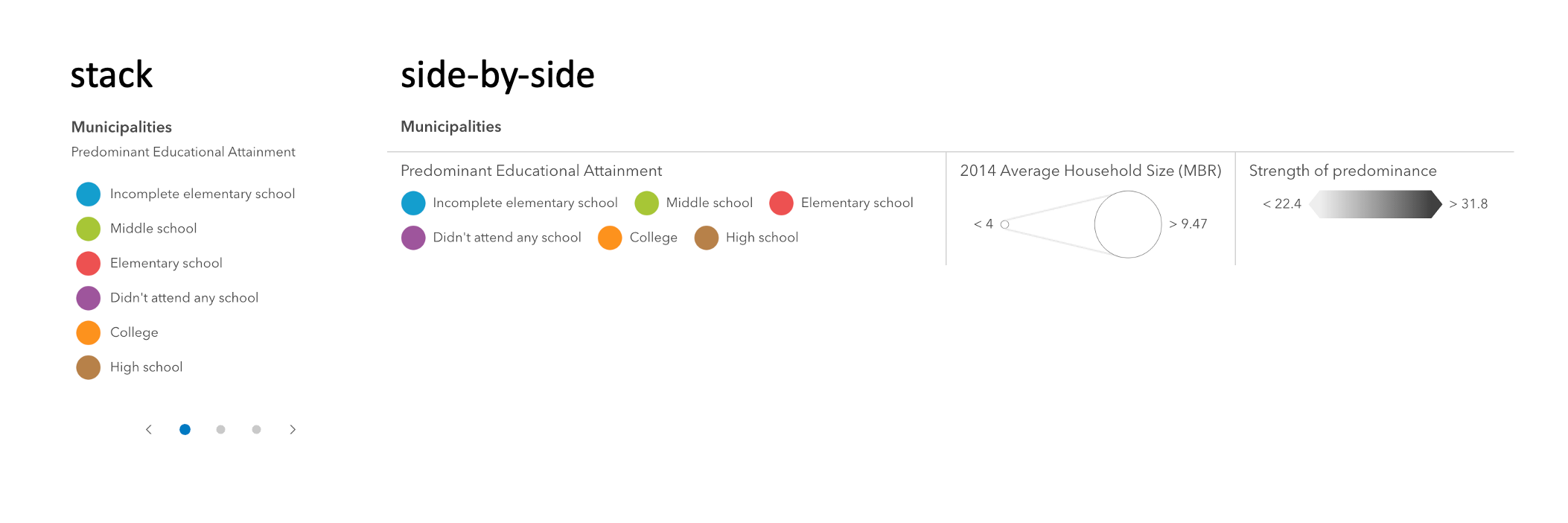](../sample-code/legend-card/)",
|
|
5049
5065
|
"values": [
|
|
5050
5066
|
{
|
|
5051
5067
|
"name": "auto"
|
|
@@ -5060,7 +5076,7 @@
|
|
|
5060
5076
|
},
|
|
5061
5077
|
{
|
|
5062
5078
|
"name": "heading-level",
|
|
5063
|
-
"description": "Indicates the heading level to use for the legend title. By default, legend titles
|
|
5079
|
+
"description": "Indicates the heading level to use for the legend title. By default, legend titles are rendered as level 3 headings (e.g. `<h3>Legend title</h3>`). Depending on the legend placement\nin your app, you may need to adjust this heading for proper semantics. This is important for meeting accessibility standards.",
|
|
5064
5080
|
"values": [
|
|
5065
5081
|
{
|
|
5066
5082
|
"name": "1"
|
|
@@ -5084,7 +5100,7 @@
|
|
|
5084
5100
|
},
|
|
5085
5101
|
{
|
|
5086
5102
|
"name": "hide-layers-not-in-current-view",
|
|
5087
|
-
"description": "When `true`, layers will only be shown in the legend if
|
|
5103
|
+
"description": "When `true`, layers will only be shown in the legend if they are visible in the view's extent. When data from a layer\nis not visible in the view, the layer's legend information will be hidden. Only layers that implement the `createQuery()`\nand `queryFeatureCount()` methods are supported by `hideLayersNotInCurrentView`.\n\nTo hide layers completely from the legend, you should set the `legendEnabled` property of the layer to `false`.",
|
|
5088
5104
|
"values": []
|
|
5089
5105
|
},
|
|
5090
5106
|
{
|
|
@@ -5094,7 +5110,7 @@
|
|
|
5094
5110
|
},
|
|
5095
5111
|
{
|
|
5096
5112
|
"name": "ignore-layer-visibility",
|
|
5097
|
-
"description": "Determines whether to respect the properties of the layers in the map that
|
|
5113
|
+
"description": "Determines whether to respect the properties of the layers in the map that control the legend's visibility (`minScale`, `maxScale`, `legendEnabled`).\nBy default, a layer's legend elements **will not render** in the legend given the following conditions:\n\n- The layer's [legendEnabled](https://developers.arcgis.com/javascript/latest/api-reference/esri-layers-FeatureLayer.html#legendEnabled) property\nis set to `false`.\n- If the view's scale is outside the visibility range\ndefined by the layer's [minScale](https://developers.arcgis.com/javascript/latest/api-reference/esri-layers-FeatureLayer.html#minScale) and\n[maxScale](https://developers.arcgis.com/javascript/latest/api-reference/esri-layers-FeatureLayer.html#maxScale) properties.\n\nWhen the `ignoreLayerVisibility` property of the legend is set to `true`, the legend elements for each\nlayer in the map will always display, thus disregarding the `minScale`, `maxScale`,\nand `legendEnabled` properties for each layer in the map.",
|
|
5098
5114
|
"values": []
|
|
5099
5115
|
},
|
|
5100
5116
|
{
|
|
@@ -5104,7 +5120,7 @@
|
|
|
5104
5120
|
},
|
|
5105
5121
|
{
|
|
5106
5122
|
"name": "legend-style",
|
|
5107
|
-
"description": "Indicates the style of the legend. The style determines the legend's layout and behavior.\nYou can either specify a string or an object to indicate the style. The known string values are the same values listed in\nthe table within the `type` property.",
|
|
5123
|
+
"description": "Indicates the style of the legend. The style determines the legend's layout and behavior.\nYou can either specify a string or an object to indicate the style. The known string values are the same values listed in\nthe table within the `type` property.\n\n[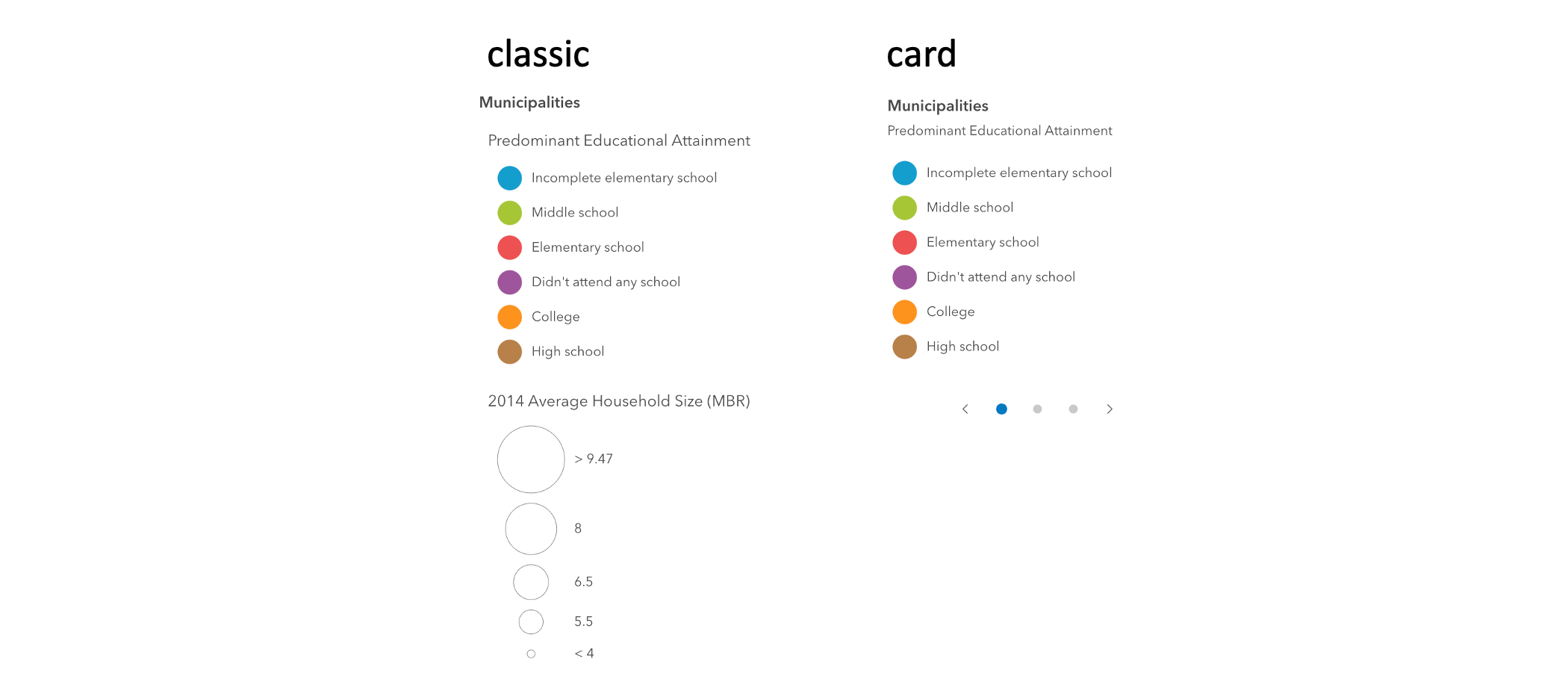](../sample-code/legend-card/)",
|
|
5108
5124
|
"values": [
|
|
5109
5125
|
{
|
|
5110
5126
|
"name": "card"
|
|
@@ -5114,6 +5130,11 @@
|
|
|
5114
5130
|
}
|
|
5115
5131
|
]
|
|
5116
5132
|
},
|
|
5133
|
+
{
|
|
5134
|
+
"name": "loading",
|
|
5135
|
+
"description": "Indicates whether the legend is currently loading.",
|
|
5136
|
+
"values": []
|
|
5137
|
+
},
|
|
5117
5138
|
{
|
|
5118
5139
|
"name": "position",
|
|
5119
5140
|
"description": "**Deprecated**: since 4.34, use [`slot`](https://developer.mozilla.org/en-US/docs/Web/HTML/Reference/Elements/slot) instead.. ",
|
|
@@ -5157,6 +5178,11 @@
|
|
|
5157
5178
|
"description": "If a layer uses a unique value render, only features that satisfy the layer's\n[definition](https://developers.arcgis.com/javascript/latest/api-reference/esri-layers-FeatureLayer.html#definitionExpression)\nwill be displayed in the legend when set to true.",
|
|
5158
5179
|
"values": []
|
|
5159
5180
|
},
|
|
5181
|
+
{
|
|
5182
|
+
"name": "respect-layer-visibility-disabled",
|
|
5183
|
+
"description": "**Deprecated**: since 4.34 use [ignoreLayerVisibility](https://developers.arcgis.com/javascript/latest/references/map-components/arcgis-legend/#ignoreLayerVisibility) instead.. Determines whether to respect the properties of the layers in the map that control the legend's visibility (`minScale`, `maxScale`, `legendEnabled`).\nBy default, a layer's legend elements **will not render** in the legend given the following conditions:\n\n- The layer's [legendEnabled](https://developers.arcgis.com/javascript/latest/api-reference/esri-layers-FeatureLayer.html#legendEnabled) property\nis set to `false`.\n- If the view's scale is outside the visibility range\ndefined by the layer's [minScale](https://developers.arcgis.com/javascript/latest/api-reference/esri-layers-FeatureLayer.html#minScale) and\n[maxScale](https://developers.arcgis.com/javascript/latest/api-reference/esri-layers-FeatureLayer.html#maxScale) properties.\n\nWhen the `respectLayerVisibilityDisabled` property of the legend is set to `false`, the legend elements for each\nlayer in the map will always display, thus disregarding the `minScale`, `maxScale`,\nand `legendEnabled` properties for each layer in the map.",
|
|
5184
|
+
"values": []
|
|
5185
|
+
},
|
|
5160
5186
|
{
|
|
5161
5187
|
"name": "state",
|
|
5162
5188
|
"description": "The view model's state.\n\n[Read more...](https://developers.arcgis.com/javascript/latest/api-reference/esri-widgets-Legend-LegendViewModel.html#state)",
|
|
@@ -5181,328 +5207,6 @@
|
|
|
5181
5207
|
}
|
|
5182
5208
|
]
|
|
5183
5209
|
},
|
|
5184
|
-
{
|
|
5185
|
-
"name": "arcgis-legend-card-color-ramp",
|
|
5186
|
-
"description": "### Methods\n- `componentOnReady(): Promise<void>` - Create a promise that resolves once component is fully loaded.",
|
|
5187
|
-
"attributes": [
|
|
5188
|
-
{
|
|
5189
|
-
"name": "css-effect-filter",
|
|
5190
|
-
"values": []
|
|
5191
|
-
},
|
|
5192
|
-
{
|
|
5193
|
-
"name": "opacity",
|
|
5194
|
-
"values": []
|
|
5195
|
-
}
|
|
5196
|
-
],
|
|
5197
|
-
"references": [
|
|
5198
|
-
{
|
|
5199
|
-
"name": "Docs",
|
|
5200
|
-
"url": "https://developers.arcgis.com/javascript/latest/references/map-components/arcgis-legend-card-color-ramp/"
|
|
5201
|
-
}
|
|
5202
|
-
]
|
|
5203
|
-
},
|
|
5204
|
-
{
|
|
5205
|
-
"name": "arcgis-legend-card-element",
|
|
5206
|
-
"description": "### Methods\n- `componentOnReady(): Promise<void>` - Create a promise that resolves once component is fully loaded.",
|
|
5207
|
-
"attributes": [
|
|
5208
|
-
{
|
|
5209
|
-
"name": "css-effect-filter",
|
|
5210
|
-
"values": []
|
|
5211
|
-
},
|
|
5212
|
-
{
|
|
5213
|
-
"name": "heading-level",
|
|
5214
|
-
"values": [
|
|
5215
|
-
{
|
|
5216
|
-
"name": "1"
|
|
5217
|
-
},
|
|
5218
|
-
{
|
|
5219
|
-
"name": "2"
|
|
5220
|
-
},
|
|
5221
|
-
{
|
|
5222
|
-
"name": "3"
|
|
5223
|
-
},
|
|
5224
|
-
{
|
|
5225
|
-
"name": "4"
|
|
5226
|
-
},
|
|
5227
|
-
{
|
|
5228
|
-
"name": "5"
|
|
5229
|
-
},
|
|
5230
|
-
{
|
|
5231
|
-
"name": "6"
|
|
5232
|
-
}
|
|
5233
|
-
]
|
|
5234
|
-
},
|
|
5235
|
-
{
|
|
5236
|
-
"name": "stacked",
|
|
5237
|
-
"values": []
|
|
5238
|
-
}
|
|
5239
|
-
],
|
|
5240
|
-
"references": [
|
|
5241
|
-
{
|
|
5242
|
-
"name": "Docs",
|
|
5243
|
-
"url": "https://developers.arcgis.com/javascript/latest/references/map-components/arcgis-legend-card-element/"
|
|
5244
|
-
}
|
|
5245
|
-
]
|
|
5246
|
-
},
|
|
5247
|
-
{
|
|
5248
|
-
"name": "arcgis-legend-card-size-ramp",
|
|
5249
|
-
"description": "### Methods\n- `componentOnReady(): Promise<void>` - Create a promise that resolves once component is fully loaded.",
|
|
5250
|
-
"attributes": [
|
|
5251
|
-
{
|
|
5252
|
-
"name": "has-indicators",
|
|
5253
|
-
"values": []
|
|
5254
|
-
},
|
|
5255
|
-
{
|
|
5256
|
-
"name": "opacity",
|
|
5257
|
-
"values": []
|
|
5258
|
-
}
|
|
5259
|
-
],
|
|
5260
|
-
"references": [
|
|
5261
|
-
{
|
|
5262
|
-
"name": "Docs",
|
|
5263
|
-
"url": "https://developers.arcgis.com/javascript/latest/references/map-components/arcgis-legend-card-size-ramp/"
|
|
5264
|
-
}
|
|
5265
|
-
]
|
|
5266
|
-
},
|
|
5267
|
-
{
|
|
5268
|
-
"name": "arcgis-legend-card-univariate-above-and-below-ramp",
|
|
5269
|
-
"description": "### Methods\n- `componentOnReady(): Promise<void>` - Create a promise that resolves once component is fully loaded.",
|
|
5270
|
-
"attributes": [
|
|
5271
|
-
{
|
|
5272
|
-
"name": "css-effect-filter",
|
|
5273
|
-
"values": []
|
|
5274
|
-
},
|
|
5275
|
-
{
|
|
5276
|
-
"name": "opacity",
|
|
5277
|
-
"values": []
|
|
5278
|
-
}
|
|
5279
|
-
],
|
|
5280
|
-
"references": [
|
|
5281
|
-
{
|
|
5282
|
-
"name": "Docs",
|
|
5283
|
-
"url": "https://developers.arcgis.com/javascript/latest/references/map-components/arcgis-legend-card-univariate-above-and-below-ramp/"
|
|
5284
|
-
}
|
|
5285
|
-
]
|
|
5286
|
-
},
|
|
5287
|
-
{
|
|
5288
|
-
"name": "arcgis-legend-card-univariate-color-size-ramp",
|
|
5289
|
-
"description": "### Methods\n- `componentOnReady(): Promise<void>` - Create a promise that resolves once component is fully loaded.",
|
|
5290
|
-
"attributes": [
|
|
5291
|
-
{
|
|
5292
|
-
"name": "css-effect-filter",
|
|
5293
|
-
"values": []
|
|
5294
|
-
},
|
|
5295
|
-
{
|
|
5296
|
-
"name": "opacity",
|
|
5297
|
-
"values": []
|
|
5298
|
-
}
|
|
5299
|
-
],
|
|
5300
|
-
"references": [
|
|
5301
|
-
{
|
|
5302
|
-
"name": "Docs",
|
|
5303
|
-
"url": "https://developers.arcgis.com/javascript/latest/references/map-components/arcgis-legend-card-univariate-color-size-ramp/"
|
|
5304
|
-
}
|
|
5305
|
-
]
|
|
5306
|
-
},
|
|
5307
|
-
{
|
|
5308
|
-
"name": "arcgis-legend-card-view",
|
|
5309
|
-
"description": "### Methods\n- `componentOnReady(): Promise<void>` - Create a promise that resolves once component is fully loaded.",
|
|
5310
|
-
"attributes": [
|
|
5311
|
-
{
|
|
5312
|
-
"name": "heading-level",
|
|
5313
|
-
"values": [
|
|
5314
|
-
{
|
|
5315
|
-
"name": "1"
|
|
5316
|
-
},
|
|
5317
|
-
{
|
|
5318
|
-
"name": "2"
|
|
5319
|
-
},
|
|
5320
|
-
{
|
|
5321
|
-
"name": "3"
|
|
5322
|
-
},
|
|
5323
|
-
{
|
|
5324
|
-
"name": "4"
|
|
5325
|
-
},
|
|
5326
|
-
{
|
|
5327
|
-
"name": "5"
|
|
5328
|
-
},
|
|
5329
|
-
{
|
|
5330
|
-
"name": "6"
|
|
5331
|
-
}
|
|
5332
|
-
]
|
|
5333
|
-
},
|
|
5334
|
-
{
|
|
5335
|
-
"name": "layout",
|
|
5336
|
-
"description": "The rendering layout.",
|
|
5337
|
-
"values": [
|
|
5338
|
-
{
|
|
5339
|
-
"name": "auto"
|
|
5340
|
-
},
|
|
5341
|
-
{
|
|
5342
|
-
"name": "side-by-side"
|
|
5343
|
-
},
|
|
5344
|
-
{
|
|
5345
|
-
"name": "stack"
|
|
5346
|
-
}
|
|
5347
|
-
]
|
|
5348
|
-
}
|
|
5349
|
-
],
|
|
5350
|
-
"references": [
|
|
5351
|
-
{
|
|
5352
|
-
"name": "Docs",
|
|
5353
|
-
"url": "https://developers.arcgis.com/javascript/latest/references/map-components/arcgis-legend-card-view/"
|
|
5354
|
-
}
|
|
5355
|
-
]
|
|
5356
|
-
},
|
|
5357
|
-
{
|
|
5358
|
-
"name": "arcgis-legend-classic-color-ramp",
|
|
5359
|
-
"description": "### Methods\n- `componentOnReady(): Promise<void>` - Create a promise that resolves once component is fully loaded.",
|
|
5360
|
-
"attributes": [
|
|
5361
|
-
{
|
|
5362
|
-
"name": "opacity",
|
|
5363
|
-
"values": []
|
|
5364
|
-
}
|
|
5365
|
-
],
|
|
5366
|
-
"references": [
|
|
5367
|
-
{
|
|
5368
|
-
"name": "Docs",
|
|
5369
|
-
"url": "https://developers.arcgis.com/javascript/latest/references/map-components/arcgis-legend-classic-color-ramp/"
|
|
5370
|
-
}
|
|
5371
|
-
]
|
|
5372
|
-
},
|
|
5373
|
-
{
|
|
5374
|
-
"name": "arcgis-legend-classic-element",
|
|
5375
|
-
"description": "### Methods\n- `componentOnReady(): Promise<void>` - Create a promise that resolves once component is fully loaded.",
|
|
5376
|
-
"attributes": [
|
|
5377
|
-
{
|
|
5378
|
-
"name": "css-effect-filter",
|
|
5379
|
-
"values": []
|
|
5380
|
-
}
|
|
5381
|
-
],
|
|
5382
|
-
"references": [
|
|
5383
|
-
{
|
|
5384
|
-
"name": "Docs",
|
|
5385
|
-
"url": "https://developers.arcgis.com/javascript/latest/references/map-components/arcgis-legend-classic-element/"
|
|
5386
|
-
}
|
|
5387
|
-
]
|
|
5388
|
-
},
|
|
5389
|
-
{
|
|
5390
|
-
"name": "arcgis-legend-classic-size-ramp",
|
|
5391
|
-
"description": "### Methods\n- `componentOnReady(): Promise<void>` - Create a promise that resolves once component is fully loaded.",
|
|
5392
|
-
"attributes": [],
|
|
5393
|
-
"references": [
|
|
5394
|
-
{
|
|
5395
|
-
"name": "Docs",
|
|
5396
|
-
"url": "https://developers.arcgis.com/javascript/latest/references/map-components/arcgis-legend-classic-size-ramp/"
|
|
5397
|
-
}
|
|
5398
|
-
]
|
|
5399
|
-
},
|
|
5400
|
-
{
|
|
5401
|
-
"name": "arcgis-legend-classic-univariate-above-and-below-ramp",
|
|
5402
|
-
"description": "### Methods\n- `componentOnReady(): Promise<void>` - Create a promise that resolves once component is fully loaded.",
|
|
5403
|
-
"attributes": [
|
|
5404
|
-
{
|
|
5405
|
-
"name": "css-effect-filter",
|
|
5406
|
-
"values": []
|
|
5407
|
-
},
|
|
5408
|
-
{
|
|
5409
|
-
"name": "opacity",
|
|
5410
|
-
"values": []
|
|
5411
|
-
}
|
|
5412
|
-
],
|
|
5413
|
-
"references": [
|
|
5414
|
-
{
|
|
5415
|
-
"name": "Docs",
|
|
5416
|
-
"url": "https://developers.arcgis.com/javascript/latest/references/map-components/arcgis-legend-classic-univariate-above-and-below-ramp/"
|
|
5417
|
-
}
|
|
5418
|
-
]
|
|
5419
|
-
},
|
|
5420
|
-
{
|
|
5421
|
-
"name": "arcgis-legend-classic-univariate-color-size-ramp",
|
|
5422
|
-
"description": "### Methods\n- `componentOnReady(): Promise<void>` - Create a promise that resolves once component is fully loaded.",
|
|
5423
|
-
"attributes": [
|
|
5424
|
-
{
|
|
5425
|
-
"name": "css-effect-filter",
|
|
5426
|
-
"values": []
|
|
5427
|
-
},
|
|
5428
|
-
{
|
|
5429
|
-
"name": "opacity",
|
|
5430
|
-
"values": []
|
|
5431
|
-
}
|
|
5432
|
-
],
|
|
5433
|
-
"references": [
|
|
5434
|
-
{
|
|
5435
|
-
"name": "Docs",
|
|
5436
|
-
"url": "https://developers.arcgis.com/javascript/latest/references/map-components/arcgis-legend-classic-univariate-color-size-ramp/"
|
|
5437
|
-
}
|
|
5438
|
-
]
|
|
5439
|
-
},
|
|
5440
|
-
{
|
|
5441
|
-
"name": "arcgis-legend-classic-view",
|
|
5442
|
-
"description": "### Methods\n- `componentOnReady(): Promise<void>` - Create a promise that resolves once component is fully loaded.",
|
|
5443
|
-
"attributes": [
|
|
5444
|
-
{
|
|
5445
|
-
"name": "heading-level",
|
|
5446
|
-
"values": [
|
|
5447
|
-
{
|
|
5448
|
-
"name": "1"
|
|
5449
|
-
},
|
|
5450
|
-
{
|
|
5451
|
-
"name": "2"
|
|
5452
|
-
},
|
|
5453
|
-
{
|
|
5454
|
-
"name": "3"
|
|
5455
|
-
},
|
|
5456
|
-
{
|
|
5457
|
-
"name": "4"
|
|
5458
|
-
},
|
|
5459
|
-
{
|
|
5460
|
-
"name": "5"
|
|
5461
|
-
},
|
|
5462
|
-
{
|
|
5463
|
-
"name": "6"
|
|
5464
|
-
}
|
|
5465
|
-
]
|
|
5466
|
-
}
|
|
5467
|
-
],
|
|
5468
|
-
"references": [
|
|
5469
|
-
{
|
|
5470
|
-
"name": "Docs",
|
|
5471
|
-
"url": "https://developers.arcgis.com/javascript/latest/references/map-components/arcgis-legend-classic-view/"
|
|
5472
|
-
}
|
|
5473
|
-
]
|
|
5474
|
-
},
|
|
5475
|
-
{
|
|
5476
|
-
"name": "arcgis-legend-relationship-ramp",
|
|
5477
|
-
"description": "### Methods\n- `componentOnReady(): Promise<void>` - Create a promise that resolves once component is fully loaded.",
|
|
5478
|
-
"attributes": [
|
|
5479
|
-
{
|
|
5480
|
-
"name": "css-effect-filter",
|
|
5481
|
-
"values": []
|
|
5482
|
-
},
|
|
5483
|
-
{
|
|
5484
|
-
"name": "opacity",
|
|
5485
|
-
"values": []
|
|
5486
|
-
}
|
|
5487
|
-
],
|
|
5488
|
-
"references": [
|
|
5489
|
-
{
|
|
5490
|
-
"name": "Docs",
|
|
5491
|
-
"url": "https://developers.arcgis.com/javascript/latest/references/map-components/arcgis-legend-relationship-ramp/"
|
|
5492
|
-
}
|
|
5493
|
-
]
|
|
5494
|
-
},
|
|
5495
|
-
{
|
|
5496
|
-
"name": "arcgis-legend-spike-ramp",
|
|
5497
|
-
"description": "### Methods\n- `componentOnReady(): Promise<void>` - Create a promise that resolves once component is fully loaded.",
|
|
5498
|
-
"attributes": [],
|
|
5499
|
-
"references": [
|
|
5500
|
-
{
|
|
5501
|
-
"name": "Docs",
|
|
5502
|
-
"url": "https://developers.arcgis.com/javascript/latest/references/map-components/arcgis-legend-spike-ramp/"
|
|
5503
|
-
}
|
|
5504
|
-
]
|
|
5505
|
-
},
|
|
5506
5210
|
{
|
|
5507
5211
|
"name": "arcgis-line-of-sight",
|
|
5508
5212
|
"description": "The Line Of Sight component is a 3D analysis tool that allows you to perform\n[line of sight visibility analysis](https://developers.arcgis.com/javascript/latest/api-reference/esri-analysis-LineOfSightAnalysis.html)\nin a [Scene](https://developers.arcgis.com/javascript/latest/references/map-components/arcgis-scene/). Visibility between a given observer and multiple target points is calculated against the currently\ndisplayed content in the view, including the ground, integrated meshes, and 3D objects such as buildings or trees.\n\n\n\nThe analysis results are displayed as colored lines, where areas visible to the observer are\nshown green and occluded parts are marked in red. Also, the color of the target points indicates their visibility.\nWhen the line of sight cannot be calculated, it will be displayed with a gray color. This may happen if either\nthe target or the observer is not in the view.\n\nWhen creating a new line of sight analysis, the first click in the Scene creates the\n[observer](https://developers.arcgis.com/javascript/latest/api-reference/esri-analysis-LineOfSightAnalysisObserver.html)\nand subsequent clicks place the [targets](https://developers.arcgis.com/javascript/latest/api-reference/esri-analysis-LineOfSightAnalysisTarget.html).\nBoth the observer and target points can be moved by dragging. Additionally, the target points can be removed with a right click.\n\n**Known limitation**\n\nLine Of Sight is only supported in a 3D [Scene](https://developers.arcgis.com/javascript/latest/references/map-components/arcgis-scene/) component.\n\n**See also**\n\n- [LineOfSightAnalysis](https://developers.arcgis.com/javascript/latest/api-reference/esri-analysis-LineOfSightAnalysis.html)\n- [Sample - Line of sight component](https://developers.arcgis.com/javascript/latest/sample-code/line-of-sight/)\n- [Sample - Analysis objects](https://developers.arcgis.com/javascript/latest/sample-code/analysis-objects/)\n--\n\n### Events\n- **arcgisPropertyChange** - Emitted when the value of a property is changed. Use this to listen to changes to properties.\n- **arcgisReady** - Emitted when the component associated with a map or scene view is ready to be interacted with.\n\n### Methods\n- `clear(): Promise<void>` - Clear the current analysis results. After calling this method, the user can set a new observer and targets.\n- `componentOnReady(): Promise<void>` - Create a promise that resolves once component is fully loaded.\n- `continue(): Promise<void>` - After [stop()](#stop) was called, this method allows to continue the line of sight analysis and add more targets.\n- `destroy(): Promise<void>` - Permanently destroy the component.\n- `start(): Promise<void>` - Start a new line of sight analysis.\n- `stop(): Promise<void>` - Stop the current placing of line of sight analysis. Any lines added this far are kept in the view.\nUsers can still interact with existing targets and the observer, but they cannot place new target points.",
|
|
@@ -5592,7 +5296,7 @@
|
|
|
5592
5296
|
},
|
|
5593
5297
|
{
|
|
5594
5298
|
"name": "arcgis-link-chart",
|
|
5595
|
-
"description": "Loads a [WebLinkChart](https://developers.arcgis.com/javascript/latest/api-reference/esri-WebLinkChart.html) from an [ArcGIS Enterprise portal](https://enterprise.arcgis.com/en/portal/latest/administer/windows/what-is-portal-for-arcgis-.htm) into a [LinkChartView](https://developers.arcgis.com/javascript/latest/api-reference/esri-views-LinkChartView.html).\n\
|
|
5299
|
+
"description": "Loads a [WebLinkChart](https://developers.arcgis.com/javascript/latest/api-reference/esri-WebLinkChart.html) from an [ArcGIS Enterprise portal](https://enterprise.arcgis.com/en/portal/latest/administer/windows/what-is-portal-for-arcgis-.htm) into a [LinkChartView](https://developers.arcgis.com/javascript/latest/api-reference/esri-views-LinkChartView.html).\n\nNote: Sign in to access the data in this demo, U/P: `viewer01`/`I68VGU^nMurF`\n--\n\n### Events\n- **arcgisViewAnalysisViewCreate** - Fires when the view for an analysis is created.\n\n[Read more](https://developers.arcgis.com/javascript/latest/api-reference/esri-views-MapView.html#event-analysis-view-create)\n- **arcgisViewAnalysisViewCreateError** - Fires when an error occurs during the creation of an analysis view after an analysis is added to the view.\n\n[Read more](https://developers.arcgis.com/javascript/latest/api-reference/esri-views-MapView.html#event-analysis-view-create-error)\n- **arcgisViewAnalysisViewDestroy** - Fires after an analysis view is destroyed.\n\n[Read more](https://developers.arcgis.com/javascript/latest/api-reference/esri-views-MapView.html#event-analysis-view-destroy)\n- **arcgisViewChange** - This event is for view related property changes: zoom, scale, center, rotation, extent, camera, viewpoint.\nThis event will also emit if stationary toggles from true to false.\n- **arcgisViewClick** - Fires after a user clicks on the view.\n- **arcgisViewDoubleClick** - Fires after double-clicking on the view.\n- **arcgisViewDrag** - Fires during a pointer drag on the view.\n- **arcgisViewHold** - Fires during a pointer drag on the view.\n- **arcgisViewImmediateClick** - Fires right after a user clicks on the view.\n- **arcgisViewImmediateDoubleClick** - Is emitted after two consecutive immediate-click events.\n- **arcgisViewKeyDown** - Fires after a keyboard key is pressed.\n- **arcgisViewKeyUp** - Fires after a keyboard key is pressed.\n- **arcgisViewLayerviewCreate** - Fires after each layer in the link chart has a corresponding LayerView created and rendered in the view.\n- **arcgisViewLayerviewCreateError** - Fires when an error emits during the creation of a LayerView after a layer has been added to the link chart.\n- **arcgisViewLayerviewDestroy** - Fires after a LayerView is destroyed and is no longer rendered in the view.\n- **arcgisViewMouseWheel** - Fires when a wheel button of a pointing device (typically a mouse) is scrolled on the view.\n- **arcgisViewPointerDown** - Fires after a mouse button is pressed, or a finger touches the display.\n- **arcgisViewPointerEnter** - Fires after a mouse cursor enters the view, or a display touch begins.\n- **arcgisViewPointerLeave** - Fires after a mouse cursor leaves the view, or a display touch ends.\n- **arcgisViewPointerMove** - Fires after the mouse or a finger on the display moves.\n- **arcgisViewPointerUp** - Fires after a mouse button is released, or a display touch ends.\n- **arcgisViewReadyChange** - This event is for the `ready` property and will be emitted when the view is ready.\nThis event will also emit if the `map` property is changed.\n\n### Methods\n- `addLayer(layer: __esri.Layer | Promise<any>, index?: number): Promise<void>` - **Deprecated**: since 4.33, use `element.map.add(layer)` instead.\n\nAdds a layer to the map layers collection.. \n- `addLayers(layers: __esri.Layer[], index?: number): Promise<void>` - **Deprecated**: since 4.33, use `element.map.addMany([layer])` instead.\n\nAdds a layer or array of layers to the map layers collection.. \n- `closePopup(): Promise<void>` - Closes the popup.\n- `componentOnReady(): Promise<void>` - Create a promise that resolves once component is fully loaded.\n- `destroy(): Promise<void>` - Destroys the view, and any associated resources, including its map, popup, and UI elements.\n- `goTo(target: __esri.GoToTarget2D, options?: __esri.GoToOptions2D): Promise<unknown>` - Sets the view to a given target.\n- `openPopup(options?: __esri.PopupViewOpenPopupOptions): Promise<void>` - Opens the popup at the given location with content defined either explicitly with content or driven\nfrom the PopupTemplate of input features.\n- `toMap(screenPoint: __esri.MapViewScreenPoint | MouseEvent): __esri.Point`\n- `toScreen(point: __esri.Point, options?: __esri.ToScreenOptions2D): __esri.MapViewScreenPoint | nullish`\n- `tryFatalErrorRecovery(): Promise<void>` - Call this method to clear any fatal errors resulting from a lost WebGL context.\n- `viewOnReady(callback?: (): void, errback?: (error: Error) => void): Promise<void>` - `viewOnReady()` may be leveraged once an instance of the component and its underlying [view](https://developers.arcgis.com/javascript/latest/references/map-components/arcgis-link-chart/#view) is created and ready.\nThis method takes two input parameters, a `callback` function and an `errback` function, and returns a promise. The `callback` executes when the promise resolves, and the `errback` executes if the promise is rejected.\n- `whenAnalysisView(analysis: __esri.Analysis): Promise<__esri.AnalysisView2DUnion>` - Gets the analysis view created for the given analysis object.\n\n[Read more](https://developers.arcgis.com/javascript/latest/api-reference/esri-views-MapView.html#whenAnalysisView)\n- `whenLayerView(layer: __esri.Layer): Promise<__esri.LayerView>` - Gets the LayerView created on the view for the given layer.\n\n### Slots\n- _default_ - Default slot for adding components to the link chart. User is responsible for positioning the content via CSS.\n- **top-left** - Slot for components positioned in the top-left corner.\n- **top-right** - Slot for components positioned in the top-right corner.\n- **bottom-left** - Slot for components positioned in the bottom-left corner.\n- **bottom-right** - Slot for components positioned in the bottom-right corner.\n- **top-start** - Slot for components positioned at the top-start (top-left in LTR, top-right in RTL).\n- **top-end** - Slot for components positioned at the top-end (top-right in LTR, top-left in RTL).\n- **bottom-start** - Slot for components positioned at the bottom-start (bottom-left in LTR, bottom-right in RTL).\n- **bottom-end** - Slot for components positioned at the bottom-end (bottom-right in LTR, bottom-left in RTL).\n\n### CSS Properties\n- **--arcgis-layout-padding-top** - Specifies the top padding for the layout. \n- **--arcgis-layout-padding-bottom** - Specifies the bottom padding for the layout. \n- **--arcgis-layout-padding-left** - Specifies the left padding for the layout. \n- **--arcgis-layout-padding-right** - Specifies the right padding for the layout. ",
|
|
5596
5300
|
"attributes": [
|
|
5597
5301
|
{
|
|
5598
5302
|
"name": "auto-destroy-disabled",
|
|
@@ -5696,7 +5400,7 @@
|
|
|
5696
5400
|
},
|
|
5697
5401
|
{
|
|
5698
5402
|
"name": "arcgis-link-chart-layout-switcher",
|
|
5699
|
-
"description": "A component for use in link charts that allows users to switch between different layouts. See [documentation on layouts](https://enterprise.arcgis.com/en/knowledge/latest/knowledge-studio/change-the-layout-applied-to-a-link-chart.htm) for more details.\n\
|
|
5403
|
+
"description": "A component for use in link charts that allows users to switch between different layouts. See [documentation on layouts](https://enterprise.arcgis.com/en/knowledge/latest/knowledge-studio/change-the-layout-applied-to-a-link-chart.htm) for more details.\n\nNote: Sign in to access the data in this demo, U/P: `viewer01`/`I68VGU^nMurF`\n--\n\n### Events\n- **arcgisPropertyChange** - Emitted when the value of a property is changed. Use this to listen to changes to properties.\n- **arcgisReady** - Emitted when the component associated with a map or scene view is ready to be interacted with.\n- **arcgisSwitchLayout** - Fires when component has completed the layout switch\n\n### Methods\n- `componentOnReady(): Promise<void>` - Create a promise that resolves once component is fully loaded.\n- `destroy(): Promise<void>` - Permanently destroy the component.\n- `switchLayout(newLayout: \"basic-grid\" | \"chronological-mono-timeline\" | \"chronological-multi-timeline\" | \"geographic-organic-standard\" | \"hierarchical-bottom-to-top\" | \"organic-community\" | \"organic-standard\" | \"radial-root-centric\" | \"tree-left-to-right\"): Promise<void>` - Switches the layout of the link chart to the value provided.",
|
|
5700
5404
|
"attributes": [
|
|
5701
5405
|
{
|
|
5702
5406
|
"name": "appearance",
|
|
@@ -5905,7 +5609,7 @@
|
|
|
5905
5609
|
},
|
|
5906
5610
|
{
|
|
5907
5611
|
"name": "arcgis-map",
|
|
5908
|
-
"description": "The ArcGIS Map component is used to add 2D maps to web applications. For 3D maps, use the\n[ArcGIS Scene component](https://developers.arcgis.com/javascript/latest/references/map-components/arcgis-scene/).\n\nThe Map component creates a [MapView](https://developers.arcgis.com/javascript/latest/api-reference/esri-views-MapView.html) and loads a WebMap from either [ArcGIS Online](https://www.arcgis.com/home/index.html) or [ArcGIS Enterprise portal](https://enterprise.arcgis.com/en/portal/latest/administer/windows/what-is-portal-for-arcgis-.htm).\n\n```html\n<arcgis-map item-id=\"05e015c5f0314db9a487a9b46cb37eca\"></arcgis-map>\n```\n\nAlternatively, the Map component can be initialized without a WebMap item.\n\n```html\n<arcgis-map basemap=\"satellite\" center=\"-154.88, 19.46\" zoom=\"15\"></arcgis-map>\n```\n\nOther components can be added and connected to the Map component.\n\n```html\n<arcgis-map item-id=\"05e015c5f0314db9a487a9b46cb37eca\">\n <arcgis-zoom slot=\"top-left\"></arcgis-zoom>\n <arcgis-legend slot=\"bottom-left\"></arcgis-legend>\n</arcgis-map>\n```\n\nThe Map component can be customized further using any of the [core API functionalities](https://developers.arcgis.com/javascript/latest/api-reference/) of the ArcGIS Maps SDK for JavaScript.\n\n```js\nconst viewElement = document.querySelector(\"arcgis-map\");\nviewElement.addEventListener(\"arcgisViewReadyChange\", () => {\n const layer = new GraphicsLayer({ title: \"My Layer\" });\n viewElement.map.add(layer);\n});\n```\n\nSee also:\n- [SDK sample apps using the Map component](https://developers.arcgis.com/javascript/latest/sample-code/?tagged=arcgis-map)\n- [Get started](https://developers.arcgis.com/javascript/latest/get-started/)\n- [Programming patterns](https://developers.arcgis.com/javascript/latest/programming-patterns/)\n--\n\n### Events\n- **arcgisViewAnalysisViewCreate** - Fires when the view for an analysis is created.\n\n[Read more](https://developers.arcgis.com/javascript/latest/api-reference/esri-views-MapView.html#event-analysis-view-create)\n- **arcgisViewAnalysisViewCreateError** - Fires when an error occurs during the creation of an analysis view after an analysis is added to the view.\n\n[Read more](https://developers.arcgis.com/javascript/latest/api-reference/esri-views-MapView.html#event-analysis-view-create-error)\n- **arcgisViewAnalysisViewDestroy** - Fires after an analysis view is destroyed.\n\n[Read more](https://developers.arcgis.com/javascript/latest/api-reference/esri-views-MapView.html#event-analysis-view-destroy)\n- **arcgisViewChange** - This event is for view related property changes: zoom, scale, center, rotation, extent, camera, viewpoint.\nThis event will also emit if stationary toggles from true to false.\n- **arcgisViewClick** - Fires after a user clicks on the view.\n- **arcgisViewDoubleClick** - Fires after double-clicking on the view.\n- **arcgisViewDrag** - Fires during a pointer drag on the view.\n- **arcgisViewHold** - Fires during a pointer drag on the view.\n- **arcgisViewImmediateClick** - Fires right after a user clicks on the view.\n- **arcgisViewImmediateDoubleClick** - Is emitted after two consecutive immediate-click events.\n- **arcgisViewKeyDown** - Fires after a keyboard key is pressed.\n- **arcgisViewKeyUp** - Fires after a keyboard key is pressed.\n- **arcgisViewLayerviewCreate** - Fires after each layer in the map has a corresponding LayerView created and rendered in the view.\n- **arcgisViewLayerviewCreateError** - Fires when an error emits during the creation of a LayerView after a layer has been added to the map.\n- **arcgisViewLayerviewDestroy** - Fires after a LayerView is destroyed and is no longer rendered in the view.\n- **arcgisViewMouseWheel** - Fires when a wheel button of a pointing device (typically a mouse) is scrolled on the view.\n- **arcgisViewPointerDown** - Fires after a mouse button is pressed, or a finger touches the display.\n- **arcgisViewPointerEnter** - Fires after a mouse cursor enters the view, or a display touch begins.\n- **arcgisViewPointerLeave** - Fires after a mouse cursor leaves the view, or a display touch ends.\n- **arcgisViewPointerMove** - Fires after the mouse or a finger on the display moves.\n- **arcgisViewPointerUp** - Fires after a mouse button is released, or a display touch ends.\n- **arcgisViewReadyChange** - This event is for the `ready` property and will be emitted when the view is ready.\nThis event will also emit if the `map` property is changed.\n\n### Methods\n- `addLayer(layer: __esri.Layer | Promise<any>, index?: number): Promise<void>` - **Deprecated**: since 4.33, use `element.map.add(layer)` instead.\n\nAdds a layer to the map layers collection.. \n- `addLayers(layers: __esri.Layer[], index?: number): Promise<void>` - **Deprecated**: since 4.33, use `element.map.addMany([layer])` instead.\n\nAdds a layer or array of layers to the map layers collection.. \n- `addTable(table: __esri.FeatureLayer): Promise<void>` - **Deprecated**: since 4.33, use `element.map.tables.add(table)` instead.\n\nAdds a table to the map tables collection.. \n- `addTables(tables: __esri.FeatureLayer[], index?: number): Promise<void>` - **Deprecated**: since 4.33, use `element.map.tables.addMany([table])` instead.\n\nAdds a table or array of tables to the map tables collection.. \n- `closePopup(): Promise<void>` - Closes the popup.\n- `componentOnReady(): Promise<void>` - Create a promise that resolves once component is fully loaded.\n- `destroy(): Promise<void>` - Destroys the view, and any associated resources, including its map, popup, and UI elements.\n- `goTo(target: __esri.GoToTarget2D, options?: __esri.GoToOptions2D): Promise<unknown>` - Sets the view to a given target.\n- `hitTest(screenPoint: __esri.MapViewScreenPoint | MouseEvent, options?: __esri.MapViewHitTestOptions): Promise<__esri.HitTestResult>` - Returns hit test results from each layer that intersects the specified screen coordinates.\n- `openPopup(options?: __esri.PopupViewOpenPopupOptions): Promise<void>` - Opens the popup at the given location with content defined either explicitly with content or driven\nfrom the PopupTemplate of input features.\n- `takeScreenshot(options?: __esri.MapViewTakeScreenshotOptions): Promise<__esri.Screenshot>` - Create a screenshot of the current view.\n- `toMap(screenPoint: __esri.MapViewScreenPoint | MouseEvent): __esri.Point`\n- `toScreen(point: __esri.Point, options?: __esri.ToScreenOptions2D): __esri.MapViewScreenPoint | nullish`\n- `tryFatalErrorRecovery(): Promise<void>` - Call this method to clear any fatal errors resulting from a lost WebGL context.\n- `viewOnReady(callback?: (): void, errback?: (error: Error) => void): Promise<void>` - `viewOnReady()` may be leveraged once an instance of the component and its underlying [view](https://developers.arcgis.com/javascript/latest/references/map-components/arcgis-map/#view) is created and ready.\nThis method takes two input parameters, a `callback` function and an `errback` function, and returns a promise. The `callback` executes when the promise resolves, and the `errback` executes if the promise is rejected.\n- `whenAnalysisView(analysis: __esri.Analysis): Promise<__esri.AnalysisView2DUnion>` - Gets the analysis view created for the given analysis object.\n\n[Read more](https://developers.arcgis.com/javascript/latest/api-reference/esri-views-MapView.html#whenAnalysisView)\n- `whenLayerView(layer: __esri.Layer): Promise<__esri.LayerView>` - Gets the LayerView created on the view for the given layer.\n\n[Read more](https://developers.arcgis.com/javascript/latest/api-reference/esri-views-MapView.html#whenLayerView)\n\n### Slots\n- _default_ - Default slot for adding components to the map. User is responsible for positioning the content via CSS.\n- **top-left** - Slot for components positioned in the top-left corner.\n- **top-right** - Slot for components positioned in the top-right corner.\n- **bottom-left** - Slot for components positioned in the bottom-left corner.\n- **bottom-right** - Slot for components positioned in the bottom-right corner.\n- **top-start** - Slot for components positioned at the top-start (top-left in LTR, top-right in RTL).\n- **top-end** - Slot for components positioned at the top-end (top-right in LTR, top-left in RTL).\n- **bottom-start** - Slot for components positioned at the bottom-start (bottom-left in LTR, bottom-right in RTL).\n- **bottom-end** - Slot for components positioned at the bottom-end (bottom-right in LTR, bottom-left in RTL).",
|
|
5612
|
+
"description": "The ArcGIS Map component is used to add 2D maps to web applications. For 3D maps, use the\n[ArcGIS Scene component](https://developers.arcgis.com/javascript/latest/references/map-components/arcgis-scene/).\n\nThe Map component creates a [MapView](https://developers.arcgis.com/javascript/latest/api-reference/esri-views-MapView.html) and loads a WebMap from either [ArcGIS Online](https://www.arcgis.com/home/index.html) or [ArcGIS Enterprise portal](https://enterprise.arcgis.com/en/portal/latest/administer/windows/what-is-portal-for-arcgis-.htm).\n\n```html\n<arcgis-map item-id=\"05e015c5f0314db9a487a9b46cb37eca\"></arcgis-map>\n```\n\nAlternatively, the Map component can be initialized without a WebMap item.\n\n```html\n<arcgis-map basemap=\"satellite\" center=\"-154.88, 19.46\" zoom=\"15\"></arcgis-map>\n```\n\nOther components can be added and connected to the Map component.\n\n```html\n<arcgis-map item-id=\"05e015c5f0314db9a487a9b46cb37eca\">\n <arcgis-zoom slot=\"top-left\"></arcgis-zoom>\n <arcgis-legend slot=\"bottom-left\"></arcgis-legend>\n</arcgis-map>\n```\n\nThe Map component can be customized further using any of the [core API functionalities](https://developers.arcgis.com/javascript/latest/api-reference/) of the ArcGIS Maps SDK for JavaScript.\n\n```js\nconst viewElement = document.querySelector(\"arcgis-map\");\nviewElement.addEventListener(\"arcgisViewReadyChange\", () => {\n const layer = new GraphicsLayer({ title: \"My Layer\" });\n viewElement.map.add(layer);\n});\n```\n\nSee also:\n- [SDK sample apps using the Map component](https://developers.arcgis.com/javascript/latest/sample-code/?tagged=arcgis-map)\n- [Get started](https://developers.arcgis.com/javascript/latest/get-started/)\n- [Programming patterns](https://developers.arcgis.com/javascript/latest/programming-patterns/)\n--\n\n### Events\n- **arcgisViewAnalysisViewCreate** - Fires when the view for an analysis is created.\n\n[Read more](https://developers.arcgis.com/javascript/latest/api-reference/esri-views-MapView.html#event-analysis-view-create)\n- **arcgisViewAnalysisViewCreateError** - Fires when an error occurs during the creation of an analysis view after an analysis is added to the view.\n\n[Read more](https://developers.arcgis.com/javascript/latest/api-reference/esri-views-MapView.html#event-analysis-view-create-error)\n- **arcgisViewAnalysisViewDestroy** - Fires after an analysis view is destroyed.\n\n[Read more](https://developers.arcgis.com/javascript/latest/api-reference/esri-views-MapView.html#event-analysis-view-destroy)\n- **arcgisViewChange** - This event is for view related property changes: zoom, scale, center, rotation, extent, camera, viewpoint.\nThis event will also emit if stationary toggles from true to false.\n- **arcgisViewClick** - Fires after a user clicks on the view.\n- **arcgisViewDoubleClick** - Fires after double-clicking on the view.\n- **arcgisViewDrag** - Fires during a pointer drag on the view.\n- **arcgisViewHold** - Fires during a pointer drag on the view.\n- **arcgisViewImmediateClick** - Fires right after a user clicks on the view.\n- **arcgisViewImmediateDoubleClick** - Is emitted after two consecutive immediate-click events.\n- **arcgisViewKeyDown** - Fires after a keyboard key is pressed.\n- **arcgisViewKeyUp** - Fires after a keyboard key is pressed.\n- **arcgisViewLayerviewCreate** - Fires after each layer in the map has a corresponding LayerView created and rendered in the view.\n- **arcgisViewLayerviewCreateError** - Fires when an error emits during the creation of a LayerView after a layer has been added to the map.\n- **arcgisViewLayerviewDestroy** - Fires after a LayerView is destroyed and is no longer rendered in the view.\n- **arcgisViewMouseWheel** - Fires when a wheel button of a pointing device (typically a mouse) is scrolled on the view.\n- **arcgisViewPointerDown** - Fires after a mouse button is pressed, or a finger touches the display.\n- **arcgisViewPointerEnter** - Fires after a mouse cursor enters the view, or a display touch begins.\n- **arcgisViewPointerLeave** - Fires after a mouse cursor leaves the view, or a display touch ends.\n- **arcgisViewPointerMove** - Fires after the mouse or a finger on the display moves.\n- **arcgisViewPointerUp** - Fires after a mouse button is released, or a display touch ends.\n- **arcgisViewReadyChange** - This event is for the `ready` property and will be emitted when the view is ready.\nThis event will also emit if the `map` property is changed.\n\n### Methods\n- `addLayer(layer: __esri.Layer | Promise<any>, index?: number): Promise<void>` - **Deprecated**: since 4.33, use `element.map.add(layer)` instead.\n\nAdds a layer to the map layers collection.. \n- `addLayers(layers: __esri.Layer[], index?: number): Promise<void>` - **Deprecated**: since 4.33, use `element.map.addMany([layer])` instead.\n\nAdds a layer or array of layers to the map layers collection.. \n- `addTable(table: __esri.FeatureLayer): Promise<void>` - **Deprecated**: since 4.33, use `element.map.tables.add(table)` instead.\n\nAdds a table to the map tables collection.. \n- `addTables(tables: __esri.FeatureLayer[], index?: number): Promise<void>` - **Deprecated**: since 4.33, use `element.map.tables.addMany([table])` instead.\n\nAdds a table or array of tables to the map tables collection.. \n- `closePopup(): Promise<void>` - Closes the popup.\n- `componentOnReady(): Promise<void>` - Create a promise that resolves once component is fully loaded.\n- `destroy(): Promise<void>` - Destroys the view, and any associated resources, including its map, popup, and UI elements.\n- `goTo(target: __esri.GoToTarget2D, options?: __esri.GoToOptions2D): Promise<unknown>` - Sets the view to a given target.\n- `hitTest(screenPoint: __esri.MapViewScreenPoint | MouseEvent, options?: __esri.MapViewHitTestOptions): Promise<__esri.HitTestResult>` - Returns hit test results from each layer that intersects the specified screen coordinates.\n- `openPopup(options?: __esri.PopupViewOpenPopupOptions): Promise<void>` - Opens the popup at the given location with content defined either explicitly with content or driven\nfrom the PopupTemplate of input features.\n- `takeScreenshot(options?: __esri.MapViewTakeScreenshotOptions): Promise<__esri.Screenshot>` - Create a screenshot of the current view.\n- `toMap(screenPoint: __esri.MapViewScreenPoint | MouseEvent): __esri.Point`\n- `toScreen(point: __esri.Point, options?: __esri.ToScreenOptions2D): __esri.MapViewScreenPoint | nullish`\n- `tryFatalErrorRecovery(): Promise<void>` - Call this method to clear any fatal errors resulting from a lost WebGL context.\n- `viewOnReady(callback?: (): void, errback?: (error: Error) => void): Promise<void>` - `viewOnReady()` may be leveraged once an instance of the component and its underlying [view](https://developers.arcgis.com/javascript/latest/references/map-components/arcgis-map/#view) is created and ready.\nThis method takes two input parameters, a `callback` function and an `errback` function, and returns a promise. The `callback` executes when the promise resolves, and the `errback` executes if the promise is rejected.\n- `whenAnalysisView(analysis: __esri.Analysis): Promise<__esri.AnalysisView2DUnion>` - Gets the analysis view created for the given analysis object.\n\n[Read more](https://developers.arcgis.com/javascript/latest/api-reference/esri-views-MapView.html#whenAnalysisView)\n- `whenLayerView(layer: __esri.Layer): Promise<__esri.LayerView>` - Gets the LayerView created on the view for the given layer.\n\n[Read more](https://developers.arcgis.com/javascript/latest/api-reference/esri-views-MapView.html#whenLayerView)\n\n### Slots\n- _default_ - Default slot for adding components to the map. User is responsible for positioning the content via CSS.\n- **top-left** - Slot for components positioned in the top-left corner.\n- **top-right** - Slot for components positioned in the top-right corner.\n- **bottom-left** - Slot for components positioned in the bottom-left corner.\n- **bottom-right** - Slot for components positioned in the bottom-right corner.\n- **top-start** - Slot for components positioned at the top-start (top-left in LTR, top-right in RTL).\n- **top-end** - Slot for components positioned at the top-end (top-right in LTR, top-left in RTL).\n- **bottom-start** - Slot for components positioned at the bottom-start (bottom-left in LTR, bottom-right in RTL).\n- **bottom-end** - Slot for components positioned at the bottom-end (bottom-right in LTR, bottom-left in RTL).\n\n### CSS Properties\n- **--arcgis-layout-padding-top** - Specifies the top padding for the layout. \n- **--arcgis-layout-padding-bottom** - Specifies the bottom padding for the layout. \n- **--arcgis-layout-padding-left** - Specifies the left padding for the layout. \n- **--arcgis-layout-padding-right** - Specifies the right padding for the layout. ",
|
|
5909
5613
|
"attributes": [
|
|
5910
5614
|
{
|
|
5911
5615
|
"name": "auto-destroy-disabled",
|
|
@@ -5987,7 +5691,7 @@
|
|
|
5987
5691
|
},
|
|
5988
5692
|
{
|
|
5989
5693
|
"name": "spatial-reference-locked",
|
|
5990
|
-
"description": "Indicates if the view's spatialReference can be changed after it is ready.\nThe default is false indicating the view's spatialReference can be changed at runtime.\nWhen true, basemaps with spatial references that do not match the view's spatial reference\nwill be disabled in [
|
|
5694
|
+
"description": "Indicates if the view's spatialReference can be changed after it is ready.\nThe default is false indicating the view's spatialReference can be changed at runtime.\nWhen true, basemaps with spatial references that do not match the view's spatial reference\nwill be disabled in [arcgis-basemap-gallery](https://developers.arcgis.com/javascript/latest/references/map-components/arcgis-basemap-gallery/) and [arcgis-basemap-toggle](https://developers.arcgis.com/javascript/latest/references/map-components/arcgis-basemap-toggle/) components and the view spatialReference cannot be changed at runtime.",
|
|
5991
5695
|
"values": []
|
|
5992
5696
|
},
|
|
5993
5697
|
{
|
|
@@ -6491,6 +6195,208 @@
|
|
|
6491
6195
|
}
|
|
6492
6196
|
]
|
|
6493
6197
|
},
|
|
6198
|
+
{
|
|
6199
|
+
"name": "arcgis-popup",
|
|
6200
|
+
"description": "<a name=\"overview\"></a>\n\n## Overview\nThe Popup widget allows users to view content from feature attributes. Popups enhance web applications\nby providing users with a simple way to interact with and view attributes in a layer.\nThey play an important role in relaying information to the user, which improves the storytelling capabilities of the application.\n\n<a name=\"loading-the-popup\"></a>\n\n## Loading the Popup\nAt [version 4.27](../release-notes#popup-performance-improvements), the view's default popup is loaded on demand when [`popupEnabled`](https://developers.arcgis.com/javascript/latest/api-reference/esri-views-View2D.html#popupEnabled) is set to `true` (which is the default), when the [`openPopup()`](https://developers.arcgis.com/javascript/latest/api-reference/esri-views-View2D.html#openPopup) method is called,\nor when some widgets need the popup, such as [Search](https://developers.arcgis.com/javascript/latest/api-reference/esri-widgets-Search.html). Please see the read more section below for details on how to manually load the popup or take\nadvantage of the API lazy loading.\n\n>>> esri-read-more\n\nThe Popup class can be loaded when the [View](https://developers.arcgis.com/javascript/latest/api-reference/esri-views-View.html) is instantiated, however, this does not take advantage of the performance improvements of lazily loading the popup.\n```js\n// Create a new MapView\nconst view = new MapView({\n// set the popup property to a new instance of Popup\n popup: new Popup(...)\n});\n```\nTo utilize the performance improvements and the API automatically lazy loading the popup:\n- Set options/properties on the view's popup:\n ```js\n const view = MapView({\n popup: {\n dockEnabled: true,\n dockOptions: {\n position: true,\n ...\n }\n }\n });\n ```\n- Use [`popupEnabled`](https://developers.arcgis.com/javascript/latest/api-reference/esri-views-View2D.html#popupEnabled) to prevent the popup appearing when the user clicks the view.\n ```js\n // The popup doesn't show for features on selection, but will on Search results and when `openPopup()` is called.\n view.popupEnabled = false;\n ```\n- Use [`openPopup()`](https://developers.arcgis.com/javascript/latest/api-reference/esri-views-View2D.html#openPopup) instead of [`open()`](#open) and [`closePopup()`](https://developers.arcgis.com/javascript/latest/api-reference/esri-views-View2D.html#closePopup) instead of [`close()`](#close).\n ```js\n // A deprecation warning is prompted if the popup isn't created\n // and calls view.openPopup() or view.closePopup() respectively under the hood.\n view.popup.open(...);\n view.popup.close(...);\n\n // Opens or closes the popup on the View.\n view.openPopup(...);\n view.closePopup(...);\n ```\n- Use [reactiveUtils](https://developers.arcgis.com/javascript/latest/api-reference/esri-core-reactiveUtils.html) to watch properties on the popup and its view model instead of the [`watch()`](#watch) method.\n ```js\n // This will throw an error that watch() is not a method\n // since the popup hasn't been created yet.\n view.popup.watch(\"selectedFeature\", ...)\n\n // Call reactiveUtils.watch() on popup properties with optional chaining.\n reactiveUtils.watch(() => view.popup?.selectedFeature, ...);\n ```\n- Use the [`reactiveUtils.when()`](https://developers.arcgis.com/javascript/latest/api-reference/esri-core-reactiveUtils.html#when) method to check when the popup instance is created. Once its created, then it's properties or methods can be accessed and called.\n ```js\n // This will throw an error that actions is not a property.\n view.popup.actions.push(...);\n\n // Wait for the popup to load before accessing properties.\n reactiveUtils.when(() => view.popup?.actions, ()=>{\n view.popup.actions.push(...);\n });\n ```\n\n>>>\n\n<a name=\"popup-ui\"></a>\n\n## Popup UI\nAll [Views](https://developers.arcgis.com/javascript/latest/api-reference/esri-views-View.html) contain a default popup.\nThis popup can display generic content, which is set in its [title](#title)\nand [content](#content) properties.\nWhen content is set directly on the Popup instance it is not tied to a specific feature or layer.\n\n[](../sample-code/sandbox/?sample=intro-popup)\n\nIn the image above, the text \"Marriage in New York County Census Tract 8\" is the popup's `title`. The remaining text is\nits `content`. A dock button  may also be available in the\ntop right corner of the popup. This allows the user to dock the popup to one of the sides or corners of the view.\nThe options for docking may be set in the [dockOptions](#dockOptions) property.\n\nPopups can also contain [actions](#actions) that act like buttons,\nwhich execute a function defined by the developer when clicked.\nBy default, every popup has a \"Zoom to\" action \nthat allows users to zoom to the selected feature. See the [actions](#actions)\nproperty for information about adding custom actions to a popup.\n\nThe Popup widget is tied to the [View](https://developers.arcgis.com/javascript/latest/api-reference/esri-views-View.html), whether it's docked or anchored to the selected feature.\nIf wanting to utilize the Popup functionality outside of the View, the [Features](https://developers.arcgis.com/javascript/latest/api-reference/esri-widgets-Features.html) widget can be used to display the same content\nin its own container that's not tied to the View.\n\n<a name=\"popup-and-popuptemplate\"></a>\n\n## Popup and PopupTemplate\n[PopupTemplate](https://developers.arcgis.com/javascript/latest/api-reference/esri-PopupTemplate.html) is closely related to Popup, but is more specific to [layers](https://developers.arcgis.com/javascript/latest/api-reference/esri-layers-Layer.html)\nand [graphics](https://developers.arcgis.com/javascript/latest/api-reference/esri-Graphic.html). It allows you to define custom titles and content templates based on the source of the\n[selected feature](#selectedFeature). When a layer or a graphic has a defined\nPopupTemplate, the popup will display the content\ndefined in the PopupTemplate when the feature is clicked. The content may contain field values from the attributes of the [selected feature](#selectedFeature).\n\nCustom PopupTemplates may also be assigned directly to a popup by setting [graphics](https://developers.arcgis.com/javascript/latest/api-reference/esri-Graphic.html) on the\n[features](#features) property. For more information about Popup\nand how it relates to [PopupTemplate](https://developers.arcgis.com/javascript/latest/api-reference/esri-PopupTemplate.html) see the samples listed below.\n--\n\n### Events\n- **arcgisClose** - Emitted when the component's close button is clicked.\n- **arcgisPropertyChange**\n- **arcgisReady** - Emitted when the component associated with a map or scene view is ready to be interacted with.\n- **arcgisTriggerAction**\n\n### Methods\n- `clear(): Promise<void>` - Removes [promises](#promises), [features](#features), [content](#content),\n[title](#title) and [location](#location) from the Popup.\n- `componentOnReady(): Promise<void>` - Create a promise that resolves once component is fully loaded.\n- `destroy(): Promise<void>` - Permanently destroy the component.\n- `fetchFeatures(screenPoint: __esri.ScreenPoint, options?: FetchFeaturesOptions): Promise<__esri.FetchPopupFeaturesResult>` - Use this method to return feature(s) at a given screen location.\nThese features are fetched from all of the [LayerViews](https://developers.arcgis.com/javascript/latest/api-reference/esri-views-layers-LayerView.html)\nin the [view](https://developers.arcgis.com/javascript/latest/api-reference/esri-views-View.html). In order to use this, a layer must already have an\nassociated [PopupTemplate](https://developers.arcgis.com/javascript/latest/api-reference/esri-PopupTemplate.html) and have its [popupEnabled](https://developers.arcgis.com/javascript/latest/api-reference/esri-layers-FeatureLayer.html#popupEnabled).\nThese features can then be used within a custom [Popup](https://developers.arcgis.com/javascript/latest/api-reference/esri-widgets-Popup.html)\nor [Feature](https://developers.arcgis.com/javascript/latest/api-reference/esri-widgets-Feature.html) widget experience.\nOne example could be a custom side panel that displays feature-specific information based on\nan end user's click location. This method allows a developer the ability to\ncontrol how the input location is handled, and then subsequently, what to do with the results.\n- `next(): Promise<FeaturesViewModel>` - Selects the feature at the next index in relation to the selected feature.\n- `open(options?: __esri.FeaturesViewModelOpenOptions): Promise<void>` - Opens the popup at the given location with content defined either explicitly with `content`\nor driven from the [PopupTemplate](https://developers.arcgis.com/javascript/latest/api-reference/esri-PopupTemplate.html) of input features. This method sets\nthe popup's [visible](#visible) property to `true`. Users can alternatively open the popup\nby directly setting the [visible](#visible) property to `true`.\n\n::: esri-md class=\"warning\"\nThe popup will only display if\nthe view's size constraints in [dockOptions](#dockOptions) are met or the [location](#location)\nproperty is set to a geometry.\n:::\n- `previous(): Promise<FeaturesViewModel>` - Selects the feature at the previous index in relation to the selected feature.\n- `setFocus(): Promise<void>` - Use this method to give focus to the Widget if the widget is able to be focused.\n- `triggerAction(action: __esri.ActionButton | __esri.ActionToggle): Promise<void>` - Triggers the [trigger-action](#event-trigger-action) event and executes the [action](#actions)\nat the specified index in the [actions](#actions) array.",
|
|
6201
|
+
"attributes": [
|
|
6202
|
+
{
|
|
6203
|
+
"name": "alignment",
|
|
6204
|
+
"description": "Position of the popup in relation to the selected feature. The default behavior\nis to display above the feature and adjust if not enough room. If needing\nto explicitly control where the popup displays in relation to the feature, choose\nan option besides `auto`.",
|
|
6205
|
+
"values": [
|
|
6206
|
+
{
|
|
6207
|
+
"name": "auto"
|
|
6208
|
+
},
|
|
6209
|
+
{
|
|
6210
|
+
"name": "bottom-center"
|
|
6211
|
+
},
|
|
6212
|
+
{
|
|
6213
|
+
"name": "bottom-end"
|
|
6214
|
+
},
|
|
6215
|
+
{
|
|
6216
|
+
"name": "bottom-left"
|
|
6217
|
+
},
|
|
6218
|
+
{
|
|
6219
|
+
"name": "bottom-right"
|
|
6220
|
+
},
|
|
6221
|
+
{
|
|
6222
|
+
"name": "bottom-start"
|
|
6223
|
+
},
|
|
6224
|
+
{
|
|
6225
|
+
"name": "top-center"
|
|
6226
|
+
},
|
|
6227
|
+
{
|
|
6228
|
+
"name": "top-end"
|
|
6229
|
+
},
|
|
6230
|
+
{
|
|
6231
|
+
"name": "top-left"
|
|
6232
|
+
},
|
|
6233
|
+
{
|
|
6234
|
+
"name": "top-right"
|
|
6235
|
+
},
|
|
6236
|
+
{
|
|
6237
|
+
"name": "top-start"
|
|
6238
|
+
}
|
|
6239
|
+
]
|
|
6240
|
+
},
|
|
6241
|
+
{
|
|
6242
|
+
"name": "auto-close-enabled",
|
|
6243
|
+
"description": "This closes the popup when the [View](https://developers.arcgis.com/javascript/latest/api-reference/esri-views-View.html) camera or [Viewpoint](https://developers.arcgis.com/javascript/latest/api-reference/esri-Viewpoint.html) changes.",
|
|
6244
|
+
"values": []
|
|
6245
|
+
},
|
|
6246
|
+
{
|
|
6247
|
+
"name": "auto-destroy-disabled",
|
|
6248
|
+
"description": "If true, the component will not be destroyed automatically when it is\ndisconnected from the document. This is useful when you want to move the\ncomponent to a different place on the page, or temporarily hide it. If this\nis set, make sure to call the [destroy](https://developers.arcgis.com/javascript/latest/references/map-components/arcgis-popup/#destroy) method when you are done to\nprevent memory leaks.",
|
|
6249
|
+
"values": []
|
|
6250
|
+
},
|
|
6251
|
+
{
|
|
6252
|
+
"name": "content",
|
|
6253
|
+
"description": "The content of the popup. When set directly on the Popup, this content is\nstatic and cannot use fields to set content templates. To set a template\nfor the content based on field or attribute names, see\n[PopupTemplate.content](https://developers.arcgis.com/javascript/latest/api-reference/esri-PopupTemplate.html#content).",
|
|
6254
|
+
"values": []
|
|
6255
|
+
},
|
|
6256
|
+
{
|
|
6257
|
+
"name": "default-popup-template-enabled",
|
|
6258
|
+
"description": "Enables automatic creation of a popup template for layers that have popups enabled but no\npopupTemplate defined. Automatic popup templates are supported for layers that\nsupport the `createPopupTemplate` method. (Supported for\n[FeatureLayer](https://developers.arcgis.com/javascript/latest/api-reference/esri-layers-FeatureLayer.html),\n[GeoJSONLayer](https://developers.arcgis.com/javascript/latest/api-reference/esri-layers-GeoJSONLayer.html),\n[OGCFeatureLayer](https://developers.arcgis.com/javascript/latest/api-reference/esri-layers-OGCFeatureLayer.html),\n[SceneLayer](https://developers.arcgis.com/javascript/latest/api-reference/esri-layers-SceneLayer.html),\n[CSVLayer](https://developers.arcgis.com/javascript/latest/api-reference/esri-layers-CSVLayer.html),\n[PointCloudLayer](https://developers.arcgis.com/javascript/latest/api-reference/esri-layers-PointCloudLayer.html),\n[StreamLayer](https://developers.arcgis.com/javascript/latest/api-reference/esri-layers-StreamLayer.html),\n[ImageryLayer](https://developers.arcgis.com/javascript/latest/api-reference/esri-layers-ImageryLayer.html), and\n[VoxelLayer](https://developers.arcgis.com/javascript/latest/api-reference/esri-layers-VoxelLayer.html)).\n\n::: esri-md class=\"warning\"\n* Starting with version 4.12, [PopupTemplate](https://developers.arcgis.com/javascript/latest/api-reference/esri-PopupTemplate.html) content can no longer be set using a\nwildcard, e.g. `*`. Instead, set the `defaultPopupTemplateEnabled` property to `true`.\n* Starting with 4.16, the default popup has been improved to no longer display system\n[fields](https://developers.arcgis.com/javascript/latest/api-reference/esri-popup-FieldInfo.html)\nthat do not hold significant value, e.g. `Shape__Area` and `Shape__Length` are two fields that\nno longer display.\n* Starting with version 4.28, `date` fields are formatted using the `short-date-short-time` preset [dateFormat](https://developers.arcgis.com/javascript/latest/api-reference/esri-popup-support-FieldInfoFormat.html#dateFormat)\nrather than `long-month-day-year` in default [popup](https://developers.arcgis.com/javascript/latest/api-reference/esri-PopupTemplate.html) created by setting the `defaultPopupTemplateEnabled` property to `true`.\nFor example, previously a date that may have appeared as `\"December 30, 1997\"` will now appear as `\"12/30/1997 6:00 PM\"`.\n:::",
|
|
6259
|
+
"values": []
|
|
6260
|
+
},
|
|
6261
|
+
{
|
|
6262
|
+
"name": "dock-enabled",
|
|
6263
|
+
"description": "Indicates whether the placement of the popup is docked to the side of the view.\n\nDocking the popup allows for a better user experience, particularly when opening\npopups in apps on mobile devices. When a popup is \"dockEnabled\" it means the popup no\nlonger points to the [selected feature](#selectedFeature) or the [location](#location)\nassigned to it. Rather it is attached to a side, the top, or the bottom of the view.\n\nSee [dockOptions](#dockOptions) to override default options related to docking the popup.",
|
|
6264
|
+
"values": []
|
|
6265
|
+
},
|
|
6266
|
+
{
|
|
6267
|
+
"name": "feature-menu-open",
|
|
6268
|
+
"description": "This property enables showing the list of features.\n\n[Read more...](https://developers.arcgis.com/javascript/latest/api-reference/esri-widgets-Features-FeaturesViewModel.html#featureMenuOpen)",
|
|
6269
|
+
"values": []
|
|
6270
|
+
},
|
|
6271
|
+
{
|
|
6272
|
+
"name": "heading",
|
|
6273
|
+
"description": "The title of the popup. This can be set generically on the popup no\nmatter the features that are selected. If the [selected feature](#selectedFeature)\nhas a [PopupTemplate](https://developers.arcgis.com/javascript/latest/api-reference/esri-PopupTemplate.html), then the title set in the\ncorresponding template is used here.",
|
|
6274
|
+
"values": []
|
|
6275
|
+
},
|
|
6276
|
+
{
|
|
6277
|
+
"name": "heading-level",
|
|
6278
|
+
"description": "Indicates the heading level to use for the [title](#title) of the popup.\nBy default, the title is rendered\nas a level 2 heading (e.g. `<h2>Popup title</h2>`). Depending on the widget's placement\nin your app, you may need to adjust this heading for proper semantics. This is\nimportant for meeting accessibility standards.",
|
|
6279
|
+
"values": [
|
|
6280
|
+
{
|
|
6281
|
+
"name": "1"
|
|
6282
|
+
},
|
|
6283
|
+
{
|
|
6284
|
+
"name": "2"
|
|
6285
|
+
},
|
|
6286
|
+
{
|
|
6287
|
+
"name": "3"
|
|
6288
|
+
},
|
|
6289
|
+
{
|
|
6290
|
+
"name": "4"
|
|
6291
|
+
},
|
|
6292
|
+
{
|
|
6293
|
+
"name": "5"
|
|
6294
|
+
},
|
|
6295
|
+
{
|
|
6296
|
+
"name": "6"
|
|
6297
|
+
}
|
|
6298
|
+
]
|
|
6299
|
+
},
|
|
6300
|
+
{
|
|
6301
|
+
"name": "hide-action-bar",
|
|
6302
|
+
"description": "This property provides the ability to turn individual elements of the component's display on/off.",
|
|
6303
|
+
"values": []
|
|
6304
|
+
},
|
|
6305
|
+
{
|
|
6306
|
+
"name": "hide-close-button",
|
|
6307
|
+
"description": "This property provides the ability to turn individual elements of the component's display on/off.",
|
|
6308
|
+
"values": []
|
|
6309
|
+
},
|
|
6310
|
+
{
|
|
6311
|
+
"name": "hide-collapse-button",
|
|
6312
|
+
"description": "This property provides the ability to turn individual elements of the component's display on/off.",
|
|
6313
|
+
"values": []
|
|
6314
|
+
},
|
|
6315
|
+
{
|
|
6316
|
+
"name": "hide-feature-list-layer-title",
|
|
6317
|
+
"description": "This property provides the ability to turn individual elements of the component's display on/off.",
|
|
6318
|
+
"values": []
|
|
6319
|
+
},
|
|
6320
|
+
{
|
|
6321
|
+
"name": "hide-feature-menu-heading",
|
|
6322
|
+
"description": "This property provides the ability to turn individual elements of the component's display on/off.",
|
|
6323
|
+
"values": []
|
|
6324
|
+
},
|
|
6325
|
+
{
|
|
6326
|
+
"name": "hide-feature-navigation",
|
|
6327
|
+
"description": "This property provides the ability to turn individual elements of the component's display on/off.",
|
|
6328
|
+
"values": []
|
|
6329
|
+
},
|
|
6330
|
+
{
|
|
6331
|
+
"name": "hide-heading",
|
|
6332
|
+
"description": "This property provides the ability to turn individual elements of the component's display on/off.",
|
|
6333
|
+
"values": []
|
|
6334
|
+
},
|
|
6335
|
+
{
|
|
6336
|
+
"name": "hide-spinner",
|
|
6337
|
+
"description": "This property provides the ability to turn individual elements of the component's display on/off.",
|
|
6338
|
+
"values": []
|
|
6339
|
+
},
|
|
6340
|
+
{
|
|
6341
|
+
"name": "highlight-disabled",
|
|
6342
|
+
"description": "Highlight the selected popup feature using the [highlights](https://developers.arcgis.com/javascript/latest/api-reference/esri-views-MapView.html#highlights)\nset on the [MapView](https://developers.arcgis.com/javascript/latest/api-reference/esri-views-MapView.html) or the [highlights](https://developers.arcgis.com/javascript/latest/api-reference/esri-views-SceneView.html#highlights)\nset on the [SceneView](https://developers.arcgis.com/javascript/latest/api-reference/esri-views-SceneView.html).",
|
|
6343
|
+
"values": []
|
|
6344
|
+
},
|
|
6345
|
+
{
|
|
6346
|
+
"name": "initial-display-mode",
|
|
6347
|
+
"description": "Indicates whether to initially display a list of features, or the content for one feature.",
|
|
6348
|
+
"values": [
|
|
6349
|
+
{
|
|
6350
|
+
"name": "feature"
|
|
6351
|
+
},
|
|
6352
|
+
{
|
|
6353
|
+
"name": "list"
|
|
6354
|
+
}
|
|
6355
|
+
]
|
|
6356
|
+
},
|
|
6357
|
+
{
|
|
6358
|
+
"name": "label",
|
|
6359
|
+
"description": "The widget's default label.",
|
|
6360
|
+
"values": []
|
|
6361
|
+
},
|
|
6362
|
+
{
|
|
6363
|
+
"name": "reference-element",
|
|
6364
|
+
"values": []
|
|
6365
|
+
},
|
|
6366
|
+
{
|
|
6367
|
+
"name": "selected-feature-index",
|
|
6368
|
+
"description": "Index of the feature that is [selected](#selectedFeature). When [features](#features) are set,\nthe first index is automatically selected.",
|
|
6369
|
+
"values": []
|
|
6370
|
+
},
|
|
6371
|
+
{
|
|
6372
|
+
"name": "state",
|
|
6373
|
+
"description": "The view model's state.\n\n[Read more...](https://developers.arcgis.com/javascript/latest/api-reference/esri-widgets-Features-FeaturesViewModel.html#state)",
|
|
6374
|
+
"values": [
|
|
6375
|
+
{
|
|
6376
|
+
"name": "disabled"
|
|
6377
|
+
},
|
|
6378
|
+
{
|
|
6379
|
+
"name": "ready"
|
|
6380
|
+
}
|
|
6381
|
+
]
|
|
6382
|
+
},
|
|
6383
|
+
{
|
|
6384
|
+
"name": "visible",
|
|
6385
|
+
"description": "Indicates whether the popup is visible. This property is `true` when the popup is querying for results, even if it is not open in the view.\nUse the property to check if the popup is visible and is not",
|
|
6386
|
+
"values": []
|
|
6387
|
+
}
|
|
6388
|
+
],
|
|
6389
|
+
"references": [
|
|
6390
|
+
{
|
|
6391
|
+
"name": "Docs",
|
|
6392
|
+
"url": "https://developers.arcgis.com/javascript/latest/references/map-components/arcgis-popup/"
|
|
6393
|
+
},
|
|
6394
|
+
{
|
|
6395
|
+
"name": "Popup",
|
|
6396
|
+
"url": "https://developers.arcgis.com/javascript/latest/storybook/map-components/?path=/story/arcgis-popup--demo&singleStory=true"
|
|
6397
|
+
}
|
|
6398
|
+
]
|
|
6399
|
+
},
|
|
6494
6400
|
{
|
|
6495
6401
|
"name": "arcgis-print",
|
|
6496
6402
|
"description": "The Print component connects your application with a [printing service](https://enterprise.arcgis.com/en/portal/latest/administer/windows/configure-the-portal-to-print-maps.htm) to allow the map to be printed.\nIt takes advantage of server-side, high-quality, full cartographic print functionality using the ExportWebMap service of ArcGIS,\nwhich can be configured with custom layout templates. One is provided that shows the map only, while another provides a layout with legend, etc.\nThe Print component works with the [print](https://developers.arcgis.com/javascript/latest/api-reference/esri-rest-print.html) module, which generates a printer-ready version of the map.\n\nThe Print component uses the ArcGIS Online print service by default, but it can be configured to use a custom print service with the [printServiceUrl](#printServiceUrl) property.\nThe component can preserve map scale or map extent in the printout. By default, the map extent is preserved. Use\n[TemplateOptions.scaleEnabled](https://developers.arcgis.com/javascript/latest/api-reference/esri-widgets-Print-TemplateOptions.html#scaleEnabled) to preserve scale instead.\n\nThe Print component prints a localized date for all [layouts](https://developers.arcgis.com/javascript/latest/api-reference/esri-rest-support-PrintTemplate.html#layout)\nexcept `map-only`. If using a custom print service, then `customTextElements` are supported for each print\ntemplate. Values found there will be populated in the Print component under `Advanced options`. These values can\nbe overwritten in the Print component UI, or programmatically using the\n[templateCustomTextElements](#templateCustomTextElements) property.\n\nFor more information about printing with the `MAP_ONLY` layout, please see\n[exportOptions](https://developers.arcgis.com/javascript/latest/api-reference/esri-rest-support-PrintTemplate.html#exportOptions).\n\n**Known limitations**\n\nSee [print](https://developers.arcgis.com/javascript/latest/api-reference/esri-rest-print.html) for a detailed list of known limitations.\n\n```html\n<arcgis-map item-id=\"45725ba7d9fb47a0925398919b13d1fa\">\n <arcgis-print slot=\"top-right\"></arcgis-print>\n</arcgis-map>\n```\n\n```js\n// get a reference to the component\nconst components = document.querySelectorAll(\"arcgis-print\");\n\nconst portal = new Portal({\n url: \"https://user.maps.arcgis.com/sharing\",\n authMode: \"immediate\",\n authorizedCrossOriginDomains: [\"https://user.maps.arcgis.com\"],\n});\n\ncomponents.forEach((component) => {\n component.portal = portal;\n});\n```\n--\n\n### Events\n- **arcgisComplete** - Emitted when the component is complete.\n- **arcgisPropertyChange** - Emitted when the value of a property is changed. Use this to listen to changes to properties.\n- **arcgisReady** - Emitted when the component associated with a map or scene view is ready to be interacted with.\n- **arcgisSubmit** - Emitted when the component is submitted.\n\n### Methods\n- `componentOnReady(): Promise<void>` - Create a promise that resolves once component is fully loaded.\n- `destroy(): Promise<void>` - Permanently destroy the component.",
|
|
@@ -6882,7 +6788,7 @@
|
|
|
6882
6788
|
},
|
|
6883
6789
|
{
|
|
6884
6790
|
"name": "arcgis-scene",
|
|
6885
|
-
"description": "The ArcGIS Scene component is used to add 3D maps to web applications. For 2D maps, use the\n[ArcGIS Map component](https://developers.arcgis.com/javascript/latest/references/map-components/arcgis-map/).\n\nThe Scene component creates a [SceneView](https://developers.arcgis.com/javascript/latest/api-reference/esri-views-SceneView.html)\nand loads a [WebScene](https://developers.arcgis.com/javascript/latest/api-reference/esri-WebScene.html) item from either\n[ArcGIS Online](https://www.arcgis.com/home/index.html) or [ArcGIS Enterprise portal](https://enterprise.arcgis.com/en/portal/latest/administer/windows/what-is-portal-for-arcgis-.htm).\n\n```html\n<arcgis-scene item-id=\"e2da7564e4f24eaaa918ffd70378056a\"></arcgis-scene>\n```\n\nAlternatively, the Scene component can be initialized without a WebScene item:\n\n```html\n<arcgis-scene\n basemap=\"satellite\"\n ground=\"world-elevation\"\n camera-position=\"12.3808, 46.3959, 4400\"\n camera-tilt=\"75\"\n camera-heading=\"300\">\n</arcgis-scene>\n```\n\nFurther components can be added and connected to the Scene component:\n\n```html\n<arcgis-scene item-id=\"e2da7564e4f24eaaa918ffd70378056a\">\n <arcgis-layer-list slot=\"bottom-right\"></arcgis-layer-list>\n</arcgis-scene>\n```\n\nThe Scene component can be customized further using any of the [core API functionalities](https://developers.arcgis.com/javascript/latest/api-reference/)\nof the ArcGIS Maps SDK for JavaScript.\n\n```js\nconst viewElement = document.querySelector(\"arcgis-scene\");\nawait viewElement.viewOnReady();\n// The view is now ready to be used.\nconst layer = new GraphicsLayer({ title: \"My layer\"});\nviewElement.map.add(layer);\n```\n\n**See also**\n\n- [SDK sample apps using the Scene component](https://developers.arcgis.com/javascript/latest/sample-code/?tagged=arcgis-scene)\n- [Get started](https://developers.arcgis.com/javascript/latest/get-started/)\n- [Programming patterns](https://developers.arcgis.com/javascript/latest/programming-patterns/)\n--\n\n### Events\n- **arcgisViewAnalysisViewCreate** - Fires when the view for an analysis is created.\n\n[Read more](https://developers.arcgis.com/javascript/latest/api-reference/esri-views-SceneView.html#event-analysis-view-create)\n- **arcgisViewAnalysisViewCreateError** - Fires when an error occurs during the creation of an analysis view after an analysis is added to the view.\n\n[Read more](https://developers.arcgis.com/javascript/latest/api-reference/esri-views-SceneView.html#event-analysis-view-create-error)\n- **arcgisViewAnalysisViewDestroy** - Fires after an analysis view is destroyed.\n\n[Read more](https://developers.arcgis.com/javascript/latest/api-reference/esri-views-SceneView.html#event-analysis-view-destroy)\n- **arcgisViewChange** - This event is for view related property changes: [zoom](#zoom), [scale](#scale), [center](#center), [rotation](#rotation), [extent](#extent),\n[camera](#camera), [viewpoint](#viewpoint). This event will also emit if [stationary](#stationary) toggles from `true` to `false`.\n- **arcgisViewClick** - Fires after a user clicks on the view.\n\n```js\nviewElement.addEventListener(\"arcgisViewClick\", (event) => {\n viewElement.hitTest(event.detail).then((response) => {\n const result = response.results[0];\n // ....\n });\n});\n```\n\n[Read more](https://developers.arcgis.com/javascript/latest/api-reference/esri-views-SceneView.html#event-click)\n- **arcgisViewDoubleClick** - Fires after double-clicking on the view.\n\n[Read more](https://developers.arcgis.com/javascript/latest/api-reference/esri-views-SceneView.html#event-double-click)\n- **arcgisViewDrag** - Fires during a pointer drag on the view.\n\n[Read more](https://developers.arcgis.com/javascript/latest/api-reference/esri-views-SceneView.html#event-drag)\n- **arcgisViewHold** - Fires after holding either a mouse button or a single finger on the view for a short amount of time.\n\n[Read more](https://developers.arcgis.com/javascript/latest/api-reference/esri-views-SceneView.html#event-hold)\n- **arcgisViewImmediateClick** - Fires right after a user clicks on the view.\n\n[Read more](https://developers.arcgis.com/javascript/latest/api-reference/esri-views-SceneView.html#event-immediate-click)\n- **arcgisViewImmediateDoubleClick** - Is emitted after two consecutive immediate-click events.\n\n[Read more](https://developers.arcgis.com/javascript/latest/api-reference/esri-views-SceneView.html#event-immediate-double-click)\n- **arcgisViewKeyDown** - Fires after a keyboard key is pressed.\n\n[Read more](https://developers.arcgis.com/javascript/latest/api-reference/esri-views-SceneView.html#event-key-down)\n- **arcgisViewKeyUp** - Fires after a keyboard key is released.\n\n[Read more](https://developers.arcgis.com/javascript/latest/api-reference/esri-views-SceneView.html#event-key-up)\n- **arcgisViewLayerviewCreate** - Fires after each layer in the map has a corresponding LayerView created and rendered in the view.\n\n[Read more](https://developers.arcgis.com/javascript/latest/api-reference/esri-views-SceneView.html#event-layerview-create)\n- **arcgisViewLayerviewCreateError** - Fires when an error emits during the creation of a LayerView after a layer has been added to the map.\n\n[Read more](https://developers.arcgis.com/javascript/latest/api-reference/esri-views-SceneView.html#event-layerview-create-error)\n- **arcgisViewLayerviewDestroy** - Fires after a LayerView is destroyed and is no longer rendered in the view.\n\n[Read more](https://developers.arcgis.com/javascript/latest/api-reference/esri-views-SceneView.html#event-layerview-destroy)\n- **arcgisViewMouseWheel** - Fires when a wheel button of a pointing device (typically a mouse) is scrolled on the view.\n\n[Read more](https://developers.arcgis.com/javascript/latest/api-reference/esri-views-SceneView.html#event-mouse-wheel)\n- **arcgisViewPointerDown** - Fires after a mouse button is pressed, or a finger touches the display.\n\n[Read more](https://developers.arcgis.com/javascript/latest/api-reference/esri-views-SceneView.html#event-pointer-down)\n- **arcgisViewPointerEnter** - Fires after a mouse cursor enters the view, or a display touch begins.\n\n[Read more](https://developers.arcgis.com/javascript/latest/api-reference/esri-views-SceneView.html#event-pointer-enter)\n- **arcgisViewPointerLeave** - Fires after a mouse cursor leaves the view, or a display touch ends.\n\n[Read more](https://developers.arcgis.com/javascript/latest/api-reference/esri-views-SceneView.html#event-pointer-leave)\n- **arcgisViewPointerMove** - Fires after the mouse or a finger on the display moves.\n\n[Read more](https://developers.arcgis.com/javascript/latest/api-reference/esri-views-SceneView.html#event-pointer-move)\n- **arcgisViewPointerUp** - Fires after a mouse button is released, or a display touch ends.\n\n[Read more](https://developers.arcgis.com/javascript/latest/api-reference/esri-views-SceneView.html#event-pointer-up)\n- **arcgisViewReadyChange** - This event is for the [ready](#ready) property and will be emitted when the view is ready.\nThis event will also emit if the [map](#map) property is changed.\n\n### Methods\n- `addLayer(layer: __esri.Layer | Promise<any>, index?: number): Promise<void>` - **Deprecated**: since 4.33, use `element.map.add(layer)` instead.\n\nAdds a layer to the [map's](https://developers.arcgis.com/javascript/latest/references/map-components/arcgis-scene/#map) `layers` collection.. \n- `addLayers(layers: __esri.Layer[], index?: number): Promise<void>` - **Deprecated**: since 4.33, use `element.map.addMany([layer])` instead.\n\nAdds a layer or array of layers to the [map's](https://developers.arcgis.com/javascript/latest/references/map-components/arcgis-scene/#map) `layers` collection.. \n- `addTable(table: __esri.FeatureLayer): Promise<void>` - **Deprecated**: since 4.33, use `element.map.tables.add(table)` instead.\n\nAdds a table to the [map's](https://developers.arcgis.com/javascript/latest/references/map-components/arcgis-scene/#map) `tables` collection.. \n- `addTables(tables: __esri.FeatureLayer[], index?: number): Promise<void>` - **Deprecated**: since 4.33, use `element.map.tables.addMany([table])` instead.\n\nAdds a table or array of tables to the [map's](https://developers.arcgis.com/javascript/latest/references/map-components/arcgis-scene/#map) `tables` collection.. \n- `closePopup(): Promise<void>` - Closes the [popup](#popup).\n- `componentOnReady(): Promise<void>` - Create a promise that resolves once component is fully loaded.\n- `destroy(): Promise<void>` - Destroys the Scene component, and any associated resources, including its [map](#map), [popup](#popup),\nand removes components or other UI DOM elements added to it.\n- `goTo(target: __esri.GoToTarget3D, options?: __esri.GoToOptions3D): Promise<unknown>` - Sets the view to a given target.\n\n[Read more](https://developers.arcgis.com/javascript/latest/api-reference/esri-views-SceneView.html#goTo)\n- `hitTest(screenPoint: __esri.SceneViewScreenPoint | MouseEvent, options?: __esri.SceneViewHitTestOptions): Promise<__esri.SceneViewHitTestResult>` - Returns [hit test results](https://developers.arcgis.com/javascript/latest/api-reference/esri-views-SceneView.html#HitTestResult)\nfrom each layer that intersects the specified screen coordinates.\n\n```js\nviewElement.addEventListener(\"arcgisViewClick\", (event) => {\n viewElement.hitTest(event.detail).then((response) => {\n const result = response.results[0];\n if (result?.type === \"graphic\") {\n const { longitude, latitude } = result.mapPoint;\n console.log(\"Hit graphic at (\" + longitude + \", \" + latitude + \")\", result.graphic);\n } else {\n console.log(\"Did not hit any graphic\");\n }\n });\n});\n```\n\n[Read more](https://developers.arcgis.com/javascript/latest/api-reference/esri-views-SceneView.html#hitTest)\n- `openPopup(options?: __esri.PopupViewOpenPopupOptions): Promise<void>` - Opens the popup based on input options.\n\n[Read more](https://developers.arcgis.com/javascript/latest/api-reference/esri-views-SceneView.html#openPopup)\n- `takeScreenshot(options?: __esri.SceneViewTakeScreenshotOptions): Promise<__esri.SceneViewScreenshot>` - Creates a screenshot of the current view.\n\n[Read more](https://developers.arcgis.com/javascript/latest/api-reference/esri-views-SceneView.html#takeScreenshot)\n- `toMap(screenPoint: __esri.SceneViewScreenPoint | MouseEvent, options?: __esri.SceneViewToMapOptions): __esri.Point | nullish` - Converts the given screen point to a [map point](https://developers.arcgis.com/javascript/latest/api-reference/esri-geometry-Point.html).\n- `toScreen(point: __esri.Point): __esri.SceneViewScreenPoint` - Converts the given [map point](https://developers.arcgis.com/javascript/latest/api-reference/esri-geometry-Point.html) to a screen point.\n- `tryFatalErrorRecovery(): Promise<void>` - Call this method to clear any fatal errors resulting from a lost WebGL context.\n- `viewOnReady(callback?: (): void, errback?: (error: Error) => void): Promise<void>` - `viewOnReady()` may be leveraged once an instance of the component and its underlying [view](https://developers.arcgis.com/javascript/latest/references/map-components/arcgis-scene/#view) is created and ready.\nThis method takes two input parameters, a `callback` function and an `errback` function, and returns a promise. The `callback` executes when the promise resolves, and the `errback` executes if the promise is rejected.\n- `whenAnalysisView(analysis: __esri.Analysis): Promise<__esri.AnalysisView3DUnion>` - Gets the analysis view created for the given analysis object.\n\n[Read more](https://developers.arcgis.com/javascript/latest/api-reference/esri-views-SceneView.html#whenAnalysisView)\n- `whenLayerView(layer: __esri.Layer): Promise<__esri.LayerView>` - Gets the layer view created on the view for the given layer.\n\n[Read more](https://developers.arcgis.com/javascript/latest/api-reference/esri-views-SceneView.html#whenLayerView)\n\n### Slots\n- _default_ - Default slot for adding components to the scene. User is responsible for positioning the content via CSS.\n- **top-left** - Slot for components positioned in the top-left corner.\n- **top-right** - Slot for components positioned in the top-right corner.\n- **bottom-left** - Slot for components positioned in the bottom-left corner.\n- **bottom-right** - Slot for components positioned in the bottom-right corner.\n- **top-start** - Slot for components positioned at the top-start (top-left in LTR, top-right in RTL).\n- **top-end** - Slot for components positioned at the top-end (top-right in LTR, top-left in RTL).\n- **bottom-start** - Slot for components positioned at the bottom-start (bottom-left in LTR, bottom-right in RTL).\n- **bottom-end** - Slot for components positioned at the bottom-end (bottom-right in LTR, bottom-left in RTL).",
|
|
6791
|
+
"description": "The ArcGIS Scene component is used to add 3D maps to web applications. For 2D maps, use the\n[ArcGIS Map component](https://developers.arcgis.com/javascript/latest/references/map-components/arcgis-map/).\n\nThe Scene component creates a [SceneView](https://developers.arcgis.com/javascript/latest/api-reference/esri-views-SceneView.html)\nand loads a [WebScene](https://developers.arcgis.com/javascript/latest/api-reference/esri-WebScene.html) item from either\n[ArcGIS Online](https://www.arcgis.com/home/index.html) or [ArcGIS Enterprise portal](https://enterprise.arcgis.com/en/portal/latest/administer/windows/what-is-portal-for-arcgis-.htm).\n\n```html\n<arcgis-scene item-id=\"e2da7564e4f24eaaa918ffd70378056a\"></arcgis-scene>\n```\n\nAlternatively, the Scene component can be initialized without a WebScene item:\n\n```html\n<arcgis-scene\n basemap=\"satellite\"\n ground=\"world-elevation\"\n camera-position=\"12.3808, 46.3959, 4400\"\n camera-tilt=\"75\"\n camera-heading=\"300\">\n</arcgis-scene>\n```\n\nFurther components can be added and connected to the Scene component:\n\n```html\n<arcgis-scene item-id=\"e2da7564e4f24eaaa918ffd70378056a\">\n <arcgis-layer-list slot=\"bottom-right\"></arcgis-layer-list>\n</arcgis-scene>\n```\n\nThe Scene component can be customized further using any of the [core API functionalities](https://developers.arcgis.com/javascript/latest/api-reference/)\nof the ArcGIS Maps SDK for JavaScript.\n\n```js\nconst viewElement = document.querySelector(\"arcgis-scene\");\nawait viewElement.viewOnReady();\n// The view is now ready to be used.\nconst layer = new GraphicsLayer({ title: \"My layer\"});\nviewElement.map.add(layer);\n```\n\n**See also**\n\n- [SDK sample apps using the Scene component](https://developers.arcgis.com/javascript/latest/sample-code/?tagged=arcgis-scene)\n- [Get started](https://developers.arcgis.com/javascript/latest/get-started/)\n- [Programming patterns](https://developers.arcgis.com/javascript/latest/programming-patterns/)\n--\n\n### Events\n- **arcgisViewAnalysisViewCreate** - Fires when the view for an analysis is created.\n\n[Read more](https://developers.arcgis.com/javascript/latest/api-reference/esri-views-SceneView.html#event-analysis-view-create)\n- **arcgisViewAnalysisViewCreateError** - Fires when an error occurs during the creation of an analysis view after an analysis is added to the view.\n\n[Read more](https://developers.arcgis.com/javascript/latest/api-reference/esri-views-SceneView.html#event-analysis-view-create-error)\n- **arcgisViewAnalysisViewDestroy** - Fires after an analysis view is destroyed.\n\n[Read more](https://developers.arcgis.com/javascript/latest/api-reference/esri-views-SceneView.html#event-analysis-view-destroy)\n- **arcgisViewChange** - This event is for view related property changes: [zoom](#zoom), [scale](#scale), [center](#center), [rotation](#rotation), [extent](#extent),\n[camera](#camera), [viewpoint](#viewpoint). This event will also emit if [stationary](#stationary) toggles from `true` to `false`.\n- **arcgisViewClick** - Fires after a user clicks on the view.\n\n```js\nviewElement.addEventListener(\"arcgisViewClick\", (event) => {\n viewElement.hitTest(event.detail).then((response) => {\n const result = response.results[0];\n // ....\n });\n});\n```\n\n[Read more](https://developers.arcgis.com/javascript/latest/api-reference/esri-views-SceneView.html#event-click)\n- **arcgisViewDoubleClick** - Fires after double-clicking on the view.\n\n[Read more](https://developers.arcgis.com/javascript/latest/api-reference/esri-views-SceneView.html#event-double-click)\n- **arcgisViewDrag** - Fires during a pointer drag on the view.\n\n[Read more](https://developers.arcgis.com/javascript/latest/api-reference/esri-views-SceneView.html#event-drag)\n- **arcgisViewHold** - Fires after holding either a mouse button or a single finger on the view for a short amount of time.\n\n[Read more](https://developers.arcgis.com/javascript/latest/api-reference/esri-views-SceneView.html#event-hold)\n- **arcgisViewImmediateClick** - Fires right after a user clicks on the view.\n\n[Read more](https://developers.arcgis.com/javascript/latest/api-reference/esri-views-SceneView.html#event-immediate-click)\n- **arcgisViewImmediateDoubleClick** - Is emitted after two consecutive immediate-click events.\n\n[Read more](https://developers.arcgis.com/javascript/latest/api-reference/esri-views-SceneView.html#event-immediate-double-click)\n- **arcgisViewKeyDown** - Fires after a keyboard key is pressed.\n\n[Read more](https://developers.arcgis.com/javascript/latest/api-reference/esri-views-SceneView.html#event-key-down)\n- **arcgisViewKeyUp** - Fires after a keyboard key is released.\n\n[Read more](https://developers.arcgis.com/javascript/latest/api-reference/esri-views-SceneView.html#event-key-up)\n- **arcgisViewLayerviewCreate** - Fires after each layer in the map has a corresponding LayerView created and rendered in the view.\n\n[Read more](https://developers.arcgis.com/javascript/latest/api-reference/esri-views-SceneView.html#event-layerview-create)\n- **arcgisViewLayerviewCreateError** - Fires when an error emits during the creation of a LayerView after a layer has been added to the map.\n\n[Read more](https://developers.arcgis.com/javascript/latest/api-reference/esri-views-SceneView.html#event-layerview-create-error)\n- **arcgisViewLayerviewDestroy** - Fires after a LayerView is destroyed and is no longer rendered in the view.\n\n[Read more](https://developers.arcgis.com/javascript/latest/api-reference/esri-views-SceneView.html#event-layerview-destroy)\n- **arcgisViewMouseWheel** - Fires when a wheel button of a pointing device (typically a mouse) is scrolled on the view.\n\n[Read more](https://developers.arcgis.com/javascript/latest/api-reference/esri-views-SceneView.html#event-mouse-wheel)\n- **arcgisViewPointerDown** - Fires after a mouse button is pressed, or a finger touches the display.\n\n[Read more](https://developers.arcgis.com/javascript/latest/api-reference/esri-views-SceneView.html#event-pointer-down)\n- **arcgisViewPointerEnter** - Fires after a mouse cursor enters the view, or a display touch begins.\n\n[Read more](https://developers.arcgis.com/javascript/latest/api-reference/esri-views-SceneView.html#event-pointer-enter)\n- **arcgisViewPointerLeave** - Fires after a mouse cursor leaves the view, or a display touch ends.\n\n[Read more](https://developers.arcgis.com/javascript/latest/api-reference/esri-views-SceneView.html#event-pointer-leave)\n- **arcgisViewPointerMove** - Fires after the mouse or a finger on the display moves.\n\n[Read more](https://developers.arcgis.com/javascript/latest/api-reference/esri-views-SceneView.html#event-pointer-move)\n- **arcgisViewPointerUp** - Fires after a mouse button is released, or a display touch ends.\n\n[Read more](https://developers.arcgis.com/javascript/latest/api-reference/esri-views-SceneView.html#event-pointer-up)\n- **arcgisViewReadyChange** - This event is for the [ready](#ready) property and will be emitted when the view is ready.\nThis event will also emit if the [map](#map) property is changed.\n\n### Methods\n- `addLayer(layer: __esri.Layer | Promise<any>, index?: number): Promise<void>` - **Deprecated**: since 4.33, use `element.map.add(layer)` instead.\n\nAdds a layer to the [map's](https://developers.arcgis.com/javascript/latest/references/map-components/arcgis-scene/#map) `layers` collection.. \n- `addLayers(layers: __esri.Layer[], index?: number): Promise<void>` - **Deprecated**: since 4.33, use `element.map.addMany([layer])` instead.\n\nAdds a layer or array of layers to the [map's](https://developers.arcgis.com/javascript/latest/references/map-components/arcgis-scene/#map) `layers` collection.. \n- `addTable(table: __esri.FeatureLayer): Promise<void>` - **Deprecated**: since 4.33, use `element.map.tables.add(table)` instead.\n\nAdds a table to the [map's](https://developers.arcgis.com/javascript/latest/references/map-components/arcgis-scene/#map) `tables` collection.. \n- `addTables(tables: __esri.FeatureLayer[], index?: number): Promise<void>` - **Deprecated**: since 4.33, use `element.map.tables.addMany([table])` instead.\n\nAdds a table or array of tables to the [map's](https://developers.arcgis.com/javascript/latest/references/map-components/arcgis-scene/#map) `tables` collection.. \n- `closePopup(): Promise<void>` - Closes the [popup](#popup).\n- `componentOnReady(): Promise<void>` - Create a promise that resolves once component is fully loaded.\n- `destroy(): Promise<void>` - Destroys the Scene component, and any associated resources, including its [map](#map), [popup](#popup),\nand removes components or other UI DOM elements added to it.\n- `goTo(target: __esri.GoToTarget3D, options?: __esri.GoToOptions3D): Promise<unknown>` - Sets the view to a given target.\n\n[Read more](https://developers.arcgis.com/javascript/latest/api-reference/esri-views-SceneView.html#goTo)\n- `hitTest(screenPoint: __esri.SceneViewScreenPoint | MouseEvent, options?: __esri.SceneViewHitTestOptions): Promise<__esri.SceneViewHitTestResult>` - Returns [hit test results](https://developers.arcgis.com/javascript/latest/api-reference/esri-views-SceneView.html#HitTestResult)\nfrom each layer that intersects the specified screen coordinates.\n\n```js\nviewElement.addEventListener(\"arcgisViewClick\", (event) => {\n viewElement.hitTest(event.detail).then((response) => {\n const result = response.results[0];\n if (result?.type === \"graphic\") {\n const { longitude, latitude } = result.mapPoint;\n console.log(\"Hit graphic at (\" + longitude + \", \" + latitude + \")\", result.graphic);\n } else {\n console.log(\"Did not hit any graphic\");\n }\n });\n});\n```\n\n[Read more](https://developers.arcgis.com/javascript/latest/api-reference/esri-views-SceneView.html#hitTest)\n- `openPopup(options?: __esri.PopupViewOpenPopupOptions): Promise<void>` - Opens the popup based on input options.\n\n[Read more](https://developers.arcgis.com/javascript/latest/api-reference/esri-views-SceneView.html#openPopup)\n- `takeScreenshot(options?: __esri.SceneViewTakeScreenshotOptions): Promise<__esri.SceneViewScreenshot>` - Creates a screenshot of the current view.\n\n[Read more](https://developers.arcgis.com/javascript/latest/api-reference/esri-views-SceneView.html#takeScreenshot)\n- `toMap(screenPoint: __esri.SceneViewScreenPoint | MouseEvent, options?: __esri.SceneViewToMapOptions): __esri.Point | nullish` - Converts the given screen point to a [map point](https://developers.arcgis.com/javascript/latest/api-reference/esri-geometry-Point.html).\n- `toScreen(point: __esri.Point): __esri.SceneViewScreenPoint` - Converts the given [map point](https://developers.arcgis.com/javascript/latest/api-reference/esri-geometry-Point.html) to a screen point.\n- `tryFatalErrorRecovery(): Promise<void>` - Call this method to clear any fatal errors resulting from a lost WebGL context.\n- `viewOnReady(callback?: (): void, errback?: (error: Error) => void): Promise<void>` - `viewOnReady()` may be leveraged once an instance of the component and its underlying [view](https://developers.arcgis.com/javascript/latest/references/map-components/arcgis-scene/#view) is created and ready.\nThis method takes two input parameters, a `callback` function and an `errback` function, and returns a promise. The `callback` executes when the promise resolves, and the `errback` executes if the promise is rejected.\n- `whenAnalysisView(analysis: __esri.Analysis): Promise<__esri.AnalysisView3DUnion>` - Gets the analysis view created for the given analysis object.\n\n[Read more](https://developers.arcgis.com/javascript/latest/api-reference/esri-views-SceneView.html#whenAnalysisView)\n- `whenLayerView(layer: __esri.Layer): Promise<__esri.LayerView>` - Gets the layer view created on the view for the given layer.\n\n[Read more](https://developers.arcgis.com/javascript/latest/api-reference/esri-views-SceneView.html#whenLayerView)\n\n### Slots\n- _default_ - Default slot for adding components to the scene. User is responsible for positioning the content via CSS.\n- **top-left** - Slot for components positioned in the top-left corner.\n- **top-right** - Slot for components positioned in the top-right corner.\n- **bottom-left** - Slot for components positioned in the bottom-left corner.\n- **bottom-right** - Slot for components positioned in the bottom-right corner.\n- **top-start** - Slot for components positioned at the top-start (top-left in LTR, top-right in RTL).\n- **top-end** - Slot for components positioned at the top-end (top-right in LTR, top-left in RTL).\n- **bottom-start** - Slot for components positioned at the bottom-start (bottom-left in LTR, bottom-right in RTL).\n- **bottom-end** - Slot for components positioned at the bottom-end (bottom-right in LTR, bottom-left in RTL).\n\n### CSS Properties\n- **--arcgis-layout-padding-top** - Specifies the top padding for the layout. \n- **--arcgis-layout-padding-bottom** - Specifies the bottom padding for the layout. \n- **--arcgis-layout-padding-left** - Specifies the left padding for the layout. \n- **--arcgis-layout-padding-right** - Specifies the right padding for the layout. ",
|
|
6886
6792
|
"attributes": [
|
|
6887
6793
|
{
|
|
6888
6794
|
"name": "alpha-compositing-enabled",
|
|
@@ -8788,7 +8694,7 @@
|
|
|
8788
8694
|
},
|
|
8789
8695
|
{
|
|
8790
8696
|
"name": "arcgis-utility-network-validate-topology",
|
|
8791
|
-
"description": "### Events\n- **arcgisPropertyChange** - Emitted when the value of a property is changed. Use this to listen to changes to properties.\n- **arcgisReady** - Emitted when the component associated with a map or scene view is ready to be interacted with.\n\n### Methods\n- `componentOnReady(): Promise<void>` - Create a promise that resolves once component is fully loaded.\n- `destroy(): Promise<void>` - Permanently destroy the component.",
|
|
8697
|
+
"description": "The UtilityNetworkValidateTopology component simplifies the process of validating a DirtyArea within a utility network. It offers an intuitive user interface, reducing the complexity of working with utility network associations.\n\n> The UtilityNetworkValidateTopology Component does not support proxied feature services or feature services that utilize stored credentials.\n--\n\n### Events\n- **arcgisPropertyChange** - Emitted when the value of a property is changed. Use this to listen to changes to properties.\n- **arcgisReady** - Emitted when the component associated with a map or scene view is ready to be interacted with.\n\n### Methods\n- `componentOnReady(): Promise<void>` - Create a promise that resolves once component is fully loaded.\n- `destroy(): Promise<void>` - Permanently destroy the component.",
|
|
8792
8698
|
"attributes": [
|
|
8793
8699
|
{
|
|
8794
8700
|
"name": "auto-destroy-disabled",
|
|
@@ -9116,7 +9022,7 @@
|
|
|
9116
9022
|
},
|
|
9117
9023
|
{
|
|
9118
9024
|
"name": "arcgis-video",
|
|
9119
|
-
"description": "The ArcGIS Video component provides a view for displaying video feeds from a\n[VideoLayer](https://developers.arcgis.com/javascript/latest/api-reference/esri-layers-VideoLayer.html).\nIt is designed to render and interact with video layers.\n\nA Video component must have a valid VideoLayer.\nIt supports various features such as navigating, zooming, and panning, making it suitable for\napplications that require interactive video overlays.\n--\n\n### Events\n- **arcgisViewReadyChange**\n\n### Methods\n- `componentOnReady(): Promise<void>` - Create a promise that resolves once component is fully loaded.\n- `destroy(): Promise<void>` - Destroys the view, and any associated resources, including its map, popup, and UI elements.\n\n### Slots\n- _default_ - Default slot for adding components to the video. User is responsible for positioning the content via CSS.\n- **top-left** - Slot for components positioned in the top-left corner.\n- **top-right** - Slot for components positioned in the top-right corner.\n- **bottom-left** - Slot for components positioned in the bottom-left corner.\n- **bottom-right** - Slot for components positioned in the bottom-right corner.\n- **top-start** - Slot for components positioned at the top-start (top-left in LTR, top-right in RTL).\n- **top-end** - Slot for components positioned at the top-end (top-right in LTR, top-left in RTL).\n- **bottom-start** - Slot for components positioned at the bottom-start (bottom-left in LTR, bottom-right in RTL).\n- **bottom-end** - Slot for components positioned at the bottom-end (bottom-right in LTR, bottom-left in RTL).",
|
|
9025
|
+
"description": "The ArcGIS Video component provides a view for displaying video feeds from a\n[VideoLayer](https://developers.arcgis.com/javascript/latest/api-reference/esri-layers-VideoLayer.html).\nIt is designed to render and interact with video layers.\n\nA Video component must have a valid VideoLayer.\nIt supports various features such as navigating, zooming, and panning, making it suitable for\napplications that require interactive video overlays.\n--\n\n### Events\n- **arcgisViewReadyChange**\n\n### Methods\n- `componentOnReady(): Promise<void>` - Create a promise that resolves once component is fully loaded.\n- `destroy(): Promise<void>` - Destroys the view, and any associated resources, including its map, popup, and UI elements.\n\n### Slots\n- _default_ - Default slot for adding components to the video. User is responsible for positioning the content via CSS.\n- **top-left** - Slot for components positioned in the top-left corner.\n- **top-right** - Slot for components positioned in the top-right corner.\n- **bottom-left** - Slot for components positioned in the bottom-left corner.\n- **bottom-right** - Slot for components positioned in the bottom-right corner.\n- **top-start** - Slot for components positioned at the top-start (top-left in LTR, top-right in RTL).\n- **top-end** - Slot for components positioned at the top-end (top-right in LTR, top-left in RTL).\n- **bottom-start** - Slot for components positioned at the bottom-start (bottom-left in LTR, bottom-right in RTL).\n- **bottom-end** - Slot for components positioned at the bottom-end (bottom-right in LTR, bottom-left in RTL).\n\n### CSS Properties\n- **--arcgis-layout-padding-top** - Specifies the top padding for the layout. \n- **--arcgis-layout-padding-bottom** - Specifies the bottom padding for the layout. \n- **--arcgis-layout-padding-left** - Specifies the left padding for the layout. \n- **--arcgis-layout-padding-right** - Specifies the right padding for the layout. ",
|
|
9120
9026
|
"attributes": [
|
|
9121
9027
|
{
|
|
9122
9028
|
"name": "auto-destroy-disabled",
|