@aigne/doc-smith 0.8.2 → 0.8.4
This diff represents the content of publicly available package versions that have been released to one of the supported registries. The information contained in this diff is provided for informational purposes only and reflects changes between package versions as they appear in their respective public registries.
- package/.aigne/doc-smith/config.yaml +3 -3
- package/.aigne/doc-smith/preferences.yml +58 -12
- package/.aigne/doc-smith/upload-cache.yaml +600 -207
- package/CHANGELOG.md +17 -0
- package/README.md +77 -5
- package/docs/advanced-how-it-works.md +55 -60
- package/docs/advanced-how-it-works.zh.md +60 -65
- package/docs/advanced-quality-assurance.md +73 -38
- package/docs/advanced-quality-assurance.zh.md +73 -38
- package/docs/advanced.md +2 -14
- package/docs/advanced.zh.md +5 -17
- package/docs/changelog.md +41 -4
- package/docs/changelog.zh.md +77 -40
- package/docs/cli-reference.md +79 -13
- package/docs/cli-reference.zh.md +92 -26
- package/docs/configuration-interactive-setup.md +102 -49
- package/docs/configuration-interactive-setup.zh.md +102 -49
- package/docs/configuration-language-support.md +69 -39
- package/docs/configuration-language-support.zh.md +68 -38
- package/docs/configuration-llm-setup.md +25 -62
- package/docs/configuration-llm-setup.zh.md +25 -62
- package/docs/configuration-preferences.md +79 -67
- package/docs/configuration-preferences.zh.md +78 -67
- package/docs/configuration.md +122 -109
- package/docs/configuration.zh.md +130 -117
- package/docs/features-generate-documentation.md +44 -24
- package/docs/features-generate-documentation.zh.md +52 -32
- package/docs/features-publish-your-docs.md +41 -40
- package/docs/features-publish-your-docs.zh.md +50 -49
- package/docs/features-translate-documentation.md +73 -17
- package/docs/features-translate-documentation.zh.md +76 -20
- package/docs/features-update-and-refine.md +72 -21
- package/docs/features-update-and-refine.zh.md +80 -29
- package/docs/features.md +24 -28
- package/docs/features.zh.md +25 -29
- package/docs/getting-started.md +87 -38
- package/docs/getting-started.zh.md +88 -39
- package/docs/overview.md +17 -35
- package/docs/overview.zh.md +18 -36
- package/package.json +9 -8
- package/prompts/content-detail-generator.md +1 -0
- package/prompts/document/custom-code-block.md +101 -0
- package/prompts/document/d2-chart/rules.md +941 -1031
- package/prompts/document/detail-generator.md +7 -53
- package/tests/kroki-utils.test.mjs +88 -17
- package/utils/constants.mjs +15 -1
- package/utils/kroki-utils.mjs +22 -14
- package/utils/markdown-checker.mjs +1 -1
- package/utils/utils.mjs +3 -2
- package/prompts/document/d2-chart/diy-examples.md +0 -44
- package/prompts/document/d2-chart/shape-rules.md +0 -182
|
@@ -1,34 +1,90 @@
|
|
|
1
|
-
---
|
|
2
|
-
labels: ["Reference"]
|
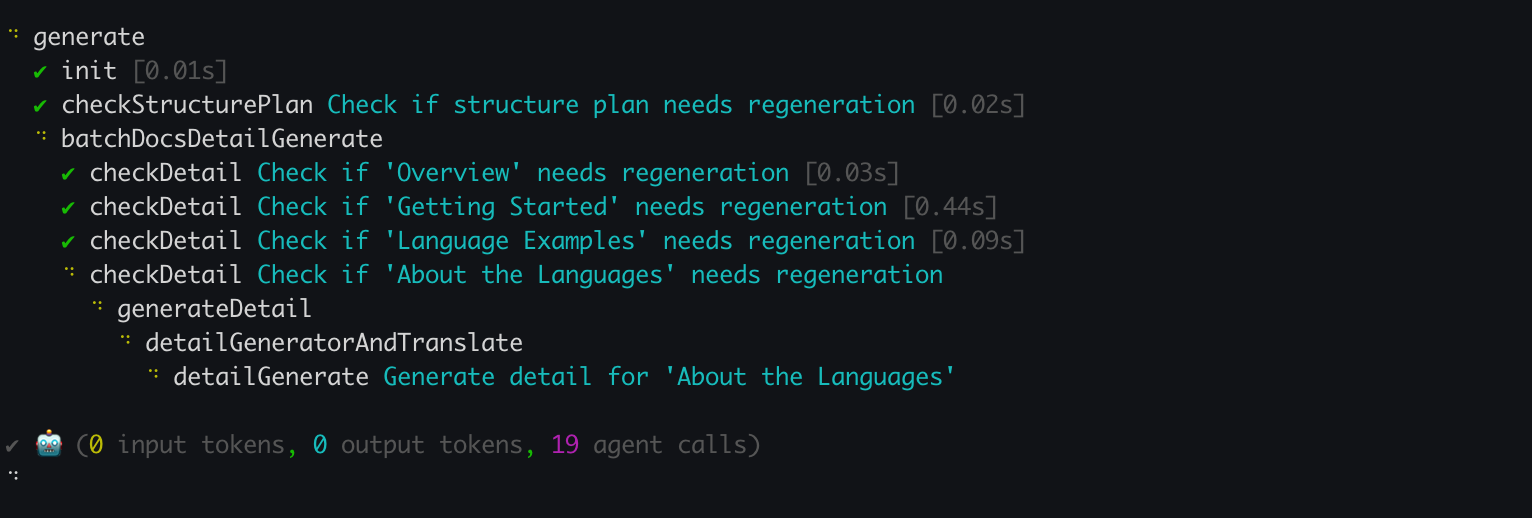
|
3
|
-
---
|
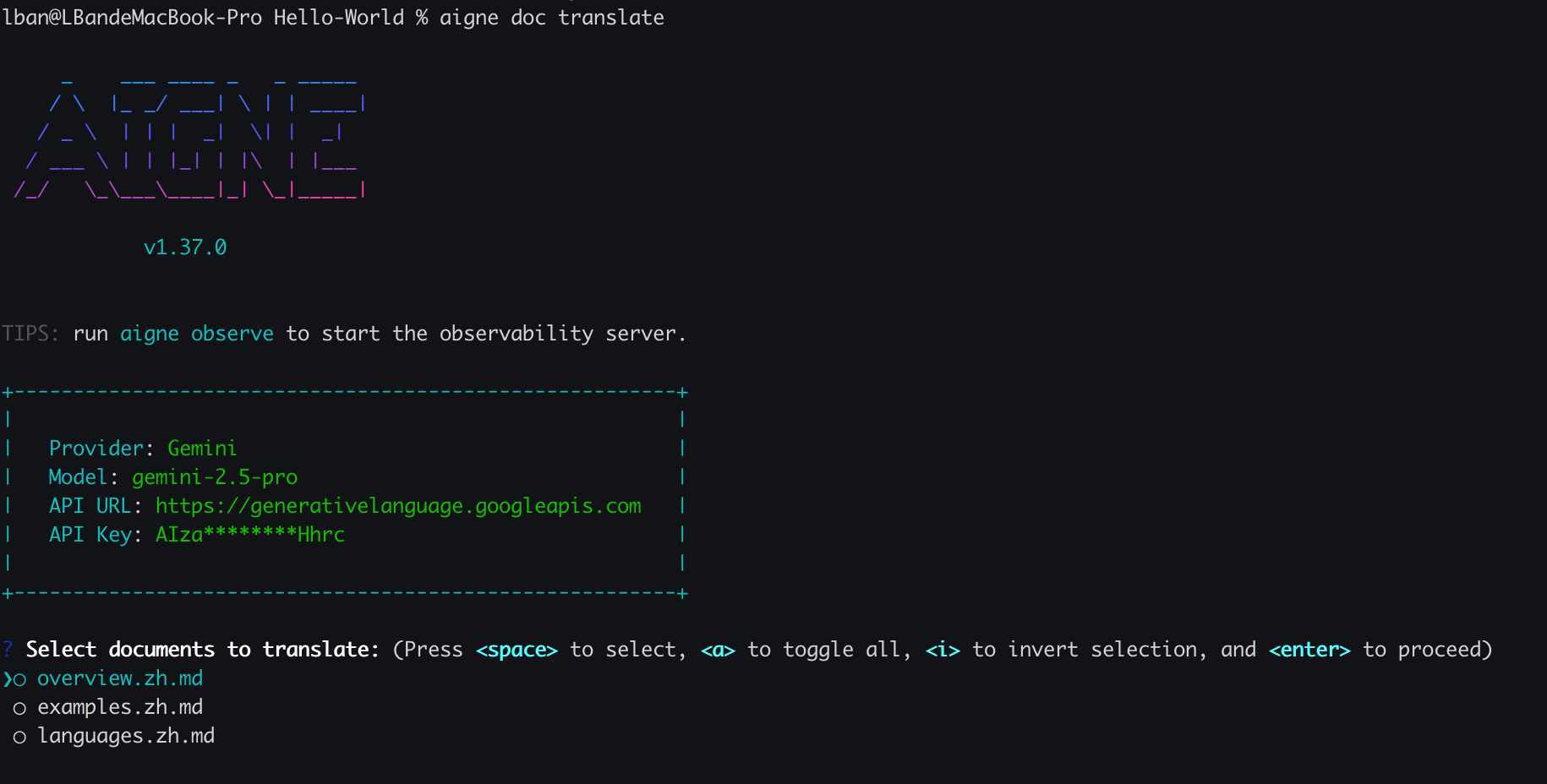
|
4
|
-
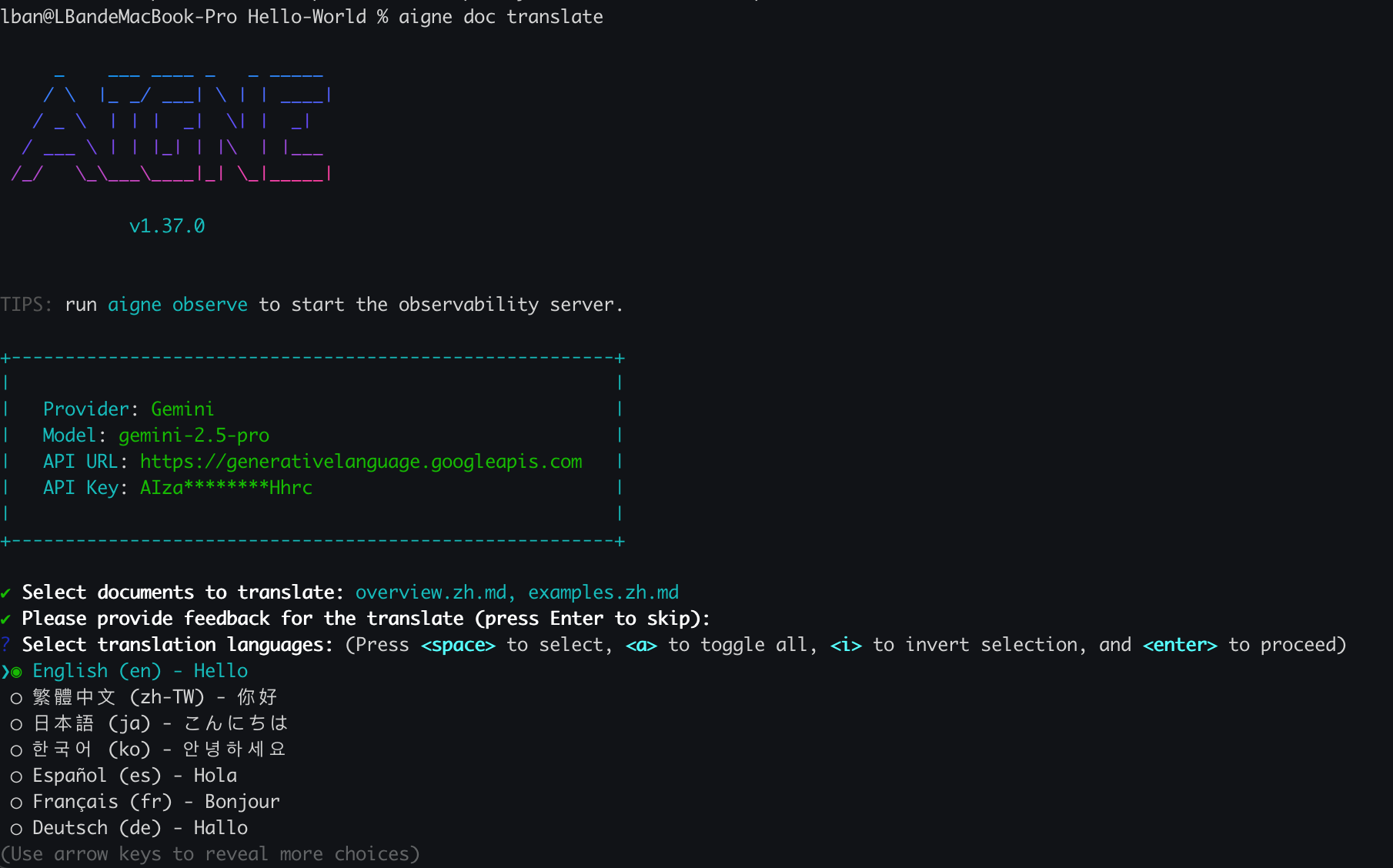
|
|
5
1
|
# Translate Documentation
|
|
6
2
|
|
|
7
|
-
AIGNE DocSmith helps you reach a global audience by
|
|
3
|
+
AIGNE DocSmith helps you reach a global audience by translating your documentation into 12 languages. This process can be managed through a simple interactive wizard or automated with command-line arguments for advanced control.
|
|
4
|
+
|
|
5
|
+
### Translation Workflow
|
|
6
|
+
|
|
7
|
+
The `aigne doc translate` command offers two primary modes of operation: interactive for a guided setup and command-line for automation.
|
|
8
|
+
|
|
9
|
+
```d2
|
|
10
|
+
direction: down
|
|
11
|
+
|
|
12
|
+
start: {
|
|
13
|
+
label: "Run 'aigne doc translate'"
|
|
14
|
+
shape: rectangle
|
|
15
|
+
}
|
|
16
|
+
|
|
17
|
+
interactive_vs_cli: {
|
|
18
|
+
label: "With or without\narguments?"
|
|
19
|
+
shape: diamond
|
|
20
|
+
}
|
|
21
|
+
|
|
22
|
+
interactive_path: {
|
|
23
|
+
label: "Interactive Mode"
|
|
24
|
+
shape: rectangle
|
|
25
|
+
|
|
26
|
+
select_docs: {
|
|
27
|
+
label: "1. Select Documents"
|
|
28
|
+
shape: rectangle
|
|
29
|
+
}
|
|
30
|
+
select_langs: {
|
|
31
|
+
label: "2. Choose Languages"
|
|
32
|
+
shape: rectangle
|
|
33
|
+
}
|
|
34
|
+
select_docs -> select_langs
|
|
35
|
+
}
|
|
36
|
+
|
|
37
|
+
cli_path: {
|
|
38
|
+
label: "CLI Mode"
|
|
39
|
+
shape: rectangle
|
|
40
|
+
|
|
41
|
+
flags: {
|
|
42
|
+
label: "Provide arguments\n--docs, --langs, etc."
|
|
43
|
+
shape: rectangle
|
|
44
|
+
}
|
|
45
|
+
}
|
|
46
|
+
|
|
47
|
+
ai_translation: {
|
|
48
|
+
label: "AI-Powered Translation"
|
|
49
|
+
shape: rectangle
|
|
50
|
+
}
|
|
51
|
+
|
|
52
|
+
end: {
|
|
53
|
+
label: "Translated Documents\nSaved"
|
|
54
|
+
shape: rectangle
|
|
55
|
+
}
|
|
56
|
+
|
|
57
|
+
start -> interactive_vs_cli
|
|
58
|
+
interactive_vs_cli -> interactive_path: "Without args"
|
|
59
|
+
interactive_vs_cli -> cli_path: "With args"
|
|
60
|
+
interactive_path -> ai_translation
|
|
61
|
+
cli_path -> ai_translation
|
|
62
|
+
ai_translation -> end
|
|
63
|
+
```
|
|
8
64
|
|
|
9
|
-
##
|
|
65
|
+
## Interactive Translation
|
|
10
66
|
|
|
11
|
-
For a guided experience,
|
|
67
|
+
For a guided experience, run the `translate` command without any arguments:
|
|
12
68
|
|
|
13
69
|
```bash
|
|
14
70
|
aigne doc translate
|
|
15
71
|
```
|
|
16
72
|
|
|
17
|
-
This
|
|
73
|
+
This launches an interactive wizard that guides you through the process:
|
|
18
74
|
|
|
19
|
-
1. **Select Documents to Translate:** You
|
|
75
|
+
1. **Select Documents to Translate:** You will be presented with a list of your existing documents. Use the spacebar to select the ones you want to translate.
|
|
20
76
|
|
|
21
77
|
|
|
22
78
|
|
|
23
|
-
2. **Choose Target Languages:** After selecting your documents,
|
|
79
|
+
2. **Choose Target Languages:** After selecting your documents, pick one or more target languages from the list of supported options.
|
|
24
80
|
|
|
25
81
|
|
|
26
82
|
|
|
27
|
-
3. **Confirm and Run:** DocSmith will then
|
|
83
|
+
3. **Confirm and Run:** DocSmith will then process the translation, generating new versions of your selected files for each chosen language.
|
|
28
84
|
|
|
29
|
-
##
|
|
85
|
+
## Command-Line Translation
|
|
30
86
|
|
|
31
|
-
For automation or more specific tasks, you can use command-line flags to control the translation process
|
|
87
|
+
For automation or more specific tasks, you can use command-line flags to control the translation process. This method is suitable for integration into CI/CD pipelines.
|
|
32
88
|
|
|
33
89
|
Here are the primary options available:
|
|
34
90
|
|
|
@@ -36,12 +92,12 @@ Here are the primary options available:
|
|
|
36
92
|
|---|---|
|
|
37
93
|
| `--langs` | Specify one or more target languages. This flag can be used multiple times (e.g., `--langs zh --langs ja`). |
|
|
38
94
|
| `--docs` | Specify the paths of the documents to translate. This flag can also be used multiple times. |
|
|
39
|
-
| `--feedback` | Provide
|
|
40
|
-
| `--glossary` | Use a glossary file in
|
|
95
|
+
| `--feedback` | Provide suggestions to the AI to improve the quality of future translations (e.g., `--feedback "Use a formal tone"`). |
|
|
96
|
+
| `--glossary` | Use a glossary file in Markdown format to ensure consistent terminology for specific terms (e.g., `--glossary @path/to/glossary.md`). |
|
|
41
97
|
|
|
42
98
|
### Example: Translating Specific Documents
|
|
43
99
|
|
|
44
|
-
To translate `overview.md` and `examples.md` into Chinese and Japanese,
|
|
100
|
+
To translate `overview.md` and `examples.md` into Chinese and Japanese, run:
|
|
45
101
|
|
|
46
102
|
```bash
|
|
47
103
|
aigne doc translate --langs zh --langs ja --docs overview.md --docs examples.md
|
|
@@ -76,7 +132,7 @@ DocSmith supports automatic translation for the following languages:
|
|
|
76
132
|
|
|
77
133
|
---
|
|
78
134
|
|
|
79
|
-
Once your documentation is translated, you
|
|
135
|
+
Once your documentation is translated, you are ready to share it with the world.
|
|
80
136
|
|
|
81
137
|
<x-card data-title="Next: Publish Your Docs" data-icon="lucide:upload-cloud" data-href="/features/publish-your-docs" data-cta="Read More">
|
|
82
138
|
A guide on how to easily publish your documentation to a public platform or your own private website.
|
|
@@ -1,47 +1,103 @@
|
|
|
1
|
-
---
|
|
2
|
-
labels: ["Reference"]
|
|
3
|
-
---
|
|
4
|
-
|
|
5
1
|
# 翻译文档
|
|
6
2
|
|
|
7
|
-
AIGNE DocSmith
|
|
3
|
+
AIGNE DocSmith 可将您的文档翻译成 12 种语言,帮助您触达全球用户。此过程可通过简单的交互式向导进行管理,也可通过命令行参数实现自动化,以进行高级控制。
|
|
4
|
+
|
|
5
|
+
### 翻译工作流
|
|
6
|
+
|
|
7
|
+
`aigne doc translate` 命令提供两种主要操作模式:用于引导设置的交互模式和用于自动化的命令行模式。
|
|
8
|
+
|
|
9
|
+
```d2
|
|
10
|
+
direction: down
|
|
11
|
+
|
|
12
|
+
start: {
|
|
13
|
+
label: "运行 'aigne doc translate'"
|
|
14
|
+
shape: rectangle
|
|
15
|
+
}
|
|
16
|
+
|
|
17
|
+
interactive_vs_cli: {
|
|
18
|
+
label: "是否带有\n参数?"
|
|
19
|
+
shape: diamond
|
|
20
|
+
}
|
|
21
|
+
|
|
22
|
+
interactive_path: {
|
|
23
|
+
label: "交互模式"
|
|
24
|
+
shape: rectangle
|
|
25
|
+
|
|
26
|
+
select_docs: {
|
|
27
|
+
label: "1. 选择文档"
|
|
28
|
+
shape: rectangle
|
|
29
|
+
}
|
|
30
|
+
select_langs: {
|
|
31
|
+
label: "2. 选择语言"
|
|
32
|
+
shape: rectangle
|
|
33
|
+
}
|
|
34
|
+
select_docs -> select_langs
|
|
35
|
+
}
|
|
36
|
+
|
|
37
|
+
cli_path: {
|
|
38
|
+
label: "CLI 模式"
|
|
39
|
+
shape: rectangle
|
|
40
|
+
|
|
41
|
+
flags: {
|
|
42
|
+
label: "提供参数\n--docs, --langs 等"
|
|
43
|
+
shape: rectangle
|
|
44
|
+
}
|
|
45
|
+
}
|
|
46
|
+
|
|
47
|
+
ai_translation: {
|
|
48
|
+
label: "AI 翻译"
|
|
49
|
+
shape: rectangle
|
|
50
|
+
}
|
|
51
|
+
|
|
52
|
+
end: {
|
|
53
|
+
label: "已翻译文档\n已保存"
|
|
54
|
+
shape: rectangle
|
|
55
|
+
}
|
|
56
|
+
|
|
57
|
+
start -> interactive_vs_cli
|
|
58
|
+
interactive_vs_cli -> interactive_path: "无参数"
|
|
59
|
+
interactive_vs_cli -> cli_path: "有参数"
|
|
60
|
+
interactive_path -> ai_translation
|
|
61
|
+
cli_path -> ai_translation
|
|
62
|
+
ai_translation -> end
|
|
63
|
+
```
|
|
8
64
|
|
|
9
|
-
##
|
|
65
|
+
## 交互式翻译
|
|
10
66
|
|
|
11
|
-
|
|
67
|
+
如需引导式体验,请运行不带任何参数的 `translate` 命令:
|
|
12
68
|
|
|
13
69
|
```bash
|
|
14
70
|
aigne doc translate
|
|
15
71
|
```
|
|
16
72
|
|
|
17
|
-
|
|
73
|
+
这将启动一个交互式向导,引导您完成整个过程:
|
|
18
74
|
|
|
19
|
-
1.
|
|
75
|
+
1. **选择要翻译的文档:** 系统将显示您现有文档的列表。使用空格键选择您想要翻译的文档。
|
|
20
76
|
|
|
21
77
|

|
|
22
78
|
|
|
23
|
-
2. **选择目标语言:**
|
|
79
|
+
2. **选择目标语言:** 选择文档后,从支持的选项列表中选择一种或多种目标语言。
|
|
24
80
|
|
|
25
81
|

|
|
26
82
|
|
|
27
|
-
3. **确认并运行:** DocSmith
|
|
83
|
+
3. **确认并运行:** DocSmith 将处理翻译,为每个选定的语言生成所选文件的新版本。
|
|
28
84
|
|
|
29
|
-
##
|
|
85
|
+
## 命令行翻译
|
|
30
86
|
|
|
31
|
-
|
|
87
|
+
对于自动化或更具体的任务,您可以使用命令行标志来控制翻译过程。此方法适用于集成到 CI/CD 管道中。
|
|
32
88
|
|
|
33
89
|
以下是可用的主要选项:
|
|
34
90
|
|
|
35
91
|
| 参数 | 描述 |
|
|
36
92
|
|---|---|
|
|
37
|
-
| `--langs` |
|
|
38
|
-
| `--docs` |
|
|
39
|
-
| `--feedback` | 向 AI
|
|
40
|
-
| `--glossary` | 使用 Markdown
|
|
93
|
+
| `--langs` | 指定一种或多种目标语言。此标志可多次使用(例如,`--langs zh --langs ja`)。 |
|
|
94
|
+
| `--docs` | 指定要翻译的文档路径。此标志也可多次使用。 |
|
|
95
|
+
| `--feedback` | 向 AI 提供建议,以提高未来翻译的质量(例如,`--feedback "使用正式语气"`)。 |
|
|
96
|
+
| `--glossary` | 使用 Markdown 格式的术语表文件,以确保特定术语的一致性(例如,`--glossary @path/to/glossary.md`)。 |
|
|
41
97
|
|
|
42
98
|
### 示例:翻译特定文档
|
|
43
99
|
|
|
44
|
-
要将 `overview.md` 和 `examples.md`
|
|
100
|
+
要将 `overview.md` 和 `examples.md` 翻译成中文和日文,请运行:
|
|
45
101
|
|
|
46
102
|
```bash
|
|
47
103
|
aigne doc translate --langs zh --langs ja --docs overview.md --docs examples.md
|
|
@@ -49,7 +105,7 @@ aigne doc translate --langs zh --langs ja --docs overview.md --docs examples.md
|
|
|
49
105
|
|
|
50
106
|
### 示例:使用术语表和反馈
|
|
51
107
|
|
|
52
|
-
|
|
108
|
+
为确保品牌名称和技术术语翻译正确,您可以提供一个术语表文件。您还可以提供反馈以优化翻译风格。
|
|
53
109
|
|
|
54
110
|
```bash
|
|
55
111
|
aigne doc translate --glossary @glossary.md --feedback "Use technical terminology consistently" --docs overview.md --langs de
|
|
@@ -76,7 +132,7 @@ DocSmith 支持以下语言的自动翻译:
|
|
|
76
132
|
|
|
77
133
|
---
|
|
78
134
|
|
|
79
|
-
|
|
135
|
+
文档翻译完成后,您就可以与世界分享了。
|
|
80
136
|
|
|
81
137
|
<x-card data-title="下一步:发布您的文档" data-icon="lucide:upload-cloud" data-href="/features/publish-your-docs" data-cta="阅读更多">
|
|
82
138
|
一份关于如何轻松将您的文档发布到公共平台或您自己的私人网站的指南。
|
|
@@ -1,32 +1,83 @@
|
|
|
1
|
-
---
|
|
2
|
-
labels: ["Reference"]
|
|
3
|
-
---
|
|
4
|
-
|
|
5
1
|
# Update and Refine
|
|
6
2
|
|
|
7
|
-
Keeping documentation synchronized with
|
|
3
|
+
Keeping documentation synchronized with an evolving codebase is essential. AIGNE DocSmith provides direct and flexible methods to keep your content current, whether through automatic updates triggered by code changes or precise, feedback-driven refinements.
|
|
8
4
|
|
|
9
5
|
This guide covers how to:
|
|
10
6
|
- Automatically update documents when your code changes.
|
|
11
7
|
- Manually regenerate specific documents with targeted feedback.
|
|
12
8
|
- Optimize the overall documentation structure.
|
|
13
9
|
|
|
10
|
+
### Document Update Workflows
|
|
11
|
+
|
|
12
|
+
The following diagram illustrates the different paths you can take to update your documentation:
|
|
13
|
+
|
|
14
|
+
```d2
|
|
15
|
+
direction: down
|
|
16
|
+
|
|
17
|
+
Start: {
|
|
18
|
+
shape: circle
|
|
19
|
+
label: "Start"
|
|
20
|
+
}
|
|
21
|
+
|
|
22
|
+
Code-Change: {
|
|
23
|
+
label: "Source Code or\nConfig Changes"
|
|
24
|
+
shape: rectangle
|
|
25
|
+
}
|
|
26
|
+
|
|
27
|
+
Content-Tweak: {
|
|
28
|
+
label: "Need Content\nImprovement?"
|
|
29
|
+
shape: rectangle
|
|
30
|
+
}
|
|
31
|
+
|
|
32
|
+
Structure-Tweak: {
|
|
33
|
+
label: "Need Structure\nImprovement?"
|
|
34
|
+
shape: rectangle
|
|
35
|
+
}
|
|
36
|
+
|
|
37
|
+
Start -> Code-Change
|
|
38
|
+
Start -> Content-Tweak
|
|
39
|
+
Start -> Structure-Tweak
|
|
40
|
+
|
|
41
|
+
Code-Change -> Generate-Command: "aigne doc generate"
|
|
42
|
+
|
|
43
|
+
Generate-Command -> Change-Detection: {
|
|
44
|
+
label: "Change Detection"
|
|
45
|
+
shape: diamond
|
|
46
|
+
}
|
|
47
|
+
Change-Detection -> Auto-Regen: "Regenerates\nAffected Docs"
|
|
48
|
+
|
|
49
|
+
Content-Tweak -> Update-Command: "aigne doc update\n--feedback"
|
|
50
|
+
Update-Command -> Manual-Regen: "Regenerates\nSpecific Doc"
|
|
51
|
+
|
|
52
|
+
Structure-Tweak -> Generate-Feedback-Command: "aigne doc generate\n--feedback"
|
|
53
|
+
Generate-Feedback-Command -> Replan: "Re-plans Document\nStructure"
|
|
54
|
+
|
|
55
|
+
End: {
|
|
56
|
+
shape: circle
|
|
57
|
+
label: "Docs Updated"
|
|
58
|
+
}
|
|
59
|
+
|
|
60
|
+
Auto-Regen -> End
|
|
61
|
+
Manual-Regen -> End
|
|
62
|
+
Replan -> End
|
|
63
|
+
```
|
|
64
|
+
|
|
14
65
|
---
|
|
15
66
|
|
|
16
|
-
## Automatic Updates with
|
|
67
|
+
## Automatic Updates with Change Detection
|
|
17
68
|
|
|
18
|
-
When you run the `aigne doc generate` command, DocSmith
|
|
69
|
+
When you run the `aigne doc generate` command, DocSmith analyzes your codebase, detects any changes since the last run, and regenerates only the documents that are affected. This process saves time and reduces unnecessary LLM API calls.
|
|
19
70
|
|
|
20
71
|
```bash
|
|
21
|
-
# DocSmith will
|
|
72
|
+
# DocSmith will detect changes and update only what's necessary
|
|
22
73
|
aigne doc generate
|
|
23
74
|
```
|
|
24
75
|
|
|
25
|
-
|
|
26
77
|
|
|
27
78
|
### Forcing a Full Regeneration
|
|
28
79
|
|
|
29
|
-
If you need to regenerate all documentation from scratch, ignoring
|
|
80
|
+
If you need to regenerate all documentation from scratch, ignoring any cached or previous state, use the `--forceRegenerate` flag. This is useful after significant configuration changes or when you want to ensure a completely fresh build.
|
|
30
81
|
|
|
31
82
|
```bash
|
|
32
83
|
# Regenerate all documentation from the ground up
|
|
@@ -35,15 +86,15 @@ aigne doc generate --forceRegenerate
|
|
|
35
86
|
|
|
36
87
|
---
|
|
37
88
|
|
|
38
|
-
## Refining Individual Documents
|
|
89
|
+
## Refining Individual Documents
|
|
39
90
|
|
|
40
|
-
|
|
91
|
+
To improve a specific document without any corresponding code changes, the `aigne doc update` command allows you to provide targeted feedback to the AI for content refinement.
|
|
41
92
|
|
|
42
93
|
You can use this command in two ways: interactively or directly via command-line arguments.
|
|
43
94
|
|
|
44
95
|
### Interactive Mode
|
|
45
96
|
|
|
46
|
-
For
|
|
97
|
+
For a guided experience, run the command without any arguments. DocSmith will present an interactive menu to select which document you want to update. After you choose, you'll be prompted to enter your feedback.
|
|
47
98
|
|
|
48
99
|
```bash
|
|
49
100
|
# Start the interactive update process
|
|
@@ -63,24 +114,24 @@ aigne doc update --docs overview.md --feedback "Add a more comprehensive FAQ sec
|
|
|
63
114
|
|
|
64
115
|
Key parameters for the `update` command:
|
|
65
116
|
|
|
66
|
-
| Parameter
|
|
67
|
-
|
|
68
|
-
| `--docs`
|
|
69
|
-
| `--feedback` | The specific
|
|
117
|
+
| Parameter | Description |
|
|
118
|
+
| ---------- | ------------------------------------------------------------------------------------------------ |
|
|
119
|
+
| `--docs` | The path to the document you want to update. You can use this flag multiple times for batch updates. |
|
|
120
|
+
| `--feedback` | The specific instructions for the AI to use when regenerating the content. |
|
|
70
121
|
|
|
71
122
|
---
|
|
72
123
|
|
|
73
124
|
## Optimizing the Overall Structure
|
|
74
125
|
|
|
75
|
-
Beyond refining the content of individual documents, you can also
|
|
126
|
+
Beyond refining the content of individual documents, you can also adjust the overall documentation structure. If a section is missing or the existing organization could be improved, you can provide feedback to the structure planning agent using the `generate` command with the `--feedback` flag.
|
|
76
127
|
|
|
77
|
-
This command
|
|
128
|
+
This command instructs DocSmith to reconsider the entire document plan based on your new input.
|
|
78
129
|
|
|
79
130
|
```bash
|
|
80
131
|
# Regenerate the structure plan with specific feedback
|
|
81
132
|
aigne doc generate --feedback "Remove the 'About' section and add a more detailed 'API Reference'."
|
|
82
133
|
```
|
|
83
134
|
|
|
84
|
-
This approach is best for high-level changes to the table of contents, rather than line-by-line content edits.
|
|
135
|
+
This approach is best for high-level changes to the document's table of contents, rather than line-by-line content edits.
|
|
85
136
|
|
|
86
|
-
With these tools, you can maintain accurate
|
|
137
|
+
With these tools, you can maintain accurate documentation that evolves alongside your project. Once your content is refined, you can make it available to a global audience. Learn how in the [Translate Documentation](./features-translate-documentation.md) guide.
|
|
@@ -1,32 +1,83 @@
|
|
|
1
|
-
|
|
2
|
-
labels: ["Reference"]
|
|
3
|
-
---
|
|
4
|
-
|
|
5
|
-
# 更新与优化
|
|
1
|
+
# 更新和优化
|
|
6
2
|
|
|
7
|
-
|
|
3
|
+
保持文档与不断演进的代码库同步至关重要。AIGNE DocSmith 提供了直接且灵活的方法来保持内容最新,无论是通过代码变更触发的自动更新,还是通过精确的、由反馈驱动的优化。
|
|
8
4
|
|
|
9
|
-
|
|
10
|
-
-
|
|
11
|
-
-
|
|
5
|
+
本指南涵盖了如何:
|
|
6
|
+
- 当代码变更时自动更新文档。
|
|
7
|
+
- 使用有针对性的反馈手动重新生成特定文档。
|
|
12
8
|
- 优化整体文档结构。
|
|
13
9
|
|
|
10
|
+
### 文档更新工作流
|
|
11
|
+
|
|
12
|
+
下图说明了更新文档可以采取的不同路径:
|
|
13
|
+
|
|
14
|
+
```d2
|
|
15
|
+
direction: down
|
|
16
|
+
|
|
17
|
+
Start: {
|
|
18
|
+
shape: circle
|
|
19
|
+
label: "开始"
|
|
20
|
+
}
|
|
21
|
+
|
|
22
|
+
Code-Change: {
|
|
23
|
+
label: "源代码或\n配置变更"
|
|
24
|
+
shape: rectangle
|
|
25
|
+
}
|
|
26
|
+
|
|
27
|
+
Content-Tweak: {
|
|
28
|
+
label: "需要改进\n内容?"
|
|
29
|
+
shape: rectangle
|
|
30
|
+
}
|
|
31
|
+
|
|
32
|
+
Structure-Tweak: {
|
|
33
|
+
label: "需要改进\n结构?"
|
|
34
|
+
shape: rectangle
|
|
35
|
+
}
|
|
36
|
+
|
|
37
|
+
Start -> Code-Change
|
|
38
|
+
Start -> Content-Tweak
|
|
39
|
+
Start -> Structure-Tweak
|
|
40
|
+
|
|
41
|
+
Code-Change -> Generate-Command: "aigne doc generate"
|
|
42
|
+
|
|
43
|
+
Generate-Command -> Change-Detection: {
|
|
44
|
+
label: "变更检测"
|
|
45
|
+
shape: diamond
|
|
46
|
+
}
|
|
47
|
+
Change-Detection -> Auto-Regen: "重新生成\n受影响的文档"
|
|
48
|
+
|
|
49
|
+
Content-Tweak -> Update-Command: "aigne doc update\n--feedback"
|
|
50
|
+
Update-Command -> Manual-Regen: "重新生成\n特定文档"
|
|
51
|
+
|
|
52
|
+
Structure-Tweak -> Generate-Feedback-Command: "aigne doc generate\n--feedback"
|
|
53
|
+
Generate-Feedback-Command -> Replan: "重新规划文档\n结构"
|
|
54
|
+
|
|
55
|
+
End: {
|
|
56
|
+
shape: circle
|
|
57
|
+
label: "文档已更新"
|
|
58
|
+
}
|
|
59
|
+
|
|
60
|
+
Auto-Regen -> End
|
|
61
|
+
Manual-Regen -> End
|
|
62
|
+
Replan -> End
|
|
63
|
+
```
|
|
64
|
+
|
|
14
65
|
---
|
|
15
66
|
|
|
16
|
-
##
|
|
67
|
+
## 通过变更检测自动更新
|
|
17
68
|
|
|
18
|
-
当您运行 `aigne doc generate` 命令时,DocSmith
|
|
69
|
+
当您运行 `aigne doc generate` 命令时,DocSmith 会分析您的代码库,检测自上次运行以来的任何变更,并仅重新生成受影响的文档。此过程可以节省时间并减少不必要的 LLM API 调用。
|
|
19
70
|
|
|
20
71
|
```bash
|
|
21
|
-
# DocSmith
|
|
72
|
+
# DocSmith 将检测变更并仅更新必要的部分
|
|
22
73
|
aigne doc generate
|
|
23
74
|
```
|
|
24
75
|
|
|
25
|
-

|
|
26
77
|
|
|
27
78
|
### 强制完全重新生成
|
|
28
79
|
|
|
29
|
-
|
|
80
|
+
如果您需要从头开始重新生成所有文档,忽略任何缓存或先前的状态,请使用 `--forceRegenerate` 标志。这在进行重大配置更改或希望确保完全重新构建时非常有用。
|
|
30
81
|
|
|
31
82
|
```bash
|
|
32
83
|
# 从头开始重新生成所有文档
|
|
@@ -35,15 +86,15 @@ aigne doc generate --forceRegenerate
|
|
|
35
86
|
|
|
36
87
|
---
|
|
37
88
|
|
|
38
|
-
##
|
|
89
|
+
## 优化单个文档
|
|
39
90
|
|
|
40
|
-
|
|
91
|
+
要在没有任何相应代码变更的情况下改进特定文档,`aigne doc update` 命令允许您向 AI 提供有针对性的反馈以进行内容优化。
|
|
41
92
|
|
|
42
|
-
|
|
93
|
+
您可以通过两种方式使用此命令:交互式或直接通过命令行参数。
|
|
43
94
|
|
|
44
95
|
### 交互模式
|
|
45
96
|
|
|
46
|
-
|
|
97
|
+
要获得引导式体验,请在不带任何参数的情况下运行该命令。DocSmith 将呈现一个交互式菜单,供您选择要更新的文档。选择后,系统将提示您输入反馈。
|
|
47
98
|
|
|
48
99
|
```bash
|
|
49
100
|
# 启动交互式更新流程
|
|
@@ -54,7 +105,7 @@ aigne doc update
|
|
|
54
105
|
|
|
55
106
|
### 直接通过命令行更新
|
|
56
107
|
|
|
57
|
-
|
|
108
|
+
对于更快捷的工作流或脚本编写,您可以使用标志直接指定文档和反馈。这允许进行精确的非交互式更新。
|
|
58
109
|
|
|
59
110
|
```bash
|
|
60
111
|
# 使用反馈更新特定文档
|
|
@@ -63,24 +114,24 @@ aigne doc update --docs overview.md --feedback "在末尾添加一个更全面
|
|
|
63
114
|
|
|
64
115
|
`update` 命令的关键参数:
|
|
65
116
|
|
|
66
|
-
| Parameter
|
|
67
|
-
|
|
68
|
-
| `--docs`
|
|
69
|
-
| `--feedback` | 供 AI
|
|
117
|
+
| Parameter | Description |
|
|
118
|
+
| ---------- | ------------------------------------------------------------------------------------------------ |
|
|
119
|
+
| `--docs` | 要更新的文档路径。您可以多次使用此标志进行批量更新。 |
|
|
120
|
+
| `--feedback` | 供 AI 在重新生成内容时使用的具体说明。 |
|
|
70
121
|
|
|
71
122
|
---
|
|
72
123
|
|
|
73
124
|
## 优化整体结构
|
|
74
125
|
|
|
75
|
-
|
|
126
|
+
除了优化单个文档的内容外,您还可以调整整体文档结构。如果缺少某个部分或现有组织结构可以改进,您可以使用带 `--feedback` 标志的 `generate` 命令向结构规划 agent 提供反馈。
|
|
76
127
|
|
|
77
|
-
|
|
128
|
+
此命令指示 DocSmith 根据您的新输入重新考虑整个文档计划。
|
|
78
129
|
|
|
79
130
|
```bash
|
|
80
|
-
#
|
|
81
|
-
aigne doc generate --feedback "
|
|
131
|
+
# 使用特定反馈重新生成结构计划
|
|
132
|
+
aigne doc generate --feedback "移除‘关于’部分,并添加一个更详细的‘API 参考’。"
|
|
82
133
|
```
|
|
83
134
|
|
|
84
|
-
|
|
135
|
+
此方法最适用于文档目录的高层级更改,而非逐行内容编辑。
|
|
85
136
|
|
|
86
|
-
|
|
137
|
+
借助这些工具,您可以维护与项目一同演进的准确文档。内容优化后,您可以将其提供给全球受众。在 [翻译文档](./features-translate-documentation.md) 指南中了解如何操作。
|
package/docs/features.md
CHANGED
|
@@ -1,56 +1,52 @@
|
|
|
1
|
-
---
|
|
2
|
-
labels: ["Reference"]
|
|
3
|
-
---
|
|
4
|
-
|
|
5
1
|
# Core Features
|
|
6
2
|
|
|
7
|
-
AIGNE DocSmith provides a
|
|
8
|
-
|
|
9
|
-
The typical workflow follows a logical progression, allowing you to generate, refine, translate, and finally publish your documentation.
|
|
3
|
+
AIGNE DocSmith provides a set of commands to manage your documentation lifecycle, from initial creation to global distribution. The process is organized into a standard workflow: generating, refining, translating, and publishing your documentation.
|
|
10
4
|
|
|
11
5
|
```d2
|
|
12
|
-
direction:
|
|
6
|
+
direction: down
|
|
13
7
|
|
|
14
|
-
|
|
15
|
-
|
|
16
|
-
|
|
8
|
+
Generate: {
|
|
9
|
+
label: "1. Generate\naigne doc generate"
|
|
10
|
+
shape: rectangle
|
|
11
|
+
description: "Create a full documentation set from your source code."
|
|
17
12
|
}
|
|
18
13
|
|
|
19
|
-
|
|
20
|
-
|
|
21
|
-
|
|
14
|
+
Refine: {
|
|
15
|
+
label: "2. Update & Refine\naigne doc update"
|
|
16
|
+
shape: rectangle
|
|
17
|
+
description: "Keep docs in sync with code and apply targeted feedback."
|
|
22
18
|
}
|
|
23
19
|
|
|
24
|
-
|
|
25
|
-
|
|
26
|
-
|
|
20
|
+
Translate: {
|
|
21
|
+
label: "3. Translate\naigne doc translate"
|
|
22
|
+
shape: rectangle
|
|
23
|
+
description: "Localize content into multiple languages for a global audience."
|
|
27
24
|
}
|
|
28
25
|
|
|
29
|
-
|
|
30
|
-
|
|
31
|
-
|
|
26
|
+
Publish: {
|
|
27
|
+
label: "4. Publish\naigne doc publish"
|
|
28
|
+
shape: rectangle
|
|
29
|
+
description: "Deploy your documentation to public or private platforms."
|
|
32
30
|
}
|
|
33
31
|
|
|
34
|
-
|
|
35
|
-
style.animated: true
|
|
36
|
-
}
|
|
32
|
+
Generate -> Refine -> Translate -> Publish
|
|
37
33
|
```
|
|
38
34
|
|
|
39
35
|
Explore the main capabilities of DocSmith in the following sections:
|
|
40
36
|
|
|
41
37
|
<x-cards data-columns="2">
|
|
42
38
|
<x-card data-title="Generate Documentation" data-icon="lucide:file-plus-2" data-href="/features/generate-documentation">
|
|
43
|
-
|
|
39
|
+
Create a complete set of documentation from your source code using a single command.
|
|
44
40
|
</x-card>
|
|
45
41
|
<x-card data-title="Update and Refine" data-icon="lucide:edit" data-href="/features/update-and-refine">
|
|
46
|
-
Keep your documentation synchronized with code changes or regenerate specific
|
|
42
|
+
Keep your documentation synchronized with code changes or regenerate specific documents with targeted feedback.
|
|
47
43
|
</x-card>
|
|
48
44
|
<x-card data-title="Translate Documentation" data-icon="lucide:languages" data-href="/features/translate-documentation">
|
|
49
|
-
|
|
45
|
+
Translate your content into multiple supported languages to make your project accessible to a global audience.
|
|
50
46
|
</x-card>
|
|
51
47
|
<x-card data-title="Publish Your Docs" data-icon="lucide:send" data-href="/features/publish-your-docs">
|
|
52
|
-
Publish your generated documentation to the official DocSmith platform or your own self-hosted instance
|
|
48
|
+
Publish your generated documentation to the official DocSmith platform or your own self-hosted instance.
|
|
53
49
|
</x-card>
|
|
54
50
|
</x-cards>
|
|
55
51
|
|
|
56
|
-
These
|
|
52
|
+
These features provide a structured workflow for documentation. For a detailed list of all available commands and their options, see the [CLI Command Reference](./cli-reference.md).
|