@aigne/doc-smith 0.8.11-beta.4 → 0.8.11-beta.6
This diff represents the content of publicly available package versions that have been released to one of the supported registries. The information contained in this diff is provided for informational purposes only and reflects changes between package versions as they appear in their respective public registries.
- package/.aigne/doc-smith/config.yaml +2 -4
- package/.release-please-manifest.json +1 -1
- package/CHANGELOG.md +17 -2
- package/README.md +1 -1
- package/agents/clear/choose-contents.mjs +2 -2
- package/agents/clear/clear-document-structure.mjs +8 -8
- package/agents/clear/index.yaml +1 -1
- package/agents/evaluate/document-structure.yaml +1 -1
- package/agents/generate/check-d2-diagram-valid.mjs +26 -0
- package/agents/generate/check-document-structure.yaml +3 -3
- package/agents/generate/check-need-generate-structure.mjs +8 -8
- package/agents/generate/document-structure-tools/add-document.mjs +3 -3
- package/agents/generate/document-structure-tools/delete-document.mjs +2 -2
- package/agents/generate/document-structure-tools/move-document.mjs +3 -2
- package/agents/generate/document-structure-tools/update-document.mjs +2 -2
- package/agents/generate/generate-d2-diagram.yaml +23 -0
- package/agents/generate/generate-structure.yaml +1 -1
- package/agents/generate/merge-d2-diagram.yaml +39 -0
- package/agents/generate/update-document-structure.yaml +3 -3
- package/agents/generate/user-review-document-structure.mjs +10 -10
- package/agents/init/index.mjs +18 -10
- package/agents/publish/publish-docs.mjs +17 -20
- package/agents/update/batch-generate-document.yaml +1 -1
- package/agents/update/check-document.mjs +2 -2
- package/agents/update/generate-document.yaml +25 -0
- package/agents/utils/check-feedback-refiner.mjs +1 -1
- package/agents/utils/choose-docs.mjs +1 -1
- package/agents/utils/load-document-all-content.mjs +3 -3
- package/agents/utils/load-sources.mjs +1 -1
- package/agents/utils/save-docs.mjs +7 -28
- package/aigne.yaml +2 -2
- package/docs/_sidebar.md +1 -1
- package/docs/advanced-how-it-works.md +3 -3
- package/docs/advanced-quality-assurance.md +1 -1
- package/docs/cli-reference.ja.md +151 -80
- package/docs/cli-reference.md +126 -55
- package/docs/cli-reference.zh-TW.md +133 -62
- package/docs/cli-reference.zh.md +143 -72
- package/docs/configuration-interactive-setup.md +1 -1
- package/docs/configuration-language-support.md +1 -1
- package/docs/configuration-preferences.md +1 -1
- package/docs/configuration.ja.md +104 -48
- package/docs/configuration.md +58 -2
- package/docs/configuration.zh-TW.md +99 -42
- package/docs/configuration.zh.md +78 -21
- package/docs/features-generate-documentation.ja.md +63 -44
- package/docs/features-generate-documentation.md +54 -35
- package/docs/features-generate-documentation.zh-TW.md +67 -48
- package/docs/features-generate-documentation.zh.md +61 -41
- package/docs/features-publish-your-docs.ja.md +69 -46
- package/docs/features-publish-your-docs.md +65 -42
- package/docs/features-publish-your-docs.zh-TW.md +73 -50
- package/docs/features-publish-your-docs.zh.md +67 -44
- package/docs/features-translate-documentation.ja.md +35 -33
- package/docs/features-translate-documentation.md +24 -22
- package/docs/features-translate-documentation.zh-TW.md +32 -30
- package/docs/features-translate-documentation.zh.md +29 -27
- package/docs/features-update-and-refine.ja.md +120 -66
- package/docs/features-update-and-refine.md +110 -56
- package/docs/features-update-and-refine.zh-TW.md +116 -62
- package/docs/features-update-and-refine.zh.md +118 -64
- package/docs/getting-started.ja.md +22 -22
- package/docs/getting-started.md +1 -1
- package/docs/getting-started.zh-TW.md +16 -16
- package/docs/getting-started.zh.md +28 -28
- package/docs/overview.md +3 -3
- package/docs-mcp/analyze-docs-relevance.yaml +6 -6
- package/docs-mcp/docs-search.yaml +1 -1
- package/package.json +3 -3
- package/prompts/common/document-structure/conflict-resolution-guidance.md +3 -3
- package/prompts/common/document-structure/document-structure-rules.md +2 -2
- package/prompts/detail/{d2-chart/rules.md → d2-diagram/rules-system.md} +41 -5
- package/prompts/detail/d2-diagram/rules-user.md +4 -0
- package/prompts/detail/document-rules.md +3 -4
- package/prompts/detail/generate-document.md +8 -2
- package/prompts/detail/update-document.md +0 -2
- package/prompts/evaluate/document-structure.md +6 -6
- package/prompts/structure/check-document-structure.md +10 -10
- package/prompts/structure/document-rules.md +2 -2
- package/prompts/structure/generate-structure-system.md +3 -3
- package/prompts/structure/structure-example.md +1 -1
- package/prompts/structure/structure-getting-started.md +1 -1
- package/prompts/structure/update-document-structure.md +9 -9
- package/prompts/utils/feedback-refiner.md +1 -1
- package/tests/agents/clear/choose-contents.test.mjs +1 -1
- package/tests/agents/clear/clear-document-structure.test.mjs +36 -30
- package/tests/agents/evaluate/generate-report.test.mjs +1 -1
- package/tests/agents/generate/check-need-generate-structure.test.mjs +1 -1
- package/tests/agents/generate/document-structure-tools/add-document.test.mjs +2 -2
- package/tests/agents/generate/document-structure-tools/delete-document.test.mjs +4 -4
- package/tests/agents/generate/document-structure-tools/move-document.test.mjs +3 -3
- package/tests/agents/generate/document-structure-tools/update-document.test.mjs +3 -3
- package/tests/agents/generate/user-review-document-structure.test.mjs +7 -5
- package/tests/agents/init/init.test.mjs +25 -19
- package/tests/agents/publish/publish-docs.test.mjs +99 -0
- package/tests/agents/update/check-document.test.mjs +1 -1
- package/tests/agents/utils/check-detail-result.test.mjs +2 -15
- package/tests/agents/utils/format-document-structure.test.mjs +5 -5
- package/tests/agents/utils/load-sources.test.mjs +4 -4
- package/tests/agents/utils/save-docs.test.mjs +1 -1
- package/tests/utils/auth-utils.test.mjs +1 -1
- package/tests/utils/conflict-detector.test.mjs +1 -1
- package/tests/utils/d2-utils.test.mjs +4 -4
- package/tests/utils/deploy.test.mjs +3 -10
- package/tests/utils/docs-finder-utils.test.mjs +8 -8
- package/tests/utils/kroki-utils.test.mjs +5 -5
- package/tests/utils/preferences-utils.test.mjs +5 -3
- package/tests/utils/save-value-to-config.test.mjs +3 -1
- package/types/document-structure-schema.mjs +9 -9
- package/utils/auth-utils.mjs +4 -0
- package/utils/conflict-detector.mjs +1 -1
- package/utils/constants/index.mjs +7 -4
- package/utils/d2-utils.mjs +11 -6
- package/utils/deploy.mjs +4 -20
- package/utils/docs-finder-utils.mjs +11 -11
- package/utils/kroki-utils.mjs +5 -4
- package/utils/markdown-checker.mjs +1 -21
- /package/prompts/detail/{d2-chart → d2-diagram}/official-examples.md +0 -0
package/docs/configuration.zh.md
CHANGED
|
@@ -1,12 +1,69 @@
|
|
|
1
1
|
# 配置指南
|
|
2
2
|
|
|
3
|
-
AIGNE DocSmith
|
|
3
|
+
AIGNE DocSmith 的行为由一个中央配置文件 `.aigne/doc-smith/config.yaml` 控制。该文件允许您自定义文档的风格、目标受众、语言和结构,以满足您的特定需求。
|
|
4
4
|
|
|
5
|
-
您可以通过运行 `aigne doc init` 使用交互式设置向导来创建和管理此文件。有关分步演练,请参阅[交互式设置](./configuration-interactive-setup.md)
|
|
5
|
+
您可以通过运行 `aigne doc init` 使用交互式设置向导来创建和管理此文件。有关分步演练,请参阅 [交互式设置](./configuration-interactive-setup.md) 指南。或者,您可以直接编辑该文件以进行更精细的控制。
|
|
6
6
|
|
|
7
|
-
|
|
7
|
+
下图说明了配置工作流程:
|
|
8
8
|
|
|
9
|
-
|
|
9
|
+
```d2 配置工作流
|
|
10
|
+
direction: down
|
|
11
|
+
|
|
12
|
+
User: {
|
|
13
|
+
shape: c4-person
|
|
14
|
+
label: "用户"
|
|
15
|
+
}
|
|
16
|
+
|
|
17
|
+
CLI: {
|
|
18
|
+
label: "`aigne doc init`\n(交互式设置)"
|
|
19
|
+
shape: rectangle
|
|
20
|
+
}
|
|
21
|
+
|
|
22
|
+
ConfigFile: {
|
|
23
|
+
label: ".aigne/doc-smith/config.yaml"
|
|
24
|
+
shape: rectangle
|
|
25
|
+
|
|
26
|
+
Project-Info: {
|
|
27
|
+
label: "项目信息"
|
|
28
|
+
shape: rectangle
|
|
29
|
+
}
|
|
30
|
+
|
|
31
|
+
Doc-Strategy: {
|
|
32
|
+
label: "文档策略"
|
|
33
|
+
shape: rectangle
|
|
34
|
+
}
|
|
35
|
+
|
|
36
|
+
Custom-Directives: {
|
|
37
|
+
label: "自定义指令"
|
|
38
|
+
shape: rectangle
|
|
39
|
+
}
|
|
40
|
+
|
|
41
|
+
Lang-Path: {
|
|
42
|
+
label: "语言和路径配置"
|
|
43
|
+
shape: rectangle
|
|
44
|
+
}
|
|
45
|
+
}
|
|
46
|
+
|
|
47
|
+
AIGNE-DocSmith: {
|
|
48
|
+
label: "AIGNE DocSmith\n(生成过程)"
|
|
49
|
+
icon: "https://www.arcblock.io/image-bin/uploads/89a24f04c34eca94f26c9dd30aec44fc.png"
|
|
50
|
+
}
|
|
51
|
+
|
|
52
|
+
Generated-Docs: {
|
|
53
|
+
label: "生成的文档"
|
|
54
|
+
shape: rectangle
|
|
55
|
+
}
|
|
56
|
+
|
|
57
|
+
User -> CLI: "运行"
|
|
58
|
+
CLI -> ConfigFile: "创建/修改"
|
|
59
|
+
User -> ConfigFile: "直接编辑"
|
|
60
|
+
ConfigFile -> AIGNE-DocSmith: "控制"
|
|
61
|
+
AIGNE-DocSmith -> Generated-Docs: "生成"
|
|
62
|
+
```
|
|
63
|
+
|
|
64
|
+
## 核心配置区域
|
|
65
|
+
|
|
66
|
+
您的文档由几个关键的配置区域决定。浏览这些指南,了解如何微调生成过程的每个方面。
|
|
10
67
|
|
|
11
68
|
<x-cards data-columns="2">
|
|
12
69
|
<x-card data-title="交互式设置" data-icon="lucide:wand-2" data-href="/configuration/interactive-setup">
|
|
@@ -19,7 +76,7 @@ AIGNE DocSmith 的行为由一个中央文件 `config.yaml` 控制,该文件
|
|
|
19
76
|
查看支持的语言完整列表,并了解如何设置主语言和启用自动翻译。
|
|
20
77
|
</x-card>
|
|
21
78
|
<x-card data-title="管理偏好" data-icon="lucide:sliders-horizontal" data-href="/configuration/preferences">
|
|
22
|
-
了解 DocSmith
|
|
79
|
+
了解 DocSmith 如何使用您的反馈来创建持久性规则,以及如何通过 CLI 管理它们。
|
|
23
80
|
</x-card>
|
|
24
81
|
</x-cards>
|
|
25
82
|
|
|
@@ -46,7 +103,7 @@ AIGNE DocSmith 的行为由一个中央文件 `config.yaml` 控制,该文件
|
|
|
46
103
|
|
|
47
104
|
| 选项 | 名称 | 描述 |
|
|
48
105
|
|---|---|---|
|
|
49
|
-
| `getStarted` | 快速入门 | 帮助新用户在30分钟内从零开始上手。 |
|
|
106
|
+
| `getStarted` | 快速入门 | 帮助新用户在 30 分钟内从零开始上手。 |
|
|
50
107
|
| `completeTasks` | 完成特定任务 | 引导用户完成常见的工作流程和用例。 |
|
|
51
108
|
| `findAnswers` | 快速查找答案 | 为所有功能和 API 提供可搜索的参考。 |
|
|
52
109
|
| `understandSystem`| 理解系统 | 解释其工作原理以及做出设计决策的原因。 |
|
|
@@ -66,14 +123,14 @@ AIGNE DocSmith 的行为由一个中央文件 `config.yaml` 控制,该文件
|
|
|
66
123
|
| `mixedTechnical`| 混合技术受众 | 开发人员、DevOps 和其他技术用户。 |
|
|
67
124
|
|
|
68
125
|
#### `readerKnowledgeLevel`
|
|
69
|
-
|
|
126
|
+
定义读者通常具备的知识水平。这会调整所假定的基础知识量。
|
|
70
127
|
|
|
71
128
|
| 选项 | 名称 | 描述 |
|
|
72
129
|
|---|---|---|
|
|
73
|
-
| `completeBeginners` | 完全是初学者,从零开始 |
|
|
74
|
-
| `domainFamiliar` |
|
|
130
|
+
| `completeBeginners` | 完全是初学者,从零开始 | 完全不熟悉此领域/技术。 |
|
|
131
|
+
| `domainFamiliar` | 以前使用过类似的工具 | 了解问题领域,但对这个特定解决方案不熟悉。 |
|
|
75
132
|
| `experiencedUsers` | 是试图做某件特定事情的专家 | 需要参考或高级主题的常规用户。 |
|
|
76
|
-
| `emergencyTroubleshooting`|
|
|
133
|
+
| `emergencyTroubleshooting`| 紧急情况/故障排除 | 某些东西坏了,需要快速修复。 |
|
|
77
134
|
| `exploringEvaluating` | 正在将此工具与其他工具进行评估 | 试图了解这是否符合他们的需求。 |
|
|
78
135
|
|
|
79
136
|
#### `documentationDepth`
|
|
@@ -83,16 +140,16 @@ AIGNE DocSmith 的行为由一个中央文件 `config.yaml` 控制,该文件
|
|
|
83
140
|
|---|---|---|
|
|
84
141
|
| `essentialOnly` | 仅限基本内容 | 覆盖 80% 的用例,保持简洁。 |
|
|
85
142
|
| `balancedCoverage`| 均衡覆盖 | 具有良好深度和实际示例 [推荐]。 |
|
|
86
|
-
| `comprehensive` | 全面 |
|
|
143
|
+
| `comprehensive` | 全面 | 覆盖所有功能、边界情况和高级场景。 |
|
|
87
144
|
| `aiDecide` | 让 AI 决定 | 分析代码复杂性并建议适当的深度。 |
|
|
88
145
|
|
|
89
146
|
### 自定义指令
|
|
90
147
|
|
|
91
|
-
|
|
148
|
+
为了进行更精细的控制,您可以提供自由文本指令。
|
|
92
149
|
|
|
93
150
|
| 参数 | 描述 |
|
|
94
151
|
|---|---|
|
|
95
|
-
| `rules` |
|
|
152
|
+
| `rules` | 一个多行字符串,您可以在其中定义特定的文档生成规则(例如,“始终包含性能基准”)。 |
|
|
96
153
|
| `targetAudience`| 一个多行字符串,用于比预设更详细地描述您的特定目标受众。 |
|
|
97
154
|
|
|
98
155
|
### 语言和路径配置
|
|
@@ -101,20 +158,20 @@ AIGNE DocSmith 的行为由一个中央文件 `config.yaml` 控制,该文件
|
|
|
101
158
|
|
|
102
159
|
| 参数 | 描述 |
|
|
103
160
|
|---|---|
|
|
104
|
-
| `locale` |
|
|
105
|
-
| `translateLanguages` |
|
|
161
|
+
| `locale` | 文档的主要语言(例如,`en`、`zh`)。 |
|
|
162
|
+
| `translateLanguages` | 要将文档翻译成的语言代码列表(例如,`[ja, fr, es]`)。 |
|
|
106
163
|
| `docsDir` | 保存生成的文档文件的目录。 |
|
|
107
|
-
| `sourcesPath` | 供 DocSmith 分析的源代码路径或 glob
|
|
164
|
+
| `sourcesPath` | 供 DocSmith 分析的源代码路径或 glob 模式列表(例如,`['./src', './lib/**/*.js']`)。 |
|
|
108
165
|
| `glossary` | 包含项目特定术语的 markdown 文件(`@glossary.md`)的路径,以确保翻译的一致性。 |
|
|
109
166
|
|
|
110
|
-
##
|
|
167
|
+
## config.yaml 示例
|
|
111
168
|
|
|
112
|
-
|
|
169
|
+
这是一个完整的配置文件示例。您可以随时直接编辑此文件来更改设置。
|
|
113
170
|
|
|
114
|
-
```yaml
|
|
171
|
+
```yaml config.yaml 示例 icon=logos:yaml
|
|
115
172
|
# 用于文档发布的项目信息
|
|
116
173
|
projectName: AIGNE DocSmith
|
|
117
|
-
projectDesc:
|
|
174
|
+
projectDesc: 一个由 AI 驱动的文档生成工具。
|
|
118
175
|
projectLogo: https://docsmith.aigne.io/image-bin/uploads/def424c20bbdb3c77483894fe0e22819.png
|
|
119
176
|
|
|
120
177
|
# =============================================================================
|
|
@@ -132,7 +189,7 @@ documentPurpose:
|
|
|
132
189
|
targetAudienceTypes:
|
|
133
190
|
- developers
|
|
134
191
|
|
|
135
|
-
#
|
|
192
|
+
# 读者知识水平:读者通常具备哪些知识?
|
|
136
193
|
# 选项:completeBeginners, domainFamiliar, experiencedUsers, emergencyTroubleshooting, exploringEvaluating
|
|
137
194
|
readerKnowledgeLevel: domainFamiliar
|
|
138
195
|
|
|
@@ -1,101 +1,120 @@
|
|
|
1
1
|
# ドキュメントの生成
|
|
2
2
|
|
|
3
|
-
`aigne doc generate
|
|
3
|
+
`aigne doc generate` コマンドは、ソースコードから完全なドキュメントセットを作成するための主要な機能です。このコマンドは、コードベースを分析し、論理的なドキュメント構造を計画し、各セクションのコンテンツを生成するプロセスを開始します。これは、初期状態からドキュメントを作成するための標準的な方法です。
|
|
4
4
|
|
|
5
|
-
##
|
|
5
|
+
## 初めての生成
|
|
6
6
|
|
|
7
|
-
|
|
7
|
+
開始するには、プロジェクトのルートディレクトリに移動して、次のコマンドを実行します。
|
|
8
8
|
|
|
9
|
-
```bash
|
|
9
|
+
```bash aigne doc generate icon=lucide:play-circle
|
|
10
10
|
aigne doc generate
|
|
11
11
|
```
|
|
12
12
|
|
|
13
13
|
### 自動設定
|
|
14
14
|
|
|
15
|
-
|
|
15
|
+
プロジェクトでこのコマンドを初めて実行する場合、DocSmith は設定が存在しないことを検出します。その後、対話型のセットアップウィザードが自動的に起動し、必要なセットアップ手順を案内します。このプロセスにより、生成が開始される前に有効な設定が確実に配置されます。
|
|
16
16
|
|
|
17
|
-
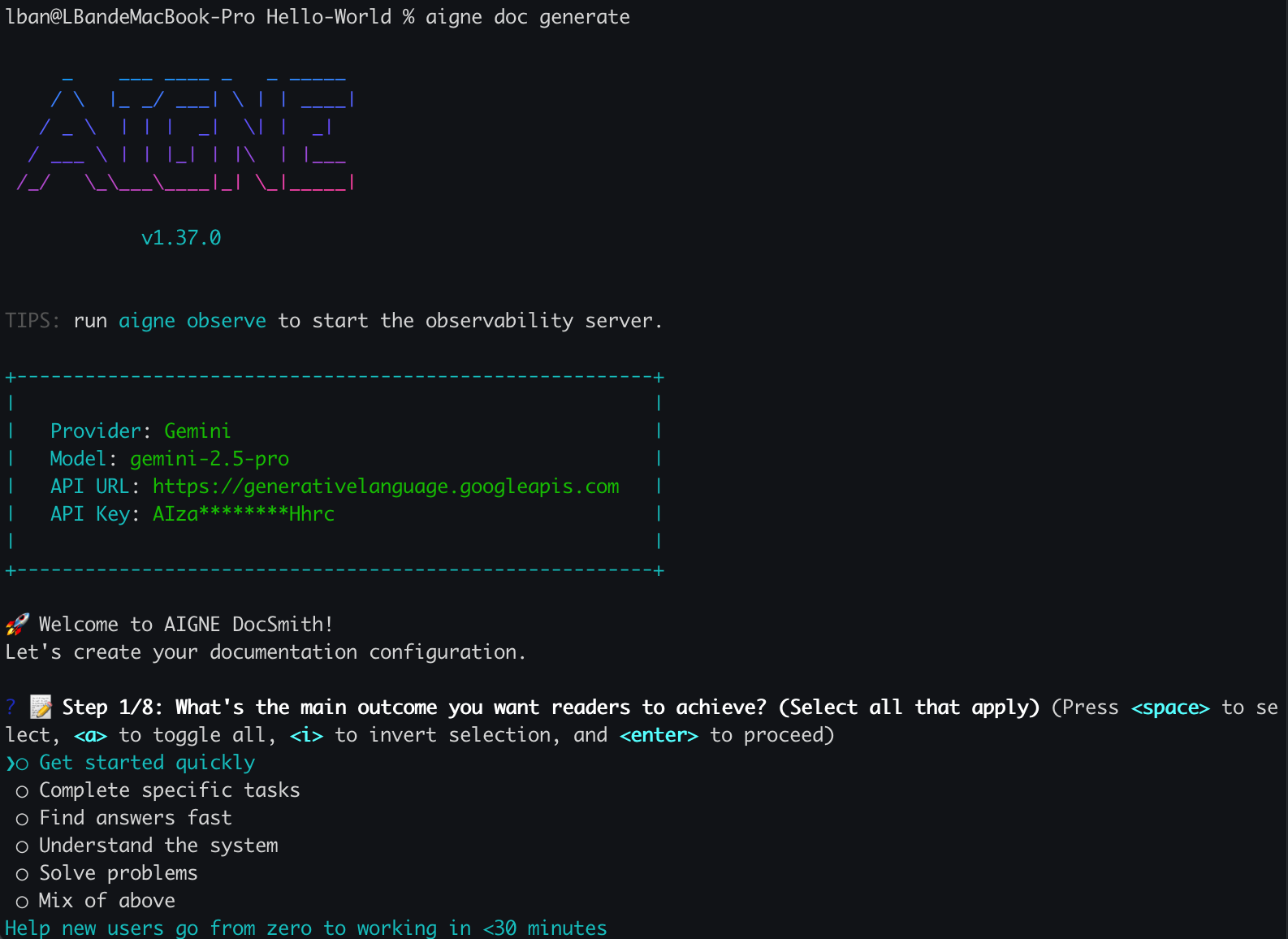
|
|
18
18
|
|
|
19
|
-
|
|
19
|
+
以下を含む、ドキュメントの主要な側面を定義するための一連の質問に答えるよう求められます。
|
|
20
20
|
|
|
21
21
|
- ドキュメントの生成ルールとスタイル
|
|
22
22
|
- 対象読者
|
|
23
|
-
-
|
|
24
|
-
-
|
|
23
|
+
- 主要言語と追加の翻訳言語
|
|
24
|
+
- ソースコードの入力パスとドキュメントの出力パス
|
|
25
25
|
|
|
26
26
|
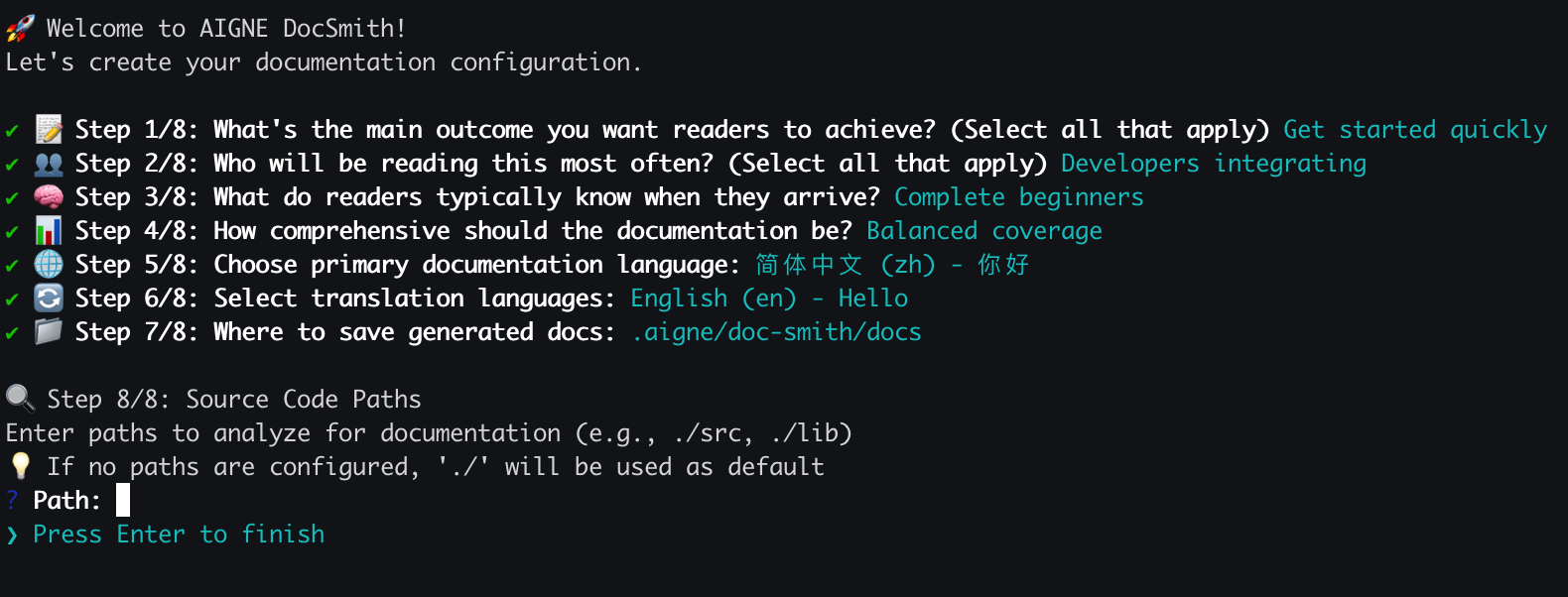
|
|
27
27
|
|
|
28
|
-
設定が完了すると、DocSmithはドキュメントの生成に進みます。
|
|
28
|
+
設定が完了すると、DocSmith はドキュメントの生成に進みます。
|
|
29
29
|
|
|
30
|
-
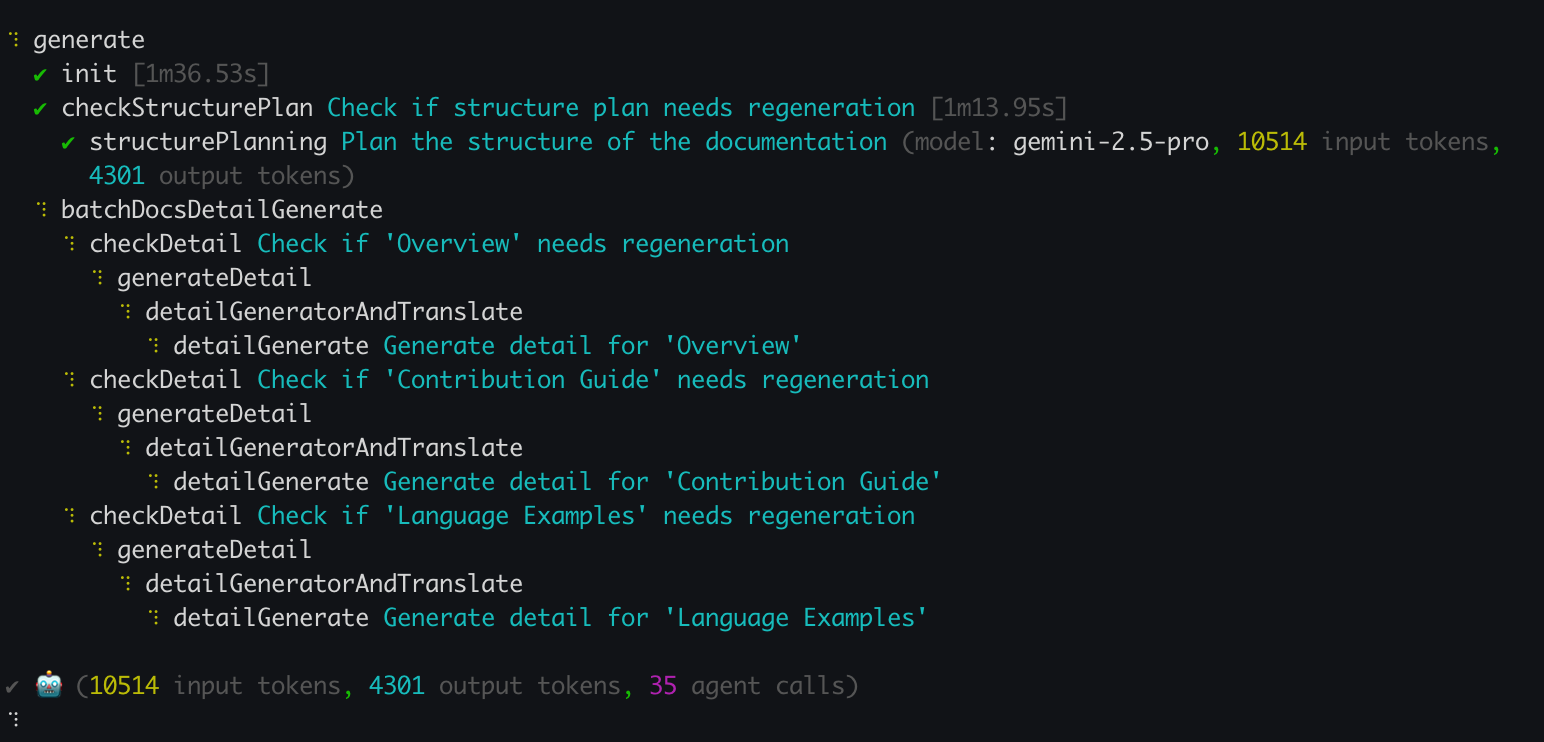
|
|
30
|
+

|
|
31
31
|
|
|
32
|
-
|
|
32
|
+
正常に完了すると、新しく作成されたドキュメントは、セットアップ時に指定された出力ディレクトリで利用可能になります。
|
|
33
33
|
|
|
34
|
-
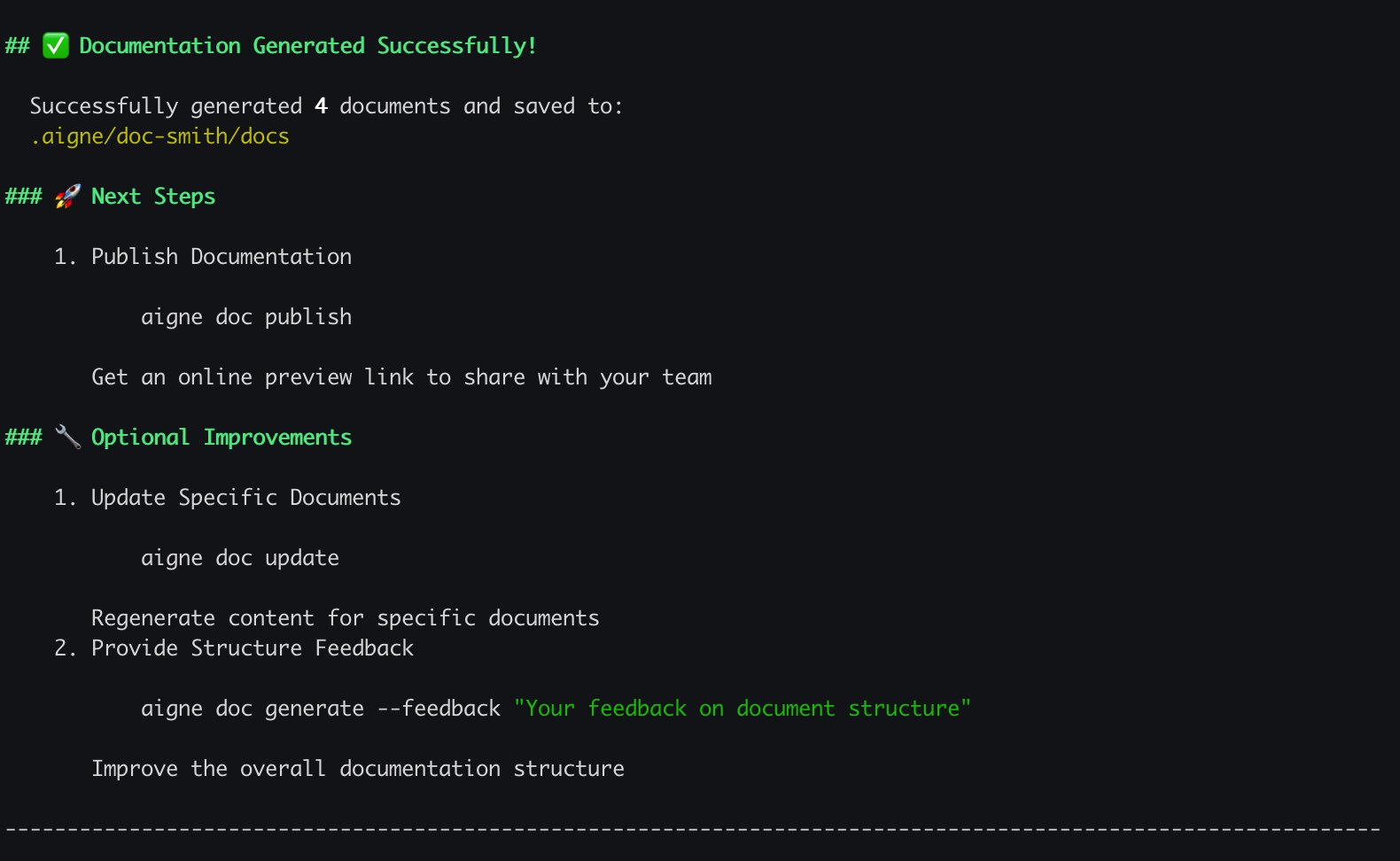
|
|
35
35
|
|
|
36
36
|
## 生成プロセス
|
|
37
37
|
|
|
38
|
-
`generate
|
|
38
|
+
`generate` コマンドは、自動化された複数ステップのワークフローを実行します。プロセスを以下に示します。
|
|
39
39
|
|
|
40
40
|
```d2
|
|
41
41
|
direction: down
|
|
42
42
|
|
|
43
|
-
|
|
44
|
-
shape:
|
|
43
|
+
User: {
|
|
44
|
+
shape: c4-person
|
|
45
45
|
}
|
|
46
46
|
|
|
47
|
-
|
|
48
|
-
|
|
47
|
+
AIGNE-CLI: {
|
|
48
|
+
label: "AIGNE CLI"
|
|
49
49
|
}
|
|
50
50
|
|
|
51
|
-
|
|
51
|
+
Config-Check: {
|
|
52
|
+
label: "設定は\n存在しますか?"
|
|
52
53
|
shape: diamond
|
|
53
54
|
}
|
|
54
55
|
|
|
55
|
-
|
|
56
|
-
|
|
56
|
+
Setup-Wizard: {
|
|
57
|
+
label: "対話型\nセットアップウィザード"
|
|
57
58
|
}
|
|
58
59
|
|
|
59
|
-
|
|
60
|
-
|
|
60
|
+
Generation-Process: {
|
|
61
|
+
label: "生成プロセス"
|
|
62
|
+
grid-columns: 1
|
|
63
|
+
|
|
64
|
+
Analyze: { label: "コードベースの分析" }
|
|
65
|
+
Plan: { label: "構造の計画" }
|
|
66
|
+
Generate: { label: "コンテンツの生成" }
|
|
61
67
|
}
|
|
62
68
|
|
|
63
|
-
|
|
64
|
-
|
|
69
|
+
Source-Code: {
|
|
70
|
+
label: "ソースコード"
|
|
71
|
+
shape: cylinder
|
|
65
72
|
}
|
|
66
73
|
|
|
67
|
-
|
|
68
|
-
|
|
74
|
+
Config-File: {
|
|
75
|
+
label: "config.yaml"
|
|
76
|
+
shape: cylinder
|
|
69
77
|
}
|
|
70
78
|
|
|
71
|
-
|
|
72
|
-
|
|
79
|
+
Output-Directory: {
|
|
80
|
+
label: "出力ディレクトリ"
|
|
81
|
+
shape: cylinder
|
|
73
82
|
}
|
|
74
83
|
|
|
75
|
-
|
|
76
|
-
|
|
77
|
-
|
|
78
|
-
|
|
79
|
-
|
|
80
|
-
|
|
81
|
-
|
|
82
|
-
|
|
84
|
+
User -> AIGNE-CLI: "1. aigne doc generate"
|
|
85
|
+
AIGNE-CLI -> Config-Check: "2. 設定の確認"
|
|
86
|
+
|
|
87
|
+
Config-Check -> Setup-Wizard: "3a. いいえ"
|
|
88
|
+
Setup-Wizard -> User: "入力を要求"
|
|
89
|
+
User -> Setup-Wizard: "回答を提供"
|
|
90
|
+
Setup-Wizard -> Config-File: "作成"
|
|
91
|
+
Config-File -> Generation-Process: "使用"
|
|
92
|
+
Setup-Wizard -> Generation-Process: "4. 続行"
|
|
93
|
+
|
|
94
|
+
Config-Check -> Generation-Process: "3b. はい"
|
|
95
|
+
|
|
96
|
+
Source-Code -> Generation-Process.Analyze: "入力"
|
|
97
|
+
Generation-Process.Analyze -> Generation-Process.Plan
|
|
98
|
+
Generation-Process.Plan -> Generation-Process.Generate
|
|
99
|
+
Generation-Process.Generate -> Output-Directory: "5. ドキュメントの書き込み"
|
|
100
|
+
|
|
101
|
+
Output-Directory -> User: "6. ドキュメントのレビュー"
|
|
83
102
|
```
|
|
84
103
|
|
|
85
104
|
## コマンドオプション
|
|
86
105
|
|
|
87
|
-
|
|
106
|
+
デフォルトの `generate` コマンドはほとんどのユースケースで十分です。ただし、その動作を変更するためのいくつかのオプションが利用可能であり、これらは完全な再生成を強制したり、ドキュメント構造を洗練させたりするのに役立ちます。
|
|
88
107
|
|
|
89
|
-
| オプション
|
|
108
|
+
| オプション | 説明 | 例 |
|
|
90
109
|
|---------------------|------------------------------------------------------------------------------------------------------------------------------------------|----------------------------------------------------------------------|
|
|
91
|
-
| `--forceRegenerate` | 既存のすべてのドキュメントを削除し、ゼロから再生成します。ソースコードや設定に大幅な変更を加えた後に使用します。 | `aigne doc generate --forceRegenerate`
|
|
92
|
-
| `--feedback`
|
|
93
|
-
| `--model`
|
|
110
|
+
| `--forceRegenerate` | 既存のすべてのドキュメントを削除し、ゼロから再生成します。ソースコードや設定に大幅な変更を加えた後に使用します。 | `aigne doc generate --forceRegenerate` |
|
|
111
|
+
| `--feedback` | セクションの追加、削除、再編成など、ドキュメント全体の構造を洗練させるための高レベルのフィードバックを提供します。 | `aigne doc generate --feedback "APIリファレンスセクションを追加"` |
|
|
112
|
+
| `--model` | コンテンツ生成に使用する AIGNE Hub の特定のラージ言語モデルを指定します。これにより、異なるモデルを切り替えることができます。 | `aigne doc generate --model anthropic:claude-3-5-sonnet` |
|
|
94
113
|
|
|
95
114
|
## 次のステップ
|
|
96
115
|
|
|
97
|
-
|
|
116
|
+
最初のドキュメントを生成した後も、プロジェクトは進化し続けます。ドキュメントをコードと同期させるには、更新を実行する必要があります。次のセクションでは、新しい要件やコードの変更に基づいて、対象を絞った変更を行い、特定のファイルを再生成する方法について説明します。
|
|
98
117
|
|
|
99
118
|
<x-card data-title="更新と改良" data-icon="lucide:file-edit" data-href="/features/update-and-refine">
|
|
100
|
-
|
|
119
|
+
コードが変更されたときにドキュメントを更新する方法や、フィードバックを使用して特定の改善を行う方法を学びます。
|
|
101
120
|
</x-card>
|
|
@@ -1,100 +1,119 @@
|
|
|
1
1
|
# Generate Documentation
|
|
2
2
|
|
|
3
|
-
The `aigne doc generate` command is the
|
|
3
|
+
The `aigne doc generate` command is the primary function for creating a complete documentation set from your source code. This command initiates a process that analyzes your codebase, plans a logical documentation structure, and then generates content for each section. It is the standard method for creating your documentation from an initial state.
|
|
4
4
|
|
|
5
5
|
## Your First Generation
|
|
6
6
|
|
|
7
7
|
To begin, navigate to your project's root directory and run the following command:
|
|
8
8
|
|
|
9
|
-
```bash
|
|
9
|
+
```bash aigne doc generate icon=lucide:play-circle
|
|
10
10
|
aigne doc generate
|
|
11
11
|
```
|
|
12
12
|
|
|
13
13
|
### Automatic Configuration
|
|
14
14
|
|
|
15
|
-
If you
|
|
15
|
+
If you are running this command for the first time in a project, DocSmith will detect that no configuration exists. It will then automatically launch an interactive setup wizard to guide you through the required setup steps. This process ensures a valid configuration is in place before generation begins.
|
|
16
16
|
|
|
17
17
|

|
|
18
18
|
|
|
19
|
-
You will be
|
|
19
|
+
You will be prompted to answer a series of questions to define key aspects of your documentation, including:
|
|
20
20
|
|
|
21
21
|
- Document generation rules and style
|
|
22
22
|
- The target audience
|
|
23
|
-
- Primary and translation languages
|
|
24
|
-
- Source code and output paths
|
|
23
|
+
- Primary language and any additional translation languages
|
|
24
|
+
- Source code input and documentation output paths
|
|
25
25
|
|
|
26
26
|

|
|
27
27
|
|
|
28
|
-
|
|
28
|
+
After the configuration is complete, DocSmith proceeds with the documentation generation.
|
|
29
29
|
|
|
30
30
|

|
|
31
31
|
|
|
32
|
-
Upon successful completion,
|
|
32
|
+
Upon successful completion, the newly created documentation will be available in the output directory specified during setup.
|
|
33
33
|
|
|
34
34
|

|
|
35
35
|
|
|
36
36
|
## The Generation Process
|
|
37
37
|
|
|
38
|
-
The `generate` command
|
|
38
|
+
The `generate` command executes an automated, multi-step workflow. The process is outlined below:
|
|
39
39
|
|
|
40
40
|
```d2
|
|
41
41
|
direction: down
|
|
42
42
|
|
|
43
|
-
|
|
44
|
-
shape:
|
|
43
|
+
User: {
|
|
44
|
+
shape: c4-person
|
|
45
45
|
}
|
|
46
46
|
|
|
47
|
-
|
|
48
|
-
|
|
47
|
+
AIGNE-CLI: {
|
|
48
|
+
label: "AIGNE CLI"
|
|
49
49
|
}
|
|
50
50
|
|
|
51
|
-
|
|
51
|
+
Config-Check: {
|
|
52
|
+
label: "Configuration\nExists?"
|
|
52
53
|
shape: diamond
|
|
53
54
|
}
|
|
54
55
|
|
|
55
|
-
|
|
56
|
-
|
|
56
|
+
Setup-Wizard: {
|
|
57
|
+
label: "Interactive\nSetup Wizard"
|
|
57
58
|
}
|
|
58
59
|
|
|
59
|
-
|
|
60
|
-
|
|
60
|
+
Generation-Process: {
|
|
61
|
+
label: "Generation Process"
|
|
62
|
+
grid-columns: 1
|
|
63
|
+
|
|
64
|
+
Analyze: { label: "Analyze Codebase" }
|
|
65
|
+
Plan: { label: "Plan Structure" }
|
|
66
|
+
Generate: { label: "Generate Content" }
|
|
61
67
|
}
|
|
62
68
|
|
|
63
|
-
|
|
64
|
-
|
|
69
|
+
Source-Code: {
|
|
70
|
+
label: "Source Code"
|
|
71
|
+
shape: cylinder
|
|
65
72
|
}
|
|
66
73
|
|
|
67
|
-
|
|
68
|
-
|
|
74
|
+
Config-File: {
|
|
75
|
+
label: "config.yaml"
|
|
76
|
+
shape: cylinder
|
|
69
77
|
}
|
|
70
78
|
|
|
71
|
-
|
|
72
|
-
|
|
79
|
+
Output-Directory: {
|
|
80
|
+
label: "Output Directory"
|
|
81
|
+
shape: cylinder
|
|
73
82
|
}
|
|
74
83
|
|
|
75
|
-
|
|
76
|
-
|
|
77
|
-
|
|
78
|
-
|
|
79
|
-
|
|
80
|
-
|
|
81
|
-
|
|
82
|
-
|
|
84
|
+
User -> AIGNE-CLI: "1. aigne doc generate"
|
|
85
|
+
AIGNE-CLI -> Config-Check: "2. Check for config"
|
|
86
|
+
|
|
87
|
+
Config-Check -> Setup-Wizard: "3a. No"
|
|
88
|
+
Setup-Wizard -> User: "Prompt for input"
|
|
89
|
+
User -> Setup-Wizard: "Provide answers"
|
|
90
|
+
Setup-Wizard -> Config-File: "Creates"
|
|
91
|
+
Config-File -> Generation-Process: "Uses"
|
|
92
|
+
Setup-Wizard -> Generation-Process: "4. Proceed"
|
|
93
|
+
|
|
94
|
+
Config-Check -> Generation-Process: "3b. Yes"
|
|
95
|
+
|
|
96
|
+
Source-Code -> Generation-Process.Analyze: "Input"
|
|
97
|
+
Generation-Process.Analyze -> Generation-Process.Plan
|
|
98
|
+
Generation-Process.Plan -> Generation-Process.Generate
|
|
99
|
+
Generation-Process.Generate -> Output-Directory: "5. Write documentation"
|
|
100
|
+
|
|
101
|
+
Output-Directory -> User: "6. Review documentation"
|
|
83
102
|
```
|
|
84
103
|
|
|
85
104
|
## Command Options
|
|
86
105
|
|
|
87
|
-
|
|
106
|
+
The default `generate` command is sufficient for most use cases. However, several options are available to modify its behavior, which can be useful for forcing a full regeneration or refining the documentation structure.
|
|
88
107
|
|
|
89
108
|
| Option | Description | Example |
|
|
90
109
|
|---------------------|------------------------------------------------------------------------------------------------------------------------------------------|----------------------------------------------------------------------|
|
|
91
110
|
| `--forceRegenerate` | Deletes all existing documents and regenerates them from scratch. Use this after making significant changes to your source code or configuration. | `aigne doc generate --forceRegenerate` |
|
|
92
111
|
| `--feedback` | Provides high-level feedback to refine the overall documentation structure, such as adding, removing, or reorganizing sections. | `aigne doc generate --feedback "Add an API Reference section"` |
|
|
93
|
-
| `--model` | Specifies a particular Large Language Model from AIGNE Hub to use for content generation
|
|
112
|
+
| `--model` | Specifies a particular Large Language Model from AIGNE Hub to use for content generation. This allows you to switch between different models. | `aigne doc generate --model anthropic:claude-3-5-sonnet` |
|
|
94
113
|
|
|
95
114
|
## What's Next?
|
|
96
115
|
|
|
97
|
-
|
|
116
|
+
After generating the initial documentation, your project will continue to evolve. To keep your documents synchronized with your code, you will need to perform updates. The next section explains how to make targeted changes and regenerate specific files based on new requirements or code modifications.
|
|
98
117
|
|
|
99
118
|
<x-card data-title="Update and Refine" data-icon="lucide:file-edit" data-href="/features/update-and-refine">
|
|
100
119
|
Learn how to update documents when your code changes or make specific improvements using feedback.
|