@adamchanadam/agent-handoff-kit 0.4.0 → 0.4.1
This diff represents the content of publicly available package versions that have been released to one of the supported registries. The information contained in this diff is provided for informational purposes only and reflects changes between package versions as they appear in their respective public registries.
- package/README.en.md +77 -246
- package/README.md +77 -252
- package/bin/agent-handoff-kit.mjs +66 -26
- package/bin/commands.mjs +54 -6
- package/bin/installed-file-contract.mjs +79 -63
- package/bin/migration-baselines/official-origin-catalog.json +238 -1
- package/bin/official-origin-catalog.mjs +267 -257
- package/bin/progress/assets.mjs +6 -0
- package/bin/progress/dashboard.mjs +1 -1
- package/bin/progress/index.html +4 -1
- package/bin/progress/launch.mjs +40 -0
- package/bin/progress/open.mjs +4 -3
- package/bin/progress/project-version.mjs +121 -0
- package/bin/progress/renderer.js +1 -0
- package/bin/progress/server.mjs +5 -3
- package/bin/progress/styles.css +1 -1
- package/bin/upgrade-inventory.mjs +153 -273
- package/docs/commands.md +61 -59
- package/docs/progress.md +45 -39
- package/package.json +1 -1
package/README.md
CHANGED
|
@@ -1,252 +1,77 @@
|
|
|
1
|
-
# Agent Handoff Kit
|
|
2
|
-
|
|
3
|
-
English
|
|
4
|
-
|
|
5
|
-
|
|
6
|
-
|
|
7
|
-
|
|
8
|
-
|
|
9
|
-
|
|
10
|
-
|
|
11
|
-
|
|
12
|
-
|
|
13
|
-
|
|
14
|
-
|
|
15
|
-
|
|
16
|
-
|
|
17
|
-
|
|
18
|
-
|
|
19
|
-
|
|
20
|
-
|
|
21
|
-
|
|
22
|
-
|
|
23
|
-
|
|
24
|
-
|
|
25
|
-
|
|
26
|
-
|
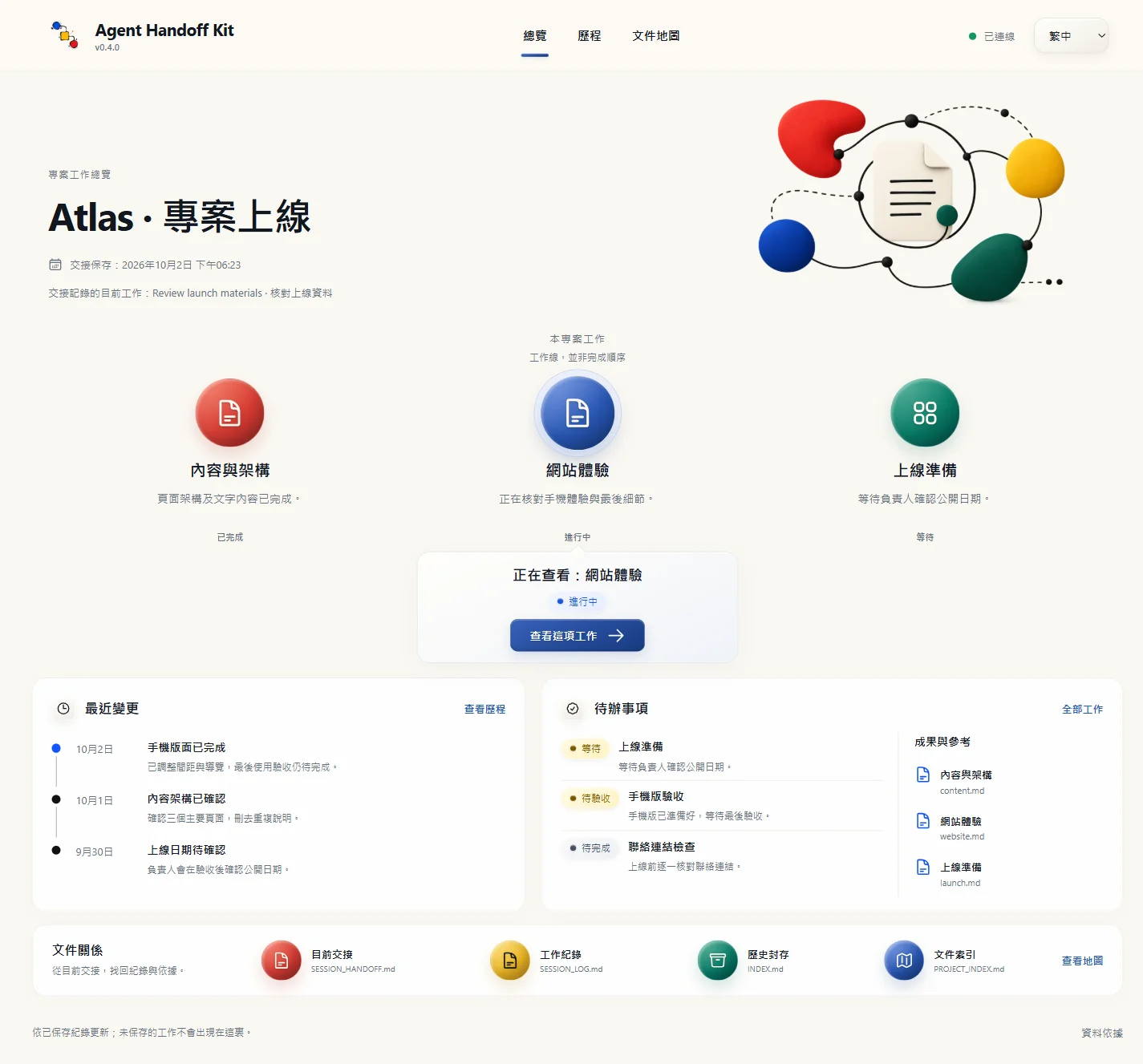
|
27
|
-
|
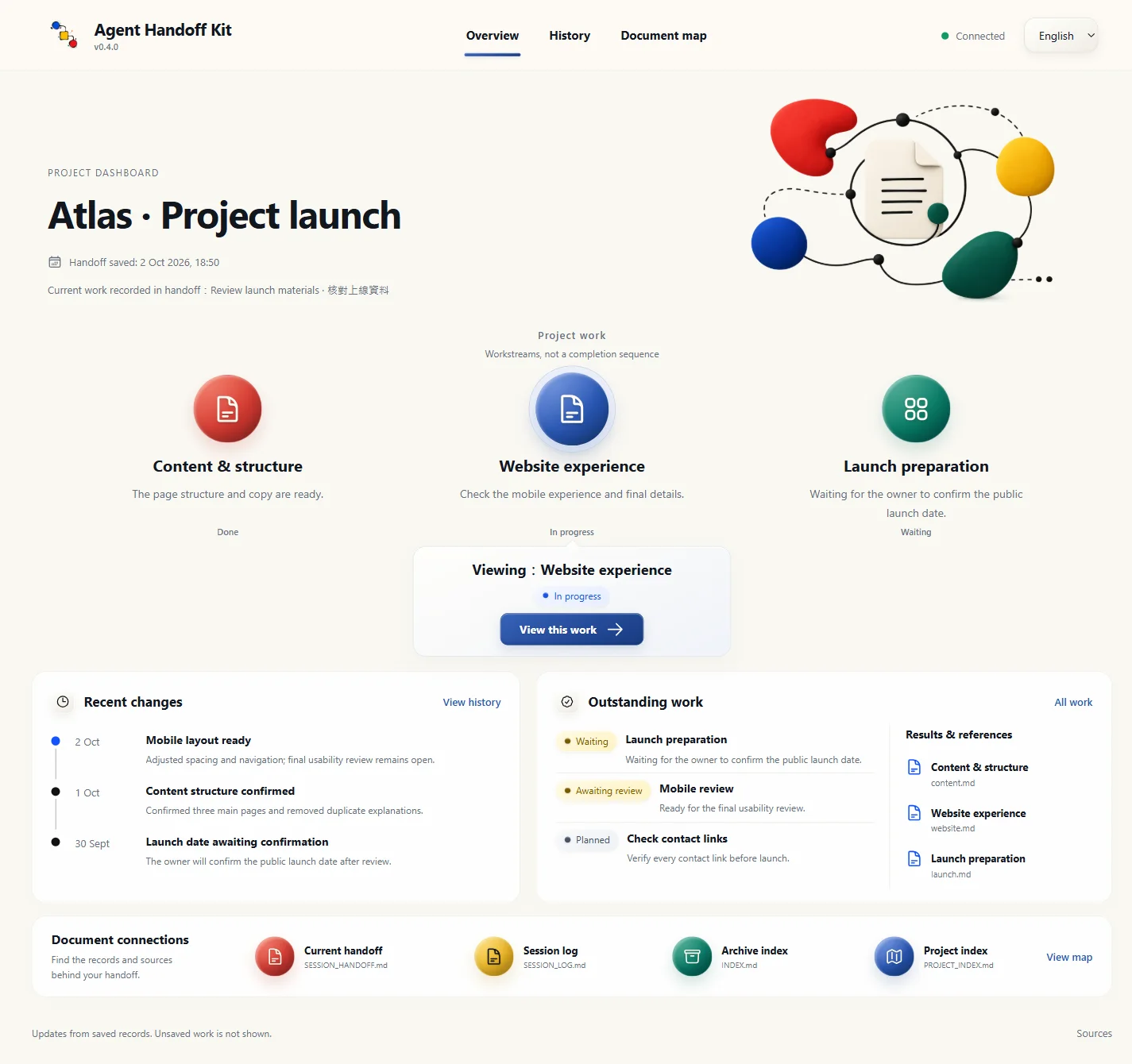
|
28
|
-
|
|
29
|
-
|
|
30
|
-
|
|
31
|
-
|
|
32
|
-
|
|
33
|
-
|
|
34
|
-
|
|
35
|
-
|
|
36
|
-
|
|
37
|
-
|
|
38
|
-
|
|
39
|
-
|
|
40
|
-
|
|
|
41
|
-
|
|
42
|
-
| `(
|
|
43
|
-
|
|
44
|
-
|
|
45
|
-
|
|
46
|
-
|
|
47
|
-
|
|
48
|
-
|
|
49
|
-
|
|
50
|
-
|
|
51
|
-
|
|
52
|
-
|
|
53
|
-
|
|
54
|
-
|
|
55
|
-
|
|
56
|
-
|
|
57
|
-
|
|
58
|
-
|
|
59
|
-
|
|
60
|
-
|
|
61
|
-
|
|
62
|
-
|
|
63
|
-
|
|
64
|
-
|
|
65
|
-
|
|
66
|
-
|
|
67
|
-
|
|
68
|
-
|
|
69
|
-
|
|
70
|
-
|
|
71
|
-
|
|
72
|
-
|
|
73
|
-
|
|
74
|
-
|
|
75
|
-
|
|
76
|
-
|
|
77
|
-
|
|
78
|
-
## 🧰 適用工具
|
|
79
|
-
|
|
80
|
-
Agent Handoff Kit 適合能讀寫本機專案資料夾的 agentic AI 工具,例如 Claude Code、OpenAI Codex、Gemini CLI、Google Antigravity,或其他具備本機工作區讀寫能力的工具。
|
|
81
|
-
|
|
82
|
-
它不適合普通 web chat AI,例如沒有本機檔案讀寫能力的 ChatGPT、Claude、Gemini 網頁版。上載檔案或貼上交接內容不能取代本工具需要的本機讀寫能力;這類工具不能可靠維護專案內的交接文件。
|
|
83
|
-
|
|
84
|
-
## ⌨️ 常用快捷入口
|
|
85
|
-
|
|
86
|
-
每個專案啟用一次:對 AI 說「在這個專案啟用 Kit 常用快捷入口」。AI 安裝教學已包含這一步。Claude Code、Gemini CLI、Antigravity CLI 用 <code>/handoff-kit-help</code>;Codex 用 <code>$handoff-kit-help</code>,或在 <code>/skills</code> 選單選取。
|
|
87
|
-
|
|
88
|
-
選單涵蓋開工、收工、進度頁、文件對齊、新手引導、日後工作規則及安裝檢查。例如 <code>/handoff-kit-progress</code> 會自動開啟或重用本機進度頁。詳見[八個入口及啟用方法](docs/commands.md)。原有自然語句仍可使用。
|
|
89
|
-
|
|
90
|
-
## 🟢 開工
|
|
91
|
-
|
|
92
|
-
打開能讀寫本機專案資料夾的 AI agent。
|
|
93
|
-
|
|
94
|
-
若 AI 已經在正確專案資料夾內,日常開工只需輸入:
|
|
95
|
-
|
|
96
|
-
```text
|
|
97
|
-
Start Agent Handoff
|
|
98
|
-
```
|
|
99
|
-
|
|
100
|
-
中文可說「開工」。
|
|
101
|
-
|
|
102
|
-
若目前平台能安全控制當前對話標題,單獨開工可順手把過於籠統或過時的標題改成簡潔的「`<項目名稱>|<主要動作>`」。標題要從開工卡片已載入的目前目標或推薦下一步產生;「開工」、「開始交接工作」這類泛稱不能當主要動作。它不為命名額外讀檔或連網;已有清楚標題便保留,不支援標題控制時則靜默略過。標題只供顯示,不代表項目狀態、進度、完成證據或額外授權。
|
|
103
|
-
|
|
104
|
-
若 AI 還未指向你的專案資料夾,才使用帶路徑啟動句:
|
|
105
|
-
|
|
106
|
-
```text
|
|
107
|
-
Work in <你的專案資料夾>. Read AGENTS.md first, then Start Agent Handoff. Before changing anything, tell me the current state and your recommended next step.
|
|
108
|
-
```
|
|
109
|
-
|
|
110
|
-
第一次安裝會把新手引導標記為待使用。只有該標記仍為 `eligible`、目前目標空白或 `TBD`,而且沒有同句明確任務時,AI 才在開工卡後進入簡短新手歡迎引導;升級既有項目不會重置這個標記。你已清楚描述目標和現有資料時,AI 可開始第一個安全步驟,不必先走新手流程。日常「開工」先讀 `dev/SESSION_HANDOFF.md`;同一資料夾內不會再重讀 `START_NEXT_SESSION_PROMPT.txt` 或 `dev/SESSION_LOG.md`。提示副本只供尚未指向專案資料夾的 AI 接入。
|
|
111
|
-
|
|
112
|
-
「開工,繼續 <任務>」、「<項目> 開工」或 `Start Agent Handoff and continue <task>` 都是接力指令。只有語句明顯可能指現實世界的開業、輪班或其他無關事件時,AI 才作一次簡短確認。單獨開工或只加項目名稱,會完整讀取交接包並恢復必要狀態、顯示開工卡與建議下一步,然後等待;不會因此研究、計劃、驗收、改檔、連網或啟用子代理。只有同句明確任務或長程指令才授權開始工作;上面列明的新手引導例外仍適用。
|
|
113
|
-
|
|
114
|
-
然後用日常話描述你要完成的任務。AI 應先讀交接文件,說明目前狀態、下一步與風險,再開始工作。
|
|
115
|
-
|
|
116
|
-
開工時,AI 須先完整接收同一版本的交接包,再核對目標、已完成工作、你的修正、未完事項與授權範圍。若讀取結果被截斷,便分段補讀;仍未讀齊或有關鍵矛盾,會顯示 continuity incomplete,不會聲稱已恢復。安裝成功與收工保存都不代表下一個 AI 已接收交接。
|
|
117
|
-
|
|
118
|
-
## 💾 收工
|
|
119
|
-
|
|
120
|
-
本輪工作完成、準備結束時,只需輸入:
|
|
121
|
-
|
|
122
|
-
```text
|
|
123
|
-
收工
|
|
124
|
-
```
|
|
125
|
-
|
|
126
|
-
也可以輸入:
|
|
127
|
-
|
|
128
|
-
```text
|
|
129
|
-
Wrap up Agent Handoff
|
|
130
|
-
wrap up
|
|
131
|
-
handoff
|
|
132
|
-
```
|
|
133
|
-
|
|
134
|
-
若你說的是「某某收工」(例如餐廳收工、今天活動收工)這類帶其他上下文的話,AI 應先反問你是否要執行 Agent Handoff Kit 收工交接,而不是立即改寫交接文件。
|
|
135
|
-
|
|
136
|
-
AI 應把整體目標、目前子任務、準確續接點和剩餘驗收寫清楚,保留必要真源的版本、已讀段落、閱讀深度與未解缺口。簡單任務只記必要資訊,不必建立多層任務表。收工前,AI 要只憑交接內容重建下一步,再對照你的原始要求和實際成果,避免把小步完成當成整體完成;接續時仍須讀取任務所需真源,不能把上一位的「已讀」當作自己已核實。
|
|
137
|
-
|
|
138
|
-
AI 應只更新有變的交接狀態,並核對下一次開工提示副本;有差異時才重新產生:
|
|
139
|
-
|
|
140
|
-
```text
|
|
141
|
-
START_NEXT_SESSION_PROMPT.txt
|
|
142
|
-
```
|
|
143
|
-
|
|
144
|
-
這個檔案保存下一次真正要讀的開工內容。你下次仍只需說 `Start Agent Handoff` 或「開工」;若 AI 尚未指向專案資料夾,才使用帶路徑啟動句。真正的權威來源仍是 `dev/SESSION_HANDOFF.md` 裡的「下次開工提示」段。若兩者不同,永遠以 `dev/SESSION_HANDOFF.md` 為準重新產生副本。
|
|
145
|
-
|
|
146
|
-
## 🩺 不確定狀態時
|
|
147
|
-
|
|
148
|
-
如你不確定目前資料夾是否安裝完整、是否需要升級,或剛升級後想確認狀態,直接叫 AI:
|
|
149
|
-
|
|
150
|
-
```text
|
|
151
|
-
請讀取頁頂的安裝頁,幫我檢查這個資料夾的 Agent Handoff Kit 狀態。
|
|
152
|
-
```
|
|
153
|
-
|
|
154
|
-
AI 會處理檢查,不會把「檢查通過」誤當成已理解你的專案。真正開始工作前,仍要對 AI 說 `Start Agent Handoff` 或「開工」。
|
|
155
|
-
|
|
156
|
-
## 📖 動態 Dashboard:一眼找回專案方向
|
|
157
|
-
|
|
158
|
-
對 AI 說「開啟專案進度頁」,或使用已啟用的 `/handoff-kit-progress`(Codex:`$handoff-kit-progress`)。AI 會開啟或重用這個專案的本機 Dashboard。
|
|
159
|
-
|
|
160
|
-
|
|
161
|
-
|
|
162
|
-
*新版實際介面截圖,Atlas 為虛構範例資料;每個專案都由相同模板讀取自己的紀錄。點開圖片可放大。*
|
|
163
|
-
|
|
164
|
-
<details>
|
|
165
|
-
<summary>查看英文介面截圖</summary>
|
|
166
|
-
|
|
167
|
-
|
|
168
|
-
|
|
169
|
-
</details>
|
|
170
|
-
|
|
171
|
-
- **總覽**:目前工作、已完成、等待、待驗收及尚未完成事項,成果可直接查閱。
|
|
172
|
-
- **歷程**:用日期、關鍵字及工作線找回重要改變;長日誌與封存按範圍分批讀取。
|
|
173
|
-
- **文件地圖**:看清 Kit 核心文件及已登記文件的角色、關係與來源。
|
|
174
|
-
|
|
175
|
-
AI 在正常保存時只維護有變的紀錄;程式讀取既有索引、交接及日誌後自動更新畫面,不用刷新、不另寫報告,也不呼叫 AI。介面可切換繁中/英文;來源沒有翻譯時保留原文。未保存的工作不會出現,畫面也不代替交接接收或成果驗收。
|
|
176
|
-
|
|
177
|
-
沿用 Node.js 與瀏覽器,無需資料庫或 API key。全部頁面關閉後保留八小時,期間可重開;服務停止或電腦重啟後,再用同一快捷入口開啟。詳見 [Dashboard 使用說明](docs/progress.md)。
|
|
178
|
-
|
|
179
|
-
## 🗂️ AI 會替你維護甚麼
|
|
180
|
-
|
|
181
|
-
安裝後,Agent Handoff Kit 會在你的專案中放入一組交接文件。你不需要逐一閱讀,也不需要手動維護。
|
|
182
|
-
|
|
183
|
-
- **開工入口**:讓不同 AI 工具找到同一套開工方式,例如 `AGENTS.md`、`CLAUDE.md`、`GEMINI.md` 和 `START_NEXT_SESSION_PROMPT.txt`。
|
|
184
|
-
- **目前狀態**:保存做到哪裡、下一步、風險和檢查結果,例如 `dev/SESSION_HANDOFF.md`。
|
|
185
|
-
- **追溯紀錄**:保存近期做過的事;長期使用後,AI 會自動整理,避免紀錄無止境膨脹。
|
|
186
|
-
- **項目索引與決策**:記錄重要文件、外部來源、同步責任和長期決策,方便你日後問「之前為何這樣做」。
|
|
187
|
-
- **工作規則**:AI 會按你的任務自己載入需要的規則;你不用記規則名稱。
|
|
188
|
-
|
|
189
|
-
## 🧭 AI 工作規則怎樣運作
|
|
190
|
-
|
|
191
|
-
你不需要記住任何規則檔名。Agent Handoff Kit 會讓 AI 先判斷你現在要做甚麼,再只載入需要的工作規則。
|
|
192
|
-
|
|
193
|
-
| 你要做的事 | AI 會套用的規則 |
|
|
194
|
-
|---|---|
|
|
195
|
-
| 寫程式 / 修錯誤 | 先讀項目索引、相關檔案,再改動和測試。 |
|
|
196
|
-
| 寫文章 / README / 社交帖文 | 先確認讀者、目的、語氣和發布位置。 |
|
|
197
|
-
| 查資料 / 比較工具 | 分清已驗證事實、來源摘要和 AI 的判斷。 |
|
|
198
|
-
| 刪檔 / Git / 發佈 / npm | 高風險操作必須先說明影響,並等你確認。 |
|
|
199
|
-
| Notion / Google Drive 等外部工具 | 先核對目前工具說明或官方文件;用後按資源歸屬安全收口;機密不寫入項目文件。 |
|
|
200
|
-
|
|
201
|
-
你只要用日常話說目的,例如「幫我改 README」、「幫我查這個工具是否適合」、「把這份文件接入 Agent Handoff Kit」。AI 會自己判斷要用哪些規則。
|
|
202
|
-
|
|
203
|
-
想加入自己的長期規則,也不用手改規則檔。你可以直接說:
|
|
204
|
-
|
|
205
|
-
```text
|
|
206
|
-
以後寫公開中文文件時,請用繁體中文書面語,避免半中半英。請把這條規則接入 Agent Handoff Kit。
|
|
207
|
-
```
|
|
208
|
-
|
|
209
|
-
AI 應先區分當次要求與長期規則,再查閱既有分類、相關規則包及專案補充;有合適位置便合併修改。專案規則放在可修改的補充區或已登記的參考文件,保留 Kit 官方正文。下一次處理相關任務時,AI 應沿原有路徑讀取並運用規則,遵守你的目標及指令優先級,不自行另定目標或通過門檻。
|
|
210
|
-
|
|
211
|
-
這些要求用來引導 AI 並檢查結果,不能攔截任意編輯器寫入。若舊規則已混入官方正文,仍需由 AI 核對來源,在取得合併授權後保留並整理;升級不會自動猜刪。
|
|
212
|
-
|
|
213
|
-
## 💬 你可以怎樣叫 AI
|
|
214
|
-
|
|
215
|
-
你只要用自然語言講目的,AI 會自己判斷要讀哪些交接文件、規則或索引。
|
|
216
|
-
|
|
217
|
-
| 你想做的事 | 可以這樣說 |
|
|
218
|
-
|---|---|
|
|
219
|
-
| 接上上次工作 | `Start Agent Handoff` 或「開工」 |
|
|
220
|
-
| 結束本輪工作 | 「收工」 |
|
|
221
|
-
| 讓新文件不變成孤兒 | 「把這份文件接入 Agent Handoff Kit,讓下次 AI 知道何時要讀、何時要更新。」 |
|
|
222
|
-
| 掃描可能被遺漏的重要文件 | 「掃描未接入 Agent Handoff Kit 的重要文件。」 |
|
|
223
|
-
| 讓 AI 下次避免同類錯誤 | 「把今次錯誤整理成日後工作規則,讓下次 AI 知道要怎樣避免。」 |
|
|
224
|
-
| 讓 API / 工具用法下次仍生效 | 「以後都用這個 API 調用方式,之後開新對話也要沿用。」 |
|
|
225
|
-
| 使用外部工具,例如 Notion、Google Drive、GitHub | 「這個項目會用到這些外部工具,請記住哪些能直接使用,機密不要寫入項目文件。」 |
|
|
226
|
-
| 長任務用了 MCP、browser 或自動化工具 | 「收工時請顯示外部工具資源收口結果:已關閉哪些本任務資源,哪些因歸屬不明而保留並列證據。」 |
|
|
227
|
-
|
|
228
|
-
掃描重要文件時,AI 只會先列出可能需要接入的文件與原因,不會自動修改;是否接入、合併或退役由你確認。
|
|
229
|
-
|
|
230
|
-
需要長期保留的規則,AI 應寫入合適的項目文件,而不是只留在當次對話摘要。
|
|
231
|
-
|
|
232
|
-
如涉及刪除、改名、合併權威文件、發佈、上傳或權限變更,AI 應先說明影響並等你確認。
|
|
233
|
-
|
|
234
|
-
## 🛡️ 安全護欄
|
|
235
|
-
|
|
236
|
-
就算你不懂代碼,這套工具也會要求 AI 在高風險操作前停下來講清楚。
|
|
237
|
-
|
|
238
|
-
- 破壞性操作分界:`rm -rf`、`git reset --hard` 等指定破壞性命令及系統根路徑操作一律禁止;強制推送、分支或標籤刪除及歷史改寫,須另取明確授權並核對受影響 ref。
|
|
239
|
-
- 機密保護:`.env`、API key、token 不可印出、不可提交、不可上傳。
|
|
240
|
-
- 查證不猜:使用第三方服務、Connector、MCP、CLI、API 或 plugin API 前,先核對目前工具說明、官方文件或已驗證的本地操作說明;查不到就標示未核實。
|
|
241
|
-
- 外部工具安全收口:用完 MCP、browser、自動化工具、notebook 或 helper server 後,AI 只可自動關閉能證明屬於本任務的資源;不明、共享、使用者或其他 AI agent 可能擁有的程序與暫存資料,必須先回報並等你確認。
|
|
242
|
-
- 權限不足就停手:檔案被鎖或沒有權限時,輸出手動操作清單,不嘗試繞過。
|
|
243
|
-
- 發佈需明確批准:建立版本標籤、GitHub Release、npm publish、部署或上傳,都不能因「準備好了」而自動執行。
|
|
244
|
-
|
|
245
|
-
## 🔗 可選配合:Adam-AI-Instructions
|
|
246
|
-
|
|
247
|
-
Agent Handoff Kit 可與 [Adam-AI-Instructions](https://github.com/prompt-templates/Adam-AI-Instructions) 配合使用。兩者分工互補,但在安全、機密、不可逆操作及發佈底線上刻意保留最低限度的共同防線;這不是父子真源,也不應合併成同一套規則:
|
|
248
|
-
|
|
249
|
-
- **Adam-AI-Instructions** 負責 AI 在**單一對話**內的做事規矩:語氣、做事優先序、回覆骨架、計算紀律、用語紀律、安全護欄、輸出層分工。屬「AI 應該怎樣答你」的持久基準。
|
|
250
|
-
- **Agent Handoff Kit** 負責 AI 在**對話之間**的接力:當前狀態、下一步、檔案登記、收工同下次開工。屬「AI 在對話之間怎樣記住你的項目」的持久基準。
|
|
251
|
-
|
|
252
|
-
這是可選配合,不影響 Agent Handoff Kit 的安裝和日常使用。想使用時,到該倉庫選擇適合你 AI 工具的版本,貼入 AI 工具設定即可。
|
|
1
|
+
# Agent Handoff Kit
|
|
2
|
+
|
|
3
|
+
[English](README.en.md) · [入門介紹](https://adamchanadam.github.io/agent-handoff-kit/agent-handoff-kit-intro.html) · [常用指令用法](https://adamchanadam.github.io/agent-handoff-kit/agent-handoff-kit-guide.html)
|
|
4
|
+
|
|
5
|
+
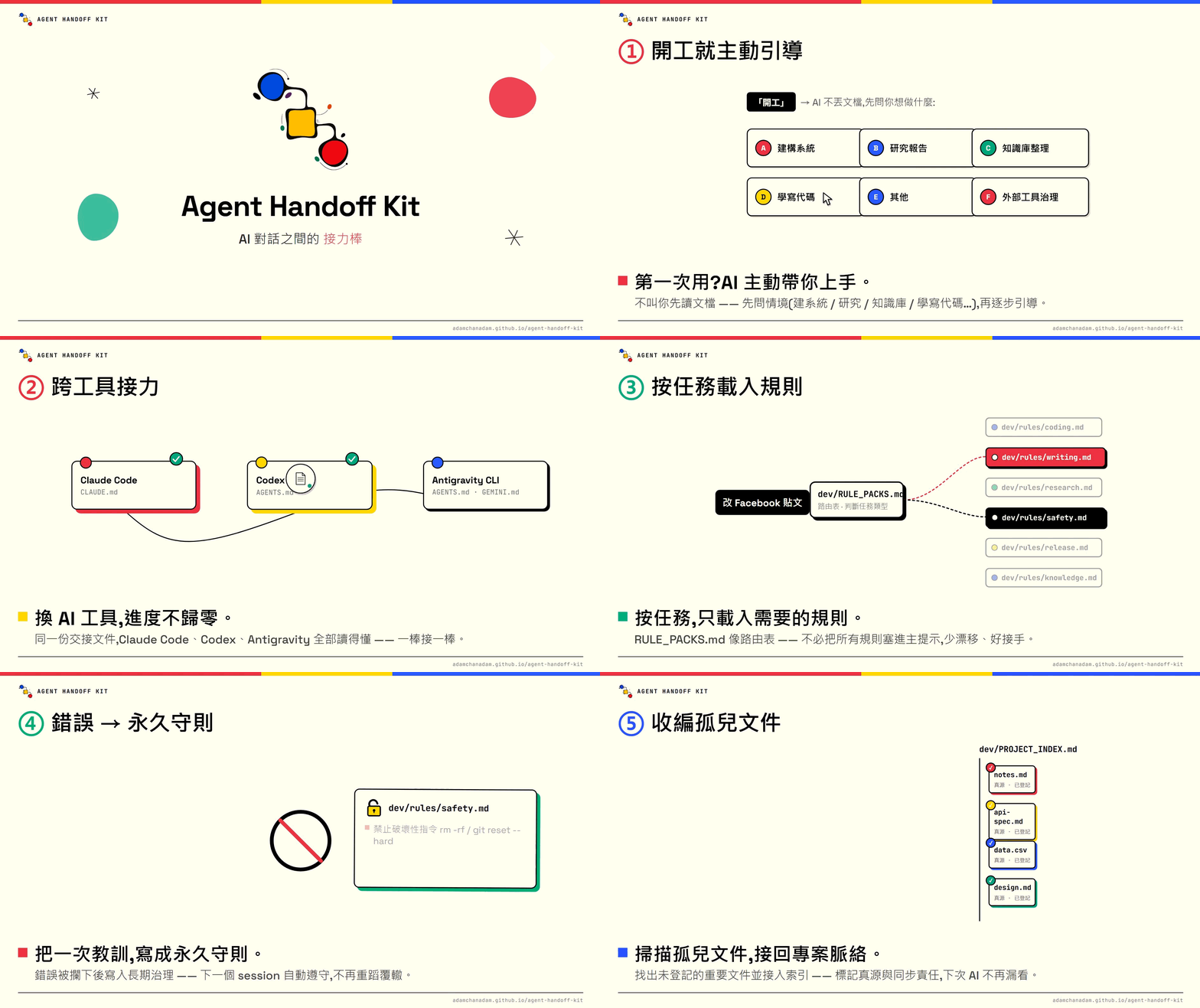
**Session 接力棒**。讓下一次 AI 對話接得上:保留進度、重要決定、文件位置和未完事項。
|
|
6
|
+
|
|
7
|
+
文件對應程式版本:`v0.4.1`。這份說明包含尚未發布的更新;正式下載可用的功能,以已發布版本為準。
|
|
8
|
+
|
|
9
|
+
[](https://youtu.be/RopbfBiSw1I)
|
|
10
|
+
|
|
11
|
+
## 這套工具怎樣幫你
|
|
12
|
+
|
|
13
|
+
- **跨對話接力**:保存目標、你的修正、重要決定、已完成和未完事項,下次不用從頭交代。不同支援工具開啟同一專案,可沿用已保存內容。
|
|
14
|
+
- **重要文件不漏掉**:記下文件用途、何時要讀、哪些改動需要一起更新,減少拿錯版本或找不到資料。
|
|
15
|
+
- **長期紀錄找得回**:保留重要選擇及原因,讓你日後追問「之前為甚麼這樣做」。舊紀錄按需要整理和封存,不必每次全部重讀。
|
|
16
|
+
- **按任務選做法**:寫作先看讀者和語氣,研究先核對來源,寫程式先讀檔再測試,整理雲端文件先查權限。你不用自己選規則。
|
|
17
|
+
- **保留日後要求**:把你明示要長期遵守的習慣留在專案,讓下一次相關工作讀得到;不是只記在當次聊天。
|
|
18
|
+
- **安全處理工具與資料**:重要操作先核對及取得所需批准,秘密不寫進紀錄;用完只關閉確定屬於本次工作的臨時程式,不亂停其他工作。
|
|
19
|
+
|
|
20
|
+
常用指令是這些功能的使用入口。Dashboard 則把已保存的進度、歷程和文件關係放到眼前。這套工具不是雲端同步工具,也不會自動帶走未保存的對話。
|
|
21
|
+
|
|
22
|
+
## 第一次使用
|
|
23
|
+
|
|
24
|
+
1. 在你的專案資料夾打開 AI,把下面這句貼進對話。
|
|
25
|
+
2. AI 會確認資料夾、安裝或升級,然後檢查結果;你不用選安裝指令。
|
|
26
|
+
3. 完成後用 `handoff-kit-onboard` 取得引導,或用 `handoff-kit-start` 接回工作。
|
|
27
|
+
|
|
28
|
+
```text
|
|
29
|
+
請讀取 https://adamchanadam.github.io/agent-handoff-kit/agent-handoff-kit-ai-install.html ,並在這個資料夾安裝或升級 Agent Handoff Kit。
|
|
30
|
+
```
|
|
31
|
+
|
|
32
|
+
已裝過舊版、資料夾已有 AI 工作文件,或不確定是否裝好,都用同一句。需要能讀寫專案資料夾的 AI 工具及 Node.js 18 以上;普通網頁聊天若不能存取資料夾便不適用,AI 可先替你檢查環境。
|
|
33
|
+
|
|
34
|
+
## 常用指令,按需要用
|
|
35
|
+
|
|
36
|
+
在專案的 AI 對話輸入指令,不是在終端機。Claude Code、Gemini CLI、Antigravity CLI 用 /;Codex 用 $,也可從 /skills 選取。 例如 Codex 的開工指令是 `$handoff-kit-start`。
|
|
37
|
+
|
|
38
|
+
| 想做甚麼 | 指令 |
|
|
39
|
+
|---|---|
|
|
40
|
+
| 接回上次工作 | [`/handoff-kit-start`](https://adamchanadam.github.io/agent-handoff-kit/agent-handoff-kit-guide.html#start) |
|
|
41
|
+
| 看專案全貌 | [`/handoff-kit-progress`](https://adamchanadam.github.io/agent-handoff-kit/agent-handoff-kit-guide.html#progress) |
|
|
42
|
+
| 準備結束這次對話 | [`/handoff-kit-close`](https://adamchanadam.github.io/agent-handoff-kit/agent-handoff-kit-guide.html#close) |
|
|
43
|
+
|
|
44
|
+
[完整指令用法:新手引導、整理文件、記住要求、檢查及更新](https://adamchanadam.github.io/agent-handoff-kit/agent-handoff-kit-guide.html#commands)
|
|
45
|
+
|
|
46
|
+
日常節奏:**開工 → 說明任務 → 需要時看進度 → 結束對話前收工**。不用每次跑完常用指令。原有「開工」「收工」說法仍可使用。
|
|
47
|
+
|
|
48
|
+
單獨開工會先完整讀取交接、說明現況,再等你提出任務;初次使用而尚未有目標時會簡短引導。想立即繼續,可在指令後加「繼續完成目前目標」。交接未讀齊時,AI 必須明說,不能假裝已接上。
|
|
49
|
+
|
|
50
|
+
新安裝或升級會一併放好快捷入口,只供這個專案使用,不會安裝到整部電腦的共用設定。舊對話未顯示入口時,重新開啟專案對話;其他問題見[快捷入口說明](docs/commands.md)。
|
|
51
|
+
|
|
52
|
+
## 進度頁:一眼找回方向
|
|
53
|
+
|
|
54
|
+
用 `handoff-kit-progress` 打開 Dashboard,看目前工作、未完成/等待/待確認事項、最近變更及重要文件的關係。
|
|
55
|
+
|
|
56
|
+

|
|
57
|
+
|
|
58
|
+
*實際介面截圖;Atlas 是虛構範例。相同頁面會讀取每個專案自己的紀錄。*
|
|
59
|
+
|
|
60
|
+
<details>
|
|
61
|
+
<summary>查看英文介面</summary>
|
|
62
|
+
|
|
63
|
+

|
|
64
|
+
|
|
65
|
+
</details>
|
|
66
|
+
|
|
67
|
+
AI 保存紀錄後,畫面自動更新,不用刷新。你叫 AI 開啟頁面及平常保存紀錄會使用一些 token;之後查看、篩選和更新畫面由本機程式處理,不另叫 AI 寫報告。未保存的工作不會出現。[進度頁用法與常見問題](docs/progress.md)
|
|
68
|
+
|
|
69
|
+
## 放心使用前,知道這幾點
|
|
70
|
+
|
|
71
|
+
- AI 負責讀取、整理、執行及檢查;你提出需求、回饋和必要決定,不用維護內部文件。
|
|
72
|
+
- 收工保存的是交接,未做完的工作會保留為未完成;這不等於整個專案已完成。
|
|
73
|
+
- 檢查安裝不會修復或升級;檢查更新會在有正式新版時自動升級。你的自訂內容遇到衝突會保留並停止處理。
|
|
74
|
+
- 刪除重要資料、上傳、發布或更改權限等操作,AI 必須先說明影響並取得所需批准。密碼和金鑰不可寫入交接。
|
|
75
|
+
- 這套工具用規則和檢查協助交接,不能保證 AI 永不出錯。交接缺漏、讀取失敗或未完成的檢查,應明確告訴你。
|
|
76
|
+
|
|
77
|
+
想一步步學,開啟[使用指南](https://adamchanadam.github.io/agent-handoff-kit/agent-handoff-kit-guide.html)。想另外設定 AI 的回覆語氣,可選用 [Adam-AI-Instructions](https://github.com/prompt-templates/Adam-AI-Instructions);它不是使用這套工具的必要條件。
|
|
@@ -11,7 +11,9 @@ import path from "node:path";
|
|
|
11
11
|
import { fileURLToPath } from "node:url";
|
|
12
12
|
import { assessPromptMirrorRoot, assessPromptMirrorTexts, extractOpeningMessage } from "./prompt-mirror-core.mjs";
|
|
13
13
|
import { readHandoffChunk, formatHandoffChunk } from "./handoff-read.mjs";
|
|
14
|
-
import { freshInstallMappings, installedFileContract, installedMappings, requiredInstalledTargets, upgradeStateMappings, upgradeStateTargets } from "./installed-file-contract.mjs";
|
|
14
|
+
import { freshInstallMappings, installedFileContract, installedMappings, requiredInstalledTargets, upgradeStateMappings, upgradeStateTargets, requiredShortcutTargets, SHORTCUT_INSTALL_CONTRACT } from "./installed-file-contract.mjs";
|
|
15
|
+
import { commands, commandFiles, planCommands, assertCommandPaths } from "./commands.mjs";
|
|
16
|
+
const legacyShortcutRecoveryPermit = Symbol("legacy shortcut recovery only");
|
|
15
17
|
import { getArtifactBoundManagedSegment, getOfficialBaseline, identifyOfficialOrigin, loadOfficialOriginCatalog } from "./official-origin-catalog.mjs";
|
|
16
18
|
import {
|
|
17
19
|
markdownVisibleLinesOutsideHiddenBlocks,
|
|
@@ -570,7 +572,7 @@ async function main() {
|
|
|
570
572
|
const version = await readPackageVersion();
|
|
571
573
|
// `doctor` renders version alignment itself. Let that single health run own
|
|
572
574
|
// the lookup instead of checking once here and once again inside doctor.
|
|
573
|
-
if (!new Set(["closeout-status", "doctor", "workspace-health", "progress", "commands", "handoff-read"]).has(command)) await maybePrintUpdateNotice(version);
|
|
575
|
+
if (!new Set(["closeout-status", "doctor", "workspace-health", "progress", "commands", "handoff-read", "update"]).has(command)) await maybePrintUpdateNotice(version);
|
|
574
576
|
if (!command || options.help) {
|
|
575
577
|
if (command === "handoff-read") {
|
|
576
578
|
console.log("Usage: agent-handoff-kit handoff-read [--root <path>] [--max-chars <64..8192>] [--offset <n> --sha256 <digest>]\nRead-only, offline. Offsets count Unicode code points. Continue using nextOffset and the same sha256.\nContent served is not proof of reception, understanding or permission to act.");
|
|
@@ -595,6 +597,25 @@ async function main() {
|
|
|
595
597
|
return;
|
|
596
598
|
}
|
|
597
599
|
|
|
600
|
+
if (command === "update") {
|
|
601
|
+
assertCommandPaths(root);
|
|
602
|
+
await validateTransactionRoot(root, [], { createMissingRoot: false });
|
|
603
|
+
const installed = await readProjectIndexTemplateVersion(root);
|
|
604
|
+
if (!installed) throw new Error('Project version is unverified; check the existing Kit installation before updating. / 無法確認專案版本,未升級。');
|
|
605
|
+
const latest = await fetchLatestVersion();
|
|
606
|
+
if (!latest || !isStableSemver(latest)) throw new Error('npm latest could not be verified; no upgrade performed. / 未能確認 npm 最新版,未升級。');
|
|
607
|
+
console.log('Installed / 已安裝: ' + installed + '; npm latest / 最新版: ' + latest);
|
|
608
|
+
if (compareSemver(installed, latest) > 0) throw new Error('Project is newer than npm latest; refusing downgrade. / 專案版本較新,不會降級。');
|
|
609
|
+
if (version !== latest) throw new Error('Acquire the verified public CLI and retry: npx --yes @adamchanadam/agent-handoff-kit@' + latest + ' update --root <project-root> (quote the verified root as one argument in your active shell)');
|
|
610
|
+
if (installed === latest && !await exists(path.join(root, 'dev/governance_migrations/.upgrade.lock'))) {
|
|
611
|
+
console.log('Already current; checking installation without writing. / 已是最新版,唯讀核對安裝。');
|
|
612
|
+
await runDoctor(root, version);
|
|
613
|
+
return;
|
|
614
|
+
}
|
|
615
|
+
await runInstall('upgrade', root, { ...options, yes: true }, version);
|
|
616
|
+
return;
|
|
617
|
+
}
|
|
618
|
+
|
|
598
619
|
if (command === "doctor") {
|
|
599
620
|
await runDoctor(root, version);
|
|
600
621
|
return;
|
|
@@ -610,7 +631,8 @@ async function main() {
|
|
|
610
631
|
const result = installCommands({ root, agent: options.agent ?? "all", yes: options.yes, dryRun: options.dryRun });
|
|
611
632
|
console.log("Agent Handoff Kit — Shortcuts / 快捷入口: " + result.status);
|
|
612
633
|
for (const item of result.plan) console.log(item.action + " " + item.file);
|
|
613
|
-
if (result.status === "
|
|
634
|
+
if (result.status === "upgrade-required") { console.error('Official entries need a transactional update. Run upgrade --dry-run, then upgrade --yes. / 官方入口需要安全升級,請用 Kit 升級流程。'); process.exitCode = 1; }
|
|
635
|
+
else if (result.status === "conflict") { console.error("Existing command differs; no files written. Review the named conflict. / 同名入口有差異,未寫入任何檔案。"); process.exitCode = 1; }
|
|
614
636
|
else if (result.status === "preview") console.log("Preview only. Add --yes to enable. / 只作預覽,加 --yes 才啟用。");
|
|
615
637
|
else console.log("Ready. Reload your agent if needed. / 已啟用,必要時重新載入 AI。Claude / Gemini / Antigravity: /handoff-kit-help · Codex: $handoff-kit-help or /skills");
|
|
616
638
|
return;
|
|
@@ -1280,6 +1302,7 @@ async function needsProjectIndexVersionInject(root, command, version) {
|
|
|
1280
1302
|
}
|
|
1281
1303
|
|
|
1282
1304
|
async function runInstall(command, root, options, version) {
|
|
1305
|
+
assertCommandPaths(root); // Before recovery: recovery itself can write.
|
|
1283
1306
|
// Guard the selected root before reading or recovering any persisted
|
|
1284
1307
|
// transaction. Recovery is a write path and must not run through a junction.
|
|
1285
1308
|
await validateTransactionRoot(root, [], { createMissingRoot: false });
|
|
@@ -1572,7 +1595,9 @@ async function executeDirectNoClobberCreateInstall(command, root, mode, plan, ve
|
|
|
1572
1595
|
}
|
|
1573
1596
|
|
|
1574
1597
|
for (const output of outputs) {
|
|
1598
|
+
await validateTransactionRoot(root, plan, { createMissingRoot: false });
|
|
1575
1599
|
await mkdir(path.dirname(output.targetAbs), { recursive: true });
|
|
1600
|
+
assertCommandPaths(root);
|
|
1576
1601
|
await writeFile(output.targetAbs, output.after, { mode: 0o600, flag: "wx" });
|
|
1577
1602
|
const written = await readOptionalBuffer(output.targetAbs);
|
|
1578
1603
|
if (!written || sha256(written) !== output.afterHash) {
|
|
@@ -1717,6 +1742,7 @@ async function buildTransactionOutputs(command, root, plan, version, options = {
|
|
|
1717
1742
|
for (const item of plan) {
|
|
1718
1743
|
if (item.action !== "create" && item.action !== "merge" && item.action !== "preserve") continue;
|
|
1719
1744
|
const before = await readOptionalBuffer(item.targetAbs);
|
|
1745
|
+
if (item.generatedText != null && item.action === "create" && before) throw new Error(`${item.targetRel}: target appeared after shortcut planning; restart the read-only plan`);
|
|
1720
1746
|
if (item.plannedInputHash && (!before || sha256(before) !== item.plannedInputHash)) {
|
|
1721
1747
|
throw new Error(`${item.targetRel}: input changed after official-region proof; restart the read-only plan`);
|
|
1722
1748
|
}
|
|
@@ -1737,7 +1763,7 @@ async function buildTransactionOutputs(command, root, plan, version, options = {
|
|
|
1737
1763
|
after = Buffer.from(before);
|
|
1738
1764
|
}
|
|
1739
1765
|
} else if (item.action === "create") {
|
|
1740
|
-
const sourceText = await readTemplateSource(command, item.sourceRel, item.targetRel, item.sourceAbs);
|
|
1766
|
+
const sourceText = item.generatedText ?? await readTemplateSource(command, item.sourceRel, item.targetRel, item.sourceAbs);
|
|
1741
1767
|
afterText = item.targetRel === "AGENTS.md" ? mergeManagedBlock("", sourceText) : sourceText;
|
|
1742
1768
|
} else if (item.action === "merge" && item.targetRel === "dev/PROJECT_INDEX.md" && item.metadataTransition === projectIndexTemplateVersionMetadataTransition) {
|
|
1743
1769
|
if (!before) throw new Error(`${item.targetRel}: template-version metadata transition disappeared before preparation`);
|
|
@@ -1785,6 +1811,9 @@ async function buildTransactionOutputs(command, root, plan, version, options = {
|
|
|
1785
1811
|
if (materializedText !== indexOutput.afterText) {
|
|
1786
1812
|
indexOutput.after = Buffer.from(materializedText, "utf8");
|
|
1787
1813
|
indexOutput.afterText = null;
|
|
1814
|
+
} else if (indexOutput.before && decodeUtf8(indexOutput.before, indexRel).text === materializedText) {
|
|
1815
|
+
indexOutput.after = Buffer.from(indexOutput.before);
|
|
1816
|
+
indexOutput.afterText = null; // Preserve mixed line endings when only shortcuts need repair.
|
|
1788
1817
|
} else {
|
|
1789
1818
|
indexOutput.afterText = materializedText;
|
|
1790
1819
|
}
|
|
@@ -1976,6 +2005,7 @@ async function prepareTransaction(root, command, version, outputs, mode, plan, a
|
|
|
1976
2005
|
command,
|
|
1977
2006
|
mode,
|
|
1978
2007
|
attemptedVersion: version,
|
|
2008
|
+
shortcutInstallContract: SHORTCUT_INSTALL_CONTRACT,
|
|
1979
2009
|
committedVersion: null,
|
|
1980
2010
|
plannedSkips: plan.filter((item) => item.action === "skip").length,
|
|
1981
2011
|
host: hostname(),
|
|
@@ -2269,6 +2299,7 @@ async function pathExists(filePath) {
|
|
|
2269
2299
|
}
|
|
2270
2300
|
|
|
2271
2301
|
async function validateTransactionRoot(root, plan, { createMissingRoot = true } = {}) {
|
|
2302
|
+
assertCommandPaths(root);
|
|
2272
2303
|
let rootStats;
|
|
2273
2304
|
try {
|
|
2274
2305
|
rootStats = await lstat(root);
|
|
@@ -2316,6 +2347,7 @@ async function validateTransactionOverlay(root, outputs) {
|
|
|
2316
2347
|
.map((item) => [item.targetRel, decodeUtf8(item.after, item.targetRel).text]));
|
|
2317
2348
|
const finalText = async (relative) => outputMap.get(relative) ?? await readOptionalText(path.join(root, relative));
|
|
2318
2349
|
const failures = [];
|
|
2350
|
+
for (const item of commandFiles()) if ((await finalText(item.file)) !== item.text) failures.push(`${item.file}: required shortcut missing or different after transaction`);
|
|
2319
2351
|
for (const target of requiredTargets) if ((await finalText(target)) == null) failures.push(`${target}: missing after transaction`);
|
|
2320
2352
|
for (const rule of requiredAnchors) {
|
|
2321
2353
|
if (preservedRuntimeTargets.has(rule.target)) continue;
|
|
@@ -2386,6 +2418,7 @@ function bridgeTextFailure(targetRel, text) {
|
|
|
2386
2418
|
}
|
|
2387
2419
|
|
|
2388
2420
|
async function atomicReplaceFromBuffer(root, targetAbs, buffer, id, expectedHash, options = {}) {
|
|
2421
|
+
assertCommandPaths(root);
|
|
2389
2422
|
const targetRel = options.targetRel ?? path.relative(root, targetAbs);
|
|
2390
2423
|
const phase = options.phase ?? "forward";
|
|
2391
2424
|
const escrowDir = options.escrowDir;
|
|
@@ -2537,6 +2570,7 @@ async function validateRecoveryJournal(root, journal, journalPath, lockId = null
|
|
|
2537
2570
|
}
|
|
2538
2571
|
if (!Array.isArray(journal.entries) || journal.entries.length === 0) throw new Error("upgrade journal has no valid entries; no recovery writes attempted");
|
|
2539
2572
|
if (!isStableSemver(journal.attemptedVersion ?? "")) throw new Error("upgrade journal attempted version is invalid; no recovery writes attempted");
|
|
2573
|
+
if (journal.shortcutInstallContract !== undefined && journal.shortcutInstallContract !== SHORTCUT_INSTALL_CONTRACT) throw new Error("unknown shortcut install contract; no recovery writes attempted");
|
|
2540
2574
|
const allowedStates = new Set(["prepared", "committing", "rollback-needed", "manual-recovery-required", "committed", "rolled-back"]);
|
|
2541
2575
|
if (!allowedStates.has(journal.state)) throw new Error("upgrade journal state is invalid; no recovery writes attempted");
|
|
2542
2576
|
|
|
@@ -2594,6 +2628,7 @@ async function validateRecoveryJournal(root, journal, journalPath, lockId = null
|
|
|
2594
2628
|
if (!entry || typeof entry !== "object" || Array.isArray(entry)) throw new Error("upgrade journal entry schema is invalid; no recovery writes attempted");
|
|
2595
2629
|
const allowedTarget = requiredTargets.includes(entry.targetRel)
|
|
2596
2630
|
|| upgradeStateTargets.includes(entry.targetRel)
|
|
2631
|
+
|| (journal.shortcutInstallContract === SHORTCUT_INSTALL_CONTRACT && requiredShortcutTargets.includes(entry.targetRel))
|
|
2597
2632
|
|| formalWitness?.contentPaths.has(entry.targetRel);
|
|
2598
2633
|
if (!allowedTarget || seen.has(entry.targetRel)) throw new Error("upgrade journal target is unknown or duplicated; no recovery writes attempted");
|
|
2599
2634
|
seen.add(entry.targetRel);
|
|
@@ -2837,6 +2872,7 @@ async function recoverInterruptedTransaction(root, options = {}) {
|
|
|
2837
2872
|
const doctorStatus = await runDoctor(root, journal.committedVersion, {
|
|
2838
2873
|
silentCard: true,
|
|
2839
2874
|
context: "recovered-committed-transaction-health",
|
|
2875
|
+
legacyShortcutRecovery: journal.shortcutInstallContract === undefined ? legacyShortcutRecoveryPermit : null,
|
|
2840
2876
|
skipVersionRegistryLookup: true,
|
|
2841
2877
|
allowActiveTransaction: true,
|
|
2842
2878
|
captureFormalUserRules: (state) => { formalRuntimeState = state; }
|
|
@@ -3129,6 +3165,22 @@ async function runDoctor(root, version, options = {}) {
|
|
|
3129
3165
|
return "failed";
|
|
3130
3166
|
}
|
|
3131
3167
|
|
|
3168
|
+
if (options.legacyShortcutRecovery !== legacyShortcutRecoveryPermit) {
|
|
3169
|
+
let shortcutFailures;
|
|
3170
|
+
try { shortcutFailures = planCommands(root).filter(item => item.action !== "keep").map(item => item.file); }
|
|
3171
|
+
catch (error) { shortcutFailures = [safeErrorLabel(error)]; }
|
|
3172
|
+
console.log(`\nproject shortcut checks: 1 (${commands.length} entries / ${requiredShortcutTargets.length} files)`);
|
|
3173
|
+
console.log(shortcutFailures.length ? "missing or different project shortcuts" : "ok project shortcuts ready");
|
|
3174
|
+
rows.push({target: "project shortcuts", ok: shortcutFailures.length === 0});
|
|
3175
|
+
if (shortcutFailures.length) {
|
|
3176
|
+
for (const failure of shortcutFailures) console.log(' ' + failure);
|
|
3177
|
+
printDoctorSummary(version, root, "needs-fix", {checked: rows.length, failedKind: "project shortcuts", failedCount: shortcutFailures.length,
|
|
3178
|
+
nextStep: "Kit 安裝未齊備。請執行 upgrade --dry-run;缺少的入口會一併補齊,同名差異需先處理。"});
|
|
3179
|
+
process.exitCode = 1;
|
|
3180
|
+
return "failed";
|
|
3181
|
+
}
|
|
3182
|
+
} else console.log("legacy transaction recovery: shortcut acceptance deferred to the current install plan");
|
|
3183
|
+
|
|
3132
3184
|
const archiveCasing = await checkSessionLogArchiveCasing(root);
|
|
3133
3185
|
console.log(`\nSESSION_LOG archive casing checks: 1`);
|
|
3134
3186
|
console.log(`${archiveCasing.ok ? "ok" : "missing"} dev/SESSION_LOG_archive canonical path`);
|
|
@@ -4255,6 +4307,12 @@ async function buildPlan(root, command, version = null) {
|
|
|
4255
4307
|
...(reason ? { reason } : {})
|
|
4256
4308
|
});
|
|
4257
4309
|
}
|
|
4310
|
+
for (const item of planCommands(root)) plan.push({
|
|
4311
|
+
targetRel: item.file, targetAbs: item.target, generatedText: item.text,
|
|
4312
|
+
action: item.action === 'keep' ? 'skip' : item.action,
|
|
4313
|
+
...(item.action === 'merge' ? { mergedText: item.text, plannedInputHash: item.plannedInputHash } : {}),
|
|
4314
|
+
reason: item.action === 'conflict' ? 'project shortcut differs; preserve it and resolve before installation' : item.action === 'merge' ? `verified official v${item.officialVersion} shortcut update` : 'required project shortcut'
|
|
4315
|
+
});
|
|
4258
4316
|
return plan;
|
|
4259
4317
|
}
|
|
4260
4318
|
|
|
@@ -6623,29 +6681,9 @@ function printCard(version, status, eyes) {
|
|
|
6623
6681
|
function printInstallNextSteps(root, conflictCount, mode = "first-install", skippedCount = 0, options = {}) {
|
|
6624
6682
|
console.log("");
|
|
6625
6683
|
console.log("============================================================");
|
|
6626
|
-
|
|
6627
|
-
|
|
6628
|
-
console.log("⚠️ 已補齊缺少檔案,但仍要檢查入口連接");
|
|
6629
|
-
} else {
|
|
6630
|
-
console.log("✅ 安裝完成:下一步請在 AI 對話中操作");
|
|
6631
|
-
}
|
|
6684
|
+
console.log("✅ 安裝完成:下一步請在 AI 對話中操作");
|
|
6685
|
+
console.log("✅ 專案快捷入口已就緒;進度頁可直接由 handoff-kit-progress 開啟。");
|
|
6632
6686
|
console.log("============================================================");
|
|
6633
|
-
if (conflictCount > 0) {
|
|
6634
|
-
console.log("⚠️ 狀態:有既有檔案未能證明可安全合併。");
|
|
6635
|
-
console.log("⚠️ 這不是檔案壞掉;工具已停手,沒有覆寫 conflict 檔案。");
|
|
6636
|
-
console.log(conflictRepairNextStepLine());
|
|
6637
|
-
console.log("");
|
|
6638
|
-
}
|
|
6639
|
-
if (needsPartialRepairStep) {
|
|
6640
|
-
console.log("你原本已有部分 AI 記憶檔,工具已保留它們,沒有覆寫。");
|
|
6641
|
-
console.log("下一步先不要開始新任務;請在終端機執行以下預演,讓工具檢查能否安全補入口連接:");
|
|
6642
|
-
console.log(" npx --yes @adamchanadam/agent-handoff-kit@latest upgrade --dry-run");
|
|
6643
|
-
console.log("");
|
|
6644
|
-
console.log("如預演顯示沒有 conflict,再執行:");
|
|
6645
|
-
console.log(" npx --yes @adamchanadam/agent-handoff-kit@latest upgrade");
|
|
6646
|
-
console.log("============================================================");
|
|
6647
|
-
return;
|
|
6648
|
-
}
|
|
6649
6687
|
console.log("------------------------------------------------------------");
|
|
6650
6688
|
console.log("⚠️ 下面這句不是終端機指令。");
|
|
6651
6689
|
console.log("📋 不用再留在終端機;請打開能讀寫此資料夾的 AI agent。若 AI 已在此資料夾內,新增對話後輸入:");
|
|
@@ -6681,6 +6719,7 @@ function printUpgradeNextSteps(root, conflictCount) {
|
|
|
6681
6719
|
console.log("============================================================");
|
|
6682
6720
|
return;
|
|
6683
6721
|
}
|
|
6722
|
+
console.log("✅ 專案快捷入口已就緒;進度頁可直接由 handoff-kit-progress 開啟。");
|
|
6684
6723
|
console.log("🛠️ Kit migration 已通過離線遷移驗收;已由正式 doctor 的同輪讀回確認提交與健康使用同一狀態");
|
|
6685
6724
|
console.log("============================================================");
|
|
6686
6725
|
console.log("📋 如你正在進行中的工作對話已熟悉 Agent Handoff Kit,繼續使用原本的開工方式即可,無需重新做新手引導。");
|
|
@@ -6787,6 +6826,7 @@ Usage:
|
|
|
6787
6826
|
|
|
6788
6827
|
Commands:
|
|
6789
6828
|
init Plan or install missing core files and rule packs.
|
|
6829
|
+
update Check npm latest; safely upgrade this project if newer.
|
|
6790
6830
|
upgrade Preserve existing files; merge safe core updates or report conflicts.
|
|
6791
6831
|
doctor Check required installed files.
|
|
6792
6832
|
workspace-health Read live root / Git / worktree state without writing files.
|