@adamchanadam/agent-handoff-kit 0.4.0 → 0.4.1
This diff represents the content of publicly available package versions that have been released to one of the supported registries. The information contained in this diff is provided for informational purposes only and reflects changes between package versions as they appear in their respective public registries.
- package/README.en.md +77 -246
- package/README.md +77 -252
- package/bin/agent-handoff-kit.mjs +66 -26
- package/bin/commands.mjs +54 -6
- package/bin/installed-file-contract.mjs +79 -63
- package/bin/migration-baselines/official-origin-catalog.json +238 -1
- package/bin/official-origin-catalog.mjs +267 -257
- package/bin/progress/assets.mjs +6 -0
- package/bin/progress/dashboard.mjs +1 -1
- package/bin/progress/index.html +4 -1
- package/bin/progress/launch.mjs +40 -0
- package/bin/progress/open.mjs +4 -3
- package/bin/progress/project-version.mjs +121 -0
- package/bin/progress/renderer.js +1 -0
- package/bin/progress/server.mjs +5 -3
- package/bin/progress/styles.css +1 -1
- package/bin/upgrade-inventory.mjs +153 -273
- package/docs/commands.md +61 -59
- package/docs/progress.md +45 -39
- package/package.json +1 -1
package/README.en.md
CHANGED
|
@@ -1,246 +1,77 @@
|
|
|
1
|
-
# Agent Handoff Kit
|
|
2
|
-
|
|
3
|
-
[繁體中文](README.md) · [
|
|
4
|
-
|
|
5
|
-
|
|
6
|
-
|
|
7
|
-
|
|
8
|
-
|
|
9
|
-
|
|
10
|
-
|
|
11
|
-
|
|
12
|
-
|
|
13
|
-
|
|
14
|
-
|
|
15
|
-
|
|
16
|
-
|
|
17
|
-
|
|
18
|
-
|
|
19
|
-
|
|
20
|
-
|
|
21
|
-
|
|
22
|
-
|
|
23
|
-
|
|
24
|
-
|
|
25
|
-
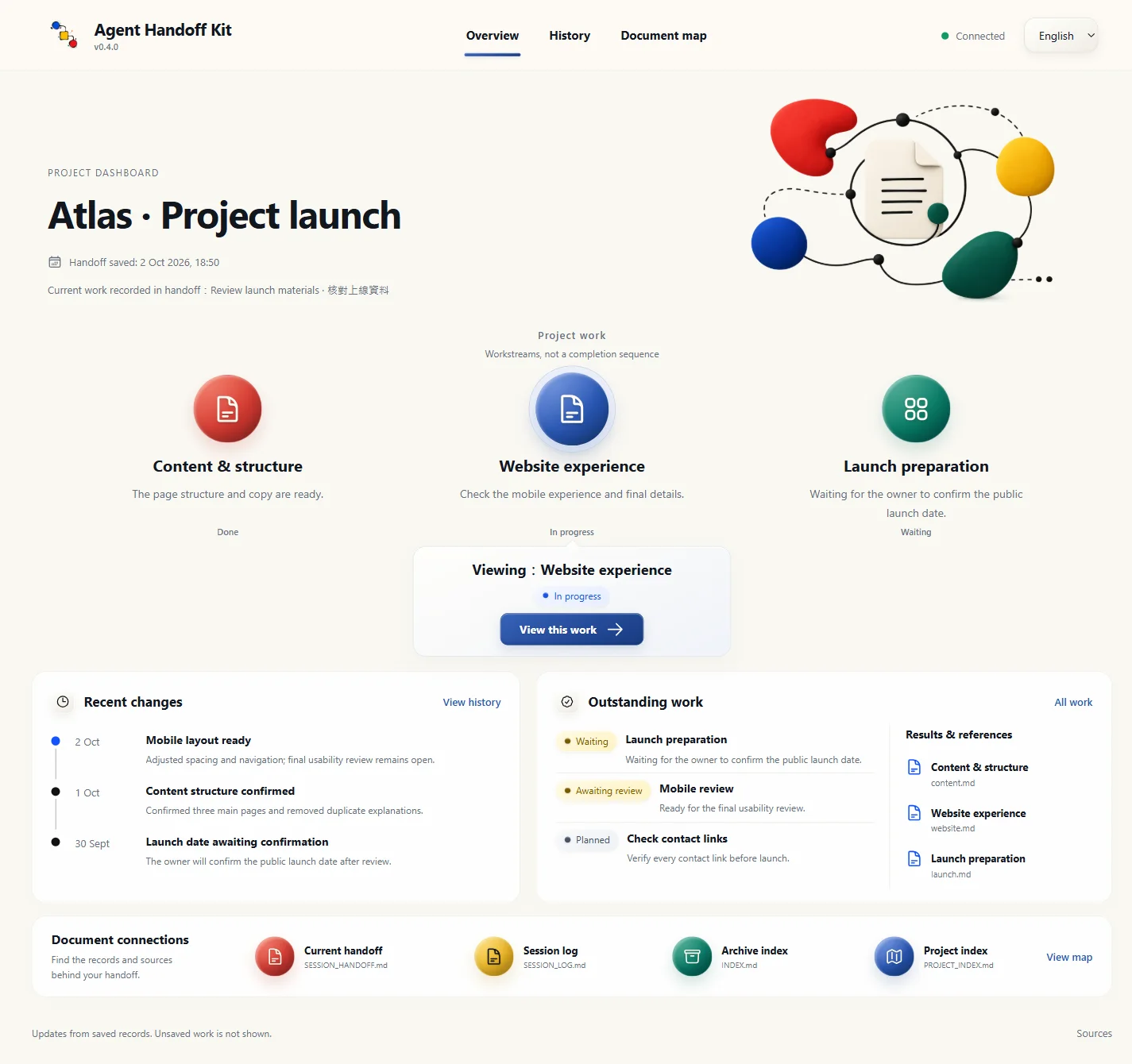
|
|
26
|
-
|
|
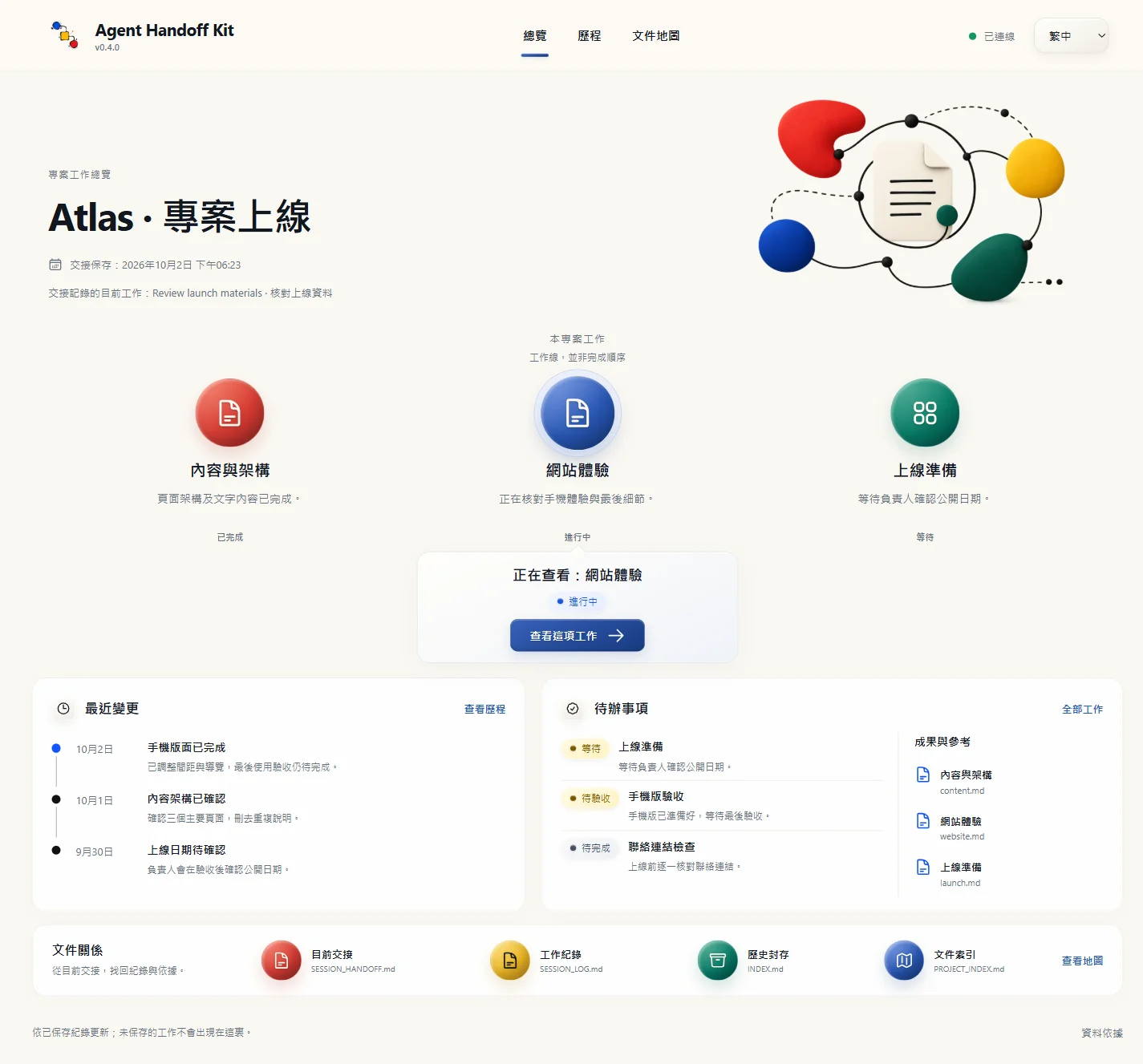
27
|
-
|
|
28
|
-
|
|
29
|
-
|
|
30
|
-
|
|
31
|
-
|
|
32
|
-
|
|
33
|
-
|
|
34
|
-
|
|
35
|
-
|
|
36
|
-
|
|
37
|
-
|
|
38
|
-
|
|
39
|
-
|
|
40
|
-
|
|
41
|
-
|
|
|
42
|
-
|
|
43
|
-
|
|
44
|
-
|
|
45
|
-
|
|
46
|
-
|
|
47
|
-
|
|
48
|
-
|
|
49
|
-
|
|
50
|
-
|
|
51
|
-
|
|
52
|
-
|
|
53
|
-
|
|
54
|
-
|
|
55
|
-
|
|
56
|
-
|
|
57
|
-
|
|
58
|
-
|
|
59
|
-
|
|
60
|
-
|
|
61
|
-
|
|
62
|
-
|
|
63
|
-
|
|
64
|
-
|
|
65
|
-
|
|
66
|
-
|
|
67
|
-
|
|
68
|
-
|
|
69
|
-
|
|
70
|
-
|
|
71
|
-
|
|
72
|
-
|
|
73
|
-
|
|
74
|
-
|
|
75
|
-
|
|
76
|
-
|
|
77
|
-
|
|
78
|
-
## 🧰 Supported tools
|
|
79
|
-
|
|
80
|
-
Agent Handoff Kit is for agentic AI tools that can read and write a local project folder, such as Claude Code, OpenAI Codex, Gemini CLI, Google Antigravity, or another local-workspace agent. Antigravity CLI uses the work folder’s `AGENTS.md` and `GEMINI.md` routes to reach the same startup flow.
|
|
81
|
-
|
|
82
|
-
It is not for ordinary web-chat AI that cannot access your local folder. Uploading a file or pasting a handoff into a web chat does not give that chat the ability to maintain the project’s handoff files safely.
|
|
83
|
-
|
|
84
|
-
## ⌨️ Common shortcuts
|
|
85
|
-
|
|
86
|
-
Enable shortcuts once in each project: ask the AI to “Enable Kit shortcuts in this project.” The AI installation guide includes this step. Claude Code, Gemini CLI and Antigravity CLI use <code>/handoff-kit-help</code>; Codex uses <code>$handoff-kit-help</code> or the <code>/skills</code> picker.
|
|
87
|
-
|
|
88
|
-
The menu covers start, closeout, the live progress page, document alignment, onboarding, future working rules and installation checks. For example, <code>/handoff-kit-progress</code> opens or reuses the local overview automatically. See [all eight entries and setup](docs/commands.md). Natural-language requests still work.
|
|
89
|
-
|
|
90
|
-
## 🟢 Start work
|
|
91
|
-
|
|
92
|
-
Open a local AI agent in the correct project folder.
|
|
93
|
-
|
|
94
|
-
If the AI is already in that folder, ordinary continuity startup is simply:
|
|
95
|
-
|
|
96
|
-
```text
|
|
97
|
-
Start Agent Handoff
|
|
98
|
-
```
|
|
99
|
-
|
|
100
|
-
You may also say `開工`.
|
|
101
|
-
|
|
102
|
-
When the active platform can safely control the current conversation title, a plain start may replace a generic or stale title with a concise `<project name>|<primary action>` title. The title is generated from the startup card's already-finalized current objective or recommended next action; generic triggers such as `Start Agent Handoff`, `開工`, or "start handoff" cannot be the primary action. It performs no extra file or network reads, keeps an informative title, and skips silently when title control is unavailable. The title is display-only: it is not project state, progress, completion evidence, or additional authority.
|
|
103
|
-
|
|
104
|
-
If the AI is not yet pointed at the project folder, use the path-bearing startup sentence:
|
|
105
|
-
|
|
106
|
-
```text
|
|
107
|
-
Work in <your project folder>. Read AGENTS.md first, then Start Agent Handoff. Before changing anything, tell me the current state and your recommended next step.
|
|
108
|
-
```
|
|
109
|
-
|
|
110
|
-
A first installation marks onboarding as pending. The AI enters a short first-use welcome after the startup card only when that state is still `eligible`, the active objective is empty or `TBD`, and there is no concrete task in the same message. Upgrades of existing projects do not reset the state. When you clearly describe the goal and available facts, the AI may begin the first safe step without going through onboarding first.
|
|
111
|
-
|
|
112
|
-
For ordinary daily startup, the AI reads `dev/SESSION_HANDOFF.md` first. Inside the same folder it does not reread `START_NEXT_SESSION_PROMPT.txt` or `dev/SESSION_LOG.md` during normal startup. The prompt copy is only for an AI that has not yet been pointed at the project folder.
|
|
113
|
-
|
|
114
|
-
`開工,繼續 <task>`, `<project> 開工`, and `Start Agent Handoff and continue <task>` are all continuity commands. The AI asks one short confirmation only when the phrase could genuinely refer to a real-world opening, shift, or unrelated event. A bare startup or one that adds only the project name reads the complete handoff and restores the necessary state, shows the startup card and recommended next action, then waits; it does not authorize research, planning, QA, file writes, network use, or sub-agents. Only a concrete task or explicit long-run instruction in the same message authorizes work. The first-use guidance exception described above still applies.
|
|
115
|
-
|
|
116
|
-
Then describe your task in ordinary language. The AI should explain the current state, next action, and risk before it starts the requested work.
|
|
117
|
-
|
|
118
|
-
At startup, the AI must receive the complete handoff from one unchanged version, then reconcile the goal, completed work, your corrections, remaining obligations and permission boundaries. Truncated output requires smaller follow-up reads. Missing content or a critical contradiction displays continuity incomplete instead of a recovery claim. Successful installation or saved closeout does not prove that the next AI has received the handoff.
|
|
119
|
-
|
|
120
|
-
## 💾 Wrap up
|
|
121
|
-
|
|
122
|
-
When the work session is really ending, say:
|
|
123
|
-
|
|
124
|
-
```text
|
|
125
|
-
wrap up
|
|
126
|
-
```
|
|
127
|
-
|
|
128
|
-
You can also say `收工`, `Wrap up Agent Handoff`, or `handoff`.
|
|
129
|
-
|
|
130
|
-
If the phrase could instead mean a real-world closing event, such as a restaurant closing, the AI should ask one short question rather than immediately changing the project handoff.
|
|
131
|
-
|
|
132
|
-
The AI should record the overall outcome, current subtask, exact resume point, and remaining acceptance checks, together with the necessary source versions, sections read, reading depth, and unresolved gaps. Simple tasks need only the relevant facts, not a multi-level task table. Before closeout, the AI reconstructs the next step using only the handoff, then compares it with your original request and actual results so a completed small step is not mistaken for the overall outcome. When resuming, the AI must still read the sources needed for the task; a predecessor's “read” record is not its own verification.
|
|
133
|
-
|
|
134
|
-
The AI should update only changed handoff state and compare the next-session prompt copy, regenerating it only when it differs:
|
|
135
|
-
|
|
136
|
-
```text
|
|
137
|
-
START_NEXT_SESSION_PROMPT.txt
|
|
138
|
-
```
|
|
139
|
-
|
|
140
|
-
That file is a portable convenience copy for an AI that is not yet in the project folder. The authority remains the next-session opening message in `dev/SESSION_HANDOFF.md`; if the two differ, the AI rebuilds the copy from the handoff.
|
|
141
|
-
|
|
142
|
-
## 🩺 When you are unsure about the state
|
|
143
|
-
|
|
144
|
-
If you are unsure whether the folder is installed correctly, needs an upgrade, or is healthy after an upgrade, ask the AI:
|
|
145
|
-
|
|
146
|
-
```text
|
|
147
|
-
Read the AI install page and check the Agent Handoff Kit state of this folder.
|
|
148
|
-
```
|
|
149
|
-
|
|
150
|
-
The AI performs the check. A successful check does not mean it has understood your project task; when you want continuity work, still say `Start Agent Handoff` or `開工`.
|
|
151
|
-
|
|
152
|
-
## 📖 Dynamic Dashboard: find your project at a glance
|
|
153
|
-
|
|
154
|
-
Ask your AI to “Open the project progress page”, or use an enabled `/handoff-kit-progress` entry (Codex: `$handoff-kit-progress`). The AI starts or reuses this project's local Dashboard.
|
|
155
|
-
|
|
156
|
-
|
|
157
|
-
|
|
158
|
-
*Actual interface capture with fictional Atlas example data. The same template reads each project's own records. Open the image to enlarge it.*
|
|
159
|
-
|
|
160
|
-
<details>
|
|
161
|
-
<summary>View the Traditional Chinese interface</summary>
|
|
162
|
-
|
|
163
|
-
|
|
164
|
-
|
|
165
|
-
</details>
|
|
166
|
-
|
|
167
|
-
- **Overview:** current work, completed items, waiting, review and outstanding work, with access to results.
|
|
168
|
-
- **History:** find important changes by date, keyword and workstream; long logs and archives are read in bounded batches.
|
|
169
|
-
- **Document map:** see the roles, relationships and sources of core Kit files and registered project documents.
|
|
170
|
-
|
|
171
|
-
At normal saves, the AI maintains only changed records. The program reads the existing index, handoff and logs and updates the page without refreshes, a second report or model calls. Switch the interface between Traditional Chinese and English; untranslated source content stays in its original language. Unsaved work is not shown, and the view does not replace handoff reception or result acceptance.
|
|
172
|
-
|
|
173
|
-
It uses Node.js and your browser, without a database or API key. After all pages close, the service stays available for eight hours. If it stops or the computer restarts, use the same entry again. See the [Dashboard guide](docs/progress.md).
|
|
174
|
-
|
|
175
|
-
## 🗂️ What the AI maintains for you
|
|
176
|
-
|
|
177
|
-
After installation, the Kit places a small set of handoff files in the project. You do not need to read or maintain each one manually.
|
|
178
|
-
|
|
179
|
-
- **Startup entries:** `AGENTS.md`, `CLAUDE.md`, `GEMINI.md`, and `START_NEXT_SESSION_PROMPT.txt` route local AI tools into the same startup flow.
|
|
180
|
-
- **Current state:** `dev/SESSION_HANDOFF.md` records progress, next action, risks, and validation.
|
|
181
|
-
- **Trace record:** recent work remains available for trace-back; long-running use is compacted so the record does not grow without limit.
|
|
182
|
-
- **Project index and decisions:** important files, external sources, synchronization responsibilities, and durable decisions remain findable when you later ask “why did we choose this?”
|
|
183
|
-
- **Routed work rules:** the AI loads the rules needed for the task; you do not have to memorize rule-file names.
|
|
184
|
-
|
|
185
|
-
## 🧭 How work rules operate
|
|
186
|
-
|
|
187
|
-
You do not need to remember rule file names. The Kit lets the AI classify what you need and load only the relevant work rules.
|
|
188
|
-
|
|
189
|
-
| What you want to do | What the AI does |
|
|
190
|
-
|---|---|
|
|
191
|
-
| Write code or fix a bug | Reads the project index and relevant files, then changes and tests only what is needed. |
|
|
192
|
-
| Write an article, README, or public copy | Clarifies audience, purpose, tone, and publication surface. |
|
|
193
|
-
| Research or compare tools | Separates verified facts, source summaries, and the AI’s judgement. |
|
|
194
|
-
| Delete files, use Git, publish, or use npm | For high-risk operations, explains impact first and waits for your confirmation. |
|
|
195
|
-
| Use Notion, Google Drive, or another external tool | Checks the current tool guidance, handles resources by ownership, and keeps secrets out of project files. |
|
|
196
|
-
|
|
197
|
-
You can simply say what you want, for example: “Help me revise the README”, “Research whether this tool is suitable”, or “Connect this document to Agent Handoff Kit.” The AI chooses the needed rules.
|
|
198
|
-
|
|
199
|
-
For a durable preference, tell the AI rather than editing rule files blindly:
|
|
200
|
-
|
|
201
|
-
```text
|
|
202
|
-
For future public Chinese documents, use written Traditional Chinese and avoid mixing Chinese and English fragments. Connect this rule to Agent Handoff Kit.
|
|
203
|
-
```
|
|
204
|
-
|
|
205
|
-
The AI should distinguish a current request from a durable rule, then read the existing categories, relevant rule pack, and project supplements; when a suitable home exists, it should merge the change there. Project rules belong in a writable supplement or registered reference, preserving the Kit's official body. On the next relevant task, the AI should read and apply the rule through the existing route, respecting your objective and instruction priority without inventing a new goal or acceptance threshold.
|
|
206
|
-
|
|
207
|
-
These requirements guide the AI and check the result; they cannot intercept arbitrary editor writes. If older local rules are already mixed into official prose, the AI still needs to verify their sources and preserve and reconcile them after receiving merge authorization. Upgrades will not guess what to delete.
|
|
208
|
-
|
|
209
|
-
## 💬 Things you can ask an AI to do
|
|
210
|
-
|
|
211
|
-
State the goal in natural language. The AI decides which handoff files, rules, or indexes it needs to read.
|
|
212
|
-
|
|
213
|
-
| What you want | Example |
|
|
214
|
-
|---|---|
|
|
215
|
-
| Continue the last session | `Start Agent Handoff` or `開工` |
|
|
216
|
-
| End this session | `wrap up` or `收工` |
|
|
217
|
-
| Keep a new document from becoming disconnected | “Connect this document to Agent Handoff Kit so the next AI knows when to read and update it.” |
|
|
218
|
-
| Find important unconnected documents | “Scan for important documents not yet connected to Agent Handoff Kit.” |
|
|
219
|
-
| Avoid the same mistake in future work | “Turn this mistake into a durable work rule for future sessions.” |
|
|
220
|
-
| Keep an API or tool practice usable | “Use this API approach in future sessions too.” |
|
|
221
|
-
| Use Notion, Google Drive, GitHub, or another external tool | “This project uses these tools. Record what can be used directly and keep secrets out of project files.” |
|
|
222
|
-
| Finish a long task that used MCP, browser, or automation tools | “At wrap up, show the external-tool resource closeout: which task-owned resources were closed and which uncertain resources were retained with evidence.” |
|
|
223
|
-
|
|
224
|
-
When scanning for important documents, the AI first lists candidates and reasons. It does not automatically modify, merge, or retire them. For deletion, rename, authority changes, publication, upload, or permission changes, it must explain the impact and wait for confirmation.
|
|
225
|
-
|
|
226
|
-
Rules that must persist across future sessions should be written into the appropriate project file, not left only in the current chat summary.
|
|
227
|
-
|
|
228
|
-
## 🛡️ Safety boundaries
|
|
229
|
-
|
|
230
|
-
Even if you do not write code, the Kit requires an AI to stop and explain high-risk actions.
|
|
231
|
-
|
|
232
|
-
- **Destructive operations:** commands such as `rm -rf`, `git reset --hard`, and operations against system root paths are prohibited. Force-push, branch or tag deletion, and history rewriting need explicit scope, explicit approval, and readback of the affected refs.
|
|
233
|
-
- **Secrets:** do not print, commit, or upload `.env` values, API keys, or tokens.
|
|
234
|
-
- **Verify; do not guess:** before using a third-party service, connector, MCP, CLI, API, or plugin, check current official or already verified local guidance. If it cannot be verified, say so.
|
|
235
|
-
- **External-tool closeout:** an AI may close only resources it can show were created for the current task. Shared, user-owned, other-agent-owned, or unclear resources must be reported and left alone until you confirm.
|
|
236
|
-
- **Permission failures:** if a file is locked or permission is missing, stop and provide safe manual steps; do not bypass the protection.
|
|
237
|
-
- **Publishing:** tags, GitHub Releases, npm publication, deployment, and upload always require explicit approval. “Ready” is never approval.
|
|
238
|
-
|
|
239
|
-
## 🔗 Optional companion: Adam-AI-Instructions
|
|
240
|
-
|
|
241
|
-
Agent Handoff Kit can work alongside [Adam-AI-Instructions](https://github.com/prompt-templates/Adam-AI-Instructions). They are complementary, not competing authorities. They deliberately keep a minimum shared baseline for safety, secrets, irreversible operations, and release boundaries; neither is the parent source of truth for the other, and they should not be merged into one rule set:
|
|
242
|
-
|
|
243
|
-
- **Adam-AI-Instructions** governs how an AI works within one conversation: tone, priorities, response structure, calculation discipline, language discipline, safety boundaries, and output-layer roles.
|
|
244
|
-
- **Agent Handoff Kit** governs continuity between conversations: current state, next action, file routes, real closeout, and the next startup.
|
|
245
|
-
|
|
246
|
-
This pairing is optional. It does not change installation or everyday use of Agent Handoff Kit. To use it, choose the version for your AI tool in that repository and paste it into the AI tool's settings.
|
|
1
|
+
# Agent Handoff Kit
|
|
2
|
+
|
|
3
|
+
[繁體中文](README.md) · [Introduction](https://adamchanadam.github.io/agent-handoff-kit/agent-handoff-kit-intro.en.html) · [Command guide](https://adamchanadam.github.io/agent-handoff-kit/agent-handoff-kit-guide.en.html)
|
|
4
|
+
|
|
5
|
+
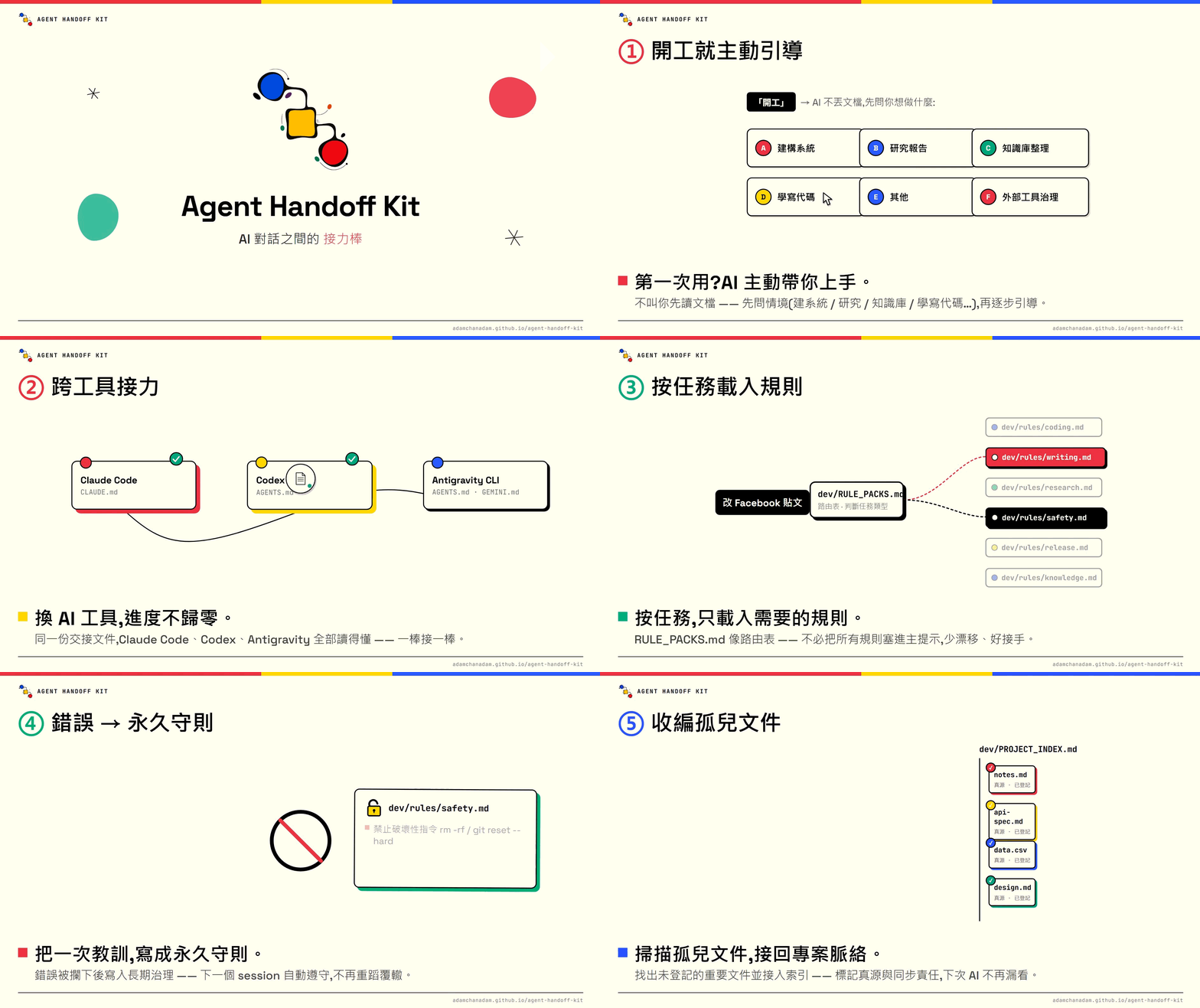
**Your session relay baton.** Help the next AI conversation pick up your work: keep progress, key decisions, file locations and unfinished tasks.
|
|
6
|
+
|
|
7
|
+
Code version covered: `v0.4.1`. This guide includes updates that have not been released yet. Features available to download depend on the published version.
|
|
8
|
+
|
|
9
|
+
[](https://youtu.be/RopbfBiSw1I)
|
|
10
|
+
|
|
11
|
+
## How this tool helps your project
|
|
12
|
+
|
|
13
|
+
- **Carry work between conversations**: save goals, your corrections, important decisions, completed work and outstanding items, so you do not retell everything. Supported tools can reuse saved content in the same project.
|
|
14
|
+
- **Keep important files connected**: record what files are for, when to read them and what related content needs updating, reducing missing material and wrong-version use.
|
|
15
|
+
- **Keep a useful long-term record**: preserve important choices and reasons so you can ask “Why did we do this?” later. Older records are organized and archived as needed, without rereading everything every time.
|
|
16
|
+
- **Adapt to the task**: writing checks audience and tone; research checks sources; coding reads files and tests results; cloud document work checks permissions. You do not select the rules yourself.
|
|
17
|
+
- **Keep future working requirements**: save the preferences you explicitly want followed in this project for relevant work next time, beyond the current chat.
|
|
18
|
+
- **Handle tools and data carefully**: check important actions and obtain required approval, keep secrets out of records, and close only temporary processes confirmed to belong to this task.
|
|
19
|
+
|
|
20
|
+
The commands are entry points to these functions. The dashboard brings saved progress, history and file connections into view. The tool is not a cloud sync tool and does not automatically carry unsaved chats between tools.
|
|
21
|
+
|
|
22
|
+
## First time here
|
|
23
|
+
|
|
24
|
+
1. Open your project folder in your AI tool and paste the sentence below into the conversation.
|
|
25
|
+
2. The AI confirms the folder, installs or upgrades the tool, then checks the result. You do not have to choose installation commands.
|
|
26
|
+
3. Once it is ready, use `handoff-kit-onboard` for guidance or `handoff-kit-start` to pick up your work.
|
|
27
|
+
|
|
28
|
+
```text
|
|
29
|
+
Read https://adamchanadam.github.io/agent-handoff-kit/agent-handoff-kit-ai-install.en.html and install or upgrade Agent Handoff Kit in this project folder.
|
|
30
|
+
```
|
|
31
|
+
|
|
32
|
+
Use the same sentence if you have an older version, existing AI work files, or are unsure whether setup is complete. You need an AI tool that can read and write your project folder, plus Node.js 18 or later. Ordinary web chat without folder access is not supported; the AI can check your setup first.
|
|
33
|
+
|
|
34
|
+
## Useful commands, as you need them
|
|
35
|
+
|
|
36
|
+
Enter shortcuts in your project’s AI conversation, not in the terminal. Claude Code, Gemini CLI and Antigravity CLI use /; Codex uses $, or selection through /skills. For example, the Codex start shortcut is `$handoff-kit-start`.
|
|
37
|
+
|
|
38
|
+
| What you want to do | Shortcut |
|
|
39
|
+
|---|---|
|
|
40
|
+
| Pick up where you left off | [`/handoff-kit-start`](https://adamchanadam.github.io/agent-handoff-kit/agent-handoff-kit-guide.en.html#start) |
|
|
41
|
+
| See the whole project | [`/handoff-kit-progress`](https://adamchanadam.github.io/agent-handoff-kit/agent-handoff-kit-guide.en.html#progress) |
|
|
42
|
+
| Finish this conversation | [`/handoff-kit-close`](https://adamchanadam.github.io/agent-handoff-kit/agent-handoff-kit-guide.en.html#close) |
|
|
43
|
+
|
|
44
|
+
[All commands: guidance, files, working requirements, checks and updates](https://adamchanadam.github.io/agent-handoff-kit/agent-handoff-kit-guide.en.html#commands)
|
|
45
|
+
|
|
46
|
+
The daily rhythm: **start → describe your task → check progress when useful → wrap up before ending the conversation**. You do not need all commands every time. Natural phrases such as “Start Agent Handoff” and “wrap up” still work.
|
|
47
|
+
|
|
48
|
+
Start on its own reads the full handoff, explains the current state and waits for your task. On first use, with no goal yet, it adds a short welcome. To continue immediately, add “continue the current goal”. If the handoff has not been read in full, the AI must say so instead of claiming it has resumed.
|
|
49
|
+
|
|
50
|
+
Installation and upgrades include the shortcuts for this project only, without installing them in shared computer-wide settings. If an older conversation does not show them, reopen the project conversation. See [shortcut help](docs/commands.md) for other issues.
|
|
51
|
+
|
|
52
|
+
## The dashboard: find your bearings
|
|
53
|
+
|
|
54
|
+
Use `handoff-kit-progress` to see current work, unfinished items, things waiting or needing confirmation, recent changes and connections between important files.
|
|
55
|
+
|
|
56
|
+

|
|
57
|
+
|
|
58
|
+
*Actual interface screenshot; Atlas is a fictional example. The same page reads each project’s own saved records.*
|
|
59
|
+
|
|
60
|
+
<details>
|
|
61
|
+
<summary>View the English interface</summary>
|
|
62
|
+
|
|
63
|
+

|
|
64
|
+
|
|
65
|
+
</details>
|
|
66
|
+
|
|
67
|
+
The page updates automatically when the AI saves records, without a refresh. Asking the AI to open it and saving normal records use some tokens. After that, viewing, filtering and page updates run locally without asking the AI to write another report. Unsaved work does not appear. [Dashboard help](docs/progress.md)
|
|
68
|
+
|
|
69
|
+
## A few things to know
|
|
70
|
+
|
|
71
|
+
- The AI handles reading, organizing, doing the work and checking results. You give requirements, feedback and necessary decisions; you do not maintain internal files.
|
|
72
|
+
- Wrapping up saves a handoff. Unfinished work stays unfinished; it does not mean the whole project is complete.
|
|
73
|
+
- Checking the installation does not repair or upgrade it. Checking for updates automatically upgrades when a newer release exists. Conflicting custom content is kept, and the operation stops.
|
|
74
|
+
- Before deleting important data, uploading, publishing or changing access, the AI must explain the effects and obtain the required approval. Passwords and secret keys must not go into handoff records.
|
|
75
|
+
- The tool’s rules and checks support handoff; they cannot guarantee an AI will never make a mistake. Missing context, failed reads and incomplete checks should be clearly reported.
|
|
76
|
+
|
|
77
|
+
For step-by-step help, open the [guide](https://adamchanadam.github.io/agent-handoff-kit/agent-handoff-kit-guide.en.html). To set the AI’s reply style separately, you can also use [Adam-AI-Instructions](https://github.com/prompt-templates/Adam-AI-Instructions). It is optional, not a requirement for the tool.
|