playwright-ruby-client 0.0.8 → 1.58.1.alpha1
This diff represents the content of publicly available package versions that have been released to one of the supported registries. The information contained in this diff is provided for informational purposes only and reflects changes between package versions as they appear in their respective public registries.
- checksums.yaml +4 -4
- data/AGENTS.md +4 -0
- data/CLAUDE/api_generation.md +28 -0
- data/CLAUDE/ci_expectations.md +23 -0
- data/CLAUDE/gem_release_flow.md +39 -0
- data/CLAUDE/past_upgrade_pr_patterns.md +42 -0
- data/CLAUDE/playwright_upgrade_workflow.md +35 -0
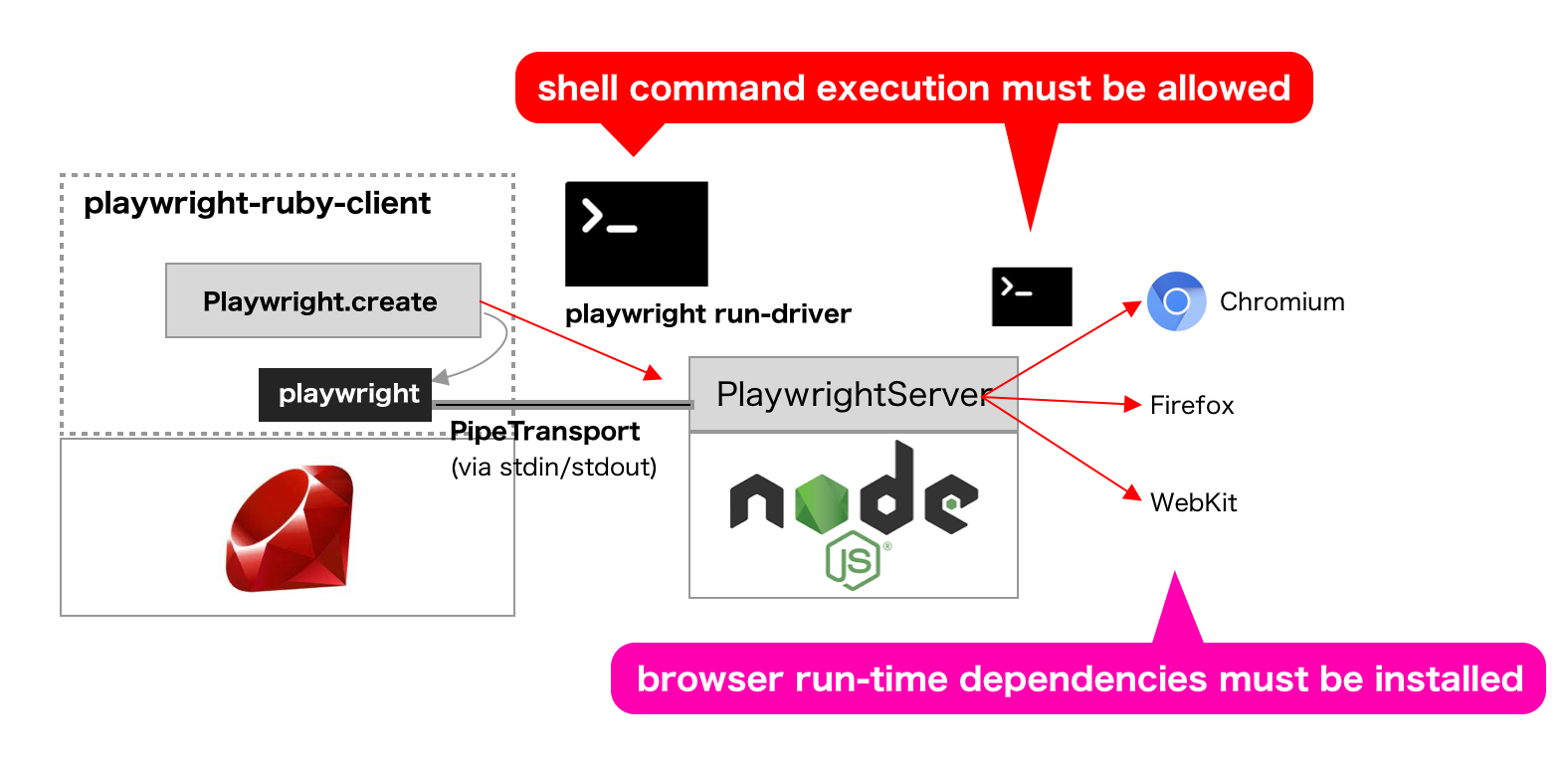
- data/CLAUDE/rspec_debugging.md +30 -0
- data/CLAUDE/unimplemented_examples.md +18 -0
- data/CLAUDE.md +32 -0
- data/CONTRIBUTING.md +5 -0
- data/README.md +60 -16
- data/documentation/README.md +33 -0
- data/documentation/babel.config.js +3 -0
- data/documentation/docs/api/api_request.md +7 -0
- data/documentation/docs/api/api_request_context.md +298 -0
- data/documentation/docs/api/api_response.md +114 -0
- data/documentation/docs/api/browser.md +237 -0
- data/documentation/docs/api/browser_context.md +503 -0
- data/documentation/docs/api/browser_type.md +184 -0
- data/documentation/docs/api/cdp_session.md +44 -0
- data/documentation/docs/api/clock.md +154 -0
- data/documentation/docs/api/console_message.md +85 -0
- data/documentation/docs/api/dialog.md +84 -0
- data/documentation/docs/api/download.md +111 -0
- data/documentation/docs/api/element_handle.md +694 -0
- data/documentation/docs/api/experimental/_category_.yml +3 -0
- data/documentation/docs/api/experimental/android.md +42 -0
- data/documentation/docs/api/experimental/android_device.md +109 -0
- data/documentation/docs/api/experimental/android_input.md +43 -0
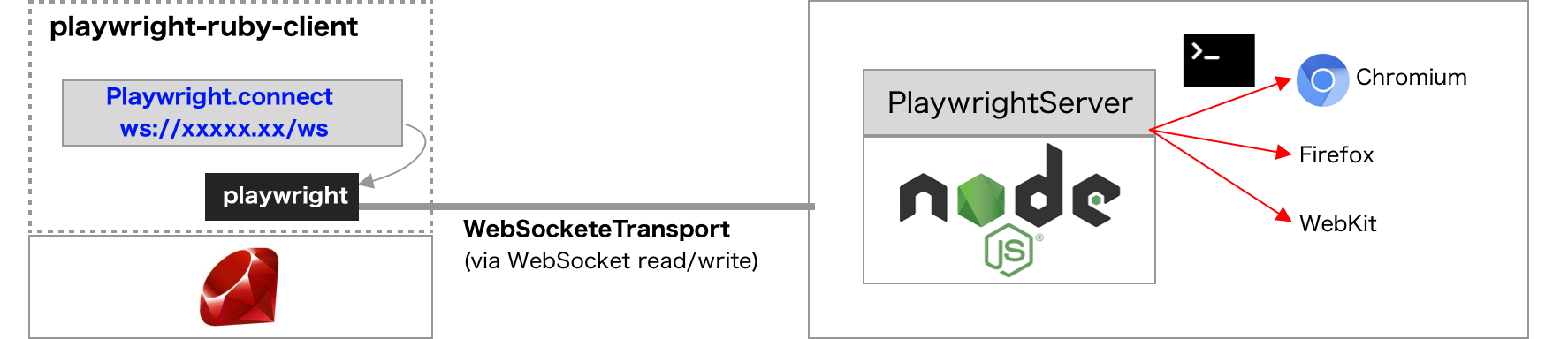
- data/documentation/docs/api/experimental/android_socket.md +7 -0
- data/documentation/docs/api/experimental/android_web_view.md +7 -0
- data/documentation/docs/api/file_chooser.md +53 -0
- data/documentation/docs/api/frame.md +1218 -0
- data/documentation/docs/api/frame_locator.md +348 -0
- data/documentation/docs/api/js_handle.md +121 -0
- data/documentation/docs/api/keyboard.md +170 -0
- data/documentation/docs/api/locator.md +1495 -0
- data/documentation/docs/api/locator_assertions.md +827 -0
- data/documentation/docs/api/mouse.md +86 -0
- data/documentation/docs/api/page.md +1946 -0
- data/documentation/docs/api/page_assertions.md +65 -0
- data/documentation/docs/api/playwright.md +66 -0
- data/documentation/docs/api/request.md +255 -0
- data/documentation/docs/api/response.md +176 -0
- data/documentation/docs/api/route.md +205 -0
- data/documentation/docs/api/selectors.md +63 -0
- data/documentation/docs/api/touchscreen.md +22 -0
- data/documentation/docs/api/tracing.md +129 -0
- data/documentation/docs/api/web_socket.md +51 -0
- data/documentation/docs/api/worker.md +83 -0
- data/documentation/docs/article/api_coverage.mdx +11 -0
- data/documentation/docs/article/getting_started.md +161 -0
- data/documentation/docs/article/guides/_category_.yml +3 -0
- data/documentation/docs/article/guides/download_playwright_driver.md +55 -0
- data/documentation/docs/article/guides/inspector.md +31 -0
- data/documentation/docs/article/guides/launch_browser.md +121 -0
- data/documentation/docs/article/guides/playwright_on_alpine_linux.md +112 -0
- data/documentation/docs/article/guides/rails_integration.md +278 -0
- data/documentation/docs/article/guides/rails_integration_with_null_driver.md +145 -0
- data/documentation/docs/article/guides/recording_video.md +79 -0
- data/documentation/docs/article/guides/rspec_integration.md +59 -0
- data/documentation/docs/article/guides/semi_automation.md +71 -0
- data/documentation/docs/article/guides/use_storage_state.md +78 -0
- data/documentation/docs/include/api_coverage.md +671 -0
- data/documentation/docusaurus.config.js +114 -0
- data/documentation/package.json +39 -0
- data/documentation/sidebars.js +15 -0
- data/documentation/src/components/HomepageFeatures.js +61 -0
- data/documentation/src/components/HomepageFeatures.module.css +13 -0
- data/documentation/src/css/custom.css +44 -0
- data/documentation/src/pages/index.js +49 -0
- data/documentation/src/pages/index.module.css +41 -0
- data/documentation/src/pages/markdown-page.md +7 -0
- data/documentation/static/.nojekyll +0 -0
- data/documentation/static/img/playwright-logo.svg +9 -0
- data/documentation/static/img/playwright-ruby-client.png +0 -0
- data/documentation/static/img/undraw_dropdown_menu.svg +1 -0
- data/documentation/static/img/undraw_web_development.svg +1 -0
- data/documentation/static/img/undraw_windows.svg +1 -0
- data/documentation/yarn.lock +9005 -0
- data/lib/playwright/{input_types/android_input.rb → android_input_impl.rb} +5 -1
- data/lib/playwright/api_implementation.rb +18 -0
- data/lib/playwright/api_response_impl.rb +77 -0
- data/lib/playwright/channel.rb +62 -1
- data/lib/playwright/channel_owner.rb +70 -7
- data/lib/playwright/channel_owners/android.rb +16 -3
- data/lib/playwright/channel_owners/android_device.rb +22 -66
- data/lib/playwright/channel_owners/api_request_context.rb +247 -0
- data/lib/playwright/channel_owners/artifact.rb +40 -0
- data/lib/playwright/channel_owners/binding_call.rb +70 -0
- data/lib/playwright/channel_owners/browser.rb +114 -22
- data/lib/playwright/channel_owners/browser_context.rb +589 -15
- data/lib/playwright/channel_owners/browser_type.rb +90 -1
- data/lib/playwright/channel_owners/cdp_session.rb +19 -0
- data/lib/playwright/channel_owners/dialog.rb +32 -0
- data/lib/playwright/channel_owners/element_handle.rb +107 -43
- data/lib/playwright/channel_owners/fetch_request.rb +8 -0
- data/lib/playwright/channel_owners/frame.rb +334 -104
- data/lib/playwright/channel_owners/js_handle.rb +9 -13
- data/lib/playwright/channel_owners/local_utils.rb +82 -0
- data/lib/playwright/channel_owners/page.rb +778 -95
- data/lib/playwright/channel_owners/playwright.rb +25 -30
- data/lib/playwright/channel_owners/request.rb +120 -18
- data/lib/playwright/channel_owners/response.rb +113 -0
- data/lib/playwright/channel_owners/route.rb +181 -0
- data/lib/playwright/channel_owners/stream.rb +30 -0
- data/lib/playwright/channel_owners/tracing.rb +117 -0
- data/lib/playwright/channel_owners/web_socket.rb +96 -0
- data/lib/playwright/channel_owners/worker.rb +46 -0
- data/lib/playwright/channel_owners/writable_stream.rb +14 -0
- data/lib/playwright/clock_impl.rb +67 -0
- data/lib/playwright/connection.rb +111 -63
- data/lib/playwright/console_message_impl.rb +29 -0
- data/lib/playwright/download_impl.rb +32 -0
- data/lib/playwright/errors.rb +42 -5
- data/lib/playwright/event_emitter.rb +17 -3
- data/lib/playwright/event_emitter_proxy.rb +49 -0
- data/lib/playwright/events.rb +10 -5
- data/lib/playwright/file_chooser_impl.rb +24 -0
- data/lib/playwright/frame_locator_impl.rb +66 -0
- data/lib/playwright/har_router.rb +89 -0
- data/lib/playwright/http_headers.rb +14 -0
- data/lib/playwright/input_files.rb +102 -15
- data/lib/playwright/javascript/expression.rb +7 -11
- data/lib/playwright/javascript/regex.rb +23 -0
- data/lib/playwright/javascript/source_url.rb +16 -0
- data/lib/playwright/javascript/value_parser.rb +108 -19
- data/lib/playwright/javascript/value_serializer.rb +47 -8
- data/lib/playwright/javascript/visitor_info.rb +26 -0
- data/lib/playwright/javascript.rb +2 -10
- data/lib/playwright/{input_types/keyboard.rb → keyboard_impl.rb} +6 -2
- data/lib/playwright/locator_assertions_impl.rb +571 -0
- data/lib/playwright/locator_impl.rb +544 -0
- data/lib/playwright/locator_utils.rb +136 -0
- data/lib/playwright/mouse_impl.rb +57 -0
- data/lib/playwright/page_assertions_impl.rb +154 -0
- data/lib/playwright/playwright_api.rb +102 -30
- data/lib/playwright/raw_headers.rb +61 -0
- data/lib/playwright/route_handler.rb +78 -0
- data/lib/playwright/select_option_values.rb +34 -13
- data/lib/playwright/selectors_impl.rb +45 -0
- data/lib/playwright/test.rb +102 -0
- data/lib/playwright/timeout_settings.rb +9 -4
- data/lib/playwright/touchscreen_impl.rb +14 -0
- data/lib/playwright/transport.rb +61 -10
- data/lib/playwright/url_matcher.rb +24 -2
- data/lib/playwright/utils.rb +48 -13
- data/lib/playwright/version.rb +2 -1
- data/lib/playwright/video.rb +54 -0
- data/lib/playwright/waiter.rb +166 -0
- data/lib/playwright/web_socket_client.rb +167 -0
- data/lib/playwright/web_socket_transport.rb +116 -0
- data/lib/playwright.rb +188 -11
- data/lib/playwright_api/android.rb +46 -11
- data/lib/playwright_api/android_device.rb +182 -31
- data/lib/playwright_api/android_input.rb +22 -13
- data/lib/playwright_api/android_socket.rb +18 -0
- data/lib/playwright_api/android_web_view.rb +24 -0
- data/lib/playwright_api/api_request.rb +26 -0
- data/lib/playwright_api/api_request_context.rb +311 -0
- data/lib/playwright_api/api_response.rb +92 -0
- data/lib/playwright_api/browser.rb +116 -103
- data/lib/playwright_api/browser_context.rb +290 -389
- data/lib/playwright_api/browser_type.rb +96 -118
- data/lib/playwright_api/cdp_session.rb +36 -39
- data/lib/playwright_api/clock.rb +121 -0
- data/lib/playwright_api/console_message.rb +35 -19
- data/lib/playwright_api/dialog.rb +53 -50
- data/lib/playwright_api/download.rb +49 -43
- data/lib/playwright_api/element_handle.rb +354 -402
- data/lib/playwright_api/file_chooser.rb +15 -18
- data/lib/playwright_api/frame.rb +703 -603
- data/lib/playwright_api/frame_locator.rb +285 -0
- data/lib/playwright_api/js_handle.rb +50 -76
- data/lib/playwright_api/keyboard.rb +67 -146
- data/lib/playwright_api/locator.rb +1304 -0
- data/lib/playwright_api/locator_assertions.rb +704 -0
- data/lib/playwright_api/mouse.rb +23 -29
- data/lib/playwright_api/page.rb +1196 -1176
- data/lib/playwright_api/page_assertions.rb +60 -0
- data/lib/playwright_api/playwright.rb +54 -122
- data/lib/playwright_api/request.rb +112 -74
- data/lib/playwright_api/response.rb +92 -20
- data/lib/playwright_api/route.rb +152 -62
- data/lib/playwright_api/selectors.rb +47 -61
- data/lib/playwright_api/touchscreen.rb +8 -2
- data/lib/playwright_api/tracing.rb +128 -0
- data/lib/playwright_api/web_socket.rb +43 -5
- data/lib/playwright_api/worker.rb +74 -34
- data/playwright.gemspec +14 -9
- data/sig/playwright.rbs +658 -0
- metadata +216 -50
- data/docs/api_coverage.md +0 -354
- data/lib/playwright/channel_owners/chromium_browser.rb +0 -8
- data/lib/playwright/channel_owners/chromium_browser_context.rb +0 -8
- data/lib/playwright/channel_owners/console_message.rb +0 -21
- data/lib/playwright/channel_owners/firefox_browser.rb +0 -8
- data/lib/playwright/channel_owners/selectors.rb +0 -4
- data/lib/playwright/channel_owners/webkit_browser.rb +0 -8
- data/lib/playwright/input_type.rb +0 -19
- data/lib/playwright/input_types/mouse.rb +0 -4
- data/lib/playwright/input_types/touchscreen.rb +0 -4
- data/lib/playwright/javascript/function.rb +0 -67
- data/lib/playwright/wait_helper.rb +0 -73
- data/lib/playwright_api/accessibility.rb +0 -93
- data/lib/playwright_api/binding_call.rb +0 -23
- data/lib/playwright_api/chromium_browser_context.rb +0 -57
- data/lib/playwright_api/video.rb +0 -24
|
@@ -0,0 +1,161 @@
|
|
|
1
|
+
---
|
|
2
|
+
sidebar_position: 0
|
|
3
|
+
---
|
|
4
|
+
|
|
5
|
+
# Getting started
|
|
6
|
+
|
|
7
|
+
```
|
|
8
|
+
gem 'playwright-ruby-client'
|
|
9
|
+
```
|
|
10
|
+
|
|
11
|
+
Add the line above and then `bundle install`.
|
|
12
|
+
|
|
13
|
+
|
|
14
|
+
Since `playwright-ruby-client` doesn't include Playwright driver nor its downloader, **we have to install Playwright in advance**
|
|
15
|
+
|
|
16
|
+
```shell
|
|
17
|
+
$ npx playwright install
|
|
18
|
+
```
|
|
19
|
+
|
|
20
|
+
and then set `playwright_cli_executable_path: "npx playwright"` into `Playwright.create`.
|
|
21
|
+
|
|
22
|
+
Other methods of installation are also available. See the detail in [Download Playwright driver](./guides/download_playwright_driver)
|
|
23
|
+
|
|
24
|
+
## Enjoy with examples
|
|
25
|
+
|
|
26
|
+
### Capture a site
|
|
27
|
+
|
|
28
|
+
Navigate pages with `page.goto(url)` and save the screenshot with `page.screenshot(path: './image.png')`.
|
|
29
|
+
|
|
30
|
+
```rb {6-7}
|
|
31
|
+
require 'playwright'
|
|
32
|
+
|
|
33
|
+
Playwright.create(playwright_cli_executable_path: 'npx playwright') do |playwright|
|
|
34
|
+
playwright.chromium.launch(headless: false) do |browser|
|
|
35
|
+
page = browser.new_page
|
|
36
|
+
page.goto('https://github.com/YusukeIwaki')
|
|
37
|
+
page.screenshot(path: './YusukeIwaki.png')
|
|
38
|
+
end
|
|
39
|
+
end
|
|
40
|
+
```
|
|
41
|
+
|
|
42
|
+

|
|
43
|
+
|
|
44
|
+
### Simple scraping
|
|
45
|
+
|
|
46
|
+
Extract data from a site.
|
|
47
|
+
|
|
48
|
+
* Grab DOM elements with `page.query_selector(loc)` and `page.query_selector_all(loc)`
|
|
49
|
+
* Extract data with `elem.evaluate(js)` or `page.eval_on_selector(js)`
|
|
50
|
+
* Wait for navigation with `page.expect_navigation do ... end`
|
|
51
|
+
|
|
52
|
+
```rb {12-14,17-21}
|
|
53
|
+
require 'playwright'
|
|
54
|
+
|
|
55
|
+
Playwright.create(playwright_cli_executable_path: 'npx playwright') do |playwright|
|
|
56
|
+
playwright.chromium.launch(headless: false) do |browser|
|
|
57
|
+
page = browser.new_page
|
|
58
|
+
page.goto('https://github.com/')
|
|
59
|
+
|
|
60
|
+
form = page.query_selector("form.js-site-search-form")
|
|
61
|
+
search_input = form.query_selector("input.header-search-input")
|
|
62
|
+
search_input.click
|
|
63
|
+
page.keyboard.type("playwright")
|
|
64
|
+
page.expect_navigation {
|
|
65
|
+
page.keyboard.press("Enter")
|
|
66
|
+
}
|
|
67
|
+
|
|
68
|
+
list = page.query_selector("ul.repo-list")
|
|
69
|
+
items = list.query_selector_all("div.f4")
|
|
70
|
+
items.each do |item|
|
|
71
|
+
title = item.eval_on_selector("a", "a => a.innerText")
|
|
72
|
+
puts("==> #{title}")
|
|
73
|
+
end
|
|
74
|
+
end
|
|
75
|
+
end
|
|
76
|
+
```
|
|
77
|
+
|
|
78
|
+
```
|
|
79
|
+
$ bundle exec ruby main.rb
|
|
80
|
+
==> microsoft/playwright
|
|
81
|
+
==> microsoft/playwright-python
|
|
82
|
+
==> microsoft/playwright-cli
|
|
83
|
+
==> checkly/headless-recorder
|
|
84
|
+
==> microsoft/playwright-sharp
|
|
85
|
+
==> playwright-community/jest-playwright
|
|
86
|
+
==> microsoft/playwright-test
|
|
87
|
+
==> mxschmitt/playwright-go
|
|
88
|
+
==> microsoft/playwright-java
|
|
89
|
+
==> MarketSquare/robotframework-browser
|
|
90
|
+
```
|
|
91
|
+
|
|
92
|
+
### Android browser automation
|
|
93
|
+
|
|
94
|
+
As an experimental feature, we can automate Chrome for Android.
|
|
95
|
+
|
|
96
|
+
```rb
|
|
97
|
+
require 'playwright'
|
|
98
|
+
|
|
99
|
+
Playwright.create(playwright_cli_executable_path: 'npx playwright') do |playwright|
|
|
100
|
+
devices = playwright.android.devices
|
|
101
|
+
unless devices.empty?
|
|
102
|
+
device = devices.last
|
|
103
|
+
begin
|
|
104
|
+
puts "Model: #{device.model}"
|
|
105
|
+
puts "Serial: #{device.serial}"
|
|
106
|
+
puts device.shell('ls /system')
|
|
107
|
+
|
|
108
|
+
device.launch_browser do |context|
|
|
109
|
+
page = context.pages.first
|
|
110
|
+
page.goto('https://github.com/YusukeIwaki')
|
|
111
|
+
page.click('header button')
|
|
112
|
+
page.click('input[name="q"]')
|
|
113
|
+
page.keyboard.type('puppeteer')
|
|
114
|
+
page.expect_navigation {
|
|
115
|
+
page.keyboard.press('Enter')
|
|
116
|
+
}
|
|
117
|
+
page.screenshot(path: 'YusukeIwaki.android.png')
|
|
118
|
+
end
|
|
119
|
+
ensure
|
|
120
|
+
device.close
|
|
121
|
+
end
|
|
122
|
+
end
|
|
123
|
+
end
|
|
124
|
+
```
|
|
125
|
+
|
|
126
|
+

|
|
127
|
+
|
|
128
|
+
### Android native automation
|
|
129
|
+
|
|
130
|
+
We have to download android-driver for Playwright in advance.
|
|
131
|
+
|
|
132
|
+
```shell
|
|
133
|
+
$ wget https://github.com/microsoft/playwright/raw/master/bin/android-driver-target.apk -O /path/to/playwright-driver/package/bin/android-driver-target.apk
|
|
134
|
+
$ wget https://github.com/microsoft/playwright/raw/master/bin/android-driver.apk -O /path/to/playwright-driver/package/bin/android-driver.apk
|
|
135
|
+
```
|
|
136
|
+
|
|
137
|
+
(If you downloaded Playwright via npm, replace /path/to/playwright-driver/package/ with ./node_modules/playwright/ above.)
|
|
138
|
+
|
|
139
|
+
```rb
|
|
140
|
+
require 'playwright'
|
|
141
|
+
|
|
142
|
+
Playwright.create(playwright_cli_executable_path: ENV['PLAYWRIGHT_CLI_EXECUTABLE_PATH']) do |playwright|
|
|
143
|
+
devices = playwright.android.devices
|
|
144
|
+
unless devices.empty?
|
|
145
|
+
device = devices.last
|
|
146
|
+
begin
|
|
147
|
+
device.shell('input keyevent POWER')
|
|
148
|
+
device.shell('input keyevent POWER')
|
|
149
|
+
device.shell('input keyevent 82')
|
|
150
|
+
sleep 1
|
|
151
|
+
device.shell('cmd statusbar expand-notifications')
|
|
152
|
+
|
|
153
|
+
# pp device.tree
|
|
154
|
+
# pp device.info(res: 'com.android.systemui:id/clock')
|
|
155
|
+
device.tap_on(res: 'com.android.systemui:id/clock')
|
|
156
|
+
ensure
|
|
157
|
+
device.close
|
|
158
|
+
end
|
|
159
|
+
end
|
|
160
|
+
end
|
|
161
|
+
```
|
|
@@ -0,0 +1,55 @@
|
|
|
1
|
+
---
|
|
2
|
+
sidebar_position: 1
|
|
3
|
+
---
|
|
4
|
+
|
|
5
|
+
# Download Playwright driver
|
|
6
|
+
|
|
7
|
+
`playwright-ruby-client` doesn't include Playwright driver nor its downloader. **We have to install Playwright in advance**, and set the proper CLI path like `Playwright.create(playwright_cli_executable_path: /path/to/playwright)`
|
|
8
|
+
|
|
9
|
+
Choose any of the three ways as you prefer to download the driver:
|
|
10
|
+
|
|
11
|
+
- `npx`: suitable for playground use, and not suitable for continuous usage.
|
|
12
|
+
- `npm install`: the best choice for most use cases, with existing Node.js environment.
|
|
13
|
+
- Direct download: maybe a good choice for Docker :whale: integration.
|
|
14
|
+
|
|
15
|
+
:::note
|
|
16
|
+
|
|
17
|
+
Also the article [Playwright on Alpine Linux](./playwright_on_alpine_linux) would be helpful if you plan to
|
|
18
|
+
|
|
19
|
+
- Build a browser server/container like Selenium Grid
|
|
20
|
+
- Run automation scripts on Alpine Linux
|
|
21
|
+
|
|
22
|
+
:::
|
|
23
|
+
|
|
24
|
+
## Using `npx`
|
|
25
|
+
|
|
26
|
+
```shell
|
|
27
|
+
$ npx playwright install
|
|
28
|
+
```
|
|
29
|
+
|
|
30
|
+
and then set `playwright_cli_executable_path: "npx playwright"` at `Playwright.create`.
|
|
31
|
+
|
|
32
|
+
## Using `npm install`
|
|
33
|
+
|
|
34
|
+
Actually `npx playwright` is a bit slow. We can also use `npm install` to setup.
|
|
35
|
+
|
|
36
|
+
Instead of `npx playwright install`:
|
|
37
|
+
|
|
38
|
+
```shell
|
|
39
|
+
$ export PLAYWRIGHT_CLI_VERSION=$(bundle exec ruby -e 'puts Playwright::COMPATIBLE_PLAYWRIGHT_VERSION.strip')
|
|
40
|
+
$ npm install playwright@$PLAYWRIGHT_CLI_VERSION || npm install playwright@next
|
|
41
|
+
$ ./node_modules/.bin/playwright install
|
|
42
|
+
```
|
|
43
|
+
|
|
44
|
+
and then set `playwright_cli_executable_path: './node_modules/.bin/playwright'`
|
|
45
|
+
|
|
46
|
+
## Directly download driver without Node.js installation.
|
|
47
|
+
|
|
48
|
+
Instead of npm, you can also directly download playwright driver from playwright.azureedge.net. (The URL can be easily detected from [here](https://github.com/microsoft/playwright-python/blob/cfc1030a69d1e934cac579687a680eac53d4b9ee/setup.py#L75))
|
|
49
|
+
|
|
50
|
+
```shell
|
|
51
|
+
$ export PLAYWRIGHT_CLI_VERSION=$(bundle exec ruby -e 'puts Playwright::COMPATIBLE_PLAYWRIGHT_VERSION.strip')
|
|
52
|
+
$ wget https://playwright.azureedge.net/builds/driver/playwright-$PLAYWRIGHT_CLI_VERSION-linux.zip
|
|
53
|
+
```
|
|
54
|
+
|
|
55
|
+
and then extract it, and set `playwright_cli_executable_path: '/path/to/playwright-$PLAYWRIGHT_CLI_VERSION-linux/node /path/to/playwright-$PLAYWRIGHT_CLI_VERSION-linux/package/cli.js'`
|
|
@@ -0,0 +1,31 @@
|
|
|
1
|
+
---
|
|
2
|
+
sidebar_position: 30
|
|
3
|
+
---
|
|
4
|
+
|
|
5
|
+
# Playwright inspector
|
|
6
|
+
|
|
7
|
+
Playwright provides a useful inspector.
|
|
8
|
+
https://playwright.dev/docs/inspector/
|
|
9
|
+
|
|
10
|
+
## Overview
|
|
11
|
+
|
|
12
|
+
```ruby {4,8}
|
|
13
|
+
playwright.chromium.launch(headless: false) do |browser|
|
|
14
|
+
browser.new_context do |context|
|
|
15
|
+
# This method call should be put just after creating BrowserContext.
|
|
16
|
+
context.enable_debug_console!
|
|
17
|
+
|
|
18
|
+
page = context.new_page
|
|
19
|
+
page.goto('http://example.com/')
|
|
20
|
+
page.pause
|
|
21
|
+
end
|
|
22
|
+
end
|
|
23
|
+
```
|
|
24
|
+
|
|
25
|
+
`page.pause` requires Playwright debug session, and it can be enabled by calling `BrowserContext#enable_debug_console!` in advance.
|
|
26
|
+
|
|
27
|
+
Note that since Ruby is not officially supported in Playwright, many limitations exist. We CANNOT
|
|
28
|
+
|
|
29
|
+
* Launch inspector via `PWDEBUG=1`
|
|
30
|
+
* Debug without inspector UI (`PWDEBUG=console` is not working well)
|
|
31
|
+
* Show Ruby code in inspector
|
|
@@ -0,0 +1,121 @@
|
|
|
1
|
+
---
|
|
2
|
+
sidebar_position: 2
|
|
3
|
+
---
|
|
4
|
+
|
|
5
|
+
# Launch Browser
|
|
6
|
+
|
|
7
|
+

|
|
8
|
+
|
|
9
|
+
## Create Playwright session
|
|
10
|
+
|
|
11
|
+
In order to launch browser, it is required to create Playwright session.
|
|
12
|
+
|
|
13
|
+
In previous examples,
|
|
14
|
+
|
|
15
|
+
```rb
|
|
16
|
+
Playwright.create(playwright_cli_executable_path: 'npx playwright') do |playwright|
|
|
17
|
+
# Play with `playwright` here
|
|
18
|
+
end
|
|
19
|
+
```
|
|
20
|
+
|
|
21
|
+
this is the exact procedure for creating Playwright session. Choose either method for creating the session.
|
|
22
|
+
|
|
23
|
+
### Define scoped Playwright session with block
|
|
24
|
+
|
|
25
|
+
```rb
|
|
26
|
+
Playwright.create(playwright_cli_executable_path: 'npx playwright') do |playwright|
|
|
27
|
+
# Play with `playwright` here
|
|
28
|
+
end
|
|
29
|
+
```
|
|
30
|
+
|
|
31
|
+
As described repeatedly, this is the recommended way for creating a Playwright session. Even when any exception happens, Playwright session is safely ended on leaving the block.
|
|
32
|
+
|
|
33
|
+
Internally `playwright run-driver` session is alive during the block.
|
|
34
|
+
|
|
35
|
+
### Define start/end of the Playwright session separately without block.
|
|
36
|
+
|
|
37
|
+
Sometimes we have to define separate start/end definitions. `playwright-ruby-client` also allows it.
|
|
38
|
+
|
|
39
|
+
```rb
|
|
40
|
+
class SomeClass
|
|
41
|
+
|
|
42
|
+
def start_playwright
|
|
43
|
+
# Start Playwright driver (runs `playwright run-driver` internally)
|
|
44
|
+
@playwright_exec = Playwright.create(playwright_cli_executable_path: 'npx playwright')
|
|
45
|
+
end
|
|
46
|
+
|
|
47
|
+
def stop_playwright!
|
|
48
|
+
# Stop Playwright driver
|
|
49
|
+
@playwright_exec.stop
|
|
50
|
+
end
|
|
51
|
+
|
|
52
|
+
def play_with_playwright(&blk)
|
|
53
|
+
# Acquire Playwright instance with PlaywrightExecution#playwright
|
|
54
|
+
playwright = @playwright_exec.playwright
|
|
55
|
+
|
|
56
|
+
browser = playwright.chromium.launch
|
|
57
|
+
|
|
58
|
+
begin
|
|
59
|
+
blk.call(browser)
|
|
60
|
+
ensure
|
|
61
|
+
browser.close
|
|
62
|
+
end
|
|
63
|
+
end
|
|
64
|
+
end
|
|
65
|
+
```
|
|
66
|
+
|
|
67
|
+
Note that we have to make sure to call `PlaywrightExecution#stop` (`stop_playwright!` in this case).
|
|
68
|
+
|
|
69
|
+
## Create browser instance
|
|
70
|
+
|
|
71
|
+
Playwright allows launching several browsers.
|
|
72
|
+
|
|
73
|
+
* `playwright.chromium.launch` for launching Chrome, Microsoft Edge, Chromium
|
|
74
|
+
* `playwright.firefox.launch` for launching (modified version of) Firefox
|
|
75
|
+
* `playwright.webkit.launch` for launching (modified version of) WebKit/Safari
|
|
76
|
+
|
|
77
|
+
It is recommended in most cases to launch browser with block, which automatically closes the launched browser on end.
|
|
78
|
+
|
|
79
|
+
```rb
|
|
80
|
+
# scoped browser block
|
|
81
|
+
playwright.chromium.launch do |browser|
|
|
82
|
+
# Play with `browser`
|
|
83
|
+
end
|
|
84
|
+
```
|
|
85
|
+
|
|
86
|
+
Of course, you can manually call `Browser#close` when the browser is launched without block.
|
|
87
|
+
|
|
88
|
+
```rb
|
|
89
|
+
# separated start/end
|
|
90
|
+
browser = playwright.chromium.launch
|
|
91
|
+
|
|
92
|
+
begin
|
|
93
|
+
# Play with `@browser`
|
|
94
|
+
ensure
|
|
95
|
+
browser.close
|
|
96
|
+
end
|
|
97
|
+
```
|
|
98
|
+
|
|
99
|
+
## Open new window and new tab
|
|
100
|
+
|
|
101
|
+
Use `Browser#new_context` to prepare a new browser window and use `BrowserContext#new_page` to create a new tab.
|
|
102
|
+
Also we can use `Browser#new_page` to create a new window and new tab at once.
|
|
103
|
+
|
|
104
|
+
```rb
|
|
105
|
+
Playwright.create(playwright_cli_executable_path: 'npx playwright') do |playwright|
|
|
106
|
+
playwright.chromium.launch(headless: false) do |browser| # Chromium task icon appears.
|
|
107
|
+
context = browser.new_context # Prepare new window.
|
|
108
|
+
page = context.new_page # Open new window and new tab here. (about:blank)
|
|
109
|
+
page.goto('https://example.com') # Navigate to a site.
|
|
110
|
+
|
|
111
|
+
page2 = context.new_page # Open another tab here.
|
|
112
|
+
page2.goto('https://example.com') # Navigate to a site.
|
|
113
|
+
|
|
114
|
+
another_context = browser.new_context # Prepare another window here.
|
|
115
|
+
another_page = another_context.new_page # Open a new window and new tab.
|
|
116
|
+
another_page.goto('https://example.com/') # Navigate to a site.
|
|
117
|
+
end
|
|
118
|
+
end
|
|
119
|
+
```
|
|
120
|
+
|
|
121
|
+
Note that each browser context is isolated and not persisted by default. When persistent browser context is needed, we can use [BrowserType#launch_persistent_context](/docs/api/browser_type#launch_persistent_context).
|
|
@@ -0,0 +1,112 @@
|
|
|
1
|
+
---
|
|
2
|
+
sidebar_position: 40
|
|
3
|
+
---
|
|
4
|
+
|
|
5
|
+
# Playwright on Alpine Linux
|
|
6
|
+
|
|
7
|
+
**NOTE: This feature is EXPERIMENTAL.**
|
|
8
|
+
|
|
9
|
+
Playwright actually requires a permission for shell command execution, and many run-time dependencies for each browser.
|
|
10
|
+
|
|
11
|
+
|
|
12
|
+
|
|
13
|
+
This all-in-one architecture is reasonable for browser automation in our own computers.
|
|
14
|
+
|
|
15
|
+
However we may have trouble with bringing Playwright into:
|
|
16
|
+
|
|
17
|
+
- Docker
|
|
18
|
+
- Alpine Linux
|
|
19
|
+
- Serverless computing
|
|
20
|
+
- AWS Lambda
|
|
21
|
+
- Google Cloud Functions
|
|
22
|
+
- PaaS
|
|
23
|
+
- Heroku
|
|
24
|
+
- Google App Engine
|
|
25
|
+
|
|
26
|
+
This article introduces a way to separate environments into client (for executing Playwright script) and server (for working with browsers). The main use-case assumes Docker (using Alpine Linux), however the way can be applied also into other use-cases.
|
|
27
|
+
|
|
28
|
+
ref: https://playwright.dev/docs/docker#remote-connection
|
|
29
|
+
|
|
30
|
+
## Overview
|
|
31
|
+
|
|
32
|
+
Playwright Ruby client is running on Alpine Linux. It just sends/receives JSON messages of Playwright-protocol via WebSocket.
|
|
33
|
+
|
|
34
|
+
Playwright server is running on a container of [official Docker image](https://hub.docker.com/_/microsoft-playwright). It just operates browsers in response to the JSON messages from WebSocket.
|
|
35
|
+
|
|
36
|
+
|
|
37
|
+
|
|
38
|
+
- Server can be launched with `npx playwright run-server` CLI command.
|
|
39
|
+
- Client can connect to server with [BrowserType#connect](https://playwright.dev/docs/api/class-browsertype#browser-type-connect). In playwright-ruby-client, `BrowserType#connect` and not implemented yet and use `Playwright#connect_to_browser_server()` instead.
|
|
40
|
+
|
|
41
|
+
### Client code
|
|
42
|
+
|
|
43
|
+
Many example uses `Playwright#create`, which internally uses Pipe (stdin/stdout) transport for Playwright-protocol messaging. Instead, **use `Playwright#connect_to_browser_server(endpoint)`** for WebSocket transport.
|
|
44
|
+
|
|
45
|
+
```ruby {3}
|
|
46
|
+
require 'playwright'
|
|
47
|
+
|
|
48
|
+
Playwright.connect_to_browser_server('wss://example.com:8888/ws') do |browser|
|
|
49
|
+
page = browser.new_page
|
|
50
|
+
page.goto('https://github.com/microsoft/playwright')
|
|
51
|
+
page.screenshot(path: 'github-microsoft-playwright.png')
|
|
52
|
+
end
|
|
53
|
+
```
|
|
54
|
+
|
|
55
|
+
`wss://example.com:8888/ws` is an example of endpoint URL of the Playwright server. In local development environment, it is typically `"ws://127.0.0.1:#{port}/ws"`.
|
|
56
|
+
|
|
57
|
+
We can also pass launchOptions parameters using a `launch-options` query string like this:
|
|
58
|
+
|
|
59
|
+
```ruby {3-4}
|
|
60
|
+
require 'json'
|
|
61
|
+
|
|
62
|
+
launch_params = { headless: false }
|
|
63
|
+
Playwright.connect_to_browser_server("wss://example.com:8888/ws?launch-options=#{launch_params.to_json}") do |browser|
|
|
64
|
+
page = browser.new_page
|
|
65
|
+
page.goto('https://github.com/microsoft/playwright')
|
|
66
|
+
page.screenshot(path: 'github-microsoft-playwright_headful.png')
|
|
67
|
+
end
|
|
68
|
+
|
|
69
|
+
Playwright.connect_to_browser_server('wss://example.com:8888/ws') do |browser|
|
|
70
|
+
page = browser.new_page
|
|
71
|
+
page.goto('https://github.com/microsoft/playwright')
|
|
72
|
+
page.screenshot(path: 'github-microsoft-playwright_headless.png')
|
|
73
|
+
end
|
|
74
|
+
```
|
|
75
|
+
|
|
76
|
+
### Server code
|
|
77
|
+
|
|
78
|
+
With the [official Docker image](https://hub.docker.com/_/microsoft-playwright) or in the local development environment with Node.js, just execute `npx playwright install && npx playwright run-server --port $PORT --path /ws`. (`$PORT` is a port number of the server)
|
|
79
|
+
|
|
80
|
+
If custom Docker image is preferred, build it as follows:
|
|
81
|
+
|
|
82
|
+
```Dockerfile
|
|
83
|
+
FROM mcr.microsoft.com/playwright
|
|
84
|
+
|
|
85
|
+
WORKDIR /root
|
|
86
|
+
RUN npm install playwright && ./node_modules/.bin/playwright install
|
|
87
|
+
|
|
88
|
+
ENV PORT 8888
|
|
89
|
+
CMD ["./node_modules/.bin/playwright", "run-server", "--port", "$PORT", "--path", "/ws"]
|
|
90
|
+
```
|
|
91
|
+
|
|
92
|
+
## Debugging for connection
|
|
93
|
+
|
|
94
|
+
The client and server are really quiet. This chapter shows how to check if the communication on the WebSocket works well or not.
|
|
95
|
+
|
|
96
|
+
### Show JSON message on client
|
|
97
|
+
|
|
98
|
+
Just set an environment variable `DEBUG=1`.
|
|
99
|
+
|
|
100
|
+
```
|
|
101
|
+
DEBUG=1 bundle exec ruby some-automation-with-playwright.rb
|
|
102
|
+
```
|
|
103
|
+
|
|
104
|
+
### Enable verbose logging on server
|
|
105
|
+
|
|
106
|
+
Just set an environment variable `DEBUG=pw:*` or `DEBUG=pw:server`
|
|
107
|
+
|
|
108
|
+
```
|
|
109
|
+
DEBUG=pw:* npx playwright run-server --browser chromium
|
|
110
|
+
```
|
|
111
|
+
|
|
112
|
+
See [the official documentation](https://playwright.dev/docs/debug/#verbose-api-logs) for details.
|