tencentcloud-sdk-python-essbasic 3.1.164__py2.py3-none-any.whl → 3.1.166__py2.py3-none-any.whl
This diff represents the content of publicly available package versions that have been released to one of the supported registries. The information contained in this diff is provided for informational purposes only and reflects changes between package versions as they appear in their respective public registries.
- tencentcloud/__init__.py +1 -1
- tencentcloud/essbasic/v20210526/essbasic_client.py +140 -0
- tencentcloud/essbasic/v20210526/essbasic_client_async.py +135 -0
- tencentcloud/essbasic/v20210526/models.py +169 -0
- {tencentcloud_sdk_python_essbasic-3.1.164.dist-info → tencentcloud_sdk_python_essbasic-3.1.166.dist-info}/METADATA +2 -2
- {tencentcloud_sdk_python_essbasic-3.1.164.dist-info → tencentcloud_sdk_python_essbasic-3.1.166.dist-info}/RECORD +8 -8
- {tencentcloud_sdk_python_essbasic-3.1.164.dist-info → tencentcloud_sdk_python_essbasic-3.1.166.dist-info}/WHEEL +0 -0
- {tencentcloud_sdk_python_essbasic-3.1.164.dist-info → tencentcloud_sdk_python_essbasic-3.1.166.dist-info}/top_level.txt +0 -0
tencentcloud/__init__.py
CHANGED
|
@@ -2522,6 +2522,146 @@ class EssbasicClient(AbstractClient):
|
|
|
2522
2522
|
raise TencentCloudSDKException(type(e).__name__, str(e))
|
|
2523
2523
|
|
|
2524
2524
|
|
|
2525
|
+
def CreateRequestWithEncryption(self, request):
|
|
2526
|
+
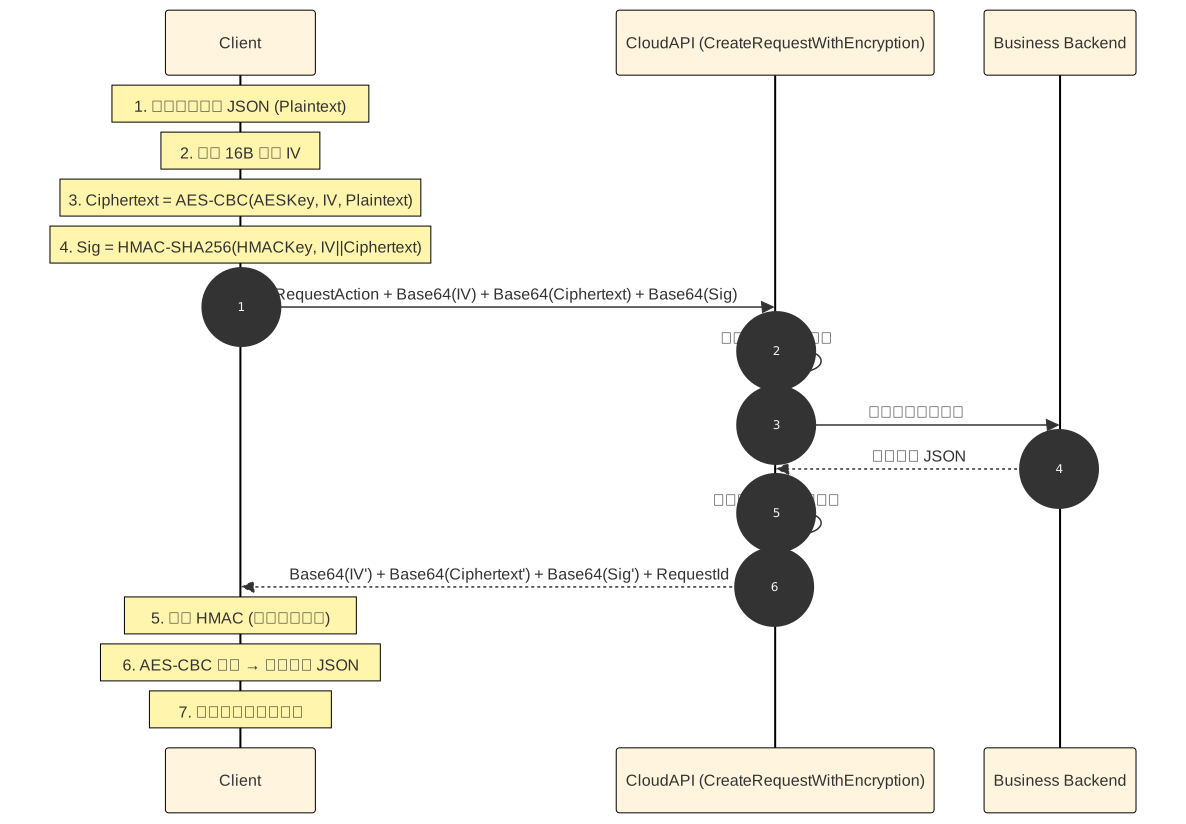
r"""该接口支持对请求内容进行加密传输。调用方需使用约定的 AES-CBC 或 SM4-CBC 算法对请求内容进行加密,并使用 HMAC-SHA256 或 HMAC-SM3 算法对 IV 和加密后的数据进行完整性校验,防止请求内容被篡改。
|
|
2527
|
+
|
|
2528
|
+
|
|
2529
|
+
|
|
2530
|
+
**请求端加密流程**
|
|
2531
|
+
1. 每次请求使用密码学安全的随机源生成 16 字节 的 IV。每次请求必须重新生成,严禁复用。
|
|
2532
|
+
2. 使用约定的 AES-CBC 或 SM4-CBC 算法对原始请求体进行加密,使用 PKCS#7 Padding。
|
|
2533
|
+
3. 将加密后的密文原始字节进行标准 Base64 编码,作为 EncryptedData 参数。
|
|
2534
|
+
4. 将 IV 原始字节进行标准 Base64 编码,作为 IV 参数。
|
|
2535
|
+
5. 对 IV 原始字节和密文原始字节直接拼接(不添加分隔符),计算 HMAC-SHA256 或 HMAC-SM4:HMAC(Key, IVBytes || CiphertextBytes)
|
|
2536
|
+
6. 将 HMAC 的结果进行 标准 Base64 编码,作为 EncryptionSignature 参数。
|
|
2537
|
+
|
|
2538
|
+
**响应端解密流程**
|
|
2539
|
+
1. 先判断本接口自身是否返回外层错误,此时错误为明文(标准腾讯云错误体),有则直接失败处理。
|
|
2540
|
+
2. 分别对 IV、EncryptedData、EncryptionSignature 做标准 Base64 解码,得到原始字节。
|
|
2541
|
+
3. 将 IV 与密文原始字节直接拼接(无分隔符),计算 HMAC-SHA256 或 HMAC-SM4:HMAC(Key, IVBytes || CiphertextBytes)。
|
|
2542
|
+
4. 与响应中 EncryptionSignature 解码后的字节做恒定时间比较,不一致立即失败,不得继续解密。
|
|
2543
|
+
5. 使用约定的 AES-CBC 或 SM4-CBC,以 IV 和密钥解密 EncryptedData,去除 PKCS#7 Padding 得到明文。
|
|
2544
|
+
6. 先用腾讯云标准错误体反序列化明文,判断被加密业务接口是否返回 Error。
|
|
2545
|
+
7. 无业务错误时,再用目标业务接口的响应结构体反序列化明文,取出实际业务参数。
|
|
2546
|
+
|
|
2547
|
+
**响应端错误处理**
|
|
2548
|
+
1. 外层错误(本接口本身调用失败):返回标准腾讯云错误 JSON(含 Error.Code / Error.Message),无 EncryptedData,不需要解密即可处理。
|
|
2549
|
+
2. 内层错误(业务接口执行失败):外层成功,但解密后的明文里包含 Error.Code / Error.Message,按目标业务接口的错误规范处理。
|
|
2550
|
+
|
|
2551
|
+
**处理过程示例**
|
|
2552
|
+
```
|
|
2553
|
+
# ========== 前置约定 ==========
|
|
2554
|
+
AESKey : 加密 密钥(AES 32 字节,SM4 16 字节)
|
|
2555
|
+
HMACKey : HMAC 密钥(与加密密钥需要不同)
|
|
2556
|
+
ALGO : AES-CBC 或 SM4-CBC,双方约定
|
|
2557
|
+
HMAC : ALGO == AES-CBC ? HMAC-SHA256 : HMAC-SM3
|
|
2558
|
+
|
|
2559
|
+
# ========== 请求端:加密并调用 ==========
|
|
2560
|
+
function CallWithEncryption(bizAction, bizApplicationId, bizRequestObj):
|
|
2561
|
+
# 1. 序列化业务请求
|
|
2562
|
+
plaintext = JSON.stringify(bizRequestObj)
|
|
2563
|
+
# 2. 生成 16 字节随机 IV(每次新生成,禁止复用)
|
|
2564
|
+
iv = SecureRandom(16)
|
|
2565
|
+
# 3. 对称加密(PKCS#7 Padding)
|
|
2566
|
+
ciphertext = SymmetricEncrypt(ALGO, AESKey, iv, plaintext)
|
|
2567
|
+
# 4. 计算完整性签名:HMAC(Key, IV || Ciphertext)
|
|
2568
|
+
signature = HMAC(HMACKey, concat(iv, ciphertext))
|
|
2569
|
+
# 5. 组装外层请求参数(三段均为标准 Base64)
|
|
2570
|
+
encReq = {
|
|
2571
|
+
RequestAction: bizAction,
|
|
2572
|
+
ApplicationId: bizApplicationId,
|
|
2573
|
+
IV: Base64(iv),
|
|
2574
|
+
EncryptedData: Base64(ciphertext),
|
|
2575
|
+
EncryptionSignature: Base64(signature),
|
|
2576
|
+
}
|
|
2577
|
+
# 6. 调用 CreateRequestWithEncryption
|
|
2578
|
+
# TC3-HMAC-SHA256 鉴权由官方 SDK 自动完成
|
|
2579
|
+
encResp = CloudAPI.CreateRequestWithEncryption(encReq)
|
|
2580
|
+
# 7. 外层错误:明文,直接抛出
|
|
2581
|
+
if encResp.Error != nil:
|
|
2582
|
+
raise OuterError(encResp.Error)
|
|
2583
|
+
# 8. 解密并返回业务响应
|
|
2584
|
+
return DecryptResponse(encResp.Response)
|
|
2585
|
+
|
|
2586
|
+
# ========== 响应端:校验并解密 ==========
|
|
2587
|
+
function DecryptResponse(resp):
|
|
2588
|
+
# 1. Base64 解码
|
|
2589
|
+
ivBytes = Base64Decode(resp.IV)
|
|
2590
|
+
ctBytes = Base64Decode(resp.EncryptedData)
|
|
2591
|
+
sigBytes = Base64Decode(resp.EncryptionSignature)
|
|
2592
|
+
# 2. 重新计算 HMAC
|
|
2593
|
+
expected = HMAC(HMACKey, concat(ivBytes, ctBytes))
|
|
2594
|
+
# 3. 恒定时间比较,失败立即终止(不得继续解密)
|
|
2595
|
+
if not ConstantTimeEqual(expected, sigBytes):
|
|
2596
|
+
raise SignatureMismatch
|
|
2597
|
+
# 4. 对称解密,去除 PKCS#7 Padding
|
|
2598
|
+
plaintext = SymmetricDecrypt(ALGO, AESKey, ivBytes, ctBytes)
|
|
2599
|
+
# 5. 先按腾讯云错误体解析,判断业务是否失败
|
|
2600
|
+
bizErr = TryParseTencentCloudError(plaintext)
|
|
2601
|
+
if bizErr != nil:
|
|
2602
|
+
raise BusinessError(bizErr)
|
|
2603
|
+
# 6. 按目标业务接口的响应结构反序列化
|
|
2604
|
+
return JSON.parse(plaintext, BizResponseSchema)
|
|
2605
|
+
```
|
|
2606
|
+
|
|
2607
|
+
**AES-CBC 示例**
|
|
2608
|
+
以下示例参数及结果可用于验证 AES-CBC 加密和 HMAC-SHA256 签名算法的实现是否正确。
|
|
2609
|
+
|
|
2610
|
+
加密密钥:AES-CBC-Key-1234
|
|
2611
|
+
签名密钥:AES-HMAC-Key-123
|
|
2612
|
+
IV:1234567890abcdef
|
|
2613
|
+
请求内容:{"Request": "This is a test."}
|
|
2614
|
+
|
|
2615
|
+
最终请求参数:
|
|
2616
|
+
```
|
|
2617
|
+
{
|
|
2618
|
+
"RequestAction": "DescribeFlowComponents",
|
|
2619
|
+
"ApplicationId: "yD******************************,
|
|
2620
|
+
"IV": "MTIzNDU2Nzg5MGFiY2RlZg==",
|
|
2621
|
+
"EncryptedData": "Iqp2W1jislwMNmE7bH9dKZZiMQsfkAPyvAAqDFRnWLw=",
|
|
2622
|
+
"EncryptionSignature": "4TT3PUCZgZT7YmEPtXDm5PDcM6xT7FoYHfMW8xunB5I="
|
|
2623
|
+
}
|
|
2624
|
+
```
|
|
2625
|
+
|
|
2626
|
+
**SM4-CBC 示例**
|
|
2627
|
+
以下示例参数及结果可用于验证 SM4-CBC 加密和 HMAC-SM4 签名算法的实现是否正确。
|
|
2628
|
+
|
|
2629
|
+
加密密钥:SM4-CBC-Key-1234
|
|
2630
|
+
签名密钥:SM4-HMAC-Key-123
|
|
2631
|
+
IV:fedcba0987654321
|
|
2632
|
+
请求内容:{"Request": "This is a test."}
|
|
2633
|
+
|
|
2634
|
+
最终请求参数:
|
|
2635
|
+
```
|
|
2636
|
+
{
|
|
2637
|
+
"RequestAction": "DescribeFlowComponents",
|
|
2638
|
+
"ApplicationId: "yD******************************,
|
|
2639
|
+
"IV": "ZmVkY2JhMDk4NzY1NDMyMQ==",
|
|
2640
|
+
"EncryptedData": "GwUovQhNUPaUnVM/UDXMtPOYTpTSi2B1oyZDFbyyvns=",
|
|
2641
|
+
"EncryptionSignature": "nHB/v/AvOaDCQ66esFNnp12lHKcGkwaLGid0Warl/KE="
|
|
2642
|
+
}
|
|
2643
|
+
```
|
|
2644
|
+
|
|
2645
|
+
:param request: Request instance for CreateRequestWithEncryption.
|
|
2646
|
+
:type request: :class:`tencentcloud.essbasic.v20210526.models.CreateRequestWithEncryptionRequest`
|
|
2647
|
+
:rtype: :class:`tencentcloud.essbasic.v20210526.models.CreateRequestWithEncryptionResponse`
|
|
2648
|
+
|
|
2649
|
+
"""
|
|
2650
|
+
try:
|
|
2651
|
+
params = request._serialize()
|
|
2652
|
+
headers = request.headers
|
|
2653
|
+
body = self.call("CreateRequestWithEncryption", params, headers=headers)
|
|
2654
|
+
response = json.loads(body)
|
|
2655
|
+
model = models.CreateRequestWithEncryptionResponse()
|
|
2656
|
+
model._deserialize(response["Response"])
|
|
2657
|
+
return model
|
|
2658
|
+
except Exception as e:
|
|
2659
|
+
if isinstance(e, TencentCloudSDKException):
|
|
2660
|
+
raise
|
|
2661
|
+
else:
|
|
2662
|
+
raise TencentCloudSDKException(type(e).__name__, str(e))
|
|
2663
|
+
|
|
2664
|
+
|
|
2525
2665
|
def CreateSealByImage(self, request):
|
|
2526
2666
|
r"""1. 可以**通过图片**为子客企业代创建印章,图片最大5MB
|
|
2527
2667
|
|
|
@@ -2161,6 +2161,141 @@ class EssbasicClient(AbstractClient):
|
|
|
2161
2161
|
|
|
2162
2162
|
return await self.call_and_deserialize(**kwargs)
|
|
2163
2163
|
|
|
2164
|
+
async def CreateRequestWithEncryption(
|
|
2165
|
+
self,
|
|
2166
|
+
request: models.CreateRequestWithEncryptionRequest,
|
|
2167
|
+
opts: Dict = None,
|
|
2168
|
+
) -> models.CreateRequestWithEncryptionResponse:
|
|
2169
|
+
"""
|
|
2170
|
+
该接口支持对请求内容进行加密传输。调用方需使用约定的 AES-CBC 或 SM4-CBC 算法对请求内容进行加密,并使用 HMAC-SHA256 或 HMAC-SM3 算法对 IV 和加密后的数据进行完整性校验,防止请求内容被篡改。
|
|
2171
|
+
|
|
2172
|
+

|
|
2173
|
+
|
|
2174
|
+
**请求端加密流程**
|
|
2175
|
+
1. 每次请求使用密码学安全的随机源生成 16 字节 的 IV。每次请求必须重新生成,严禁复用。
|
|
2176
|
+
2. 使用约定的 AES-CBC 或 SM4-CBC 算法对原始请求体进行加密,使用 PKCS#7 Padding。
|
|
2177
|
+
3. 将加密后的密文原始字节进行标准 Base64 编码,作为 EncryptedData 参数。
|
|
2178
|
+
4. 将 IV 原始字节进行标准 Base64 编码,作为 IV 参数。
|
|
2179
|
+
5. 对 IV 原始字节和密文原始字节直接拼接(不添加分隔符),计算 HMAC-SHA256 或 HMAC-SM4:HMAC(Key, IVBytes || CiphertextBytes)
|
|
2180
|
+
6. 将 HMAC 的结果进行 标准 Base64 编码,作为 EncryptionSignature 参数。
|
|
2181
|
+
|
|
2182
|
+
**响应端解密流程**
|
|
2183
|
+
1. 先判断本接口自身是否返回外层错误,此时错误为明文(标准腾讯云错误体),有则直接失败处理。
|
|
2184
|
+
2. 分别对 IV、EncryptedData、EncryptionSignature 做标准 Base64 解码,得到原始字节。
|
|
2185
|
+
3. 将 IV 与密文原始字节直接拼接(无分隔符),计算 HMAC-SHA256 或 HMAC-SM4:HMAC(Key, IVBytes || CiphertextBytes)。
|
|
2186
|
+
4. 与响应中 EncryptionSignature 解码后的字节做恒定时间比较,不一致立即失败,不得继续解密。
|
|
2187
|
+
5. 使用约定的 AES-CBC 或 SM4-CBC,以 IV 和密钥解密 EncryptedData,去除 PKCS#7 Padding 得到明文。
|
|
2188
|
+
6. 先用腾讯云标准错误体反序列化明文,判断被加密业务接口是否返回 Error。
|
|
2189
|
+
7. 无业务错误时,再用目标业务接口的响应结构体反序列化明文,取出实际业务参数。
|
|
2190
|
+
|
|
2191
|
+
**响应端错误处理**
|
|
2192
|
+
1. 外层错误(本接口本身调用失败):返回标准腾讯云错误 JSON(含 Error.Code / Error.Message),无 EncryptedData,不需要解密即可处理。
|
|
2193
|
+
2. 内层错误(业务接口执行失败):外层成功,但解密后的明文里包含 Error.Code / Error.Message,按目标业务接口的错误规范处理。
|
|
2194
|
+
|
|
2195
|
+
**处理过程示例**
|
|
2196
|
+
```
|
|
2197
|
+
# ========== 前置约定 ==========
|
|
2198
|
+
AESKey : 加密 密钥(AES 32 字节,SM4 16 字节)
|
|
2199
|
+
HMACKey : HMAC 密钥(与加密密钥需要不同)
|
|
2200
|
+
ALGO : AES-CBC 或 SM4-CBC,双方约定
|
|
2201
|
+
HMAC : ALGO == AES-CBC ? HMAC-SHA256 : HMAC-SM3
|
|
2202
|
+
|
|
2203
|
+
# ========== 请求端:加密并调用 ==========
|
|
2204
|
+
function CallWithEncryption(bizAction, bizApplicationId, bizRequestObj):
|
|
2205
|
+
# 1. 序列化业务请求
|
|
2206
|
+
plaintext = JSON.stringify(bizRequestObj)
|
|
2207
|
+
# 2. 生成 16 字节随机 IV(每次新生成,禁止复用)
|
|
2208
|
+
iv = SecureRandom(16)
|
|
2209
|
+
# 3. 对称加密(PKCS#7 Padding)
|
|
2210
|
+
ciphertext = SymmetricEncrypt(ALGO, AESKey, iv, plaintext)
|
|
2211
|
+
# 4. 计算完整性签名:HMAC(Key, IV || Ciphertext)
|
|
2212
|
+
signature = HMAC(HMACKey, concat(iv, ciphertext))
|
|
2213
|
+
# 5. 组装外层请求参数(三段均为标准 Base64)
|
|
2214
|
+
encReq = {
|
|
2215
|
+
RequestAction: bizAction,
|
|
2216
|
+
ApplicationId: bizApplicationId,
|
|
2217
|
+
IV: Base64(iv),
|
|
2218
|
+
EncryptedData: Base64(ciphertext),
|
|
2219
|
+
EncryptionSignature: Base64(signature),
|
|
2220
|
+
}
|
|
2221
|
+
# 6. 调用 CreateRequestWithEncryption
|
|
2222
|
+
# TC3-HMAC-SHA256 鉴权由官方 SDK 自动完成
|
|
2223
|
+
encResp = CloudAPI.CreateRequestWithEncryption(encReq)
|
|
2224
|
+
# 7. 外层错误:明文,直接抛出
|
|
2225
|
+
if encResp.Error != nil:
|
|
2226
|
+
raise OuterError(encResp.Error)
|
|
2227
|
+
# 8. 解密并返回业务响应
|
|
2228
|
+
return DecryptResponse(encResp.Response)
|
|
2229
|
+
|
|
2230
|
+
# ========== 响应端:校验并解密 ==========
|
|
2231
|
+
function DecryptResponse(resp):
|
|
2232
|
+
# 1. Base64 解码
|
|
2233
|
+
ivBytes = Base64Decode(resp.IV)
|
|
2234
|
+
ctBytes = Base64Decode(resp.EncryptedData)
|
|
2235
|
+
sigBytes = Base64Decode(resp.EncryptionSignature)
|
|
2236
|
+
# 2. 重新计算 HMAC
|
|
2237
|
+
expected = HMAC(HMACKey, concat(ivBytes, ctBytes))
|
|
2238
|
+
# 3. 恒定时间比较,失败立即终止(不得继续解密)
|
|
2239
|
+
if not ConstantTimeEqual(expected, sigBytes):
|
|
2240
|
+
raise SignatureMismatch
|
|
2241
|
+
# 4. 对称解密,去除 PKCS#7 Padding
|
|
2242
|
+
plaintext = SymmetricDecrypt(ALGO, AESKey, ivBytes, ctBytes)
|
|
2243
|
+
# 5. 先按腾讯云错误体解析,判断业务是否失败
|
|
2244
|
+
bizErr = TryParseTencentCloudError(plaintext)
|
|
2245
|
+
if bizErr != nil:
|
|
2246
|
+
raise BusinessError(bizErr)
|
|
2247
|
+
# 6. 按目标业务接口的响应结构反序列化
|
|
2248
|
+
return JSON.parse(plaintext, BizResponseSchema)
|
|
2249
|
+
```
|
|
2250
|
+
|
|
2251
|
+
**AES-CBC 示例**
|
|
2252
|
+
以下示例参数及结果可用于验证 AES-CBC 加密和 HMAC-SHA256 签名算法的实现是否正确。
|
|
2253
|
+
|
|
2254
|
+
加密密钥:AES-CBC-Key-1234
|
|
2255
|
+
签名密钥:AES-HMAC-Key-123
|
|
2256
|
+
IV:1234567890abcdef
|
|
2257
|
+
请求内容:{"Request": "This is a test."}
|
|
2258
|
+
|
|
2259
|
+
最终请求参数:
|
|
2260
|
+
```
|
|
2261
|
+
{
|
|
2262
|
+
"RequestAction": "DescribeFlowComponents",
|
|
2263
|
+
"ApplicationId: "yD******************************,
|
|
2264
|
+
"IV": "MTIzNDU2Nzg5MGFiY2RlZg==",
|
|
2265
|
+
"EncryptedData": "Iqp2W1jislwMNmE7bH9dKZZiMQsfkAPyvAAqDFRnWLw=",
|
|
2266
|
+
"EncryptionSignature": "4TT3PUCZgZT7YmEPtXDm5PDcM6xT7FoYHfMW8xunB5I="
|
|
2267
|
+
}
|
|
2268
|
+
```
|
|
2269
|
+
|
|
2270
|
+
**SM4-CBC 示例**
|
|
2271
|
+
以下示例参数及结果可用于验证 SM4-CBC 加密和 HMAC-SM4 签名算法的实现是否正确。
|
|
2272
|
+
|
|
2273
|
+
加密密钥:SM4-CBC-Key-1234
|
|
2274
|
+
签名密钥:SM4-HMAC-Key-123
|
|
2275
|
+
IV:fedcba0987654321
|
|
2276
|
+
请求内容:{"Request": "This is a test."}
|
|
2277
|
+
|
|
2278
|
+
最终请求参数:
|
|
2279
|
+
```
|
|
2280
|
+
{
|
|
2281
|
+
"RequestAction": "DescribeFlowComponents",
|
|
2282
|
+
"ApplicationId: "yD******************************,
|
|
2283
|
+
"IV": "ZmVkY2JhMDk4NzY1NDMyMQ==",
|
|
2284
|
+
"EncryptedData": "GwUovQhNUPaUnVM/UDXMtPOYTpTSi2B1oyZDFbyyvns=",
|
|
2285
|
+
"EncryptionSignature": "nHB/v/AvOaDCQ66esFNnp12lHKcGkwaLGid0Warl/KE="
|
|
2286
|
+
}
|
|
2287
|
+
```
|
|
2288
|
+
"""
|
|
2289
|
+
|
|
2290
|
+
kwargs = {}
|
|
2291
|
+
kwargs["action"] = "CreateRequestWithEncryption"
|
|
2292
|
+
kwargs["params"] = request._serialize()
|
|
2293
|
+
kwargs["resp_cls"] = models.CreateRequestWithEncryptionResponse
|
|
2294
|
+
kwargs["headers"] = request.headers
|
|
2295
|
+
kwargs["opts"] = opts or {}
|
|
2296
|
+
|
|
2297
|
+
return await self.call_and_deserialize(**kwargs)
|
|
2298
|
+
|
|
2164
2299
|
async def CreateSealByImage(
|
|
2165
2300
|
self,
|
|
2166
2301
|
request: models.CreateSealByImageRequest,
|
|
@@ -17355,6 +17355,175 @@ class CreatePersonAuthCertificateImageResponse(AbstractModel):
|
|
|
17355
17355
|
self._RequestId = params.get("RequestId")
|
|
17356
17356
|
|
|
17357
17357
|
|
|
17358
|
+
class CreateRequestWithEncryptionRequest(AbstractModel):
|
|
17359
|
+
r"""CreateRequestWithEncryption请求参数结构体
|
|
17360
|
+
|
|
17361
|
+
"""
|
|
17362
|
+
|
|
17363
|
+
def __init__(self):
|
|
17364
|
+
r"""
|
|
17365
|
+
:param _RequestAction: <p>操作的接口名称。取值参考接口文档输入参数章节关于公共参数 Action 的说明。</p>
|
|
17366
|
+
:type RequestAction: str
|
|
17367
|
+
:param _ApplicationId: <p>第三方应用的唯一标识,对应通用参数 Agent.AppId。</p>
|
|
17368
|
+
:type ApplicationId: str
|
|
17369
|
+
:param _IV: <p>加密算法使用的初始化向量。固定为 16 字节,将 IV 原始字节使用标准 Base64 编码后传入。</p>
|
|
17370
|
+
:type IV: str
|
|
17371
|
+
:param _EncryptedData: <p>使用 AES-CBC 或 SM4-CBC 加密请求内容得到的密文。加密前请求内容采用 PKCS#7 Padding;将密文原始字节使用标准 Base64 编码后传入。</p>
|
|
17372
|
+
:type EncryptedData: str
|
|
17373
|
+
:param _EncryptionSignature: <p>用于校验请求数据完整性。对 IV 原始字节和密文原始字节直接拼接(不加拼接符)后计算 HMAC-SHA256,再将计算结果使用标准 Base64 编码后传入。</p>
|
|
17374
|
+
:type EncryptionSignature: str
|
|
17375
|
+
"""
|
|
17376
|
+
self._RequestAction = None
|
|
17377
|
+
self._ApplicationId = None
|
|
17378
|
+
self._IV = None
|
|
17379
|
+
self._EncryptedData = None
|
|
17380
|
+
self._EncryptionSignature = None
|
|
17381
|
+
|
|
17382
|
+
@property
|
|
17383
|
+
def RequestAction(self):
|
|
17384
|
+
r"""<p>操作的接口名称。取值参考接口文档输入参数章节关于公共参数 Action 的说明。</p>
|
|
17385
|
+
:rtype: str
|
|
17386
|
+
"""
|
|
17387
|
+
return self._RequestAction
|
|
17388
|
+
|
|
17389
|
+
@RequestAction.setter
|
|
17390
|
+
def RequestAction(self, RequestAction):
|
|
17391
|
+
self._RequestAction = RequestAction
|
|
17392
|
+
|
|
17393
|
+
@property
|
|
17394
|
+
def ApplicationId(self):
|
|
17395
|
+
r"""<p>第三方应用的唯一标识,对应通用参数 Agent.AppId。</p>
|
|
17396
|
+
:rtype: str
|
|
17397
|
+
"""
|
|
17398
|
+
return self._ApplicationId
|
|
17399
|
+
|
|
17400
|
+
@ApplicationId.setter
|
|
17401
|
+
def ApplicationId(self, ApplicationId):
|
|
17402
|
+
self._ApplicationId = ApplicationId
|
|
17403
|
+
|
|
17404
|
+
@property
|
|
17405
|
+
def IV(self):
|
|
17406
|
+
r"""<p>加密算法使用的初始化向量。固定为 16 字节,将 IV 原始字节使用标准 Base64 编码后传入。</p>
|
|
17407
|
+
:rtype: str
|
|
17408
|
+
"""
|
|
17409
|
+
return self._IV
|
|
17410
|
+
|
|
17411
|
+
@IV.setter
|
|
17412
|
+
def IV(self, IV):
|
|
17413
|
+
self._IV = IV
|
|
17414
|
+
|
|
17415
|
+
@property
|
|
17416
|
+
def EncryptedData(self):
|
|
17417
|
+
r"""<p>使用 AES-CBC 或 SM4-CBC 加密请求内容得到的密文。加密前请求内容采用 PKCS#7 Padding;将密文原始字节使用标准 Base64 编码后传入。</p>
|
|
17418
|
+
:rtype: str
|
|
17419
|
+
"""
|
|
17420
|
+
return self._EncryptedData
|
|
17421
|
+
|
|
17422
|
+
@EncryptedData.setter
|
|
17423
|
+
def EncryptedData(self, EncryptedData):
|
|
17424
|
+
self._EncryptedData = EncryptedData
|
|
17425
|
+
|
|
17426
|
+
@property
|
|
17427
|
+
def EncryptionSignature(self):
|
|
17428
|
+
r"""<p>用于校验请求数据完整性。对 IV 原始字节和密文原始字节直接拼接(不加拼接符)后计算 HMAC-SHA256,再将计算结果使用标准 Base64 编码后传入。</p>
|
|
17429
|
+
:rtype: str
|
|
17430
|
+
"""
|
|
17431
|
+
return self._EncryptionSignature
|
|
17432
|
+
|
|
17433
|
+
@EncryptionSignature.setter
|
|
17434
|
+
def EncryptionSignature(self, EncryptionSignature):
|
|
17435
|
+
self._EncryptionSignature = EncryptionSignature
|
|
17436
|
+
|
|
17437
|
+
|
|
17438
|
+
def _deserialize(self, params):
|
|
17439
|
+
self._RequestAction = params.get("RequestAction")
|
|
17440
|
+
self._ApplicationId = params.get("ApplicationId")
|
|
17441
|
+
self._IV = params.get("IV")
|
|
17442
|
+
self._EncryptedData = params.get("EncryptedData")
|
|
17443
|
+
self._EncryptionSignature = params.get("EncryptionSignature")
|
|
17444
|
+
memeber_set = set(params.keys())
|
|
17445
|
+
for name, value in vars(self).items():
|
|
17446
|
+
property_name = name[1:]
|
|
17447
|
+
if property_name in memeber_set:
|
|
17448
|
+
memeber_set.remove(property_name)
|
|
17449
|
+
if len(memeber_set) > 0:
|
|
17450
|
+
warnings.warn("%s fileds are useless." % ",".join(memeber_set))
|
|
17451
|
+
|
|
17452
|
+
|
|
17453
|
+
|
|
17454
|
+
class CreateRequestWithEncryptionResponse(AbstractModel):
|
|
17455
|
+
r"""CreateRequestWithEncryption返回参数结构体
|
|
17456
|
+
|
|
17457
|
+
"""
|
|
17458
|
+
|
|
17459
|
+
def __init__(self):
|
|
17460
|
+
r"""
|
|
17461
|
+
:param _IV: <p>加密算法使用的初始化向量。固定为 16 字节,将 IV 原始字节使用标准 Base64 编码后传入。</p>
|
|
17462
|
+
:type IV: str
|
|
17463
|
+
:param _EncryptedData: <p>使用 AES-CBC 或 SM4-CBC 加密返回内容得到的密文。加密前返回内容采用 PKCS#7 Padding;将密文原始字节使用标准 Base64 编码后传入。</p>
|
|
17464
|
+
:type EncryptedData: str
|
|
17465
|
+
:param _EncryptionSignature: <p>用于校验请求数据完整性。对 IV 原始字节和密文原始字节直接拼接(不加拼接符)后计算 HMAC-SHA256,再将计算结果使用标准 Base64 编码后传入。</p>
|
|
17466
|
+
:type EncryptionSignature: str
|
|
17467
|
+
:param _RequestId: 唯一请求 ID,由服务端生成,每次请求都会返回(若请求因其他原因未能抵达服务端,则该次请求不会获得 RequestId)。定位问题时需要提供该次请求的 RequestId。
|
|
17468
|
+
:type RequestId: str
|
|
17469
|
+
"""
|
|
17470
|
+
self._IV = None
|
|
17471
|
+
self._EncryptedData = None
|
|
17472
|
+
self._EncryptionSignature = None
|
|
17473
|
+
self._RequestId = None
|
|
17474
|
+
|
|
17475
|
+
@property
|
|
17476
|
+
def IV(self):
|
|
17477
|
+
r"""<p>加密算法使用的初始化向量。固定为 16 字节,将 IV 原始字节使用标准 Base64 编码后传入。</p>
|
|
17478
|
+
:rtype: str
|
|
17479
|
+
"""
|
|
17480
|
+
return self._IV
|
|
17481
|
+
|
|
17482
|
+
@IV.setter
|
|
17483
|
+
def IV(self, IV):
|
|
17484
|
+
self._IV = IV
|
|
17485
|
+
|
|
17486
|
+
@property
|
|
17487
|
+
def EncryptedData(self):
|
|
17488
|
+
r"""<p>使用 AES-CBC 或 SM4-CBC 加密返回内容得到的密文。加密前返回内容采用 PKCS#7 Padding;将密文原始字节使用标准 Base64 编码后传入。</p>
|
|
17489
|
+
:rtype: str
|
|
17490
|
+
"""
|
|
17491
|
+
return self._EncryptedData
|
|
17492
|
+
|
|
17493
|
+
@EncryptedData.setter
|
|
17494
|
+
def EncryptedData(self, EncryptedData):
|
|
17495
|
+
self._EncryptedData = EncryptedData
|
|
17496
|
+
|
|
17497
|
+
@property
|
|
17498
|
+
def EncryptionSignature(self):
|
|
17499
|
+
r"""<p>用于校验请求数据完整性。对 IV 原始字节和密文原始字节直接拼接(不加拼接符)后计算 HMAC-SHA256,再将计算结果使用标准 Base64 编码后传入。</p>
|
|
17500
|
+
:rtype: str
|
|
17501
|
+
"""
|
|
17502
|
+
return self._EncryptionSignature
|
|
17503
|
+
|
|
17504
|
+
@EncryptionSignature.setter
|
|
17505
|
+
def EncryptionSignature(self, EncryptionSignature):
|
|
17506
|
+
self._EncryptionSignature = EncryptionSignature
|
|
17507
|
+
|
|
17508
|
+
@property
|
|
17509
|
+
def RequestId(self):
|
|
17510
|
+
r"""唯一请求 ID,由服务端生成,每次请求都会返回(若请求因其他原因未能抵达服务端,则该次请求不会获得 RequestId)。定位问题时需要提供该次请求的 RequestId。
|
|
17511
|
+
:rtype: str
|
|
17512
|
+
"""
|
|
17513
|
+
return self._RequestId
|
|
17514
|
+
|
|
17515
|
+
@RequestId.setter
|
|
17516
|
+
def RequestId(self, RequestId):
|
|
17517
|
+
self._RequestId = RequestId
|
|
17518
|
+
|
|
17519
|
+
|
|
17520
|
+
def _deserialize(self, params):
|
|
17521
|
+
self._IV = params.get("IV")
|
|
17522
|
+
self._EncryptedData = params.get("EncryptedData")
|
|
17523
|
+
self._EncryptionSignature = params.get("EncryptionSignature")
|
|
17524
|
+
self._RequestId = params.get("RequestId")
|
|
17525
|
+
|
|
17526
|
+
|
|
17358
17527
|
class CreateResultPageConfig(AbstractModel):
|
|
17359
17528
|
r"""发起流程的可嵌入页面操作结果页配置
|
|
17360
17529
|
|
|
@@ -1,6 +1,6 @@
|
|
|
1
1
|
Metadata-Version: 2.1
|
|
2
2
|
Name: tencentcloud-sdk-python-essbasic
|
|
3
|
-
Version: 3.1.
|
|
3
|
+
Version: 3.1.166
|
|
4
4
|
Summary: Tencent Cloud Essbasic SDK for Python
|
|
5
5
|
Home-page: https://github.com/TencentCloud/tencentcloud-sdk-python
|
|
6
6
|
Author: Tencent Cloud
|
|
@@ -15,7 +15,7 @@ Classifier: Programming Language :: Python :: 2.7
|
|
|
15
15
|
Classifier: Programming Language :: Python :: 3
|
|
16
16
|
Classifier: Programming Language :: Python :: 3.6
|
|
17
17
|
Classifier: Programming Language :: Python :: 3.7
|
|
18
|
-
Requires-Dist: tencentcloud-sdk-python-common <4.0.0,>=3.1.
|
|
18
|
+
Requires-Dist: tencentcloud-sdk-python-common <4.0.0,>=3.1.166
|
|
19
19
|
|
|
20
20
|
============================
|
|
21
21
|
Tencent Cloud SDK for Python
|
|
@@ -1,4 +1,4 @@
|
|
|
1
|
-
tencentcloud/__init__.py,sha256=
|
|
1
|
+
tencentcloud/__init__.py,sha256=yhpZww772TBu5Yq4CtKLQ0oSRJtTQXXtyIoWDqLX-L4,630
|
|
2
2
|
tencentcloud/essbasic/__init__.py,sha256=47DEQpj8HBSa-_TImW-5JCeuQeRkm5NMpJWZG3hSuFU,0
|
|
3
3
|
tencentcloud/essbasic/v20201222/__init__.py,sha256=47DEQpj8HBSa-_TImW-5JCeuQeRkm5NMpJWZG3hSuFU,0
|
|
4
4
|
tencentcloud/essbasic/v20201222/errorcodes.py,sha256=_HaXGynY1ocz-dbY7C6IOlNUWmNMu9XsY-x11g3Rm-w,5365
|
|
@@ -7,10 +7,10 @@ tencentcloud/essbasic/v20201222/essbasic_client_async.py,sha256=FDF4CJifYy6IfhH6
|
|
|
7
7
|
tencentcloud/essbasic/v20201222/models.py,sha256=P2ayL06cP1AmBPL9CbzFr9gO2naGrVFsa2RLHnN0QDc,335467
|
|
8
8
|
tencentcloud/essbasic/v20210526/__init__.py,sha256=47DEQpj8HBSa-_TImW-5JCeuQeRkm5NMpJWZG3hSuFU,0
|
|
9
9
|
tencentcloud/essbasic/v20210526/errorcodes.py,sha256=ipRcEnuaFrJJdvJvRMqmR_F8mAbqBp-ySUhVAmw4jvw,19938
|
|
10
|
-
tencentcloud/essbasic/v20210526/essbasic_client.py,sha256=
|
|
11
|
-
tencentcloud/essbasic/v20210526/essbasic_client_async.py,sha256=
|
|
12
|
-
tencentcloud/essbasic/v20210526/models.py,sha256=
|
|
13
|
-
tencentcloud_sdk_python_essbasic-3.1.
|
|
14
|
-
tencentcloud_sdk_python_essbasic-3.1.
|
|
15
|
-
tencentcloud_sdk_python_essbasic-3.1.
|
|
16
|
-
tencentcloud_sdk_python_essbasic-3.1.
|
|
10
|
+
tencentcloud/essbasic/v20210526/essbasic_client.py,sha256=NmSdzLmuoea9JKna6l6yzb8ZEGfGk30g6storoTQqkM,198343
|
|
11
|
+
tencentcloud/essbasic/v20210526/essbasic_client_async.py,sha256=MRDgHs-Of8tsUSNvhIjWKzjRRuYnJfxF35WK7KIJdG8,166095
|
|
12
|
+
tencentcloud/essbasic/v20210526/models.py,sha256=FQu5Qt3h1jrS3gKEOPKQHVWo0TSRUorEAcNrPyxVBpk,1496384
|
|
13
|
+
tencentcloud_sdk_python_essbasic-3.1.166.dist-info/METADATA,sha256=gjWMRhPw_6gMDhzuGrl-42vHH1F8sBgF1_Qie_TS8UU,1522
|
|
14
|
+
tencentcloud_sdk_python_essbasic-3.1.166.dist-info/WHEEL,sha256=a5ogxI61vGGBHYbAAwISCXsfU7mxKr76gTpCEmSNOI8,109
|
|
15
|
+
tencentcloud_sdk_python_essbasic-3.1.166.dist-info/top_level.txt,sha256=g-8OyzoqI6O6LiS85zkeNzhB-osEnRIPZMdyRd_0eL0,13
|
|
16
|
+
tencentcloud_sdk_python_essbasic-3.1.166.dist-info/RECORD,,
|
|
File without changes
|