stringart 0.1.0__py3-none-any.whl
This diff represents the content of publicly available package versions that have been released to one of the supported registries. The information contained in this diff is provided for informational purposes only and reflects changes between package versions as they appear in their respective public registries.
- stringart-0.1.0.dist-info/METADATA +83 -0
- stringart-0.1.0.dist-info/RECORD +5 -0
- stringart-0.1.0.dist-info/WHEEL +4 -0
- stringart-0.1.0.dist-info/licenses/LICENSE +21 -0
- stringart.py +180 -0
|
@@ -0,0 +1,83 @@
|
|
|
1
|
+
Metadata-Version: 2.5
|
|
2
|
+
Name: stringart
|
|
3
|
+
Version: 0.1.0
|
|
4
|
+
Summary: A Python library to explore string art
|
|
5
|
+
Project-URL: Homepage, https://github.com/anandology/stringart
|
|
6
|
+
Author-email: Anand Chitipothu <anandology@gmail.com>
|
|
7
|
+
License: MIT
|
|
8
|
+
License-File: LICENSE
|
|
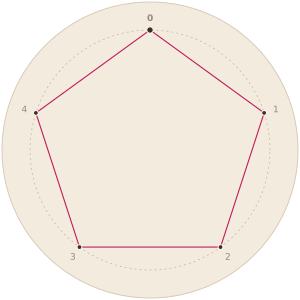
9
|
+
Requires-Python: >=3.9
|
|
10
|
+
Requires-Dist: numpy>=2.0.0
|
|
11
|
+
Requires-Dist: python-joy>=0.4.1
|
|
12
|
+
Description-Content-Type: text/markdown
|
|
13
|
+
|
|
14
|
+
# String Art
|
|
15
|
+
|
|
16
|
+
A Python library to explore string art.
|
|
17
|
+
|
|
18
|
+
<img src="https://raw.githubusercontent.com/anandology/stringart/main/examples/three-circles.svg" width="300" alt="String art with three layers of threads">
|
|
19
|
+
|
|
20
|
+
## Install
|
|
21
|
+
|
|
22
|
+
```
|
|
23
|
+
pip install stringart
|
|
24
|
+
```
|
|
25
|
+
|
|
26
|
+
Requires Python 3.9 or later.
|
|
27
|
+
|
|
28
|
+
## Quick Start
|
|
29
|
+
|
|
30
|
+
```python
|
|
31
|
+
from stringart import *
|
|
32
|
+
|
|
33
|
+
make_circle(18)
|
|
34
|
+
|
|
35
|
+
for i in range(18):
|
|
36
|
+
connect(i, i+6)
|
|
37
|
+
|
|
38
|
+
show()
|
|
39
|
+
```
|
|
40
|
+
|
|
41
|
+
<img src="https://raw.githubusercontent.com/anandology/stringart/main/examples/circle.svg" width="300" alt="18 points, each connected to the point 6 steps ahead">
|
|
42
|
+
|
|
43
|
+
`show()` displays the art in a Jupyter notebook. In a plain Python script, use `save("art.svg")` to save it as an svg file instead.
|
|
44
|
+
|
|
45
|
+
## Functions
|
|
46
|
+
|
|
47
|
+
| Function | What it does |
|
|
48
|
+
|---|---|
|
|
49
|
+
| `make_circle(n)` | Starts a new art with `n` points on a circle, numbered `0` to `n-1`. |
|
|
50
|
+
| `connect(a, b)` | Connects point `a` to point `b` with a thread. |
|
|
51
|
+
| `show()` | Displays the art in Jupyter. |
|
|
52
|
+
| `save(path)` | Saves the art as an svg file. |
|
|
53
|
+
|
|
54
|
+
Point numbers wrap around the circle. With `18` points, `connect(17, 20)` is the same as `connect(17, 2)`. That is why `connect(i, i+6)` works for every `i` in the loop above.
|
|
55
|
+
|
|
56
|
+
## Examples
|
|
57
|
+
|
|
58
|
+
| | | |
|
|
59
|
+
|---|---|---|
|
|
60
|
+
| [](examples/pentagon.py) | [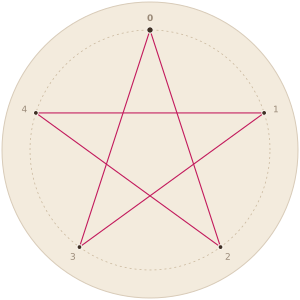](examples/pentagonal-star.py) | [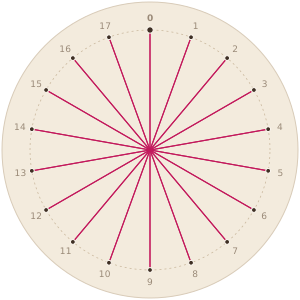](examples/radials.py) |
|
|
61
|
+
| [pentagon.py](examples/pentagon.py) | [pentagonal-star.py](examples/pentagonal-star.py) | [radials.py](examples/radials.py) |
|
|
62
|
+
|
|
63
|
+
See the [examples](examples/) directory for the programs. To regenerate the svg files after changing them, run `make` in that directory.
|
|
64
|
+
|
|
65
|
+
## Why
|
|
66
|
+
|
|
67
|
+
StringArt was born out of a desire to teach programming to beginners in a fun, interactive way.
|
|
68
|
+
|
|
69
|
+
Every program draws a picture, so students see right away what their code does, and a mistake looks wrong instead of just printing a wrong number.
|
|
70
|
+
|
|
71
|
+
The API has just four functions, but the possible complexity is far from small. Connecting each point by hand quickly becomes tedious, and the need for a loop comes naturally. When the same pattern shows up again and again, the need for a function follows. Ideas like generalization and abstraction, which are hard to convey, emerge on their own in this medium.
|
|
72
|
+
|
|
73
|
+
## Development
|
|
74
|
+
|
|
75
|
+
```
|
|
76
|
+
uv sync
|
|
77
|
+
make -C examples
|
|
78
|
+
uv build
|
|
79
|
+
```
|
|
80
|
+
|
|
81
|
+
## License
|
|
82
|
+
|
|
83
|
+
MIT. See [LICENSE](LICENSE).
|
|
@@ -0,0 +1,5 @@
|
|
|
1
|
+
stringart.py,sha256=__z_CT9IuQQP50oLTUO26ppfUutayxx4RJJqJNeAunw,4904
|
|
2
|
+
stringart-0.1.0.dist-info/METADATA,sha256=w2alXoOjSz4tP1jJb57yVFAVKDeS_AunzOUQsZHkUt4,2938
|
|
3
|
+
stringart-0.1.0.dist-info/WHEEL,sha256=W3fkpkm7-wf9vBI5Z-7s0eWkeM-spu78I8Neb98DeEg,87
|
|
4
|
+
stringart-0.1.0.dist-info/licenses/LICENSE,sha256=kkkc4XWqyT-hZL_O63lJi3H5jZZo8SB7IkeKQLuz9YQ,1104
|
|
5
|
+
stringart-0.1.0.dist-info/RECORD,,
|
|
@@ -0,0 +1,21 @@
|
|
|
1
|
+
MIT License
|
|
2
|
+
|
|
3
|
+
Copyright (c) 2024-present Anand Chitipothu <anandology@gmail.com>
|
|
4
|
+
|
|
5
|
+
Permission is hereby granted, free of charge, to any person obtaining a copy
|
|
6
|
+
of this software and associated documentation files (the "Software"), to deal
|
|
7
|
+
in the Software without restriction, including without limitation the rights
|
|
8
|
+
to use, copy, modify, merge, publish, distribute, sublicense, and/or sell
|
|
9
|
+
copies of the Software, and to permit persons to whom the Software is
|
|
10
|
+
furnished to do so, subject to the following conditions:
|
|
11
|
+
|
|
12
|
+
The above copyright notice and this permission notice shall be included in all
|
|
13
|
+
copies or substantial portions of the Software.
|
|
14
|
+
|
|
15
|
+
THE SOFTWARE IS PROVIDED "AS IS", WITHOUT WARRANTY OF ANY KIND, EXPRESS OR
|
|
16
|
+
IMPLIED, INCLUDING BUT NOT LIMITED TO THE WARRANTIES OF MERCHANTABILITY,
|
|
17
|
+
FITNESS FOR A PARTICULAR PURPOSE AND NONINFRINGEMENT. IN NO EVENT SHALL THE
|
|
18
|
+
AUTHORS OR COPYRIGHT HOLDERS BE LIABLE FOR ANY CLAIM, DAMAGES OR OTHER
|
|
19
|
+
LIABILITY, WHETHER IN AN ACTION OF CONTRACT, TORT OR OTHERWISE, ARISING FROM,
|
|
20
|
+
OUT OF OR IN CONNECTION WITH THE SOFTWARE OR THE USE OR OTHER DEALINGS IN THE
|
|
21
|
+
SOFTWARE.
|
stringart.py
ADDED
|
@@ -0,0 +1,180 @@
|
|
|
1
|
+
"""
|
|
2
|
+
String Art Library in Python.
|
|
3
|
+
"""
|
|
4
|
+
|
|
5
|
+
import numpy as np
|
|
6
|
+
from joy import circle, line, Group, Shape, scale, translate
|
|
7
|
+
|
|
8
|
+
class StringArt:
|
|
9
|
+
RADIUS = 120
|
|
10
|
+
LINE_COLOR = "#c2185b"
|
|
11
|
+
POINT_COLOR = "#3e2f24"
|
|
12
|
+
POINT_OUTLINE_COLOR = "#fffaf2"
|
|
13
|
+
LABEL_COLOR = "#9a8a78"
|
|
14
|
+
BACKGROUND_COLOR = "#f3ebdd"
|
|
15
|
+
BORDER_COLOR = "#d8cbb8"
|
|
16
|
+
GUIDE_COLOR = "#c9b79c"
|
|
17
|
+
|
|
18
|
+
def __init__(self):
|
|
19
|
+
self.reset()
|
|
20
|
+
self.line_color = self.LINE_COLOR
|
|
21
|
+
self.stroke_width = 1.1
|
|
22
|
+
|
|
23
|
+
def reset(self):
|
|
24
|
+
self.points = []
|
|
25
|
+
self.lines = []
|
|
26
|
+
self.labels = []
|
|
27
|
+
|
|
28
|
+
def set_color(self, color):
|
|
29
|
+
self.line_color = color
|
|
30
|
+
|
|
31
|
+
def draw(self):
|
|
32
|
+
background = circle(r=148, fill=self.BACKGROUND_COLOR,
|
|
33
|
+
stroke=self.BORDER_COLOR, stroke_width=1)
|
|
34
|
+
guide = circle(r=self.RADIUS, fill="none", stroke=self.GUIDE_COLOR,
|
|
35
|
+
stroke_width=0.75, stroke_dasharray="2 3")
|
|
36
|
+
|
|
37
|
+
lines = Group(
|
|
38
|
+
[self._draw_line(p1, p2, color) for p1, p2, color in self.lines],
|
|
39
|
+
stroke_width=self.stroke_width,
|
|
40
|
+
stroke_linecap="round")
|
|
41
|
+
points = Group(
|
|
42
|
+
[self._draw_point(i, x, y) for i, (x, y) in enumerate(self.points)],
|
|
43
|
+
fill=self.POINT_COLOR,
|
|
44
|
+
stroke=self.POINT_OUTLINE_COLOR,
|
|
45
|
+
stroke_width=1)
|
|
46
|
+
labels = Group(
|
|
47
|
+
[self._draw_label(x, y, text) for x, y, text in self.labels],
|
|
48
|
+
font_family="ui-monospace, 'JetBrains Mono', Menlo, Consolas, monospace",
|
|
49
|
+
font_size=9,
|
|
50
|
+
fill=self.LABEL_COLOR,
|
|
51
|
+
stroke="none",
|
|
52
|
+
text_anchor="middle")
|
|
53
|
+
return Group([background, guide, lines, points, labels])
|
|
54
|
+
|
|
55
|
+
def _draw_point(self, index, x, y):
|
|
56
|
+
# the starting point is drawn bigger to make it easy to spot
|
|
57
|
+
r = 3.2 if index == 0 else 2.4
|
|
58
|
+
return circle(x=x, y=y, r=r)
|
|
59
|
+
|
|
60
|
+
def _draw_line(self, p1, p2, color):
|
|
61
|
+
x1, y1 = p1
|
|
62
|
+
x2, y2 = p2
|
|
63
|
+
return line(x1=x1, y1=y1, x2=x2, y2=y2, stroke=color)
|
|
64
|
+
|
|
65
|
+
def _draw_label(self, x, y, label):
|
|
66
|
+
weight = "700" if label == "0" else None
|
|
67
|
+
return self._text(0, 0, label, font_weight=weight, dominant_baseline="central") | scale(x=1, y=-1) | translate(x=x, y=y)
|
|
68
|
+
|
|
69
|
+
def _repr_svg_(self):
|
|
70
|
+
"""Returns the svg representation of this node.
|
|
71
|
+
|
|
72
|
+
This method is called by Juputer to render this object as an
|
|
73
|
+
svg image.
|
|
74
|
+
"""
|
|
75
|
+
return self.as_svg()
|
|
76
|
+
|
|
77
|
+
def as_svg(self):
|
|
78
|
+
"""Returns the svg representation of this string art as a string.
|
|
79
|
+
"""
|
|
80
|
+
return self.draw().as_svg()
|
|
81
|
+
|
|
82
|
+
def save(self, path):
|
|
83
|
+
"""Saves this string art as an svg file.
|
|
84
|
+
"""
|
|
85
|
+
with open(path, "w") as f:
|
|
86
|
+
f.write(self.as_svg())
|
|
87
|
+
|
|
88
|
+
def make_circle(self, n):
|
|
89
|
+
"""Makes a circle with n points.
|
|
90
|
+
"""
|
|
91
|
+
self.reset()
|
|
92
|
+
t = -np.linspace(0, 2*np.pi, n, endpoint=False)+np.pi/2
|
|
93
|
+
r = self.RADIUS
|
|
94
|
+
self.points = list(zip(r*np.cos(t), r*np.sin(t)))
|
|
95
|
+
|
|
96
|
+
num_labels = self._find_num_labels(n)
|
|
97
|
+
if not num_labels:
|
|
98
|
+
self.labels = []
|
|
99
|
+
else:
|
|
100
|
+
step = n // num_labels
|
|
101
|
+
r1 = r + 12
|
|
102
|
+
labels = [str(i) for i in range(0, n, step)]
|
|
103
|
+
tt = t[::step]
|
|
104
|
+
self.labels = list(zip(r1*np.cos(tt), r1*np.sin(tt), labels))
|
|
105
|
+
|
|
106
|
+
return self
|
|
107
|
+
|
|
108
|
+
def _find_num_labels(self, n):
|
|
109
|
+
if n <= 30:
|
|
110
|
+
return n
|
|
111
|
+
elif n%2 == 0 and n <= 40:
|
|
112
|
+
return n//2
|
|
113
|
+
elif n%3 == 0 and n <= 60:
|
|
114
|
+
return n//3
|
|
115
|
+
elif n%4 == 0 and n <= 80:
|
|
116
|
+
return n//4
|
|
117
|
+
elif n%5 == 0 and n <= 100:
|
|
118
|
+
return n//5
|
|
119
|
+
else:
|
|
120
|
+
# no labels
|
|
121
|
+
return 0
|
|
122
|
+
|
|
123
|
+
|
|
124
|
+
|
|
125
|
+
def connect(self, a, b):
|
|
126
|
+
n = len(self.points)
|
|
127
|
+
a = a % n
|
|
128
|
+
b = b % n
|
|
129
|
+
p1 = self.points[a]
|
|
130
|
+
p2 = self.points[b]
|
|
131
|
+
self.lines.append((p1, p2, self.line_color))
|
|
132
|
+
return self
|
|
133
|
+
|
|
134
|
+
def _text(self, x, y, content, **kwargs):
|
|
135
|
+
return Shape(tag="text", x=x, y=y,
|
|
136
|
+
children=[_Text(content)], **kwargs)
|
|
137
|
+
|
|
138
|
+
class _Text:
|
|
139
|
+
def __init__(self, content):
|
|
140
|
+
self.content = content
|
|
141
|
+
def _svg(self, indent):
|
|
142
|
+
return self.content
|
|
143
|
+
|
|
144
|
+
_art = StringArt()
|
|
145
|
+
|
|
146
|
+
def make_circle(n=36):
|
|
147
|
+
"""Makes a circle with n points.
|
|
148
|
+
"""
|
|
149
|
+
return _art.make_circle(n)
|
|
150
|
+
|
|
151
|
+
def connect(a, b):
|
|
152
|
+
"""Connects point a and b.
|
|
153
|
+
|
|
154
|
+
Usage:
|
|
155
|
+
|
|
156
|
+
make_circle(5)
|
|
157
|
+
connect(0, 1)
|
|
158
|
+
connect(1, 5)
|
|
159
|
+
"""
|
|
160
|
+
return _art.connect(a, b)
|
|
161
|
+
|
|
162
|
+
def set_color(color):
|
|
163
|
+
return _art.set_color(color)
|
|
164
|
+
|
|
165
|
+
def save(path, art=None):
|
|
166
|
+
"""Saves the string art as an svg file.
|
|
167
|
+
|
|
168
|
+
Usage:
|
|
169
|
+
|
|
170
|
+
make_circle(10)
|
|
171
|
+
connect(0, 5)
|
|
172
|
+
save("art.svg")
|
|
173
|
+
"""
|
|
174
|
+
art = art or _art
|
|
175
|
+
art.save(path)
|
|
176
|
+
|
|
177
|
+
def show(art=None):
|
|
178
|
+
from IPython.display import display
|
|
179
|
+
art = art or _art
|
|
180
|
+
display(art)
|