side-vim 0.1.0__py3-none-any.whl
This diff represents the content of publicly available package versions that have been released to one of the supported registries. The information contained in this diff is provided for informational purposes only and reflects changes between package versions as they appear in their respective public registries.
- side_vim/__init__.py +7 -0
- side_vim/__main__.py +146 -0
- side_vim/_unicode_data.py +1469 -0
- side_vim/caret.py +131 -0
- side_vim/edits.py +84 -0
- side_vim/keys.py +134 -0
- side_vim/layouts.py +13 -0
- side_vim/mode.py +10 -0
- side_vim/motions.py +428 -0
- side_vim/notation.py +8 -0
- side_vim/parser.py +185 -0
- side_vim/scroll.py +98 -0
- side_vim/search.py +118 -0
- side_vim/text.py +146 -0
- side_vim/unicode.py +31 -0
- side_vim/vim.py +1398 -0
- side_vim-0.1.0.dist-info/METADATA +212 -0
- side_vim-0.1.0.dist-info/RECORD +20 -0
- side_vim-0.1.0.dist-info/WHEEL +4 -0
- side_vim-0.1.0.dist-info/licenses/LICENSE +21 -0
|
@@ -0,0 +1,212 @@
|
|
|
1
|
+
Metadata-Version: 2.4
|
|
2
|
+
Name: side-vim
|
|
3
|
+
Version: 0.1.0
|
|
4
|
+
Summary: Vim mode for PySide6's QPlainTextEdit
|
|
5
|
+
Author: sprytnyk.dev
|
|
6
|
+
License-Expression: MIT
|
|
7
|
+
License-File: LICENSE
|
|
8
|
+
Requires-Dist: pyside6-essentials>=6.8
|
|
9
|
+
Requires-Python: >=3.12
|
|
10
|
+
Project-URL: Repository, https://github.com/sprytnyk/side-vim
|
|
11
|
+
Description-Content-Type: text/markdown
|
|
12
|
+
|
|
13
|
+
# side-vim
|
|
14
|
+
|
|
15
|
+
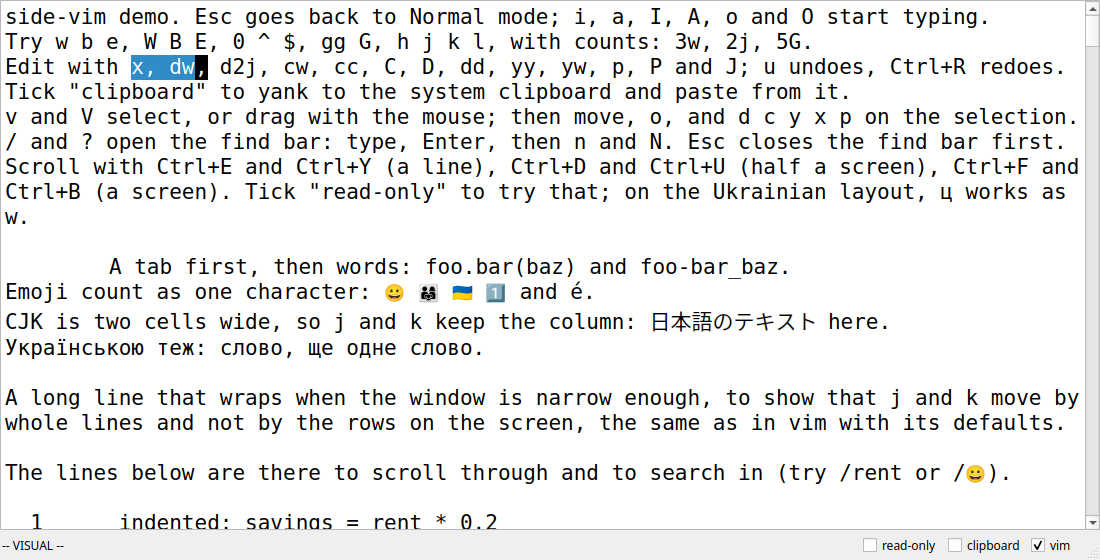
A Vim mode for PySide6's `QPlainTextEdit`. Attach it to an existing editor to add
|
|
16
|
+
Normal, Insert, Visual and Visual Line modes.
|
|
17
|
+
|
|
18
|
+
|
|
19
|
+
|
|
20
|
+
## Install
|
|
21
|
+
|
|
22
|
+
Requires Python 3.12 or newer and PySide6 6.8 or newer. Installing side-vim also
|
|
23
|
+
installs PySide6-Essentials.
|
|
24
|
+
|
|
25
|
+
```sh
|
|
26
|
+
uv add side-vim
|
|
27
|
+
```
|
|
28
|
+
|
|
29
|
+
## Usage
|
|
30
|
+
|
|
31
|
+
```python
|
|
32
|
+
import sys
|
|
33
|
+
|
|
34
|
+
from PySide6.QtWidgets import QApplication, QLabel, QPlainTextEdit, QVBoxLayout, QWidget
|
|
35
|
+
|
|
36
|
+
from side_vim import VimMode
|
|
37
|
+
|
|
38
|
+
app = QApplication(sys.argv)
|
|
39
|
+
window = QWidget()
|
|
40
|
+
editor = QPlainTextEdit("Try w, i, Esc, v and y.")
|
|
41
|
+
status = QLabel()
|
|
42
|
+
layout = QVBoxLayout(window)
|
|
43
|
+
layout.addWidget(editor)
|
|
44
|
+
layout.addWidget(status)
|
|
45
|
+
|
|
46
|
+
vim = VimMode(editor) # Starts in Normal mode. Qt deletes it with the editor.
|
|
47
|
+
status.setText(vim.mode.value)
|
|
48
|
+
vim.mode_changed.connect(lambda mode: status.setText(mode.value))
|
|
49
|
+
|
|
50
|
+
window.resize(800, 500)
|
|
51
|
+
window.show()
|
|
52
|
+
editor.setFocus()
|
|
53
|
+
sys.exit(app.exec())
|
|
54
|
+
```
|
|
55
|
+
|
|
56
|
+
Attach one `VimMode` per editor. Import `Mode` to compare `vim.mode` with
|
|
57
|
+
`Mode.NORMAL`, `Mode.INSERT`, `Mode.VISUAL` or `Mode.VISUAL_LINE`.
|
|
58
|
+
|
|
59
|
+
| API | Behavior |
|
|
60
|
+
| --- | --- |
|
|
61
|
+
| `vim.mode_changed.connect(callback)` | Calls `callback(mode)` when the mode changes. |
|
|
62
|
+
| `vim.pending_changed.connect(callback)` | Calls `callback(text)` with pending keys such as `2d`, or `""` when done. |
|
|
63
|
+
| `vim.escape_hook = callback` | Calls `callback()` before handling Esc. Return `True` if the app used it, for example to close a popup. |
|
|
64
|
+
| `vim.search_hook = callback` | `/` calls `callback(True)`; `?` calls `callback(False)`. The app opens its search UI. |
|
|
65
|
+
| `vim.set_search("rent", forward=True)` | Saves the search text and jumps to the next match. `n` repeats in that direction; `N` reverses it. |
|
|
66
|
+
| `vim.normal()` | Goes to Normal mode as Esc does, from Insert or Visual mode. |
|
|
67
|
+
| `vim.clipboard = True` | Uses the system clipboard for yank, delete, change and paste. Defaults to `False`. |
|
|
68
|
+
| `vim.layout_map = UKRAINIAN` | Maps Ukrainian letters to Vim keys. This is the default; import `UKRAINIAN` from `side_vim`. Set `None` to disable it, or pass your own dictionary. |
|
|
69
|
+
| `vim.set_enabled(False)` | Restores the plain editor and its cursor. `True` enables Vim in Normal mode. Read the setting through `vim.enabled`. |
|
|
70
|
+
| `vim.detach()` | Removes Vim from the editor. To turn it off for a while, use `set_enabled(False)`. |
|
|
71
|
+
|
|
72
|
+
When the app accepts a search, call `set_search` with its text and direction,
|
|
73
|
+
after `normal()` if the search was opened from Insert mode.
|
|
74
|
+
Search is case-sensitive, wraps around the document, and uses plain text rather
|
|
75
|
+
than regular expressions. Each editor keeps its own search. An empty string
|
|
76
|
+
clears it. In Insert mode or while disabled, `set_search` saves the search without
|
|
77
|
+
moving the cursor. The [demo](https://github.com/sprytnyk/side-vim/blob/main/side_vim/__main__.py)
|
|
78
|
+
shows a find bar and an Esc hook together.
|
|
79
|
+
|
|
80
|
+
The unnamed register is shared between editors in the same process. With
|
|
81
|
+
`clipboard=False`, yank in one editor and paste in another. With `clipboard=True`,
|
|
82
|
+
text copied in another app pastes as whole lines if it ends in a newline.
|
|
83
|
+
|
|
84
|
+
## Supported keys
|
|
85
|
+
|
|
86
|
+
Counts work with motions and edits: `3w`, `5G`, `2dd`, `y3j`. A counted insert
|
|
87
|
+
repeats the typed text: `3ix<Esc>` inserts `xxx`.
|
|
88
|
+
|
|
89
|
+
| Action | Keys |
|
|
90
|
+
| --- | --- |
|
|
91
|
+
| Move | `h j k l`, `w b e`, `W B E`, `0 ^ $`, `gg G` |
|
|
92
|
+
| Insert | `i a I A o O` |
|
|
93
|
+
| Delete, change, yank | `d c y` followed by a motion; `dd cc yy`, `x D C` |
|
|
94
|
+
| Paste, join | `p P`, `J` |
|
|
95
|
+
| Undo, redo | `u`, `Ctrl+R` |
|
|
96
|
+
| Select | `v` for characters, `V` for lines; motions extend the selection |
|
|
97
|
+
| Edit a selection | `d c y x p`; `o` switches its ends |
|
|
98
|
+
| Search | `/ ?` through the app hook, then `n N` |
|
|
99
|
+
| Scroll a line | `Ctrl+E`, `Ctrl+Y` |
|
|
100
|
+
| Scroll half a screen | `Ctrl+D`, `Ctrl+U` |
|
|
101
|
+
| Scroll a screen | `Ctrl+F`, `Ctrl+B` |
|
|
102
|
+
| Return to Normal | `Esc`, `Ctrl+[` |
|
|
103
|
+
|
|
104
|
+
In Normal and Visual modes, the Ctrl keys above take priority over app shortcuts.
|
|
105
|
+
`j` and `k` keep the screen column across tabs and wide characters, and a wrapped
|
|
106
|
+
line counts as one line, as in Vim.
|
|
107
|
+
|
|
108
|
+
This release has only the keys above. It has no repeat (`.`), text objects,
|
|
109
|
+
`f t r ~`, colon commands, macros, marks, named registers or block selection.
|
|
110
|
+
|
|
111
|
+
## Differences from Vim
|
|
112
|
+
|
|
113
|
+
side-vim follows Vim 9.1 with its default settings, except for these:
|
|
114
|
+
|
|
115
|
+
- Joined emoji and flags, such as 👨👩👧 and 🇺🇦, are one character. Vim splits
|
|
116
|
+
them into their parts. Accents, CJK and single emoji work as in Vim.
|
|
117
|
+
- Search uses plain text, not regular expressions. There is no command line.
|
|
118
|
+
`/` and `?` call `search_hook`, then the app shows its own search box and
|
|
119
|
+
passes the text to `set_search`.
|
|
120
|
+
- `J` puts one space after a period, like Vim with `nojoinspaces`. Vim's default
|
|
121
|
+
puts two.
|
|
122
|
+
- Qt stops scrolling when the last line reaches the bottom of the editor. Vim
|
|
123
|
+
scrolls on until the last line is at the top, so `Ctrl+F` and `Ctrl+E` stop
|
|
124
|
+
sooner near the end. The cursor still goes to the line Vim picks.
|
|
125
|
+
- In Insert mode the editor handles every key except Esc and `Ctrl+[`. Arrows,
|
|
126
|
+
Backspace and app shortcuts work as in any Qt editor. Vim's Insert mode keys,
|
|
127
|
+
such as `Ctrl+W`, `Ctrl+U` and `Ctrl+O`, are not there.
|
|
128
|
+
- In Normal and Visual modes, Ctrl keys that side-vim doesn't use go to the
|
|
129
|
+
editor or the app, and so do PageUp, PageDown and the function keys. `Ctrl+A`
|
|
130
|
+
selects all, for example. Qt's keys that change the text do nothing in these
|
|
131
|
+
modes: paste, cut, `Ctrl+Backspace` and `Ctrl+Delete`. In Vim, `Ctrl+V` starts
|
|
132
|
+
a block selection, which side-vim doesn't have.
|
|
133
|
+
- Other keys without a command do nothing in Normal mode. They never type text.
|
|
134
|
+
- Esc in Normal mode with nothing pending goes to the app, for example to close a
|
|
135
|
+
dialog. Vim beeps.
|
|
136
|
+
- A read-only editor allows movement, scrolling, selection, yank and search, and
|
|
137
|
+
ignores edits. Vim only warns when you change a read-only file.
|
|
138
|
+
- Dragging with the mouse in Normal mode starts Visual mode.
|
|
139
|
+
- Outside Insert mode, Ukrainian letters work as the Latin keys in the same
|
|
140
|
+
place, so `ц` is `w`. Vim needs `langmap` for that. Punctuation stays as typed,
|
|
141
|
+
`ґ` isn't mapped because its key moves between layout variants, and `/` needs
|
|
142
|
+
the English layout.
|
|
143
|
+
- On macOS, Ctrl means the physical Control key. Command shortcuts stay with the
|
|
144
|
+
app.
|
|
145
|
+
- The tab width comes from the editor's tab stop, not from a `tabstop` setting.
|
|
146
|
+
- `u` and the app's undo share the editor's undo stack, so they undo the same
|
|
147
|
+
steps.
|
|
148
|
+
|
|
149
|
+
## Develop
|
|
150
|
+
|
|
151
|
+
```sh
|
|
152
|
+
uv sync --locked
|
|
153
|
+
make run # Demo window
|
|
154
|
+
make check # Ruff and pytest
|
|
155
|
+
make format # Format Python
|
|
156
|
+
make record # Record expected results using local Vim
|
|
157
|
+
make unicode # Regenerate Vim character classes and widths
|
|
158
|
+
make mac-keys # Key checks on a Mac
|
|
159
|
+
```
|
|
160
|
+
|
|
161
|
+
Tests run Qt offscreen. CI runs for release tags and can also be started from
|
|
162
|
+
**Actions → CI → Run workflow**. It tests Linux, macOS and Windows on Python 3.12
|
|
163
|
+
and 3.14, and the lowest allowed PySide6 on Python 3.12.
|
|
164
|
+
The tests replay saved [Vim cases](https://github.com/sprytnyk/side-vim/tree/main/tests/cases),
|
|
165
|
+
so CI doesn't need Vim. Recording them needs Vim, and the scrolling cases need a
|
|
166
|
+
Unix terminal.
|
|
167
|
+
|
|
168
|
+
On a Mac, `make mac-keys` opens the demo and presses keys through macOS. It checks
|
|
169
|
+
Ctrl and Cmd keys, search, read-only mode and the Ukrainian layout, and prints PASS
|
|
170
|
+
or FAIL for each. Start it on the English (ABC) layout with Ukrainian-PC installed,
|
|
171
|
+
and don't type until it finishes.
|
|
172
|
+
|
|
173
|
+
## Release
|
|
174
|
+
|
|
175
|
+
Set these up by hand before the first tag:
|
|
176
|
+
|
|
177
|
+
1. In the GitHub repository, open **Settings**, then **Environments**, and create
|
|
178
|
+
`pypi`. Add yourself as a required reviewer. Leave **Prevent self-review** off,
|
|
179
|
+
so you can approve runs you start. Limit deployment tags to `v*`.
|
|
180
|
+
2. In your PyPI account's **Publishing** page, add a pending trusted publisher:
|
|
181
|
+
|
|
182
|
+
| Field | Value |
|
|
183
|
+
| --- | --- |
|
|
184
|
+
| PyPI project | `side-vim` |
|
|
185
|
+
| GitHub owner | `sprytnyk` |
|
|
186
|
+
| Repository | `side-vim` |
|
|
187
|
+
| Workflow | `release.yml` |
|
|
188
|
+
| Environment | `pypi` |
|
|
189
|
+
|
|
190
|
+
A pending publisher creates the project on its first upload. No PyPI token
|
|
191
|
+
goes into GitHub. See the [PyPI setup guide](https://docs.pypi.org/trusted-publishers/creating-a-project-through-oidc/)
|
|
192
|
+
and [GitHub approval guide](https://docs.github.com/en/actions/how-tos/deploy/configure-and-manage-deployments/review-deployments).
|
|
193
|
+
|
|
194
|
+
For each release:
|
|
195
|
+
|
|
196
|
+
1. On `main`, check the README and run `make check`. If key handling changed,
|
|
197
|
+
run `make mac-keys` on a Mac.
|
|
198
|
+
2. Run `uv version X.Y.Z`. Write the dated `CHANGELOG.md` section from the commits
|
|
199
|
+
since the previous release, using only sections with entries: Breaking,
|
|
200
|
+
Highlights, Fixes, Changes and Removed. Review it before committing.
|
|
201
|
+
3. Build and test the wheel in a temporary environment. Make the signed
|
|
202
|
+
`chore(release): vX.Y.Z` commit and signed `vX.Y.Z` tag with key
|
|
203
|
+
`0xC00C0F0D647BD3C6`. Push `main` and that tag to `origin`.
|
|
204
|
+
4. The release workflow runs CI, checks that the tag matches the package version,
|
|
205
|
+
and builds the wheel and source distribution. Review the run and approve the
|
|
206
|
+
`pypi` job. It publishes those files using
|
|
207
|
+
[uv trusted publishing](https://docs.astral.sh/uv/guides/integration/github/#publishing-to-pypi).
|
|
208
|
+
5. Confirm the version is on PyPI, then create a GitHub release using just the
|
|
209
|
+
changelog section as its notes. Attach no files.
|
|
210
|
+
|
|
211
|
+
The project [release skill](https://github.com/sprytnyk/side-vim/blob/main/.claude/skills/release/SKILL.md)
|
|
212
|
+
has the command sequence and approval points.
|
|
@@ -0,0 +1,20 @@
|
|
|
1
|
+
side_vim/__init__.py,sha256=6gWh57DZlBg6EPLZ4WMvBCx1m3HR1iNVw0EZ1K2uaHQ,195
|
|
2
|
+
side_vim/__main__.py,sha256=Ig6fb0AQW3RzIhuj-2TaGZlJhwnSqO0uA3ZKMQ7r6ug,5103
|
|
3
|
+
side_vim/_unicode_data.py,sha256=d8nQS-3YrKVj1nagX15AYVD6xYOKA1fpWgTb6mjtZCE,13359
|
|
4
|
+
side_vim/caret.py,sha256=WmMN9CZNdKqC0R-MNkaz7QgL9bFJ4zp0bmdM1xI_M-U,5081
|
|
5
|
+
side_vim/edits.py,sha256=r9m57uAZgwOYft3i4YW1_tyBtQmY4R3jgwbImryAMSw,3264
|
|
6
|
+
side_vim/keys.py,sha256=PnlskG8PB7IgoYusNV96ANdY7cYCQg4O6bn1qfN2qIw,4528
|
|
7
|
+
side_vim/layouts.py,sha256=CRnCFJRdfRSnPIVksPPCHkLP7euoDoLGbDX30R_IwKk,681
|
|
8
|
+
side_vim/mode.py,sha256=z58TQG14X8jNNdQ71nI3DpYv3BAanDBD4ltnf68Guxs,162
|
|
9
|
+
side_vim/motions.py,sha256=T1eAivp9zGAciCWE_OH-FM4p-FNCoNa1wGe2iGBH2io,15486
|
|
10
|
+
side_vim/notation.py,sha256=h7KxOQtTRSCNHg8tRIjUcc6YFV0cUjbiN7AVlF5-q0g,233
|
|
11
|
+
side_vim/parser.py,sha256=8874c884Deczw1Q_iIQTdtBJ5kNLzHFkzRztZd2HEZo,5706
|
|
12
|
+
side_vim/scroll.py,sha256=eFN5q8pY1uhGvwlxJ-ZUDEv4_ispAWZxRRZCRpzwuBs,3580
|
|
13
|
+
side_vim/search.py,sha256=6JTILcpPZCnTpYMb4JNAjnTV9-2fyuFTg8fG6RWMwb8,4064
|
|
14
|
+
side_vim/text.py,sha256=_zQEq9iDrTykh3UF7PDjsTNYNW6SuTcyvSuxCPEQOmI,5687
|
|
15
|
+
side_vim/unicode.py,sha256=IBgjmvTUfDEKoWt9_3hdhapHE84xc2K03vfTwRkT7ac,1229
|
|
16
|
+
side_vim/vim.py,sha256=px4pN-FBgRqozszHwqfocd0oN2qf5N4BnC2nTG2aP6Q,59102
|
|
17
|
+
side_vim-0.1.0.dist-info/licenses/LICENSE,sha256=7lr8JM-qhrsBax3u9brlqAkVX3KqOvgfPhB17xbG5o8,1069
|
|
18
|
+
side_vim-0.1.0.dist-info/WHEEL,sha256=3OmCxFA0ffBIsX4x0o8CdfSvZAOvO3mzEG8U_z5TvV4,80
|
|
19
|
+
side_vim-0.1.0.dist-info/METADATA,sha256=o2bCqOwo6ylRBVg4F4jpdo8eZFwIae9nPmyTh7TzpYo,9972
|
|
20
|
+
side_vim-0.1.0.dist-info/RECORD,,
|
|
@@ -0,0 +1,21 @@
|
|
|
1
|
+
MIT License
|
|
2
|
+
|
|
3
|
+
Copyright (c) 2026 sprytnyk.dev
|
|
4
|
+
|
|
5
|
+
Permission is hereby granted, free of charge, to any person obtaining a copy
|
|
6
|
+
of this software and associated documentation files (the "Software"), to deal
|
|
7
|
+
in the Software without restriction, including without limitation the rights
|
|
8
|
+
to use, copy, modify, merge, publish, distribute, sublicense, and/or sell
|
|
9
|
+
copies of the Software, and to permit persons to whom the Software is
|
|
10
|
+
furnished to do so, subject to the following conditions:
|
|
11
|
+
|
|
12
|
+
The above copyright notice and this permission notice shall be included in all
|
|
13
|
+
copies or substantial portions of the Software.
|
|
14
|
+
|
|
15
|
+
THE SOFTWARE IS PROVIDED "AS IS", WITHOUT WARRANTY OF ANY KIND, EXPRESS OR
|
|
16
|
+
IMPLIED, INCLUDING BUT NOT LIMITED TO THE WARRANTIES OF MERCHANTABILITY,
|
|
17
|
+
FITNESS FOR A PARTICULAR PURPOSE AND NONINFRINGEMENT. IN NO EVENT SHALL THE
|
|
18
|
+
AUTHORS OR COPYRIGHT HOLDERS BE LIABLE FOR ANY CLAIM, DAMAGES OR OTHER
|
|
19
|
+
LIABILITY, WHETHER IN AN ACTION OF CONTRACT, TORT OR OTHERWISE, ARISING FROM,
|
|
20
|
+
OUT OF OR IN CONNECTION WITH THE SOFTWARE OR THE USE OR OTHER DEALINGS IN THE
|
|
21
|
+
SOFTWARE.
|