q3dviewer 1.0.8__py3-none-any.whl → 1.1.0__py3-none-any.whl
This diff represents the content of publicly available package versions that have been released to one of the supported registries. The information contained in this diff is provided for informational purposes only and reflects changes between package versions as they appear in their respective public registries.
- q3dviewer/base_glwidget.py +62 -10
- q3dviewer/base_item.py +15 -0
- q3dviewer/custom_items/axis_item.py +31 -94
- q3dviewer/custom_items/cloud_item.py +36 -30
- q3dviewer/custom_items/frame_item.py +56 -36
- q3dviewer/custom_items/gaussian_item.py +3 -3
- q3dviewer/custom_items/grid_item.py +88 -37
- q3dviewer/custom_items/image_item.py +1 -2
- q3dviewer/custom_items/line_item.py +4 -5
- q3dviewer/gau_io.py +0 -168
- q3dviewer/glwidget.py +22 -16
- q3dviewer/test/test_interpolation.py +58 -0
- q3dviewer/test/test_rendering.py +72 -0
- q3dviewer/tools/cinematographer.py +367 -0
- q3dviewer/tools/cloud_viewer.py +2 -2
- q3dviewer/tools/film_maker.py +421 -0
- q3dviewer/tools/lidar_calib.py +11 -22
- q3dviewer/tools/lidar_cam_calib.py +9 -20
- q3dviewer/utils/maths.py +155 -5
- q3dviewer/viewer.py +30 -7
- q3dviewer-1.1.0.dist-info/METADATA +214 -0
- q3dviewer-1.1.0.dist-info/RECORD +45 -0
- {q3dviewer-1.0.8.dist-info → q3dviewer-1.1.0.dist-info}/entry_points.txt +1 -1
- q3dviewer/basic_window.py +0 -228
- q3dviewer/cloud_viewer.py +0 -74
- q3dviewer/custom_items/camera_frame_item.py +0 -173
- q3dviewer/custom_items/trajectory_item.py +0 -79
- q3dviewer/utils.py +0 -71
- q3dviewer-1.0.8.dist-info/METADATA +0 -21
- q3dviewer-1.0.8.dist-info/RECORD +0 -46
- {q3dviewer-1.0.8.dist-info → q3dviewer-1.1.0.dist-info}/LICENSE +0 -0
- {q3dviewer-1.0.8.dist-info → q3dviewer-1.1.0.dist-info}/WHEEL +0 -0
- {q3dviewer-1.0.8.dist-info → q3dviewer-1.1.0.dist-info}/top_level.txt +0 -0
q3dviewer/utils/maths.py
CHANGED
|
@@ -3,9 +3,145 @@ Copyright 2024 Panasonic Advanced Technology Development Co.,Ltd. (Liu Yang)
|
|
|
3
3
|
Distributed under MIT license. See LICENSE for more information.
|
|
4
4
|
"""
|
|
5
5
|
|
|
6
|
+
"""
|
|
7
|
+
Math proofs and implementations:
|
|
8
|
+
https://github.com/scomup/MathematicalRobotics.git
|
|
9
|
+
"""
|
|
10
|
+
|
|
11
|
+
|
|
6
12
|
import numpy as np
|
|
7
13
|
|
|
8
14
|
|
|
15
|
+
_epsilon_ = 1e-5
|
|
16
|
+
|
|
17
|
+
|
|
18
|
+
def skew(vector):
|
|
19
|
+
return np.array([[0, -vector[2], vector[1]],
|
|
20
|
+
[vector[2], 0, -vector[0]],
|
|
21
|
+
[-vector[1], vector[0], 0]])
|
|
22
|
+
|
|
23
|
+
|
|
24
|
+
def expSO3(omega):
|
|
25
|
+
"""
|
|
26
|
+
Exponential map of SO3
|
|
27
|
+
The proof is shown in 3d_rotation_group.md (10)
|
|
28
|
+
"""
|
|
29
|
+
theta2 = omega.dot(omega)
|
|
30
|
+
theta = np.sqrt(theta2)
|
|
31
|
+
nearZero = theta2 <= _epsilon_
|
|
32
|
+
W = skew(omega)
|
|
33
|
+
if (nearZero):
|
|
34
|
+
return np.eye(3) + W
|
|
35
|
+
else:
|
|
36
|
+
K = W/theta
|
|
37
|
+
KK = K.dot(K)
|
|
38
|
+
sin_theta = np.sin(theta)
|
|
39
|
+
one_minus_cos = 1 - np.cos(theta)
|
|
40
|
+
R = np.eye(3) + sin_theta * K + one_minus_cos * KK # rotation.md (10)
|
|
41
|
+
return R
|
|
42
|
+
|
|
43
|
+
|
|
44
|
+
def logSO3(R):
|
|
45
|
+
"""
|
|
46
|
+
Logarithm map of SO3
|
|
47
|
+
The proof is shown in rotation.md (14)
|
|
48
|
+
"""
|
|
49
|
+
R11, R12, R13 = R[0, :]
|
|
50
|
+
R21, R22, R23 = R[1, :]
|
|
51
|
+
R31, R32, R33 = R[2, :]
|
|
52
|
+
tr = np.trace(R)
|
|
53
|
+
omega = np.zeros(3)
|
|
54
|
+
v = np.array([R32 - R23, R13 - R31, R21 - R12])
|
|
55
|
+
# when trace == -1, i.e., the theta is approx to +-pi, +-3pi, +-5pi, etc.
|
|
56
|
+
# we do something special
|
|
57
|
+
if (tr + 1.0 < 1e-3):
|
|
58
|
+
if (R33 > R22 and R33 > R11):
|
|
59
|
+
# R33 is largest
|
|
60
|
+
# sin(theta) approx to sgn_w*pi-theta, cos(theta) approx to -1
|
|
61
|
+
W = R21 - R12 # 2*r3*sin(theta) = 2*r3*(sgn_w*pi-theta)
|
|
62
|
+
Q1 = R31 + R13 # 4 * r1*r3
|
|
63
|
+
Q2 = R23 + R32 # 4 * r2*r3
|
|
64
|
+
Q3 = 2.0 + 2.0 * R33 # 4 * r3*r3
|
|
65
|
+
r = np.sqrt(Q3) # 2 * r3
|
|
66
|
+
one_over_r = 1 / r # 1 / (2*r3)
|
|
67
|
+
norm = np.sqrt(Q1*Q1 + Q2*Q2 + Q3*Q3 + W*W) # 4*r3
|
|
68
|
+
sgn_w = np.sign(W) # get the sgn of theta
|
|
69
|
+
mag = np.pi - (2 * sgn_w * W) / norm # theta*sgn_w
|
|
70
|
+
scale = 0.5 * mag * one_over_r # theta * sgn_w / (4*r3)
|
|
71
|
+
# omega = theta * [4*r1*r3, 4*r2*r3, 4*r3*r3]/ (4*r3)
|
|
72
|
+
omega = sgn_w * scale * np.array([Q1, Q2, Q3])
|
|
73
|
+
elif (R22 > R11):
|
|
74
|
+
# R22 is the largest
|
|
75
|
+
W = R13 - R31 # 2*r2*sin(theta) = 2*r2*(sgn_w*pi-theta)
|
|
76
|
+
Q1 = R12 + R21 # 4 * r2*r1
|
|
77
|
+
Q2 = 2.0 + 2.0 * R22 # 4 * r2*r2
|
|
78
|
+
Q3 = R23 + R32 # 4 * r2*r3
|
|
79
|
+
r = np.sqrt(Q2)
|
|
80
|
+
one_over_r = 1 / r
|
|
81
|
+
norm = np.sqrt(Q1*Q1 + Q2*Q2 + Q3*Q3 + W*W)
|
|
82
|
+
sgn_w = np.sign(W)
|
|
83
|
+
mag = np.pi - (2 * sgn_w * W) / norm
|
|
84
|
+
scale = 0.5 * one_over_r * mag
|
|
85
|
+
omega = sgn_w * scale * np.array([Q1, Q2, Q3])
|
|
86
|
+
else:
|
|
87
|
+
# R11 is the largest
|
|
88
|
+
W = R32 - R23 # 2*r1*sin(theta) = 2*r1*(sgn_w*pi-theta)
|
|
89
|
+
Q1 = 2.0 + 2.0 * R11 # 4 * r1*r1
|
|
90
|
+
Q2 = R12 + R21 # 4 * r1*r2
|
|
91
|
+
Q3 = R31 + R13 # 4 * r1*r3
|
|
92
|
+
r = np.sqrt(Q1)
|
|
93
|
+
one_over_r = 1 / r
|
|
94
|
+
norm = np.sqrt(Q1*Q1 + Q2*Q2 + Q3*Q3 + W*W)
|
|
95
|
+
sgn_w = np.sign(W)
|
|
96
|
+
mag = np.pi - (2 * sgn_w * W) / norm
|
|
97
|
+
scale = 0.5 * one_over_r * mag
|
|
98
|
+
omega = sgn_w * scale * np.array([Q1, Q2, Q3])
|
|
99
|
+
else:
|
|
100
|
+
magnitude = 0
|
|
101
|
+
tr_3 = tr - 3.0
|
|
102
|
+
if (tr_3 < -1e-6):
|
|
103
|
+
# this is the normal case -1 < trace < 3
|
|
104
|
+
theta = np.arccos((tr - 1.0) / 2.0)
|
|
105
|
+
magnitude = theta / (2.0 * np.sin(theta))
|
|
106
|
+
else:
|
|
107
|
+
# when theta near 0, +-2pi, +-4pi, etc. (trace near 3.0)
|
|
108
|
+
# use Taylor expansion: theta \approx 1/2-(t-3)/12 + O((t-3)^2)
|
|
109
|
+
# see https://github.com/borglab/gtsam/issues/746 for details
|
|
110
|
+
magnitude = 0.5 - tr_3 / 12.0 + tr_3*tr_3/60.0
|
|
111
|
+
omega = magnitude * np.array([R32 - R23, R13 - R31, R21 - R12])
|
|
112
|
+
return omega
|
|
113
|
+
|
|
114
|
+
|
|
115
|
+
def interpolate_pose(T1, T2, v_max, omega_max, dt=0.02):
|
|
116
|
+
R1, t1 = makeRt(T1)
|
|
117
|
+
R2, t2 = makeRt(T2)
|
|
118
|
+
|
|
119
|
+
# Get transfrom time based on linear velocity
|
|
120
|
+
d = np.linalg.norm(t2 - t1)
|
|
121
|
+
t_lin = d / v_max
|
|
122
|
+
|
|
123
|
+
# Get transform time based on angular velocity
|
|
124
|
+
omega = logSO3(R2 @ R1.T)
|
|
125
|
+
theta = np.linalg.norm(omega)
|
|
126
|
+
t_ang = theta / omega_max
|
|
127
|
+
|
|
128
|
+
# Get total time based on the linear and angular time.
|
|
129
|
+
t_total = max(t_lin, t_ang)
|
|
130
|
+
num_steps = int(np.ceil(t_total / dt))
|
|
131
|
+
|
|
132
|
+
# Generate interpolated transforms
|
|
133
|
+
interpolated_Ts = []
|
|
134
|
+
for i in range(num_steps):
|
|
135
|
+
s = i / num_steps
|
|
136
|
+
t_interp = (1 - s) * t1 + s * t2
|
|
137
|
+
# Interpolate rotation using SO3.
|
|
138
|
+
R_interp = expSO3(s * omega) @ R1
|
|
139
|
+
T_interp = makeT(R_interp, t_interp)
|
|
140
|
+
interpolated_Ts.append(T_interp)
|
|
141
|
+
|
|
142
|
+
return interpolated_Ts
|
|
143
|
+
|
|
144
|
+
|
|
9
145
|
def frustum(left, right, bottom, top, near, far):
|
|
10
146
|
# see https://www.khronos.org/registry/OpenGL-Refpages/gl2.1/xhtml/glFrustum.xml
|
|
11
147
|
if near <= 0 or far <= 0 or near >= far or left == right or bottom == top:
|
|
@@ -157,11 +293,25 @@ def makeRt(T):
|
|
|
157
293
|
return R, t
|
|
158
294
|
|
|
159
295
|
def hex_to_rgba(hex_color):
|
|
160
|
-
|
|
161
|
-
|
|
162
|
-
|
|
163
|
-
|
|
164
|
-
|
|
296
|
+
if not hex_color.startswith("#"):
|
|
297
|
+
print("Invalid hex color string.")
|
|
298
|
+
return (1.0, 1.0, 1.0, 1.0)
|
|
299
|
+
if len(hex_color) == 7:
|
|
300
|
+
color_flat = int(hex_color[1:], 16)
|
|
301
|
+
red = (color_flat >> 16) & 0xFF
|
|
302
|
+
green = (color_flat >> 8) & 0xFF
|
|
303
|
+
blue = color_flat & 0xFF
|
|
304
|
+
return (red / 255.0, green / 255.0, blue / 255.0, 1.0)
|
|
305
|
+
elif len(hex_color) == 9:
|
|
306
|
+
color_flat = int(hex_color[1:], 16)
|
|
307
|
+
red = (color_flat >> 24) & 0xFF
|
|
308
|
+
green = (color_flat >> 16) & 0xFF
|
|
309
|
+
blue = (color_flat >> 8) & 0xFF
|
|
310
|
+
alpha = color_flat & 0xFF
|
|
311
|
+
return (red / 255.0, green / 255.0, blue / 255.0, alpha / 255.0)
|
|
312
|
+
else:
|
|
313
|
+
print("Invalid hex color string.")
|
|
314
|
+
return (1.0, 1.0, 1.0, 1.0)
|
|
165
315
|
|
|
166
316
|
# euler = np.array([1, 0.1, 0.1])
|
|
167
317
|
# euler_angles = matrix_to_euler(euler_to_matrix(euler))
|
q3dviewer/viewer.py
CHANGED
|
@@ -6,7 +6,7 @@ Distributed under MIT license. See LICENSE for more information.
|
|
|
6
6
|
|
|
7
7
|
from q3dviewer.glwidget import *
|
|
8
8
|
import signal
|
|
9
|
-
from PySide6.QtWidgets import QMainWindow, QApplication
|
|
9
|
+
from PySide6.QtWidgets import QMainWindow, QApplication, QHBoxLayout
|
|
10
10
|
|
|
11
11
|
|
|
12
12
|
def handler(signal, frame):
|
|
@@ -15,22 +15,45 @@ def handler(signal, frame):
|
|
|
15
15
|
|
|
16
16
|
|
|
17
17
|
class Viewer(QMainWindow):
|
|
18
|
-
def __init__(self, name='Viewer', win_size=[1920, 1080]
|
|
18
|
+
def __init__(self, name='Viewer', win_size=[1920, 1080],
|
|
19
|
+
gl_widget_class=GLWidget, update_interval=20):
|
|
19
20
|
signal.signal(signal.SIGINT, handler)
|
|
20
21
|
super(Viewer, self).__init__()
|
|
21
22
|
self.setGeometry(0, 0, win_size[0], win_size[1])
|
|
23
|
+
self.gl_widget_class = gl_widget_class
|
|
22
24
|
self.init_ui()
|
|
25
|
+
self.update_interval = update_interval
|
|
26
|
+
self.add_update_timer()
|
|
23
27
|
self.setWindowTitle(name)
|
|
28
|
+
self.installEventFilter(self)
|
|
24
29
|
|
|
25
30
|
def init_ui(self):
|
|
26
31
|
center_widget = QWidget()
|
|
27
32
|
self.setCentralWidget(center_widget)
|
|
28
|
-
|
|
29
|
-
|
|
30
|
-
|
|
31
|
-
self.
|
|
33
|
+
main_layout = QHBoxLayout()
|
|
34
|
+
self.add_control_panel(main_layout)
|
|
35
|
+
center_widget.setLayout(main_layout)
|
|
36
|
+
self.glwidget = self.gl_widget_class()
|
|
37
|
+
main_layout.addWidget(self.glwidget, 1)
|
|
38
|
+
self.default_gl_setting(self.glwidget)
|
|
39
|
+
|
|
40
|
+
def add_control_panel(self, main_layout):
|
|
41
|
+
"""
|
|
42
|
+
Override this function to add your own control panel to
|
|
43
|
+
the left side of the main window.
|
|
44
|
+
Don't forget add your own layout to the main_layout.
|
|
45
|
+
"""
|
|
46
|
+
pass
|
|
47
|
+
|
|
48
|
+
def default_gl_setting(self, glwidget):
|
|
49
|
+
"""
|
|
50
|
+
Override this function to set the default opengl setting of the viewer.
|
|
51
|
+
"""
|
|
52
|
+
pass
|
|
53
|
+
|
|
54
|
+
def add_update_timer(self):
|
|
32
55
|
timer = QtCore.QTimer(self)
|
|
33
|
-
timer.setInterval(
|
|
56
|
+
timer.setInterval(self.update_interval) # period, in milliseconds
|
|
34
57
|
timer.timeout.connect(self.update)
|
|
35
58
|
timer.start()
|
|
36
59
|
|
|
@@ -0,0 +1,214 @@
|
|
|
1
|
+
Metadata-Version: 2.1
|
|
2
|
+
Name: q3dviewer
|
|
3
|
+
Version: 1.1.0
|
|
4
|
+
Summary: A library designed for quickly deploying a 3D viewer.
|
|
5
|
+
Home-page: https://github.com/scomup/q3dviewer
|
|
6
|
+
Author: Liu Yang
|
|
7
|
+
Classifier: Programming Language :: Python :: 3
|
|
8
|
+
Classifier: License :: OSI Approved :: MIT License
|
|
9
|
+
Classifier: Operating System :: OS Independent
|
|
10
|
+
Description-Content-Type: text/markdown
|
|
11
|
+
License-File: LICENSE
|
|
12
|
+
Requires-Dist: numpy
|
|
13
|
+
Requires-Dist: pyside6
|
|
14
|
+
Requires-Dist: PyOpenGL
|
|
15
|
+
Requires-Dist: pillow
|
|
16
|
+
Requires-Dist: meshio
|
|
17
|
+
Requires-Dist: pypcd4
|
|
18
|
+
Requires-Dist: pye57
|
|
19
|
+
Requires-Dist: laspy
|
|
20
|
+
Requires-Dist: imageio
|
|
21
|
+
|
|
22
|
+
## q3dviewer
|
|
23
|
+
|
|
24
|
+
`q3dviewer` is a library designed for quickly deploying a 3D viewer. It is based on Qt (PySide6) and provides efficient OpenGL items for displaying 3D objects (e.g., point clouds, cameras, and 3D Gaussians). You can use it to visualize your 3D data or set up an efficient viewer application. It is inspired by PyQtGraph but focuses more on efficient 3D rendering.
|
|
25
|
+
|
|
26
|
+
## Installation
|
|
27
|
+
|
|
28
|
+
To install `q3dviewer`, execute the following command in your terminal on either Linux or Windows:
|
|
29
|
+
|
|
30
|
+
```bash
|
|
31
|
+
pip install q3dviewer
|
|
32
|
+
```
|
|
33
|
+
|
|
34
|
+
### Note for Windows Users
|
|
35
|
+
|
|
36
|
+
- Ensure that you have a Python 3 environment set up:
|
|
37
|
+
- Download and install Python 3 from the [official Python website](https://www.python.org/downloads/).
|
|
38
|
+
- During installation, make sure to check the "Add Python to PATH" option.
|
|
39
|
+
|
|
40
|
+
### Note for Linux Users
|
|
41
|
+
|
|
42
|
+
If you encounter an error related to loading the shared library `libxcb-cursor.so.0` on Ubuntu 20.04 or 22.04, please install `libxcb-cursor0`:
|
|
43
|
+
|
|
44
|
+
```bash
|
|
45
|
+
sudo apt-get install libxcb-cursor0
|
|
46
|
+
```
|
|
47
|
+
|
|
48
|
+
## Tools
|
|
49
|
+
|
|
50
|
+
Once installed, you can directly use the following tools:
|
|
51
|
+
|
|
52
|
+
### 1. Cloud Viewer
|
|
53
|
+
|
|
54
|
+
A tool for visualizing point cloud files. Launch it by executing the following command in your terminal:
|
|
55
|
+
|
|
56
|
+
```sh
|
|
57
|
+
cloud_viewer # The viewer will be displayed
|
|
58
|
+
```
|
|
59
|
+
|
|
60
|
+
*Alternatively*, if the path is not set (though it's not recommended):
|
|
61
|
+
|
|
62
|
+
```sh
|
|
63
|
+
python3 -m q3dviewer.tools.cloud_viewer
|
|
64
|
+
```
|
|
65
|
+
|
|
66
|
+
After the viewer launches, you can drag and drop files onto the window to display the point clouds. Multiple files can be dropped simultaneously to view them together. Supported formats include LAS, PCD, PLY, and E57.
|
|
67
|
+
|
|
68
|
+
For example, you can download and view point clouds of Tokyo in LAS format from the following link:
|
|
69
|
+
|
|
70
|
+
[Tokyo Point Clouds](https://www.geospatial.jp/ckan/dataset/tokyopc-23ku-2024/resource/7807d6d1-29f3-4b36-b0c8-f7aa0ea2cff3)
|
|
71
|
+
|
|
72
|
+

|
|
73
|
+
|
|
74
|
+
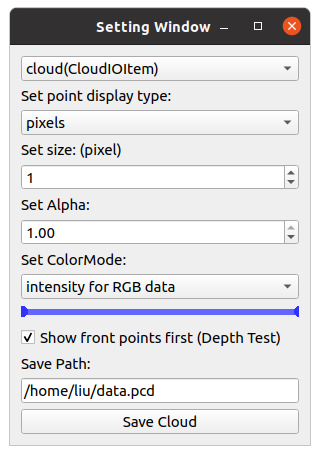
Press `M` on your keyboard to display a menu on the screen, where you can modify visualization settings for each item. For example, you can adjust various settings such as shape, size, color, and transparency for `CloudItem`.
|
|
75
|
+
|
|
76
|
+
|
|
77
|
+
|
|
78
|
+
### 2. ROS Viewer
|
|
79
|
+
|
|
80
|
+
A high-performance SLAM viewer compatible with ROS, serving as an alternative to RVIZ.
|
|
81
|
+
|
|
82
|
+
```sh
|
|
83
|
+
roscore &
|
|
84
|
+
ros_viewer
|
|
85
|
+
```
|
|
86
|
+
|
|
87
|
+
### 3. Film Maker
|
|
88
|
+
|
|
89
|
+
Would you like to create a video from point cloud data? With Film Maker, you can easily create videos with simple operations. Just edit keyframes using the user-friendly GUI, and the software will automatically interpolate the keyframes to generate the video.
|
|
90
|
+
|
|
91
|
+
```sh
|
|
92
|
+
film_maker # drag and drop your cloud file to the window
|
|
93
|
+
```
|
|
94
|
+
|
|
95
|
+
* Space key to add a keyframe.
|
|
96
|
+
* Delete key to remove a keyframe.
|
|
97
|
+
|
|
98
|
+
Film Maker GUI:
|
|
99
|
+
|
|
100
|
+

|
|
101
|
+
|
|
102
|
+
### 4. Gaussian Viewer
|
|
103
|
+
|
|
104
|
+
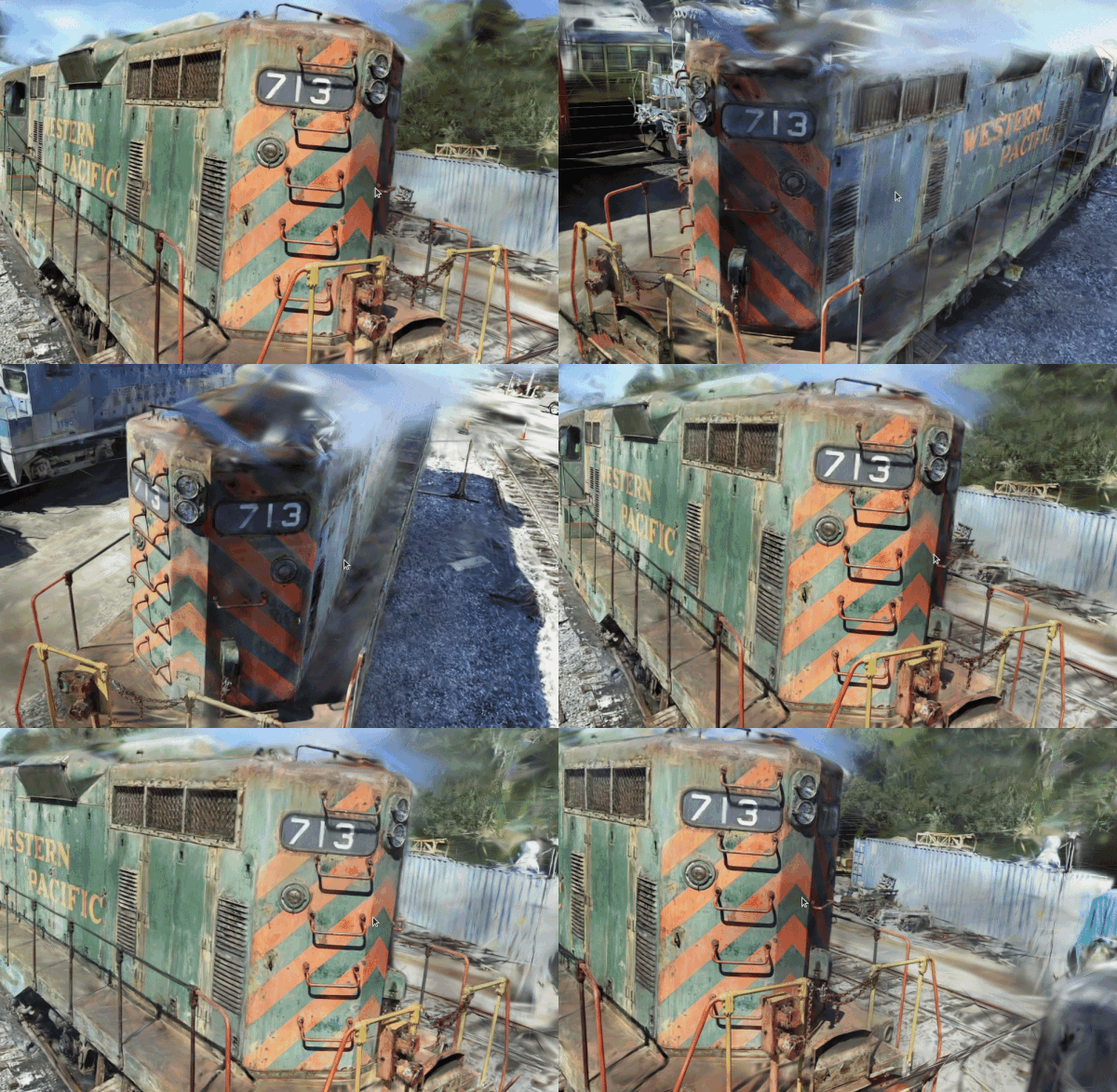
A simple viewer for 3D Gaussians. See [EasyGaussianSplatting](https://github.com/scomup/EasyGaussianSplatting) for more information.
|
|
105
|
+
|
|
106
|
+
```sh
|
|
107
|
+
gaussian_viewer # Drag and drop your Gaussian file onto the window
|
|
108
|
+
```
|
|
109
|
+
|
|
110
|
+
|
|
111
|
+
|
|
112
|
+
### 5. LiDAR-LiDAR Calibration Tools
|
|
113
|
+
|
|
114
|
+
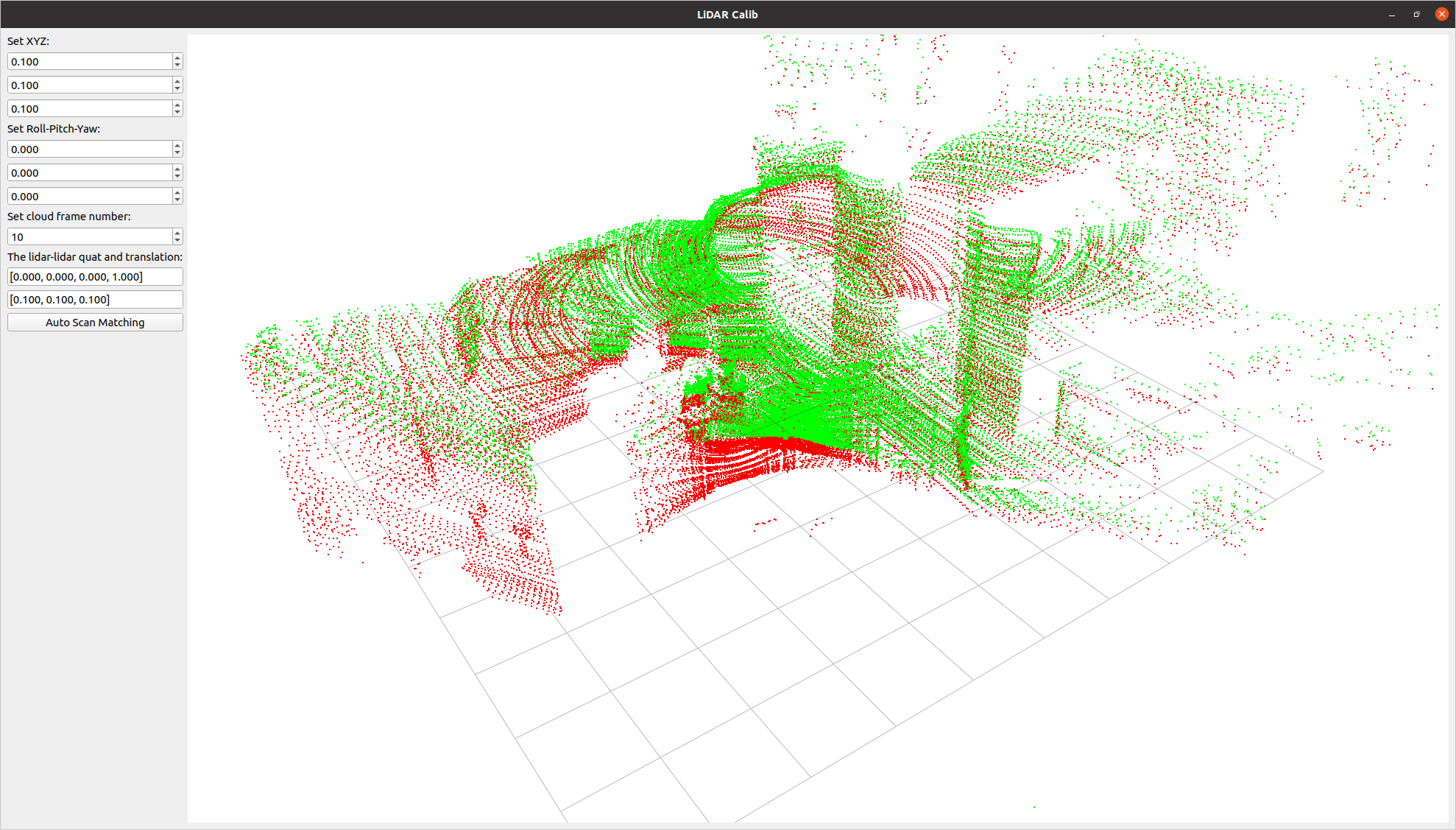
A tool to compute the relative pose between two LiDARs. It allows for both manual adjustment in the settings screen and automatic calibration.
|
|
115
|
+
|
|
116
|
+
```sh
|
|
117
|
+
lidar_calib --lidar0=/YOUR_LIDAR0_TOPIC --lidar1=/YOUR_LIDAR1_TOPIC
|
|
118
|
+
```
|
|
119
|
+
|
|
120
|
+
|
|
121
|
+
|
|
122
|
+
### 6. LiDAR-Camera Calibration Tools
|
|
123
|
+
|
|
124
|
+
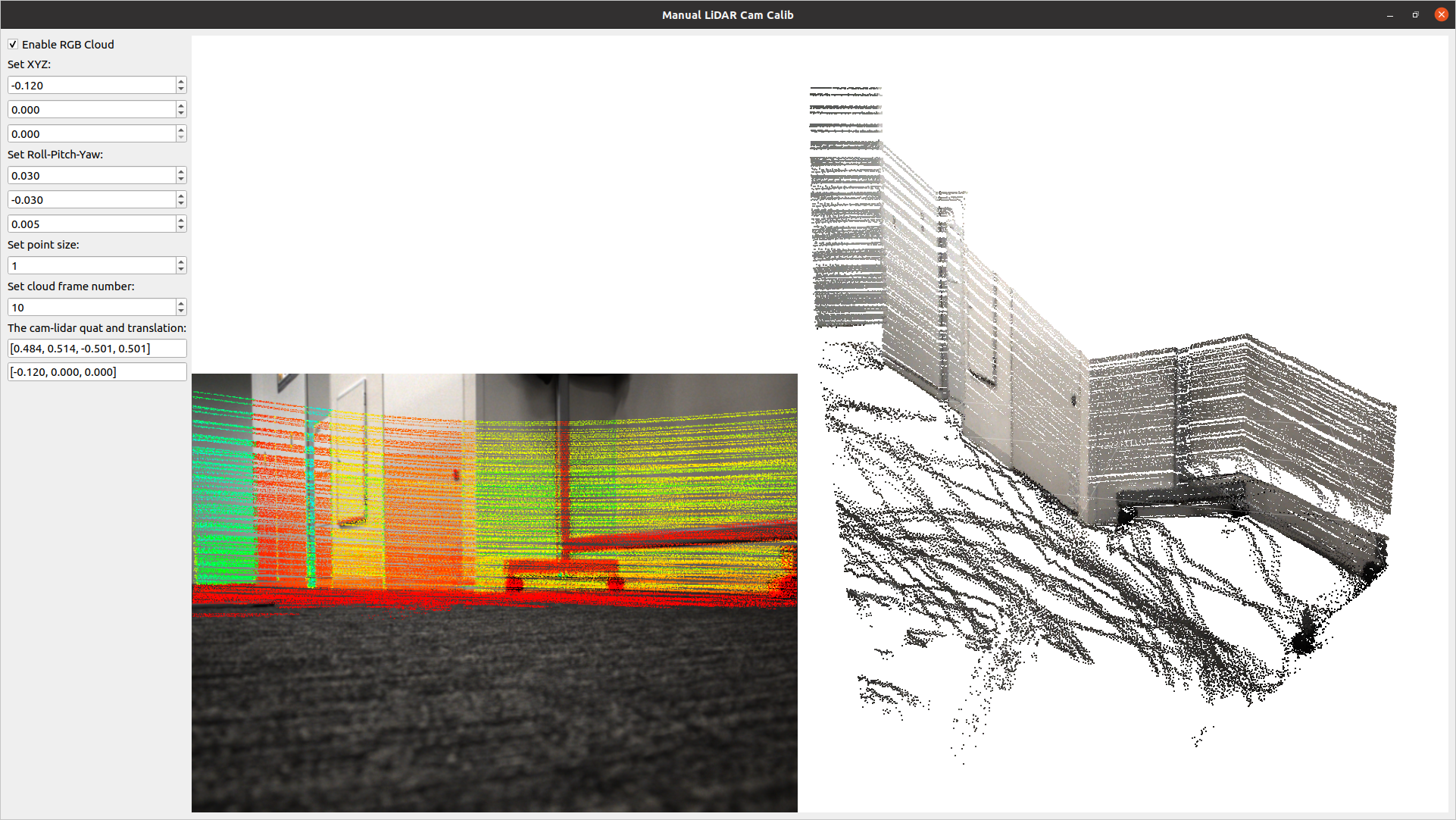
A tool for calculating the relative pose between a LiDAR and a camera. It allows for manual adjustment in the settings screen and real-time verification of LiDAR point projection onto images.
|
|
125
|
+
|
|
126
|
+
```sh
|
|
127
|
+
lidar_cam_calib --lidar=/YOUR_LIDAR_TOPIC --camera=/YOUR_CAMERA_TOPIC --camera_info=/YOUR_CAMERA_INFO_TOPIC
|
|
128
|
+
```
|
|
129
|
+
|
|
130
|
+
|
|
131
|
+
|
|
132
|
+
## Using as a Library
|
|
133
|
+
|
|
134
|
+
Using the examples above, you can easily customize and develop your own 3D viewer with `q3dviewer`. Below is a coding example.
|
|
135
|
+
|
|
136
|
+
### Custom 3D Viewer
|
|
137
|
+
|
|
138
|
+
```python
|
|
139
|
+
#!/usr/bin/env python3
|
|
140
|
+
|
|
141
|
+
import q3dviewer as q3d # Import q3dviewer
|
|
142
|
+
|
|
143
|
+
def main():
|
|
144
|
+
# Create a Qt application
|
|
145
|
+
app = q3d.QApplication([])
|
|
146
|
+
|
|
147
|
+
# Create various 3D items
|
|
148
|
+
axis_item = q3d.AxisItem(size=0.5, width=5)
|
|
149
|
+
grid_item = q3d.GridItem(size=10, spacing=1)
|
|
150
|
+
|
|
151
|
+
# Create a viewer
|
|
152
|
+
viewer = q3d.Viewer(name='example')
|
|
153
|
+
|
|
154
|
+
# Add items to the viewer
|
|
155
|
+
viewer.add_items({
|
|
156
|
+
'grid': grid_item,
|
|
157
|
+
'axis': axis_item,
|
|
158
|
+
})
|
|
159
|
+
|
|
160
|
+
# Show the viewer & run the Qt application
|
|
161
|
+
viewer.show()
|
|
162
|
+
app.exec()
|
|
163
|
+
|
|
164
|
+
if __name__ == '__main__':
|
|
165
|
+
main()
|
|
166
|
+
```
|
|
167
|
+
|
|
168
|
+
`q3dviewer` provides the following 3D items:
|
|
169
|
+
|
|
170
|
+
- **AxisItem**: Displays coordinate axes or the origin position.
|
|
171
|
+
- **CloudItem**: Displays point clouds.
|
|
172
|
+
- **CloudIOItem**: Displays point clouds with input/output capabilities.
|
|
173
|
+
- **GaussianItem**: Displays 3D Gaussians.
|
|
174
|
+
- **GridItem**: Displays grids.
|
|
175
|
+
- **ImageItem**: Displays 2D images.
|
|
176
|
+
- **Text2DItem**: Displays 2D text.
|
|
177
|
+
- **LineItem**: Displays lines or trajectories.
|
|
178
|
+
|
|
179
|
+
### Developing Custom Items
|
|
180
|
+
|
|
181
|
+
In addition to the standard 3D items provided, you can visualize custom 3D items with simple coding. Below is a sample:
|
|
182
|
+
|
|
183
|
+
```python
|
|
184
|
+
from OpenGL.GL import *
|
|
185
|
+
import numpy as np
|
|
186
|
+
import q3dviewer as q3d
|
|
187
|
+
from PySide6.QtWidgets import QLabel, QSpinBox
|
|
188
|
+
|
|
189
|
+
class YourItem(q3d.BaseItem):
|
|
190
|
+
def __init__(self):
|
|
191
|
+
super(YourItem, self).__init__()
|
|
192
|
+
# Necessary initialization
|
|
193
|
+
|
|
194
|
+
def add_setting(self, layout):
|
|
195
|
+
# Initialize the settings screen
|
|
196
|
+
label = QLabel("Add your setting:")
|
|
197
|
+
layout.addWidget(label)
|
|
198
|
+
box = QSpinBox()
|
|
199
|
+
layout.addWidget(box)
|
|
200
|
+
|
|
201
|
+
def set_data(self, data):
|
|
202
|
+
# Obtain the data you want to visualize
|
|
203
|
+
pass
|
|
204
|
+
|
|
205
|
+
def initialize_gl(self):
|
|
206
|
+
# OpenGL initialization settings (if needed)
|
|
207
|
+
pass
|
|
208
|
+
|
|
209
|
+
def paint(self):
|
|
210
|
+
# Visualize 3D objects using OpenGL
|
|
211
|
+
pass
|
|
212
|
+
```
|
|
213
|
+
|
|
214
|
+
Enjoy using `q3dviewer`!
|
|
@@ -0,0 +1,45 @@
|
|
|
1
|
+
q3dviewer/__init__.py,sha256=rP5XX_x8g7hxIMqNHlU89BN4dt5MSvoYYwip68fCmhc,173
|
|
2
|
+
q3dviewer/base_glwidget.py,sha256=k4fVwV2A_0CS7zZgHargbKE7push-l2UN7rmr2Z9vFo,10916
|
|
3
|
+
q3dviewer/base_item.py,sha256=lzb04oRaS4rRJrAP6C1Bu4ugK237FgupMTB97zjNVFw,1768
|
|
4
|
+
q3dviewer/gau_io.py,sha256=47DEQpj8HBSa-_TImW-5JCeuQeRkm5NMpJWZG3hSuFU,0
|
|
5
|
+
q3dviewer/glwidget.py,sha256=im8hjVYEL0Zl7fOIHTQMJdWu7WNOHlvTdIDYjebz9WA,4940
|
|
6
|
+
q3dviewer/viewer.py,sha256=LH1INLFhi6pRjzazzQJ0AWT4hgyXI6GnmqoJFUwUZVE,2517
|
|
7
|
+
q3dviewer/custom_items/__init__.py,sha256=gOiAxdjDaAnFL8YbqSEWWWOwUrJfvzP9JLR34sCB9-4,434
|
|
8
|
+
q3dviewer/custom_items/axis_item.py,sha256=PTBSf5DmQI8ieSinYjY_aC7P8q1nzE-2Vc2GNd1O3Os,2568
|
|
9
|
+
q3dviewer/custom_items/cloud_io_item.py,sha256=gjK3n9WKB7JwxC93ijkweEHA5EezpgNJ8KO-PBaDKCs,2835
|
|
10
|
+
q3dviewer/custom_items/cloud_item.py,sha256=7r6s_j1qEUfLe70t-M68-oIrGRrPOUcZp18ML6jST0s,12542
|
|
11
|
+
q3dviewer/custom_items/frame_item.py,sha256=6BOM3MXi-Akv6KUXDC3QYEAXKxwk0Eo1KQn-F7jkqrQ,7559
|
|
12
|
+
q3dviewer/custom_items/gaussian_item.py,sha256=CZoXMmj2JPFfMqu7v4q4dLUI2cg_WfE1DHWGXjEYn6M,9869
|
|
13
|
+
q3dviewer/custom_items/grid_item.py,sha256=20n4TGm5YEaudhnEOCOk-HtsKwxVxaPr8YV36kO04yU,4802
|
|
14
|
+
q3dviewer/custom_items/image_item.py,sha256=ctNR81fVgxkdl2n3U_TPFL6yn086UhNI_A9fFHgkc-4,5491
|
|
15
|
+
q3dviewer/custom_items/line_item.py,sha256=u0oFN2iHzsRHtnbvyvC_iglEkCwEU2NnTuE536sKUAE,4348
|
|
16
|
+
q3dviewer/custom_items/text_item.py,sha256=nuHMVMQrwy50lNk9hxB94criFxbJJK-SYiK2fSXWUMQ,2158
|
|
17
|
+
q3dviewer/shaders/cloud_frag.glsl,sha256=tbCsDUp9YlPe0hRWlFS724SH6TtMeLO-GVYROzEElZg,609
|
|
18
|
+
q3dviewer/shaders/cloud_vert.glsl,sha256=Vxgw-Zrr0knAK0z4qMXKML6IC4EbffKMwYN2TMXROoI,2117
|
|
19
|
+
q3dviewer/shaders/gau_frag.glsl,sha256=5_UY84tWDts59bxP8x4I-wgnzY8aGeGuo28wX--LW7E,975
|
|
20
|
+
q3dviewer/shaders/gau_prep.glsl,sha256=eCT9nm65uz32w8NaDjeGKhyAZh42Aea-QTwr3yQVr9U,7218
|
|
21
|
+
q3dviewer/shaders/gau_vert.glsl,sha256=NNbVhv_JyqZDK9iXAyBAcIHAtim7G9yWbC9IaUfTL1w,1666
|
|
22
|
+
q3dviewer/shaders/sort_by_key.glsl,sha256=CA2zOcbyDGYAJSJEUvgjUqNshg9NAehf8ipL3Jsv4qE,1097
|
|
23
|
+
q3dviewer/test/test_interpolation.py,sha256=rR_CXsYFLpn0zO0mHf_jL-naluDBMSky--FviOQga0Q,1657
|
|
24
|
+
q3dviewer/test/test_rendering.py,sha256=gbTcu7-cg20DgC5Zoi17C1s5lBGLfAE1rW9biqPjRsA,2164
|
|
25
|
+
q3dviewer/tools/__init__.py,sha256=01wG7BGM6VX0QyFBKsqPmyf2e-vrmV_N3-mo-VQ1VBg,20
|
|
26
|
+
q3dviewer/tools/cinematographer.py,sha256=o_24SSQ4mF062QQ7Gv3i90v7fA79PcHLB03UHXufuEA,13950
|
|
27
|
+
q3dviewer/tools/cloud_viewer.py,sha256=10f2LSWpmsXzxrGobXw188doVjJbgBfPoqZPUi35EtI,3867
|
|
28
|
+
q3dviewer/tools/example_viewer.py,sha256=yeVXT0k4-h1vTLKnGzWADZD3our6XUaYUTy0p5daTkE,959
|
|
29
|
+
q3dviewer/tools/film_maker.py,sha256=CC4RuK0bE_-0kcdU6xyzqR47pB4TEcm0g4LlDrFs3qY,16004
|
|
30
|
+
q3dviewer/tools/gaussian_viewer.py,sha256=vIwWmiFhjNmknrEkBLzt2yiegeH7LP3OeNjnGM6GzaI,1633
|
|
31
|
+
q3dviewer/tools/lidar_calib.py,sha256=M01bGg2mT8LwVcYybolr4UW_UUaR-f-BFciEHtjeK-w,10488
|
|
32
|
+
q3dviewer/tools/lidar_cam_calib.py,sha256=SYNLDvi15MX7Q3aGn771fvu1cES9xeXgP0_WmDq33w4,11200
|
|
33
|
+
q3dviewer/tools/ros_viewer.py,sha256=ARB3I5wohY3maP8dCu0O0hxObd6JFKuK2y7AApVgMWA,2551
|
|
34
|
+
q3dviewer/utils/__init__.py,sha256=irm8Z_bT8l9kzhoMlds2Dal8g4iw4vjmqNPZSs4W6e0,157
|
|
35
|
+
q3dviewer/utils/cloud_io.py,sha256=ttD8FJExdDhXB1Z0Ej9S939i8gcq4JfyqwLXVh8CEFw,11094
|
|
36
|
+
q3dviewer/utils/convert_ros_msg.py,sha256=sAoQfy3qLQKsIArBAVm8H--wlQXOcmkKK3-Ox9UCcrc,1686
|
|
37
|
+
q3dviewer/utils/gl_helper.py,sha256=dRY_kUqyPMr7NTcupUr6_VTvgnj53iE2C0Lk0-oFYsI,1435
|
|
38
|
+
q3dviewer/utils/maths.py,sha256=5TmjWUX1K3UjygXxrUsydjbo7tPzu0gD-yy7qtQUGBU,10588
|
|
39
|
+
q3dviewer/utils/range_slider.py,sha256=jZJQL-uQgnpgLvtYSWpKTrJlLkt3aqNpaRQAePEpNd0,3174
|
|
40
|
+
q3dviewer-1.1.0.dist-info/LICENSE,sha256=81cMOyNfw8KLb1JnPYngGHJ5W83gSbZEBU9MEP3tl-E,1124
|
|
41
|
+
q3dviewer-1.1.0.dist-info/METADATA,sha256=hiWxWsKDWmCaXB-lJYhi-kutcydCeafxfzDSgeQv5Y8,6991
|
|
42
|
+
q3dviewer-1.1.0.dist-info/WHEEL,sha256=g4nMs7d-Xl9-xC9XovUrsDHGXt-FT0E17Yqo92DEfvY,92
|
|
43
|
+
q3dviewer-1.1.0.dist-info/entry_points.txt,sha256=aeUdGH7UIgMZEMFUc-0xPZWspY95GoPdZcZuLceq85g,361
|
|
44
|
+
q3dviewer-1.1.0.dist-info/top_level.txt,sha256=HFFDCbGu28txcGe2HPc46A7EPaguBa_b5oH7bufmxHM,10
|
|
45
|
+
q3dviewer-1.1.0.dist-info/RECORD,,
|
|
@@ -1,8 +1,8 @@
|
|
|
1
1
|
[console_scripts]
|
|
2
2
|
cloud_viewer = q3dviewer.tools.cloud_viewer:main
|
|
3
|
+
film_maker = q3dviewer.tools.film_maker:main
|
|
3
4
|
gaussian_viewer = q3dviewer.tools.gaussian_viewer:main
|
|
4
5
|
lidar_calib = q3dviewer.tools.lidar_calib:main
|
|
5
6
|
lidar_cam_calib = q3dviewer.tools.lidar_cam_calib:main
|
|
6
7
|
mesh_viewer = q3dviewer.tools.mesh_viewer:main
|
|
7
8
|
ros_viewer = q3dviewer.tools.ros_viewer:main
|
|
8
|
-
|