plotille 6.0.0__py3-none-any.whl → 6.0.1__py3-none-any.whl
This diff represents the content of publicly available package versions that have been released to one of the supported registries. The information contained in this diff is provided for informational purposes only and reflects changes between package versions as they appear in their respective public registries.
Potentially problematic release.
This version of plotille might be problematic. Click here for more details.
|
@@ -1,6 +1,6 @@
|
|
|
1
1
|
Metadata-Version: 2.4
|
|
2
2
|
Name: plotille
|
|
3
|
-
Version: 6.0.
|
|
3
|
+
Version: 6.0.1
|
|
4
4
|
Summary: Plot in the terminal using braille dots.
|
|
5
5
|
Keywords: plot,scatter,histogram,terminal,braille,unicode,timeseries
|
|
6
6
|
Author: Tammo Ippen
|
|
@@ -32,11 +32,12 @@ Description-Content-Type: text/markdown
|
|
|
32
32
|
[](https://github.com/tammoippen/plotille/actions/workflows/CI.yml)
|
|
33
33
|
[](https://codecov.io/gh/tammoippen/plotille)
|
|
34
34
|
[](https://img.shields.io/badge/cpython-3.10%2C%203.11%2C%203.12%2C%203.13%203.14-brightgreen.svg)
|
|
35
|
-
[](https://img.shields.io/badge/pypy-3.11-brightgreen.svg)
|
|
35
|
+
[](https://img.shields.io/badge/pypy-3.11-brightgreen.svg)
|
|
36
36
|
[](https://pypi.python.org/pypi/plotille)
|
|
37
37
|
[](https://pepy.tech/project/plotille)
|
|
38
38
|
[](https://pypi.python.org/pypi/plotille)
|
|
39
39
|
[](https://github.com/astral-sh/ruff)
|
|
40
|
+
[](https://github.com/astral-sh/uv)
|
|
40
41
|
|
|
41
42
|
Plots, scatter plots, histograms and heatmaps in the terminal using braille dots, and foreground and background colors - with no dependencies. Make complex figures using the Figure class or make fast and simple plots using graphing function - similar to a very small sibling to matplotlib. Or use the canvas to plot dots, lines and images yourself.
|
|
42
43
|
|
|
@@ -72,8 +73,8 @@ In [3]: X = np.sort(np.random.normal(size=1000))
|
|
|
72
73
|
To construct plots the recommended way is to use a `Figure`:
|
|
73
74
|
|
|
74
75
|
```python
|
|
75
|
-
In [
|
|
76
|
-
Init signature: plotille.Figure()
|
|
76
|
+
In [4]: plotille.Figure?
|
|
77
|
+
Init signature: plotille.Figure() -> None
|
|
77
78
|
Docstring:
|
|
78
79
|
Figure class to compose multiple plots.
|
|
79
80
|
|
|
@@ -81,17 +82,16 @@ Within a Figure you can easily compose many plots, assign labels to plots
|
|
|
81
82
|
and define the properties of the underlying Canvas. Possible properties that
|
|
82
83
|
can be defined are:
|
|
83
84
|
|
|
84
|
-
width, height: int
|
|
85
|
-
|
|
86
|
-
x_limits:
|
|
87
|
-
|
|
88
|
-
y_limits:
|
|
89
|
-
|
|
90
|
-
color_mode: str
|
|
91
|
-
with_colors: bool
|
|
92
|
-
background:
|
|
93
|
-
x_label, y_label: str
|
|
94
|
-
```
|
|
85
|
+
width, height: int Define the number of characters in X / Y direction
|
|
86
|
+
which are used for plotting.
|
|
87
|
+
x_limits: DataValue Define the X limits of the reference coordinate system,
|
|
88
|
+
that will be plotted.
|
|
89
|
+
y_limits: DataValue Define the Y limits of the reference coordinate system,
|
|
90
|
+
that will be plotted.
|
|
91
|
+
color_mode: str Define the used color mode. See `plotille.color()`.
|
|
92
|
+
with_colors: bool Define, whether to use colors at all.
|
|
93
|
+
background: ColorDefinition Define the background color.
|
|
94
|
+
x_label, y_label: str Define the X / Y axis label.```
|
|
95
95
|
|
|
96
96
|
Basically, you create a `Figure`, define the properties and add your plots. Using the `show()` function, the `Figure` generates the plot using a new canvas:
|
|
97
97
|
|
|
@@ -158,44 +158,47 @@ There are some utility functions for fast graphing of single plots.
|
|
|
158
158
|
In [4]: plotille.plot?
|
|
159
159
|
Signature:
|
|
160
160
|
plotille.plot(
|
|
161
|
-
X,
|
|
162
|
-
Y,
|
|
163
|
-
width=80,
|
|
164
|
-
height=40,
|
|
165
|
-
X_label='X',
|
|
166
|
-
Y_label='Y',
|
|
167
|
-
linesep=
|
|
168
|
-
interp='linear',
|
|
169
|
-
x_min=None,
|
|
170
|
-
x_max=None,
|
|
171
|
-
y_min=None,
|
|
172
|
-
y_max=None,
|
|
173
|
-
lc=None,
|
|
174
|
-
bg=None,
|
|
175
|
-
color_mode='names',
|
|
176
|
-
origin=True,
|
|
177
|
-
marker=None,
|
|
178
|
-
)
|
|
161
|
+
X: Sequence[float | int] | Sequence[datetime.datetime],
|
|
162
|
+
Y: Sequence[float | int] | Sequence[datetime.datetime],
|
|
163
|
+
width: int = 80,
|
|
164
|
+
height: int = 40,
|
|
165
|
+
X_label: str = 'X',
|
|
166
|
+
Y_label: str = 'Y',
|
|
167
|
+
linesep: str = '\n',
|
|
168
|
+
interp: Optional[Literal['linear']] = 'linear',
|
|
169
|
+
x_min: float | int | datetime.datetime | None = None,
|
|
170
|
+
x_max: float | int | datetime.datetime | None = None,
|
|
171
|
+
y_min: float | int | datetime.datetime | None = None,
|
|
172
|
+
y_max: float | int | datetime.datetime | None = None,
|
|
173
|
+
lc: Union[str, int, ColorNames, tuple[int, int, int], Sequence[int], NoneType] = None,
|
|
174
|
+
bg: Union[str, int, ColorNames, tuple[int, int, int], Sequence[int], NoneType] = None,
|
|
175
|
+
color_mode: Literal['names', 'byte', 'rgb'] = 'names',
|
|
176
|
+
origin: bool = True,
|
|
177
|
+
marker: str | None = None,
|
|
178
|
+
) -> str
|
|
179
179
|
Docstring:
|
|
180
180
|
Create plot with X , Y values and linear interpolation between points
|
|
181
181
|
|
|
182
182
|
Parameters:
|
|
183
183
|
X: List[float] X values.
|
|
184
184
|
Y: List[float] Y values. X and Y must have the same number of entries.
|
|
185
|
-
width: int The number of characters for the width (columns) of the
|
|
186
|
-
|
|
185
|
+
width: int The number of characters for the width (columns) of the
|
|
186
|
+
canvas.
|
|
187
|
+
height: int The number of characters for the hight (rows) of the
|
|
188
|
+
canvas.
|
|
187
189
|
X_label: str Label for X-axis.
|
|
188
|
-
Y_label: str Label for Y-axis. max 8 characters.
|
|
190
|
+
Y_label: str Label for Y-axis. max 8 characters. linesep: str The requested line separator. default: os.linesep
|
|
189
191
|
linesep: str The requested line separator. default: os.linesep
|
|
190
192
|
interp: Optional[str] Specify interpolation; values None, 'linear'
|
|
191
193
|
x_min, x_max: float Limits for the displayed X values.
|
|
192
194
|
y_min, y_max: float Limits for the displayed Y values.
|
|
193
|
-
lc:
|
|
194
|
-
bg:
|
|
195
|
-
color_mode:
|
|
196
|
-
see plotille.color.__docs__
|
|
195
|
+
lc: ColorDefinition Give the line color.
|
|
196
|
+
bg: ColorDefinition Give the background color.
|
|
197
|
+
color_mode: ColorMode Specify color input mode; 'names' (default), 'byte' or
|
|
198
|
+
'rgb' see plotille.color.__docs__
|
|
197
199
|
origin: bool Whether to print the origin. default: True
|
|
198
|
-
marker: str Instead of braille dots set a marker char for actual
|
|
200
|
+
marker: str Instead of braille dots set a marker char for actual
|
|
201
|
+
values.
|
|
199
202
|
|
|
200
203
|
Returns:
|
|
201
204
|
str: plot over `X`, `Y`.
|
|
@@ -211,23 +214,23 @@ In [5]: print(plotille.plot(X, np.sin(X), height=30, width=60))
|
|
|
211
214
|
In [6]: plotille.scatter?
|
|
212
215
|
Signature:
|
|
213
216
|
plotille.scatter(
|
|
214
|
-
X,
|
|
215
|
-
Y,
|
|
216
|
-
width=80,
|
|
217
|
-
height=40,
|
|
218
|
-
X_label='X',
|
|
219
|
-
Y_label='Y',
|
|
220
|
-
linesep='\n',
|
|
221
|
-
x_min=None,
|
|
222
|
-
x_max=None,
|
|
223
|
-
y_min=None,
|
|
224
|
-
y_max=None,
|
|
225
|
-
lc=None,
|
|
226
|
-
bg=None,
|
|
227
|
-
color_mode='names',
|
|
228
|
-
origin=True,
|
|
229
|
-
marker=None,
|
|
230
|
-
)
|
|
217
|
+
X: Sequence[float | int] | Sequence[datetime.datetime],
|
|
218
|
+
Y: Sequence[float | int] | Sequence[datetime.datetime],
|
|
219
|
+
width: int = 80,
|
|
220
|
+
height: int = 40,
|
|
221
|
+
X_label: str = 'X',
|
|
222
|
+
Y_label: str = 'Y',
|
|
223
|
+
linesep: str = '\n',
|
|
224
|
+
x_min: float | int | datetime.datetime | None = None,
|
|
225
|
+
x_max: float | int | datetime.datetime | None = None,
|
|
226
|
+
y_min: float | int | datetime.datetime | None = None,
|
|
227
|
+
y_max: float | int | datetime.datetime | None = None,
|
|
228
|
+
lc: Union[str, int, ColorNames, tuple[int, int, int], Sequence[int], NoneType] = None,
|
|
229
|
+
bg: Union[str, int, ColorNames, tuple[int, int, int], Sequence[int], NoneType] = None,
|
|
230
|
+
color_mode: Literal['names', 'byte', 'rgb'] = 'names',
|
|
231
|
+
origin: bool = True,
|
|
232
|
+
marker: str | None = None,
|
|
233
|
+
) -> str
|
|
231
234
|
Docstring:
|
|
232
235
|
Create scatter plot with X , Y values
|
|
233
236
|
|
|
@@ -237,17 +240,19 @@ Basically plotting without interpolation:
|
|
|
237
240
|
Parameters:
|
|
238
241
|
X: List[float] X values.
|
|
239
242
|
Y: List[float] Y values. X and Y must have the same number of entries.
|
|
240
|
-
width: int The number of characters for the width (columns) of the
|
|
241
|
-
|
|
243
|
+
width: int The number of characters for the width (columns) of the
|
|
244
|
+
canvas.
|
|
245
|
+
height: int The number of characters for the hight (rows) of the
|
|
246
|
+
canvas. X_label: str Label for X-axis.
|
|
242
247
|
X_label: str Label for X-axis.
|
|
243
248
|
Y_label: str Label for Y-axis. max 8 characters.
|
|
244
249
|
linesep: str The requested line separator. default: os.linesep
|
|
245
250
|
x_min, x_max: float Limits for the displayed X values.
|
|
246
251
|
y_min, y_max: float Limits for the displayed Y values.
|
|
247
|
-
lc:
|
|
248
|
-
bg:
|
|
249
|
-
color_mode:
|
|
250
|
-
see plotille.color.__docs__
|
|
252
|
+
lc: ColorDefinition Give the line color.
|
|
253
|
+
bg: ColorDefinition Give the background color.
|
|
254
|
+
color_mode: ColorMode Specify color input mode; 'names' (default), 'byte' or
|
|
255
|
+
'rgb' see plotille.color.__docs__
|
|
251
256
|
origin: bool Whether to print the origin. default: True
|
|
252
257
|
marker: str Instead of braille dots set a marker char.
|
|
253
258
|
|
|
@@ -267,15 +272,15 @@ Inspired by [crappyhist](http://kevinastraight.x10host.com/2013/12/28/python-his
|
|
|
267
272
|
In [8]: plotille.hist?
|
|
268
273
|
Signature:
|
|
269
274
|
plotille.hist(
|
|
270
|
-
X,
|
|
271
|
-
bins=40,
|
|
272
|
-
width=80,
|
|
273
|
-
log_scale=False,
|
|
274
|
-
linesep='\n',
|
|
275
|
-
lc=None,
|
|
276
|
-
bg=None,
|
|
277
|
-
color_mode='names',
|
|
278
|
-
)
|
|
275
|
+
X: Sequence[float | int] | Sequence[datetime.datetime],
|
|
276
|
+
bins: int = 40,
|
|
277
|
+
width: int = 80,
|
|
278
|
+
log_scale: bool = False,
|
|
279
|
+
linesep: str = '\n',
|
|
280
|
+
lc: Union[str, int, ColorNames, tuple[int, int, int], Sequence[int], NoneType] = None,
|
|
281
|
+
bg: Union[str, int, ColorNames, tuple[int, int, int], Sequence[int], NoneType] = None,
|
|
282
|
+
color_mode: Literal['names', 'byte', 'rgb'] = 'names',
|
|
283
|
+
) -> str
|
|
279
284
|
Docstring:
|
|
280
285
|
Create histogram over `X` from left to right
|
|
281
286
|
|
|
@@ -288,10 +293,10 @@ Parameters:
|
|
|
288
293
|
width: int The number of characters for the width (columns).
|
|
289
294
|
log_scale: bool Scale the histogram with `log` function.
|
|
290
295
|
linesep: str The requested line separator. default: os.linesep
|
|
291
|
-
lc:
|
|
292
|
-
bg:
|
|
293
|
-
color_mode:
|
|
294
|
-
see plotille.color.__docs__
|
|
296
|
+
lc: ColorDefinition Give the line color.
|
|
297
|
+
bg: ColorDefinition Give the background color.
|
|
298
|
+
color_mode: ColorMode Specify color input mode; 'names' (default), 'byte' or
|
|
299
|
+
'rgb' see plotille.color.__docs__
|
|
295
300
|
|
|
296
301
|
Returns:
|
|
297
302
|
str: histogram over `X` from left to right.
|
|
@@ -313,30 +318,32 @@ only expose access to aggregated values (counts for each bin / bucket).
|
|
|
313
318
|
In [8]: plotille.hist_aggregated?
|
|
314
319
|
Signature:
|
|
315
320
|
plotille.hist_aggregated(
|
|
316
|
-
counts,
|
|
317
|
-
bins,
|
|
318
|
-
width=80,
|
|
319
|
-
log_scale=False,
|
|
320
|
-
linesep='\n',
|
|
321
|
-
lc=None,
|
|
322
|
-
bg=None,
|
|
323
|
-
color_mode='names',
|
|
324
|
-
|
|
321
|
+
counts: list[int],
|
|
322
|
+
bins: Sequence[float],
|
|
323
|
+
width: int = 80,
|
|
324
|
+
log_scale: bool = False,
|
|
325
|
+
linesep: str = '\n',
|
|
326
|
+
lc: Union[str, int, ColorNames, tuple[int, int, int], Sequence[int], NoneType] = None,
|
|
327
|
+
bg: Union[str, int, ColorNames, tuple[int, int, int], Sequence[int], NoneType] = None,
|
|
328
|
+
color_mode: Literal['names', 'byte', 'rgb'] = 'names',
|
|
329
|
+
meta: plotille._data_metadata.DataMetadata | None = None,
|
|
330
|
+
) -> str
|
|
325
331
|
Docstring:
|
|
326
332
|
Create histogram for aggregated data.
|
|
327
333
|
|
|
328
334
|
Parameters:
|
|
329
|
-
counts: List[int]
|
|
330
|
-
bins: List[float]
|
|
331
|
-
|
|
332
|
-
|
|
333
|
-
width: int
|
|
334
|
-
log_scale: bool
|
|
335
|
-
linesep: str
|
|
336
|
-
lc:
|
|
337
|
-
bg:
|
|
338
|
-
color_mode:
|
|
339
|
-
|
|
335
|
+
counts: List[int] Counts for each bucket.
|
|
336
|
+
bins: List[float] Limits for the bins for the provided counts: limits for
|
|
337
|
+
bin `i` are `[bins[i], bins[i+1])`.
|
|
338
|
+
Hence, `len(bins) == len(counts) + 1`.
|
|
339
|
+
width: int The number of characters for the width (columns).
|
|
340
|
+
log_scale: bool Scale the histogram with `log` function.
|
|
341
|
+
linesep: str The requested line separator. default: os.linesep
|
|
342
|
+
lc: ColorDefinition Give the line color.
|
|
343
|
+
bg: ColorDefinition Give the background color.
|
|
344
|
+
color_mode: ColorMode Specify color input mode; 'names' (default), 'byte' or
|
|
345
|
+
'rgb' see plotille.color.__docs__
|
|
346
|
+
meta: DataMetadata | None For conversion of datetime values.
|
|
340
347
|
Returns:
|
|
341
348
|
str: histogram over `X` from left to right.
|
|
342
349
|
|
|
@@ -359,21 +366,21 @@ There is also another more 'usual' histogram function available:
|
|
|
359
366
|
In [10]: plotille.histogram?
|
|
360
367
|
Signature:
|
|
361
368
|
plotille.histogram(
|
|
362
|
-
X,
|
|
363
|
-
bins=160,
|
|
364
|
-
width=80,
|
|
365
|
-
height=40,
|
|
366
|
-
X_label='X',
|
|
367
|
-
Y_label='Counts',
|
|
368
|
-
linesep='\n',
|
|
369
|
-
x_min=None,
|
|
370
|
-
x_max=None,
|
|
371
|
-
y_min=None,
|
|
372
|
-
y_max=None,
|
|
373
|
-
lc=None,
|
|
374
|
-
bg=None,
|
|
375
|
-
color_mode='names',
|
|
376
|
-
)
|
|
369
|
+
X: Sequence[float | int] | Sequence[datetime.datetime],
|
|
370
|
+
bins: int = 160,
|
|
371
|
+
width: int = 80,
|
|
372
|
+
height: int = 40,
|
|
373
|
+
X_label: str = 'X',
|
|
374
|
+
Y_label: str = 'Counts',
|
|
375
|
+
linesep: str = '\n',
|
|
376
|
+
x_min: float | int | datetime.datetime | None = None,
|
|
377
|
+
x_max: float | int | datetime.datetime | None = None,
|
|
378
|
+
y_min: float | int | datetime.datetime | None = None,
|
|
379
|
+
y_max: float | int | datetime.datetime | None = None,
|
|
380
|
+
lc: Union[str, int, ColorNames, tuple[int, int, int], Sequence[int], NoneType] = None,
|
|
381
|
+
bg: Union[str, int, ColorNames, tuple[int, int, int], Sequence[int], NoneType] = None,
|
|
382
|
+
color_mode: Literal['names', 'byte', 'rgb'] = 'names',
|
|
383
|
+
) -> str
|
|
377
384
|
Docstring:
|
|
378
385
|
Create histogram over `X`
|
|
379
386
|
|
|
@@ -390,10 +397,10 @@ Parameters:
|
|
|
390
397
|
linesep: str The requested line separator. default: os.linesep
|
|
391
398
|
x_min, x_max: float Limits for the displayed X values.
|
|
392
399
|
y_min, y_max: float Limits for the displayed Y values.
|
|
393
|
-
lc:
|
|
394
|
-
bg:
|
|
395
|
-
color_mode:
|
|
396
|
-
see plotille.color.__docs__
|
|
400
|
+
lc: ColorDefinition Give the line color.
|
|
401
|
+
bg: ColorDefinition Give the background color.
|
|
402
|
+
color_mode: ColorMode Specify color input mode; 'names' (default), 'byte' or
|
|
403
|
+
'rgb' see plotille.color.__docs__
|
|
397
404
|
|
|
398
405
|
Returns:
|
|
399
406
|
str: histogram over `X`.
|
|
@@ -411,39 +418,42 @@ The underlying plotting area is modeled as the `Canvas` class:
|
|
|
411
418
|
In [12]: plotille.Canvas?
|
|
412
419
|
Init signature:
|
|
413
420
|
plotille.Canvas(
|
|
414
|
-
width,
|
|
415
|
-
height,
|
|
416
|
-
xmin=0,
|
|
417
|
-
ymin=0,
|
|
418
|
-
xmax=1,
|
|
419
|
-
ymax=1,
|
|
420
|
-
background=None,
|
|
421
|
-
**color_kwargs,
|
|
422
|
-
)
|
|
421
|
+
width: int,
|
|
422
|
+
height: int,
|
|
423
|
+
xmin: Union[float, int] = 0,
|
|
424
|
+
ymin: Union[float, int] = 0,
|
|
425
|
+
xmax: Union[float, int] = 1,
|
|
426
|
+
ymax: Union[float, int] = 1,
|
|
427
|
+
background: Union[str, int, ColorNames, tuple[int, int, int], Sequence[int], NoneType] = None,
|
|
428
|
+
**color_kwargs: Any,
|
|
429
|
+
) -> None
|
|
423
430
|
Docstring:
|
|
424
431
|
A canvas object for plotting braille dots
|
|
425
432
|
|
|
426
433
|
A Canvas object has a `width` x `height` characters large canvas, in which it
|
|
427
434
|
can plot indivitual braille point, lines out of braille points, rectangles,...
|
|
428
|
-
Since a full braille character has 2 x 4 dots (⣿), the canvas has `width` * 2,
|
|
429
|
-
dots to plot into in total.
|
|
435
|
+
Since a full braille character has 2 x 4 dots (⣿), the canvas has `width` * 2,
|
|
436
|
+
`height` * 4 dots to plot into in total.
|
|
430
437
|
|
|
431
438
|
It maintains two coordinate systems: a reference system with the limits (xmin, ymin)
|
|
432
439
|
in the lower left corner to (xmax, ymax) in the upper right corner is transformed
|
|
433
|
-
into the canvas discrete, i.e. dots, coordinate system (0, 0) to (`width` * 2,
|
|
434
|
-
It does so transparently to clients of the Canvas, i.e. all plotting
|
|
435
|
-
only accept coordinates in the reference system. If the coordinates are
|
|
436
|
-
the reference system, they are not plotted.
|
|
440
|
+
into the canvas discrete, i.e. dots, coordinate system (0, 0) to (`width` * 2,
|
|
441
|
+
`height` * 4). It does so transparently to clients of the Canvas, i.e. all plotting
|
|
442
|
+
functions only accept coordinates in the reference system. If the coordinates are
|
|
443
|
+
outside the reference system, they are not plotted.
|
|
437
444
|
Init docstring:
|
|
438
445
|
Initiate a Canvas object
|
|
439
446
|
|
|
440
447
|
Parameters:
|
|
441
|
-
width: int The number of characters for the width (columns) of
|
|
442
|
-
|
|
448
|
+
width: int The number of characters for the width (columns) of
|
|
449
|
+
the canvas.
|
|
450
|
+
height: int The number of characters for the hight (rows) of the
|
|
451
|
+
canvas.
|
|
443
452
|
xmin, ymin: float Lower left corner of reference system.
|
|
444
453
|
xmax, ymax: float Upper right corner of reference system.
|
|
445
454
|
background: multiple Background color of the canvas.
|
|
446
|
-
**color_kwargs: More arguments to the color-function.
|
|
455
|
+
**color_kwargs: More arguments to the color-function.
|
|
456
|
+
See `plotille.color()`.
|
|
447
457
|
|
|
448
458
|
Returns:
|
|
449
459
|
Canvas object
|
|
@@ -455,7 +465,15 @@ _point:_
|
|
|
455
465
|
|
|
456
466
|
```python
|
|
457
467
|
In [11]: plotille.Canvas.point?
|
|
458
|
-
Signature:
|
|
468
|
+
Signature:
|
|
469
|
+
plotille.Canvas.point(
|
|
470
|
+
self,
|
|
471
|
+
x: Union[float, int],
|
|
472
|
+
y: Union[float, int],
|
|
473
|
+
set_: bool = True,
|
|
474
|
+
color: Union[str, int, ColorNames, tuple[int, int, int], Sequence[int], NoneType] = None,
|
|
475
|
+
marker: str | None = None,
|
|
476
|
+
) -> None
|
|
459
477
|
Docstring:
|
|
460
478
|
Put a point into the canvas at (x, y) [reference coordinate system]
|
|
461
479
|
|
|
@@ -471,7 +489,16 @@ _line:_
|
|
|
471
489
|
|
|
472
490
|
```python
|
|
473
491
|
In [14]: plotille.Canvas.line?
|
|
474
|
-
Signature:
|
|
492
|
+
Signature:
|
|
493
|
+
plotille.Canvas.line(
|
|
494
|
+
self,
|
|
495
|
+
x0: Union[float, int],
|
|
496
|
+
y0: Union[float, int],
|
|
497
|
+
x1: Union[float, int],
|
|
498
|
+
y1: Union[float, int],
|
|
499
|
+
set_: bool = True,
|
|
500
|
+
color: Union[str, int, ColorNames, tuple[int, int, int], Sequence[int], NoneType] = None,
|
|
501
|
+
) -> None
|
|
475
502
|
Docstring:
|
|
476
503
|
Plot line between point (x0, y0) and (x1, y1) [reference coordinate system].
|
|
477
504
|
|
|
@@ -486,9 +513,20 @@ _rect:_
|
|
|
486
513
|
|
|
487
514
|
```python
|
|
488
515
|
In [15]: plotille.Canvas.rect?
|
|
489
|
-
Signature:
|
|
516
|
+
Signature:
|
|
517
|
+
plotille.Canvas.rect(
|
|
518
|
+
self,
|
|
519
|
+
xmin: Union[float, int],
|
|
520
|
+
ymin: Union[float, int],
|
|
521
|
+
xmax: Union[float, int],
|
|
522
|
+
ymax: Union[float, int],
|
|
523
|
+
set_: bool = True,
|
|
524
|
+
color: Union[str, int, ColorNames, tuple[int, int, int], Sequence[int], NoneType] = None,
|
|
525
|
+
) -> None
|
|
490
526
|
Docstring:
|
|
491
|
-
Plot rectangle with bbox (xmin, ymin) and (xmax, ymax)
|
|
527
|
+
Plot rectangle with bbox (xmin, ymin) and (xmax, ymax).
|
|
528
|
+
|
|
529
|
+
In the reference coordinate system.
|
|
492
530
|
|
|
493
531
|
Parameters:
|
|
494
532
|
xmin, ymin: float Lower left corner of rectangle.
|
|
@@ -501,7 +539,15 @@ _text:_
|
|
|
501
539
|
|
|
502
540
|
```python
|
|
503
541
|
In [16]: plotille.Canvas.text?
|
|
504
|
-
Signature:
|
|
542
|
+
Signature:
|
|
543
|
+
plotille.Canvas.text(
|
|
544
|
+
self,
|
|
545
|
+
x: Union[float, int],
|
|
546
|
+
y: Union[float, int],
|
|
547
|
+
text: str,
|
|
548
|
+
set_: bool = True,
|
|
549
|
+
color: Union[str, int, ColorNames, tuple[int, int, int], Sequence[int], NoneType] = None,
|
|
550
|
+
) -> None
|
|
505
551
|
Docstring:
|
|
506
552
|
Put some text into the canvas at (x, y) [reference coordinate system]
|
|
507
553
|
|
|
@@ -520,11 +566,12 @@ In [17]: plotille.Canvas.braille_image?
|
|
|
520
566
|
Signature:
|
|
521
567
|
plotille.Canvas.braille_image(
|
|
522
568
|
self,
|
|
523
|
-
pixels,
|
|
524
|
-
threshold=127,
|
|
525
|
-
inverse=False,
|
|
526
|
-
|
|
527
|
-
|
|
569
|
+
pixels: Sequence[int],
|
|
570
|
+
threshold: int = 127,
|
|
571
|
+
inverse: bool = False,
|
|
572
|
+
color: Union[str, int, ColorNames, tuple[int, int, int], Sequence[int], NoneType] = None,
|
|
573
|
+
set_: bool = True,
|
|
574
|
+
) -> None
|
|
528
575
|
Docstring:
|
|
529
576
|
Print an image using braille dots into the canvas.
|
|
530
577
|
|
|
@@ -547,6 +594,7 @@ Parameters:
|
|
|
547
594
|
threshold: float All pixels above this threshold will be
|
|
548
595
|
drawn.
|
|
549
596
|
inverse: bool Whether to invert the image.
|
|
597
|
+
color: multiple Color of the point.
|
|
550
598
|
set_: bool Whether to plot or remove the dots.
|
|
551
599
|
```
|
|
552
600
|
|
|
@@ -554,7 +602,12 @@ _image:_
|
|
|
554
602
|
|
|
555
603
|
```python
|
|
556
604
|
In [18]: plotille.Canvas.image?
|
|
557
|
-
Signature:
|
|
605
|
+
Signature:
|
|
606
|
+
plotille.Canvas.image(
|
|
607
|
+
self,
|
|
608
|
+
pixels: Sequence[tuple[int, int, int] | Sequence[int] | None],
|
|
609
|
+
set_: bool = True,
|
|
610
|
+
) -> None
|
|
558
611
|
Docstring:
|
|
559
612
|
Print an image using background colors into the canvas.
|
|
560
613
|
|
|
@@ -582,7 +635,7 @@ _plot:_
|
|
|
582
635
|
|
|
583
636
|
```python
|
|
584
637
|
In [16]: plotille.Canvas.plot?
|
|
585
|
-
Signature: plotille.Canvas.plot(self, linesep='\n')
|
|
638
|
+
Signature: plotille.Canvas.plot(self, linesep: str = '\n') -> str
|
|
586
639
|
Docstring:
|
|
587
640
|
Transform canvas into `print`-able string
|
|
588
641
|
|
|
@@ -637,8 +690,3 @@ In [29]: print(cvs.plot())
|
|
|
637
690
|
|
|
638
691
|
[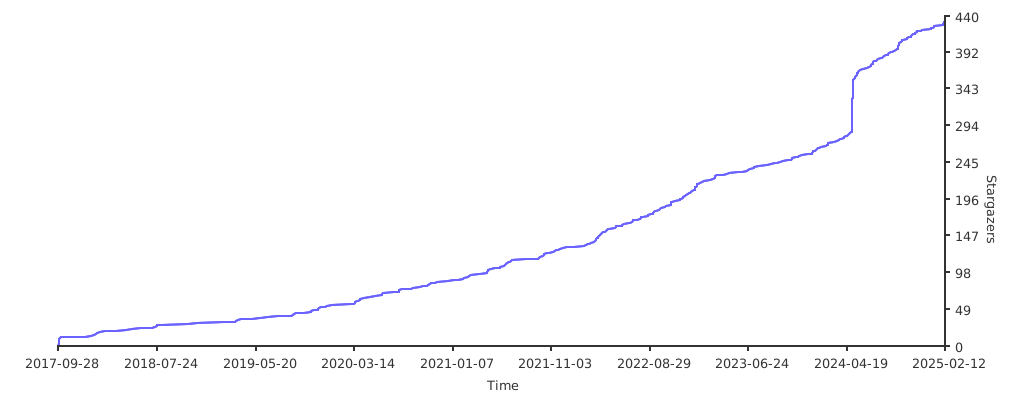](https://starchart.cc/tammoippen/plotille)
|
|
639
692
|
|
|
640
|
-
## Sponsoring the project
|
|
641
|
-
|
|
642
|
-
If you like the project and want to buy me a coffee, feel free to send some coins ;)
|
|
643
|
-
|
|
644
|
-
[<img src="https://api.gitsponsors.com/api/badge/img?id=105019800" height="20">](https://api.gitsponsors.com/api/badge/link?p=gkBol1u2+g2pjgZGRaDLy4k0XbPDRXdPWJWnueCUGo/wcSsqyE8nr+n9nvqfeuqXee6JhLARGZS5bP0ZvorS7y6t4INyHLtTrprYh9c+MYkqAZeSqNIf7WL0ZRTI070RVQA3L9QW9IZNFlMbulW+BQ==)
|
|
@@ -11,6 +11,6 @@ plotille/_graphs.py,sha256=dd5d6c3523390b2b7f7187ef0372fb2391656930c04b52a06b38e
|
|
|
11
11
|
plotille/_input_formatter.py,sha256=e68ec1f225f5c79259cb873b60336b06e5c28f6201b11bd930bf32681c97b632,8326
|
|
12
12
|
plotille/_util.py,sha256=35ce5a38f9b9b2f52e14d5bdaf35f2f1afa8d0c5106a393c9f55a146ca4eab1b,3101
|
|
13
13
|
plotille/data.py,sha256=7d8050585a5fdfffc0ee985edcdf136f932cd8df228a3175e71d5f435e4bea13,3734
|
|
14
|
-
plotille-6.0.
|
|
15
|
-
plotille-6.0.
|
|
16
|
-
plotille-6.0.
|
|
14
|
+
plotille-6.0.1.dist-info/WHEEL,sha256=ab6157bc637547491fb4567cd7ddf26b04d63382916ca16c29a5c8e94c9c9ef7,79
|
|
15
|
+
plotille-6.0.1.dist-info/METADATA,sha256=28dbbd2dabc2332af0b4e8d27d098fa5d4e38d9093579193a51c93aa8a335d8e,26556
|
|
16
|
+
plotille-6.0.1.dist-info/RECORD,,
|
|
File without changes
|