plotext-plus 1.0.1__py3-none-any.whl
This diff represents the content of publicly available package versions that have been released to one of the supported registries. The information contained in this diff is provided for informational purposes only and reflects changes between package versions as they appear in their respective public registries.
- plotext_plus/__init__.py +31 -0
- plotext_plus/__main__.py +2 -0
- plotext_plus/_api.py +828 -0
- plotext_plus/_build.py +270 -0
- plotext_plus/_core.py +581 -0
- plotext_plus/_date.py +60 -0
- plotext_plus/_default.py +83 -0
- plotext_plus/_dict.py +210 -0
- plotext_plus/_doc.py +707 -0
- plotext_plus/_doc_utils.py +291 -0
- plotext_plus/_figure.py +488 -0
- plotext_plus/_global.py +370 -0
- plotext_plus/_matrix.py +171 -0
- plotext_plus/_monitor.py +848 -0
- plotext_plus/_output.py +136 -0
- plotext_plus/_shtab.py +9 -0
- plotext_plus/_themes.py +343 -0
- plotext_plus/_utility.py +853 -0
- plotext_plus/api.py +828 -0
- plotext_plus/charts.py +42 -0
- plotext_plus/core.py +581 -0
- plotext_plus/mcp_cli.py +79 -0
- plotext_plus/mcp_server.py +505 -0
- plotext_plus/plotext_cli.py +375 -0
- plotext_plus/plotting.py +92 -0
- plotext_plus/themes.py +29 -0
- plotext_plus/utilities.py +52 -0
- plotext_plus/utils.py +370 -0
- plotext_plus-1.0.1.dist-info/METADATA +303 -0
- plotext_plus-1.0.1.dist-info/RECORD +33 -0
- plotext_plus-1.0.1.dist-info/WHEEL +4 -0
- plotext_plus-1.0.1.dist-info/entry_points.txt +3 -0
- plotext_plus-1.0.1.dist-info/licenses/LICENSE +23 -0
plotext_plus/utils.py
ADDED
|
@@ -0,0 +1,370 @@
|
|
|
1
|
+
# This file contains some plotext functions which are only available to the top main level and not to sub figures (which are written in _figure.py and _monitor.py). These are functions which requires some coding and would be too long to be added directly in _core.py
|
|
2
|
+
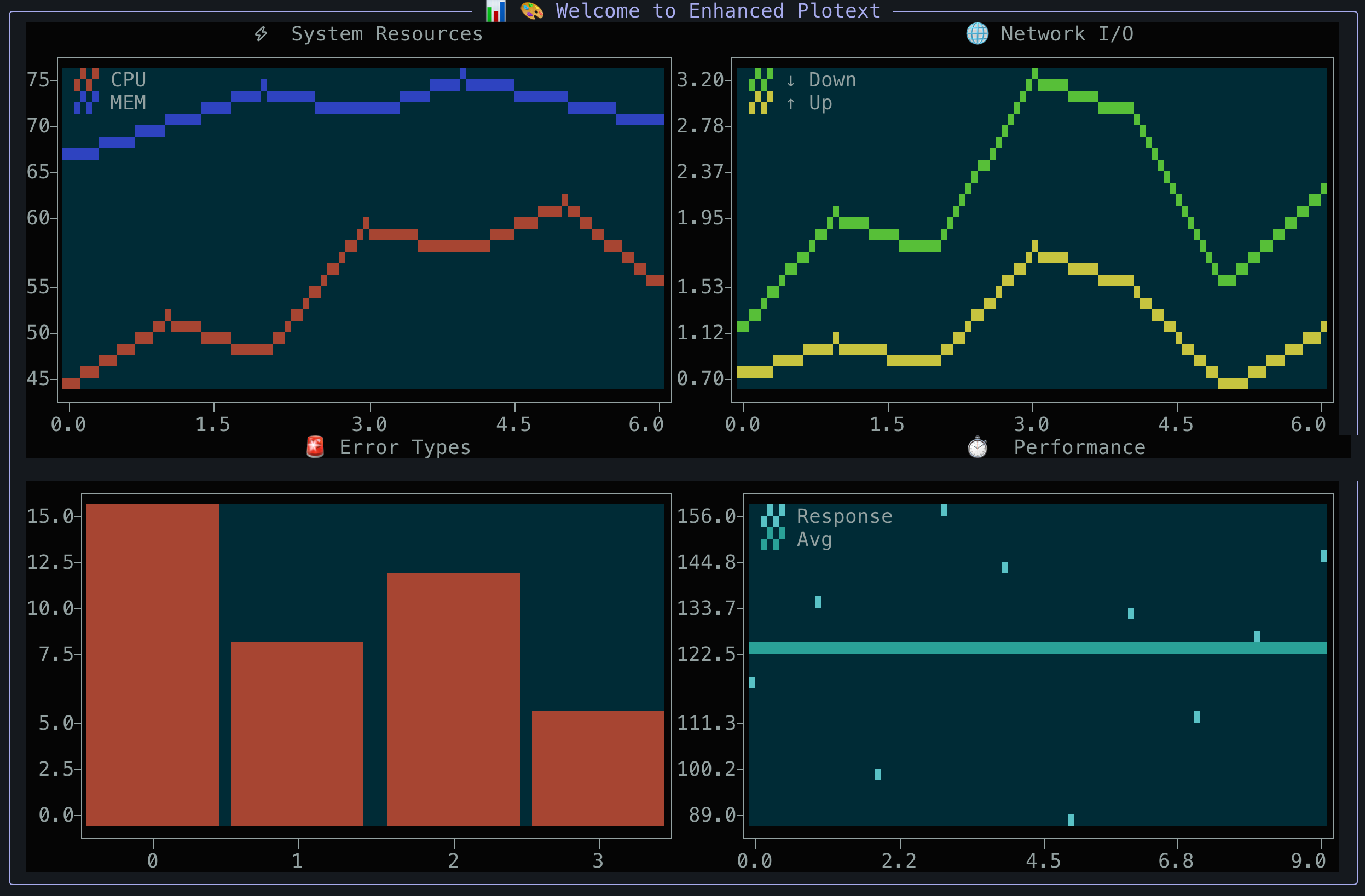
|
|
3
|
+
from plotext_plus._utility import marker_codes, hd_symbols, sin
|
|
4
|
+
from plotext_plus._figure import _figure_class
|
|
5
|
+
from plotext_plus._utility import themes as _themes
|
|
6
|
+
import plotext_plus._utility as ut
|
|
7
|
+
from time import time, sleep
|
|
8
|
+
from math import sqrt, ceil
|
|
9
|
+
import datetime as dt
|
|
10
|
+
|
|
11
|
+
figure = _figure_class() # the main figure at top level
|
|
12
|
+
|
|
13
|
+
##############################################
|
|
14
|
+
####### Simple Bar Functions ########
|
|
15
|
+
##############################################
|
|
16
|
+
|
|
17
|
+
def simple_bar(*args, width = None, marker = None, color = None, title = None):
|
|
18
|
+
x, y = ut.set_data(*args)
|
|
19
|
+
marker = ut.correct_marker(marker)
|
|
20
|
+
|
|
21
|
+
color_ok = ut.is_color(color) or (isinstance(color, list) and len(color) == len(x))
|
|
22
|
+
color = [color] if color_ok else None
|
|
23
|
+
|
|
24
|
+
simple_stacked_bar(x, [y], width = width, marker = marker, colors = color, title = title)
|
|
25
|
+
|
|
26
|
+
def simple_stacked_bar(*args, width = None, marker = None, colors = None, title = None, labels = None):
|
|
27
|
+
x, y, Y, width = ut.bar_data(*args, width = width)
|
|
28
|
+
marker = ut.correct_marker(marker)
|
|
29
|
+
|
|
30
|
+
bars = len(Y); stacked_bars = len(Y[0])
|
|
31
|
+
|
|
32
|
+
colors_ok1 = isinstance(colors, list) and isinstance(colors[0], list) and ut.matrix_size(colors) == [bars, stacked_bars]
|
|
33
|
+
colors_ok2 = isinstance(colors, list) and len(colors) == stacked_bars
|
|
34
|
+
colors = ut.transpose(colors) if colors_ok1 else [colors] * bars if colors_ok2 else [ut.color_sequence[:stacked_bars]] * bars
|
|
35
|
+
|
|
36
|
+
title = ut.get_title(title, width)
|
|
37
|
+
bars = [ut.single_bar(x[i], Y[i], y[i], marker, colors[i]) for i in range(bars)]
|
|
38
|
+
labels = ut.get_simple_labels(marker, labels, colors[0], width)
|
|
39
|
+
figure.monitor.matrix.canvas = title + '\n'.join(bars) + labels
|
|
40
|
+
figure.monitor.fast_plot = True
|
|
41
|
+
|
|
42
|
+
def simple_multiple_bar(*args, width = None, marker = None, colors = None, title = None, labels = None):
|
|
43
|
+
x, y, Y, width = ut.bar_data(*args, width = width, mode='multiple')
|
|
44
|
+
bars = len(Y); multiple_bars = len(Y[0]); lx = len(x[0])
|
|
45
|
+
marker = ut.correct_marker(marker)
|
|
46
|
+
|
|
47
|
+
colors_ok = isinstance(colors, list) and len(colors) == multiple_bars
|
|
48
|
+
colors = colors if colors_ok else ut.color_sequence[:multiple_bars]
|
|
49
|
+
|
|
50
|
+
out = ut.get_title(title, width)
|
|
51
|
+
for i in range(bars):
|
|
52
|
+
xn = [x[i] if j == (multiple_bars - 1) // 2 else ut.space * lx for j in range(multiple_bars)]
|
|
53
|
+
new = [ut.single_bar(xn[j], [Y[i][j]], y[j][i], marker, [colors[j]]) for j in range(multiple_bars)]
|
|
54
|
+
out += '\n'.join(new)
|
|
55
|
+
out += '\n\n' if i != bars - 1 else ''
|
|
56
|
+
labels = ut.get_simple_labels(marker, labels, colors, width)
|
|
57
|
+
figure.monitor.matrix.canvas = out + labels
|
|
58
|
+
figure.monitor.fast_plot = True
|
|
59
|
+
|
|
60
|
+
##############################################
|
|
61
|
+
############# Play GIF ################
|
|
62
|
+
##############################################
|
|
63
|
+
|
|
64
|
+
def play_gif(path):
|
|
65
|
+
from PIL import Image, ImageSequence
|
|
66
|
+
path = ut.correct_path(path)
|
|
67
|
+
if not ut.is_file(path):
|
|
68
|
+
return
|
|
69
|
+
im = Image.open(path)
|
|
70
|
+
index = 1
|
|
71
|
+
for image in ImageSequence.Iterator(im):
|
|
72
|
+
load_time = time()
|
|
73
|
+
figure.clt()
|
|
74
|
+
image = image.convert('RGB')
|
|
75
|
+
figure.monitor._draw_image(image, fast = True)
|
|
76
|
+
figure.show()
|
|
77
|
+
load_time = time() - load_time
|
|
78
|
+
frame_time = image.info['duration'] / 10 ** 3
|
|
79
|
+
if load_time < frame_time:
|
|
80
|
+
sleep(frame_time - load_time)
|
|
81
|
+
|
|
82
|
+
##############################################
|
|
83
|
+
########## Video Functions ############
|
|
84
|
+
##############################################
|
|
85
|
+
|
|
86
|
+
def play_video(path, from_youtube = False):
|
|
87
|
+
path = ut.correct_path(path)
|
|
88
|
+
if not ut.is_file(path):
|
|
89
|
+
return
|
|
90
|
+
_play_video(path, from_youtube)
|
|
91
|
+
|
|
92
|
+
def play_youtube(url):
|
|
93
|
+
import pafy
|
|
94
|
+
video = pafy.new(url)
|
|
95
|
+
best = video.getbest()
|
|
96
|
+
_play_video(best.url, from_youtube = True)
|
|
97
|
+
|
|
98
|
+
def get_youtube(url, path, log):
|
|
99
|
+
import pafy
|
|
100
|
+
video = pafy.new(url)
|
|
101
|
+
best = video.getbest(preftype = "mp4")
|
|
102
|
+
path = "youtube-video.mp4" if path is None else path
|
|
103
|
+
path = ut.correct_path(path)
|
|
104
|
+
best.download(filepath = path, quiet = not log)
|
|
105
|
+
print(ut.format_strings('YouTube video downloaded as', path)) if log else None
|
|
106
|
+
|
|
107
|
+
def _play_video(path, from_youtube = False):
|
|
108
|
+
import cv2
|
|
109
|
+
from ffpyplayer.player import MediaPlayer
|
|
110
|
+
from PIL import Image
|
|
111
|
+
cap = cv2.VideoCapture(path)
|
|
112
|
+
player = MediaPlayer(path)#, paused = True, loglevel = 'quiet');
|
|
113
|
+
fr = 0;
|
|
114
|
+
while fr == 0:
|
|
115
|
+
fr = cap.get(cv2.CAP_PROP_FPS)
|
|
116
|
+
frame_time = 1 / fr
|
|
117
|
+
#to_list = lambda frame: [[tuple(int(el) for el in tup) for tup in row] for row in frame]
|
|
118
|
+
pt = lambda time: '{time:05.1f} '.format(time=round(10 ** 3 * time, 1))
|
|
119
|
+
real_time = video_time = 0
|
|
120
|
+
while True:
|
|
121
|
+
load_time = time()
|
|
122
|
+
check_video, frame = cap.read();
|
|
123
|
+
audio, check_audio = player.get_frame(show = False)
|
|
124
|
+
load_time = time() - load_time
|
|
125
|
+
if not check_video:
|
|
126
|
+
break
|
|
127
|
+
if load_time >= frame_time:
|
|
128
|
+
continue
|
|
129
|
+
real_time += load_time
|
|
130
|
+
video_time += frame_time
|
|
131
|
+
show_time = 0
|
|
132
|
+
shown = False
|
|
133
|
+
if video_time >= real_time:
|
|
134
|
+
shown = True
|
|
135
|
+
show_time = time()
|
|
136
|
+
frame = cv2.cvtColor(frame, cv2.COLOR_BGR2RGB) if from_youtube else frame
|
|
137
|
+
#frame = to_list(frame)
|
|
138
|
+
image = Image.fromarray(frame)
|
|
139
|
+
|
|
140
|
+
# Synchronized frame rendering - ensure each step completes before next
|
|
141
|
+
figure.clt()
|
|
142
|
+
# Small delay to ensure clear operation completes
|
|
143
|
+
sleep(0.001) # 1ms delay
|
|
144
|
+
figure.monitor._draw_image(image, fast = True)
|
|
145
|
+
# Small delay to ensure image drawing completes before display
|
|
146
|
+
sleep(0.001) # 1ms delay
|
|
147
|
+
figure.show()
|
|
148
|
+
# Brief delay after display to prevent frame overlap
|
|
149
|
+
sleep(0.002) # 2ms delay for terminal rendering
|
|
150
|
+
|
|
151
|
+
show_time = time() - show_time
|
|
152
|
+
sleep_time = 0
|
|
153
|
+
if real_time < video_time:
|
|
154
|
+
sleep_time = time()
|
|
155
|
+
sleep(video_time - real_time)
|
|
156
|
+
sleep_time = time() - sleep_time
|
|
157
|
+
total_time = load_time + show_time + sleep_time
|
|
158
|
+
real_time += show_time + sleep_time
|
|
159
|
+
#print('load: ' + pt(load_time), 'show: ' + pt(show_time), 'sleep: ' + pt(sleep_time), 'total: ' + pt(total_time), 'frame: ' + pt(frame_time), 'real: ' + pt(real_time), 'video: ' + pt(video_time), 'r/v:', round(real_time / video_time, 3)) if shown else None
|
|
160
|
+
player.close_player()
|
|
161
|
+
cap.release()
|
|
162
|
+
cv2.destroyAllWindows()
|
|
163
|
+
figure.clf()
|
|
164
|
+
|
|
165
|
+
##############################################
|
|
166
|
+
############ Utilities ###############
|
|
167
|
+
##############################################
|
|
168
|
+
|
|
169
|
+
test_data_url = "https://raw.githubusercontent.com/piccolomo/plotext/master/data/data.txt"
|
|
170
|
+
test_bar_data_url = "https://raw.githubusercontent.com/piccolomo/plotext/master/data/bar_data.txt"
|
|
171
|
+
test_image_url = "https://raw.githubusercontent.com/piccolomo/plotext/master/data/cat.jpg"
|
|
172
|
+
test_gif_url = "https://raw.githubusercontent.com/piccolomo/plotext/master/data/homer.gif"
|
|
173
|
+
test_video_url = "https://raw.githubusercontent.com/piccolomo/plotext/master/data/moonwalk.mp4"
|
|
174
|
+
test_youtube_url = 'https://www.youtube.com/watch?v=ZNAvVVc4b3E&t=75s'
|
|
175
|
+
|
|
176
|
+
##############################################
|
|
177
|
+
######### Matplotlib Backend ##########
|
|
178
|
+
##############################################
|
|
179
|
+
|
|
180
|
+
def from_matplotlib(fig, marker = None):
|
|
181
|
+
fig.canvas.draw()
|
|
182
|
+
slots = (rows, cols) = fig.axes[0].get_subplotspec().get_gridspec().get_geometry()
|
|
183
|
+
figure.clf(); #clt()
|
|
184
|
+
figure.subplots(*slots)
|
|
185
|
+
round10 = lambda data: [round(el, 10) for el in data]
|
|
186
|
+
to_rgb = lambda rgb_norm: tuple([round(255 * el) for el in rgb_norm[:3]])
|
|
187
|
+
figure.axes_color(to_rgb(fig.patch.get_facecolor()))
|
|
188
|
+
for sub in fig.axes[:]:
|
|
189
|
+
p = sub.get_subplotspec().get_geometry()[2]
|
|
190
|
+
row = int((p - 0) / cols + 1)
|
|
191
|
+
col = p + 1 - (row - 1) * cols
|
|
192
|
+
monitor = figure.subplot(row, col)
|
|
193
|
+
monitor.xlabel(sub.get_xlabel())
|
|
194
|
+
monitor.ylabel(sub.get_ylabel())
|
|
195
|
+
monitor.title(sub.get_title())
|
|
196
|
+
monitor.xscale(sub.get_xscale())
|
|
197
|
+
monitor.yscale(sub.get_yscale())
|
|
198
|
+
monitor.xticks(round10(sub.get_xticks()))
|
|
199
|
+
monitor.yticks(round10(sub.get_yticks()))
|
|
200
|
+
monitor.canvas_color(to_rgb(sub.get_facecolor()))
|
|
201
|
+
for point in sub.collections:
|
|
202
|
+
label = point.get_label()
|
|
203
|
+
label = label if label[0] != '_' else ''
|
|
204
|
+
#point.set_offset_position('data')
|
|
205
|
+
x, y = ut.transpose(point.get_offsets())
|
|
206
|
+
color = [ut.to_rgb(point.to_rgba(el)) for el in point.get_facecolors()[0]]
|
|
207
|
+
# can't find the right point colors
|
|
208
|
+
monitor.scatter(x, y, label = label, marker = marker)
|
|
209
|
+
for line in sub.get_lines():
|
|
210
|
+
label = line.get_label()
|
|
211
|
+
label = label if label[0] != '_' else ''
|
|
212
|
+
x, y = line.get_data()
|
|
213
|
+
monitor.plot(x, y, marker = marker, color = line.get_c(), label = label)
|
|
214
|
+
for b in sub.patches:
|
|
215
|
+
label = b.get_label()
|
|
216
|
+
label = label if label[0] != '_' else ''
|
|
217
|
+
color = b.get_facecolor()
|
|
218
|
+
color = ut.to_rgb(color)
|
|
219
|
+
box = b.get_bbox()
|
|
220
|
+
x0, y0, x1, y1 = box.x0, box.y0, box.x1, box.y1
|
|
221
|
+
x = [x0, x0, x1, x1, x0]
|
|
222
|
+
y = [y0, y1, y1, y0, y0]
|
|
223
|
+
fill = b.get_fill()
|
|
224
|
+
fillx = fill if y0 == 0 else False
|
|
225
|
+
filly = fill if x0 == 0 else False
|
|
226
|
+
monitor.plot(x, y, fillx = fillx, filly = filly, marker = marker, color = color, label = label)
|
|
227
|
+
monitor.xlim(*sub.get_xlim())
|
|
228
|
+
monitor.ylim(*sub.get_ylim())
|
|
229
|
+
|
|
230
|
+
##############################################
|
|
231
|
+
####### Presentation Functions ########
|
|
232
|
+
##############################################
|
|
233
|
+
|
|
234
|
+
def markers():
|
|
235
|
+
markers = list(hd_symbols.keys())[::-1] + list(marker_codes.keys())
|
|
236
|
+
l = len(markers)
|
|
237
|
+
rows = int(sqrt(l))
|
|
238
|
+
cols = ceil(l / rows)
|
|
239
|
+
y = ut.sin(1)
|
|
240
|
+
figure.clf(); figure.theme('pro'); figure.xfrequency(0); figure.yfrequency(0); figure.frame(1)
|
|
241
|
+
figure.subplots(rows, cols)
|
|
242
|
+
figure.frame(0)
|
|
243
|
+
for row in range(1, rows + 1):
|
|
244
|
+
for col in range(1, cols + 1):
|
|
245
|
+
i = (row - 1) * cols + col - 1
|
|
246
|
+
if i < l:
|
|
247
|
+
subplot = figure.subplot(row, col)
|
|
248
|
+
figure.frame(1)
|
|
249
|
+
default = ' [default]' if markers[i] == 'hd' else ''
|
|
250
|
+
subplot.title(markers[i] + default)
|
|
251
|
+
subplot.scatter(y, marker = markers[i])
|
|
252
|
+
subplot.ticks_style('bold')
|
|
253
|
+
#figure.ticks_color(figure._utility.title_color)
|
|
254
|
+
figure.show()
|
|
255
|
+
figure.clf()
|
|
256
|
+
|
|
257
|
+
def colors():
|
|
258
|
+
print(ut.colorize("String Color Codes", style = 'bold'))
|
|
259
|
+
bg = "default"
|
|
260
|
+
c = ut.no_duplicates([el.replace('+', '') for el in ut.colors if el not in ['default', 'black', 'white']])
|
|
261
|
+
cp = [ut.colorize(ut.pad_string(el + '+', 10), el + '+', background = bg) for el in c]
|
|
262
|
+
c = [ut.colorize(ut.pad_string(el, 10), el, background = bg) for el in c]
|
|
263
|
+
c = [' ' + c[i] + cp[i] for i in range(len(c))]
|
|
264
|
+
c = '\n'.join(c)
|
|
265
|
+
print(' ' + ut.colorize(ut.pad_string('default', 20), background = bg))
|
|
266
|
+
print(' ' + ut.colorize(ut.pad_string('black', 10), 'black', background = 'gray') + ut.colorize(ut.pad_string('white', 10), 'white', background = bg))
|
|
267
|
+
print(c)
|
|
268
|
+
print()
|
|
269
|
+
#print(colorize("\n\nInteger Color Codes:", style = ''))
|
|
270
|
+
c = ut.colorize("Integer Color Codes", style = 'bold', show = False) + '\n'
|
|
271
|
+
for row in range(16):
|
|
272
|
+
cr = ' '
|
|
273
|
+
for col in range(16):
|
|
274
|
+
i = row * 16 + col
|
|
275
|
+
cr += ut.colorize(ut.pad_string(i, 5), i)
|
|
276
|
+
c += cr + '\n'
|
|
277
|
+
print(c)
|
|
278
|
+
c = '\n'
|
|
279
|
+
rgb = (100, 200, 85)
|
|
280
|
+
rgb_string = '(' + ', '.join([str(el) for el in rgb]) + ')'
|
|
281
|
+
print(ut.colorize("RGB Tuples like:", style = "bold"), ut.colorize(rgb_string, rgb, "bold"))
|
|
282
|
+
|
|
283
|
+
def styles():
|
|
284
|
+
from plotext_plus._utility import styles, colorize, title_color
|
|
285
|
+
c = [colorize(el, style = el) for el in styles]
|
|
286
|
+
c = '\n'.join(c)
|
|
287
|
+
print(c)
|
|
288
|
+
mul = 'bold italic dim'
|
|
289
|
+
print('\n' + colorize('multiple styles are accepted, ', title_color) + 'eg: ' + colorize(mul, style = mul))
|
|
290
|
+
|
|
291
|
+
def themes():
|
|
292
|
+
themes = list(_themes.keys())[::]
|
|
293
|
+
l = len(themes)
|
|
294
|
+
rows = int(sqrt(l))
|
|
295
|
+
cols = ceil(l / rows)
|
|
296
|
+
y1 = ut.sin(periods = 1)
|
|
297
|
+
y2 = ut.sin(periods = 1, phase = -1)
|
|
298
|
+
figure.clf()
|
|
299
|
+
figure.subplots(rows, cols)
|
|
300
|
+
for row in range(1, rows + 1):
|
|
301
|
+
for col in range(1, cols + 1):
|
|
302
|
+
i = (row - 1) * cols + col - 1
|
|
303
|
+
if i < l:
|
|
304
|
+
subplot = figure.subplot(row, col)
|
|
305
|
+
subplot.theme(themes[i])
|
|
306
|
+
subplot.title(themes[i])
|
|
307
|
+
subplot.scatter(y1); subplot.plot(y2)
|
|
308
|
+
figure.show()
|
|
309
|
+
figure.clf()
|
|
310
|
+
|
|
311
|
+
##############################################
|
|
312
|
+
########### Test Function #############
|
|
313
|
+
##############################################
|
|
314
|
+
|
|
315
|
+
def test():
|
|
316
|
+
import random
|
|
317
|
+
figure.clf(); figure.clt()
|
|
318
|
+
figure.date_form("d/m/Y");
|
|
319
|
+
figure.take_min()
|
|
320
|
+
figure.plot_size(None, ut.terminal_height())
|
|
321
|
+
#figure.plot_size(108, 70)
|
|
322
|
+
|
|
323
|
+
figure.plotsize(ut.tw(), ut.th() - 5)
|
|
324
|
+
figure.subplots(2, 2)
|
|
325
|
+
|
|
326
|
+
subplot = figure.subplot(1, 1)
|
|
327
|
+
subplot.title("Multiple Axes Plot")
|
|
328
|
+
subplot.canvas_color(66); subplot.axes_color(4); subplot.ticks_color(216); subplot.ticks_style('bold italic')
|
|
329
|
+
y = ut.sin(periods = 1); l = len(y)
|
|
330
|
+
subplot.scatter(y, label = "lower left")
|
|
331
|
+
x = [figure.today_datetime() + dt.timedelta(days = i) for i in range(l)]; x = figure.datetimes_to_strings(x)
|
|
332
|
+
subplot.plot(x, x, label = 'upper right - all dates', xside = 2, yside = 2)
|
|
333
|
+
subplot.vline(l / 2, 'red')
|
|
334
|
+
subplot.hline(0, 200)
|
|
335
|
+
subplot.text("origin", l // 2, 0, color = 'red', alignment = 'center')
|
|
336
|
+
subplot.xlabel('x lower'); subplot.xlabel('x upper', 2)
|
|
337
|
+
subplot.ylabel('y left', 'left'); subplot.ylabel('y right', 'right')
|
|
338
|
+
subplot.xfrequency(8); subplot.xfrequency(5, 2);
|
|
339
|
+
subplot.yfrequency(3); subplot.yfrequency(5, 2);
|
|
340
|
+
subplot.grid(1,1)
|
|
341
|
+
|
|
342
|
+
subplot = figure.subplot(1, 2)
|
|
343
|
+
subplot.theme('innocent')
|
|
344
|
+
xb = ["Sausage", "Pepperoni", "Mushrooms", "Cheese", "Chicken", "Beef"]
|
|
345
|
+
y1 = [36, 14, 11, 8, 7, 4]
|
|
346
|
+
y2 = [20, 12, 35, 15, 4, 5]
|
|
347
|
+
subplot.stacked_bar(xb, [y1, y2], labels = ["men", "women"])
|
|
348
|
+
|
|
349
|
+
subplot = figure.subplot(2, 1)
|
|
350
|
+
subplot.theme('dreamland')
|
|
351
|
+
ld = 7 * 10 ** 4
|
|
352
|
+
data = [random.gauss(0, 1) for el in range(10 * ld)]
|
|
353
|
+
subplot.hist(data, bins = 60, label="mean 0")
|
|
354
|
+
subplot.frame(1); #subplot.xaxes(1, 0); subplot.yaxes(1, 0)
|
|
355
|
+
|
|
356
|
+
subplot = figure.subplot(2, 2)
|
|
357
|
+
subplot.canvas_color('gray+'); subplot.axes_color('gray+')
|
|
358
|
+
ut.download(test_image_url, 'cat.jpg')
|
|
359
|
+
subplot.image_plot('cat.jpg', grayscale = False)
|
|
360
|
+
ut.delete_file('cat.jpg')
|
|
361
|
+
subplot.title('A very Cute Cat')
|
|
362
|
+
subplot.frame(0)
|
|
363
|
+
|
|
364
|
+
#figure.plotsize(0, 0)
|
|
365
|
+
figure.show()
|
|
366
|
+
figure._get_time()
|
|
367
|
+
figure.save_fig('test.txt')
|
|
368
|
+
figure.save_fig('test.html')
|
|
369
|
+
#figure.clf()
|
|
370
|
+
|
|
@@ -0,0 +1,303 @@
|
|
|
1
|
+
Metadata-Version: 2.4
|
|
2
|
+
Name: plotext_plus
|
|
3
|
+
Version: 1.0.1
|
|
4
|
+
Summary: Modern terminal plotting library with enhanced visual features, themes, and AI integration
|
|
5
|
+
Project-URL: Homepage, https://github.com/ccmitchellusa/plotext_plus
|
|
6
|
+
Project-URL: Repository, https://github.com/ccmitchellusa/plotext_plus.git
|
|
7
|
+
Project-URL: Issues, https://github.com/ccmitchellusa/plotext_plus/issues
|
|
8
|
+
Project-URL: Documentation, https://github.com/ccmitchellusa/plotext_plus/tree/main/docs
|
|
9
|
+
Author-email: Chris Mitchell <chris@ccmitchellusa.com>
|
|
10
|
+
License-Expression: MIT
|
|
11
|
+
License-File: LICENSE
|
|
12
|
+
Keywords: ai,charts,cli,graphs,mcp,plotting,terminal,visualization
|
|
13
|
+
Classifier: Development Status :: 4 - Beta
|
|
14
|
+
Classifier: Intended Audience :: Developers
|
|
15
|
+
Classifier: Intended Audience :: Science/Research
|
|
16
|
+
Classifier: License :: OSI Approved :: MIT License
|
|
17
|
+
Classifier: Operating System :: OS Independent
|
|
18
|
+
Classifier: Programming Language :: Python :: 3
|
|
19
|
+
Classifier: Programming Language :: Python :: 3.11
|
|
20
|
+
Classifier: Programming Language :: Python :: 3.12
|
|
21
|
+
Classifier: Programming Language :: Python :: 3.13
|
|
22
|
+
Classifier: Topic :: Scientific/Engineering :: Visualization
|
|
23
|
+
Classifier: Topic :: Software Development :: Libraries :: Python Modules
|
|
24
|
+
Classifier: Topic :: Terminals
|
|
25
|
+
Requires-Python: >=3.11
|
|
26
|
+
Requires-Dist: chuk-term>=0.1.0
|
|
27
|
+
Provides-Extra: completion
|
|
28
|
+
Requires-Dist: shtab; extra == 'completion'
|
|
29
|
+
Provides-Extra: image
|
|
30
|
+
Requires-Dist: pillow>=8.4; extra == 'image'
|
|
31
|
+
Provides-Extra: mcp
|
|
32
|
+
Requires-Dist: chuk-mcp-server>=0.2.3; extra == 'mcp'
|
|
33
|
+
Provides-Extra: video
|
|
34
|
+
Requires-Dist: ffpyplayer>=4.3.5; extra == 'video'
|
|
35
|
+
Requires-Dist: opencv-python>=4.5.5; extra == 'video'
|
|
36
|
+
Requires-Dist: pafy>=0.5.5; extra == 'video'
|
|
37
|
+
Requires-Dist: pillow>=8.4; extra == 'video'
|
|
38
|
+
Requires-Dist: youtube-dl==2020.12.2; extra == 'video'
|
|
39
|
+
Description-Content-Type: text/markdown
|
|
40
|
+
|
|
41
|
+
# 📊 Plotext+ - Modern Terminal Plotting
|
|
42
|
+
|
|
43
|
+
[](https://badge.fury.io/py/plotext_plus)
|
|
44
|
+
[](https://github.com/ccmitchellusa/plotext_plus/stargazers)
|
|
45
|
+
[](https://pepy.tech/project/plotext_plus)
|
|
46
|
+
[](https://github.com/ccmitchellusa/plotext_plus/issues)
|
|
47
|
+
[](https://github.com/ccmitchellusa/plotext_plus/pulls)
|
|
48
|
+
|
|
49
|
+
|
|
50
|
+
|
|
51
|
+
**Plotext+ plots directly in your terminal** with stunning visuals, modern APIs, and professional styling. Plotext+ is a redesigned version of the original [plotext](https://github.com/piccolomo/plotext) library by Savino Piccolomo. New features include an updated API with object oriented features, an MCP server to make the project easily usable with AI & LLM scenarios, new themes and integration with chuk-term to make sure it works in the awesome [mcp-cli](https://github.com/chrishayuk/mcp-cli) by Chris Hay.
|
|
52
|
+
|
|
53
|
+
## ✨ Key Features
|
|
54
|
+
|
|
55
|
+
🎯 **Multiple Plot Types**: [scatter](docs/basic.md#scatter-plot), [line](docs/basic.md#line-plot), [bar](docs/bar.md), [histogram](docs/bar.md#histogram-plot), [candlestick](docs/datetime.md#candlestick-plot), [heatmap](docs/special.md), [confusion matrix](docs/special.md#confusion-matrix), and more
|
|
56
|
+
|
|
57
|
+
🎨 **Rich Visuals**: [Banner mode](docs/chart_classes.md), [themes](docs/themes.md), [colored text](docs/utilities.md#colored-text), automatic terminal width detection
|
|
58
|
+
|
|
59
|
+
📊 **Advanced Features**: [Subplots](docs/subplots.md), [datetime plots](docs/datetime.md), [image/GIF display](docs/image.md), [video streaming](docs/video.md) (including YouTube)
|
|
60
|
+
|
|
61
|
+
🔧 **Modern APIs**: Clean public API, object-oriented charts, quick functions, 100% backward compatible
|
|
62
|
+
|
|
63
|
+
🤖 **AI Integration**: [MCP server](docs/mcp-server.md) for direct AI client access (Claude, etc.)
|
|
64
|
+
|
|
65
|
+
⚡ **Zero Dependencies**: No required dependencies (optional packages for multimedia and AI integration)
|
|
66
|
+
|
|
67
|
+
|
|
68
|
+
|
|
69
|
+
## 🚀 Quick Start
|
|
70
|
+
|
|
71
|
+
### Installation
|
|
72
|
+
|
|
73
|
+
```bash
|
|
74
|
+
# Modern Python package management
|
|
75
|
+
uv add plotext_plus
|
|
76
|
+
|
|
77
|
+
# Traditional installation
|
|
78
|
+
pip install plotext_plus
|
|
79
|
+
|
|
80
|
+
# With optional dependencies
|
|
81
|
+
pip install plotext_plus[image,video] # Multimedia support
|
|
82
|
+
pip install plotext_plus[mcp] # AI integration (MCP server)
|
|
83
|
+
pip install plotext_plus[image,video,mcp] # All features
|
|
84
|
+
```
|
|
85
|
+
|
|
86
|
+
### Basic Usage
|
|
87
|
+
|
|
88
|
+
```python
|
|
89
|
+
import plotext_plus as plt
|
|
90
|
+
|
|
91
|
+
# Simple scatter plot
|
|
92
|
+
plt.scatter([1, 2, 3, 4], [1, 4, 9, 16])
|
|
93
|
+
plt.title("My First Plot")
|
|
94
|
+
plt.show()
|
|
95
|
+
```
|
|
96
|
+
|
|
97
|
+
### Enhanced Visual Styling ✨
|
|
98
|
+
|
|
99
|
+
```python
|
|
100
|
+
import plotext_plus as plt
|
|
101
|
+
|
|
102
|
+
# Enable beautiful banner mode
|
|
103
|
+
plt.banner_mode(True, "📊 Data Analysis Dashboard")
|
|
104
|
+
|
|
105
|
+
# Apply professional themes
|
|
106
|
+
plt.theme('professional')
|
|
107
|
+
|
|
108
|
+
# Create styled plot
|
|
109
|
+
plt.plot([1, 2, 3, 4], [1, 4, 2, 3], label="Data Series")
|
|
110
|
+
plt.title("Enhanced Line Plot")
|
|
111
|
+
plt.xlabel("Time")
|
|
112
|
+
plt.ylabel("Values")
|
|
113
|
+
plt.show()
|
|
114
|
+
```
|
|
115
|
+
|
|
116
|
+
### Modern Chart Classes 🎯
|
|
117
|
+
|
|
118
|
+
```python
|
|
119
|
+
import plotext_plus as plt
|
|
120
|
+
|
|
121
|
+
# Object-oriented chart creation with method chaining
|
|
122
|
+
chart = (plt.ScatterChart([1, 2, 3, 4], [1, 4, 9, 16])
|
|
123
|
+
.title("Scientific Analysis")
|
|
124
|
+
.xlabel("X Variable")
|
|
125
|
+
.ylabel("Y Variable")
|
|
126
|
+
.color('blue')
|
|
127
|
+
.show())
|
|
128
|
+
|
|
129
|
+
# Quick one-liner plots
|
|
130
|
+
plt.quick_scatter(x_data, y_data, title="Quick Analysis")
|
|
131
|
+
```
|
|
132
|
+
|
|
133
|
+
### Public API 🔧
|
|
134
|
+
|
|
135
|
+
```python
|
|
136
|
+
import plotext_plus as plt
|
|
137
|
+
|
|
138
|
+
# Access organized functionality
|
|
139
|
+
plt.plotting.bar(categories, values) # Main plotting functions
|
|
140
|
+
plt.themes.apply_theme('dark_mode') # Theme management
|
|
141
|
+
plt.utilities.log_success("Plot ready!") # Helper utilities
|
|
142
|
+
```
|
|
143
|
+
|
|
144
|
+
### AI Integration 🤖
|
|
145
|
+
|
|
146
|
+
```bash
|
|
147
|
+
# Install with MCP (Model Context Protocol) support
|
|
148
|
+
pip install plotext_plus[mcp]
|
|
149
|
+
|
|
150
|
+
# Start the MCP server for AI clients like Claude
|
|
151
|
+
plotext-mcp
|
|
152
|
+
```
|
|
153
|
+
|
|
154
|
+
**Use with Claude Desktop**: Add to your `claude_desktop_config.json`:
|
|
155
|
+
|
|
156
|
+
```json
|
|
157
|
+
{
|
|
158
|
+
"mcpServers": {
|
|
159
|
+
"plotext-plus": {
|
|
160
|
+
"command": "plotext-mcp",
|
|
161
|
+
"args": [],
|
|
162
|
+
"env": {}
|
|
163
|
+
}
|
|
164
|
+
}
|
|
165
|
+
}
|
|
166
|
+
```
|
|
167
|
+
|
|
168
|
+
Now AI clients can create plots directly:
|
|
169
|
+
|
|
170
|
+
```text
|
|
171
|
+
"Create a scatter plot showing x=[1,2,3,4,5] vs y=[1,4,9,16,25] with title 'Quadratic Function'"
|
|
172
|
+
```
|
|
173
|
+
|
|
174
|
+
## 🏗️ Architecture & API
|
|
175
|
+
|
|
176
|
+
### Public API Structure
|
|
177
|
+
|
|
178
|
+
```python
|
|
179
|
+
# 🎯 Main Modules (Public API - no underscores)
|
|
180
|
+
plotext_plus.plotting # Core plotting functions
|
|
181
|
+
plotext_plus.charts # Object-oriented chart classes
|
|
182
|
+
plotext_plus.themes # Theme and styling system
|
|
183
|
+
plotext_plus.utilities # Helper functions and tools
|
|
184
|
+
|
|
185
|
+
# 📁 Internal Modules (Private - with underscores)
|
|
186
|
+
plotext_plus._core # Internal implementation
|
|
187
|
+
plotext_plus._api # Internal API details
|
|
188
|
+
plotext_plus._themes # Theme internals
|
|
189
|
+
# ... other internal modules
|
|
190
|
+
```
|
|
191
|
+
|
|
192
|
+
### Project Structure
|
|
193
|
+
|
|
194
|
+
```bash
|
|
195
|
+
plotext_plus/
|
|
196
|
+
├── src/plotext_plus/ # Modern src-layout
|
|
197
|
+
│ ├── plotting.py # 🎯 Main plotting functions (PUBLIC)
|
|
198
|
+
│ ├── charts.py # 🎯 Chart classes (PUBLIC)
|
|
199
|
+
│ ├── themes.py # 🎯 Theme system (PUBLIC)
|
|
200
|
+
│ ├── utilities.py # 🎯 Utilities (PUBLIC)
|
|
201
|
+
│ └── _*.py # 🔒 Internal modules (PRIVATE)
|
|
202
|
+
├── examples/ # Interactive demos
|
|
203
|
+
│ ├── interactive_demo.py # Full interactive showcase
|
|
204
|
+
│ └── theme_showcase_demo.py # Theme comparison tool
|
|
205
|
+
├── tests/ # Test suites
|
|
206
|
+
├── docs/ # Comprehensive documentation
|
|
207
|
+
└── pyproject.toml # Modern packaging
|
|
208
|
+
```
|
|
209
|
+
|
|
210
|
+
## 🎨 Enhanced Features
|
|
211
|
+
|
|
212
|
+
### 🎭 Visual Enhancements
|
|
213
|
+
|
|
214
|
+
- **Professional Banners**: Automatic width detection and border styling
|
|
215
|
+
- **Advanced Theming**: Multiple built-in themes with chuk-term integration
|
|
216
|
+
- **Smart Layouts**: Charts automatically resize to fit terminal dimensions
|
|
217
|
+
- **Rich Colors**: 24-bit color support with automatic fallbacks
|
|
218
|
+
|
|
219
|
+
### 🚀 Developer Experience
|
|
220
|
+
|
|
221
|
+
- **Clean API**: Public modules clearly separated from internals
|
|
222
|
+
- **Method Chaining**: Fluent interface for complex plot creation
|
|
223
|
+
- **Quick Functions**: One-liner plots for rapid prototyping
|
|
224
|
+
- **Type Safety**: Better IDE support and autocomplete
|
|
225
|
+
- **Zero Breaking Changes**: 100% backward compatibility guaranteed
|
|
226
|
+
|
|
227
|
+
## 🧪 Try It Now
|
|
228
|
+
|
|
229
|
+
```bash
|
|
230
|
+
# Install and run interactive demo
|
|
231
|
+
pip install plotext_plus
|
|
232
|
+
python -c "
|
|
233
|
+
import plotext_plus as plt
|
|
234
|
+
plt.banner_mode(True, '🎨 Plotext Plus Demo')
|
|
235
|
+
plt.scatter([1,2,3,4], [1,4,2,3], color='blue')
|
|
236
|
+
plt.title('Welcome to Plotext Plus!')
|
|
237
|
+
plt.show()
|
|
238
|
+
"
|
|
239
|
+
|
|
240
|
+
# Run comprehensive demos
|
|
241
|
+
git clone https://github.com/ccmitchellusa/plotext_plus.git
|
|
242
|
+
cd plotext_plus
|
|
243
|
+
python examples/interactive_demo.py # Full interactive showcase
|
|
244
|
+
python examples/theme_showcase_demo.py # Theme comparison
|
|
245
|
+
```
|
|
246
|
+
|
|
247
|
+
## 📚 Complete Documentation
|
|
248
|
+
|
|
249
|
+
### 🎯 **Core Plotting**
|
|
250
|
+
|
|
251
|
+
- **[📊 Basic Plots](docs/basic.md)** - Scatter, line, and fundamental plotting
|
|
252
|
+
- **[📈 Bar Charts](docs/bar.md)** - Bar plots, histograms, and variations
|
|
253
|
+
- **[📅 DateTime Plots](docs/datetime.md)** - Time series and candlestick charts
|
|
254
|
+
- **[🔬 Special Plots](docs/special.md)** - Heatmaps, confusion matrices, error bars
|
|
255
|
+
- **[🎨 Decorator Plots](docs/decorator.md)** - Text, lines, and shape overlays
|
|
256
|
+
|
|
257
|
+
### 🖼️ **Multimedia & Advanced**
|
|
258
|
+
|
|
259
|
+
- **[🖼️ Image Plotting](docs/image.md)** - Display images and GIFs in terminal
|
|
260
|
+
- **[🎬 Video Streaming](docs/video.md)** - Play videos and YouTube content
|
|
261
|
+
- **[📐 Subplots](docs/subplots.md)** - Multiple plots and complex layouts
|
|
262
|
+
|
|
263
|
+
### ⚙️ **Configuration & Styling**
|
|
264
|
+
|
|
265
|
+
- **[🎨 Themes](docs/themes.md)** - Built-in themes and customization
|
|
266
|
+
- **[⚙️ Settings](docs/settings.md)** - Plot configuration and options
|
|
267
|
+
- **[📏 Aspect](docs/aspect.md)** - Size, scaling, and layout control
|
|
268
|
+
- **[🔧 Chart Classes](docs/chart_classes.md)** - Object-oriented API reference
|
|
269
|
+
|
|
270
|
+
### 🛠️ **Tools & Integration**
|
|
271
|
+
|
|
272
|
+
- **[🔧 Utilities](docs/utilities.md)** - Helper functions and command-line tools
|
|
273
|
+
- **[🤖 MCP Server](docs/mcp-server.md)** - AI integration via Model Context Protocol
|
|
274
|
+
- **[🌐 Environments](docs/environments.md)** - IDE and platform compatibility
|
|
275
|
+
- **[🏗️ API Structure](docs/api.md)** - Clean public API organization
|
|
276
|
+
- **[📝 Notes](docs/notes.md)** - Installation, tips, and troubleshooting
|
|
277
|
+
|
|
278
|
+
### 🚀 **Getting Started Guides**
|
|
279
|
+
|
|
280
|
+
1. **[👋 Introduction](docs/basic.md#introduction)** - First steps with Plotext
|
|
281
|
+
2. **[📦 Installation](docs/notes.md#install)** - Setup and dependencies
|
|
282
|
+
3. **[🎯 Quick Examples](#-quick-start)** - Jump right in with code samples
|
|
283
|
+
4. **[🎨 Theming Guide](docs/themes.md)** - Make your plots beautiful
|
|
284
|
+
5. **[🔧 Modern API Guide](docs/api.md)** - Use the clean public interface
|
|
285
|
+
|
|
286
|
+
## 💡 Migration & Compatibility
|
|
287
|
+
|
|
288
|
+
**For Existing Users**: All your current code works unchanged! The new features are purely additive.
|
|
289
|
+
|
|
290
|
+
**For New Users**: Take advantage of the modern APIs and enhanced styling while learning the fundamentals.
|
|
291
|
+
|
|
292
|
+
```python
|
|
293
|
+
# ✅ Your existing code still works
|
|
294
|
+
import plotext_plus as plt
|
|
295
|
+
plt.plot([1,2,3], [1,4,2])
|
|
296
|
+
plt.show()
|
|
297
|
+
|
|
298
|
+
# 🆕 Enhanced with new features
|
|
299
|
+
plt.banner_mode(True, "📊 My Analysis")
|
|
300
|
+
plt.theme('professional')
|
|
301
|
+
plt.plot([1,2,3], [1,4,2])
|
|
302
|
+
plt.show()
|
|
303
|
+
```
|