pinescript-mcp 0.1.0__py3-none-any.whl
This diff represents the content of publicly available package versions that have been released to one of the supported registries. The information contained in this diff is provided for informational purposes only and reflects changes between package versions as they appear in their respective public registries.
- pinescript_mcp/__init__.py +7 -0
- pinescript_mcp/__main__.py +6 -0
- pinescript_mcp/docs/LLM_MANIFEST.md +96 -0
- pinescript_mcp/docs/concepts/colors_and_display.md +574 -0
- pinescript_mcp/docs/concepts/common_errors.md +550 -0
- pinescript_mcp/docs/concepts/execution_model.md +1059 -0
- pinescript_mcp/docs/concepts/methods.md +543 -0
- pinescript_mcp/docs/concepts/objects.md +349 -0
- pinescript_mcp/docs/concepts/timeframes.md +73 -0
- pinescript_mcp/docs/pine_v6_functions.json +488 -0
- pinescript_mcp/docs/reference/annotations.md +229 -0
- pinescript_mcp/docs/reference/constants.md +1694 -0
- pinescript_mcp/docs/reference/functions/collections.md +2793 -0
- pinescript_mcp/docs/reference/functions/drawing.md +1082 -0
- pinescript_mcp/docs/reference/functions/general.md +1892 -0
- pinescript_mcp/docs/reference/functions/request.md +232 -0
- pinescript_mcp/docs/reference/functions/strategy.md +1517 -0
- pinescript_mcp/docs/reference/functions/ta.md +1225 -0
- pinescript_mcp/docs/reference/keywords.md +487 -0
- pinescript_mcp/docs/reference/operators.md +311 -0
- pinescript_mcp/docs/reference/pine_v6_cheatsheet.md +183 -0
- pinescript_mcp/docs/reference/types.md +405 -0
- pinescript_mcp/docs/reference/variables.md +2272 -0
- pinescript_mcp/docs/visuals/backgrounds.md +110 -0
- pinescript_mcp/docs/visuals/bar_coloring.md +35 -0
- pinescript_mcp/docs/visuals/bar_plotting.md +93 -0
- pinescript_mcp/docs/visuals/colors.md +574 -0
- pinescript_mcp/docs/visuals/fills.md +497 -0
- pinescript_mcp/docs/visuals/levels.md +91 -0
- pinescript_mcp/docs/visuals/lines_and_boxes.md +1252 -0
- pinescript_mcp/docs/visuals/overview.md +563 -0
- pinescript_mcp/docs/visuals/plots.md +390 -0
- pinescript_mcp/docs/visuals/tables.md +207 -0
- pinescript_mcp/docs/visuals/texts_and_shapes.md +862 -0
- pinescript_mcp/docs/writing_scripts/debugging.md +1943 -0
- pinescript_mcp/docs/writing_scripts/limitations.md +457 -0
- pinescript_mcp/docs/writing_scripts/profiling_and_optimization.md +2016 -0
- pinescript_mcp/docs/writing_scripts/publishing_scripts.md +327 -0
- pinescript_mcp/docs/writing_scripts/style_guide.md +245 -0
- pinescript_mcp/server.py +570 -0
- pinescript_mcp-0.1.0.dist-info/METADATA +121 -0
- pinescript_mcp-0.1.0.dist-info/RECORD +45 -0
- pinescript_mcp-0.1.0.dist-info/WHEEL +4 -0
- pinescript_mcp-0.1.0.dist-info/entry_points.txt +2 -0
- pinescript_mcp-0.1.0.dist-info/licenses/LICENSE +21 -0
|
@@ -0,0 +1,543 @@
|
|
|
1
|
+
|
|
2
|
+
# [Methods](https://www.tradingview.com/pine-script-docs/language/methods/#methods)
|
|
3
|
+
|
|
4
|
+
TipThis page contains _advanced_ material. If you’re new to Pine Script®, start by learning about core language components — such as the [type system](https://www.tradingview.com/pine-script-docs/language/type-system/) and [the basics](https://www.tradingview.com/pine-script-docs/language/execution-model/#the-basics) of the [execution model](https://www.tradingview.com/pine-script-docs/language/execution-model/) — and explore other, more accessible features before venturing further.
|
|
5
|
+
|
|
6
|
+
## [Introduction](https://www.tradingview.com/pine-script-docs/language/methods/#introduction)
|
|
7
|
+
|
|
8
|
+
Pine Script methods are specialized functions associated with values of specific [built-in types](https://www.tradingview.com/pine-script-docs/language/type-system/#types), [user-defined types](https://www.tradingview.com/pine-script-docs/language/type-system/#user-defined-types), or [enum types](https://www.tradingview.com/pine-script-docs/language/type-system/#enum-types). They behave the same as regular functions in most regards while offering a shorter, more convenient syntax. Users can access methods using _dot notation_ syntax on variables of the associated type, similar to accessing the fields of a Pine Script [object](https://www.tradingview.com/pine-script-docs/language/objects/).
|
|
9
|
+
|
|
10
|
+
## [Built-in methods](https://www.tradingview.com/pine-script-docs/language/methods/#built-in-methods)
|
|
11
|
+
|
|
12
|
+
Pine Script includes built-in methods for all _special types_, including [array](https://www.tradingview.com/pine-script-reference/v6/#type_array), [matrix](https://www.tradingview.com/pine-script-reference/v6/#type_matrix), [map](https://www.tradingview.com/pine-script-reference/v6/#type_map), [line](https://www.tradingview.com/pine-script-reference/v6/#type_line), [linefill](https://www.tradingview.com/pine-script-reference/v6/#type_linefill), [box](https://www.tradingview.com/pine-script-reference/v6/#type_box), [polyline](https://www.tradingview.com/pine-script-reference/v6/#type_polyline), [label](https://www.tradingview.com/pine-script-reference/v6/#type_label), and [table](https://www.tradingview.com/pine-script-reference/v6/#type_table). These methods provide users with a more concise way to call specialized routines for these types within their scripts.
|
|
13
|
+
|
|
14
|
+
When using these special types, the expressions:
|
|
15
|
+
|
|
16
|
+
```
|
|
17
|
+
|
|
18
|
+
```
|
|
19
|
+
|
|
20
|
+
and:
|
|
21
|
+
|
|
22
|
+
```
|
|
23
|
+
|
|
24
|
+
```
|
|
25
|
+
|
|
26
|
+
are equivalent. For example, rather than using:
|
|
27
|
+
|
|
28
|
+
|
|
29
|
+
|
|
30
|
+
`array.get(id, index)
|
|
31
|
+
`
|
|
32
|
+
|
|
33
|
+
to get the value from an array `id` at the specified `index`, we can simply use:
|
|
34
|
+
|
|
35
|
+
|
|
36
|
+
|
|
37
|
+
`id.get(index)
|
|
38
|
+
`
|
|
39
|
+
|
|
40
|
+
to achieve the same effect. This notation eliminates the need for users to reference the function’s namespace, as [get()](https://www.tradingview.com/pine-script-reference/v6/#fun_array.get) is a method of `id` in this context.
|
|
41
|
+
|
|
42
|
+
Written below is a practical example to demonstrate the usage of built-in methods in place of functions.
|
|
43
|
+
|
|
44
|
+
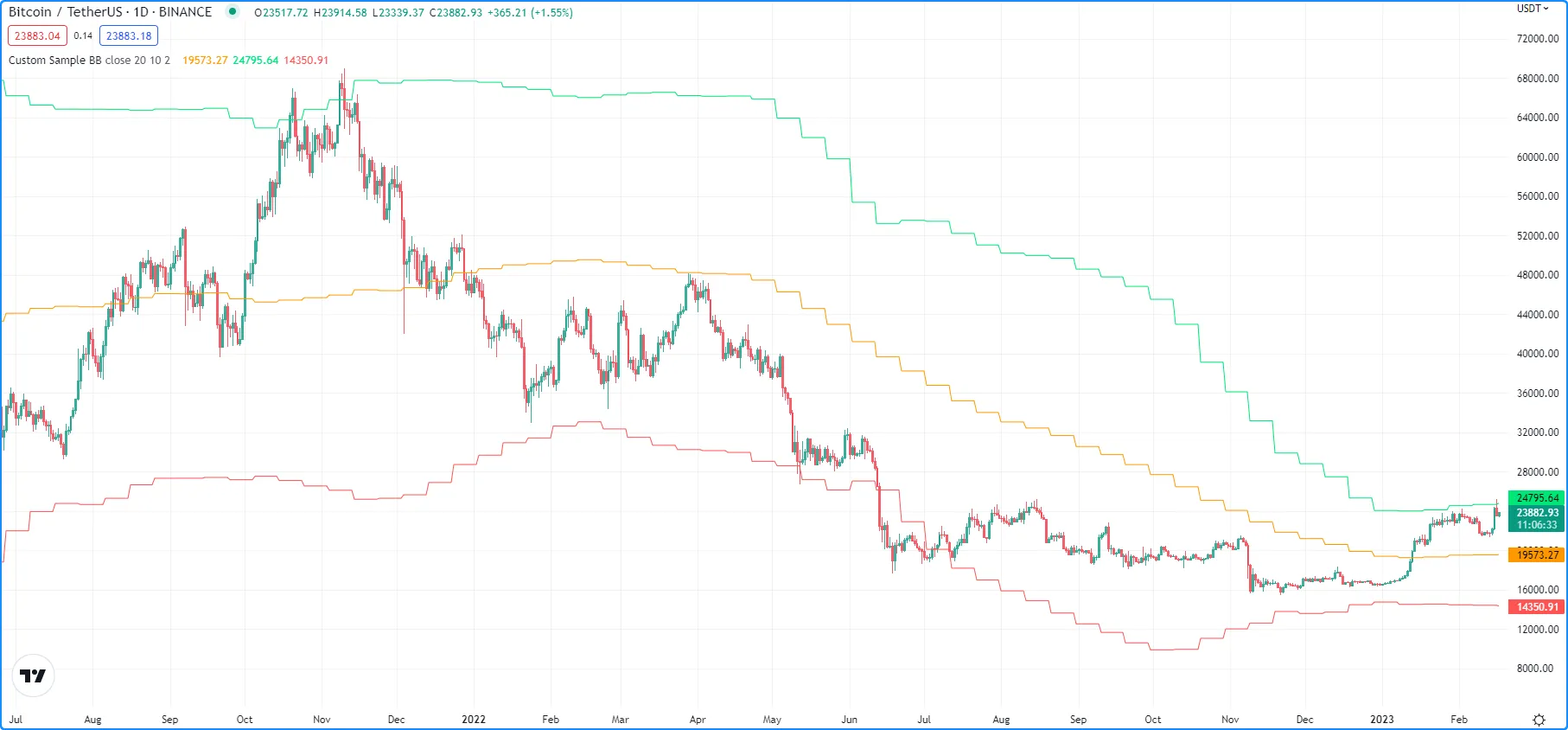
The following script computes Bollinger Bands over a specified number of prices sampled once every `n` bars. It calls [array.push()](https://www.tradingview.com/pine-script-reference/v6/#fun_array.push) and [array.shift()](https://www.tradingview.com/pine-script-reference/v6/#fun_array.shift) to queue `sourceInput` values through the `sourceArray`, then [array.avg()](https://www.tradingview.com/pine-script-reference/v6/#fun_array.avg) and [array.stdev()](https://www.tradingview.com/pine-script-reference/v6/#fun_array.stdev) to compute the `sampleMean` and `sampleDev`. The script then uses these values to calculate the `highBand` and `lowBand`, which it plots on the chart along with the `sampleMean`:
|
|
45
|
+
|
|
46
|
+
|
|
47
|
+
|
|
48
|
+
|
|
49
|
+
|
|
50
|
+
``//@version=6
|
|
51
|
+
indicator("Custom Sample BB", overlay = true)
|
|
52
|
+
|
|
53
|
+
float sourceInput = input.source(close, "Source")
|
|
54
|
+
int samplesInput = input.int(20, "Samples")
|
|
55
|
+
int n = input.int(10, "Bars")
|
|
56
|
+
float multiplier = input.float(2.0, "StdDev")
|
|
57
|
+
|
|
58
|
+
var array<float> sourceArray = array.new<float>(samplesInput)
|
|
59
|
+
var float sampleMean = na
|
|
60
|
+
var float sampleDev = na
|
|
61
|
+
|
|
62
|
+
// Identify if `n` bars have passed.
|
|
63
|
+
if bar_index % n == 0
|
|
64
|
+
// Update the queue.
|
|
65
|
+
array.push(sourceArray, sourceInput)
|
|
66
|
+
array.shift(sourceArray)
|
|
67
|
+
// Update the mean and standard deviation values.
|
|
68
|
+
sampleMean := array.avg(sourceArray)
|
|
69
|
+
sampleDev := array.stdev(sourceArray) * multiplier
|
|
70
|
+
|
|
71
|
+
// Calculate bands.
|
|
72
|
+
float highBand = sampleMean + sampleDev
|
|
73
|
+
float lowBand = sampleMean - sampleDev
|
|
74
|
+
|
|
75
|
+
plot(sampleMean, "Basis", color.orange)
|
|
76
|
+
plot(highBand, "Upper", color.lime)
|
|
77
|
+
plot(lowBand, "Lower", color.red)
|
|
78
|
+
``
|
|
79
|
+
|
|
80
|
+
Let’s rewrite this code to utilize methods rather than built-in functions. In this version, we have replaced all built-in `array.*()` function calls in the script with equivalent method calls:
|
|
81
|
+
|
|
82
|
+
|
|
83
|
+
|
|
84
|
+
``//@version=6
|
|
85
|
+
indicator("Custom Sample BB", overlay = true)
|
|
86
|
+
|
|
87
|
+
float sourceInput = input.source(close, "Source")
|
|
88
|
+
int samplesInput = input.int(20, "Samples")
|
|
89
|
+
int n = input.int(10, "Bars")
|
|
90
|
+
float multiplier = input.float(2.0, "StdDev")
|
|
91
|
+
|
|
92
|
+
var array<float> sourceArray = array.new<float>(samplesInput)
|
|
93
|
+
var float sampleMean = na
|
|
94
|
+
var float sampleDev = na
|
|
95
|
+
|
|
96
|
+
// Identify if `n` bars have passed.
|
|
97
|
+
if bar_index % n == 0
|
|
98
|
+
// Update the queue.
|
|
99
|
+
sourceArray.push(sourceInput)
|
|
100
|
+
sourceArray.shift()
|
|
101
|
+
// Update the mean and standard deviation values.
|
|
102
|
+
sampleMean := sourceArray.avg()
|
|
103
|
+
sampleDev := sourceArray.stdev() * multiplier
|
|
104
|
+
|
|
105
|
+
// Calculate band values.
|
|
106
|
+
float highBand = sampleMean + sampleDev
|
|
107
|
+
float lowBand = sampleMean - sampleDev
|
|
108
|
+
|
|
109
|
+
plot(sampleMean, "Basis", color.orange)
|
|
110
|
+
plot(highBand, "Upper", color.lime)
|
|
111
|
+
plot(lowBand, "Lower", color.red)
|
|
112
|
+
``
|
|
113
|
+
|
|
114
|
+
Note that:
|
|
115
|
+
|
|
116
|
+
- We call the array methods using `sourceArray.*` rather than referencing the [array](https://www.tradingview.com/pine-script-reference/v6/#type_array) namespace.
|
|
117
|
+
- We do not include `sourceArray` as a parameter when we call the methods since they already reference the object.
|
|
118
|
+
|
|
119
|
+
## [User-defined methods](https://www.tradingview.com/pine-script-docs/language/methods/#user-defined-methods)
|
|
120
|
+
|
|
121
|
+
Pine Script allows users to define custom methods for use with objects of any built-in or user-defined type. Defining a method is essentially the same as defining a function, but with two key differences:
|
|
122
|
+
|
|
123
|
+
- The [method](https://www.tradingview.com/pine-script-reference/v6/#kw_method) keyword must be included before the function name.
|
|
124
|
+
- The type of the first parameter in the signature must be explicitly declared, as it represents the type of object that the method will be associated with.
|
|
125
|
+
|
|
126
|
+
```
|
|
127
|
+
|
|
128
|
+
```
|
|
129
|
+
|
|
130
|
+
Let’s apply user-defined methods to our previous Bollinger Bands example to encapsulate operations from the global scope, which will simplify the code and promote reusability. See this portion from the example:
|
|
131
|
+
|
|
132
|
+
|
|
133
|
+
|
|
134
|
+
``// Identify if `n` bars have passed.
|
|
135
|
+
if bar_index % n == 0
|
|
136
|
+
// Update the queue.
|
|
137
|
+
sourceArray.push(sourceInput)
|
|
138
|
+
sourceArray.shift()
|
|
139
|
+
// Update the mean and standard deviation values.
|
|
140
|
+
sampleMean := sourceArray.avg()
|
|
141
|
+
sampleDev := sourceArray.stdev() * multiplier
|
|
142
|
+
|
|
143
|
+
// Calculate band values.
|
|
144
|
+
float highBand = sampleMean + sampleDev
|
|
145
|
+
float lowBand = sampleMean - sampleDev
|
|
146
|
+
``
|
|
147
|
+
|
|
148
|
+
We will start by defining a simple method to queue values through an array in a single call.
|
|
149
|
+
|
|
150
|
+
This `maintainQueue()` method invokes the [push()](https://www.tradingview.com/pine-script-reference/v6/#fun_array.push) and [shift()](https://www.tradingview.com/pine-script-reference/v6/#fun_array.shift) methods on a `srcArray` when `takeSample` is true and returns the object:
|
|
151
|
+
|
|
152
|
+
|
|
153
|
+
|
|
154
|
+
``// @function Maintains a queue of the size of `srcArray`.
|
|
155
|
+
// It appends a `value` to the array and removes its oldest element at position zero.
|
|
156
|
+
// @param srcArray (array<float>) The array where the queue is maintained.
|
|
157
|
+
// @param value (float) The new value to be added to the queue.
|
|
158
|
+
// The queue's oldest value is also removed, so its size is constant.
|
|
159
|
+
// @param takeSample (bool) A new `value` is only pushed into the queue if this is true.
|
|
160
|
+
// @returns (array<float>) `srcArray` object.
|
|
161
|
+
method maintainQueue(array<float> srcArray, float value, bool takeSample = true) =>
|
|
162
|
+
if takeSample
|
|
163
|
+
srcArray.push(value)
|
|
164
|
+
srcArray.shift()
|
|
165
|
+
srcArray
|
|
166
|
+
``
|
|
167
|
+
|
|
168
|
+
Note that:
|
|
169
|
+
|
|
170
|
+
- Just as with user-defined functions, we use the `@function` [compiler annotation](https://www.tradingview.com/pine-script-docs/language/script-structure/#compiler-annotations) to document method descriptions.
|
|
171
|
+
|
|
172
|
+
Now we can replace `sourceArray.push()` and `sourceArray.shift()` with `sourceArray.maintainQueue()` in our example:
|
|
173
|
+
|
|
174
|
+
|
|
175
|
+
|
|
176
|
+
``// Identify if `n` bars have passed.
|
|
177
|
+
if bar_index % n == 0
|
|
178
|
+
// Update the queue.
|
|
179
|
+
sourceArray.maintainQueue(sourceInput)
|
|
180
|
+
// Update the mean and standard deviation values.
|
|
181
|
+
sampleMean := sourceArray.avg()
|
|
182
|
+
sampleDev := sourceArray.stdev() * multiplier
|
|
183
|
+
|
|
184
|
+
// Calculate band values.
|
|
185
|
+
float highBand = sampleMean + sampleDev
|
|
186
|
+
float lowBand = sampleMean - sampleDev
|
|
187
|
+
``
|
|
188
|
+
|
|
189
|
+
From here, we will further simplify our code by defining a method that handles all Bollinger Band calculations within its scope.
|
|
190
|
+
|
|
191
|
+
This `calcBB()` method invokes the [avg()](https://www.tradingview.com/pine-script-reference/v6/#fun_array.avg) and [stdev()](https://www.tradingview.com/pine-script-reference/v6/#fun_array.stdev) methods on a `srcArray` to update `mean` and `dev` values when `calculate` is true. The method uses these values to return a tuple containing the basis, upper band, and lower band values respectively:
|
|
192
|
+
|
|
193
|
+
|
|
194
|
+
|
|
195
|
+
`// @function Computes Bollinger Band values from an array of data.
|
|
196
|
+
// @param srcArray (array<float>) The array where the queue is maintained.
|
|
197
|
+
// @param multiplier (float) Standard deviation multiplier.
|
|
198
|
+
// @param calcuate (bool) The method will only calculate new values when this is true.
|
|
199
|
+
// @returns A tuple containing the basis, upper band, and lower band respectively.
|
|
200
|
+
method calcBB(array<float> srcArray, float mult, bool calculate = true) =>
|
|
201
|
+
var float mean = na
|
|
202
|
+
var float dev = na
|
|
203
|
+
if calculate
|
|
204
|
+
// Compute the mean and standard deviation of the array.
|
|
205
|
+
mean := srcArray.avg()
|
|
206
|
+
dev := srcArray.stdev() * mult
|
|
207
|
+
[mean, mean + dev, mean - dev]
|
|
208
|
+
`
|
|
209
|
+
|
|
210
|
+
With this method, we can now remove Bollinger Band calculations from the global scope and improve code readability:
|
|
211
|
+
|
|
212
|
+
|
|
213
|
+
|
|
214
|
+
``// Identify if `n` bars have passed.
|
|
215
|
+
bool newSample = bar_index % n == 0
|
|
216
|
+
|
|
217
|
+
// Update the queue and compute new BB values on each new sample.
|
|
218
|
+
[sampleMean, highBand, lowBand] = sourceArray.maintainQueue(sourceInput, newSample).calcBB(multiplier, newSample)
|
|
219
|
+
``
|
|
220
|
+
|
|
221
|
+
Note that:
|
|
222
|
+
|
|
223
|
+
- Rather than using an `if` block in the global scope, we have defined a `newSample` variable that is only true once every `n` bars. The `maintainQueue()` and `calcBB()` methods use this value for their respective `takeSample` and `calculate` parameters.
|
|
224
|
+
- Since the `maintainQueue()` method returns the object that it references, we’re able to call `calcBB()` from the same line of code, as both methods apply to `array<float>` instances.
|
|
225
|
+
|
|
226
|
+
Here is how the full script example looks now that we’ve applied our user-defined methods:
|
|
227
|
+
|
|
228
|
+
|
|
229
|
+
|
|
230
|
+
``//@version=6
|
|
231
|
+
indicator("Custom Sample BB", overlay = true)
|
|
232
|
+
|
|
233
|
+
float sourceInput = input.source(close, "Source")
|
|
234
|
+
int samplesInput = input.int(20, "Samples")
|
|
235
|
+
int n = input.int(10, "Bars")
|
|
236
|
+
float multiplier = input.float(2.0, "StdDev")
|
|
237
|
+
|
|
238
|
+
var array<float> sourceArray = array.new<float>(samplesInput)
|
|
239
|
+
|
|
240
|
+
// @function Maintains a queue of the size of `srcArray`.
|
|
241
|
+
// It appends a `value` to the array and removes its oldest element at position zero.
|
|
242
|
+
// @param srcArray (array<float>) The array where the queue is maintained.
|
|
243
|
+
// @param value (float) The new value to be added to the queue.
|
|
244
|
+
// The queue's oldest value is also removed, so its size is constant.
|
|
245
|
+
// @param takeSample (bool) A new `value` is only pushed into the queue if this is true.
|
|
246
|
+
// @returns (array<float>) `srcArray` object.
|
|
247
|
+
method maintainQueue(array<float> srcArray, float value, bool takeSample = true) =>
|
|
248
|
+
if takeSample
|
|
249
|
+
srcArray.push(value)
|
|
250
|
+
srcArray.shift()
|
|
251
|
+
srcArray
|
|
252
|
+
|
|
253
|
+
// @function Computes Bollinger Band values from an array of data.
|
|
254
|
+
// @param srcArray (array<float>) The array where the queue is maintained.
|
|
255
|
+
// @param multiplier (float) Standard deviation multiplier.
|
|
256
|
+
// @param calcuate (bool) The method will only calculate new values when this is true.
|
|
257
|
+
// @returns A tuple containing the basis, upper band, and lower band respectively.
|
|
258
|
+
method calcBB(array<float> srcArray, float mult, bool calculate = true) =>
|
|
259
|
+
var float mean = na
|
|
260
|
+
var float dev = na
|
|
261
|
+
if calculate
|
|
262
|
+
// Compute the mean and standard deviation of the array.
|
|
263
|
+
mean := srcArray.avg()
|
|
264
|
+
dev := srcArray.stdev() * mult
|
|
265
|
+
[mean, mean + dev, mean - dev]
|
|
266
|
+
|
|
267
|
+
// Identify if `n` bars have passed.
|
|
268
|
+
bool newSample = bar_index % n == 0
|
|
269
|
+
|
|
270
|
+
// Update the queue and compute new BB values on each new sample.
|
|
271
|
+
[sampleMean, highBand, lowBand] = sourceArray.maintainQueue(sourceInput, newSample).calcBB(multiplier, newSample)
|
|
272
|
+
|
|
273
|
+
plot(sampleMean, "Basis", color.orange)
|
|
274
|
+
plot(highBand, "Upper", color.lime)
|
|
275
|
+
plot(lowBand, "Lower", color.red)
|
|
276
|
+
``
|
|
277
|
+
|
|
278
|
+
## [Method overloading](https://www.tradingview.com/pine-script-docs/language/methods/#method-overloading)
|
|
279
|
+
|
|
280
|
+
User-defined methods can override and overload existing built-in and user-defined methods with the same identifier. This capability allows users to define multiple routines associated with different parameter signatures under the same method name.
|
|
281
|
+
|
|
282
|
+
As a simple example, suppose we want to define a method to identify a variable’s type. Since we must explicitly specify the type of object associated with a user-defined method, we will need to define overloads for each type that we want it to recognize.
|
|
283
|
+
|
|
284
|
+
Below, we have defined a `getType()` method that returns a string representation of a variable’s type with overloads for the five primitive types:
|
|
285
|
+
|
|
286
|
+
|
|
287
|
+
|
|
288
|
+
``// @function Identifies an object's type.
|
|
289
|
+
// @param this Object to inspect.
|
|
290
|
+
// @returns (string) A string representation of the type.
|
|
291
|
+
method getType(int this) =>
|
|
292
|
+
na(this) ? "int(na)" : "int"
|
|
293
|
+
|
|
294
|
+
method getType(float this) =>
|
|
295
|
+
na(this) ? "float(na)" : "float"
|
|
296
|
+
|
|
297
|
+
method getType(bool this) =>
|
|
298
|
+
// "bool" values only have two states, `true` and `false`, but never `na`.
|
|
299
|
+
"bool"
|
|
300
|
+
|
|
301
|
+
method getType(color this) =>
|
|
302
|
+
na(this) ? "color(na)" : "color"
|
|
303
|
+
|
|
304
|
+
method getType(string this) =>
|
|
305
|
+
na(this) ? "string(na)" : "string"
|
|
306
|
+
``
|
|
307
|
+
|
|
308
|
+
Now we can use these overloads to inspect some variables. This script uses [str.format()](https://www.tradingview.com/pine-script-reference/v6/#fun_str.format) to format the results from calling the `getType()` method on five different variables into a single `results` string, then displays the string in the `lbl` label using the built-in [set_text()](https://www.tradingview.com/pine-script-reference/v6/#fun_label.set_text) method:
|
|
309
|
+
|
|
310
|
+

|
|
311
|
+
|
|
312
|
+
|
|
313
|
+
|
|
314
|
+
`//@version=6
|
|
315
|
+
indicator("Type Inspection")
|
|
316
|
+
|
|
317
|
+
// @function Identifies an object's type.
|
|
318
|
+
// @param this Object to inspect.
|
|
319
|
+
// @returns (string) A string representation of the type.
|
|
320
|
+
method getType(int this) =>
|
|
321
|
+
na(this) ? "int(na)" : "int"
|
|
322
|
+
|
|
323
|
+
method getType(float this) =>
|
|
324
|
+
na(this) ? "float(na)" : "float"
|
|
325
|
+
|
|
326
|
+
method getType(bool this) =>
|
|
327
|
+
na(this) ? "bool(na)" : "bool"
|
|
328
|
+
|
|
329
|
+
method getType(color this) =>
|
|
330
|
+
na(this) ? "color(na)" : "color"
|
|
331
|
+
|
|
332
|
+
method getType(string this) =>
|
|
333
|
+
na(this) ? "string(na)" : "string"
|
|
334
|
+
|
|
335
|
+
a = 1
|
|
336
|
+
b = 1.0
|
|
337
|
+
c = true
|
|
338
|
+
d = color.white
|
|
339
|
+
e = "1"
|
|
340
|
+
|
|
341
|
+
// Inspect variables and format results.
|
|
342
|
+
results = str.format(
|
|
343
|
+
"a: {0}\nb: {1}\nc: {2}\nd: {3}\ne: {4}",
|
|
344
|
+
a.getType(), b.getType(), c.getType(), d.getType(), e.getType()
|
|
345
|
+
)
|
|
346
|
+
|
|
347
|
+
var label lbl = label.new(0, 0)
|
|
348
|
+
lbl.set_x(bar_index)
|
|
349
|
+
lbl.set_text(results)
|
|
350
|
+
`
|
|
351
|
+
|
|
352
|
+
Note that:
|
|
353
|
+
|
|
354
|
+
- The underlying type of each variable determines which overload of `getType()` the compiler will use.
|
|
355
|
+
- The method will append “(na)” to the output string when a variable is `na` to demarcate that it is empty.
|
|
356
|
+
|
|
357
|
+
## [Advanced example](https://www.tradingview.com/pine-script-docs/language/methods/#advanced-example)
|
|
358
|
+
|
|
359
|
+
Let’s apply what we’ve learned to construct a script that estimates the cumulative distribution of elements in an array, meaning the fraction of elements in the array that are less than or equal to any given value.
|
|
360
|
+
|
|
361
|
+
There are many ways in which we could choose to tackle this objective. For this example, we will start by defining a method to replace elements of an array, which will help us count the occurrences of elements within a range of values.
|
|
362
|
+
|
|
363
|
+
Written below is an overload of the built-in [fill()](https://www.tradingview.com/pine-script-reference/v6/#fun_array.fill) method for `array<float>` instances. This overload replaces elements in a `srcArray` within the range between the `lowerBound` and `upperBound` with an `innerValue`, and replaces all elements outside the range with an `outerValue`:
|
|
364
|
+
|
|
365
|
+
|
|
366
|
+
|
|
367
|
+
``// @function Replaces elements in a `srcArray` between `lowerBound` and `upperBound` with an `innerValue`,
|
|
368
|
+
// and replaces elements outside the range with an `outerValue`.
|
|
369
|
+
// @param srcArray (array<float>) Array to modify.
|
|
370
|
+
// @param innerValue (float) Value to replace elements within the range with.
|
|
371
|
+
// @param outerValue (float) Value to replace elements outside the range with.
|
|
372
|
+
// @param lowerBound (float) Lowest value to replace with `innerValue`.
|
|
373
|
+
// @param upperBound (float) Highest value to replace with `innerValue`.
|
|
374
|
+
// @returns (array<float>) `srcArray` object.
|
|
375
|
+
method fill(array<float> srcArray, float innerValue, float outerValue, float lowerBound, float upperBound) =>
|
|
376
|
+
for [i, element] in srcArray
|
|
377
|
+
if (element >= lowerBound or na(lowerBound)) and (element <= upperBound or na(upperBound))
|
|
378
|
+
srcArray.set(i, innerValue)
|
|
379
|
+
else
|
|
380
|
+
srcArray.set(i, outerValue)
|
|
381
|
+
srcArray
|
|
382
|
+
``
|
|
383
|
+
|
|
384
|
+
With this method, we can filter an array by value ranges to produce an array of occurrences. For example, the expression:
|
|
385
|
+
|
|
386
|
+
|
|
387
|
+
|
|
388
|
+
`srcArray.copy().fill(1.0, 0.0, min, val)
|
|
389
|
+
`
|
|
390
|
+
|
|
391
|
+
copies the `srcArray` object, replaces all elements between `min` and `val` with 1.0, then replaces all elements above `val` with 0.0. From here, it’s easy to estimate the output of the cumulative distribution function at the `val`, as it’s simply the average of the resulting array:
|
|
392
|
+
|
|
393
|
+
|
|
394
|
+
|
|
395
|
+
`srcArray.copy().fill(1.0, 0.0, min, val).avg()
|
|
396
|
+
`
|
|
397
|
+
|
|
398
|
+
Note that:
|
|
399
|
+
|
|
400
|
+
- The compiler will only use this `fill()` overload instead of the built-in when the user provides `innerValue`, `outerValue`, `lowerBound`, and `upperBound` arguments in the call.
|
|
401
|
+
- If either `lowerBound` or `upperBound` is `na`, its value is ignored while filtering the fill range.
|
|
402
|
+
- We are able to call `copy()`, `fill()`, and `avg()` successively on the same line of code because the first two methods return an `array<float>` instance.
|
|
403
|
+
|
|
404
|
+
We can now use this to define a method that will calculate our empirical distribution values. The following `eCDF()` method estimates a number of evenly spaced ascending `steps` from the cumulative distribution function of a `srcArray` and pushes the results into a `cdfArray`:
|
|
405
|
+
|
|
406
|
+
|
|
407
|
+
|
|
408
|
+
``// @function Estimates the empirical CDF of a `srcArray`.
|
|
409
|
+
// @param srcArray (array<float>) Array to calculate on.
|
|
410
|
+
// @param steps (int) Number of steps in the estimation.
|
|
411
|
+
// @returns (array<float>) Array of estimated CDF ratios.
|
|
412
|
+
method eCDF(array<float> srcArray, int steps) =>
|
|
413
|
+
float min = srcArray.min()
|
|
414
|
+
float rng = srcArray.range() / steps
|
|
415
|
+
array<float> cdfArray = array.new<float>()
|
|
416
|
+
// Add averages of `srcArray` filtered by value region to the `cdfArray`.
|
|
417
|
+
float val = min
|
|
418
|
+
for i = 1 to steps
|
|
419
|
+
val += rng
|
|
420
|
+
cdfArray.push(srcArray.copy().fill(1.0, 0.0, min, val).avg())
|
|
421
|
+
cdfArray
|
|
422
|
+
``
|
|
423
|
+
|
|
424
|
+
Lastly, to ensure that our `eCDF()` method functions properly for arrays containing small and large values, we will define a method to normalize our arrays.
|
|
425
|
+
|
|
426
|
+
This `featureScale()` method uses array [min()](https://www.tradingview.com/pine-script-reference/v6/#fun_array.min) and [range()](https://www.tradingview.com/pine-script-reference/v6/#fun_array.range) methods to produce a rescaled copy of a `srcArray`. We will use this to normalize our arrays prior to invoking the `eCDF()` method:
|
|
427
|
+
|
|
428
|
+
|
|
429
|
+
|
|
430
|
+
``// @function Rescales the elements within a `srcArray` to the interval [0, 1].
|
|
431
|
+
// @param srcArray (array<float>) Array to normalize.
|
|
432
|
+
// @returns (array<float>) Normalized copy of the `srcArray`.
|
|
433
|
+
method featureScale(array<float> srcArray) =>
|
|
434
|
+
float min = srcArray.min()
|
|
435
|
+
float rng = srcArray.range()
|
|
436
|
+
array<float> scaledArray = array.new<float>()
|
|
437
|
+
// Push normalized `element` values into the `scaledArray`.
|
|
438
|
+
for element in srcArray
|
|
439
|
+
scaledArray.push((element - min) / rng)
|
|
440
|
+
scaledArray
|
|
441
|
+
``
|
|
442
|
+
|
|
443
|
+
Note that:
|
|
444
|
+
|
|
445
|
+
- This method does not include special handling for divide by zero conditions. If `rng` is 0, the value of the array element will be `na`.
|
|
446
|
+
|
|
447
|
+
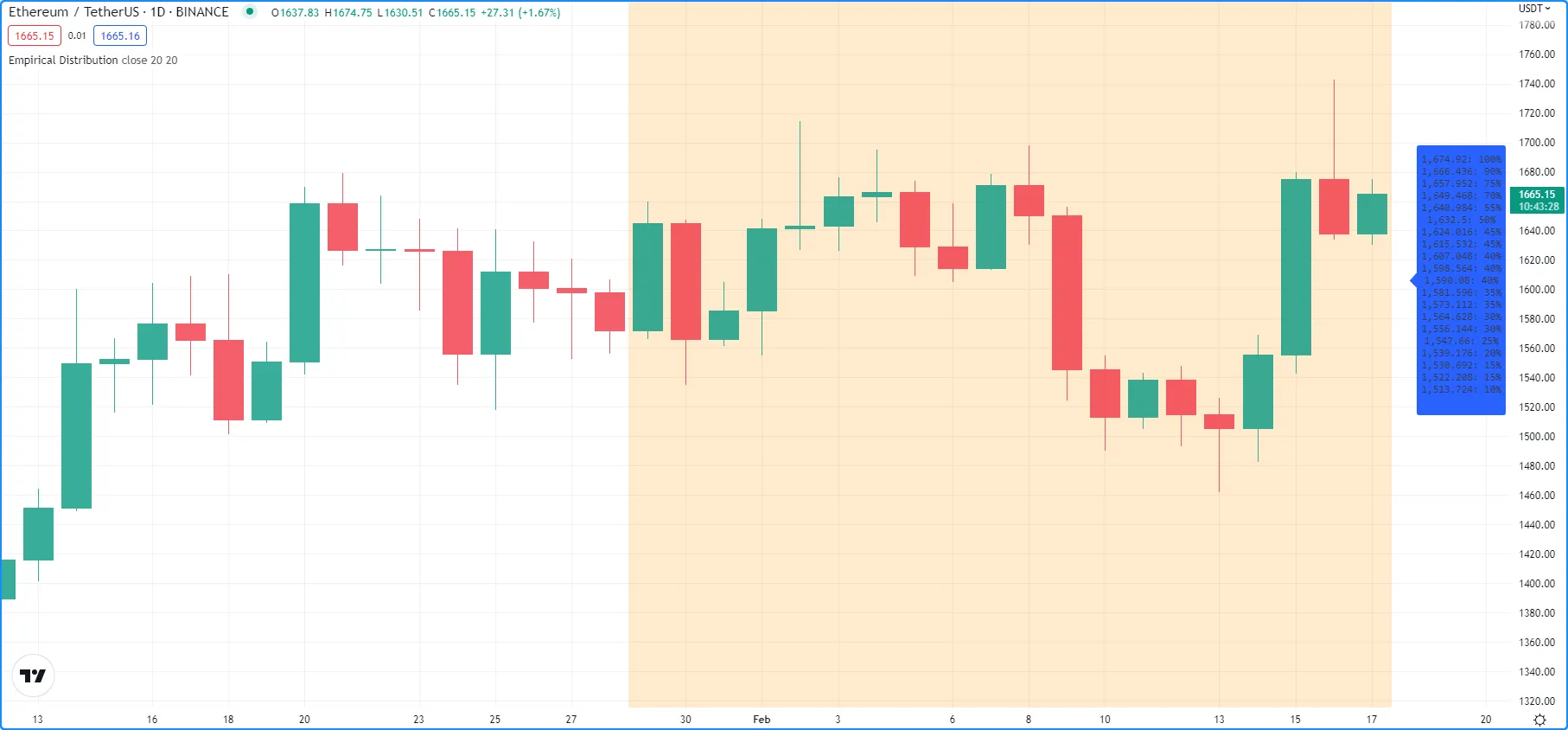
The full example below queues a `sourceArray` of size `length` with `sourceInput` values using our previous `maintainQueue()` method, normalizes the array’s elements using the `featureScale()` method, then calls the `eCDF()` method to get an array of estimates for `n` evenly spaced steps on the distribution. The script then calls a user-defined `makeLabel()` function to display the estimates and prices in a label on the right side of the chart:
|
|
448
|
+
|
|
449
|
+
|
|
450
|
+
|
|
451
|
+
[Pine Script®](https://tradingview.com/pine-script-docs)
|
|
452
|
+
|
|
453
|
+
Copied
|
|
454
|
+
|
|
455
|
+
``//@version=6
|
|
456
|
+
indicator("Empirical Distribution", overlay = true)
|
|
457
|
+
|
|
458
|
+
float sourceInput = input.source(close, "Source")
|
|
459
|
+
int length = input.int(20, "Length")
|
|
460
|
+
int n = input.int(20, "Steps")
|
|
461
|
+
|
|
462
|
+
// @function Maintains a queue of the size of `srcArray`.
|
|
463
|
+
// It appends a `value` to the array and removes its oldest element at position zero.
|
|
464
|
+
// @param srcArray (array<float>) The array where the queue is maintained.
|
|
465
|
+
// @param value (float) The new value to be added to the queue.
|
|
466
|
+
// The queue's oldest value is also removed, so its size is constant.
|
|
467
|
+
// @param takeSample (bool) A new `value` is only pushed into the queue if this is true.
|
|
468
|
+
// @returns (array<float>) `srcArray` object.
|
|
469
|
+
method maintainQueue(array<float> srcArray, float value, bool takeSample = true) =>
|
|
470
|
+
if takeSample
|
|
471
|
+
srcArray.push(value)
|
|
472
|
+
srcArray.shift()
|
|
473
|
+
srcArray
|
|
474
|
+
|
|
475
|
+
// @function Replaces elements in a `srcArray` between `lowerBound` and `upperBound` with an `innerValue`,
|
|
476
|
+
// and replaces elements outside the range with an `outerValue`.
|
|
477
|
+
// @param srcArray (array<float>) Array to modify.
|
|
478
|
+
// @param innerValue (float) Value to replace elements within the range with.
|
|
479
|
+
// @param outerValue (float) Value to replace elements outside the range with.
|
|
480
|
+
// @param lowerBound (float) Lowest value to replace with `innerValue`.
|
|
481
|
+
// @param upperBound (float) Highest value to replace with `innerValue`.
|
|
482
|
+
// @returns (array<float>) `srcArray` object.
|
|
483
|
+
method fill(array<float> srcArray, float innerValue, float outerValue, float lowerBound, float upperBound) =>
|
|
484
|
+
for [i, element] in srcArray
|
|
485
|
+
if (element >= lowerBound or na(lowerBound)) and (element <= upperBound or na(upperBound))
|
|
486
|
+
srcArray.set(i, innerValue)
|
|
487
|
+
else
|
|
488
|
+
srcArray.set(i, outerValue)
|
|
489
|
+
srcArray
|
|
490
|
+
|
|
491
|
+
// @function Estimates the empirical CDF of a `srcArray`.
|
|
492
|
+
// @param srcArray (array<float>) Array to calculate on.
|
|
493
|
+
// @param steps (int) Number of steps in the estimation.
|
|
494
|
+
// @returns (array<float>) Array of estimated CDF ratios.
|
|
495
|
+
method eCDF(array<float> srcArray, int steps) =>
|
|
496
|
+
float min = srcArray.min()
|
|
497
|
+
float rng = srcArray.range() / steps
|
|
498
|
+
array<float> cdfArray = array.new<float>()
|
|
499
|
+
// Add averages of `srcArray` filtered by value region to the `cdfArray`.
|
|
500
|
+
float val = min
|
|
501
|
+
for i = 1 to steps
|
|
502
|
+
val += rng
|
|
503
|
+
cdfArray.push(srcArray.copy().fill(1.0, 0.0, min, val).avg())
|
|
504
|
+
cdfArray
|
|
505
|
+
|
|
506
|
+
// @function Rescales the elements within a `srcArray` to the interval [0, 1].
|
|
507
|
+
// @param srcArray (array<float>) Array to normalize.
|
|
508
|
+
// @returns (array<float>) Normalized copy of the `srcArray`.
|
|
509
|
+
method featureScale(array<float> srcArray) =>
|
|
510
|
+
float min = srcArray.min()
|
|
511
|
+
float rng = srcArray.range()
|
|
512
|
+
array<float> scaledArray = array.new<float>()
|
|
513
|
+
// Push normalized `element` values into the `scaledArray`.
|
|
514
|
+
for element in srcArray
|
|
515
|
+
scaledArray.push((element - min) / rng)
|
|
516
|
+
scaledArray
|
|
517
|
+
|
|
518
|
+
// @function Draws a label containing eCDF estimates in the format "{price}: {percent}%"
|
|
519
|
+
// @param srcArray (array<float>) Array of source values.
|
|
520
|
+
// @param cdfArray (array<float>) Array of CDF estimates.
|
|
521
|
+
// @returns (void)
|
|
522
|
+
makeLabel(array<float> srcArray, array<float> cdfArray) =>
|
|
523
|
+
float max = srcArray.max()
|
|
524
|
+
float rng = srcArray.range() / cdfArray.size()
|
|
525
|
+
string results = ""
|
|
526
|
+
var label lbl = label.new(0, 0, "", style = label.style_label_left, text_font_family = font.family_monospace)
|
|
527
|
+
// Add percentage strings to `results` starting from the `max`.
|
|
528
|
+
cdfArray.reverse()
|
|
529
|
+
for [i, element] in cdfArray
|
|
530
|
+
results += str.format("{0}: {1}%\n", max - i * rng, element * 100)
|
|
531
|
+
// Update `lbl` attributes.
|
|
532
|
+
lbl.set_xy(bar_index + 1, srcArray.avg())
|
|
533
|
+
lbl.set_text(results)
|
|
534
|
+
|
|
535
|
+
var array<float> sourceArray = array.new<float>(length)
|
|
536
|
+
|
|
537
|
+
// Add background color for the last `length` bars.
|
|
538
|
+
bgcolor(bar_index > last_bar_index - length ? color.new(color.orange, 80) : na)
|
|
539
|
+
|
|
540
|
+
// Queue `sourceArray`, feature scale, then estimate the distribution over `n` steps.
|
|
541
|
+
array<float> distArray = sourceArray.maintainQueue(sourceInput).featureScale().eCDF(n)
|
|
542
|
+
// Draw label.
|
|
543
|
+
makeLabel(sourceArray, distArray)``
|