pacebar 0.1.0__py3-none-any.whl
This diff represents the content of publicly available package versions that have been released to one of the supported registries. The information contained in this diff is provided for informational purposes only and reflects changes between package versions as they appear in their respective public registries.
- pacebar/__init__.py +3 -0
- pacebar/__main__.py +20 -0
- pacebar/app.py +24 -0
- pacebar/constants.py +29 -0
- pacebar/editor/__init__.py +5 -0
- pacebar/editor/fields.py +91 -0
- pacebar/editor/row.py +83 -0
- pacebar/editor/window.py +178 -0
- pacebar/formatting.py +14 -0
- pacebar/overlay/__init__.py +5 -0
- pacebar/overlay/bar.py +80 -0
- pacebar/overlay/controller.py +154 -0
- pacebar/overlay/hotkeys.py +112 -0
- pacebar/overlay/square.py +42 -0
- pacebar/paths.py +20 -0
- pacebar/persistence.py +24 -0
- pacebar/timing.py +94 -0
- pacebar-0.1.0.dist-info/METADATA +193 -0
- pacebar-0.1.0.dist-info/RECORD +22 -0
- pacebar-0.1.0.dist-info/WHEEL +4 -0
- pacebar-0.1.0.dist-info/entry_points.txt +2 -0
- pacebar-0.1.0.dist-info/licenses/LICENSE +21 -0
pacebar/__init__.py
ADDED
pacebar/__main__.py
ADDED
|
@@ -0,0 +1,20 @@
|
|
|
1
|
+
"""Entry point: `python -m pacebar` / the `pacebar` script / the exe."""
|
|
2
|
+
|
|
3
|
+
import sys
|
|
4
|
+
|
|
5
|
+
from PySide6.QtWidgets import QApplication
|
|
6
|
+
|
|
7
|
+
from .app import App
|
|
8
|
+
from .constants import APP_DISPLAY_NAME
|
|
9
|
+
|
|
10
|
+
|
|
11
|
+
def main() -> int:
|
|
12
|
+
qt_application = QApplication(sys.argv)
|
|
13
|
+
qt_application.setApplicationName(APP_DISPLAY_NAME)
|
|
14
|
+
app = App()
|
|
15
|
+
app.show()
|
|
16
|
+
return qt_application.exec()
|
|
17
|
+
|
|
18
|
+
|
|
19
|
+
if __name__ == "__main__":
|
|
20
|
+
sys.exit(main())
|
pacebar/app.py
ADDED
|
@@ -0,0 +1,24 @@
|
|
|
1
|
+
"""Application controller: wires the editor to a run, persists the run on start."""
|
|
2
|
+
|
|
3
|
+
from PySide6.QtWidgets import QApplication
|
|
4
|
+
|
|
5
|
+
from .editor import EditorWindow
|
|
6
|
+
from .overlay import RunController
|
|
7
|
+
from .persistence import save_sections
|
|
8
|
+
|
|
9
|
+
|
|
10
|
+
class App:
|
|
11
|
+
def __init__(self):
|
|
12
|
+
self.editor = EditorWindow()
|
|
13
|
+
self.editor.start_requested.connect(self._start_run)
|
|
14
|
+
self.run: RunController | None = None
|
|
15
|
+
|
|
16
|
+
def show(self):
|
|
17
|
+
self.editor.show()
|
|
18
|
+
|
|
19
|
+
def _start_run(self, sections, lateness_seconds, yellow_percent, yellow_seconds):
|
|
20
|
+
# Persist the schedule (order + minutes + names only) as the run begins.
|
|
21
|
+
save_sections(sections)
|
|
22
|
+
self.editor.hide()
|
|
23
|
+
self.run = RunController(sections, lateness_seconds, yellow_percent, yellow_seconds)
|
|
24
|
+
self.run.finished.connect(QApplication.instance().quit)
|
pacebar/constants.py
ADDED
|
@@ -0,0 +1,29 @@
|
|
|
1
|
+
"""Constants shared across modules.
|
|
2
|
+
|
|
3
|
+
Purely cosmetic, single-use dimensions live next to the code that uses them;
|
|
4
|
+
this file holds values that are shared or worth tuning in one place.
|
|
5
|
+
"""
|
|
6
|
+
|
|
7
|
+
# Identity and storage
|
|
8
|
+
APP_DISPLAY_NAME = "PaceBar"
|
|
9
|
+
LAST_RUN_FILENAME = "pacebar_last_run.json"
|
|
10
|
+
|
|
11
|
+
# Section / editor limits and defaults
|
|
12
|
+
MIN_SECTION_MINUTES = 1
|
|
13
|
+
MAX_SECTION_MINUTES = 999
|
|
14
|
+
MAX_LATENESS_MINUTES = 999
|
|
15
|
+
MAX_SECTION_NAME_LENGTH = 30
|
|
16
|
+
MAX_YELLOW_PERCENT = 100
|
|
17
|
+
MAX_YELLOW_SECONDS = 3600
|
|
18
|
+
DEFAULT_YELLOW_PERCENT = 10
|
|
19
|
+
DEFAULT_YELLOW_SECONDS = 30
|
|
20
|
+
|
|
21
|
+
# Overlay rendering
|
|
22
|
+
RENDER_INTERVAL_MS = 100 # ~10 Hz; the smallest shown unit is one second
|
|
23
|
+
OVERLAY_FONT_POINT_INCREASE = 2
|
|
24
|
+
OVERLAY_HEIGHT_FACTOR = 1.6
|
|
25
|
+
|
|
26
|
+
# Pastel status colors for the strip and minimized square
|
|
27
|
+
PASTEL_GREEN = "#cfe8cf"
|
|
28
|
+
PASTEL_YELLOW = "#f6efb4"
|
|
29
|
+
PASTEL_RED = "#f2c4c4"
|
pacebar/editor/fields.py
ADDED
|
@@ -0,0 +1,91 @@
|
|
|
1
|
+
"""Input widgets for a section row: the minutes spin box and the name field."""
|
|
2
|
+
|
|
3
|
+
from PySide6.QtCore import QEvent, Qt, QTimer, Signal
|
|
4
|
+
from PySide6.QtWidgets import QLineEdit, QSpinBox
|
|
5
|
+
|
|
6
|
+
from ..constants import (
|
|
7
|
+
MAX_SECTION_MINUTES,
|
|
8
|
+
MAX_SECTION_NAME_LENGTH,
|
|
9
|
+
MIN_SECTION_MINUTES,
|
|
10
|
+
PASTEL_RED,
|
|
11
|
+
)
|
|
12
|
+
|
|
13
|
+
_TAB_KEYS = (Qt.Key_Tab, Qt.Key_Backtab)
|
|
14
|
+
_ENTER_KEYS = (Qt.Key_Return, Qt.Key_Enter)
|
|
15
|
+
_MINUTES_FIELD_WIDTH = 95
|
|
16
|
+
_NAME_OVERFLOW_BLINK_MS = 120
|
|
17
|
+
|
|
18
|
+
|
|
19
|
+
class MinutesSpinBox(QSpinBox):
|
|
20
|
+
"""Whole-minutes spin box that keeps Tab and Enter inside the current row."""
|
|
21
|
+
|
|
22
|
+
tab_pressed = Signal()
|
|
23
|
+
enter_pressed = Signal()
|
|
24
|
+
|
|
25
|
+
def __init__(self, value: int = MIN_SECTION_MINUTES):
|
|
26
|
+
super().__init__()
|
|
27
|
+
self.setRange(MIN_SECTION_MINUTES, MAX_SECTION_MINUTES)
|
|
28
|
+
self.setValue(max(MIN_SECTION_MINUTES, value))
|
|
29
|
+
self.setSuffix(" min")
|
|
30
|
+
self.setFixedWidth(_MINUTES_FIELD_WIDTH)
|
|
31
|
+
|
|
32
|
+
def event(self, event):
|
|
33
|
+
# Tab is consumed by the focus framework before keyPressEvent, so we
|
|
34
|
+
# intercept it here in event() instead.
|
|
35
|
+
if event.type() == QEvent.KeyPress:
|
|
36
|
+
if event.key() in _TAB_KEYS:
|
|
37
|
+
self.tab_pressed.emit()
|
|
38
|
+
return True
|
|
39
|
+
if event.key() in _ENTER_KEYS:
|
|
40
|
+
self.enter_pressed.emit()
|
|
41
|
+
return True
|
|
42
|
+
return super().event(event)
|
|
43
|
+
|
|
44
|
+
|
|
45
|
+
class NameLineEdit(QLineEdit):
|
|
46
|
+
"""Section name field: caps at MAX_SECTION_NAME_LENGTH and blinks when full."""
|
|
47
|
+
|
|
48
|
+
tab_pressed = Signal()
|
|
49
|
+
enter_pressed = Signal()
|
|
50
|
+
up_pressed = Signal()
|
|
51
|
+
down_pressed = Signal()
|
|
52
|
+
|
|
53
|
+
def __init__(self, text: str = ""):
|
|
54
|
+
super().__init__(text)
|
|
55
|
+
self.setMaxLength(MAX_SECTION_NAME_LENGTH)
|
|
56
|
+
self.setPlaceholderText("Section name")
|
|
57
|
+
self._default_style = self.styleSheet()
|
|
58
|
+
|
|
59
|
+
def event(self, event):
|
|
60
|
+
if event.type() == QEvent.KeyPress:
|
|
61
|
+
key = event.key()
|
|
62
|
+
if key in _TAB_KEYS:
|
|
63
|
+
self.tab_pressed.emit()
|
|
64
|
+
return True
|
|
65
|
+
if key in _ENTER_KEYS:
|
|
66
|
+
self.enter_pressed.emit()
|
|
67
|
+
return True
|
|
68
|
+
# Up/Down jump between rows (the spin box keeps arrows for its value).
|
|
69
|
+
if key == Qt.Key_Up:
|
|
70
|
+
self.up_pressed.emit()
|
|
71
|
+
return True
|
|
72
|
+
if key == Qt.Key_Down:
|
|
73
|
+
self.down_pressed.emit()
|
|
74
|
+
return True
|
|
75
|
+
if self._is_overflow_keystroke(event):
|
|
76
|
+
self._blink()
|
|
77
|
+
return True
|
|
78
|
+
return super().event(event)
|
|
79
|
+
|
|
80
|
+
def _is_overflow_keystroke(self, event) -> bool:
|
|
81
|
+
text = event.text()
|
|
82
|
+
return bool(
|
|
83
|
+
text
|
|
84
|
+
and text.isprintable()
|
|
85
|
+
and len(self.text()) >= MAX_SECTION_NAME_LENGTH
|
|
86
|
+
and not self.hasSelectedText()
|
|
87
|
+
)
|
|
88
|
+
|
|
89
|
+
def _blink(self):
|
|
90
|
+
self.setStyleSheet(f"background:{PASTEL_RED};")
|
|
91
|
+
QTimer.singleShot(_NAME_OVERFLOW_BLINK_MS, lambda: self.setStyleSheet(self._default_style))
|
pacebar/editor/row.py
ADDED
|
@@ -0,0 +1,83 @@
|
|
|
1
|
+
"""A single editable section row."""
|
|
2
|
+
|
|
3
|
+
from PySide6.QtCore import Qt, Signal
|
|
4
|
+
from PySide6.QtWidgets import QHBoxLayout, QPushButton, QToolButton, QVBoxLayout, QWidget
|
|
5
|
+
|
|
6
|
+
from ..timing import Section
|
|
7
|
+
from .fields import MinutesSpinBox, NameLineEdit
|
|
8
|
+
|
|
9
|
+
_MOVE_BUTTON_WIDTH = 26
|
|
10
|
+
_MOVE_BUTTON_HEIGHT = 13
|
|
11
|
+
_ROW_BUTTON_WIDTH = 30
|
|
12
|
+
|
|
13
|
+
|
|
14
|
+
class RowWidget(QWidget):
|
|
15
|
+
"""One section row: minutes, name, reorder, add and delete controls."""
|
|
16
|
+
|
|
17
|
+
add_after_requested = Signal(object)
|
|
18
|
+
delete_requested = Signal(object)
|
|
19
|
+
move_up_requested = Signal(object)
|
|
20
|
+
move_down_requested = Signal(object)
|
|
21
|
+
focus_up_requested = Signal(object)
|
|
22
|
+
focus_down_requested = Signal(object)
|
|
23
|
+
|
|
24
|
+
def __init__(self, minutes: int = 1, name: str = ""):
|
|
25
|
+
super().__init__()
|
|
26
|
+
layout = QHBoxLayout(self)
|
|
27
|
+
layout.setContentsMargins(0, 0, 0, 0)
|
|
28
|
+
layout.setSpacing(6)
|
|
29
|
+
|
|
30
|
+
self.minutes = MinutesSpinBox(minutes)
|
|
31
|
+
self.name = NameLineEdit(name)
|
|
32
|
+
|
|
33
|
+
self.move_up_button = QToolButton()
|
|
34
|
+
self.move_up_button.setText("▲")
|
|
35
|
+
self.move_down_button = QToolButton()
|
|
36
|
+
self.move_down_button.setText("▼")
|
|
37
|
+
move_box = self._build_move_box()
|
|
38
|
+
|
|
39
|
+
self.add_button = QPushButton("+")
|
|
40
|
+
self.delete_button = QPushButton("✕")
|
|
41
|
+
for button in (self.add_button, self.delete_button):
|
|
42
|
+
button.setFixedWidth(_ROW_BUTTON_WIDTH)
|
|
43
|
+
button.setFocusPolicy(Qt.NoFocus)
|
|
44
|
+
|
|
45
|
+
layout.addWidget(self.minutes)
|
|
46
|
+
layout.addWidget(self.name, 1)
|
|
47
|
+
layout.addWidget(move_box)
|
|
48
|
+
layout.addWidget(self.add_button)
|
|
49
|
+
layout.addWidget(self.delete_button)
|
|
50
|
+
|
|
51
|
+
self._connect_signals()
|
|
52
|
+
|
|
53
|
+
def _build_move_box(self) -> QWidget:
|
|
54
|
+
"""A visually-joined up/down control."""
|
|
55
|
+
box = QWidget()
|
|
56
|
+
box_layout = QVBoxLayout(box)
|
|
57
|
+
box_layout.setContentsMargins(0, 0, 0, 0)
|
|
58
|
+
box_layout.setSpacing(0)
|
|
59
|
+
for button in (self.move_up_button, self.move_down_button):
|
|
60
|
+
button.setAutoRaise(True)
|
|
61
|
+
button.setFocusPolicy(Qt.NoFocus)
|
|
62
|
+
button.setFixedSize(_MOVE_BUTTON_WIDTH, _MOVE_BUTTON_HEIGHT)
|
|
63
|
+
box_layout.addWidget(button)
|
|
64
|
+
return box
|
|
65
|
+
|
|
66
|
+
def _connect_signals(self):
|
|
67
|
+
# Tab / Shift+Tab cycle only between the two fields of this row.
|
|
68
|
+
self.minutes.tab_pressed.connect(self.name.setFocus)
|
|
69
|
+
self.name.tab_pressed.connect(self.minutes.setFocus)
|
|
70
|
+
# Enter in either field appends a new row.
|
|
71
|
+
self.minutes.enter_pressed.connect(lambda: self.add_after_requested.emit(self))
|
|
72
|
+
self.name.enter_pressed.connect(lambda: self.add_after_requested.emit(self))
|
|
73
|
+
# Up/Down in the name field move between existing rows.
|
|
74
|
+
self.name.up_pressed.connect(lambda: self.focus_up_requested.emit(self))
|
|
75
|
+
self.name.down_pressed.connect(lambda: self.focus_down_requested.emit(self))
|
|
76
|
+
|
|
77
|
+
self.move_up_button.clicked.connect(lambda: self.move_up_requested.emit(self))
|
|
78
|
+
self.move_down_button.clicked.connect(lambda: self.move_down_requested.emit(self))
|
|
79
|
+
self.add_button.clicked.connect(lambda: self.add_after_requested.emit(self))
|
|
80
|
+
self.delete_button.clicked.connect(lambda: self.delete_requested.emit(self))
|
|
81
|
+
|
|
82
|
+
def section(self) -> Section:
|
|
83
|
+
return Section(self.minutes.value(), self.name.text().strip())
|
pacebar/editor/window.py
ADDED
|
@@ -0,0 +1,178 @@
|
|
|
1
|
+
"""The setup window: a toolbar plus one editable row per section."""
|
|
2
|
+
|
|
3
|
+
from PySide6.QtCore import Signal
|
|
4
|
+
from PySide6.QtWidgets import (
|
|
5
|
+
QFrame,
|
|
6
|
+
QHBoxLayout,
|
|
7
|
+
QLabel,
|
|
8
|
+
QPushButton,
|
|
9
|
+
QScrollArea,
|
|
10
|
+
QSpinBox,
|
|
11
|
+
QVBoxLayout,
|
|
12
|
+
QWidget,
|
|
13
|
+
)
|
|
14
|
+
|
|
15
|
+
from ..constants import (
|
|
16
|
+
APP_DISPLAY_NAME,
|
|
17
|
+
DEFAULT_YELLOW_PERCENT,
|
|
18
|
+
DEFAULT_YELLOW_SECONDS,
|
|
19
|
+
MAX_LATENESS_MINUTES,
|
|
20
|
+
MAX_YELLOW_PERCENT,
|
|
21
|
+
MAX_YELLOW_SECONDS,
|
|
22
|
+
)
|
|
23
|
+
from ..persistence import load_sections
|
|
24
|
+
from .row import RowWidget
|
|
25
|
+
|
|
26
|
+
_WINDOW_DEFAULT_SIZE = (560, 440)
|
|
27
|
+
_SECONDS_PER_MINUTE = 60
|
|
28
|
+
|
|
29
|
+
|
|
30
|
+
class EditorWindow(QWidget):
|
|
31
|
+
"""Top-level setup window."""
|
|
32
|
+
|
|
33
|
+
# sections, lateness_seconds, yellow_percent, yellow_seconds
|
|
34
|
+
start_requested = Signal(object, int, int, int)
|
|
35
|
+
|
|
36
|
+
def __init__(self):
|
|
37
|
+
super().__init__()
|
|
38
|
+
self.setWindowTitle(APP_DISPLAY_NAME)
|
|
39
|
+
self.rows: list[RowWidget] = []
|
|
40
|
+
|
|
41
|
+
root_layout = QVBoxLayout(self)
|
|
42
|
+
root_layout.addLayout(self._build_toolbar())
|
|
43
|
+
root_layout.addWidget(self._build_rows_area(), 1)
|
|
44
|
+
|
|
45
|
+
self._load_initial_rows()
|
|
46
|
+
self.resize(*_WINDOW_DEFAULT_SIZE)
|
|
47
|
+
|
|
48
|
+
# --- construction ---------------------------------------------------
|
|
49
|
+
|
|
50
|
+
def _build_toolbar(self) -> QHBoxLayout:
|
|
51
|
+
toolbar = QHBoxLayout()
|
|
52
|
+
|
|
53
|
+
self.start_button = QPushButton("▶ Start")
|
|
54
|
+
self.start_button.clicked.connect(self._on_start)
|
|
55
|
+
self.lateness = QSpinBox()
|
|
56
|
+
self.lateness.setRange(0, MAX_LATENESS_MINUTES)
|
|
57
|
+
self.lateness.setSuffix(" min late")
|
|
58
|
+
self.reset_button = QPushButton("⟳ Reset")
|
|
59
|
+
self.reset_button.clicked.connect(self.reset)
|
|
60
|
+
|
|
61
|
+
toolbar.addWidget(self.start_button)
|
|
62
|
+
toolbar.addWidget(self.lateness)
|
|
63
|
+
toolbar.addWidget(self.reset_button)
|
|
64
|
+
toolbar.addStretch(1)
|
|
65
|
+
|
|
66
|
+
toolbar.addWidget(QLabel("Yellow at"))
|
|
67
|
+
self.yellow_percent = QSpinBox()
|
|
68
|
+
self.yellow_percent.setRange(0, MAX_YELLOW_PERCENT)
|
|
69
|
+
self.yellow_percent.setValue(DEFAULT_YELLOW_PERCENT)
|
|
70
|
+
self.yellow_percent.setSuffix(" %")
|
|
71
|
+
self.yellow_seconds = QSpinBox()
|
|
72
|
+
self.yellow_seconds.setRange(0, MAX_YELLOW_SECONDS)
|
|
73
|
+
self.yellow_seconds.setValue(DEFAULT_YELLOW_SECONDS)
|
|
74
|
+
self.yellow_seconds.setSuffix(" s")
|
|
75
|
+
toolbar.addWidget(self.yellow_percent)
|
|
76
|
+
toolbar.addWidget(QLabel("or"))
|
|
77
|
+
toolbar.addWidget(self.yellow_seconds)
|
|
78
|
+
return toolbar
|
|
79
|
+
|
|
80
|
+
def _build_rows_area(self) -> QScrollArea:
|
|
81
|
+
self.rows_container = QWidget()
|
|
82
|
+
self.rows_layout = QVBoxLayout(self.rows_container)
|
|
83
|
+
self.rows_layout.setContentsMargins(0, 0, 0, 0)
|
|
84
|
+
self.rows_layout.setSpacing(4)
|
|
85
|
+
self.rows_layout.addStretch(1)
|
|
86
|
+
|
|
87
|
+
scroll_area = QScrollArea()
|
|
88
|
+
scroll_area.setWidgetResizable(True)
|
|
89
|
+
scroll_area.setWidget(self.rows_container)
|
|
90
|
+
scroll_area.setFrameShape(QFrame.NoFrame)
|
|
91
|
+
return scroll_area
|
|
92
|
+
|
|
93
|
+
# --- row management -------------------------------------------------
|
|
94
|
+
|
|
95
|
+
def _make_row(self, minutes: int, name: str) -> RowWidget:
|
|
96
|
+
row = RowWidget(minutes, name)
|
|
97
|
+
row.add_after_requested.connect(self._add_after)
|
|
98
|
+
row.delete_requested.connect(self._delete)
|
|
99
|
+
row.move_up_requested.connect(self._move_up)
|
|
100
|
+
row.move_down_requested.connect(self._move_down)
|
|
101
|
+
row.focus_up_requested.connect(self._focus_up)
|
|
102
|
+
row.focus_down_requested.connect(self._focus_down)
|
|
103
|
+
return row
|
|
104
|
+
|
|
105
|
+
def _insert_row(self, index: int, minutes: int = 1, name: str = "") -> RowWidget:
|
|
106
|
+
row = self._make_row(minutes, name)
|
|
107
|
+
self.rows.insert(index, row)
|
|
108
|
+
self.rows_layout.insertWidget(index, row) # trailing stretch stays last
|
|
109
|
+
return row
|
|
110
|
+
|
|
111
|
+
def _add_after(self, row: RowWidget):
|
|
112
|
+
index = self.rows.index(row) + 1
|
|
113
|
+
new_row = self._insert_row(index)
|
|
114
|
+
new_row.minutes.setFocus()
|
|
115
|
+
|
|
116
|
+
def _delete(self, row: RowWidget):
|
|
117
|
+
self.rows.remove(row)
|
|
118
|
+
row.setParent(None)
|
|
119
|
+
row.deleteLater()
|
|
120
|
+
if not self.rows:
|
|
121
|
+
self._insert_row(0)
|
|
122
|
+
|
|
123
|
+
def _move_up(self, row: RowWidget):
|
|
124
|
+
index = self.rows.index(row)
|
|
125
|
+
if index > 0:
|
|
126
|
+
self._swap(index, index - 1)
|
|
127
|
+
|
|
128
|
+
def _move_down(self, row: RowWidget):
|
|
129
|
+
index = self.rows.index(row)
|
|
130
|
+
if index < len(self.rows) - 1:
|
|
131
|
+
self._swap(index, index + 1)
|
|
132
|
+
|
|
133
|
+
def _swap(self, first: int, second: int):
|
|
134
|
+
self.rows[first], self.rows[second] = self.rows[second], self.rows[first]
|
|
135
|
+
for row in self.rows:
|
|
136
|
+
self.rows_layout.removeWidget(row)
|
|
137
|
+
for position, row in enumerate(self.rows):
|
|
138
|
+
self.rows_layout.insertWidget(position, row)
|
|
139
|
+
|
|
140
|
+
def _focus_up(self, row: RowWidget):
|
|
141
|
+
index = self.rows.index(row)
|
|
142
|
+
if index > 0:
|
|
143
|
+
self.rows[index - 1].name.setFocus()
|
|
144
|
+
|
|
145
|
+
def _focus_down(self, row: RowWidget):
|
|
146
|
+
index = self.rows.index(row)
|
|
147
|
+
if index < len(self.rows) - 1:
|
|
148
|
+
self.rows[index + 1].name.setFocus()
|
|
149
|
+
|
|
150
|
+
def _load_initial_rows(self):
|
|
151
|
+
saved_sections = load_sections()
|
|
152
|
+
if saved_sections:
|
|
153
|
+
for section in saved_sections:
|
|
154
|
+
self._insert_row(len(self.rows), section.minutes, section.name)
|
|
155
|
+
else:
|
|
156
|
+
self._insert_row(0)
|
|
157
|
+
|
|
158
|
+
# --- actions --------------------------------------------------------
|
|
159
|
+
|
|
160
|
+
def reset(self):
|
|
161
|
+
for row in list(self.rows):
|
|
162
|
+
row.setParent(None)
|
|
163
|
+
row.deleteLater()
|
|
164
|
+
self.rows.clear()
|
|
165
|
+
self._insert_row(0)
|
|
166
|
+
|
|
167
|
+
def _on_start(self):
|
|
168
|
+
sections = [row.section() for row in self.rows]
|
|
169
|
+
sections = [section for section in sections if section.name]
|
|
170
|
+
if not sections:
|
|
171
|
+
return
|
|
172
|
+
lateness_seconds = self.lateness.value() * _SECONDS_PER_MINUTE
|
|
173
|
+
self.start_requested.emit(
|
|
174
|
+
sections,
|
|
175
|
+
lateness_seconds,
|
|
176
|
+
self.yellow_percent.value(),
|
|
177
|
+
self.yellow_seconds.value(),
|
|
178
|
+
)
|
pacebar/formatting.py
ADDED
|
@@ -0,0 +1,14 @@
|
|
|
1
|
+
"""Display formatting helpers."""
|
|
2
|
+
|
|
3
|
+
|
|
4
|
+
def format_duration(total_seconds: float, show_hours: bool) -> str:
|
|
5
|
+
"""Format seconds as [-]HH:MM:SS, hiding the hours group when not needed."""
|
|
6
|
+
is_negative = total_seconds < 0
|
|
7
|
+
whole_seconds = int(abs(total_seconds))
|
|
8
|
+
hours, remainder = divmod(whole_seconds, 3600)
|
|
9
|
+
minutes, seconds = divmod(remainder, 60)
|
|
10
|
+
if show_hours:
|
|
11
|
+
body = f"{hours:02d}:{minutes:02d}:{seconds:02d}"
|
|
12
|
+
else:
|
|
13
|
+
body = f"{minutes:02d}:{seconds:02d}"
|
|
14
|
+
return ("-" if is_negative else "") + body
|
pacebar/overlay/bar.py
ADDED
|
@@ -0,0 +1,80 @@
|
|
|
1
|
+
"""The flat top strip shown while a meeting runs."""
|
|
2
|
+
|
|
3
|
+
from PySide6.QtCore import Qt, Signal
|
|
4
|
+
from PySide6.QtGui import QFont
|
|
5
|
+
from PySide6.QtWidgets import QHBoxLayout, QLabel, QPushButton, QWidget
|
|
6
|
+
|
|
7
|
+
_FRAMELESS_TOPMOST = Qt.FramelessWindowHint | Qt.WindowStaysOnTopHint | Qt.Tool
|
|
8
|
+
|
|
9
|
+
|
|
10
|
+
class OverlayBar(QWidget):
|
|
11
|
+
"""The flat top strip. Every variable-width part is pinned so width is stable."""
|
|
12
|
+
|
|
13
|
+
back_clicked = Signal()
|
|
14
|
+
next_clicked = Signal()
|
|
15
|
+
minimize_clicked = Signal()
|
|
16
|
+
cancel_clicked = Signal()
|
|
17
|
+
|
|
18
|
+
def __init__(
|
|
19
|
+
self,
|
|
20
|
+
font: QFont,
|
|
21
|
+
height: int,
|
|
22
|
+
timer_width: int,
|
|
23
|
+
name_width: int,
|
|
24
|
+
next_width: int,
|
|
25
|
+
):
|
|
26
|
+
super().__init__(None, _FRAMELESS_TOPMOST)
|
|
27
|
+
self.setAttribute(Qt.WA_StyledBackground, True)
|
|
28
|
+
self.setFixedHeight(height)
|
|
29
|
+
|
|
30
|
+
layout = QHBoxLayout(self)
|
|
31
|
+
layout.setContentsMargins(8, 0, 8, 0)
|
|
32
|
+
layout.setSpacing(10)
|
|
33
|
+
|
|
34
|
+
self.back_button = self._make_flat_button("◀", font)
|
|
35
|
+
self.timer_label = QLabel()
|
|
36
|
+
self.timer_label.setFont(font)
|
|
37
|
+
self.timer_label.setFixedWidth(timer_width)
|
|
38
|
+
self.current_label = QLabel()
|
|
39
|
+
self.current_label.setFont(font)
|
|
40
|
+
self.current_label.setFixedWidth(name_width)
|
|
41
|
+
self.next_button = self._make_flat_button("", font)
|
|
42
|
+
self.next_button.setFixedWidth(next_width)
|
|
43
|
+
self.minimize_button = self._make_flat_button("▢", font)
|
|
44
|
+
self.cancel_button = self._make_flat_button("✕", font)
|
|
45
|
+
|
|
46
|
+
layout.addWidget(self.back_button)
|
|
47
|
+
layout.addWidget(self.timer_label)
|
|
48
|
+
layout.addWidget(self.current_label)
|
|
49
|
+
layout.addWidget(self.next_button)
|
|
50
|
+
layout.addWidget(self.minimize_button)
|
|
51
|
+
layout.addWidget(self.cancel_button)
|
|
52
|
+
|
|
53
|
+
self.back_button.clicked.connect(self.back_clicked)
|
|
54
|
+
self.next_button.clicked.connect(self.next_clicked)
|
|
55
|
+
self.minimize_button.clicked.connect(self.minimize_clicked)
|
|
56
|
+
self.cancel_button.clicked.connect(self.cancel_clicked)
|
|
57
|
+
|
|
58
|
+
def _make_flat_button(self, text: str, font: QFont) -> QPushButton:
|
|
59
|
+
button = QPushButton(text)
|
|
60
|
+
button.setFont(font)
|
|
61
|
+
button.setFlat(True)
|
|
62
|
+
button.setCursor(Qt.PointingHandCursor)
|
|
63
|
+
button.setFocusPolicy(Qt.NoFocus)
|
|
64
|
+
button.setStyleSheet(
|
|
65
|
+
"QPushButton{border:none;background:transparent;padding:0 4px;text-align:left;}"
|
|
66
|
+
"QPushButton:hover{background:rgba(0,0,0,0.08);}"
|
|
67
|
+
)
|
|
68
|
+
return button
|
|
69
|
+
|
|
70
|
+
def set_color(self, color: str):
|
|
71
|
+
self.setStyleSheet(f"OverlayBar{{background:{color};}}")
|
|
72
|
+
|
|
73
|
+
def set_timer_text(self, text: str):
|
|
74
|
+
self.timer_label.setText(text)
|
|
75
|
+
|
|
76
|
+
def set_current(self, name: str):
|
|
77
|
+
self.current_label.setText(name)
|
|
78
|
+
|
|
79
|
+
def set_next(self, label: str):
|
|
80
|
+
self.next_button.setText(label)
|
|
@@ -0,0 +1,154 @@
|
|
|
1
|
+
"""Run controller: owns the timer model, both windows, render loop and hotkeys."""
|
|
2
|
+
|
|
3
|
+
from PySide6.QtCore import QObject, QPoint, QTimer, Signal
|
|
4
|
+
from PySide6.QtGui import QCursor, QFontMetrics, QGuiApplication
|
|
5
|
+
from PySide6.QtWidgets import QApplication
|
|
6
|
+
|
|
7
|
+
from ..constants import (
|
|
8
|
+
OVERLAY_FONT_POINT_INCREASE,
|
|
9
|
+
OVERLAY_HEIGHT_FACTOR,
|
|
10
|
+
PASTEL_GREEN,
|
|
11
|
+
PASTEL_RED,
|
|
12
|
+
PASTEL_YELLOW,
|
|
13
|
+
RENDER_INTERVAL_MS,
|
|
14
|
+
)
|
|
15
|
+
from ..formatting import format_duration
|
|
16
|
+
from ..timing import GREEN, RED, YELLOW, TimerModel
|
|
17
|
+
from .bar import OverlayBar
|
|
18
|
+
from .hotkeys import HotkeyBridge, start_global_hotkeys
|
|
19
|
+
from .square import MiniSquare
|
|
20
|
+
|
|
21
|
+
_STATUS_COLORS = {GREEN: PASTEL_GREEN, YELLOW: PASTEL_YELLOW, RED: PASTEL_RED}
|
|
22
|
+
|
|
23
|
+
_SECONDS_PER_HOUR = 3600
|
|
24
|
+
_TIMER_WIDTH_PADDING = 6
|
|
25
|
+
_NAME_WIDTH_PADDING = 6
|
|
26
|
+
_NEXT_WIDTH_PADDING = 10
|
|
27
|
+
_SQUARE_TOP_MARGIN = 10
|
|
28
|
+
|
|
29
|
+
|
|
30
|
+
class RunController(QObject):
|
|
31
|
+
"""Owns the timer model, both windows, the render loop and global hotkeys."""
|
|
32
|
+
|
|
33
|
+
finished = Signal()
|
|
34
|
+
|
|
35
|
+
def __init__(self, sections, lateness_seconds, yellow_percent, yellow_seconds):
|
|
36
|
+
super().__init__()
|
|
37
|
+
self.model = TimerModel(sections, lateness_seconds)
|
|
38
|
+
self.yellow_percent = yellow_percent
|
|
39
|
+
self.yellow_seconds = yellow_seconds
|
|
40
|
+
|
|
41
|
+
font = QApplication.font()
|
|
42
|
+
if font.pointSize() > 0:
|
|
43
|
+
font.setPointSize(font.pointSize() + OVERLAY_FONT_POINT_INCREASE)
|
|
44
|
+
metrics = QFontMetrics(font)
|
|
45
|
+
bar_height = int(metrics.height() * OVERLAY_HEIGHT_FACTOR)
|
|
46
|
+
|
|
47
|
+
self.show_hours = max(s.seconds for s in sections) >= _SECONDS_PER_HOUR
|
|
48
|
+
timer_width, name_width, next_width = self._measure_widths(metrics, sections)
|
|
49
|
+
|
|
50
|
+
self.bar = OverlayBar(font, bar_height, timer_width, name_width, next_width)
|
|
51
|
+
self.bar.adjustSize()
|
|
52
|
+
self.bar.setFixedWidth(self.bar.width())
|
|
53
|
+
self.square = MiniSquare(bar_height)
|
|
54
|
+
self._square_shown = False
|
|
55
|
+
self._square_home = QPoint()
|
|
56
|
+
|
|
57
|
+
self._connect_windows()
|
|
58
|
+
|
|
59
|
+
self._render_timer = QTimer(self)
|
|
60
|
+
self._render_timer.timeout.connect(self.tick)
|
|
61
|
+
self._render_timer.start(RENDER_INTERVAL_MS)
|
|
62
|
+
|
|
63
|
+
self._place_bar()
|
|
64
|
+
self.bar.show()
|
|
65
|
+
self.tick()
|
|
66
|
+
|
|
67
|
+
self._hotkey_bridge = HotkeyBridge()
|
|
68
|
+
self._hotkey_bridge.next_requested.connect(self.on_next_button)
|
|
69
|
+
self._hotkey_bridge.back_requested.connect(self.on_back)
|
|
70
|
+
self._hotkey_listener = start_global_hotkeys(self._hotkey_bridge)
|
|
71
|
+
|
|
72
|
+
# --- setup ----------------------------------------------------------
|
|
73
|
+
|
|
74
|
+
def _measure_widths(self, metrics: QFontMetrics, sections):
|
|
75
|
+
"""Size every variable-width part to its worst case for this run."""
|
|
76
|
+
worst_seconds = max(s.seconds for s in sections)
|
|
77
|
+
worst_timer_text = "-" + format_duration(worst_seconds, self.show_hours)
|
|
78
|
+
timer_width = metrics.horizontalAdvance(worst_timer_text) + _TIMER_WIDTH_PADDING
|
|
79
|
+
|
|
80
|
+
longest_name = max((s.name for s in sections), key=len, default="")
|
|
81
|
+
name_width = metrics.horizontalAdvance(longest_name) + _NAME_WIDTH_PADDING
|
|
82
|
+
|
|
83
|
+
next_labels = ["→ " + s.name for s in sections] + ["→ End"]
|
|
84
|
+
widest_next = max(metrics.horizontalAdvance(label) for label in next_labels)
|
|
85
|
+
next_width = widest_next + _NEXT_WIDTH_PADDING
|
|
86
|
+
return timer_width, name_width, next_width
|
|
87
|
+
|
|
88
|
+
def _connect_windows(self):
|
|
89
|
+
self.bar.back_clicked.connect(self.on_back)
|
|
90
|
+
self.bar.next_clicked.connect(self.on_next_button)
|
|
91
|
+
self.bar.minimize_clicked.connect(self.minimize)
|
|
92
|
+
self.bar.cancel_clicked.connect(self.cancel)
|
|
93
|
+
self.square.clicked.connect(self.restore)
|
|
94
|
+
|
|
95
|
+
# --- placement ------------------------------------------------------
|
|
96
|
+
|
|
97
|
+
def _place_bar(self):
|
|
98
|
+
screen = QGuiApplication.screenAt(QCursor.pos()) or QGuiApplication.primaryScreen()
|
|
99
|
+
geometry = screen.availableGeometry()
|
|
100
|
+
left = geometry.x() + (geometry.width() - self.bar.width()) // 2
|
|
101
|
+
self.bar.move(left, geometry.y())
|
|
102
|
+
square_left = geometry.x() + (geometry.width() - self.square.width()) // 2
|
|
103
|
+
self._square_home = QPoint(square_left, geometry.y() + _SQUARE_TOP_MARGIN)
|
|
104
|
+
|
|
105
|
+
# --- render ---------------------------------------------------------
|
|
106
|
+
|
|
107
|
+
def tick(self):
|
|
108
|
+
remaining = self.model.remaining()
|
|
109
|
+
self.bar.set_timer_text(format_duration(remaining, self.show_hours))
|
|
110
|
+
self.bar.set_current(self.model.current.name)
|
|
111
|
+
upcoming = self.model.next_section
|
|
112
|
+
self.bar.set_next("→ " + (upcoming.name if upcoming else "End"))
|
|
113
|
+
status = self.model.color(self.yellow_percent, self.yellow_seconds)
|
|
114
|
+
color = _STATUS_COLORS[status]
|
|
115
|
+
self.bar.set_color(color)
|
|
116
|
+
self.square.set_color(color)
|
|
117
|
+
|
|
118
|
+
# --- actions --------------------------------------------------------
|
|
119
|
+
|
|
120
|
+
def on_next_button(self):
|
|
121
|
+
# On the last section the button reads "End" and quits the program.
|
|
122
|
+
if self.model.is_last:
|
|
123
|
+
self.cancel()
|
|
124
|
+
else:
|
|
125
|
+
self.model.advance()
|
|
126
|
+
self.tick()
|
|
127
|
+
|
|
128
|
+
def on_back(self):
|
|
129
|
+
if self.model.go_back():
|
|
130
|
+
self.tick()
|
|
131
|
+
|
|
132
|
+
def minimize(self):
|
|
133
|
+
if not self._square_shown:
|
|
134
|
+
self.square.move(self._square_home)
|
|
135
|
+
self._square_shown = True
|
|
136
|
+
self.bar.hide()
|
|
137
|
+
self.square.show()
|
|
138
|
+
|
|
139
|
+
def restore(self):
|
|
140
|
+
self.square.hide()
|
|
141
|
+
self._place_bar()
|
|
142
|
+
self.bar.show()
|
|
143
|
+
|
|
144
|
+
def cancel(self):
|
|
145
|
+
self._render_timer.stop()
|
|
146
|
+
self._stop_hotkeys()
|
|
147
|
+
self.bar.close()
|
|
148
|
+
self.square.close()
|
|
149
|
+
self.finished.emit()
|
|
150
|
+
|
|
151
|
+
def _stop_hotkeys(self):
|
|
152
|
+
if self._hotkey_listener is not None:
|
|
153
|
+
self._hotkey_listener.stop()
|
|
154
|
+
self._hotkey_listener = None
|
|
@@ -0,0 +1,112 @@
|
|
|
1
|
+
"""Global hotkeys.
|
|
2
|
+
|
|
3
|
+
On Windows we use the native ``RegisterHotKey`` API plugged into Qt's own
|
|
4
|
+
message loop via a native event filter. That is far more robust in a frozen
|
|
5
|
+
``--windowed`` exe than a background low-level keyboard hook (which silently
|
|
6
|
+
receives no events there). On other platforms we fall back to pynput.
|
|
7
|
+
"""
|
|
8
|
+
|
|
9
|
+
import sys
|
|
10
|
+
|
|
11
|
+
from PySide6.QtCore import QAbstractNativeEventFilter, QCoreApplication, QObject, Signal
|
|
12
|
+
|
|
13
|
+
|
|
14
|
+
class HotkeyBridge(QObject):
|
|
15
|
+
"""Carries hotkey events as Qt signals delivered on the main thread."""
|
|
16
|
+
|
|
17
|
+
next_requested = Signal()
|
|
18
|
+
back_requested = Signal()
|
|
19
|
+
|
|
20
|
+
|
|
21
|
+
# Win32 RegisterHotKey modifiers / message / virtual-key codes.
|
|
22
|
+
_MOD_ALT = 0x0001
|
|
23
|
+
_MOD_CONTROL = 0x0002
|
|
24
|
+
_MOD_NOREPEAT = 0x4000
|
|
25
|
+
_WM_HOTKEY = 0x0312
|
|
26
|
+
_VK_A = 0x41
|
|
27
|
+
_VK_D = 0x44
|
|
28
|
+
_HOTKEY_NEXT = 1
|
|
29
|
+
_HOTKEY_BACK = 2
|
|
30
|
+
|
|
31
|
+
|
|
32
|
+
class _WindowsHotkeys(QAbstractNativeEventFilter):
|
|
33
|
+
"""Ctrl+Alt+D / Ctrl+Alt+A via native RegisterHotKey + Qt's message pump."""
|
|
34
|
+
|
|
35
|
+
def __init__(self, bridge: HotkeyBridge):
|
|
36
|
+
super().__init__()
|
|
37
|
+
import ctypes
|
|
38
|
+
from ctypes import wintypes
|
|
39
|
+
|
|
40
|
+
self._wintypes = wintypes
|
|
41
|
+
self._user32 = ctypes.windll.user32
|
|
42
|
+
self._user32.RegisterHotKey.argtypes = [
|
|
43
|
+
wintypes.HWND,
|
|
44
|
+
ctypes.c_int,
|
|
45
|
+
wintypes.UINT,
|
|
46
|
+
wintypes.UINT,
|
|
47
|
+
]
|
|
48
|
+
self._user32.RegisterHotKey.restype = wintypes.BOOL
|
|
49
|
+
self._user32.UnregisterHotKey.argtypes = [wintypes.HWND, ctypes.c_int]
|
|
50
|
+
self._user32.UnregisterHotKey.restype = wintypes.BOOL
|
|
51
|
+
|
|
52
|
+
self._bridge = bridge
|
|
53
|
+
self._ids: list[int] = []
|
|
54
|
+
modifiers = _MOD_CONTROL | _MOD_ALT | _MOD_NOREPEAT
|
|
55
|
+
for hotkey_id, virtual_key in ((_HOTKEY_NEXT, _VK_D), (_HOTKEY_BACK, _VK_A)):
|
|
56
|
+
if self._user32.RegisterHotKey(None, hotkey_id, modifiers, virtual_key):
|
|
57
|
+
self._ids.append(hotkey_id)
|
|
58
|
+
QCoreApplication.instance().installNativeEventFilter(self)
|
|
59
|
+
|
|
60
|
+
def nativeEventFilter(self, event_type, message):
|
|
61
|
+
if event_type == b"windows_generic_MSG":
|
|
62
|
+
msg = self._wintypes.MSG.from_address(int(message))
|
|
63
|
+
if msg.message == _WM_HOTKEY:
|
|
64
|
+
if msg.wParam == _HOTKEY_NEXT:
|
|
65
|
+
self._bridge.next_requested.emit()
|
|
66
|
+
elif msg.wParam == _HOTKEY_BACK:
|
|
67
|
+
self._bridge.back_requested.emit()
|
|
68
|
+
return False, 0
|
|
69
|
+
|
|
70
|
+
def stop(self):
|
|
71
|
+
app = QCoreApplication.instance()
|
|
72
|
+
if app is not None:
|
|
73
|
+
app.removeNativeEventFilter(self)
|
|
74
|
+
for hotkey_id in self._ids:
|
|
75
|
+
self._user32.UnregisterHotKey(None, hotkey_id)
|
|
76
|
+
self._ids = []
|
|
77
|
+
|
|
78
|
+
|
|
79
|
+
def start_global_hotkeys(bridge: HotkeyBridge):
|
|
80
|
+
"""Start global hotkeys. Returns a handle with .stop(), or None if unavailable."""
|
|
81
|
+
if sys.platform == "win32":
|
|
82
|
+
try:
|
|
83
|
+
return _WindowsHotkeys(bridge)
|
|
84
|
+
except Exception:
|
|
85
|
+
return None
|
|
86
|
+
return _start_pynput(bridge)
|
|
87
|
+
|
|
88
|
+
|
|
89
|
+
def _start_pynput(bridge: HotkeyBridge):
|
|
90
|
+
"""Fallback for non-Windows (X11 etc.). May be blocked under Wayland."""
|
|
91
|
+
try:
|
|
92
|
+
from pynput import keyboard
|
|
93
|
+
except Exception:
|
|
94
|
+
return None
|
|
95
|
+
|
|
96
|
+
def on_next():
|
|
97
|
+
bridge.next_requested.emit()
|
|
98
|
+
|
|
99
|
+
def on_back():
|
|
100
|
+
bridge.back_requested.emit()
|
|
101
|
+
|
|
102
|
+
try:
|
|
103
|
+
listener = keyboard.GlobalHotKeys(
|
|
104
|
+
{
|
|
105
|
+
"<ctrl>+<alt>+d": on_next,
|
|
106
|
+
"<ctrl>+<alt>+a": on_back,
|
|
107
|
+
}
|
|
108
|
+
)
|
|
109
|
+
listener.start()
|
|
110
|
+
return listener
|
|
111
|
+
except Exception:
|
|
112
|
+
return None
|
|
@@ -0,0 +1,42 @@
|
|
|
1
|
+
"""The minimized square: a draggable, color-only status indicator."""
|
|
2
|
+
|
|
3
|
+
from PySide6.QtCore import QPoint, Qt, Signal
|
|
4
|
+
from PySide6.QtWidgets import QWidget
|
|
5
|
+
|
|
6
|
+
_FRAMELESS_TOPMOST = Qt.FramelessWindowHint | Qt.WindowStaysOnTopHint | Qt.Tool
|
|
7
|
+
_DRAG_THRESHOLD_PX = 4
|
|
8
|
+
|
|
9
|
+
|
|
10
|
+
class MiniSquare(QWidget):
|
|
11
|
+
"""Small draggable square that signals status by color; a click restores."""
|
|
12
|
+
|
|
13
|
+
clicked = Signal()
|
|
14
|
+
|
|
15
|
+
def __init__(self, size: int):
|
|
16
|
+
super().__init__(None, _FRAMELESS_TOPMOST)
|
|
17
|
+
self.setAttribute(Qt.WA_StyledBackground, True)
|
|
18
|
+
self.setFixedSize(size, size)
|
|
19
|
+
self._press_position = None
|
|
20
|
+
self._window_origin = QPoint()
|
|
21
|
+
self._dragged = False
|
|
22
|
+
|
|
23
|
+
def set_color(self, color: str):
|
|
24
|
+
self.setStyleSheet(f"background:{color};")
|
|
25
|
+
|
|
26
|
+
def mousePressEvent(self, event):
|
|
27
|
+
self._press_position = event.globalPosition().toPoint()
|
|
28
|
+
self._window_origin = self.pos()
|
|
29
|
+
self._dragged = False
|
|
30
|
+
|
|
31
|
+
def mouseMoveEvent(self, event):
|
|
32
|
+
if self._press_position is None:
|
|
33
|
+
return
|
|
34
|
+
offset = event.globalPosition().toPoint() - self._press_position
|
|
35
|
+
if offset.manhattanLength() > _DRAG_THRESHOLD_PX:
|
|
36
|
+
self._dragged = True
|
|
37
|
+
self.move(self._window_origin + offset)
|
|
38
|
+
|
|
39
|
+
def mouseReleaseEvent(self, event):
|
|
40
|
+
if self._press_position is not None and not self._dragged:
|
|
41
|
+
self.clicked.emit()
|
|
42
|
+
self._press_position = None
|
pacebar/paths.py
ADDED
|
@@ -0,0 +1,20 @@
|
|
|
1
|
+
"""Filesystem locations for persisted state."""
|
|
2
|
+
|
|
3
|
+
import sys
|
|
4
|
+
from pathlib import Path
|
|
5
|
+
|
|
6
|
+
from .constants import LAST_RUN_FILENAME
|
|
7
|
+
|
|
8
|
+
|
|
9
|
+
def state_directory() -> Path:
|
|
10
|
+
"""Folder of the running exe, so each copy keeps its own typical schedule.
|
|
11
|
+
|
|
12
|
+
When running from source there is no exe, so fall back to the current dir.
|
|
13
|
+
"""
|
|
14
|
+
if getattr(sys, "frozen", False):
|
|
15
|
+
return Path(sys.executable).parent
|
|
16
|
+
return Path.cwd()
|
|
17
|
+
|
|
18
|
+
|
|
19
|
+
def last_run_path() -> Path:
|
|
20
|
+
return state_directory() / LAST_RUN_FILENAME
|
pacebar/persistence.py
ADDED
|
@@ -0,0 +1,24 @@
|
|
|
1
|
+
"""Load/save the last run as a deliberately simple JSON file."""
|
|
2
|
+
|
|
3
|
+
import json
|
|
4
|
+
|
|
5
|
+
from .paths import last_run_path
|
|
6
|
+
from .timing import Section
|
|
7
|
+
|
|
8
|
+
|
|
9
|
+
def save_sections(sections) -> None:
|
|
10
|
+
"""Persist sections in order. No lateness, no thresholds — kept minimal."""
|
|
11
|
+
data = [{"minutes": int(section.minutes), "name": section.name} for section in sections]
|
|
12
|
+
last_run_path().write_text(json.dumps(data, ensure_ascii=False, indent=2), encoding="utf-8")
|
|
13
|
+
|
|
14
|
+
|
|
15
|
+
def load_sections():
|
|
16
|
+
"""Return the saved sections, or [] if the file is missing/unreadable."""
|
|
17
|
+
path = last_run_path()
|
|
18
|
+
if not path.exists():
|
|
19
|
+
return []
|
|
20
|
+
try:
|
|
21
|
+
data = json.loads(path.read_text(encoding="utf-8"))
|
|
22
|
+
return [Section(int(item["minutes"]), str(item["name"])) for item in data]
|
|
23
|
+
except Exception:
|
|
24
|
+
return []
|
pacebar/timing.py
ADDED
|
@@ -0,0 +1,94 @@
|
|
|
1
|
+
"""Pure timing model: stages, a global meeting clock and color state."""
|
|
2
|
+
|
|
3
|
+
from dataclasses import dataclass
|
|
4
|
+
from time import monotonic
|
|
5
|
+
|
|
6
|
+
GREEN = "green"
|
|
7
|
+
YELLOW = "yellow"
|
|
8
|
+
RED = "red"
|
|
9
|
+
|
|
10
|
+
|
|
11
|
+
@dataclass
|
|
12
|
+
class Section:
|
|
13
|
+
minutes: int
|
|
14
|
+
name: str
|
|
15
|
+
|
|
16
|
+
@property
|
|
17
|
+
def seconds(self) -> int:
|
|
18
|
+
return self.minutes * 60
|
|
19
|
+
|
|
20
|
+
|
|
21
|
+
class TimerModel:
|
|
22
|
+
"""Drives the countdown using one global clock for the whole meeting.
|
|
23
|
+
|
|
24
|
+
Two pieces of state are enough to place every stage on the same timeline:
|
|
25
|
+
|
|
26
|
+
* ``_start`` — the monotonic instant the meeting began. It is shifted back by
|
|
27
|
+
the initial lateness, so elapsed time starts at ``lateness`` and the first
|
|
28
|
+
stage is already partway down (possibly negative).
|
|
29
|
+
* ``_accumulated`` — the planned seconds of all *completed* stages.
|
|
30
|
+
|
|
31
|
+
The remaining time of the current stage is therefore its planned cumulative
|
|
32
|
+
end minus the real elapsed time. Switching stages never restarts the clock,
|
|
33
|
+
so an overrun (or an early switch) carries straight over to the next stage.
|
|
34
|
+
"""
|
|
35
|
+
|
|
36
|
+
def __init__(self, sections, lateness_seconds: int = 0):
|
|
37
|
+
if not sections:
|
|
38
|
+
raise ValueError("at least one section is required")
|
|
39
|
+
self.sections = list(sections)
|
|
40
|
+
self.index = 0
|
|
41
|
+
self._start = monotonic() - lateness_seconds
|
|
42
|
+
self._accumulated = 0.0
|
|
43
|
+
|
|
44
|
+
@property
|
|
45
|
+
def current(self) -> Section:
|
|
46
|
+
return self.sections[self.index]
|
|
47
|
+
|
|
48
|
+
@property
|
|
49
|
+
def is_last(self) -> bool:
|
|
50
|
+
return self.index >= len(self.sections) - 1
|
|
51
|
+
|
|
52
|
+
@property
|
|
53
|
+
def next_section(self):
|
|
54
|
+
return None if self.is_last else self.sections[self.index + 1]
|
|
55
|
+
|
|
56
|
+
def _elapsed(self) -> float:
|
|
57
|
+
return monotonic() - self._start
|
|
58
|
+
|
|
59
|
+
def remaining(self) -> float:
|
|
60
|
+
# Planned cumulative end of the current stage, minus real elapsed time.
|
|
61
|
+
return (self._accumulated + self.current.seconds) - self._elapsed()
|
|
62
|
+
|
|
63
|
+
def advance(self) -> bool:
|
|
64
|
+
"""Move to the next stage. Returns False if already on the last one.
|
|
65
|
+
|
|
66
|
+
The real clock keeps running: we only bank the current stage's *planned*
|
|
67
|
+
duration, so any over/under-run rolls into the next stage automatically.
|
|
68
|
+
"""
|
|
69
|
+
if self.is_last:
|
|
70
|
+
return False
|
|
71
|
+
self._accumulated += self.current.seconds
|
|
72
|
+
self.index += 1
|
|
73
|
+
return True
|
|
74
|
+
|
|
75
|
+
def go_back(self) -> bool:
|
|
76
|
+
"""Roll back one stage — the exact inverse of advance().
|
|
77
|
+
|
|
78
|
+
The global clock keeps running, so the previous stage resumes exactly
|
|
79
|
+
where the timeline puts it: with the time it had left if you switched
|
|
80
|
+
early, or already overdue if you had overrun it.
|
|
81
|
+
"""
|
|
82
|
+
if self.index == 0:
|
|
83
|
+
return False
|
|
84
|
+
self.index -= 1
|
|
85
|
+
self._accumulated -= self.current.seconds
|
|
86
|
+
return True
|
|
87
|
+
|
|
88
|
+
def color(self, yellow_percent: float, yellow_seconds: float) -> str:
|
|
89
|
+
remaining = self.remaining()
|
|
90
|
+
if remaining < 0:
|
|
91
|
+
return RED
|
|
92
|
+
# Yellow kicks in at whichever threshold is larger: percent or seconds.
|
|
93
|
+
threshold = max(self.current.seconds * yellow_percent / 100.0, yellow_seconds)
|
|
94
|
+
return YELLOW if remaining <= threshold else GREEN
|
|
@@ -0,0 +1,193 @@
|
|
|
1
|
+
Metadata-Version: 2.4
|
|
2
|
+
Name: pacebar
|
|
3
|
+
Version: 0.1.0
|
|
4
|
+
Summary: Floating top-strip pacing timer for timeboxed stages — meetings, talks, workouts, even cooking — with countdown and color signalling.
|
|
5
|
+
Author-email: Roman Voronov <roman.voronov.python.developer@gmail.com>
|
|
6
|
+
License-Expression: MIT
|
|
7
|
+
License-File: LICENSE
|
|
8
|
+
Keywords: countdown,meeting,overlay,pacing,presentation,pyside6,timer
|
|
9
|
+
Classifier: Development Status :: 4 - Beta
|
|
10
|
+
Classifier: Environment :: Win32 (MS Windows)
|
|
11
|
+
Classifier: Environment :: X11 Applications :: Qt
|
|
12
|
+
Classifier: Intended Audience :: End Users/Desktop
|
|
13
|
+
Classifier: Operating System :: Microsoft :: Windows
|
|
14
|
+
Classifier: Operating System :: POSIX :: Linux
|
|
15
|
+
Classifier: Programming Language :: Python :: 3
|
|
16
|
+
Classifier: Programming Language :: Python :: 3.10
|
|
17
|
+
Classifier: Programming Language :: Python :: 3.11
|
|
18
|
+
Classifier: Programming Language :: Python :: 3.12
|
|
19
|
+
Classifier: Programming Language :: Python :: 3.13
|
|
20
|
+
Classifier: Topic :: Office/Business
|
|
21
|
+
Classifier: Topic :: Utilities
|
|
22
|
+
Requires-Python: >=3.10
|
|
23
|
+
Requires-Dist: pynput>=1.7
|
|
24
|
+
Requires-Dist: pyside6>=6.6
|
|
25
|
+
Provides-Extra: build
|
|
26
|
+
Requires-Dist: pyinstaller>=6.3; extra == 'build'
|
|
27
|
+
Provides-Extra: dev
|
|
28
|
+
Requires-Dist: ruff>=0.6; extra == 'dev'
|
|
29
|
+
Description-Content-Type: text/markdown
|
|
30
|
+
|
|
31
|
+
# PaceBar
|
|
32
|
+
|
|
33
|
+

|
|
34
|
+

|
|
35
|
+

|
|
36
|
+

|
|
37
|
+
|
|
38
|
+
A small desktop tool that keeps you on time through any sequence of timed stages —
|
|
39
|
+
a sales call, a talk, a workout, even a recipe. You enter the stages and how many
|
|
40
|
+
minutes each should take; on **Start** a flat,
|
|
41
|
+
always-on-top strip appears across the top of the screen and counts the current
|
|
42
|
+
section down. The strip is **green** while you are on pace, **pastel yellow** when
|
|
43
|
+
the section is almost over, and **pastel red** once you have run over — so you can
|
|
44
|
+
feel the pacing without staring at numbers.
|
|
45
|
+
|
|
46
|
+
Written in Python with **PySide6**. Built cross-platform (Windows + Linux);
|
|
47
|
+
**tested and working on Windows 11**, **not yet tested on Linux** (feedback welcome).
|
|
48
|
+
|
|
49
|
+
## Screenshots
|
|
50
|
+
|
|
51
|
+
The setup window — one row per section, plus the start / lateness / reset toolbar:
|
|
52
|
+
|
|
53
|
+
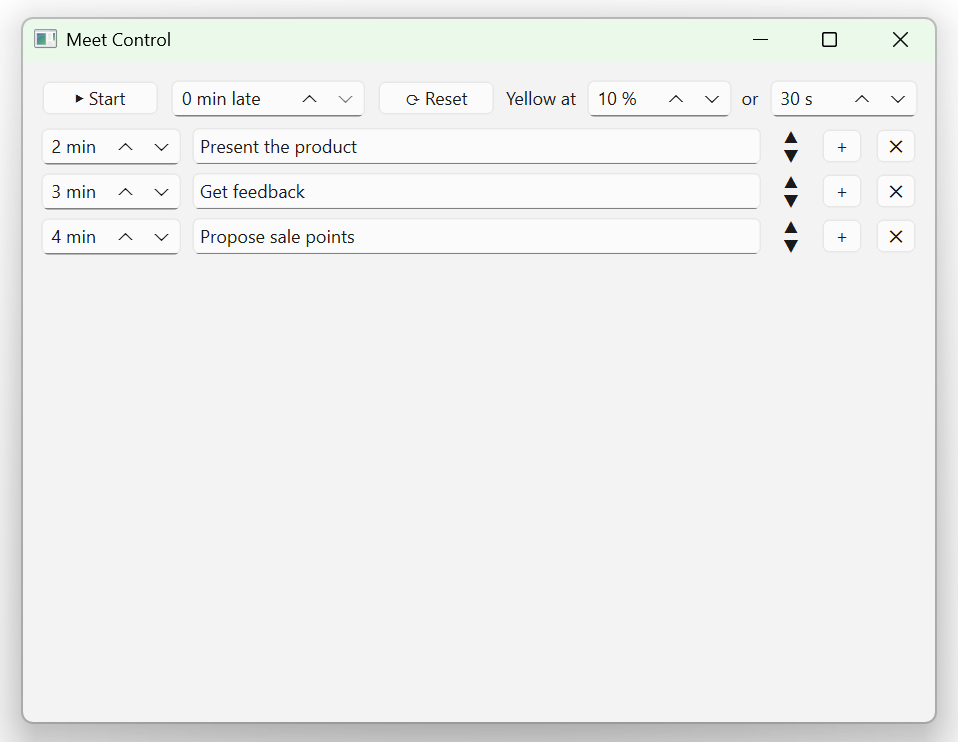
|
|
54
|
+
|
|
55
|
+
The running strip (here ~2 minutes left on the current section, next section as a
|
|
56
|
+
button), and the minimized square that signals status by color alone:
|
|
57
|
+
|
|
58
|
+

|
|
59
|
+
|
|
60
|
+
|
|
61
|
+
|
|
62
|
+
## Requirements
|
|
63
|
+
|
|
64
|
+
- [uv](https://docs.astral.sh/uv/) (manages the virtual environment and dependencies)
|
|
65
|
+
- Python 3.10+ (uv can install it for you)
|
|
66
|
+
|
|
67
|
+
## Install
|
|
68
|
+
|
|
69
|
+
```bash
|
|
70
|
+
pip install pacebar
|
|
71
|
+
pacebar
|
|
72
|
+
```
|
|
73
|
+
|
|
74
|
+
This pulls in PySide6 automatically and adds a `pacebar` command. (Prefer the
|
|
75
|
+
standalone exe if you don't want a Python environment at all — see below.)
|
|
76
|
+
|
|
77
|
+
## Run from source
|
|
78
|
+
|
|
79
|
+
```bash
|
|
80
|
+
uv sync # create the venv and install dependencies
|
|
81
|
+
uv run pacebar
|
|
82
|
+
```
|
|
83
|
+
|
|
84
|
+
Or run it in **one click** — double-click the script for your OS:
|
|
85
|
+
|
|
86
|
+
- **Windows:** `scripts\run.bat`
|
|
87
|
+
- **Linux / macOS:** `scripts/run.sh`
|
|
88
|
+
|
|
89
|
+
(`uv sync` runs automatically the first time `uv run` is used.)
|
|
90
|
+
|
|
91
|
+
## Build a standalone executable
|
|
92
|
+
|
|
93
|
+
One click: double-click `scripts\build.bat` (Windows) or `scripts/build.sh`
|
|
94
|
+
(Linux / macOS). Or run it manually:
|
|
95
|
+
|
|
96
|
+
```bash
|
|
97
|
+
uv run --extra build pyinstaller --noconfirm --clean pacebar.spec
|
|
98
|
+
```
|
|
99
|
+
|
|
100
|
+
The build is driven by [`pacebar.spec`](pacebar.spec) (a single
|
|
101
|
+
`--windowed --onefile` build). The result lands in `dist/` (`pacebar.exe` on
|
|
102
|
+
Windows) — one shareable file; it starts a touch slower because it unpacks to a temp
|
|
103
|
+
dir on launch.
|
|
104
|
+
|
|
105
|
+
PyInstaller does **not** cross-compile: it freezes for the OS you run the build on.
|
|
106
|
+
Build on Windows to get the `.exe`, and on Linux (or WSL) to get a Linux binary — each
|
|
107
|
+
runs only on its own platform. For a platform-independent option, use `pip install`
|
|
108
|
+
above instead.
|
|
109
|
+
|
|
110
|
+
## Lint & format
|
|
111
|
+
|
|
112
|
+
```bash
|
|
113
|
+
uv run ruff format . # format
|
|
114
|
+
uv run ruff check . # lint
|
|
115
|
+
```
|
|
116
|
+
|
|
117
|
+
## Publishing to PyPI (maintainer)
|
|
118
|
+
|
|
119
|
+
```bash
|
|
120
|
+
uv build # builds the wheel + sdist into dist/
|
|
121
|
+
uv publish dist/pacebar-* # upload (needs a PyPI account + API token)
|
|
122
|
+
```
|
|
123
|
+
|
|
124
|
+
The `pacebar-*` glob is deliberate: it uploads only the wheel and sdist and skips
|
|
125
|
+
`pacebar.exe`, which also lives in `dist/`. Test on TestPyPI first
|
|
126
|
+
(`uv publish --publish-url https://test.pypi.org/legacy/ ...`), and make sure the
|
|
127
|
+
project name is still available on PyPI before the first real upload.
|
|
128
|
+
|
|
129
|
+
## How to use
|
|
130
|
+
|
|
131
|
+
**Setup window**
|
|
132
|
+
|
|
133
|
+
- Each row is one section: **minutes** (whole positive number — arrows or type) and a
|
|
134
|
+
**name** (max 30 characters; it blinks red if you try to type more).
|
|
135
|
+
- **Tab / Shift+Tab** move between the two fields of the current row only.
|
|
136
|
+
**Up / Down** (while in the name field) jump to the name field of the row above /
|
|
137
|
+
below. **Enter** adds a new row. The `+` button also adds one; the ▲/▼ control
|
|
138
|
+
reorders; `✕` deletes.
|
|
139
|
+
- **Start** is top-left. Next to it is **minutes late** — how late the meeting is
|
|
140
|
+
actually starting (subtracted from the first section). **Reset** clears everything
|
|
141
|
+
back to one empty row (no confirmation, by design).
|
|
142
|
+
- **Yellow at … % or … s** controls the warning threshold: the strip turns yellow
|
|
143
|
+
when the remaining time drops below *whichever is larger* — that percentage of the
|
|
144
|
+
section, or that many seconds.
|
|
145
|
+
|
|
146
|
+
**Running strip** (left → right)
|
|
147
|
+
|
|
148
|
+
- ◀ **Back** — roll back one section. It resumes on the same global timeline: with the
|
|
149
|
+
time it still had if you switched early, or already overdue if you had overrun it.
|
|
150
|
+
- **Timer** — counts the current section down; format `HH:MM:SS` with the hours group
|
|
151
|
+
hidden when no section is an hour or longer. Goes negative when you run over.
|
|
152
|
+
- **Current section name.**
|
|
153
|
+
- **→ Next section** — click to advance. On the last section it reads **→ End**;
|
|
154
|
+
clicking it exits the program.
|
|
155
|
+
- ▢ **Minimize** — collapses to a small square that signals status by color only.
|
|
156
|
+
Drag it anywhere; click it to restore the full strip.
|
|
157
|
+
- ✕ **Cancel** — quits the program.
|
|
158
|
+
|
|
159
|
+
**Global hotkeys** (work even when another app is focused), laid out like game
|
|
160
|
+
left/right (D = forward, A = back):
|
|
161
|
+
|
|
162
|
+
- **Ctrl+Alt+D** — next section (right); on the last section it triggers **End** (exit)
|
|
163
|
+
- **Ctrl+Alt+A** — back (left)
|
|
164
|
+
|
|
165
|
+
> Chosen to stay clear of common conflicts: plain Alt+A mutes the mic in Zoom and
|
|
166
|
+
> Alt+D jumps to the browser address bar. On non-US layouts Ctrl+Alt equals AltGr,
|
|
167
|
+
> but that only matters while typing into a text field, not during a call.
|
|
168
|
+
|
|
169
|
+
> The strip is intentionally visible to everyone on a screen share — it keeps the
|
|
170
|
+
> whole call honest about time. There is deliberately **no pause**: business calls
|
|
171
|
+
> have hard stops.
|
|
172
|
+
|
|
173
|
+
## Saved state
|
|
174
|
+
|
|
175
|
+
On every Start the schedule (order, minutes, names — no lateness, no thresholds) is
|
|
176
|
+
written to `pacebar_last_run.json`, and it is loaded back the next time you launch. This
|
|
177
|
+
also makes the tool handy for rehearsing a talk.
|
|
178
|
+
|
|
179
|
+
The file lives **next to the running exe**, so each copy of the app keeps its own
|
|
180
|
+
typical call scenario — drop a copy in a different project folder and it remembers a
|
|
181
|
+
different schedule. (When running from source there is no exe, so it uses the current
|
|
182
|
+
working directory instead.)
|
|
183
|
+
|
|
184
|
+
## Notes & limitations
|
|
185
|
+
|
|
186
|
+
- Global hotkeys need the `pynput` package (already a dependency). On Linux they work
|
|
187
|
+
under **X11**; under **Wayland** they may be blocked — the on-strip buttons always
|
|
188
|
+
work regardless.
|
|
189
|
+
- Always-on-top is reliable over windowed apps (Zoom/Meet/Teams). A few apps in true
|
|
190
|
+
fullscreen-exclusive mode can still cover any topmost window.
|
|
191
|
+
- The strip width is fixed for the run from the widest section name and worst-case
|
|
192
|
+
timer. An extreme overrun (more minutes over than the longest section) can still
|
|
193
|
+
nudge the timer width.
|
|
@@ -0,0 +1,22 @@
|
|
|
1
|
+
pacebar/__init__.py,sha256=r0xu41rhHPYY0C2AniNOI9Qr2pblUpvBXU33vnTgWC0,87
|
|
2
|
+
pacebar/__main__.py,sha256=-utKlA1Seqn8ksP7rW84kJiBSJRGVblq-qfBljFneKI,426
|
|
3
|
+
pacebar/app.py,sha256=UpwYXMWGA2DAqgjAGfKlvwBZ-TQCot_czxxzGDb1YvY,849
|
|
4
|
+
pacebar/constants.py,sha256=Dv9Oyt_Im7pgOBZdHvd_JBDVUQPqKVDyAQeA7cgUDrg,825
|
|
5
|
+
pacebar/formatting.py,sha256=YwyzeSeKitD_IvB1ou1dMFfvFRWN1YOnaj9ih2nJ2KY,541
|
|
6
|
+
pacebar/paths.py,sha256=9Gf0bgE9MoJ_CIY8ynjS2EBM5l0oTSE7R4AVbHACHGo,510
|
|
7
|
+
pacebar/persistence.py,sha256=5cDTwal9CfLS5YqrYXcVFVzto1EsRDAe6q-aWzMYvvU,815
|
|
8
|
+
pacebar/timing.py,sha256=hWi2jj-03drorCawo5F5a4XfuPWJN5i2IZ3ebhwAfbE,3192
|
|
9
|
+
pacebar/editor/__init__.py,sha256=RK7_XFmgOsEmel2IUX_BrGYBJuzoayMqMjxJA5j3pTk,132
|
|
10
|
+
pacebar/editor/fields.py,sha256=C6H_kXYWzKGt4vfRizkhwIx9wSEtiX9eToPVsCfmjoc,3000
|
|
11
|
+
pacebar/editor/row.py,sha256=LLDCrwsgBrl3RqYkAI5ykAtrbtgaQ1tIqSIzpcFYhw8,3312
|
|
12
|
+
pacebar/editor/window.py,sha256=oP86skaVvkyj4qQHIkMAXUuBDuYIsjxCMKNEfSoZkJw,5938
|
|
13
|
+
pacebar/overlay/__init__.py,sha256=FxOeOt4PQr0_0wKfRnTZhpQn-etl9V8xRgZAMqJDHYw,149
|
|
14
|
+
pacebar/overlay/bar.py,sha256=TBGnFjpCjhXugHFtdvp6XkalMCedk6ME_mzlznuWZMQ,2824
|
|
15
|
+
pacebar/overlay/controller.py,sha256=vBVjakK0Sc1VcgPAm40YJb0KCW1mBfqnSuZyu4R2K18,5727
|
|
16
|
+
pacebar/overlay/hotkeys.py,sha256=jmh8GSGhprJGSW8M9279bDoitHaG_0PIWkr22fr_bgw,3511
|
|
17
|
+
pacebar/overlay/square.py,sha256=qte2_OUjPSL4dPfwz3QTKY4rIph5JNKprHiaHMcUH54,1428
|
|
18
|
+
pacebar-0.1.0.dist-info/METADATA,sha256=emd9sCWG0Ka-8BGgt_M-Yn9tC_6Jzvyfc5aRZZJcups,8185
|
|
19
|
+
pacebar-0.1.0.dist-info/WHEEL,sha256=mffPy8wBnZQn2VnJUU5jE99KsxaSfiyMHV9Yt0aLVxs,87
|
|
20
|
+
pacebar-0.1.0.dist-info/entry_points.txt,sha256=CZ06IldTiRbuUWpsdIy45sJZbN-hFxepG2Bo0P-OACQ,50
|
|
21
|
+
pacebar-0.1.0.dist-info/licenses/LICENSE,sha256=ihxuew3kQ8FXvaHuD9-fVOX-IXusEbARDiVIST0Dk54,1070
|
|
22
|
+
pacebar-0.1.0.dist-info/RECORD,,
|
|
@@ -0,0 +1,21 @@
|
|
|
1
|
+
MIT License
|
|
2
|
+
|
|
3
|
+
Copyright (c) 2026 Roman Voronov
|
|
4
|
+
|
|
5
|
+
Permission is hereby granted, free of charge, to any person obtaining a copy
|
|
6
|
+
of this software and associated documentation files (the "Software"), to deal
|
|
7
|
+
in the Software without restriction, including without limitation the rights
|
|
8
|
+
to use, copy, modify, merge, publish, distribute, sublicense, and/or sell
|
|
9
|
+
copies of the Software, and to permit persons to whom the Software is
|
|
10
|
+
furnished to do so, subject to the following conditions:
|
|
11
|
+
|
|
12
|
+
The above copyright notice and this permission notice shall be included in all
|
|
13
|
+
copies or substantial portions of the Software.
|
|
14
|
+
|
|
15
|
+
THE SOFTWARE IS PROVIDED "AS IS", WITHOUT WARRANTY OF ANY KIND, EXPRESS OR
|
|
16
|
+
IMPLIED, INCLUDING BUT NOT LIMITED TO THE WARRANTIES OF MERCHANTABILITY,
|
|
17
|
+
FITNESS FOR A PARTICULAR PURPOSE AND NONINFRINGEMENT. IN NO EVENT SHALL THE
|
|
18
|
+
AUTHORS OR COPYRIGHT HOLDERS BE LIABLE FOR ANY CLAIM, DAMAGES OR OTHER
|
|
19
|
+
LIABILITY, WHETHER IN AN ACTION OF CONTRACT, TORT OR OTHERWISE, ARISING FROM,
|
|
20
|
+
OUT OF OR IN CONNECTION WITH THE SOFTWARE OR THE USE OR OTHER DEALINGS IN THE
|
|
21
|
+
SOFTWARE.
|