onnx2tf 1.23.3__py3-none-any.whl → 1.25.8__py3-none-any.whl
This diff represents the content of publicly available package versions that have been released to one of the supported registries. The information contained in this diff is provided for informational purposes only and reflects changes between package versions as they appear in their respective public registries.
- onnx2tf/__init__.py +1 -1
- onnx2tf/onnx2tf.py +181 -30
- onnx2tf/ops/Add.py +29 -0
- onnx2tf/ops/AveragePool.py +20 -10
- onnx2tf/ops/BatchNormalization.py +270 -24
- onnx2tf/ops/Concat.py +4 -4
- onnx2tf/ops/DepthToSpace.py +8 -0
- onnx2tf/ops/Div.py +30 -0
- onnx2tf/ops/Expand.py +207 -0
- onnx2tf/ops/Gather.py +67 -18
- onnx2tf/ops/Mod.py +29 -0
- onnx2tf/ops/Mul.py +30 -0
- onnx2tf/ops/ReduceL1.py +3 -0
- onnx2tf/ops/ReduceL2.py +3 -0
- onnx2tf/ops/ReduceLogSum.py +3 -0
- onnx2tf/ops/ReduceLogSumExp.py +3 -0
- onnx2tf/ops/ReduceMax.py +3 -0
- onnx2tf/ops/ReduceMean.py +3 -0
- onnx2tf/ops/ReduceMin.py +3 -0
- onnx2tf/ops/ReduceProd.py +3 -0
- onnx2tf/ops/ReduceSum.py +3 -0
- onnx2tf/ops/ReduceSumSquare.py +3 -0
- onnx2tf/ops/Shape.py +2 -0
- onnx2tf/ops/Sub.py +29 -0
- onnx2tf/ops/Transpose.py +14 -0
- onnx2tf/utils/common_functions.py +2 -2
- {onnx2tf-1.23.3.dist-info → onnx2tf-1.25.8.dist-info}/METADATA +269 -28
- {onnx2tf-1.23.3.dist-info → onnx2tf-1.25.8.dist-info}/RECORD +33 -33
- {onnx2tf-1.23.3.dist-info → onnx2tf-1.25.8.dist-info}/WHEEL +1 -1
- {onnx2tf-1.23.3.dist-info → onnx2tf-1.25.8.dist-info}/LICENSE +0 -0
- {onnx2tf-1.23.3.dist-info → onnx2tf-1.25.8.dist-info}/LICENSE_onnx-tensorflow +0 -0
- {onnx2tf-1.23.3.dist-info → onnx2tf-1.25.8.dist-info}/entry_points.txt +0 -0
- {onnx2tf-1.23.3.dist-info → onnx2tf-1.25.8.dist-info}/top_level.txt +0 -0
|
@@ -1,6 +1,6 @@
|
|
|
1
1
|
Metadata-Version: 2.1
|
|
2
2
|
Name: onnx2tf
|
|
3
|
-
Version: 1.
|
|
3
|
+
Version: 1.25.8
|
|
4
4
|
Summary: Self-Created Tools to convert ONNX files (NCHW) to TensorFlow/TFLite/Keras format (NHWC). The purpose of this tool is to solve the massive Transpose extrapolation problem in onnx-tensorflow (onnx-tf).
|
|
5
5
|
Home-page: https://github.com/PINTO0309/onnx2tf
|
|
6
6
|
Author: Katsuya Hyodo
|
|
@@ -16,6 +16,8 @@ License-File: LICENSE_onnx-tensorflow
|
|
|
16
16
|
# onnx2tf
|
|
17
17
|
Self-Created Tools to convert ONNX files (NCHW) to TensorFlow/TFLite/Keras format (NHWC). The purpose of this tool is to solve the massive Transpose extrapolation problem in [onnx-tensorflow](https://github.com/onnx/onnx-tensorflow) ([onnx-tf](https://pypi.org/project/onnx-tf/)). I don't need a Star, but give me a pull request. Since I am adding challenging model optimizations and fixing bugs almost daily, I frequently embed potential bugs that would otherwise break through CI's regression testing. Therefore, if you encounter new problems, I recommend that you try a package that is a few versions older, or try the latest package that will be released in a few days.
|
|
18
18
|
|
|
19
|
+
Incidentally, I have never used this tool in practice myself since I started working on it. It doesn't matter.
|
|
20
|
+
|
|
19
21
|
<p align="center">
|
|
20
22
|
<img src="https://user-images.githubusercontent.com/33194443/193840307-fa69eace-05a9-4d93-9c5d-999cf88af28e.png" />
|
|
21
23
|
</p>
|
|
@@ -269,12 +271,12 @@ Video speed is adjusted approximately 50 times slower than actual speed.
|
|
|
269
271
|
|
|
270
272
|
## Environment
|
|
271
273
|
- Linux / Windows
|
|
272
|
-
- onnx==1.
|
|
273
|
-
- onnxruntime==1.
|
|
274
|
+
- onnx==1.16.1
|
|
275
|
+
- onnxruntime==1.18.1
|
|
274
276
|
- onnx-simplifier==0.4.33 or 0.4.30 `(onnx.onnx_cpp2py_export.shape_inference.InferenceError: [ShapeInferenceError] (op_type:Slice, node name: /xxxx/Slice): [ShapeInferenceError] Inferred shape and existing shape differ in rank: (x) vs (y))`
|
|
275
277
|
- onnx_graphsurgeon
|
|
276
278
|
- simple_onnx_processing_tools
|
|
277
|
-
- tensorflow==2.
|
|
279
|
+
- tensorflow==2.17.0, Special bugs: [#436](https://github.com/PINTO0309/onnx2tf/issues/436)
|
|
278
280
|
- psutil==5.9.5
|
|
279
281
|
- ml_dtypes==0.3.2
|
|
280
282
|
- flatbuffers-compiler (Optional, Only when using the `-coion` option. Executable file named `flatc`.)
|
|
@@ -290,10 +292,14 @@ Video speed is adjusted approximately 50 times slower than actual speed.
|
|
|
290
292
|
|
|
291
293
|
## Sample Usage
|
|
292
294
|
### 1. Install
|
|
295
|
+
#### Note:
|
|
296
|
+
**1. If you are using TensorFlow v2.13.0 or earlier, use a version older than onnx2tf v1.17.5. onnx2tf v1.17.6 or later will not work properly due to changes in TensorFlow's API.**
|
|
293
297
|
|
|
294
|
-
**
|
|
298
|
+
**2. The latest onnx2tf implementation is based on Keras API 3 and will not work properly if you install TensorFlow v2.15.0 or earlier.**
|
|
295
299
|
|
|
296
300
|
- HostPC
|
|
301
|
+
<details><summary>Click to expand</summary><div>
|
|
302
|
+
|
|
297
303
|
- When using GHCR, see `Authenticating to the Container registry`
|
|
298
304
|
|
|
299
305
|
https://docs.github.com/en/packages/working-with-a-github-packages-registry/working-with-the-container-registry#authenticating-to-the-container-registry
|
|
@@ -308,7 +314,7 @@ Video speed is adjusted approximately 50 times slower than actual speed.
|
|
|
308
314
|
docker run --rm -it \
|
|
309
315
|
-v `pwd`:/workdir \
|
|
310
316
|
-w /workdir \
|
|
311
|
-
ghcr.io/pinto0309/onnx2tf:1.
|
|
317
|
+
ghcr.io/pinto0309/onnx2tf:1.25.8
|
|
312
318
|
|
|
313
319
|
or
|
|
314
320
|
|
|
@@ -316,19 +322,19 @@ Video speed is adjusted approximately 50 times slower than actual speed.
|
|
|
316
322
|
docker run --rm -it \
|
|
317
323
|
-v `pwd`:/workdir \
|
|
318
324
|
-w /workdir \
|
|
319
|
-
docker.io/pinto0309/onnx2tf:1.
|
|
325
|
+
docker.io/pinto0309/onnx2tf:1.25.8
|
|
320
326
|
|
|
321
327
|
or
|
|
322
328
|
|
|
323
|
-
pip install -U onnx==1.
|
|
329
|
+
pip install -U onnx==1.16.1 \
|
|
324
330
|
&& pip install -U nvidia-pyindex \
|
|
325
331
|
&& pip install -U onnx-graphsurgeon \
|
|
326
|
-
&& pip install -U onnxruntime==1.
|
|
332
|
+
&& pip install -U onnxruntime==1.18.1 \
|
|
327
333
|
&& pip install -U onnxsim==0.4.33 \
|
|
328
334
|
&& pip install -U simple_onnx_processing_tools \
|
|
329
335
|
&& pip install -U sne4onnx>=1.0.13 \
|
|
330
336
|
&& pip install -U sng4onnx>=1.0.4 \
|
|
331
|
-
&& pip install -U tensorflow==2.
|
|
337
|
+
&& pip install -U tensorflow==2.17.0 \
|
|
332
338
|
&& pip install -U protobuf==3.20.3 \
|
|
333
339
|
&& pip install -U onnx2tf \
|
|
334
340
|
&& pip install -U h5py==3.11.0 \
|
|
@@ -342,9 +348,13 @@ Video speed is adjusted approximately 50 times slower than actual speed.
|
|
|
342
348
|
pip install -e .
|
|
343
349
|
```
|
|
344
350
|
|
|
351
|
+
</div></details>
|
|
352
|
+
|
|
345
353
|
or
|
|
346
354
|
|
|
347
355
|
- Google Colaboratory Python3.10
|
|
356
|
+
<details><summary>Click to expand</summary><div>
|
|
357
|
+
|
|
348
358
|
```
|
|
349
359
|
!sudo apt-get -y update
|
|
350
360
|
!sudo apt-get -y install python3-pip
|
|
@@ -354,11 +364,11 @@ or
|
|
|
354
364
|
&& sudo chmod +x flatc \
|
|
355
365
|
&& sudo mv flatc /usr/bin/
|
|
356
366
|
!pip install -U pip \
|
|
357
|
-
&& pip install tensorflow==2.
|
|
358
|
-
&& pip install -U onnx==1.
|
|
367
|
+
&& pip install tensorflow==2.17.0 \
|
|
368
|
+
&& pip install -U onnx==1.16.1 \
|
|
359
369
|
&& python -m pip install onnx_graphsurgeon \
|
|
360
370
|
--index-url https://pypi.ngc.nvidia.com \
|
|
361
|
-
&& pip install -U onnxruntime==1.
|
|
371
|
+
&& pip install -U onnxruntime==1.18.1 \
|
|
362
372
|
&& pip install -U onnxsim==0.4.33 \
|
|
363
373
|
&& pip install -U simple_onnx_processing_tools \
|
|
364
374
|
&& pip install -U onnx2tf \
|
|
@@ -370,24 +380,48 @@ or
|
|
|
370
380
|
&& pip install flatbuffers>=23.5.26
|
|
371
381
|
```
|
|
372
382
|
|
|
383
|
+
</div></details>
|
|
384
|
+
|
|
373
385
|
### 2. Run test
|
|
374
386
|
Only patterns that are considered to be used particularly frequently are described. In addition, there are several other options, such as disabling Flex OP and additional options to improve inference performance. See: [CLI Parameter](#cli-parameter)
|
|
375
387
|
```bash
|
|
376
388
|
# Float32, Float16
|
|
377
|
-
# This is the fastest way to generate tflite
|
|
378
|
-
#
|
|
379
|
-
#
|
|
380
|
-
#
|
|
389
|
+
# This is the fastest way to generate tflite.
|
|
390
|
+
# Improved to automatically generate `signature` without `-osd` starting from v1.25.3.
|
|
391
|
+
# Also, starting from v1.24.0, efficient TFLite can be generated
|
|
392
|
+
# without unrolling `GroupConvolution`. e.g. YOLOv9, YOLOvN
|
|
393
|
+
# Conversion to other frameworks. e.g. TensorFlow.js, CoreML, etc
|
|
394
|
+
# https://github.com/PINTO0309/onnx2tf#19-conversion-to-tensorflowjs
|
|
395
|
+
# https://github.com/PINTO0309/onnx2tf#20-conversion-to-coreml
|
|
381
396
|
wget https://github.com/PINTO0309/onnx2tf/releases/download/0.0.2/resnet18-v1-7.onnx
|
|
382
397
|
onnx2tf -i resnet18-v1-7.onnx
|
|
383
398
|
|
|
384
|
-
|
|
385
|
-
|
|
386
|
-
|
|
387
|
-
|
|
388
|
-
|
|
389
|
-
|
|
390
|
-
|
|
399
|
+
ls -lh saved_model/
|
|
400
|
+
|
|
401
|
+
assets
|
|
402
|
+
fingerprint.pb
|
|
403
|
+
resnet18-v1-7_float16.tflite
|
|
404
|
+
resnet18-v1-7_float32.tflite
|
|
405
|
+
saved_model.pb
|
|
406
|
+
variables
|
|
407
|
+
|
|
408
|
+
TF_CPP_MIN_LOG_LEVEL=3 \
|
|
409
|
+
saved_model_cli show \
|
|
410
|
+
--dir saved_model \
|
|
411
|
+
--signature_def serving_default \
|
|
412
|
+
--tag_set serve
|
|
413
|
+
|
|
414
|
+
The given SavedModel SignatureDef contains the following input(s):
|
|
415
|
+
inputs['data'] tensor_info:
|
|
416
|
+
dtype: DT_FLOAT
|
|
417
|
+
shape: (-1, 224, 224, 3)
|
|
418
|
+
name: serving_default_data:0
|
|
419
|
+
The given SavedModel SignatureDef contains the following output(s):
|
|
420
|
+
outputs['output_0'] tensor_info:
|
|
421
|
+
dtype: DT_FLOAT
|
|
422
|
+
shape: (1, 1000) # <-- Model design bug in resnet18-v1-7.onnx
|
|
423
|
+
name: PartitionedCall:0
|
|
424
|
+
Method name is: tensorflow/serving/predict
|
|
391
425
|
|
|
392
426
|
# In the interest of efficiency for my development and debugging of onnx2tf,
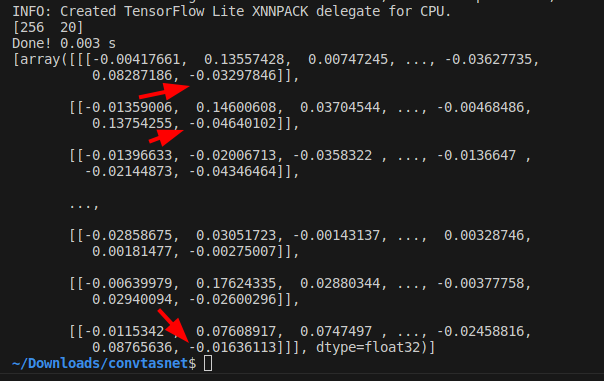
|
|
393
427
|
# the default configuration shows a large amount of debug level logs.
|
|
@@ -451,9 +485,20 @@ onnx2tf -i emotion-ferplus-8.onnx -oiqt
|
|
|
451
485
|
# INT8 Quantization (per-tensor)
|
|
452
486
|
onnx2tf -i emotion-ferplus-8.onnx -oiqt -qt per-tensor
|
|
453
487
|
|
|
488
|
+
# Split the model at the middle position for debugging
|
|
489
|
+
# Specify the input name of the OP
|
|
490
|
+
wget https://github.com/PINTO0309/onnx2tf/releases/download/1.25.0/cf_fus.onnx
|
|
491
|
+
onnx2tf -i cf_fus.onnx -inimc 448
|
|
492
|
+
|
|
454
493
|
# Split the model at the middle position for debugging
|
|
455
494
|
# Specify the output name of the OP
|
|
456
|
-
|
|
495
|
+
wget https://github.com/PINTO0309/onnx2tf/releases/download/1.25.0/cf_fus.onnx
|
|
496
|
+
onnx2tf -i cf_fus.onnx -onimc dep_sec
|
|
497
|
+
|
|
498
|
+
# Split the model at the middle position for debugging
|
|
499
|
+
# Specify the input/output name of the OP
|
|
500
|
+
wget https://github.com/PINTO0309/onnx2tf/releases/download/1.25.0/cf_fus.onnx
|
|
501
|
+
onnx2tf -i cf_fus.onnx -inimc 448 -onimc velocity
|
|
457
502
|
|
|
458
503
|
# Suppress generation of Flex OP and replace with Pseudo-Function
|
|
459
504
|
# [
|
|
@@ -502,6 +547,9 @@ onnx2tf -i human_segmentation_pphumanseg_2021oct.onnx -prf replace.json
|
|
|
502
547
|
```
|
|
503
548
|
|
|
504
549
|
### 3. Accuracy check
|
|
550
|
+
|
|
551
|
+
<details><summary>Click to expand</summary><div>
|
|
552
|
+
|
|
505
553
|
Perform error checking of ONNX output and TensorFlow output. Verify that the error of all outputs, one operation at a time, is below a certain threshold. Automatically determines before and after which OPs the tool's automatic conversion of the model failed. Know where dimensional compression, dimensional expansion, and dimensional transposition by `Reshape` and `Traspose` are failing. Once you have identified the problem area, you can refer to the tutorial on [Parameter replacement](#parameter-replacement) to modify the tool's behavior.
|
|
506
554
|
|
|
507
555
|
After many upgrades, the need for JSON parameter correction has become much less common, but there are still some edge cases where JSON correction is required. If the PC has sufficient free space in its RAM, onnx2tf will convert the model while carefully performing accuracy checks on all OPs. Thus, at the cost of successful model conversion, the conversion speed is a little slower. If the amount of RAM required for the accuracy check is expected to exceed 80% of the total available RAM capacity of the entire PC, the conversion operation will be performed without an accuracy check. Therefore, if the accuracy of the converted model is found to be significantly degraded, the accuracy may be automatically corrected by re-conversion on a PC with a large amount of RAM. For example, my PC has 128GB of RAM, but the StableDiffusion v1.5 model is too complex in its structure and consumed about 180GB of RAM in total with 50GB of SWAP space.
|
|
@@ -527,8 +575,16 @@ onnx2tf -i mobilenetv2-12.onnx -cotof -cotoa 1e-1 -cind "input" "/your/path/x.np
|
|
|
527
575
|
|
|
528
576
|

|
|
529
577
|
|
|
578
|
+
</div></details>
|
|
579
|
+
|
|
530
580
|
### 4. Match tflite input/output names and input/output order to ONNX
|
|
581
|
+
|
|
582
|
+
<details><summary>Click to expand</summary><div>
|
|
583
|
+
|
|
531
584
|
If you want to match tflite's input/output OP names and the order of input/output OPs with ONNX, you can use the `interpreter.get_signature_runner()` to infer this after using the `-coion` / `--copy_onnx_input_output_names_to_tflite` option to output tflite file. See: https://github.com/PINTO0309/onnx2tf/issues/228
|
|
585
|
+
|
|
586
|
+
onnx2tf automatically compares the final input/output shapes of ONNX and the generated TFLite and tries to automatically correct the input/output order as much as possible if there is a difference. However, if INT8 quantization is used and there are multiple inputs and outputs with the same shape, automatic correction may fail. This is because TFLiteConverter shuffles the input-output order by itself only when INT8 quantization is performed.
|
|
587
|
+
|
|
532
588
|
```python
|
|
533
589
|
import torch
|
|
534
590
|
import onnxruntime
|
|
@@ -607,7 +663,12 @@ print("[TFLite] Model Predictions:", tf_lite_output)
|
|
|
607
663
|
```
|
|
608
664
|

|
|
609
665
|
|
|
666
|
+
</div></details>
|
|
667
|
+
|
|
610
668
|
### 5. Rewriting of tflite input/output OP names and `signature_defs`
|
|
669
|
+
|
|
670
|
+
<details><summary>Click to expand</summary><div>
|
|
671
|
+
|
|
611
672
|
If you do not like tflite input/output names such as `serving_default_*:0` or `StatefulPartitionedCall:0`, you can rewrite them using the following tools and procedures. It can be rewritten from any name to any name, so it does not have to be `serving_default_*:0` or `StatefulPartitionedCall:0`.
|
|
612
673
|
|
|
613
674
|
https://github.com/PINTO0309/tflite-input-output-rewriter
|
|
@@ -643,8 +704,12 @@ pip install -U tfliteiorewriter
|
|
|
643
704
|
|
|
644
705
|

|
|
645
706
|
|
|
707
|
+
</div></details>
|
|
646
708
|
|
|
647
709
|
### 6. Embed metadata in tflite
|
|
710
|
+
|
|
711
|
+
<details><summary>Click to expand</summary><div>
|
|
712
|
+
|
|
648
713
|
If you want to embed label maps, quantization parameters, descriptions, etc. into your tflite file, you can refer to the official tutorial and try it yourself. For now, this tool does not plan to implement the ability to append metadata, as I do not want to write byte arrays to the tflite file that are not essential to its operation.
|
|
649
714
|
|
|
650
715
|
- Adding metadata to TensorFlow Lite models
|
|
@@ -652,7 +717,12 @@ If you want to embed label maps, quantization parameters, descriptions, etc. int
|
|
|
652
717
|
https://www.tensorflow.org/lite/models/convert/metadata
|
|
653
718
|

|
|
654
719
|
|
|
720
|
+
</div></details>
|
|
721
|
+
|
|
655
722
|
### 7. If the accuracy of the INT8 quantized model degrades significantly
|
|
723
|
+
|
|
724
|
+
<details><summary>Click to expand</summary><div>
|
|
725
|
+
|
|
656
726
|
It is a matter of model structure. The activation function (`SiLU`/`Swish`), kernel size and stride for `Pooling`, and kernel size and stride for `Conv` should be completely revised. See: https://github.com/PINTO0309/onnx2tf/issues/269
|
|
657
727
|
|
|
658
728
|
If you want to see the difference in quantization error between `SiLU` and `ReLU`, please check this Gist by [@motokimura](https://gist.github.com/motokimura) who helped us in our research. Thanks Motoki!
|
|
@@ -716,7 +786,12 @@ The accuracy error rates after quantization for different activation functions a
|
|
|
716
786
|
2. Pattern with fixed value `-128.0` padded on 4 sides of tensor
|
|
717
787
|

|
|
718
788
|
|
|
789
|
+
</div></details>
|
|
790
|
+
|
|
719
791
|
### 8. Calibration data creation for INT8 quantization
|
|
792
|
+
|
|
793
|
+
<details><summary>Click to expand</summary><div>
|
|
794
|
+
|
|
720
795
|
Calibration data (.npy) for INT8 quantization (`-cind`) is generated as follows. This is a sample when the data used for training is image data. See: https://github.com/PINTO0309/onnx2tf/issues/222
|
|
721
796
|
|
|
722
797
|
https://www.tensorflow.org/lite/performance/post_training_quantization
|
|
@@ -768,7 +843,12 @@ e.g. How to specify calibration data in CLI or Script respectively.
|
|
|
768
843
|
"""
|
|
769
844
|
```
|
|
770
845
|
|
|
846
|
+
</div></details>
|
|
847
|
+
|
|
771
848
|
### 9. INT8 quantization of models with multiple inputs requiring non-image data
|
|
849
|
+
|
|
850
|
+
<details><summary>Click to expand</summary><div>
|
|
851
|
+
|
|
772
852
|
If you do not need to perform INT8 quantization with this tool alone, the following method is the easiest.
|
|
773
853
|
|
|
774
854
|
The `-osd` option will output a `saved_model.pb` in the `saved_model` folder with the full size required for quantization. That is, a default signature named `serving_default` is embedded in `.pb`. The `-b` option is used to convert the batch size by rewriting it as a static integer.
|
|
@@ -848,7 +928,12 @@ https://www.tensorflow.org/lite/performance/post_training_quantization
|
|
|
848
928
|
|
|
849
929
|
See: https://github.com/PINTO0309/onnx2tf/issues/248
|
|
850
930
|
|
|
931
|
+
</div></details>
|
|
932
|
+
|
|
851
933
|
### 10. Fixing the output of NonMaxSuppression (NMS)
|
|
934
|
+
|
|
935
|
+
<details><summary>Click to expand</summary><div>
|
|
936
|
+
|
|
852
937
|
PyTorch's `NonMaxSuppression (torchvision.ops.nms)` and ONNX's `NonMaxSuppression` are not fully compatible. TorchVision's NMS is very inefficient. Therefore, it is inevitable that converting ONNX using NMS in object detection models and other models will be very redundant and will be converted with a structure that is difficult for TensorFlow.js and TFLite models to take advantage of in devices. This is due to the indefinite number of tensors output by the NMS. In this chapter, I share how to easily tune the ONNX generated using TorchVision's redundant NMS to generate an optimized NMS.
|
|
853
938
|
|
|
854
939
|
1. There are multiple issues with TorchVision's NMS. First, the batch size specification is not supported; second, the `max_output_boxes_per_class` parameter cannot be specified. Please see the NMS sample ONNX part I generated. The `max_output_boxes_per_class` has been changed to `896` instead of `-Infinity`. The biggest problem with TorchVision NMS is that it generates ONNX with `max_output_boxes_per_class` set to `-Infinity` or `9223372036854775807 (Maximum value of INT64)`, resulting in a variable number of NMS outputs from zero to infinite. Thus, by rewriting `-Infinity` or `9223372036854775807 (Maximum value of INT64)` to a constant value, it is possible to output an NMS that can be effortlessly inferred by TFJS or TFLite.
|
|
@@ -885,7 +970,12 @@ PyTorch's `NonMaxSuppression (torchvision.ops.nms)` and ONNX's `NonMaxSuppressio
|
|
|
885
970
|
I would be happy if this is a reference for Android + Java or TFJS implementations. There are tons more tricky model optimization techniques described in my blog posts, so you'll have to find them yourself. I don't dare to list the URL here because it is annoying to see so many `issues` being posted. And unfortunately, all articles are in Japanese.
|
|
886
971
|

|
|
887
972
|
|
|
973
|
+
</div></details>
|
|
974
|
+
|
|
888
975
|
### 11. RNN (RNN, GRU, LSTM) Inference Acceleration
|
|
976
|
+
|
|
977
|
+
<details><summary>Click to expand</summary><div>
|
|
978
|
+
|
|
889
979
|
TensorFlow's RNN has a speedup option called `unroll`. The network will be unrolled, else a symbolic loop will be used. Unrolling can speed-up a RNN, although it tends to be more memory-intensive. Unrolling is only suitable for short sequences. onnx2tf allows you to deploy RNNs into memory-intensive operations by specifying the `--enable_rnn_unroll` or `-eru` options. The `--enable_rnn_unroll` option is available for `RNN`, `GRU`, and `LSTM`.
|
|
890
980
|
|
|
891
981
|
- Keras https://keras.io/api/layers/recurrent_layers/lstm/
|
|
@@ -907,7 +997,12 @@ An example of `BidirectionalLSTM` conversion with the `--enable_rnn_unroll` opti
|
|
|
907
997
|
|
|
908
998
|

|
|
909
999
|
|
|
1000
|
+
</div></details>
|
|
1001
|
+
|
|
910
1002
|
### 12. If the accuracy of the Float32 model degrades significantly
|
|
1003
|
+
|
|
1004
|
+
<details><summary>Click to expand</summary><div>
|
|
1005
|
+
|
|
911
1006
|
The pattern of accuracy degradation of the converted model does not only occur when INT8 quantization is performed. A special edge case is when there is a problem with the implementation of a particular OP on the TFLite runtime side. Below, I will reproduce the problem by means of a very simple CNN model and further explain its workaround. Here is the issue that prompted me to add this explanation. [[Conv-TasNet] Facing issue in converting Conv-TasNet model #447](https://github.com/PINTO0309/onnx2tf/issues/447)
|
|
912
1007
|
|
|
913
1008
|
Download a sample model for validation.
|
|
@@ -1008,7 +1103,12 @@ Again, run the test code to check the inference results. The figure below shows
|
|
|
1008
1103
|
|
|
1009
1104
|
|
|
1010
1105
|
|
|
1106
|
+
</div></details>
|
|
1107
|
+
|
|
1011
1108
|
### 13. Problem of extremely large calculation error in `InstanceNormalization`
|
|
1109
|
+
|
|
1110
|
+
<details><summary>Click to expand</summary><div>
|
|
1111
|
+
|
|
1012
1112
|
Even if the conversion is successful, `InstanceNormalization` tends to have very large errors. This is an ONNX specification.
|
|
1013
1113
|
|
|
1014
1114
|
- See.1: https://discuss.pytorch.org/t/understanding-instance-normalization-2d-with-running-mean-and-running-var/144139
|
|
@@ -1020,7 +1120,12 @@ I verified this with a very simple sample model. There are more than 8 million e
|
|
|
1020
1120
|
|
|
1021
1121
|

|
|
1022
1122
|
|
|
1123
|
+
</div></details>
|
|
1124
|
+
|
|
1023
1125
|
### 14. Inference with dynamic tensors in TFLite
|
|
1126
|
+
|
|
1127
|
+
<details><summary>Click to expand</summary><div>
|
|
1128
|
+
|
|
1024
1129
|
For some time now, TFLite runtime has supported inference by dynamic tensors. However, the existence of this important function is not widely recognized. In this chapter, I will show how I can convert an ONNX file that contains dynamic geometry in batch size directly into a TFLite file that contains dynamic geometry and then further infer it in variable batch conditions. The issue that inspired me to add this tutorial is here. [[Dynamic batch / Dynamic shape] onnx model with dynamic input is converted to tflite with static input 1 #441](https://github.com/PINTO0309/onnx2tf/issues/441), or [Cannot use converted model with dynamic input shape #521](https://github.com/PINTO0309/onnx2tf/issues/521)
|
|
1025
1130
|
|
|
1026
1131
|
|
|
@@ -1105,6 +1210,8 @@ If you want to infer in variable batches, you need to infer using `signature`. I
|
|
|
1105
1210
|
|
|
1106
1211
|
https://github.com/PINTO0309/onnx2tf#4-match-tflite-inputoutput-names-and-inputoutput-order-to-onnx
|
|
1107
1212
|
|
|
1213
|
+
You can use `signature_runner` to handle dynamic input tensors by performing inference using `signature`. Below I show that both `batch_size=5` and `batch_size=3` tensors can be inferred with the same model.
|
|
1214
|
+
|
|
1108
1215
|
- `test.py` - Batch size: `5`
|
|
1109
1216
|
```python
|
|
1110
1217
|
import numpy as np
|
|
@@ -1164,7 +1271,12 @@ https://github.com/PINTO0309/onnx2tf#4-match-tflite-inputoutput-names-and-inputo
|
|
|
1164
1271
|
3.7874976e-01, 0.0000000e+00]], dtype=float32)}
|
|
1165
1272
|
```
|
|
1166
1273
|
|
|
1274
|
+
</div></details>
|
|
1275
|
+
|
|
1167
1276
|
### 15. Significant optimization of the entire model through `Einsum` and `OneHot` optimizations
|
|
1277
|
+
|
|
1278
|
+
<details><summary>Click to expand</summary><div>
|
|
1279
|
+
|
|
1168
1280
|
`Einsum` and `OneHot` are not optimized to the maximum by the standard behavior of onnx-optimizer. Therefore, pre-optimizing the `Einsum` OP and `OneHot` OP using my original method can significantly improve the success rate of model conversion, and the input ONNX model itself can be significantly optimized compared to when onnxsim alone is optimized. See: https://github.com/PINTO0309/onnx2tf/issues/569
|
|
1169
1281
|
|
|
1170
1282
|
- I have made a few unique customizations to the cited model structure.
|
|
@@ -1192,7 +1304,12 @@ onnx2tf -i sjy_fused_static_spo.onnx
|
|
|
1192
1304
|
|
|
1193
1305
|

|
|
1194
1306
|
|
|
1307
|
+
</div></details>
|
|
1308
|
+
|
|
1195
1309
|
### 16. Add constant outputs to the model that are not connected to the model body
|
|
1310
|
+
|
|
1311
|
+
<details><summary>Click to expand</summary><div>
|
|
1312
|
+
|
|
1196
1313
|
Sometimes you want to always output constants that are not connected to the model body. See: [https://github.com/PINTO0309/onnx2tf/issues/627](https://github.com/PINTO0309/onnx2tf/issues/627). For example, in the case of ONNX as shown in the figure below. You may want to keep scaling parameters and other parameters as fixed values inside the model and always include the same value in the output.
|
|
1197
1314
|
|
|
1198
1315
|

|
|
@@ -1253,7 +1370,96 @@ Constant Output:
|
|
|
1253
1370
|
array([1., 2., 3., 4., 5.], dtype=float32)
|
|
1254
1371
|
```
|
|
1255
1372
|
|
|
1256
|
-
|
|
1373
|
+
</div></details>
|
|
1374
|
+
|
|
1375
|
+
### 17. Conversion of models that use variable length tokens and embedding, such as LLM and sound models
|
|
1376
|
+
|
|
1377
|
+
<details><summary>Click to expand</summary><div>
|
|
1378
|
+
|
|
1379
|
+
This refers to a model with undefined dimensions, either all dimensions or multiple dimensions including batch size, as shown in the figure below.
|
|
1380
|
+
|
|
1381
|
+
- Sample model
|
|
1382
|
+
|
|
1383
|
+
https://github.com/PINTO0309/onnx2tf/releases/download/1.24.0/bge-m3.onnx
|
|
1384
|
+
|
|
1385
|
+
- Structure
|
|
1386
|
+
|
|
1387
|
+

|
|
1388
|
+
|
|
1389
|
+
If such a model is converted without any options, TensorFlow/Keras will abort. This is an internal TensorFlow/Keras implementation issue rather than an onnx2tf issue. TensorFlow/Keras does not allow more than two undefined dimensions in the `shape` attribute of `Reshape` due to the specification, so an error occurs during the internal transformation operation of the `Reshape` OP as shown below. This has been an inherent problem in TensorFlow/Keras since long ago and has not been resolved to this day. See: [RuntimeError: tensorflow/lite/kernels/range.cc:39 (start > limit && delta < 0) || (start < limit && delta > 0) was not true.Node number 3 (RANGE) failed to invoke. Node number 393 (WHILE) failed to invoke. current error :RuntimeError: tensorflow/lite/kernels/reshape.cc:55 stretch_dim != -1 (0 != -1)Node number 83 (RESHAPE) failed to prepare. #40504](https://github.com/tensorflow/tensorflow/issues/40504)
|
|
1390
|
+
|
|
1391
|
+
- OP where the problem occurs
|
|
1392
|
+
|
|
1393
|
+

|
|
1394
|
+
|
|
1395
|
+
- Error message
|
|
1396
|
+
```
|
|
1397
|
+
error: 'tf.Reshape' op requires 'shape' to have at most one dynamic dimension, but got multiple dynamic dimensions at indices 0 and 3
|
|
1398
|
+
```
|
|
1399
|
+
|
|
1400
|
+
Thus, for models such as this, where all dimensions, including batch size, are dynamic shapes, it is often possible to convert by fixing the batch size to `1` with the `-b 1` or `--batch_size 1` option.
|
|
1401
|
+
|
|
1402
|
+
```
|
|
1403
|
+
onnx2tf -i model.onnx -b 1 -osd
|
|
1404
|
+
```
|
|
1405
|
+
|
|
1406
|
+
- Results
|
|
1407
|
+
|
|
1408
|
+

|
|
1409
|
+
|
|
1410
|
+
When the converted tflite is displayed in Netron, all the dimensions of the dynamic shape are displayed as `1`, but this is a display problem in Netron, and the shape is actually converted to `-1` or `None`.
|
|
1411
|
+
|
|
1412
|
+

|
|
1413
|
+
|
|
1414
|
+
Click here to see how to perform inference using the dynamic shape tensor.
|
|
1415
|
+
|
|
1416
|
+
https://github.com/PINTO0309/onnx2tf/tree/main?tab=readme-ov-file#14-inference-with-dynamic-tensors-in-tflite
|
|
1417
|
+
|
|
1418
|
+
</div></details>
|
|
1419
|
+
|
|
1420
|
+
### 18. Convert only the intermediate structural part of the ONNX model
|
|
1421
|
+
|
|
1422
|
+
<details><summary>Click to expand</summary><div>
|
|
1423
|
+
|
|
1424
|
+
By specifying ONNX input or output names, only the middle part of the model can be converted. This is useful when you want to see what output is obtained in what part of the model after conversion, or when debugging the model conversion operation itself.
|
|
1425
|
+
|
|
1426
|
+
For example, take a model with multiple inputs and multiple outputs as shown in the figure below to try a partial transformation.
|
|
1427
|
+
|
|
1428
|
+

|
|
1429
|
+
|
|
1430
|
+
- To convert by specifying only the input name to start the conversion
|
|
1431
|
+
|
|
1432
|
+
```
|
|
1433
|
+
wget https://github.com/PINTO0309/onnx2tf/releases/download/1.25.0/cf_fus.onnx
|
|
1434
|
+
onnx2tf -i cf_fus.onnx -inimc 448 -coion
|
|
1435
|
+
```
|
|
1436
|
+
|
|
1437
|
+

|
|
1438
|
+
|
|
1439
|
+
- To convert by specifying only the output name to end the conversion
|
|
1440
|
+
|
|
1441
|
+
```
|
|
1442
|
+
wget https://github.com/PINTO0309/onnx2tf/releases/download/1.25.0/cf_fus.onnx
|
|
1443
|
+
onnx2tf -i cf_fus.onnx -onimc dep_sec -coion
|
|
1444
|
+
```
|
|
1445
|
+
|
|
1446
|
+

|
|
1447
|
+
|
|
1448
|
+
- To perform a conversion by specifying the input name to start the conversion and the output name to end the conversion
|
|
1449
|
+
|
|
1450
|
+
```
|
|
1451
|
+
wget https://github.com/PINTO0309/onnx2tf/releases/download/1.25.0/cf_fus.onnx
|
|
1452
|
+
onnx2tf -i cf_fus.onnx -inimc 448 -onimc velocity -coion
|
|
1453
|
+
```
|
|
1454
|
+
|
|
1455
|
+

|
|
1456
|
+
|
|
1457
|
+
</div></details>
|
|
1458
|
+
|
|
1459
|
+
### 19. Conversion to TensorFlow.js
|
|
1460
|
+
|
|
1461
|
+
<details><summary>Click to expand</summary><div>
|
|
1462
|
+
|
|
1257
1463
|
When converting to TensorFlow.js, process as follows.
|
|
1258
1464
|
|
|
1259
1465
|
```bash
|
|
@@ -1272,7 +1478,12 @@ See: https://github.com/tensorflow/tfjs/tree/master/tfjs-converter
|
|
|
1272
1478
|
|
|
1273
1479
|

|
|
1274
1480
|
|
|
1275
|
-
|
|
1481
|
+
</div></details>
|
|
1482
|
+
|
|
1483
|
+
### 20. Conversion to CoreML
|
|
1484
|
+
|
|
1485
|
+
<details><summary>Click to expand</summary><div>
|
|
1486
|
+
|
|
1276
1487
|
When converting to CoreML, process as follows. The `-k` option is for conversion while maintaining the input channel order in ONNX's NCHW format.
|
|
1277
1488
|
|
|
1278
1489
|
```bash
|
|
@@ -1296,9 +1507,12 @@ See: https://github.com/apple/coremltools
|
|
|
1296
1507
|
|
|
1297
1508
|

|
|
1298
1509
|
|
|
1510
|
+
</div></details>
|
|
1511
|
+
|
|
1299
1512
|
## CLI Parameter
|
|
1300
|
-
|
|
1513
|
+
<details><summary>Click to expand</summary><div>
|
|
1301
1514
|
|
|
1515
|
+
```
|
|
1302
1516
|
onnx2tf -h
|
|
1303
1517
|
|
|
1304
1518
|
usage: onnx2tf
|
|
@@ -1325,6 +1539,7 @@ usage: onnx2tf
|
|
|
1325
1539
|
[-k KEEP_NCW_OR_NCHW_OR_NCDHW_INPUT_NAMES [KEEP_NCW_OR_NCHW_OR_NCDHW_INPUT_NAMES ...]]
|
|
1326
1540
|
[-kt KEEP_NWC_OR_NHWC_OR_NDHWC_INPUT_NAMES [KEEP_NWC_OR_NHWC_OR_NDHWC_INPUT_NAMES ...]]
|
|
1327
1541
|
[-kat KEEP_SHAPE_ABSOLUTELY_INPUT_NAMES [KEEP_SHAPE_ABSOLUTELY_INPUT_NAMES ...]]
|
|
1542
|
+
[-inimc INPUT_NAMES [INPUT_NAMES ...]]
|
|
1328
1543
|
[-onimc OUTPUT_NAMES [OUTPUT_NAMES ...]]
|
|
1329
1544
|
[-dgc]
|
|
1330
1545
|
[-eatfp16]
|
|
@@ -1541,6 +1756,13 @@ optional arguments:
|
|
|
1541
1756
|
If a nonexistent INPUT OP name is specified, it is ignored.
|
|
1542
1757
|
e.g. --keep_shape_absolutely_input_names "input0" "input1" "input2"
|
|
1543
1758
|
|
|
1759
|
+
-inimc INPUT_NAMES [INPUT_NAMES ...], \
|
|
1760
|
+
--input_names_to_interrupt_model_conversion INPUT_NAMES [INPUT_NAMES ...]
|
|
1761
|
+
Input names of ONNX that interrupt model conversion.
|
|
1762
|
+
Interrupts model transformation at the specified input name and inputs the
|
|
1763
|
+
model partitioned into subgraphs.
|
|
1764
|
+
e.g. --input_names_to_interrupt_model_conversion "input0" "input1" "input2"
|
|
1765
|
+
|
|
1544
1766
|
-onimc OUTPUT_NAMES [OUTPUT_NAMES ...], \
|
|
1545
1767
|
--output_names_to_interrupt_model_conversion OUTPUT_NAMES [OUTPUT_NAMES ...]
|
|
1546
1768
|
Output names of ONNX that interrupt model conversion.
|
|
@@ -1761,7 +1983,12 @@ optional arguments:
|
|
|
1761
1983
|
Default: "debug" (for backwards compatability)
|
|
1762
1984
|
```
|
|
1763
1985
|
|
|
1986
|
+
</div></details>
|
|
1987
|
+
|
|
1764
1988
|
## In-script Usage
|
|
1989
|
+
|
|
1990
|
+
<details><summary>Click to expand</summary><div>
|
|
1991
|
+
|
|
1765
1992
|
```python
|
|
1766
1993
|
>>> from onnx2tf import convert
|
|
1767
1994
|
>>> help(convert)
|
|
@@ -1791,6 +2018,7 @@ convert(
|
|
|
1791
2018
|
keep_ncw_or_nchw_or_ncdhw_input_names: Union[List[str], NoneType] = None,
|
|
1792
2019
|
keep_nwc_or_nhwc_or_ndhwc_input_names: Union[List[str], NoneType] = None,
|
|
1793
2020
|
keep_shape_absolutely_input_names: Optional[List[str]] = None,
|
|
2021
|
+
input_names_to_interrupt_model_conversion: Union[List[str], NoneType] = None,
|
|
1794
2022
|
output_names_to_interrupt_model_conversion: Union[List[str], NoneType] = None,
|
|
1795
2023
|
disable_group_convolution: Union[bool, NoneType] = False,
|
|
1796
2024
|
enable_batchmatmul_unfold: Optional[bool] = False,
|
|
@@ -2010,6 +2238,13 @@ convert(
|
|
|
2010
2238
|
e.g.
|
|
2011
2239
|
keep_shape_absolutely_input_names=['input0','input1','input2']
|
|
2012
2240
|
|
|
2241
|
+
input_names_to_interrupt_model_conversion: Optional[List[str]]
|
|
2242
|
+
Input names of ONNX that interrupt model conversion.
|
|
2243
|
+
Interrupts model transformation at the specified input name
|
|
2244
|
+
and inputs the model partitioned into subgraphs.
|
|
2245
|
+
e.g.
|
|
2246
|
+
input_names_to_interrupt_model_conversion=['input0','input1','input2']
|
|
2247
|
+
|
|
2013
2248
|
output_names_to_interrupt_model_conversion: Optional[List[str]]
|
|
2014
2249
|
Output names of ONNX that interrupt model conversion.
|
|
2015
2250
|
Interrupts model transformation at the specified output name
|
|
@@ -2239,9 +2474,13 @@ convert(
|
|
|
2239
2474
|
Model
|
|
2240
2475
|
```
|
|
2241
2476
|
|
|
2477
|
+
</div></details>
|
|
2478
|
+
|
|
2242
2479
|
## Parameter replacement
|
|
2243
2480
|
This tool is used to convert `NCW` to `NWC`, `NCHW` to `NHWC`, `NCDHW` to `NDHWC`, `NCDDHW` to `NDDHWC`, `NCDDDDDDHW` to `NDDDDDDHWC`. Therefore, as stated in the Key Concepts, the conversion will inevitably break down at some point in the model. You need to look at the entire conversion log to see which OP transpositions are failing and correct them yourself. I dare to explain very little because I know that no matter how much detail I put in the README, you guys will not read it at all. `attribute` or `INPUT constant` or `INPUT Initializer` can be replaced with the specified value.
|
|
2244
2481
|
|
|
2482
|
+
<details><summary>Click to expand</summary><div>
|
|
2483
|
+
|
|
2245
2484
|
Starting from `v1.3.0`, almost all OPs except for some special OPs support pre- and post-transposition by `pre_process_transpose` and `post_process_transpose`.
|
|
2246
2485
|
|
|
2247
2486
|
1. "A conversion error occurs."
|
|
@@ -2370,6 +2609,8 @@ Do not submit an issue that only contains an amount of information that cannot b
|
|
|
2370
2609
|
|
|
2371
2610
|
</div></details>
|
|
2372
2611
|
|
|
2612
|
+
</div></details>
|
|
2613
|
+
|
|
2373
2614
|
## Generated Model
|
|
2374
2615
|
- YOLOv7-tiny with Post-Process (NMS) ONNX to TFLite Float32
|
|
2375
2616
|
https://github.com/PINTO0309/onnx2tf/releases/download/0.0.33/yolov7_tiny_head_0.768_post_480x640.onnx
|