ntermqt 0.1.0__py3-none-any.whl → 0.1.3__py3-none-any.whl
This diff represents the content of publicly available package versions that have been released to one of the supported registries. The information contained in this diff is provided for informational purposes only and reflects changes between package versions as they appear in their respective public registries.
- nterm/__main__.py +339 -13
- nterm/scripting/__init__.py +43 -0
- nterm/scripting/api.py +447 -0
- nterm/scripting/cli.py +305 -0
- nterm/session/local_terminal.py +225 -0
- nterm/session/pty_transport.py +105 -91
- nterm/theme/engine.py +238 -0
- nterm/theme/themes/enterprise_dark.yaml +42 -0
- nterm/theme/themes/enterprise_hybrid.yaml +44 -0
- nterm/theme/themes/enterprise_light.yaml +42 -0
- {ntermqt-0.1.0.dist-info → ntermqt-0.1.3.dist-info}/METADATA +119 -12
- {ntermqt-0.1.0.dist-info → ntermqt-0.1.3.dist-info}/RECORD +15 -8
- {ntermqt-0.1.0.dist-info → ntermqt-0.1.3.dist-info}/entry_points.txt +1 -0
- {ntermqt-0.1.0.dist-info → ntermqt-0.1.3.dist-info}/WHEEL +0 -0
- {ntermqt-0.1.0.dist-info → ntermqt-0.1.3.dist-info}/top_level.txt +0 -0
nterm/theme/engine.py
CHANGED
|
@@ -285,6 +285,241 @@ class Theme:
|
|
|
285
285
|
overlay_text_color="#3c3836",
|
|
286
286
|
)
|
|
287
287
|
|
|
288
|
+
|
|
289
|
+
@classmethod
|
|
290
|
+
def enterprise_dark(cls) -> Theme:
|
|
291
|
+
"""
|
|
292
|
+
Enterprise Dark theme.
|
|
293
|
+
|
|
294
|
+
Classic corporate dark theme with pure black terminal.
|
|
295
|
+
Microsoft-inspired blue accent palette.
|
|
296
|
+
"""
|
|
297
|
+
return cls(
|
|
298
|
+
name="enterprise_dark",
|
|
299
|
+
terminal_colors={
|
|
300
|
+
"background": "#0c0c0c",
|
|
301
|
+
"foreground": "#cccccc",
|
|
302
|
+
"cursor": "#ffffff",
|
|
303
|
+
"cursorAccent": "#0c0c0c",
|
|
304
|
+
"selectionBackground": "#264f78",
|
|
305
|
+
"selectionForeground": "#ffffff",
|
|
306
|
+
# Windows Terminal-inspired palette
|
|
307
|
+
"black": "#0c0c0c",
|
|
308
|
+
"red": "#c50f1f",
|
|
309
|
+
"green": "#13a10e",
|
|
310
|
+
"yellow": "#c19c00",
|
|
311
|
+
"blue": "#0037da",
|
|
312
|
+
"magenta": "#881798",
|
|
313
|
+
"cyan": "#3a96dd",
|
|
314
|
+
"white": "#cccccc",
|
|
315
|
+
"brightBlack": "#767676",
|
|
316
|
+
"brightRed": "#e74856",
|
|
317
|
+
"brightGreen": "#16c60c",
|
|
318
|
+
"brightYellow": "#f9f1a5",
|
|
319
|
+
"brightBlue": "#3b78ff",
|
|
320
|
+
"brightMagenta": "#b4009e",
|
|
321
|
+
"brightCyan": "#61d6d6",
|
|
322
|
+
"brightWhite": "#f2f2f2",
|
|
323
|
+
},
|
|
324
|
+
font_family="Cascadia Code, Consolas, JetBrains Mono, monospace",
|
|
325
|
+
font_size=14,
|
|
326
|
+
background_color="#1e1e1e",
|
|
327
|
+
foreground_color="#d4d4d4",
|
|
328
|
+
border_color="#3c3c3c",
|
|
329
|
+
accent_color="#0078d4",
|
|
330
|
+
overlay_background="rgba(30, 30, 30, 0.95)",
|
|
331
|
+
overlay_text_color="#d4d4d4",
|
|
332
|
+
)
|
|
333
|
+
|
|
334
|
+
# Add these class methods to Theme class in engine.py
|
|
335
|
+
# Add to _themes dict in ThemeEngine.__init__():
|
|
336
|
+
# self._themes["enterprise_dark"] = Theme.enterprise_dark()
|
|
337
|
+
# self._themes["enterprise_light"] = Theme.enterprise_light()
|
|
338
|
+
# self._themes["enterprise_hybrid"] = Theme.enterprise_hybrid()
|
|
339
|
+
|
|
340
|
+
@classmethod
|
|
341
|
+
def enterprise_dark(cls) -> Theme:
|
|
342
|
+
"""
|
|
343
|
+
Enterprise Dark theme.
|
|
344
|
+
|
|
345
|
+
Classic corporate dark theme with pure black terminal.
|
|
346
|
+
Microsoft-inspired blue accent palette.
|
|
347
|
+
"""
|
|
348
|
+
return cls(
|
|
349
|
+
name="enterprise_dark",
|
|
350
|
+
terminal_colors={
|
|
351
|
+
"background": "#0c0c0c",
|
|
352
|
+
"foreground": "#cccccc",
|
|
353
|
+
"cursor": "#ffffff",
|
|
354
|
+
"cursorAccent": "#0c0c0c",
|
|
355
|
+
"selectionBackground": "#264f78",
|
|
356
|
+
"selectionForeground": "#ffffff",
|
|
357
|
+
# Windows Terminal-inspired palette
|
|
358
|
+
"black": "#0c0c0c",
|
|
359
|
+
"red": "#c50f1f",
|
|
360
|
+
"green": "#13a10e",
|
|
361
|
+
"yellow": "#c19c00",
|
|
362
|
+
"blue": "#0037da",
|
|
363
|
+
"magenta": "#881798",
|
|
364
|
+
"cyan": "#3a96dd",
|
|
365
|
+
"white": "#cccccc",
|
|
366
|
+
"brightBlack": "#767676",
|
|
367
|
+
"brightRed": "#e74856",
|
|
368
|
+
"brightGreen": "#16c60c",
|
|
369
|
+
"brightYellow": "#f9f1a5",
|
|
370
|
+
"brightBlue": "#3b78ff",
|
|
371
|
+
"brightMagenta": "#b4009e",
|
|
372
|
+
"brightCyan": "#61d6d6",
|
|
373
|
+
"brightWhite": "#f2f2f2",
|
|
374
|
+
},
|
|
375
|
+
font_family="Cascadia Code, Consolas, JetBrains Mono, monospace",
|
|
376
|
+
font_size=14,
|
|
377
|
+
background_color="#1e1e1e",
|
|
378
|
+
foreground_color="#d4d4d4",
|
|
379
|
+
border_color="#3c3c3c",
|
|
380
|
+
accent_color="#0078d4",
|
|
381
|
+
overlay_background="rgba(30, 30, 30, 0.95)",
|
|
382
|
+
overlay_text_color="#d4d4d4",
|
|
383
|
+
)
|
|
384
|
+
|
|
385
|
+
@classmethod
|
|
386
|
+
def enterprise_light(cls) -> Theme:
|
|
387
|
+
"""
|
|
388
|
+
Enterprise Light theme.
|
|
389
|
+
|
|
390
|
+
Classic corporate light theme with white terminal.
|
|
391
|
+
Microsoft-inspired blue accent palette.
|
|
392
|
+
"""
|
|
393
|
+
return cls(
|
|
394
|
+
name="enterprise_light",
|
|
395
|
+
terminal_colors={
|
|
396
|
+
"background": "#ffffff",
|
|
397
|
+
"foreground": "#1e1e1e",
|
|
398
|
+
"cursor": "#1e1e1e",
|
|
399
|
+
"cursorAccent": "#ffffff",
|
|
400
|
+
"selectionBackground": "#add6ff",
|
|
401
|
+
"selectionForeground": "#1e1e1e",
|
|
402
|
+
# Light terminal palette
|
|
403
|
+
"black": "#1e1e1e",
|
|
404
|
+
"red": "#c72e2e",
|
|
405
|
+
"green": "#098658",
|
|
406
|
+
"yellow": "#795e26",
|
|
407
|
+
"blue": "#0451a5",
|
|
408
|
+
"magenta": "#a626a4",
|
|
409
|
+
"cyan": "#0598bc",
|
|
410
|
+
"white": "#d4d4d4",
|
|
411
|
+
"brightBlack": "#5a5a5a",
|
|
412
|
+
"brightRed": "#e51400",
|
|
413
|
+
"brightGreen": "#14a114",
|
|
414
|
+
"brightYellow": "#b5a000",
|
|
415
|
+
"brightBlue": "#0078d4",
|
|
416
|
+
"brightMagenta": "#bc05bc",
|
|
417
|
+
"brightCyan": "#00b7c3",
|
|
418
|
+
"brightWhite": "#f8f8f8",
|
|
419
|
+
},
|
|
420
|
+
font_family="Cascadia Code, Consolas, JetBrains Mono, monospace",
|
|
421
|
+
font_size=14,
|
|
422
|
+
background_color="#f3f3f3",
|
|
423
|
+
foreground_color="#1e1e1e",
|
|
424
|
+
border_color="#d1d1d1",
|
|
425
|
+
accent_color="#0078d4",
|
|
426
|
+
overlay_background="rgba(243, 243, 243, 0.95)",
|
|
427
|
+
overlay_text_color="#1e1e1e",
|
|
428
|
+
)
|
|
429
|
+
|
|
430
|
+
@classmethod
|
|
431
|
+
def enterprise_hybrid(cls) -> Theme:
|
|
432
|
+
"""
|
|
433
|
+
Enterprise Hybrid theme.
|
|
434
|
+
|
|
435
|
+
Dark UI chrome with white terminal.
|
|
436
|
+
Best of both: comfortable dark UI, high-contrast readable terminal.
|
|
437
|
+
Microsoft-inspired blue accent palette.
|
|
438
|
+
"""
|
|
439
|
+
return cls(
|
|
440
|
+
name="enterprise_hybrid",
|
|
441
|
+
# Light terminal for readability
|
|
442
|
+
terminal_colors={
|
|
443
|
+
"background": "#ffffff",
|
|
444
|
+
"foreground": "#1e1e1e",
|
|
445
|
+
"cursor": "#1e1e1e",
|
|
446
|
+
"cursorAccent": "#ffffff",
|
|
447
|
+
"selectionBackground": "#add6ff",
|
|
448
|
+
"selectionForeground": "#1e1e1e",
|
|
449
|
+
"black": "#1e1e1e",
|
|
450
|
+
"red": "#c72e2e",
|
|
451
|
+
"green": "#098658",
|
|
452
|
+
"yellow": "#795e26",
|
|
453
|
+
"blue": "#0451a5",
|
|
454
|
+
"magenta": "#a626a4",
|
|
455
|
+
"cyan": "#0598bc",
|
|
456
|
+
"white": "#d4d4d4",
|
|
457
|
+
"brightBlack": "#5a5a5a",
|
|
458
|
+
"brightRed": "#e51400",
|
|
459
|
+
"brightGreen": "#14a114",
|
|
460
|
+
"brightYellow": "#b5a000",
|
|
461
|
+
"brightBlue": "#0078d4",
|
|
462
|
+
"brightMagenta": "#bc05bc",
|
|
463
|
+
"brightCyan": "#00b7c3",
|
|
464
|
+
"brightWhite": "#f8f8f8",
|
|
465
|
+
},
|
|
466
|
+
font_family="Cascadia Code, Consolas, JetBrains Mono, monospace",
|
|
467
|
+
font_size=14,
|
|
468
|
+
# Dark UI chrome
|
|
469
|
+
background_color="#1e1e1e",
|
|
470
|
+
foreground_color="#d4d4d4",
|
|
471
|
+
border_color="#3c3c3c",
|
|
472
|
+
accent_color="#0078d4",
|
|
473
|
+
overlay_background="rgba(30, 30, 30, 0.95)",
|
|
474
|
+
overlay_text_color="#d4d4d4",
|
|
475
|
+
)
|
|
476
|
+
|
|
477
|
+
|
|
478
|
+
@classmethod
|
|
479
|
+
def enterprise_light(cls) -> Theme:
|
|
480
|
+
"""
|
|
481
|
+
Enterprise Light theme.
|
|
482
|
+
|
|
483
|
+
Classic corporate light theme with white terminal.
|
|
484
|
+
Microsoft-inspired blue accent palette.
|
|
485
|
+
"""
|
|
486
|
+
return cls(
|
|
487
|
+
name="enterprise_light",
|
|
488
|
+
terminal_colors={
|
|
489
|
+
"background": "#ffffff",
|
|
490
|
+
"foreground": "#1e1e1e",
|
|
491
|
+
"cursor": "#1e1e1e",
|
|
492
|
+
"cursorAccent": "#ffffff",
|
|
493
|
+
"selectionBackground": "#add6ff",
|
|
494
|
+
"selectionForeground": "#1e1e1e",
|
|
495
|
+
# Light terminal palette
|
|
496
|
+
"black": "#1e1e1e",
|
|
497
|
+
"red": "#c72e2e",
|
|
498
|
+
"green": "#098658",
|
|
499
|
+
"yellow": "#795e26",
|
|
500
|
+
"blue": "#0451a5",
|
|
501
|
+
"magenta": "#a626a4",
|
|
502
|
+
"cyan": "#0598bc",
|
|
503
|
+
"white": "#d4d4d4",
|
|
504
|
+
"brightBlack": "#5a5a5a",
|
|
505
|
+
"brightRed": "#e51400",
|
|
506
|
+
"brightGreen": "#14a114",
|
|
507
|
+
"brightYellow": "#b5a000",
|
|
508
|
+
"brightBlue": "#0078d4",
|
|
509
|
+
"brightMagenta": "#bc05bc",
|
|
510
|
+
"brightCyan": "#00b7c3",
|
|
511
|
+
"brightWhite": "#f8f8f8",
|
|
512
|
+
},
|
|
513
|
+
font_family="Cascadia Code, Consolas, JetBrains Mono, monospace",
|
|
514
|
+
font_size=14,
|
|
515
|
+
background_color="#f3f3f3",
|
|
516
|
+
foreground_color="#1e1e1e",
|
|
517
|
+
border_color="#d1d1d1",
|
|
518
|
+
accent_color="#0078d4",
|
|
519
|
+
overlay_background="rgba(243, 243, 243, 0.95)",
|
|
520
|
+
overlay_text_color="#1e1e1e",
|
|
521
|
+
)
|
|
522
|
+
|
|
288
523
|
@classmethod
|
|
289
524
|
def clean(cls) -> Theme:
|
|
290
525
|
"""
|
|
@@ -400,6 +635,9 @@ class ThemeEngine:
|
|
|
400
635
|
self._themes["gruvbox_light"] = Theme.gruvbox_light()
|
|
401
636
|
self._themes["gruvbox_hybrid"] = Theme.gruvbox_hybrid()
|
|
402
637
|
self._themes["clean"] = Theme.clean()
|
|
638
|
+
self._themes["enterprise_dark"] = Theme.enterprise_dark()
|
|
639
|
+
self._themes["enterprise_light"] = Theme.enterprise_light()
|
|
640
|
+
self._themes["enterprise_hybrid"] = Theme.enterprise_hybrid()
|
|
403
641
|
|
|
404
642
|
def load_themes(self) -> None:
|
|
405
643
|
"""Load all themes from theme directory."""
|
|
@@ -0,0 +1,42 @@
|
|
|
1
|
+
name: enterprise_dark
|
|
2
|
+
|
|
3
|
+
# Classic enterprise dark theme
|
|
4
|
+
# Dark UI chrome with pure black terminal
|
|
5
|
+
# Microsoft-inspired blue accent palette
|
|
6
|
+
|
|
7
|
+
terminal_colors:
|
|
8
|
+
background: "#0c0c0c"
|
|
9
|
+
foreground: "#cccccc"
|
|
10
|
+
cursor: "#ffffff"
|
|
11
|
+
cursorAccent: "#0c0c0c"
|
|
12
|
+
selectionBackground: "#264f78"
|
|
13
|
+
selectionForeground: "#ffffff"
|
|
14
|
+
# Windows Terminal-inspired palette
|
|
15
|
+
black: "#0c0c0c"
|
|
16
|
+
red: "#c50f1f"
|
|
17
|
+
green: "#13a10e"
|
|
18
|
+
yellow: "#c19c00"
|
|
19
|
+
blue: "#0037da"
|
|
20
|
+
magenta: "#881798"
|
|
21
|
+
cyan: "#3a96dd"
|
|
22
|
+
white: "#cccccc"
|
|
23
|
+
brightBlack: "#767676"
|
|
24
|
+
brightRed: "#e74856"
|
|
25
|
+
brightGreen: "#16c60c"
|
|
26
|
+
brightYellow: "#f9f1a5"
|
|
27
|
+
brightBlue: "#3b78ff"
|
|
28
|
+
brightMagenta: "#b4009e"
|
|
29
|
+
brightCyan: "#61d6d6"
|
|
30
|
+
brightWhite: "#f2f2f2"
|
|
31
|
+
|
|
32
|
+
font_family: "Cascadia Code, Consolas, JetBrains Mono, monospace"
|
|
33
|
+
font_size: 14
|
|
34
|
+
|
|
35
|
+
# UI chrome colors
|
|
36
|
+
background_color: "#1e1e1e"
|
|
37
|
+
foreground_color: "#d4d4d4"
|
|
38
|
+
border_color: "#3c3c3c"
|
|
39
|
+
accent_color: "#0078d4"
|
|
40
|
+
|
|
41
|
+
overlay_background: "rgba(30, 30, 30, 0.95)"
|
|
42
|
+
overlay_text_color: "#d4d4d4"
|
|
@@ -0,0 +1,44 @@
|
|
|
1
|
+
name: enterprise_hybrid
|
|
2
|
+
|
|
3
|
+
# Enterprise Hybrid theme
|
|
4
|
+
# Dark UI chrome with white terminal
|
|
5
|
+
# Best of both: comfortable dark UI, high-contrast readable terminal
|
|
6
|
+
# Microsoft-inspired blue accent palette
|
|
7
|
+
|
|
8
|
+
terminal_colors:
|
|
9
|
+
# Light terminal for readability
|
|
10
|
+
background: "#ffffff"
|
|
11
|
+
foreground: "#1e1e1e"
|
|
12
|
+
cursor: "#1e1e1e"
|
|
13
|
+
cursorAccent: "#ffffff"
|
|
14
|
+
selectionBackground: "#add6ff"
|
|
15
|
+
selectionForeground: "#1e1e1e"
|
|
16
|
+
# Light terminal palette
|
|
17
|
+
black: "#1e1e1e"
|
|
18
|
+
red: "#c72e2e"
|
|
19
|
+
green: "#098658"
|
|
20
|
+
yellow: "#795e26"
|
|
21
|
+
blue: "#0451a5"
|
|
22
|
+
magenta: "#a626a4"
|
|
23
|
+
cyan: "#0598bc"
|
|
24
|
+
white: "#d4d4d4"
|
|
25
|
+
brightBlack: "#5a5a5a"
|
|
26
|
+
brightRed: "#e51400"
|
|
27
|
+
brightGreen: "#14a114"
|
|
28
|
+
brightYellow: "#b5a000"
|
|
29
|
+
brightBlue: "#0078d4"
|
|
30
|
+
brightMagenta: "#bc05bc"
|
|
31
|
+
brightCyan: "#00b7c3"
|
|
32
|
+
brightWhite: "#f8f8f8"
|
|
33
|
+
|
|
34
|
+
font_family: "Cascadia Code, Consolas, JetBrains Mono, monospace"
|
|
35
|
+
font_size: 14
|
|
36
|
+
|
|
37
|
+
# Dark UI chrome
|
|
38
|
+
background_color: "#1e1e1e"
|
|
39
|
+
foreground_color: "#d4d4d4"
|
|
40
|
+
border_color: "#3c3c3c"
|
|
41
|
+
accent_color: "#0078d4"
|
|
42
|
+
|
|
43
|
+
overlay_background: "rgba(30, 30, 30, 0.95)"
|
|
44
|
+
overlay_text_color: "#d4d4d4"
|
|
@@ -0,0 +1,42 @@
|
|
|
1
|
+
name: enterprise_light
|
|
2
|
+
|
|
3
|
+
# Classic enterprise light theme
|
|
4
|
+
# Light UI chrome with white terminal
|
|
5
|
+
# Microsoft-inspired blue accent palette
|
|
6
|
+
|
|
7
|
+
terminal_colors:
|
|
8
|
+
background: "#ffffff"
|
|
9
|
+
foreground: "#1e1e1e"
|
|
10
|
+
cursor: "#1e1e1e"
|
|
11
|
+
cursorAccent: "#ffffff"
|
|
12
|
+
selectionBackground: "#add6ff"
|
|
13
|
+
selectionForeground: "#1e1e1e"
|
|
14
|
+
# Light terminal palette (VS Code light-inspired)
|
|
15
|
+
black: "#1e1e1e"
|
|
16
|
+
red: "#c72e2e"
|
|
17
|
+
green: "#098658"
|
|
18
|
+
yellow: "#795e26"
|
|
19
|
+
blue: "#0451a5"
|
|
20
|
+
magenta: "#a626a4"
|
|
21
|
+
cyan: "#0598bc"
|
|
22
|
+
white: "#d4d4d4"
|
|
23
|
+
brightBlack: "#5a5a5a"
|
|
24
|
+
brightRed: "#e51400"
|
|
25
|
+
brightGreen: "#14a114"
|
|
26
|
+
brightYellow: "#b5a000"
|
|
27
|
+
brightBlue: "#0078d4"
|
|
28
|
+
brightMagenta: "#bc05bc"
|
|
29
|
+
brightCyan: "#00b7c3"
|
|
30
|
+
brightWhite: "#f8f8f8"
|
|
31
|
+
|
|
32
|
+
font_family: "Cascadia Code, Consolas, JetBrains Mono, monospace"
|
|
33
|
+
font_size: 14
|
|
34
|
+
|
|
35
|
+
# UI chrome colors - classic light gray
|
|
36
|
+
background_color: "#f3f3f3"
|
|
37
|
+
foreground_color: "#1e1e1e"
|
|
38
|
+
border_color: "#d1d1d1"
|
|
39
|
+
accent_color: "#0078d4"
|
|
40
|
+
|
|
41
|
+
overlay_background: "rgba(243, 243, 243, 0.95)"
|
|
42
|
+
overlay_text_color: "#1e1e1e"
|
|
@@ -1,6 +1,6 @@
|
|
|
1
1
|
Metadata-Version: 2.4
|
|
2
2
|
Name: ntermqt
|
|
3
|
-
Version: 0.1.
|
|
3
|
+
Version: 0.1.3
|
|
4
4
|
Summary: Modern SSH terminal widget for PyQt6 with credential vault and jump host support
|
|
5
5
|
Author: Scott Peterman
|
|
6
6
|
License: GPL-3.0
|
|
@@ -25,14 +25,23 @@ Requires-Dist: PyQt6-WebEngine>=6.4.0
|
|
|
25
25
|
Requires-Dist: paramiko>=3.0.0
|
|
26
26
|
Requires-Dist: cryptography>=41.0.0
|
|
27
27
|
Requires-Dist: pyyaml>=6.0
|
|
28
|
+
Requires-Dist: click>=8.0.0
|
|
29
|
+
Requires-Dist: pexpect>=4.8.0; sys_platform != "win32"
|
|
30
|
+
Requires-Dist: pywinpty>=2.0.0; sys_platform == "win32"
|
|
28
31
|
Provides-Extra: keyring
|
|
29
32
|
Requires-Dist: keyring>=24.0.0; extra == "keyring"
|
|
33
|
+
Provides-Extra: scripting
|
|
34
|
+
Requires-Dist: ipython>=8.0.0; extra == "scripting"
|
|
30
35
|
Provides-Extra: dev
|
|
31
36
|
Requires-Dist: pytest; extra == "dev"
|
|
32
37
|
Requires-Dist: black; extra == "dev"
|
|
33
38
|
Requires-Dist: pyinstaller; extra == "dev"
|
|
34
39
|
Requires-Dist: build; extra == "dev"
|
|
35
40
|
Requires-Dist: twine; extra == "dev"
|
|
41
|
+
Requires-Dist: ipython>=8.0.0; extra == "dev"
|
|
42
|
+
Provides-Extra: all
|
|
43
|
+
Requires-Dist: keyring>=24.0.0; extra == "all"
|
|
44
|
+
Requires-Dist: ipython>=8.0.0; extra == "all"
|
|
36
45
|
|
|
37
46
|
# nterm
|
|
38
47
|
|
|
@@ -42,7 +51,7 @@ PyQt6 terminal widget with encrypted credential vault, jump host chaining, YubiK
|
|
|
42
51
|
|
|
43
52
|
Built for managing hundreds of devices through bastion hosts with hardware security keys.
|
|
44
53
|
|
|
45
|
-

|
|
46
55
|
|
|
47
56
|
---
|
|
48
57
|
|
|
@@ -74,6 +83,12 @@ Built for managing hundreds of devices through bastion hosts with hardware secur
|
|
|
74
83
|
- Cross-platform keychain: macOS Keychain, Windows Credential Locker, Linux Secret Service
|
|
75
84
|
- Full PyQt6 management UI
|
|
76
85
|
|
|
86
|
+
**Scripting API** *(Experimental)*
|
|
87
|
+
- Query device inventory and credentials programmatically
|
|
88
|
+
- Built-in IPython console with API pre-loaded
|
|
89
|
+
- CLI for shell scripts and automation
|
|
90
|
+
- Foundation for MCP tools and agentic workflows
|
|
91
|
+
|
|
77
92
|
---
|
|
78
93
|
|
|
79
94
|
## Screenshots
|
|
@@ -88,15 +103,48 @@ Built for managing hundreds of devices through bastion hosts with hardware secur
|
|
|
88
103
|
|
|
89
104
|
---
|
|
90
105
|
|
|
106
|
+
## Dev Console
|
|
107
|
+
|
|
108
|
+
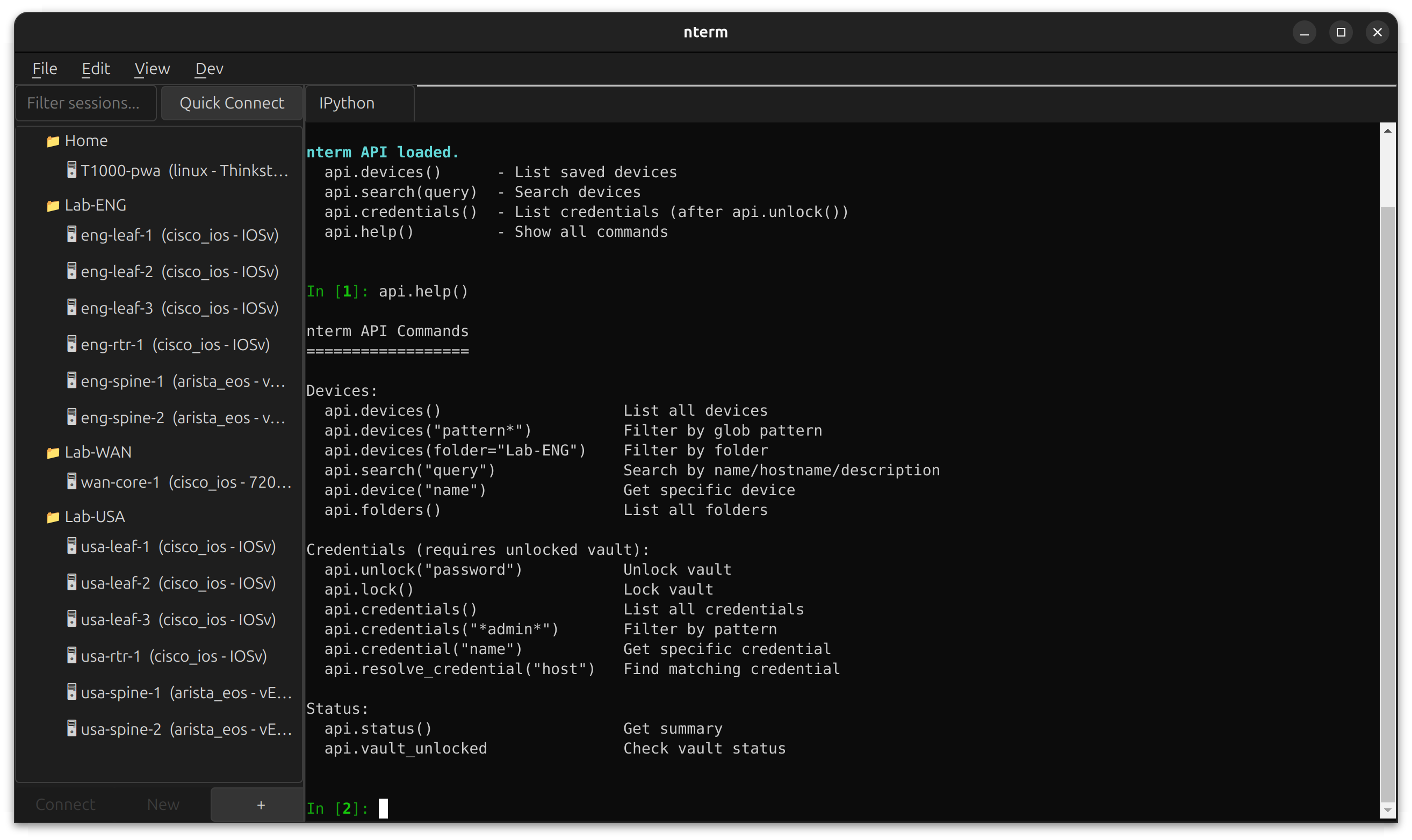
nterm includes a built-in development console accessible via **Dev → IPython** or **Dev → Shell**. Open in a tab alongside your SSH sessions, or pop out to a separate window.
|
|
109
|
+
|
|
110
|
+
|
|
111
|
+
|
|
112
|
+
The IPython console runs in the same Python environment as nterm, with the scripting API pre-loaded. Query your device inventory, inspect credentials, and prototype automation workflows without leaving the app.
|
|
113
|
+
|
|
114
|
+
```python
|
|
115
|
+
# Available immediately when IPython opens
|
|
116
|
+
api.devices() # List all saved devices
|
|
117
|
+
api.search("leaf") # Search by name/hostname
|
|
118
|
+
api.credentials() # List credentials (after api.unlock())
|
|
119
|
+
api.help() # Show all commands
|
|
120
|
+
```
|
|
121
|
+
|
|
122
|
+
**Use cases:**
|
|
123
|
+
- Debug connection issues with live access to session objects
|
|
124
|
+
- Prototype automation scripts against your real device inventory
|
|
125
|
+
- Test credential resolution patterns
|
|
126
|
+
- Build and test MCP tools interactively
|
|
127
|
+
|
|
128
|
+
Requires the `scripting` extra: `pip install ntermqt[scripting]`
|
|
129
|
+
|
|
130
|
+
---
|
|
131
|
+
|
|
91
132
|
## Installation
|
|
92
133
|
|
|
134
|
+
### Be aware due to a naming conflict, the pypi package is actually "ntermqt"
|
|
135
|
+
|
|
93
136
|
### From PyPI
|
|
94
137
|
|
|
138
|
+
https://pypi.org/project/ntermqt/
|
|
139
|
+
|
|
95
140
|
```bash
|
|
96
|
-
pip install
|
|
141
|
+
pip install ntermqt
|
|
97
142
|
|
|
98
|
-
#
|
|
99
|
-
pip install
|
|
143
|
+
# With optional scripting support (IPython)
|
|
144
|
+
pip install ntermqt[scripting]
|
|
145
|
+
|
|
146
|
+
# With all optional features
|
|
147
|
+
pip install ntermqt[all]
|
|
100
148
|
|
|
101
149
|
# Run
|
|
102
150
|
nterm
|
|
@@ -114,10 +162,7 @@ source .venv/bin/activate # Linux/macOS
|
|
|
114
162
|
# .venv\Scripts\activate # Windows
|
|
115
163
|
|
|
116
164
|
# Install in development mode
|
|
117
|
-
pip install -e .
|
|
118
|
-
|
|
119
|
-
# Optional: system keychain support
|
|
120
|
-
pip install keyring
|
|
165
|
+
pip install -e ".[all]"
|
|
121
166
|
|
|
122
167
|
# Run
|
|
123
168
|
nterm
|
|
@@ -137,12 +182,70 @@ python -m nterm
|
|
|
137
182
|
|
|
138
183
|
| Platform | PTY | Keychain |
|
|
139
184
|
|----------|-----|----------|
|
|
140
|
-
| Linux | ✅
|
|
141
|
-
| macOS | ✅
|
|
185
|
+
| Linux | ✅ pexpect | Secret Service |
|
|
186
|
+
| macOS | ✅ pexpect | macOS Keychain |
|
|
142
187
|
| Windows 10+ | ✅ pywinpty | Credential Locker |
|
|
143
188
|
|
|
144
189
|
---
|
|
145
190
|
|
|
191
|
+
## Scripting API *(Experimental)*
|
|
192
|
+
|
|
193
|
+
nterm includes a scripting API for programmatic access to your device inventory and credential vault. Use it from IPython, CLI, or Python scripts.
|
|
194
|
+
|
|
195
|
+
### IPython Console
|
|
196
|
+
|
|
197
|
+
Open **Dev → IPython → Open in Tab** to get an interactive console with the API pre-loaded:
|
|
198
|
+
|
|
199
|
+
```python
|
|
200
|
+
api.devices() # List all saved devices
|
|
201
|
+
api.search("leaf") # Search by name/hostname
|
|
202
|
+
api.devices("eng-*") # Glob pattern filter
|
|
203
|
+
|
|
204
|
+
api.unlock("vault-password") # Unlock credential vault
|
|
205
|
+
api.credentials() # List credentials (metadata only)
|
|
206
|
+
|
|
207
|
+
api.help() # Show all commands
|
|
208
|
+
```
|
|
209
|
+
|
|
210
|
+
### CLI
|
|
211
|
+
|
|
212
|
+
```bash
|
|
213
|
+
nterm-cli devices # List all devices
|
|
214
|
+
nterm-cli search leaf # Search devices
|
|
215
|
+
nterm-cli device eng-leaf-1 # Device details
|
|
216
|
+
nterm-cli credentials --unlock # List credentials
|
|
217
|
+
nterm-cli --json devices # JSON output for scripting
|
|
218
|
+
```
|
|
219
|
+
|
|
220
|
+
### Python Scripts
|
|
221
|
+
|
|
222
|
+
```python
|
|
223
|
+
from nterm.scripting import NTermAPI
|
|
224
|
+
|
|
225
|
+
api = NTermAPI()
|
|
226
|
+
|
|
227
|
+
# Query devices
|
|
228
|
+
for device in api.devices("*spine*"):
|
|
229
|
+
print(f"{device.name}: {device.hostname}")
|
|
230
|
+
|
|
231
|
+
# Work with credentials
|
|
232
|
+
api.unlock("vault-password")
|
|
233
|
+
cred = api.credential("lab-admin")
|
|
234
|
+
print(f"Username: {cred.username}")
|
|
235
|
+
```
|
|
236
|
+
|
|
237
|
+
### Roadmap
|
|
238
|
+
|
|
239
|
+
The scripting API is the foundation for:
|
|
240
|
+
|
|
241
|
+
- **Command execution** — `api.connect()` and `api.send()` for programmatic device interaction
|
|
242
|
+
- **Batch operations** — Fan out commands across device groups
|
|
243
|
+
- **MCP tool integration** — Expose nterm capabilities to AI agents
|
|
244
|
+
|
|
245
|
+
See [scripting/README.md](nterm/scripting/README.md) for full API documentation.
|
|
246
|
+
|
|
247
|
+
---
|
|
248
|
+
|
|
146
249
|
## Quick Start
|
|
147
250
|
|
|
148
251
|
### As a Widget
|
|
@@ -289,6 +392,7 @@ nterm/
|
|
|
289
392
|
├── session/
|
|
290
393
|
│ ├── ssh.py # SSHSession (Paramiko) with legacy fallback
|
|
291
394
|
│ ├── interactive_ssh.py # Native SSH + PTY
|
|
395
|
+
│ ├── local_terminal.py # Local shell/IPython sessions
|
|
292
396
|
│ └── pty_transport.py # Cross-platform PTY
|
|
293
397
|
├── terminal/
|
|
294
398
|
│ ├── widget.py # TerminalWidget (PyQt6 + xterm.js)
|
|
@@ -300,7 +404,10 @@ nterm/
|
|
|
300
404
|
│ ├── store.py # Encrypted credential storage
|
|
301
405
|
│ ├── resolver.py # Pattern-based resolution
|
|
302
406
|
│ └── manager_ui.py # PyQt6 credential manager
|
|
303
|
-
|
|
407
|
+
├── manager/ # Session tree, connection dialogs
|
|
408
|
+
└── scripting/ # API, CLI, automation support
|
|
409
|
+
├── api.py # NTermAPI class
|
|
410
|
+
└── cli.py # nterm-cli entry point
|
|
304
411
|
```
|
|
305
412
|
|
|
306
413
|
---
|
|
@@ -1,5 +1,5 @@
|
|
|
1
1
|
nterm/__init__.py,sha256=Liu1bya6xi3NnwO9KLqqlYyLD1eS-2HeEdEpJRc2480,1346
|
|
2
|
-
nterm/__main__.py,sha256=
|
|
2
|
+
nterm/__main__.py,sha256=X4R51lyR9j3IteX-Bzs1Q-UcbCJFfvcVitaPWDFBdck,33765
|
|
3
3
|
nterm/config.py,sha256=19T28opP-rdLRuxXCGP-qrklAlh4HNbXNTyAwveBhu8,4690
|
|
4
4
|
nterm/resources.py,sha256=SYC8JeF7vVfER93KKRd-tt5b25t0tHTkd7fSJqVDXnI,1447
|
|
5
5
|
nterm/askpass/__init__.py,sha256=UpJBk0EOm0nkRwMVv7YdIB4v75ZJpSYmNsU_GlgzbUg,495
|
|
@@ -13,11 +13,15 @@ nterm/manager/io.py,sha256=R5ksWgpEz0VdVCokcgTN5G3PFgp5QYhjjt40OypSWkY,21687
|
|
|
13
13
|
nterm/manager/models.py,sha256=cvC2HzCRadNG1EYsnZN4C9YS6uolHGcUGGZtt-wzGF4,12237
|
|
14
14
|
nterm/manager/settings.py,sha256=r6MTw_9r1Wl2UX_ALpXIuPbDvJ0D91Y8wRKq6Bfr_3g,9210
|
|
15
15
|
nterm/manager/tree.py,sha256=D1aLVH7xy9m-V1PSwu-GFW1r6UYd93zyufrO0HBRidE,18996
|
|
16
|
+
nterm/scripting/__init__.py,sha256=4WvwvJfJNMwXW6jas8wFreIzKBgjvAhMQnR2cnA_mEE,967
|
|
17
|
+
nterm/scripting/api.py,sha256=O-EyV0ksj7LATMSSPrDJShE3x4JPuEBs0SsPZdc2yUo,13931
|
|
18
|
+
nterm/scripting/cli.py,sha256=W2DK4ZnuutaArye_to7CBchg0ogClURxVbGsMdnj1y0,9187
|
|
16
19
|
nterm/session/__init__.py,sha256=FkgHF1WPz78JBOWHSC7LLynG2NqoR6aanNTRlEzsO6I,1612
|
|
17
20
|
nterm/session/askpass_ssh.py,sha256=U-frmLBIXwE2L5ZCEtai91G1dVRSWKLCtxn88t_PqGs,14083
|
|
18
21
|
nterm/session/base.py,sha256=NNFt2uy-rTkwigrHcdnfREk_QZDxNe0CoP16C-7oIWs,2475
|
|
19
22
|
nterm/session/interactive_ssh.py,sha256=qBhVGFdkx4hRyEzx0ZdBZZeiuwCav6BR4UtKqPnCssM,17846
|
|
20
|
-
nterm/session/
|
|
23
|
+
nterm/session/local_terminal.py,sha256=sG2lFAOpItMiT93dYCi05nrGRS-MB52XG4J-iZbcoLM,7066
|
|
24
|
+
nterm/session/pty_transport.py,sha256=QwSFqKKuJhgcLWzv1CUKf3aCGDGbbkmmGwIB1L1A2PU,17176
|
|
21
25
|
nterm/session/ssh.py,sha256=sGOxjBa9FX6GjVwkmfiKsupoLVsrPVk-LSREjlNmAdE,20942
|
|
22
26
|
nterm/terminal/__init__.py,sha256=uFnG366Z166pK-ijT1dZanVSSFVZCiMGeNKXvss_sDg,184
|
|
23
27
|
nterm/terminal/bridge.py,sha256=FSZMArlq-7a3IsKUrOL42MZeDJ4FfdZwC5UTRk1xryc,2860
|
|
@@ -30,11 +34,14 @@ nterm/terminal/resources/xterm-addon-web-links.min.js,sha256=_iizzOZ3_DRg6y7iu11
|
|
|
30
34
|
nterm/terminal/resources/xterm.css,sha256=gy8_LGA7Q61DUf8ElwFQzHqHMBQnbbEmpgZcbdgeSHI,5383
|
|
31
35
|
nterm/terminal/resources/xterm.min.js,sha256=_B3TGyIePl-SlIbgeoC0d6iq-dzitPnD_-fdJfNwZV0,283670
|
|
32
36
|
nterm/theme/__init__.py,sha256=ZTywoJliQcFre0Gh7I30n-_7RrPmdR1NHnE4wSkSCsQ,130
|
|
33
|
-
nterm/theme/engine.py,sha256=
|
|
37
|
+
nterm/theme/engine.py,sha256=e1mh8JQeErqc59d1-rbcsbVvz86_BEZCrtDapDjQOyk,24718
|
|
34
38
|
nterm/theme/stylesheet.py,sha256=Ycy-y_kiP-SLcQFrAEdJtbSDtKm4yvBfxEe-N26qlDg,9004
|
|
35
39
|
nterm/theme/themes/clean.yaml,sha256=47DEQpj8HBSa-_TImW-5JCeuQeRkm5NMpJWZG3hSuFU,0
|
|
36
40
|
nterm/theme/themes/default.yaml,sha256=niUrI_K8fayPCZDy1gc3hueLtkWjfmm1p1R33JjYgS4,810
|
|
37
41
|
nterm/theme/themes/dracula.yaml,sha256=YKX1cNHw4g0A8KipFC5QEa22xyH8Mu1W0QwpY3hJLyE,810
|
|
42
|
+
nterm/theme/themes/enterprise_dark.yaml,sha256=8ID7D0DZW7jDP8BKsWlpJbqVcpJBwl8JLmaxldOp4JY,984
|
|
43
|
+
nterm/theme/themes/enterprise_hybrid.yaml,sha256=_E_8mE2PJCdQj5ggtX94xwFubN4ChBixxNcRyrOn3mg,1066
|
|
44
|
+
nterm/theme/themes/enterprise_light.yaml,sha256=Q6H5lSsStoFVJNFS63IPp0FaBhkjN9uBo7jCbQ7Pp-M,1020
|
|
38
45
|
nterm/theme/themes/gruvbox_dark.yaml,sha256=cAr-67R7QhW80ncHptpyyrZuUqD65xoSuLtmHeDgQM0,815
|
|
39
46
|
nterm/theme/themes/gruvbox_hybrid.yaml,sha256=Ml7Ed3sTBjcSYVJ9t961KhiG3DwMAdVdRBtzI4eWZg0,936
|
|
40
47
|
nterm/theme/themes/gruvbox_light.yaml,sha256=InqYF-TsLLIzhCHpSSHqSxnest5tu28htQ4AaFN4BFY,820
|
|
@@ -45,8 +52,8 @@ nterm/vault/manager_ui.py,sha256=qle-W40j6L_pOR0AaOCeyU8myizFTRkISNrloCn0H_Y,345
|
|
|
45
52
|
nterm/vault/profile.py,sha256=qM9TJf68RKdjtxo-sJehO7wS4iTi2G26BKbmlmHLA5M,6246
|
|
46
53
|
nterm/vault/resolver.py,sha256=GWB2YR9H1MH98RGQBKvitIsjWT_-wSMLuddZNz4wbns,7800
|
|
47
54
|
nterm/vault/store.py,sha256=fbmABHWRjkZ5t42O7r74D3B_R2mZ0WPY8STPo3fGMdw,21191
|
|
48
|
-
ntermqt-0.1.
|
|
49
|
-
ntermqt-0.1.
|
|
50
|
-
ntermqt-0.1.
|
|
51
|
-
ntermqt-0.1.
|
|
52
|
-
ntermqt-0.1.
|
|
55
|
+
ntermqt-0.1.3.dist-info/METADATA,sha256=oP3lHksgZAXVWTV3GL3e5c3s8snzr1d_0meieLh-xqA,12344
|
|
56
|
+
ntermqt-0.1.3.dist-info/WHEEL,sha256=_zCd3N1l69ArxyTb8rzEoP9TpbYXkqRFSNOD5OuxnTs,91
|
|
57
|
+
ntermqt-0.1.3.dist-info/entry_points.txt,sha256=Gunr-_3w-aSpfqoMuGKM2PJSCRo9hZ7K1BksUtp1yd8,130
|
|
58
|
+
ntermqt-0.1.3.dist-info/top_level.txt,sha256=bZdnNLTHNRNqo9jsOQGUWF7h5st0xW_thH0n2QOxWUo,6
|
|
59
|
+
ntermqt-0.1.3.dist-info/RECORD,,
|
|
File without changes
|
|
File without changes
|