mytunes-pro 1.5.2__py3-none-any.whl → 1.9.3__py3-none-any.whl
This diff represents the content of publicly available package versions that have been released to one of the supported registries. The information contained in this diff is provided for informational purposes only and reflects changes between package versions as they appear in their respective public registries.
- mytunes/app.py +402 -28
- mytunes_pro-1.9.3.dist-info/METADATA +446 -0
- mytunes_pro-1.9.3.dist-info/RECORD +8 -0
- {mytunes_pro-1.5.2.dist-info → mytunes_pro-1.9.3.dist-info}/WHEEL +1 -1
- mytunes_pro-1.5.2.dist-info/METADATA +0 -357
- mytunes_pro-1.5.2.dist-info/RECORD +0 -8
- {mytunes_pro-1.5.2.dist-info → mytunes_pro-1.9.3.dist-info}/entry_points.txt +0 -0
- {mytunes_pro-1.5.2.dist-info → mytunes_pro-1.9.3.dist-info}/licenses/LICENSE +0 -0
- {mytunes_pro-1.5.2.dist-info → mytunes_pro-1.9.3.dist-info}/top_level.txt +0 -0
|
@@ -1,357 +0,0 @@
|
|
|
1
|
-
Metadata-Version: 2.4
|
|
2
|
-
Name: mytunes-pro
|
|
3
|
-
Version: 1.5.2
|
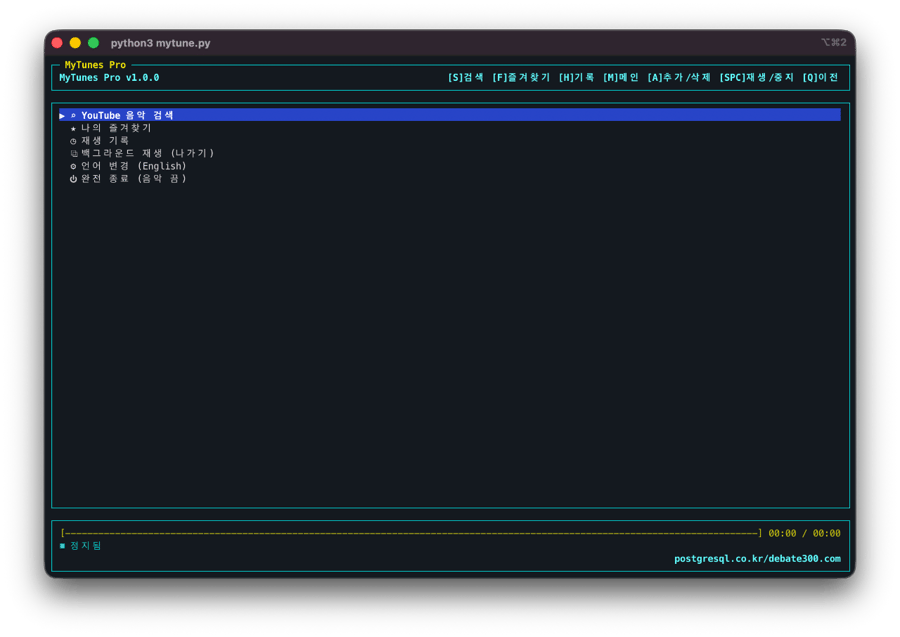
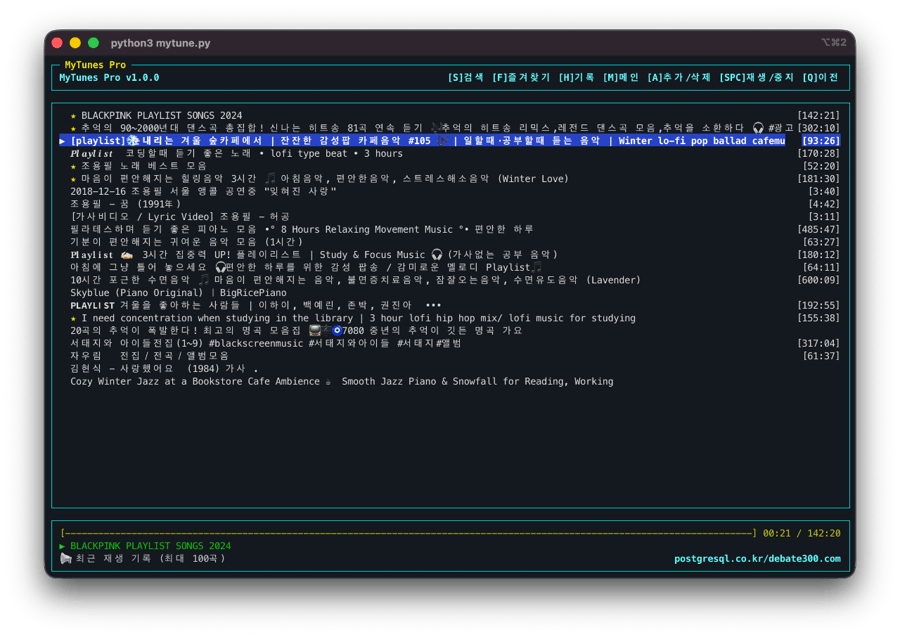
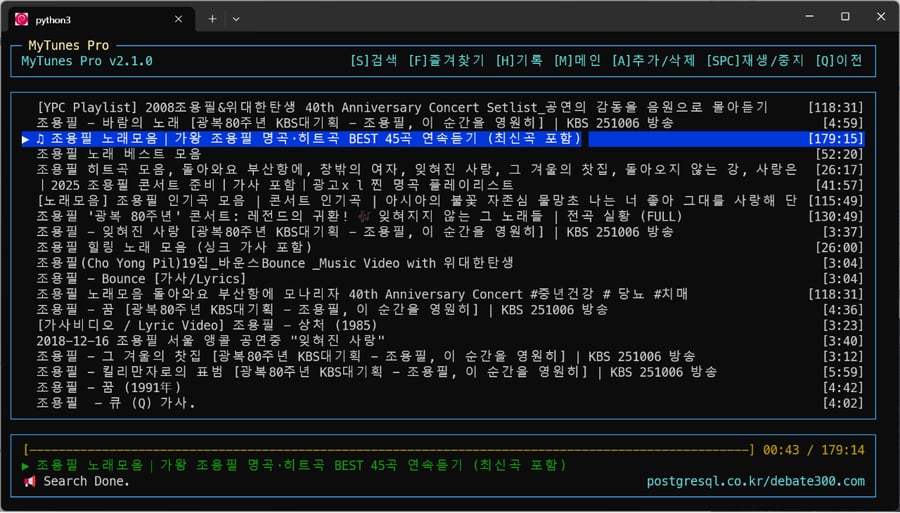
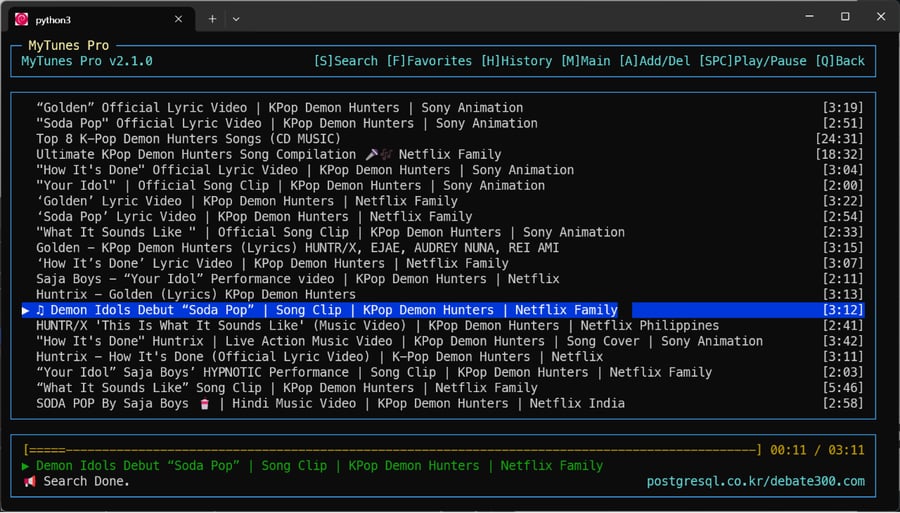
|
4
|
-
Summary: A lightweight, keyboard-centric terminal player for streaming YouTube music.
|
|
5
|
-
Author-email: loxo <loxo5432@gmail.com>
|
|
6
|
-
Project-URL: Homepage, https://github.com/postgresql-co-kr/mytunes
|
|
7
|
-
Project-URL: Bug Tracker, https://github.com/postgresql-co-kr/mytunes/issues
|
|
8
|
-
Classifier: Programming Language :: Python :: 3
|
|
9
|
-
Classifier: License :: OSI Approved :: MIT License
|
|
10
|
-
Classifier: Operating System :: OS Independent
|
|
11
|
-
Classifier: Topic :: Multimedia :: Sound/Audio :: Players
|
|
12
|
-
Requires-Python: >=3.9
|
|
13
|
-
Description-Content-Type: text/markdown
|
|
14
|
-
License-File: LICENSE
|
|
15
|
-
Requires-Dist: requests
|
|
16
|
-
Requires-Dist: yt-dlp
|
|
17
|
-
Dynamic: license-file
|
|
18
|
-
|
|
19
|
-
# 🎵 MyTunes Pro (Korean)
|
|
20
|
-
|
|
21
|
-
**현대적인 CLI 유튜브 뮤직 플레이어 (v1.5.2)**
|
|
22
|
-
터미널 환경에서 **YouTube 음악을 검색하여 듣는** 가볍고 빠른 키보드 중심의 플레이어입니다.
|
|
23
|
-
한국어 입력 환경에서도 **숫자 키(1~5)**를 통해 지연 없는 쾌적한 조작이 가능합니다.
|
|
24
|
-
|
|
25
|
-
> **💡 개발 배경**
|
|
26
|
-
> 이 프로그램은 하루 종일 터미널을 보는 개발자들이 **작업 흐름을 끊지 않고** 편하게 음악을 듣기 위해 만들어졌습니다.
|
|
27
|
-
> 특히 **모니터가 없는(Headless) 미니 PC (Debian Server)**를 거실이나 책상의 '뮤직 스테이션'으로 활용하고자 했던 개인적인 필요에서 시작되었습니다.
|
|
28
|
-
> 복잡한 설정 없이, 터미널 하나만 있으면 어디서든 당신만의 오디오 플레이어가 됩니다.
|
|
29
|
-
|
|
30
|
-

|
|
31
|
-

|
|
32
|
-
|
|
33
|
-
## 📸 Screenshots
|
|
34
|
-
| | |
|
|
35
|
-
| :---: | :---: |
|
|
36
|
-
|  |  |
|
|
37
|
-
|  |  |
|
|
38
|
-
|
|
39
|
-
---
|
|
40
|
-
|
|
41
|
-
## ✨ 주요 기능
|
|
42
|
-
|
|
43
|
-
- **강력한 검색**: `yt-dlp` 엔진을 사용하여 광고 없는 고음질 오디오 스트리밍.
|
|
44
|
-
- **쾌적한 조작**: `curses` 기반 TUI로 빠르고 직관적인 인터페이스.
|
|
45
|
-
- **연속 재생**: 한 곡이 끝나면 **리스트의 다음 곡을 자동으로 재생**합니다.
|
|
46
|
-
- **이어듣기**: 중단된 위치부터 **이어서 재생**할지 선택할 수 있습니다.
|
|
47
|
-
- **한글 최적화**: 한글 자소 조합 대기 시간 없이 즉시 반응하는 **숫자 단축키** 지원.
|
|
48
|
-
- **스마트 기능**: 즐겨찾기, 재생 기록(최대 100곡), 자동 음악 필터링 검색.
|
|
49
|
-
- **비주얼**: 현대적인 심볼 아이콘(⌕, ★, ◷)과 깔끔한 디자인.
|
|
50
|
-
|
|
51
|
-
---
|
|
52
|
-
|
|
53
|
-
## 💻 구동 환경 안내
|
|
54
|
-
|
|
55
|
-
**MyTunes Pro**는 터미널(CLI) 기반 애플리케이션입니다. 각 운영체제에서 고음질 오디오를 재생하기 위해 **`mpv`**라는 엔진을 사용합니다.
|
|
56
|
-
|
|
57
|
-
- **macOS**: 터미널(iTerm2, Warp 추천)에서 즉시 실행 가능.
|
|
58
|
-
- **Linux**: 우분투, 데비안 등 모든 리눅스 배포판 지원.
|
|
59
|
-
- **Windows**: **WSL(Windows Subsystem for Linux)** 환경이 필요합니다. (아래 가이드를 참고하세요.)
|
|
60
|
-
|
|
61
|
-
---
|
|
62
|
-
|
|
63
|
-
## 🚀 빠른 설치 (Quick Install)
|
|
64
|
-
|
|
65
|
-
최신 macOS/Linux 시스템(PEP 668)에서는 **`pipx`** 사용을 강력히 권장합니다.
|
|
66
|
-
|
|
67
|
-
### 1. 추천 방식 (pipx)
|
|
68
|
-
자동으로 격리된 환경을 만들고 명령어를 등록해줍니다.
|
|
69
|
-
|
|
70
|
-
```bash
|
|
71
|
-
brew install pipx # macOS (설치 안 된 경우)
|
|
72
|
-
pipx install mytunes-pro
|
|
73
|
-
pipx ensurepath # 터미널 명령어 경로 등록 (최초 1회 필수)
|
|
74
|
-
```
|
|
75
|
-
|
|
76
|
-
### 2. 일반 pip 방식
|
|
77
|
-
만약 `externally-managed-environment` 에러가 발생한다면 아래 플래그를 추가하세요:
|
|
78
|
-
|
|
79
|
-
```bash
|
|
80
|
-
pip install mytunes-pro --break-system-packages
|
|
81
|
-
```
|
|
82
|
-
|
|
83
|
-
설치 후 터미널 어디서든 **`mp`**를 입력하면 실행됩니다!
|
|
84
|
-
|
|
85
|
-
### 🔄 최신 버전 업데이트 (Update)
|
|
86
|
-
이미 설치되어 있다면 아래 명령어로 간단히 최신 기능을 반영하세요:
|
|
87
|
-
|
|
88
|
-
```bash
|
|
89
|
-
pipx upgrade mytunes-pro
|
|
90
|
-
```
|
|
91
|
-
|
|
92
|
-
---
|
|
93
|
-
|
|
94
|
-
## 🛠 환경별 요구사항 (Prerequisites)
|
|
95
|
-
|
|
96
|
-
`pip install` 이후 실행이 안 된다면, 각 운영체제에 맞는 오디오 엔진(`mpv`)을 설치해 주세요.
|
|
97
|
-
|
|
98
|
-
### macOS
|
|
99
|
-
```bash
|
|
100
|
-
brew install mpv
|
|
101
|
-
```
|
|
102
|
-
|
|
103
|
-
### Linux (Ubuntu/Debian)
|
|
104
|
-
```bash
|
|
105
|
-
sudo apt update && sudo apt install mpv
|
|
106
|
-
```
|
|
107
|
-
|
|
108
|
-
### Windows (초보자용 WSL 가이드)
|
|
109
|
-
|
|
110
|
-
Windows 환경이 익숙한 일반인도 따라할 수 있는 **완전 정복 가이드**입니다.
|
|
111
|
-
|
|
112
|
-
> **❓ WSL이란?**
|
|
113
|
-
> 윈도우 안에서 리눅스(강력한 개발 도구들)를 마치 일반 앱처럼 쓸 수 있게 해주는 마이크로소프트의 공식 기능입니다. MyTunes는 이 환경에서 리눅스의 강력한 오디오 엔진을 활용해 작동합니다.
|
|
114
|
-
|
|
115
|
-
1. **WSL 설치하기**:
|
|
116
|
-
- `시작` 버튼 우클릭 -> `터미널(관리자)` 혹은 `PowerShell(관리자)` 실행.
|
|
117
|
-
- 아래 명령어를 복사해서 붙여넣고 엔터!
|
|
118
|
-
```powershell
|
|
119
|
-
wsl --install -d Debian
|
|
120
|
-
```
|
|
121
|
-
- 설치가 끝나면 **컴퓨터를 다시 시작**하세요.
|
|
122
|
-
|
|
123
|
-
2. **기본 설정**:
|
|
124
|
-
- 재부팅 후 `데비안(Debian)` 창이 자동으로 뜨면, 사용할 아이디(영문)와 비밀번호를 정하세요.
|
|
125
|
-
|
|
126
|
-
3. **필수 도구 설치**:
|
|
127
|
-
- 데비안 창에서 아래 명령어를 한 번에 복사해서 붙여넣으세요:
|
|
128
|
-
```bash
|
|
129
|
-
sudo apt update && sudo apt install mpv python3-pip pipx -y
|
|
130
|
-
```
|
|
131
|
-
|
|
132
|
-
4. **MyTunes 설치**:
|
|
133
|
-
- 이제 위 `빠른 설치` 섹션의 `pipx install` 과정을 그대로 따라하면 끝!
|
|
134
|
-
|
|
135
|
-
---
|
|
136
|
-
|
|
137
|
-
## 🧑💻 개발자용 수동 설치 (Manual Installation)
|
|
138
|
-
|
|
139
|
-
직접 소스를 수정하거나 개발 버전을 사용하려면 아래 과정을 따르세요.
|
|
140
|
-
|
|
141
|
-
1. **저장소 클론**:
|
|
142
|
-
```bash
|
|
143
|
-
git clone https://github.com/postgresql-co-kr/mytunes.git
|
|
144
|
-
cd mytunes
|
|
145
|
-
```
|
|
146
|
-
|
|
147
|
-
2. **가상환경 설정**:
|
|
148
|
-
```bash
|
|
149
|
-
python3 -m venv venv
|
|
150
|
-
source venv/bin/activate # macOS/Linux
|
|
151
|
-
pip install -r requirements.txt
|
|
152
|
-
```
|
|
153
|
-
|
|
154
|
-
3. **실행**:
|
|
155
|
-
```bash
|
|
156
|
-
python3 mytune.py
|
|
157
|
-
```
|
|
158
|
-
|
|
159
|
-
4. **업데이트**:
|
|
160
|
-
```bash
|
|
161
|
-
git pull
|
|
162
|
-
```
|
|
163
|
-
|
|
164
|
-
---
|
|
165
|
-
|
|
166
|
-
## ⌨️ 조작 방법 (Controls)
|
|
167
|
-
|
|
168
|
-
**MyTunes Pro**는 키보드만으로 모든 기능을 제어합니다.
|
|
169
|
-
한글 입력 상태에서도 끊김 없는 조작을 위해 **숫자 단축키** 사용을 권장합니다.
|
|
170
|
-
|
|
171
|
-
### ⚡️ 즉시 반응 단축키 (숫자키)
|
|
172
|
-
한영 전환 없이 언제든 누르면 즉시 실행됩니다.
|
|
173
|
-
|
|
174
|
-
| 키 | 기능 | 설명 |
|
|
175
|
-
| :--- | :--- | :--- |
|
|
176
|
-
| **`1`** | **검색 (Search)** | 음악 검색창 열기 (단축키 `S`와 동일) |
|
|
177
|
-
| **`2`** | **즐겨찾기 (Fav)** | 저장된 즐겨찾기 목록 보기 (단축키 `F`와 동일) |
|
|
178
|
-
| **`3`** | **기록 (History)** | 최근 재생한 100곡 보기 (단축키 `R`와 동일) |
|
|
179
|
-
| **`4`** | **메인 (Main)** | 메인 화면으로 돌아가기 (단축키 `M`와 동일) |
|
|
180
|
-
| **`5`** | **추가/삭제** | 선택한 곡 즐겨찾기 토글 (단축키 `A`와 동일) |
|
|
181
|
-
| **`+`** | **볼륨 UP** | 볼륨 +5% (단축키 `=`와 동일) |
|
|
182
|
-
| **`-`** | **볼륨 DOWN** | 볼륨 -5% (단축키 `_`와 동일) |
|
|
183
|
-
| **`6`** | **뒤로가기** | 이전 화면으로 이동 (단축키 `Q`, `H`와 동일) |
|
|
184
|
-
| **`ESC`** | **배경재생** | **음악 끄지 않고 나가기** (백그라운드 재생) |
|
|
185
|
-
|
|
186
|
-
### 🧭 기본 탐색
|
|
187
|
-
| 키 | 동작 |
|
|
188
|
-
| :--- | :--- |
|
|
189
|
-
| `↑` / `↓` / `k` / `j` | 리스트 위/아래 이동 (Vim 키 지원) |
|
|
190
|
-
| `Enter` / `l` | **선택 / 재생** (한글 `ㅣ`도 지원) |
|
|
191
|
-
| `Space` | 재생 / 일시정지 (Play/Pause) |
|
|
192
|
-
| `-` / `+` | **볼륨 조절** (- / +) |
|
|
193
|
-
| `,` / `.` | 10초 뒤로 / 앞으로 감기 |
|
|
194
|
-
| `<` / `>` | **30초** 뒤로 / 앞으로 감기 (Shift) |
|
|
195
|
-
| `Backspace` / `h` / `q` | 뒤로 가기 / 검색어 지우기 |
|
|
196
|
-
| `/` | **검색** (Vim Style) |
|
|
197
|
-
|
|
198
|
-
---
|
|
199
|
-
|
|
200
|
-
## 📂 데이터 저장
|
|
201
|
-
- 즐겨찾기와 재생 기록은 홈 디렉토리의 `~/.pymusic_data.json` 파일에 영구 저장됩니다.
|
|
202
|
-
- 프로그램 종료 후 다시 실행해도 데이터가 유지됩니다.
|
|
203
|
-
|
|
204
|
-
---
|
|
205
|
-
---
|
|
206
|
-
|
|
207
|
-
# 🎵 MyTunes Pro (English)
|
|
208
|
-
|
|
209
|
-
**Modern CLI YouTube Music Player (v1.5.2)**
|
|
210
|
-
A lightweight, keyboard-centric terminal player for streaming YouTube music.
|
|
211
|
-
Designed for speed and efficiency, with optimized controls for international keyboard imports.
|
|
212
|
-
|
|
213
|
-
> **💡 Preface**
|
|
214
|
-
> This project was created to give developers a seamless way to enjoy music without leaving their terminal environment.
|
|
215
|
-
> It basically started from a personal need to turn a **headless mini-PC running Debian Server** into a dedicated living room music station.
|
|
216
|
-
|
|
217
|
-
---
|
|
218
|
-
|
|
219
|
-
## 💻 Environment Support
|
|
220
|
-
|
|
221
|
-
**MyTunes Pro** is a Terminal-native application. It uses the **`mpv`** engine for high-quality audio playback.
|
|
222
|
-
|
|
223
|
-
- **macOS**: Runs natively in Terminal (iTerm2, Warp recommended).
|
|
224
|
-
- **Linux**: Supports all distributions (Ubuntu, Debian, etc.).
|
|
225
|
-
- **Windows**: Requires **WSL (Windows Subsystem for Linux)**. See the guide below.
|
|
226
|
-
|
|
227
|
-
---
|
|
228
|
-
|
|
229
|
-
## 🚀 Quick Start
|
|
230
|
-
|
|
231
|
-
On modern macOS/Linux systems (PEP 668), using **`pipx`** is highly recommended.
|
|
232
|
-
|
|
233
|
-
### 1. Recommended (pipx)
|
|
234
|
-
Automatically manages virtual environments and global paths.
|
|
235
|
-
|
|
236
|
-
```bash
|
|
237
|
-
brew install pipx # macOS (if not installed)
|
|
238
|
-
pipx install mytunes-pro
|
|
239
|
-
pipx ensurepath # Registers command paths (required once)
|
|
240
|
-
```
|
|
241
|
-
|
|
242
|
-
### 2. Standard pip
|
|
243
|
-
If you encounter an `externally-managed-environment` error, use this flag:
|
|
244
|
-
|
|
245
|
-
```bash
|
|
246
|
-
pip install mytunes-pro --break-system-packages
|
|
247
|
-
```
|
|
248
|
-
|
|
249
|
-
Run simply by typing **`mp`** in your terminal!
|
|
250
|
-
|
|
251
|
-
### 🔄 How to Update
|
|
252
|
-
If already installed, update to the latest version with one command:
|
|
253
|
-
|
|
254
|
-
```bash
|
|
255
|
-
pipx upgrade mytunes-pro
|
|
256
|
-
```
|
|
257
|
-
|
|
258
|
-
---
|
|
259
|
-
|
|
260
|
-
## 🛠 Prerequisites
|
|
261
|
-
|
|
262
|
-
If the command fails, please ensure the `mpv` audio engine is installed.
|
|
263
|
-
|
|
264
|
-
### macOS
|
|
265
|
-
```bash
|
|
266
|
-
brew install mpv
|
|
267
|
-
```
|
|
268
|
-
|
|
269
|
-
### Linux (Ubuntu/Debian)
|
|
270
|
-
```bash
|
|
271
|
-
sudo apt update && sudo apt install mpv
|
|
272
|
-
```
|
|
273
|
-
|
|
274
|
-
### Windows (Beginner's WSL Guide)
|
|
275
|
-
|
|
276
|
-
A step-by-step guide for Windows users to get started with CLI tools.
|
|
277
|
-
|
|
278
|
-
> **❓ What is WSL?**
|
|
279
|
-
> It stands for "Windows Subsystem for Linux". It's an official Microsoft feature that lets you run Linux powerful tools directly inside Windows like a regular app.
|
|
280
|
-
|
|
281
|
-
1. **Install WSL**:
|
|
282
|
-
- Right-click `Start` -> Select `Terminal (Admin)` or `PowerShell (Admin)`.
|
|
283
|
-
- Paste this command and hit Enter:
|
|
284
|
-
```powershell
|
|
285
|
-
wsl --install -d Debian
|
|
286
|
-
```
|
|
287
|
-
- **Restart your computer** after installation.
|
|
288
|
-
|
|
289
|
-
2. **Basic Setup**:
|
|
290
|
-
- After restart, the `Debian` window will pop up. Choose your username and password.
|
|
291
|
-
|
|
292
|
-
3. **Install Core Tools**:
|
|
293
|
-
- Inside the Debian window, run:
|
|
294
|
-
```bash
|
|
295
|
-
sudo apt update && sudo apt install mpv python3-pip pipx -y
|
|
296
|
-
```
|
|
297
|
-
|
|
298
|
-
4. **Install MyTunes**:
|
|
299
|
-
- Follow the `Quick Start` section above inside the Debian window. Done!
|
|
300
|
-
|
|
301
|
-
---
|
|
302
|
-
|
|
303
|
-
## 🧑💻 Manual Installation (For Developers)
|
|
304
|
-
|
|
305
|
-
1. **Clone Repository**:
|
|
306
|
-
```bash
|
|
307
|
-
git clone https://github.com/postgresql-co-kr/mytunes.git
|
|
308
|
-
cd mytunes
|
|
309
|
-
```
|
|
310
|
-
|
|
311
|
-
2. **Virtual Environment**:
|
|
312
|
-
```bash
|
|
313
|
-
python3 -m venv venv
|
|
314
|
-
source venv/bin/activate # macOS/Linux
|
|
315
|
-
pip install -r requirements.txt
|
|
316
|
-
```
|
|
317
|
-
|
|
318
|
-
3. **Run**:
|
|
319
|
-
```bash
|
|
320
|
-
python3 mytune.py
|
|
321
|
-
```
|
|
322
|
-
|
|
323
|
-
4. **How to Update**:
|
|
324
|
-
```bash
|
|
325
|
-
git pull
|
|
326
|
-
```
|
|
327
|
-
|
|
328
|
-
---
|
|
329
|
-
|
|
330
|
-
## ⌨️ English Controls
|
|
331
|
-
|
|
332
|
-
### ⚡️ Instant Shortcuts (Number Keys)
|
|
333
|
-
Works instantly even with non-English keyboard layouts.
|
|
334
|
-
|
|
335
|
-
| Key | Function | Description |
|
|
336
|
-
| :--- | :--- | :--- |
|
|
337
|
-
| **`1`** | **Search** | Open search bar (Same as `S`) |
|
|
338
|
-
| **`2`** | **Favs** | View favorites list (Same as `F`) |
|
|
339
|
-
| **`3`** | **Hist** | View history (Same as `R`) |
|
|
340
|
-
| **`4`** | **Main** | Go to Main Menu (Same as `M`) |
|
|
341
|
-
| **`5`** | **Add/Del** | Toggle Favorite (Same as `A`) |
|
|
342
|
-
| **`+`** | **Vol Up** | Volume +5% (Same as `=`) |
|
|
343
|
-
| **`-`** | **Vol Down** | Volume -5% (Same as `_`) |
|
|
344
|
-
| **`6`** | **Back** | Go back (Same as `Q`, `H`) |
|
|
345
|
-
| **`ESC`** | **Bg Play** | **Exit app but keep music playing** |
|
|
346
|
-
|
|
347
|
-
### 🧭 Navigation
|
|
348
|
-
| Key | Action |
|
|
349
|
-
| :--- | :--- |
|
|
350
|
-
| `↑` / `↓` / `k` / `j` | Move selection (Vim style supported) |
|
|
351
|
-
| `Enter` / `l` | **Select / Play** (Includes `L`) |
|
|
352
|
-
| `Space` | Play / Pause |
|
|
353
|
-
| `-` / `+` | **Volume** (- / +) |
|
|
354
|
-
| `,` / `.` | Seek -10s / +10s |
|
|
355
|
-
| `<` / `>` | **Seek -30s / +30s** (Shift) |
|
|
356
|
-
| `Backspace` / `h` / `q` | Go back |
|
|
357
|
-
| `/` | **Search** (Vim Style) |
|
|
@@ -1,8 +0,0 @@
|
|
|
1
|
-
mytunes/__init__.py,sha256=47DEQpj8HBSa-_TImW-5JCeuQeRkm5NMpJWZG3hSuFU,0
|
|
2
|
-
mytunes/app.py,sha256=E6-FCofnMY0P7KwxXf-kQCpwFryQvWBubLZKTG_Pj_g,44064
|
|
3
|
-
mytunes_pro-1.5.2.dist-info/licenses/LICENSE,sha256=lOrP0EIjxcgJia__W3f3PVDZkRd2oRzFkyH2g3LRRCg,1063
|
|
4
|
-
mytunes_pro-1.5.2.dist-info/METADATA,sha256=1OjWAq45TTUD3ShYedEGMEEgiZhcKn-lzHQB2KWAWec,12360
|
|
5
|
-
mytunes_pro-1.5.2.dist-info/WHEEL,sha256=qELbo2s1Yzl39ZmrAibXA2jjPLUYfnVhUNTlyF1rq0Y,92
|
|
6
|
-
mytunes_pro-1.5.2.dist-info/entry_points.txt,sha256=6-MsC13nIgzLvrREaGotc32FgxHx_Iuu1z2qCzJs1_4,65
|
|
7
|
-
mytunes_pro-1.5.2.dist-info/top_level.txt,sha256=KWzdFyNNG_sO7GT83-sN5fYArP4_DL5I8HYIwgazXyY,8
|
|
8
|
-
mytunes_pro-1.5.2.dist-info/RECORD,,
|
|
File without changes
|
|
File without changes
|
|
File without changes
|