mkdocs-audience-toggle 0.1.0__py3-none-any.whl
This diff represents the content of publicly available package versions that have been released to one of the supported registries. The information contained in this diff is provided for informational purposes only and reflects changes between package versions as they appear in their respective public registries.
- mkdocs_audience_toggle/__init__.py +0 -0
- mkdocs_audience_toggle/plugin.py +122 -0
- mkdocs_audience_toggle/static/audience_toggle.css +133 -0
- mkdocs_audience_toggle/static/audience_toggle.js +332 -0
- mkdocs_audience_toggle-0.1.0.dist-info/METADATA +380 -0
- mkdocs_audience_toggle-0.1.0.dist-info/RECORD +9 -0
- mkdocs_audience_toggle-0.1.0.dist-info/WHEEL +4 -0
- mkdocs_audience_toggle-0.1.0.dist-info/entry_points.txt +2 -0
- mkdocs_audience_toggle-0.1.0.dist-info/licenses/LICENSE +21 -0
|
File without changes
|
|
@@ -0,0 +1,122 @@
|
|
|
1
|
+
import json
|
|
2
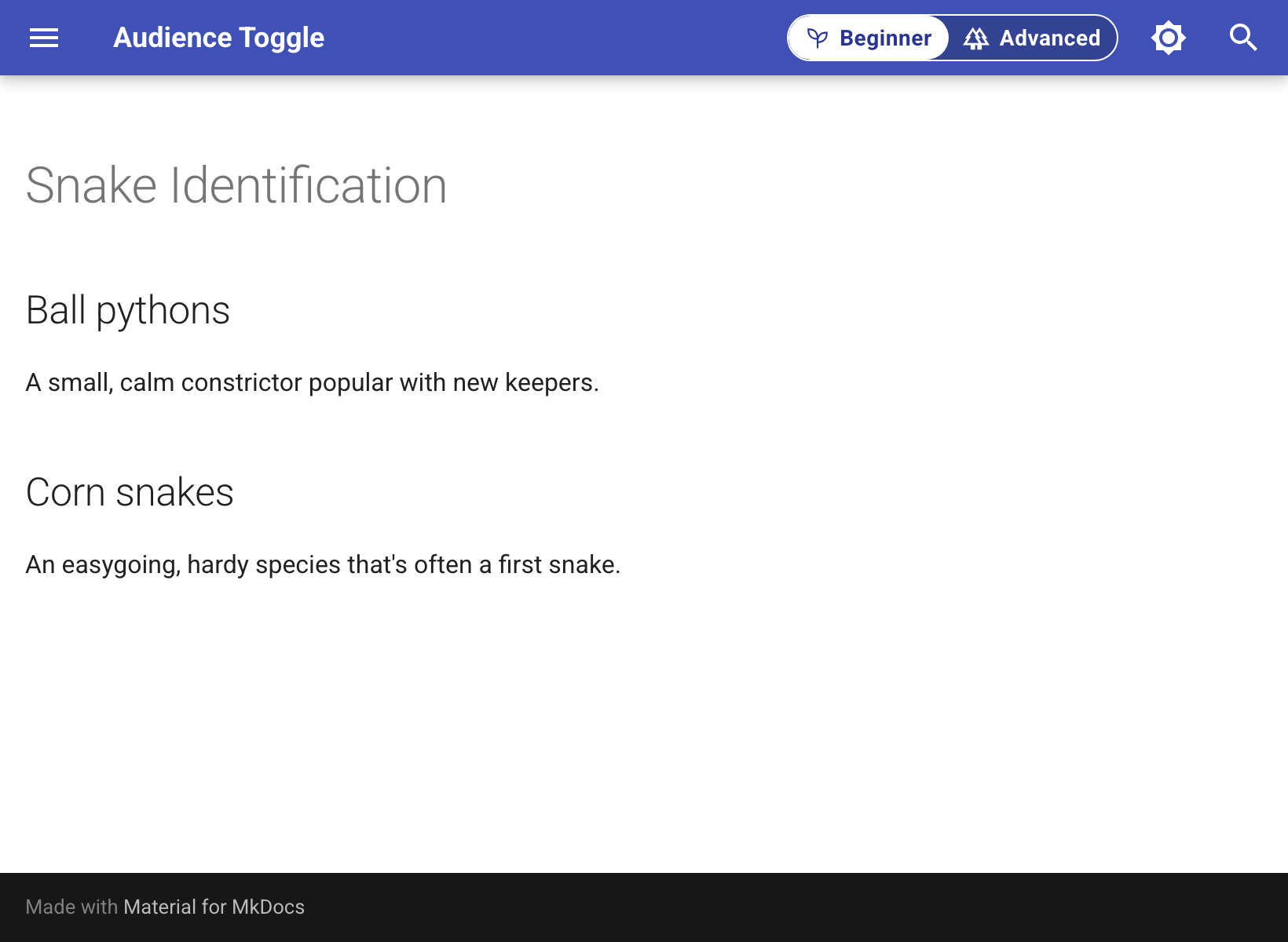
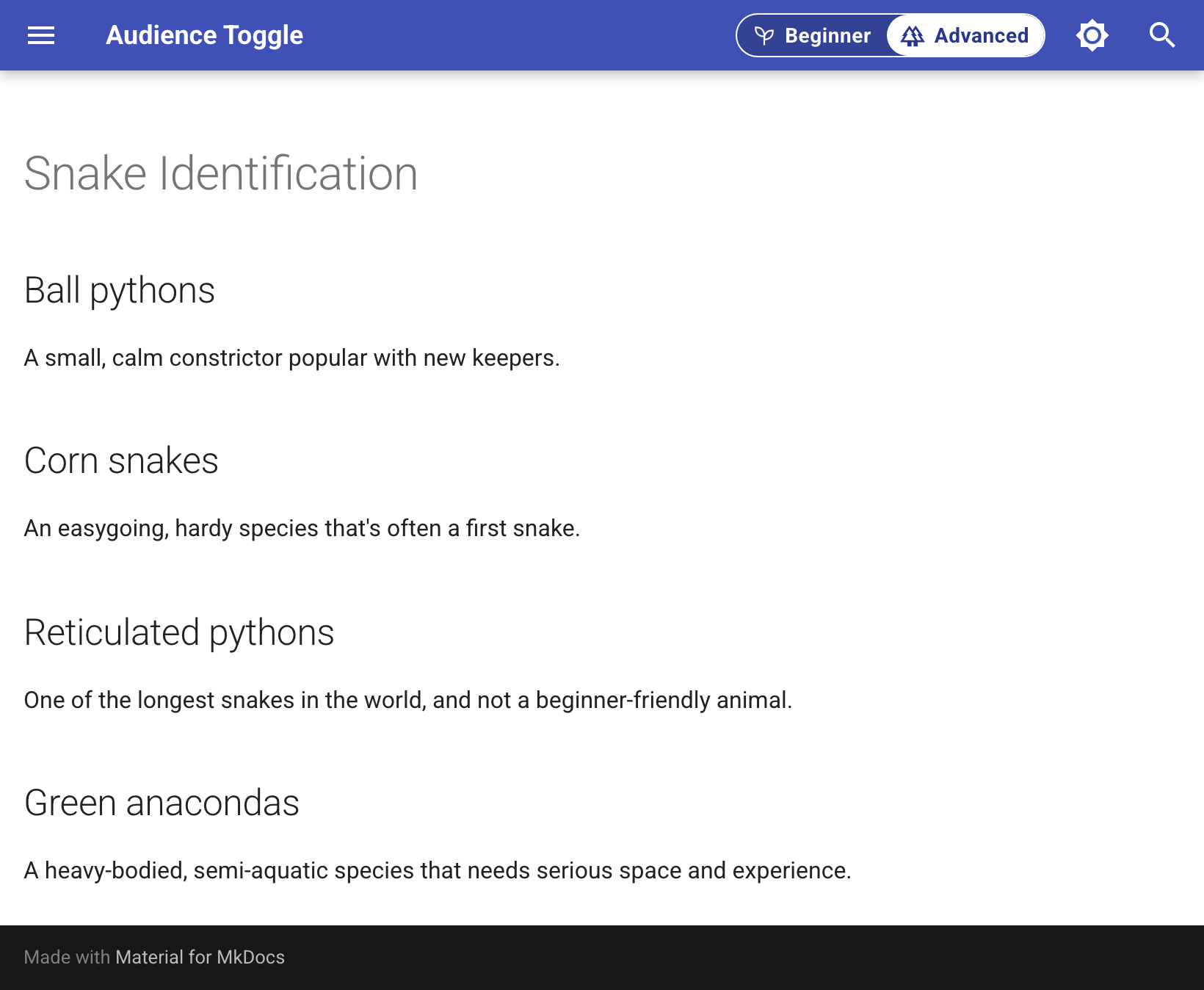
|
+
import os
|
|
3
|
+
|
|
4
|
+
from mkdocs.config import config_options
|
|
5
|
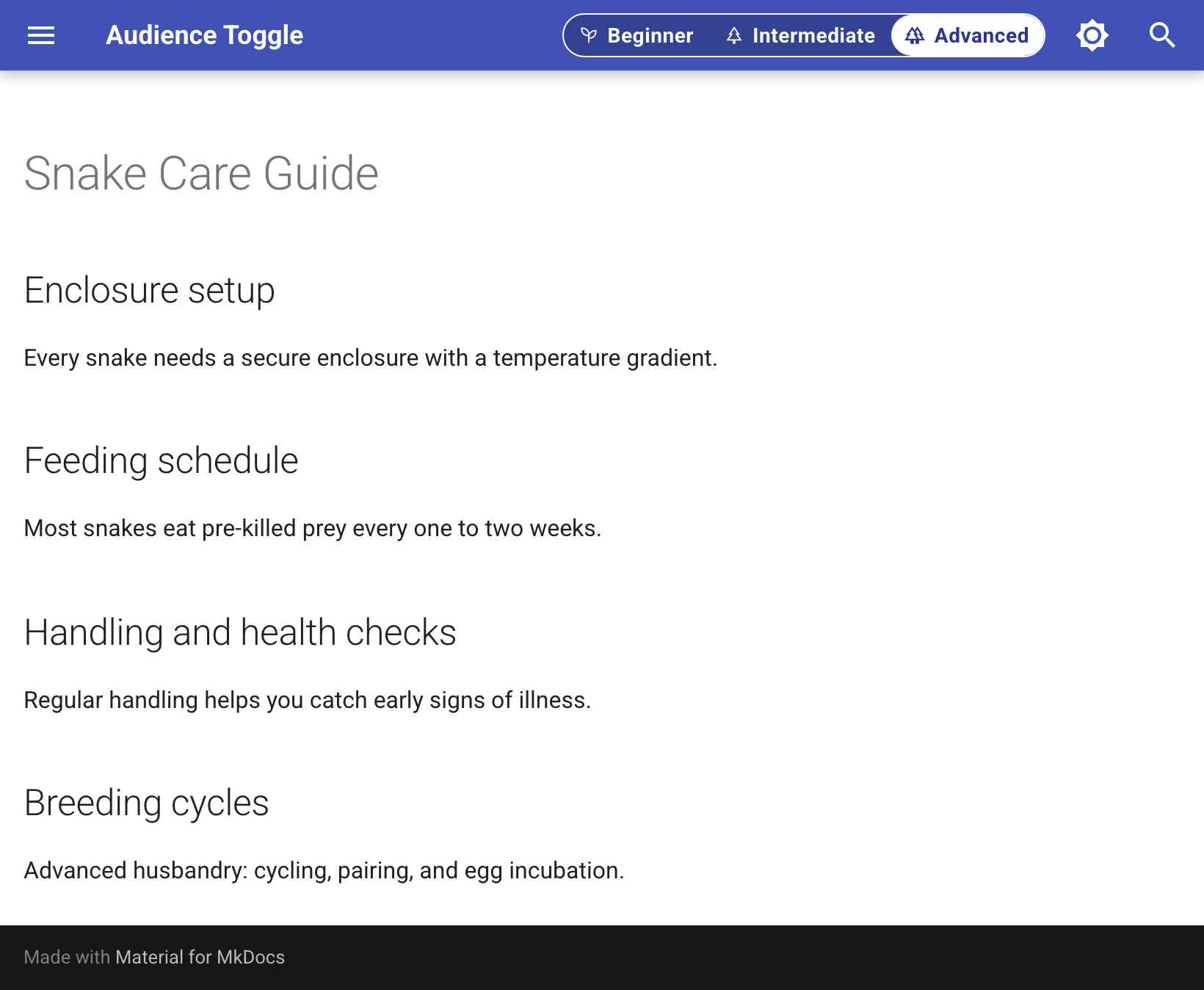
+
from mkdocs.plugins import BasePlugin
|
|
6
|
+
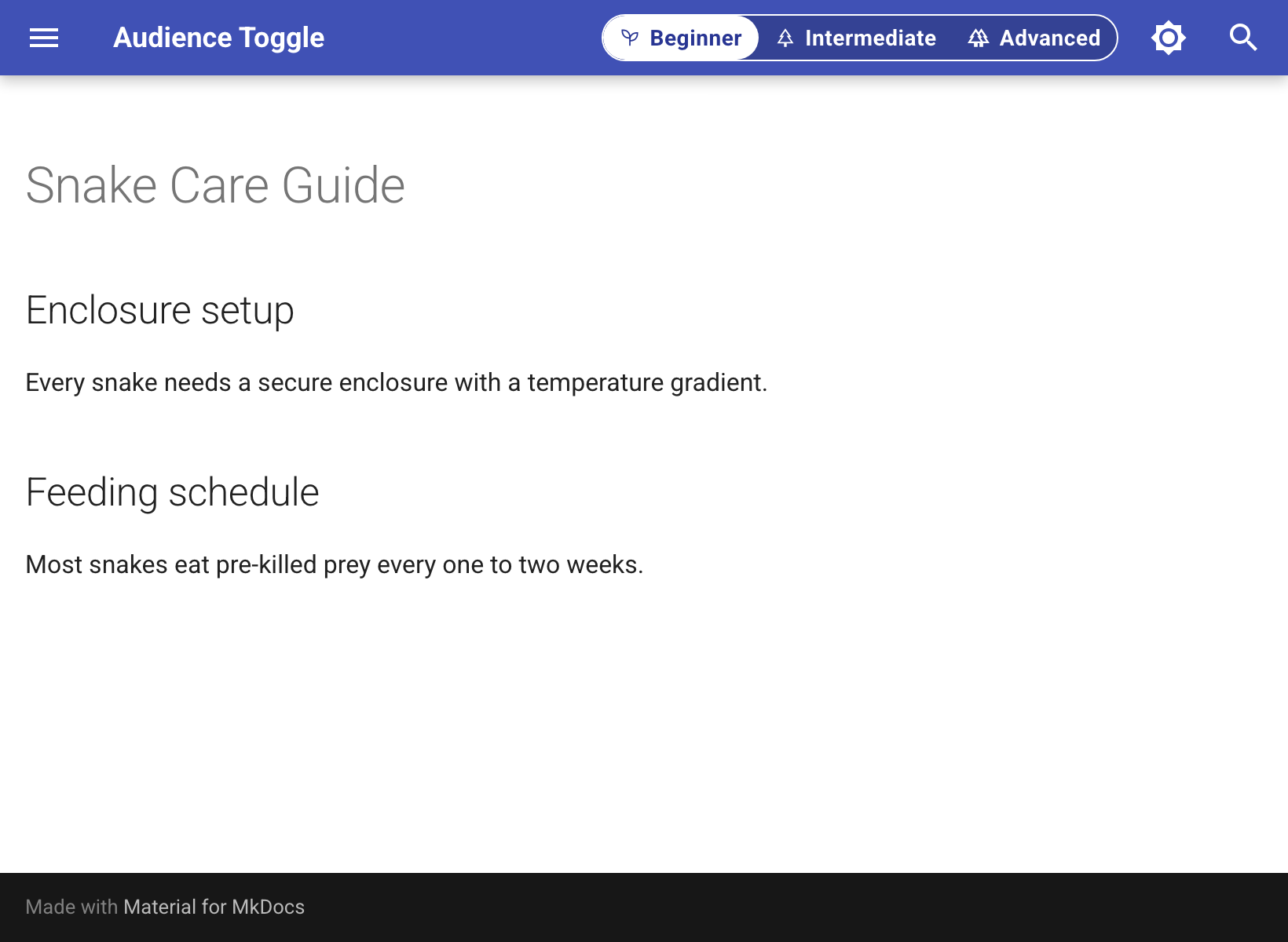
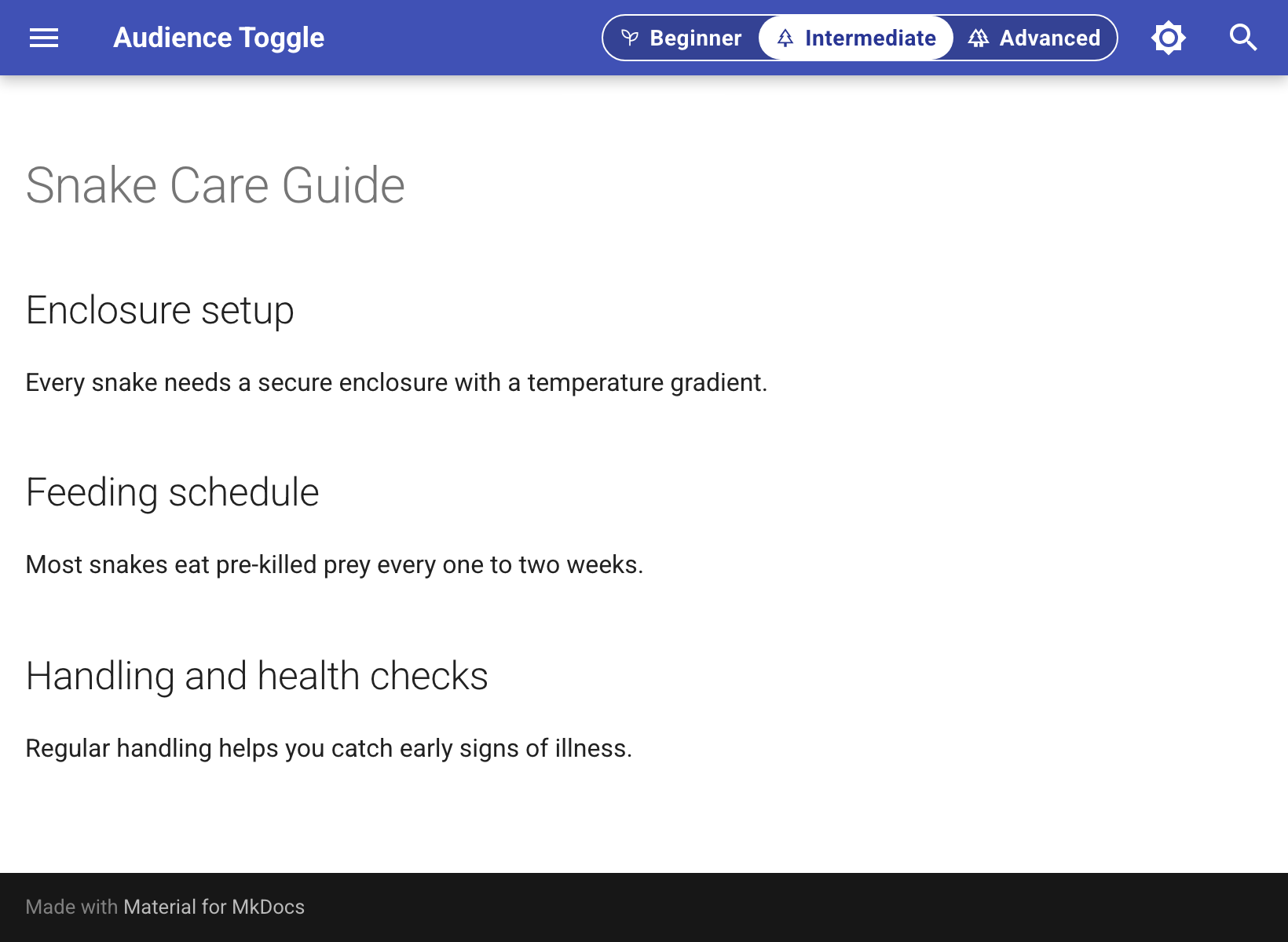
from mkdocs.utils import copy_file, log
|
|
7
|
+
|
|
8
|
+
STATIC_DIR = os.path.join(os.path.dirname(__file__), "static")
|
|
9
|
+
JS_FILENAME = "audience_toggle.js"
|
|
10
|
+
CSS_FILENAME = "audience_toggle.css"
|
|
11
|
+
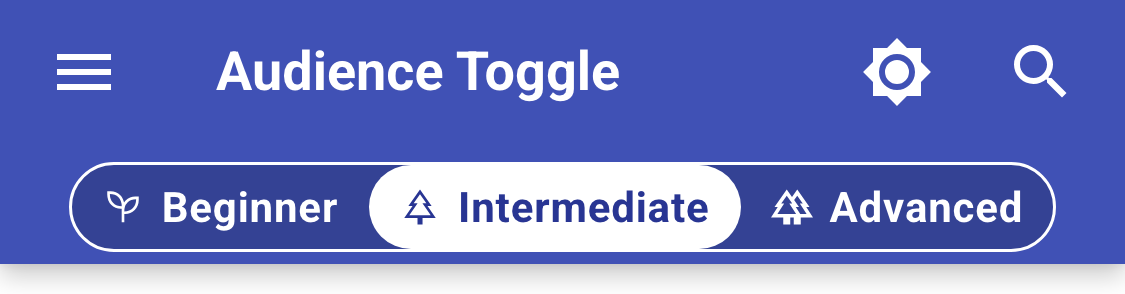
ASSET_PREFIX = "assets/audience_toggle"
|
|
12
|
+
CONFIG_SCRIPT_ID = "fcm-config"
|
|
13
|
+
|
|
14
|
+
DEFAULTS = {
|
|
15
|
+
"storage_key": "fcm-mode",
|
|
16
|
+
"query_param": None,
|
|
17
|
+
"insert_selector": '[data-md-component="palette"]',
|
|
18
|
+
"hide_toc_entries": True,
|
|
19
|
+
"wrapper_class": None,
|
|
20
|
+
"attribute": "data-fcm-hide",
|
|
21
|
+
}
|
|
22
|
+
|
|
23
|
+
|
|
24
|
+
class AudienceTogglePlugin(BasePlugin):
|
|
25
|
+
config_scheme = (
|
|
26
|
+
("modes", config_options.Type(list, default=[])),
|
|
27
|
+
("storage_key", config_options.Type(str, default=DEFAULTS["storage_key"])),
|
|
28
|
+
("query_param", config_options.Type(str, default="")),
|
|
29
|
+
("insert_selector", config_options.Type(str, default=DEFAULTS["insert_selector"])),
|
|
30
|
+
("hide_toc_entries", config_options.Type(bool, default=True)),
|
|
31
|
+
("wrapper_class", config_options.Type(list, default=[])),
|
|
32
|
+
("attribute", config_options.Type(str, default=DEFAULTS["attribute"])),
|
|
33
|
+
("aria_label", config_options.Type(str, default="Content mode")),
|
|
34
|
+
("collapse_labels", config_options.Type(bool, default=False)),
|
|
35
|
+
("show_toast", config_options.Type(bool, default=True)),
|
|
36
|
+
)
|
|
37
|
+
|
|
38
|
+
def on_config(self, config):
|
|
39
|
+
modes = self.config.get("modes") or []
|
|
40
|
+
if not modes:
|
|
41
|
+
log.warning(
|
|
42
|
+
"audience_toggle: no 'modes' configured in mkdocs.yml, so the "
|
|
43
|
+
"toggle will not be inserted."
|
|
44
|
+
)
|
|
45
|
+
normalized = []
|
|
46
|
+
seen_names = set()
|
|
47
|
+
default_name = None
|
|
48
|
+
for i, raw in enumerate(modes):
|
|
49
|
+
if not isinstance(raw, dict) or "name" not in raw:
|
|
50
|
+
raise ValueError(
|
|
51
|
+
"audience_toggle: each entry under 'modes' must be a "
|
|
52
|
+
"mapping with at least a 'name' key (got %r)" % (raw,)
|
|
53
|
+
)
|
|
54
|
+
name = str(raw["name"])
|
|
55
|
+
if name in seen_names:
|
|
56
|
+
raise ValueError(
|
|
57
|
+
"audience_toggle: duplicate mode name %r in 'modes'" % name
|
|
58
|
+
)
|
|
59
|
+
seen_names.add(name)
|
|
60
|
+
entry = {
|
|
61
|
+
"name": name,
|
|
62
|
+
"label": str(raw.get("label", name.title())),
|
|
63
|
+
"icon": raw.get("icon"),
|
|
64
|
+
"description": raw.get("description"),
|
|
65
|
+
"announcement": raw.get("announcement"),
|
|
66
|
+
}
|
|
67
|
+
if raw.get("default"):
|
|
68
|
+
if default_name is not None:
|
|
69
|
+
raise ValueError(
|
|
70
|
+
"audience_toggle: more than one mode marked default: true"
|
|
71
|
+
)
|
|
72
|
+
default_name = name
|
|
73
|
+
normalized.append(entry)
|
|
74
|
+
|
|
75
|
+
if normalized and default_name is None:
|
|
76
|
+
default_name = normalized[0]["name"]
|
|
77
|
+
|
|
78
|
+
self._runtime_config = {
|
|
79
|
+
"modes": normalized,
|
|
80
|
+
"defaultMode": default_name,
|
|
81
|
+
"storageKey": self.config["storage_key"],
|
|
82
|
+
"queryParam": self.config["query_param"] or None,
|
|
83
|
+
"insertSelector": self.config["insert_selector"],
|
|
84
|
+
"hideTocEntries": self.config["hide_toc_entries"],
|
|
85
|
+
"wrapperClasses": list(self.config["wrapper_class"] or []),
|
|
86
|
+
"attribute": self.config["attribute"],
|
|
87
|
+
"ariaLabel": self.config["aria_label"],
|
|
88
|
+
"collapseLabels": self.config["collapse_labels"],
|
|
89
|
+
"showToast": self.config["show_toast"],
|
|
90
|
+
}
|
|
91
|
+
|
|
92
|
+
extra_css = list(config.get("extra_css", []))
|
|
93
|
+
extra_js = list(config.get("extra_javascript", []))
|
|
94
|
+
css_uri = f"{ASSET_PREFIX}/{CSS_FILENAME}"
|
|
95
|
+
js_uri = f"{ASSET_PREFIX}/{JS_FILENAME}"
|
|
96
|
+
if css_uri not in extra_css:
|
|
97
|
+
extra_css.append(css_uri)
|
|
98
|
+
if js_uri not in extra_js:
|
|
99
|
+
extra_js.append(js_uri)
|
|
100
|
+
config["extra_css"] = extra_css
|
|
101
|
+
config["extra_javascript"] = extra_js
|
|
102
|
+
|
|
103
|
+
return config
|
|
104
|
+
|
|
105
|
+
def on_post_build(self, config):
|
|
106
|
+
for filename in (JS_FILENAME, CSS_FILENAME):
|
|
107
|
+
src_path = os.path.join(STATIC_DIR, filename)
|
|
108
|
+
dest_path = os.path.join(config["site_dir"], ASSET_PREFIX, filename)
|
|
109
|
+
copy_file(src_path, dest_path)
|
|
110
|
+
|
|
111
|
+
def on_post_page(self, output, page, config):
|
|
112
|
+
if not getattr(self, "_runtime_config", None) or not self._runtime_config["modes"]:
|
|
113
|
+
return output
|
|
114
|
+
script = (
|
|
115
|
+
f'<script id="{CONFIG_SCRIPT_ID}" type="application/json">'
|
|
116
|
+
f"{json.dumps(self._runtime_config)}"
|
|
117
|
+
f"</script>"
|
|
118
|
+
)
|
|
119
|
+
marker = "</body>"
|
|
120
|
+
if marker in output:
|
|
121
|
+
return output.replace(marker, script + marker, 1)
|
|
122
|
+
return output + script
|
|
@@ -0,0 +1,133 @@
|
|
|
1
|
+
/* mkdocs-audience-toggle
|
|
2
|
+
|
|
3
|
+
Custom properties (set on #fcm-toggle or a parent such as :root):
|
|
4
|
+
--fcm-accent border and highlight color (default: currentColor)
|
|
5
|
+
--fcm-track-bg toggle background (default: transparent)
|
|
6
|
+
--fcm-active-fg text color of the active option (default: Canvas)
|
|
7
|
+
--fcm-radius corner radius of the toggle and highlight
|
|
8
|
+
--fcm-height toggle height
|
|
9
|
+
--fcm-font-size label font size
|
|
10
|
+
--fcm-icon-size icon size */
|
|
11
|
+
|
|
12
|
+
.fcm-toggle {
|
|
13
|
+
position: relative;
|
|
14
|
+
display: inline-flex;
|
|
15
|
+
align-items: center;
|
|
16
|
+
height: var(--fcm-height, 1.2rem);
|
|
17
|
+
border: 0.05rem solid var(--fcm-accent, currentColor);
|
|
18
|
+
border-radius: var(--fcm-radius, 1rem);
|
|
19
|
+
overflow: hidden;
|
|
20
|
+
background-color: var(--fcm-track-bg, transparent);
|
|
21
|
+
}
|
|
22
|
+
|
|
23
|
+
/* left and width are set by the script to match the active option. */
|
|
24
|
+
.fcm-highlight {
|
|
25
|
+
position: absolute;
|
|
26
|
+
top: 0;
|
|
27
|
+
left: 0;
|
|
28
|
+
height: 100%;
|
|
29
|
+
border-radius: var(--fcm-radius, 1rem);
|
|
30
|
+
background-color: var(--fcm-accent, currentColor);
|
|
31
|
+
transition: left 0.2s ease, width 0.2s ease;
|
|
32
|
+
}
|
|
33
|
+
|
|
34
|
+
.fcm-option {
|
|
35
|
+
position: relative;
|
|
36
|
+
z-index: 1;
|
|
37
|
+
display: inline-flex;
|
|
38
|
+
align-items: center;
|
|
39
|
+
justify-content: center;
|
|
40
|
+
flex: 1;
|
|
41
|
+
padding: 0 0.5rem;
|
|
42
|
+
border: none;
|
|
43
|
+
background: none;
|
|
44
|
+
color: inherit;
|
|
45
|
+
font: inherit;
|
|
46
|
+
font-size: var(--fcm-font-size, 0.6rem);
|
|
47
|
+
font-weight: 700;
|
|
48
|
+
letter-spacing: 0.02em;
|
|
49
|
+
white-space: nowrap;
|
|
50
|
+
cursor: pointer;
|
|
51
|
+
}
|
|
52
|
+
|
|
53
|
+
.fcm-option[aria-pressed="true"] {
|
|
54
|
+
color: var(--fcm-active-fg, Canvas);
|
|
55
|
+
}
|
|
56
|
+
|
|
57
|
+
/* The icon is a mask over currentColor so it matches the label color. */
|
|
58
|
+
.fcm-option--icon::before {
|
|
59
|
+
content: "";
|
|
60
|
+
display: inline-block;
|
|
61
|
+
width: var(--fcm-icon-size, 0.7rem);
|
|
62
|
+
height: var(--fcm-icon-size, 0.7rem);
|
|
63
|
+
margin-right: 0.3rem;
|
|
64
|
+
flex: none;
|
|
65
|
+
background-color: currentColor;
|
|
66
|
+
-webkit-mask-image: var(--fcm-icon);
|
|
67
|
+
mask-image: var(--fcm-icon);
|
|
68
|
+
-webkit-mask-repeat: no-repeat;
|
|
69
|
+
mask-repeat: no-repeat;
|
|
70
|
+
-webkit-mask-size: contain;
|
|
71
|
+
mask-size: contain;
|
|
72
|
+
-webkit-mask-position: center;
|
|
73
|
+
mask-position: center;
|
|
74
|
+
}
|
|
75
|
+
|
|
76
|
+
@media (max-width: 45em) {
|
|
77
|
+
.fcm-toggle[data-collapse-labels] .fcm-option--icon::before {
|
|
78
|
+
margin-right: 0;
|
|
79
|
+
}
|
|
80
|
+
|
|
81
|
+
.fcm-toggle[data-collapse-labels] .fcm-label {
|
|
82
|
+
position: absolute;
|
|
83
|
+
width: 1px;
|
|
84
|
+
height: 1px;
|
|
85
|
+
overflow: hidden;
|
|
86
|
+
clip: rect(0, 0, 0, 0);
|
|
87
|
+
white-space: nowrap;
|
|
88
|
+
}
|
|
89
|
+
}
|
|
90
|
+
|
|
91
|
+
/* Material header on narrow screens: if the toggle doesn't fit next to the
|
|
92
|
+
title, the script adds .fcm-toggle--own-row, which moves it after the other
|
|
93
|
+
header buttons so it gets a row to itself. */
|
|
94
|
+
@media (max-width: 45em) {
|
|
95
|
+
.md-header__inner:has(> #fcm-toggle) {
|
|
96
|
+
flex-wrap: wrap;
|
|
97
|
+
row-gap: 0.2rem;
|
|
98
|
+
}
|
|
99
|
+
|
|
100
|
+
.md-header__inner > #fcm-toggle.fcm-toggle--own-row {
|
|
101
|
+
order: 1;
|
|
102
|
+
margin: 0.1rem auto 0.2rem;
|
|
103
|
+
}
|
|
104
|
+
}
|
|
105
|
+
|
|
106
|
+
.fcm-toast {
|
|
107
|
+
position: fixed;
|
|
108
|
+
left: 50%;
|
|
109
|
+
z-index: 10;
|
|
110
|
+
padding: 0.5rem 0.9rem;
|
|
111
|
+
border-radius: 0.4rem;
|
|
112
|
+
background-color: var(--fcm-accent, currentColor);
|
|
113
|
+
color: var(--fcm-active-fg, Canvas);
|
|
114
|
+
font-size: 0.7rem;
|
|
115
|
+
font-weight: 700;
|
|
116
|
+
white-space: nowrap;
|
|
117
|
+
opacity: 0;
|
|
118
|
+
pointer-events: none;
|
|
119
|
+
transform: translate(-50%, -0.3rem);
|
|
120
|
+
transition: opacity 0.2s ease, transform 0.2s ease;
|
|
121
|
+
}
|
|
122
|
+
|
|
123
|
+
.fcm-toast--visible {
|
|
124
|
+
opacity: 1;
|
|
125
|
+
transform: translate(-50%, 0);
|
|
126
|
+
}
|
|
127
|
+
|
|
128
|
+
@media (prefers-reduced-motion: reduce) {
|
|
129
|
+
.fcm-highlight,
|
|
130
|
+
.fcm-toast {
|
|
131
|
+
transition: none;
|
|
132
|
+
}
|
|
133
|
+
}
|
|
@@ -0,0 +1,332 @@
|
|
|
1
|
+
(function () {
|
|
2
|
+
"use strict";
|
|
3
|
+
|
|
4
|
+
var CONFIG_SCRIPT_ID = "fcm-config";
|
|
5
|
+
|
|
6
|
+
function readConfig() {
|
|
7
|
+
var el = document.getElementById(CONFIG_SCRIPT_ID);
|
|
8
|
+
if (!el) return null;
|
|
9
|
+
try {
|
|
10
|
+
var config = JSON.parse(el.textContent);
|
|
11
|
+
if (!config.modes || !config.modes.length) return null;
|
|
12
|
+
return config;
|
|
13
|
+
} catch (e) {
|
|
14
|
+
return null;
|
|
15
|
+
}
|
|
16
|
+
}
|
|
17
|
+
|
|
18
|
+
// A heading hides its whole section: every following sibling up to the next
|
|
19
|
+
// heading of the same or higher level.
|
|
20
|
+
function setElementHidden(el, hidden, config) {
|
|
21
|
+
el.style.display = hidden ? "none" : "";
|
|
22
|
+
|
|
23
|
+
if (/^H[1-6]$/.test(el.tagName)) {
|
|
24
|
+
var level = Number(el.tagName[1]);
|
|
25
|
+
var sib = el.nextElementSibling;
|
|
26
|
+
while (sib && !(/^H[1-6]$/.test(sib.tagName) && Number(sib.tagName[1]) <= level)) {
|
|
27
|
+
sib.style.display = hidden ? "none" : "";
|
|
28
|
+
sib = sib.nextElementSibling;
|
|
29
|
+
}
|
|
30
|
+
|
|
31
|
+
var wrapper = el.parentElement;
|
|
32
|
+
if (
|
|
33
|
+
wrapper &&
|
|
34
|
+
config.wrapperClasses &&
|
|
35
|
+
config.wrapperClasses.length &&
|
|
36
|
+
wrapper.firstElementChild === el &&
|
|
37
|
+
config.wrapperClasses.some(function (cls) {
|
|
38
|
+
return wrapper.classList.contains(cls);
|
|
39
|
+
})
|
|
40
|
+
) {
|
|
41
|
+
wrapper.style.display = hidden ? "none" : "";
|
|
42
|
+
}
|
|
43
|
+
|
|
44
|
+
if (config.hideTocEntries && el.id) {
|
|
45
|
+
setTocEntryHidden(el.id, hidden);
|
|
46
|
+
}
|
|
47
|
+
}
|
|
48
|
+
}
|
|
49
|
+
|
|
50
|
+
// Material can render the same TOC link more than once (primary nav and
|
|
51
|
+
// secondary sidebar), so hide every match.
|
|
52
|
+
function setTocEntryHidden(id, hidden) {
|
|
53
|
+
document.querySelectorAll('a.md-nav__link[href$="#' + id + '"]').forEach(function (link) {
|
|
54
|
+
var item = link.closest(".md-nav__item");
|
|
55
|
+
if (item) item.style.display = hidden ? "none" : "";
|
|
56
|
+
});
|
|
57
|
+
}
|
|
58
|
+
|
|
59
|
+
function applyContentVisibility(mode, config) {
|
|
60
|
+
var selector = "[" + config.attribute + "]";
|
|
61
|
+
document.querySelectorAll(selector).forEach(function (el) {
|
|
62
|
+
var tokens = (el.getAttribute(config.attribute) || "").split(/\s+/).filter(Boolean);
|
|
63
|
+
setElementHidden(el, tokens.indexOf(mode) !== -1, config);
|
|
64
|
+
});
|
|
65
|
+
}
|
|
66
|
+
|
|
67
|
+
function applyState(container, mode, config) {
|
|
68
|
+
var previousMode = container.dataset.active || null;
|
|
69
|
+
|
|
70
|
+
document.documentElement.setAttribute("data-fcm-mode", mode);
|
|
71
|
+
applyContentVisibility(mode, config);
|
|
72
|
+
|
|
73
|
+
container.dataset.active = mode;
|
|
74
|
+
var activeOption = null;
|
|
75
|
+
container.querySelectorAll(".fcm-option").forEach(function (option) {
|
|
76
|
+
var isActive = option.dataset.name === mode;
|
|
77
|
+
option.setAttribute("aria-pressed", String(isActive));
|
|
78
|
+
if (isActive) activeOption = option;
|
|
79
|
+
});
|
|
80
|
+
positionHighlight(container, activeOption);
|
|
81
|
+
|
|
82
|
+
if (previousMode !== mode) {
|
|
83
|
+
document.dispatchEvent(
|
|
84
|
+
new CustomEvent("fcm:modechange", { detail: { mode: mode, previousMode: previousMode } })
|
|
85
|
+
);
|
|
86
|
+
}
|
|
87
|
+
}
|
|
88
|
+
|
|
89
|
+
// Options size to their labels, so the highlight is measured from the active
|
|
90
|
+
// option rather than set to an equal share of the track.
|
|
91
|
+
function positionHighlight(container, activeOption) {
|
|
92
|
+
var highlight = container.querySelector(".fcm-highlight");
|
|
93
|
+
if (!highlight || !activeOption) return;
|
|
94
|
+
highlight.style.left = activeOption.offsetLeft + "px";
|
|
95
|
+
highlight.style.width = activeOption.offsetWidth + "px";
|
|
96
|
+
}
|
|
97
|
+
|
|
98
|
+
// Material header only: if the toggle wrapped below the title, give it a row
|
|
99
|
+
// to itself (see .fcm-toggle--own-row in the CSS). Measured with the class
|
|
100
|
+
// off, so the toggle keeps its place whenever it fits.
|
|
101
|
+
function updateHeaderRow(container) {
|
|
102
|
+
var inner = container.parentElement;
|
|
103
|
+
if (!inner || !inner.classList.contains("md-header__inner")) return;
|
|
104
|
+
var title = inner.querySelector(".md-header__title");
|
|
105
|
+
if (!title) return;
|
|
106
|
+
|
|
107
|
+
container.classList.remove("fcm-toggle--own-row");
|
|
108
|
+
var wrapped = container.getBoundingClientRect().top >= title.getBoundingClientRect().bottom - 1;
|
|
109
|
+
container.classList.toggle("fcm-toggle--own-row", wrapped);
|
|
110
|
+
}
|
|
111
|
+
|
|
112
|
+
function refreshLayout() {
|
|
113
|
+
var container = document.getElementById("fcm-toggle");
|
|
114
|
+
if (!container) return;
|
|
115
|
+
updateHeaderRow(container);
|
|
116
|
+
positionHighlight(container, container.querySelector('.fcm-option[aria-pressed="true"]'));
|
|
117
|
+
}
|
|
118
|
+
|
|
119
|
+
var toastTimer = null;
|
|
120
|
+
function showToast(mode, config) {
|
|
121
|
+
if (!config.showToast) return;
|
|
122
|
+
var text = mode.announcement || mode.label;
|
|
123
|
+
if (!text) return;
|
|
124
|
+
|
|
125
|
+
var toast = document.getElementById("fcm-toast");
|
|
126
|
+
if (!toast) {
|
|
127
|
+
toast = document.createElement("div");
|
|
128
|
+
toast.id = "fcm-toast";
|
|
129
|
+
toast.className = "fcm-toast";
|
|
130
|
+
toast.setAttribute("role", "status");
|
|
131
|
+
toast.setAttribute("aria-live", "polite");
|
|
132
|
+
document.body.appendChild(toast);
|
|
133
|
+
}
|
|
134
|
+
toast.textContent = text;
|
|
135
|
+
|
|
136
|
+
var header = document.querySelector(".md-header");
|
|
137
|
+
var headerBottom = header ? header.getBoundingClientRect().bottom : 0;
|
|
138
|
+
toast.style.top = Math.max(headerBottom, 0) + 12 + "px";
|
|
139
|
+
|
|
140
|
+
// Force a reflow so the transition restarts if the toast is already showing.
|
|
141
|
+
toast.classList.remove("fcm-toast--visible");
|
|
142
|
+
void toast.offsetWidth;
|
|
143
|
+
toast.classList.add("fcm-toast--visible");
|
|
144
|
+
|
|
145
|
+
clearTimeout(toastTimer);
|
|
146
|
+
toastTimer = setTimeout(function () {
|
|
147
|
+
toast.classList.remove("fcm-toast--visible");
|
|
148
|
+
}, 1400);
|
|
149
|
+
}
|
|
150
|
+
|
|
151
|
+
function buildToggle(config) {
|
|
152
|
+
var container = document.createElement("div");
|
|
153
|
+
container.id = "fcm-toggle";
|
|
154
|
+
container.className = "fcm-toggle";
|
|
155
|
+
container.setAttribute("role", "group");
|
|
156
|
+
container.setAttribute("aria-label", config.ariaLabel || "Content mode");
|
|
157
|
+
if (config.collapseLabels) container.setAttribute("data-collapse-labels", "");
|
|
158
|
+
|
|
159
|
+
var highlight = document.createElement("span");
|
|
160
|
+
highlight.className = "fcm-highlight";
|
|
161
|
+
highlight.setAttribute("aria-hidden", "true");
|
|
162
|
+
container.appendChild(highlight);
|
|
163
|
+
|
|
164
|
+
config.modes.forEach(function (mode) {
|
|
165
|
+
var option = document.createElement("button");
|
|
166
|
+
option.type = "button";
|
|
167
|
+
option.className = "fcm-option";
|
|
168
|
+
if (mode.icon) option.className += " fcm-option--icon";
|
|
169
|
+
option.dataset.name = mode.name;
|
|
170
|
+
if (mode.description) option.title = mode.description;
|
|
171
|
+
if (mode.icon) option.style.setProperty("--fcm-icon", mode.icon);
|
|
172
|
+
|
|
173
|
+
var label = document.createElement("span");
|
|
174
|
+
label.className = "fcm-label";
|
|
175
|
+
label.textContent = mode.label;
|
|
176
|
+
option.appendChild(label);
|
|
177
|
+
|
|
178
|
+
container.appendChild(option);
|
|
179
|
+
});
|
|
180
|
+
|
|
181
|
+
container.addEventListener("click", function (event) {
|
|
182
|
+
var option = event.target.closest(".fcm-option");
|
|
183
|
+
if (!option) return;
|
|
184
|
+
var name = option.dataset.name;
|
|
185
|
+
if (container.dataset.active === name) return;
|
|
186
|
+
localStorage.setItem(config.storageKey, name);
|
|
187
|
+
applyState(container, name, config);
|
|
188
|
+
var mode = config.modes.find(function (m) {
|
|
189
|
+
return m.name === name;
|
|
190
|
+
});
|
|
191
|
+
if (mode) showToast(mode, config);
|
|
192
|
+
});
|
|
193
|
+
|
|
194
|
+
return container;
|
|
195
|
+
}
|
|
196
|
+
|
|
197
|
+
function getOrCreateToggle(config) {
|
|
198
|
+
var existing = document.getElementById("fcm-toggle");
|
|
199
|
+
if (existing) return existing;
|
|
200
|
+
|
|
201
|
+
var anchor = config.insertSelector ? document.querySelector(config.insertSelector) : null;
|
|
202
|
+
var container = buildToggle(config);
|
|
203
|
+
|
|
204
|
+
if (anchor) {
|
|
205
|
+
anchor.insertAdjacentElement("beforebegin", container);
|
|
206
|
+
} else {
|
|
207
|
+
document.body.appendChild(container);
|
|
208
|
+
}
|
|
209
|
+
|
|
210
|
+
return container;
|
|
211
|
+
}
|
|
212
|
+
|
|
213
|
+
function marksMode(el, mode, config) {
|
|
214
|
+
var tokens = (el.getAttribute(config.attribute) || "").split(/\s+/).filter(Boolean);
|
|
215
|
+
return tokens.indexOf(mode) !== -1;
|
|
216
|
+
}
|
|
217
|
+
|
|
218
|
+
function headingLevel(el) {
|
|
219
|
+
return /^H[1-6]$/.test(el.tagName) ? Number(el.tagName[1]) : null;
|
|
220
|
+
}
|
|
221
|
+
|
|
222
|
+
// Same rules as setElementHidden, checked without changing the page.
|
|
223
|
+
function isHiddenInMode(el, mode, config) {
|
|
224
|
+
for (var node = el; node && node !== document.body; node = node.parentElement) {
|
|
225
|
+
if (marksMode(node, mode, config)) return true;
|
|
226
|
+
|
|
227
|
+
// An earlier sibling heading owns `node` if it's a higher level than
|
|
228
|
+
// `node` and every heading in between.
|
|
229
|
+
var limit = headingLevel(node) || 7;
|
|
230
|
+
for (var sib = node.previousElementSibling; sib && limit > 1; sib = sib.previousElementSibling) {
|
|
231
|
+
var level = headingLevel(sib);
|
|
232
|
+
if (level === null || level >= limit) continue;
|
|
233
|
+
if (marksMode(sib, mode, config)) return true;
|
|
234
|
+
limit = level;
|
|
235
|
+
}
|
|
236
|
+
|
|
237
|
+
var first = node.firstElementChild;
|
|
238
|
+
if (
|
|
239
|
+
first &&
|
|
240
|
+
headingLevel(first) &&
|
|
241
|
+
marksMode(first, mode, config) &&
|
|
242
|
+
(config.wrapperClasses || []).some(function (cls) {
|
|
243
|
+
return node.classList.contains(cls);
|
|
244
|
+
})
|
|
245
|
+
) {
|
|
246
|
+
return true;
|
|
247
|
+
}
|
|
248
|
+
}
|
|
249
|
+
return false;
|
|
250
|
+
}
|
|
251
|
+
|
|
252
|
+
// Checks modes one position away from the current mode, then two, and so
|
|
253
|
+
// on. On a tie, the later mode in the list wins.
|
|
254
|
+
function findNearestVisibleMode(target, config, currentIndex) {
|
|
255
|
+
for (var distance = 1; distance < config.modes.length; distance++) {
|
|
256
|
+
var candidates = [currentIndex + distance, currentIndex - distance];
|
|
257
|
+
for (var i = 0; i < candidates.length; i++) {
|
|
258
|
+
var mode = config.modes[candidates[i]];
|
|
259
|
+
if (mode && !isHiddenInMode(target, mode.name, config)) return mode.name;
|
|
260
|
+
}
|
|
261
|
+
}
|
|
262
|
+
return null;
|
|
263
|
+
}
|
|
264
|
+
|
|
265
|
+
function revealHashTargetIfHidden(container, config) {
|
|
266
|
+
if (!location.hash) return;
|
|
267
|
+
var target = document.getElementById(decodeURIComponent(location.hash.slice(1)));
|
|
268
|
+
var current = container.dataset.active;
|
|
269
|
+
if (!target || !isHiddenInMode(target, current, config)) return;
|
|
270
|
+
|
|
271
|
+
var currentIndex = config.modes.findIndex(function (m) {
|
|
272
|
+
return m.name === current;
|
|
273
|
+
});
|
|
274
|
+
var nextMode = findNearestVisibleMode(target, config, currentIndex);
|
|
275
|
+
if (nextMode === null) return;
|
|
276
|
+
|
|
277
|
+
localStorage.setItem(config.storageKey, nextMode);
|
|
278
|
+
applyState(container, nextMode, config);
|
|
279
|
+
}
|
|
280
|
+
|
|
281
|
+
function setUp() {
|
|
282
|
+
var config = readConfig();
|
|
283
|
+
if (!config) return;
|
|
284
|
+
|
|
285
|
+
var container = getOrCreateToggle(config);
|
|
286
|
+
|
|
287
|
+
var initial = config.defaultMode;
|
|
288
|
+
var stored = localStorage.getItem(config.storageKey);
|
|
289
|
+
if (stored && config.modes.some(function (m) { return m.name === stored; })) {
|
|
290
|
+
initial = stored;
|
|
291
|
+
}
|
|
292
|
+
if (config.queryParam) {
|
|
293
|
+
var override = new URLSearchParams(window.location.search).get(config.queryParam);
|
|
294
|
+
if (override && config.modes.some(function (m) { return m.name === override; })) {
|
|
295
|
+
localStorage.setItem(config.storageKey, override);
|
|
296
|
+
initial = override;
|
|
297
|
+
}
|
|
298
|
+
}
|
|
299
|
+
|
|
300
|
+
applyState(container, initial, config);
|
|
301
|
+
revealHashTargetIfHidden(container, config);
|
|
302
|
+
refreshLayout();
|
|
303
|
+
|
|
304
|
+
// Label widths can change when a web font finishes loading.
|
|
305
|
+
if (document.fonts && document.fonts.ready) {
|
|
306
|
+
document.fonts.ready.then(refreshLayout);
|
|
307
|
+
}
|
|
308
|
+
|
|
309
|
+
// setUp runs on every page change with navigation.instant, so bind
|
|
310
|
+
// window listeners only once.
|
|
311
|
+
if (!window.__fcmHashRecoveryBound) {
|
|
312
|
+
window.__fcmHashRecoveryBound = true;
|
|
313
|
+
window.addEventListener("hashchange", function () {
|
|
314
|
+
var current = document.getElementById("fcm-toggle");
|
|
315
|
+
if (current) revealHashTargetIfHidden(current, config);
|
|
316
|
+
});
|
|
317
|
+
}
|
|
318
|
+
|
|
319
|
+
if (!window.__fcmResizeBound) {
|
|
320
|
+
window.__fcmResizeBound = true;
|
|
321
|
+
window.addEventListener("resize", refreshLayout);
|
|
322
|
+
}
|
|
323
|
+
}
|
|
324
|
+
|
|
325
|
+
// Material's document$ emits on every page change, including instant
|
|
326
|
+
// navigation, where DOMContentLoaded only fires once.
|
|
327
|
+
if (window.document$) {
|
|
328
|
+
window.document$.subscribe(setUp);
|
|
329
|
+
} else {
|
|
330
|
+
document.addEventListener("DOMContentLoaded", setUp);
|
|
331
|
+
}
|
|
332
|
+
})();
|
|
@@ -0,0 +1,380 @@
|
|
|
1
|
+
Metadata-Version: 2.5
|
|
2
|
+
Name: mkdocs-audience-toggle
|
|
3
|
+
Version: 0.1.0
|
|
4
|
+
Summary: Material for MkDocs plugin: an N-way content-mode toggle (e.g. Essentials/Advanced) that shows or hides marked content per mode.
|
|
5
|
+
Project-URL: Homepage, https://github.com/luka-sherman/mkdocs-audience-toggle
|
|
6
|
+
Author-email: Luka Sherman <luka.msherman@gmail.com>
|
|
7
|
+
License: MIT
|
|
8
|
+
License-File: LICENSE
|
|
9
|
+
Classifier: Framework :: MkDocs
|
|
10
|
+
Classifier: License :: OSI Approved :: MIT License
|
|
11
|
+
Classifier: Programming Language :: Python :: 3
|
|
12
|
+
Requires-Python: >=3.9
|
|
13
|
+
Requires-Dist: mkdocs>=1.5
|
|
14
|
+
Provides-Extra: test
|
|
15
|
+
Requires-Dist: mkdocs-material; extra == 'test'
|
|
16
|
+
Requires-Dist: playwright; extra == 'test'
|
|
17
|
+
Requires-Dist: pytest; extra == 'test'
|
|
18
|
+
Requires-Dist: pytest-playwright; extra == 'test'
|
|
19
|
+
Description-Content-Type: text/markdown
|
|
20
|
+
|
|
21
|
+
# mkdocs-audience-toggle
|
|
22
|
+
|
|
23
|
+
A [MkDocs](https://www.mkdocs.org/) plugin (built for and tested with
|
|
24
|
+
[Material for MkDocs](https://squidfunk.github.io/mkdocs-material/)) that adds a toggle to the header that allows the user to switch the content mode. A mode allows you to hide content sections that you do not want that audience to see. By default all content is otherwise available in all modes (see ["Marking content"](#marking-content)). State persists across pages via `localStorage`.
|
|
25
|
+
|
|
26
|
+
With two modes, Beginner hides the advanced sections and Advanced shows everything. Switching
|
|
27
|
+
modes updates the page without reloading it.
|
|
28
|
+
|
|
29
|
+
```yaml
|
|
30
|
+
plugins:
|
|
31
|
+
- audience_toggle:
|
|
32
|
+
modes:
|
|
33
|
+
- name: beginner
|
|
34
|
+
label: Beginner
|
|
35
|
+
icon: url(...)
|
|
36
|
+
- name: advanced
|
|
37
|
+
label: Advanced
|
|
38
|
+
default: true
|
|
39
|
+
icon: url(...)
|
|
40
|
+
```
|
|
41
|
+
|
|
42
|
+

|
|
43
|
+
|
|
44
|
+
In this example, the last two sections are marked `{: data-fcm-hide="beginner" }` (see
|
|
45
|
+
["Marking content"](#marking-content)), so Beginner mode hides them:
|
|
46
|
+
|
|
47
|
+
|
|
48
|
+
|
|
49
|
+
|
|
50
|
+
|
|
51
|
+
You can add more modes. Each mode's `icon` is optional.
|
|
52
|
+
|
|
53
|
+
```yaml
|
|
54
|
+
modes:
|
|
55
|
+
- name: beginner
|
|
56
|
+
icon: url(...)
|
|
57
|
+
- name: intermediate
|
|
58
|
+
default: true
|
|
59
|
+
icon: url(...)
|
|
60
|
+
- name: advanced
|
|
61
|
+
icon: url(...)
|
|
62
|
+
```
|
|
63
|
+
|
|
64
|
+

|
|
65
|
+
|
|
66
|
+
Each heading lists the modes it's hidden in, so sections can appear in stages:
|
|
67
|
+
|
|
68
|
+
```markdown
|
|
69
|
+
## Handling and health checks {: data-fcm-hide="beginner" }
|
|
70
|
+
|
|
71
|
+
## Breeding cycles {: data-fcm-hide="beginner intermediate" }
|
|
72
|
+
```
|
|
73
|
+
|
|
74
|
+
|
|
75
|
+
|
|
76
|
+
|
|
77
|
+
|
|
78
|
+
|
|
79
|
+
|
|
80
|
+
Below a 45em viewport width, `collapse_labels` shows only the icons:
|
|
81
|
+
|
|
82
|
+
```yaml
|
|
83
|
+
collapse_labels: true
|
|
84
|
+
```
|
|
85
|
+
|
|
86
|
+

|
|
87
|
+
|
|
88
|
+
Without `collapse_labels`, a toggle that doesn't fit in the header moves to its own row:
|
|
89
|
+
|
|
90
|
+
|
|
91
|
+
|
|
92
|
+
## Requirements
|
|
93
|
+
|
|
94
|
+
Python 3.9+ and MkDocs 1.5+. The plugin doesn't depend on Material for MkDocs, but it was built
|
|
95
|
+
and tested with it, and two options rely on Material's markup:
|
|
96
|
+
|
|
97
|
+
- `insert_selector` defaults to Material's palette toggle. If nothing matches, the toggle is added
|
|
98
|
+
to the end of `<body>`. Set `insert_selector` to place it somewhere else.
|
|
99
|
+
- `hide_toc_entries` hides entries in Material's table of contents. With other themes it does
|
|
100
|
+
nothing, but the content itself is still hidden.
|
|
101
|
+
|
|
102
|
+
## Hidden content is not private
|
|
103
|
+
|
|
104
|
+
Content is hidden in the browser with JavaScript and CSS. Every visitor downloads the full page in
|
|
105
|
+
every mode, and hidden content can be read in the page source, with JavaScript turned off, or by
|
|
106
|
+
switching modes. Don't use the plugin to restrict access to anything.
|
|
107
|
+
|
|
108
|
+
MkDocs' `search` plugin indexes all content regardless of mode. A search result can point to a
|
|
109
|
+
heading that's hidden in the current mode. Following it switches modes, as described in
|
|
110
|
+
["Linking to hidden content"](#linking-to-hidden-content).
|
|
111
|
+
|
|
112
|
+
## Install
|
|
113
|
+
|
|
114
|
+
```bash
|
|
115
|
+
pip install mkdocs-audience-toggle
|
|
116
|
+
```
|
|
117
|
+
|
|
118
|
+
## Configure
|
|
119
|
+
|
|
120
|
+
```yaml
|
|
121
|
+
plugins:
|
|
122
|
+
- audience_toggle:
|
|
123
|
+
modes:
|
|
124
|
+
- name: essentials
|
|
125
|
+
label: Essentials
|
|
126
|
+
default: true
|
|
127
|
+
description: Show only what you need to write your first programs
|
|
128
|
+
announcement: Just the basics, start here!
|
|
129
|
+
icon: url(...)
|
|
130
|
+
- name: advanced
|
|
131
|
+
label: Advanced
|
|
132
|
+
description: Show all site content
|
|
133
|
+
announcement: Viewing all content.
|
|
134
|
+
icon: url(...)
|
|
135
|
+
```
|
|
136
|
+
|
|
137
|
+
`modes` is required. List at least two. Each entry has these keys:
|
|
138
|
+
|
|
139
|
+
| Key | Required | Description |
|
|
140
|
+
| -------------- | -------- | ---------------------------------------------------------------------------- |
|
|
141
|
+
| `name` | yes | Identifier used in `data-fcm-hide`, the URL parameter, and `localStorage`. |
|
|
142
|
+
| `label` | no | Button text. Defaults to `name.title()`. |
|
|
143
|
+
| `default` | no | Makes this the mode on a reader's first visit. Defaults to the first mode. |
|
|
144
|
+
| `icon` | no | A CSS `mask-image` value, such as `"url('data:image/svg+xml,...')"`. |
|
|
145
|
+
| `description` | no | Tooltip text for the mode's button. |
|
|
146
|
+
| `announcement` | no | Text shown in the toast after switching to this mode. Defaults to `label`. |
|
|
147
|
+
|
|
148
|
+
Other options:
|
|
149
|
+
|
|
150
|
+
| Key | Default | Description |
|
|
151
|
+
| ------------------ | ------------------------------- | --------------------------------------------------------------------------- |
|
|
152
|
+
| `storage_key` | `fcm-mode` | `localStorage` key for the active mode. |
|
|
153
|
+
| `query_param` | none | URL parameter that sets the mode, such as `?mode=advanced`. |
|
|
154
|
+
| `insert_selector` | `[data-md-component="palette"]` | The toggle is inserted before the first element matching this selector. If nothing matches, it's added to the end of `<body>`. |
|
|
155
|
+
| `attribute` | `data-fcm-hide` | Attribute used to mark content. |
|
|
156
|
+
| `hide_toc_entries` | `true` | Also hide a hidden heading's entry in Material's table of contents. |
|
|
157
|
+
| `wrapper_class` | `[]` | Class names of wrapper elements to hide along with a marked heading, when the heading is the wrapper's first child. |
|
|
158
|
+
| `aria_label` | `Content mode` | Accessible label for the toggle. |
|
|
159
|
+
| `collapse_labels` | `false` | Below a 45em viewport width, show only the icons. Every mode needs an `icon`. |
|
|
160
|
+
| `show_toast` | `true` | Show a short message after the mode changes. |
|
|
161
|
+
|
|
162
|
+
Below 45em, if the toggle doesn't fit in Material's header row, it moves to its own row below it.
|
|
163
|
+
When it fits, it stays next to the title.
|
|
164
|
+
This needs browser support for CSS `:has()`. Without it, the toggle stays in the header row and
|
|
165
|
+
can overflow on narrow screens.
|
|
166
|
+
|
|
167
|
+
## Marking content
|
|
168
|
+
|
|
169
|
+
The plugin hides elements whose `data-fcm-hide` attribute (or the attribute set in `attribute`)
|
|
170
|
+
includes the active mode. The value is a space-separated list of mode names. There are three ways
|
|
171
|
+
to add the attribute.
|
|
172
|
+
|
|
173
|
+
### 1. `attr_list` attributes
|
|
174
|
+
|
|
175
|
+
With the [`attr_list`](https://python-markdown.github.io/extensions/attr_list/) extension enabled
|
|
176
|
+
in `markdown_extensions`, add the attribute to a heading, paragraph, list item, or admonition:
|
|
177
|
+
|
|
178
|
+
```markdown
|
|
179
|
+
## Decorators {: data-fcm-hide="essentials" }
|
|
180
|
+
|
|
181
|
+
This section is hidden in Essentials mode.
|
|
182
|
+
|
|
183
|
+
## Functions
|
|
184
|
+
|
|
185
|
+
This paragraph is hidden in Essentials mode. The rest of the section is shown.
|
|
186
|
+
{: data-fcm-hide="essentials" }
|
|
187
|
+
```
|
|
188
|
+
|
|
189
|
+
A marked heading hides its whole section, up to the next heading of the same or higher level. Any
|
|
190
|
+
other marked element hides only itself.
|
|
191
|
+
|
|
192
|
+
### 2. HTML wrappers
|
|
193
|
+
|
|
194
|
+
To hide content that isn't a single block, wrap it in a `<div>` or `<span>` with the attribute. On
|
|
195
|
+
a `<div>`, add `markdown="block"` (from the
|
|
196
|
+
[`md_in_html`](https://python-markdown.github.io/extensions/md_in_html/) extension) so the Markdown
|
|
197
|
+
inside it is still rendered:
|
|
198
|
+
|
|
199
|
+
```markdown
|
|
200
|
+
<div data-fcm-hide="essentials" markdown="block">
|
|
201
|
+
This block is hidden in Essentials mode.
|
|
202
|
+
</div>
|
|
203
|
+
|
|
204
|
+
This sentence has <span data-fcm-hide="essentials">an inline aside</span> in it.
|
|
205
|
+
```
|
|
206
|
+
|
|
207
|
+
### 3. CSS for multi-paragraph list items
|
|
208
|
+
|
|
209
|
+
The plugin hides only the marked element and, for a heading, its section. It doesn't hide parent
|
|
210
|
+
elements. For a list item with more than one paragraph, such as a card in a Material
|
|
211
|
+
[card grid](https://squidfunk.github.io/mkdocs-material/reference/grids/#using-card-grids),
|
|
212
|
+
`attr_list` can only mark the first paragraph, not the `<li>`. To hide the whole item, add a CSS
|
|
213
|
+
rule that uses the `data-fcm-mode` attribute the plugin sets on `<html>`:
|
|
214
|
+
|
|
215
|
+
```css
|
|
216
|
+
html[data-fcm-mode="essentials"] .grid.cards > ul > li:has(> p[data-fcm-hide~="essentials"]) {
|
|
217
|
+
display: none;
|
|
218
|
+
}
|
|
219
|
+
```
|
|
220
|
+
|
|
221
|
+
The default mode is the one active on a reader's first visit. Content can be hidden in it like in
|
|
222
|
+
any other mode.
|
|
223
|
+
|
|
224
|
+
The attribute has no effect without the plugin. If you remove the plugin, all marked content is
|
|
225
|
+
shown.
|
|
226
|
+
|
|
227
|
+
## Linking to hidden content
|
|
228
|
+
|
|
229
|
+
When a link points to content that's hidden in the reader's current mode, the plugin switches to
|
|
230
|
+
the nearest mode that shows it. This works whether the target is marked itself or is hidden
|
|
231
|
+
because of something around it, such as a subheading inside a hidden section or a heading inside
|
|
232
|
+
a hidden `<div>`.
|
|
233
|
+
|
|
234
|
+
Distance is measured from the current mode's position in the `modes` list: the plugin checks the
|
|
235
|
+
modes one position away, then two, and so on. If two modes are the same distance away, it picks
|
|
236
|
+
the one later in the list.
|
|
237
|
+
|
|
238
|
+
For example, with the modes `beginner`, `intermediate`, and `advanced`, a heading marked
|
|
239
|
+
`data-fcm-hide="beginner advanced"` is shown only in Intermediate. Following a link to it from
|
|
240
|
+
Beginner or Advanced switches to Intermediate. A heading marked `data-fcm-hide="beginner"` is
|
|
241
|
+
shown in both Intermediate and Advanced, so a Beginner reader following a link to it switches to
|
|
242
|
+
Intermediate, the closer of the two.
|
|
243
|
+
|
|
244
|
+
If the target is hidden in every mode, the mode doesn't change.
|
|
245
|
+
|
|
246
|
+
### Setting the mode from a URL
|
|
247
|
+
|
|
248
|
+
Set `query_param` to let a link choose the mode:
|
|
249
|
+
|
|
250
|
+
```yaml
|
|
251
|
+
query_param: mode
|
|
252
|
+
```
|
|
253
|
+
|
|
254
|
+
```
|
|
255
|
+
https://example.com/some-page/?mode=advanced
|
|
256
|
+
```
|
|
257
|
+
|
|
258
|
+
Opening this link switches to Advanced mode and saves it to `localStorage`, so the mode stays the
|
|
259
|
+
same on other pages. Unrecognized values are ignored. To also jump to a section, add a heading
|
|
260
|
+
anchor: `?mode=advanced#some-heading`.
|
|
261
|
+
|
|
262
|
+
The parameter stays in the URL after the mode is applied. With Material's `navigation.instant`
|
|
263
|
+
feature, Material rewrites the page's navigation links as absolute URLs, including the query
|
|
264
|
+
string, before the plugin runs. If the plugin removed the parameter afterward, those links would no
|
|
265
|
+
longer match the current URL, and clicking one would reload the page instead of scrolling to the
|
|
266
|
+
heading.
|
|
267
|
+
|
|
268
|
+
As a result, analytics tools that count page views by URL record the landing page as
|
|
269
|
+
`/some-page/?mode=advanced`, separately from `/some-page/`. Only the page opened from the link is
|
|
270
|
+
affected. To track modes without relying on the URL, use the event described in
|
|
271
|
+
["Analytics"](#analytics).
|
|
272
|
+
|
|
273
|
+
## Styling
|
|
274
|
+
|
|
275
|
+
The toggle's CSS is controlled with custom properties. Override them in your `extra_css` file on
|
|
276
|
+
`#fcm-toggle`, or on a parent element such as `:root`:
|
|
277
|
+
|
|
278
|
+
```css
|
|
279
|
+
#fcm-toggle {
|
|
280
|
+
--fcm-accent: #2e7d32; /* border and highlight color (default: currentColor) */
|
|
281
|
+
--fcm-track-bg: #fdf6e3; /* toggle background (default: transparent) */
|
|
282
|
+
--fcm-active-fg: #fdf6e3; /* text color of the active option (default: Canvas) */
|
|
283
|
+
--fcm-radius: 1rem; /* corner radius of the toggle and highlight (default: 1rem) */
|
|
284
|
+
--fcm-height: 1.2rem; /* toggle height (default: 1.2rem) */
|
|
285
|
+
--fcm-font-size: 0.6rem; /* label font size (default: 0.6rem) */
|
|
286
|
+
--fcm-icon-size: 0.7rem; /* icon size (default: 0.7rem) */
|
|
287
|
+
}
|
|
288
|
+
```
|
|
289
|
+
|
|
290
|
+
For other changes, target the classes `.fcm-toggle`, `.fcm-highlight`, `.fcm-option`,
|
|
291
|
+
`.fcm-option--icon`, and `.fcm-label`. The script sets the highlight's `left` and `width` inline to
|
|
292
|
+
match the active option.
|
|
293
|
+
|
|
294
|
+
## Accessibility
|
|
295
|
+
|
|
296
|
+
- The color properties aren't checked for contrast. Check your color choices against WCAG
|
|
297
|
+
contrast requirements.
|
|
298
|
+
- With `collapse_labels: true`, give every mode an `icon`. Below 45em the labels are hidden
|
|
299
|
+
visually but still read by screen readers, so a mode without an icon appears as an empty button.
|
|
300
|
+
- Each option is a toggle button with `aria-pressed` and its own tab stop. The toggle doesn't use
|
|
301
|
+
the ARIA radio group pattern, which has a single tab stop and arrow-key navigation.
|
|
302
|
+
- The [card grid CSS rule](#3-css-for-multi-paragraph-list-items) and the toggle's mobile row both
|
|
303
|
+
need CSS `:has()` (Chrome 105+, Safari 15.4+, Firefox 121+). In older browsers, the card's first
|
|
304
|
+
paragraph is still hidden but the rest of the card isn't, and the toggle doesn't move to its own
|
|
305
|
+
row.
|
|
306
|
+
- Transitions are turned off when `prefers-reduced-motion: reduce` is set.
|
|
307
|
+
- Hidden content uses `display: none`, which removes it from the accessibility tree.
|
|
308
|
+
- If the plugin's JavaScript doesn't run, no content is hidden.
|
|
309
|
+
|
|
310
|
+
## Active mode attribute
|
|
311
|
+
|
|
312
|
+
The plugin sets `data-fcm-mode` on `<html>` to the name of the active mode. Use it to style other
|
|
313
|
+
elements or to read the mode from other scripts.
|
|
314
|
+
|
|
315
|
+
## Analytics
|
|
316
|
+
|
|
317
|
+
The plugin doesn't add the mode to URLs, so page views counted by URL don't include it. To record
|
|
318
|
+
the mode, listen for the `fcm:modechange` event on `document`. `event.detail` contains `mode` and
|
|
319
|
+
`previousMode`:
|
|
320
|
+
|
|
321
|
+
```js
|
|
322
|
+
document.addEventListener("fcm:modechange", (event) => {
|
|
323
|
+
const { mode, previousMode } = event.detail;
|
|
324
|
+
// Google Analytics (gtag.js)
|
|
325
|
+
gtag("event", "content_mode_change", { mode, previous_mode: previousMode });
|
|
326
|
+
// Plausible
|
|
327
|
+
plausible("Content Mode Change", { props: { mode } });
|
|
328
|
+
});
|
|
329
|
+
```
|
|
330
|
+
|
|
331
|
+
The event fires when the plugin sets the mode on page load (`previousMode` is `null`) and each time
|
|
332
|
+
the mode changes. Clicking the option that's already active doesn't fire it.
|
|
333
|
+
|
|
334
|
+
A script that loads after the plugin, such as a tag manager snippet, misses the page-load event.
|
|
335
|
+
Read `document.documentElement.dataset.fcmMode` when the script starts to get the current mode,
|
|
336
|
+
then listen for the event.
|
|
337
|
+
|
|
338
|
+
### Using a MutationObserver
|
|
339
|
+
|
|
340
|
+
You can also watch the `data-fcm-mode` attribute instead of listening for the event. With
|
|
341
|
+
`navigation.instant`, the plugin sets the attribute again on each page change even when the mode
|
|
342
|
+
hasn't changed, so this example skips repeated values:
|
|
343
|
+
|
|
344
|
+
```js
|
|
345
|
+
const html = document.documentElement;
|
|
346
|
+
let lastMode = null;
|
|
347
|
+
|
|
348
|
+
function reportMode() {
|
|
349
|
+
const mode = html.dataset.fcmMode;
|
|
350
|
+
if (!mode || mode === lastMode) return;
|
|
351
|
+
gtag("event", "content_mode_change", { mode, previous_mode: lastMode });
|
|
352
|
+
lastMode = mode;
|
|
353
|
+
}
|
|
354
|
+
|
|
355
|
+
reportMode();
|
|
356
|
+
new MutationObserver(reportMode).observe(html, { attributeFilter: ["data-fcm-mode"] });
|
|
357
|
+
```
|
|
358
|
+
|
|
359
|
+
## Testing
|
|
360
|
+
|
|
361
|
+
```bash
|
|
362
|
+
python3 -m venv .venv
|
|
363
|
+
source .venv/bin/activate
|
|
364
|
+
pip install -e ".[test]"
|
|
365
|
+
playwright install chromium
|
|
366
|
+
pytest
|
|
367
|
+
```
|
|
368
|
+
|
|
369
|
+
`tests/fixture_site/` is a small Material for MkDocs site that uses the plugin. The tests build it
|
|
370
|
+
once, serve it locally, and run Playwright against it:
|
|
371
|
+
|
|
372
|
+
- `test_behavior.py`: hiding, persistence, links to hidden content, and toggle layout.
|
|
373
|
+
- `test_accessibility.py`: axe-core checks.
|
|
374
|
+
- `test_keyboard.py`: keyboard use and focus.
|
|
375
|
+
|
|
376
|
+
axe-core is included in `tests/vendor/`, so the tests don't need network access.
|
|
377
|
+
|
|
378
|
+
## License
|
|
379
|
+
|
|
380
|
+
[MIT](LICENSE)
|
|
@@ -0,0 +1,9 @@
|
|
|
1
|
+
mkdocs_audience_toggle/__init__.py,sha256=47DEQpj8HBSa-_TImW-5JCeuQeRkm5NMpJWZG3hSuFU,0
|
|
2
|
+
mkdocs_audience_toggle/plugin.py,sha256=H_OoWMcK_6YCC9j2c5wGtXlYM98v3p57mSlZgdvh3_g,4812
|
|
3
|
+
mkdocs_audience_toggle/static/audience_toggle.css,sha256=9Hf7Hg6ary3SuQNlskDEBTFchBc9uUeuRqlWtgTmbfU,3363
|
|
4
|
+
mkdocs_audience_toggle/static/audience_toggle.js,sha256=7PndlnMytWvlDqu2k4ou2kEOMrp4pQJx2VBNkyx-dR0,11561
|
|
5
|
+
mkdocs_audience_toggle-0.1.0.dist-info/METADATA,sha256=qvzpoHBW6otBlLowe_EjuhSrM7qekrVxCXXXV51SC_c,17054
|
|
6
|
+
mkdocs_audience_toggle-0.1.0.dist-info/WHEEL,sha256=W3fkpkm7-wf9vBI5Z-7s0eWkeM-spu78I8Neb98DeEg,87
|
|
7
|
+
mkdocs_audience_toggle-0.1.0.dist-info/entry_points.txt,sha256=OBXYINVvNwBBAKz4-JMkzTRZBe0lZGSvTO8N-ddOmjM,86
|
|
8
|
+
mkdocs_audience_toggle-0.1.0.dist-info/licenses/LICENSE,sha256=8eSg7z3uZ_8PXMr30y4f3GlWv6ND5QUAIOB3eccrtc0,1069
|
|
9
|
+
mkdocs_audience_toggle-0.1.0.dist-info/RECORD,,
|
|
@@ -0,0 +1,21 @@
|
|
|
1
|
+
MIT License
|
|
2
|
+
|
|
3
|
+
Copyright (c) 2026 Luka Sherman
|
|
4
|
+
|
|
5
|
+
Permission is hereby granted, free of charge, to any person obtaining a copy
|
|
6
|
+
of this software and associated documentation files (the "Software"), to deal
|
|
7
|
+
in the Software without restriction, including without limitation the rights
|
|
8
|
+
to use, copy, modify, merge, publish, distribute, sublicense, and/or sell
|
|
9
|
+
copies of the Software, and to permit persons to whom the Software is
|
|
10
|
+
furnished to do so, subject to the following conditions:
|
|
11
|
+
|
|
12
|
+
The above copyright notice and this permission notice shall be included in all
|
|
13
|
+
copies or substantial portions of the Software.
|
|
14
|
+
|
|
15
|
+
THE SOFTWARE IS PROVIDED "AS IS", WITHOUT WARRANTY OF ANY KIND, EXPRESS OR
|
|
16
|
+
IMPLIED, INCLUDING BUT NOT LIMITED TO THE WARRANTIES OF MERCHANTABILITY,
|
|
17
|
+
FITNESS FOR A PARTICULAR PURPOSE AND NONINFRINGEMENT. IN NO EVENT SHALL THE
|
|
18
|
+
AUTHORS OR COPYRIGHT HOLDERS BE LIABLE FOR ANY CLAIM, DAMAGES OR OTHER
|
|
19
|
+
LIABILITY, WHETHER IN AN ACTION OF CONTRACT, TORT OR OTHERWISE, ARISING FROM,
|
|
20
|
+
OUT OF OR IN CONNECTION WITH THE SOFTWARE OR THE USE OR OTHER DEALINGS IN THE
|
|
21
|
+
SOFTWARE.
|