mergechannels 0.4.0__cp312-cp312-musllinux_1_2_x86_64.whl → 0.5.1__cp312-cp312-musllinux_1_2_x86_64.whl
This diff represents the content of publicly available package versions that have been released to one of the supported registries. The information contained in this diff is provided for informational purposes only and reflects changes between package versions as they appear in their respective public registries.
Potentially problematic release.
This version of mergechannels might be problematic. Click here for more details.
- mergechannels/__init__.py +5 -0
- mergechannels/__init__.pyi +47 -17
- mergechannels/_internal.py +74 -9
- mergechannels/_luts.py +147 -149
- mergechannels/mergechannels.cpython-312-x86_64-linux-musl.so +0 -0
- mergechannels-0.5.1.dist-info/METADATA +397 -0
- mergechannels-0.5.1.dist-info/RECORD +12 -0
- {mergechannels-0.4.0.dist-info → mergechannels-0.5.1.dist-info}/WHEEL +1 -1
- mergechannels-0.4.0.dist-info/METADATA +0 -146
- mergechannels-0.4.0.dist-info/RECORD +0 -12
- {mergechannels-0.4.0.dist-info → mergechannels-0.5.1.dist-info}/licenses/LICENSE +0 -0
mergechannels/__init__.py
CHANGED
|
@@ -4,6 +4,10 @@ from .mergechannels import ( # type: ignore
|
|
|
4
4
|
dispatch_multi_channel,
|
|
5
5
|
)
|
|
6
6
|
from ._internal import merge, apply_color_map
|
|
7
|
+
from ._luts import COLORMAPS as _COLORMAPS
|
|
8
|
+
from typing import Literal # noqa: F401
|
|
9
|
+
|
|
10
|
+
COLORMAPS = _COLORMAPS
|
|
7
11
|
|
|
8
12
|
|
|
9
13
|
__all__ = [
|
|
@@ -11,4 +15,5 @@ __all__ = [
|
|
|
11
15
|
'dispatch_multi_channel',
|
|
12
16
|
'merge',
|
|
13
17
|
'apply_color_map',
|
|
18
|
+
'COLORMAPS',
|
|
14
19
|
]
|
mergechannels/__init__.pyi
CHANGED
|
@@ -1,39 +1,69 @@
|
|
|
1
|
-
|
|
2
|
-
from typing import Literal, Sequence
|
|
1
|
+
from __future__ import annotations
|
|
2
|
+
from typing import TYPE_CHECKING, Literal, Sequence, Union
|
|
3
3
|
import numpy as np
|
|
4
4
|
|
|
5
|
-
from
|
|
6
|
-
from
|
|
5
|
+
from mergechannels._blending import BLENDING_OPTIONS
|
|
6
|
+
from mergechannels._luts import COLORMAPS
|
|
7
|
+
|
|
8
|
+
if TYPE_CHECKING:
|
|
9
|
+
from matplotlib.colors import Colormap as MatplotlibColormap
|
|
10
|
+
from cmap import Colormap as CmapColormap
|
|
11
|
+
from nptyping import (
|
|
12
|
+
NDArray,
|
|
13
|
+
Shape,
|
|
14
|
+
UInt8,
|
|
15
|
+
)
|
|
16
|
+
|
|
7
17
|
|
|
18
|
+
Number = Union[int, float]
|
|
8
19
|
|
|
9
20
|
def apply_color_map(
|
|
10
|
-
|
|
11
|
-
|
|
12
|
-
|
|
13
|
-
|
|
21
|
+
arr: np.ndarray,
|
|
22
|
+
color: Union[
|
|
23
|
+
COLORMAPS,
|
|
24
|
+
NDArray[Shape['3, 255'], UInt8],
|
|
25
|
+
MatplotlibColormap,
|
|
26
|
+
CmapColormap,
|
|
27
|
+
],
|
|
28
|
+
percentiles: tuple[Number, Number] | None = None,
|
|
29
|
+
saturation_limits: tuple[Number, Number] | None = None,
|
|
14
30
|
) -> np.ndarray:
|
|
15
31
|
...
|
|
16
32
|
|
|
17
33
|
def merge(
|
|
18
|
-
|
|
19
|
-
|
|
20
|
-
|
|
21
|
-
|
|
22
|
-
|
|
34
|
+
arrs: Sequence[np.ndarray],
|
|
35
|
+
colors: Sequence[COLORMAPS],
|
|
36
|
+
blending: BLENDING_OPTIONS = 'max',
|
|
37
|
+
percentiles: Sequence[tuple[float, float]] | None = None,
|
|
38
|
+
saturation_limits: Sequence[tuple[float, float]] | None = None,
|
|
23
39
|
) -> np.ndarray:
|
|
24
40
|
...
|
|
25
41
|
|
|
26
42
|
def dispatch_single_channel(
|
|
27
43
|
array_reference: np.ndarray,
|
|
28
|
-
cmap_name:
|
|
29
|
-
|
|
44
|
+
cmap_name: Union[COLORMAPS, None],
|
|
45
|
+
cmap_values: Union[
|
|
46
|
+
NDArray[Shape['3, 255'], UInt8],
|
|
47
|
+
MatplotlibColormap,
|
|
48
|
+
CmapColormap,
|
|
49
|
+
None,
|
|
50
|
+
],
|
|
51
|
+
limits: tuple[Number, Number] | None = None,
|
|
30
52
|
) -> np.ndarray:
|
|
31
53
|
...
|
|
32
54
|
|
|
33
55
|
def dispatch_multi_channel(
|
|
34
56
|
array_references: Sequence[np.ndarray],
|
|
35
|
-
cmap_names: Sequence[
|
|
57
|
+
cmap_names: Sequence[Union[COLORMAPS, None]],
|
|
58
|
+
cmap_values: Sequence[
|
|
59
|
+
Union[
|
|
60
|
+
NDArray[Shape['3, 255'], UInt8],
|
|
61
|
+
MatplotlibColormap,
|
|
62
|
+
CmapColormap,
|
|
63
|
+
None,
|
|
64
|
+
]
|
|
65
|
+
],
|
|
36
66
|
blending: Literal[BLENDING_OPTIONS],
|
|
37
|
-
limits: Sequence[tuple[
|
|
67
|
+
limits: Sequence[tuple[Number, Number]] | None = None,
|
|
38
68
|
) -> np.ndarray:
|
|
39
69
|
...
|
mergechannels/_internal.py
CHANGED
|
@@ -1,6 +1,9 @@
|
|
|
1
|
+
from __future__ import annotations
|
|
1
2
|
from typing import (
|
|
3
|
+
TYPE_CHECKING,
|
|
2
4
|
Sequence,
|
|
3
5
|
Union,
|
|
6
|
+
Tuple,
|
|
4
7
|
)
|
|
5
8
|
|
|
6
9
|
import numpy as np
|
|
@@ -12,9 +15,67 @@ from mergechannels import (
|
|
|
12
15
|
from ._luts import COLORMAPS
|
|
13
16
|
from ._blending import BLENDING_OPTIONS
|
|
14
17
|
|
|
18
|
+
if TYPE_CHECKING:
|
|
19
|
+
from matplotlib.colors import Colormap as MatplotlibColormap
|
|
20
|
+
from cmap import Colormap as CmapColormap
|
|
21
|
+
from nptyping import (
|
|
22
|
+
NDArray,
|
|
23
|
+
Shape,
|
|
24
|
+
UInt8,
|
|
25
|
+
)
|
|
26
|
+
|
|
27
|
+
def _parse_cmap_arguments(
|
|
28
|
+
color: Union[
|
|
29
|
+
COLORMAPS,
|
|
30
|
+
NDArray[Shape['3, 255'], UInt8],
|
|
31
|
+
MatplotlibColormap,
|
|
32
|
+
CmapColormap,
|
|
33
|
+
],
|
|
34
|
+
) -> Tuple[Union[COLORMAPS, None], Union[NDArray[Shape['3, 256'], UInt8], None]]:
|
|
35
|
+
'''
|
|
36
|
+
Parse the color argument and return the corresponding cmap name and cmap values
|
|
37
|
+
|
|
38
|
+
Args:
|
|
39
|
+
color: a user-specified argument which may be the name of mergechannels colormap, a ndarray
|
|
40
|
+
lookup table, and matplotlib colormap, or a cmap colormap.
|
|
41
|
+
|
|
42
|
+
Returns:
|
|
43
|
+
A tuple specifying the corresponding mergechannels colormap name (or None if N/A), and an
|
|
44
|
+
array of the lookup table (or None if N/A)
|
|
45
|
+
'''
|
|
46
|
+
if isinstance(color, str):
|
|
47
|
+
return color, None
|
|
48
|
+
else:
|
|
49
|
+
try: # try to convert from a matplotlib colormap
|
|
50
|
+
if not color._isinit: # type: ignore
|
|
51
|
+
color._init() # type: ignore
|
|
52
|
+
cmap_values = (color._lut[:color.N, :3] * 255).astype('uint8') # type: ignore
|
|
53
|
+
except AttributeError: # try to convert from a cmaps ColorMap
|
|
54
|
+
try:
|
|
55
|
+
cmap_values = (np.asarray(color.lut()[:, :3]) * 255).astype('uint8') # type: ignore
|
|
56
|
+
except AttributeError: # must be a list of lists or an array castable to u8 (256, 3)
|
|
57
|
+
cmap_values = np.asarray(color).astype('uint8') # type: ignore
|
|
58
|
+
|
|
59
|
+
if not (
|
|
60
|
+
isinstance(cmap_values, np.ndarray)
|
|
61
|
+
and cmap_values.shape == (256, 3)
|
|
62
|
+
and cmap_values.dtype == np.uint8
|
|
63
|
+
):
|
|
64
|
+
raise ValueError(
|
|
65
|
+
'Expected a matplotlib colormap, a cmaps colormap, or an object directly castable to '
|
|
66
|
+
f'an 8-bit array of shape (256, 3), got {type(cmap_values)}: {color}'
|
|
67
|
+
)
|
|
68
|
+
return None, cmap_values
|
|
69
|
+
|
|
70
|
+
|
|
15
71
|
def apply_color_map(
|
|
16
72
|
arr: np.ndarray,
|
|
17
|
-
|
|
73
|
+
color: Union[
|
|
74
|
+
COLORMAPS,
|
|
75
|
+
NDArray[Shape['3, 255'], UInt8],
|
|
76
|
+
MatplotlibColormap,
|
|
77
|
+
CmapColormap,
|
|
78
|
+
],
|
|
18
79
|
percentiles: Union[tuple[float, float], None] = None,
|
|
19
80
|
saturation_limits: Union[tuple[float, float], None] = None,
|
|
20
81
|
) -> np.ndarray:
|
|
@@ -27,23 +88,26 @@ def apply_color_map(
|
|
|
27
88
|
low, high = np.percentile(arr, percentiles)
|
|
28
89
|
saturation_limits = (low, high)
|
|
29
90
|
|
|
91
|
+
cmap_name, cmap_values = _parse_cmap_arguments(color)
|
|
92
|
+
|
|
30
93
|
return dispatch_single_channel(
|
|
31
94
|
array_reference=arr,
|
|
32
|
-
cmap_name=
|
|
95
|
+
cmap_name=cmap_name,
|
|
96
|
+
cmap_values=cmap_values,
|
|
33
97
|
limits=saturation_limits,
|
|
34
98
|
)
|
|
35
99
|
|
|
36
|
-
|
|
37
100
|
def merge(
|
|
38
|
-
|
|
39
|
-
|
|
40
|
-
|
|
41
|
-
|
|
42
|
-
|
|
101
|
+
arrs: Sequence[np.ndarray],
|
|
102
|
+
colors: Sequence[COLORMAPS],
|
|
103
|
+
blending: BLENDING_OPTIONS = 'max',
|
|
104
|
+
percentiles: Sequence[tuple[float, float]] | None = None,
|
|
105
|
+
saturation_limits: Sequence[tuple[float, float]] | None = None,
|
|
43
106
|
) -> np.ndarray:
|
|
44
107
|
'''
|
|
45
108
|
apply cmaps to arrays and blend the colors
|
|
46
109
|
'''
|
|
110
|
+
cmap_names, cmap_values = zip(*[_parse_cmap_arguments(color) for color in colors])
|
|
47
111
|
if saturation_limits is None:
|
|
48
112
|
if percentiles is None:
|
|
49
113
|
percentiles = [(1.1, 99.9)] * len(arrs)
|
|
@@ -53,7 +117,8 @@ def merge(
|
|
|
53
117
|
)
|
|
54
118
|
return dispatch_multi_channel(
|
|
55
119
|
array_references=arrs,
|
|
56
|
-
cmap_names=
|
|
120
|
+
cmap_names=cmap_names,
|
|
121
|
+
cmap_values=cmap_values,
|
|
57
122
|
blending=blending,
|
|
58
123
|
limits=saturation_limits, # type: ignore
|
|
59
124
|
)
|
mergechannels/_luts.py
CHANGED
|
@@ -1,177 +1,175 @@
|
|
|
1
1
|
from typing import Literal
|
|
2
2
|
|
|
3
3
|
COLORMAPS = Literal[
|
|
4
|
-
'
|
|
5
|
-
'
|
|
6
|
-
'
|
|
7
|
-
'
|
|
8
|
-
'Rainbow RGB',
|
|
9
|
-
'Parabolic RGB',
|
|
4
|
+
'16_colors',
|
|
5
|
+
'3-3-2 RGB',
|
|
6
|
+
'3color-BMR',
|
|
7
|
+
'3color-CGY',
|
|
10
8
|
'3color-RMB',
|
|
11
|
-
'
|
|
12
|
-
'
|
|
13
|
-
'
|
|
14
|
-
'
|
|
15
|
-
'
|
|
16
|
-
'betterRed',
|
|
17
|
-
'Grays g=1.75',
|
|
18
|
-
'blue_orange_icb',
|
|
19
|
-
'Pop green',
|
|
20
|
-
'mpl-inferno',
|
|
21
|
-
'I Blue',
|
|
9
|
+
'3color-YGC',
|
|
10
|
+
'5_ramps',
|
|
11
|
+
'6_shades',
|
|
12
|
+
'BOP blue',
|
|
13
|
+
'BOP orange',
|
|
22
14
|
'BOP purple',
|
|
23
|
-
'Duo Yellow',
|
|
24
|
-
'Phase Ink Mint-Cherry',
|
|
25
|
-
'betterOrange',
|
|
26
15
|
'Blue',
|
|
27
|
-
'
|
|
28
|
-
'
|
|
29
|
-
'
|
|
30
|
-
'Quartetto MYGB Blue',
|
|
31
|
-
'Ink Green',
|
|
32
|
-
'Red/Green',
|
|
33
|
-
'Turbo',
|
|
16
|
+
'Circus Cherry',
|
|
17
|
+
'Circus Cyan',
|
|
18
|
+
'Circus Green',
|
|
34
19
|
'Circus Ink Black',
|
|
20
|
+
'Circus Ink Cherry',
|
|
21
|
+
'Circus Ink Cyan',
|
|
22
|
+
'Circus Ink Green',
|
|
23
|
+
'Circus Ink Mint',
|
|
24
|
+
'Circus Ink Purple',
|
|
25
|
+
'Circus Ink Yellow',
|
|
26
|
+
'Circus Mint',
|
|
27
|
+
'Circus Purple',
|
|
28
|
+
'Circus Yellow',
|
|
29
|
+
'Cyan',
|
|
30
|
+
'Cyan Hot',
|
|
31
|
+
'Duo Cherry',
|
|
32
|
+
'Duo Cyan',
|
|
35
33
|
'Duo Green',
|
|
36
|
-
'mpl-viridis',
|
|
37
|
-
'Grays g=0.25',
|
|
38
|
-
'Quartetto RYGB Blue',
|
|
39
|
-
'smart',
|
|
40
|
-
'Thermal',
|
|
41
|
-
'OIMB2',
|
|
42
|
-
'Pop blue inverted',
|
|
43
34
|
'Duo Intense Cherry',
|
|
44
|
-
'
|
|
45
|
-
'Quartetto MYGB Magenta',
|
|
46
|
-
'Pop purple inverted',
|
|
47
|
-
'glow',
|
|
48
|
-
'OPF orange',
|
|
49
|
-
'Pop cyan inverted',
|
|
50
|
-
'physics',
|
|
51
|
-
'Phase Ink Yellow-Cyan',
|
|
52
|
-
'Circus Ink Mint',
|
|
53
|
-
'Ink Wash Purple',
|
|
54
|
-
'OIMB1',
|
|
55
|
-
'betterCyan',
|
|
56
|
-
'mpl-magma',
|
|
35
|
+
'Duo Intense Cyan',
|
|
57
36
|
'Duo Intense Green',
|
|
58
|
-
'
|
|
59
|
-
'Quartetto MYGB Green',
|
|
60
|
-
'Ink Wash Cherry',
|
|
61
|
-
'OPF purple',
|
|
62
|
-
'Ink Wash Cyan',
|
|
37
|
+
'Duo Intense Mint',
|
|
63
38
|
'Duo Intense Purple',
|
|
64
|
-
'
|
|
65
|
-
'
|
|
66
|
-
'
|
|
67
|
-
'
|
|
68
|
-
'
|
|
69
|
-
'
|
|
39
|
+
'Duo Intense Yellow',
|
|
40
|
+
'Duo Mint',
|
|
41
|
+
'Duo Purple',
|
|
42
|
+
'Duo Yellow',
|
|
43
|
+
'Fire',
|
|
44
|
+
'Grays',
|
|
45
|
+
'Grays g=0.25',
|
|
46
|
+
'Grays g=0.25 inverted',
|
|
47
|
+
'Grays g=0.50',
|
|
48
|
+
'Grays g=0.50 inverted',
|
|
49
|
+
'Grays g=0.75',
|
|
50
|
+
'Grays g=0.75 inverted',
|
|
70
51
|
'Grays g=1.00 inverted',
|
|
71
|
-
'
|
|
72
|
-
'Quartetto RYGB Green',
|
|
73
|
-
'Ink Wash Green',
|
|
74
|
-
'Pop blue',
|
|
75
|
-
'Quartetto RYGB Red',
|
|
76
|
-
'I Forest',
|
|
77
|
-
'ICA3',
|
|
78
|
-
'Circus Yellow',
|
|
79
|
-
'Pop mint',
|
|
80
|
-
'BOP orange',
|
|
52
|
+
'Grays g=1.25',
|
|
81
53
|
'Grays g=1.25 inverted',
|
|
82
|
-
'
|
|
83
|
-
'
|
|
54
|
+
'Grays g=1.50',
|
|
55
|
+
'Grays g=1.50 inverted',
|
|
56
|
+
'Grays g=1.75',
|
|
57
|
+
'Grays g=1.75 inverted',
|
|
58
|
+
'Grays g=2.00',
|
|
59
|
+
'Grays g=2.00 inverted',
|
|
60
|
+
'Green',
|
|
61
|
+
'Green Fire Blue',
|
|
62
|
+
'HiLo',
|
|
63
|
+
'I Blue',
|
|
64
|
+
'I Bordeaux',
|
|
65
|
+
'I Cyan',
|
|
66
|
+
'I Forest',
|
|
84
67
|
'I Green',
|
|
85
|
-
'
|
|
68
|
+
'I Magenta',
|
|
69
|
+
'I Purple',
|
|
70
|
+
'I Red',
|
|
71
|
+
'I Yellow',
|
|
72
|
+
'ICA',
|
|
73
|
+
'ICA2',
|
|
74
|
+
'ICA3',
|
|
75
|
+
'Ice',
|
|
76
|
+
'Ink Black',
|
|
77
|
+
'Ink Cherry',
|
|
78
|
+
'Ink Cyan',
|
|
79
|
+
'Ink Green',
|
|
80
|
+
'Ink Mint',
|
|
81
|
+
'Ink Purple',
|
|
82
|
+
'Ink Wash Black',
|
|
83
|
+
'Ink Wash Cherry',
|
|
84
|
+
'Ink Wash Cyan',
|
|
85
|
+
'Ink Wash Green',
|
|
86
|
+
'Ink Wash Mint',
|
|
87
|
+
'Ink Wash Purple',
|
|
88
|
+
'Ink Wash Yellow',
|
|
89
|
+
'Ink Yellow',
|
|
90
|
+
'Magenta',
|
|
86
91
|
'Magenta Hot',
|
|
87
|
-
'
|
|
92
|
+
'OIMB1',
|
|
93
|
+
'OIMB2',
|
|
94
|
+
'OIMB3',
|
|
95
|
+
'OPF fresh',
|
|
96
|
+
'OPF orange',
|
|
97
|
+
'OPF purple',
|
|
88
98
|
'Orange Hot',
|
|
89
|
-
'
|
|
90
|
-
'
|
|
91
|
-
'Ink
|
|
92
|
-
'unionjack',
|
|
93
|
-
'Ink Wash Yellow',
|
|
94
|
-
'I Cyan',
|
|
95
|
-
'Cyan Hot',
|
|
96
|
-
'Pop mint inverted',
|
|
97
|
-
'I Magenta',
|
|
98
|
-
'Grays',
|
|
99
|
-
'Phase Green-Magenta',
|
|
100
|
-
'Cyan',
|
|
101
|
-
'Grays g=0.75',
|
|
99
|
+
'Parabolic RGB',
|
|
100
|
+
'Phase Bold Green-Magenta',
|
|
101
|
+
'Phase Bold Ink Green-Magenta',
|
|
102
102
|
'Phase Bold Ink Mint-Cherry',
|
|
103
|
-
'
|
|
104
|
-
'
|
|
105
|
-
'
|
|
103
|
+
'Phase Bold Ink Yellow-Cyan',
|
|
104
|
+
'Phase Bold Mint-Cherry',
|
|
105
|
+
'Phase Bold Yellow-Cyan',
|
|
106
|
+
'Phase Green-Magenta',
|
|
107
|
+
'Phase Ink Green-Magenta',
|
|
108
|
+
'Phase Ink Mint-Cherry',
|
|
109
|
+
'Phase Ink Yellow-Cyan',
|
|
110
|
+
'Phase Mint-Cherry',
|
|
111
|
+
'Phase Yellow-Cyan',
|
|
112
|
+
'Pop blue',
|
|
113
|
+
'Pop blue inverted',
|
|
114
|
+
'Pop cherry',
|
|
106
115
|
'Pop cherry inverted',
|
|
116
|
+
'Pop cyan',
|
|
117
|
+
'Pop cyan inverted',
|
|
118
|
+
'Pop green',
|
|
119
|
+
'Pop green inverted',
|
|
120
|
+
'Pop lavender inverted',
|
|
121
|
+
'Pop magenta',
|
|
122
|
+
'Pop magenta inverted',
|
|
123
|
+
'Pop mint',
|
|
124
|
+
'Pop mint inverted',
|
|
125
|
+
'Pop purple',
|
|
126
|
+
'Pop purple inverted',
|
|
107
127
|
'Pop red',
|
|
108
|
-
'Circus Cherry',
|
|
109
|
-
'OPF fresh',
|
|
110
|
-
'Circus Ink Cyan',
|
|
111
|
-
'betterGreen',
|
|
112
|
-
'Phase Ink Green-Magenta',
|
|
113
|
-
'3color-BMR',
|
|
114
|
-
'Ink Wash Black',
|
|
115
128
|
'Pop red inverted',
|
|
116
|
-
'
|
|
117
|
-
'
|
|
118
|
-
'
|
|
129
|
+
'Pop yellow',
|
|
130
|
+
'Pop yellow inverted',
|
|
131
|
+
'Quartetto MYGB Blue',
|
|
132
|
+
'Quartetto MYGB Green',
|
|
133
|
+
'Quartetto MYGB Magenta',
|
|
134
|
+
'Quartetto MYGB Yellow',
|
|
135
|
+
'Quartetto RYGB Blue',
|
|
136
|
+
'Quartetto RYGB Green',
|
|
137
|
+
'Quartetto RYGB Red',
|
|
119
138
|
'Quartetto RYGB Yellow',
|
|
120
|
-
'
|
|
121
|
-
'Duo Mint',
|
|
139
|
+
'Rainbow RGB',
|
|
122
140
|
'Red',
|
|
123
|
-
'
|
|
124
|
-
'
|
|
125
|
-
'
|
|
126
|
-
'
|
|
141
|
+
'Red Hot',
|
|
142
|
+
'Red/Green',
|
|
143
|
+
'Spectrum',
|
|
144
|
+
'Thermal',
|
|
145
|
+
'Turbo',
|
|
146
|
+
'Yellow',
|
|
147
|
+
'Yellow Hot',
|
|
148
|
+
'betterBlue',
|
|
149
|
+
'betterCyan',
|
|
150
|
+
'betterGreen',
|
|
151
|
+
'betterOrange',
|
|
152
|
+
'betterRed',
|
|
153
|
+
'betterYellow',
|
|
154
|
+
'blue_orange_icb',
|
|
155
|
+
'brgbcmyw',
|
|
156
|
+
'cool',
|
|
157
|
+
'edges',
|
|
158
|
+
'gem',
|
|
127
159
|
'glasbey',
|
|
160
|
+
'glasbey_inverted',
|
|
128
161
|
'glasbey_on_dark',
|
|
162
|
+
'glow',
|
|
163
|
+
'mpl-inferno',
|
|
164
|
+
'mpl-magma',
|
|
129
165
|
'mpl-plasma',
|
|
130
|
-
'
|
|
131
|
-
'
|
|
132
|
-
'
|
|
133
|
-
'Pop cyan',
|
|
134
|
-
'Pop green inverted',
|
|
135
|
-
'Ink Purple',
|
|
136
|
-
'3color-YGC',
|
|
137
|
-
'Pop yellow',
|
|
138
|
-
'Quartetto MYGB Yellow',
|
|
139
|
-
'Duo Cherry',
|
|
140
|
-
'Green',
|
|
141
|
-
'Grays g=0.50 inverted',
|
|
142
|
-
'Circus Ink Green',
|
|
143
|
-
'ICA',
|
|
144
|
-
'Phase Mint-Cherry',
|
|
145
|
-
'Ink Black',
|
|
146
|
-
'Yellow Hot',
|
|
147
|
-
'Phase Bold Yellow-Cyan',
|
|
148
|
-
'thallium',
|
|
149
|
-
'Pop yellow inverted',
|
|
150
|
-
'Spectrum',
|
|
166
|
+
'mpl-viridis',
|
|
167
|
+
'phase',
|
|
168
|
+
'physics',
|
|
151
169
|
'royal',
|
|
152
|
-
'
|
|
153
|
-
'
|
|
154
|
-
'Circus Purple',
|
|
155
|
-
'Grays g=2.00',
|
|
156
|
-
'HiLo',
|
|
157
|
-
'cool',
|
|
158
|
-
'Green Fire Blue',
|
|
159
|
-
'Ink Wash Mint',
|
|
160
|
-
'Grays g=0.75 inverted',
|
|
161
|
-
'BOP blue',
|
|
170
|
+
'sepia',
|
|
171
|
+
'smart',
|
|
162
172
|
'thal',
|
|
163
|
-
'
|
|
164
|
-
'
|
|
165
|
-
'Grays g=1.50',
|
|
166
|
-
'Duo Intense Mint',
|
|
167
|
-
'brgbcmyw',
|
|
168
|
-
'Phase Yellow-Cyan',
|
|
169
|
-
'I Purple',
|
|
170
|
-
'Duo Intense Yellow',
|
|
171
|
-
'Phase Bold Ink Green-Magenta',
|
|
172
|
-
'Pop magenta',
|
|
173
|
-
'3-3-2 RGB',
|
|
174
|
-
'Grays g=2.00 inverted',
|
|
175
|
-
'5_ramps',
|
|
176
|
-
'Phase Bold Mint-Cherry',
|
|
173
|
+
'thallium',
|
|
174
|
+
'unionjack',
|
|
177
175
|
]
|
|
Binary file
|
|
@@ -0,0 +1,397 @@
|
|
|
1
|
+
Metadata-Version: 2.4
|
|
2
|
+
Name: mergechannels
|
|
3
|
+
Version: 0.5.1
|
|
4
|
+
Classifier: Programming Language :: Rust
|
|
5
|
+
Classifier: Programming Language :: Python :: Implementation :: CPython
|
|
6
|
+
Classifier: Programming Language :: Python :: Implementation :: PyPy
|
|
7
|
+
Classifier: License :: OSI Approved :: MIT License
|
|
8
|
+
Classifier: Programming Language :: Python :: 3
|
|
9
|
+
Classifier: Programming Language :: Python :: 3.9
|
|
10
|
+
Classifier: Programming Language :: Python :: 3.10
|
|
11
|
+
Classifier: Programming Language :: Python :: 3.11
|
|
12
|
+
Classifier: Programming Language :: Python :: 3.12
|
|
13
|
+
Classifier: Programming Language :: Python :: 3.13
|
|
14
|
+
Requires-Dist: numpy>1.25.0
|
|
15
|
+
Requires-Dist: nptyping==2.5.0 ; extra == 'types'
|
|
16
|
+
Provides-Extra: types
|
|
17
|
+
License-File: LICENSE
|
|
18
|
+
Summary: Apply and merge colormaps
|
|
19
|
+
Author-email: Zac Swider <zac.swider@gmail.com>
|
|
20
|
+
License: MIT
|
|
21
|
+
Requires-Python: >=3.9, <=3.13
|
|
22
|
+
Description-Content-Type: text/markdown; charset=UTF-8; variant=GFM
|
|
23
|
+
|
|
24
|
+
[](https://github.com/zacswider/mergechannels/actions/workflows/CI.yml)
|
|
25
|
+

|
|
26
|
+

|
|
27
|
+

|
|
28
|
+
|
|
29
|
+
# mergechannels
|
|
30
|
+
|
|
31
|
+
This project was originally conceived because I often find myself wanting to apply and blend colormaps to images while working from Python, and many of my favorite colormaps are distributed as [FIJI](https://imagej.net/software/fiji/) lookup tables. I also care about things likes speed and memory usage, so I was interested in seeing if I could at least match matplotlib's colormapping performance with my own hand-rolled colorizer in Rust.
|
|
32
|
+
|
|
33
|
+
The current goal of this library is to be a simple, fast, and memory-efficient way to apply and blend colormaps to images. The api should be intuitive, flexible, and simple. If this is not the case in your hands, please open an issue.
|
|
34
|
+
|
|
35
|
+
|
|
36
|
+
## Installation
|
|
37
|
+
|
|
38
|
+
Install pre-compiled binaries from [PyPI](https://pypi.org/project/mergechannels/):
|
|
39
|
+
```bash
|
|
40
|
+
pip install mergechannels
|
|
41
|
+
```
|
|
42
|
+
|
|
43
|
+
Build from source on your own machine:
|
|
44
|
+
```bash
|
|
45
|
+
pip install git+https://github.com/zacswider/mergechannels.git
|
|
46
|
+
```
|
|
47
|
+
|
|
48
|
+
## Usage
|
|
49
|
+
*NOTE*: `skimage`, `matplotlib`, and `cmap` are not dependencies of this project, but are used in the examples below to fetch data/colormaps, and display images.
|
|
50
|
+
|
|
51
|
+
|
|
52
|
+
### apply a different colormap to each channel
|
|
53
|
+
The primary entrypoint for merging multiple channels is with `mergechannels.merge`. This function expects a sequence of arrays, a sequence of colormaps, a blending approach, and optionally a sequence of pre-determined saturation limits. The arrays is expected to be either u8 or u16 and 2 or 3D.
|
|
54
|
+
|
|
55
|
+
```python
|
|
56
|
+
from skimage import data
|
|
57
|
+
import matplotlib.pyplot as plt
|
|
58
|
+
import mergechannels as mc
|
|
59
|
+
|
|
60
|
+
cells, nuclei = data.cells3d().max(axis=0)
|
|
61
|
+
|
|
62
|
+
fig, axes = plt.subplots(1, 3)
|
|
63
|
+
for ax in axes: ax.axis('off')
|
|
64
|
+
a, b, c = axes
|
|
65
|
+
a.imshow(cells, cmap='gray')
|
|
66
|
+
b.imshow(nuclei, cmap='gray')
|
|
67
|
+
c.imshow(mc.merge([cells, nuclei], ['Orange Hot', 'Cyan Hot']))
|
|
68
|
+
```
|
|
69
|
+
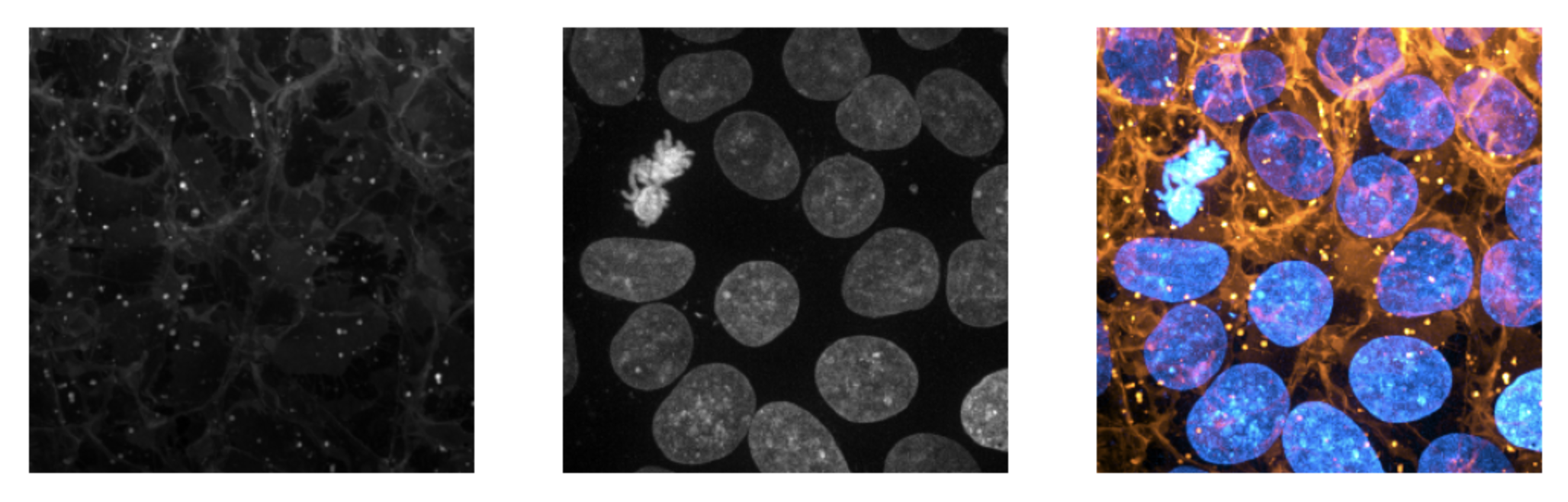
|
|
70
|
+
|
|
71
|
+
#### What constitutes a colormap?
|
|
72
|
+
Colormaps can be the literal name of one of the FIJI colormaps compiled into the mergechannels binary (see a list as the bottom of the page), a matplotlib colormap, or a [cmap](https://pypi.org/project/cmap/) colormap. The example below creates a similar blending as above, but by explicitly passing pre-generated colormaps (one from the matplotlib library, one from the cmap library). These can also be combined with string literals.
|
|
73
|
+
|
|
74
|
+
```python
|
|
75
|
+
import cmap
|
|
76
|
+
import matplotlib.pyplot as plt
|
|
77
|
+
from skimage import data
|
|
78
|
+
import mergechannels as mc
|
|
79
|
+
|
|
80
|
+
cells, nuclei = data.cells3d().max(axis=0)
|
|
81
|
+
blue = cmap.Colormap('seaborn:mako')
|
|
82
|
+
copper = plt.get_cmap('copper')
|
|
83
|
+
|
|
84
|
+
fig, axes = plt.subplots(1, 3)
|
|
85
|
+
for ax in axes: ax.axis('off')
|
|
86
|
+
a, b, c = axes
|
|
87
|
+
a.imshow(mc.apply_color_map(nuclei, blue))
|
|
88
|
+
b.imshow(mc.apply_color_map(cells, copper))
|
|
89
|
+
c.imshow(mc.merge([nuclei, cells], [blue, copper]))
|
|
90
|
+
```
|
|
91
|
+
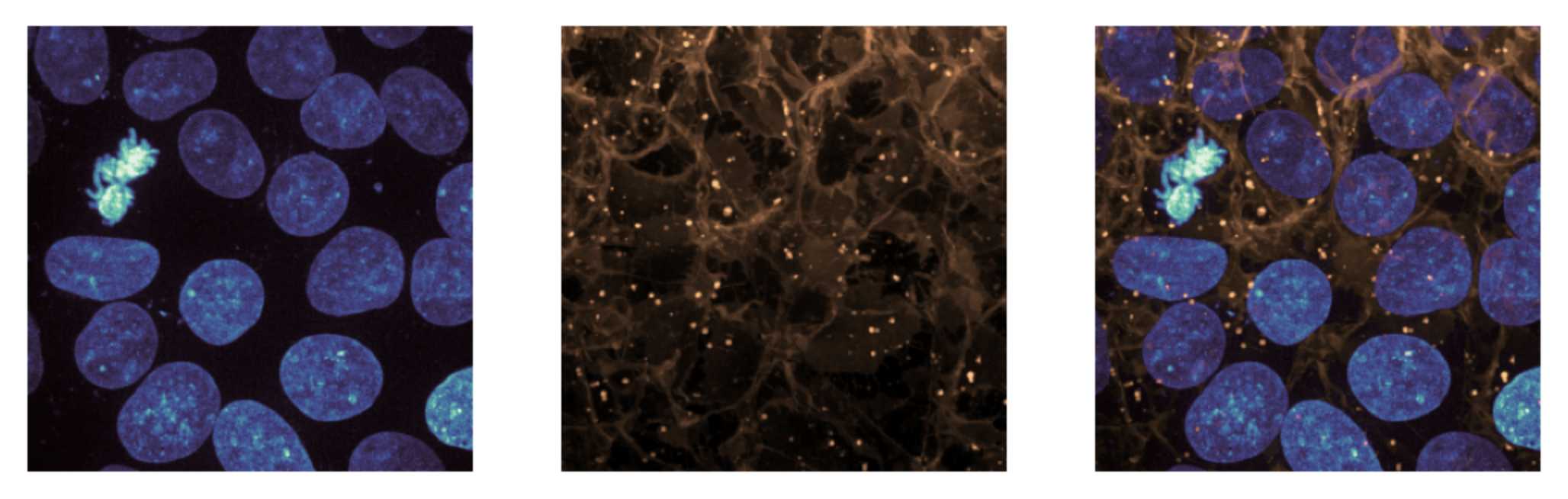
|
|
92
|
+
|
|
93
|
+
#### What are my blending options?
|
|
94
|
+
The `blending` argument to `mergechannels.merge` can be one of the following:
|
|
95
|
+
- `'max'`: the maximum RGB value of each pixel is used. This is the default (and intuitive) behavior.
|
|
96
|
+
- `'min'`: the minimum RGB value of each pixel is used. This is useful when combining inverted colormaps.
|
|
97
|
+
- `'mean'`: the mean RGB value of each pixel is used. This is typically most useful when combinding fluorescence with brightfield, but can often require re-scaling the images after blending.
|
|
98
|
+
- `'sum'`: the sum of the RGB values of each pixel is used (saturating). Results in high saturation images but can often be overwhelming and difficult to interpret.
|
|
99
|
+
|
|
100
|
+
The default and intuitive behavior is the use `'max'` blending, but oftentimes minimum blending is desired when combining inverted colormaps.
|
|
101
|
+
```python
|
|
102
|
+
from skimage import data
|
|
103
|
+
import matplotlib.pyplot as plt
|
|
104
|
+
import mergechannels as mc
|
|
105
|
+
|
|
106
|
+
cells, nuclei = data.cells3d().max(axis=0)
|
|
107
|
+
fig, axes = plt.subplots(1, 3, dpi=200)
|
|
108
|
+
for ax in axes: ax.axis('off')
|
|
109
|
+
a, b, c = axes
|
|
110
|
+
a.imshow(cells, cmap='gray')
|
|
111
|
+
b.imshow(nuclei, cmap='gray')
|
|
112
|
+
c.imshow(mc.merge([cells, nuclei],['I Blue', 'I Forest'], blending='min'))
|
|
113
|
+
```
|
|
114
|
+
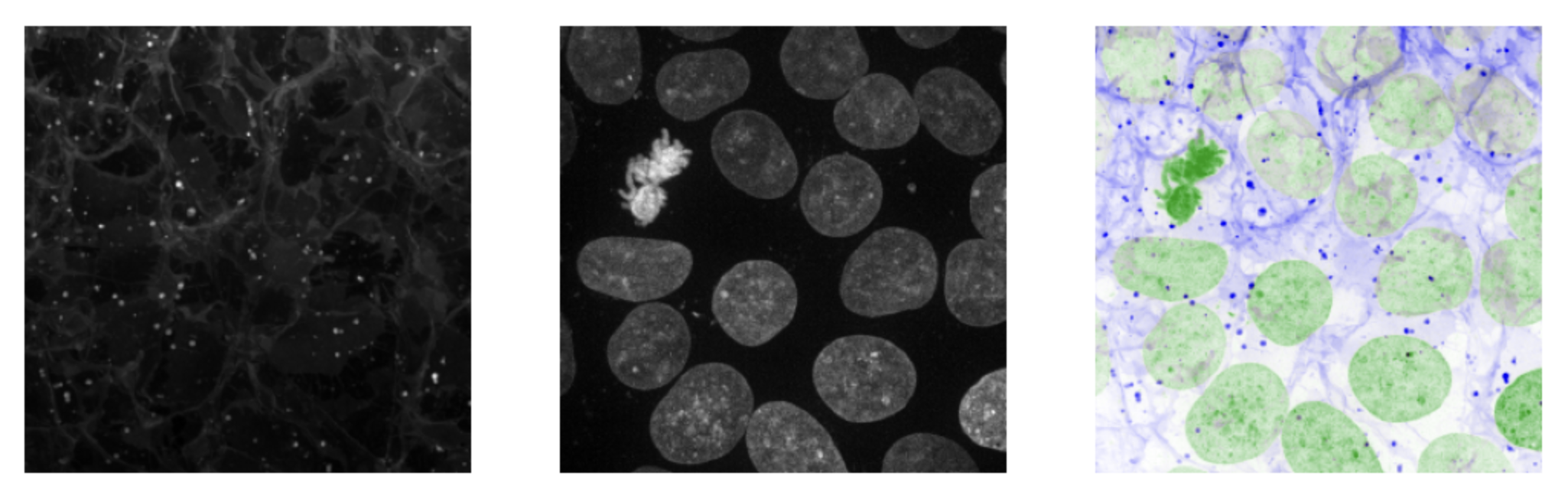
|
|
115
|
+
|
|
116
|
+
#### How can I control display brightness?
|
|
117
|
+
If desired, pre-determined saturation limits can be passed to `apply_color_map` to clip the images values to a range that best represents the contents of the image. These can be explicit pixel values passed with the `saturation_limits` argument, or as percentile values passed with the `percentiles` argument. If the latter, the percentile values will be used to calculate the saturation limits based on the distribution of pixel values in the images (this is sometimes referred to as "autoscaling). The default behavior is to calculate use the 1.1th percentile value as the dark point and the 99.9th percentile as the bright point.
|
|
118
|
+
|
|
119
|
+
```python
|
|
120
|
+
from skimage import data
|
|
121
|
+
import matplotlib.pyplot as plt
|
|
122
|
+
import mergechannels as mc
|
|
123
|
+
|
|
124
|
+
cells, nuclei = data.cells3d().max(axis=0)
|
|
125
|
+
channels = [cells, nuclei]
|
|
126
|
+
colormaps = ['I Blue', 'I Forest']
|
|
127
|
+
fig, axes = plt.subplots(1, 3, dpi=300)
|
|
128
|
+
for ax in axes: ax.axis('off')
|
|
129
|
+
(a, b, c) = axes
|
|
130
|
+
a.imshow(mc.merge(channels, colormaps, blending='min')) # use the default autoscaling
|
|
131
|
+
b.imshow(
|
|
132
|
+
mc.merge(
|
|
133
|
+
channels,
|
|
134
|
+
colormaps,
|
|
135
|
+
blending='min',
|
|
136
|
+
saturation_limits=[
|
|
137
|
+
(1000, 20_000), # pre-determined dark and light points for ch1
|
|
138
|
+
(1000, 50_000), # pre-determined dark and light points for ch2
|
|
139
|
+
],
|
|
140
|
+
),
|
|
141
|
+
)
|
|
142
|
+
c.imshow(
|
|
143
|
+
mc.merge(
|
|
144
|
+
channels,
|
|
145
|
+
colormaps,
|
|
146
|
+
blending='min',
|
|
147
|
+
percentiles=[(
|
|
148
|
+
1, # bottom 1% of pixels set to black point
|
|
149
|
+
97, # top 3% of pixels set to white point
|
|
150
|
+
)]*len(channels), # apply this to all channels
|
|
151
|
+
),
|
|
152
|
+
)
|
|
153
|
+
```
|
|
154
|
+
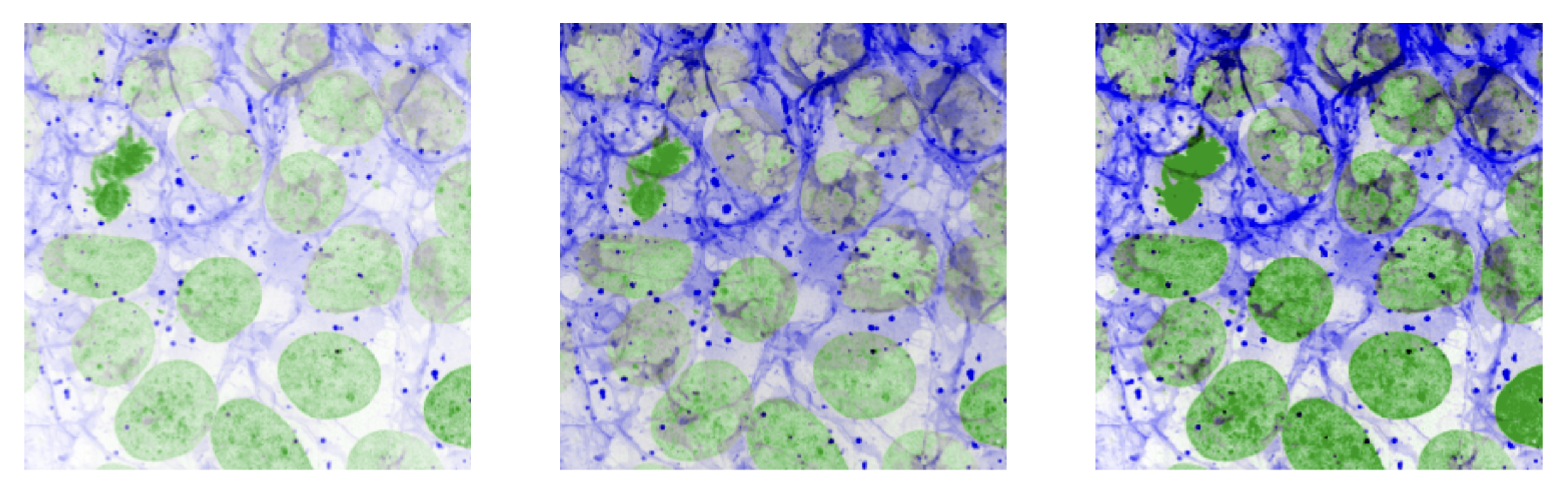
|
|
155
|
+
|
|
156
|
+
|
|
157
|
+
NOTE: if you are already working with appropriately scaled u8 images, you will see ~10X performance improvements (relative to the mergechannels and matplotlib naive default implementations) by passing `saturation_limits=(0, 255)` as this significantly reduces the amount of arithmetic done per pixel.
|
|
158
|
+
|
|
159
|
+
|
|
160
|
+
### apply a colormap to a whole stack
|
|
161
|
+
```python
|
|
162
|
+
from skimage import data
|
|
163
|
+
from matplotlib import pyplot as plt
|
|
164
|
+
import mergechannels as mc
|
|
165
|
+
|
|
166
|
+
volume = data.cells3d()
|
|
167
|
+
cells = volume[:, 0]
|
|
168
|
+
nuclei = volume[:, 1]
|
|
169
|
+
merged = mc.merge([cells, nuclei],['Orange Hot', 'Cyan Hot'])
|
|
170
|
+
plt.imshow(merged[24]); plt.show()
|
|
171
|
+
```
|
|
172
|
+
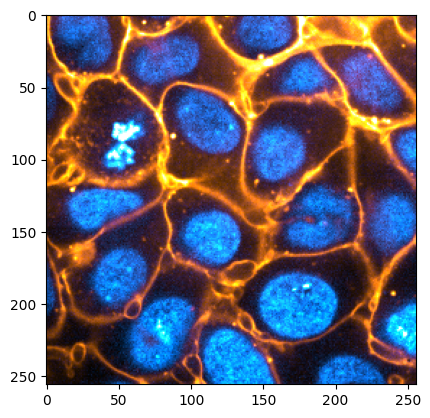
|
|
173
|
+
|
|
174
|
+
|
|
175
|
+
### colorize a single image
|
|
176
|
+
The primary entrypoint to applying a colormap to a single image is with `apply_color_map`. this function takes an array, a colormap, and an optional percentiles argument. The arrays is expected to be either u8 or u16 and 2 or 3D.
|
|
177
|
+
|
|
178
|
+
```python
|
|
179
|
+
from skimage import data
|
|
180
|
+
import matplotlib.pyplot as plt
|
|
181
|
+
import mergechannels as mc
|
|
182
|
+
|
|
183
|
+
img = data.camera()
|
|
184
|
+
colorized = mc.apply_color_map(img, 'Red/Green')
|
|
185
|
+
|
|
186
|
+
fig, axes = plt.subplots(1, 2)
|
|
187
|
+
for ax in axes: ax.axis('off')
|
|
188
|
+
(a, b) = axes
|
|
189
|
+
a.imshow(img, cmap='gray')
|
|
190
|
+
b.imshow(colorized)
|
|
191
|
+
plt.show()
|
|
192
|
+
print(colorized.shape, colorized.dtype)
|
|
193
|
+
>> (512, 512, 3) uint8
|
|
194
|
+
```
|
|
195
|
+
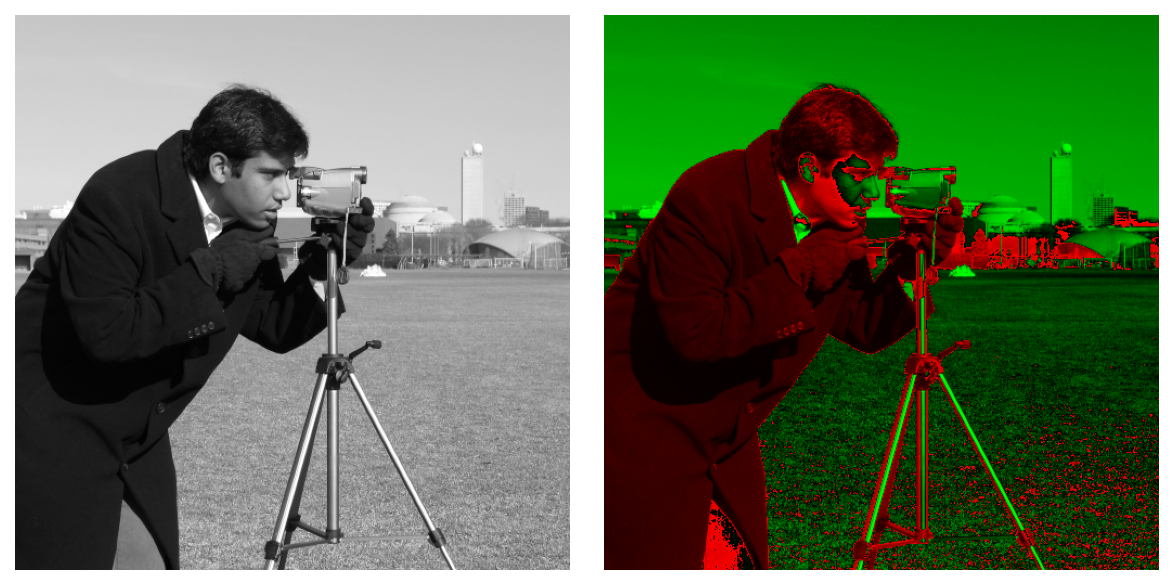
|
|
196
|
+
|
|
197
|
+
Similar to `mergechannels.merge`, `apply_color_map` will also accept colormaps directly from `matplotlib` and `cmap`, explicit saturation limits, or perctile values for autoscaling.
|
|
198
|
+
|
|
199
|
+
## Roadmap
|
|
200
|
+
mergechannels is currently incredibly simple. It can apply one or more colormaps to one or more 2/3D 8/16-bit images and that's it.
|
|
201
|
+
- ~~Add support to u8 and u16 images~~
|
|
202
|
+
- Add support for any numerical dtype
|
|
203
|
+
- Add option to return any colormap as a matplotlib colormap
|
|
204
|
+
- ~~Add option to pass external colormaps to mergechannels~~
|
|
205
|
+
- Parallelize colormap application on large images (if it's helpful)
|
|
206
|
+
- Add option to overlay binary or instance masks onto colorized images
|
|
207
|
+
|
|
208
|
+
## Acknowledgements
|
|
209
|
+
|
|
210
|
+
There are other great colormapping libraries available (e.g., [microfilm](https://github.com/guiwitz/microfilm), [cmap](https://github.com/pyapp-kit/cmap)) that are more feature-rich than this one, but which don't address my goals. My hope is that this project can fill an un-met niche and otherwise maintain full compatibility with these and similar libraries.
|
|
211
|
+
|
|
212
|
+
This project incorporates a number of colormaps that were hand-crafted by Christophe Leterrier and James Manton which were originally distributed [here](https://github.com/cleterrier/ChrisLUTs) and [here](https://sites.imagej.net/JDM_LUTs/) respectively.
|
|
213
|
+
|
|
214
|
+
## Colormaps
|
|
215
|
+
### FIJI built-in LUTs
|
|
216
|
+
|
|
217
|
+
<p>16_colors: <img src="https://raw.githubusercontent.com/zacswider/README_Images/main/builtin_luts_16_colors.png" style="vertical-align: middle"></p>
|
|
218
|
+
<p>3-3-2 RGB: <img src="https://raw.githubusercontent.com/zacswider/README_Images/main/builtin_luts_3-3-2 RGB.png" style="vertical-align: middle"></p>
|
|
219
|
+
<p>5_ramps: <img src="https://raw.githubusercontent.com/zacswider/README_Images/main/builtin_luts_5_ramps.png" style="vertical-align: middle"></p>
|
|
220
|
+
<p>6_shades: <img src="https://raw.githubusercontent.com/zacswider/README_Images/main/builtin_luts_6_shades.png" style="vertical-align: middle"></p>
|
|
221
|
+
<p>Blue: <img src="https://raw.githubusercontent.com/zacswider/README_Images/main/builtin_luts_Blue.png" style="vertical-align: middle"></p>
|
|
222
|
+
<p>Cyan: <img src="https://raw.githubusercontent.com/zacswider/README_Images/main/builtin_luts_Cyan.png" style="vertical-align: middle"></p>
|
|
223
|
+
<p>Cyan Hot: <img src="https://raw.githubusercontent.com/zacswider/README_Images/main/builtin_luts_Cyan Hot.png" style="vertical-align: middle"></p>
|
|
224
|
+
<p>Fire: <img src="https://raw.githubusercontent.com/zacswider/README_Images/main/builtin_luts_Fire.png" style="vertical-align: middle"></p>
|
|
225
|
+
<p>Grays: <img src="https://raw.githubusercontent.com/zacswider/README_Images/main/builtin_luts_Grays.png" style="vertical-align: middle"></p>
|
|
226
|
+
<p>Green: <img src="https://raw.githubusercontent.com/zacswider/README_Images/main/builtin_luts_Green.png" style="vertical-align: middle"></p>
|
|
227
|
+
<p>Green Fire Blue: <img src="https://raw.githubusercontent.com/zacswider/README_Images/main/builtin_luts_Green Fire Blue.png" style="vertical-align: middle"></p>
|
|
228
|
+
<p>HiLo: <img src="https://raw.githubusercontent.com/zacswider/README_Images/main/builtin_luts_HiLo.png" style="vertical-align: middle"></p>
|
|
229
|
+
<p>ICA: <img src="https://raw.githubusercontent.com/zacswider/README_Images/main/builtin_luts_ICA.png" style="vertical-align: middle"></p>
|
|
230
|
+
<p>ICA2: <img src="https://raw.githubusercontent.com/zacswider/README_Images/main/builtin_luts_ICA2.png" style="vertical-align: middle"></p>
|
|
231
|
+
<p>ICA3: <img src="https://raw.githubusercontent.com/zacswider/README_Images/main/builtin_luts_ICA3.png" style="vertical-align: middle"></p>
|
|
232
|
+
<p>Ice: <img src="https://raw.githubusercontent.com/zacswider/README_Images/main/builtin_luts_Ice.png" style="vertical-align: middle"></p>
|
|
233
|
+
<p>Magenta: <img src="https://raw.githubusercontent.com/zacswider/README_Images/main/builtin_luts_Magenta.png" style="vertical-align: middle"></p>
|
|
234
|
+
<p>Magenta Hot: <img src="https://raw.githubusercontent.com/zacswider/README_Images/main/builtin_luts_Magenta Hot.png" style="vertical-align: middle"></p>
|
|
235
|
+
<p>Orange Hot: <img src="https://raw.githubusercontent.com/zacswider/README_Images/main/builtin_luts_Orange Hot.png" style="vertical-align: middle"></p>
|
|
236
|
+
<p>Rainbow RGB: <img src="https://raw.githubusercontent.com/zacswider/README_Images/main/builtin_luts_Rainbow RGB.png" style="vertical-align: middle"></p>
|
|
237
|
+
<p>Red: <img src="https://raw.githubusercontent.com/zacswider/README_Images/main/builtin_luts_Red.png" style="vertical-align: middle"></p>
|
|
238
|
+
<p>Red Hot: <img src="https://raw.githubusercontent.com/zacswider/README_Images/main/builtin_luts_Red Hot.png" style="vertical-align: middle"></p>
|
|
239
|
+
<p>Red/Green: <img src="https://raw.githubusercontent.com/zacswider/README_Images/main/builtin_luts_Red%25Green.png" style="vertical-align: middle"></p>
|
|
240
|
+
<p>Spectrum: <img src="https://raw.githubusercontent.com/zacswider/README_Images/main/builtin_luts_Spectrum.png" style="vertical-align: middle"></p>
|
|
241
|
+
<p>Thermal: <img src="https://raw.githubusercontent.com/zacswider/README_Images/main/builtin_luts_Thermal.png" style="vertical-align: middle"></p>
|
|
242
|
+
<p>Yellow: <img src="https://raw.githubusercontent.com/zacswider/README_Images/main/builtin_luts_Yellow.png" style="vertical-align: middle"></p>
|
|
243
|
+
<p>Yellow Hot: <img src="https://raw.githubusercontent.com/zacswider/README_Images/main/builtin_luts_Yellow Hot.png" style="vertical-align: middle"></p>
|
|
244
|
+
<p>blue_orange_icb: <img src="https://raw.githubusercontent.com/zacswider/README_Images/main/builtin_luts_blue_orange_icb.png" style="vertical-align: middle"></p>
|
|
245
|
+
<p>brgbcmyw: <img src="https://raw.githubusercontent.com/zacswider/README_Images/main/builtin_luts_brgbcmyw.png" style="vertical-align: middle"></p>
|
|
246
|
+
<p>cool: <img src="https://raw.githubusercontent.com/zacswider/README_Images/main/builtin_luts_cool.png" style="vertical-align: middle"></p>
|
|
247
|
+
<p>edges: <img src="https://raw.githubusercontent.com/zacswider/README_Images/main/builtin_luts_edges.png" style="vertical-align: middle"></p>
|
|
248
|
+
<p>gem: <img src="https://raw.githubusercontent.com/zacswider/README_Images/main/builtin_luts_gem.png" style="vertical-align: middle"></p>
|
|
249
|
+
<p>glasbey: <img src="https://raw.githubusercontent.com/zacswider/README_Images/main/builtin_luts_glasbey.png" style="vertical-align: middle"></p>
|
|
250
|
+
<p>glasbey_inverted: <img src="https://raw.githubusercontent.com/zacswider/README_Images/main/builtin_luts_glasbey_inverted.png" style="vertical-align: middle"></p>
|
|
251
|
+
<p>glasbey_on_dark: <img src="https://raw.githubusercontent.com/zacswider/README_Images/main/builtin_luts_glasbey_on_dark.png" style="vertical-align: middle"></p>
|
|
252
|
+
<p>glow: <img src="https://raw.githubusercontent.com/zacswider/README_Images/main/builtin_luts_glow.png" style="vertical-align: middle"></p>
|
|
253
|
+
<p>mpl-inferno: <img src="https://raw.githubusercontent.com/zacswider/README_Images/main/builtin_luts_mpl-inferno.png" style="vertical-align: middle"></p>
|
|
254
|
+
<p>mpl-magma: <img src="https://raw.githubusercontent.com/zacswider/README_Images/main/builtin_luts_mpl-magma.png" style="vertical-align: middle"></p>
|
|
255
|
+
<p>mpl-plasma: <img src="https://raw.githubusercontent.com/zacswider/README_Images/main/builtin_luts_mpl-plasma.png" style="vertical-align: middle"></p>
|
|
256
|
+
<p>mpl-viridis: <img src="https://raw.githubusercontent.com/zacswider/README_Images/main/builtin_luts_mpl-viridis.png" style="vertical-align: middle"></p>
|
|
257
|
+
<p>phase: <img src="https://raw.githubusercontent.com/zacswider/README_Images/main/builtin_luts_phase.png" style="vertical-align: middle"></p>
|
|
258
|
+
<p>physics: <img src="https://raw.githubusercontent.com/zacswider/README_Images/main/builtin_luts_physics.png" style="vertical-align: middle"></p>
|
|
259
|
+
<p>royal: <img src="https://raw.githubusercontent.com/zacswider/README_Images/main/builtin_luts_royal.png" style="vertical-align: middle"></p>
|
|
260
|
+
<p>sepia: <img src="https://raw.githubusercontent.com/zacswider/README_Images/main/builtin_luts_sepia.png" style="vertical-align: middle"></p>
|
|
261
|
+
<p>smart: <img src="https://raw.githubusercontent.com/zacswider/README_Images/main/builtin_luts_smart.png" style="vertical-align: middle"></p>
|
|
262
|
+
<p>thal: <img src="https://raw.githubusercontent.com/zacswider/README_Images/main/builtin_luts_thal.png" style="vertical-align: middle"></p>
|
|
263
|
+
<p>thallium: <img src="https://raw.githubusercontent.com/zacswider/README_Images/main/builtin_luts_thallium.png" style="vertical-align: middle"></p>
|
|
264
|
+
<p>unionjack: <img src="https://raw.githubusercontent.com/zacswider/README_Images/main/builtin_luts_unionjack.png" style="vertical-align: middle"></p>
|
|
265
|
+
|
|
266
|
+
### [My custom LUTs](https://github.com/zacswider/LUTs)
|
|
267
|
+
|
|
268
|
+
<p>OIMB1: <img src="https://raw.githubusercontent.com/zacswider/README_Images/main/zac_luts_OIMB1.png" style="vertical-align: middle"></p>
|
|
269
|
+
<p>OIMB2: <img src="https://raw.githubusercontent.com/zacswider/README_Images/main/zac_luts_OIMB2.png" style="vertical-align: middle"></p>
|
|
270
|
+
<p>OIMB3: <img src="https://raw.githubusercontent.com/zacswider/README_Images/main/zac_luts_OIMB3.png" style="vertical-align: middle"></p>
|
|
271
|
+
<p>betterBlue: <img src="https://raw.githubusercontent.com/zacswider/README_Images/main/zac_luts_betterBlue.png" style="vertical-align: middle"></p>
|
|
272
|
+
<p>betterCyan: <img src="https://raw.githubusercontent.com/zacswider/README_Images/main/zac_luts_betterCyan.png" style="vertical-align: middle"></p>
|
|
273
|
+
<p>betterGreen: <img src="https://raw.githubusercontent.com/zacswider/README_Images/main/zac_luts_betterGreen.png" style="vertical-align: middle"></p>
|
|
274
|
+
<p>betterOrange: <img src="https://raw.githubusercontent.com/zacswider/README_Images/main/zac_luts_betterOrange.png" style="vertical-align: middle"></p>
|
|
275
|
+
<p>betterRed: <img src="https://raw.githubusercontent.com/zacswider/README_Images/main/zac_luts_betterRed.png" style="vertical-align: middle"></p>
|
|
276
|
+
<p>betterYellow: <img src="https://raw.githubusercontent.com/zacswider/README_Images/main/zac_luts_betterYellow.png" style="vertical-align: middle"></p>
|
|
277
|
+
|
|
278
|
+
### [Christophe Leterrier's LUTs](https://github.com/cleterrier/ChrisLUTs)
|
|
279
|
+
|
|
280
|
+
<p>3color-BMR: <img src="https://raw.githubusercontent.com/zacswider/README_Images/main/christ_luts_3color-BMR.png" style="vertical-align: middle"></p>
|
|
281
|
+
<p>3color-CGY: <img src="https://raw.githubusercontent.com/zacswider/README_Images/main/christ_luts_3color-CGY.png" style="vertical-align: middle"></p>
|
|
282
|
+
<p>3color-RMB: <img src="https://raw.githubusercontent.com/zacswider/README_Images/main/christ_luts_3color-RMB.png" style="vertical-align: middle"></p>
|
|
283
|
+
<p>3color-YGC: <img src="https://raw.githubusercontent.com/zacswider/README_Images/main/christ_luts_3color-YGC.png" style="vertical-align: middle"></p>
|
|
284
|
+
<p>BOP blue: <img src="https://raw.githubusercontent.com/zacswider/README_Images/main/christ_luts_BOP blue.png" style="vertical-align: middle"></p>
|
|
285
|
+
<p>BOP orange: <img src="https://raw.githubusercontent.com/zacswider/README_Images/main/christ_luts_BOP orange.png" style="vertical-align: middle"></p>
|
|
286
|
+
<p>BOP purple: <img src="https://raw.githubusercontent.com/zacswider/README_Images/main/christ_luts_BOP purple.png" style="vertical-align: middle"></p>
|
|
287
|
+
<p>I Blue: <img src="https://raw.githubusercontent.com/zacswider/README_Images/main/christ_luts_I Blue.png" style="vertical-align: middle"></p>
|
|
288
|
+
<p>I Bordeaux: <img src="https://raw.githubusercontent.com/zacswider/README_Images/main/christ_luts_I Bordeaux.png" style="vertical-align: middle"></p>
|
|
289
|
+
<p>I Cyan: <img src="https://raw.githubusercontent.com/zacswider/README_Images/main/christ_luts_I Cyan.png" style="vertical-align: middle"></p>
|
|
290
|
+
<p>I Forest: <img src="https://raw.githubusercontent.com/zacswider/README_Images/main/christ_luts_I Forest.png" style="vertical-align: middle"></p>
|
|
291
|
+
<p>I Green: <img src="https://raw.githubusercontent.com/zacswider/README_Images/main/christ_luts_I Green.png" style="vertical-align: middle"></p>
|
|
292
|
+
<p>I Magenta: <img src="https://raw.githubusercontent.com/zacswider/README_Images/main/christ_luts_I Magenta.png" style="vertical-align: middle"></p>
|
|
293
|
+
<p>I Purple: <img src="https://raw.githubusercontent.com/zacswider/README_Images/main/christ_luts_I Purple.png" style="vertical-align: middle"></p>
|
|
294
|
+
<p>I Red: <img src="https://raw.githubusercontent.com/zacswider/README_Images/main/christ_luts_I Red.png" style="vertical-align: middle"></p>
|
|
295
|
+
<p>I Yellow: <img src="https://raw.githubusercontent.com/zacswider/README_Images/main/christ_luts_I Yellow.png" style="vertical-align: middle"></p>
|
|
296
|
+
<p>OPF fresh: <img src="https://raw.githubusercontent.com/zacswider/README_Images/main/christ_luts_OPF fresh.png" style="vertical-align: middle"></p>
|
|
297
|
+
<p>OPF orange: <img src="https://raw.githubusercontent.com/zacswider/README_Images/main/christ_luts_OPF orange.png" style="vertical-align: middle"></p>
|
|
298
|
+
<p>OPF purple: <img src="https://raw.githubusercontent.com/zacswider/README_Images/main/christ_luts_OPF purple.png" style="vertical-align: middle"></p>
|
|
299
|
+
<p>Turbo: <img src="https://raw.githubusercontent.com/zacswider/README_Images/main/christ_luts_Turbo.png" style="vertical-align: middle"></p>
|
|
300
|
+
|
|
301
|
+
### [James Manton's LUTs](https://sites.imagej.net/JDM_LUTs/)
|
|
302
|
+
|
|
303
|
+
<p>Circus Cherry: <img src="https://raw.githubusercontent.com/zacswider/README_Images/main/jdm_luts_Circus Cherry.png" style="vertical-align: middle"></p>
|
|
304
|
+
<p>Circus Cyan: <img src="https://raw.githubusercontent.com/zacswider/README_Images/main/jdm_luts_Circus Cyan.png" style="vertical-align: middle"></p>
|
|
305
|
+
<p>Circus Green: <img src="https://raw.githubusercontent.com/zacswider/README_Images/main/jdm_luts_Circus Green.png" style="vertical-align: middle"></p>
|
|
306
|
+
<p>Circus Ink Black: <img src="https://raw.githubusercontent.com/zacswider/README_Images/main/jdm_luts_Circus Ink Black.png" style="vertical-align: middle"></p>
|
|
307
|
+
<p>Circus Ink Cherry: <img src="https://raw.githubusercontent.com/zacswider/README_Images/main/jdm_luts_Circus Ink Cherry.png" style="vertical-align: middle"></p>
|
|
308
|
+
<p>Circus Ink Cyan: <img src="https://raw.githubusercontent.com/zacswider/README_Images/main/jdm_luts_Circus Ink Cyan.png" style="vertical-align: middle"></p>
|
|
309
|
+
<p>Circus Ink Green: <img src="https://raw.githubusercontent.com/zacswider/README_Images/main/jdm_luts_Circus Ink Green.png" style="vertical-align: middle"></p>
|
|
310
|
+
<p>Circus Ink Mint: <img src="https://raw.githubusercontent.com/zacswider/README_Images/main/jdm_luts_Circus Ink Mint.png" style="vertical-align: middle"></p>
|
|
311
|
+
<p>Circus Ink Purple: <img src="https://raw.githubusercontent.com/zacswider/README_Images/main/jdm_luts_Circus Ink Purple.png" style="vertical-align: middle"></p>
|
|
312
|
+
<p>Circus Ink Yellow: <img src="https://raw.githubusercontent.com/zacswider/README_Images/main/jdm_luts_Circus Ink Yellow.png" style="vertical-align: middle"></p>
|
|
313
|
+
<p>Circus Mint: <img src="https://raw.githubusercontent.com/zacswider/README_Images/main/jdm_luts_Circus Mint.png" style="vertical-align: middle"></p>
|
|
314
|
+
<p>Circus Purple: <img src="https://raw.githubusercontent.com/zacswider/README_Images/main/jdm_luts_Circus Purple.png" style="vertical-align: middle"></p>
|
|
315
|
+
<p>Circus Yellow: <img src="https://raw.githubusercontent.com/zacswider/README_Images/main/jdm_luts_Circus Yellow.png" style="vertical-align: middle"></p>
|
|
316
|
+
<p>Duo Cherry: <img src="https://raw.githubusercontent.com/zacswider/README_Images/main/jdm_luts_Duo Cherry.png" style="vertical-align: middle"></p>
|
|
317
|
+
<p>Duo Cyan: <img src="https://raw.githubusercontent.com/zacswider/README_Images/main/jdm_luts_Duo Cyan.png" style="vertical-align: middle"></p>
|
|
318
|
+
<p>Duo Green: <img src="https://raw.githubusercontent.com/zacswider/README_Images/main/jdm_luts_Duo Green.png" style="vertical-align: middle"></p>
|
|
319
|
+
<p>Duo Intense Cherry: <img src="https://raw.githubusercontent.com/zacswider/README_Images/main/jdm_luts_Duo Intense Cherry.png" style="vertical-align: middle"></p>
|
|
320
|
+
<p>Duo Intense Cyan: <img src="https://raw.githubusercontent.com/zacswider/README_Images/main/jdm_luts_Duo Intense Cyan.png" style="vertical-align: middle"></p>
|
|
321
|
+
<p>Duo Intense Green: <img src="https://raw.githubusercontent.com/zacswider/README_Images/main/jdm_luts_Duo Intense Green.png" style="vertical-align: middle"></p>
|
|
322
|
+
<p>Duo Intense Mint: <img src="https://raw.githubusercontent.com/zacswider/README_Images/main/jdm_luts_Duo Intense Mint.png" style="vertical-align: middle"></p>
|
|
323
|
+
<p>Duo Intense Purple: <img src="https://raw.githubusercontent.com/zacswider/README_Images/main/jdm_luts_Duo Intense Purple.png" style="vertical-align: middle"></p>
|
|
324
|
+
<p>Duo Intense Yellow: <img src="https://raw.githubusercontent.com/zacswider/README_Images/main/jdm_luts_Duo Intense Yellow.png" style="vertical-align: middle"></p>
|
|
325
|
+
<p>Duo Mint: <img src="https://raw.githubusercontent.com/zacswider/README_Images/main/jdm_luts_Duo Mint.png" style="vertical-align: middle"></p>
|
|
326
|
+
<p>Duo Purple: <img src="https://raw.githubusercontent.com/zacswider/README_Images/main/jdm_luts_Duo Purple.png" style="vertical-align: middle"></p>
|
|
327
|
+
<p>Duo Yellow: <img src="https://raw.githubusercontent.com/zacswider/README_Images/main/jdm_luts_Duo Yellow.png" style="vertical-align: middle"></p>
|
|
328
|
+
<p>Grays g=0.25: <img src="https://raw.githubusercontent.com/zacswider/README_Images/main/jdm_luts_Grays g=0.25.png" style="vertical-align: middle"></p>
|
|
329
|
+
<p>Grays g=0.25 inverted: <img src="https://raw.githubusercontent.com/zacswider/README_Images/main/jdm_luts_Grays g=0.25 inverted.png" style="vertical-align: middle"></p>
|
|
330
|
+
<p>Grays g=0.50: <img src="https://raw.githubusercontent.com/zacswider/README_Images/main/jdm_luts_Grays g=0.50.png" style="vertical-align: middle"></p>
|
|
331
|
+
<p>Grays g=0.50 inverted: <img src="https://raw.githubusercontent.com/zacswider/README_Images/main/jdm_luts_Grays g=0.50 inverted.png" style="vertical-align: middle"></p>
|
|
332
|
+
<p>Grays g=0.75: <img src="https://raw.githubusercontent.com/zacswider/README_Images/main/jdm_luts_Grays g=0.75.png" style="vertical-align: middle"></p>
|
|
333
|
+
<p>Grays g=0.75 inverted: <img src="https://raw.githubusercontent.com/zacswider/README_Images/main/jdm_luts_Grays g=0.75 inverted.png" style="vertical-align: middle"></p>
|
|
334
|
+
<p>Grays g=1.00 inverted: <img src="https://raw.githubusercontent.com/zacswider/README_Images/main/jdm_luts_Grays g=1.00 inverted.png" style="vertical-align: middle"></p>
|
|
335
|
+
<p>Grays g=1.25: <img src="https://raw.githubusercontent.com/zacswider/README_Images/main/jdm_luts_Grays g=1.25.png" style="vertical-align: middle"></p>
|
|
336
|
+
<p>Grays g=1.25 inverted: <img src="https://raw.githubusercontent.com/zacswider/README_Images/main/jdm_luts_Grays g=1.25 inverted.png" style="vertical-align: middle"></p>
|
|
337
|
+
<p>Grays g=1.50: <img src="https://raw.githubusercontent.com/zacswider/README_Images/main/jdm_luts_Grays g=1.50.png" style="vertical-align: middle"></p>
|
|
338
|
+
<p>Grays g=1.50 inverted: <img src="https://raw.githubusercontent.com/zacswider/README_Images/main/jdm_luts_Grays g=1.50 inverted.png" style="vertical-align: middle"></p>
|
|
339
|
+
<p>Grays g=1.75: <img src="https://raw.githubusercontent.com/zacswider/README_Images/main/jdm_luts_Grays g=1.75.png" style="vertical-align: middle"></p>
|
|
340
|
+
<p>Grays g=1.75 inverted: <img src="https://raw.githubusercontent.com/zacswider/README_Images/main/jdm_luts_Grays g=1.75 inverted.png" style="vertical-align: middle"></p>
|
|
341
|
+
<p>Grays g=2.00: <img src="https://raw.githubusercontent.com/zacswider/README_Images/main/jdm_luts_Grays g=2.00.png" style="vertical-align: middle"></p>
|
|
342
|
+
<p>Grays g=2.00 inverted: <img src="https://raw.githubusercontent.com/zacswider/README_Images/main/jdm_luts_Grays g=2.00 inverted.png" style="vertical-align: middle"></p>
|
|
343
|
+
<p>Ink Black: <img src="https://raw.githubusercontent.com/zacswider/README_Images/main/jdm_luts_Ink Black.png" style="vertical-align: middle"></p>
|
|
344
|
+
<p>Ink Cherry: <img src="https://raw.githubusercontent.com/zacswider/README_Images/main/jdm_luts_Ink Cherry.png" style="vertical-align: middle"></p>
|
|
345
|
+
<p>Ink Cyan: <img src="https://raw.githubusercontent.com/zacswider/README_Images/main/jdm_luts_Ink Cyan.png" style="vertical-align: middle"></p>
|
|
346
|
+
<p>Ink Green: <img src="https://raw.githubusercontent.com/zacswider/README_Images/main/jdm_luts_Ink Green.png" style="vertical-align: middle"></p>
|
|
347
|
+
<p>Ink Mint: <img src="https://raw.githubusercontent.com/zacswider/README_Images/main/jdm_luts_Ink Mint.png" style="vertical-align: middle"></p>
|
|
348
|
+
<p>Ink Purple: <img src="https://raw.githubusercontent.com/zacswider/README_Images/main/jdm_luts_Ink Purple.png" style="vertical-align: middle"></p>
|
|
349
|
+
<p>Ink Wash Black: <img src="https://raw.githubusercontent.com/zacswider/README_Images/main/jdm_luts_Ink Wash Black.png" style="vertical-align: middle"></p>
|
|
350
|
+
<p>Ink Wash Cherry: <img src="https://raw.githubusercontent.com/zacswider/README_Images/main/jdm_luts_Ink Wash Cherry.png" style="vertical-align: middle"></p>
|
|
351
|
+
<p>Ink Wash Cyan: <img src="https://raw.githubusercontent.com/zacswider/README_Images/main/jdm_luts_Ink Wash Cyan.png" style="vertical-align: middle"></p>
|
|
352
|
+
<p>Ink Wash Green: <img src="https://raw.githubusercontent.com/zacswider/README_Images/main/jdm_luts_Ink Wash Green.png" style="vertical-align: middle"></p>
|
|
353
|
+
<p>Ink Wash Mint: <img src="https://raw.githubusercontent.com/zacswider/README_Images/main/jdm_luts_Ink Wash Mint.png" style="vertical-align: middle"></p>
|
|
354
|
+
<p>Ink Wash Purple: <img src="https://raw.githubusercontent.com/zacswider/README_Images/main/jdm_luts_Ink Wash Purple.png" style="vertical-align: middle"></p>
|
|
355
|
+
<p>Ink Wash Yellow: <img src="https://raw.githubusercontent.com/zacswider/README_Images/main/jdm_luts_Ink Wash Yellow.png" style="vertical-align: middle"></p>
|
|
356
|
+
<p>Ink Yellow: <img src="https://raw.githubusercontent.com/zacswider/README_Images/main/jdm_luts_Ink Yellow.png" style="vertical-align: middle"></p>
|
|
357
|
+
<p>Parabolic RGB: <img src="https://raw.githubusercontent.com/zacswider/README_Images/main/jdm_luts_Parabolic RGB.png" style="vertical-align: middle"></p>
|
|
358
|
+
<p>Phase Bold Green-Magenta: <img src="https://raw.githubusercontent.com/zacswider/README_Images/main/jdm_luts_Phase Bold Green-Magenta.png" style="vertical-align: middle"></p>
|
|
359
|
+
<p>Phase Bold Ink Green-Magenta: <img src="https://raw.githubusercontent.com/zacswider/README_Images/main/jdm_luts_Phase Bold Ink Green-Magenta.png" style="vertical-align: middle"></p>
|
|
360
|
+
<p>Phase Bold Ink Mint-Cherry: <img src="https://raw.githubusercontent.com/zacswider/README_Images/main/jdm_luts_Phase Bold Ink Mint-Cherry.png" style="vertical-align: middle"></p>
|
|
361
|
+
<p>Phase Bold Ink Yellow-Cyan: <img src="https://raw.githubusercontent.com/zacswider/README_Images/main/jdm_luts_Phase Bold Ink Yellow-Cyan.png" style="vertical-align: middle"></p>
|
|
362
|
+
<p>Phase Bold Mint-Cherry: <img src="https://raw.githubusercontent.com/zacswider/README_Images/main/jdm_luts_Phase Bold Mint-Cherry.png" style="vertical-align: middle"></p>
|
|
363
|
+
<p>Phase Bold Yellow-Cyan: <img src="https://raw.githubusercontent.com/zacswider/README_Images/main/jdm_luts_Phase Bold Yellow-Cyan.png" style="vertical-align: middle"></p>
|
|
364
|
+
<p>Phase Green-Magenta: <img src="https://raw.githubusercontent.com/zacswider/README_Images/main/jdm_luts_Phase Green-Magenta.png" style="vertical-align: middle"></p>
|
|
365
|
+
<p>Phase Ink Green-Magenta: <img src="https://raw.githubusercontent.com/zacswider/README_Images/main/jdm_luts_Phase Ink Green-Magenta.png" style="vertical-align: middle"></p>
|
|
366
|
+
<p>Phase Ink Mint-Cherry: <img src="https://raw.githubusercontent.com/zacswider/README_Images/main/jdm_luts_Phase Ink Mint-Cherry.png" style="vertical-align: middle"></p>
|
|
367
|
+
<p>Phase Ink Yellow-Cyan: <img src="https://raw.githubusercontent.com/zacswider/README_Images/main/jdm_luts_Phase Ink Yellow-Cyan.png" style="vertical-align: middle"></p>
|
|
368
|
+
<p>Phase Mint-Cherry: <img src="https://raw.githubusercontent.com/zacswider/README_Images/main/jdm_luts_Phase Mint-Cherry.png" style="vertical-align: middle"></p>
|
|
369
|
+
<p>Phase Yellow-Cyan: <img src="https://raw.githubusercontent.com/zacswider/README_Images/main/jdm_luts_Phase Yellow-Cyan.png" style="vertical-align: middle"></p>
|
|
370
|
+
<p>Pop blue: <img src="https://raw.githubusercontent.com/zacswider/README_Images/main/jdm_luts_Pop blue.png" style="vertical-align: middle"></p>
|
|
371
|
+
<p>Pop blue inverted: <img src="https://raw.githubusercontent.com/zacswider/README_Images/main/jdm_luts_Pop blue inverted.png" style="vertical-align: middle"></p>
|
|
372
|
+
<p>Pop cherry: <img src="https://raw.githubusercontent.com/zacswider/README_Images/main/jdm_luts_Pop cherry.png" style="vertical-align: middle"></p>
|
|
373
|
+
<p>Pop cherry inverted: <img src="https://raw.githubusercontent.com/zacswider/README_Images/main/jdm_luts_Pop cherry inverted.png" style="vertical-align: middle"></p>
|
|
374
|
+
<p>Pop cyan: <img src="https://raw.githubusercontent.com/zacswider/README_Images/main/jdm_luts_Pop cyan.png" style="vertical-align: middle"></p>
|
|
375
|
+
<p>Pop cyan inverted: <img src="https://raw.githubusercontent.com/zacswider/README_Images/main/jdm_luts_Pop cyan inverted.png" style="vertical-align: middle"></p>
|
|
376
|
+
<p>Pop green: <img src="https://raw.githubusercontent.com/zacswider/README_Images/main/jdm_luts_Pop green.png" style="vertical-align: middle"></p>
|
|
377
|
+
<p>Pop green inverted: <img src="https://raw.githubusercontent.com/zacswider/README_Images/main/jdm_luts_Pop green inverted.png" style="vertical-align: middle"></p>
|
|
378
|
+
<p>Pop lavender inverted: <img src="https://raw.githubusercontent.com/zacswider/README_Images/main/jdm_luts_Pop lavender inverted.png" style="vertical-align: middle"></p>
|
|
379
|
+
<p>Pop magenta: <img src="https://raw.githubusercontent.com/zacswider/README_Images/main/jdm_luts_Pop magenta.png" style="vertical-align: middle"></p>
|
|
380
|
+
<p>Pop magenta inverted: <img src="https://raw.githubusercontent.com/zacswider/README_Images/main/jdm_luts_Pop magenta inverted.png" style="vertical-align: middle"></p>
|
|
381
|
+
<p>Pop mint: <img src="https://raw.githubusercontent.com/zacswider/README_Images/main/jdm_luts_Pop mint.png" style="vertical-align: middle"></p>
|
|
382
|
+
<p>Pop mint inverted: <img src="https://raw.githubusercontent.com/zacswider/README_Images/main/jdm_luts_Pop mint inverted.png" style="vertical-align: middle"></p>
|
|
383
|
+
<p>Pop purple: <img src="https://raw.githubusercontent.com/zacswider/README_Images/main/jdm_luts_Pop purple.png" style="vertical-align: middle"></p>
|
|
384
|
+
<p>Pop purple inverted: <img src="https://raw.githubusercontent.com/zacswider/README_Images/main/jdm_luts_Pop purple inverted.png" style="vertical-align: middle"></p>
|
|
385
|
+
<p>Pop red: <img src="https://raw.githubusercontent.com/zacswider/README_Images/main/jdm_luts_Pop red.png" style="vertical-align: middle"></p>
|
|
386
|
+
<p>Pop red inverted: <img src="https://raw.githubusercontent.com/zacswider/README_Images/main/jdm_luts_Pop red inverted.png" style="vertical-align: middle"></p>
|
|
387
|
+
<p>Pop yellow: <img src="https://raw.githubusercontent.com/zacswider/README_Images/main/jdm_luts_Pop yellow.png" style="vertical-align: middle"></p>
|
|
388
|
+
<p>Pop yellow inverted: <img src="https://raw.githubusercontent.com/zacswider/README_Images/main/jdm_luts_Pop yellow inverted.png" style="vertical-align: middle"></p>
|
|
389
|
+
<p>Quartetto MYGB Blue: <img src="https://raw.githubusercontent.com/zacswider/README_Images/main/jdm_luts_Quartetto MYGB Blue.png" style="vertical-align: middle"></p>
|
|
390
|
+
<p>Quartetto MYGB Green: <img src="https://raw.githubusercontent.com/zacswider/README_Images/main/jdm_luts_Quartetto MYGB Green.png" style="vertical-align: middle"></p>
|
|
391
|
+
<p>Quartetto MYGB Magenta: <img src="https://raw.githubusercontent.com/zacswider/README_Images/main/jdm_luts_Quartetto MYGB Magenta.png" style="vertical-align: middle"></p>
|
|
392
|
+
<p>Quartetto MYGB Yellow: <img src="https://raw.githubusercontent.com/zacswider/README_Images/main/jdm_luts_Quartetto MYGB Yellow.png" style="vertical-align: middle"></p>
|
|
393
|
+
<p>Quartetto RYGB Blue: <img src="https://raw.githubusercontent.com/zacswider/README_Images/main/jdm_luts_Quartetto RYGB Blue.png" style="vertical-align: middle"></p>
|
|
394
|
+
<p>Quartetto RYGB Green: <img src="https://raw.githubusercontent.com/zacswider/README_Images/main/jdm_luts_Quartetto RYGB Green.png" style="vertical-align: middle"></p>
|
|
395
|
+
<p>Quartetto RYGB Red: <img src="https://raw.githubusercontent.com/zacswider/README_Images/main/jdm_luts_Quartetto RYGB Red.png" style="vertical-align: middle"></p>
|
|
396
|
+
<p>Quartetto RYGB Yellow: <img src="https://raw.githubusercontent.com/zacswider/README_Images/main/jdm_luts_Quartetto RYGB Yellow.png" style="vertical-align: middle"></p>
|
|
397
|
+
|
|
@@ -0,0 +1,12 @@
|
|
|
1
|
+
mergechannels-0.5.1.dist-info/METADATA,sha256=-VwHNevVPYYI3iuLZ9ko69Dr7b8kqJ980DOjVTiOQvU,36764
|
|
2
|
+
mergechannels-0.5.1.dist-info/WHEEL,sha256=C0UEYGfmbwV7RUquuUeO4xByZw-_EeUrnedPz08oKg4,107
|
|
3
|
+
mergechannels-0.5.1.dist-info/licenses/LICENSE,sha256=csvD60rgtSorbYEM3f8867qNyPCzmIXyFNj8h01Bd6c,1071
|
|
4
|
+
mergechannels.libs/libgcc_s-1e52349c.so.1,sha256=Ani0u_W_tB8ESsFePO4D2mn2lrgWLhyFdw6RETxBTYM,437537
|
|
5
|
+
mergechannels/__init__.py,sha256=RpIHde1-y_FgqPaFQFhVoqurnZDbOQgOT4b5I3ejYrI,391
|
|
6
|
+
mergechannels/__init__.pyi,sha256=_fyJhcixWLF7vDjCGnQyncOB1H2ykP-khAThzwvTaEk,1777
|
|
7
|
+
mergechannels/_blending.py,sha256=mE5Cr9wvVJRcwfymg_UUZUjdIKx2mldfLU8QJT95bVM,84
|
|
8
|
+
mergechannels/_internal.py,sha256=5jic4Zy4pATDKvZxP4Hr4j4McdiYFwaI1XDtfMDBVwA,3498
|
|
9
|
+
mergechannels/_luts.py,sha256=gFcSIjbLqRS33UvrOryYRKAU5i8EGLjgQbXMJYpiy48,2967
|
|
10
|
+
mergechannels/mergechannels.cpython-312-x86_64-linux-musl.so,sha256=66nNEAt9cwJrYYSXSaC6nLci7VakEUHfTvlWEfUUmFk,1022777
|
|
11
|
+
mergechannels/py.typed,sha256=47DEQpj8HBSa-_TImW-5JCeuQeRkm5NMpJWZG3hSuFU,0
|
|
12
|
+
mergechannels-0.5.1.dist-info/RECORD,,
|
|
@@ -1,146 +0,0 @@
|
|
|
1
|
-
Metadata-Version: 2.4
|
|
2
|
-
Name: mergechannels
|
|
3
|
-
Version: 0.4.0
|
|
4
|
-
Classifier: Programming Language :: Rust
|
|
5
|
-
Classifier: Programming Language :: Python :: Implementation :: CPython
|
|
6
|
-
Classifier: Programming Language :: Python :: Implementation :: PyPy
|
|
7
|
-
Classifier: License :: OSI Approved :: MIT License
|
|
8
|
-
Classifier: Programming Language :: Python :: 3
|
|
9
|
-
Classifier: Programming Language :: Python :: 3.9
|
|
10
|
-
Classifier: Programming Language :: Python :: 3.10
|
|
11
|
-
Classifier: Programming Language :: Python :: 3.11
|
|
12
|
-
Classifier: Programming Language :: Python :: 3.12
|
|
13
|
-
Classifier: Programming Language :: Python :: 3.13
|
|
14
|
-
Requires-Dist: numpy>1.25.0
|
|
15
|
-
Provides-Extra: nvim
|
|
16
|
-
License-File: LICENSE
|
|
17
|
-
Summary: Apply and merge colormaps
|
|
18
|
-
Author-email: Zac Swider <zac.swider@gmail.com>
|
|
19
|
-
License: MIT
|
|
20
|
-
Requires-Python: >=3.9, <=3.13
|
|
21
|
-
Description-Content-Type: text/markdown; charset=UTF-8; variant=GFM
|
|
22
|
-
|
|
23
|
-
[](https://github.com/zacswider/mergechannels/actions/workflows/CI.yml)
|
|
24
|
-

|
|
25
|
-

|
|
26
|
-

|
|
27
|
-
|
|
28
|
-
# mergechannels
|
|
29
|
-
|
|
30
|
-
This project was originally conceived because I often find myself wanting to apply and blend colormaps to images while working from Python, and for historical reasons many of my favorite colormaps are distributed as [FIJI](https://imagej.net/software/fiji/) lookup tables. I also care about things likes speed and memory usage (e.g., not casting large arrays to floating point dtypes, not creating multiple whole arrays just to add them together), so I was interested in seeing if I could at least match matplotlib's colormapping performance with my own hand-rolled colorizer in Rust.
|
|
31
|
-
|
|
32
|
-
|
|
33
|
-
|
|
34
|
-
## Installation
|
|
35
|
-
|
|
36
|
-
Install pre-compiled binaries from [PyPI](https://pypi.org/project/mergechannels/):
|
|
37
|
-
```bash
|
|
38
|
-
pip install mergechannels
|
|
39
|
-
```
|
|
40
|
-
|
|
41
|
-
Build from source on your own machine:
|
|
42
|
-
```bash
|
|
43
|
-
pip install git+https://github.com/zacswider/mergechannels.git
|
|
44
|
-
```
|
|
45
|
-
|
|
46
|
-
## Usage
|
|
47
|
-
*NOTE*: scikit-image is not a dependency of this project, but is used in the examples below to fetch images.
|
|
48
|
-
|
|
49
|
-
### colorize a single image
|
|
50
|
-
|
|
51
|
-
```python
|
|
52
|
-
from skimage import data
|
|
53
|
-
import matplotlib.pyplot as plt
|
|
54
|
-
import mergechannels as mc
|
|
55
|
-
|
|
56
|
-
img = data.camera()
|
|
57
|
-
colorized = mc.apply_color_map(img, 'Red/Green')
|
|
58
|
-
fig, axes = plt.subplots(1, 2, figsize=(6, 3), dpi=150)
|
|
59
|
-
for ax in axes: ax.axis('off')
|
|
60
|
-
(a, b) = axes
|
|
61
|
-
a.imshow(img, cmap='gray')
|
|
62
|
-
b.imshow(colorized)
|
|
63
|
-
plt.show()
|
|
64
|
-
print(colorized.shape, colorized.dtype)
|
|
65
|
-
>> (512, 512, 3) uint8
|
|
66
|
-
```
|
|
67
|
-

|
|
68
|
-
|
|
69
|
-
|
|
70
|
-
### apply a different colormap to each channel
|
|
71
|
-
```python
|
|
72
|
-
from skimage import data
|
|
73
|
-
import matplotlib.pyplot as plt
|
|
74
|
-
import mergechannels as mc
|
|
75
|
-
|
|
76
|
-
cells, nuclei = data.cells3d().max(axis=0)
|
|
77
|
-
assert cells.dtype == 'uint16' and nuclei.dtype == 'uint16'
|
|
78
|
-
fig, axes = plt.subplots(1, 2, figsize=(3, 6), dpi=300)
|
|
79
|
-
for ax in axes.ravel(): ax.axis('off')
|
|
80
|
-
(a, b) = axes.ravel()
|
|
81
|
-
a.imshow(mc.merge([cells, nuclei],['Orange Hot', 'Cyan Hot']))
|
|
82
|
-
b.imshow(mc.merge([cells, nuclei],['I Blue', 'I Forest'], blending='min'))
|
|
83
|
-
fig.tight_layout()
|
|
84
|
-
plt.show()
|
|
85
|
-
```
|
|
86
|
-
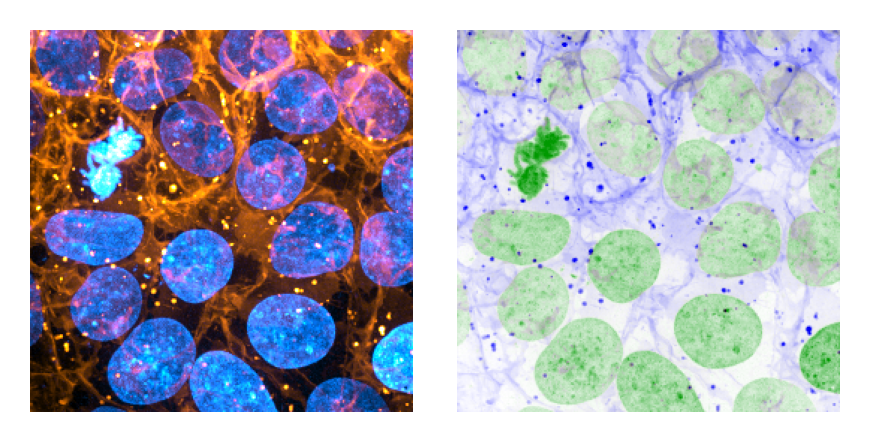
|
|
87
|
-
|
|
88
|
-
### apply a colormap to a whole stack
|
|
89
|
-
```python
|
|
90
|
-
from skimage import data
|
|
91
|
-
from matplotlib import pyplot as plt
|
|
92
|
-
import mergechannels as mc
|
|
93
|
-
|
|
94
|
-
volume = data.cells3d()
|
|
95
|
-
cells = volume[:, 0]
|
|
96
|
-
nuclei = volume[:, 1]
|
|
97
|
-
merged = mc.merge([cells, nuclei],['Orange Hot', 'Cyan Hot'])
|
|
98
|
-
plt.imshow(merged[24]); plt.show()
|
|
99
|
-
```
|
|
100
|
-

|
|
101
|
-
|
|
102
|
-
### adjust the saturation limits when applying colormaps
|
|
103
|
-
``` python
|
|
104
|
-
from skimage import data
|
|
105
|
-
import matplotlib.pyplot as plt
|
|
106
|
-
import mergechannels as mc
|
|
107
|
-
|
|
108
|
-
cells, nuclei = data.cells3d().max(axis=0)
|
|
109
|
-
channels = [cells, nuclei]
|
|
110
|
-
colormaps = ['I Blue', 'I Forest']
|
|
111
|
-
fig, axes = plt.subplots(1, 2, figsize=(3, 6), dpi=300)
|
|
112
|
-
for ax in axes.ravel(): ax.axis('off')
|
|
113
|
-
(a, b) = axes.ravel()
|
|
114
|
-
a.imshow(mc.merge(channels, colormaps, blending='min'))
|
|
115
|
-
b.imshow(
|
|
116
|
-
mc.merge(
|
|
117
|
-
channels,
|
|
118
|
-
colormaps,
|
|
119
|
-
blending='min',
|
|
120
|
-
percentiles=[(
|
|
121
|
-
1, # bottom 1% of pixels set to black point
|
|
122
|
-
97, # top 3% of pixels set to white point
|
|
123
|
-
)]*len(channels),
|
|
124
|
-
),
|
|
125
|
-
)
|
|
126
|
-
fig.tight_layout()
|
|
127
|
-
plt.show()
|
|
128
|
-
```
|
|
129
|
-
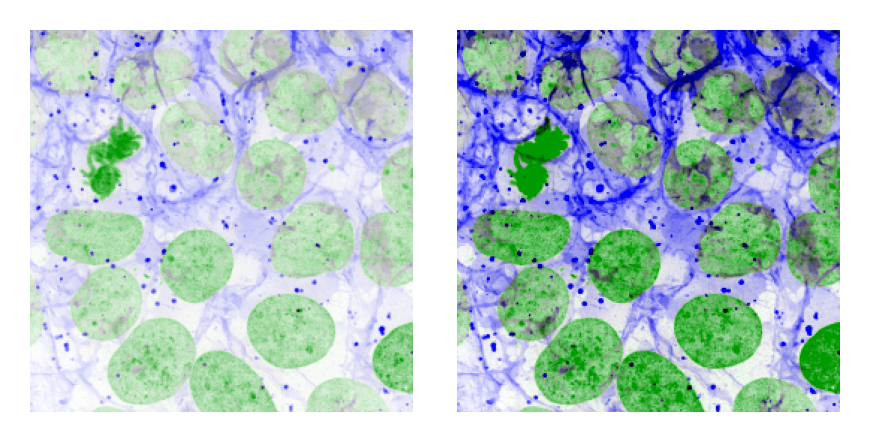
|
|
130
|
-
|
|
131
|
-
|
|
132
|
-
## Roadmap
|
|
133
|
-
mergechannels is currently incredibly simple. It can apply one or more colormaps to one or more 2D and 3D 8-bit or 16-bit images and that's it.
|
|
134
|
-
- Add support for any numerical dtype
|
|
135
|
-
- Add option to return any colormap as a matplotlib colormap
|
|
136
|
-
- Add option to pass external colormaps to mergechannels
|
|
137
|
-
- Add support for directly passing matplotlib colormaps instead of colormap names
|
|
138
|
-
- Parallelize colormap application on large images (if it's helpful)
|
|
139
|
-
- Add option to overlay binary or instance masks onto colorized images
|
|
140
|
-
|
|
141
|
-
## Acknowledgements
|
|
142
|
-
|
|
143
|
-
There are other great colormapping libraries available (e.g., [microfilm](https://github.com/guiwitz/microfilm), [cmap](https://github.com/pyapp-kit/cmap)) that are more feature-rich than this one, but which don't address my goals. My hope is that this project can fill an un-met niche and otherwise maintain full compatibility with these and similar libraries.
|
|
144
|
-
|
|
145
|
-
This project incorporates a number of colormaps that were hand-crafted by Christophe Leterrier and were originally distributed here under the MIT license: https://github.com/cleterrier/ChrisLUTs
|
|
146
|
-
|
|
@@ -1,12 +0,0 @@
|
|
|
1
|
-
mergechannels-0.4.0.dist-info/METADATA,sha256=UFSUXd5ow06vtucS9sA9wum226fAXxzK8oQignieJtY,5762
|
|
2
|
-
mergechannels-0.4.0.dist-info/WHEEL,sha256=NK_viivHfmS5lJpaRTTCfFHwsP-SFhkIIaQc4q5FHCg,107
|
|
3
|
-
mergechannels-0.4.0.dist-info/licenses/LICENSE,sha256=csvD60rgtSorbYEM3f8867qNyPCzmIXyFNj8h01Bd6c,1071
|
|
4
|
-
mergechannels.libs/libgcc_s-1e52349c.so.1,sha256=Ani0u_W_tB8ESsFePO4D2mn2lrgWLhyFdw6RETxBTYM,437537
|
|
5
|
-
mergechannels/__init__.py,sha256=87haN6eeG02qnJJerNCb4Tfn-3GpChD89DKsFAYIH3Y,269
|
|
6
|
-
mergechannels/__init__.pyi,sha256=FZYQH4ue5M9r3zeUMHVZoU2D_RYwd3UiVD-GkcReY7M,1011
|
|
7
|
-
mergechannels/_blending.py,sha256=mE5Cr9wvVJRcwfymg_UUZUjdIKx2mldfLU8QJT95bVM,84
|
|
8
|
-
mergechannels/_internal.py,sha256=tMQtEG3s-N8eamqLUPUHy_fTO-7FqR8Q0Xng-4RSAC0,1421
|
|
9
|
-
mergechannels/_luts.py,sha256=RswhkrCGAFtDthmVHt-Kk7lxROwS-kdsQy1EboyUUc8,3009
|
|
10
|
-
mergechannels/mergechannels.cpython-312-x86_64-linux-musl.so,sha256=rxRyh125a9uMaTL883a2gfYbsuaU9zFJZJplhndk6Sk,1030969
|
|
11
|
-
mergechannels/py.typed,sha256=47DEQpj8HBSa-_TImW-5JCeuQeRkm5NMpJWZG3hSuFU,0
|
|
12
|
-
mergechannels-0.4.0.dist-info/RECORD,,
|
|
File without changes
|