mcp-use 1.1.5__py3-none-any.whl → 1.2.6__py3-none-any.whl
This diff represents the content of publicly available package versions that have been released to one of the supported registries. The information contained in this diff is provided for informational purposes only and reflects changes between package versions as they appear in their respective public registries.
Potentially problematic release.
This version of mcp-use might be problematic. Click here for more details.
- mcp_use/__init__.py +14 -1
- mcp_use/adapters/__init__.py +10 -0
- mcp_use/adapters/base.py +178 -0
- mcp_use/adapters/langchain_adapter.py +161 -0
- mcp_use/agents/__init__.py +6 -2
- mcp_use/agents/mcpagent.py +298 -115
- mcp_use/agents/prompts/system_prompt_builder.py +105 -0
- mcp_use/agents/prompts/templates.py +43 -0
- mcp_use/agents/server_manager.py +282 -0
- mcp_use/logging.py +51 -4
- {mcp_use-1.1.5.dist-info → mcp_use-1.2.6.dist-info}/METADATA +128 -7
- {mcp_use-1.1.5.dist-info → mcp_use-1.2.6.dist-info}/RECORD +14 -10
- mcp_use/agents/langchain_agent.py +0 -267
- mcp_use/agents/prompts/default.py +0 -22
- {mcp_use-1.1.5.dist-info → mcp_use-1.2.6.dist-info}/WHEEL +0 -0
- {mcp_use-1.1.5.dist-info → mcp_use-1.2.6.dist-info}/licenses/LICENSE +0 -0
|
@@ -1,6 +1,6 @@
|
|
|
1
1
|
Metadata-Version: 2.4
|
|
2
2
|
Name: mcp-use
|
|
3
|
-
Version: 1.
|
|
3
|
+
Version: 1.2.6
|
|
4
4
|
Summary: MCP Library for LLMs
|
|
5
5
|
Author-email: Pietro Zullo <pietro.zullo@gmail.com>
|
|
6
6
|
License: MIT
|
|
@@ -41,9 +41,9 @@ Description-Content-Type: text/markdown
|
|
|
41
41
|
<img alt="" src="./static/image.jpg" width="full">
|
|
42
42
|
</picture>
|
|
43
43
|
|
|
44
|
-
<h1 align="center">
|
|
44
|
+
<h1 align="center">Unified MCP Client Library </h1>
|
|
45
45
|
|
|
46
|
-
[](https://pypi.org/project/mcp_use/)
|
|
47
47
|
[](https://pypi.org/project/mcp_use/)
|
|
48
48
|
[](https://pypi.org/project/mcp_use/)
|
|
49
49
|
[](https://pypi.org/project/mcp_use/)
|
|
@@ -51,8 +51,9 @@ Description-Content-Type: text/markdown
|
|
|
51
51
|
[](https://github.com/pietrozullo/mcp-use/blob/main/LICENSE)
|
|
52
52
|
[](https://github.com/astral-sh/ruff)
|
|
53
53
|
[](https://github.com/pietrozullo/mcp-use/stargazers)
|
|
54
|
+
[](https://x.com/pietrozullo)
|
|
54
55
|
|
|
55
|
-
🌐 MCP-Use is the open source way to connect any LLM to MCP
|
|
56
|
+
🌐 MCP-Use is the open source way to connect **any LLM to any MCP server** and build custom agents that have tool access, without using closed source or application clients.
|
|
56
57
|
|
|
57
58
|
💡 Let developers easily connect any LLM to tools like web browsing, file operations, and more.
|
|
58
59
|
|
|
@@ -65,8 +66,10 @@ Description-Content-Type: text/markdown
|
|
|
65
66
|
| 🔄 **Ease of use** | Create your first MCP capable agent you need only 6 lines of code |
|
|
66
67
|
| 🤖 **LLM Flexibility** | Works with any langchain supported LLM that supports tool calling (OpenAI, Anthropic, Groq, LLama etc.) |
|
|
67
68
|
| 🌐 **HTTP Support** | Direct connection to MCP servers running on specific HTTP ports |
|
|
69
|
+
| ⚙️ **Dynamic Server Selection** | Agents can dynamically choose the most appropriate MCP server for a given task from the available pool |
|
|
68
70
|
| 🧩 **Multi-Server Support** | Use multiple MCP servers simultaneously in a single agent |
|
|
69
71
|
| 🛡️ **Tool Restrictions** | Restrict potentially dangerous tools like file system or network access |
|
|
72
|
+
| 🔧 **Custom Agents** | Build your own agents with any framework using the LangChain adapter or create new adapters |
|
|
70
73
|
|
|
71
74
|
|
|
72
75
|
# Quick start
|
|
@@ -388,7 +391,7 @@ This example demonstrates how to connect to an MCP server running on a specific
|
|
|
388
391
|
|
|
389
392
|
# Multi-Server Support
|
|
390
393
|
|
|
391
|
-
MCP-Use
|
|
394
|
+
MCP-Use allows configuring and connecting to multiple MCP servers simultaneously using the `MCPClient`. This enables complex workflows that require tools from different servers, such as web browsing combined with file operations or 3D modeling.
|
|
392
395
|
|
|
393
396
|
## Configuration
|
|
394
397
|
|
|
@@ -414,7 +417,28 @@ You can configure multiple servers in your configuration file:
|
|
|
414
417
|
|
|
415
418
|
## Usage
|
|
416
419
|
|
|
417
|
-
The `MCPClient` class provides
|
|
420
|
+
The `MCPClient` class provides methods for managing connections to multiple servers. When creating an `MCPAgent`, you can provide an `MCPClient` configured with multiple servers.
|
|
421
|
+
|
|
422
|
+
By default, the agent will have access to tools from all configured servers. If you need to target a specific server for a particular task, you can specify the `server_name` when calling the `agent.run()` method.
|
|
423
|
+
|
|
424
|
+
```python
|
|
425
|
+
# Example: Manually selecting a server for a specific task
|
|
426
|
+
result = await agent.run(
|
|
427
|
+
"Search for Airbnb listings in Barcelona",
|
|
428
|
+
server_name="airbnb" # Explicitly use the airbnb server
|
|
429
|
+
)
|
|
430
|
+
|
|
431
|
+
result_google = await agent.run(
|
|
432
|
+
"Find restaurants near the first result using Google Search",
|
|
433
|
+
server_name="playwright" # Explicitly use the playwright server
|
|
434
|
+
)
|
|
435
|
+
```
|
|
436
|
+
|
|
437
|
+
## Dynamic Server Selection (Server Manager)
|
|
438
|
+
|
|
439
|
+
For enhanced efficiency and to reduce potential agent confusion when dealing with many tools from different servers, you can enable the Server Manager by setting `use_server_manager=True` during `MCPAgent` initialization.
|
|
440
|
+
|
|
441
|
+
When enabled, the agent intelligently selects the correct MCP server based on the tool chosen by the LLM for a specific step. This minimizes unnecessary connections and ensures the agent uses the appropriate tools for the task.
|
|
418
442
|
|
|
419
443
|
```python
|
|
420
444
|
import asyncio
|
|
@@ -428,7 +452,8 @@ async def main():
|
|
|
428
452
|
# Create agent with the client
|
|
429
453
|
agent = MCPAgent(
|
|
430
454
|
llm=ChatAnthropic(model="claude-3-5-sonnet-20240620"),
|
|
431
|
-
client=client
|
|
455
|
+
client=client,
|
|
456
|
+
use_server_manager=True # Enable the Server Manager
|
|
432
457
|
)
|
|
433
458
|
|
|
434
459
|
try:
|
|
@@ -479,6 +504,98 @@ if __name__ == "__main__":
|
|
|
479
504
|
asyncio.run(main())
|
|
480
505
|
```
|
|
481
506
|
|
|
507
|
+
# Build a Custom Agent:
|
|
508
|
+
|
|
509
|
+
You can also build your own custom agent using the LangChain adapter:
|
|
510
|
+
|
|
511
|
+
```python
|
|
512
|
+
import asyncio
|
|
513
|
+
from langchain_openai import ChatOpenAI
|
|
514
|
+
from mcp_use.client import MCPClient
|
|
515
|
+
from mcp_use.adapters.langchain_adapter import LangChainAdapter
|
|
516
|
+
from dotenv import load_dotenv
|
|
517
|
+
|
|
518
|
+
load_dotenv()
|
|
519
|
+
|
|
520
|
+
|
|
521
|
+
async def main():
|
|
522
|
+
# Initialize MCP client
|
|
523
|
+
client = MCPClient.from_config_file("examples/browser_mcp.json")
|
|
524
|
+
llm = ChatOpenAI(model="gpt-4o")
|
|
525
|
+
|
|
526
|
+
# Create adapter instance
|
|
527
|
+
adapter = LangChainAdapter()
|
|
528
|
+
# Get LangChain tools with a single line
|
|
529
|
+
tools = await adapter.create_tools(client)
|
|
530
|
+
|
|
531
|
+
# Create a custom LangChain agent
|
|
532
|
+
llm_with_tools = llm.bind_tools(tools)
|
|
533
|
+
result = await llm_with_tools.ainvoke("What tools do you have avilable ? ")
|
|
534
|
+
print(result)
|
|
535
|
+
|
|
536
|
+
|
|
537
|
+
if __name__ == "__main__":
|
|
538
|
+
asyncio.run(main())
|
|
539
|
+
|
|
540
|
+
|
|
541
|
+
```
|
|
542
|
+
|
|
543
|
+
# Debugging
|
|
544
|
+
|
|
545
|
+
MCP-Use provides a built-in debug mode that increases log verbosity and helps diagnose issues in your agent implementation.
|
|
546
|
+
|
|
547
|
+
## Enabling Debug Mode
|
|
548
|
+
|
|
549
|
+
There are two primary ways to enable debug mode:
|
|
550
|
+
|
|
551
|
+
### 1. Environment Variable (Recommended for One-off Runs)
|
|
552
|
+
|
|
553
|
+
Run your script with the `DEBUG` environment variable set to the desired level:
|
|
554
|
+
|
|
555
|
+
```bash
|
|
556
|
+
# Level 1: Show INFO level messages
|
|
557
|
+
DEBUG=1 python3.11 examples/browser_use.py
|
|
558
|
+
|
|
559
|
+
# Level 2: Show DEBUG level messages (full verbose output)
|
|
560
|
+
DEBUG=2 python3.11 examples/browser_use.py
|
|
561
|
+
```
|
|
562
|
+
|
|
563
|
+
This sets the debug level only for the duration of that specific Python process.
|
|
564
|
+
|
|
565
|
+
Alternatively you can set the following environment variable to the desired logging level:
|
|
566
|
+
|
|
567
|
+
```bash
|
|
568
|
+
export MCP_USE_DEBUG=1 # or 2
|
|
569
|
+
```
|
|
570
|
+
|
|
571
|
+
### 2. Setting the Debug Flag Programmatically
|
|
572
|
+
|
|
573
|
+
You can set the global debug flag directly in your code:
|
|
574
|
+
|
|
575
|
+
```python
|
|
576
|
+
import mcp_use
|
|
577
|
+
|
|
578
|
+
mcp_use.set_debug(1) # INFO level
|
|
579
|
+
# or
|
|
580
|
+
mcp_use.set_debug(2) # DEBUG level (full verbose output)
|
|
581
|
+
```
|
|
582
|
+
|
|
583
|
+
### 3. Agent-Specific Verbosity
|
|
584
|
+
|
|
585
|
+
If you only want to see debug information from the agent without enabling full debug logging, you can set the `verbose` parameter when creating an MCPAgent:
|
|
586
|
+
|
|
587
|
+
```python
|
|
588
|
+
# Create agent with increased verbosity
|
|
589
|
+
agent = MCPAgent(
|
|
590
|
+
llm=your_llm,
|
|
591
|
+
client=your_client,
|
|
592
|
+
verbose=True # Only shows debug messages from the agent
|
|
593
|
+
)
|
|
594
|
+
```
|
|
595
|
+
|
|
596
|
+
This is useful when you only need to see the agent's steps and decision-making process without all the low-level debug information from other components.
|
|
597
|
+
|
|
598
|
+
|
|
482
599
|
# Roadmap
|
|
483
600
|
|
|
484
601
|
<ul>
|
|
@@ -487,6 +604,10 @@ if __name__ == "__main__":
|
|
|
487
604
|
<li>[ ] ... </li>
|
|
488
605
|
</ul>
|
|
489
606
|
|
|
607
|
+
## Star History
|
|
608
|
+
|
|
609
|
+
[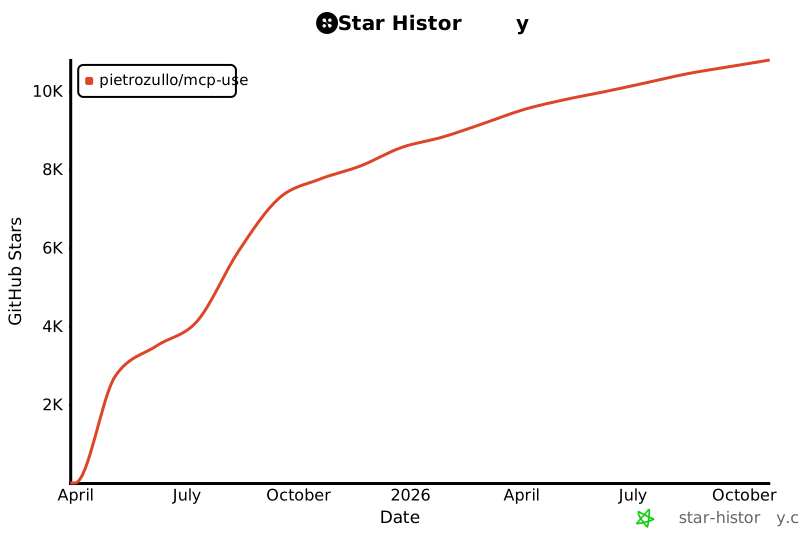](https://www.star-history.com/#pietrozullo/mcp-use&Date)
|
|
610
|
+
|
|
490
611
|
# Contributing
|
|
491
612
|
|
|
492
613
|
We love contributions! Feel free to open issues for bugs or feature requests.
|
|
@@ -1,13 +1,17 @@
|
|
|
1
|
-
mcp_use/__init__.py,sha256=
|
|
1
|
+
mcp_use/__init__.py,sha256=FikKagS6u8mugJOeslN3xfSA-tBLhjOywZSEcQ-y23g,1006
|
|
2
2
|
mcp_use/client.py,sha256=RoOOpCzMCjpqkkyAIEDOVc6Sn_HsET1rbn_J_J778q4,8278
|
|
3
3
|
mcp_use/config.py,sha256=O9V4pa-shZ2mPokRTrd7KZQ2GpuTcYBGUslefl1fosw,1653
|
|
4
|
-
mcp_use/logging.py,sha256=
|
|
4
|
+
mcp_use/logging.py,sha256=UhQdMx0H0q08-ZPjY_hAJVErkEUAkU1oahHqwdfdK_U,4274
|
|
5
5
|
mcp_use/session.py,sha256=Z4EZTUnQUX0QyGMzkJIrMRTX4SDk6qQUoBld408LIJE,3449
|
|
6
|
-
mcp_use/
|
|
6
|
+
mcp_use/adapters/__init__.py,sha256=-xCrgPThuX7x0PHGFDdjb7M-mgw6QV3sKu5PM7ShnRg,275
|
|
7
|
+
mcp_use/adapters/base.py,sha256=ixLHXp8FWdyZPx7Kh6s-4jEVs3qT4DWrApSLXfqzNws,6141
|
|
8
|
+
mcp_use/adapters/langchain_adapter.py,sha256=mbOkWHMgHJJNJYFXYLCk3JjIT0CRW_iiu5eZtxsWEmk,6309
|
|
9
|
+
mcp_use/agents/__init__.py,sha256=7QCfjE9WA50r-W8CS7IzUZMuhLgm8xSuKH1kYWdFU64,324
|
|
7
10
|
mcp_use/agents/base.py,sha256=bfuldi_89AbSbNc8KeTiCArRT9V62CNxHOWYkLHWjyA,1605
|
|
8
|
-
mcp_use/agents/
|
|
9
|
-
mcp_use/agents/
|
|
10
|
-
mcp_use/agents/prompts/
|
|
11
|
+
mcp_use/agents/mcpagent.py,sha256=kSNqmF728LrEYfzfvW8h8llqC877vJLcn-DJodYVucU,23988
|
|
12
|
+
mcp_use/agents/server_manager.py,sha256=ShmjrvDtmU7dJtfVlw_srC3t5f_B-QtifzIiV4mfsRA,11315
|
|
13
|
+
mcp_use/agents/prompts/system_prompt_builder.py,sha256=GH5Pvl49IBpKpZA9YTI83xMsdYSkRN_hw4LFHkKtxbg,4122
|
|
14
|
+
mcp_use/agents/prompts/templates.py,sha256=AZKrGWuI516C-PmyOPvxDBibNdqJtN24sOHTGR06bi4,1933
|
|
11
15
|
mcp_use/connectors/__init__.py,sha256=jnd-7pPPJMb0UNJ6aD9lInj5Tlamc8lA_mFyG8RWJpo,385
|
|
12
16
|
mcp_use/connectors/base.py,sha256=5TcXB-I5zrwPtedB6dShceNucsK3wHBeGC2yDVq8X48,4885
|
|
13
17
|
mcp_use/connectors/http.py,sha256=2ZG5JxcK1WZ4jkTfTir6bEQLMxXBTPHyi0s42RHGeFs,2837
|
|
@@ -18,7 +22,7 @@ mcp_use/task_managers/base.py,sha256=ksNdxTwq8N-zqymxVoKGnWXq9iqkLYC61uB91o6Mh-4
|
|
|
18
22
|
mcp_use/task_managers/sse.py,sha256=WysmjwqRI3meXMZY_F4y9tSBMvSiUZfTJQfitM5l6jQ,2529
|
|
19
23
|
mcp_use/task_managers/stdio.py,sha256=DEISpXv4mo3d5a-WT8lkWbrXJwUh7QW0nMT_IM3fHGg,2269
|
|
20
24
|
mcp_use/task_managers/websocket.py,sha256=ZbCqdGgzCRtsXzRGFws-f2OzH8cPAkN4sJNDwEpRmCc,1915
|
|
21
|
-
mcp_use-1.
|
|
22
|
-
mcp_use-1.
|
|
23
|
-
mcp_use-1.
|
|
24
|
-
mcp_use-1.
|
|
25
|
+
mcp_use-1.2.6.dist-info/METADATA,sha256=wGaSC2X6TKK2-WUqmr7qupD_oc1l0IK_1Xrn09iLKiE,18156
|
|
26
|
+
mcp_use-1.2.6.dist-info/WHEEL,sha256=qtCwoSJWgHk21S1Kb4ihdzI2rlJ1ZKaIurTj_ngOhyQ,87
|
|
27
|
+
mcp_use-1.2.6.dist-info/licenses/LICENSE,sha256=7Pw7dbwJSBw8zH-WE03JnR5uXvitRtaGTP9QWPcexcs,1068
|
|
28
|
+
mcp_use-1.2.6.dist-info/RECORD,,
|
|
@@ -1,267 +0,0 @@
|
|
|
1
|
-
"""
|
|
2
|
-
LangChain agent implementation for MCP tools with customizable system message.
|
|
3
|
-
|
|
4
|
-
This module provides a LangChain agent implementation that can use MCP tools
|
|
5
|
-
through a unified interface, with support for customizable system messages.
|
|
6
|
-
"""
|
|
7
|
-
|
|
8
|
-
from typing import Any, NoReturn
|
|
9
|
-
|
|
10
|
-
from jsonschema_pydantic import jsonschema_to_pydantic
|
|
11
|
-
from langchain.agents import AgentExecutor, create_tool_calling_agent
|
|
12
|
-
from langchain.prompts import ChatPromptTemplate, MessagesPlaceholder
|
|
13
|
-
from langchain.schema.language_model import BaseLanguageModel
|
|
14
|
-
from langchain_core.tools import BaseTool, ToolException
|
|
15
|
-
from mcp.types import CallToolResult, EmbeddedResource, ImageContent, TextContent
|
|
16
|
-
from pydantic import BaseModel
|
|
17
|
-
|
|
18
|
-
from ..connectors.base import BaseConnector
|
|
19
|
-
from ..logging import logger
|
|
20
|
-
|
|
21
|
-
|
|
22
|
-
def _parse_mcp_tool_result(tool_result: CallToolResult) -> str:
|
|
23
|
-
"""Parse the content of a CallToolResult into a string.
|
|
24
|
-
|
|
25
|
-
Args:
|
|
26
|
-
tool_result: The result object from calling an MCP tool.
|
|
27
|
-
|
|
28
|
-
Returns:
|
|
29
|
-
A string representation of the tool result content.
|
|
30
|
-
|
|
31
|
-
Raises:
|
|
32
|
-
ToolException: If the tool execution failed, returned no content,
|
|
33
|
-
or contained unexpected content types.
|
|
34
|
-
"""
|
|
35
|
-
if tool_result.isError:
|
|
36
|
-
raise ToolException(f"Tool execution failed: {tool_result.content}")
|
|
37
|
-
|
|
38
|
-
if not tool_result.content:
|
|
39
|
-
raise ToolException("Tool execution returned no content")
|
|
40
|
-
|
|
41
|
-
decoded_result = ""
|
|
42
|
-
for item in tool_result.content:
|
|
43
|
-
match item.type:
|
|
44
|
-
case "text":
|
|
45
|
-
item: TextContent
|
|
46
|
-
decoded_result += item.text
|
|
47
|
-
case "image":
|
|
48
|
-
item: ImageContent
|
|
49
|
-
decoded_result += item.data # Assuming data is string-like or base64
|
|
50
|
-
case "resource":
|
|
51
|
-
resource: EmbeddedResource = item.resource
|
|
52
|
-
if hasattr(resource, "text"):
|
|
53
|
-
decoded_result += resource.text
|
|
54
|
-
elif hasattr(resource, "blob"):
|
|
55
|
-
# Assuming blob needs decoding or specific handling; adjust as needed
|
|
56
|
-
decoded_result += (
|
|
57
|
-
resource.blob.decode()
|
|
58
|
-
if isinstance(resource.blob, bytes)
|
|
59
|
-
else str(resource.blob)
|
|
60
|
-
)
|
|
61
|
-
else:
|
|
62
|
-
raise ToolException(f"Unexpected resource type: {resource.type}")
|
|
63
|
-
case _:
|
|
64
|
-
raise ToolException(f"Unexpected content type: {item.type}")
|
|
65
|
-
|
|
66
|
-
return decoded_result
|
|
67
|
-
|
|
68
|
-
|
|
69
|
-
class LangChainAgent:
|
|
70
|
-
"""LangChain agent that can use MCP tools.
|
|
71
|
-
|
|
72
|
-
This agent uses LangChain's agent framework to interact with MCP tools
|
|
73
|
-
through a unified interface.
|
|
74
|
-
"""
|
|
75
|
-
|
|
76
|
-
# Default system message if none is provided
|
|
77
|
-
DEFAULT_SYSTEM_MESSAGE = "You are a helpful AI assistant that can use tools to help users."
|
|
78
|
-
|
|
79
|
-
def __init__(
|
|
80
|
-
self,
|
|
81
|
-
connectors: list[BaseConnector],
|
|
82
|
-
llm: BaseLanguageModel,
|
|
83
|
-
max_steps: int = 5,
|
|
84
|
-
system_message: str | None = None,
|
|
85
|
-
disallowed_tools: list[str] | None = None,
|
|
86
|
-
) -> None:
|
|
87
|
-
"""Initialize a new LangChain agent.
|
|
88
|
-
|
|
89
|
-
Args:
|
|
90
|
-
connector: The MCP connector to use.
|
|
91
|
-
llm: The LangChain LLM to use.
|
|
92
|
-
max_steps: The maximum number of steps to take.
|
|
93
|
-
system_message: Optional custom system message to use.
|
|
94
|
-
disallowed_tools: List of tool names that should not be available to the agent.
|
|
95
|
-
"""
|
|
96
|
-
self.connectors = connectors
|
|
97
|
-
self.llm = llm
|
|
98
|
-
self.max_steps = max_steps
|
|
99
|
-
self.system_message = system_message or self.DEFAULT_SYSTEM_MESSAGE
|
|
100
|
-
self.disallowed_tools = disallowed_tools or []
|
|
101
|
-
self.tools: list[BaseTool] = []
|
|
102
|
-
self.agent: AgentExecutor | None = None
|
|
103
|
-
|
|
104
|
-
def set_system_message(self, message: str) -> None:
|
|
105
|
-
"""Set a new system message and recreate the agent.
|
|
106
|
-
|
|
107
|
-
Args:
|
|
108
|
-
message: The new system message.
|
|
109
|
-
"""
|
|
110
|
-
self.system_message = message
|
|
111
|
-
|
|
112
|
-
# Recreate the agent with the new system message if it exists
|
|
113
|
-
if self.agent and self.tools:
|
|
114
|
-
self.agent = self._create_agent()
|
|
115
|
-
logger.debug("Agent recreated with new system message")
|
|
116
|
-
|
|
117
|
-
async def initialize(self) -> None:
|
|
118
|
-
"""Initialize the agent and its tools."""
|
|
119
|
-
self.tools = await self._create_langchain_tools()
|
|
120
|
-
self.agent = self._create_agent()
|
|
121
|
-
|
|
122
|
-
def fix_schema(self, schema: dict) -> dict:
|
|
123
|
-
"""Convert JSON Schema 'type': ['string', 'null'] to 'anyOf' format.
|
|
124
|
-
|
|
125
|
-
Args:
|
|
126
|
-
schema: The JSON schema to fix.
|
|
127
|
-
|
|
128
|
-
Returns:
|
|
129
|
-
The fixed JSON schema.
|
|
130
|
-
"""
|
|
131
|
-
if isinstance(schema, dict):
|
|
132
|
-
if "type" in schema and isinstance(schema["type"], list):
|
|
133
|
-
schema["anyOf"] = [{"type": t} for t in schema["type"]]
|
|
134
|
-
del schema["type"] # Remove 'type' and standardize to 'anyOf'
|
|
135
|
-
for key, value in schema.items():
|
|
136
|
-
schema[key] = self.fix_schema(value) # Apply recursively
|
|
137
|
-
return schema
|
|
138
|
-
|
|
139
|
-
async def _create_langchain_tools(self) -> list[BaseTool]:
|
|
140
|
-
"""Create LangChain tools from MCP tools.
|
|
141
|
-
|
|
142
|
-
Returns:
|
|
143
|
-
A list of LangChain tools that wrap MCP tools.
|
|
144
|
-
"""
|
|
145
|
-
tools = []
|
|
146
|
-
for connector in self.connectors:
|
|
147
|
-
local_connector = connector # Capture for closure
|
|
148
|
-
for tool in connector.tools:
|
|
149
|
-
# Skip disallowed tools
|
|
150
|
-
if tool.name in self.disallowed_tools:
|
|
151
|
-
continue
|
|
152
|
-
|
|
153
|
-
class McpToLangChainAdapter(BaseTool):
|
|
154
|
-
name: str = tool.name or "NO NAME"
|
|
155
|
-
description: str = tool.description or ""
|
|
156
|
-
# Convert JSON schema to Pydantic model for argument validation
|
|
157
|
-
args_schema: type[BaseModel] = jsonschema_to_pydantic(
|
|
158
|
-
self.fix_schema(tool.inputSchema) # Apply schema conversion
|
|
159
|
-
)
|
|
160
|
-
connector: BaseConnector = local_connector
|
|
161
|
-
handle_tool_error: bool = True
|
|
162
|
-
|
|
163
|
-
def _run(self, **kwargs: Any) -> NoReturn:
|
|
164
|
-
"""Synchronous run method that always raises an error.
|
|
165
|
-
|
|
166
|
-
Raises:
|
|
167
|
-
NotImplementedError: Always raises this error because MCP tools
|
|
168
|
-
only support async operations.
|
|
169
|
-
"""
|
|
170
|
-
raise NotImplementedError("MCP tools only support async operations")
|
|
171
|
-
|
|
172
|
-
async def _arun(self, **kwargs: Any) -> Any:
|
|
173
|
-
"""Asynchronously execute the tool with given arguments.
|
|
174
|
-
|
|
175
|
-
Args:
|
|
176
|
-
kwargs: The arguments to pass to the tool.
|
|
177
|
-
|
|
178
|
-
Returns:
|
|
179
|
-
The result of the tool execution.
|
|
180
|
-
|
|
181
|
-
Raises:
|
|
182
|
-
ToolException: If tool execution fails.
|
|
183
|
-
"""
|
|
184
|
-
logger.debug(f'MCP tool: "{self.name}" received input: {kwargs}')
|
|
185
|
-
|
|
186
|
-
try:
|
|
187
|
-
tool_result: CallToolResult = await self.connector.call_tool(
|
|
188
|
-
self.name, kwargs
|
|
189
|
-
)
|
|
190
|
-
try:
|
|
191
|
-
# Use the helper function to parse the result
|
|
192
|
-
return _parse_mcp_tool_result(tool_result)
|
|
193
|
-
except Exception as e:
|
|
194
|
-
# Log the exception for debugging
|
|
195
|
-
logger.error(f"Error parsing tool result: {e}")
|
|
196
|
-
# Shortened line:
|
|
197
|
-
return (
|
|
198
|
-
f"Error parsing result: {e!s};"
|
|
199
|
-
f" Raw content: {tool_result.content!r}"
|
|
200
|
-
)
|
|
201
|
-
|
|
202
|
-
except Exception as e:
|
|
203
|
-
if self.handle_tool_error:
|
|
204
|
-
return f"Error executing MCP tool: {str(e)}"
|
|
205
|
-
raise
|
|
206
|
-
|
|
207
|
-
tools.append(McpToLangChainAdapter())
|
|
208
|
-
|
|
209
|
-
# Log available tools for debugging
|
|
210
|
-
logger.debug(f"Available tools: {[tool.name for tool in tools]}")
|
|
211
|
-
return tools
|
|
212
|
-
|
|
213
|
-
def _create_agent(self) -> AgentExecutor:
|
|
214
|
-
"""Create the LangChain agent with the configured system message.
|
|
215
|
-
|
|
216
|
-
Returns:
|
|
217
|
-
An initialized AgentExecutor.
|
|
218
|
-
"""
|
|
219
|
-
prompt = ChatPromptTemplate.from_messages(
|
|
220
|
-
[
|
|
221
|
-
(
|
|
222
|
-
"system",
|
|
223
|
-
self.system_message,
|
|
224
|
-
),
|
|
225
|
-
MessagesPlaceholder(variable_name="chat_history"),
|
|
226
|
-
("human", "{input}"),
|
|
227
|
-
MessagesPlaceholder(variable_name="agent_scratchpad"),
|
|
228
|
-
]
|
|
229
|
-
)
|
|
230
|
-
agent = create_tool_calling_agent(llm=self.llm, tools=self.tools, prompt=prompt)
|
|
231
|
-
return AgentExecutor(
|
|
232
|
-
agent=agent, tools=self.tools, max_iterations=self.max_steps, verbose=False
|
|
233
|
-
)
|
|
234
|
-
|
|
235
|
-
async def run(
|
|
236
|
-
self,
|
|
237
|
-
query: str,
|
|
238
|
-
max_steps: int | None = None,
|
|
239
|
-
chat_history: list | None = None,
|
|
240
|
-
) -> str:
|
|
241
|
-
"""Run the agent on a query.
|
|
242
|
-
|
|
243
|
-
Args:
|
|
244
|
-
query: The query to run.
|
|
245
|
-
max_steps: Optional maximum number of steps to take.
|
|
246
|
-
chat_history: Optional chat history.
|
|
247
|
-
|
|
248
|
-
Returns:
|
|
249
|
-
The result of running the query.
|
|
250
|
-
|
|
251
|
-
Raises:
|
|
252
|
-
RuntimeError: If the MCP client is not initialized.
|
|
253
|
-
"""
|
|
254
|
-
if not self.agent:
|
|
255
|
-
raise RuntimeError("MCP client is not initialized")
|
|
256
|
-
|
|
257
|
-
if max_steps is not None:
|
|
258
|
-
self.agent.max_iterations = max_steps
|
|
259
|
-
|
|
260
|
-
# Initialize empty chat history if none provided
|
|
261
|
-
if chat_history is None:
|
|
262
|
-
chat_history = []
|
|
263
|
-
|
|
264
|
-
# Invoke with all required variables
|
|
265
|
-
result = await self.agent.ainvoke({"input": query, "chat_history": chat_history})
|
|
266
|
-
|
|
267
|
-
return result["output"]
|
|
@@ -1,22 +0,0 @@
|
|
|
1
|
-
DEFAULT_SYSTEM_PROMPT_TEMPLATE = """You are an assistant with access to these tools:
|
|
2
|
-
|
|
3
|
-
{tool_descriptions}
|
|
4
|
-
|
|
5
|
-
Proactively use these tools to:
|
|
6
|
-
- Retrieve and analyze information relevant to user requests
|
|
7
|
-
- Process and transform data in various formats
|
|
8
|
-
- Perform computations and generate insights
|
|
9
|
-
- Execute multi-step workflows by combining tools as needed
|
|
10
|
-
- Interact with external systems when authorized
|
|
11
|
-
|
|
12
|
-
When appropriate, use available tools rather than relying on your built-in knowledge alone.
|
|
13
|
-
Your tools enable you to perform tasks that would otherwise be beyond your capabilities.
|
|
14
|
-
|
|
15
|
-
For optimal assistance:
|
|
16
|
-
1. Identify when a tool can help address the user's request
|
|
17
|
-
2. Select the most appropriate tool(s) for the task
|
|
18
|
-
3. Apply tools in the correct sequence when multiple tools are needed
|
|
19
|
-
4. Clearly communicate your process and findings
|
|
20
|
-
|
|
21
|
-
Remember that you have real capabilities through your tools - use them confidently when needed.
|
|
22
|
-
"""
|
|
File without changes
|
|
File without changes
|