mcp-use 1.1.5__py3-none-any.whl → 1.2.5__py3-none-any.whl
This diff represents the content of publicly available package versions that have been released to one of the supported registries. The information contained in this diff is provided for informational purposes only and reflects changes between package versions as they appear in their respective public registries.
Potentially problematic release.
This version of mcp-use might be problematic. Click here for more details.
- mcp_use/__init__.py +14 -1
- mcp_use/adapters/__init__.py +5 -0
- mcp_use/adapters/langchain_adapter.py +212 -0
- mcp_use/agents/__init__.py +6 -2
- mcp_use/agents/mcpagent.py +290 -114
- mcp_use/agents/prompts/system_prompt_builder.py +105 -0
- mcp_use/agents/prompts/templates.py +43 -0
- mcp_use/agents/server_manager.py +280 -0
- mcp_use/logging.py +51 -4
- {mcp_use-1.1.5.dist-info → mcp_use-1.2.5.dist-info}/METADATA +92 -7
- {mcp_use-1.1.5.dist-info → mcp_use-1.2.5.dist-info}/RECORD +13 -10
- mcp_use/agents/langchain_agent.py +0 -267
- mcp_use/agents/prompts/default.py +0 -22
- {mcp_use-1.1.5.dist-info → mcp_use-1.2.5.dist-info}/WHEEL +0 -0
- {mcp_use-1.1.5.dist-info → mcp_use-1.2.5.dist-info}/licenses/LICENSE +0 -0
|
@@ -0,0 +1,105 @@
|
|
|
1
|
+
from langchain.schema import SystemMessage
|
|
2
|
+
from langchain_core.tools import BaseTool
|
|
3
|
+
|
|
4
|
+
|
|
5
|
+
def generate_tool_descriptions(
|
|
6
|
+
tools: list[BaseTool], disallowed_tools: list[str] | None = None
|
|
7
|
+
) -> list[str]:
|
|
8
|
+
"""
|
|
9
|
+
Generates a list of formatted tool descriptions, excluding disallowed tools.
|
|
10
|
+
|
|
11
|
+
Args:
|
|
12
|
+
tools: The list of available BaseTool objects.
|
|
13
|
+
disallowed_tools: A list of tool names to exclude.
|
|
14
|
+
|
|
15
|
+
Returns:
|
|
16
|
+
A list of strings, each describing a tool in the format "- tool_name: description".
|
|
17
|
+
"""
|
|
18
|
+
disallowed_set = set(disallowed_tools or [])
|
|
19
|
+
tool_descriptions_list = []
|
|
20
|
+
for tool in tools:
|
|
21
|
+
if tool.name in disallowed_set:
|
|
22
|
+
continue
|
|
23
|
+
# Escape curly braces for formatting
|
|
24
|
+
escaped_desc = tool.description.replace("{", "{{").replace("}", "}}")
|
|
25
|
+
description = f"- {tool.name}: {escaped_desc}"
|
|
26
|
+
tool_descriptions_list.append(description)
|
|
27
|
+
return tool_descriptions_list
|
|
28
|
+
|
|
29
|
+
|
|
30
|
+
def build_system_prompt_content(
|
|
31
|
+
template: str, tool_description_lines: list[str], additional_instructions: str | None = None
|
|
32
|
+
) -> str:
|
|
33
|
+
"""
|
|
34
|
+
Builds the final system prompt string using a template, tool descriptions,
|
|
35
|
+
and optional additional instructions.
|
|
36
|
+
|
|
37
|
+
Args:
|
|
38
|
+
template: The system prompt template string (must contain '{tool_descriptions}').
|
|
39
|
+
tool_description_lines: A list of formatted tool description strings.
|
|
40
|
+
additional_instructions: Optional extra instructions to append.
|
|
41
|
+
|
|
42
|
+
Returns:
|
|
43
|
+
The fully formatted system prompt content string.
|
|
44
|
+
"""
|
|
45
|
+
tool_descriptions_block = "\n".join(tool_description_lines)
|
|
46
|
+
# Add a check for missing placeholder to prevent errors
|
|
47
|
+
if "{tool_descriptions}" not in template:
|
|
48
|
+
# Handle this case: maybe append descriptions at the end or raise an error
|
|
49
|
+
# For now, let's append if placeholder is missing
|
|
50
|
+
print("Warning: '{tool_descriptions}' placeholder not found in template.")
|
|
51
|
+
system_prompt_content = template + "\n\nAvailable tools:\n" + tool_descriptions_block
|
|
52
|
+
else:
|
|
53
|
+
system_prompt_content = template.format(tool_descriptions=tool_descriptions_block)
|
|
54
|
+
|
|
55
|
+
if additional_instructions:
|
|
56
|
+
system_prompt_content += f"\n\n{additional_instructions}"
|
|
57
|
+
|
|
58
|
+
return system_prompt_content
|
|
59
|
+
|
|
60
|
+
|
|
61
|
+
def create_system_message(
|
|
62
|
+
tools: list[BaseTool],
|
|
63
|
+
system_prompt_template: str,
|
|
64
|
+
server_manager_template: str,
|
|
65
|
+
use_server_manager: bool,
|
|
66
|
+
disallowed_tools: list[str] | None = None,
|
|
67
|
+
user_provided_prompt: str | None = None,
|
|
68
|
+
additional_instructions: str | None = None,
|
|
69
|
+
) -> SystemMessage:
|
|
70
|
+
"""
|
|
71
|
+
Creates the final SystemMessage object for the agent.
|
|
72
|
+
|
|
73
|
+
Handles selecting the correct template, generating tool descriptions,
|
|
74
|
+
and incorporating user overrides and additional instructions.
|
|
75
|
+
|
|
76
|
+
Args:
|
|
77
|
+
tools: List of available tools.
|
|
78
|
+
system_prompt_template: The default system prompt template.
|
|
79
|
+
server_manager_template: The template to use when server manager is active.
|
|
80
|
+
use_server_manager: Flag indicating if server manager mode is enabled.
|
|
81
|
+
disallowed_tools: List of tool names to exclude.
|
|
82
|
+
user_provided_prompt: A complete system prompt provided by the user, overriding templates.
|
|
83
|
+
additional_instructions: Extra instructions to append to the template-based prompt.
|
|
84
|
+
|
|
85
|
+
Returns:
|
|
86
|
+
A SystemMessage object containing the final prompt content.
|
|
87
|
+
"""
|
|
88
|
+
# If a complete user prompt is given, use it directly
|
|
89
|
+
if user_provided_prompt:
|
|
90
|
+
return SystemMessage(content=user_provided_prompt)
|
|
91
|
+
|
|
92
|
+
# Select the appropriate template
|
|
93
|
+
template_to_use = server_manager_template if use_server_manager else system_prompt_template
|
|
94
|
+
|
|
95
|
+
# Generate tool descriptions
|
|
96
|
+
tool_description_lines = generate_tool_descriptions(tools, disallowed_tools)
|
|
97
|
+
|
|
98
|
+
# Build the final prompt content
|
|
99
|
+
final_prompt_content = build_system_prompt_content(
|
|
100
|
+
template=template_to_use,
|
|
101
|
+
tool_description_lines=tool_description_lines,
|
|
102
|
+
additional_instructions=additional_instructions,
|
|
103
|
+
)
|
|
104
|
+
|
|
105
|
+
return SystemMessage(content=final_prompt_content)
|
|
@@ -0,0 +1,43 @@
|
|
|
1
|
+
# mcp_use/agents/prompts/templates.py
|
|
2
|
+
|
|
3
|
+
DEFAULT_SYSTEM_PROMPT_TEMPLATE = """You are a helpful AI assistant.
|
|
4
|
+
You have access to the following tools:
|
|
5
|
+
|
|
6
|
+
{tool_descriptions}
|
|
7
|
+
|
|
8
|
+
Use the following format:
|
|
9
|
+
|
|
10
|
+
Question: the input question you must answer
|
|
11
|
+
Thought: you should always think about what to do
|
|
12
|
+
Action: the action to take, should be one of the available tools
|
|
13
|
+
Action Input: the input to the action
|
|
14
|
+
Observation: the result of the action
|
|
15
|
+
... (this Thought/Action/Action Input/Observation can repeat N times)
|
|
16
|
+
Thought: I now know the final answer
|
|
17
|
+
Final Answer: the final answer to the original input question"""
|
|
18
|
+
|
|
19
|
+
|
|
20
|
+
SERVER_MANAGER_SYSTEM_PROMPT_TEMPLATE = """You are a helpful assistant designed to interact with MCP
|
|
21
|
+
(Model Context Protocol) servers. You can manage connections to different servers and use the tools
|
|
22
|
+
provided by the currently active server.
|
|
23
|
+
|
|
24
|
+
Important: The available tools change depending on which server is active.
|
|
25
|
+
If a request requires tools not listed below (e.g., file operations, web browsing,
|
|
26
|
+
image manipulation), you MUST first connect to the appropriate server using
|
|
27
|
+
'connect_to_mcp_server'.
|
|
28
|
+
Use 'list_mcp_servers' to find the relevant server if you are unsure.
|
|
29
|
+
Only after successfully connecting and seeing the new tools listed in
|
|
30
|
+
the response should you attempt to use those server-specific tools.
|
|
31
|
+
Before attempting a task that requires specific tools, you should
|
|
32
|
+
ensure you are connected to the correct server and aware of its
|
|
33
|
+
available tools. If unsure, use 'list_mcp_servers' to see options
|
|
34
|
+
or 'get_active_mcp_server' to check the current connection.
|
|
35
|
+
|
|
36
|
+
When you connect to a server using 'connect_to_mcp_server',
|
|
37
|
+
you will be informed about the new tools that become available.
|
|
38
|
+
You can then use these server-specific tools in subsequent steps.
|
|
39
|
+
|
|
40
|
+
Here are the tools *currently* available to you (this list includes server management tools and will
|
|
41
|
+
change when you connect to a server):
|
|
42
|
+
{tool_descriptions}
|
|
43
|
+
"""
|
|
@@ -0,0 +1,280 @@
|
|
|
1
|
+
from langchain_core.tools import BaseTool, StructuredTool
|
|
2
|
+
from pydantic import BaseModel, Field
|
|
3
|
+
|
|
4
|
+
from mcp_use.client import MCPClient
|
|
5
|
+
from mcp_use.logging import logger
|
|
6
|
+
|
|
7
|
+
from ..adapters.langchain_adapter import LangChainAdapter
|
|
8
|
+
|
|
9
|
+
|
|
10
|
+
class ServerActionInput(BaseModel):
|
|
11
|
+
"""Base input for server-related actions"""
|
|
12
|
+
|
|
13
|
+
server_name: str = Field(description="The name of the MCP server")
|
|
14
|
+
|
|
15
|
+
|
|
16
|
+
class DisconnectServerInput(BaseModel):
|
|
17
|
+
"""Empty input for disconnecting from the current server"""
|
|
18
|
+
|
|
19
|
+
pass
|
|
20
|
+
|
|
21
|
+
|
|
22
|
+
class ListServersInput(BaseModel):
|
|
23
|
+
"""Empty input for listing available servers"""
|
|
24
|
+
|
|
25
|
+
pass
|
|
26
|
+
|
|
27
|
+
|
|
28
|
+
class CurrentServerInput(BaseModel):
|
|
29
|
+
"""Empty input for checking current server"""
|
|
30
|
+
|
|
31
|
+
pass
|
|
32
|
+
|
|
33
|
+
|
|
34
|
+
class ServerManager:
|
|
35
|
+
"""Manages MCP servers and provides tools for server selection and management.
|
|
36
|
+
|
|
37
|
+
This class allows an agent to discover and select which MCP server to use,
|
|
38
|
+
dynamically activating the tools for the selected server.
|
|
39
|
+
"""
|
|
40
|
+
|
|
41
|
+
def __init__(self, client: MCPClient, adapter: LangChainAdapter) -> None:
|
|
42
|
+
"""Initialize the server manager.
|
|
43
|
+
|
|
44
|
+
Args:
|
|
45
|
+
client: The MCPClient instance managing server connections
|
|
46
|
+
adapter: The LangChainAdapter for converting MCP tools to LangChain tools
|
|
47
|
+
"""
|
|
48
|
+
self.client = client
|
|
49
|
+
self.adapter = adapter
|
|
50
|
+
self.active_server: str | None = None
|
|
51
|
+
self.initialized_servers: dict[str, bool] = {}
|
|
52
|
+
self._server_tools: dict[str, list[BaseTool]] = {}
|
|
53
|
+
|
|
54
|
+
async def initialize(self) -> None:
|
|
55
|
+
"""Initialize the server manager and prepare server management tools."""
|
|
56
|
+
# Make sure we have server configurations
|
|
57
|
+
if not self.client.get_server_names():
|
|
58
|
+
logger.warning("No MCP servers defined in client configuration")
|
|
59
|
+
|
|
60
|
+
async def get_server_management_tools(self) -> list[BaseTool]:
|
|
61
|
+
"""Get tools for managing server connections.
|
|
62
|
+
|
|
63
|
+
Returns:
|
|
64
|
+
List of LangChain tools for server management
|
|
65
|
+
"""
|
|
66
|
+
# Create structured tools for server management with direct parameter passing
|
|
67
|
+
list_servers_tool = StructuredTool.from_function(
|
|
68
|
+
coroutine=self.list_servers,
|
|
69
|
+
name="list_mcp_servers",
|
|
70
|
+
description="Lists all available MCP (Model Context Protocol) servers that can be "
|
|
71
|
+
"connected to, along with the tools available on each server. "
|
|
72
|
+
"Use this tool to discover servers and see what functionalities they offer.",
|
|
73
|
+
args_schema=ListServersInput,
|
|
74
|
+
)
|
|
75
|
+
|
|
76
|
+
connect_server_tool = StructuredTool.from_function(
|
|
77
|
+
coroutine=self.connect_to_server,
|
|
78
|
+
name="connect_to_mcp_server",
|
|
79
|
+
description="Connect to a specific MCP (Model Context Protocol) server to use its "
|
|
80
|
+
"tools. Use this tool to connect to a specific server and use its tools.",
|
|
81
|
+
args_schema=ServerActionInput,
|
|
82
|
+
)
|
|
83
|
+
|
|
84
|
+
get_active_server_tool = StructuredTool.from_function(
|
|
85
|
+
coroutine=self.get_active_server,
|
|
86
|
+
name="get_active_mcp_server",
|
|
87
|
+
description="Get the currently active MCP (Model Context Protocol) server",
|
|
88
|
+
args_schema=CurrentServerInput,
|
|
89
|
+
)
|
|
90
|
+
|
|
91
|
+
disconnect_server_tool = StructuredTool.from_function(
|
|
92
|
+
func=None,
|
|
93
|
+
coroutine=self.disconnect_from_server,
|
|
94
|
+
name="disconnect_from_mcp_server",
|
|
95
|
+
description="Disconnect from the currently active MCP (Model Context Protocol) server",
|
|
96
|
+
args_schema=DisconnectServerInput,
|
|
97
|
+
)
|
|
98
|
+
|
|
99
|
+
return [
|
|
100
|
+
list_servers_tool,
|
|
101
|
+
connect_server_tool,
|
|
102
|
+
get_active_server_tool,
|
|
103
|
+
disconnect_server_tool,
|
|
104
|
+
]
|
|
105
|
+
|
|
106
|
+
async def list_servers(self) -> str:
|
|
107
|
+
"""List all available MCP servers along with their available tools.
|
|
108
|
+
|
|
109
|
+
Returns:
|
|
110
|
+
String listing all available servers and their tools.
|
|
111
|
+
"""
|
|
112
|
+
servers = self.client.get_server_names()
|
|
113
|
+
if not servers:
|
|
114
|
+
return "No MCP servers are currently defined."
|
|
115
|
+
|
|
116
|
+
result = "Available MCP servers:\n"
|
|
117
|
+
for i, server_name in enumerate(servers):
|
|
118
|
+
active_marker = " (ACTIVE)" if server_name == self.active_server else ""
|
|
119
|
+
result += f"{i + 1}. {server_name}{active_marker}\n"
|
|
120
|
+
|
|
121
|
+
tools: list[BaseTool] = []
|
|
122
|
+
try:
|
|
123
|
+
# Check cache first
|
|
124
|
+
if server_name in self._server_tools:
|
|
125
|
+
tools = self._server_tools[server_name]
|
|
126
|
+
else:
|
|
127
|
+
# Attempt to get/create session without setting active
|
|
128
|
+
session = None
|
|
129
|
+
try:
|
|
130
|
+
session = self.client.get_session(server_name)
|
|
131
|
+
logger.debug(
|
|
132
|
+
f"Using existing session for server '{server_name}' to list tools."
|
|
133
|
+
)
|
|
134
|
+
except ValueError:
|
|
135
|
+
try:
|
|
136
|
+
# Only create session if needed, don't set active
|
|
137
|
+
session = await self.client.create_session(server_name)
|
|
138
|
+
logger.debug(f"Temporarily created session for server '{server_name}'")
|
|
139
|
+
except Exception:
|
|
140
|
+
logger.warning(f"Could not create session for server '{server_name}'")
|
|
141
|
+
|
|
142
|
+
# Fetch tools if session is available
|
|
143
|
+
if session:
|
|
144
|
+
try:
|
|
145
|
+
connector = session.connector
|
|
146
|
+
fetched_tools = await self.adapter.create_langchain_tools([connector])
|
|
147
|
+
self._server_tools[server_name] = fetched_tools # Cache tools
|
|
148
|
+
self.initialized_servers[server_name] = True # Mark as initialized
|
|
149
|
+
tools = fetched_tools
|
|
150
|
+
logger.debug(f"Fetched {len(tools)} tools for server '{server_name}'.")
|
|
151
|
+
except Exception as e:
|
|
152
|
+
logger.warning(f"Could not fetch tools for server '{server_name}': {e}")
|
|
153
|
+
# Keep tools as empty list if fetching failed
|
|
154
|
+
|
|
155
|
+
# Append tool names to the result string
|
|
156
|
+
if tools:
|
|
157
|
+
tool_names = ", ".join([tool.name for tool in tools])
|
|
158
|
+
result += f" Tools: {tool_names}\n"
|
|
159
|
+
else:
|
|
160
|
+
result += " Tools: (Could not retrieve or none available)\n"
|
|
161
|
+
|
|
162
|
+
except Exception as e:
|
|
163
|
+
logger.error(f"Unexpected error listing tools for server '{server_name}': {e}")
|
|
164
|
+
result += " Tools: (Error retrieving tools)\n"
|
|
165
|
+
|
|
166
|
+
return result
|
|
167
|
+
|
|
168
|
+
async def connect_to_server(self, server_name: str) -> str:
|
|
169
|
+
"""Connect to a specific MCP server.
|
|
170
|
+
|
|
171
|
+
Args:
|
|
172
|
+
server_name: The name of the server to connect to
|
|
173
|
+
|
|
174
|
+
Returns:
|
|
175
|
+
Status message about the connection
|
|
176
|
+
"""
|
|
177
|
+
# Check if server exists
|
|
178
|
+
servers = self.client.get_server_names()
|
|
179
|
+
if server_name not in servers:
|
|
180
|
+
available = ", ".join(servers) if servers else "none"
|
|
181
|
+
return f"Server '{server_name}' not found. Available servers: {available}"
|
|
182
|
+
|
|
183
|
+
# If we're already connected to this server, just return
|
|
184
|
+
if self.active_server == server_name:
|
|
185
|
+
return f"Already connected to MCP server '{server_name}'"
|
|
186
|
+
|
|
187
|
+
try:
|
|
188
|
+
# Create or get session for this server
|
|
189
|
+
try:
|
|
190
|
+
session = self.client.get_session(server_name)
|
|
191
|
+
logger.debug(f"Using existing session for server '{server_name}'")
|
|
192
|
+
except ValueError:
|
|
193
|
+
logger.debug(f"Creating new session for server '{server_name}'")
|
|
194
|
+
session = await self.client.create_session(server_name)
|
|
195
|
+
|
|
196
|
+
# Set as active server
|
|
197
|
+
self.active_server = server_name
|
|
198
|
+
|
|
199
|
+
# Initialize server tools if not already initialized
|
|
200
|
+
if server_name not in self._server_tools:
|
|
201
|
+
connector = session.connector
|
|
202
|
+
self._server_tools[server_name] = await self.adapter.create_langchain_tools(
|
|
203
|
+
[connector]
|
|
204
|
+
)
|
|
205
|
+
self.initialized_servers[server_name] = True
|
|
206
|
+
|
|
207
|
+
server_tools = self._server_tools.get(server_name, [])
|
|
208
|
+
num_tools = len(server_tools)
|
|
209
|
+
|
|
210
|
+
tool_descriptions = "\nAvailable tools for this server:\n"
|
|
211
|
+
for i, tool in enumerate(server_tools):
|
|
212
|
+
tool_descriptions += f"{i + 1}. {tool.name}: {tool.description}\n"
|
|
213
|
+
|
|
214
|
+
return (
|
|
215
|
+
f"Connected to MCP server '{server_name}'. "
|
|
216
|
+
f"{num_tools} tools are now available."
|
|
217
|
+
f"{tool_descriptions}"
|
|
218
|
+
)
|
|
219
|
+
|
|
220
|
+
except Exception as e:
|
|
221
|
+
logger.error(f"Error connecting to server '{server_name}': {e}")
|
|
222
|
+
return f"Failed to connect to server '{server_name}': {str(e)}"
|
|
223
|
+
|
|
224
|
+
async def get_active_server(self) -> str:
|
|
225
|
+
"""Get the currently active MCP server.
|
|
226
|
+
|
|
227
|
+
Returns:
|
|
228
|
+
Name of the active server or message if none is active
|
|
229
|
+
"""
|
|
230
|
+
if not self.active_server:
|
|
231
|
+
return (
|
|
232
|
+
"No MCP server is currently active. "
|
|
233
|
+
"Use connect_to_mcp_server to connect to a server."
|
|
234
|
+
)
|
|
235
|
+
return f"Currently active MCP server: {self.active_server}"
|
|
236
|
+
|
|
237
|
+
async def disconnect_from_server(self) -> str:
|
|
238
|
+
"""Disconnect from the currently active MCP server.
|
|
239
|
+
|
|
240
|
+
Returns:
|
|
241
|
+
Status message about the disconnection
|
|
242
|
+
"""
|
|
243
|
+
|
|
244
|
+
if not self.active_server:
|
|
245
|
+
return "No MCP server is currently active, so there's nothing to disconnect from."
|
|
246
|
+
|
|
247
|
+
server_name = self.active_server
|
|
248
|
+
try:
|
|
249
|
+
# Clear the active server
|
|
250
|
+
self.active_server = None
|
|
251
|
+
|
|
252
|
+
# Note: We're not actually closing the session here, just 'deactivating'
|
|
253
|
+
# This way we keep the session cache without requiring reconnection if needed again
|
|
254
|
+
# TODO: consider closing the sessions
|
|
255
|
+
|
|
256
|
+
return f"Successfully disconnected from MCP server '{server_name}'."
|
|
257
|
+
except Exception as e:
|
|
258
|
+
logger.error(f"Error disconnecting from server '{server_name}': {e}")
|
|
259
|
+
return f"Failed to disconnect from server '{server_name}': {str(e)}"
|
|
260
|
+
|
|
261
|
+
async def get_active_server_tools(self) -> list[BaseTool]:
|
|
262
|
+
"""Get the tools for the currently active server.
|
|
263
|
+
|
|
264
|
+
Returns:
|
|
265
|
+
List of LangChain tools for the active server or empty list if no active server
|
|
266
|
+
"""
|
|
267
|
+
if not self.active_server:
|
|
268
|
+
return []
|
|
269
|
+
|
|
270
|
+
return self._server_tools.get(self.active_server, [])
|
|
271
|
+
|
|
272
|
+
async def get_all_tools(self) -> list[BaseTool]:
|
|
273
|
+
"""Get all tools - both server management tools and tools for the active server.
|
|
274
|
+
|
|
275
|
+
Returns:
|
|
276
|
+
Combined list of server management tools and active server tools
|
|
277
|
+
"""
|
|
278
|
+
management_tools = await self.get_server_management_tools()
|
|
279
|
+
active_server_tools = await self.get_active_server_tools()
|
|
280
|
+
return management_tools + active_server_tools
|
mcp_use/logging.py
CHANGED
|
@@ -9,6 +9,11 @@ import logging
|
|
|
9
9
|
import os
|
|
10
10
|
import sys
|
|
11
11
|
|
|
12
|
+
from langchain.globals import set_debug as langchain_set_debug
|
|
13
|
+
|
|
14
|
+
# Global debug flag - can be set programmatically or from environment
|
|
15
|
+
MCP_USE_DEBUG = False
|
|
16
|
+
|
|
12
17
|
|
|
13
18
|
class Logger:
|
|
14
19
|
"""Centralized logger for mcp_use.
|
|
@@ -45,7 +50,7 @@ class Logger:
|
|
|
45
50
|
@classmethod
|
|
46
51
|
def configure(
|
|
47
52
|
cls,
|
|
48
|
-
level: int | str =
|
|
53
|
+
level: int | str = None,
|
|
49
54
|
format_str: str | None = None,
|
|
50
55
|
log_to_console: bool = True,
|
|
51
56
|
log_to_file: str | None = None,
|
|
@@ -53,16 +58,26 @@ class Logger:
|
|
|
53
58
|
"""Configure the root mcp_use logger.
|
|
54
59
|
|
|
55
60
|
Args:
|
|
56
|
-
level: Log level (default:
|
|
61
|
+
level: Log level (default: DEBUG if MCP_USE_DEBUG is 2,
|
|
62
|
+
INFO if MCP_USE_DEBUG is 1,
|
|
63
|
+
otherwise WARNING)
|
|
57
64
|
format_str: Log format string (default: DEFAULT_FORMAT)
|
|
58
65
|
log_to_console: Whether to log to console (default: True)
|
|
59
66
|
log_to_file: Path to log file (default: None)
|
|
60
67
|
"""
|
|
61
68
|
root_logger = cls.get_logger()
|
|
62
69
|
|
|
63
|
-
# Set level
|
|
64
|
-
if
|
|
70
|
+
# Set level based on debug settings if not explicitly provided
|
|
71
|
+
if level is None:
|
|
72
|
+
if MCP_USE_DEBUG == 2:
|
|
73
|
+
level = logging.DEBUG
|
|
74
|
+
elif MCP_USE_DEBUG == 1:
|
|
75
|
+
level = logging.INFO
|
|
76
|
+
else:
|
|
77
|
+
level = logging.WARNING
|
|
78
|
+
elif isinstance(level, str):
|
|
65
79
|
level = getattr(logging, level.upper())
|
|
80
|
+
|
|
66
81
|
root_logger.setLevel(level)
|
|
67
82
|
|
|
68
83
|
# Clear existing handlers
|
|
@@ -89,6 +104,38 @@ class Logger:
|
|
|
89
104
|
file_handler.setFormatter(formatter)
|
|
90
105
|
root_logger.addHandler(file_handler)
|
|
91
106
|
|
|
107
|
+
@classmethod
|
|
108
|
+
def set_debug(cls, debug_level: int = 2) -> None:
|
|
109
|
+
"""Set the debug flag and update the log level accordingly.
|
|
110
|
+
|
|
111
|
+
Args:
|
|
112
|
+
debug_level: Debug level (0=off, 1=info, 2=debug)
|
|
113
|
+
"""
|
|
114
|
+
global MCP_USE_DEBUG
|
|
115
|
+
MCP_USE_DEBUG = debug_level
|
|
116
|
+
|
|
117
|
+
# Update log level for existing loggers
|
|
118
|
+
if debug_level == 2:
|
|
119
|
+
for logger in cls._loggers.values():
|
|
120
|
+
logger.setLevel(logging.DEBUG)
|
|
121
|
+
langchain_set_debug(True)
|
|
122
|
+
elif debug_level == 1:
|
|
123
|
+
for logger in cls._loggers.values():
|
|
124
|
+
logger.setLevel(logging.INFO)
|
|
125
|
+
langchain_set_debug(False)
|
|
126
|
+
else:
|
|
127
|
+
# Reset to default (WARNING)
|
|
128
|
+
for logger in cls._loggers.values():
|
|
129
|
+
logger.setLevel(logging.WARNING)
|
|
130
|
+
langchain_set_debug(False)
|
|
131
|
+
|
|
132
|
+
|
|
133
|
+
# Check environment variable for debug flag
|
|
134
|
+
debug_env = os.environ.get("DEBUG", "").lower()
|
|
135
|
+
if debug_env == "2":
|
|
136
|
+
MCP_USE_DEBUG = 2
|
|
137
|
+
elif debug_env == "1":
|
|
138
|
+
MCP_USE_DEBUG = 1
|
|
92
139
|
|
|
93
140
|
# Configure default logger
|
|
94
141
|
Logger.configure()
|
|
@@ -1,6 +1,6 @@
|
|
|
1
1
|
Metadata-Version: 2.4
|
|
2
2
|
Name: mcp-use
|
|
3
|
-
Version: 1.
|
|
3
|
+
Version: 1.2.5
|
|
4
4
|
Summary: MCP Library for LLMs
|
|
5
5
|
Author-email: Pietro Zullo <pietro.zullo@gmail.com>
|
|
6
6
|
License: MIT
|
|
@@ -41,9 +41,9 @@ Description-Content-Type: text/markdown
|
|
|
41
41
|
<img alt="" src="./static/image.jpg" width="full">
|
|
42
42
|
</picture>
|
|
43
43
|
|
|
44
|
-
<h1 align="center">
|
|
44
|
+
<h1 align="center">Unified MCP Client Library </h1>
|
|
45
45
|
|
|
46
|
-
[](https://pypi.org/project/mcp_use/)
|
|
47
47
|
[](https://pypi.org/project/mcp_use/)
|
|
48
48
|
[](https://pypi.org/project/mcp_use/)
|
|
49
49
|
[](https://pypi.org/project/mcp_use/)
|
|
@@ -51,8 +51,9 @@ Description-Content-Type: text/markdown
|
|
|
51
51
|
[](https://github.com/pietrozullo/mcp-use/blob/main/LICENSE)
|
|
52
52
|
[](https://github.com/astral-sh/ruff)
|
|
53
53
|
[](https://github.com/pietrozullo/mcp-use/stargazers)
|
|
54
|
+
[](https://x.com/pietrozullo)
|
|
54
55
|
|
|
55
|
-
🌐 MCP-Use is the open source way to connect any LLM to MCP
|
|
56
|
+
🌐 MCP-Use is the open source way to connect **any LLM to any MCP server** and build custom agents that have tool access, without using closed source or application clients.
|
|
56
57
|
|
|
57
58
|
💡 Let developers easily connect any LLM to tools like web browsing, file operations, and more.
|
|
58
59
|
|
|
@@ -65,6 +66,7 @@ Description-Content-Type: text/markdown
|
|
|
65
66
|
| 🔄 **Ease of use** | Create your first MCP capable agent you need only 6 lines of code |
|
|
66
67
|
| 🤖 **LLM Flexibility** | Works with any langchain supported LLM that supports tool calling (OpenAI, Anthropic, Groq, LLama etc.) |
|
|
67
68
|
| 🌐 **HTTP Support** | Direct connection to MCP servers running on specific HTTP ports |
|
|
69
|
+
| ⚙️ **Dynamic Server Selection** | Agents can dynamically choose the most appropriate MCP server for a given task from the available pool |
|
|
68
70
|
| 🧩 **Multi-Server Support** | Use multiple MCP servers simultaneously in a single agent |
|
|
69
71
|
| 🛡️ **Tool Restrictions** | Restrict potentially dangerous tools like file system or network access |
|
|
70
72
|
|
|
@@ -388,7 +390,7 @@ This example demonstrates how to connect to an MCP server running on a specific
|
|
|
388
390
|
|
|
389
391
|
# Multi-Server Support
|
|
390
392
|
|
|
391
|
-
MCP-Use
|
|
393
|
+
MCP-Use allows configuring and connecting to multiple MCP servers simultaneously using the `MCPClient`. This enables complex workflows that require tools from different servers, such as web browsing combined with file operations or 3D modeling.
|
|
392
394
|
|
|
393
395
|
## Configuration
|
|
394
396
|
|
|
@@ -414,7 +416,28 @@ You can configure multiple servers in your configuration file:
|
|
|
414
416
|
|
|
415
417
|
## Usage
|
|
416
418
|
|
|
417
|
-
The `MCPClient` class provides
|
|
419
|
+
The `MCPClient` class provides methods for managing connections to multiple servers. When creating an `MCPAgent`, you can provide an `MCPClient` configured with multiple servers.
|
|
420
|
+
|
|
421
|
+
By default, the agent will have access to tools from all configured servers. If you need to target a specific server for a particular task, you can specify the `server_name` when calling the `agent.run()` method.
|
|
422
|
+
|
|
423
|
+
```python
|
|
424
|
+
# Example: Manually selecting a server for a specific task
|
|
425
|
+
result = await agent.run(
|
|
426
|
+
"Search for Airbnb listings in Barcelona",
|
|
427
|
+
server_name="airbnb" # Explicitly use the airbnb server
|
|
428
|
+
)
|
|
429
|
+
|
|
430
|
+
result_google = await agent.run(
|
|
431
|
+
"Find restaurants near the first result using Google Search",
|
|
432
|
+
server_name="playwright" # Explicitly use the playwright server
|
|
433
|
+
)
|
|
434
|
+
```
|
|
435
|
+
|
|
436
|
+
## Dynamic Server Selection (Server Manager)
|
|
437
|
+
|
|
438
|
+
For enhanced efficiency and to reduce potential agent confusion when dealing with many tools from different servers, you can enable the Server Manager by setting `use_server_manager=True` during `MCPAgent` initialization.
|
|
439
|
+
|
|
440
|
+
When enabled, the agent intelligently selects the correct MCP server based on the tool chosen by the LLM for a specific step. This minimizes unnecessary connections and ensures the agent uses the appropriate tools for the task.
|
|
418
441
|
|
|
419
442
|
```python
|
|
420
443
|
import asyncio
|
|
@@ -428,7 +451,8 @@ async def main():
|
|
|
428
451
|
# Create agent with the client
|
|
429
452
|
agent = MCPAgent(
|
|
430
453
|
llm=ChatAnthropic(model="claude-3-5-sonnet-20240620"),
|
|
431
|
-
client=client
|
|
454
|
+
client=client,
|
|
455
|
+
use_server_manager=True # Enable the Server Manager
|
|
432
456
|
)
|
|
433
457
|
|
|
434
458
|
try:
|
|
@@ -479,6 +503,63 @@ if __name__ == "__main__":
|
|
|
479
503
|
asyncio.run(main())
|
|
480
504
|
```
|
|
481
505
|
|
|
506
|
+
|
|
507
|
+
# Debugging
|
|
508
|
+
|
|
509
|
+
MCP-Use provides a built-in debug mode that increases log verbosity and helps diagnose issues in your agent implementation.
|
|
510
|
+
|
|
511
|
+
## Enabling Debug Mode
|
|
512
|
+
|
|
513
|
+
There are two primary ways to enable debug mode:
|
|
514
|
+
|
|
515
|
+
### 1. Environment Variable (Recommended for One-off Runs)
|
|
516
|
+
|
|
517
|
+
Run your script with the `DEBUG` environment variable set to the desired level:
|
|
518
|
+
|
|
519
|
+
```bash
|
|
520
|
+
# Level 1: Show INFO level messages
|
|
521
|
+
DEBUG=1 python3.11 examples/browser_use.py
|
|
522
|
+
|
|
523
|
+
# Level 2: Show DEBUG level messages (full verbose output)
|
|
524
|
+
DEBUG=2 python3.11 examples/browser_use.py
|
|
525
|
+
```
|
|
526
|
+
|
|
527
|
+
This sets the debug level only for the duration of that specific Python process.
|
|
528
|
+
|
|
529
|
+
Alternatively you can set the following environment variable to the desired logging level:
|
|
530
|
+
|
|
531
|
+
```bash
|
|
532
|
+
export MCP_USE_DEBUG=1 # or 2
|
|
533
|
+
```
|
|
534
|
+
|
|
535
|
+
### 2. Setting the Debug Flag Programmatically
|
|
536
|
+
|
|
537
|
+
You can set the global debug flag directly in your code:
|
|
538
|
+
|
|
539
|
+
```python
|
|
540
|
+
import mcp_use
|
|
541
|
+
|
|
542
|
+
mcp_use.set_debug(1) # INFO level
|
|
543
|
+
# or
|
|
544
|
+
mcp_use.set_debug(2) # DEBUG level (full verbose output)
|
|
545
|
+
```
|
|
546
|
+
|
|
547
|
+
### 3. Agent-Specific Verbosity
|
|
548
|
+
|
|
549
|
+
If you only want to see debug information from the agent without enabling full debug logging, you can set the `verbose` parameter when creating an MCPAgent:
|
|
550
|
+
|
|
551
|
+
```python
|
|
552
|
+
# Create agent with increased verbosity
|
|
553
|
+
agent = MCPAgent(
|
|
554
|
+
llm=your_llm,
|
|
555
|
+
client=your_client,
|
|
556
|
+
verbose=True # Only shows debug messages from the agent
|
|
557
|
+
)
|
|
558
|
+
```
|
|
559
|
+
|
|
560
|
+
This is useful when you only need to see the agent's steps and decision-making process without all the low-level debug information from other components.
|
|
561
|
+
|
|
562
|
+
|
|
482
563
|
# Roadmap
|
|
483
564
|
|
|
484
565
|
<ul>
|
|
@@ -487,6 +568,10 @@ if __name__ == "__main__":
|
|
|
487
568
|
<li>[ ] ... </li>
|
|
488
569
|
</ul>
|
|
489
570
|
|
|
571
|
+
## Star History
|
|
572
|
+
|
|
573
|
+
[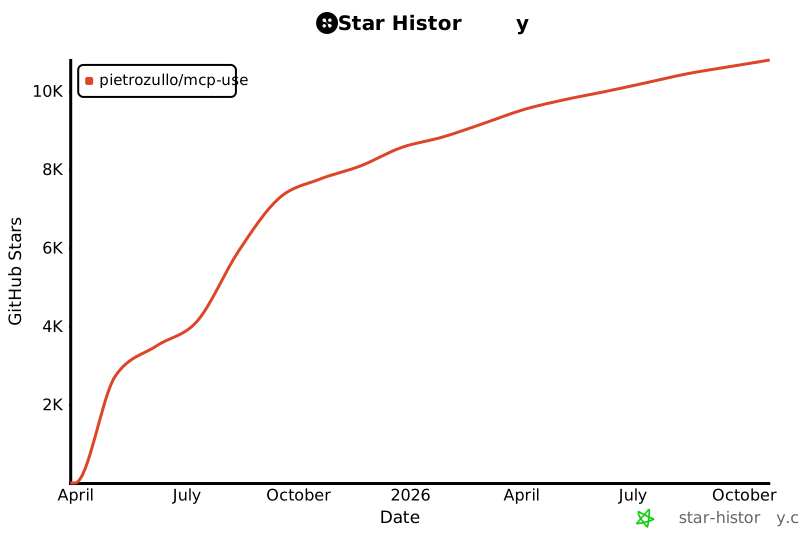](https://www.star-history.com/#pietrozullo/mcp-use&Date)
|
|
574
|
+
|
|
490
575
|
# Contributing
|
|
491
576
|
|
|
492
577
|
We love contributions! Feel free to open issues for bugs or feature requests.
|