lybic-guiagents 0.1.0__py3-none-any.whl
This diff represents the content of publicly available package versions that have been released to one of the supported registries. The information contained in this diff is provided for informational purposes only and reflects changes between package versions as they appear in their respective public registries.
Potentially problematic release.
This version of lybic-guiagents might be problematic. Click here for more details.
- desktop_env/__init__.py +1 -0
- desktop_env/actions.py +203 -0
- desktop_env/controllers/__init__.py +0 -0
- desktop_env/controllers/python.py +471 -0
- desktop_env/controllers/setup.py +882 -0
- desktop_env/desktop_env.py +509 -0
- desktop_env/evaluators/__init__.py +5 -0
- desktop_env/evaluators/getters/__init__.py +41 -0
- desktop_env/evaluators/getters/calc.py +15 -0
- desktop_env/evaluators/getters/chrome.py +1774 -0
- desktop_env/evaluators/getters/file.py +154 -0
- desktop_env/evaluators/getters/general.py +42 -0
- desktop_env/evaluators/getters/gimp.py +38 -0
- desktop_env/evaluators/getters/impress.py +126 -0
- desktop_env/evaluators/getters/info.py +24 -0
- desktop_env/evaluators/getters/misc.py +406 -0
- desktop_env/evaluators/getters/replay.py +20 -0
- desktop_env/evaluators/getters/vlc.py +86 -0
- desktop_env/evaluators/getters/vscode.py +35 -0
- desktop_env/evaluators/metrics/__init__.py +160 -0
- desktop_env/evaluators/metrics/basic_os.py +68 -0
- desktop_env/evaluators/metrics/chrome.py +493 -0
- desktop_env/evaluators/metrics/docs.py +1011 -0
- desktop_env/evaluators/metrics/general.py +665 -0
- desktop_env/evaluators/metrics/gimp.py +637 -0
- desktop_env/evaluators/metrics/libreoffice.py +28 -0
- desktop_env/evaluators/metrics/others.py +92 -0
- desktop_env/evaluators/metrics/pdf.py +31 -0
- desktop_env/evaluators/metrics/slides.py +957 -0
- desktop_env/evaluators/metrics/table.py +585 -0
- desktop_env/evaluators/metrics/thunderbird.py +176 -0
- desktop_env/evaluators/metrics/utils.py +719 -0
- desktop_env/evaluators/metrics/vlc.py +524 -0
- desktop_env/evaluators/metrics/vscode.py +283 -0
- desktop_env/providers/__init__.py +35 -0
- desktop_env/providers/aws/__init__.py +0 -0
- desktop_env/providers/aws/manager.py +278 -0
- desktop_env/providers/aws/provider.py +186 -0
- desktop_env/providers/aws/provider_with_proxy.py +315 -0
- desktop_env/providers/aws/proxy_pool.py +193 -0
- desktop_env/providers/azure/__init__.py +0 -0
- desktop_env/providers/azure/manager.py +87 -0
- desktop_env/providers/azure/provider.py +207 -0
- desktop_env/providers/base.py +97 -0
- desktop_env/providers/gcp/__init__.py +0 -0
- desktop_env/providers/gcp/manager.py +0 -0
- desktop_env/providers/gcp/provider.py +0 -0
- desktop_env/providers/virtualbox/__init__.py +0 -0
- desktop_env/providers/virtualbox/manager.py +463 -0
- desktop_env/providers/virtualbox/provider.py +124 -0
- desktop_env/providers/vmware/__init__.py +0 -0
- desktop_env/providers/vmware/manager.py +455 -0
- desktop_env/providers/vmware/provider.py +105 -0
- gui_agents/__init__.py +0 -0
- gui_agents/agents/Action.py +209 -0
- gui_agents/agents/__init__.py +0 -0
- gui_agents/agents/agent_s.py +832 -0
- gui_agents/agents/global_state.py +610 -0
- gui_agents/agents/grounding.py +651 -0
- gui_agents/agents/hardware_interface.py +129 -0
- gui_agents/agents/manager.py +568 -0
- gui_agents/agents/translator.py +132 -0
- gui_agents/agents/worker.py +355 -0
- gui_agents/cli_app.py +560 -0
- gui_agents/core/__init__.py +0 -0
- gui_agents/core/engine.py +1496 -0
- gui_agents/core/knowledge.py +449 -0
- gui_agents/core/mllm.py +555 -0
- gui_agents/tools/__init__.py +0 -0
- gui_agents/tools/tools.py +727 -0
- gui_agents/unit_test/__init__.py +0 -0
- gui_agents/unit_test/run_tests.py +65 -0
- gui_agents/unit_test/test_manager.py +330 -0
- gui_agents/unit_test/test_worker.py +269 -0
- gui_agents/utils/__init__.py +0 -0
- gui_agents/utils/analyze_display.py +301 -0
- gui_agents/utils/common_utils.py +263 -0
- gui_agents/utils/display_viewer.py +281 -0
- gui_agents/utils/embedding_manager.py +53 -0
- gui_agents/utils/image_axis_utils.py +27 -0
- lybic_guiagents-0.1.0.dist-info/METADATA +416 -0
- lybic_guiagents-0.1.0.dist-info/RECORD +85 -0
- lybic_guiagents-0.1.0.dist-info/WHEEL +5 -0
- lybic_guiagents-0.1.0.dist-info/licenses/LICENSE +201 -0
- lybic_guiagents-0.1.0.dist-info/top_level.txt +2 -0
|
@@ -0,0 +1,416 @@
|
|
|
1
|
+
Metadata-Version: 2.4
|
|
2
|
+
Name: lybic-guiagents
|
|
3
|
+
Version: 0.1.0
|
|
4
|
+
Summary: An open-source agentic framework that enables AI to use computers like humans and can provide a multi-agent runtime environment as an infrastructure capability
|
|
5
|
+
Author: Lybic Development Team
|
|
6
|
+
Author-email: Lybic Development Team <lybic@tingyutech.com>
|
|
7
|
+
License-Expression: Apache-2.0
|
|
8
|
+
Classifier: Programming Language :: Python :: 3
|
|
9
|
+
Requires-Python: >=3.9, <=3.12
|
|
10
|
+
Description-Content-Type: text/markdown
|
|
11
|
+
License-File: LICENSE
|
|
12
|
+
Requires-Dist: numpy
|
|
13
|
+
Requires-Dist: backoff
|
|
14
|
+
Requires-Dist: pandas
|
|
15
|
+
Requires-Dist: openai
|
|
16
|
+
Requires-Dist: anthropic
|
|
17
|
+
Requires-Dist: fastapi
|
|
18
|
+
Requires-Dist: zhipuai
|
|
19
|
+
Requires-Dist: groq
|
|
20
|
+
Requires-Dist: boto3
|
|
21
|
+
Requires-Dist: uvicorn
|
|
22
|
+
Requires-Dist: paddleocr
|
|
23
|
+
Requires-Dist: paddlepaddle
|
|
24
|
+
Requires-Dist: together
|
|
25
|
+
Requires-Dist: scikit-learn
|
|
26
|
+
Requires-Dist: websockets
|
|
27
|
+
Requires-Dist: tiktoken
|
|
28
|
+
Requires-Dist: pyautogui~=0.9.54
|
|
29
|
+
Requires-Dist: toml
|
|
30
|
+
Requires-Dist: exa_py
|
|
31
|
+
Requires-Dist: black
|
|
32
|
+
Requires-Dist: certifi
|
|
33
|
+
Requires-Dist: pytesseract
|
|
34
|
+
Requires-Dist: google-genai
|
|
35
|
+
Requires-Dist: python-dotenv
|
|
36
|
+
Requires-Dist: Pillow~=11.0.0
|
|
37
|
+
Requires-Dist: fabric
|
|
38
|
+
Requires-Dist: gymnasium~=0.28.1
|
|
39
|
+
Requires-Dist: requests~=2.31.0
|
|
40
|
+
Requires-Dist: pytz~=2024.1
|
|
41
|
+
Requires-Dist: transformers~=4.35.2
|
|
42
|
+
Requires-Dist: torch~=2.5.0
|
|
43
|
+
Requires-Dist: accelerate
|
|
44
|
+
Requires-Dist: opencv-python~=4.8.1.78
|
|
45
|
+
Requires-Dist: matplotlib~=3.7.4
|
|
46
|
+
Requires-Dist: pynput~=1.7.6
|
|
47
|
+
Requires-Dist: psutil~=5.9.6
|
|
48
|
+
Requires-Dist: tqdm~=4.65.0
|
|
49
|
+
Requires-Dist: flask~=3.0.0
|
|
50
|
+
Requires-Dist: requests-toolbelt~=1.0.0
|
|
51
|
+
Requires-Dist: lxml
|
|
52
|
+
Requires-Dist: cssselect
|
|
53
|
+
Requires-Dist: xmltodict
|
|
54
|
+
Requires-Dist: openpyxl
|
|
55
|
+
Requires-Dist: python-docx
|
|
56
|
+
Requires-Dist: python-pptx
|
|
57
|
+
Requires-Dist: pypdf
|
|
58
|
+
Requires-Dist: PyGetWindow
|
|
59
|
+
Requires-Dist: rapidfuzz
|
|
60
|
+
Requires-Dist: pyacoustid
|
|
61
|
+
Requires-Dist: pygame
|
|
62
|
+
Requires-Dist: ImageHash
|
|
63
|
+
Requires-Dist: scikit-image
|
|
64
|
+
Requires-Dist: librosa
|
|
65
|
+
Requires-Dist: pymupdf
|
|
66
|
+
Requires-Dist: chardet
|
|
67
|
+
Requires-Dist: playwright
|
|
68
|
+
Requires-Dist: formulas
|
|
69
|
+
Requires-Dist: pydrive
|
|
70
|
+
Requires-Dist: fastdtw
|
|
71
|
+
Requires-Dist: odfpy
|
|
72
|
+
Requires-Dist: func-timeout
|
|
73
|
+
Requires-Dist: beautifulsoup4
|
|
74
|
+
Requires-Dist: dashscope
|
|
75
|
+
Requires-Dist: google-generativeai
|
|
76
|
+
Requires-Dist: PyYaml
|
|
77
|
+
Requires-Dist: mutagen
|
|
78
|
+
Requires-Dist: easyocr
|
|
79
|
+
Requires-Dist: borb
|
|
80
|
+
Requires-Dist: pypdf2
|
|
81
|
+
Requires-Dist: pdfplumber
|
|
82
|
+
Requires-Dist: wandb
|
|
83
|
+
Requires-Dist: wrapt_timeout_decorator
|
|
84
|
+
Requires-Dist: gdown
|
|
85
|
+
Requires-Dist: azure-identity
|
|
86
|
+
Requires-Dist: azure-mgmt-compute
|
|
87
|
+
Requires-Dist: azure-mgmt-network
|
|
88
|
+
Requires-Dist: docker
|
|
89
|
+
Requires-Dist: loguru
|
|
90
|
+
Requires-Dist: dotenv
|
|
91
|
+
Requires-Dist: pyobjc; platform_system == "Darwin"
|
|
92
|
+
Requires-Dist: pywinauto; platform_system == "Windows"
|
|
93
|
+
Requires-Dist: pywin32; platform_system == "Windows"
|
|
94
|
+
Dynamic: author
|
|
95
|
+
Dynamic: license-file
|
|
96
|
+
Dynamic: requires-python
|
|
97
|
+
|
|
98
|
+
<div align="center">
|
|
99
|
+
|
|
100
|
+
**[English](./README.md) | [中文](./README-zh.md) | [日本語](./README-jp.md)**
|
|
101
|
+
|
|
102
|
+
<br/>
|
|
103
|
+
</div>
|
|
104
|
+
|
|
105
|
+
<p align="center">
|
|
106
|
+
<img src="assets/logo.png" alt="Lybic Logo" width="400"/>
|
|
107
|
+
</p>
|
|
108
|
+
<h1 align="center">
|
|
109
|
+
Lybic GUI Agent: <small>An open-source agentic framework for Computer Use Agents</small>
|
|
110
|
+
</h1>
|
|
111
|
+
|
|
112
|
+
## What is Lybic GUI Agent?
|
|
113
|
+
|
|
114
|
+
Lybic platform placeholder - comprehensive AI platform for building and deploying intelligent agents
|
|
115
|
+
|
|
116
|
+
Lybic GUI Agent is an open-source framework that enables developers and businesses to create intelligent computer-use agents,mobile-use agents, and intelligent agents that can understand and interact with graphical user interfaces across Windows, macOS, Linux and Android(via lybic Android Sandbox) platforms.
|
|
117
|
+
|
|
118
|
+
<!-- <p align="center"><small>Lybic GUI Agent is based upon the <a href="https://github.com/simular-ai/Agent-S">Agent-S</a> codebase, allowing us to focus on making the best interaction experience with Lybic while maintaining a familiar execution logic.</small></p> -->
|
|
119
|
+
|
|
120
|
+
<div align="center">
|
|
121
|
+
|
|
122
|
+
<p>Skip the setup? Try Lybic GUI Agent in our <a href="https://playground.lybic.cn/">Playground</a> with a few clicks.(Only in the Chinese mainland supported)
|
|
123
|
+
|
|
124
|
+
</div>
|
|
125
|
+
|
|
126
|
+
## 🥳 Updates
|
|
127
|
+
- [x] **2025/09/09**: We achieved the world's first place in the 50-step length of [OS-world](https://os-world.github.io/)!
|
|
128
|
+
- [x] **2025/08/08**: Released v0.1.0 of [Lybic GUI Agent](https://github.com/lybic/agent) library, with support for Windows, Mac, Ubuntu and Lybic API!
|
|
129
|
+
|
|
130
|
+
## Table of Contents
|
|
131
|
+
|
|
132
|
+
1. [💡 Introduction](#-introduction)
|
|
133
|
+
2. [🛠️ Installation & Setup](#%EF%B8%8F-installation--setup)
|
|
134
|
+
3. [🚀 Usage](#-usage)
|
|
135
|
+
|
|
136
|
+
## 💡 Introduction
|
|
137
|
+
|
|
138
|
+
## ✨ Feature Agentic Lybic Support
|
|
139
|
+
|
|
140
|
+
- **Multiple LLMs providers**: OpenAI, Anthropic, Google, xAI , AzureOpenAI, DeepSeek, Qwen, Doubao, ZhipuGLM
|
|
141
|
+
- **Aggregation Model Provider**: Bedrock, Groq, Monica, OpenRouter, SiliconFlow
|
|
142
|
+
- **RAG**: We support RAG, and this capability is provided as an extension
|
|
143
|
+
- **Cross-Platform GUI Control**: Windows, Linux, macOS, Android Supported
|
|
144
|
+
- **Observability**: Supported
|
|
145
|
+
- **Local Deployment**: Supported
|
|
146
|
+
- **Cloud Sandbox Environment**: Supported
|
|
147
|
+
|
|
148
|
+
<p align="center">🎉 Agents Online Demo</p>
|
|
149
|
+
|
|
150
|
+
[](https://www.youtube.com/watch?v=GaOoYoRKWhE)
|
|
151
|
+
|
|
152
|
+
<p align="center">🎯 Current Results</p>
|
|
153
|
+
|
|
154
|
+
<div align="center">
|
|
155
|
+
<table border="0" cellspacing="0" cellpadding="5">
|
|
156
|
+
<tr>
|
|
157
|
+
<th>Benchmark</th>
|
|
158
|
+
<th>Lybic GUI Agent</th>
|
|
159
|
+
<th>Previous SOTA</th>
|
|
160
|
+
</tr>
|
|
161
|
+
<tr>
|
|
162
|
+
<td>OSWorld Verified (50 step)</td>
|
|
163
|
+
<td><b>57.1%</b></td>
|
|
164
|
+
<td>53.1%</td>
|
|
165
|
+
</tr>
|
|
166
|
+
</table>
|
|
167
|
+
</div>
|
|
168
|
+
|
|
169
|
+
<p align="center">
|
|
170
|
+
<img src="assets/structure.png" alt="Lybic GUI Agent system structure" width="700"/>
|
|
171
|
+
</p>
|
|
172
|
+
<p align="center"><b>Fig. Lybic GUI Agent system structure</b></p>
|
|
173
|
+
|
|
174
|
+
## 🛠️ Installation & Setup
|
|
175
|
+
|
|
176
|
+
> [!WARNING]
|
|
177
|
+
> To leverage the full potential of Lybic GUI Agent, we support multiple model providers including OpenAI, Anthropic, Gemini, and Doubao. For the best visual grounding performance, we recommend using UI-TARS models.
|
|
178
|
+
|
|
179
|
+
### Installation
|
|
180
|
+
|
|
181
|
+
You can use [UV](https://docs.astral.sh/uv/getting-started/installation/) (a modern Python package manager) version 0.8.5 for installation:
|
|
182
|
+
|
|
183
|
+
```bash
|
|
184
|
+
# 1. Install UV if not already installed
|
|
185
|
+
# macOS and Linux
|
|
186
|
+
curl -LsSf https://astral.sh/uv/0.8.5/install.sh | sh
|
|
187
|
+
# Windows
|
|
188
|
+
powershell -ExecutionPolicy ByPass -c "irm https://astral.sh/uv/0.8.5/install.ps1 | iex"
|
|
189
|
+
|
|
190
|
+
# testing uv installation, version should be 0.8.5
|
|
191
|
+
uv --version
|
|
192
|
+
|
|
193
|
+
# 2. Install the python 3.12
|
|
194
|
+
uv python install 3.12.11
|
|
195
|
+
|
|
196
|
+
# 3. Create a virtual environment
|
|
197
|
+
uv venv -p 3.12.11
|
|
198
|
+
|
|
199
|
+
# 4. Activate the virtual environment
|
|
200
|
+
# macOS and Linux
|
|
201
|
+
source .venv/bin/activate
|
|
202
|
+
# Windows
|
|
203
|
+
.venv\Scripts\activate
|
|
204
|
+
|
|
205
|
+
# 5. Install dependencies (using locked versions)
|
|
206
|
+
uv sync
|
|
207
|
+
|
|
208
|
+
# 6. Install the package locally in development mode
|
|
209
|
+
uv pip install -e .
|
|
210
|
+
```
|
|
211
|
+
|
|
212
|
+
### API Key Configuration
|
|
213
|
+
|
|
214
|
+
The simplest way to configure API keys is to:
|
|
215
|
+
|
|
216
|
+
1. Copy `gui_agents/.env.example` to `gui_agents/.env`
|
|
217
|
+
2. Edit the `.env` file and add your API keys
|
|
218
|
+
|
|
219
|
+
### Tool Configuration
|
|
220
|
+
|
|
221
|
+
We provide two pre-configured tool settings:
|
|
222
|
+
|
|
223
|
+
- `tools_config_en.json`: Configured for English language models (Gemini, Exa)
|
|
224
|
+
- `tools_config_cn.json`: Configured for Chinese language models (Doubao, bocha)
|
|
225
|
+
|
|
226
|
+
The agent uses `tools_config.json` by default. You can:
|
|
227
|
+
|
|
228
|
+
- Copy either `tools_config_en.json` or `tools_config_cn.json` to `tools_config.json`
|
|
229
|
+
- Or create your own custom configuration
|
|
230
|
+
|
|
231
|
+
If you are using `tools_config_cn.json` and use `pyautogui` backend, the environment variable only `ARK_API_KEY` should be set.
|
|
232
|
+
|
|
233
|
+
If you are using `tools_config_en.json` and use `pyautogui` backend, you should set those 3 environment variables:
|
|
234
|
+
|
|
235
|
+
```bash
|
|
236
|
+
GEMINI_ENDPOINT_URL=https://generativelanguage.googleapis.com/v1beta/openai/
|
|
237
|
+
GEMINI_API_KEY=your_gemini_api_key
|
|
238
|
+
ARK_API_KEY=your_ark_api_key
|
|
239
|
+
```
|
|
240
|
+
|
|
241
|
+
```bash
|
|
242
|
+
# For English models
|
|
243
|
+
cp gui_agents/tools/tools_config_en.json gui_agents/tools/tools_config.json
|
|
244
|
+
|
|
245
|
+
# For Chinese models
|
|
246
|
+
cp gui_agents/tools/tools_config_cn.json gui_agents/tools/tools_config.json
|
|
247
|
+
```
|
|
248
|
+
|
|
249
|
+
> **Note**: Our recommended configuration uses `doubao-1-5-ui-tars-250428` for `"tool_name": "grounding" or "fast_action_generator"` and `claude-sonnet-4-20250514` or `doubao-seed-1-6-250615` for other tools such as `"tool_name": "action_generator"`. You can customize the model configuration in the tools configuration files. Do not modify the `"tool_name"` in `tools_config.json` file. To change the `"provider"` and `"model_name"` in `tools_config.json` file, see [model.md](gui_agents/tools/model.md)
|
|
250
|
+
|
|
251
|
+
## 🚀 Usage
|
|
252
|
+
|
|
253
|
+
### Command Line Interface
|
|
254
|
+
|
|
255
|
+
Run Lybic GUI Agent with python in the command-line interface:
|
|
256
|
+
|
|
257
|
+
```sh
|
|
258
|
+
python gui_agents/cli_app.py [OPTIONS]
|
|
259
|
+
```
|
|
260
|
+
|
|
261
|
+
This will show a user query prompt where you can enter your instructions and interact with the agent.
|
|
262
|
+
|
|
263
|
+
### Options
|
|
264
|
+
|
|
265
|
+
- `--backend [lybic|pyautogui|pyautogui_vmware]`: Specifies the backend to use for controlling the GUI. Defaults to `lybic`.
|
|
266
|
+
|
|
267
|
+
- `--query "YOUR_QUERY"`: Optional, can be input during the runtime; if provided, the agent will execute the query and then exit.
|
|
268
|
+
- `--max-steps NUMBER`: Sets the maximum number of steps the agent can take. Defaults to `50`.
|
|
269
|
+
- `--mode [normal|fast]`: (Optional) Selects the agent mode. `normal` runs the full agent with detailed reasoning and memory, while `fast` mode executes actions more quickly with less reasoning overhead. Defaults to `normal`.
|
|
270
|
+
- `--enable-takeover`: (Optional) Enables user takeover functionality, allowing the agent to pause and request user intervention when needed. By default, user takeover is disabled.
|
|
271
|
+
- `--disable-search`: (Optional) Disables web search functionality. By default, web search is enabled.
|
|
272
|
+
|
|
273
|
+
### Examples
|
|
274
|
+
|
|
275
|
+
Run in interactive mode with the `lybic` backend:
|
|
276
|
+
```sh
|
|
277
|
+
python gui_agents/cli_app.py --backend lybic
|
|
278
|
+
```
|
|
279
|
+
|
|
280
|
+
Run a single query with the `pyautogui` backend and a maximum of 20 steps:
|
|
281
|
+
```sh
|
|
282
|
+
python gui_agents/cli_app.py --backend pyautogui --query "Find the result of 8 × 7 on a calculator" --max-steps 20
|
|
283
|
+
```
|
|
284
|
+
|
|
285
|
+
Run in fast mode with the `pyautogui` backend:
|
|
286
|
+
```sh
|
|
287
|
+
python gui_agents/cli_app.py --backend pyautogui --mode fast
|
|
288
|
+
```
|
|
289
|
+
|
|
290
|
+
> [!WARNING]
|
|
291
|
+
> The agent will directly control your computer with `--backend pyautogui`. Please use with care.
|
|
292
|
+
|
|
293
|
+
### Lybic Sandbox Configuration
|
|
294
|
+
|
|
295
|
+
The simplest way to configure Lybic Sandbox is still to edit the `.env` file and add your API keys, as mentioned in the [API Key Configuration](#api-key-configuration) section.
|
|
296
|
+
|
|
297
|
+
|
|
298
|
+
```bash
|
|
299
|
+
LYBIC_API_KEY=your_lybic_api_key
|
|
300
|
+
LYBIC_ORG_ID=your_lybic_org_id
|
|
301
|
+
LYBIC_MAX_LIFE_SECONDS=3600
|
|
302
|
+
```
|
|
303
|
+
|
|
304
|
+
> **Note**: If you want to use a precreated Lybic Sandbox in [Lybic Dashboard](https://dashboard.lybic.cn/), you need to set the `LYBIC_PRECREATE_SID` to the precreated Sandbox ID.
|
|
305
|
+
|
|
306
|
+
>
|
|
307
|
+
> ```bash
|
|
308
|
+
> LYBIC_PRECREATE_SID=SBX-XXXXXXXXXXXXXXX
|
|
309
|
+
> ```
|
|
310
|
+
|
|
311
|
+
### VMware Configuration
|
|
312
|
+
|
|
313
|
+
To use PyAutoGUI with VMware, you need to install [VMware Workstation Pro](https://www.vmware.com/products/desktop-hypervisor/workstation-and-fusion) (on Windows) and create a virtual machine.
|
|
314
|
+
|
|
315
|
+
Next, you need to download the [`Windows-x86.zip`](https://huggingface.co/datasets/xlangai/ubuntu_osworld/resolve/main/Ubuntu-x86.zip) and [`Ubuntu-x86.zip`](https://huggingface.co/datasets/xlangai/ubuntu_osworld/resolve/main/Ubuntu-x86.zip) from Hugging Face. Then unzip them into `./vmware_vm_data/Windows-x86` and `./vmware_vm_data/Ubuntu-x86` directory.
|
|
316
|
+
|
|
317
|
+
Finally, you need to edit the `.env` file and set the `USE_PRECREATE_VM` environment variable to the name of the virtual machine. `USE_PRECREATE_VM` support `Windows` and `Ubuntu` on x86 arch computer.
|
|
318
|
+
|
|
319
|
+
```bash
|
|
320
|
+
USE_PRECREATE_VM=Ubuntu
|
|
321
|
+
```
|
|
322
|
+
|
|
323
|
+
## 🔧 Troubleshooting
|
|
324
|
+
|
|
325
|
+
### Common Runtime Issues
|
|
326
|
+
|
|
327
|
+
#### 1. API Key Configuration Issues
|
|
328
|
+
|
|
329
|
+
**Problem**: `KeyError` or authentication errors when running the agent.
|
|
330
|
+
|
|
331
|
+
**Solution**:
|
|
332
|
+
- Ensure your `.env` file is properly configured with valid API keys
|
|
333
|
+
- Check that environment variables are set correctly:
|
|
334
|
+
```bash
|
|
335
|
+
# For English models
|
|
336
|
+
export GEMINI_API_KEY=your_gemini_api_key
|
|
337
|
+
export ARK_API_KEY=your_ark_api_key
|
|
338
|
+
|
|
339
|
+
# For Chinese models
|
|
340
|
+
export ARK_API_KEY=your_ark_api_key
|
|
341
|
+
```
|
|
342
|
+
- Verify API key permissions and quotas
|
|
343
|
+
|
|
344
|
+
#### 2. Python Environment Issues
|
|
345
|
+
|
|
346
|
+
**Problem**: `ModuleNotFoundError` or package import errors.
|
|
347
|
+
|
|
348
|
+
**Solution**:
|
|
349
|
+
- Ensure you're using Python 3.12.11 as specified
|
|
350
|
+
- Activate the virtual environment:
|
|
351
|
+
```bash
|
|
352
|
+
# macOS/Linux
|
|
353
|
+
source .venv/bin/activate
|
|
354
|
+
# Windows
|
|
355
|
+
.venv\Scripts\activate
|
|
356
|
+
```
|
|
357
|
+
- Reinstall dependencies:
|
|
358
|
+
```bash
|
|
359
|
+
uv sync
|
|
360
|
+
uv pip install -e .
|
|
361
|
+
```
|
|
362
|
+
|
|
363
|
+
#### 3. Lybic Sandbox Connection Issues
|
|
364
|
+
|
|
365
|
+
**Problem**: `Connection timeout` or `Sandbox creation failed`.
|
|
366
|
+
|
|
367
|
+
**Solution**:
|
|
368
|
+
- Check network connectivity to Lybic servers
|
|
369
|
+
- Verify `LYBIC_ORG_ID` and `LYBIC_API_KEY` are correct
|
|
370
|
+
- Ensure sufficient quota in your Lybic account
|
|
371
|
+
- Try increasing `LYBIC_MAX_LIFE_SECONDS` if sandbox times out
|
|
372
|
+
|
|
373
|
+
#### 4. VMware Backend Issues
|
|
374
|
+
|
|
375
|
+
**Problem**: Virtual machine fails to start or control.
|
|
376
|
+
|
|
377
|
+
**Solution**:
|
|
378
|
+
- Ensure VMware Workstation Pro is properly installed
|
|
379
|
+
- Check that VM files are extracted to correct directories:
|
|
380
|
+
- `./vmware_vm_data/Windows-x86/`
|
|
381
|
+
- `./vmware_vm_data/Ubuntu-x86/`
|
|
382
|
+
- Verify VMware service is running
|
|
383
|
+
- Set correct `USE_PRECREATE_VM` environment variable
|
|
384
|
+
|
|
385
|
+
#### 5. Model Performance Issues
|
|
386
|
+
|
|
387
|
+
**Problem**: Slow response times or poor grounding accuracy.
|
|
388
|
+
|
|
389
|
+
**Solution**:
|
|
390
|
+
|
|
391
|
+
- Use recommended models for better performance:
|
|
392
|
+
- Visual grounding: `doubao-1-5-ui-tars-250428`
|
|
393
|
+
- Action generation: `claude-sonnet-4-20250514`
|
|
394
|
+
- Switch to `--mode fast` for quicker execution
|
|
395
|
+
- Reduce `--max-steps` for shorter tasks
|
|
396
|
+
|
|
397
|
+
### Getting Help
|
|
398
|
+
|
|
399
|
+
If you encounter issues not covered here:
|
|
400
|
+
|
|
401
|
+
1. Check the [GitHub Issues](https://github.com/lybic/agent/issues) for similar problems
|
|
402
|
+
2. Review the [Lybic Documentation](https://lybic.ai/docs)
|
|
403
|
+
3. Create a new issue with:
|
|
404
|
+
- Your operating system and version
|
|
405
|
+
- Python version and environment details
|
|
406
|
+
- Complete error messages
|
|
407
|
+
- Steps to reproduce the issue
|
|
408
|
+
|
|
409
|
+
## Stargazers over time
|
|
410
|
+
|
|
411
|
+
[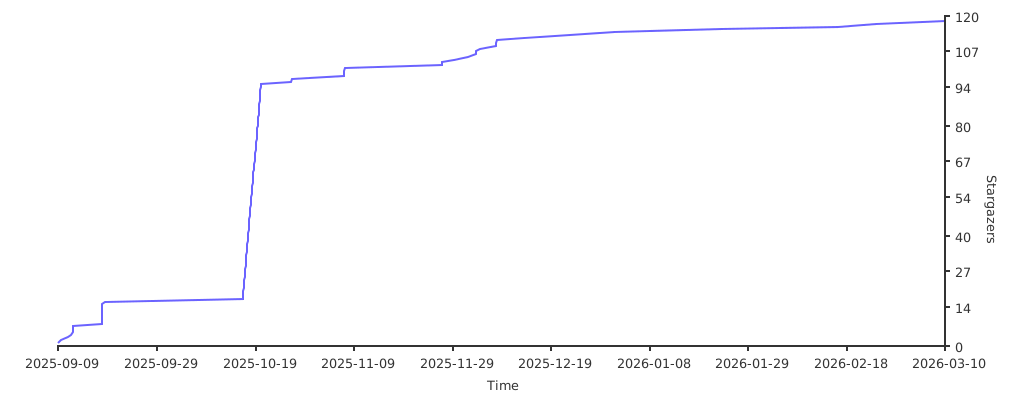](https://starchart.cc/lybic/agent)
|
|
412
|
+
|
|
413
|
+
## License
|
|
414
|
+
|
|
415
|
+
This project is distributed under Apache 2.0 License.
|
|
416
|
+
Therefore, you can modify the source code and release it commercially.
|
|
@@ -0,0 +1,85 @@
|
|
|
1
|
+
desktop_env/__init__.py,sha256=AbpHGcgLb-kRsJGnwFEktk7uzpZOCcBY74-YBdrKVGs,1
|
|
2
|
+
desktop_env/actions.py,sha256=sFxZmsxPLHvspunvPpHC3cb7DXgvTgm33rmo5wwpOvk,7174
|
|
3
|
+
desktop_env/desktop_env.py,sha256=-g10qXEklelyZgQatRrcb1sGiaZN6ntj_K6KbEmRc5Y,23512
|
|
4
|
+
desktop_env/controllers/__init__.py,sha256=47DEQpj8HBSa-_TImW-5JCeuQeRkm5NMpJWZG3hSuFU,0
|
|
5
|
+
desktop_env/controllers/python.py,sha256=hS9Gc3QB0hBIXj_Ddg2CLA6K2Nr7BxuTau4ujfJ-0fM,20955
|
|
6
|
+
desktop_env/controllers/setup.py,sha256=ylHYKZIDEi4oAtTG1mvYCGjfTNvVPNPWmUV-P2CCSlw,41291
|
|
7
|
+
desktop_env/evaluators/__init__.py,sha256=a6Yu3wJN_aDqJz7yTC-eg1nT9vlPtC-1ZyfBJbUxuy4,108
|
|
8
|
+
desktop_env/evaluators/getters/__init__.py,sha256=oWmUAug0loNfX4tiW6kL2pUZsJgL3z3cY1ddoJuR2Y0,1558
|
|
9
|
+
desktop_env/evaluators/getters/calc.py,sha256=cFzUasSyy5Qu5kH788YhSRdGp9rdHMRqUmbSpVkIGfY,522
|
|
10
|
+
desktop_env/evaluators/getters/chrome.py,sha256=XCeHGlL7K2Rrr44V0A0CNgE2LYnWiTWPW1KFN3PQDOQ,88153
|
|
11
|
+
desktop_env/evaluators/getters/file.py,sha256=R_m7k17NdUvaNpcnt3QmCLRFQ32dA5Lr_EHraCcbPd8,5458
|
|
12
|
+
desktop_env/evaluators/getters/general.py,sha256=UOaQqikCPXr7QiYKmPoimrAPIpGuLAa1BWKV8hM6FWY,1249
|
|
13
|
+
desktop_env/evaluators/getters/gimp.py,sha256=y83l48wEDZaCGApd_LAZMRbxdDr65gpQKrGgX1Th80A,1106
|
|
14
|
+
desktop_env/evaluators/getters/impress.py,sha256=RqVCHLSOkhTN7ZEki1VbsV7KSUMduKmuJVTp4L7SfVU,7030
|
|
15
|
+
desktop_env/evaluators/getters/info.py,sha256=Drx32RlHUZpq_s1R3O12yKFrdfVCwENmPnp_xFiAG3o,636
|
|
16
|
+
desktop_env/evaluators/getters/misc.py,sha256=E3t_8KtvhglCQo23_HzdtHcKLQmxU1H3y2Xi2_KcChQ,21642
|
|
17
|
+
desktop_env/evaluators/getters/replay.py,sha256=Pif9L_krfErZHU5jprgGRLJgIACpd56Wtk3SojDpkWo,709
|
|
18
|
+
desktop_env/evaluators/getters/vlc.py,sha256=Eq-tj7wIKLrcCachL6ZDPbsjx2hlWvqwd-XHG6LgTMQ,3691
|
|
19
|
+
desktop_env/evaluators/getters/vscode.py,sha256=0-NEw78j_vu-E9mRdFysnFT3NzNVWoquJzapktVJyFc,1078
|
|
20
|
+
desktop_env/evaluators/metrics/__init__.py,sha256=PmYjndMuT3drVi_Zvb55LLtD-GlyL0qv3EIRPmjta8w,4019
|
|
21
|
+
desktop_env/evaluators/metrics/basic_os.py,sha256=CIQ8k7q46PD5F_Cd0UZ2jicvXf9zVlLwJUW0a0V2S7w,1809
|
|
22
|
+
desktop_env/evaluators/metrics/chrome.py,sha256=xP7Z3UQpO7pu7GZdftDkMJMs9ZY6t_C-kdsc21VJabc,16652
|
|
23
|
+
desktop_env/evaluators/metrics/docs.py,sha256=Ykyg9nix9kPb55SnS9KM4f8S8s8P8mPmeRpIgqriBQ0,33676
|
|
24
|
+
desktop_env/evaluators/metrics/general.py,sha256=dRdBKm78RqaEpb7O5FAFNEWspj6PVKTC748-OY1eWKk,25184
|
|
25
|
+
desktop_env/evaluators/metrics/gimp.py,sha256=jai6tE4NwZ3BRN5YWlm_cTxixTSuW-40PuwUP-k-H00,20598
|
|
26
|
+
desktop_env/evaluators/metrics/libreoffice.py,sha256=0m8x76qMjnYJTtAAL8PPNfr0yIxVwDonf-dX-cO-XpY,1214
|
|
27
|
+
desktop_env/evaluators/metrics/others.py,sha256=ESQXovm4SbWXfY15CEJ9mXuIZP6eIChPsFeEJ7un1xU,3292
|
|
28
|
+
desktop_env/evaluators/metrics/pdf.py,sha256=8_6ZUZET8wGa00qodnP3dhfDRs852wcR-NAXr2VPJm0,801
|
|
29
|
+
desktop_env/evaluators/metrics/slides.py,sha256=-c7kCeJjLlKB9um7SGolgyJmJW4sM_rmNVOz-KkzSrg,49388
|
|
30
|
+
desktop_env/evaluators/metrics/table.py,sha256=ED-szwb7UM6jDNns4tdZPaGBX1sPJzL0KSkLcsqWS18,26564
|
|
31
|
+
desktop_env/evaluators/metrics/thunderbird.py,sha256=BNScQrBpBJinUTxnz6YjMd_4Oy1dutqIGEF4DR0s-Cc,6625
|
|
32
|
+
desktop_env/evaluators/metrics/utils.py,sha256=twmNUnU79RSBHOKQ_4L_h5Lg_eRbBHiDekD1BlfRhv4,30384
|
|
33
|
+
desktop_env/evaluators/metrics/vlc.py,sha256=h2N53cDRT9I2KDLdPSXmJ5O8jMqFv2JrBq7kpj9T2Xk,19915
|
|
34
|
+
desktop_env/evaluators/metrics/vscode.py,sha256=vVRjtlZGJMGrcvtnM1Xg2-e_WgosfJqoNPPnIOAaDRY,7882
|
|
35
|
+
desktop_env/providers/__init__.py,sha256=d4-wBI1XHOcnQztR_GXWLw8Uxb3jgFnwYxPuXEIttrk,1885
|
|
36
|
+
desktop_env/providers/base.py,sha256=PHEpTxtjxbga4XoolZNK2xXEh3qlpzWcXVKCpBJmRus,2215
|
|
37
|
+
desktop_env/providers/aws/__init__.py,sha256=47DEQpj8HBSa-_TImW-5JCeuQeRkm5NMpJWZG3hSuFU,0
|
|
38
|
+
desktop_env/providers/aws/manager.py,sha256=sut44d5o8-jTWk8cvgeiqR16GUcqgdEthTfu_7oOQXQ,11053
|
|
39
|
+
desktop_env/providers/aws/provider.py,sha256=OqZLzxAjyXsG9XE-IQR1rPbpCcPPZdA42BnMZDt3NdA,8422
|
|
40
|
+
desktop_env/providers/aws/provider_with_proxy.py,sha256=3bezeCFV8hh7r8NG7LPhAzA9_mCwLEfsBJ7WFHYsvVM,13077
|
|
41
|
+
desktop_env/providers/aws/proxy_pool.py,sha256=tpHgbStA410KqElrHVojFPr9yJniciWGo-LADvDALrM,6822
|
|
42
|
+
desktop_env/providers/azure/__init__.py,sha256=47DEQpj8HBSa-_TImW-5JCeuQeRkm5NMpJWZG3hSuFU,0
|
|
43
|
+
desktop_env/providers/azure/manager.py,sha256=p28BYQyQdxSAR5d148mNIx4ScFUJnqZ5ZjvoQtl4yyc,3313
|
|
44
|
+
desktop_env/providers/azure/provider.py,sha256=tMqfNra5wKrzc9yfMq3EeIYQajzt8pZRXua0gRUbnrU,9729
|
|
45
|
+
desktop_env/providers/gcp/__init__.py,sha256=47DEQpj8HBSa-_TImW-5JCeuQeRkm5NMpJWZG3hSuFU,0
|
|
46
|
+
desktop_env/providers/gcp/manager.py,sha256=47DEQpj8HBSa-_TImW-5JCeuQeRkm5NMpJWZG3hSuFU,0
|
|
47
|
+
desktop_env/providers/gcp/provider.py,sha256=47DEQpj8HBSa-_TImW-5JCeuQeRkm5NMpJWZG3hSuFU,0
|
|
48
|
+
desktop_env/providers/virtualbox/__init__.py,sha256=47DEQpj8HBSa-_TImW-5JCeuQeRkm5NMpJWZG3hSuFU,0
|
|
49
|
+
desktop_env/providers/virtualbox/manager.py,sha256=zIn6l63kPYVd29gPWsty3WZ4u5uRsVIei1su5LfXy3M,20143
|
|
50
|
+
desktop_env/providers/virtualbox/provider.py,sha256=kSWLSddLpn8IfeyAPyMEy_p5SOapG_u6hHMRbWm0Soo,5996
|
|
51
|
+
desktop_env/providers/vmware/__init__.py,sha256=47DEQpj8HBSa-_TImW-5JCeuQeRkm5NMpJWZG3hSuFU,0
|
|
52
|
+
desktop_env/providers/vmware/manager.py,sha256=pFqJwF6BAijmD-LbSei68-DU7ILCTONRj7e0At5iKIg,18893
|
|
53
|
+
desktop_env/providers/vmware/provider.py,sha256=88ERND67KQIxG74b10sAXJ04o5FhNpx0d9pRTi8bHrA,4080
|
|
54
|
+
gui_agents/__init__.py,sha256=47DEQpj8HBSa-_TImW-5JCeuQeRkm5NMpJWZG3hSuFU,0
|
|
55
|
+
gui_agents/cli_app.py,sha256=yB5l6tL2eoQ6nyrd9opoxQwGgmsvKaZJXh1JPa-3H4I,22874
|
|
56
|
+
gui_agents/agents/Action.py,sha256=YHDJwfShNYtS3AtTjD4XE9YqW1SMcbMG-LoD2SLL6ZI,6218
|
|
57
|
+
gui_agents/agents/__init__.py,sha256=47DEQpj8HBSa-_TImW-5JCeuQeRkm5NMpJWZG3hSuFU,0
|
|
58
|
+
gui_agents/agents/agent_s.py,sha256=BpFNbM6jlHpYezcozpmTeq8kzCPK1Y0MIBFdU19lrVI,34387
|
|
59
|
+
gui_agents/agents/global_state.py,sha256=BS6tUeK9Z3CdUIeU0gcEjzVnc_s7naeKQsCoIQLp23g,22314
|
|
60
|
+
gui_agents/agents/grounding.py,sha256=bmWj1daLx3agPWavc_h8XOVhOCLdw-emiuJ-KdQHEOU,22924
|
|
61
|
+
gui_agents/agents/hardware_interface.py,sha256=yiK8w5OPCrFEfBUhMs11SyeOB6OQIuzruoSKhzVZEm4,4549
|
|
62
|
+
gui_agents/agents/manager.py,sha256=5wNbKj_gbBiE7ZlLLp6EQODasgE3rd6o4JGPk_8hl5k,24106
|
|
63
|
+
gui_agents/agents/translator.py,sha256=AgauUpAEtq4GCK37MuxPG-RW-cxzHkfRFvgT8RZtgfA,5177
|
|
64
|
+
gui_agents/agents/worker.py,sha256=jgyywA02vFnjJmHN7WKljNQ41yUqBhQScC78MeCQ2qs,15348
|
|
65
|
+
gui_agents/core/__init__.py,sha256=47DEQpj8HBSa-_TImW-5JCeuQeRkm5NMpJWZG3hSuFU,0
|
|
66
|
+
gui_agents/core/engine.py,sha256=7MezEJLqJxZBjkhM0HWc9HP6oc3ajplmWTCMRHfNY0I,54627
|
|
67
|
+
gui_agents/core/knowledge.py,sha256=RewER4oywfz8_e7ze83GYeuIlzsEB5bwHzyrk9OFyM8,18283
|
|
68
|
+
gui_agents/core/mllm.py,sha256=k3BIILmb7eaNBu_pXQaD5cRpVBGkrLVQqkxQzzseZdo,21191
|
|
69
|
+
gui_agents/tools/__init__.py,sha256=47DEQpj8HBSa-_TImW-5JCeuQeRkm5NMpJWZG3hSuFU,0
|
|
70
|
+
gui_agents/tools/tools.py,sha256=c5yfrPz3QMe-clFg3HkHrC6AtRWckDmF0Mb1U24FH-k,27607
|
|
71
|
+
gui_agents/unit_test/__init__.py,sha256=47DEQpj8HBSa-_TImW-5JCeuQeRkm5NMpJWZG3hSuFU,0
|
|
72
|
+
gui_agents/unit_test/run_tests.py,sha256=HuByLtSZ1TXbn_QWduA51L4BYcv_oM6ctGcyWcoqPq8,1773
|
|
73
|
+
gui_agents/unit_test/test_manager.py,sha256=NJyXPsjigMklK9Gh72LTN6Pw4inWsNjZ2QBmhqW9aQ0,13593
|
|
74
|
+
gui_agents/unit_test/test_worker.py,sha256=wVIzaEJ-ULNOvbfAt78NZAy_aweRN0WTl_i2FlWPlEw,10323
|
|
75
|
+
gui_agents/utils/__init__.py,sha256=47DEQpj8HBSa-_TImW-5JCeuQeRkm5NMpJWZG3hSuFU,0
|
|
76
|
+
gui_agents/utils/analyze_display.py,sha256=im8ha8ermLOf9lCrk1vSMT2y3LIe_2GcTvF4BV4av0k,10565
|
|
77
|
+
gui_agents/utils/common_utils.py,sha256=vYvjw-0ouWLkpAVKZH0vUkGhtlHKfC2FqPVFA-Cd9CI,8788
|
|
78
|
+
gui_agents/utils/display_viewer.py,sha256=hL6Pf-wpoQrrYeOi6eaGnCorkAvGWNzkLIuM9yIudnk,8731
|
|
79
|
+
gui_agents/utils/embedding_manager.py,sha256=7QFITe9l0z8OKHT-yqx-BGwVMj4BRL2iJ13PgJ2-Yak,2117
|
|
80
|
+
gui_agents/utils/image_axis_utils.py,sha256=z21cVAE2ZOK1DR7wK10JHg8aZapkX2oGI6D93pKZEao,878
|
|
81
|
+
lybic_guiagents-0.1.0.dist-info/licenses/LICENSE,sha256=QwcOLU5TJoTeUhuIXzhdCEEDDvorGiC6-3YTOl4TecE,11356
|
|
82
|
+
lybic_guiagents-0.1.0.dist-info/METADATA,sha256=auqfKz5NVLSGRGAcnCOs-BqOKbNqCR8S17p6f3VSayI,14098
|
|
83
|
+
lybic_guiagents-0.1.0.dist-info/WHEEL,sha256=_zCd3N1l69ArxyTb8rzEoP9TpbYXkqRFSNOD5OuxnTs,91
|
|
84
|
+
lybic_guiagents-0.1.0.dist-info/top_level.txt,sha256=NFP1jNNbbEGUexavwh7g0z_23hahrdgEV_9AjdynSw0,23
|
|
85
|
+
lybic_guiagents-0.1.0.dist-info/RECORD,,
|