llms-py 2.0.18__py3-none-any.whl → 2.0.33__py3-none-any.whl
This diff represents the content of publicly available package versions that have been released to one of the supported registries. The information contained in this diff is provided for informational purposes only and reflects changes between package versions as they appear in their respective public registries.
- llms/index.html +17 -1
- llms/llms.json +1132 -1075
- llms/main.py +561 -103
- llms/ui/Analytics.mjs +115 -104
- llms/ui/App.mjs +81 -4
- llms/ui/Avatar.mjs +61 -4
- llms/ui/Brand.mjs +29 -11
- llms/ui/ChatPrompt.mjs +163 -16
- llms/ui/Main.mjs +177 -94
- llms/ui/ModelSelector.mjs +28 -10
- llms/ui/OAuthSignIn.mjs +92 -0
- llms/ui/ProviderStatus.mjs +12 -12
- llms/ui/Recents.mjs +13 -13
- llms/ui/SettingsDialog.mjs +65 -65
- llms/ui/Sidebar.mjs +24 -19
- llms/ui/SystemPromptEditor.mjs +5 -5
- llms/ui/SystemPromptSelector.mjs +26 -6
- llms/ui/Welcome.mjs +2 -2
- llms/ui/ai.mjs +69 -5
- llms/ui/app.css +548 -34
- llms/ui/lib/servicestack-vue.mjs +9 -9
- llms/ui/markdown.mjs +8 -8
- llms/ui/tailwind.input.css +2 -0
- llms/ui/threadStore.mjs +39 -0
- llms/ui/typography.css +54 -36
- {llms_py-2.0.18.dist-info → llms_py-2.0.33.dist-info}/METADATA +403 -47
- llms_py-2.0.33.dist-info/RECORD +48 -0
- {llms_py-2.0.18.dist-info → llms_py-2.0.33.dist-info}/licenses/LICENSE +1 -2
- llms/__pycache__/__init__.cpython-312.pyc +0 -0
- llms/__pycache__/__init__.cpython-313.pyc +0 -0
- llms/__pycache__/__init__.cpython-314.pyc +0 -0
- llms/__pycache__/__main__.cpython-312.pyc +0 -0
- llms/__pycache__/__main__.cpython-314.pyc +0 -0
- llms/__pycache__/llms.cpython-312.pyc +0 -0
- llms/__pycache__/main.cpython-312.pyc +0 -0
- llms/__pycache__/main.cpython-313.pyc +0 -0
- llms/__pycache__/main.cpython-314.pyc +0 -0
- llms_py-2.0.18.dist-info/RECORD +0 -56
- {llms_py-2.0.18.dist-info → llms_py-2.0.33.dist-info}/WHEEL +0 -0
- {llms_py-2.0.18.dist-info → llms_py-2.0.33.dist-info}/entry_points.txt +0 -0
- {llms_py-2.0.18.dist-info → llms_py-2.0.33.dist-info}/top_level.txt +0 -0
|
@@ -1,6 +1,6 @@
|
|
|
1
1
|
Metadata-Version: 2.4
|
|
2
2
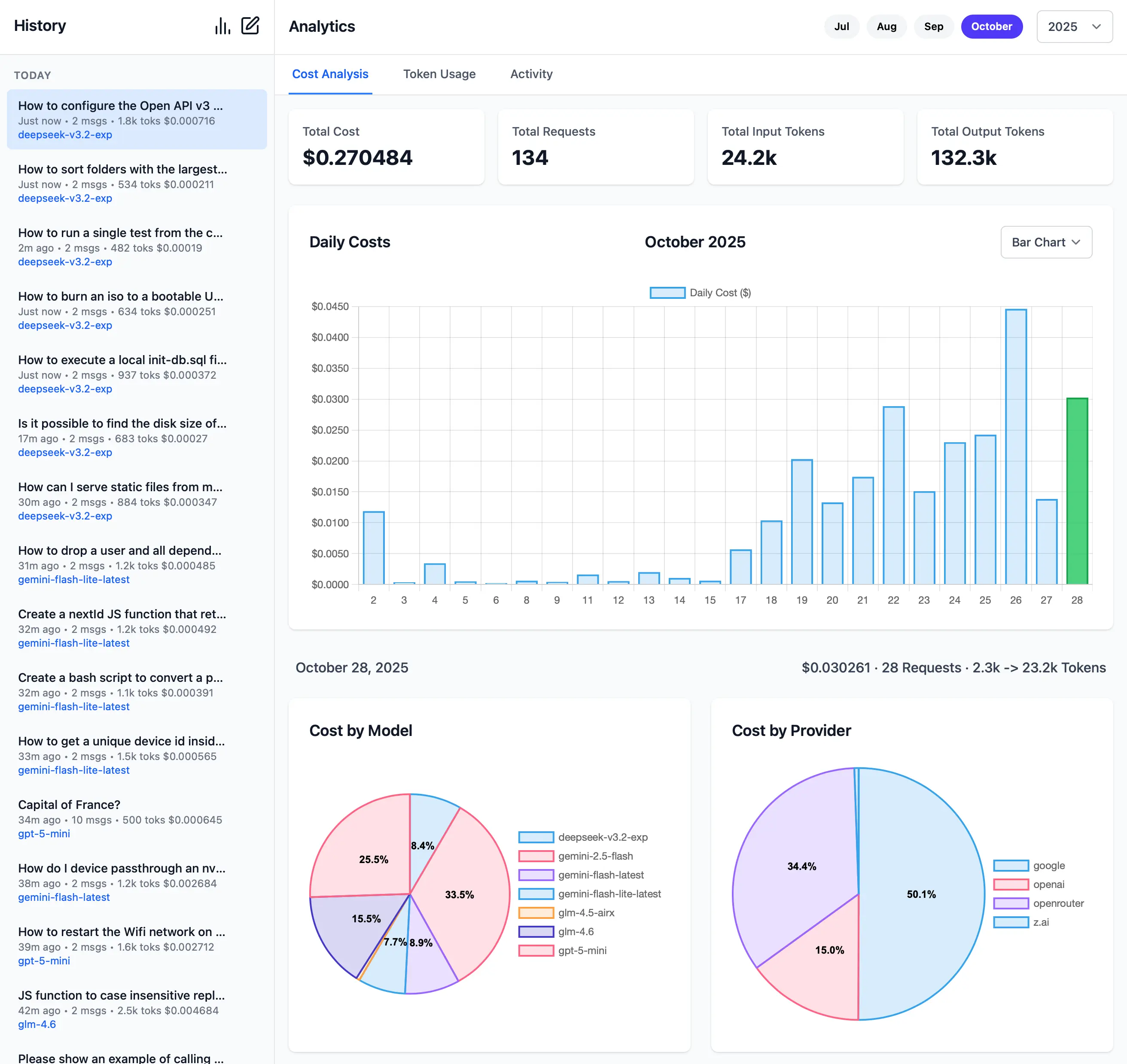
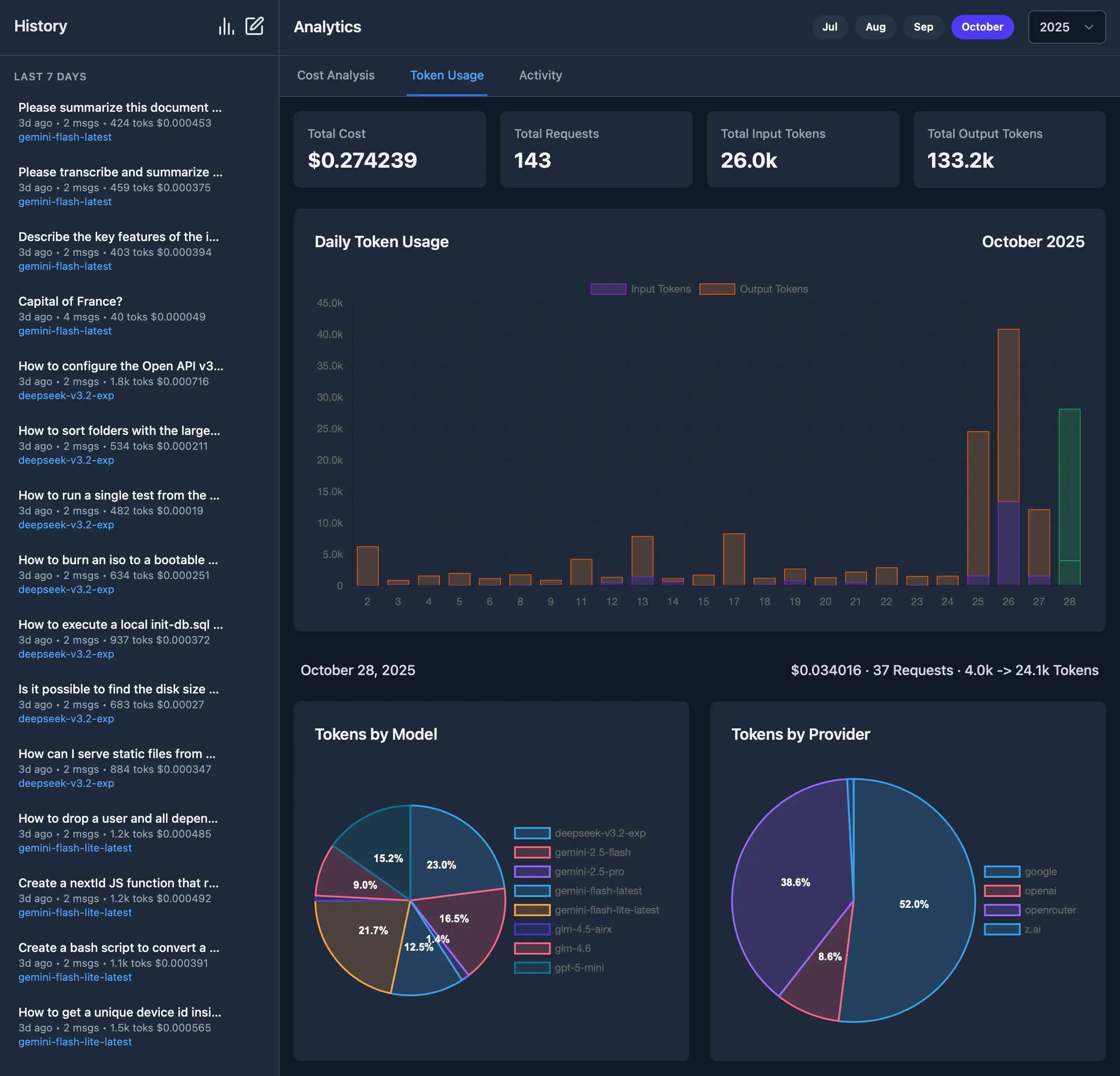
|
Name: llms-py
|
|
3
|
-
Version: 2.0.
|
|
3
|
+
Version: 2.0.33
|
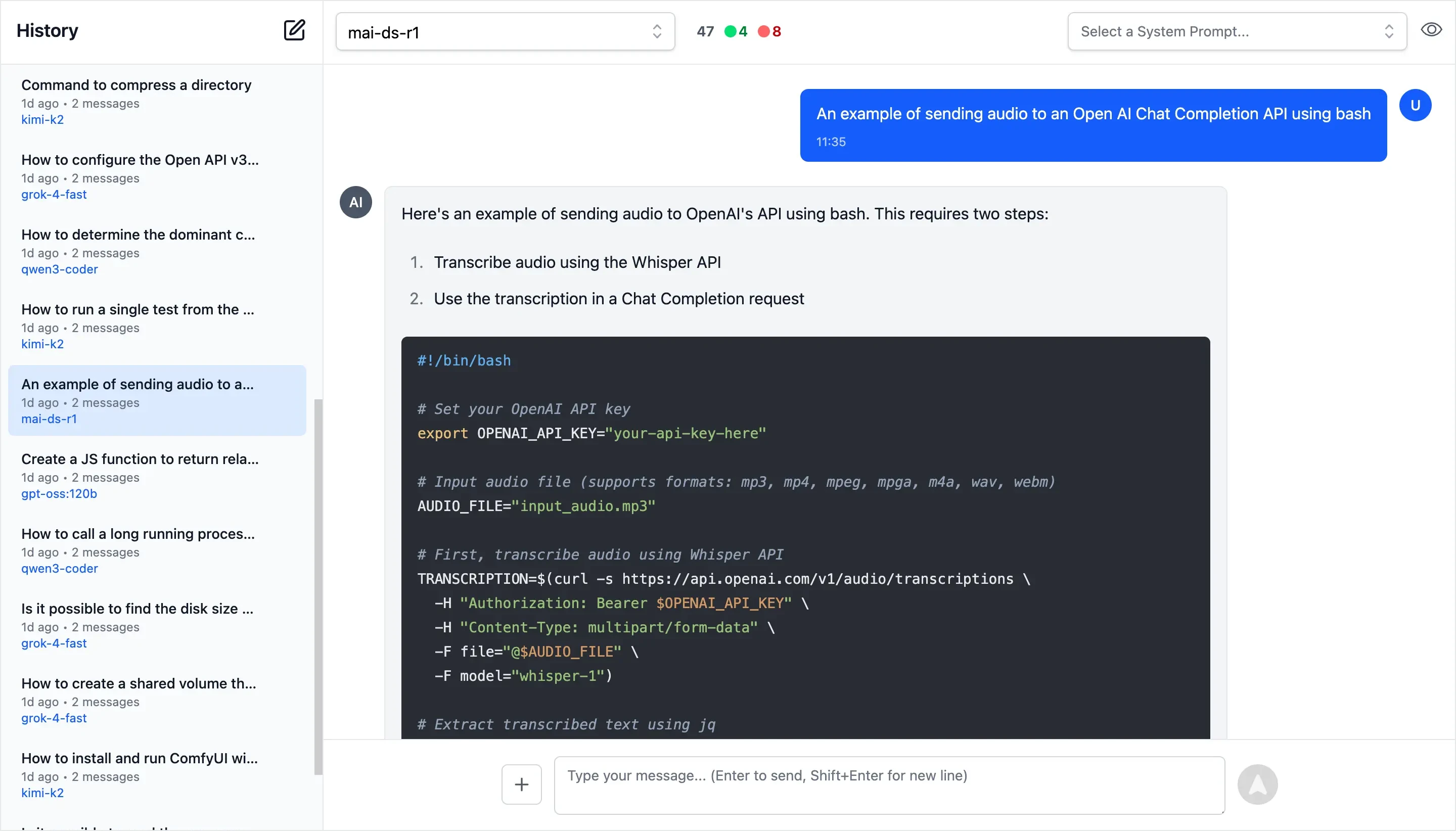
|
4
4
|
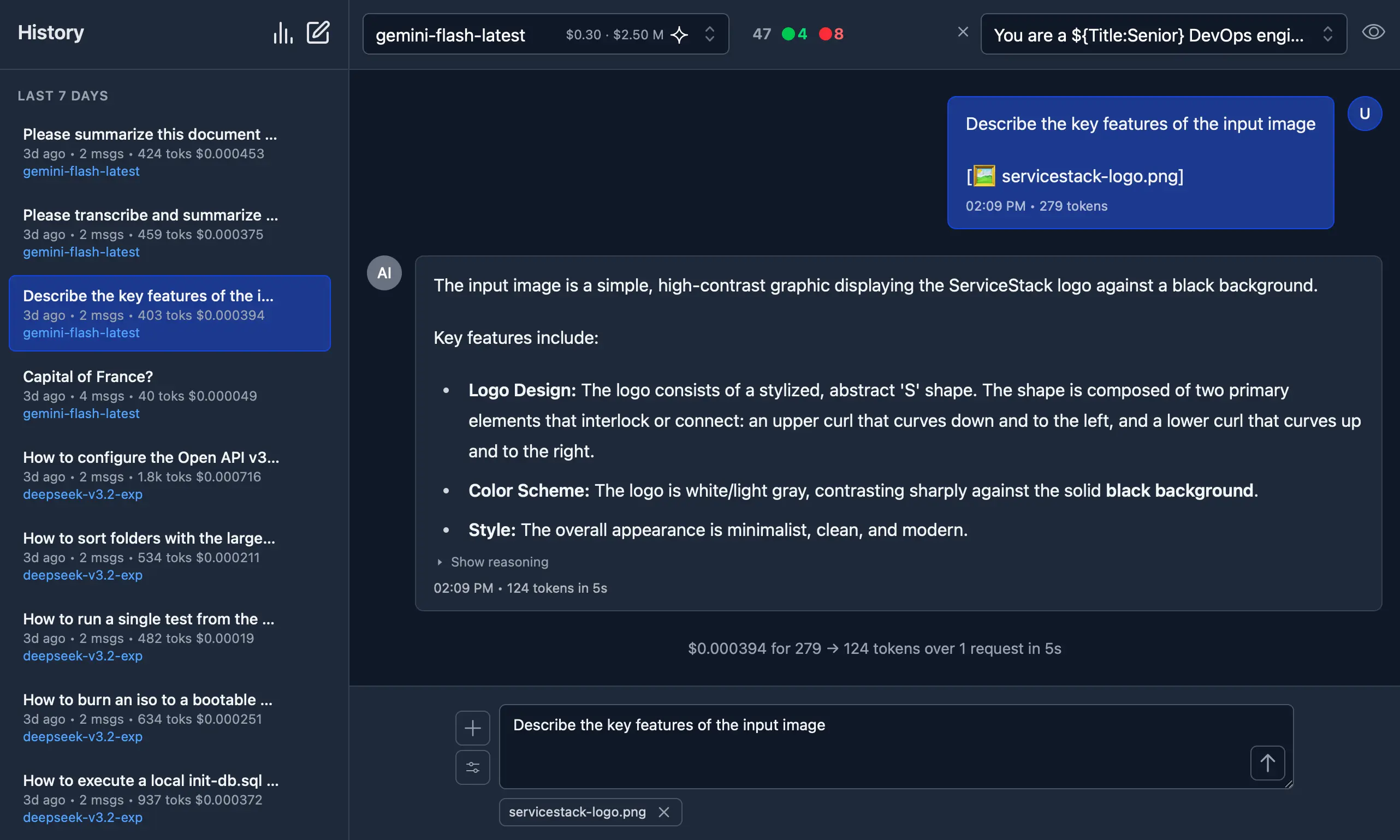
Summary: A lightweight CLI tool and OpenAI-compatible server for querying multiple Large Language Model (LLM) providers
|
|
5
5
|
Home-page: https://github.com/ServiceStack/llms
|
|
6
6
|
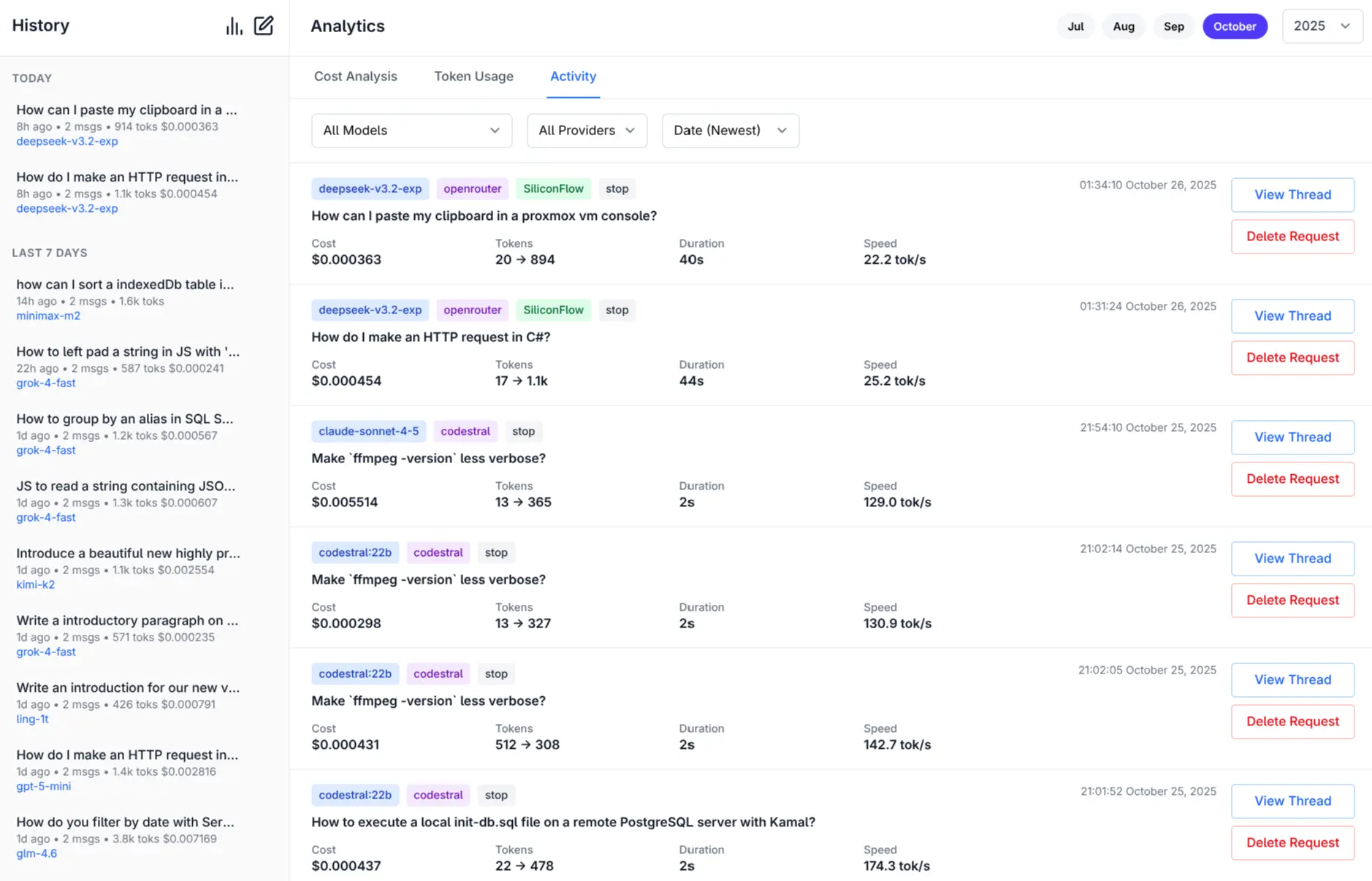
Author: ServiceStack
|
|
@@ -40,7 +40,7 @@ Dynamic: requires-python
|
|
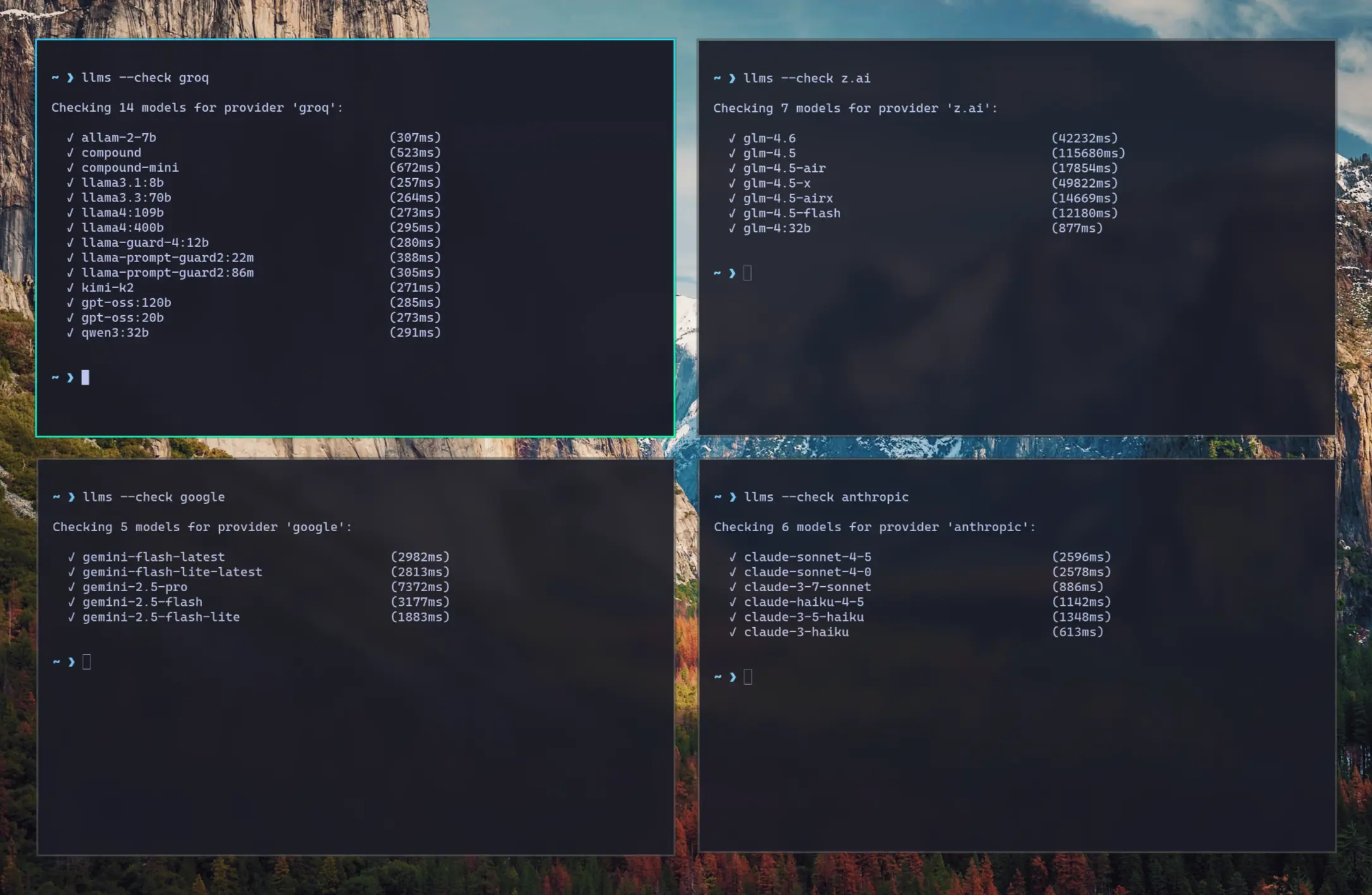
|
40
40
|
|
|
41
41
|
# llms.py
|
|
42
42
|
|
|
43
|
-
Lightweight CLI and
|
|
43
|
+
Lightweight CLI, API and ChatGPT-like alternative to Open WebUI for accessing multiple LLMs, entirely offline, with all data kept private in browser storage.
|
|
44
44
|
|
|
45
45
|
Configure additional providers and models in [llms.json](llms/llms.json)
|
|
46
46
|
- Mix and match local models with models from different API providers
|
|
@@ -50,13 +50,16 @@ Configure additional providers and models in [llms.json](llms/llms.json)
|
|
|
50
50
|
|
|
51
51
|
## Features
|
|
52
52
|
|
|
53
|
-
- **Lightweight**: Single [llms.py](llms.py) Python file with single `aiohttp` dependency
|
|
53
|
+
- **Lightweight**: Single [llms.py](https://github.com/ServiceStack/llms/blob/main/llms/main.py) Python file with single `aiohttp` dependency (Pillow optional)
|
|
54
54
|
- **Multi-Provider Support**: OpenRouter, Ollama, Anthropic, Google, OpenAI, Grok, Groq, Qwen, Z.ai, Mistral
|
|
55
55
|
- **OpenAI-Compatible API**: Works with any client that supports OpenAI's chat completion API
|
|
56
|
+
- **Built-in Analytics**: Built-in analytics UI to visualize costs, requests, and token usage
|
|
57
|
+
- **GitHub OAuth**: Optionally Secure your web UI and restrict access to specified GitHub Users
|
|
56
58
|
- **Configuration Management**: Easy provider enable/disable and configuration management
|
|
57
59
|
- **CLI Interface**: Simple command-line interface for quick interactions
|
|
58
60
|
- **Server Mode**: Run an OpenAI-compatible HTTP server at `http://localhost:{PORT}/v1/chat/completions`
|
|
59
61
|
- **Image Support**: Process images through vision-capable models
|
|
62
|
+
- Auto resizes and converts to webp if exceeds configured limits
|
|
60
63
|
- **Audio Support**: Process audio through audio-capable models
|
|
61
64
|
- **Custom Chat Templates**: Configurable chat completion request templates for different modalities
|
|
62
65
|
- **Auto-Discovery**: Automatically discover available Ollama models
|
|
@@ -65,18 +68,77 @@ Configure additional providers and models in [llms.json](llms/llms.json)
|
|
|
65
68
|
|
|
66
69
|
## llms.py UI
|
|
67
70
|
|
|
68
|
-
|
|
71
|
+
Access all your local all remote LLMs with a single ChatGPT-like UI:
|
|
69
72
|
|
|
70
|
-
[](https://servicestack.net/posts/llms-py-ui)
|
|
71
74
|
|
|
72
|
-
|
|
75
|
+
#### Dark Mode Support
|
|
76
|
+
|
|
77
|
+
[](https://servicestack.net/posts/llms-py-ui)
|
|
78
|
+
|
|
79
|
+
#### Monthly Costs Analysis
|
|
80
|
+
|
|
81
|
+
[](https://servicestack.net/posts/llms-py-ui)
|
|
82
|
+
|
|
83
|
+
#### Monthly Token Usage (Dark Mode)
|
|
84
|
+
|
|
85
|
+
[](https://servicestack.net/posts/llms-py-ui)
|
|
86
|
+
|
|
87
|
+
#### Monthly Activity Log
|
|
88
|
+
|
|
89
|
+
[](https://servicestack.net/posts/llms-py-ui)
|
|
90
|
+
|
|
91
|
+
[More Features and Screenshots](https://servicestack.net/posts/llms-py-ui).
|
|
92
|
+
|
|
93
|
+
#### Check Provider Reliability and Response Times
|
|
94
|
+
|
|
95
|
+
Check the status of configured providers to test if they're configured correctly, reachable and what their response times is for the simplest `1+1=` request:
|
|
96
|
+
|
|
97
|
+
```bash
|
|
98
|
+
# Check all models for a provider:
|
|
99
|
+
llms --check groq
|
|
100
|
+
|
|
101
|
+
# Check specific models for a provider:
|
|
102
|
+
llms --check groq kimi-k2 llama4:400b gpt-oss:120b
|
|
103
|
+
```
|
|
104
|
+
|
|
105
|
+
[](https://servicestack.net/img/posts/llms-py-ui/llms-check.webp)
|
|
106
|
+
|
|
107
|
+
As they're a good indicator for the reliability and speed you can expect from different providers we've created a
|
|
108
|
+
[test-providers.yml](https://github.com/ServiceStack/llms/actions/workflows/test-providers.yml) GitHub Action to
|
|
109
|
+
test the response times for all configured providers and models, the results of which will be frequently published to
|
|
110
|
+
[/checks/latest.txt](https://github.com/ServiceStack/llms/blob/main/docs/checks/latest.txt)
|
|
111
|
+
|
|
112
|
+
## Change Log
|
|
113
|
+
|
|
114
|
+
#### v2.0.30 (2025-11-01)
|
|
115
|
+
- Improved Responsive Layout with collapsible Sidebar
|
|
116
|
+
- Watching config files for changes and auto-reloading
|
|
117
|
+
- Add cancel button to cancel pending request
|
|
118
|
+
- Return focus to textarea after request completes
|
|
119
|
+
- Clicking outside model or system prompt selector will collapse it
|
|
120
|
+
- Clicking on selected item no longer deselects it
|
|
121
|
+
- Support `VERBOSE=1` for enabling `--verbose` mode (useful in Docker)
|
|
122
|
+
|
|
123
|
+
#### v2.0.28 (2025-10-31)
|
|
124
|
+
- Dark Mode
|
|
125
|
+
- Drag n' Drop files in Message prompt
|
|
126
|
+
- Copy & Paste files in Message prompt
|
|
127
|
+
- Support for GitHub OAuth and optional restrict access to specified Users
|
|
128
|
+
- Support for Docker and Docker Compose
|
|
129
|
+
|
|
130
|
+
[llms.py Releases](https://github.com/ServiceStack/llms/releases)
|
|
73
131
|
|
|
74
132
|
## Installation
|
|
75
133
|
|
|
134
|
+
### Using pip
|
|
135
|
+
|
|
76
136
|
```bash
|
|
77
137
|
pip install llms-py
|
|
78
138
|
```
|
|
79
139
|
|
|
140
|
+
- [Using Docker](#using-docker)
|
|
141
|
+
|
|
80
142
|
## Quick Start
|
|
81
143
|
|
|
82
144
|
### 1. Set API Keys
|
|
@@ -103,51 +165,142 @@ export OPENROUTER_API_KEY="..."
|
|
|
103
165
|
| z.ai | `ZAI_API_KEY` | Z.ai API key | `sk-...` |
|
|
104
166
|
| mistral | `MISTRAL_API_KEY` | Mistral API key | `...` |
|
|
105
167
|
|
|
106
|
-
### 2.
|
|
168
|
+
### 2. Run Server
|
|
169
|
+
|
|
170
|
+
Start the UI and an OpenAI compatible API on port **8000**:
|
|
171
|
+
|
|
172
|
+
```bash
|
|
173
|
+
llms --serve 8000
|
|
174
|
+
```
|
|
175
|
+
|
|
176
|
+
Launches UI at `http://localhost:8000` and OpenAI Endpoint at `http://localhost:8000/v1/chat/completions`.
|
|
177
|
+
|
|
178
|
+
To see detailed request/response logging, add `--verbose`:
|
|
179
|
+
|
|
180
|
+
```bash
|
|
181
|
+
llms --serve 8000 --verbose
|
|
182
|
+
```
|
|
183
|
+
|
|
184
|
+
### Use llms.py CLI
|
|
185
|
+
|
|
186
|
+
```bash
|
|
187
|
+
llms "What is the capital of France?"
|
|
188
|
+
```
|
|
189
|
+
|
|
190
|
+
### Enable Providers
|
|
107
191
|
|
|
108
|
-
|
|
192
|
+
Any providers that have their API Keys set and enabled in `llms.json` are automatically made available.
|
|
193
|
+
|
|
194
|
+
Providers can be enabled or disabled in the UI at runtime next to the model selector, or on the command line:
|
|
109
195
|
|
|
110
196
|
```bash
|
|
111
|
-
#
|
|
112
|
-
llms --
|
|
197
|
+
# Disable free providers with free models and free tiers
|
|
198
|
+
llms --disable openrouter_free codestral google_free groq
|
|
113
199
|
|
|
114
200
|
# Enable paid providers
|
|
115
|
-
llms --enable openrouter anthropic google openai
|
|
201
|
+
llms --enable openrouter anthropic google openai grok z.ai qwen mistral
|
|
116
202
|
```
|
|
117
203
|
|
|
118
|
-
|
|
204
|
+
## Using Docker
|
|
119
205
|
|
|
120
|
-
|
|
206
|
+
#### a) Simple - Run in a Docker container:
|
|
207
|
+
|
|
208
|
+
Run the server on port `8000`:
|
|
121
209
|
|
|
122
210
|
```bash
|
|
123
|
-
|
|
211
|
+
docker run -p 8000:8000 -e GROQ_API_KEY=$GROQ_API_KEY ghcr.io/servicestack/llms:latest
|
|
124
212
|
```
|
|
125
213
|
|
|
126
|
-
|
|
214
|
+
Get the latest version:
|
|
215
|
+
|
|
216
|
+
```bash
|
|
217
|
+
docker pull ghcr.io/servicestack/llms:latest
|
|
218
|
+
```
|
|
127
219
|
|
|
128
|
-
|
|
220
|
+
Use custom `llms.json` and `ui.json` config files outside of the container (auto created if they don't exist):
|
|
129
221
|
|
|
130
222
|
```bash
|
|
131
|
-
|
|
223
|
+
docker run -p 8000:8000 -e GROQ_API_KEY=$GROQ_API_KEY \
|
|
224
|
+
-v ~/.llms:/home/llms/.llms \
|
|
225
|
+
ghcr.io/servicestack/llms:latest
|
|
226
|
+
```
|
|
227
|
+
|
|
228
|
+
#### b) Recommended - Use Docker Compose:
|
|
229
|
+
|
|
230
|
+
Download and use [docker-compose.yml](https://raw.githubusercontent.com/ServiceStack/llms/refs/heads/main/docker-compose.yml):
|
|
231
|
+
|
|
232
|
+
```bash
|
|
233
|
+
curl -O https://raw.githubusercontent.com/ServiceStack/llms/refs/heads/main/docker-compose.yml
|
|
234
|
+
```
|
|
235
|
+
|
|
236
|
+
Update API Keys in `docker-compose.yml` then start the server:
|
|
237
|
+
|
|
238
|
+
```bash
|
|
239
|
+
docker-compose up -d
|
|
240
|
+
```
|
|
241
|
+
|
|
242
|
+
#### c) Build and run local Docker image from source:
|
|
243
|
+
|
|
244
|
+
```bash
|
|
245
|
+
git clone https://github.com/ServiceStack/llms
|
|
246
|
+
|
|
247
|
+
docker-compose -f docker-compose.local.yml up -d --build
|
|
132
248
|
```
|
|
133
249
|
|
|
250
|
+
After the container starts, you can access the UI and API at `http://localhost:8000`.
|
|
251
|
+
|
|
252
|
+
|
|
253
|
+
See [DOCKER.md](DOCKER.md) for detailed instructions on customizing configuration files.
|
|
254
|
+
|
|
255
|
+
## GitHub OAuth Authentication
|
|
256
|
+
|
|
257
|
+
llms.py supports optional GitHub OAuth authentication to secure your web UI and API endpoints. When enabled, users must sign in with their GitHub account before accessing the application.
|
|
258
|
+
|
|
259
|
+
```json
|
|
260
|
+
{
|
|
261
|
+
"auth": {
|
|
262
|
+
"enabled": true,
|
|
263
|
+
"github": {
|
|
264
|
+
"client_id": "$GITHUB_CLIENT_ID",
|
|
265
|
+
"client_secret": "$GITHUB_CLIENT_SECRET",
|
|
266
|
+
"redirect_uri": "http://localhost:8000/auth/github/callback",
|
|
267
|
+
"restrict_to": "$GITHUB_USERS"
|
|
268
|
+
}
|
|
269
|
+
}
|
|
270
|
+
}
|
|
271
|
+
```
|
|
272
|
+
|
|
273
|
+
`GITHUB_USERS` is optional but if set will only allow access to the specified users.
|
|
274
|
+
|
|
275
|
+
See [GITHUB_OAUTH_SETUP.md](GITHUB_OAUTH_SETUP.md) for detailed setup instructions.
|
|
276
|
+
|
|
134
277
|
## Configuration
|
|
135
278
|
|
|
136
|
-
The configuration file [llms.json](llms/llms.json) is saved to `~/.llms/llms.json` and defines available providers, models, and default settings.
|
|
279
|
+
The configuration file [llms.json](llms/llms.json) is saved to `~/.llms/llms.json` and defines available providers, models, and default settings. If it doesn't exist, `llms.json` is auto created with the latest
|
|
280
|
+
configuration, so you can re-create it by deleting your local config (e.g. `rm -rf ~/.llms`).
|
|
281
|
+
|
|
282
|
+
Key sections:
|
|
137
283
|
|
|
138
284
|
### Defaults
|
|
139
285
|
- `headers`: Common HTTP headers for all requests
|
|
140
286
|
- `text`: Default chat completion request template for text prompts
|
|
287
|
+
- `image`: Default chat completion request template for image prompts
|
|
288
|
+
- `audio`: Default chat completion request template for audio prompts
|
|
289
|
+
- `file`: Default chat completion request template for file prompts
|
|
290
|
+
- `check`: Check request template for testing provider connectivity
|
|
291
|
+
- `limits`: Override Request size limits
|
|
292
|
+
- `convert`: Max image size and length limits and auto conversion settings
|
|
141
293
|
|
|
142
294
|
### Providers
|
|
143
|
-
|
|
144
295
|
Each provider configuration includes:
|
|
145
296
|
- `enabled`: Whether the provider is active
|
|
146
297
|
- `type`: Provider class (OpenAiProvider, GoogleProvider, etc.)
|
|
147
298
|
- `api_key`: API key (supports environment variables with `$VAR_NAME`)
|
|
148
299
|
- `base_url`: API endpoint URL
|
|
149
300
|
- `models`: Model name mappings (local name → provider name)
|
|
150
|
-
|
|
301
|
+
- `pricing`: Pricing per token (input/output) for each model
|
|
302
|
+
- `default_pricing`: Default pricing if not specified in `pricing`
|
|
303
|
+
- `check`: Check request template for testing provider connectivity
|
|
151
304
|
|
|
152
305
|
## Command Line Usage
|
|
153
306
|
|
|
@@ -489,9 +642,6 @@ llms --verbose --logprefix "[DEBUG] " "Hello world"
|
|
|
489
642
|
# Set default model (updates config file)
|
|
490
643
|
llms --default grok-4
|
|
491
644
|
|
|
492
|
-
# Update llms.py to latest version
|
|
493
|
-
llms --update
|
|
494
|
-
|
|
495
645
|
# Pass custom parameters to chat request (URL-encoded)
|
|
496
646
|
llms --args "temperature=0.7&seed=111" "What is 2+2?"
|
|
497
647
|
|
|
@@ -561,19 +711,10 @@ When you set a default model:
|
|
|
561
711
|
|
|
562
712
|
### Updating llms.py
|
|
563
713
|
|
|
564
|
-
The `--update` option downloads and installs the latest version of `llms.py` from the GitHub repository:
|
|
565
|
-
|
|
566
714
|
```bash
|
|
567
|
-
|
|
568
|
-
llms --update
|
|
715
|
+
pip install llms-py --upgrade
|
|
569
716
|
```
|
|
570
717
|
|
|
571
|
-
This command:
|
|
572
|
-
- Downloads the latest `llms.py` from `github.com/ServiceStack/llms/blob/main/llms/main.py`
|
|
573
|
-
- Overwrites your current `llms.py` file with the latest version
|
|
574
|
-
- Preserves your existing configuration file (`llms.json`)
|
|
575
|
-
- Requires an internet connection to download the update
|
|
576
|
-
|
|
577
718
|
### Beautiful rendered Markdown
|
|
578
719
|
|
|
579
720
|
Pipe Markdown output to [glow](https://github.com/charmbracelet/glow) to beautifully render it in the terminal:
|
|
@@ -809,35 +950,249 @@ Example: If both OpenAI and OpenRouter support `kimi-k2`, the request will first
|
|
|
809
950
|
|
|
810
951
|
## Usage
|
|
811
952
|
|
|
812
|
-
|
|
813
|
-
|
|
814
|
-
|
|
815
|
-
[--file FILE] [--raw] [--list] [--serve PORT] [--enable PROVIDER] [--disable PROVIDER]
|
|
816
|
-
[--default MODEL] [--init] [--logprefix PREFIX] [--verbose] [--update]
|
|
953
|
+
usage: llms [-h] [--config FILE] [-m MODEL] [--chat REQUEST] [-s PROMPT] [--image IMAGE] [--audio AUDIO] [--file FILE]
|
|
954
|
+
[--args PARAMS] [--raw] [--list] [--check PROVIDER] [--serve PORT] [--enable PROVIDER] [--disable PROVIDER]
|
|
955
|
+
[--default MODEL] [--init] [--root PATH] [--logprefix PREFIX] [--verbose]
|
|
817
956
|
|
|
818
|
-
llms
|
|
957
|
+
llms v2.0.24
|
|
819
958
|
|
|
820
959
|
options:
|
|
821
960
|
-h, --help show this help message and exit
|
|
822
961
|
--config FILE Path to config file
|
|
823
|
-
-m
|
|
824
|
-
Model to use
|
|
962
|
+
-m, --model MODEL Model to use
|
|
825
963
|
--chat REQUEST OpenAI Chat Completion Request to send
|
|
826
|
-
-s
|
|
827
|
-
System prompt to use for chat completion
|
|
964
|
+
-s, --system PROMPT System prompt to use for chat completion
|
|
828
965
|
--image IMAGE Image input to use in chat completion
|
|
829
966
|
--audio AUDIO Audio input to use in chat completion
|
|
830
967
|
--file FILE File input to use in chat completion
|
|
968
|
+
--args PARAMS URL-encoded parameters to add to chat request (e.g. "temperature=0.7&seed=111")
|
|
831
969
|
--raw Return raw AI JSON response
|
|
832
970
|
--list Show list of enabled providers and their models (alias ls provider?)
|
|
971
|
+
--check PROVIDER Check validity of models for a provider
|
|
833
972
|
--serve PORT Port to start an OpenAI Chat compatible server on
|
|
834
973
|
--enable PROVIDER Enable a provider
|
|
835
974
|
--disable PROVIDER Disable a provider
|
|
836
975
|
--default MODEL Configure the default model to use
|
|
837
976
|
--init Create a default llms.json
|
|
977
|
+
--root PATH Change root directory for UI files
|
|
838
978
|
--logprefix PREFIX Prefix used in log messages
|
|
839
979
|
--verbose Verbose output
|
|
840
|
-
|
|
980
|
+
|
|
981
|
+
## Docker Deployment
|
|
982
|
+
|
|
983
|
+
### Quick Start with Docker
|
|
984
|
+
|
|
985
|
+
The easiest way to run llms-py is using Docker:
|
|
986
|
+
|
|
987
|
+
```bash
|
|
988
|
+
# Using docker-compose (recommended)
|
|
989
|
+
docker-compose up -d
|
|
990
|
+
|
|
991
|
+
# Or pull and run directly
|
|
992
|
+
docker run -p 8000:8000 \
|
|
993
|
+
-e OPENROUTER_API_KEY="your-key" \
|
|
994
|
+
ghcr.io/servicestack/llms:latest
|
|
995
|
+
```
|
|
996
|
+
|
|
997
|
+
### Docker Images
|
|
998
|
+
|
|
999
|
+
Pre-built Docker images are automatically published to GitHub Container Registry:
|
|
1000
|
+
|
|
1001
|
+
- **Latest stable**: `ghcr.io/servicestack/llms:latest`
|
|
1002
|
+
- **Specific version**: `ghcr.io/servicestack/llms:v2.0.24`
|
|
1003
|
+
- **Main branch**: `ghcr.io/servicestack/llms:main`
|
|
1004
|
+
|
|
1005
|
+
### Environment Variables
|
|
1006
|
+
|
|
1007
|
+
Pass API keys as environment variables:
|
|
1008
|
+
|
|
1009
|
+
```bash
|
|
1010
|
+
docker run -p 8000:8000 \
|
|
1011
|
+
-e OPENROUTER_API_KEY="sk-or-..." \
|
|
1012
|
+
-e GROQ_API_KEY="gsk_..." \
|
|
1013
|
+
-e GOOGLE_FREE_API_KEY="AIza..." \
|
|
1014
|
+
-e ANTHROPIC_API_KEY="sk-ant-..." \
|
|
1015
|
+
-e OPENAI_API_KEY="sk-..." \
|
|
1016
|
+
ghcr.io/servicestack/llms:latest
|
|
1017
|
+
```
|
|
1018
|
+
|
|
1019
|
+
### Using docker-compose
|
|
1020
|
+
|
|
1021
|
+
Create a `docker-compose.yml` file (or use the one in the repository):
|
|
1022
|
+
|
|
1023
|
+
```yaml
|
|
1024
|
+
version: '3.8'
|
|
1025
|
+
|
|
1026
|
+
services:
|
|
1027
|
+
llms:
|
|
1028
|
+
image: ghcr.io/servicestack/llms:latest
|
|
1029
|
+
ports:
|
|
1030
|
+
- "8000:8000"
|
|
1031
|
+
environment:
|
|
1032
|
+
- OPENROUTER_API_KEY=${OPENROUTER_API_KEY}
|
|
1033
|
+
- GROQ_API_KEY=${GROQ_API_KEY}
|
|
1034
|
+
- GOOGLE_FREE_API_KEY=${GOOGLE_FREE_API_KEY}
|
|
1035
|
+
volumes:
|
|
1036
|
+
- llms-data:/home/llms/.llms
|
|
1037
|
+
restart: unless-stopped
|
|
1038
|
+
|
|
1039
|
+
volumes:
|
|
1040
|
+
llms-data:
|
|
1041
|
+
```
|
|
1042
|
+
|
|
1043
|
+
Create a `.env` file with your API keys:
|
|
1044
|
+
|
|
1045
|
+
```bash
|
|
1046
|
+
OPENROUTER_API_KEY=sk-or-...
|
|
1047
|
+
GROQ_API_KEY=gsk_...
|
|
1048
|
+
GOOGLE_FREE_API_KEY=AIza...
|
|
1049
|
+
```
|
|
1050
|
+
|
|
1051
|
+
Start the service:
|
|
1052
|
+
|
|
1053
|
+
```bash
|
|
1054
|
+
docker-compose up -d
|
|
1055
|
+
```
|
|
1056
|
+
|
|
1057
|
+
### Building Locally
|
|
1058
|
+
|
|
1059
|
+
Build the Docker image from source:
|
|
1060
|
+
|
|
1061
|
+
```bash
|
|
1062
|
+
# Using the build script
|
|
1063
|
+
./docker-build.sh
|
|
1064
|
+
|
|
1065
|
+
# Or manually
|
|
1066
|
+
docker build -t llms-py:latest .
|
|
1067
|
+
|
|
1068
|
+
# Run your local build
|
|
1069
|
+
docker run -p 8000:8000 \
|
|
1070
|
+
-e OPENROUTER_API_KEY="your-key" \
|
|
1071
|
+
llms-py:latest
|
|
1072
|
+
```
|
|
1073
|
+
|
|
1074
|
+
### Volume Mounting
|
|
1075
|
+
|
|
1076
|
+
To persist configuration and analytics data between container restarts:
|
|
1077
|
+
|
|
1078
|
+
```bash
|
|
1079
|
+
# Using a named volume (recommended)
|
|
1080
|
+
docker run -p 8000:8000 \
|
|
1081
|
+
-v llms-data:/home/llms/.llms \
|
|
1082
|
+
-e OPENROUTER_API_KEY="your-key" \
|
|
1083
|
+
ghcr.io/servicestack/llms:latest
|
|
1084
|
+
|
|
1085
|
+
# Or mount a local directory
|
|
1086
|
+
docker run -p 8000:8000 \
|
|
1087
|
+
-v $(pwd)/llms-config:/home/llms/.llms \
|
|
1088
|
+
-e OPENROUTER_API_KEY="your-key" \
|
|
1089
|
+
ghcr.io/servicestack/llms:latest
|
|
1090
|
+
```
|
|
1091
|
+
|
|
1092
|
+
### Custom Configuration Files
|
|
1093
|
+
|
|
1094
|
+
Customize llms-py behavior by providing your own `llms.json` and `ui.json` files:
|
|
1095
|
+
|
|
1096
|
+
**Option 1: Mount a directory with custom configs**
|
|
1097
|
+
|
|
1098
|
+
```bash
|
|
1099
|
+
# Create config directory with your custom files
|
|
1100
|
+
mkdir -p config
|
|
1101
|
+
# Add your custom llms.json and ui.json to config/
|
|
1102
|
+
|
|
1103
|
+
# Mount the directory
|
|
1104
|
+
docker run -p 8000:8000 \
|
|
1105
|
+
-v $(pwd)/config:/home/llms/.llms \
|
|
1106
|
+
-e OPENROUTER_API_KEY="your-key" \
|
|
1107
|
+
ghcr.io/servicestack/llms:latest
|
|
1108
|
+
```
|
|
1109
|
+
|
|
1110
|
+
**Option 2: Mount individual config files**
|
|
1111
|
+
|
|
1112
|
+
```bash
|
|
1113
|
+
docker run -p 8000:8000 \
|
|
1114
|
+
-v $(pwd)/my-llms.json:/home/llms/.llms/llms.json:ro \
|
|
1115
|
+
-v $(pwd)/my-ui.json:/home/llms/.llms/ui.json:ro \
|
|
1116
|
+
-e OPENROUTER_API_KEY="your-key" \
|
|
1117
|
+
ghcr.io/servicestack/llms:latest
|
|
1118
|
+
```
|
|
1119
|
+
|
|
1120
|
+
**With docker-compose:**
|
|
1121
|
+
|
|
1122
|
+
```yaml
|
|
1123
|
+
volumes:
|
|
1124
|
+
# Use local directory
|
|
1125
|
+
- ./config:/home/llms/.llms
|
|
1126
|
+
|
|
1127
|
+
# Or mount individual files
|
|
1128
|
+
# - ./my-llms.json:/home/llms/.llms/llms.json:ro
|
|
1129
|
+
# - ./my-ui.json:/home/llms/.llms/ui.json:ro
|
|
1130
|
+
```
|
|
1131
|
+
|
|
1132
|
+
The container will auto-create default config files on first run if they don't exist. You can customize these to:
|
|
1133
|
+
- Enable/disable specific providers
|
|
1134
|
+
- Add or remove models
|
|
1135
|
+
- Configure API endpoints
|
|
1136
|
+
- Set custom pricing
|
|
1137
|
+
- Customize chat templates
|
|
1138
|
+
- Configure UI settings
|
|
1139
|
+
|
|
1140
|
+
See [DOCKER.md](DOCKER.md) for detailed configuration examples.
|
|
1141
|
+
|
|
1142
|
+
### Custom Port
|
|
1143
|
+
|
|
1144
|
+
Change the port mapping to run on a different port:
|
|
1145
|
+
|
|
1146
|
+
```bash
|
|
1147
|
+
# Run on port 3000 instead of 8000
|
|
1148
|
+
docker run -p 3000:8000 \
|
|
1149
|
+
-e OPENROUTER_API_KEY="your-key" \
|
|
1150
|
+
ghcr.io/servicestack/llms:latest
|
|
1151
|
+
```
|
|
1152
|
+
|
|
1153
|
+
### Docker CLI Usage
|
|
1154
|
+
|
|
1155
|
+
You can also use the Docker container for CLI commands:
|
|
1156
|
+
|
|
1157
|
+
```bash
|
|
1158
|
+
# Run a single query
|
|
1159
|
+
docker run --rm \
|
|
1160
|
+
-e OPENROUTER_API_KEY="your-key" \
|
|
1161
|
+
ghcr.io/servicestack/llms:latest \
|
|
1162
|
+
llms "What is the capital of France?"
|
|
1163
|
+
|
|
1164
|
+
# List available models
|
|
1165
|
+
docker run --rm \
|
|
1166
|
+
-e OPENROUTER_API_KEY="your-key" \
|
|
1167
|
+
ghcr.io/servicestack/llms:latest \
|
|
1168
|
+
llms --list
|
|
1169
|
+
|
|
1170
|
+
# Check provider status
|
|
1171
|
+
docker run --rm \
|
|
1172
|
+
-e GROQ_API_KEY="your-key" \
|
|
1173
|
+
ghcr.io/servicestack/llms:latest \
|
|
1174
|
+
llms --check groq
|
|
1175
|
+
```
|
|
1176
|
+
|
|
1177
|
+
### Health Checks
|
|
1178
|
+
|
|
1179
|
+
The Docker image includes a health check that verifies the server is responding:
|
|
1180
|
+
|
|
1181
|
+
```bash
|
|
1182
|
+
# Check container health
|
|
1183
|
+
docker ps
|
|
1184
|
+
|
|
1185
|
+
# View health check logs
|
|
1186
|
+
docker inspect --format='{{json .State.Health}}' llms-server
|
|
1187
|
+
```
|
|
1188
|
+
|
|
1189
|
+
### Multi-Architecture Support
|
|
1190
|
+
|
|
1191
|
+
The Docker images support multiple architectures:
|
|
1192
|
+
- `linux/amd64` (x86_64)
|
|
1193
|
+
- `linux/arm64` (ARM64/Apple Silicon)
|
|
1194
|
+
|
|
1195
|
+
Docker will automatically pull the correct image for your platform.
|
|
841
1196
|
|
|
842
1197
|
## Troubleshooting
|
|
843
1198
|
|
|
@@ -899,9 +1254,10 @@ This shows:
|
|
|
899
1254
|
|
|
900
1255
|
### Project Structure
|
|
901
1256
|
|
|
902
|
-
- `llms.py` - Main script with CLI and server functionality
|
|
903
|
-
- `llms.json` - Default configuration file
|
|
904
|
-
- `
|
|
1257
|
+
- `llms/main.py` - Main script with CLI and server functionality
|
|
1258
|
+
- `llms/llms.json` - Default configuration file
|
|
1259
|
+
- `llms/ui.json` - UI configuration file
|
|
1260
|
+
- `requirements.txt` - Python dependencies, required: `aiohttp`, optional: `Pillow`
|
|
905
1261
|
|
|
906
1262
|
### Provider Classes
|
|
907
1263
|
|
|
@@ -0,0 +1,48 @@
|
|
|
1
|
+
llms/__init__.py,sha256=Mk6eHi13yoUxLlzhwfZ6A1IjsfSQt9ShhOdbLXTvffU,53
|
|
2
|
+
llms/__main__.py,sha256=hrBulHIt3lmPm1BCyAEVtB6DQ0Hvc3gnIddhHCmJasg,151
|
|
3
|
+
llms/index.html,sha256=_pkjdzCX95HTf19LgE4gMh6tLittcnf7M_jL2hSEbbM,3250
|
|
4
|
+
llms/llms.json,sha256=D7-ZXbcUUCHhsiT4z9B18XRdfdBNRVESpt3GSyg-DCQ,33151
|
|
5
|
+
llms/main.py,sha256=BZvuMwwUKUwJRGfqV_h3ISh4ZK4QFgsqkvrZUWvEnuA,90865
|
|
6
|
+
llms/ui.json,sha256=iBOmpNeD5-o8AgUa51ymS-KemovJ7bm9J1fnL0nf8jk,134025
|
|
7
|
+
llms/ui/Analytics.mjs,sha256=LfWbUlpb__0EEYtHu6e4r8AeyhsNQeAxrg44RuNSR0M,73261
|
|
8
|
+
llms/ui/App.mjs,sha256=L8Zn7b7YVqR5jgVQKvo_txijSd1T7jq6QOQEt7Q0eB0,3811
|
|
9
|
+
llms/ui/Avatar.mjs,sha256=TgouwV9bN-Ou1Tf2zCDtVaRiUB21TXZZPFCTlFL-xxQ,3387
|
|
10
|
+
llms/ui/Brand.mjs,sha256=JLN_lPirNXqS332g0B_WVOlFRVg3lNe1Q56TRnpj0zQ,3411
|
|
11
|
+
llms/ui/ChatPrompt.mjs,sha256=7Bx2-ossJPm8F2n9M82vNt8J-ayHEXft3qctd9TeSdw,27147
|
|
12
|
+
llms/ui/Main.mjs,sha256=SxItBoxJXf5vEVzfUYY6F7imJuwdm0By3EhrCfo4a1M,43016
|
|
13
|
+
llms/ui/ModelSelector.mjs,sha256=0YuNXlyEeiD4YKyXtxtHu0rT7zIv_lnfljvB3hm7YE8,3198
|
|
14
|
+
llms/ui/OAuthSignIn.mjs,sha256=IdA9Tbswlh74a_-9e9YulOpqLfRpodRLGfCZ9sTZ5jU,4879
|
|
15
|
+
llms/ui/ProviderIcon.mjs,sha256=HTjlgtXEpekn8iNN_S0uswbbvL0iGb20N15-_lXdojk,9054
|
|
16
|
+
llms/ui/ProviderStatus.mjs,sha256=v5_Qx5kX-JbnJHD6Or5THiePzcX3Wf9ODcS4Q-kfQbM,6084
|
|
17
|
+
llms/ui/Recents.mjs,sha256=sRoesSktUvBZ7UjfFJwp0btCQj5eQvnTDjSUDzN8ySU,8864
|
|
18
|
+
llms/ui/SettingsDialog.mjs,sha256=vyqLOrACBICwT8qQ10oJAMOYeA1phrAyz93mZygn-9Y,19956
|
|
19
|
+
llms/ui/Sidebar.mjs,sha256=93wCzrbY4F9VBFGiWujNIj5ynxP_9bmv5pJQOGdybIc,11183
|
|
20
|
+
llms/ui/SignIn.mjs,sha256=df3b-7L3ZIneDGbJWUk93K9RGo40gVeuR5StzT1ZH9g,2324
|
|
21
|
+
llms/ui/SystemPromptEditor.mjs,sha256=PffkNPV6hGbm1QZBKPI7yvWPZSBL7qla0d-JEJ4mxYo,1466
|
|
22
|
+
llms/ui/SystemPromptSelector.mjs,sha256=UgoeuscFes0B1oFkx74dFwC0JgRib37VM4Gy3-kCVDQ,3769
|
|
23
|
+
llms/ui/Welcome.mjs,sha256=r9j7unF9CF3k7gEQBMRMVsa2oSjgHGNn46Oa5l5BwlY,950
|
|
24
|
+
llms/ui/ai.mjs,sha256=1y7zW9AQ5njvXkz2PxMH_qGKZX56y7iF3drwTjZqiDs,4849
|
|
25
|
+
llms/ui/app.css,sha256=m6wR6XCzJWbUs0K_MDyGbcnxsWOu2Q58nGpAL646kio,111026
|
|
26
|
+
llms/ui/fav.svg,sha256=_R6MFeXl6wBFT0lqcUxYQIDWgm246YH_3hSTW0oO8qw,734
|
|
27
|
+
llms/ui/markdown.mjs,sha256=uWSyBZZ8a76Dkt53q6CJzxg7Gkx7uayX089td3Srv8w,6388
|
|
28
|
+
llms/ui/tailwind.input.css,sha256=QInTVDpCR89OTzRo9AePdAa-MX3i66RkhNOfa4_7UAg,12086
|
|
29
|
+
llms/ui/threadStore.mjs,sha256=VeGXAuUlA9-Ie9ZzOsay6InKBK_ewWFK6aTRmLTporg,16543
|
|
30
|
+
llms/ui/typography.css,sha256=6o7pbMIamRVlm2GfzSStpcOG4T5eFCK_WcQ3RIHKAsU,19587
|
|
31
|
+
llms/ui/utils.mjs,sha256=cYrP17JwpQk7lLqTWNgVTOD_ZZAovbWnx2QSvKzeB24,5333
|
|
32
|
+
llms/ui/lib/chart.js,sha256=dx8FdDX0Rv6OZtZjr9FQh5h-twFsKjfnb-FvFlQ--cU,196176
|
|
33
|
+
llms/ui/lib/charts.mjs,sha256=MNym9qE_2eoH6M7_8Gj9i6e6-Y3b7zw9UQWCUHRF6x0,1088
|
|
34
|
+
llms/ui/lib/color.js,sha256=DDG7Pr-qzJHTPISZNSqP_qJR8UflKHEc_56n6xrBugQ,8273
|
|
35
|
+
llms/ui/lib/highlight.min.mjs,sha256=sG7wq8bF-IKkfie7S4QSyh5DdHBRf0NqQxMOEH8-MT0,127458
|
|
36
|
+
llms/ui/lib/idb.min.mjs,sha256=CeTXyV4I_pB5vnibvJuyXdMs0iVF2ZL0Z7cdm3w_QaI,3853
|
|
37
|
+
llms/ui/lib/marked.min.mjs,sha256=QRHb_VZugcBJRD2EP6gYlVFEsJw5C2fQ8ImMf_pA2_s,39488
|
|
38
|
+
llms/ui/lib/servicestack-client.mjs,sha256=UVafVbzhJ_0N2lzv7rlzIbzwnWpoqXxGk3N3FSKgOOc,54534
|
|
39
|
+
llms/ui/lib/servicestack-vue.mjs,sha256=n1auUBv4nAdEwZoDiPBRSMizH6M9GP_5b8QSDCR-3wI,215269
|
|
40
|
+
llms/ui/lib/vue-router.min.mjs,sha256=fR30GHoXI1u81zyZ26YEU105pZgbbAKSXbpnzFKIxls,30418
|
|
41
|
+
llms/ui/lib/vue.min.mjs,sha256=iXh97m5hotl0eFllb3aoasQTImvp7mQoRJ_0HoxmZkw,163811
|
|
42
|
+
llms/ui/lib/vue.mjs,sha256=dS8LKOG01t9CvZ04i0tbFXHqFXOO_Ha4NmM3BytjQAs,537071
|
|
43
|
+
llms_py-2.0.33.dist-info/licenses/LICENSE,sha256=bus9cuAOWeYqBk2OuhSABVV1P4z7hgrEFISpyda_H5w,1532
|
|
44
|
+
llms_py-2.0.33.dist-info/METADATA,sha256=vAMgo7RJ-eNuYWdaxqGH7hMtRMNWwi1wExNaAAqtIuM,38070
|
|
45
|
+
llms_py-2.0.33.dist-info/WHEEL,sha256=_zCd3N1l69ArxyTb8rzEoP9TpbYXkqRFSNOD5OuxnTs,91
|
|
46
|
+
llms_py-2.0.33.dist-info/entry_points.txt,sha256=WswyE7PfnkZMIxboC-MS6flBD6wm-CYU7JSUnMhqMfM,40
|
|
47
|
+
llms_py-2.0.33.dist-info/top_level.txt,sha256=gC7hk9BKSeog8gyg-EM_g2gxm1mKHwFRfK-10BxOsa4,5
|
|
48
|
+
llms_py-2.0.33.dist-info/RECORD,,
|
|
@@ -1,6 +1,5 @@
|
|
|
1
1
|
Copyright (c) 2007-present, Demis Bellot, ServiceStack, Inc.
|
|
2
2
|
https://servicestack.net
|
|
3
|
-
All rights reserved.
|
|
4
3
|
|
|
5
4
|
Redistribution and use in source and binary forms, with or without
|
|
6
5
|
modification, are permitted provided that the following conditions are met:
|
|
@@ -9,7 +8,7 @@ modification, are permitted provided that the following conditions are met:
|
|
|
9
8
|
* Redistributions in binary form must reproduce the above copyright
|
|
10
9
|
notice, this list of conditions and the following disclaimer in the
|
|
11
10
|
documentation and/or other materials provided with the distribution.
|
|
12
|
-
* Neither the name of the
|
|
11
|
+
* Neither the name of the copyright holder nor the
|
|
13
12
|
names of its contributors may be used to endorse or promote products
|
|
14
13
|
derived from this software without specific prior written permission.
|
|
15
14
|
|
|
Binary file
|
|
Binary file
|
|
Binary file
|
|
Binary file
|
|
Binary file
|
|
Binary file
|
|
Binary file
|
|
Binary file
|
|
Binary file
|