kmtronic-usb-relay 26.0.1__py3-none-any.whl
This diff represents the content of publicly available package versions that have been released to one of the supported registries. The information contained in this diff is provided for informational purposes only and reflects changes between package versions as they appear in their respective public registries.
- kmtronic_usb_relay/__init__.py +0 -0
- kmtronic_usb_relay/com_utils.py +303 -0
- kmtronic_usb_relay/four_channel_relay.py +229 -0
- kmtronic_usb_relay/four_channel_relay_app.py +500 -0
- kmtronic_usb_relay/four_channel_relay_gui.py +324 -0
- kmtronic_usb_relay-26.0.1.dist-info/METADATA +64 -0
- kmtronic_usb_relay-26.0.1.dist-info/RECORD +8 -0
- kmtronic_usb_relay-26.0.1.dist-info/WHEEL +4 -0
|
@@ -0,0 +1,324 @@
|
|
|
1
|
+
import logging
|
|
2
|
+
import threading
|
|
3
|
+
from typing import List, Optional
|
|
4
|
+
|
|
5
|
+
import customtkinter as ctk
|
|
6
|
+
import tkinter.messagebox as messagebox
|
|
7
|
+
|
|
8
|
+
from kmtronic_usb_relay.com_utils import SerialComUtils
|
|
9
|
+
from kmtronic_usb_relay.four_channel_relay import RelayController
|
|
10
|
+
|
|
11
|
+
class RelayControllerGui:
|
|
12
|
+
"""
|
|
13
|
+
User-friendly GUI for KMTronic USB 4-channel relay module.
|
|
14
|
+
Provides an interface to connect, control, and monitor relays.
|
|
15
|
+
"""
|
|
16
|
+
|
|
17
|
+
def __init__(
|
|
18
|
+
self,
|
|
19
|
+
com_port: str = "",
|
|
20
|
+
controller: Optional[RelayController] = None,
|
|
21
|
+
relay_names: Optional[List[str]] = None,
|
|
22
|
+
):
|
|
23
|
+
"""
|
|
24
|
+
Initialize the RelayControllerGui.
|
|
25
|
+
|
|
26
|
+
Args:
|
|
27
|
+
com_port (str): Default COM port to select.
|
|
28
|
+
controller (Optional[RelayController]): Optional pre-initialized RelayController.
|
|
29
|
+
relay_names (Optional[List[str]]): Optional list of relay names for labeling buttons.
|
|
30
|
+
"""
|
|
31
|
+
self.controller = controller
|
|
32
|
+
self.com_port = com_port
|
|
33
|
+
self.relay_names = relay_names or [f"Relay {i}" for i in range(1, 5)]
|
|
34
|
+
ctk.set_appearance_mode("dark")
|
|
35
|
+
ctk.set_default_color_theme("dark-blue")
|
|
36
|
+
self.root = ctk.CTk()
|
|
37
|
+
self.root.title("KMTronic USB Relay Controller")
|
|
38
|
+
self.root.protocol("WM_DELETE_WINDOW", self.close)
|
|
39
|
+
self.relay_buttons: List[ctk.CTkButton] = []
|
|
40
|
+
self.combobox = None
|
|
41
|
+
self.conn_btn = None
|
|
42
|
+
self._build_ui()
|
|
43
|
+
self._update_ui()
|
|
44
|
+
|
|
45
|
+
def _build_ui(self):
|
|
46
|
+
"""
|
|
47
|
+
Build the main UI layout, including port selection, relay controls, and action buttons.
|
|
48
|
+
"""
|
|
49
|
+
main = ctk.CTkFrame(self.root, fg_color="#23272e")
|
|
50
|
+
main.pack(padx=1, pady=1, fill="both", expand=True)
|
|
51
|
+
self._build_port_group(main)
|
|
52
|
+
self._build_relay_group(main)
|
|
53
|
+
self._build_action_group(main)
|
|
54
|
+
|
|
55
|
+
def _build_port_group(self, parent):
|
|
56
|
+
"""
|
|
57
|
+
Build the serial port selection group in the UI.
|
|
58
|
+
|
|
59
|
+
Args:
|
|
60
|
+
parent: The parent widget to attach this group to.
|
|
61
|
+
"""
|
|
62
|
+
port_group = ctk.CTkFrame(parent, border_color="#1976D2", border_width=2, fg_color="#23272e")
|
|
63
|
+
port_group.pack(fill="x", pady=(0, 4), padx=1, ipady=2, ipadx=2)
|
|
64
|
+
ctk.CTkLabel(
|
|
65
|
+
port_group, text="Port:", width=50, anchor="w", text_color="#B0B8C1",
|
|
66
|
+
font=ctk.CTkFont(size=13, weight="bold")
|
|
67
|
+
).grid(row=0, column=0, padx=(4, 1), pady=4, sticky="w")
|
|
68
|
+
ports = SerialComUtils.get_port_names()
|
|
69
|
+
self.combobox = ctk.CTkComboBox(
|
|
70
|
+
port_group, values=ports, width=120, fg_color="#23272e", border_color="#1976D2"
|
|
71
|
+
)
|
|
72
|
+
self.combobox.grid(row=0, column=1, padx=1, pady=4, sticky="w")
|
|
73
|
+
self.combobox.set(self.com_port if self.com_port in ports else (ports[0] if ports else ""))
|
|
74
|
+
ctk.CTkButton(
|
|
75
|
+
port_group, text="⟳", width=28, command=self.refresh_ports,
|
|
76
|
+
fg_color="#23272e", border_color="#1976D2"
|
|
77
|
+
).grid(row=0, column=2, padx=1, pady=4)
|
|
78
|
+
self.conn_btn = ctk.CTkButton(
|
|
79
|
+
port_group, text="Connect", fg_color="#444c56", hover_color="#1976D2",
|
|
80
|
+
width=90, command=self._toggle_connection
|
|
81
|
+
)
|
|
82
|
+
self.conn_btn.grid(row=0, column=3, padx=(6, 1), pady=4)
|
|
83
|
+
port_group.grid_columnconfigure(4, weight=1)
|
|
84
|
+
|
|
85
|
+
def _build_relay_group(self, parent):
|
|
86
|
+
"""
|
|
87
|
+
Build the relay control buttons in the UI.
|
|
88
|
+
|
|
89
|
+
Args:
|
|
90
|
+
parent: The parent widget to attach this group to.
|
|
91
|
+
"""
|
|
92
|
+
relay_group = ctk.CTkFrame(parent, border_color="#388E3C", border_width=2, fg_color="#23272e")
|
|
93
|
+
relay_group.pack(fill="x", pady=(0, 4), padx=1, ipady=2, ipadx=2)
|
|
94
|
+
ctk.CTkLabel(
|
|
95
|
+
relay_group, text="Relay Controls", font=ctk.CTkFont(size=15, weight="bold"),
|
|
96
|
+
text_color="#A5D6A7"
|
|
97
|
+
).pack(anchor="w", padx=4, pady=(4, 6))
|
|
98
|
+
row = ctk.CTkFrame(relay_group, fg_color="#23272e")
|
|
99
|
+
row.pack(fill="x", padx=6, pady=(0, 4))
|
|
100
|
+
for i in range(1, 5):
|
|
101
|
+
col = ctk.CTkFrame(row, fg_color="#23272e")
|
|
102
|
+
col.pack(side="left", padx=6, expand=True)
|
|
103
|
+
relay_label = self.relay_names[i - 1] if i - 1 < len(self.relay_names) else f"Relay {i}"
|
|
104
|
+
ctk.CTkLabel(
|
|
105
|
+
col, text=relay_label, width=60, anchor="center", text_color="#B0B8C1",
|
|
106
|
+
font=ctk.CTkFont(size=12, weight="bold")
|
|
107
|
+
).pack(pady=(0, 2))
|
|
108
|
+
btn = ctk.CTkButton(
|
|
109
|
+
col, text="OFF", fg_color="#444c56", hover_color="#388E3C", width=70,
|
|
110
|
+
command=lambda n=i: self._toggle_relay(n)
|
|
111
|
+
)
|
|
112
|
+
btn.pack()
|
|
113
|
+
self.relay_buttons.append(btn)
|
|
114
|
+
|
|
115
|
+
def _build_action_group(self, parent):
|
|
116
|
+
"""
|
|
117
|
+
Build the action buttons group (e.g., Refresh Status) in the UI.
|
|
118
|
+
|
|
119
|
+
Args:
|
|
120
|
+
parent: The parent widget to attach this group to.
|
|
121
|
+
"""
|
|
122
|
+
btn_frame = ctk.CTkFrame(parent, fg_color="#23272e", border_color="#F57C00", border_width=2)
|
|
123
|
+
btn_frame.pack(fill="x", pady=(4, 0), padx=1, ipady=2, ipadx=2)
|
|
124
|
+
ctk.CTkButton(
|
|
125
|
+
btn_frame, text="Refresh Status", command=self._update_status_labels, width=120,
|
|
126
|
+
fg_color="#444c56", hover_color="#F57C00", text_color="#FFA726"
|
|
127
|
+
).pack(side="right", padx=(0, 4))
|
|
128
|
+
|
|
129
|
+
def refresh_ports(self):
|
|
130
|
+
"""
|
|
131
|
+
Refresh the list of available serial ports and update the port selection combobox.
|
|
132
|
+
Enables or disables the connect button based on port availability.
|
|
133
|
+
"""
|
|
134
|
+
ports = SerialComUtils.get_port_names()
|
|
135
|
+
if self.combobox:
|
|
136
|
+
self.combobox.configure(values=ports)
|
|
137
|
+
self.combobox.set(self.com_port if self.com_port in ports else (ports[0] if ports else ""))
|
|
138
|
+
if self.conn_btn:
|
|
139
|
+
self.conn_btn.configure(state="normal" if ports else "disabled")
|
|
140
|
+
|
|
141
|
+
def _toggle_connection(self):
|
|
142
|
+
"""
|
|
143
|
+
Handle connect/disconnect button click.
|
|
144
|
+
Starts a background thread to connect or disconnect from the relay controller.
|
|
145
|
+
"""
|
|
146
|
+
if self.controller:
|
|
147
|
+
self._run_in_thread(self._disconnect_threaded)
|
|
148
|
+
else:
|
|
149
|
+
if self.conn_btn:
|
|
150
|
+
self.conn_btn.configure(state="disabled", text="Connecting...")
|
|
151
|
+
self._run_in_thread(self._connect_threaded)
|
|
152
|
+
|
|
153
|
+
def _connect_threaded(self):
|
|
154
|
+
"""
|
|
155
|
+
Attempt to connect to the relay controller in a background thread.
|
|
156
|
+
On success, updates the UI and relay status. On failure, shows an error dialog.
|
|
157
|
+
"""
|
|
158
|
+
port = self.combobox.get() if self.combobox else ""
|
|
159
|
+
try:
|
|
160
|
+
if self.controller:
|
|
161
|
+
self.controller.close()
|
|
162
|
+
self.controller = None
|
|
163
|
+
controller = RelayController(port, switch_delay=0.1)
|
|
164
|
+
statuses = controller.get_statuses() # <-- FIXED
|
|
165
|
+
if statuses:
|
|
166
|
+
self.root.after(0, self._on_connect_success, controller, port)
|
|
167
|
+
else:
|
|
168
|
+
raise Exception("Failed to read relay status after connecting.")
|
|
169
|
+
except Exception as e:
|
|
170
|
+
logging.error(f"Connection failed: {e}")
|
|
171
|
+
self.root.after(0, lambda: messagebox.showerror("Connection Error", str(e)))
|
|
172
|
+
self.root.after(0, self._update_ui)
|
|
173
|
+
finally:
|
|
174
|
+
self.root.after(0, self._enable_connect_btn)
|
|
175
|
+
|
|
176
|
+
def _disconnect_threaded(self):
|
|
177
|
+
"""
|
|
178
|
+
Disconnect from the relay controller in a background thread.
|
|
179
|
+
Updates the UI and enables the connect button after disconnecting.
|
|
180
|
+
"""
|
|
181
|
+
try:
|
|
182
|
+
if self.controller:
|
|
183
|
+
self.controller.close()
|
|
184
|
+
self.controller = None
|
|
185
|
+
except Exception as e:
|
|
186
|
+
logging.error(f"Disconnection failed: {e}")
|
|
187
|
+
self.root.after(0, lambda: messagebox.showerror("Disconnection Error", str(e)))
|
|
188
|
+
finally:
|
|
189
|
+
self.root.after(0, self._update_ui)
|
|
190
|
+
self.root.after(0, self._enable_connect_btn)
|
|
191
|
+
|
|
192
|
+
def _on_connect_success(self, controller: RelayController, port: str):
|
|
193
|
+
"""
|
|
194
|
+
Callback for successful connection.
|
|
195
|
+
Sets the controller, updates the UI, and refreshes relay statuses.
|
|
196
|
+
|
|
197
|
+
Args:
|
|
198
|
+
controller (RelayController): The connected relay controller instance.
|
|
199
|
+
port (str): The COM port used for connection.
|
|
200
|
+
"""
|
|
201
|
+
self.controller = controller
|
|
202
|
+
self.com_port = port
|
|
203
|
+
self._update_ui()
|
|
204
|
+
self._update_status_labels()
|
|
205
|
+
|
|
206
|
+
def _enable_connect_btn(self):
|
|
207
|
+
"""
|
|
208
|
+
Enable the connect/disconnect button after a connection or disconnection attempt.
|
|
209
|
+
Updates the button text based on connection state.
|
|
210
|
+
"""
|
|
211
|
+
if self.conn_btn:
|
|
212
|
+
self.conn_btn.configure(state="normal", text="Disconnect" if self.controller else "Connect")
|
|
213
|
+
|
|
214
|
+
def _toggle_relay(self, relay_number: int):
|
|
215
|
+
"""
|
|
216
|
+
Toggle the state of a relay in a background thread.
|
|
217
|
+
|
|
218
|
+
Args:
|
|
219
|
+
relay_number (int): The relay number to toggle (1-4).
|
|
220
|
+
"""
|
|
221
|
+
if self.controller:
|
|
222
|
+
self._run_in_thread(lambda: self._toggle_relay_worker(relay_number))
|
|
223
|
+
|
|
224
|
+
def _toggle_relay_worker(self, relay_number: int):
|
|
225
|
+
"""
|
|
226
|
+
Worker function to toggle relay state.
|
|
227
|
+
Reads current status and switches relay ON/OFF accordingly.
|
|
228
|
+
|
|
229
|
+
Args:
|
|
230
|
+
relay_number (int): The relay number to toggle (1-4).
|
|
231
|
+
"""
|
|
232
|
+
try:
|
|
233
|
+
statuses = self.controller.get_statuses()
|
|
234
|
+
relay_key = f"R{relay_number}"
|
|
235
|
+
if statuses.get(relay_key) == "ON":
|
|
236
|
+
self.controller.turn_off(relay_number) # <-- FIXED
|
|
237
|
+
else:
|
|
238
|
+
self.controller.turn_on(relay_number) # <-- FIXED
|
|
239
|
+
except Exception as e:
|
|
240
|
+
self.root.after(0, lambda e=e: messagebox.showerror("Relay Error", str(e)))
|
|
241
|
+
self.root.after(0, self._update_status_labels)
|
|
242
|
+
|
|
243
|
+
def _update_status_labels(self):
|
|
244
|
+
"""
|
|
245
|
+
Update the relay button labels and colors to reflect current relay states.
|
|
246
|
+
If not connected, sets all buttons to unknown state.
|
|
247
|
+
"""
|
|
248
|
+
if self.controller:
|
|
249
|
+
try:
|
|
250
|
+
statuses = self.controller.get_statuses() # <-- FIXED
|
|
251
|
+
for i in range(4):
|
|
252
|
+
status = statuses.get(f"R{i+1}", "Unknown")
|
|
253
|
+
color = "green" if status == "ON" else "red" if status == "OFF" else "gray"
|
|
254
|
+
text = status if status in ("ON", "OFF") else "?"
|
|
255
|
+
self.relay_buttons[i].configure(text=text, fg_color=color)
|
|
256
|
+
except Exception as e:
|
|
257
|
+
messagebox.showerror("Status Error", str(e))
|
|
258
|
+
for btn in self.relay_buttons:
|
|
259
|
+
btn.configure(text="?", fg_color="gray")
|
|
260
|
+
else:
|
|
261
|
+
for btn in self.relay_buttons:
|
|
262
|
+
btn.configure(text="?", fg_color="gray")
|
|
263
|
+
|
|
264
|
+
def _update_ui(self):
|
|
265
|
+
"""
|
|
266
|
+
Update the UI elements (button states, labels) based on connection state.
|
|
267
|
+
Disables relay buttons if not connected.
|
|
268
|
+
"""
|
|
269
|
+
is_connected = self.controller is not None
|
|
270
|
+
if self.conn_btn:
|
|
271
|
+
self.conn_btn.configure(
|
|
272
|
+
text="Disconnect" if is_connected else "Connect",
|
|
273
|
+
fg_color="green" if is_connected else "gray"
|
|
274
|
+
)
|
|
275
|
+
for btn in self.relay_buttons:
|
|
276
|
+
btn.configure(state="normal" if is_connected else "disabled")
|
|
277
|
+
|
|
278
|
+
def _run_in_thread(self, func):
|
|
279
|
+
"""
|
|
280
|
+
Run a function in a background thread to avoid blocking the UI.
|
|
281
|
+
|
|
282
|
+
Args:
|
|
283
|
+
func (Callable): The function to run in a thread.
|
|
284
|
+
"""
|
|
285
|
+
threading.Thread(target=func, daemon=True).start()
|
|
286
|
+
|
|
287
|
+
def run(self):
|
|
288
|
+
"""
|
|
289
|
+
Start the GUI main loop. Call this method to launch the application.
|
|
290
|
+
"""
|
|
291
|
+
try:
|
|
292
|
+
self.root.mainloop()
|
|
293
|
+
except Exception as e:
|
|
294
|
+
print(f"Unexpected error: {e}")
|
|
295
|
+
|
|
296
|
+
def close(self):
|
|
297
|
+
"""
|
|
298
|
+
Close the GUI and release resources.
|
|
299
|
+
Closes the relay controller connection and destroys the main window.
|
|
300
|
+
"""
|
|
301
|
+
if self.controller:
|
|
302
|
+
self.controller.close()
|
|
303
|
+
self.controller = None
|
|
304
|
+
if self.root.winfo_exists():
|
|
305
|
+
self.root.destroy()
|
|
306
|
+
|
|
307
|
+
def __del__(self):
|
|
308
|
+
"""
|
|
309
|
+
Destructor to ensure resources are released when the object is deleted.
|
|
310
|
+
"""
|
|
311
|
+
try:
|
|
312
|
+
self.close()
|
|
313
|
+
except Exception:
|
|
314
|
+
pass
|
|
315
|
+
|
|
316
|
+
def main():
|
|
317
|
+
"""
|
|
318
|
+
Entry point for running the GUI as a standalone application.
|
|
319
|
+
"""
|
|
320
|
+
print("\n--- KMTronic USB Relay Controller GUI ---")
|
|
321
|
+
RelayControllerGui().run()
|
|
322
|
+
|
|
323
|
+
if __name__ == "__main__":
|
|
324
|
+
main()
|
|
@@ -0,0 +1,64 @@
|
|
|
1
|
+
Metadata-Version: 2.3
|
|
2
|
+
Name: kmtronic-usb-relay
|
|
3
|
+
Version: 26.0.1
|
|
4
|
+
Summary: Python library for KMTronic USB Relay
|
|
5
|
+
Keywords: python,KMTronic,USB,relay,app
|
|
6
|
+
Author: chaitu-ycr
|
|
7
|
+
Author-email: chaitu-ycr <chaitu.ycr@gmail.com>
|
|
8
|
+
License: MIT License
|
|
9
|
+
|
|
10
|
+
Copyright (c) 2026 chaitu-ycr
|
|
11
|
+
|
|
12
|
+
Permission is hereby granted, free of charge, to any person obtaining a copy
|
|
13
|
+
of this software and associated documentation files (the "Software"), to deal
|
|
14
|
+
in the Software without restriction, including without limitation the rights
|
|
15
|
+
to use, copy, modify, merge, publish, distribute, sublicense, and/or sell
|
|
16
|
+
copies of the Software, and to permit persons to whom the Software is
|
|
17
|
+
furnished to do so, subject to the following conditions:
|
|
18
|
+
|
|
19
|
+
The above copyright notice and this permission notice shall be included in all
|
|
20
|
+
copies or substantial portions of the Software.
|
|
21
|
+
|
|
22
|
+
THE SOFTWARE IS PROVIDED "AS IS", WITHOUT WARRANTY OF ANY KIND, EXPRESS OR
|
|
23
|
+
IMPLIED, INCLUDING BUT NOT LIMITED TO THE WARRANTIES OF MERCHANTABILITY,
|
|
24
|
+
FITNESS FOR A PARTICULAR PURPOSE AND NONINFRINGEMENT. IN NO EVENT SHALL THE
|
|
25
|
+
AUTHORS OR COPYRIGHT HOLDERS BE LIABLE FOR ANY CLAIM, DAMAGES OR OTHER
|
|
26
|
+
LIABILITY, WHETHER IN AN ACTION OF CONTRACT, TORT OR OTHERWISE, ARISING FROM,
|
|
27
|
+
OUT OF OR IN CONNECTION WITH THE SOFTWARE OR THE USE OR OTHER DEALINGS IN THE
|
|
28
|
+
SOFTWARE.
|
|
29
|
+
Classifier: Programming Language :: Python :: 3
|
|
30
|
+
Classifier: License :: OSI Approved :: MIT License
|
|
31
|
+
Classifier: Operating System :: Microsoft :: Windows
|
|
32
|
+
Requires-Dist: pyserial
|
|
33
|
+
Requires-Dist: customtkinter
|
|
34
|
+
Requires-Dist: fastapi[all]
|
|
35
|
+
Requires-Dist: nicegui[native]
|
|
36
|
+
Requires-Python: >=3.10, <=3.14
|
|
37
|
+
Project-URL: homepage, https://github.com/chaitu-ycr/kmtronic-usb-relay
|
|
38
|
+
Project-URL: repository, https://github.com/chaitu-ycr/kmtronic-usb-relay
|
|
39
|
+
Project-URL: documentation, https://chaitu-ycr.github.io/kmtronic-usb-relay
|
|
40
|
+
Description-Content-Type: text/markdown
|
|
41
|
+
|
|
42
|
+
# kmtronic-usb-relay
|
|
43
|
+
|
|
44
|
+
This project is a Python package for controlling KMTronics USB relay boards. It provides a simple interfaces to interact with the relays, allowing you to turn them on and off programmatically.
|
|
45
|
+
|
|
46
|
+
It also includes a GUI and FastApi implementation for easy control of the relays.
|
|
47
|
+
|
|
48
|
+
## usage
|
|
49
|
+
|
|
50
|
+
### kmtronic_usb_relay_gui
|
|
51
|
+
|
|
52
|
+
```cmd
|
|
53
|
+
python -m src.kmtronic_usb_relay.four_channel_relay_gui
|
|
54
|
+
```
|
|
55
|
+
|
|
56
|
+
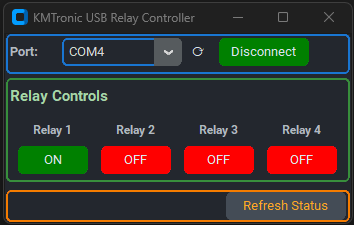
|
|
57
|
+
|
|
58
|
+
### four_channel_relay_app
|
|
59
|
+
|
|
60
|
+
```cmd
|
|
61
|
+
python -m src.kmtronic_usb_relay.four_channel_relay_app
|
|
62
|
+
```
|
|
63
|
+
|
|
64
|
+
## [source manual](https://chaitu-ycr.github.io/kmtronic-usb-relay/source-manual)
|
|
@@ -0,0 +1,8 @@
|
|
|
1
|
+
kmtronic_usb_relay/__init__.py,sha256=47DEQpj8HBSa-_TImW-5JCeuQeRkm5NMpJWZG3hSuFU,0
|
|
2
|
+
kmtronic_usb_relay/com_utils.py,sha256=gJSJC3rd60QpEKhro-xbRwmIZ-usYsmdlbch3EFa6UI,9621
|
|
3
|
+
kmtronic_usb_relay/four_channel_relay.py,sha256=2W8WSfm5V6bxvtInuTlcNhVkLGh0jl4AR0JHNvurcRk,7542
|
|
4
|
+
kmtronic_usb_relay/four_channel_relay_app.py,sha256=dtNBBq55hUD0C5Q7vwbi11BfTiepm2MT-jhfV7IiCMc,24749
|
|
5
|
+
kmtronic_usb_relay/four_channel_relay_gui.py,sha256=1ub1Ah9iFMwrnnpAmBiQJL7ptPkjCKaSsGsiXOTNyrM,13059
|
|
6
|
+
kmtronic_usb_relay-26.0.1.dist-info/WHEEL,sha256=fAguSjoiATBe7TNBkJwOjyL1Tt4wwiaQGtNtjRPNMQA,80
|
|
7
|
+
kmtronic_usb_relay-26.0.1.dist-info/METADATA,sha256=pRScMJhfwONPSZkN1R-_99FD9iLl3_eBZ0NHHqmj4bI,2748
|
|
8
|
+
kmtronic_usb_relay-26.0.1.dist-info/RECORD,,
|