kerykeion 5.0.2__py3-none-any.whl → 5.1.1__py3-none-any.whl
This diff represents the content of publicly available package versions that have been released to one of the supported registries. The information contained in this diff is provided for informational purposes only and reflects changes between package versions as they appear in their respective public registries.
Potentially problematic release.
This version of kerykeion might be problematic. Click here for more details.
- kerykeion/aspects/aspects_factory.py +11 -12
- kerykeion/backword.py +8 -4
- kerykeion/chart_data_factory.py +9 -6
- kerykeion/charts/chart_drawer.py +6 -6
- kerykeion/relationship_score_factory.py +1 -1
- kerykeion/report.py +6 -7
- kerykeion/schemas/kr_models.py +8 -10
- kerykeion/transits_time_range_factory.py +1 -1
- {kerykeion-5.0.2.dist-info → kerykeion-5.1.1.dist-info}/METADATA +651 -138
- {kerykeion-5.0.2.dist-info → kerykeion-5.1.1.dist-info}/RECORD +12 -12
- {kerykeion-5.0.2.dist-info → kerykeion-5.1.1.dist-info}/WHEEL +0 -0
- {kerykeion-5.0.2.dist-info → kerykeion-5.1.1.dist-info}/licenses/LICENSE +0 -0
|
@@ -1,6 +1,6 @@
|
|
|
1
1
|
Metadata-Version: 2.4
|
|
2
2
|
Name: kerykeion
|
|
3
|
-
Version: 5.
|
|
3
|
+
Version: 5.1.1
|
|
4
4
|
Summary: A Python library for astrological calculations, including natal charts, houses, planetary aspects, and SVG chart generation.
|
|
5
5
|
Project-URL: Homepage, https://www.kerykeion.net/
|
|
6
6
|
Project-URL: Repository, https://github.com/g-battaglia/kerykeion
|
|
@@ -86,6 +86,8 @@ Maintaining this project requires substantial time and effort. The Astrologer AP
|
|
|
86
86
|
- [**Donate**](#donate)
|
|
87
87
|
- [Table of Contents](#table-of-contents)
|
|
88
88
|
- [Installation](#installation)
|
|
89
|
+
- [Quick Start](#quick-start)
|
|
90
|
+
- [Documentation Map](#documentation-map)
|
|
89
91
|
- [Basic Usage](#basic-usage)
|
|
90
92
|
- [Generate a SVG Chart](#generate-a-svg-chart)
|
|
91
93
|
- [Birth Chart](#birth-chart)
|
|
@@ -152,6 +154,48 @@ Kerykeion requires **Python 3.9** or higher.
|
|
|
152
154
|
pip3 install kerykeion
|
|
153
155
|
```
|
|
154
156
|
|
|
157
|
+
## Quick Start
|
|
158
|
+
|
|
159
|
+
```python
|
|
160
|
+
from pathlib import Path
|
|
161
|
+
from kerykeion import AstrologicalSubjectFactory
|
|
162
|
+
from kerykeion.chart_data_factory import ChartDataFactory
|
|
163
|
+
from kerykeion.charts.chart_drawer import ChartDrawer
|
|
164
|
+
|
|
165
|
+
subject = AstrologicalSubjectFactory.from_birth_data(
|
|
166
|
+
name="Example Person",
|
|
167
|
+
year=1990, month=7, day=15,
|
|
168
|
+
hour=10, minute=30,
|
|
169
|
+
lng=12.4964,
|
|
170
|
+
lat=41.9028,
|
|
171
|
+
tz_str="Europe/Rome",
|
|
172
|
+
online=False,
|
|
173
|
+
)
|
|
174
|
+
|
|
175
|
+
chart_data = ChartDataFactory.create_natal_chart_data(subject)
|
|
176
|
+
chart_drawer = ChartDrawer(chart_data=chart_data)
|
|
177
|
+
|
|
178
|
+
output_dir = Path("charts_output")
|
|
179
|
+
output_dir.mkdir(exist_ok=True)
|
|
180
|
+
|
|
181
|
+
chart_drawer.save_svg(output_path=output_dir, filename="example-natal")
|
|
182
|
+
print("Chart saved to", (output_dir / "example-natal.svg").resolve())
|
|
183
|
+
```
|
|
184
|
+
|
|
185
|
+
This script shows the recommended workflow:
|
|
186
|
+
1. Create an `AstrologicalSubject` with explicit coordinates and timezone (offline mode).
|
|
187
|
+
2. Build a `ChartDataModel` through `ChartDataFactory`.
|
|
188
|
+
3. Render the SVG via `ChartDrawer`, saving it to a controlled folder (`charts_output`).
|
|
189
|
+
|
|
190
|
+
Use the same pattern for synastry, composite, transit, or return charts by swapping the factory method.
|
|
191
|
+
|
|
192
|
+
## Documentation Map
|
|
193
|
+
|
|
194
|
+
- **README (this file):** Quick start, common recipes, and v5 migration notes.
|
|
195
|
+
- **`site-docs/` (offline Markdown guides):** Deep dives for each factory (`chart_data_factory.md`, `charts.md`, `planetary_return_factory.md`, etc.) with runnable snippets. Run `python scripts/test_markdown_snippets.py site-docs` to validate them locally.
|
|
196
|
+
- **[Auto-generated API Reference](https://www.kerykeion.net/pydocs/kerykeion.html):** Detailed model and function signatures straight from the codebase.
|
|
197
|
+
- **[Kerykeion website](https://www.kerykeion.net/docs/):** Rendered documentation with additional context, tutorials, and showcase material.
|
|
198
|
+
|
|
155
199
|
## Basic Usage
|
|
156
200
|
|
|
157
201
|
Below is a simple example illustrating the creation of an astrological subject and retrieving astrological details:
|
|
@@ -161,7 +205,13 @@ from kerykeion import AstrologicalSubjectFactory
|
|
|
161
205
|
|
|
162
206
|
# Create an instance of the AstrologicalSubjectFactory class.
|
|
163
207
|
# Arguments: Name, year, month, day, hour, minutes, city, nation
|
|
164
|
-
john = AstrologicalSubjectFactory.from_birth_data(
|
|
208
|
+
john = AstrologicalSubjectFactory.from_birth_data(
|
|
209
|
+
"John Lennon", 1940, 10, 9, 18, 30,
|
|
210
|
+
lng=-2.9833,
|
|
211
|
+
lat=53.4,
|
|
212
|
+
tz_str="Europe/London",
|
|
213
|
+
online=False,
|
|
214
|
+
)
|
|
165
215
|
|
|
166
216
|
# Retrieve information about the Sun:
|
|
167
217
|
print(john.sun.model_dump_json())
|
|
@@ -176,6 +226,9 @@ print(john.moon.element)
|
|
|
176
226
|
# > 'Air'
|
|
177
227
|
```
|
|
178
228
|
|
|
229
|
+
> **Working offline:** pass `online=False` and specify `lng`, `lat`, and `tz_str` as shown above.
|
|
230
|
+
> **Working online:** set `online=True` and provide `city`, `nation`, and a valid GeoNames username (see `AstrologicalSubjectFactory.from_birth_data()` for details).
|
|
231
|
+
|
|
179
232
|
**To avoid using GeoNames online, specify longitude, latitude, and timezone instead of city and nation:**
|
|
180
233
|
|
|
181
234
|
```python
|
|
@@ -190,6 +243,8 @@ john = AstrologicalSubjectFactory.from_birth_data(
|
|
|
190
243
|
|
|
191
244
|
## Generate a SVG Chart
|
|
192
245
|
|
|
246
|
+
All chart-rendering examples below create a local `charts_output/` folder so the tests can write without touching your home directory. Feel free to change the path when integrating into your own projects.
|
|
247
|
+
|
|
193
248
|
To generate a chart, use the `ChartDataFactory` to pre-compute chart data, then `ChartDrawer` to create the visualization. This two-step process ensures clean separation between astrological calculations and chart rendering.
|
|
194
249
|
|
|
195
250
|
**Tip:**
|
|
@@ -199,40 +254,60 @@ To improve compatibility across different applications, you can use the `remove_
|
|
|
199
254
|
### Birth Chart
|
|
200
255
|
|
|
201
256
|
```python
|
|
257
|
+
from pathlib import Path
|
|
202
258
|
from kerykeion import AstrologicalSubjectFactory
|
|
203
259
|
from kerykeion.chart_data_factory import ChartDataFactory
|
|
204
260
|
from kerykeion.charts.chart_drawer import ChartDrawer
|
|
205
261
|
|
|
206
262
|
# Step 1: Create subject
|
|
207
|
-
john = AstrologicalSubjectFactory.from_birth_data(
|
|
263
|
+
john = AstrologicalSubjectFactory.from_birth_data(
|
|
264
|
+
"John Lennon", 1940, 10, 9, 18, 30,
|
|
265
|
+
lng=-2.9833,
|
|
266
|
+
lat=53.4,
|
|
267
|
+
tz_str="Europe/London",
|
|
268
|
+
online=False,
|
|
269
|
+
)
|
|
208
270
|
|
|
209
271
|
# Step 2: Pre-compute chart data
|
|
210
272
|
chart_data = ChartDataFactory.create_natal_chart_data(john)
|
|
211
273
|
|
|
212
274
|
# Step 3: Create visualization
|
|
213
275
|
birth_chart_svg = ChartDrawer(chart_data=chart_data)
|
|
214
|
-
|
|
276
|
+
|
|
277
|
+
output_dir = Path("charts_output")
|
|
278
|
+
output_dir.mkdir(exist_ok=True)
|
|
279
|
+
birth_chart_svg.save_svg(output_path=output_dir, filename="john-lennon-natal")
|
|
215
280
|
```
|
|
216
281
|
|
|
217
|
-
The SVG file
|
|
282
|
+
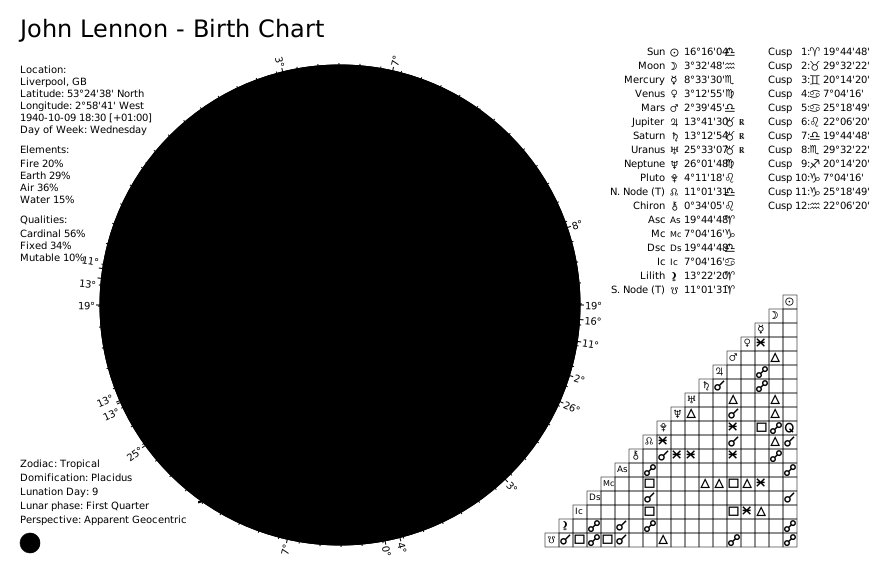
The SVG file is saved under `charts_output/john-lennon-natal.svg`.
|
|
218
283
|
|
|
219
284
|
|
|
220
285
|
### External Birth Chart
|
|
221
286
|
|
|
222
287
|
```python
|
|
288
|
+
from pathlib import Path
|
|
223
289
|
from kerykeion import AstrologicalSubjectFactory
|
|
224
290
|
from kerykeion.chart_data_factory import ChartDataFactory
|
|
225
291
|
from kerykeion.charts.chart_drawer import ChartDrawer
|
|
226
292
|
|
|
227
293
|
# Step 1: Create subject
|
|
228
|
-
birth_chart = AstrologicalSubjectFactory.from_birth_data(
|
|
294
|
+
birth_chart = AstrologicalSubjectFactory.from_birth_data(
|
|
295
|
+
"John Lennon", 1940, 10, 9, 18, 30,
|
|
296
|
+
lng=-2.9833,
|
|
297
|
+
lat=53.4,
|
|
298
|
+
tz_str="Europe/London",
|
|
299
|
+
online=False,
|
|
300
|
+
)
|
|
229
301
|
|
|
230
302
|
# Step 2: Pre-compute chart data for external natal chart
|
|
231
303
|
chart_data = ChartDataFactory.create_natal_chart_data(birth_chart)
|
|
232
304
|
|
|
233
305
|
# Step 3: Create visualization
|
|
234
306
|
birth_chart_svg = ChartDrawer(chart_data=chart_data)
|
|
235
|
-
|
|
307
|
+
|
|
308
|
+
output_dir = Path("charts_output")
|
|
309
|
+
output_dir.mkdir(exist_ok=True)
|
|
310
|
+
birth_chart_svg.save_svg(output_path=output_dir, filename="john-lennon-natal-external")
|
|
236
311
|
```
|
|
237
312
|
|
|
238
313
|

|
|
@@ -240,20 +315,36 @@ birth_chart_svg.save_svg()
|
|
|
240
315
|
### Synastry Chart
|
|
241
316
|
|
|
242
317
|
```python
|
|
318
|
+
from pathlib import Path
|
|
243
319
|
from kerykeion import AstrologicalSubjectFactory
|
|
244
320
|
from kerykeion.chart_data_factory import ChartDataFactory
|
|
245
321
|
from kerykeion.charts.chart_drawer import ChartDrawer
|
|
246
322
|
|
|
247
323
|
# Step 1: Create subjects
|
|
248
|
-
first = AstrologicalSubjectFactory.from_birth_data(
|
|
249
|
-
|
|
324
|
+
first = AstrologicalSubjectFactory.from_birth_data(
|
|
325
|
+
"John Lennon", 1940, 10, 9, 18, 30,
|
|
326
|
+
lng=-2.9833,
|
|
327
|
+
lat=53.4,
|
|
328
|
+
tz_str="Europe/London",
|
|
329
|
+
online=False,
|
|
330
|
+
)
|
|
331
|
+
second = AstrologicalSubjectFactory.from_birth_data(
|
|
332
|
+
"Paul McCartney", 1942, 6, 18, 15, 30,
|
|
333
|
+
lng=-2.9833,
|
|
334
|
+
lat=53.4,
|
|
335
|
+
tz_str="Europe/London",
|
|
336
|
+
online=False,
|
|
337
|
+
)
|
|
250
338
|
|
|
251
339
|
# Step 2: Pre-compute synastry chart data
|
|
252
340
|
chart_data = ChartDataFactory.create_synastry_chart_data(first, second)
|
|
253
341
|
|
|
254
342
|
# Step 3: Create visualization
|
|
255
343
|
synastry_chart = ChartDrawer(chart_data=chart_data)
|
|
256
|
-
|
|
344
|
+
|
|
345
|
+
output_dir = Path("charts_output")
|
|
346
|
+
output_dir.mkdir(exist_ok=True)
|
|
347
|
+
synastry_chart.save_svg(output_path=output_dir, filename="lennon-mccartney-synastry")
|
|
257
348
|
```
|
|
258
349
|
|
|
259
350
|
|
|
@@ -261,20 +352,36 @@ synastry_chart.save_svg()
|
|
|
261
352
|
### Transit Chart
|
|
262
353
|
|
|
263
354
|
```python
|
|
355
|
+
from pathlib import Path
|
|
264
356
|
from kerykeion import AstrologicalSubjectFactory
|
|
265
357
|
from kerykeion.chart_data_factory import ChartDataFactory
|
|
266
358
|
from kerykeion.charts.chart_drawer import ChartDrawer
|
|
267
359
|
|
|
268
360
|
# Step 1: Create subjects
|
|
269
|
-
transit = AstrologicalSubjectFactory.from_birth_data(
|
|
270
|
-
|
|
361
|
+
transit = AstrologicalSubjectFactory.from_birth_data(
|
|
362
|
+
"Transit", 2025, 6, 8, 8, 45,
|
|
363
|
+
lng=-84.3880,
|
|
364
|
+
lat=33.7490,
|
|
365
|
+
tz_str="America/New_York",
|
|
366
|
+
online=False,
|
|
367
|
+
)
|
|
368
|
+
subject = AstrologicalSubjectFactory.from_birth_data(
|
|
369
|
+
"John Lennon", 1940, 10, 9, 18, 30,
|
|
370
|
+
lng=-2.9833,
|
|
371
|
+
lat=53.4,
|
|
372
|
+
tz_str="Europe/London",
|
|
373
|
+
online=False,
|
|
374
|
+
)
|
|
271
375
|
|
|
272
376
|
# Step 2: Pre-compute transit chart data
|
|
273
377
|
chart_data = ChartDataFactory.create_transit_chart_data(subject, transit)
|
|
274
378
|
|
|
275
379
|
# Step 3: Create visualization
|
|
276
380
|
transit_chart = ChartDrawer(chart_data=chart_data)
|
|
277
|
-
|
|
381
|
+
|
|
382
|
+
output_dir = Path("charts_output")
|
|
383
|
+
output_dir.mkdir(exist_ok=True)
|
|
384
|
+
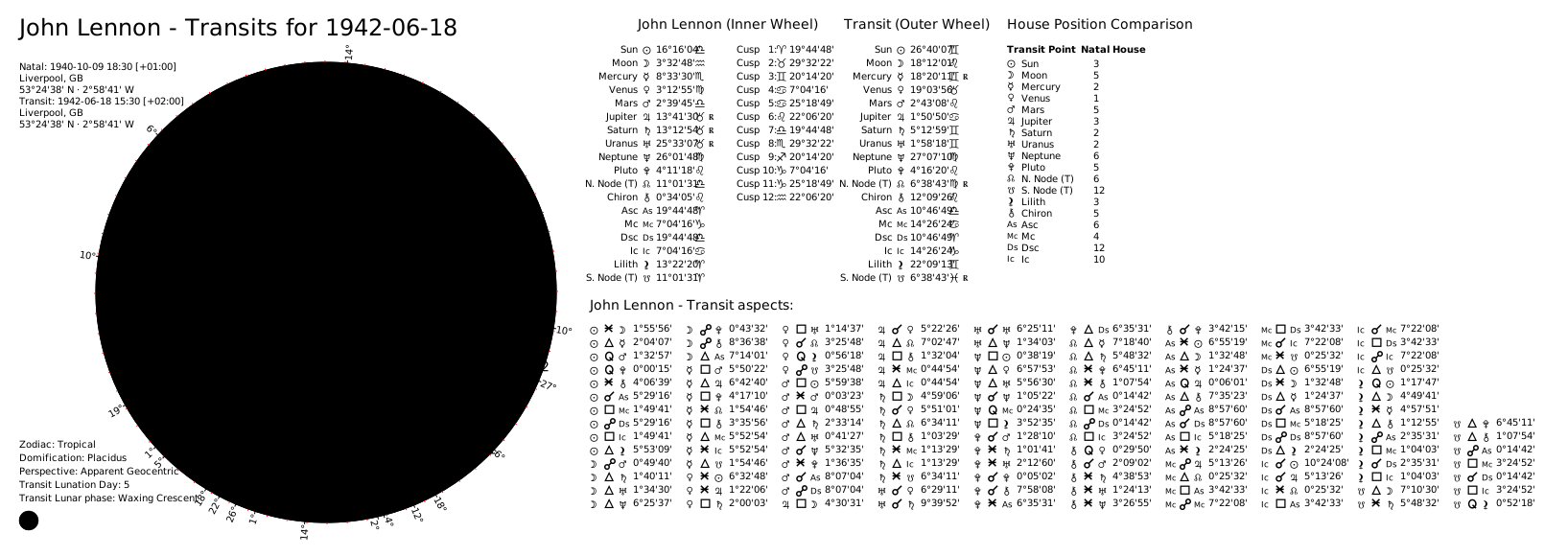
transit_chart.save_svg(output_path=output_dir, filename="john-lennon-transit")
|
|
278
385
|
```
|
|
279
386
|
|
|
280
387
|
|
|
@@ -282,13 +389,20 @@ transit_chart.save_svg()
|
|
|
282
389
|
### Solar Return Chart (Dual Wheel)
|
|
283
390
|
|
|
284
391
|
```python
|
|
392
|
+
from pathlib import Path
|
|
285
393
|
from kerykeion import AstrologicalSubjectFactory
|
|
286
394
|
from kerykeion.planetary_return_factory import PlanetaryReturnFactory
|
|
287
395
|
from kerykeion.chart_data_factory import ChartDataFactory
|
|
288
396
|
from kerykeion.charts.chart_drawer import ChartDrawer
|
|
289
397
|
|
|
290
398
|
# Step 1: Create natal subject
|
|
291
|
-
john = AstrologicalSubjectFactory.from_birth_data(
|
|
399
|
+
john = AstrologicalSubjectFactory.from_birth_data(
|
|
400
|
+
"John Lennon", 1940, 10, 9, 18, 30,
|
|
401
|
+
lng=-2.9833,
|
|
402
|
+
lat=53.4,
|
|
403
|
+
tz_str="Europe/London",
|
|
404
|
+
online=False,
|
|
405
|
+
)
|
|
292
406
|
|
|
293
407
|
# Step 2: Calculate Solar Return subject (offline example with manual coordinates)
|
|
294
408
|
return_factory = PlanetaryReturnFactory(
|
|
@@ -305,7 +419,10 @@ chart_data = ChartDataFactory.create_return_chart_data(john, solar_return_subjec
|
|
|
305
419
|
|
|
306
420
|
# Step 4: Create visualization
|
|
307
421
|
solar_return_chart = ChartDrawer(chart_data=chart_data)
|
|
308
|
-
|
|
422
|
+
|
|
423
|
+
output_dir = Path("charts_output")
|
|
424
|
+
output_dir.mkdir(exist_ok=True)
|
|
425
|
+
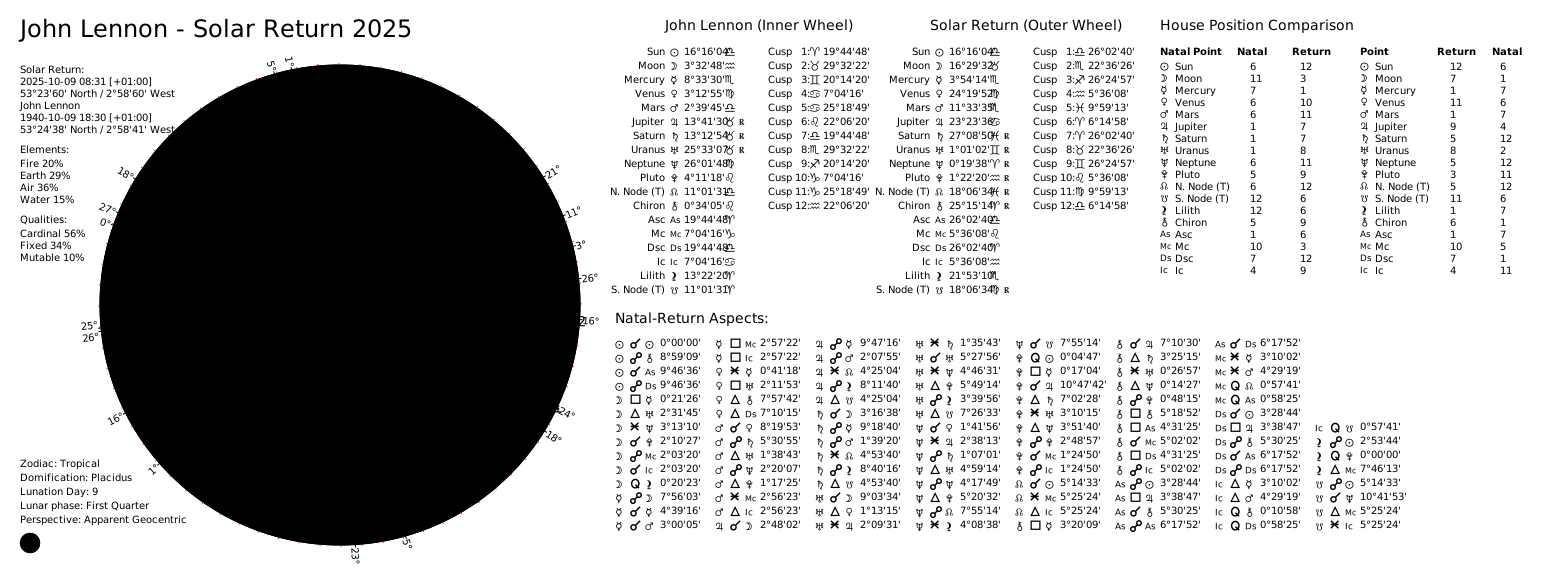
solar_return_chart.save_svg(output_path=output_dir, filename="john-lennon-solar-return-dual")
|
|
309
426
|
```
|
|
310
427
|
|
|
311
428
|
|
|
@@ -313,13 +430,20 @@ solar_return_chart.save_svg()
|
|
|
313
430
|
### Solar Return Chart (Single Wheel)
|
|
314
431
|
|
|
315
432
|
```python
|
|
433
|
+
from pathlib import Path
|
|
316
434
|
from kerykeion import AstrologicalSubjectFactory
|
|
317
435
|
from kerykeion.planetary_return_factory import PlanetaryReturnFactory
|
|
318
436
|
from kerykeion.chart_data_factory import ChartDataFactory
|
|
319
437
|
from kerykeion.charts.chart_drawer import ChartDrawer
|
|
320
438
|
|
|
321
439
|
# Step 1: Create natal subject
|
|
322
|
-
john = AstrologicalSubjectFactory.from_birth_data(
|
|
440
|
+
john = AstrologicalSubjectFactory.from_birth_data(
|
|
441
|
+
"John Lennon", 1940, 10, 9, 18, 30,
|
|
442
|
+
lng=-2.9833,
|
|
443
|
+
lat=53.4,
|
|
444
|
+
tz_str="Europe/London",
|
|
445
|
+
online=False,
|
|
446
|
+
)
|
|
323
447
|
|
|
324
448
|
# Step 2: Calculate Solar Return subject (offline example with manual coordinates)
|
|
325
449
|
return_factory = PlanetaryReturnFactory(
|
|
@@ -336,7 +460,10 @@ chart_data = ChartDataFactory.create_single_wheel_return_chart_data(solar_return
|
|
|
336
460
|
|
|
337
461
|
# Step 4: Create visualization
|
|
338
462
|
single_wheel_chart = ChartDrawer(chart_data=chart_data)
|
|
339
|
-
|
|
463
|
+
|
|
464
|
+
output_dir = Path("charts_output")
|
|
465
|
+
output_dir.mkdir(exist_ok=True)
|
|
466
|
+
single_wheel_chart.save_svg(output_path=output_dir, filename="john-lennon-solar-return-single")
|
|
340
467
|
```
|
|
341
468
|
|
|
342
469
|
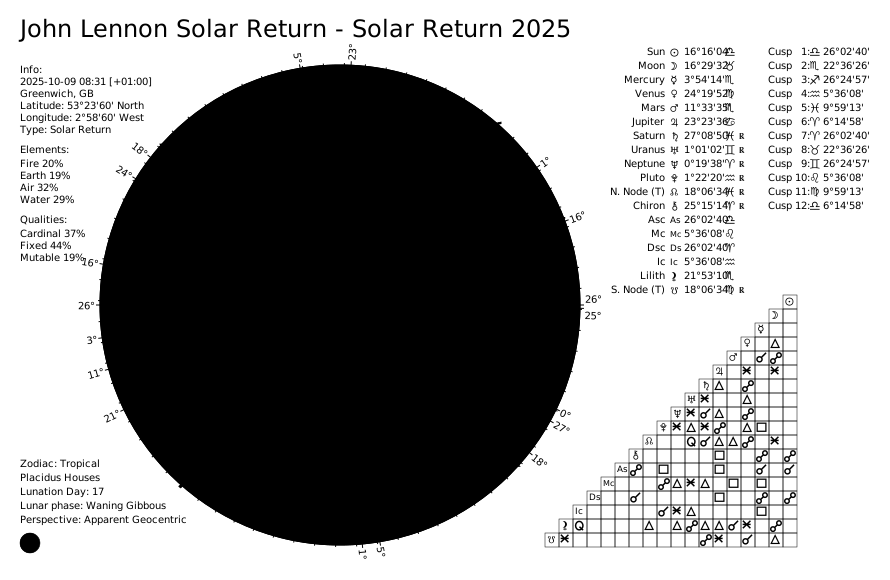
|
|
@@ -344,13 +471,20 @@ single_wheel_chart.save_svg()
|
|
|
344
471
|
### Lunar Return Chart
|
|
345
472
|
|
|
346
473
|
```python
|
|
474
|
+
from pathlib import Path
|
|
347
475
|
from kerykeion import AstrologicalSubjectFactory
|
|
348
476
|
from kerykeion.planetary_return_factory import PlanetaryReturnFactory
|
|
349
477
|
from kerykeion.chart_data_factory import ChartDataFactory
|
|
350
478
|
from kerykeion.charts.chart_drawer import ChartDrawer
|
|
351
479
|
|
|
352
480
|
# Step 1: Create natal subject
|
|
353
|
-
john = AstrologicalSubjectFactory.from_birth_data(
|
|
481
|
+
john = AstrologicalSubjectFactory.from_birth_data(
|
|
482
|
+
"John Lennon", 1940, 10, 9, 18, 30,
|
|
483
|
+
lng=-2.9833,
|
|
484
|
+
lat=53.4,
|
|
485
|
+
tz_str="Europe/London",
|
|
486
|
+
online=False,
|
|
487
|
+
)
|
|
354
488
|
|
|
355
489
|
# Step 2: Calculate Lunar Return subject
|
|
356
490
|
return_factory = PlanetaryReturnFactory(
|
|
@@ -365,12 +499,15 @@ lunar_return_subject = return_factory.next_return_from_year(1964, "Lunar")
|
|
|
365
499
|
# Step 3: Build a dual wheel (natal + lunar return)
|
|
366
500
|
lunar_return_chart_data = ChartDataFactory.create_return_chart_data(john, lunar_return_subject)
|
|
367
501
|
dual_wheel_chart = ChartDrawer(chart_data=lunar_return_chart_data)
|
|
368
|
-
|
|
502
|
+
|
|
503
|
+
output_dir = Path("charts_output")
|
|
504
|
+
output_dir.mkdir(exist_ok=True)
|
|
505
|
+
dual_wheel_chart.save_svg(output_path=output_dir, filename="john-lennon-lunar-return-dual")
|
|
369
506
|
|
|
370
507
|
# Optional: create a single-wheel lunar return
|
|
371
508
|
single_wheel_data = ChartDataFactory.create_single_wheel_return_chart_data(lunar_return_subject)
|
|
372
509
|
single_wheel_chart = ChartDrawer(chart_data=single_wheel_data)
|
|
373
|
-
single_wheel_chart.save_svg()
|
|
510
|
+
single_wheel_chart.save_svg(output_path=output_dir, filename="john-lennon-lunar-return-single")
|
|
374
511
|
```
|
|
375
512
|
|
|
376
513
|
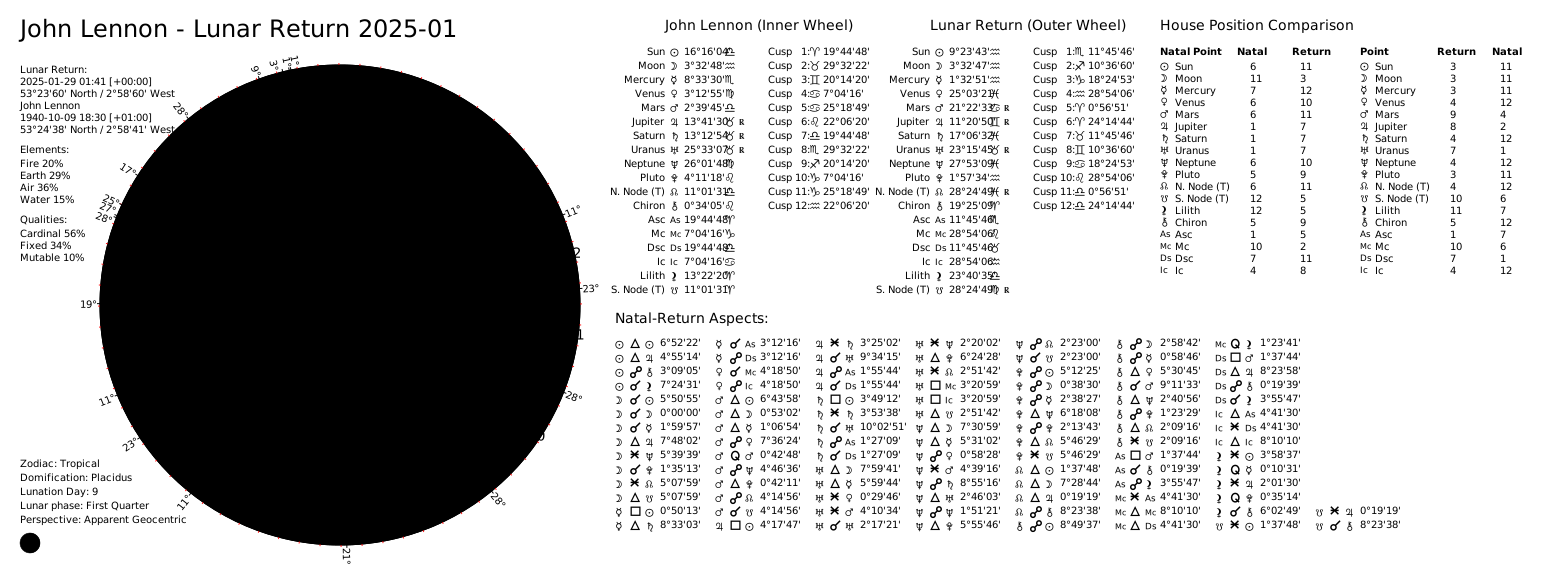
|
|
@@ -380,14 +517,27 @@ single_wheel_chart.save_svg()
|
|
|
380
517
|
### Composite Chart
|
|
381
518
|
|
|
382
519
|
```python
|
|
520
|
+
from pathlib import Path
|
|
383
521
|
from kerykeion import CompositeSubjectFactory, AstrologicalSubjectFactory
|
|
384
522
|
from kerykeion.chart_data_factory import ChartDataFactory
|
|
385
523
|
from kerykeion.charts.chart_drawer import ChartDrawer
|
|
386
524
|
|
|
387
|
-
# Step 1: Create subjects
|
|
388
|
-
angelina = AstrologicalSubjectFactory.from_birth_data(
|
|
525
|
+
# Step 1: Create subjects (offline configuration)
|
|
526
|
+
angelina = AstrologicalSubjectFactory.from_birth_data(
|
|
527
|
+
"Angelina Jolie", 1975, 6, 4, 9, 9,
|
|
528
|
+
lng=-118.2437,
|
|
529
|
+
lat=34.0522,
|
|
530
|
+
tz_str="America/Los_Angeles",
|
|
531
|
+
online=False,
|
|
532
|
+
)
|
|
389
533
|
|
|
390
|
-
brad = AstrologicalSubjectFactory.from_birth_data(
|
|
534
|
+
brad = AstrologicalSubjectFactory.from_birth_data(
|
|
535
|
+
"Brad Pitt", 1963, 12, 18, 6, 31,
|
|
536
|
+
lng=-96.7069,
|
|
537
|
+
lat=35.3273,
|
|
538
|
+
tz_str="America/Chicago",
|
|
539
|
+
online=False,
|
|
540
|
+
)
|
|
391
541
|
|
|
392
542
|
# Step 2: Create composite subject
|
|
393
543
|
factory = CompositeSubjectFactory(angelina, brad)
|
|
@@ -398,7 +548,10 @@ chart_data = ChartDataFactory.create_composite_chart_data(composite_model)
|
|
|
398
548
|
|
|
399
549
|
# Step 4: Create visualization
|
|
400
550
|
composite_chart = ChartDrawer(chart_data=chart_data)
|
|
401
|
-
|
|
551
|
+
|
|
552
|
+
output_dir = Path("charts_output")
|
|
553
|
+
output_dir.mkdir(exist_ok=True)
|
|
554
|
+
composite_chart.save_svg(output_path=output_dir, filename="jolie-pitt-composite")
|
|
402
555
|
```
|
|
403
556
|
|
|
404
557
|
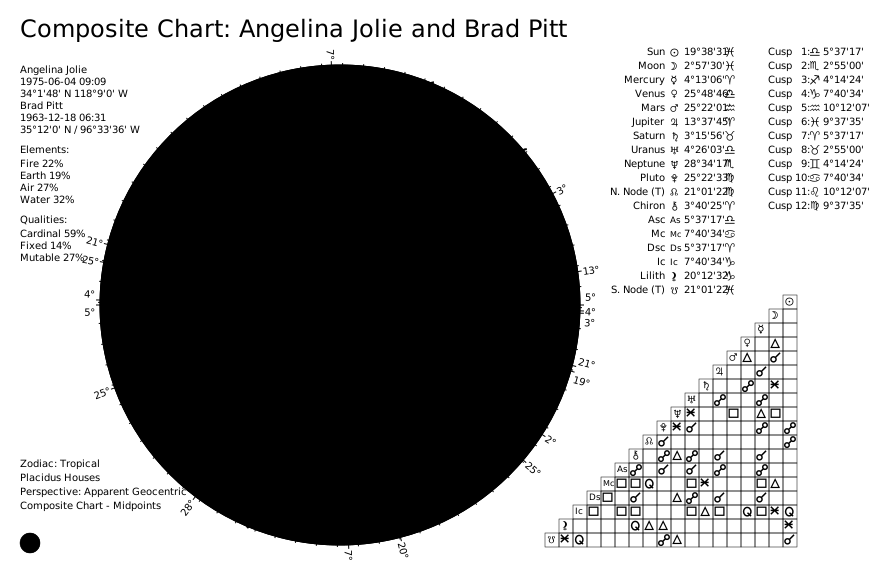
|
|
@@ -410,19 +563,29 @@ For _all_ the charts, you can generate a wheel-only chart by using the method `m
|
|
|
410
563
|
### Birth Chart
|
|
411
564
|
|
|
412
565
|
```python
|
|
566
|
+
from pathlib import Path
|
|
413
567
|
from kerykeion import AstrologicalSubjectFactory
|
|
414
568
|
from kerykeion.chart_data_factory import ChartDataFactory
|
|
415
569
|
from kerykeion.charts.chart_drawer import ChartDrawer
|
|
416
570
|
|
|
417
571
|
# Step 1: Create subject
|
|
418
|
-
birth_chart = AstrologicalSubjectFactory.from_birth_data(
|
|
572
|
+
birth_chart = AstrologicalSubjectFactory.from_birth_data(
|
|
573
|
+
"John Lennon", 1940, 10, 9, 18, 30,
|
|
574
|
+
lng=-2.9833,
|
|
575
|
+
lat=53.4,
|
|
576
|
+
tz_str="Europe/London",
|
|
577
|
+
online=False,
|
|
578
|
+
)
|
|
419
579
|
|
|
420
580
|
# Step 2: Pre-compute chart data
|
|
421
581
|
chart_data = ChartDataFactory.create_natal_chart_data(birth_chart)
|
|
422
582
|
|
|
423
583
|
# Step 3: Create visualization
|
|
424
584
|
birth_chart_svg = ChartDrawer(chart_data=chart_data)
|
|
425
|
-
|
|
585
|
+
|
|
586
|
+
output_dir = Path("charts_output")
|
|
587
|
+
output_dir.mkdir(exist_ok=True)
|
|
588
|
+
birth_chart_svg.save_wheel_only_svg_file(output_path=output_dir, filename="john-lennon-natal-wheel")
|
|
426
589
|
```
|
|
427
590
|
|
|
428
591
|
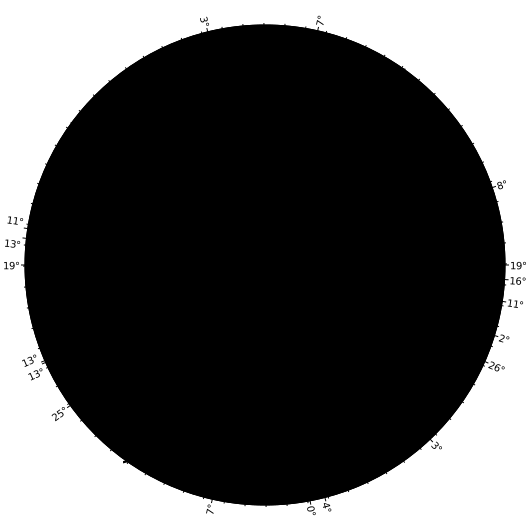
|
|
@@ -430,22 +593,29 @@ birth_chart_svg.save_wheel_only_svg_file()
|
|
|
430
593
|
### Wheel Only Birth Chart (External)
|
|
431
594
|
|
|
432
595
|
```python
|
|
596
|
+
from pathlib import Path
|
|
433
597
|
from kerykeion import AstrologicalSubjectFactory
|
|
434
598
|
from kerykeion.chart_data_factory import ChartDataFactory
|
|
435
599
|
from kerykeion.charts.chart_drawer import ChartDrawer
|
|
436
600
|
|
|
437
601
|
# Step 1: Create subject
|
|
438
|
-
birth_chart = AstrologicalSubjectFactory.from_birth_data(
|
|
602
|
+
birth_chart = AstrologicalSubjectFactory.from_birth_data(
|
|
603
|
+
"John Lennon", 1940, 10, 9, 18, 30,
|
|
604
|
+
lng=-2.9833,
|
|
605
|
+
lat=53.4,
|
|
606
|
+
tz_str="Europe/London",
|
|
607
|
+
online=False,
|
|
608
|
+
)
|
|
439
609
|
|
|
440
610
|
# Step 2: Pre-compute external natal chart data
|
|
441
611
|
chart_data = ChartDataFactory.create_natal_chart_data(birth_chart)
|
|
442
612
|
|
|
443
|
-
# Step 3: Create visualization
|
|
444
|
-
birth_chart_svg = ChartDrawer(chart_data=chart_data)
|
|
445
|
-
|
|
446
|
-
|
|
447
|
-
|
|
448
|
-
)
|
|
613
|
+
# Step 3: Create visualization (external wheel view)
|
|
614
|
+
birth_chart_svg = ChartDrawer(chart_data=chart_data, external_view=True)
|
|
615
|
+
|
|
616
|
+
output_dir = Path("charts_output")
|
|
617
|
+
output_dir.mkdir(exist_ok=True)
|
|
618
|
+
birth_chart_svg.save_wheel_only_svg_file(output_path=output_dir, filename="john-lennon-natal-wheel-external")
|
|
449
619
|
```
|
|
450
620
|
|
|
451
621
|

|
|
@@ -453,20 +623,36 @@ birth_chart_svg.save_wheel_only_svg_file(
|
|
|
453
623
|
### Synastry Chart
|
|
454
624
|
|
|
455
625
|
```python
|
|
626
|
+
from pathlib import Path
|
|
456
627
|
from kerykeion import AstrologicalSubjectFactory
|
|
457
628
|
from kerykeion.chart_data_factory import ChartDataFactory
|
|
458
629
|
from kerykeion.charts.chart_drawer import ChartDrawer
|
|
459
630
|
|
|
460
631
|
# Step 1: Create subjects
|
|
461
|
-
first = AstrologicalSubjectFactory.from_birth_data(
|
|
462
|
-
|
|
632
|
+
first = AstrologicalSubjectFactory.from_birth_data(
|
|
633
|
+
"John Lennon", 1940, 10, 9, 18, 30,
|
|
634
|
+
lng=-2.9833,
|
|
635
|
+
lat=53.4,
|
|
636
|
+
tz_str="Europe/London",
|
|
637
|
+
online=False,
|
|
638
|
+
)
|
|
639
|
+
second = AstrologicalSubjectFactory.from_birth_data(
|
|
640
|
+
"Paul McCartney", 1942, 6, 18, 15, 30,
|
|
641
|
+
lng=-2.9833,
|
|
642
|
+
lat=53.4,
|
|
643
|
+
tz_str="Europe/London",
|
|
644
|
+
online=False,
|
|
645
|
+
)
|
|
463
646
|
|
|
464
647
|
# Step 2: Pre-compute synastry chart data
|
|
465
648
|
chart_data = ChartDataFactory.create_synastry_chart_data(first, second)
|
|
466
649
|
|
|
467
650
|
# Step 3: Create visualization
|
|
468
651
|
synastry_chart = ChartDrawer(chart_data=chart_data)
|
|
469
|
-
|
|
652
|
+
|
|
653
|
+
output_dir = Path("charts_output")
|
|
654
|
+
output_dir.mkdir(exist_ok=True)
|
|
655
|
+
synastry_chart.save_wheel_only_svg_file(output_path=output_dir, filename="lennon-mccartney-synastry-wheel")
|
|
470
656
|
```
|
|
471
657
|
|
|
472
658
|
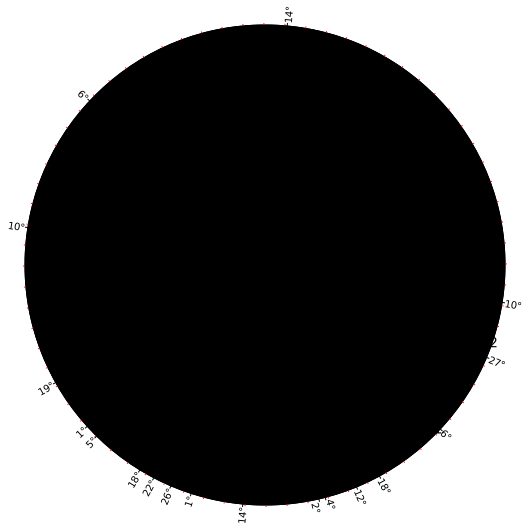
|
|
@@ -476,20 +662,37 @@ synastry_chart.save_wheel_only_svg_file()
|
|
|
476
662
|
To save the SVG file in a custom location, specify the `output_path` parameter in `save_svg()`:
|
|
477
663
|
|
|
478
664
|
```python
|
|
665
|
+
from pathlib import Path
|
|
479
666
|
from kerykeion import AstrologicalSubjectFactory
|
|
480
667
|
from kerykeion.chart_data_factory import ChartDataFactory
|
|
481
668
|
from kerykeion.charts.chart_drawer import ChartDrawer
|
|
482
669
|
|
|
483
670
|
# Step 1: Create subjects
|
|
484
|
-
first = AstrologicalSubjectFactory.from_birth_data(
|
|
485
|
-
|
|
671
|
+
first = AstrologicalSubjectFactory.from_birth_data(
|
|
672
|
+
"John Lennon", 1940, 10, 9, 18, 30,
|
|
673
|
+
lng=-2.9833,
|
|
674
|
+
lat=53.4,
|
|
675
|
+
tz_str="Europe/London",
|
|
676
|
+
online=False,
|
|
677
|
+
)
|
|
678
|
+
second = AstrologicalSubjectFactory.from_birth_data(
|
|
679
|
+
"Paul McCartney", 1942, 6, 18, 15, 30,
|
|
680
|
+
lng=-2.9833,
|
|
681
|
+
lat=53.4,
|
|
682
|
+
tz_str="Europe/London",
|
|
683
|
+
online=False,
|
|
684
|
+
)
|
|
486
685
|
|
|
487
686
|
# Step 2: Pre-compute synastry chart data
|
|
488
687
|
chart_data = ChartDataFactory.create_synastry_chart_data(first, second)
|
|
489
688
|
|
|
490
689
|
# Step 3: Create visualization with custom output directory
|
|
491
690
|
synastry_chart = ChartDrawer(chart_data=chart_data)
|
|
492
|
-
|
|
691
|
+
|
|
692
|
+
output_dir = Path("my_charts")
|
|
693
|
+
output_dir.mkdir(exist_ok=True)
|
|
694
|
+
synastry_chart.save_svg(output_path=output_dir)
|
|
695
|
+
print("Saved to", (output_dir / f"{synastry_chart.first_obj.name} - Synastry Chart.svg").resolve())
|
|
493
696
|
```
|
|
494
697
|
|
|
495
698
|
### Change Language
|
|
@@ -497,12 +700,19 @@ synastry_chart.save_svg(output_path=".")
|
|
|
497
700
|
You can switch chart language by passing `chart_language` to the `ChartDrawer` class:
|
|
498
701
|
|
|
499
702
|
```python
|
|
703
|
+
from pathlib import Path
|
|
500
704
|
from kerykeion import AstrologicalSubjectFactory
|
|
501
705
|
from kerykeion.chart_data_factory import ChartDataFactory
|
|
502
706
|
from kerykeion.charts.chart_drawer import ChartDrawer
|
|
503
707
|
|
|
504
708
|
# Step 1: Create subject
|
|
505
|
-
birth_chart = AstrologicalSubjectFactory.from_birth_data(
|
|
709
|
+
birth_chart = AstrologicalSubjectFactory.from_birth_data(
|
|
710
|
+
"John Lennon", 1940, 10, 9, 18, 30,
|
|
711
|
+
lng=-2.9833,
|
|
712
|
+
lat=53.4,
|
|
713
|
+
tz_str="Europe/London",
|
|
714
|
+
online=False,
|
|
715
|
+
)
|
|
506
716
|
|
|
507
717
|
# Step 2: Pre-compute chart data
|
|
508
718
|
chart_data = ChartDataFactory.create_natal_chart_data(birth_chart)
|
|
@@ -512,7 +722,10 @@ birth_chart_svg = ChartDrawer(
|
|
|
512
722
|
chart_data=chart_data,
|
|
513
723
|
chart_language="IT" # Change to Italian
|
|
514
724
|
)
|
|
515
|
-
|
|
725
|
+
|
|
726
|
+
output_dir = Path("charts_output")
|
|
727
|
+
output_dir.mkdir(exist_ok=True)
|
|
728
|
+
birth_chart_svg.save_svg(output_path=output_dir, filename="john-lennon-natal-it")
|
|
516
729
|
```
|
|
517
730
|
|
|
518
731
|
You can also provide custom labels (or introduce a brand-new language) by passing
|
|
@@ -520,6 +733,20 @@ a dictionary to `language_pack`. Only the keys you supply are merged on top of t
|
|
|
520
733
|
built-in strings:
|
|
521
734
|
|
|
522
735
|
```python
|
|
736
|
+
from pathlib import Path
|
|
737
|
+
from kerykeion import AstrologicalSubjectFactory
|
|
738
|
+
from kerykeion.chart_data_factory import ChartDataFactory
|
|
739
|
+
from kerykeion.charts.chart_drawer import ChartDrawer
|
|
740
|
+
|
|
741
|
+
birth_chart = AstrologicalSubjectFactory.from_birth_data(
|
|
742
|
+
"John Lennon", 1940, 10, 9, 18, 30,
|
|
743
|
+
lng=-2.9833,
|
|
744
|
+
lat=53.4,
|
|
745
|
+
tz_str="Europe/London",
|
|
746
|
+
online=False,
|
|
747
|
+
)
|
|
748
|
+
chart_data = ChartDataFactory.create_natal_chart_data(birth_chart)
|
|
749
|
+
|
|
523
750
|
custom_labels = {
|
|
524
751
|
"PT": {
|
|
525
752
|
"info": "Informações",
|
|
@@ -527,11 +754,15 @@ custom_labels = {
|
|
|
527
754
|
}
|
|
528
755
|
}
|
|
529
756
|
|
|
530
|
-
|
|
757
|
+
custom_chart = ChartDrawer(
|
|
531
758
|
chart_data=chart_data,
|
|
532
759
|
chart_language="PT",
|
|
533
760
|
language_pack=custom_labels["PT"],
|
|
534
761
|
)
|
|
762
|
+
|
|
763
|
+
output_dir = Path("charts_output")
|
|
764
|
+
output_dir.mkdir(exist_ok=True)
|
|
765
|
+
custom_chart.save_svg(output_path=output_dir, filename="john-lennon-natal-pt")
|
|
535
766
|
```
|
|
536
767
|
|
|
537
768
|
More details [here](https://www.kerykeion.net/docs/chart-language).
|
|
@@ -553,20 +784,32 @@ The available languages are:
|
|
|
553
784
|
To generate a minified SVG, set `minify_svg=True` in the `makeSVG()` method:
|
|
554
785
|
|
|
555
786
|
```python
|
|
787
|
+
from pathlib import Path
|
|
556
788
|
from kerykeion import AstrologicalSubjectFactory
|
|
557
789
|
from kerykeion.chart_data_factory import ChartDataFactory
|
|
558
790
|
from kerykeion.charts.chart_drawer import ChartDrawer
|
|
559
791
|
|
|
560
792
|
# Step 1: Create subject
|
|
561
|
-
birth_chart = AstrologicalSubjectFactory.from_birth_data(
|
|
793
|
+
birth_chart = AstrologicalSubjectFactory.from_birth_data(
|
|
794
|
+
"John Lennon", 1940, 10, 9, 18, 30,
|
|
795
|
+
lng=-2.9833,
|
|
796
|
+
lat=53.4,
|
|
797
|
+
tz_str="Europe/London",
|
|
798
|
+
online=False,
|
|
799
|
+
)
|
|
562
800
|
|
|
563
801
|
# Step 2: Pre-compute chart data
|
|
564
802
|
chart_data = ChartDataFactory.create_natal_chart_data(birth_chart)
|
|
565
803
|
|
|
566
804
|
# Step 3: Create visualization
|
|
567
805
|
birth_chart_svg = ChartDrawer(chart_data=chart_data)
|
|
806
|
+
|
|
807
|
+
output_dir = Path("charts_output")
|
|
808
|
+
output_dir.mkdir(exist_ok=True)
|
|
568
809
|
birth_chart_svg.save_svg(
|
|
569
|
-
|
|
810
|
+
output_path=output_dir,
|
|
811
|
+
filename="john-lennon-natal-minified",
|
|
812
|
+
minify=True,
|
|
570
813
|
)
|
|
571
814
|
```
|
|
572
815
|
|
|
@@ -575,20 +818,32 @@ birth_chart_svg.save_svg(
|
|
|
575
818
|
To generate an SVG without CSS variables, set `remove_css_variables=True` in the `makeSVG()` method:
|
|
576
819
|
|
|
577
820
|
```python
|
|
821
|
+
from pathlib import Path
|
|
578
822
|
from kerykeion import AstrologicalSubjectFactory
|
|
579
823
|
from kerykeion.chart_data_factory import ChartDataFactory
|
|
580
824
|
from kerykeion.charts.chart_drawer import ChartDrawer
|
|
581
825
|
|
|
582
826
|
# Step 1: Create subject
|
|
583
|
-
birth_chart = AstrologicalSubjectFactory.from_birth_data(
|
|
827
|
+
birth_chart = AstrologicalSubjectFactory.from_birth_data(
|
|
828
|
+
"John Lennon", 1940, 10, 9, 18, 30,
|
|
829
|
+
lng=-2.9833,
|
|
830
|
+
lat=53.4,
|
|
831
|
+
tz_str="Europe/London",
|
|
832
|
+
online=False,
|
|
833
|
+
)
|
|
584
834
|
|
|
585
835
|
# Step 2: Pre-compute chart data
|
|
586
836
|
chart_data = ChartDataFactory.create_natal_chart_data(birth_chart)
|
|
587
837
|
|
|
588
838
|
# Step 3: Create visualization
|
|
589
839
|
birth_chart_svg = ChartDrawer(chart_data=chart_data)
|
|
840
|
+
|
|
841
|
+
output_dir = Path("charts_output")
|
|
842
|
+
output_dir.mkdir(exist_ok=True)
|
|
590
843
|
birth_chart_svg.save_svg(
|
|
591
|
-
|
|
844
|
+
output_path=output_dir,
|
|
845
|
+
filename="john-lennon-natal-no-css-variables",
|
|
846
|
+
remove_css_variables=True,
|
|
592
847
|
)
|
|
593
848
|
```
|
|
594
849
|
|
|
@@ -599,20 +854,36 @@ This will inline all styles and eliminate CSS variables, resulting in an SVG tha
|
|
|
599
854
|
It's possible to generate a grid-only SVG, useful for creating a custom layout. To do this, use the `save_aspect_grid_only_svg_file()` method:
|
|
600
855
|
|
|
601
856
|
```python
|
|
857
|
+
from pathlib import Path
|
|
602
858
|
from kerykeion import AstrologicalSubjectFactory
|
|
603
859
|
from kerykeion.chart_data_factory import ChartDataFactory
|
|
604
860
|
from kerykeion.charts.chart_drawer import ChartDrawer
|
|
605
861
|
|
|
606
862
|
# Step 1: Create subjects
|
|
607
|
-
birth_chart = AstrologicalSubjectFactory.from_birth_data(
|
|
608
|
-
|
|
863
|
+
birth_chart = AstrologicalSubjectFactory.from_birth_data(
|
|
864
|
+
"John Lennon", 1940, 10, 9, 18, 30,
|
|
865
|
+
lng=-2.9833,
|
|
866
|
+
lat=53.4,
|
|
867
|
+
tz_str="Europe/London",
|
|
868
|
+
online=False,
|
|
869
|
+
)
|
|
870
|
+
second = AstrologicalSubjectFactory.from_birth_data(
|
|
871
|
+
"Paul McCartney", 1942, 6, 18, 15, 30,
|
|
872
|
+
lng=-2.9833,
|
|
873
|
+
lat=53.4,
|
|
874
|
+
tz_str="Europe/London",
|
|
875
|
+
online=False,
|
|
876
|
+
)
|
|
609
877
|
|
|
610
878
|
# Step 2: Pre-compute synastry chart data
|
|
611
879
|
chart_data = ChartDataFactory.create_synastry_chart_data(birth_chart, second)
|
|
612
880
|
|
|
613
881
|
# Step 3: Create visualization with dark theme
|
|
614
882
|
aspect_grid_chart = ChartDrawer(chart_data=chart_data, theme="dark")
|
|
615
|
-
|
|
883
|
+
|
|
884
|
+
output_dir = Path("charts_output")
|
|
885
|
+
output_dir.mkdir(exist_ok=True)
|
|
886
|
+
aspect_grid_chart.save_aspect_grid_only_svg_file(output_path=output_dir, filename="lennon-mccartney-aspect-grid")
|
|
616
887
|
```
|
|
617
888
|
|
|
618
889
|
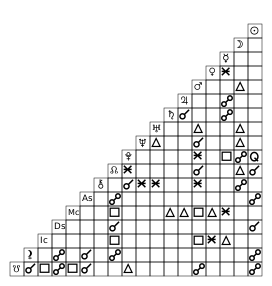
|
|
@@ -628,7 +899,11 @@ from kerykeion import ReportGenerator, AstrologicalSubjectFactory, ChartDataFact
|
|
|
628
899
|
|
|
629
900
|
# Subject-only report
|
|
630
901
|
subject = AstrologicalSubjectFactory.from_birth_data(
|
|
631
|
-
"Sample Natal", 1990, 7, 21, 14, 45,
|
|
902
|
+
"Sample Natal", 1990, 7, 21, 14, 45,
|
|
903
|
+
lng=12.4964,
|
|
904
|
+
lat=41.9028,
|
|
905
|
+
tz_str="Europe/Rome",
|
|
906
|
+
online=False,
|
|
632
907
|
)
|
|
633
908
|
ReportGenerator(subject).print_report(include_aspects=False)
|
|
634
909
|
|
|
@@ -638,7 +913,11 @@ ReportGenerator(natal_data).print_report(max_aspects=10)
|
|
|
638
913
|
|
|
639
914
|
# Dual-chart data (synastry, transit, dual return, …)
|
|
640
915
|
partner = AstrologicalSubjectFactory.from_birth_data(
|
|
641
|
-
"Sample Partner", 1992, 11, 5, 9, 30,
|
|
916
|
+
"Sample Partner", 1992, 11, 5, 9, 30,
|
|
917
|
+
lng=12.4964,
|
|
918
|
+
lat=41.9028,
|
|
919
|
+
tz_str="Europe/Rome",
|
|
920
|
+
online=False,
|
|
642
921
|
)
|
|
643
922
|
synastry_data = ChartDataFactory.create_synastry_chart_data(subject, partner)
|
|
644
923
|
ReportGenerator(synastry_data).print_report(max_aspects=12)
|
|
@@ -660,11 +939,21 @@ Each report contains:
|
|
|
660
939
|
All section helpers remain available for targeted output:
|
|
661
940
|
|
|
662
941
|
```python
|
|
942
|
+
from kerykeion import ReportGenerator, AstrologicalSubjectFactory, ChartDataFactory
|
|
943
|
+
|
|
944
|
+
subject = AstrologicalSubjectFactory.from_birth_data(
|
|
945
|
+
"Sample Natal", 1990, 7, 21, 14, 45,
|
|
946
|
+
lng=12.4964,
|
|
947
|
+
lat=41.9028,
|
|
948
|
+
tz_str="Europe/Rome",
|
|
949
|
+
online=False,
|
|
950
|
+
)
|
|
951
|
+
natal_data = ChartDataFactory.create_natal_chart_data(subject)
|
|
952
|
+
|
|
663
953
|
report = ReportGenerator(natal_data)
|
|
664
|
-
|
|
665
|
-
|
|
666
|
-
print(
|
|
667
|
-
print(report.get_aspects_report(max_aspects=5))
|
|
954
|
+
sections = report.generate_report(max_aspects=5).split("\n\n")
|
|
955
|
+
for section in sections[:3]:
|
|
956
|
+
print(section)
|
|
668
957
|
```
|
|
669
958
|
|
|
670
959
|
Refer to the refreshed [Report Documentation](https://www.kerykeion.net/report/) for end-to-end examples covering every supported chart model.
|
|
@@ -677,22 +966,32 @@ Kerykeion provides a unified `AspectsFactory` class for calculating astrological
|
|
|
677
966
|
from kerykeion import AspectsFactory, AstrologicalSubjectFactory
|
|
678
967
|
|
|
679
968
|
# Create astrological subjects
|
|
680
|
-
jack = AstrologicalSubjectFactory.from_birth_data(
|
|
681
|
-
|
|
969
|
+
jack = AstrologicalSubjectFactory.from_birth_data(
|
|
970
|
+
"Jack", 1990, 6, 15, 15, 15,
|
|
971
|
+
lng=12.4964,
|
|
972
|
+
lat=41.9028,
|
|
973
|
+
tz_str="Europe/Rome",
|
|
974
|
+
online=False,
|
|
975
|
+
)
|
|
976
|
+
jane = AstrologicalSubjectFactory.from_birth_data(
|
|
977
|
+
"Jane", 1991, 10, 25, 21, 0,
|
|
978
|
+
lng=12.4964,
|
|
979
|
+
lat=41.9028,
|
|
980
|
+
tz_str="Europe/Rome",
|
|
981
|
+
online=False,
|
|
982
|
+
)
|
|
682
983
|
|
|
683
984
|
# For single chart aspects (natal, return, composite, etc.)
|
|
684
|
-
|
|
685
|
-
print(f"Found {len(
|
|
686
|
-
print(
|
|
687
|
-
# Output: AspectModel with details like aspect type, orb, planets involved, etc.
|
|
985
|
+
single_chart_result = AspectsFactory.single_chart_aspects(jack)
|
|
986
|
+
print(f"Found {len(single_chart_result.aspects)} aspects in Jack's chart")
|
|
987
|
+
print(single_chart_result.aspects[0])
|
|
688
988
|
|
|
689
989
|
# For dual chart aspects (synastry, transits, comparisons, etc.)
|
|
690
|
-
|
|
691
|
-
print(f"Found {len(
|
|
692
|
-
print(
|
|
693
|
-
# Output: AspectModel with cross-chart aspect details
|
|
990
|
+
dual_chart_result = AspectsFactory.dual_chart_aspects(jack, jane)
|
|
991
|
+
print(f"Found {len(dual_chart_result.aspects)} aspects between Jack and Jane's charts")
|
|
992
|
+
print(dual_chart_result.aspects[0])
|
|
694
993
|
|
|
695
|
-
#
|
|
994
|
+
# Each AspectModel includes:
|
|
696
995
|
# - p1_name, p2_name: Planet/point names
|
|
697
996
|
# - aspect: Aspect type (conjunction, trine, square, etc.)
|
|
698
997
|
# - orbit: Orb tolerance in degrees
|
|
@@ -724,7 +1023,11 @@ You can refine the weighting without rebuilding the dictionary: pass lowercase p
|
|
|
724
1023
|
from kerykeion import AstrologicalSubjectFactory, ChartDataFactory
|
|
725
1024
|
|
|
726
1025
|
subject = AstrologicalSubjectFactory.from_birth_data(
|
|
727
|
-
"Sample", 1986, 4, 12, 8, 45,
|
|
1026
|
+
"Sample", 1986, 4, 12, 8, 45,
|
|
1027
|
+
lng=11.3426,
|
|
1028
|
+
lat=44.4949,
|
|
1029
|
+
tz_str="Europe/Rome",
|
|
1030
|
+
online=False,
|
|
728
1031
|
)
|
|
729
1032
|
|
|
730
1033
|
# Equal weighting: every active point counts once
|
|
@@ -758,7 +1061,10 @@ By default, the zodiac type is **Tropical**. To use **Sidereal**, specify the si
|
|
|
758
1061
|
```python
|
|
759
1062
|
johnny = AstrologicalSubjectFactory.from_birth_data(
|
|
760
1063
|
"Johnny Depp", 1963, 6, 9, 0, 0,
|
|
761
|
-
|
|
1064
|
+
lng=-87.1112,
|
|
1065
|
+
lat=37.7719,
|
|
1066
|
+
tz_str="America/Chicago",
|
|
1067
|
+
online=False,
|
|
762
1068
|
zodiac_type="Sidereal",
|
|
763
1069
|
sidereal_mode="LAHIRI"
|
|
764
1070
|
)
|
|
@@ -775,8 +1081,11 @@ By default, houses are calculated using **Placidus**. Configure a different hous
|
|
|
775
1081
|
```python
|
|
776
1082
|
johnny = AstrologicalSubjectFactory.from_birth_data(
|
|
777
1083
|
"Johnny Depp", 1963, 6, 9, 0, 0,
|
|
778
|
-
|
|
779
|
-
|
|
1084
|
+
lng=-87.1112,
|
|
1085
|
+
lat=37.7719,
|
|
1086
|
+
tz_str="America/Chicago",
|
|
1087
|
+
online=False,
|
|
1088
|
+
houses_system_identifier="M"
|
|
780
1089
|
)
|
|
781
1090
|
```
|
|
782
1091
|
|
|
@@ -793,7 +1102,10 @@ By default, Kerykeion uses the **Apparent Geocentric** perspective (the most sta
|
|
|
793
1102
|
```python
|
|
794
1103
|
johnny = AstrologicalSubjectFactory.from_birth_data(
|
|
795
1104
|
"Johnny Depp", 1963, 6, 9, 0, 0,
|
|
796
|
-
|
|
1105
|
+
lng=-87.1112,
|
|
1106
|
+
lat=37.7719,
|
|
1107
|
+
tz_str="America/Chicago",
|
|
1108
|
+
online=False,
|
|
797
1109
|
perspective_type="Heliocentric"
|
|
798
1110
|
)
|
|
799
1111
|
```
|
|
@@ -820,43 +1132,56 @@ The Black & White theme renders glyphs, rings, and aspects in solid black on lig
|
|
|
820
1132
|
Here's an example of how to set the theme:
|
|
821
1133
|
|
|
822
1134
|
```python
|
|
1135
|
+
from pathlib import Path
|
|
823
1136
|
from kerykeion import AstrologicalSubjectFactory
|
|
824
1137
|
from kerykeion.chart_data_factory import ChartDataFactory
|
|
825
1138
|
from kerykeion.charts.chart_drawer import ChartDrawer
|
|
826
1139
|
|
|
827
1140
|
# Step 1: Create subject
|
|
828
|
-
dark_theme_subject = AstrologicalSubjectFactory.from_birth_data(
|
|
1141
|
+
dark_theme_subject = AstrologicalSubjectFactory.from_birth_data(
|
|
1142
|
+
"John Lennon - Dark Theme", 1940, 10, 9, 18, 30,
|
|
1143
|
+
lng=-2.9833,
|
|
1144
|
+
lat=53.4,
|
|
1145
|
+
tz_str="Europe/London",
|
|
1146
|
+
online=False,
|
|
1147
|
+
)
|
|
829
1148
|
|
|
830
1149
|
# Step 2: Pre-compute chart data
|
|
831
1150
|
chart_data = ChartDataFactory.create_natal_chart_data(dark_theme_subject)
|
|
832
1151
|
|
|
833
1152
|
# Step 3: Create visualization with dark high contrast theme
|
|
834
1153
|
dark_theme_natal_chart = ChartDrawer(chart_data=chart_data, theme="dark-high-contrast")
|
|
835
|
-
|
|
1154
|
+
|
|
1155
|
+
output_dir = Path("charts_output")
|
|
1156
|
+
output_dir.mkdir(exist_ok=True)
|
|
1157
|
+
dark_theme_natal_chart.save_svg(output_path=output_dir, filename="john-lennon-natal-dark-high-contrast")
|
|
836
1158
|
```
|
|
837
1159
|
|
|
838
1160
|

|
|
839
1161
|
|
|
840
1162
|
## Alternative Initialization
|
|
841
1163
|
|
|
842
|
-
Create an `
|
|
843
|
-
|
|
844
|
-
```python
|
|
845
|
-
subject = AstrologicalSubject.get_from_iso_utc_time(
|
|
846
|
-
"Johnny Depp", "1963-06-09T05:00:00Z", "Owensboro", "US"
|
|
847
|
-
)
|
|
848
|
-
```
|
|
849
|
-
|
|
850
|
-
If you set `online=True`, provide a `geonames_username` to allow city-based geolocation:
|
|
1164
|
+
Create an `AstrologicalSubjectModel` from a UTC ISO 8601 string:
|
|
851
1165
|
|
|
852
1166
|
```python
|
|
853
|
-
from kerykeion
|
|
1167
|
+
from kerykeion import AstrologicalSubjectFactory
|
|
854
1168
|
|
|
855
|
-
subject =
|
|
856
|
-
"Johnny Depp",
|
|
1169
|
+
subject = AstrologicalSubjectFactory.from_iso_utc_time(
|
|
1170
|
+
name="Johnny Depp",
|
|
1171
|
+
iso_utc_time="1963-06-09T05:00:00Z",
|
|
1172
|
+
city="Owensboro",
|
|
1173
|
+
nation="US",
|
|
1174
|
+
lng=-87.1112,
|
|
1175
|
+
lat=37.7719,
|
|
1176
|
+
tz_str="America/Chicago",
|
|
1177
|
+
online=False,
|
|
857
1178
|
)
|
|
1179
|
+
|
|
1180
|
+
print(subject.iso_formatted_local_datetime)
|
|
858
1181
|
```
|
|
859
1182
|
|
|
1183
|
+
If you prefer automatic geocoding, set `online=True` and provide your GeoNames credentials via `geonames_username`.
|
|
1184
|
+
|
|
860
1185
|
## Lunar Nodes (Rahu & Ketu)
|
|
861
1186
|
|
|
862
1187
|
Kerykeion supports both **True** and **Mean** Lunar Nodes:
|
|
@@ -871,12 +1196,19 @@ In instances of the classes used to generate aspects and SVG charts, only the me
|
|
|
871
1196
|
Example:
|
|
872
1197
|
|
|
873
1198
|
```python
|
|
1199
|
+
from pathlib import Path
|
|
874
1200
|
from kerykeion import AstrologicalSubjectFactory
|
|
875
1201
|
from kerykeion.chart_data_factory import ChartDataFactory
|
|
876
1202
|
from kerykeion.charts.chart_drawer import ChartDrawer
|
|
877
1203
|
|
|
878
1204
|
# Step 1: Create subject
|
|
879
|
-
subject = AstrologicalSubjectFactory.from_birth_data(
|
|
1205
|
+
subject = AstrologicalSubjectFactory.from_birth_data(
|
|
1206
|
+
"John Lennon", 1940, 10, 9, 18, 30,
|
|
1207
|
+
lng=-2.9833,
|
|
1208
|
+
lat=53.4,
|
|
1209
|
+
tz_str="Europe/London",
|
|
1210
|
+
online=False,
|
|
1211
|
+
)
|
|
880
1212
|
|
|
881
1213
|
# Step 2: Pre-compute chart data with custom active points including true nodes
|
|
882
1214
|
chart_data = ChartDataFactory.create_natal_chart_data(
|
|
@@ -905,7 +1237,10 @@ chart_data = ChartDataFactory.create_natal_chart_data(
|
|
|
905
1237
|
|
|
906
1238
|
# Step 3: Create visualization
|
|
907
1239
|
chart = ChartDrawer(chart_data=chart_data)
|
|
908
|
-
|
|
1240
|
+
|
|
1241
|
+
output_dir = Path("charts_output")
|
|
1242
|
+
output_dir.mkdir(exist_ok=True)
|
|
1243
|
+
chart.save_svg(output_path=output_dir, filename="johnny-depp-custom-points")
|
|
909
1244
|
```
|
|
910
1245
|
|
|
911
1246
|
## JSON Support
|
|
@@ -915,9 +1250,15 @@ You can serialize the astrological subject (the base data used throughout the li
|
|
|
915
1250
|
```python
|
|
916
1251
|
from kerykeion import AstrologicalSubjectFactory
|
|
917
1252
|
|
|
918
|
-
johnny = AstrologicalSubjectFactory.from_birth_data(
|
|
1253
|
+
johnny = AstrologicalSubjectFactory.from_birth_data(
|
|
1254
|
+
"Johnny Depp", 1963, 6, 9, 0, 0,
|
|
1255
|
+
lng=-87.1112,
|
|
1256
|
+
lat=37.7719,
|
|
1257
|
+
tz_str="America/Chicago",
|
|
1258
|
+
online=False,
|
|
1259
|
+
)
|
|
919
1260
|
|
|
920
|
-
print(johnny.
|
|
1261
|
+
print(johnny.model_dump_json(indent=2))
|
|
921
1262
|
```
|
|
922
1263
|
|
|
923
1264
|
## Auto Generated Documentation
|
|
@@ -949,24 +1290,44 @@ The old class-based approach has been replaced with a modern factory pattern:
|
|
|
949
1290
|
**Old v4 API:**
|
|
950
1291
|
|
|
951
1292
|
```python
|
|
1293
|
+
from pathlib import Path
|
|
952
1294
|
from kerykeion import AstrologicalSubject, KerykeionChartSVG
|
|
953
1295
|
|
|
954
1296
|
# v4 - Class-based approach
|
|
955
|
-
|
|
956
|
-
|
|
1297
|
+
output_dir = Path("charts_output")
|
|
1298
|
+
output_dir.mkdir(exist_ok=True)
|
|
1299
|
+
|
|
1300
|
+
subject = AstrologicalSubject(
|
|
1301
|
+
"John", 1990, 1, 1, 12, 0,
|
|
1302
|
+
lng=-0.1276,
|
|
1303
|
+
lat=51.5074,
|
|
1304
|
+
tz_str="Europe/London",
|
|
1305
|
+
online=False,
|
|
1306
|
+
)
|
|
1307
|
+
chart = KerykeionChartSVG(subject, new_output_directory=output_dir)
|
|
957
1308
|
chart.makeSVG()
|
|
958
1309
|
```
|
|
959
1310
|
|
|
960
1311
|
**New v5 API:**
|
|
961
1312
|
|
|
962
1313
|
```python
|
|
1314
|
+
from pathlib import Path
|
|
963
1315
|
from kerykeion import AstrologicalSubjectFactory, ChartDataFactory, ChartDrawer
|
|
964
1316
|
|
|
965
1317
|
# v5 - Factory-based approach with separation of concerns
|
|
966
|
-
subject = AstrologicalSubjectFactory.from_birth_data(
|
|
1318
|
+
subject = AstrologicalSubjectFactory.from_birth_data(
|
|
1319
|
+
"John", 1990, 1, 1, 12, 0,
|
|
1320
|
+
lng=-0.1276,
|
|
1321
|
+
lat=51.5074,
|
|
1322
|
+
tz_str="Europe/London",
|
|
1323
|
+
online=False,
|
|
1324
|
+
)
|
|
967
1325
|
chart_data = ChartDataFactory.create_natal_chart_data(subject)
|
|
968
1326
|
drawer = ChartDrawer(chart_data=chart_data)
|
|
969
|
-
|
|
1327
|
+
|
|
1328
|
+
output_dir = Path("charts_output")
|
|
1329
|
+
output_dir.mkdir(exist_ok=True)
|
|
1330
|
+
drawer.save_svg(output_path=output_dir, filename="john-factory-demo")
|
|
970
1331
|
```
|
|
971
1332
|
|
|
972
1333
|
#### Pydantic 2 Models & Type Safety
|
|
@@ -975,7 +1336,7 @@ All data structures are now strongly typed Pydantic models:
|
|
|
975
1336
|
|
|
976
1337
|
- **`AstrologicalSubjectModel`**: Subject data with full validation
|
|
977
1338
|
- **`ChartDataModel`**: Enriched chart data with elements, qualities, aspects
|
|
978
|
-
- **`
|
|
1339
|
+
- **`AspectModel` list**: Raw aspect entries directly on `ChartDataModel.aspects`
|
|
979
1340
|
- **`PlanetReturnModel`**: Planetary return data
|
|
980
1341
|
- **`ElementDistributionModel`**: Element statistics (fire, earth, air, water)
|
|
981
1342
|
- **`QualityDistributionModel`**: Quality statistics (cardinal, fixed, mutable)
|
|
@@ -1072,11 +1433,27 @@ All lunar node fields have been renamed for clarity:
|
|
|
1072
1433
|
**Migration example:**
|
|
1073
1434
|
|
|
1074
1435
|
```python
|
|
1075
|
-
|
|
1076
|
-
print(subject.mean_node)
|
|
1436
|
+
from kerykeion import AstrologicalSubject, AstrologicalSubjectFactory
|
|
1077
1437
|
|
|
1078
|
-
#
|
|
1079
|
-
|
|
1438
|
+
# v4 alias (still available, emits DeprecationWarning)
|
|
1439
|
+
legacy_subject = AstrologicalSubject(
|
|
1440
|
+
"John", 1990, 1, 1, 12, 0,
|
|
1441
|
+
lng=-0.1276,
|
|
1442
|
+
lat=51.5074,
|
|
1443
|
+
tz_str="Europe/London",
|
|
1444
|
+
online=False,
|
|
1445
|
+
)
|
|
1446
|
+
print(legacy_subject.mean_node)
|
|
1447
|
+
|
|
1448
|
+
# v5 canonical name
|
|
1449
|
+
modern_subject = AstrologicalSubjectFactory.from_birth_data(
|
|
1450
|
+
"John", 1990, 1, 1, 12, 0,
|
|
1451
|
+
lng=-0.1276,
|
|
1452
|
+
lat=51.5074,
|
|
1453
|
+
tz_str="Europe/London",
|
|
1454
|
+
online=False,
|
|
1455
|
+
)
|
|
1456
|
+
print(modern_subject.mean_north_lunar_node)
|
|
1080
1457
|
```
|
|
1081
1458
|
|
|
1082
1459
|
#### 5. Axis Orb Filtering
|
|
@@ -1090,16 +1467,43 @@ The two-step process (data + rendering) is now required:
|
|
|
1090
1467
|
**Old v4:**
|
|
1091
1468
|
|
|
1092
1469
|
```python
|
|
1093
|
-
|
|
1470
|
+
from pathlib import Path
|
|
1471
|
+
from kerykeion import AstrologicalSubject, KerykeionChartSVG
|
|
1472
|
+
|
|
1473
|
+
output_dir = Path("charts_output")
|
|
1474
|
+
output_dir.mkdir(exist_ok=True)
|
|
1475
|
+
|
|
1476
|
+
subject = AstrologicalSubject(
|
|
1477
|
+
"John", 1990, 1, 1, 12, 0,
|
|
1478
|
+
lng=-0.1276,
|
|
1479
|
+
lat=51.5074,
|
|
1480
|
+
tz_str="Europe/London",
|
|
1481
|
+
online=False,
|
|
1482
|
+
)
|
|
1483
|
+
chart = KerykeionChartSVG(subject, new_output_directory=output_dir)
|
|
1094
1484
|
chart.makeSVG()
|
|
1095
1485
|
```
|
|
1096
1486
|
|
|
1097
1487
|
**New v5:**
|
|
1098
1488
|
|
|
1099
1489
|
```python
|
|
1490
|
+
from pathlib import Path
|
|
1491
|
+
from kerykeion import AstrologicalSubjectFactory, ChartDataFactory
|
|
1492
|
+
from kerykeion.charts.chart_drawer import ChartDrawer
|
|
1493
|
+
|
|
1494
|
+
subject = AstrologicalSubjectFactory.from_birth_data(
|
|
1495
|
+
"John", 1990, 1, 1, 12, 0,
|
|
1496
|
+
lng=-0.1276,
|
|
1497
|
+
lat=51.5074,
|
|
1498
|
+
tz_str="Europe/London",
|
|
1499
|
+
online=False,
|
|
1500
|
+
)
|
|
1100
1501
|
chart_data = ChartDataFactory.create_natal_chart_data(subject)
|
|
1101
1502
|
drawer = ChartDrawer(chart_data=chart_data)
|
|
1102
|
-
|
|
1503
|
+
|
|
1504
|
+
output_dir = Path("charts_output")
|
|
1505
|
+
output_dir.mkdir(exist_ok=True)
|
|
1506
|
+
drawer.save_svg(output_path=output_dir, filename="john-v5-demo")
|
|
1103
1507
|
```
|
|
1104
1508
|
|
|
1105
1509
|
#### 7. Aspects API Changes
|
|
@@ -1109,7 +1513,23 @@ Aspects are now calculated through the factory:
|
|
|
1109
1513
|
**Old v4:**
|
|
1110
1514
|
|
|
1111
1515
|
```python
|
|
1112
|
-
from kerykeion import NatalAspects, SynastryAspects
|
|
1516
|
+
from kerykeion import AstrologicalSubjectFactory, NatalAspects, SynastryAspects
|
|
1517
|
+
|
|
1518
|
+
subject = AstrologicalSubjectFactory.from_birth_data(
|
|
1519
|
+
"John", 1990, 1, 1, 12, 0,
|
|
1520
|
+
lng=-0.1276,
|
|
1521
|
+
lat=51.5074,
|
|
1522
|
+
tz_str="Europe/London",
|
|
1523
|
+
online=False,
|
|
1524
|
+
)
|
|
1525
|
+
subject1 = subject
|
|
1526
|
+
subject2 = AstrologicalSubjectFactory.from_birth_data(
|
|
1527
|
+
"Jane", 1990, 6, 5, 8, 30,
|
|
1528
|
+
lng=-0.1276,
|
|
1529
|
+
lat=51.5074,
|
|
1530
|
+
tz_str="Europe/London",
|
|
1531
|
+
online=False,
|
|
1532
|
+
)
|
|
1113
1533
|
|
|
1114
1534
|
natal_aspects = NatalAspects(subject)
|
|
1115
1535
|
synastry_aspects = SynastryAspects(subject1, subject2)
|
|
@@ -1118,12 +1538,30 @@ synastry_aspects = SynastryAspects(subject1, subject2)
|
|
|
1118
1538
|
**New v5:**
|
|
1119
1539
|
|
|
1120
1540
|
```python
|
|
1121
|
-
from kerykeion import AspectsFactory
|
|
1541
|
+
from kerykeion import AstrologicalSubjectFactory, AspectsFactory
|
|
1542
|
+
|
|
1543
|
+
subject = AstrologicalSubjectFactory.from_birth_data(
|
|
1544
|
+
"John", 1990, 1, 1, 12, 0,
|
|
1545
|
+
lng=-0.1276,
|
|
1546
|
+
lat=51.5074,
|
|
1547
|
+
tz_str="Europe/London",
|
|
1548
|
+
online=False,
|
|
1549
|
+
)
|
|
1550
|
+
subject1 = subject
|
|
1551
|
+
subject2 = AstrologicalSubjectFactory.from_birth_data(
|
|
1552
|
+
"Jane", 1990, 6, 5, 8, 30,
|
|
1553
|
+
lng=-0.1276,
|
|
1554
|
+
lat=51.5074,
|
|
1555
|
+
tz_str="Europe/London",
|
|
1556
|
+
online=False,
|
|
1557
|
+
)
|
|
1122
1558
|
|
|
1123
1559
|
natal_aspects = AspectsFactory.single_chart_aspects(subject)
|
|
1124
1560
|
synastry_aspects = AspectsFactory.dual_chart_aspects(subject1, subject2)
|
|
1125
1561
|
```
|
|
1126
1562
|
|
|
1563
|
+
Note (v5.1): The two lists `relevant_aspects` and `all_aspects` were unified into a single, cleaned list: `aspects`. If you previously used either property, switch to `aspects`. The legacy properties still work via the backward-compatibility layer but both return the same unified list.
|
|
1564
|
+
|
|
1127
1565
|
### 🔄 Migration Guide
|
|
1128
1566
|
|
|
1129
1567
|
#### Using the Backward Compatibility Layer
|
|
@@ -1133,7 +1571,13 @@ For a gradual migration, use the `kerykeion.backword` module:
|
|
|
1133
1571
|
```python
|
|
1134
1572
|
from kerykeion import AstrologicalSubject # Legacy wrapper
|
|
1135
1573
|
|
|
1136
|
-
subject = AstrologicalSubject(
|
|
1574
|
+
subject = AstrologicalSubject(
|
|
1575
|
+
"John Doe", 1990, 1, 1, 12, 0,
|
|
1576
|
+
lng=-0.1276,
|
|
1577
|
+
lat=51.5074,
|
|
1578
|
+
tz_str="Europe/London",
|
|
1579
|
+
online=False,
|
|
1580
|
+
)
|
|
1137
1581
|
|
|
1138
1582
|
# These still work but show DeprecationWarnings
|
|
1139
1583
|
print(subject.mean_node) # Maps to mean_north_lunar_node
|
|
@@ -1146,58 +1590,127 @@ print(subject.true_node) # Maps to true_north_lunar_node
|
|
|
1146
1590
|
|
|
1147
1591
|
1. **Update imports**
|
|
1148
1592
|
|
|
1149
|
-
|
|
1150
|
-
|
|
1151
|
-
|
|
1593
|
+
```python
|
|
1594
|
+
# Old (v4)
|
|
1595
|
+
from kerykeion import AstrologicalSubject, KerykeionChartSVG
|
|
1152
1596
|
|
|
1153
|
-
|
|
1154
|
-
|
|
1155
|
-
|
|
1597
|
+
# New (v5)
|
|
1598
|
+
from kerykeion import AstrologicalSubjectFactory, ChartDataFactory, ChartDrawer
|
|
1599
|
+
```
|
|
1156
1600
|
|
|
1157
1601
|
2. **Update subject creation**
|
|
1158
1602
|
|
|
1159
|
-
|
|
1160
|
-
|
|
1161
|
-
|
|
1603
|
+
```python
|
|
1604
|
+
from kerykeion import AstrologicalSubject, AstrologicalSubjectFactory
|
|
1605
|
+
|
|
1606
|
+
# Old (v4)
|
|
1607
|
+
subject = AstrologicalSubject(
|
|
1608
|
+
"John", 1990, 1, 1, 12, 0,
|
|
1609
|
+
lng=-0.1276,
|
|
1610
|
+
lat=51.5074,
|
|
1611
|
+
tz_str="Europe/London",
|
|
1612
|
+
online=False,
|
|
1613
|
+
)
|
|
1162
1614
|
|
|
1163
|
-
|
|
1164
|
-
|
|
1165
|
-
|
|
1615
|
+
# New (v5)
|
|
1616
|
+
subject = AstrologicalSubjectFactory.from_birth_data(
|
|
1617
|
+
"John", 1990, 1, 1, 12, 0,
|
|
1618
|
+
lng=-0.1276,
|
|
1619
|
+
lat=51.5074,
|
|
1620
|
+
tz_str="Europe/London",
|
|
1621
|
+
online=False,
|
|
1622
|
+
)
|
|
1623
|
+
```
|
|
1166
1624
|
|
|
1167
1625
|
3. **Update chart generation**
|
|
1168
1626
|
|
|
1169
|
-
|
|
1170
|
-
|
|
1171
|
-
|
|
1172
|
-
|
|
1627
|
+
```python
|
|
1628
|
+
from pathlib import Path
|
|
1629
|
+
from kerykeion import AstrologicalSubject, AstrologicalSubjectFactory, ChartDataFactory, KerykeionChartSVG
|
|
1630
|
+
from kerykeion.charts.chart_drawer import ChartDrawer
|
|
1631
|
+
|
|
1632
|
+
# Old (v4)
|
|
1633
|
+
legacy_subject = AstrologicalSubject(
|
|
1634
|
+
"John", 1990, 1, 1, 12, 0,
|
|
1635
|
+
lng=-0.1276,
|
|
1636
|
+
lat=51.5074,
|
|
1637
|
+
tz_str="Europe/London",
|
|
1638
|
+
online=False,
|
|
1639
|
+
)
|
|
1640
|
+
output_dir = Path("charts_output")
|
|
1641
|
+
output_dir.mkdir(exist_ok=True)
|
|
1173
1642
|
|
|
1174
|
-
|
|
1175
|
-
|
|
1176
|
-
|
|
1177
|
-
|
|
1178
|
-
|
|
1643
|
+
chart = KerykeionChartSVG(legacy_subject, new_output_directory=output_dir)
|
|
1644
|
+
chart.makeSVG()
|
|
1645
|
+
|
|
1646
|
+
# New (v5)
|
|
1647
|
+
modern_subject = AstrologicalSubjectFactory.from_birth_data(
|
|
1648
|
+
"John", 1990, 1, 1, 12, 0,
|
|
1649
|
+
lng=-0.1276,
|
|
1650
|
+
lat=51.5074,
|
|
1651
|
+
tz_str="Europe/London",
|
|
1652
|
+
online=False,
|
|
1653
|
+
)
|
|
1654
|
+
chart_data = ChartDataFactory.create_natal_chart_data(modern_subject)
|
|
1655
|
+
drawer = ChartDrawer(chart_data=chart_data)
|
|
1656
|
+
drawer.save_svg(output_path=output_dir, filename="john-v5-migration")
|
|
1657
|
+
```
|
|
1179
1658
|
|
|
1180
1659
|
4. **Update field access** (lunar nodes)
|
|
1181
1660
|
|
|
1182
|
-
|
|
1183
|
-
|
|
1184
|
-
print(subject.mean_node.position)
|
|
1661
|
+
```python
|
|
1662
|
+
from kerykeion import AstrologicalSubject, AstrologicalSubjectFactory
|
|
1185
1663
|
|
|
1186
|
-
|
|
1187
|
-
|
|
1188
|
-
|
|
1664
|
+
# Old (v4)
|
|
1665
|
+
legacy_subject = AstrologicalSubject(
|
|
1666
|
+
"John", 1990, 1, 1, 12, 0,
|
|
1667
|
+
lng=-0.1276,
|
|
1668
|
+
lat=51.5074,
|
|
1669
|
+
tz_str="Europe/London",
|
|
1670
|
+
online=False,
|
|
1671
|
+
)
|
|
1672
|
+
legacy_mean_node = legacy_subject.mean_node
|
|
1673
|
+
print(getattr(legacy_mean_node, "position", "Legacy mean node not active"))
|
|
1674
|
+
|
|
1675
|
+
# New (v5)
|
|
1676
|
+
modern_subject = AstrologicalSubjectFactory.from_birth_data(
|
|
1677
|
+
"John", 1990, 1, 1, 12, 0,
|
|
1678
|
+
lng=-0.1276,
|
|
1679
|
+
lat=51.5074,
|
|
1680
|
+
tz_str="Europe/London",
|
|
1681
|
+
online=False,
|
|
1682
|
+
)
|
|
1683
|
+
modern_mean_node = modern_subject.mean_north_lunar_node
|
|
1684
|
+
print(getattr(modern_mean_node, "position", "Modern mean node not active"))
|
|
1685
|
+
```
|
|
1189
1686
|
|
|
1190
1687
|
5. **Update aspects**
|
|
1191
1688
|
|
|
1192
|
-
|
|
1193
|
-
|
|
1194
|
-
from kerykeion import NatalAspects
|
|
1195
|
-
aspects = NatalAspects(subject)
|
|
1689
|
+
```python
|
|
1690
|
+
from kerykeion import AstrologicalSubject, AstrologicalSubjectFactory, NatalAspects, AspectsFactory
|
|
1196
1691
|
|
|
1197
|
-
|
|
1198
|
-
|
|
1199
|
-
|
|
1200
|
-
|
|
1692
|
+
# Old (v4)
|
|
1693
|
+
legacy_subject = AstrologicalSubject(
|
|
1694
|
+
"John", 1990, 1, 1, 12, 0,
|
|
1695
|
+
lng=-0.1276,
|
|
1696
|
+
lat=51.5074,
|
|
1697
|
+
tz_str="Europe/London",
|
|
1698
|
+
online=False,
|
|
1699
|
+
)
|
|
1700
|
+
legacy_aspects = NatalAspects(legacy_subject)
|
|
1701
|
+
print(f"Legacy aspects count: {len(legacy_aspects.relevant_aspects)}")
|
|
1702
|
+
|
|
1703
|
+
# New (v5)
|
|
1704
|
+
modern_subject = AstrologicalSubjectFactory.from_birth_data(
|
|
1705
|
+
"John", 1990, 1, 1, 12, 0,
|
|
1706
|
+
lng=-0.1276,
|
|
1707
|
+
lat=51.5074,
|
|
1708
|
+
tz_str="Europe/London",
|
|
1709
|
+
online=False,
|
|
1710
|
+
)
|
|
1711
|
+
modern_aspects = AspectsFactory.single_chart_aspects(modern_subject)
|
|
1712
|
+
print(f"Modern aspects count: {len(modern_aspects.aspects)}")
|
|
1713
|
+
```
|
|
1201
1714
|
|
|
1202
1715
|
#### Automated Migration Script
|
|
1203
1716
|
|