hcom 0.4.2.post3__py3-none-any.whl → 0.5.0__py3-none-any.whl
This diff represents the content of publicly available package versions that have been released to one of the supported registries. The information contained in this diff is provided for informational purposes only and reflects changes between package versions as they appear in their respective public registries.
Potentially problematic release.
This version of hcom might be problematic. Click here for more details.
- hcom/__init__.py +1 -1
- hcom/__main__.py +281 -341
- hcom-0.5.0.dist-info/METADATA +257 -0
- hcom-0.5.0.dist-info/RECORD +7 -0
- hcom-0.4.2.post3.dist-info/METADATA +0 -452
- hcom-0.4.2.post3.dist-info/RECORD +0 -7
- {hcom-0.4.2.post3.dist-info → hcom-0.5.0.dist-info}/WHEEL +0 -0
- {hcom-0.4.2.post3.dist-info → hcom-0.5.0.dist-info}/entry_points.txt +0 -0
- {hcom-0.4.2.post3.dist-info → hcom-0.5.0.dist-info}/top_level.txt +0 -0
|
@@ -1,452 +0,0 @@
|
|
|
1
|
-
Metadata-Version: 2.4
|
|
2
|
-
Name: hcom
|
|
3
|
-
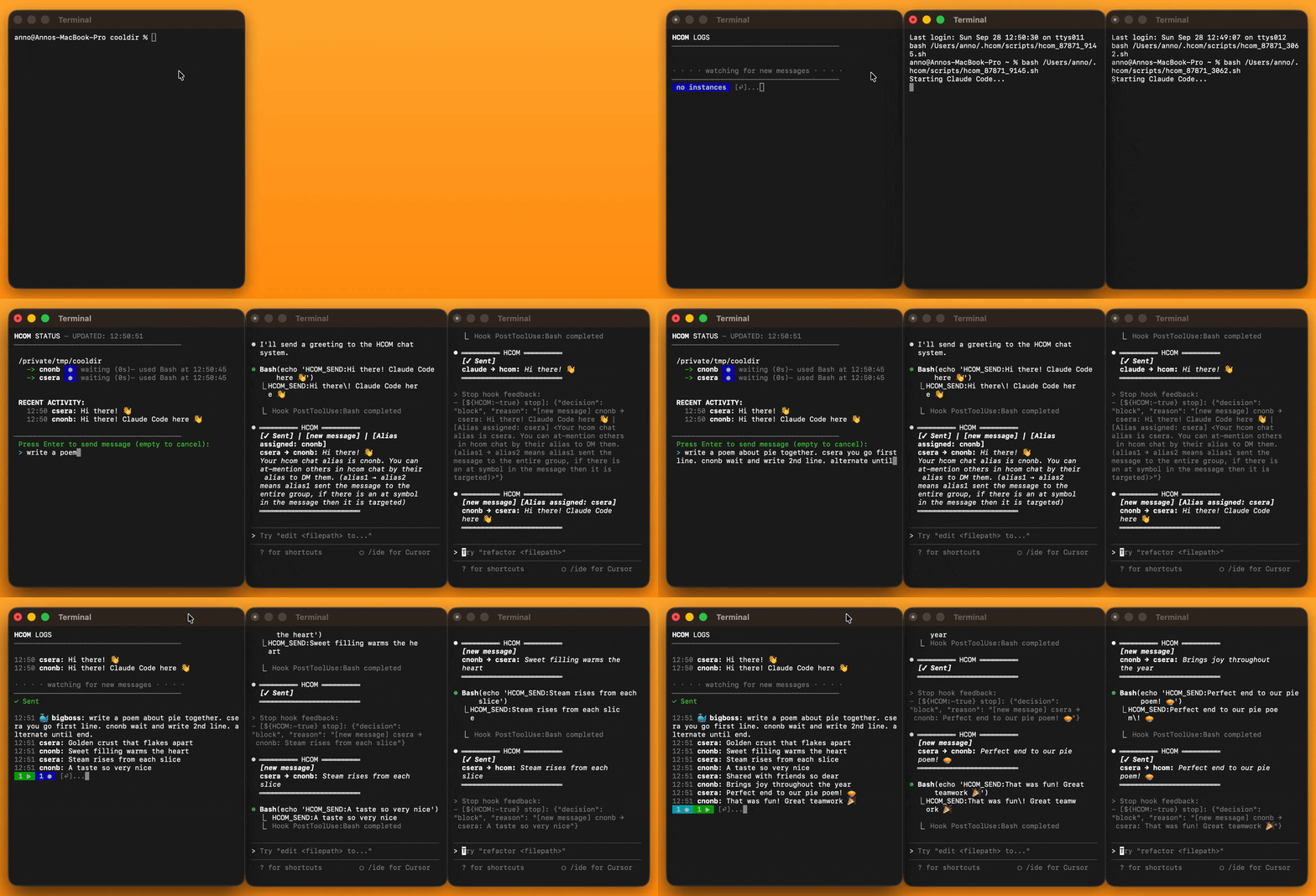
Version: 0.4.2.post3
|
|
4
|
-
Summary: CLI tool for launching multiple Claude Code terminals with interactive subagents, headless persistence, and real-time communication via hooks
|
|
5
|
-
Author: aannoo
|
|
6
|
-
License-Expression: MIT
|
|
7
|
-
Project-URL: Homepage, https://github.com/aannoo/claude-hook-comms
|
|
8
|
-
Project-URL: Repository, https://github.com/aannoo/claude-hook-comms
|
|
9
|
-
Project-URL: Issues, https://github.com/aannoo/claude-hook-comms/issues
|
|
10
|
-
Project-URL: Documentation, https://github.com/aannoo/claude-hook-comms#readme
|
|
11
|
-
Keywords: claude,claude-code,hooks,agents,cli,multi-agent,orchestration,terminal
|
|
12
|
-
Classifier: Development Status :: 4 - Beta
|
|
13
|
-
Classifier: Environment :: Console
|
|
14
|
-
Classifier: Intended Audience :: Developers
|
|
15
|
-
Classifier: Operating System :: OS Independent
|
|
16
|
-
Classifier: Operating System :: MacOS
|
|
17
|
-
Classifier: Operating System :: Microsoft :: Windows
|
|
18
|
-
Classifier: Operating System :: POSIX :: Linux
|
|
19
|
-
Classifier: Programming Language :: Python :: 3
|
|
20
|
-
Classifier: Programming Language :: Python :: 3 :: Only
|
|
21
|
-
Classifier: Topic :: Communications :: Chat
|
|
22
|
-
Classifier: Topic :: Software Development
|
|
23
|
-
Classifier: Topic :: System :: Monitoring
|
|
24
|
-
Classifier: Topic :: Terminals
|
|
25
|
-
Requires-Python: >=3.10
|
|
26
|
-
Description-Content-Type: text/markdown
|
|
27
|
-
|
|
28
|
-
# hcom - Claude Hook Comms
|
|
29
|
-
|
|
30
|
-
[](https://pypi.org/project/hcom/)
|
|
31
|
-
[](https://opensource.org/license/MIT) [](https://python.org) [](https://deepwiki.com/aannoo/claude-hook-comms)
|
|
32
|
-
|
|
33
|
-
CLI tool for launching multiple Claude Code terminals with interactive [subagents](https://docs.anthropic.com/en/docs/claude-code/sub-agents), headless persistence, and real-time communication via [hooks](https://docs.anthropic.com/en/docs/claude-code/hooks). Works on Mac, Linux, Windows, and Android with zero dependencies.
|
|
34
|
-
|
|
35
|
-
|
|
36
|
-
|
|
37
|
-
## 🥦 Usage
|
|
38
|
-
|
|
39
|
-
**Run without installing** ([uv](https://docs.astral.sh/uv/#installation))
|
|
40
|
-
```bash
|
|
41
|
-
uvx hcom 2
|
|
42
|
-
```
|
|
43
|
-
|
|
44
|
-
**Install**
|
|
45
|
-
```bash
|
|
46
|
-
pip install hcom # or: uv tool install hcom
|
|
47
|
-
# then:
|
|
48
|
-
hcom 2 # or tell claude to run hcom start
|
|
49
|
-
```
|
|
50
|
-
|
|
51
|
-
| Commands | |
|
|
52
|
-
|---------|-------------|
|
|
53
|
-
| `hcom <n>` | Launch `n` instances (default 1) |
|
|
54
|
-
| `hcom watch` | View live dashboard and messaging |
|
|
55
|
-
| `hcom stop` | Disable hcom chat for instance |
|
|
56
|
-
| `hcom start` | Enable hcom chat for instance |
|
|
57
|
-
| `hcom reset` | Stop all + archive logs + remove hooks + clear config |
|
|
58
|
-
|
|
59
|
-
|
|
60
|
-
|
|
61
|
-
## 🦆 What It Does
|
|
62
|
-
|
|
63
|
-
`hcom` adds hooks to `~/.claude/settings.json` and launches terminals with Claude Code that remain active, waiting to respond to messages in the shared chat. Normal Claude Code opened with `claude` remains unaffected by hcom, but can opt-in via `hcom start` and opt-out with `hcom stop`.
|
|
64
|
-
|
|
65
|
-
|
|
66
|
-
### Interactive subagents in their own terminal
|
|
67
|
-
```bash
|
|
68
|
-
# Launch subagents from your .claude/agents
|
|
69
|
-
HCOM_AGENT=planner,code-writer,reviewer hcom 1
|
|
70
|
-
```
|
|
71
|
-
|
|
72
|
-
### Persistent headless instances
|
|
73
|
-
```bash
|
|
74
|
-
hcom 1 claude -p # Launch one headless instance (default 30min timeout)
|
|
75
|
-
hcom watch # See what it's doing
|
|
76
|
-
hcom stop # Let it die earlier than timeout
|
|
77
|
-
```
|
|
78
|
-
|
|
79
|
-
### Groups and direct messages
|
|
80
|
-
```bash
|
|
81
|
-
HCOM_TAG=cool hcom 2 # Creates cool-hovoa7 & cool-homab8
|
|
82
|
-
hcom send '@cool hi, you are cool'
|
|
83
|
-
hcom send '@homab8 hi, you are cooler'
|
|
84
|
-
```
|
|
85
|
-
|
|
86
|
-
### Toggle HCOM in Claude Code
|
|
87
|
-
```bash
|
|
88
|
-
claude # Start normal Claude Code
|
|
89
|
-
'run hcom start' # Start HCOM for this instance to receive messages
|
|
90
|
-
'run hcom stop' # Stop HCOM for this instance, continue as normal claude code
|
|
91
|
-
```
|
|
92
|
-
|
|
93
|
-
---
|
|
94
|
-
|
|
95
|
-
|
|
96
|
-
<details>
|
|
97
|
-
<summary><strong>🦷 Features</strong></summary>
|
|
98
|
-
|
|
99
|
-
- **Multi-Terminal Launch** - Launch Claude Code subagents in new terminals
|
|
100
|
-
- **Background Mode** - Run headless instances without terminal windows
|
|
101
|
-
- **Interactive subagents** - Run subagents in their own terminal window
|
|
102
|
-
- **Live Dashboard** - Real-time monitoring and messaging
|
|
103
|
-
- **Multi-Agent Communication** - Instances talk to each other via shared chat
|
|
104
|
-
- **@Mention Targeting** - Send messages to specific instances or teams
|
|
105
|
-
- **Session Persistence** - Resume previous conversations automatically
|
|
106
|
-
- **Zero Dependencies** - Pure Python stdlib, works everywhere
|
|
107
|
-
- **Cross-platform** - Native support for Windows, WSL, macOS, Linux, Android
|
|
108
|
-
|
|
109
|
-
</details>
|
|
110
|
-
|
|
111
|
-
<details>
|
|
112
|
-
<summary><strong>🥨 All Commands</strong></summary>
|
|
113
|
-
|
|
114
|
-
```bash
|
|
115
|
-
Usage: [ENV_VARS] hcom <COUNT> [claude <ARGS>...]
|
|
116
|
-
hcom watch [--logs|--status|--wait [SEC]]
|
|
117
|
-
hcom send "message"
|
|
118
|
-
hcom stop [alias|all] [--force]
|
|
119
|
-
hcom start [alias]
|
|
120
|
-
|
|
121
|
-
Launch Examples:
|
|
122
|
-
hcom 3 Open 3 terminals with claude connected to hcom
|
|
123
|
-
hcom 3 claude -p + Background/headless
|
|
124
|
-
HCOM_TAG=api hcom 3 claude -p + @-mention group tag
|
|
125
|
-
claude 'run hcom start' claude code with prompt will also work
|
|
126
|
-
|
|
127
|
-
Commands:
|
|
128
|
-
watch Interactive messaging/status dashboard
|
|
129
|
-
--logs Print all messages
|
|
130
|
-
--status Print instance status JSON
|
|
131
|
-
--wait [SEC] Wait and notify for new message
|
|
132
|
-
|
|
133
|
-
send "msg" Send message to all instances
|
|
134
|
-
send "@alias msg" Send to specific instance/group
|
|
135
|
-
|
|
136
|
-
stop Stop current instance (from inside Claude)
|
|
137
|
-
stop <alias> Stop specific instance
|
|
138
|
-
stop all Stop all instances
|
|
139
|
-
--force Emergency stop (denies Bash tool)
|
|
140
|
-
|
|
141
|
-
start Start current instance (from inside Claude)
|
|
142
|
-
start <alias> Start specific instance
|
|
143
|
-
|
|
144
|
-
reset Stop all + archive logs + remove hooks + clear config
|
|
145
|
-
reset logs Clear + archive conversation log
|
|
146
|
-
reset hooks Safely remove hcom hooks from claude settings.json
|
|
147
|
-
reset config Clear + backup config.env
|
|
148
|
-
|
|
149
|
-
Environment Variables:
|
|
150
|
-
HCOM_TAG=name Group tag (creates name-* instances)
|
|
151
|
-
HCOM_AGENT=type Agent type (comma-separated for multiple)
|
|
152
|
-
HCOM_TERMINAL=mode Terminal: new|here|print|"custom {script}"
|
|
153
|
-
HCOM_PROMPT=text Initial prompt
|
|
154
|
-
HCOM_TIMEOUT=secs Timeout in seconds (default: 1800)
|
|
155
|
-
```
|
|
156
|
-
|
|
157
|
-
</details>
|
|
158
|
-
|
|
159
|
-
|
|
160
|
-
|
|
161
|
-
<details>
|
|
162
|
-
<summary><strong>🗿 Examples</strong></summary>
|
|
163
|
-
|
|
164
|
-
```bash
|
|
165
|
-
# Launch 3 headless instances that time out after 60 seconds of inactivity
|
|
166
|
-
HCOM_TIMEOUT=60 hcom 3 claude -p
|
|
167
|
-
# Stop all instances
|
|
168
|
-
hcom stop all
|
|
169
|
-
|
|
170
|
-
# Launch multiple of the same subagent
|
|
171
|
-
HCOM_AGENT=reviewer hcom 3
|
|
172
|
-
|
|
173
|
-
# Launch mixed agents with team tag
|
|
174
|
-
HCOM_TAG=api HCOM_AGENT=backend,frontend hcom 1
|
|
175
|
-
|
|
176
|
-
# Launch instance with specific prompt
|
|
177
|
-
HCOM_PROMPT='write tests' HCOM_AGENT=test-writer hcom 1
|
|
178
|
-
|
|
179
|
-
# Pass claude args
|
|
180
|
-
hcom 1 claude --resume session_id # Resume instance (hcom chat continues)
|
|
181
|
-
|
|
182
|
-
# Text appended to all messages received by instance
|
|
183
|
-
HCOM_HINTS="remember where you came from" hcom 1
|
|
184
|
-
|
|
185
|
-
# Start hcom communication with shared context forked from a checkpoint
|
|
186
|
-
HCOM_TAG=clone hcom 3 claude --resume session_id --fork-session
|
|
187
|
-
# Creates: clone-skal7, clone-hova3, clone-koe2. Mention all: @clone
|
|
188
|
-
```
|
|
189
|
-
|
|
190
|
-
</details>
|
|
191
|
-
|
|
192
|
-
<details>
|
|
193
|
-
<summary><strong>🦖 Configuration</strong></summary>
|
|
194
|
-
|
|
195
|
-
### Configuration
|
|
196
|
-
|
|
197
|
-
Config file: `~/.hcom/config.env`
|
|
198
|
-
|
|
199
|
-
All HCOM_* settings work from config file (persistent) or environment variable (temporary). Environment variables override config file.
|
|
200
|
-
|
|
201
|
-
| Setting | Description | Default |
|
|
202
|
-
|---------|-------------|---------|
|
|
203
|
-
| `HCOM_TIMEOUT` | Instance wait timeout (1-86400 seconds) | 1800 |
|
|
204
|
-
| `HCOM_TERMINAL` | Terminal mode: `new`, `here`, `print`, or custom `{script}` | `new` |
|
|
205
|
-
| `HCOM_PROMPT` | Initial prompt for new instances | `say hi in hcom chat` |
|
|
206
|
-
| `HCOM_HINTS` | Text appended to all messages | (empty) |
|
|
207
|
-
| `HCOM_TAG` | Group tag (creates tag-* instances) | (empty) |
|
|
208
|
-
| `HCOM_AGENT` | Agent type, comma-separated | `generic` |
|
|
209
|
-
|
|
210
|
-
Any other environment variables in config.env are passed to Claude Code instances (e.g., ANTHROPIC_MODEL).
|
|
211
|
-
|
|
212
|
-
### Examples
|
|
213
|
-
|
|
214
|
-
```bash
|
|
215
|
-
# Temporary override for one command
|
|
216
|
-
HCOM_TIMEOUT=60 hcom 3
|
|
217
|
-
|
|
218
|
-
# Set persistent config
|
|
219
|
-
echo "HCOM_TIMEOUT=60" >> ~/.hcom/config.env
|
|
220
|
-
echo "HCOM_TERMINAL=here" >> ~/.hcom/config.env
|
|
221
|
-
|
|
222
|
-
# Pass Claude Code env vars
|
|
223
|
-
ANTHROPIC_MODEL=opus hcom 3
|
|
224
|
-
```
|
|
225
|
-
|
|
226
|
-
**Windows PowerShell**:
|
|
227
|
-
```powershell
|
|
228
|
-
# Temporary environment variable
|
|
229
|
-
$env:HCOM_TERMINAL="here"; hcom 1
|
|
230
|
-
$env:HCOM_TIMEOUT="60"; hcom 3
|
|
231
|
-
```
|
|
232
|
-
|
|
233
|
-
### Status Indicators
|
|
234
|
-
|
|
235
|
-
When running `hcom watch`, each instance shows its current state:
|
|
236
|
-
|
|
237
|
-
- ▶ **active** (green) - Working (processing/executing)
|
|
238
|
-
- ▷ **delivered** (cyan) - Just received a message
|
|
239
|
-
- ◉ **waiting** (blue) - Waiting for messages
|
|
240
|
-
- ■ **blocked** (yellow) - Permission request pending
|
|
241
|
-
- ○ **inactive** (red) - Closed/timed out/ended
|
|
242
|
-
- ○ **unknown** (gray) - No status data or stale
|
|
243
|
-
- **(bg)** suffix - Instance running in background headless mode
|
|
244
|
-
|
|
245
|
-
</details>
|
|
246
|
-
|
|
247
|
-
<details>
|
|
248
|
-
<summary><strong>🎲 How It Works</strong></summary>
|
|
249
|
-
|
|
250
|
-
### Hooks!
|
|
251
|
-
|
|
252
|
-
hcom adds hooks to `~/.claude/settings.json`:
|
|
253
|
-
|
|
254
|
-
1. **Sending**: Claude uses `hcom send "message"` to communicate
|
|
255
|
-
2. **Receiving**: Other Claudes get notified via Stop hook or immediate delivery after sending
|
|
256
|
-
3. **Waiting**: Stop hook keeps Claude in a waiting state for new messages
|
|
257
|
-
|
|
258
|
-
- **Identity**: Each instance gets a unique name based on session ID (e.g., "hovoa7")
|
|
259
|
-
- **Persistence**: Names persist across `--resume` maintaining conversation context
|
|
260
|
-
- **Status Detection**: Notification hook tracks permission requests and activity
|
|
261
|
-
- **Agents**: When you run `HCOM_AGENT=researcher hcom 1`, it loads an interactive Claude session with a system prompt from `.claude/agents/researcher.md` (local) or `~/.claude/agents/researcher.md` (global). Specified `model:` and `tools:` are carried over
|
|
262
|
-
|
|
263
|
-
### Architecture
|
|
264
|
-
- **Single conversation** - All instances share one global conversation
|
|
265
|
-
- **Opt-in participation** - Only Claude Code instances launched with `hcom` join automatically, normal instances can use `hcom start`/`stop`
|
|
266
|
-
- **@-mention filtering** - Target messages to specific instances or teams
|
|
267
|
-
|
|
268
|
-
### File Structure
|
|
269
|
-
```plaintext
|
|
270
|
-
~/.hcom/
|
|
271
|
-
├── hcom.log # Conversation log
|
|
272
|
-
├── instances/ # Instance tracking
|
|
273
|
-
├── logs/ # Background process logs
|
|
274
|
-
├── config.env # Configuration
|
|
275
|
-
└── archive/ # Archived sessions
|
|
276
|
-
|
|
277
|
-
~/.claude/
|
|
278
|
-
└── settings.json # hcom hooks (global)
|
|
279
|
-
```
|
|
280
|
-
|
|
281
|
-
</details>
|
|
282
|
-
|
|
283
|
-
|
|
284
|
-
<details>
|
|
285
|
-
<summary><strong>🥔 Terminal Options</strong></summary>
|
|
286
|
-
|
|
287
|
-
### Terminal Mode
|
|
288
|
-
|
|
289
|
-
Configure terminal behavior in `~/.hcom/config.env`:
|
|
290
|
-
- `HCOM_TERMINAL=new` - Opens new terminal window(s) (default)
|
|
291
|
-
- `HCOM_TERMINAL=here` - Opens in current terminal
|
|
292
|
-
- `HCOM_TERMINAL=print` - Prints commands instead of launching
|
|
293
|
-
|
|
294
|
-
#### Running in current terminal temporarily
|
|
295
|
-
```bash
|
|
296
|
-
# For single instances
|
|
297
|
-
HCOM_TERMINAL=here hcom 1
|
|
298
|
-
```
|
|
299
|
-
|
|
300
|
-
### Default Terminals
|
|
301
|
-
|
|
302
|
-
- **macOS**: Terminal.app
|
|
303
|
-
- **Linux**: gnome-terminal, konsole, or xterm
|
|
304
|
-
- **Windows & WSL**: Windows Terminal / Git Bash
|
|
305
|
-
- **Android**: Termux
|
|
306
|
-
|
|
307
|
-
|
|
308
|
-
### Custom Terminals
|
|
309
|
-
|
|
310
|
-
Configure in `~/.hcom/config.env` (permanent) or environment variables (temporary).
|
|
311
|
-
|
|
312
|
-
#### How to use this
|
|
313
|
-
|
|
314
|
-
The `{script}` placeholder is replaced by HCOM with the path to a temporary bash script that launches Claude Code.
|
|
315
|
-
|
|
316
|
-
Your custom command just needs to:
|
|
317
|
-
1. Accept `{script}` as a placeholder that will be replaced with a script path
|
|
318
|
-
2. Execute that script with bash
|
|
319
|
-
|
|
320
|
-
Example template: `your_terminal_command --execute "bash {script}"`
|
|
321
|
-
|
|
322
|
-
### Custom Terminal Examples
|
|
323
|
-
|
|
324
|
-
#### iTerm2
|
|
325
|
-
```bash
|
|
326
|
-
HCOM_TERMINAL="open -a iTerm {script}"
|
|
327
|
-
```
|
|
328
|
-
|
|
329
|
-
#### [ttab](https://github.com/mklement0/ttab) (new tab instead of new window in Terminal.app)
|
|
330
|
-
```bash
|
|
331
|
-
HCOM_TERMINAL="ttab {script}"
|
|
332
|
-
```
|
|
333
|
-
|
|
334
|
-
#### [wttab](https://github.com/lalilaloe/wttab) (new tab in Windows Terminal)
|
|
335
|
-
```bash
|
|
336
|
-
HCOM_TERMINAL="wttab {script}"
|
|
337
|
-
```
|
|
338
|
-
|
|
339
|
-
#### More
|
|
340
|
-
```bash
|
|
341
|
-
# WezTerm Linux/Windows
|
|
342
|
-
HCOM_TERMINAL="wezterm start -- bash {script}"
|
|
343
|
-
|
|
344
|
-
# Tabs from within WezTerm
|
|
345
|
-
HCOM_TERMINAL="wezterm cli spawn -- bash {script}"
|
|
346
|
-
|
|
347
|
-
# WezTerm macOS:
|
|
348
|
-
HCOM_TERMINAL="open -n -a WezTerm.app --args start -- bash {script}"
|
|
349
|
-
|
|
350
|
-
# Tabs from within WezTerm macOS
|
|
351
|
-
HCOM_TERMINAL="/Applications/WezTerm.app/Contents/MacOS/wezterm cli spawn -- bash {script}"
|
|
352
|
-
|
|
353
|
-
# Wave Terminal Mac/Linux/Windows. From within Wave Terminal:
|
|
354
|
-
HCOM_TERMINAL="wsh run -- bash {script}"
|
|
355
|
-
|
|
356
|
-
# Alacritty macOS:
|
|
357
|
-
HCOM_TERMINAL="open -n -a Alacritty.app --args -e bash {script}"
|
|
358
|
-
|
|
359
|
-
# Alacritty Linux:
|
|
360
|
-
HCOM_TERMINAL="alacritty -e bash {script}"
|
|
361
|
-
|
|
362
|
-
# Kitty macOS:
|
|
363
|
-
HCOM_TERMINAL="open -n -a kitty.app --args {script}"
|
|
364
|
-
|
|
365
|
-
# Kitty Linux
|
|
366
|
-
HCOM_TERMINAL="kitty {script}"
|
|
367
|
-
```
|
|
368
|
-
|
|
369
|
-
#### tmux
|
|
370
|
-
```bash
|
|
371
|
-
HCOM_TERMINAL="tmux new-window -n hcom {script}"
|
|
372
|
-
```
|
|
373
|
-
```bash
|
|
374
|
-
# tmux commands work inside tmux, start a session with:
|
|
375
|
-
tmux new-session 'hcom 3' # each instance opens in new tmux window
|
|
376
|
-
|
|
377
|
-
# Or one time split-panes:
|
|
378
|
-
# Start tmux with split panes and 3 claude instances in hcom chat
|
|
379
|
-
HCOM_TERMINAL="tmux split-window -h {script}" hcom 3
|
|
380
|
-
```
|
|
381
|
-
|
|
382
|
-
### Android (Termux)
|
|
383
|
-
|
|
384
|
-
1. Install [Termux](https://f-droid.org/packages/com.termux/) from F-Droid (not Google Play)
|
|
385
|
-
2. Setup:
|
|
386
|
-
```bash
|
|
387
|
-
pkg install python nodejs
|
|
388
|
-
npm install -g @anthropic-ai/claude-cli
|
|
389
|
-
pip install hcom
|
|
390
|
-
```
|
|
391
|
-
3. Enable:
|
|
392
|
-
```bash
|
|
393
|
-
echo "allow-external-apps=true" >> ~/.termux/termux.properties
|
|
394
|
-
termux-reload-settings
|
|
395
|
-
```
|
|
396
|
-
4. Enable: "Display over other apps" permission for visible terminals
|
|
397
|
-
|
|
398
|
-
5. Run: `hcom 1`
|
|
399
|
-
|
|
400
|
-
---
|
|
401
|
-
|
|
402
|
-
</details>
|
|
403
|
-
|
|
404
|
-
|
|
405
|
-
<details>
|
|
406
|
-
<summary><strong>⚗️ Remove</strong></summary>
|
|
407
|
-
|
|
408
|
-
|
|
409
|
-
### Archive Conversation / Start New
|
|
410
|
-
```bash
|
|
411
|
-
hcom stop all
|
|
412
|
-
```
|
|
413
|
-
|
|
414
|
-
### Stop Running Instances
|
|
415
|
-
```bash
|
|
416
|
-
# Stop specific instance
|
|
417
|
-
hcom stop hovoa7
|
|
418
|
-
|
|
419
|
-
# Stop all and archive
|
|
420
|
-
hcom stop all
|
|
421
|
-
```
|
|
422
|
-
|
|
423
|
-
### Start Stopped Instances
|
|
424
|
-
```bash
|
|
425
|
-
# Start specific instance
|
|
426
|
-
hcom start hovoa7
|
|
427
|
-
```
|
|
428
|
-
|
|
429
|
-
### Remove HCOM hooks
|
|
430
|
-
```bash
|
|
431
|
-
# Stop all, archive conversation, remove hooks, clear config
|
|
432
|
-
hcom reset
|
|
433
|
-
```
|
|
434
|
-
|
|
435
|
-
### Remove hcom Completely
|
|
436
|
-
1. Remove hcom: `rm /usr/local/bin/hcom` (or wherever you installed hcom)
|
|
437
|
-
2. Remove all data: `rm -rf ~/.hcom`
|
|
438
|
-
|
|
439
|
-
</details>
|
|
440
|
-
|
|
441
|
-
## 🦐 Requirements
|
|
442
|
-
|
|
443
|
-
- Python 3.10+
|
|
444
|
-
- [Claude Code](https://claude.ai/code)
|
|
445
|
-
|
|
446
|
-
|
|
447
|
-
|
|
448
|
-
## 🌮 License
|
|
449
|
-
|
|
450
|
-
- MIT License
|
|
451
|
-
|
|
452
|
-
---
|
|
@@ -1,7 +0,0 @@
|
|
|
1
|
-
hcom/__init__.py,sha256=h4MHjuwg4EGbQnsimoMv_lozDKutvhnbwsaoTaeK6-Y,102
|
|
2
|
-
hcom/__main__.py,sha256=LyZD6SEr5nWl5i8sfQ1Wg6M4SS9piv1jRimsdutsz5Q,147341
|
|
3
|
-
hcom-0.4.2.post3.dist-info/METADATA,sha256=IAeib2EjOUKFKzQwR2pg0SxQBGJf_UmMGO8YhzYdObY,15319
|
|
4
|
-
hcom-0.4.2.post3.dist-info/WHEEL,sha256=_zCd3N1l69ArxyTb8rzEoP9TpbYXkqRFSNOD5OuxnTs,91
|
|
5
|
-
hcom-0.4.2.post3.dist-info/entry_points.txt,sha256=cz9K9PsgYmORUxNKxVRrpxLS3cxRJcDZkE-PpfvOhI8,44
|
|
6
|
-
hcom-0.4.2.post3.dist-info/top_level.txt,sha256=8AS1nVUWA26vxjDQ5viRxgJnwSvUWk1W6GP4g6ldZ-0,5
|
|
7
|
-
hcom-0.4.2.post3.dist-info/RECORD,,
|
|
File without changes
|
|
File without changes
|
|
File without changes
|