graxpert 3.2.0a0.dev4__py3-none-any.whl
This diff represents the content of publicly available package versions that have been released to one of the supported registries. The information contained in this diff is provided for informational purposes only and reflects changes between package versions as they appear in their respective public registries.
- graxpert/AstroImageRepository.py +114 -0
- graxpert/__init__.py +1 -0
- graxpert/ai_model_handling.py +215 -0
- graxpert/app_state.py +10 -0
- graxpert/application/__init__.py +0 -0
- graxpert/application/app.py +741 -0
- graxpert/application/app_events.py +96 -0
- graxpert/application/eventbus.py +24 -0
- graxpert/astroimage.py +308 -0
- graxpert/background_extraction.py +290 -0
- graxpert/background_flood_selection.py +240 -0
- graxpert/background_grid_selection.py +64 -0
- graxpert/cmdline_tools.py +547 -0
- graxpert/commands.py +200 -0
- graxpert/deconvolution.py +176 -0
- graxpert/denoising.py +178 -0
- graxpert/grid_utils.py +38 -0
- graxpert/img/GraXpert_LOGO_Hauptvariante.png +0 -0
- graxpert/img/Icon.png +0 -0
- graxpert/img/LDN1235_original.jpg +0 -0
- graxpert/img/LDN1235_processed.jpg +0 -0
- graxpert/img/__init__.py +0 -0
- graxpert/img/gfx_numbers.png +0 -0
- graxpert/img/gfx_numbers.svg +737 -0
- graxpert/img/graXpert_Startbadge_Umbriel.png +0 -0
- graxpert/img/hourglass.png +0 -0
- graxpert/locales/__init__.py +0 -0
- graxpert/locales/de_DE/LC_MESSAGES/base.mo +0 -0
- graxpert/localization.py +39 -0
- graxpert/main.py +441 -0
- graxpert/mp_logging.py +97 -0
- graxpert/parallel_processing.py +3 -0
- graxpert/preferences.py +139 -0
- graxpert/radialbasisinterpolation.py +215 -0
- graxpert/resource_utils.py +35 -0
- graxpert/s3_secrets.py +16 -0
- graxpert/skyall.py +152 -0
- graxpert/stretch.py +151 -0
- graxpert/theme/__init__.py +0 -0
- graxpert/theme/graxpert-dark-blue.json +367 -0
- graxpert/ui/__init__.py +1 -0
- graxpert/ui/application_frame.py +115 -0
- graxpert/ui/canvas.py +558 -0
- graxpert/ui/left_menu.py +437 -0
- graxpert/ui/loadingframe.py +142 -0
- graxpert/ui/right_menu.py +315 -0
- graxpert/ui/statusbar.py +102 -0
- graxpert/ui/styling.py +23 -0
- graxpert/ui/tooltip.py +194 -0
- graxpert/ui/ui_events.py +19 -0
- graxpert/ui/widgets.py +297 -0
- graxpert/ui_scaling.py +13 -0
- graxpert/version.py +2 -0
- graxpert-3.2.0a0.dev4.dist-info/METADATA +219 -0
- graxpert-3.2.0a0.dev4.dist-info/RECORD +58 -0
- graxpert-3.2.0a0.dev4.dist-info/WHEEL +5 -0
- graxpert-3.2.0a0.dev4.dist-info/entry_points.txt +2 -0
- graxpert-3.2.0a0.dev4.dist-info/top_level.txt +1 -0
graxpert/ui/widgets.py
ADDED
|
@@ -0,0 +1,297 @@
|
|
|
1
|
+
import tkinter as tk
|
|
2
|
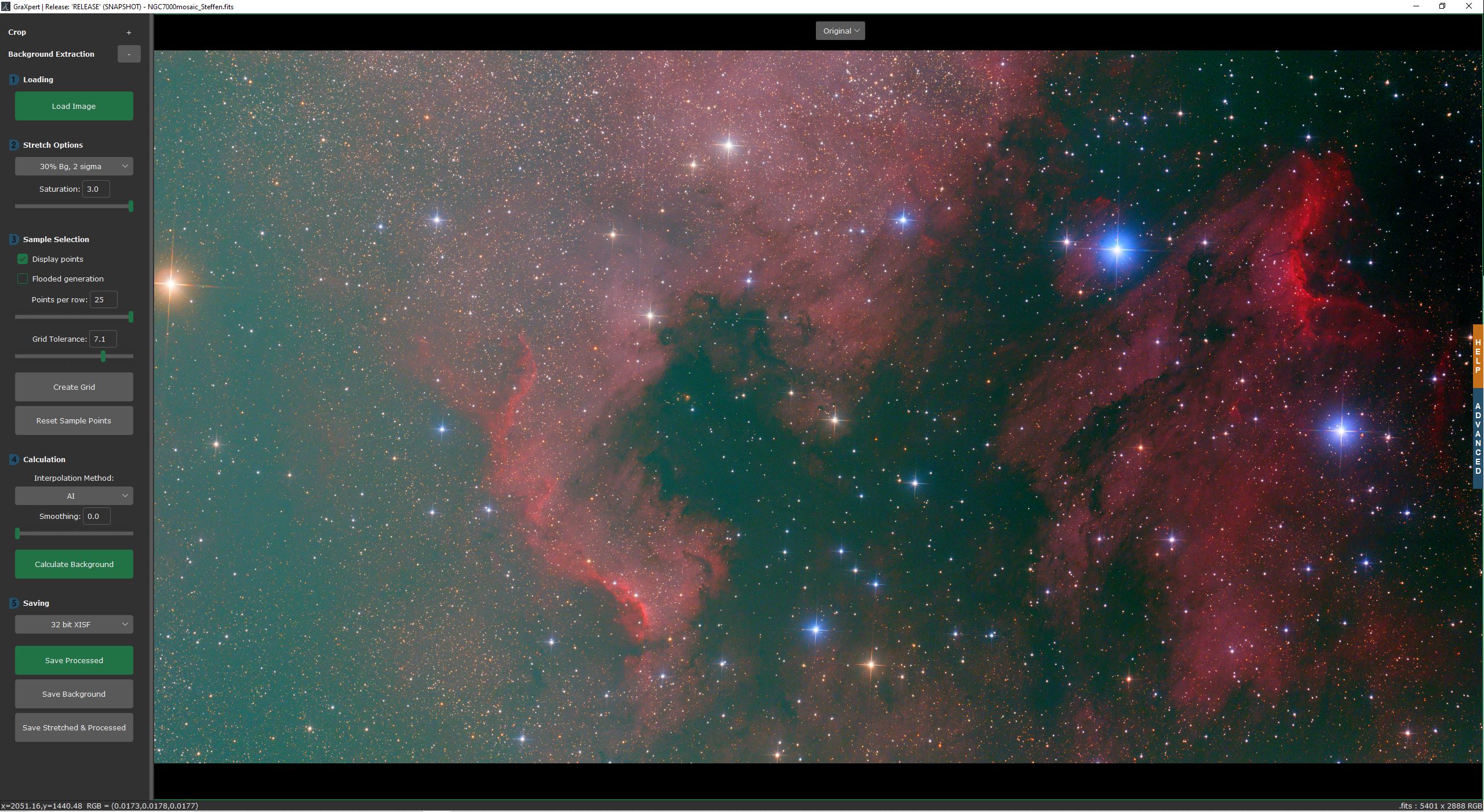
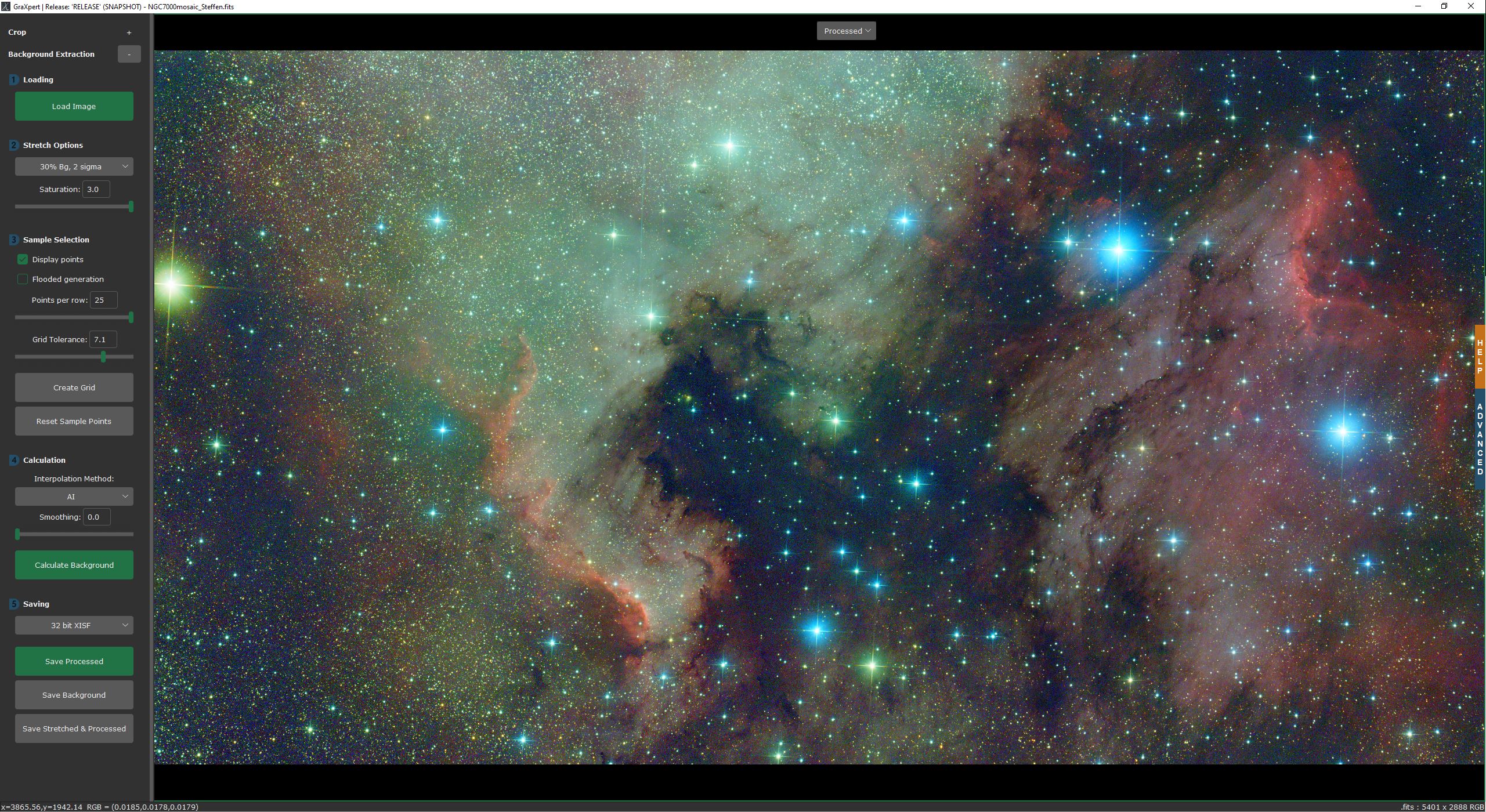
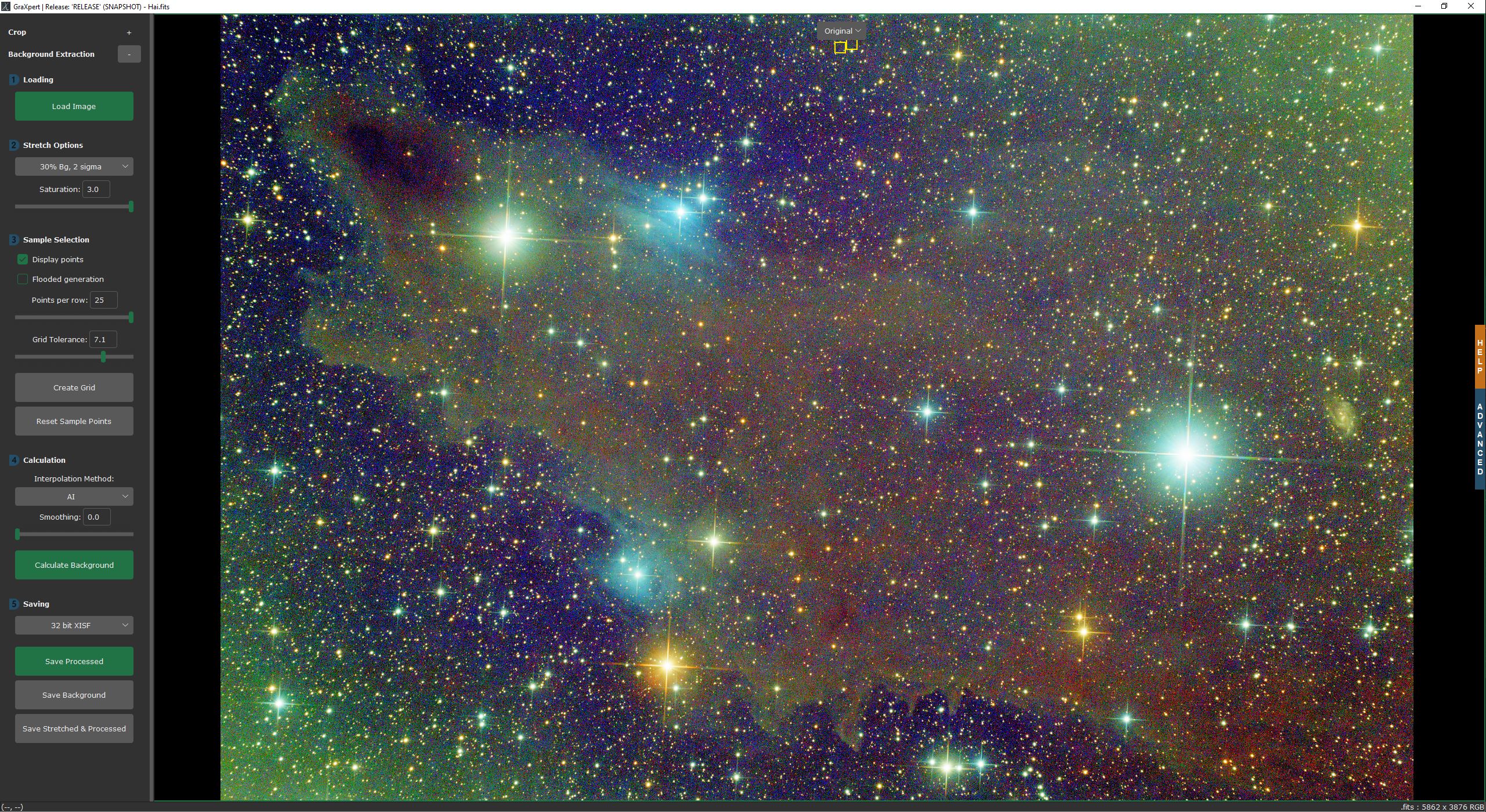
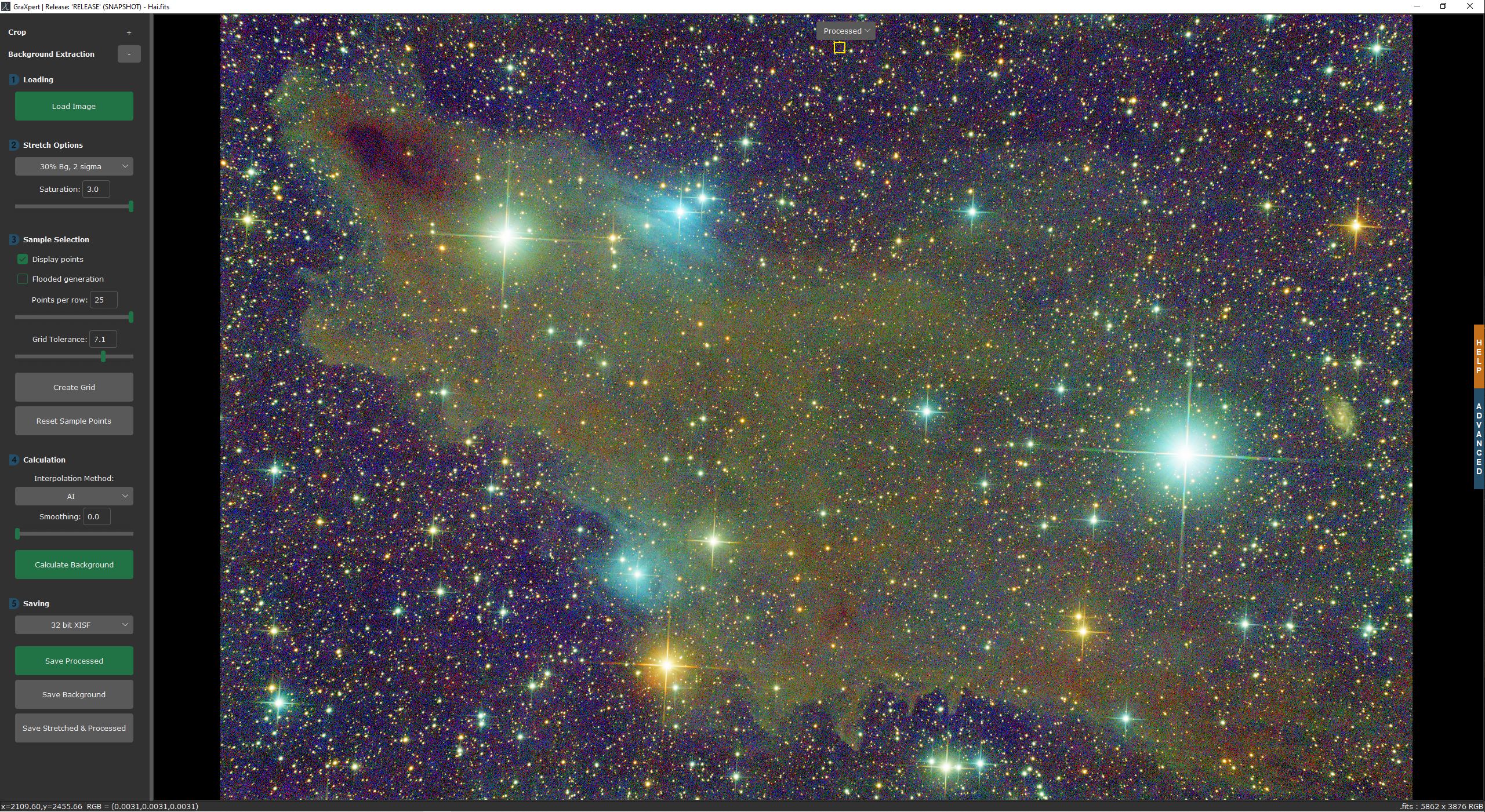
+
from tkinter import ttk
|
|
3
|
+
|
|
4
|
+
from customtkinter import CTkButton, CTkCheckBox, CTkEntry, CTkFont, CTkFrame, CTkImage, CTkLabel, CTkOptionMenu, CTkScrollableFrame, CTkSlider, DoubleVar, StringVar, ThemeManager
|
|
5
|
+
|
|
6
|
+
from graxpert.localization import _
|
|
7
|
+
from graxpert.resource_utils import resource_image
|
|
8
|
+
from graxpert.ui_scaling import get_scaling_factor
|
|
9
|
+
|
|
10
|
+
default_button_width = 200
|
|
11
|
+
default_label_width = 200
|
|
12
|
+
default_option_menu_height = 28
|
|
13
|
+
|
|
14
|
+
padx = 5 * get_scaling_factor()
|
|
15
|
+
pady = 5 * get_scaling_factor()
|
|
16
|
+
|
|
17
|
+
|
|
18
|
+
def gfx_image(number, indent=1):
|
|
19
|
+
img = resource_image(f"gfx_numbers.png").crop((number * 100, indent * 100, number * 100 + 100, indent * 100 + 100))
|
|
20
|
+
return img
|
|
21
|
+
|
|
22
|
+
|
|
23
|
+
class GraXpertButton(CTkButton):
|
|
24
|
+
def __init__(self, parent, width=default_button_width, **kwargs):
|
|
25
|
+
super().__init__(parent, width=width, **kwargs)
|
|
26
|
+
|
|
27
|
+
|
|
28
|
+
class GraXpertLabel(CTkLabel):
|
|
29
|
+
def __init__(self, parent, width=default_label_width, **kwargs):
|
|
30
|
+
super().__init__(parent, width=width, **kwargs)
|
|
31
|
+
|
|
32
|
+
|
|
33
|
+
class GraXpertOptionMenu(CTkOptionMenu):
|
|
34
|
+
def __init__(self, parent, width=default_label_width, **kwargs):
|
|
35
|
+
super().__init__(parent, width=width, anchor=tk.CENTER, **kwargs)
|
|
36
|
+
|
|
37
|
+
|
|
38
|
+
class GraXpertCheckbox(CTkCheckBox):
|
|
39
|
+
def __init__(self, parent, width=default_label_width, **kwargs):
|
|
40
|
+
super().__init__(parent, width=width, checkbox_width=20, checkbox_height=20, **kwargs)
|
|
41
|
+
|
|
42
|
+
|
|
43
|
+
class GraXpertScrollableFrame(CTkScrollableFrame):
|
|
44
|
+
def __init__(self, parent, **kwargs):
|
|
45
|
+
super().__init__(parent, **kwargs)
|
|
46
|
+
|
|
47
|
+
self.bind_all("<Button-4>", self.on_mouse_wheel, add="+") # Mouse Wheel Linux
|
|
48
|
+
self.bind_all("<Button-5>", self.on_mouse_wheel, add="+") # Mouse Wheel Linux
|
|
49
|
+
|
|
50
|
+
def on_mouse_wheel(self, event=None):
|
|
51
|
+
if self.check_if_master_is_canvas(event.widget):
|
|
52
|
+
if self._shift_pressed:
|
|
53
|
+
if self._parent_canvas.xview() != (0.0, 1.0):
|
|
54
|
+
if event.delta > 0 or event.num == 4:
|
|
55
|
+
self._parent_canvas.xview_scroll(-1, "units")
|
|
56
|
+
else:
|
|
57
|
+
self._parent_canvas.xview_scroll(1, "units")
|
|
58
|
+
else:
|
|
59
|
+
if self._parent_canvas.yview() != (0.0, 1.0):
|
|
60
|
+
if event.delta > 0 or event.num == 4:
|
|
61
|
+
self._parent_canvas.yview_scroll(-1, "units")
|
|
62
|
+
else:
|
|
63
|
+
self._parent_canvas.yview_scroll(1, "units")
|
|
64
|
+
|
|
65
|
+
|
|
66
|
+
class ProcessingStep(CTkFrame):
|
|
67
|
+
def __init__(self, parent, number=0, indent=2, title="", **kwargs):
|
|
68
|
+
super().__init__(parent, **kwargs)
|
|
69
|
+
self.bold = CTkFont(weight="bold")
|
|
70
|
+
self.number = number
|
|
71
|
+
self.indent = indent
|
|
72
|
+
self.title = title
|
|
73
|
+
self.create_children()
|
|
74
|
+
self.setup_layout()
|
|
75
|
+
self.place_children()
|
|
76
|
+
|
|
77
|
+
def create_children(self):
|
|
78
|
+
num_pic = CTkImage(
|
|
79
|
+
light_image=gfx_image(self.number, self.indent),
|
|
80
|
+
dark_image=gfx_image(self.number, self.indent),
|
|
81
|
+
size=(20, 20),
|
|
82
|
+
)
|
|
83
|
+
self.title = GraXpertLabel(self, text=self.title, image=num_pic, font=self.bold, anchor=tk.W, compound=tk.LEFT)
|
|
84
|
+
|
|
85
|
+
def setup_layout(self):
|
|
86
|
+
self.columnconfigure(0, weight=0)
|
|
87
|
+
self.rowconfigure(0, weight=1)
|
|
88
|
+
|
|
89
|
+
def place_children(self):
|
|
90
|
+
self.title.grid(column=0, row=0)
|
|
91
|
+
|
|
92
|
+
|
|
93
|
+
class ValueSlider(CTkFrame):
|
|
94
|
+
def __init__(
|
|
95
|
+
self,
|
|
96
|
+
parent,
|
|
97
|
+
width=default_label_width,
|
|
98
|
+
variable_name="",
|
|
99
|
+
variable=None,
|
|
100
|
+
default_value=0.5,
|
|
101
|
+
min_value=0,
|
|
102
|
+
max_value=1,
|
|
103
|
+
number_of_steps=None,
|
|
104
|
+
precision=1,
|
|
105
|
+
**kwargs,
|
|
106
|
+
):
|
|
107
|
+
super().__init__(parent, width=width, **kwargs)
|
|
108
|
+
self.variable_name = variable_name
|
|
109
|
+
self.min_value = min_value
|
|
110
|
+
self.max_value = max_value
|
|
111
|
+
self.number_of_steps = number_of_steps
|
|
112
|
+
self.precision = precision
|
|
113
|
+
|
|
114
|
+
if variable:
|
|
115
|
+
self.variable = variable
|
|
116
|
+
else:
|
|
117
|
+
self.variable = DoubleVar(value=default_value)
|
|
118
|
+
|
|
119
|
+
self.variable.set(round(self.variable.get(), self.precision))
|
|
120
|
+
self.entry_variable = StringVar(value=str(self.variable.get()))
|
|
121
|
+
self.slider_variable = DoubleVar(value=self.entry_variable.get())
|
|
122
|
+
|
|
123
|
+
self.create_children()
|
|
124
|
+
self.setup_layout()
|
|
125
|
+
self.place_children()
|
|
126
|
+
self.create_bindings()
|
|
127
|
+
|
|
128
|
+
def create_children(self):
|
|
129
|
+
self.variable_label = CTkLabel(self, width=0, text=self.variable_name)
|
|
130
|
+
self.entry = CTkEntry(self, width=35, textvariable=self.entry_variable, validate="focusout")
|
|
131
|
+
self.entry_variable.trace_add("write", lambda a, b, c: self.format_entry())
|
|
132
|
+
self.slider = CTkSlider(
|
|
133
|
+
self,
|
|
134
|
+
width=default_label_width,
|
|
135
|
+
command=self.on_slider,
|
|
136
|
+
variable=self.slider_variable,
|
|
137
|
+
from_=self.min_value,
|
|
138
|
+
to=self.max_value,
|
|
139
|
+
number_of_steps=self.number_of_steps,
|
|
140
|
+
)
|
|
141
|
+
|
|
142
|
+
def setup_layout(self):
|
|
143
|
+
self.columnconfigure(0, weight=1)
|
|
144
|
+
self.columnconfigure(1, weight=1)
|
|
145
|
+
self.rowconfigure(0, weight=1)
|
|
146
|
+
|
|
147
|
+
def place_children(self):
|
|
148
|
+
self.variable_label.grid(column=0, row=0, pady=pady, sticky=tk.E)
|
|
149
|
+
self.entry.grid(column=1, row=0, padx=padx, pady=pady, sticky=tk.W)
|
|
150
|
+
self.slider.grid(column=0, row=1, columnspan=2, pady=pady, sticky=tk.NSEW)
|
|
151
|
+
|
|
152
|
+
def create_bindings(self):
|
|
153
|
+
self.entry.bind("<FocusOut>", lambda event: self.on_entry(event))
|
|
154
|
+
self.entry.bind("<Return>", lambda event: self.on_entry(event))
|
|
155
|
+
self.slider.bind("<ButtonRelease-1>", lambda event: self.on_slider_release(event))
|
|
156
|
+
|
|
157
|
+
self.entry.bind("<Up>", self.up)
|
|
158
|
+
self.entry.bind("<Down>", self.down)
|
|
159
|
+
self.entry.bind("<Left>", self.down)
|
|
160
|
+
self.entry.bind("<Right>", self.up)
|
|
161
|
+
|
|
162
|
+
self.slider.bind("<Up>", self.up)
|
|
163
|
+
self.slider.bind("<Down>", self.down)
|
|
164
|
+
self.slider.bind("<Left>", self.down)
|
|
165
|
+
self.slider.bind("<Right>", self.up)
|
|
166
|
+
|
|
167
|
+
def transform_value(self, value):
|
|
168
|
+
if self.precision == 0:
|
|
169
|
+
value = int(value)
|
|
170
|
+
else:
|
|
171
|
+
value = round(value, self.precision)
|
|
172
|
+
return value
|
|
173
|
+
|
|
174
|
+
def validate_entry(self):
|
|
175
|
+
try:
|
|
176
|
+
value = self.transform_value(float(self.entry_variable.get()))
|
|
177
|
+
if value < self.min_value or value > self.max_value:
|
|
178
|
+
return False
|
|
179
|
+
return True
|
|
180
|
+
except:
|
|
181
|
+
return False
|
|
182
|
+
|
|
183
|
+
def format_entry(self):
|
|
184
|
+
if not self.validate_entry():
|
|
185
|
+
self.entry.configure(fg_color="darkred")
|
|
186
|
+
else:
|
|
187
|
+
self.entry.configure(fg_color=ThemeManager.theme["CTkEntry"]["fg_color"])
|
|
188
|
+
|
|
189
|
+
def on_entry(self, event):
|
|
190
|
+
if not self.validate_entry():
|
|
191
|
+
self.entry_variable.set(self.variable.get())
|
|
192
|
+
else:
|
|
193
|
+
value = self.transform_value(float(self.entry_variable.get()))
|
|
194
|
+
self.entry_variable.set(str(value))
|
|
195
|
+
self.slider_variable.set(value)
|
|
196
|
+
if self.variable.get() != value:
|
|
197
|
+
self.variable.set(value)
|
|
198
|
+
|
|
199
|
+
def on_slider(self, value):
|
|
200
|
+
value = self.transform_value(value)
|
|
201
|
+
self.entry_variable.set(str(value))
|
|
202
|
+
|
|
203
|
+
def on_slider_release(self, event):
|
|
204
|
+
value = self.slider_variable.get()
|
|
205
|
+
if self.precision == 0:
|
|
206
|
+
value = int(float(value))
|
|
207
|
+
else:
|
|
208
|
+
value = round(float(value), self.precision)
|
|
209
|
+
|
|
210
|
+
if self.variable.get() != value:
|
|
211
|
+
self.variable.set(value)
|
|
212
|
+
|
|
213
|
+
def up(self, event):
|
|
214
|
+
value = float(self.entry_variable.get()) + 10 ** (-self.precision)
|
|
215
|
+
if value > self.max_value:
|
|
216
|
+
return "break"
|
|
217
|
+
if self.precision == 0:
|
|
218
|
+
value = int(float(value))
|
|
219
|
+
else:
|
|
220
|
+
value = round(float(value), self.precision)
|
|
221
|
+
self.slider_variable.set(value)
|
|
222
|
+
self.variable.set(value)
|
|
223
|
+
return "break"
|
|
224
|
+
|
|
225
|
+
def down(self, event):
|
|
226
|
+
value = float(self.entry_variable.get()) - 10 ** (-self.precision)
|
|
227
|
+
if value < self.min_value:
|
|
228
|
+
return "break"
|
|
229
|
+
if self.precision == 0:
|
|
230
|
+
value = int(float(value))
|
|
231
|
+
else:
|
|
232
|
+
value = round(float(value), self.precision)
|
|
233
|
+
self.slider_variable.set(value)
|
|
234
|
+
self.variable.set(value)
|
|
235
|
+
return "break"
|
|
236
|
+
|
|
237
|
+
|
|
238
|
+
class CollapsibleMenuFrame(CTkFrame):
|
|
239
|
+
def __init__(self, parent, title="", number=0, show=True, **kwargs):
|
|
240
|
+
super().__init__(parent, **kwargs)
|
|
241
|
+
self.bold = CTkFont(weight="bold")
|
|
242
|
+
self.number = number
|
|
243
|
+
self.title = title
|
|
244
|
+
self.show = show
|
|
245
|
+
|
|
246
|
+
def create_children(self):
|
|
247
|
+
num_pic = CTkImage(
|
|
248
|
+
light_image=gfx_image(self.number, 0),
|
|
249
|
+
dark_image=gfx_image(self.number, 0),
|
|
250
|
+
size=(20, 20),
|
|
251
|
+
)
|
|
252
|
+
self.number_label = GraXpertLabel(
|
|
253
|
+
self,
|
|
254
|
+
width=20 + padx,
|
|
255
|
+
text="",
|
|
256
|
+
image=num_pic,
|
|
257
|
+
pady=pady,
|
|
258
|
+
)
|
|
259
|
+
self.title_label = GraXpertLabel(self, width=default_button_width + padx, text=self.title, pady=pady, font=self.bold)
|
|
260
|
+
self.toggle_button = GraXpertButton(self, width=25, text="+", command=self.toggle)
|
|
261
|
+
self.separator = CTkFrame(self, height=2, fg_color=ThemeManager.theme["CTkButton"]["fg_color"])
|
|
262
|
+
|
|
263
|
+
self.sub_frame = CTkFrame(self, fg_color="transparent")
|
|
264
|
+
|
|
265
|
+
def setup_layout(self):
|
|
266
|
+
self.columnconfigure(0, weight=0)
|
|
267
|
+
self.columnconfigure(1, weight=1)
|
|
268
|
+
self.columnconfigure(2, weight=0)
|
|
269
|
+
self.rowconfigure(0, weight=1)
|
|
270
|
+
|
|
271
|
+
self.sub_frame.columnconfigure(0, minsize=padx, weight=0)
|
|
272
|
+
self.sub_frame.columnconfigure(1, weight=1)
|
|
273
|
+
self.sub_frame.rowconfigure(0, weight=0)
|
|
274
|
+
|
|
275
|
+
def place_children(self):
|
|
276
|
+
self.number_label.grid(column=0, row=0, pady=pady, sticky=tk.W)
|
|
277
|
+
self.title_label.grid(column=1, row=0, pady=pady, sticky=tk.EW)
|
|
278
|
+
self.toggle_button.grid(column=3, row=0, pady=pady, sticky=tk.E)
|
|
279
|
+
self.separator.grid(column=0, row=1, columnspan=3, sticky=tk.EW)
|
|
280
|
+
self.place_sub_frame(self.show)
|
|
281
|
+
|
|
282
|
+
def place_sub_frame(self, show):
|
|
283
|
+
if show:
|
|
284
|
+
self.sub_frame.grid(column=0, row=2, columnspan=3, sticky=tk.NS)
|
|
285
|
+
self.toggle_button.configure(text="-")
|
|
286
|
+
else:
|
|
287
|
+
self.sub_frame.grid_forget()
|
|
288
|
+
self.toggle_button.configure(text="+")
|
|
289
|
+
|
|
290
|
+
def toggle(self):
|
|
291
|
+
self.show = not self.show
|
|
292
|
+
self.place_sub_frame(self.show)
|
|
293
|
+
self.sub_frame.update()
|
|
294
|
+
|
|
295
|
+
def hide(self, event=None):
|
|
296
|
+
if self.show:
|
|
297
|
+
self.toggle()
|
graxpert/ui_scaling.py
ADDED
|
@@ -0,0 +1,13 @@
|
|
|
1
|
+
import os
|
|
2
|
+
|
|
3
|
+
from appdirs import user_config_dir
|
|
4
|
+
|
|
5
|
+
from graxpert.preferences import load_preferences
|
|
6
|
+
|
|
7
|
+
|
|
8
|
+
def get_scaling_factor():
|
|
9
|
+
prefs_filename = os.path.join(user_config_dir(appname="GraXpert"), "preferences.json")
|
|
10
|
+
prefs = load_preferences(prefs_filename)
|
|
11
|
+
scaling_factor = prefs.scaling
|
|
12
|
+
|
|
13
|
+
return scaling_factor
|
graxpert/version.py
ADDED
|
@@ -0,0 +1,219 @@
|
|
|
1
|
+
Metadata-Version: 2.4
|
|
2
|
+
Name: graxpert
|
|
3
|
+
Version: 3.2.0a0.dev4
|
|
4
|
+
Summary: GraXpert is an astronomical image processing program for extracting and removing gradients in the background of your astrophotos
|
|
5
|
+
Home-page: https://graxpert.com
|
|
6
|
+
Author: GraXpert Development Team
|
|
7
|
+
Author-email: info@graxpert.com
|
|
8
|
+
License: GPL-3.0
|
|
9
|
+
Project-URL: Source Code, https://github.com/geeksville/GraXpert
|
|
10
|
+
Classifier: Development Status :: 3 - Alpha
|
|
11
|
+
Classifier: Intended Audience :: End Users/Desktop
|
|
12
|
+
Classifier: Intended Audience :: Science/Research
|
|
13
|
+
Classifier: Topic :: Scientific/Engineering :: Astronomy
|
|
14
|
+
Classifier: Topic :: Scientific/Engineering :: Image Processing
|
|
15
|
+
Classifier: Topic :: Multimedia :: Graphics :: Editors
|
|
16
|
+
Classifier: Programming Language :: Python :: 3.11
|
|
17
|
+
Classifier: Programming Language :: Python :: 3.12
|
|
18
|
+
Classifier: Operating System :: Microsoft :: Windows
|
|
19
|
+
Classifier: Operating System :: MacOS
|
|
20
|
+
Classifier: Operating System :: POSIX :: Linux
|
|
21
|
+
Classifier: Environment :: Win32 (MS Windows)
|
|
22
|
+
Classifier: Environment :: MacOS X
|
|
23
|
+
Classifier: Environment :: X11 Applications
|
|
24
|
+
Classifier: Natural Language :: English
|
|
25
|
+
Classifier: Natural Language :: German
|
|
26
|
+
Requires-Python: >=3.11
|
|
27
|
+
Description-Content-Type: text/markdown
|
|
28
|
+
Requires-Dist: ml-dtypes>=0.5.3
|
|
29
|
+
Requires-Dist: pillow>=11.3.0
|
|
30
|
+
Requires-Dist: appdirs
|
|
31
|
+
Requires-Dist: astropy>=6.1.7
|
|
32
|
+
Requires-Dist: astropy-iers-data>=0.2025.9.1.0.42.11
|
|
33
|
+
Requires-Dist: customtkinter>=5.2.2
|
|
34
|
+
Requires-Dist: imageio>=2.37.0
|
|
35
|
+
Requires-Dist: minio>=7.2.16
|
|
36
|
+
Requires-Dist: numpy==2.2.6
|
|
37
|
+
Requires-Dist: opencv-python-headless==4.11.0.86
|
|
38
|
+
Requires-Dist: PyKrige>=1.7.2
|
|
39
|
+
Requires-Dist: requests>=2.32.5
|
|
40
|
+
Requires-Dist: scikit-image>=0.25.2
|
|
41
|
+
Requires-Dist: scipy>=1.15.3
|
|
42
|
+
Requires-Dist: xisf>=0.9.5
|
|
43
|
+
Provides-Extra: cuda
|
|
44
|
+
Requires-Dist: onnxruntime-gpu[cuda,cudnn]==1.22.0; extra == "cuda"
|
|
45
|
+
Provides-Extra: rocm
|
|
46
|
+
Requires-Dist: onnxruntime-rocm==1.22.1; extra == "rocm"
|
|
47
|
+
Provides-Extra: directml
|
|
48
|
+
Requires-Dist: onnxruntime-directml; extra == "directml"
|
|
49
|
+
Provides-Extra: openvino
|
|
50
|
+
Requires-Dist: onnxruntime-openvino==1.22.0; extra == "openvino"
|
|
51
|
+
Requires-Dist: openvino>=2025.3.0; extra == "openvino"
|
|
52
|
+
Provides-Extra: cpuonly
|
|
53
|
+
Requires-Dist: onnxruntime>=1.22.1; extra == "cpuonly"
|
|
54
|
+
Dynamic: author
|
|
55
|
+
Dynamic: author-email
|
|
56
|
+
Dynamic: classifier
|
|
57
|
+
Dynamic: description
|
|
58
|
+
Dynamic: description-content-type
|
|
59
|
+
Dynamic: home-page
|
|
60
|
+
Dynamic: license
|
|
61
|
+
Dynamic: project-url
|
|
62
|
+
Dynamic: provides-extra
|
|
63
|
+
Dynamic: requires-dist
|
|
64
|
+
Dynamic: requires-python
|
|
65
|
+
Dynamic: summary
|
|
66
|
+
|
|
67
|
+
<p align="center">
|
|
68
|
+
<img src="https://github.com/Steffenhir/GraXpert/blob/main/img/GraXpert_LOGO_Hauptvariante.png" width="500"/>
|
|
69
|
+
</p>
|
|
70
|
+
|
|
71
|
+
# WARNING: This is a test branch/pip build, you probably don't want it yet.
|
|
72
|
+
For the time being you a re better off with the install images from the graxpert
|
|
73
|
+
homepage! for questions regarding this test build contact kevinh@geeksville.com.
|
|
74
|
+
|
|
75
|
+
GraXpert is an astronomical image processing program for extracting and removing
|
|
76
|
+
gradients in the background of your astrophotos. We provide several methods traditional
|
|
77
|
+
interpolation methods such as Radial Basis Functions (RBF), Splines and Kriging which require
|
|
78
|
+
the user to manually select sample points in the background of the image. Our newest addition
|
|
79
|
+
is an AI method which does not require any user input.
|
|
80
|
+
|
|
81
|
+
Original | Gradients removed with AI
|
|
82
|
+
:-------------------------:|:-------------------------:
|
|
83
|
+
 | 
|
|
84
|
+
 | 
|
|
85
|
+
|
|
86
|
+
|
|
87
|
+
**Homepage:** [https://www.graxpert.com](https://www.graxpert.com)
|
|
88
|
+
**Download:** [https://github.com/Steffenhir/GraXpert/releases/latest](https://github.com/Steffenhir/GraXpert/releases/latest)
|
|
89
|
+
|
|
90
|
+
# Cross-Platform Installation
|
|
91
|
+
We are currently testing an optional cross-platform system for installing graxpert - which allows much smaller installation images and automated download/updates.
|
|
92
|
+
|
|
93
|
+
We do this via the the python [pypi.org](https://pypi.org/project/graxpert/) repository 'app-store.' This is particularly important if you'd like to have GPU acceleration support for non Nvidia GPUs. To install via this mechanism:
|
|
94
|
+
|
|
95
|
+
1. Install [python](https://www.python.org/downloads/) runtime for your OS. The default install should automatically include the python package manager 'pip'.
|
|
96
|
+
2. At a shell prompt type the correct flavor of graxpert to install for your needs.
|
|
97
|
+
|
|
98
|
+
FIXME, recommend directml for windows, FIXME for linux and FIXME for mac
|
|
99
|
+
|
|
100
|
+
* **pip install graxpert\[cuda\]** - Use this if you have an Nvidia GPU
|
|
101
|
+
* **pip install graxpert\[rocm\]** - Use this if you have an AMD GPU
|
|
102
|
+
* **pip install graxpert\[openvino\]** - Use this if you don't have an advanced GPU or don't know what you have (provides sizable acceleration on most modern Intel CPUs)
|
|
103
|
+
* **pip install graxpert\[directml\]** - Use this if you want the Windows DirectML acceleration (not as fast as the options above but widely supported and easy to install)
|
|
104
|
+
* **pip install graxpert\[cpuonly\]** - If you encounter bugs with any of our GPU versions, please file a bug and temporarily use this version (which excludes all GPU code)
|
|
105
|
+
|
|
106
|
+
If you are an advanced python user and know about the 'pipx' tool, we recommend that you use that tool instead of pip for installs.
|
|
107
|
+
|
|
108
|
+
# Legacy Installation
|
|
109
|
+
You can download the latest official release of GraXpert [here](https://github.com/Steffenhir/GraXpert/releases/latest). Select the correct version for your operating system. For macOS, we provide different versions
|
|
110
|
+
for Intel processors (x86_64) and for apple silicon (arm64).
|
|
111
|
+
|
|
112
|
+
**Windows:** After downloading the .exe file, you should be able to start it directly. \
|
|
113
|
+
**Linux:** Before you can start GraXpert, you have to make it executable by running ```chmod u+x ./GraXpert-linux``` \
|
|
114
|
+
**macOS:** After opening the .dmg file, simply drag the GraXpert icon into the applications folder. GraXpert can now be started from the applications folder.
|
|
115
|
+
|
|
116
|
+
# Command-Line Usage
|
|
117
|
+
GraXpert comes with a graphical user interface. However, the AI method which does not need the selection of any background sample points can also be executed from the command line.
|
|
118
|
+
Here are the available command-line arguments and their descriptions:
|
|
119
|
+
|
|
120
|
+
- -cmd [image_operation]: This flag indicates which AI model to use. Options are "background-extraction" (default) or "denoising".
|
|
121
|
+
- filename: The path of the unprocessed image (required).
|
|
122
|
+
- -output [output_file_name]: Specify the name of the output image (without file ending). Otherwise the image will be saved with the suffix '_GraXpert' added to the original file name.
|
|
123
|
+
- -preferences_file: Allows GraXpert commandline to run all extraction methods based on a preferences file that contains background grid points.
|
|
124
|
+
- -gpu: Set to 'false' in order to disable gpu acceleration during AI inference, otherwise set to 'true' to enable it.
|
|
125
|
+
- -ai_version [version]: Specify the version of the AI model to use. If not provided, it defaults to the latest available version. You can choose from locally available versions and remotely available versions.
|
|
126
|
+
|
|
127
|
+
Specific commands to each operation:
|
|
128
|
+
|
|
129
|
+
Background Extraction:
|
|
130
|
+
- -correction [type]: Select the background correction method. Options are "Subtraction" (default) or "Division."
|
|
131
|
+
- -smoothing [strength]: Adjust the strength of smoothing, ranging from 0.0 (no smoothing) to 1 (maximum smoothing).
|
|
132
|
+
- -bg: Also save the generated background model.
|
|
133
|
+
|
|
134
|
+
Denoising:
|
|
135
|
+
- -strength [value]: Adjust the strength of denoising, ranging from 0.0 (minimum) to 1 (maximum). Default: "0.5".
|
|
136
|
+
- -batch_size [value]: Number of image tiles which Graxpert will denoise in parallel. Be careful: increasing this value might result in out-of-memory errors. Valid Range: 1..32, default: "4".
|
|
137
|
+
|
|
138
|
+
## Examples
|
|
139
|
+
The following examples show how GraXpert can be used from the command line in Windows. For Linux and macOS, you have to do the following replacements:
|
|
140
|
+
|
|
141
|
+
**Linux:** Replace GraXpert-win64.exe by GraXpert-linux \
|
|
142
|
+
**macOS:** Replace GraXpert-win64.exe by GraXpert.app/Contents/MacOS/GraXpert
|
|
143
|
+
|
|
144
|
+
Basic Usage:
|
|
145
|
+
```
|
|
146
|
+
GraXpert-win64.exe my_image.fits
|
|
147
|
+
```
|
|
148
|
+
|
|
149
|
+
Specify AI Model Version '1.1', correction type 'Division', smoothing '0.1', and save background model:
|
|
150
|
+
```
|
|
151
|
+
GraXpert-win64.exe my_image.fits -ai_version 1.1 -correction Division -smoothing 0.1 -bg
|
|
152
|
+
```
|
|
153
|
+
|
|
154
|
+
# Installation for Developers
|
|
155
|
+
This guide will help you get started with development of GraXpert on Windows, Linux, and macOS. Follow these steps to clone the repository, create a virtual environment with Python, install the required packages, and run GraXpert from the source code.
|
|
156
|
+
|
|
157
|
+
## Clone the repository
|
|
158
|
+
Open your terminal or command prompt and use git to clone the GraXpert repository:
|
|
159
|
+
```
|
|
160
|
+
git clone https://github.com/Steffenhir/GraXpert
|
|
161
|
+
cd GraXpert
|
|
162
|
+
```
|
|
163
|
+
## Option 1: Manual developer environment setup
|
|
164
|
+
|
|
165
|
+
### Setup the Virtual Environment
|
|
166
|
+
We recommend using a virtual environment to isolate the project's dependencies. Ensure you have Python>=3.10 installed on your system before proceeding. Here's how to set up a virtual environment with Python:
|
|
167
|
+
Windows:
|
|
168
|
+
```
|
|
169
|
+
# Create a new virtual environment with Python 3.10
|
|
170
|
+
python -m venv graxpert-env
|
|
171
|
+
|
|
172
|
+
# Activate the virtual environment
|
|
173
|
+
graxpert-env\Scripts\activate
|
|
174
|
+
```
|
|
175
|
+
|
|
176
|
+
Linux and macOS:
|
|
177
|
+
```
|
|
178
|
+
# Create a new virtual environment with Python 3.10
|
|
179
|
+
python3 -m venv graxpert-env
|
|
180
|
+
|
|
181
|
+
# Activate the virtual environment
|
|
182
|
+
source graxpert-env/bin/activate
|
|
183
|
+
```
|
|
184
|
+
|
|
185
|
+
### Install required packages
|
|
186
|
+
All the requirements can be found in the requirements.txt file. You can install them with:
|
|
187
|
+
|
|
188
|
+
Windows and Linux:
|
|
189
|
+
```
|
|
190
|
+
pip install -r requirements.txt
|
|
191
|
+
```
|
|
192
|
+
|
|
193
|
+
macOS:
|
|
194
|
+
```
|
|
195
|
+
pip3 install -r requirements.txt
|
|
196
|
+
|
|
197
|
+
"""
|
|
198
|
+
For macOS, we have to install tkinter separately.
|
|
199
|
+
We use the version provided by brew because it is newer
|
|
200
|
+
and solves issues with macOS Sonoma. Please use the version matching with your Python version.
|
|
201
|
+
"""
|
|
202
|
+
brew install python-tk@3.10
|
|
203
|
+
```
|
|
204
|
+
|
|
205
|
+
## Option 2: Automatic setup with devcontainers
|
|
206
|
+
This project includes an (optional) [devcontainer](https://containers.dev/) configuration. If you are using any editor with built-in devcontainer support (i.e. VScode or jetbrains etc...), you should get prompted to "Reopen in a devcontainer?"
|
|
207
|
+
|
|
208
|
+
If you choose to use a devcontainer a docker (or podman) based container environment will be created for your development. This environment appears to be a Debian machine (regardless of your host-OS). All windowing/file/network operations are forwarded through your host.
|
|
209
|
+
|
|
210
|
+
This provides a nice 'guaranteed' repeatable build/debug environment for all developers.
|
|
211
|
+
|
|
212
|
+
## Running GraXpert
|
|
213
|
+
Once you have set up the virtual environment (using either of the options above), you can start GraXpert in your shell:
|
|
214
|
+
|
|
215
|
+
```
|
|
216
|
+
python -m graxpert.main
|
|
217
|
+
```
|
|
218
|
+
|
|
219
|
+
|
|
@@ -0,0 +1,58 @@
|
|
|
1
|
+
graxpert/AstroImageRepository.py,sha256=i8uMxeujWtD-zRs2kxrU4-F8E0Z_hw2Ih1h4rd9j3s4,4877
|
|
2
|
+
graxpert/__init__.py,sha256=AbpHGcgLb-kRsJGnwFEktk7uzpZOCcBY74-YBdrKVGs,1
|
|
3
|
+
graxpert/ai_model_handling.py,sha256=1Iy_RLuna4eNRPzqJRkQcH2IbmWngZQbM6BxD0zbVh8,8134
|
|
4
|
+
graxpert/app_state.py,sha256=l3NEBXDZpIdSHCwNgOaSsVD_fikjnzsSbKx1UJYBiRs,181
|
|
5
|
+
graxpert/astroimage.py,sha256=lTV071DazFltIhawMwwOTovvt2JztBwR3HrfKEitlkI,12264
|
|
6
|
+
graxpert/background_extraction.py,sha256=39uy9oBAEiU2To6YG4J9tyB-T46ckcF_q7eC9BH77rk,10567
|
|
7
|
+
graxpert/background_flood_selection.py,sha256=OeK25d_NYeyRN30PxghrCZlHSVsVhuXKxWDv2NG-9Fk,7133
|
|
8
|
+
graxpert/background_grid_selection.py,sha256=iQz2iRc0RC8PIqsN42ti7vpRHCkRSOzonPXbQo3vFls,1859
|
|
9
|
+
graxpert/cmdline_tools.py,sha256=1pV3qSguCV_eIaZcmcSiuJGTWN2p-Y7BsCGLohgJD48,24631
|
|
10
|
+
graxpert/commands.py,sha256=NRD-CH4D_9FW4HbJzp7902GYBvg96x3_e37VHLKjTv0,6234
|
|
11
|
+
graxpert/deconvolution.py,sha256=M6jXQ_Kj2aSfBmw8-Zi6TvSX62tTSEG1fkY-qY_eXBU,6364
|
|
12
|
+
graxpert/denoising.py,sha256=S53i_n9RrbPiuP4LwBoibulxpEedhhrPYNj2QAH_9IQ,6050
|
|
13
|
+
graxpert/grid_utils.py,sha256=Ki-hy89inWgA9BQO7h9f-6nUQs03KbsZW1JdYFVTc48,1076
|
|
14
|
+
graxpert/localization.py,sha256=qlGGBNPbqDSunt9o2pvnumPMFUFr65TRtLsUNKKFy9Y,963
|
|
15
|
+
graxpert/main.py,sha256=o3WBdKeU3ctYqoXuND4F0ptSUQnYta6XyuxJtUR7xqA,18727
|
|
16
|
+
graxpert/mp_logging.py,sha256=lKEcI2mTvPuaHPvpHCAa5Uz6FaGhp00XYHO5iVh0nOY,2793
|
|
17
|
+
graxpert/parallel_processing.py,sha256=nauO-2TU318yet38e7hQLZxLsyNkeKLSihqqD2u0Lys,101
|
|
18
|
+
graxpert/preferences.py,sha256=Vr8315aebr6C627866J_s107mfAGvoP_aos5xSwP82Y,5253
|
|
19
|
+
graxpert/radialbasisinterpolation.py,sha256=dLoO6Yh9MHow8s35tyWyHgLj6stefpTz-OtkIXOCgN0,7570
|
|
20
|
+
graxpert/resource_utils.py,sha256=mOH-qLU4o7U06toOKo99WLmaFTF1SVbVXXr2iFz_hUQ,1068
|
|
21
|
+
graxpert/s3_secrets.py,sha256=RnONocGfIrTVqRjV00fJJqqL5rykz6HvqeiLIlMaHhM,746
|
|
22
|
+
graxpert/skyall.py,sha256=Bvhh4A2yMAAXKUZWaaP1mHnDAC-hBWONzt6LFkgMpEg,4678
|
|
23
|
+
graxpert/stretch.py,sha256=uEk7zC4Ijp2GyNEITf0N5k5lBbLMf-61T4An4IF5fIc,4812
|
|
24
|
+
graxpert/ui_scaling.py,sha256=LR64vNdaxH0q3M_SuEcUkF3QFgOT4OPnb_UT4kauwRI,337
|
|
25
|
+
graxpert/version.py,sha256=U59sff921Q6nXCkf6-NDBePq9tO8UWCJb4MzyD9tko0,73
|
|
26
|
+
graxpert/application/__init__.py,sha256=47DEQpj8HBSa-_TImW-5JCeuQeRkm5NMpJWZG3hSuFU,0
|
|
27
|
+
graxpert/application/app.py,sha256=sadhYE8hMLyvNzjM58DUyiXeivp8DQ4FI5gpyq_fjVc,32573
|
|
28
|
+
graxpert/application/app_events.py,sha256=17dpoS5FCM1Jcyb9tpjKxQtG1WsLgS9YFStoZxcW6SQ,2945
|
|
29
|
+
graxpert/application/eventbus.py,sha256=jjI6PZ1LewNO-UdBDPjYVoiZEYLypWHz5MCU0LsFIm8,792
|
|
30
|
+
graxpert/img/GraXpert_LOGO_Hauptvariante.png,sha256=gOpLDdcI6aQ457rOGyb5I6Yd8UF8NMG7bOn6pdnR0Ds,135004
|
|
31
|
+
graxpert/img/Icon.png,sha256=3jjNNzmtmvlVF3q8-_DzSPxLMOMWQZEDAs-kkRuEJfw,108016
|
|
32
|
+
graxpert/img/LDN1235_original.jpg,sha256=eNKelAC6St8Da5jHH4Ocd3tj6RXRl2XE3ClRFm3HC6Q,1331443
|
|
33
|
+
graxpert/img/LDN1235_processed.jpg,sha256=hY6SnSfp0GnAPRD75BSb1P2rezV4iygOg_gsKnwHnVo,1354628
|
|
34
|
+
graxpert/img/__init__.py,sha256=47DEQpj8HBSa-_TImW-5JCeuQeRkm5NMpJWZG3hSuFU,0
|
|
35
|
+
graxpert/img/gfx_numbers.png,sha256=Gu14uVR9xXPgGkcUJXgTD4gihbzO76wDA3BPzkF6RGg,44855
|
|
36
|
+
graxpert/img/gfx_numbers.svg,sha256=iIQbdmfbiNuD6tm7MfPBLL6KmMnIMUbcjyAi7T4REm4,39262
|
|
37
|
+
graxpert/img/graXpert_Startbadge_Umbriel.png,sha256=SFGvm4IXrwTK5003ojQtqfcHakNjRTMj3SmErt3TJF4,435524
|
|
38
|
+
graxpert/img/hourglass.png,sha256=0_PN5FBJ6WT2FzA49GaZjYgdeI1OISamVGsDajSkxY8,1301
|
|
39
|
+
graxpert/locales/__init__.py,sha256=47DEQpj8HBSa-_TImW-5JCeuQeRkm5NMpJWZG3hSuFU,0
|
|
40
|
+
graxpert/locales/de_DE/LC_MESSAGES/base.mo,sha256=fiZnB2J4W95cznVG1ldjagE0YbpHkktB5DLFHoJZZzY,10011
|
|
41
|
+
graxpert/theme/__init__.py,sha256=47DEQpj8HBSa-_TImW-5JCeuQeRkm5NMpJWZG3hSuFU,0
|
|
42
|
+
graxpert/theme/graxpert-dark-blue.json,sha256=p0sbGJkSV77938UzFqyl7kdAj0ExzdHOZKqbnZgCHVQ,7571
|
|
43
|
+
graxpert/ui/__init__.py,sha256=AbpHGcgLb-kRsJGnwFEktk7uzpZOCcBY74-YBdrKVGs,1
|
|
44
|
+
graxpert/ui/application_frame.py,sha256=oK_VzVKrp9Ow7Gt0wF_l4AI6l8y5_ihRyU02JXZEsK4,5124
|
|
45
|
+
graxpert/ui/canvas.py,sha256=XLXOp77F7WidObj7LXABlkW6LV6NX9qy3ZLPYE5si0Q,24656
|
|
46
|
+
graxpert/ui/left_menu.py,sha256=L_a-_LOx1WsWuTHbYs5bDqV9yJDfiO6VRiIQIqdFJkU,20031
|
|
47
|
+
graxpert/ui/loadingframe.py,sha256=HIDa0Mpn_VX0mypo74Q9dCQ3QZ5tEJsIuBWNsRnT27I,4621
|
|
48
|
+
graxpert/ui/right_menu.py,sha256=tL5jQ4tBjH3dNLiELIwxEpVEwsaLHfoHwX2Eq5of89o,18395
|
|
49
|
+
graxpert/ui/statusbar.py,sha256=YD3odi7azS-MLi4evcqAQbiYCqfDIiocgQscrdQNlm4,4903
|
|
50
|
+
graxpert/ui/styling.py,sha256=gKzYeVM9yhkWxMBxW3xTCrpzSPNofivElkndqDI3YZg,830
|
|
51
|
+
graxpert/ui/tooltip.py,sha256=81-wA8lazV7VamKo7oJV__phvorsXPWIqb5LoK0TNcs,7516
|
|
52
|
+
graxpert/ui/ui_events.py,sha256=wACBD--SJyLFh8fCug4yleVG803-0BDxMfoA2vcNCLs,462
|
|
53
|
+
graxpert/ui/widgets.py,sha256=ZArLXYeicn42lulQgHcWaTl1cBHTbRQF539lfVNTA68,10536
|
|
54
|
+
graxpert-3.2.0a0.dev4.dist-info/METADATA,sha256=ns2jt3k_NyjVokCjCVb0QdOfUTSMOj_gtriFqgv_iDc,10892
|
|
55
|
+
graxpert-3.2.0a0.dev4.dist-info/WHEEL,sha256=_zCd3N1l69ArxyTb8rzEoP9TpbYXkqRFSNOD5OuxnTs,91
|
|
56
|
+
graxpert-3.2.0a0.dev4.dist-info/entry_points.txt,sha256=ZLp84A_MwWTHU-J4z3hbHsMHSibth49CJKqoqu8iL6s,48
|
|
57
|
+
graxpert-3.2.0a0.dev4.dist-info/top_level.txt,sha256=w3cBOlpIE5bbHcltrU9p8q6wCQUoNsBm64L-7AKDV04,9
|
|
58
|
+
graxpert-3.2.0a0.dev4.dist-info/RECORD,,
|
|
@@ -0,0 +1 @@
|
|
|
1
|
+
graxpert
|