google-api-python-client 2.169.0__py3-none-any.whl → 2.170.0__py3-none-any.whl
This diff represents the content of publicly available package versions that have been released to one of the supported registries. The information contained in this diff is provided for informational purposes only and reflects changes between package versions as they appear in their respective public registries.
- {google_api_python_client-2.169.0.dist-info → google_api_python_client-2.170.0.dist-info}/METADATA +1 -1
- {google_api_python_client-2.169.0.dist-info → google_api_python_client-2.170.0.dist-info}/RECORD +171 -166
- googleapiclient/discovery_cache/documents/admin.directory_v1.json +28 -4
- googleapiclient/discovery_cache/documents/admin.directoryv1.json +28 -4
- googleapiclient/discovery_cache/documents/admin.reports_v1.json +4 -4
- googleapiclient/discovery_cache/documents/admin.reportsv1.json +4 -4
- googleapiclient/discovery_cache/documents/adsense.v2.json +2 -2
- googleapiclient/discovery_cache/documents/aiplatform.v1.json +167 -17
- googleapiclient/discovery_cache/documents/aiplatform.v1beta1.json +335 -187
- googleapiclient/discovery_cache/documents/alloydb.v1.json +68 -11
- googleapiclient/discovery_cache/documents/alloydb.v1alpha.json +68 -11
- googleapiclient/discovery_cache/documents/alloydb.v1beta.json +68 -11
- googleapiclient/discovery_cache/documents/analyticshub.v1.json +37 -36
- googleapiclient/discovery_cache/documents/analyticshub.v1beta1.json +71 -19
- googleapiclient/discovery_cache/documents/androidmanagement.v1.json +598 -16
- googleapiclient/discovery_cache/documents/androidpublisher.v3.json +465 -6
- googleapiclient/discovery_cache/documents/apigee.v1.json +14 -12
- googleapiclient/discovery_cache/documents/apihub.v1.json +5865 -0
- googleapiclient/discovery_cache/documents/appengine.v1.json +111 -1
- googleapiclient/discovery_cache/documents/appengine.v1alpha.json +52 -1
- googleapiclient/discovery_cache/documents/appengine.v1beta.json +111 -1
- googleapiclient/discovery_cache/documents/artifactregistry.v1.json +31 -5
- googleapiclient/discovery_cache/documents/artifactregistry.v1beta1.json +29 -3
- googleapiclient/discovery_cache/documents/artifactregistry.v1beta2.json +13 -3
- googleapiclient/discovery_cache/documents/backupdr.v1.json +325 -3
- googleapiclient/discovery_cache/documents/bigquery.v2.json +52 -8
- googleapiclient/discovery_cache/documents/bigquerydatatransfer.v1.json +25 -25
- googleapiclient/discovery_cache/documents/bigqueryreservation.v1.json +283 -23
- googleapiclient/discovery_cache/documents/bigtableadmin.v2.json +7 -3
- googleapiclient/discovery_cache/documents/certificatemanager.v1.json +7 -1
- googleapiclient/discovery_cache/documents/chat.v1.json +41 -39
- googleapiclient/discovery_cache/documents/chromepolicy.v1.json +2 -2
- googleapiclient/discovery_cache/documents/civicinfo.v2.json +1 -391
- googleapiclient/discovery_cache/documents/cloudbuild.v1.json +45 -3
- googleapiclient/discovery_cache/documents/cloudfunctions.v1.json +12 -2
- googleapiclient/discovery_cache/documents/cloudfunctions.v2.json +2 -2
- googleapiclient/discovery_cache/documents/cloudfunctions.v2alpha.json +2 -2
- googleapiclient/discovery_cache/documents/cloudfunctions.v2beta.json +2 -2
- googleapiclient/discovery_cache/documents/cloudkms.v1.json +11 -6
- googleapiclient/discovery_cache/documents/cloudresourcemanager.v3.json +3 -4
- googleapiclient/discovery_cache/documents/compute.alpha.json +287 -48
- googleapiclient/discovery_cache/documents/compute.beta.json +25240 -22195
- googleapiclient/discovery_cache/documents/compute.v1.json +2567 -278
- googleapiclient/discovery_cache/documents/connectors.v1.json +907 -160
- googleapiclient/discovery_cache/documents/connectors.v2.json +8 -1
- googleapiclient/discovery_cache/documents/contactcenterinsights.v1.json +1767 -256
- googleapiclient/discovery_cache/documents/container.v1.json +35 -1
- googleapiclient/discovery_cache/documents/container.v1beta1.json +35 -1
- googleapiclient/discovery_cache/documents/containeranalysis.v1.json +110 -8
- googleapiclient/discovery_cache/documents/containeranalysis.v1alpha1.json +110 -10
- googleapiclient/discovery_cache/documents/containeranalysis.v1beta1.json +2 -2
- googleapiclient/discovery_cache/documents/datacatalog.v1.json +4 -4
- googleapiclient/discovery_cache/documents/datacatalog.v1beta1.json +3 -3
- googleapiclient/discovery_cache/documents/dataflow.v1b3.json +7 -3
- googleapiclient/discovery_cache/documents/datamigration.v1.json +41 -1
- googleapiclient/discovery_cache/documents/dataplex.v1.json +921 -30
- googleapiclient/discovery_cache/documents/datastream.v1.json +14 -4
- googleapiclient/discovery_cache/documents/developerconnect.v1.json +5 -3
- googleapiclient/discovery_cache/documents/dialogflow.v2.json +5 -1
- googleapiclient/discovery_cache/documents/dialogflow.v2beta1.json +5 -1
- googleapiclient/discovery_cache/documents/discoveryengine.v1.json +393 -43
- googleapiclient/discovery_cache/documents/discoveryengine.v1alpha.json +375 -58
- googleapiclient/discovery_cache/documents/discoveryengine.v1beta.json +389 -58
- googleapiclient/discovery_cache/documents/displayvideo.v2.json +4 -4
- googleapiclient/discovery_cache/documents/displayvideo.v3.json +41 -41
- googleapiclient/discovery_cache/documents/displayvideo.v4.json +35 -35
- googleapiclient/discovery_cache/documents/dlp.v2.json +4 -4
- googleapiclient/discovery_cache/documents/documentai.v1.json +4 -1
- googleapiclient/discovery_cache/documents/documentai.v1beta3.json +20 -1
- googleapiclient/discovery_cache/documents/doubleclicksearch.v2.json +2 -2
- googleapiclient/discovery_cache/documents/drive.v2.json +10 -4
- googleapiclient/discovery_cache/documents/drive.v3.json +15 -3
- googleapiclient/discovery_cache/documents/firebaseapphosting.v1.json +2642 -0
- googleapiclient/discovery_cache/documents/firebaseapphosting.v1beta.json +2714 -0
- googleapiclient/discovery_cache/documents/firebaseml.v2beta.json +14 -1
- googleapiclient/discovery_cache/documents/forms.v1.json +9 -9
- googleapiclient/discovery_cache/documents/gkebackup.v1.json +75 -1
- googleapiclient/discovery_cache/documents/gkehub.v1.json +3 -1
- googleapiclient/discovery_cache/documents/gkehub.v1alpha.json +5 -1
- googleapiclient/discovery_cache/documents/gkehub.v1beta.json +3 -1
- googleapiclient/discovery_cache/documents/gkehub.v2.json +3 -1
- googleapiclient/discovery_cache/documents/gkehub.v2alpha.json +3 -1
- googleapiclient/discovery_cache/documents/gkehub.v2beta.json +3 -1
- googleapiclient/discovery_cache/documents/gkeonprem.v1.json +6 -1
- googleapiclient/discovery_cache/documents/healthcare.v1.json +23 -23
- googleapiclient/discovery_cache/documents/healthcare.v1beta1.json +28 -28
- googleapiclient/discovery_cache/documents/iam.v1.json +21 -17
- googleapiclient/discovery_cache/documents/iam.v2.json +2 -2
- googleapiclient/discovery_cache/documents/iam.v2beta.json +2 -2
- googleapiclient/discovery_cache/documents/integrations.v1.json +403 -33
- googleapiclient/discovery_cache/documents/language.v1.json +3 -1
- googleapiclient/discovery_cache/documents/language.v1beta2.json +3 -1
- googleapiclient/discovery_cache/documents/language.v2.json +3 -1
- googleapiclient/discovery_cache/documents/lifesciences.v2beta.json +7 -1
- googleapiclient/discovery_cache/documents/managedkafka.v1.json +1897 -1
- googleapiclient/discovery_cache/documents/memcache.v1.json +11 -1
- googleapiclient/discovery_cache/documents/memcache.v1beta2.json +11 -1
- googleapiclient/discovery_cache/documents/merchantapi.accounts_v1beta.json +20 -20
- googleapiclient/discovery_cache/documents/merchantapi.datasources_v1beta.json +5 -5
- googleapiclient/discovery_cache/documents/merchantapi.issueresolution_v1beta.json +999 -0
- googleapiclient/discovery_cache/documents/merchantapi.lfp_v1beta.json +3 -3
- googleapiclient/discovery_cache/documents/merchantapi.ordertracking_v1beta.json +566 -0
- googleapiclient/discovery_cache/documents/merchantapi.reports_v1beta.json +2 -2
- googleapiclient/discovery_cache/documents/metastore.v1.json +37 -1
- googleapiclient/discovery_cache/documents/metastore.v1alpha.json +37 -1
- googleapiclient/discovery_cache/documents/metastore.v1beta.json +37 -1
- googleapiclient/discovery_cache/documents/migrationcenter.v1.json +48 -1
- googleapiclient/discovery_cache/documents/migrationcenter.v1alpha1.json +6 -4
- googleapiclient/discovery_cache/documents/monitoring.v1.json +6 -1
- googleapiclient/discovery_cache/documents/monitoring.v3.json +2 -2
- googleapiclient/discovery_cache/documents/netapp.v1.json +54 -2
- googleapiclient/discovery_cache/documents/netapp.v1beta1.json +53 -2
- googleapiclient/discovery_cache/documents/networkconnectivity.v1.json +148 -6
- googleapiclient/discovery_cache/documents/networkconnectivity.v1alpha1.json +2 -2
- googleapiclient/discovery_cache/documents/networkmanagement.v1.json +5 -3
- googleapiclient/discovery_cache/documents/networkmanagement.v1beta1.json +5 -3
- googleapiclient/discovery_cache/documents/networksecurity.v1.json +2 -2
- googleapiclient/discovery_cache/documents/networksecurity.v1beta1.json +2 -2
- googleapiclient/discovery_cache/documents/networkservices.v1.json +36 -2
- googleapiclient/discovery_cache/documents/networkservices.v1beta1.json +73 -2
- googleapiclient/discovery_cache/documents/notebooks.v1.json +7 -1
- googleapiclient/discovery_cache/documents/notebooks.v2.json +53 -13
- googleapiclient/discovery_cache/documents/ondemandscanning.v1.json +96 -4
- googleapiclient/discovery_cache/documents/ondemandscanning.v1beta1.json +96 -4
- googleapiclient/discovery_cache/documents/oracledatabase.v1.json +10 -5
- googleapiclient/discovery_cache/documents/osconfig.v1.json +37 -1
- googleapiclient/discovery_cache/documents/osconfig.v1alpha.json +37 -1
- googleapiclient/discovery_cache/documents/osconfig.v1beta.json +37 -1
- googleapiclient/discovery_cache/documents/osconfig.v2.json +40 -4
- googleapiclient/discovery_cache/documents/osconfig.v2beta.json +40 -4
- googleapiclient/discovery_cache/documents/oslogin.v1alpha.json +2 -2
- googleapiclient/discovery_cache/documents/oslogin.v1beta.json +2 -2
- googleapiclient/discovery_cache/documents/people.v1.json +2 -2
- googleapiclient/discovery_cache/documents/places.v1.json +8 -4
- googleapiclient/discovery_cache/documents/realtimebidding.v1.json +7 -1
- googleapiclient/discovery_cache/documents/recaptchaenterprise.v1.json +72 -1
- googleapiclient/discovery_cache/documents/reseller.v1.json +3 -3
- googleapiclient/discovery_cache/documents/retail.v2.json +8 -20
- googleapiclient/discovery_cache/documents/retail.v2alpha.json +1 -6
- googleapiclient/discovery_cache/documents/retail.v2beta.json +15 -21
- googleapiclient/discovery_cache/documents/run.v1.json +93 -2
- googleapiclient/discovery_cache/documents/run.v2.json +61 -26
- googleapiclient/discovery_cache/documents/securitycenter.v1.json +85 -2
- googleapiclient/discovery_cache/documents/securitycenter.v1beta1.json +81 -1
- googleapiclient/discovery_cache/documents/securitycenter.v1beta2.json +81 -1
- googleapiclient/discovery_cache/documents/serviceconsumermanagement.v1.json +2 -2
- googleapiclient/discovery_cache/documents/serviceconsumermanagement.v1beta1.json +2 -2
- googleapiclient/discovery_cache/documents/servicecontrol.v2.json +3 -3
- googleapiclient/discovery_cache/documents/servicemanagement.v1.json +2 -2
- googleapiclient/discovery_cache/documents/servicenetworking.v1.json +2 -2
- googleapiclient/discovery_cache/documents/servicenetworking.v1beta.json +2 -2
- googleapiclient/discovery_cache/documents/serviceusage.v1.json +2 -2
- googleapiclient/discovery_cache/documents/serviceusage.v1beta1.json +2 -2
- googleapiclient/discovery_cache/documents/sheets.v4.json +17 -1
- googleapiclient/discovery_cache/documents/solar.v1.json +7 -7
- googleapiclient/discovery_cache/documents/sqladmin.v1.json +107 -22
- googleapiclient/discovery_cache/documents/sqladmin.v1beta4.json +103 -21
- googleapiclient/discovery_cache/documents/storage.v1.json +24 -4
- googleapiclient/discovery_cache/documents/storagetransfer.v1.json +30 -5
- googleapiclient/discovery_cache/documents/sts.v1.json +6 -1
- googleapiclient/discovery_cache/documents/sts.v1beta.json +6 -1
- googleapiclient/discovery_cache/documents/texttospeech.v1.json +11 -3
- googleapiclient/discovery_cache/documents/texttospeech.v1beta1.json +11 -3
- googleapiclient/discovery_cache/documents/trafficdirector.v3.json +6 -2
- googleapiclient/discovery_cache/documents/walletobjects.v1.json +23 -23
- googleapiclient/discovery_cache/documents/workloadmanager.v1.json +5 -251
- googleapiclient/discovery_cache/documents/workspaceevents.v1.json +2 -2
- googleapiclient/version.py +1 -1
- {google_api_python_client-2.169.0.dist-info → google_api_python_client-2.170.0.dist-info}/LICENSE +0 -0
- {google_api_python_client-2.169.0.dist-info → google_api_python_client-2.170.0.dist-info}/WHEEL +0 -0
- {google_api_python_client-2.169.0.dist-info → google_api_python_client-2.170.0.dist-info}/top_level.txt +0 -0
|
@@ -192,7 +192,7 @@
|
|
|
192
192
|
"customEmojis": {
|
|
193
193
|
"methods": {
|
|
194
194
|
"create": {
|
|
195
|
-
"description": "Creates a custom emoji. Custom emojis are only available for Google Workspace accounts, and the administrator must turn custom emojis on for the organization. For more information, see [Learn about custom emojis in Google Chat](https://support.google.com/chat/answer/12800149) and [Manage custom emoji permissions](https://support.google.com/a/answer/12850085). Requires [user authentication](https://developers.google.com/workspace/chat/authenticate-authorize-chat-user).",
|
|
195
|
+
"description": "Creates a custom emoji. Custom emojis are only available for Google Workspace accounts, and the administrator must turn custom emojis on for the organization. For more information, see [Learn about custom emojis in Google Chat](https://support.google.com/chat/answer/12800149) and [Manage custom emoji permissions](https://support.google.com/a/answer/12850085). Requires [user authentication](https://developers.google.com/workspace/chat/authenticate-authorize-chat-user) with the [authorization scope](https://developers.google.com/workspace/chat/authenticate-authorize#chat-api-scopes): - `https://www.googleapis.com/auth/chat.customemojis`",
|
|
196
196
|
"flatPath": "v1/customEmojis",
|
|
197
197
|
"httpMethod": "POST",
|
|
198
198
|
"id": "chat.customEmojis.create",
|
|
@@ -210,7 +210,7 @@
|
|
|
210
210
|
]
|
|
211
211
|
},
|
|
212
212
|
"delete": {
|
|
213
|
-
"description": "Deletes a custom emoji. By default, users can only delete custom emoji they created. [Emoji managers](https://support.google.com/a/answer/12850085) assigned by the administrator can delete any custom emoji in the organization. See [Learn about custom emojis in Google Chat](https://support.google.com/chat/answer/12800149). Custom emojis are only available for Google Workspace accounts, and the administrator must turn custom emojis on for the organization. For more information, see [Learn about custom emojis in Google Chat](https://support.google.com/chat/answer/12800149) and [Manage custom emoji permissions](https://support.google.com/a/answer/12850085). Requires [user authentication](https://developers.google.com/workspace/chat/authenticate-authorize-chat-user).",
|
|
213
|
+
"description": "Deletes a custom emoji. By default, users can only delete custom emoji they created. [Emoji managers](https://support.google.com/a/answer/12850085) assigned by the administrator can delete any custom emoji in the organization. See [Learn about custom emojis in Google Chat](https://support.google.com/chat/answer/12800149). Custom emojis are only available for Google Workspace accounts, and the administrator must turn custom emojis on for the organization. For more information, see [Learn about custom emojis in Google Chat](https://support.google.com/chat/answer/12800149) and [Manage custom emoji permissions](https://support.google.com/a/answer/12850085). Requires [user authentication](https://developers.google.com/workspace/chat/authenticate-authorize-chat-user) with the [authorization scope](https://developers.google.com/workspace/chat/authenticate-authorize#chat-api-scopes): - `https://www.googleapis.com/auth/chat.customemojis`",
|
|
214
214
|
"flatPath": "v1/customEmojis/{customEmojisId}",
|
|
215
215
|
"httpMethod": "DELETE",
|
|
216
216
|
"id": "chat.customEmojis.delete",
|
|
@@ -235,7 +235,7 @@
|
|
|
235
235
|
]
|
|
236
236
|
},
|
|
237
237
|
"get": {
|
|
238
|
-
"description": "Returns details about a custom emoji. Custom emojis are only available for Google Workspace accounts, and the administrator must turn custom emojis on for the organization. For more information, see [Learn about custom emojis in Google Chat](https://support.google.com/chat/answer/12800149) and [Manage custom emoji permissions](https://support.google.com/a/answer/12850085). Requires [user authentication](https://developers.google.com/workspace/chat/authenticate-authorize-chat-user).",
|
|
238
|
+
"description": "Returns details about a custom emoji. Custom emojis are only available for Google Workspace accounts, and the administrator must turn custom emojis on for the organization. For more information, see [Learn about custom emojis in Google Chat](https://support.google.com/chat/answer/12800149) and [Manage custom emoji permissions](https://support.google.com/a/answer/12850085). Requires [user authentication](https://developers.google.com/workspace/chat/authenticate-authorize-chat-user) with one of the following [authorization scopes](https://developers.google.com/workspace/chat/authenticate-authorize#chat-api-scopes): - `https://www.googleapis.com/auth/chat.customemojis.readonly` - `https://www.googleapis.com/auth/chat.customemojis`",
|
|
239
239
|
"flatPath": "v1/customEmojis/{customEmojisId}",
|
|
240
240
|
"httpMethod": "GET",
|
|
241
241
|
"id": "chat.customEmojis.get",
|
|
@@ -261,7 +261,7 @@
|
|
|
261
261
|
]
|
|
262
262
|
},
|
|
263
263
|
"list": {
|
|
264
|
-
"description": "Lists custom emojis visible to the authenticated user. Custom emojis are only available for Google Workspace accounts, and the administrator must turn custom emojis on for the organization. For more information, see [Learn about custom emojis in Google Chat](https://support.google.com/chat/answer/12800149) and [Manage custom emoji permissions](https://support.google.com/a/answer/12850085). Requires [user authentication](https://developers.google.com/workspace/chat/authenticate-authorize-chat-user).",
|
|
264
|
+
"description": "Lists custom emojis visible to the authenticated user. Custom emojis are only available for Google Workspace accounts, and the administrator must turn custom emojis on for the organization. For more information, see [Learn about custom emojis in Google Chat](https://support.google.com/chat/answer/12800149) and [Manage custom emoji permissions](https://support.google.com/a/answer/12850085). Requires [user authentication](https://developers.google.com/workspace/chat/authenticate-authorize-chat-user) with one of the following [authorization scopes](https://developers.google.com/workspace/chat/authenticate-authorize#chat-api-scopes): - `https://www.googleapis.com/auth/chat.customemojis.readonly` - `https://www.googleapis.com/auth/chat.customemojis`",
|
|
265
265
|
"flatPath": "v1/customEmojis",
|
|
266
266
|
"httpMethod": "GET",
|
|
267
267
|
"id": "chat.customEmojis.list",
|
|
@@ -326,7 +326,7 @@
|
|
|
326
326
|
"supportsMediaDownload": true
|
|
327
327
|
},
|
|
328
328
|
"upload": {
|
|
329
|
-
"description": "Uploads an attachment. For an example, see [Upload media as a file attachment](https://developers.google.com/workspace/chat/upload-media-attachments). Requires user [authentication](https://developers.google.com/workspace/chat/authenticate-authorize-chat-user). You can upload attachments up to 200 MB. Certain file types aren't supported. For details, see [File types blocked by Google Chat](https://support.google.com/chat/answer/7651457?&co=GENIE.Platform%3DDesktop#File%20types%20blocked%20in%20Google%20Chat).",
|
|
329
|
+
"description": "Uploads an attachment. For an example, see [Upload media as a file attachment](https://developers.google.com/workspace/chat/upload-media-attachments). Requires user [authentication](https://developers.google.com/workspace/chat/authenticate-authorize-chat-user) with one of the following [authorization scopes](https://developers.google.com/workspace/chat/authenticate-authorize#chat-api-scopes): - `https://www.googleapis.com/auth/chat.messages.create` - `https://www.googleapis.com/auth/chat.messages` - `https://www.googleapis.com/auth/chat.import` (import mode spaces only) You can upload attachments up to 200 MB. Certain file types aren't supported. For details, see [File types blocked by Google Chat](https://support.google.com/chat/answer/7651457?&co=GENIE.Platform%3DDesktop#File%20types%20blocked%20in%20Google%20Chat).",
|
|
330
330
|
"flatPath": "v1/spaces/{spacesId}/attachments:upload",
|
|
331
331
|
"httpMethod": "POST",
|
|
332
332
|
"id": "chat.media.upload",
|
|
@@ -377,7 +377,7 @@
|
|
|
377
377
|
"spaces": {
|
|
378
378
|
"methods": {
|
|
379
379
|
"completeImport": {
|
|
380
|
-
"description": "Completes the [import process](https://developers.google.com/workspace/chat/import-data) for the specified space and makes it visible to users. Requires [
|
|
380
|
+
"description": "Completes the [import process](https://developers.google.com/workspace/chat/import-data) for the specified space and makes it visible to users. Requires [user authentication](https://developers.google.com/workspace/chat/authenticate-authorize-chat-user) and domain-wide delegation with the [authorization scope](https://developers.google.com/workspace/chat/authenticate-authorize#chat-api-scopes): - `https://www.googleapis.com/auth/chat.import` For more information, see [Authorize Google Chat apps to import data](https://developers.google.com/workspace/chat/authorize-import).",
|
|
381
381
|
"flatPath": "v1/spaces/{spacesId}:completeImport",
|
|
382
382
|
"httpMethod": "POST",
|
|
383
383
|
"id": "chat.spaces.completeImport",
|
|
@@ -405,7 +405,7 @@
|
|
|
405
405
|
]
|
|
406
406
|
},
|
|
407
407
|
"create": {
|
|
408
|
-
"description": "Creates a space. Can be used to create a named space, or a group chat in `Import mode`. For an example, see [Create a space](https://developers.google.com/workspace/chat/create-spaces). Supports the following types of [authentication](https://developers.google.com/workspace/chat/authenticate-authorize): - [App authentication](https://developers.google.com/workspace/chat/authenticate-authorize-chat-app) with [administrator approval](https://support.google.com/a?p=chat-app-auth) in [Developer Preview](https://developers.google.com/workspace/preview) - [User authentication](https://developers.google.com/workspace/chat/authenticate-authorize-chat-user) When authenticating as an app, the `space.customer` field must be set in the request. Space membership upon creation depends on whether the space is created in `Import mode`: * **Import mode:** No members are created. * **All other modes:** The calling user is added as a member. This is: * The app itself when using app authentication. * The human user when using user authentication. If you receive the error message `ALREADY_EXISTS` when creating a space, try a different `displayName`. An existing space within the Google Workspace organization might already use this display name.",
|
|
408
|
+
"description": "Creates a space. Can be used to create a named space, or a group chat in `Import mode`. For an example, see [Create a space](https://developers.google.com/workspace/chat/create-spaces). Supports the following types of [authentication](https://developers.google.com/workspace/chat/authenticate-authorize): - [App authentication](https://developers.google.com/workspace/chat/authenticate-authorize-chat-app) with [administrator approval](https://support.google.com/a?p=chat-app-auth) in [Developer Preview](https://developers.google.com/workspace/preview) and one of the following authorization scopes: - `https://www.googleapis.com/auth/chat.app.spaces.create` - `https://www.googleapis.com/auth/chat.app.spaces` - [User authentication](https://developers.google.com/workspace/chat/authenticate-authorize-chat-user) with one of the following authorization scopes: - `https://www.googleapis.com/auth/chat.spaces.create` - `https://www.googleapis.com/auth/chat.spaces` - `https://www.googleapis.com/auth/chat.import` (import mode spaces only) When authenticating as an app, the `space.customer` field must be set in the request. Space membership upon creation depends on whether the space is created in `Import mode`: * **Import mode:** No members are created. * **All other modes:** The calling user is added as a member. This is: * The app itself when using app authentication. * The human user when using user authentication. If you receive the error message `ALREADY_EXISTS` when creating a space, try a different `displayName`. An existing space within the Google Workspace organization might already use this display name.",
|
|
409
409
|
"flatPath": "v1/spaces",
|
|
410
410
|
"httpMethod": "POST",
|
|
411
411
|
"id": "chat.spaces.create",
|
|
@@ -433,7 +433,7 @@
|
|
|
433
433
|
]
|
|
434
434
|
},
|
|
435
435
|
"delete": {
|
|
436
|
-
"description": "Deletes a named space. Always performs a cascading delete, which means that the space's child resources\u2014like messages posted in the space and memberships in the space\u2014are also deleted. For an example, see [Delete a space](https://developers.google.com/workspace/chat/delete-spaces). Supports the following types of [authentication](https://developers.google.com/workspace/chat/authenticate-authorize): -
|
|
436
|
+
"description": "Deletes a named space. Always performs a cascading delete, which means that the space's child resources\u2014like messages posted in the space and memberships in the space\u2014are also deleted. For an example, see [Delete a space](https://developers.google.com/workspace/chat/delete-spaces). Supports the following types of [authentication](https://developers.google.com/workspace/chat/authenticate-authorize): - [App authentication](https://developers.google.com/workspace/chat/authenticate-authorize-chat-app) with [administrator approval](https://support.google.com/a?p=chat-app-auth) in [Developer Preview](https://developers.google.com/workspace/preview) and the authorization scope: - `https://www.googleapis.com/auth/chat.app.delete` (only in spaces the app created) - [User authentication](https://developers.google.com/workspace/chat/authenticate-authorize-chat-user) with one of the following authorization scopes: - `https://www.googleapis.com/auth/chat.delete` - `https://www.googleapis.com/auth/chat.import` (import mode spaces only) - User authentication grants administrator privileges when an administrator account authenticates, `use_admin_access` is `true`, and the following authorization scope is used: - `https://www.googleapis.com/auth/chat.admin.delete`",
|
|
437
437
|
"flatPath": "v1/spaces/{spacesId}",
|
|
438
438
|
"httpMethod": "DELETE",
|
|
439
439
|
"id": "chat.spaces.delete",
|
|
@@ -466,7 +466,7 @@
|
|
|
466
466
|
]
|
|
467
467
|
},
|
|
468
468
|
"findDirectMessage": {
|
|
469
|
-
"description": "Returns the existing direct message with the specified user. If no direct message space is found, returns a `404 NOT_FOUND` error. For an example, see [Find a direct message](/chat/api/guides/v1/spaces/find-direct-message). With [app authentication](https://developers.google.com/workspace/chat/authenticate-authorize-chat-app), returns the direct message space between the specified user and the calling Chat app. With [user authentication](https://developers.google.com/workspace/chat/authenticate-authorize-chat-user), returns the direct message space between the specified user and the authenticated user.
|
|
469
|
+
"description": "Returns the existing direct message with the specified user. If no direct message space is found, returns a `404 NOT_FOUND` error. For an example, see [Find a direct message](/chat/api/guides/v1/spaces/find-direct-message). With [app authentication](https://developers.google.com/workspace/chat/authenticate-authorize-chat-app), returns the direct message space between the specified user and the calling Chat app. With [user authentication](https://developers.google.com/workspace/chat/authenticate-authorize-chat-user), returns the direct message space between the specified user and the authenticated user. Supports the following types of [authentication](https://developers.google.com/workspace/chat/authenticate-authorize): - [App authentication](https://developers.google.com/workspace/chat/authenticate-authorize-chat-app) with the authorization scope: - `https://www.googleapis.com/auth/chat.bot` - [User authentication](https://developers.google.com/workspace/chat/authenticate-authorize-chat-user) with one of the following authorization scopes: - `https://www.googleapis.com/auth/chat.spaces.readonly` - `https://www.googleapis.com/auth/chat.spaces`",
|
|
470
470
|
"flatPath": "v1/spaces:findDirectMessage",
|
|
471
471
|
"httpMethod": "GET",
|
|
472
472
|
"id": "chat.spaces.findDirectMessage",
|
|
@@ -489,7 +489,7 @@
|
|
|
489
489
|
]
|
|
490
490
|
},
|
|
491
491
|
"get": {
|
|
492
|
-
"description": "Returns details about a space. For an example, see [Get details about a space](https://developers.google.com/workspace/chat/get-spaces). Supports the following types of [authentication](https://developers.google.com/workspace/chat/authenticate-authorize): - [App authentication](https://developers.google.com/workspace/chat/authenticate-authorize-chat-app) - [User authentication](https://developers.google.com/workspace/chat/authenticate-authorize-chat-user)
|
|
492
|
+
"description": "Returns details about a space. For an example, see [Get details about a space](https://developers.google.com/workspace/chat/get-spaces). Supports the following types of [authentication](https://developers.google.com/workspace/chat/authenticate-authorize): - [App authentication](https://developers.google.com/workspace/chat/authenticate-authorize-chat-app) with one of the following authorization scopes: - `https://www.googleapis.com/auth/chat.bot` - `https://www.googleapis.com/auth/chat.app.spaces` with [administrator approval](https://support.google.com/a?p=chat-app-auth) - [User authentication](https://developers.google.com/workspace/chat/authenticate-authorize-chat-user) with one of the following authorization scopes: - `https://www.googleapis.com/auth/chat.spaces.readonly` - `https://www.googleapis.com/auth/chat.spaces` - User authentication grants administrator privileges when an administrator account authenticates, `use_admin_access` is `true`, and one of the following authorization scopes is used: - `https://www.googleapis.com/auth/chat.admin.spaces.readonly` - `https://www.googleapis.com/auth/chat.admin.spaces`",
|
|
493
493
|
"flatPath": "v1/spaces/{spacesId}",
|
|
494
494
|
"httpMethod": "GET",
|
|
495
495
|
"id": "chat.spaces.get",
|
|
@@ -524,7 +524,7 @@
|
|
|
524
524
|
]
|
|
525
525
|
},
|
|
526
526
|
"list": {
|
|
527
|
-
"description": "Lists spaces the caller is a member of. Group chats and DMs aren't listed until the first message is sent. For an example, see [List spaces](https://developers.google.com/workspace/chat/list-spaces). Supports the following types of [authentication](https://developers.google.com/workspace/chat/authenticate-authorize): - [App authentication](https://developers.google.com/workspace/chat/authenticate-authorize-chat-app) - [User authentication](https://developers.google.com/workspace/chat/authenticate-authorize-chat-user) To list all named spaces by Google Workspace organization, use the [`spaces.search()`](https://developers.google.com/workspace/chat/api/reference/rest/v1/spaces/search) method using Workspace administrator privileges instead.",
|
|
527
|
+
"description": "Lists spaces the caller is a member of. Group chats and DMs aren't listed until the first message is sent. For an example, see [List spaces](https://developers.google.com/workspace/chat/list-spaces). Supports the following types of [authentication](https://developers.google.com/workspace/chat/authenticate-authorize): - [App authentication](https://developers.google.com/workspace/chat/authenticate-authorize-chat-app) with the authorization scope: - `https://www.googleapis.com/auth/chat.bot` - [User authentication](https://developers.google.com/workspace/chat/authenticate-authorize-chat-user) with one of the following authorization scopes: - `https://www.googleapis.com/auth/chat.spaces.readonly` - `https://www.googleapis.com/auth/chat.spaces` To list all named spaces by Google Workspace organization, use the [`spaces.search()`](https://developers.google.com/workspace/chat/api/reference/rest/v1/spaces/search) method using Workspace administrator privileges instead.",
|
|
528
528
|
"flatPath": "v1/spaces",
|
|
529
529
|
"httpMethod": "GET",
|
|
530
530
|
"id": "chat.spaces.list",
|
|
@@ -558,7 +558,7 @@
|
|
|
558
558
|
]
|
|
559
559
|
},
|
|
560
560
|
"patch": {
|
|
561
|
-
"description": "Updates a space. For an example, see [Update a space](https://developers.google.com/workspace/chat/update-spaces). If you're updating the `displayName` field and receive the error message `ALREADY_EXISTS`, try a different display name.. An existing space within the Google Workspace organization might already use this display name. Supports the following types of [authentication](https://developers.google.com/workspace/chat/authenticate-authorize): - [App authentication](https://developers.google.com/workspace/chat/authenticate-authorize-chat-app) with [administrator approval](https://support.google.com/a?p=chat-app-auth) in [Developer Preview](https://developers.google.com/workspace/preview) - [User authentication](https://developers.google.com/workspace/chat/authenticate-authorize-chat-user)
|
|
561
|
+
"description": "Updates a space. For an example, see [Update a space](https://developers.google.com/workspace/chat/update-spaces). If you're updating the `displayName` field and receive the error message `ALREADY_EXISTS`, try a different display name.. An existing space within the Google Workspace organization might already use this display name. Supports the following types of [authentication](https://developers.google.com/workspace/chat/authenticate-authorize): - [App authentication](https://developers.google.com/workspace/chat/authenticate-authorize-chat-app) with [administrator approval](https://support.google.com/a?p=chat-app-auth) in [Developer Preview](https://developers.google.com/workspace/preview) and one of the following authorization scopes: - `https://www.googleapis.com/auth/chat.app.spaces` - [User authentication](https://developers.google.com/workspace/chat/authenticate-authorize-chat-user) with one of the following authorization scopes: - `https://www.googleapis.com/auth/chat.spaces` - `https://www.googleapis.com/auth/chat.import` (import mode spaces only) - User authentication grants administrator privileges when an administrator account authenticates, `use_admin_access` is `true`, and the following authorization scopes is used: - `https://www.googleapis.com/auth/chat.admin.spaces`",
|
|
562
562
|
"flatPath": "v1/spaces/{spacesId}",
|
|
563
563
|
"httpMethod": "PATCH",
|
|
564
564
|
"id": "chat.spaces.patch",
|
|
@@ -600,7 +600,7 @@
|
|
|
600
600
|
]
|
|
601
601
|
},
|
|
602
602
|
"search": {
|
|
603
|
-
"description": "Returns a list of spaces in a Google Workspace organization based on an administrator's search. Requires [user authentication with administrator privileges](https://developers.google.com/workspace/chat/authenticate-authorize-chat-user#admin-privileges). In the request, set `use_admin_access` to `true`.",
|
|
603
|
+
"description": "Returns a list of spaces in a Google Workspace organization based on an administrator's search. Requires [user authentication with administrator privileges](https://developers.google.com/workspace/chat/authenticate-authorize-chat-user#admin-privileges) and one of the following [authorization scopes](https://developers.google.com/workspace/chat/authenticate-authorize#chat-api-scopes): - `https://www.googleapis.com/auth/chat.admin.spaces.readonly` - `https://www.googleapis.com/auth/chat.admin.spaces` In the request, set `use_admin_access` to `true`.",
|
|
604
604
|
"flatPath": "v1/spaces:search",
|
|
605
605
|
"httpMethod": "GET",
|
|
606
606
|
"id": "chat.spaces.search",
|
|
@@ -643,7 +643,7 @@
|
|
|
643
643
|
]
|
|
644
644
|
},
|
|
645
645
|
"setup": {
|
|
646
|
-
"description": "Creates a space and adds specified users to it. The calling user is automatically added to the space, and shouldn't be specified as a membership in the request. For an example, see [Set up a space with initial members](https://developers.google.com/workspace/chat/set-up-spaces). To specify the human members to add, add memberships with the appropriate `membership.member.name`. To add a human user, use `users/{user}`, where `{user}` can be the email address for the user. For users in the same Workspace organization `{user}` can also be the `id` for the person from the People API, or the `id` for the user in the Directory API. For example, if the People API Person profile ID for `user@example.com` is `123456789`, you can add the user to the space by setting the `membership.member.name` to `users/user@example.com` or `users/123456789`. To specify the Google groups to add, add memberships with the appropriate `membership.group_member.name`. To add or invite a Google group, use `groups/{group}`, where `{group}` is the `id` for the group from the Cloud Identity Groups API. For example, you can use [Cloud Identity Groups lookup API](https://cloud.google.com/identity/docs/reference/rest/v1/groups/lookup) to retrieve the ID `123456789` for group email `group@example.com`, then you can add the group to the space by setting the `membership.group_member.name` to `groups/123456789`. Group email is not supported, and Google groups can only be added as members in named spaces. For a named space or group chat, if the caller blocks, or is blocked by some members, or doesn't have permission to add some members, then those members aren't added to the created space. To create a direct message (DM) between the calling user and another human user, specify exactly one membership to represent the human user. If one user blocks the other, the request fails and the DM isn't created. To create a DM between the calling user and the calling app, set `Space.singleUserBotDm` to `true` and don't specify any memberships. You can only use this method to set up a DM with the calling app. To add the calling app as a member of a space or an existing DM between two human users, see [Invite or add a user or app to a space](https://developers.google.com/workspace/chat/create-members). If a DM already exists between two users, even when one user blocks the other at the time a request is made, then the existing DM is returned. Spaces with threaded replies aren't supported. If you receive the error message `ALREADY_EXISTS` when setting up a space, try a different `displayName`. An existing space within the Google Workspace organization might already use this display name. Requires [user authentication](https://developers.google.com/workspace/chat/authenticate-authorize-chat-user).",
|
|
646
|
+
"description": "Creates a space and adds specified users to it. The calling user is automatically added to the space, and shouldn't be specified as a membership in the request. For an example, see [Set up a space with initial members](https://developers.google.com/workspace/chat/set-up-spaces). To specify the human members to add, add memberships with the appropriate `membership.member.name`. To add a human user, use `users/{user}`, where `{user}` can be the email address for the user. For users in the same Workspace organization `{user}` can also be the `id` for the person from the People API, or the `id` for the user in the Directory API. For example, if the People API Person profile ID for `user@example.com` is `123456789`, you can add the user to the space by setting the `membership.member.name` to `users/user@example.com` or `users/123456789`. To specify the Google groups to add, add memberships with the appropriate `membership.group_member.name`. To add or invite a Google group, use `groups/{group}`, where `{group}` is the `id` for the group from the Cloud Identity Groups API. For example, you can use [Cloud Identity Groups lookup API](https://cloud.google.com/identity/docs/reference/rest/v1/groups/lookup) to retrieve the ID `123456789` for group email `group@example.com`, then you can add the group to the space by setting the `membership.group_member.name` to `groups/123456789`. Group email is not supported, and Google groups can only be added as members in named spaces. For a named space or group chat, if the caller blocks, or is blocked by some members, or doesn't have permission to add some members, then those members aren't added to the created space. To create a direct message (DM) between the calling user and another human user, specify exactly one membership to represent the human user. If one user blocks the other, the request fails and the DM isn't created. To create a DM between the calling user and the calling app, set `Space.singleUserBotDm` to `true` and don't specify any memberships. You can only use this method to set up a DM with the calling app. To add the calling app as a member of a space or an existing DM between two human users, see [Invite or add a user or app to a space](https://developers.google.com/workspace/chat/create-members). If a DM already exists between two users, even when one user blocks the other at the time a request is made, then the existing DM is returned. Spaces with threaded replies aren't supported. If you receive the error message `ALREADY_EXISTS` when setting up a space, try a different `displayName`. An existing space within the Google Workspace organization might already use this display name. Requires [user authentication](https://developers.google.com/workspace/chat/authenticate-authorize-chat-user) with one of the following [authorization scopes](https://developers.google.com/workspace/chat/authenticate-authorize#chat-api-scopes): - `https://www.googleapis.com/auth/chat.spaces.create` - `https://www.googleapis.com/auth/chat.spaces`",
|
|
647
647
|
"flatPath": "v1/spaces:setup",
|
|
648
648
|
"httpMethod": "POST",
|
|
649
649
|
"id": "chat.spaces.setup",
|
|
@@ -666,7 +666,7 @@
|
|
|
666
666
|
"members": {
|
|
667
667
|
"methods": {
|
|
668
668
|
"create": {
|
|
669
|
-
"description": "Creates a membership for the calling Chat app, a user, or a Google Group. Creating memberships for other Chat apps isn't supported. When creating a membership, if the specified member has their auto-accept policy turned off, then they're invited, and must accept the space invitation before joining. Otherwise, creating a membership adds the member directly to the specified space. Supports the following types of [authentication](https://developers.google.com/workspace/chat/authenticate-authorize): - [App authentication](https://developers.google.com/workspace/chat/authenticate-authorize-chat-app) with [administrator approval](https://support.google.com/a?p=chat-app-auth) in [Developer Preview](https://developers.google.com/workspace/preview) - [User authentication](https://developers.google.com/workspace/chat/authenticate-authorize-chat-user)
|
|
669
|
+
"description": "Creates a membership for the calling Chat app, a user, or a Google Group. Creating memberships for other Chat apps isn't supported. When creating a membership, if the specified member has their auto-accept policy turned off, then they're invited, and must accept the space invitation before joining. Otherwise, creating a membership adds the member directly to the specified space. Supports the following types of [authentication](https://developers.google.com/workspace/chat/authenticate-authorize): - [App authentication](https://developers.google.com/workspace/chat/authenticate-authorize-chat-app) with [administrator approval](https://support.google.com/a?p=chat-app-auth) in [Developer Preview](https://developers.google.com/workspace/preview) and the authorization scope: - `https://www.googleapis.com/auth/chat.app.memberships` - [User authentication](https://developers.google.com/workspace/chat/authenticate-authorize-chat-user) with one of the following authorization scopes: - `https://www.googleapis.com/auth/chat.memberships` - `https://www.googleapis.com/auth/chat.memberships.app` (to add the calling app to the space) - `https://www.googleapis.com/auth/chat.import` (import mode spaces only) - User authentication grants administrator privileges when an administrator account authenticates, `use_admin_access` is `true`, and the following authorization scope is used: - `https://www.googleapis.com/auth/chat.admin.memberships` For example usage, see: - [Invite or add a user to a space](https://developers.google.com/workspace/chat/create-members#create-user-membership). - [Invite or add a Google Group to a space](https://developers.google.com/workspace/chat/create-members#create-group-membership). - [Add the Chat app to a space](https://developers.google.com/workspace/chat/create-members#create-membership-calling-api).",
|
|
670
670
|
"flatPath": "v1/spaces/{spacesId}/members",
|
|
671
671
|
"httpMethod": "POST",
|
|
672
672
|
"id": "chat.spaces.members.create",
|
|
@@ -703,7 +703,7 @@
|
|
|
703
703
|
]
|
|
704
704
|
},
|
|
705
705
|
"delete": {
|
|
706
|
-
"description": "Deletes a membership. For an example, see [Remove a user or a Google Chat app from a space](https://developers.google.com/workspace/chat/delete-members). Supports the following types of [authentication](https://developers.google.com/workspace/chat/authenticate-authorize): - [App authentication](https://developers.google.com/workspace/chat/authenticate-authorize-chat-app) with [administrator approval](https://support.google.com/a?p=chat-app-auth) in [Developer Preview](https://developers.google.com/workspace/preview) - [User authentication](https://developers.google.com/workspace/chat/authenticate-authorize-chat-user)
|
|
706
|
+
"description": "Deletes a membership. For an example, see [Remove a user or a Google Chat app from a space](https://developers.google.com/workspace/chat/delete-members). Supports the following types of [authentication](https://developers.google.com/workspace/chat/authenticate-authorize): - [App authentication](https://developers.google.com/workspace/chat/authenticate-authorize-chat-app) with [administrator approval](https://support.google.com/a?p=chat-app-auth) in [Developer Preview](https://developers.google.com/workspace/preview) and the authorization scope: - `https://www.googleapis.com/auth/chat.app.memberships` - [User authentication](https://developers.google.com/workspace/chat/authenticate-authorize-chat-user) with one of the following authorization scopes: - `https://www.googleapis.com/auth/chat.memberships` - `https://www.googleapis.com/auth/chat.memberships.app` (to remove the calling app from the space) - `https://www.googleapis.com/auth/chat.import` (import mode spaces only) - User authentication grants administrator privileges when an administrator account authenticates, `use_admin_access` is `true`, and the following authorization scope is used: - `https://www.googleapis.com/auth/chat.admin.memberships` To delete memberships for space managers, the requester must be a space manager. If you're using [app authentication](https://developers.google.com/workspace/chat/authenticate-authorize-chat-app) the application must be the space creator.",
|
|
707
707
|
"flatPath": "v1/spaces/{spacesId}/members/{membersId}",
|
|
708
708
|
"httpMethod": "DELETE",
|
|
709
709
|
"id": "chat.spaces.members.delete",
|
|
@@ -737,7 +737,7 @@
|
|
|
737
737
|
]
|
|
738
738
|
},
|
|
739
739
|
"get": {
|
|
740
|
-
"description": "Returns details about a membership. For an example, see [Get details about a user's or Google Chat app's membership](https://developers.google.com/workspace/chat/get-members). Supports the following types of [authentication](https://developers.google.com/workspace/chat/authenticate-authorize): - [App authentication](https://developers.google.com/workspace/chat/authenticate-authorize-chat-app) - [User authentication](https://developers.google.com/workspace/chat/authenticate-authorize-chat-user)
|
|
740
|
+
"description": "Returns details about a membership. For an example, see [Get details about a user's or Google Chat app's membership](https://developers.google.com/workspace/chat/get-members). Supports the following types of [authentication](https://developers.google.com/workspace/chat/authenticate-authorize): - [App authentication](https://developers.google.com/workspace/chat/authenticate-authorize-chat-app) with the authorization scope: - `https://www.googleapis.com/auth/chat.bot` - [User authentication](https://developers.google.com/workspace/chat/authenticate-authorize-chat-user) with one of the following authorization scopes: - `https://www.googleapis.com/auth/chat.memberships.readonly` - `https://www.googleapis.com/auth/chat.memberships` - User authentication grants administrator privileges when an administrator account authenticates, `use_admin_access` is `true`, and one of the following authorization scopes is used: - `https://www.googleapis.com/auth/chat.admin.memberships.readonly` - `https://www.googleapis.com/auth/chat.admin.memberships`",
|
|
741
741
|
"flatPath": "v1/spaces/{spacesId}/members/{membersId}",
|
|
742
742
|
"httpMethod": "GET",
|
|
743
743
|
"id": "chat.spaces.members.get",
|
|
@@ -771,7 +771,7 @@
|
|
|
771
771
|
]
|
|
772
772
|
},
|
|
773
773
|
"list": {
|
|
774
|
-
"description": "Lists memberships in a space. For an example, see [List users and Google Chat apps in a space](https://developers.google.com/workspace/chat/list-members). Listing memberships with [app authentication](https://developers.google.com/workspace/chat/authenticate-authorize-chat-app) lists memberships in spaces that the Chat app has access to, but excludes Chat app memberships, including its own. Listing memberships with [User authentication](https://developers.google.com/workspace/chat/authenticate-authorize-chat-user) lists memberships in spaces that the authenticated user has access to. Supports the following types of [authentication](https://developers.google.com/workspace/chat/authenticate-authorize): - [App authentication](https://developers.google.com/workspace/chat/authenticate-authorize-chat-app) - [User authentication](https://developers.google.com/workspace/chat/authenticate-authorize-chat-user)
|
|
774
|
+
"description": "Lists memberships in a space. For an example, see [List users and Google Chat apps in a space](https://developers.google.com/workspace/chat/list-members). Listing memberships with [app authentication](https://developers.google.com/workspace/chat/authenticate-authorize-chat-app) lists memberships in spaces that the Chat app has access to, but excludes Chat app memberships, including its own. Listing memberships with [User authentication](https://developers.google.com/workspace/chat/authenticate-authorize-chat-user) lists memberships in spaces that the authenticated user has access to. Supports the following types of [authentication](https://developers.google.com/workspace/chat/authenticate-authorize): - [App authentication](https://developers.google.com/workspace/chat/authenticate-authorize-chat-app) with the authorization scope: - `https://www.googleapis.com/auth/chat.bot` - [User authentication](https://developers.google.com/workspace/chat/authenticate-authorize-chat-user) with one of the following authorization scopes: - `https://www.googleapis.com/auth/chat.memberships.readonly` - `https://www.googleapis.com/auth/chat.memberships` - `https://www.googleapis.com/auth/chat.import` (import mode spaces only) - User authentication grants administrator privileges when an administrator account authenticates, `use_admin_access` is `true`, and one of the following authorization scopes is used: - `https://www.googleapis.com/auth/chat.admin.memberships.readonly` - `https://www.googleapis.com/auth/chat.admin.memberships`",
|
|
775
775
|
"flatPath": "v1/spaces/{spacesId}/members",
|
|
776
776
|
"httpMethod": "GET",
|
|
777
777
|
"id": "chat.spaces.members.list",
|
|
@@ -832,7 +832,7 @@
|
|
|
832
832
|
]
|
|
833
833
|
},
|
|
834
834
|
"patch": {
|
|
835
|
-
"description": "Updates a membership. For an example, see [Update a user's membership in a space](https://developers.google.com/workspace/chat/update-members). Supports the following types of [authentication](https://developers.google.com/workspace/chat/authenticate-authorize): -
|
|
835
|
+
"description": "Updates a membership. For an example, see [Update a user's membership in a space](https://developers.google.com/workspace/chat/update-members). Supports the following types of [authentication](https://developers.google.com/workspace/chat/authenticate-authorize): - [App authentication](https://developers.google.com/workspace/chat/authenticate-authorize-chat-app) with [administrator approval](https://support.google.com/a?p=chat-app-auth) in [Developer Preview](https://developers.google.com/workspace/preview) and the authorization scope: - `https://www.googleapis.com/auth/chat.app.memberships` (only in spaces the app created) - [User authentication](https://developers.google.com/workspace/chat/authenticate-authorize-chat-user) with one of the following authorization scopes: - `https://www.googleapis.com/auth/chat.memberships` - `https://www.googleapis.com/auth/chat.import` (import mode spaces only) - User authentication grants administrator privileges when an administrator account authenticates, `use_admin_access` is `true`, and the following authorization scope is used: - `https://www.googleapis.com/auth/chat.admin.memberships`",
|
|
836
836
|
"flatPath": "v1/spaces/{spacesId}/members/{membersId}",
|
|
837
837
|
"httpMethod": "PATCH",
|
|
838
838
|
"id": "chat.spaces.members.patch",
|
|
@@ -878,7 +878,7 @@
|
|
|
878
878
|
"messages": {
|
|
879
879
|
"methods": {
|
|
880
880
|
"create": {
|
|
881
|
-
"description": "Creates a message in a Google Chat space. For an example, see [Send a message](https://developers.google.com/workspace/chat/create-messages).
|
|
881
|
+
"description": "Creates a message in a Google Chat space. For an example, see [Send a message](https://developers.google.com/workspace/chat/create-messages). Supports the following types of [authentication](https://developers.google.com/workspace/chat/authenticate-authorize): - [App authentication](https://developers.google.com/workspace/chat/authenticate-authorize-chat-app) with the authorization scope: - `https://www.googleapis.com/auth/chat.bot` - [User authentication](https://developers.google.com/workspace/chat/authenticate-authorize-chat-user) with one of the following authorization scopes: - `https://www.googleapis.com/auth/chat.messages.create` - `https://www.googleapis.com/auth/chat.messages` - `https://www.googleapis.com/auth/chat.import` (import mode spaces only) Chat attributes the message sender differently depending on the type of authentication that you use in your request. The following image shows how Chat attributes a message when you use app authentication. Chat displays the Chat app as the message sender. The content of the message can contain text (`text`), cards (`cardsV2`), and accessory widgets (`accessoryWidgets`). 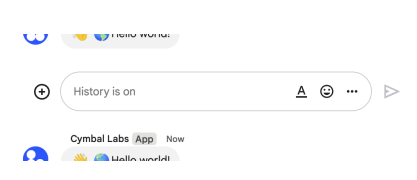 The following image shows how Chat attributes a message when you use user authentication. Chat displays the user as the message sender and attributes the Chat app to the message by displaying its name. The content of message can only contain text (`text`). 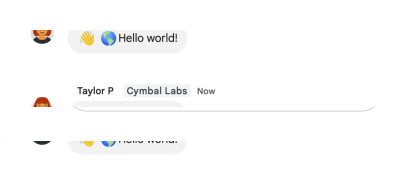 The maximum message size, including the message contents, is 32,000 bytes. For [webhook](https://developers.google.com/workspace/chat/quickstart/webhooks) requests, the response doesn't contain the full message. The response only populates the `name` and `thread.name` fields in addition to the information that was in the request.",
|
|
882
882
|
"flatPath": "v1/spaces/{spacesId}/messages",
|
|
883
883
|
"httpMethod": "POST",
|
|
884
884
|
"id": "chat.spaces.messages.create",
|
|
@@ -940,7 +940,7 @@
|
|
|
940
940
|
]
|
|
941
941
|
},
|
|
942
942
|
"delete": {
|
|
943
|
-
"description": "Deletes a message. For an example, see [Delete a message](https://developers.google.com/workspace/chat/delete-messages). Supports the following types of [authentication](https://developers.google.com/workspace/chat/authenticate-authorize): - [App authentication](https://developers.google.com/workspace/chat/authenticate-authorize-chat-app) - [User authentication](https://developers.google.com/workspace/chat/authenticate-authorize-chat-user) When using app authentication, requests can only delete messages created by the calling Chat app.",
|
|
943
|
+
"description": "Deletes a message. For an example, see [Delete a message](https://developers.google.com/workspace/chat/delete-messages). Supports the following types of [authentication](https://developers.google.com/workspace/chat/authenticate-authorize): - [App authentication](https://developers.google.com/workspace/chat/authenticate-authorize-chat-app) with the authorization scope: - `https://www.googleapis.com/auth/chat.bot` - [User authentication](https://developers.google.com/workspace/chat/authenticate-authorize-chat-user) with one of the following authorization scopes: - `https://www.googleapis.com/auth/chat.messages` - `https://www.googleapis.com/auth/chat.import` (import mode spaces only) When using app authentication, requests can only delete messages created by the calling Chat app.",
|
|
944
944
|
"flatPath": "v1/spaces/{spacesId}/messages/{messagesId}",
|
|
945
945
|
"httpMethod": "DELETE",
|
|
946
946
|
"id": "chat.spaces.messages.delete",
|
|
@@ -972,7 +972,7 @@
|
|
|
972
972
|
]
|
|
973
973
|
},
|
|
974
974
|
"get": {
|
|
975
|
-
"description": "Returns details about a message. For an example, see [Get details about a message](https://developers.google.com/workspace/chat/get-messages). Supports the following types of [authentication](https://developers.google.com/workspace/chat/authenticate-authorize): - [App authentication](https://developers.google.com/workspace/chat/authenticate-authorize-chat-app) - [User authentication](https://developers.google.com/workspace/chat/authenticate-authorize-chat-user) Note: Might return a message from a blocked member or space.",
|
|
975
|
+
"description": "Returns details about a message. For an example, see [Get details about a message](https://developers.google.com/workspace/chat/get-messages). Supports the following types of [authentication](https://developers.google.com/workspace/chat/authenticate-authorize): - [App authentication](https://developers.google.com/workspace/chat/authenticate-authorize-chat-app) with the authorization scope: - `https://www.googleapis.com/auth/chat.bot` - [User authentication](https://developers.google.com/workspace/chat/authenticate-authorize-chat-user) with one of the following authorization scopes: - `https://www.googleapis.com/auth/chat.messages.readonly` - `https://www.googleapis.com/auth/chat.messages` Note: Might return a message from a blocked member or space.",
|
|
976
976
|
"flatPath": "v1/spaces/{spacesId}/messages/{messagesId}",
|
|
977
977
|
"httpMethod": "GET",
|
|
978
978
|
"id": "chat.spaces.messages.get",
|
|
@@ -999,7 +999,7 @@
|
|
|
999
999
|
]
|
|
1000
1000
|
},
|
|
1001
1001
|
"list": {
|
|
1002
|
-
"description": "Lists messages in a space that the caller is a member of, including messages from blocked members and spaces. If you list messages from a space with no messages, the response is an empty object. When using a REST/HTTP interface, the response contains an empty JSON object, `{}`. For an example, see [List messages](https://developers.google.com/workspace/chat/api/guides/v1/messages/list). Requires [user authentication](https://developers.google.com/workspace/chat/authenticate-authorize-chat-user).",
|
|
1002
|
+
"description": "Lists messages in a space that the caller is a member of, including messages from blocked members and spaces. If you list messages from a space with no messages, the response is an empty object. When using a REST/HTTP interface, the response contains an empty JSON object, `{}`. For an example, see [List messages](https://developers.google.com/workspace/chat/api/guides/v1/messages/list). Requires [user authentication](https://developers.google.com/workspace/chat/authenticate-authorize-chat-user) with one of the following [authorization scopes](https://developers.google.com/workspace/chat/authenticate-authorize#chat-api-scopes): - `https://www.googleapis.com/auth/chat.messages.readonly` - `https://www.googleapis.com/auth/chat.messages` - `https://www.googleapis.com/auth/chat.import` (import mode spaces only)",
|
|
1003
1003
|
"flatPath": "v1/spaces/{spacesId}/messages",
|
|
1004
1004
|
"httpMethod": "GET",
|
|
1005
1005
|
"id": "chat.spaces.messages.list",
|
|
@@ -1052,7 +1052,7 @@
|
|
|
1052
1052
|
]
|
|
1053
1053
|
},
|
|
1054
1054
|
"patch": {
|
|
1055
|
-
"description": "Updates a message. There's a difference between the `patch` and `update` methods. The `patch` method uses a `patch` request while the `update` method uses a `put` request. We recommend using the `patch` method. For an example, see [Update a message](https://developers.google.com/workspace/chat/update-messages). Supports the following types of [authentication](https://developers.google.com/workspace/chat/authenticate-authorize): - [App authentication](https://developers.google.com/workspace/chat/authenticate-authorize-chat-app) - [User authentication](https://developers.google.com/workspace/chat/authenticate-authorize-chat-user) When using app authentication, requests can only update messages created by the calling Chat app.",
|
|
1055
|
+
"description": "Updates a message. There's a difference between the `patch` and `update` methods. The `patch` method uses a `patch` request while the `update` method uses a `put` request. We recommend using the `patch` method. For an example, see [Update a message](https://developers.google.com/workspace/chat/update-messages). Supports the following types of [authentication](https://developers.google.com/workspace/chat/authenticate-authorize): - [App authentication](https://developers.google.com/workspace/chat/authenticate-authorize-chat-app) with the authorization scope: - `https://www.googleapis.com/auth/chat.bot` - [User authentication](https://developers.google.com/workspace/chat/authenticate-authorize-chat-user) with one of the following authorization scopes: - `https://www.googleapis.com/auth/chat.messages` - `https://www.googleapis.com/auth/chat.import` (import mode spaces only) When using app authentication, requests can only update messages created by the calling Chat app.",
|
|
1056
1056
|
"flatPath": "v1/spaces/{spacesId}/messages/{messagesId}",
|
|
1057
1057
|
"httpMethod": "PATCH",
|
|
1058
1058
|
"id": "chat.spaces.messages.patch",
|
|
@@ -1093,7 +1093,7 @@
|
|
|
1093
1093
|
]
|
|
1094
1094
|
},
|
|
1095
1095
|
"update": {
|
|
1096
|
-
"description": "Updates a message. There's a difference between the `patch` and `update` methods. The `patch` method uses a `patch` request while the `update` method uses a `put` request. We recommend using the `patch` method. For an example, see [Update a message](https://developers.google.com/workspace/chat/update-messages). Supports the following types of [authentication](https://developers.google.com/workspace/chat/authenticate-authorize): - [App authentication](https://developers.google.com/workspace/chat/authenticate-authorize-chat-app) - [User authentication](https://developers.google.com/workspace/chat/authenticate-authorize-chat-user) When using app authentication, requests can only update messages created by the calling Chat app.",
|
|
1096
|
+
"description": "Updates a message. There's a difference between the `patch` and `update` methods. The `patch` method uses a `patch` request while the `update` method uses a `put` request. We recommend using the `patch` method. For an example, see [Update a message](https://developers.google.com/workspace/chat/update-messages). Supports the following types of [authentication](https://developers.google.com/workspace/chat/authenticate-authorize): - [App authentication](https://developers.google.com/workspace/chat/authenticate-authorize-chat-app) with the authorization scope: - `https://www.googleapis.com/auth/chat.bot` - [User authentication](https://developers.google.com/workspace/chat/authenticate-authorize-chat-user) with one of the following authorization scopes: - `https://www.googleapis.com/auth/chat.messages` - `https://www.googleapis.com/auth/chat.import` (import mode spaces only) When using app authentication, requests can only update messages created by the calling Chat app.",
|
|
1097
1097
|
"flatPath": "v1/spaces/{spacesId}/messages/{messagesId}",
|
|
1098
1098
|
"httpMethod": "PUT",
|
|
1099
1099
|
"id": "chat.spaces.messages.update",
|
|
@@ -1138,7 +1138,7 @@
|
|
|
1138
1138
|
"attachments": {
|
|
1139
1139
|
"methods": {
|
|
1140
1140
|
"get": {
|
|
1141
|
-
"description": "Gets the metadata of a message attachment. The attachment data is fetched using the [media API](https://developers.google.com/workspace/chat/api/reference/rest/v1/media/download). For an example, see [Get metadata about a message attachment](https://developers.google.com/workspace/chat/get-media-attachments). Requires [app authentication](https://developers.google.com/workspace/chat/authenticate-authorize-chat-app).",
|
|
1141
|
+
"description": "Gets the metadata of a message attachment. The attachment data is fetched using the [media API](https://developers.google.com/workspace/chat/api/reference/rest/v1/media/download). For an example, see [Get metadata about a message attachment](https://developers.google.com/workspace/chat/get-media-attachments). Requires [app authentication](https://developers.google.com/workspace/chat/authenticate-authorize-chat-app) with the [authorization scope](https://developers.google.com/workspace/chat/authenticate-authorize#chat-api-scopes): - `https://www.googleapis.com/auth/chat.bot`",
|
|
1142
1142
|
"flatPath": "v1/spaces/{spacesId}/messages/{messagesId}/attachments/{attachmentsId}",
|
|
1143
1143
|
"httpMethod": "GET",
|
|
1144
1144
|
"id": "chat.spaces.messages.attachments.get",
|
|
@@ -1167,7 +1167,7 @@
|
|
|
1167
1167
|
"reactions": {
|
|
1168
1168
|
"methods": {
|
|
1169
1169
|
"create": {
|
|
1170
|
-
"description": "Creates a reaction and adds it to a message. For an example, see [Add a reaction to a message](https://developers.google.com/workspace/chat/create-reactions). Requires [user authentication](https://developers.google.com/workspace/chat/authenticate-authorize-chat-user).",
|
|
1170
|
+
"description": "Creates a reaction and adds it to a message. For an example, see [Add a reaction to a message](https://developers.google.com/workspace/chat/create-reactions). Requires [user authentication](https://developers.google.com/workspace/chat/authenticate-authorize-chat-user) with one of the following [authorization scopes](https://developers.google.com/workspace/chat/authenticate-authorize#chat-api-scopes): - `https://www.googleapis.com/auth/chat.messages.reactions.create` - `https://www.googleapis.com/auth/chat.messages.reactions` - `https://www.googleapis.com/auth/chat.messages` - `https://www.googleapis.com/auth/chat.import` (import mode spaces only)",
|
|
1171
1171
|
"flatPath": "v1/spaces/{spacesId}/messages/{messagesId}/reactions",
|
|
1172
1172
|
"httpMethod": "POST",
|
|
1173
1173
|
"id": "chat.spaces.messages.reactions.create",
|
|
@@ -1198,7 +1198,7 @@
|
|
|
1198
1198
|
]
|
|
1199
1199
|
},
|
|
1200
1200
|
"delete": {
|
|
1201
|
-
"description": "Deletes a reaction to a message. For an example, see [Delete a reaction](https://developers.google.com/workspace/chat/delete-reactions). Requires [user authentication](https://developers.google.com/workspace/chat/authenticate-authorize-chat-user).",
|
|
1201
|
+
"description": "Deletes a reaction to a message. For an example, see [Delete a reaction](https://developers.google.com/workspace/chat/delete-reactions). Requires [user authentication](https://developers.google.com/workspace/chat/authenticate-authorize-chat-user) with one of the following [authorization scopes](https://developers.google.com/workspace/chat/authenticate-authorize#chat-api-scopes): - `https://www.googleapis.com/auth/chat.messages.reactions` - `https://www.googleapis.com/auth/chat.messages` - `https://www.googleapis.com/auth/chat.import` (import mode spaces only)",
|
|
1202
1202
|
"flatPath": "v1/spaces/{spacesId}/messages/{messagesId}/reactions/{reactionsId}",
|
|
1203
1203
|
"httpMethod": "DELETE",
|
|
1204
1204
|
"id": "chat.spaces.messages.reactions.delete",
|
|
@@ -1225,7 +1225,7 @@
|
|
|
1225
1225
|
]
|
|
1226
1226
|
},
|
|
1227
1227
|
"list": {
|
|
1228
|
-
"description": "Lists reactions to a message. For an example, see [List reactions for a message](https://developers.google.com/workspace/chat/list-reactions). Requires [user authentication](https://developers.google.com/workspace/chat/authenticate-authorize-chat-user).",
|
|
1228
|
+
"description": "Lists reactions to a message. For an example, see [List reactions for a message](https://developers.google.com/workspace/chat/list-reactions). Requires [user authentication](https://developers.google.com/workspace/chat/authenticate-authorize-chat-user) with one of the following [authorization scopes](https://developers.google.com/workspace/chat/authenticate-authorize#chat-api-scopes): - `https://www.googleapis.com/auth/chat.messages.reactions.readonly` - `https://www.googleapis.com/auth/chat.messages.reactions` - `https://www.googleapis.com/auth/chat.messages.readonly` - `https://www.googleapis.com/auth/chat.messages`",
|
|
1229
1229
|
"flatPath": "v1/spaces/{spacesId}/messages/{messagesId}/reactions",
|
|
1230
1230
|
"httpMethod": "GET",
|
|
1231
1231
|
"id": "chat.spaces.messages.reactions.list",
|
|
@@ -1275,7 +1275,7 @@
|
|
|
1275
1275
|
"spaceEvents": {
|
|
1276
1276
|
"methods": {
|
|
1277
1277
|
"get": {
|
|
1278
|
-
"description": "Returns an event from a Google Chat space. The [event payload](https://developers.google.com/workspace/chat/api/reference/rest/v1/spaces.spaceEvents#SpaceEvent.FIELDS.oneof_payload) contains the most recent version of the resource that changed. For example, if you request an event about a new message but the message was later updated, the server returns the updated `Message` resource in the event payload. Note: The `permissionSettings` field is not returned in the Space object of the Space event data for this request. Requires [user authentication](https://developers.google.com/workspace/chat/authenticate-authorize-chat-user). To get an event, the authenticated user must be a member of the space. For an example, see [Get details about an event from a Google Chat space](https://developers.google.com/workspace/chat/get-space-event).",
|
|
1278
|
+
"description": "Returns an event from a Google Chat space. The [event payload](https://developers.google.com/workspace/chat/api/reference/rest/v1/spaces.spaceEvents#SpaceEvent.FIELDS.oneof_payload) contains the most recent version of the resource that changed. For example, if you request an event about a new message but the message was later updated, the server returns the updated `Message` resource in the event payload. Note: The `permissionSettings` field is not returned in the Space object of the Space event data for this request. Requires [user authentication](https://developers.google.com/workspace/chat/authenticate-authorize-chat-user) with an [authorization scope](https://developers.google.com/workspace/chat/authenticate-authorize#chat-api-scopes) appropriate for reading the requested data: - `https://www.googleapis.com/auth/chat.spaces.readonly` - `https://www.googleapis.com/auth/chat.spaces` - `https://www.googleapis.com/auth/chat.messages.readonly` - `https://www.googleapis.com/auth/chat.messages` - `https://www.googleapis.com/auth/chat.messages.reactions.readonly` - `https://www.googleapis.com/auth/chat.messages.reactions` - `https://www.googleapis.com/auth/chat.memberships.readonly` - `https://www.googleapis.com/auth/chat.memberships` To get an event, the authenticated user must be a member of the space. For an example, see [Get details about an event from a Google Chat space](https://developers.google.com/workspace/chat/get-space-event).",
|
|
1279
1279
|
"flatPath": "v1/spaces/{spacesId}/spaceEvents/{spaceEventsId}",
|
|
1280
1280
|
"httpMethod": "GET",
|
|
1281
1281
|
"id": "chat.spaces.spaceEvents.get",
|
|
@@ -1309,7 +1309,7 @@
|
|
|
1309
1309
|
]
|
|
1310
1310
|
},
|
|
1311
1311
|
"list": {
|
|
1312
|
-
"description": "Lists events from a Google Chat space. For each event, the [payload](https://developers.google.com/workspace/chat/api/reference/rest/v1/spaces.spaceEvents#SpaceEvent.FIELDS.oneof_payload) contains the most recent version of the Chat resource. For example, if you list events about new space members, the server returns `Membership` resources that contain the latest membership details. If new members were removed during the requested period, the event payload contains an empty `Membership` resource. Requires [user authentication](https://developers.google.com/workspace/chat/authenticate-authorize-chat-user). To list events, the authenticated user must be a member of the space. For an example, see [List events from a Google Chat space](https://developers.google.com/workspace/chat/list-space-events).",
|
|
1312
|
+
"description": "Lists events from a Google Chat space. For each event, the [payload](https://developers.google.com/workspace/chat/api/reference/rest/v1/spaces.spaceEvents#SpaceEvent.FIELDS.oneof_payload) contains the most recent version of the Chat resource. For example, if you list events about new space members, the server returns `Membership` resources that contain the latest membership details. If new members were removed during the requested period, the event payload contains an empty `Membership` resource. Requires [user authentication](https://developers.google.com/workspace/chat/authenticate-authorize-chat-user) with an [authorization scope](https://developers.google.com/workspace/chat/authenticate-authorize#chat-api-scopes) appropriate for reading the requested data: - `https://www.googleapis.com/auth/chat.spaces.readonly` - `https://www.googleapis.com/auth/chat.spaces` - `https://www.googleapis.com/auth/chat.messages.readonly` - `https://www.googleapis.com/auth/chat.messages` - `https://www.googleapis.com/auth/chat.messages.reactions.readonly` - `https://www.googleapis.com/auth/chat.messages.reactions` - `https://www.googleapis.com/auth/chat.memberships.readonly` - `https://www.googleapis.com/auth/chat.memberships` To list events, the authenticated user must be a member of the space. For an example, see [List events from a Google Chat space](https://developers.google.com/workspace/chat/list-space-events).",
|
|
1313
1313
|
"flatPath": "v1/spaces/{spacesId}/spaceEvents",
|
|
1314
1314
|
"httpMethod": "GET",
|
|
1315
1315
|
"id": "chat.spaces.spaceEvents.list",
|
|
@@ -1367,7 +1367,7 @@
|
|
|
1367
1367
|
"spaces": {
|
|
1368
1368
|
"methods": {
|
|
1369
1369
|
"getSpaceReadState": {
|
|
1370
|
-
"description": "Returns details about a user's read state within a space, used to identify read and unread messages. For an example, see [Get details about a user's space read state](https://developers.google.com/workspace/chat/get-space-read-state). Requires [user authentication](https://developers.google.com/workspace/chat/authenticate-authorize-chat-user).",
|
|
1370
|
+
"description": "Returns details about a user's read state within a space, used to identify read and unread messages. For an example, see [Get details about a user's space read state](https://developers.google.com/workspace/chat/get-space-read-state). Requires [user authentication](https://developers.google.com/workspace/chat/authenticate-authorize-chat-user) with one of the following [authorization scopes](https://developers.google.com/workspace/chat/authenticate-authorize#chat-api-scopes): - `https://www.googleapis.com/auth/chat.users.readstate.readonly` - `https://www.googleapis.com/auth/chat.users.readstate`",
|
|
1371
1371
|
"flatPath": "v1/users/{usersId}/spaces/{spacesId}/spaceReadState",
|
|
1372
1372
|
"httpMethod": "GET",
|
|
1373
1373
|
"id": "chat.users.spaces.getSpaceReadState",
|
|
@@ -1393,7 +1393,7 @@
|
|
|
1393
1393
|
]
|
|
1394
1394
|
},
|
|
1395
1395
|
"updateSpaceReadState": {
|
|
1396
|
-
"description": "Updates a user's read state within a space, used to identify read and unread messages. For an example, see [Update a user's space read state](https://developers.google.com/workspace/chat/update-space-read-state). Requires [user authentication](https://developers.google.com/workspace/chat/authenticate-authorize-chat-user).",
|
|
1396
|
+
"description": "Updates a user's read state within a space, used to identify read and unread messages. For an example, see [Update a user's space read state](https://developers.google.com/workspace/chat/update-space-read-state). Requires [user authentication](https://developers.google.com/workspace/chat/authenticate-authorize-chat-user) with the [authorization scope](https://developers.google.com/workspace/chat/authenticate-authorize#chat-api-scopes): - `https://www.googleapis.com/auth/chat.users.readstate`",
|
|
1397
1397
|
"flatPath": "v1/users/{usersId}/spaces/{spacesId}/spaceReadState",
|
|
1398
1398
|
"httpMethod": "PATCH",
|
|
1399
1399
|
"id": "chat.users.spaces.updateSpaceReadState",
|
|
@@ -1431,7 +1431,7 @@
|
|
|
1431
1431
|
"spaceNotificationSetting": {
|
|
1432
1432
|
"methods": {
|
|
1433
1433
|
"get": {
|
|
1434
|
-
"description": "Gets the space notification setting. For an example, see [Get the caller's space notification setting](https://developers.google.com/workspace/chat/get-space-notification-setting). Requires [user authentication](https://developers.google.com/workspace/chat/authenticate-authorize-chat-user).",
|
|
1434
|
+
"description": "Gets the space notification setting. For an example, see [Get the caller's space notification setting](https://developers.google.com/workspace/chat/get-space-notification-setting). Requires [user authentication](https://developers.google.com/workspace/chat/authenticate-authorize-chat-user) with the [authorization scope](https://developers.google.com/workspace/chat/authenticate-authorize#chat-api-scopes): - `https://www.googleapis.com/auth/chat.users.spacesettings`",
|
|
1435
1435
|
"flatPath": "v1/users/{usersId}/spaces/{spacesId}/spaceNotificationSetting",
|
|
1436
1436
|
"httpMethod": "GET",
|
|
1437
1437
|
"id": "chat.users.spaces.spaceNotificationSetting.get",
|
|
@@ -1456,7 +1456,7 @@
|
|
|
1456
1456
|
]
|
|
1457
1457
|
},
|
|
1458
1458
|
"patch": {
|
|
1459
|
-
"description": "Updates the space notification setting. For an example, see [Update the caller's space notification setting](https://developers.google.com/workspace/chat/update-space-notification-setting). Requires [user authentication](https://developers.google.com/workspace/chat/authenticate-authorize-chat-user).",
|
|
1459
|
+
"description": "Updates the space notification setting. For an example, see [Update the caller's space notification setting](https://developers.google.com/workspace/chat/update-space-notification-setting). Requires [user authentication](https://developers.google.com/workspace/chat/authenticate-authorize-chat-user) with the [authorization scope](https://developers.google.com/workspace/chat/authenticate-authorize#chat-api-scopes): - `https://www.googleapis.com/auth/chat.users.spacesettings`",
|
|
1460
1460
|
"flatPath": "v1/users/{usersId}/spaces/{spacesId}/spaceNotificationSetting",
|
|
1461
1461
|
"httpMethod": "PATCH",
|
|
1462
1462
|
"id": "chat.users.spaces.spaceNotificationSetting.patch",
|
|
@@ -1494,7 +1494,7 @@
|
|
|
1494
1494
|
"threads": {
|
|
1495
1495
|
"methods": {
|
|
1496
1496
|
"getThreadReadState": {
|
|
1497
|
-
"description": "Returns details about a user's read state within a thread, used to identify read and unread messages. For an example, see [Get details about a user's thread read state](https://developers.google.com/workspace/chat/get-thread-read-state). Requires [user authentication](https://developers.google.com/workspace/chat/authenticate-authorize-chat-user).",
|
|
1497
|
+
"description": "Returns details about a user's read state within a thread, used to identify read and unread messages. For an example, see [Get details about a user's thread read state](https://developers.google.com/workspace/chat/get-thread-read-state). Requires [user authentication](https://developers.google.com/workspace/chat/authenticate-authorize-chat-user) with one of the following [authorization scopes](https://developers.google.com/workspace/chat/authenticate-authorize#chat-api-scopes): - `https://www.googleapis.com/auth/chat.users.readstate.readonly` - `https://www.googleapis.com/auth/chat.users.readstate`",
|
|
1498
1498
|
"flatPath": "v1/users/{usersId}/spaces/{spacesId}/threads/{threadsId}/threadReadState",
|
|
1499
1499
|
"httpMethod": "GET",
|
|
1500
1500
|
"id": "chat.users.spaces.threads.getThreadReadState",
|
|
@@ -1526,7 +1526,7 @@
|
|
|
1526
1526
|
}
|
|
1527
1527
|
}
|
|
1528
1528
|
},
|
|
1529
|
-
"revision": "
|
|
1529
|
+
"revision": "20250508",
|
|
1530
1530
|
"rootUrl": "https://chat.googleapis.com/",
|
|
1531
1531
|
"schemas": {
|
|
1532
1532
|
"AccessSettings": {
|
|
@@ -2263,7 +2263,7 @@
|
|
|
2263
2263
|
"Default value. Unspecified.",
|
|
2264
2264
|
"A user opens a dialog.",
|
|
2265
2265
|
"A user clicks an interactive element of a dialog. For example, a user fills out information in a dialog and clicks a button to submit the information.",
|
|
2266
|
-
"
|
|
2266
|
+
""
|
|
2267
2267
|
],
|
|
2268
2268
|
"type": "string"
|
|
2269
2269
|
},
|
|
@@ -3468,12 +3468,14 @@
|
|
|
3468
3468
|
"description": "For multiselect menus, a text description or label that's displayed below the item's `text` field.",
|
|
3469
3469
|
"type": "string"
|
|
3470
3470
|
},
|
|
3471
|
+
"materialIcon": {
|
|
3472
|
+
"$ref": "GoogleAppsCardV1MaterialIcon"
|
|
3473
|
+
},
|
|
3471
3474
|
"selected": {
|
|
3472
3475
|
"description": "Whether the item is selected by default. If the selection input only accepts one value (such as for radio buttons or a dropdown menu), only set this field for one item.",
|
|
3473
3476
|
"type": "boolean"
|
|
3474
3477
|
},
|
|
3475
3478
|
"startIconUri": {
|
|
3476
|
-
"description": "For multiselect menus, the URL for the icon displayed next to the item's `text` field. Supports PNG and JPEG files. Must be an `HTTPS` URL. For example, `https://developers.google.com/workspace/chat/images/quickstart-app-avatar.png`.",
|
|
3477
3479
|
"type": "string"
|
|
3478
3480
|
},
|
|
3479
3481
|
"text": {
|
|
@@ -557,7 +557,7 @@
|
|
|
557
557
|
}
|
|
558
558
|
}
|
|
559
559
|
},
|
|
560
|
-
"revision": "
|
|
560
|
+
"revision": "20250504",
|
|
561
561
|
"rootUrl": "https://chromepolicy.googleapis.com/",
|
|
562
562
|
"schemas": {
|
|
563
563
|
"GoogleChromePolicyVersionsV1AdditionalTargetKeyName": {
|
|
@@ -1789,7 +1789,7 @@
|
|
|
1789
1789
|
"properties": {
|
|
1790
1790
|
"editionDeprecated": {
|
|
1791
1791
|
"deprecated": true,
|
|
1792
|
-
"description": "
|
|
1792
|
+
"description": "copybara:strip_begin TODO(b/297898292) Deprecate and remove this field in favor of enums. copybara:strip_end",
|
|
1793
1793
|
"type": "string"
|
|
1794
1794
|
},
|
|
1795
1795
|
"enumType": {
|